Tag Your Routes Before Redistribution
Presented by
Md. Abdullah Al Naser
Sr. Systems Specialist
MetroNet Bangladesh Limited
Founder, mn-LAB
Presented by – Md. Abdullah Al Naser Page # 2
Before Starting…..
● Experts say that, don’t REDISTRIBUTE IGP routes to the
upstreams while you configure BGP – That’s True.
● But many engineers still prefer this REDISTRIBUTION for their
internal networks and also for their clients’ internal networks in
complex routing scenario – Design Requirements.
Presented by – Md. Abdullah Al Naser Page # 3
What is Redistribution?
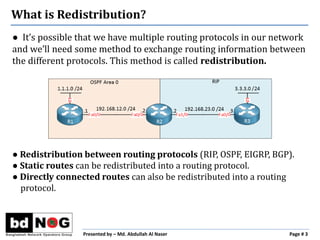
● It’s possible that we have multiple routing protocols in our network
and we’ll need some method to exchange routing information between
the different protocols. This method is called redistribution.
● Redistribution between routing protocols (RIP, OSPF, EIGRP, BGP).
● Static routes can be redistributed into a routing protocol.
● Directly connected routes can also be redistributed into a routing
protocol.
Presented by – Md. Abdullah Al Naser Page # 4
What is Redistribution?
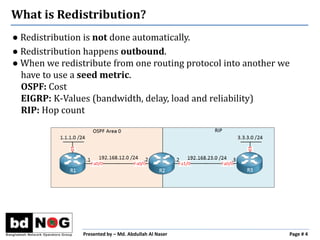
● Redistribution is not done automatically.
● Redistribution happens outbound.
● When we redistribute from one routing protocol into another we
have to use a seed metric.
OSPF: Cost
EIGRP: K-Values (bandwidth, delay, load and reliability)
RIP: Hop count
Presented by – Md. Abdullah Al Naser Page # 5
Configuring Redistribution – Just an example
R1(config)#router ospf 1
R1(config-router)#network 1.1.1.0 0.0.0.255 area 0
R1(config-router)#network 192.168.12.0 0.0.0.255 area 0
R2(config)#router ospf 1
R2(config-router)#network 192.168.12.0 0.0.0.255 area 0
R2(config)#router rip
R2(config-router)#version 2
R2(config-router)#no auto-summary
R2(config-router)#network 192.168.23.0
R3(config)#router rip
R3(config-router)#version 2
R3(config-router)#network 3.3.3.0
R3(config-router)#network 192.168.23.0
Presented by – Md. Abdullah Al Naser Page # 6
Configuring Redistribution – Just an example
R2(config)#router rip
R2(config-router)#redistribute ospf 1 metric 5
R2(config)#router ospf 1
R2(config-router)#redistribute rip subnets
R3#show ip route rip
R 192.168.12.0/24 [120/5] via 192.168.23.2, 00:00:00, FastEthernet0/0
R 1.1.1.1 [120/5] via 192.168.23.2, 00:00:00, FastEthernet0/0
R1#show ip route ospf
O E2 3.3.3.0 [110/20] via 192.168.12.2, 00:00:21, FastEthernet0/0
O E2 192.168.23.0/24 [110/20] via 192.168.12.2, 00:00:21, FastEthernet0/0
Presented by – Md. Abdullah Al Naser Page # 7
Multipoint Redistribution
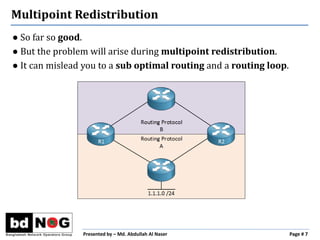
● So far so good.
● But the problem will arise during multipoint redistribution.
● It can mislead you to a sub optimal routing and a routing loop.
Presented by – Md. Abdullah Al Naser Page # 8
Multipoint Redistribution
Let’s go into
the deep
R2#show ip route rip
R 1.1.1.0 [120/6] via 192.168.12.1, 00:00:09, FastEthernet1/0
Presented by – Md. Abdullah Al Naser Page # 9
Multipoint Redistribution
Let’s redistribute RIP routes into OSPF
R3 & R4#
(config)#router ospf 1
(config-router)#redistribute rip subnets
Presented by – Md. Abdullah Al Naser Page # 10
Multipoint Redistribution
Let’s check R4’s routing table
R4#show ip route ospf
O E2 1.1.1.0 [110/20] via 192.168.34.3, 00:01:14, FastEthernet0/1
Presented by – Md. Abdullah Al Naser Page # 11
Sub Optimal Routing
Sub optimal routing refers to inefficient routing – not good
Presented by – Md. Abdullah Al Naser Page # 12
Multipoint Redistribution (cont..)
Let’s redistribute OSPF routes into RIP
R3 & R4#
(config)#router rip
(config-router)#redistribute ospf 1 metric 1
Let’s check R2’s routing table again
R2#show ip route rip
R 1.1.1.0 [120/1] via 192.168.24.4, 00:00:05, FastEthernet0/1
R2#traceroute 1.1.1.1
1 192.168.24.4 1388 msec 620 msec 744 msec
2 192.168.34.3 2552 msec 2308 msec 1904 msec
3 192.168.23.2 56 msec 48 msec 48 msec
4 192.168.24.4 76 msec 76 msec 72 msec
5 192.168.34.3 112 msec 124 msec 100 msec
6 192.168.23.2 96 msec 100 msec 92 msec
7 192.168.24.4 124 msec 140 msec 124 msec
8 192.168.34.3 156 msec 168 msec 176 msec
9 192.168.23.2 152 msec 136 msec 156 msec
10 192.168.24.4 176 msec 184 msec 172 msec
Presented by – Md. Abdullah Al Naser Page # 13
Routing Loop
Let’s check R2’s routing table again
R2#show ip route rip
R 1.1.1.0 [120/1] via 192.168.24.4, 00:00:05, FastEthernet0/1
Presented by – Md. Abdullah Al Naser Page # 14
Routing Loop
Be careful
You should never redistribute routes like this:
Routing Protocol X ----> Y ----> X
Presented by – Md. Abdullah Al Naser Page # 15
Important Redistribution Rules
● Redistribution Filtering – not scalable
● Route Filtering – not scalable at all
● Route Tagging – the best solution
Presented by – Md. Abdullah Al Naser Page # 16
Looking for Solution
R3 & R4#
(config)#route-map TAGGING deny 10
(config-route-map)#match tag 1234
(config-route-map)#exit
(config)#route-map TAGGING permit 20
(config-route-map)#set tag 1234
(config)#router rip
(config-router)#redistribute ospf 1 metric 1 route-map TAGGING
(config-router)#exit
(config)#router ospf 1
(config-router)#redistribute rip subnets route-map TAGGING
Presented by – Md. Abdullah Al Naser Page # 17
Configuring Route Tagging
Let’s check R2’s routing table again
R2#show ip route rip
R 1.1.1.0 [120/6] via 192.168.12.1, 00:00:01, FastEthernet1/0
It looks good now…..
But sub optimal routing is still there….
Presented by – Md. Abdullah Al Naser Page # 18
Routing Loop is now Removed
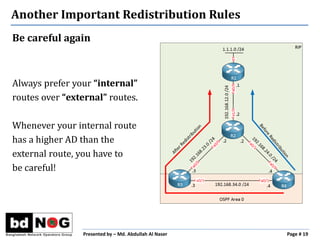
Be careful again
Always prefer your “internal”
routes over “external” routes.
Whenever your internal route
has a higher AD than the
external route, you have to
be careful!
Presented by – Md. Abdullah Al Naser Page # 19
Another Important Redistribution Rules
● Decrease the AD
of the internal route(s)
or
● Increase the AD
of the external route(s)
Presented by – Md. Abdullah Al Naser Page # 20
Possible Solution
Thank you very much

Tag your Routes Before Redistribution

  • 1.
    Tag Your RoutesBefore Redistribution Presented by Md. Abdullah Al Naser Sr. Systems Specialist MetroNet Bangladesh Limited Founder, mn-LAB
  • 2.
    Presented by –Md. Abdullah Al Naser Page # 2 Before Starting….. ● Experts say that, don’t REDISTRIBUTE IGP routes to the upstreams while you configure BGP – That’s True. ● But many engineers still prefer this REDISTRIBUTION for their internal networks and also for their clients’ internal networks in complex routing scenario – Design Requirements.
  • 3.
    Presented by –Md. Abdullah Al Naser Page # 3 What is Redistribution? ● It’s possible that we have multiple routing protocols in our network and we’ll need some method to exchange routing information between the different protocols. This method is called redistribution. ● Redistribution between routing protocols (RIP, OSPF, EIGRP, BGP). ● Static routes can be redistributed into a routing protocol. ● Directly connected routes can also be redistributed into a routing protocol.
  • 4.
    Presented by –Md. Abdullah Al Naser Page # 4 What is Redistribution? ● Redistribution is not done automatically. ● Redistribution happens outbound. ● When we redistribute from one routing protocol into another we have to use a seed metric. OSPF: Cost EIGRP: K-Values (bandwidth, delay, load and reliability) RIP: Hop count
  • 5.
    Presented by –Md. Abdullah Al Naser Page # 5 Configuring Redistribution – Just an example R1(config)#router ospf 1 R1(config-router)#network 1.1.1.0 0.0.0.255 area 0 R1(config-router)#network 192.168.12.0 0.0.0.255 area 0 R2(config)#router ospf 1 R2(config-router)#network 192.168.12.0 0.0.0.255 area 0 R2(config)#router rip R2(config-router)#version 2 R2(config-router)#no auto-summary R2(config-router)#network 192.168.23.0 R3(config)#router rip R3(config-router)#version 2 R3(config-router)#network 3.3.3.0 R3(config-router)#network 192.168.23.0
  • 6.
    Presented by –Md. Abdullah Al Naser Page # 6 Configuring Redistribution – Just an example R2(config)#router rip R2(config-router)#redistribute ospf 1 metric 5 R2(config)#router ospf 1 R2(config-router)#redistribute rip subnets R3#show ip route rip R 192.168.12.0/24 [120/5] via 192.168.23.2, 00:00:00, FastEthernet0/0 R 1.1.1.1 [120/5] via 192.168.23.2, 00:00:00, FastEthernet0/0 R1#show ip route ospf O E2 3.3.3.0 [110/20] via 192.168.12.2, 00:00:21, FastEthernet0/0 O E2 192.168.23.0/24 [110/20] via 192.168.12.2, 00:00:21, FastEthernet0/0
  • 7.
    Presented by –Md. Abdullah Al Naser Page # 7 Multipoint Redistribution ● So far so good. ● But the problem will arise during multipoint redistribution. ● It can mislead you to a sub optimal routing and a routing loop.
  • 8.
    Presented by –Md. Abdullah Al Naser Page # 8 Multipoint Redistribution Let’s go into the deep R2#show ip route rip R 1.1.1.0 [120/6] via 192.168.12.1, 00:00:09, FastEthernet1/0
  • 9.
    Presented by –Md. Abdullah Al Naser Page # 9 Multipoint Redistribution Let’s redistribute RIP routes into OSPF R3 & R4# (config)#router ospf 1 (config-router)#redistribute rip subnets
  • 10.
    Presented by –Md. Abdullah Al Naser Page # 10 Multipoint Redistribution Let’s check R4’s routing table R4#show ip route ospf O E2 1.1.1.0 [110/20] via 192.168.34.3, 00:01:14, FastEthernet0/1
  • 11.
    Presented by –Md. Abdullah Al Naser Page # 11 Sub Optimal Routing Sub optimal routing refers to inefficient routing – not good
  • 12.
    Presented by –Md. Abdullah Al Naser Page # 12 Multipoint Redistribution (cont..) Let’s redistribute OSPF routes into RIP R3 & R4# (config)#router rip (config-router)#redistribute ospf 1 metric 1
  • 13.
    Let’s check R2’srouting table again R2#show ip route rip R 1.1.1.0 [120/1] via 192.168.24.4, 00:00:05, FastEthernet0/1 R2#traceroute 1.1.1.1 1 192.168.24.4 1388 msec 620 msec 744 msec 2 192.168.34.3 2552 msec 2308 msec 1904 msec 3 192.168.23.2 56 msec 48 msec 48 msec 4 192.168.24.4 76 msec 76 msec 72 msec 5 192.168.34.3 112 msec 124 msec 100 msec 6 192.168.23.2 96 msec 100 msec 92 msec 7 192.168.24.4 124 msec 140 msec 124 msec 8 192.168.34.3 156 msec 168 msec 176 msec 9 192.168.23.2 152 msec 136 msec 156 msec 10 192.168.24.4 176 msec 184 msec 172 msec Presented by – Md. Abdullah Al Naser Page # 13 Routing Loop
  • 14.
    Let’s check R2’srouting table again R2#show ip route rip R 1.1.1.0 [120/1] via 192.168.24.4, 00:00:05, FastEthernet0/1 Presented by – Md. Abdullah Al Naser Page # 14 Routing Loop
  • 15.
    Be careful You shouldnever redistribute routes like this: Routing Protocol X ----> Y ----> X Presented by – Md. Abdullah Al Naser Page # 15 Important Redistribution Rules
  • 16.
    ● Redistribution Filtering– not scalable ● Route Filtering – not scalable at all ● Route Tagging – the best solution Presented by – Md. Abdullah Al Naser Page # 16 Looking for Solution
  • 17.
    R3 & R4# (config)#route-mapTAGGING deny 10 (config-route-map)#match tag 1234 (config-route-map)#exit (config)#route-map TAGGING permit 20 (config-route-map)#set tag 1234 (config)#router rip (config-router)#redistribute ospf 1 metric 1 route-map TAGGING (config-router)#exit (config)#router ospf 1 (config-router)#redistribute rip subnets route-map TAGGING Presented by – Md. Abdullah Al Naser Page # 17 Configuring Route Tagging
  • 18.
    Let’s check R2’srouting table again R2#show ip route rip R 1.1.1.0 [120/6] via 192.168.12.1, 00:00:01, FastEthernet1/0 It looks good now….. But sub optimal routing is still there…. Presented by – Md. Abdullah Al Naser Page # 18 Routing Loop is now Removed
  • 19.
    Be careful again Alwaysprefer your “internal” routes over “external” routes. Whenever your internal route has a higher AD than the external route, you have to be careful! Presented by – Md. Abdullah Al Naser Page # 19 Another Important Redistribution Rules
  • 20.
    ● Decrease theAD of the internal route(s) or ● Increase the AD of the external route(s) Presented by – Md. Abdullah Al Naser Page # 20 Possible Solution
  • 21.