Introducing (B)ELK stackIntroducing (B)ELK stack
BBeatseats
EElasticSearchlasticSearch
LLogStashogStash
KKibanaibana
Bart Van Bos - 11/07/2016
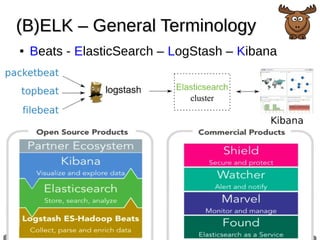
(B)ELK – General Terminology(B)ELK – General Terminology
● Beats - ElasticSearch – LogStash – Kibana
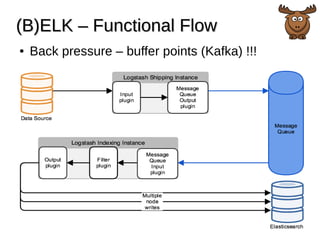
(B)ELK – Functional Flow(B)ELK – Functional Flow
● Back pressure – buffer points (Kafka) !!!
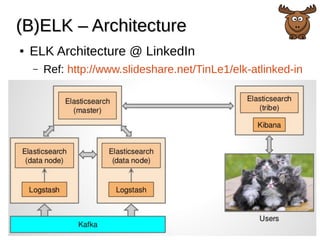
(B)ELK – Architecture(B)ELK – Architecture
● ELK Architecture @ LinkedIn
– Ref: http://www.slideshare.net/TinLe1/elk-atlinked-in
Step 1 – BeatsStep 1 – Beats
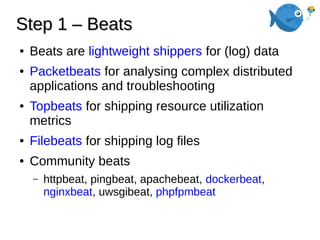
● Beats are lightweight shippers for (log) data
● Packetbeats for analysing complex distributed
applications and troubleshooting
● Topbeats for shipping resource utilization
metrics
● Filebeats for shipping log files
● Community beats
– httpbeat, pingbeat, apachebeat, dockerbeat,
nginxbeat, uwsgibeat, phpfpmbeat
Step 1 – Beats – PacketbeatsStep 1 – Beats – Packetbeats
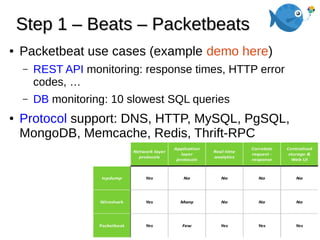
● Packetbeat use cases (example demo here)
– REST API monitoring: response times, HTTP error
codes, …
– DB monitoring: 10 slowest SQL queries
● Protocol support: DNS, HTTP, MySQL, PgSQL,
MongoDB, Memcache, Redis, Thrift-RPC
Step 1 – Beats – PacketbeatsStep 1 – Beats – Packetbeats
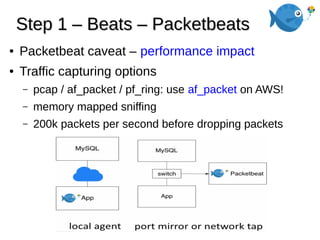
● Packetbeat caveat – performance impact
● Traffic capturing options
– pcap / af_packet / pf_ring: use af_packet on AWS!
– memory mapped sniffing
– 200k packets per second before dropping packets
Step 1 – Beats – TopbeatsStep 1 – Beats – Topbeats
● Topbeat use cases
– System wide stats: hooked onto the Linux top
command for system load, used/idle times,
free/used memory
– Per process stats: Process name, PID, CPU time,
memory size
– File system stats: Device name, mount point,
available disk space, used disk space
Step 1 – Beats – FilebeatsStep 1 – Beats – Filebeats
● Filebeat components
Step 1 – Beats – FilebeatsStep 1 – Beats – Filebeats
● Filebeat properties
● Send at least once by confirmation
● Handles log rotation
● Last reading state in case you restart your
system of LogStash is not reachable => upon
revive it will send all missing logs
● By default send new log lines every 10
seconds
Step 2 – LogStash – IntroductionStep 2 – LogStash – Introduction
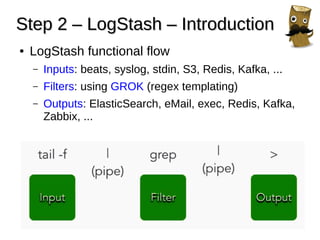
● LogStash functional flow
– Inputs: beats, syslog, stdin, S3, Redis, Kafka, ...
– Filters: using GROK (regex templating)
– Outputs: ElasticSearch, eMail, exec, Redis, Kafka,
Zabbix, ...
Step 2 – LogStash – TipsStep 2 – LogStash – Tips
● LogStash Tips
– Check predefined GROK patterns (don’t re-invent
the wheel)
● http://grokconstructor.appspot.com/groklib/grok-patterns
– Use online tool to test your GROK filters!
● http://grokconstructor.appspot.com/do/match
– Don’t forget the Kibana re-indexing feature before
making new visualizations!
● https://rafaelmt.net/en/2015/09/01/kibana-tutorial/#refresh-
fields
– Keep logstash configuration files (c)lean
Step 2 – LogStash – ConfigurationStep 2 – LogStash – Configuration
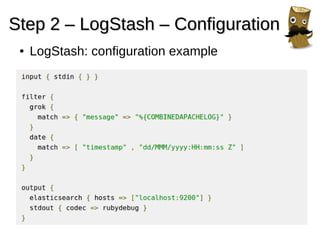
● LogStash: configuration example
Step 3 – ElasticSearchStep 3 – ElasticSearch
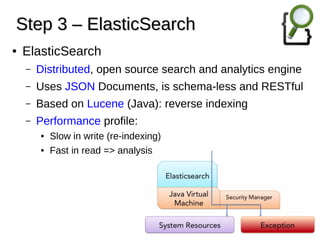
● ElasticSearch
– Distributed, open source search and analytics engine
– Uses JSON Documents, is schema-less and RESTful
– Based on Lucene (Java): reverse indexing
– Performance profile:
● Slow in write (re-indexing)
● Fast in read => analysis
Step 4 – KibanaStep 4 – Kibana
● Kibana
– Open source data visualization platform
– Interact with your data through powerful graphics
– Ongoing battle against Apache Solr
● Kibana dashboards per client => a 4x win
– DevOps (ssh/grep/alerting)
– Developers (performance analysis, API optimization)
– PM (pro-active vs. fire extinguishing)
– Customers => new revenue streams!
● Technical SEO
● Business Intelligence
DEMO TIMEDEMO TIME
Bart Van Bos - 11/07/2016

Introducing ELK

  • 1.
    Introducing (B)ELK stackIntroducing(B)ELK stack BBeatseats EElasticSearchlasticSearch LLogStashogStash KKibanaibana Bart Van Bos - 11/07/2016
  • 2.
    (B)ELK – GeneralTerminology(B)ELK – General Terminology ● Beats - ElasticSearch – LogStash – Kibana
  • 3.
    (B)ELK – FunctionalFlow(B)ELK – Functional Flow ● Back pressure – buffer points (Kafka) !!!
  • 4.
    (B)ELK – Architecture(B)ELK– Architecture ● ELK Architecture @ LinkedIn – Ref: http://www.slideshare.net/TinLe1/elk-atlinked-in
  • 5.
    Step 1 –BeatsStep 1 – Beats ● Beats are lightweight shippers for (log) data ● Packetbeats for analysing complex distributed applications and troubleshooting ● Topbeats for shipping resource utilization metrics ● Filebeats for shipping log files ● Community beats – httpbeat, pingbeat, apachebeat, dockerbeat, nginxbeat, uwsgibeat, phpfpmbeat
  • 6.
    Step 1 –Beats – PacketbeatsStep 1 – Beats – Packetbeats ● Packetbeat use cases (example demo here) – REST API monitoring: response times, HTTP error codes, … – DB monitoring: 10 slowest SQL queries ● Protocol support: DNS, HTTP, MySQL, PgSQL, MongoDB, Memcache, Redis, Thrift-RPC
  • 7.
    Step 1 –Beats – PacketbeatsStep 1 – Beats – Packetbeats ● Packetbeat caveat – performance impact ● Traffic capturing options – pcap / af_packet / pf_ring: use af_packet on AWS! – memory mapped sniffing – 200k packets per second before dropping packets
  • 8.
    Step 1 –Beats – TopbeatsStep 1 – Beats – Topbeats ● Topbeat use cases – System wide stats: hooked onto the Linux top command for system load, used/idle times, free/used memory – Per process stats: Process name, PID, CPU time, memory size – File system stats: Device name, mount point, available disk space, used disk space
  • 9.
    Step 1 –Beats – FilebeatsStep 1 – Beats – Filebeats ● Filebeat components
  • 10.
    Step 1 –Beats – FilebeatsStep 1 – Beats – Filebeats ● Filebeat properties ● Send at least once by confirmation ● Handles log rotation ● Last reading state in case you restart your system of LogStash is not reachable => upon revive it will send all missing logs ● By default send new log lines every 10 seconds
  • 11.
    Step 2 –LogStash – IntroductionStep 2 – LogStash – Introduction ● LogStash functional flow – Inputs: beats, syslog, stdin, S3, Redis, Kafka, ... – Filters: using GROK (regex templating) – Outputs: ElasticSearch, eMail, exec, Redis, Kafka, Zabbix, ...
  • 12.
    Step 2 –LogStash – TipsStep 2 – LogStash – Tips ● LogStash Tips – Check predefined GROK patterns (don’t re-invent the wheel) ● http://grokconstructor.appspot.com/groklib/grok-patterns – Use online tool to test your GROK filters! ● http://grokconstructor.appspot.com/do/match – Don’t forget the Kibana re-indexing feature before making new visualizations! ● https://rafaelmt.net/en/2015/09/01/kibana-tutorial/#refresh- fields – Keep logstash configuration files (c)lean
  • 13.
    Step 2 –LogStash – ConfigurationStep 2 – LogStash – Configuration ● LogStash: configuration example
  • 14.
    Step 3 –ElasticSearchStep 3 – ElasticSearch ● ElasticSearch – Distributed, open source search and analytics engine – Uses JSON Documents, is schema-less and RESTful – Based on Lucene (Java): reverse indexing – Performance profile: ● Slow in write (re-indexing) ● Fast in read => analysis
  • 15.
    Step 4 –KibanaStep 4 – Kibana ● Kibana – Open source data visualization platform – Interact with your data through powerful graphics – Ongoing battle against Apache Solr ● Kibana dashboards per client => a 4x win – DevOps (ssh/grep/alerting) – Developers (performance analysis, API optimization) – PM (pro-active vs. fire extinguishing) – Customers => new revenue streams! ● Technical SEO ● Business Intelligence
  • 16.
    DEMO TIMEDEMO TIME BartVan Bos - 11/07/2016