iOS Forensics:
Overcoming iPhone Data
      Protection
         Andrey Belenko
      Chief Security Researcher
         Elcomsoft Co. Ltd.


                                  1
Agenda

•   iOS Forensics 101

•   iOS 4 Data Protection

•   iOS Forensics

    •   Passcode

    •   Keychain

    •   Storage


                                     2
Forensics 101


Acquisition ➜ Analysis ➜ Reporting

GOALS:
1. Assuming physical access to the device extract as much
information as practical
2. Leave as little traces/artifacts as practical
                                                            3
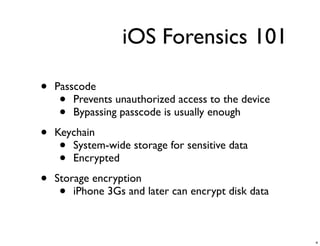
iOS Forensics 101

•   Passcode
     •  Prevents unauthorized access to the device
     •  Bypassing passcode is usually enough

•   Keychain
     • System-wide storage for sensitive data
     • Encrypted

•   Storage encryption
     •  iPhone 3Gs and later can encrypt disk data


                                                     4
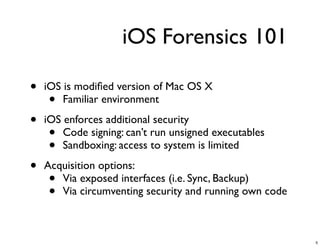
iOS Forensics 101

•   iOS is modified version of Mac OS X
     •  Familiar environment

•   iOS enforces additional security
     •  Code signing: can’t run unsigned executables
     •  Sandboxing: access to system is limited

•   Acquisition options:
     • Via exposed interfaces (i.e. Sync, Backup)
     • Via circumventing security and running own code


                                                         5
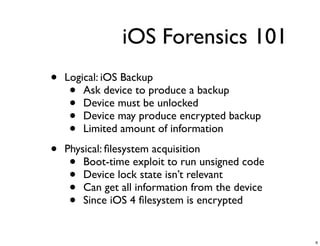
iOS Forensics 101
•   Logical: iOS Backup
     •  Ask device to produce a backup
     •  Device must be unlocked
     •  Device may produce encrypted backup
     •  Limited amount of information

•   Physical: filesystem acquisition
     •  Boot-time exploit to run unsigned code
     •  Device lock state isn’t relevant
     •  Can get all information from the device
     •  Since iOS 4 filesystem is encrypted


                                                  6
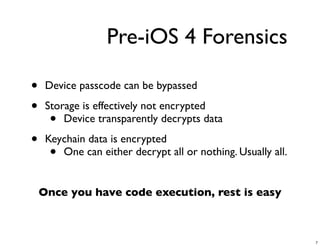
Pre-iOS 4 Forensics

•    Device passcode can be bypassed

•    Storage is effectively not encrypted
      •  Device transparently decrypts data

•    Keychain data is encrypted
      • One can either decrypt all or nothing. Usually all.

    Once you have code execution, rest is easy


                                                              7
New in iOS 4
•   Passcode protection is much more robust

•   Storage is encrypted
     •  Metadata is not encrypted
     •  Contents of (almost) every file is encrypted

•   New (and better) Keychain encryption

•   New (and better) iTunes backup format


All these are part of iOS 4 Data Protection


                                                      8
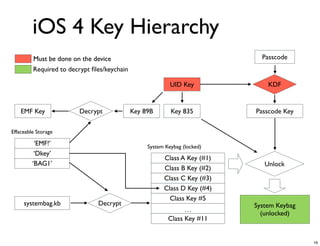
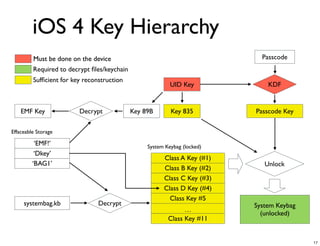
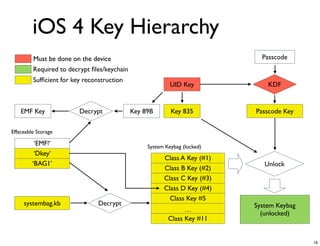
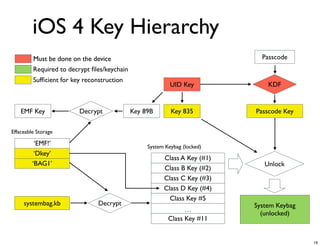
AES Keys
•   All iOS devices have built-in AES processor with 2
    hardcoded keys:
     •   GID Key is shared by all devices of the same kind
     •   UID Key is unique to each and every device
         (hardware key)

•   More keys are computed during startup:
     • Key 0x835 = AES_encrypt (UID, 0101..01)
       (device key)
     • Derived keys depend solely on GID or UID and
       thus are fixed for the particular device


                                                             9
Protection Classes

•   Content is grouped into protection classes:
    •Available only when device is unlocked
    •Available after first device unlock (and until off)
    •Always available

•   Each protection class assigned a master encryption key

•   Master keys are protected by device key and passcode

•   Protected master keys form system keybag
    • New keys created during device restore


                                                             10
System Keybag
•   Stores protected (encrypted) master keys

•   Keybag payload is encrypted before writing to disk

•   Stored in /private/var/keybags/systembag.kb

•   File has NSProtectionNone protection class
    •  Meaning it is encrypted

•   11 protection classes in total
    • All but NSProtectionNone are stored in
      systembag.kb
    • NSProtectionNone is stored in Effaceable Storage


                                                         11
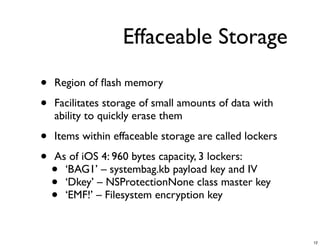
Effaceable Storage

•   Region of flash memory

•   Facilitates storage of small amounts of data with
    ability to quickly erase them

•   Items within effaceable storage are called lockers

•   As of iOS 4: 960 bytes capacity, 3 lockers:
    • ‘BAG1’ – systembag.kb payload key and IV
    • ‘Dkey’ – NSProtectionNone class master key
    • ‘EMF!’ – Filesystem encryption key


                                                         12
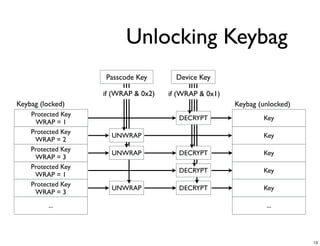
Unlocking Keybag
                    Passcode Key        Device Key

                    if (WRAP & 0x2)   if (WRAP & 0x1)
Keybag (locked)                                         Keybag (unlocked)
    Protected Key
                                         DECRYPT                Key
     WRAP = 1
    Protected Key
                      UNWRAP                                    Key
     WRAP = 2
    Protected Key
                      UNWRAP             DECRYPT                Key
     WRAP = 3
    Protected Key
                                         DECRYPT                Key
     WRAP = 1
    Protected Key
                      UNWRAP             DECRYPT                Key
     WRAP = 3
         ...                                                     ...


                                                                            13
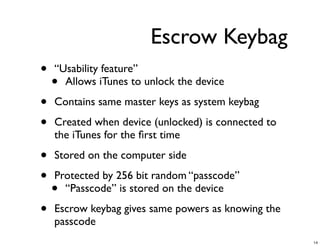
Escrow Keybag
•   “Usability feature”
    • Allows iTunes to unlock the device

•   Contains same master keys as system keybag

•   Created when device (unlocked) is connected to
    the iTunes for the first time

•   Stored on the computer side

•   Protected by 256 bit random “passcode”
    • “Passcode” is stored on the device

•   Escrow keybag gives same powers as knowing the
    passcode
                                                     14
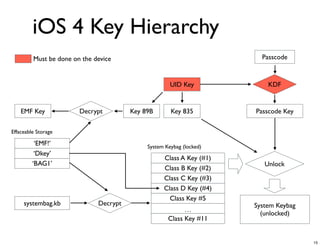
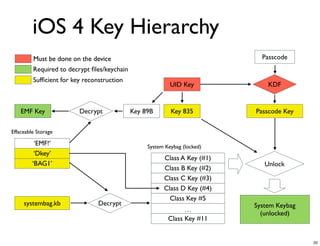
iOS 4 Key Hierarchy
         Must be done on the device                                     Passcode


                                                      UID Key             KDF


    EMF Key             Decrypt         Key 89B       Key 835         Passcode Key

Effaceable Storage

          ‘EMF!’                             System Keybag (locked)
          ‘Dkey’
                                                   Class A Key (#1)
         ‘BAG1’                                                          Unlock
                                                   Class B Key (#2)
                                                   Class C Key (#3)
                                                   Class D Key (#4)
                                                     Class Key #5
     systembag.kb             Decrypt                                 System Keybag
                                                           …
                                                                        (unlocked)
                                                     Class Key #11


                                                                                      15
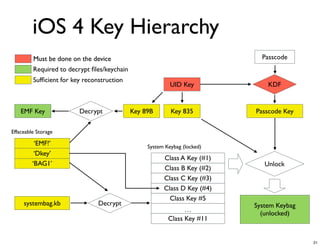
iOS 4 Key Hierarchy
         Must be done on the device                                          Passcode
         Required to decrypt files/keychain

                                                           UID Key             KDF


    EMF Key              Decrypt             Key 89B       Key 835         Passcode Key

Effaceable Storage

          ‘EMF!’                                  System Keybag (locked)
          ‘Dkey’
                                                        Class A Key (#1)
         ‘BAG1’                                                               Unlock
                                                        Class B Key (#2)
                                                        Class C Key (#3)
                                                        Class D Key (#4)
                                                          Class Key #5
     systembag.kb              Decrypt                                     System Keybag
                                                                …
                                                                             (unlocked)
                                                          Class Key #11


                                                                                           16
iOS 4 Key Hierarchy
         Must be done on the device                                          Passcode
         Required to decrypt files/keychain
         Sufficient for key reconstruction
                                                           UID Key             KDF


    EMF Key              Decrypt             Key 89B       Key 835         Passcode Key

Effaceable Storage

          ‘EMF!’                                  System Keybag (locked)
          ‘Dkey’
                                                        Class A Key (#1)
         ‘BAG1’                                                               Unlock
                                                        Class B Key (#2)
                                                        Class C Key (#3)
                                                        Class D Key (#4)
                                                          Class Key #5
     systembag.kb               Decrypt                                    System Keybag
                                                                …
                                                                             (unlocked)
                                                          Class Key #11


                                                                                           17
iOS 4 Key Hierarchy
         Must be done on the device                                          Passcode
         Required to decrypt files/keychain
         Sufficient for key reconstruction
                                                           UID Key             KDF


    EMF Key              Decrypt             Key 89B       Key 835         Passcode Key

Effaceable Storage

          ‘EMF!’                                  System Keybag (locked)
          ‘Dkey’
                                                        Class A Key (#1)
         ‘BAG1’                                                               Unlock
                                                        Class B Key (#2)
                                                        Class C Key (#3)
                                                        Class D Key (#4)
                                                          Class Key #5
     systembag.kb               Decrypt                                    System Keybag
                                                                …
                                                                             (unlocked)
                                                          Class Key #11


                                                                                           18
iOS 4 Key Hierarchy
         Must be done on the device                                          Passcode
         Required to decrypt files/keychain
         Sufficient for key reconstruction
                                                           UID Key             KDF


    EMF Key              Decrypt             Key 89B       Key 835         Passcode Key

Effaceable Storage

          ‘EMF!’                                  System Keybag (locked)
          ‘Dkey’
                                                        Class A Key (#1)
         ‘BAG1’                                                               Unlock
                                                        Class B Key (#2)
                                                        Class C Key (#3)
                                                        Class D Key (#4)
                                                          Class Key #5
     systembag.kb               Decrypt                                    System Keybag
                                                                …
                                                                             (unlocked)
                                                          Class Key #11


                                                                                           19
iOS 4 Key Hierarchy
         Must be done on the device                                          Passcode
         Required to decrypt files/keychain
         Sufficient for key reconstruction
                                                           UID Key             KDF


    EMF Key              Decrypt             Key 89B       Key 835         Passcode Key

Effaceable Storage

          ‘EMF!’                                  System Keybag (locked)
          ‘Dkey’
                                                        Class A Key (#1)
         ‘BAG1’                                                               Unlock
                                                        Class B Key (#2)
                                                        Class C Key (#3)
                                                        Class D Key (#4)
                                                          Class Key #5
     systembag.kb               Decrypt                                    System Keybag
                                                                …
                                                                             (unlocked)
                                                          Class Key #11


                                                                                           20
iOS 4 Key Hierarchy
         Must be done on the device                                          Passcode
         Required to decrypt files/keychain
         Sufficient for key reconstruction
                                                           UID Key             KDF


    EMF Key              Decrypt             Key 89B       Key 835         Passcode Key

Effaceable Storage

          ‘EMF!’                                  System Keybag (locked)
          ‘Dkey’
                                                        Class A Key (#1)
         ‘BAG1’                                                               Unlock
                                                        Class B Key (#2)
                                                        Class C Key (#3)
                                                        Class D Key (#4)
                                                          Class Key #5
     systembag.kb               Decrypt                                    System Keybag
                                                                …
                                                                             (unlocked)
                                                          Class Key #11


                                                                                           21
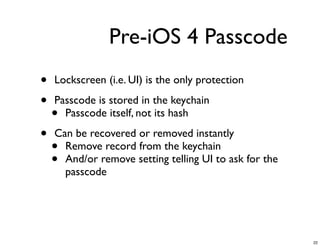
Pre-iOS 4 Passcode
•   Lockscreen (i.e. UI) is the only protection

•   Passcode is stored in the keychain
    • Passcode itself, not its hash

•   Can be recovered or removed instantly
    • Remove record from the keychain
    • And/or remove setting telling UI to ask for the
      passcode


                                                        22
23
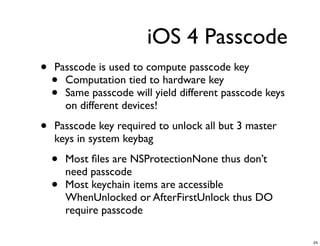
iOS 4 Passcode
•   Passcode is used to compute passcode key
    • Computation tied to hardware key
    • Same passcode will yield different passcode keys
      on different devices!

•   Passcode key required to unlock all but 3 master
    keys in system keybag

    •   Most files are NSProtectionNone thus don’t
        need passcode
    •   Most keychain items are accessible
        WhenUnlocked or AfterFirstUnlock thus DO
        require passcode

                                                         24
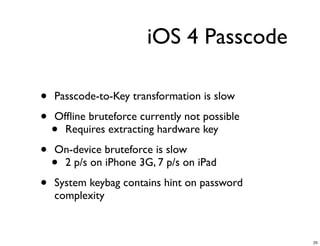
iOS 4 Passcode

•   Passcode-to-Key transformation is slow

•   Offline bruteforce currently not possible
    • Requires extracting hardware key

•   On-device bruteforce is slow
    •2 p/s on iPhone 3G, 7 p/s on iPad

•   System keybag contains hint on password
    complexity


                                               25
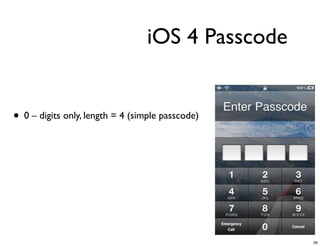
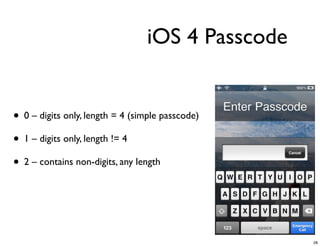
iOS 4 Passcode


• 0 – digits only, length = 4 (simple passcode)


                                                  26
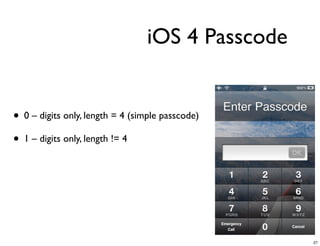
iOS 4 Passcode


• 0 – digits only, length = 4 (simple passcode)
• 1 – digits only, length != 4


                                                  27
iOS 4 Passcode


• 0 – digits only, length = 4 (simple passcode)
• 1 – digits only, length != 4
• 2 – contains non-digits, any length


                                                  28
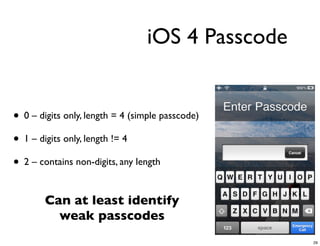
iOS 4 Passcode


• 0 – digits only, length = 4 (simple passcode)
• 1 – digits only, length != 4
• 2 – contains non-digits, any length

        Can at least identify
          weak passcodes
                                                  29
Demo


       30
Pre-iOS 4 Keychain
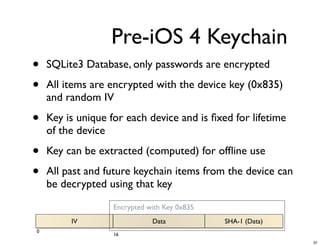
•   SQLite3 Database, only passwords are encrypted

•   All items are encrypted with the device key (0x835)
    and random IV

•   Key is unique for each device and is fixed for lifetime
    of the device

•   Key can be extracted (computed) for offline use

•   All past and future keychain items from the device can
    be decrypted using that key
                   Encrypted with Key 0x835
         IV                   Data            SHA-1 (Data)
0
                   16
                                                             31
iOS 4 Keychain
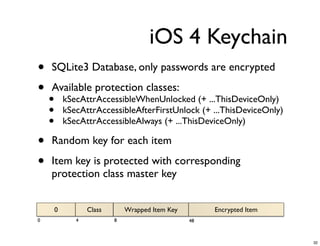
•   SQLite3 Database, only passwords are encrypted

•   Available protection classes:
    •       kSecAttrAccessibleWhenUnlocked (+ ...ThisDeviceOnly)
    •       kSecAttrAccessibleAfterFirstUnlock (+ ...ThisDeviceOnly)
    •       kSecAttrAccessibleAlways (+ ...ThisDeviceOnly)

•   Random key for each item

•   Item key is protected with corresponding
    protection class master key


        0          Class       Wrapped Item Key        Encrypted Item
0              4           8                      48


                                                                        32
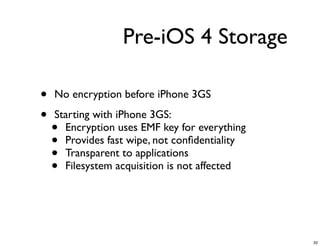
Pre-iOS 4 Storage

•   No encryption before iPhone 3GS

•   Starting with iPhone 3GS:
    • Encryption uses EMF key for everything
    • Provides fast wipe, not confidentiality
    • Transparent to applications
    • Filesystem acquisition is not affected


                                               33
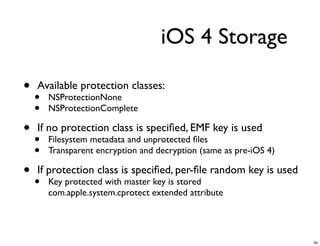
iOS 4 Storage

•   Available protection classes:
    •   NSProtectionNone
    •   NSProtectionComplete

•   If no protection class is specified, EMF key is used
    •   Filesystem metadata and unprotected files
    •   Transparent encryption and decryption (same as pre-iOS 4)

•   If protection class is specified, per-file random key is used
    •   Key protected with master key is stored
        com.apple.system.cprotect extended attribute


                                                                    34
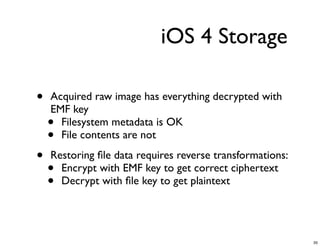
iOS 4 Storage

•   Acquired raw image has everything decrypted with
    EMF key
    • Filesystem metadata is OK
    • File contents are not

•   Restoring file data requires reverse transformations:
    • Encrypt with EMF key to get correct ciphertext
    • Decrypt with file key to get plaintext


                                                           35
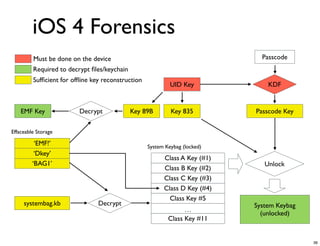
iOS 4 Forensics
         Must be done on the device                                           Passcode
         Required to decrypt files/keychain
         Sufficient for offline key reconstruction
                                                            UID Key             KDF


    EMF Key              Decrypt             Key 89B        Key 835         Passcode Key

Effaceable Storage

          ‘EMF!’                                   System Keybag (locked)
          ‘Dkey’
                                                         Class A Key (#1)
         ‘BAG1’                                                                Unlock
                                                         Class B Key (#2)
                                                         Class C Key (#3)
                                                         Class D Key (#4)
                                                           Class Key #5
     systembag.kb               Decrypt                                     System Keybag
                                                                 …
                                                                              (unlocked)
                                                           Class Key #11


                                                                                            36
iOS 4 Forensics
•   Acquiring disk image is not enough for iOS 4+
    • Content protection keys must also be extracted
      from the device during acquisition
    • Effaceable Storage contents are also needed to
      decrypt dd images.

•   Passcode or escrow keybag is needed for a
    complete set of master keys

•   In real world it might be a good idea to extract
    source data and compute protection keys offline


                                                       37
Conclusion

•   iPhone physical analysis is possible again

•   Physical acquisition requires boot-time exploit

•   Passcode is usually not a problem

•   Both proprietary and open-source tools for iOS 4
    forensics available


                                                       38
Questions?


             39
iOS Forensics:
Overcoming iPhone Data
      Protection
      a.belenko@elcomsoft.com

      @andreybelenko

      www.elcomsoft.com


                                40

iOS Forensics: Overcoming iPhone Data Protection

  • 1.
    iOS Forensics: Overcoming iPhoneData Protection Andrey Belenko Chief Security Researcher Elcomsoft Co. Ltd. 1
  • 2.
    Agenda • iOS Forensics 101 • iOS 4 Data Protection • iOS Forensics • Passcode • Keychain • Storage 2
  • 3.
    Forensics 101 Acquisition ➜Analysis ➜ Reporting GOALS: 1. Assuming physical access to the device extract as much information as practical 2. Leave as little traces/artifacts as practical 3
  • 4.
    iOS Forensics 101 • Passcode • Prevents unauthorized access to the device • Bypassing passcode is usually enough • Keychain • System-wide storage for sensitive data • Encrypted • Storage encryption • iPhone 3Gs and later can encrypt disk data 4
  • 5.
    iOS Forensics 101 • iOS is modified version of Mac OS X • Familiar environment • iOS enforces additional security • Code signing: can’t run unsigned executables • Sandboxing: access to system is limited • Acquisition options: • Via exposed interfaces (i.e. Sync, Backup) • Via circumventing security and running own code 5
  • 6.
    iOS Forensics 101 • Logical: iOS Backup • Ask device to produce a backup • Device must be unlocked • Device may produce encrypted backup • Limited amount of information • Physical: filesystem acquisition • Boot-time exploit to run unsigned code • Device lock state isn’t relevant • Can get all information from the device • Since iOS 4 filesystem is encrypted 6
  • 7.
    Pre-iOS 4 Forensics • Device passcode can be bypassed • Storage is effectively not encrypted • Device transparently decrypts data • Keychain data is encrypted • One can either decrypt all or nothing. Usually all. Once you have code execution, rest is easy 7
  • 8.
    New in iOS4 • Passcode protection is much more robust • Storage is encrypted • Metadata is not encrypted • Contents of (almost) every file is encrypted • New (and better) Keychain encryption • New (and better) iTunes backup format All these are part of iOS 4 Data Protection 8
  • 9.
    AES Keys • All iOS devices have built-in AES processor with 2 hardcoded keys: • GID Key is shared by all devices of the same kind • UID Key is unique to each and every device (hardware key) • More keys are computed during startup: • Key 0x835 = AES_encrypt (UID, 0101..01) (device key) • Derived keys depend solely on GID or UID and thus are fixed for the particular device 9
  • 10.
    Protection Classes • Content is grouped into protection classes: •Available only when device is unlocked •Available after first device unlock (and until off) •Always available • Each protection class assigned a master encryption key • Master keys are protected by device key and passcode • Protected master keys form system keybag • New keys created during device restore 10
  • 11.
    System Keybag • Stores protected (encrypted) master keys • Keybag payload is encrypted before writing to disk • Stored in /private/var/keybags/systembag.kb • File has NSProtectionNone protection class • Meaning it is encrypted • 11 protection classes in total • All but NSProtectionNone are stored in systembag.kb • NSProtectionNone is stored in Effaceable Storage 11
  • 12.
    Effaceable Storage • Region of flash memory • Facilitates storage of small amounts of data with ability to quickly erase them • Items within effaceable storage are called lockers • As of iOS 4: 960 bytes capacity, 3 lockers: • ‘BAG1’ – systembag.kb payload key and IV • ‘Dkey’ – NSProtectionNone class master key • ‘EMF!’ – Filesystem encryption key 12
  • 13.
    Unlocking Keybag Passcode Key Device Key if (WRAP & 0x2) if (WRAP & 0x1) Keybag (locked) Keybag (unlocked) Protected Key DECRYPT Key WRAP = 1 Protected Key UNWRAP Key WRAP = 2 Protected Key UNWRAP DECRYPT Key WRAP = 3 Protected Key DECRYPT Key WRAP = 1 Protected Key UNWRAP DECRYPT Key WRAP = 3 ... ... 13
  • 14.
    Escrow Keybag • “Usability feature” • Allows iTunes to unlock the device • Contains same master keys as system keybag • Created when device (unlocked) is connected to the iTunes for the first time • Stored on the computer side • Protected by 256 bit random “passcode” • “Passcode” is stored on the device • Escrow keybag gives same powers as knowing the passcode 14
  • 15.
    iOS 4 KeyHierarchy Must be done on the device Passcode UID Key KDF EMF Key Decrypt Key 89B Key 835 Passcode Key Effaceable Storage ‘EMF!’ System Keybag (locked) ‘Dkey’ Class A Key (#1) ‘BAG1’ Unlock Class B Key (#2) Class C Key (#3) Class D Key (#4) Class Key #5 systembag.kb Decrypt System Keybag … (unlocked) Class Key #11 15
  • 16.
    iOS 4 KeyHierarchy Must be done on the device Passcode Required to decrypt files/keychain UID Key KDF EMF Key Decrypt Key 89B Key 835 Passcode Key Effaceable Storage ‘EMF!’ System Keybag (locked) ‘Dkey’ Class A Key (#1) ‘BAG1’ Unlock Class B Key (#2) Class C Key (#3) Class D Key (#4) Class Key #5 systembag.kb Decrypt System Keybag … (unlocked) Class Key #11 16
  • 17.
    iOS 4 KeyHierarchy Must be done on the device Passcode Required to decrypt files/keychain Sufficient for key reconstruction UID Key KDF EMF Key Decrypt Key 89B Key 835 Passcode Key Effaceable Storage ‘EMF!’ System Keybag (locked) ‘Dkey’ Class A Key (#1) ‘BAG1’ Unlock Class B Key (#2) Class C Key (#3) Class D Key (#4) Class Key #5 systembag.kb Decrypt System Keybag … (unlocked) Class Key #11 17
  • 18.
    iOS 4 KeyHierarchy Must be done on the device Passcode Required to decrypt files/keychain Sufficient for key reconstruction UID Key KDF EMF Key Decrypt Key 89B Key 835 Passcode Key Effaceable Storage ‘EMF!’ System Keybag (locked) ‘Dkey’ Class A Key (#1) ‘BAG1’ Unlock Class B Key (#2) Class C Key (#3) Class D Key (#4) Class Key #5 systembag.kb Decrypt System Keybag … (unlocked) Class Key #11 18
  • 19.
    iOS 4 KeyHierarchy Must be done on the device Passcode Required to decrypt files/keychain Sufficient for key reconstruction UID Key KDF EMF Key Decrypt Key 89B Key 835 Passcode Key Effaceable Storage ‘EMF!’ System Keybag (locked) ‘Dkey’ Class A Key (#1) ‘BAG1’ Unlock Class B Key (#2) Class C Key (#3) Class D Key (#4) Class Key #5 systembag.kb Decrypt System Keybag … (unlocked) Class Key #11 19
  • 20.
    iOS 4 KeyHierarchy Must be done on the device Passcode Required to decrypt files/keychain Sufficient for key reconstruction UID Key KDF EMF Key Decrypt Key 89B Key 835 Passcode Key Effaceable Storage ‘EMF!’ System Keybag (locked) ‘Dkey’ Class A Key (#1) ‘BAG1’ Unlock Class B Key (#2) Class C Key (#3) Class D Key (#4) Class Key #5 systembag.kb Decrypt System Keybag … (unlocked) Class Key #11 20
  • 21.
    iOS 4 KeyHierarchy Must be done on the device Passcode Required to decrypt files/keychain Sufficient for key reconstruction UID Key KDF EMF Key Decrypt Key 89B Key 835 Passcode Key Effaceable Storage ‘EMF!’ System Keybag (locked) ‘Dkey’ Class A Key (#1) ‘BAG1’ Unlock Class B Key (#2) Class C Key (#3) Class D Key (#4) Class Key #5 systembag.kb Decrypt System Keybag … (unlocked) Class Key #11 21
  • 22.
    Pre-iOS 4 Passcode • Lockscreen (i.e. UI) is the only protection • Passcode is stored in the keychain • Passcode itself, not its hash • Can be recovered or removed instantly • Remove record from the keychain • And/or remove setting telling UI to ask for the passcode 22
  • 23.
  • 24.
    iOS 4 Passcode • Passcode is used to compute passcode key • Computation tied to hardware key • Same passcode will yield different passcode keys on different devices! • Passcode key required to unlock all but 3 master keys in system keybag • Most files are NSProtectionNone thus don’t need passcode • Most keychain items are accessible WhenUnlocked or AfterFirstUnlock thus DO require passcode 24
  • 25.
    iOS 4 Passcode • Passcode-to-Key transformation is slow • Offline bruteforce currently not possible • Requires extracting hardware key • On-device bruteforce is slow •2 p/s on iPhone 3G, 7 p/s on iPad • System keybag contains hint on password complexity 25
  • 26.
    iOS 4 Passcode •0 – digits only, length = 4 (simple passcode) 26
  • 27.
    iOS 4 Passcode •0 – digits only, length = 4 (simple passcode) • 1 – digits only, length != 4 27
  • 28.
    iOS 4 Passcode •0 – digits only, length = 4 (simple passcode) • 1 – digits only, length != 4 • 2 – contains non-digits, any length 28
  • 29.
    iOS 4 Passcode •0 – digits only, length = 4 (simple passcode) • 1 – digits only, length != 4 • 2 – contains non-digits, any length Can at least identify weak passcodes 29
  • 30.
  • 31.
    Pre-iOS 4 Keychain • SQLite3 Database, only passwords are encrypted • All items are encrypted with the device key (0x835) and random IV • Key is unique for each device and is fixed for lifetime of the device • Key can be extracted (computed) for offline use • All past and future keychain items from the device can be decrypted using that key Encrypted with Key 0x835 IV Data SHA-1 (Data) 0 16 31
  • 32.
    iOS 4 Keychain • SQLite3 Database, only passwords are encrypted • Available protection classes: • kSecAttrAccessibleWhenUnlocked (+ ...ThisDeviceOnly) • kSecAttrAccessibleAfterFirstUnlock (+ ...ThisDeviceOnly) • kSecAttrAccessibleAlways (+ ...ThisDeviceOnly) • Random key for each item • Item key is protected with corresponding protection class master key 0 Class Wrapped Item Key Encrypted Item 0 4 8 48 32
  • 33.
    Pre-iOS 4 Storage • No encryption before iPhone 3GS • Starting with iPhone 3GS: • Encryption uses EMF key for everything • Provides fast wipe, not confidentiality • Transparent to applications • Filesystem acquisition is not affected 33
  • 34.
    iOS 4 Storage • Available protection classes: • NSProtectionNone • NSProtectionComplete • If no protection class is specified, EMF key is used • Filesystem metadata and unprotected files • Transparent encryption and decryption (same as pre-iOS 4) • If protection class is specified, per-file random key is used • Key protected with master key is stored com.apple.system.cprotect extended attribute 34
  • 35.
    iOS 4 Storage • Acquired raw image has everything decrypted with EMF key • Filesystem metadata is OK • File contents are not • Restoring file data requires reverse transformations: • Encrypt with EMF key to get correct ciphertext • Decrypt with file key to get plaintext 35
  • 36.
    iOS 4 Forensics Must be done on the device Passcode Required to decrypt files/keychain Sufficient for offline key reconstruction UID Key KDF EMF Key Decrypt Key 89B Key 835 Passcode Key Effaceable Storage ‘EMF!’ System Keybag (locked) ‘Dkey’ Class A Key (#1) ‘BAG1’ Unlock Class B Key (#2) Class C Key (#3) Class D Key (#4) Class Key #5 systembag.kb Decrypt System Keybag … (unlocked) Class Key #11 36
  • 37.
    iOS 4 Forensics • Acquiring disk image is not enough for iOS 4+ • Content protection keys must also be extracted from the device during acquisition • Effaceable Storage contents are also needed to decrypt dd images. • Passcode or escrow keybag is needed for a complete set of master keys • In real world it might be a good idea to extract source data and compute protection keys offline 37
  • 38.
    Conclusion • iPhone physical analysis is possible again • Physical acquisition requires boot-time exploit • Passcode is usually not a problem • Both proprietary and open-source tools for iOS 4 forensics available 38
  • 39.
  • 40.
    iOS Forensics: Overcoming iPhoneData Protection a.belenko@elcomsoft.com @andreybelenko www.elcomsoft.com 40