Introducing


26th September 2012
                           Abraham Aranguren
                              @7a_ @owtfp
                      abraham.aranguren@owasp.org
                              http://7-a.org
                             http://owtf.org
Agenda
• Intro
     Before we start check
     OWTF Intro
     Installing OWTF
     Running OWTF
• Part 1: OWTF Passive + Semi-passive Web analysis
• Part 2: OWTF Active Web analysis
• Part 3: OWTF aux plugins – SE, IDs testing
• Conclusion
• Q&A
Before we start
If you don’t have OWTF or OWTF demos yet:

Step 1) Go to http://owtf.org (redirects to OWASP project)
Step 2) Start downloading the latest Version
This link! ☺
Download OWASP OWTF

Step 3) Start downloading the latest Demo
This link! ☺
Download OWASP OWTF DEMOs (only Firefox >= 8 required)
About me
•   Spanish dude
•   Uni: Degree, InfoSec research + honour mark
•   IT: Since 2000, defensive sec as netadmin / developer
•   (Offensive) InfoSec: Since 2007
•   OSCP, CISSP, GWEB, CEH, MCSE, etc.
•   Web App Sec and Dev/Architect
•   Infosec consultant, blogger, OWTF, GIAC, BeEF
Pentester disadvantage
Pentesters vs Bad guys
• Pentesters have time/scope constraints != Bad guys
• Pentesters have to write a report != Bad guys

Complexity is increasing
More complexity = more time needed to test properly

Customers are rarely willing to:
“Pay for enough / reasonable testing time“

A call for efficiency:
• We must find vulns faster
• We must be more efficient
• .. or bad guys will find the vulns, not us
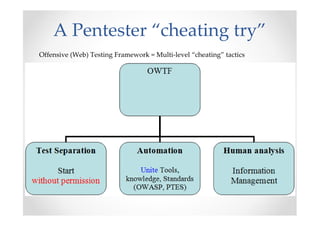
A Pentester “cheating try”
Offensive (Web) Testing Framework = Multi-level “cheating” tactics
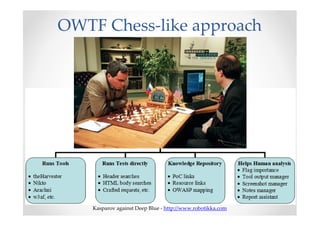
OWTF Chess-like approach


    Kasparov against Deep Blue - http://www.robotikka.com
Demos
Installing
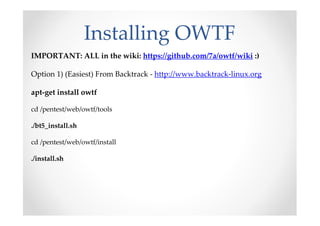
Installing OWTF
IMPORTANT: ALL in the wiki: https://github.com/7a/owtf/wiki :)

Option 1) (Easiest) From Backtrack - http://www.backtrack-linux.org

apt-get install owtf

cd /pentest/web/owtf/tools

./bt5_install.sh

cd /pentest/web/owtf/install

./install.sh
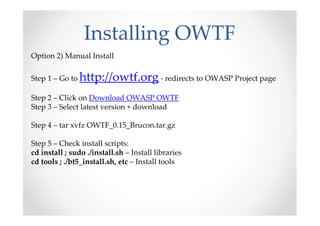
Installing OWTF
Option 2) Manual Install

Step 1 – Go to http://owtf.org - redirects to OWASP Project page

Step 2 – Click on Download OWASP OWTF
Step 3 – Select latest version + download

Step 4 – tar xvfz OWTF_0.15_Brucon.tar.gz

Step 5 – Check install scripts:
cd install ; sudo ./install.sh – Install libraries
cd tools ; ./bt5_install.sh, etc – Install tools
Missing Tools
 [*] WARNING: Tool path not found for: /pentest/web/owtf/tools/restricted/ssl/ssl-
     cipher-check.pl
 [*] WARNING: Tool path not found for: /pentest/web/owtf/tools/restricted/arachni-
     v0.3-cde
 …
 [*] WARNING: Tool path not found for: /pentest/web/owtf/tools/restricted/hoppy-
     1.8.1
 [*]
 [*] WARNING!!!: 7 tools could not be found. Some suggestions:
 [*] - Define where your tools are here:
     /pentest/web/owtf/profiles/general/default.cfg
 [*] - Use the /pentest/web/owtf/tools/bt5_install.sh script to install missing tools
 Continue anyway? [y/n]


NOTE: OWTF will run with the tools you have, installing all tools is not mandatory
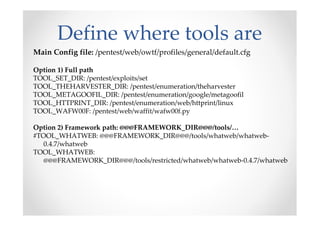
Define where tools are
Main Config file: /pentest/web/owtf/profiles/general/default.cfg

Option 1) Full path
TOOL_SET_DIR: /pentest/exploits/set
TOOL_THEHARVESTER_DIR: /pentest/enumeration/theharvester
TOOL_METAGOOFIL_DIR: /pentest/enumeration/google/metagoofil
TOOL_HTTPRINT_DIR: /pentest/enumeration/web/httprint/linux
TOOL_WAFW00F: /pentest/web/waffit/wafw00f.py

Option 2) Framework path: @@@FRAMEWORK_DIR@@@/tools/…
#TOOL_WHATWEB: @@@FRAMEWORK_DIR@@@/tools/whatweb/whatweb-
   0.4.7/whatweb
TOOL_WHATWEB:
   @@@FRAMEWORK_DIR@@@/tools/restricted/whatweb/whatweb-0.4.7/whatweb
Running
OWTF CLI help
Call owtf without arguments to see the options available

./owtf.py
…
 -l <web/net/aux>:          list available plugins in the plugin group (web, net or aux)
 -f:               force plugin result overwrite (default is avoid overwrite)
 -i <yes/no>             interactive: yes (default, more control) / no (script-friendly)
 -e <except plugin1,2,..>     comma separated list of plugins to be ignored in the test
 -o <only plugin1,2,..> comma separated list of the only plugins to be used in the test
 -p (ip:)port      setup an inbound proxy for manual site analysis
 -x ip:port            send all owtf requests using the proxy for the given ip and
     port
 -s                Do not do anything, simply simulate how plugins would run
…
Listing OWTF plugins
There are many plugins to choose from you can list them like this:

./owtf.py -l web | more
…
[*] **************************************** Passive Plugins
[*] passive: Application_Discovery_____________________________(OWASP-IG-
     005)________Third party discovery resources
[*] passive: HTTP_Methods_and_XST______________________________(OWASP-
     CM-008)________Third party resources
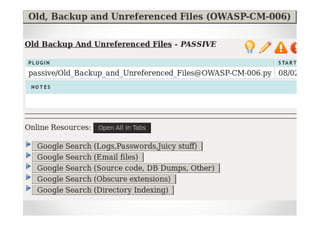
[*] passive: Old_Backup_and_Unreferenced_Files_________________(OWASP-CM-
     006)________Google Hacking for juicy files
…
Simulation mode
Simulation mode “-s”:
1) SIMULATES what OWTF will do (so it does not do it!):
2) Is useful to check the effect of a command before running it

# owtf.py -s https://accounts.google.com | more
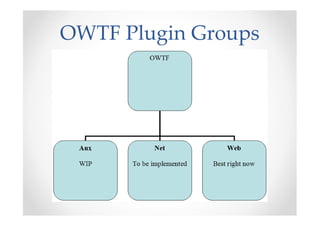
OWTF Plugin Groups
Plugin Groups
OWTF defines 3 major plugin groups (-g):
• web (default) = targets are interpreted as URLs = web assessment only
• net = targets are interpreted as hosts/network ranges = traditional network
  discovery and probing
• aux = targets are NOT interpreted, it is up to the plugin/resource definition to
  decide what to do with the target

Example:
The following would run all web plugins against http://demo.testfire.net

./owtf.py -g web http://demo.testfire.net
Part 1


Passive and Semi-Passive
      Web analysis
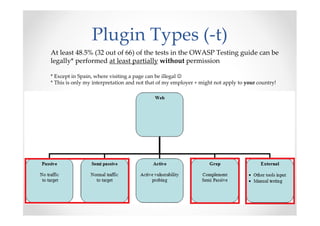
Plugin Types (-t)
At least 48.5% (32 out of 66) of the tests in the OWASP Testing guide can be
legally* performed at least partially without permission

* Except in Spain, where visiting a page can be illegal ☺
* This is only my interpretation and not that of my employer + might not apply to your country!
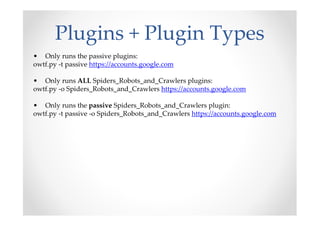
Plugins + Plugin Types
• Only runs the passive plugins:
owtf.py -t passive https://accounts.google.com

• Only runs ALL Spiders_Robots_and_Crawlers plugins:
owtf.py -o Spiders_Robots_and_Crawlers https://accounts.google.com

• Only runs the passive Spiders_Robots_and_Crawlers plugin:
owtf.py -t passive -o Spiders_Robots_and_Crawlers https://accounts.google.com
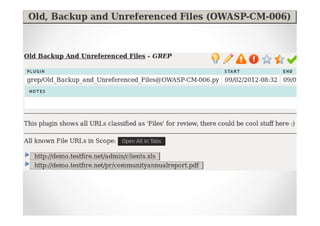
Demo / Exercise


    Putting it all together..
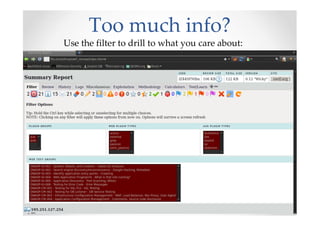
Too much info?
Use the filter to drill to what you care about:
Before we continue
If you don’t have OWTF or OWTF demos yet:

Step 1) Go to http://owtf.org (redirects to OWASP project)
Step 2) Start downloading the latest Demo
This link! ☺
Download OWASP OWTF DEMOs (only Firefox >= 8 required)
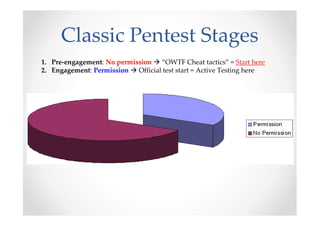
Classic Pentest Stages
1. Pre-engagement: No permission “OWTF Cheat tactics” = Start here
2. Engagement: Permission Official test start = Active Testing here
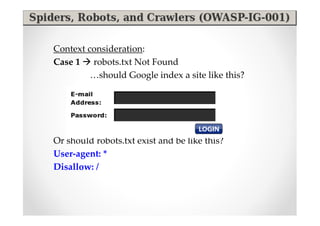
Context consideration:
Case 1 robots.txt Not Found
         …should Google index a site like this?


Or should robots.txt exist and be like this?
User-agent: *
Disallow: /
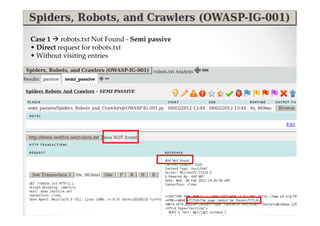
Case 1 robots.txt Not Found - Semi passive
• Direct request for robots.txt
• Without visiting entries
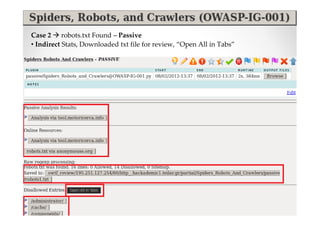
Case 2 robots.txt Found – Passive
• Indirect Stats, Downloaded txt file for review, “Open All in Tabs”
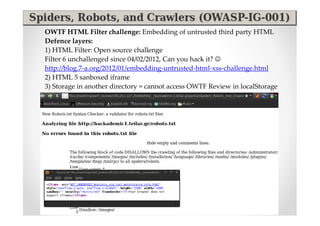
OWTF HTML Filter challenge: Embedding of untrusted third party HTML
Defence layers:
1) HTML Filter: Open source challenge
Filter 6 unchallenged since 04/02/2012, Can you hack it? ☺
http://blog.7-a.org/2012/01/embedding-untrusted-html-xss-challenge.html
2) HTML 5 sanboxed iframe
3) Storage in another directory = cannot access OWTF Review in localStorage
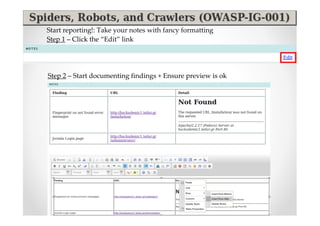
Start reporting!: Take your notes with fancy formatting
Step 1 – Click the “Edit” link


Step 2 – Start documenting findings + Ensure preview is ok
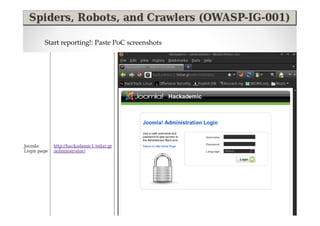
Start reporting!: Paste PoC screenshots
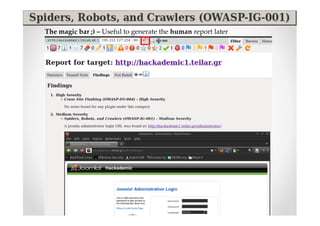
The magic bar ;) – Useful to generate the human report later
Demo / Exercise
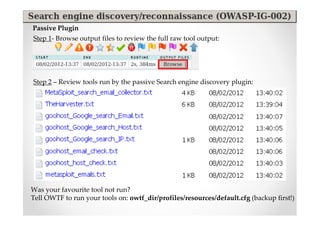
Passive Plugin
Step 1- Browse output files to review the full raw tool output:


Step 2 – Review tools run by the passive Search engine discovery plugin:


Was your favourite tool not run?
Tell OWTF to run your tools on: owtf_dir/profiles/resources/default.cfg (backup first!)
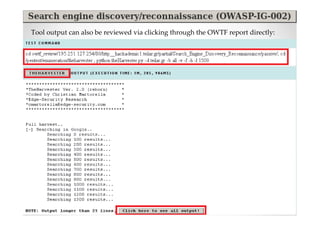
Tool output can also be reviewed via clicking through the OWTF report directly:
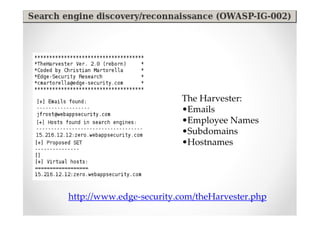
The Harvester:
                         •Emails
                         •Employee Names
                         •Subdomains
                         •Hostnames


http://www.edge-security.com/theHarvester.php
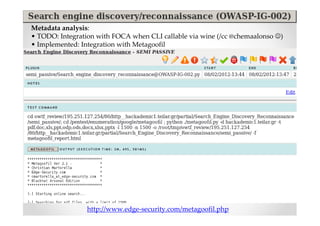
Metadata analysis:
• TODO: Integration with FOCA when CLI callable via wine (/cc @chemaalonso ☺)
• Implemented: Integration with Metagoofil


                 http://www.edge-security.com/metagoofil.php
Demo / Exercise
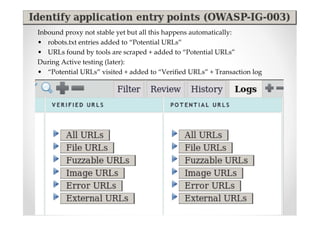
Inbound proxy not stable yet but all this happens automatically:
• robots.txt entries added to “Potential URLs”
• URLs found by tools are scraped + added to “Potential URLs”
During Active testing (later):
• “Potential URLs” visited + added to “Verified URLs” + Transaction log
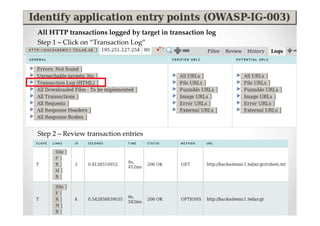
All HTTP transactions logged by target in transaction log
Step 1 – Click on “Transaction Log”


Step 2 – Review transaction entries
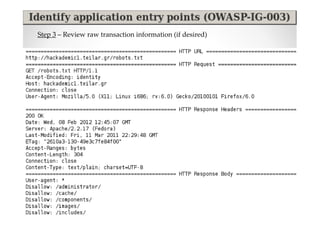
Step 3 – Review raw transaction information (if desired)
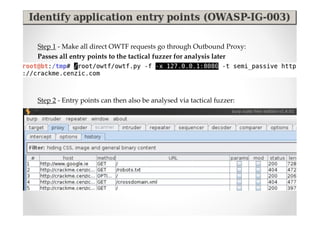
Step 1 - Make all direct OWTF requests go through Outbound Proxy:
Passes all entry points to the tactical fuzzer for analysis later


Step 2 - Entry points can then also be analysed via tactical fuzzer:
Demo / Exercise
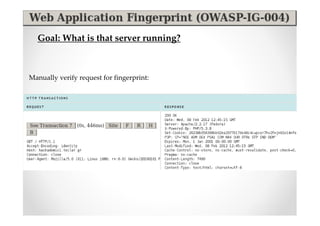
Goal: What is that server running?


Manually verify request for fingerprint:
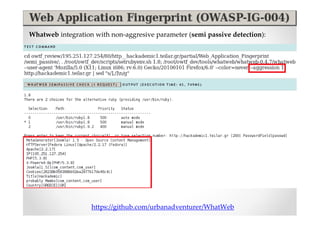
Whatweb integration with non-aggresive parameter (semi passive detection):


                   https://github.com/urbanadventurer/WhatWeb
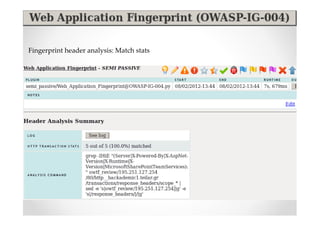
Fingerprint header analysis: Match stats
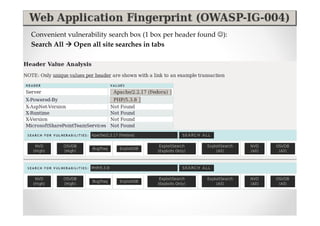
Convenient vulnerability search box (1 box per header found ☺):
Search All Open all site searches in tabs
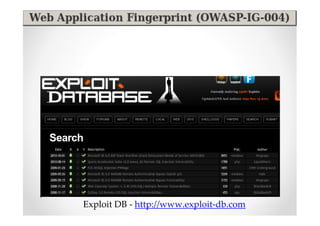
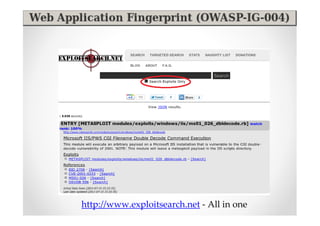
Exploit DB - http://www.exploit-db.com
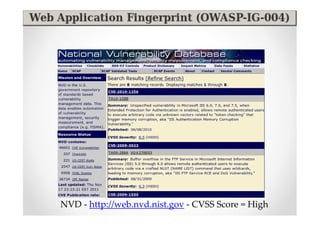
NVD - http://web.nvd.nist.gov - CVSS Score = High
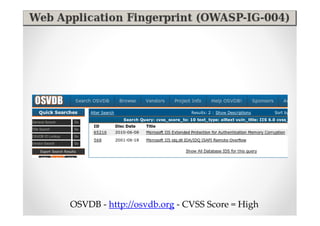
OSVDB - http://osvdb.org - CVSS Score = High
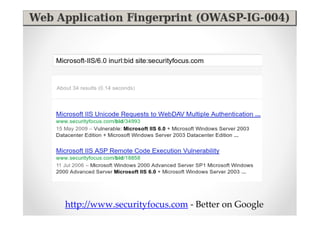
http://www.securityfocus.com - Better on Google
http://www.exploitsearch.net - All in one
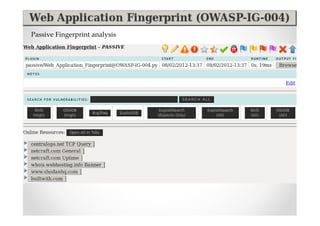
Passive Fingerprint analysis
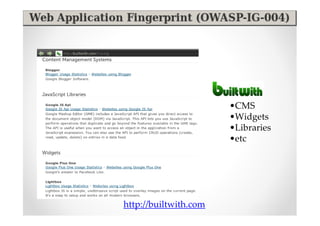
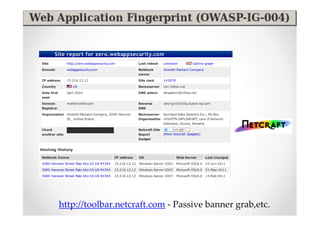
http://toolbar.netcraft.com - Passive banner grab,etc.
•CMS
                       •Widgets
                       •Libraries
                       •etc


http://builtwith.com
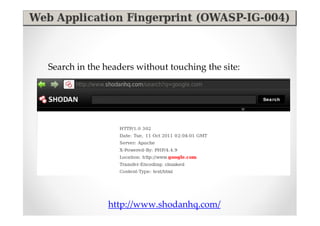
Search in the headers without touching the site:


               http://www.shodanhq.com/
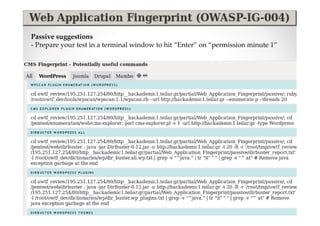
Passive suggestions
- Prepare your test in a terminal window to hit “Enter” on “permission minute 1”
What else can be done with a fingerprint?
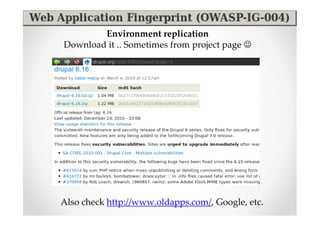
Environment replication
Download it .. Sometimes from project page ☺


Also check http://www.oldapps.com/, Google, etc.
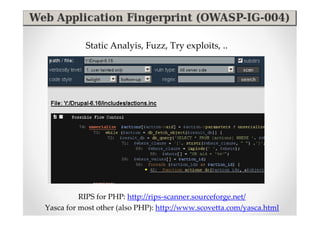
Static Analyis, Fuzz, Try exploits, ..


          RIPS for PHP: http://rips-scanner.sourceforge.net/
Yasca for most other (also PHP): http://www.scovetta.com/yasca.html
Demo / Exercise
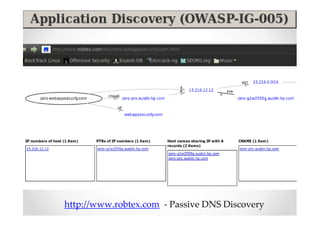
http://www.robtex.com - Passive DNS Discovery
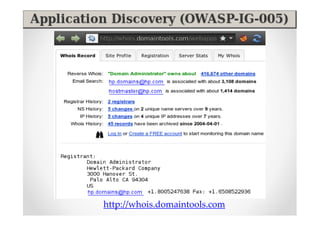
http://whois.domaintools.com
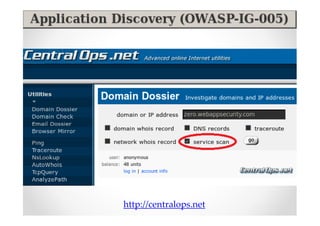
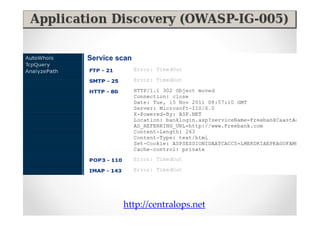
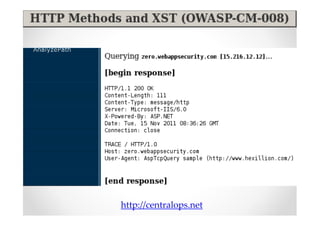
http://centralops.net
Demo / Exercise
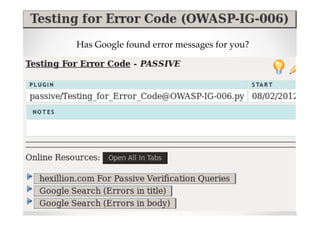
Has Google found error messages for you?
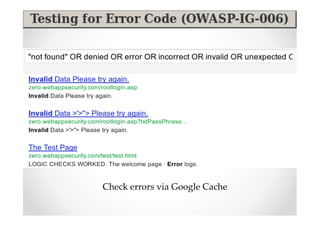
Check errors via Google Cache
Demo / Exercise
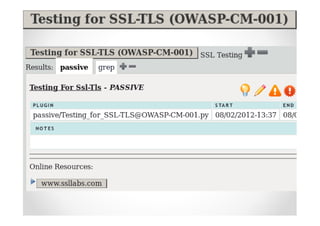
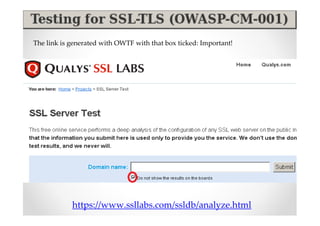
The link is generated with OWTF with that box ticked: Important!


            https://www.ssllabs.com/ssldb/analyze.html
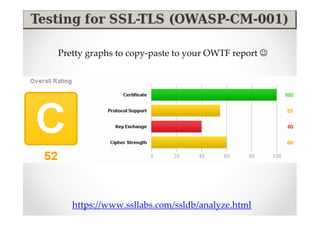
Pretty graphs to copy-paste to your OWTF report ☺


   https://www.ssllabs.com/ssldb/analyze.html
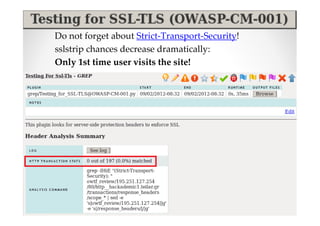
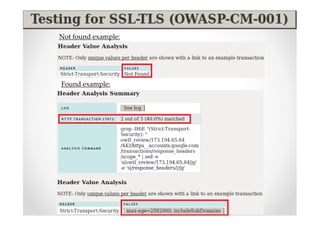
Do not forget about Strict-Transport-Security!
sslstrip chances decrease dramatically:
Only 1st time user visits the site!
Not found example:


Found example:
Demo / Exercise
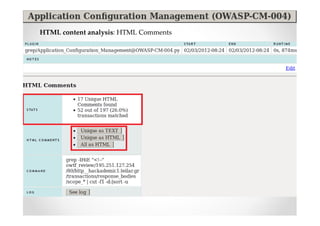
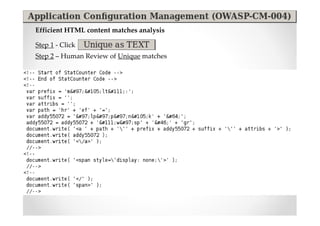
HTML content analysis: HTML Comments
Efficient HTML content matches analysis

Step 1 - Click
Step 2 – Human Review of Unique matches
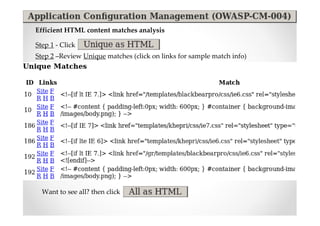
Efficient HTML content matches analysis

Step 1 - Click
Step 2 –Review Unique matches (click on links for sample match info)


  Want to see all? then click
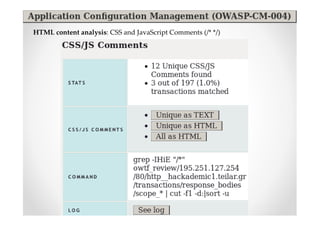
HTML content analysis: CSS and JavaScript Comments (/* */)
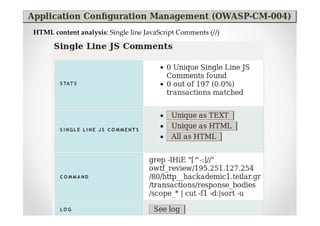
HTML content analysis: Single line JavaScript Comments (//)
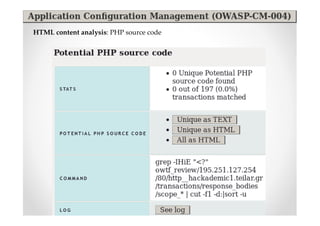
HTML content analysis: PHP source code
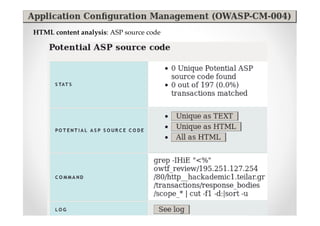
HTML content analysis: ASP source code
Demo / Exercise
Demo / Exercise
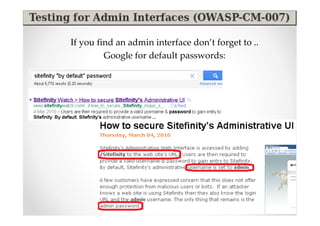
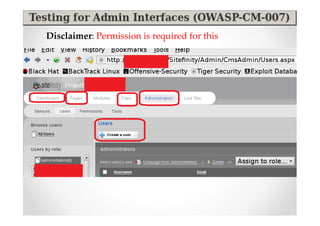
If you find an admin interface don’t forget to ..
         Google for default passwords:
Disclaimer: Permission is required for this
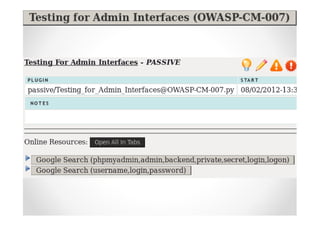
Demo / Exercise
http://centralops.net
Demo / Exercise
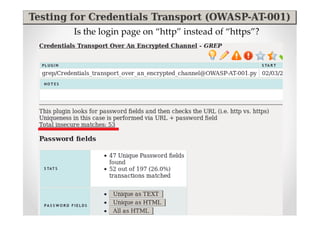
Is the login page on “http” instead of “https”?
Demo / Exercise
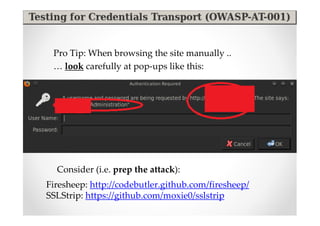
Pro Tip: When browsing the site manually ..
 … look carefully at pop-ups like this:


  Consider (i.e. prep the attack):
Firesheep: http://codebutler.github.com/firesheep/
SSLStrip: https://github.com/moxie0/sslstrip
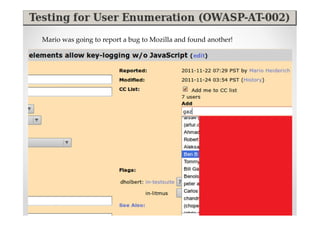
Mario was going to report a bug to Mozilla and found another!
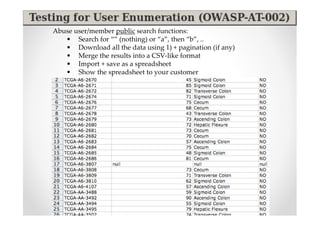
Abuse user/member public search functions:
   • Search for “” (nothing) or “a”, then “b”, ..
   • Download all the data using 1) + pagination (if any)
   • Merge the results into a CSV-like format
   • Import + save as a spreadsheet
   • Show the spreadsheet to your customer
Demo / Exercise
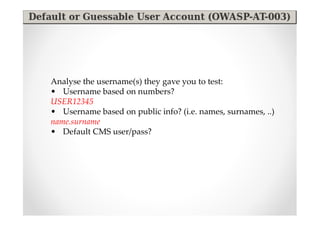
Analyse the username(s) they gave you to test:
• Username based on numbers?
USER12345
• Username based on public info? (i.e. names, surnames, ..)
name.surname
• Default CMS user/pass?
Demo / Exercise
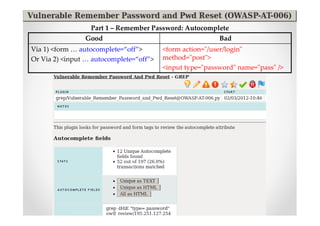
Part 1 – Remember Password: Autocomplete
                Good                                      Bad
Via 1) <form … autocomplete=“off”>       <form action="/user/login"
Or Via 2) <input … autocomplete=“off”>   method="post">
                                         <input type="password" name="pass" />
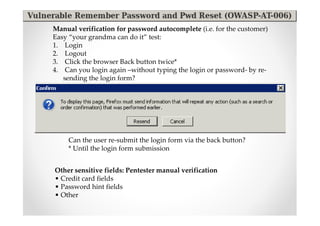
Manual verification for password autocomplete (i.e. for the customer)
Easy “your grandma can do it” test:
1. Login
2. Logout
3. Click the browser Back button twice*
4. Can you login again –without typing the login or password- by re-
   sending the login form?


     Can the user re-submit the login form via the back button?
     * Until the login form submission


Other sensitive fields: Pentester manual verification
• Credit card fields
• Password hint fields
• Other
Part 2 - Password Reset forms
Manually look at the questions / fields in the password reset form
• Does it let you specify your email address?
• Is it based on public info? (name, surname, etc)
• Does it send an email to a potentially dead email address you can
  register? (i.e. hotmail.com)
Demo / Exercise
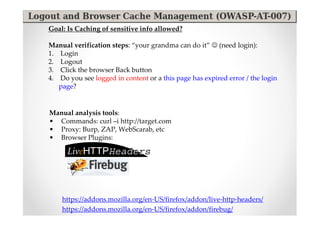
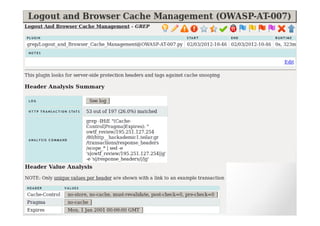
Goal: Is Caching of sensitive info allowed?

Manual verification steps: “your grandma can do it” ☺ (need login):
1. Login
2. Logout
3. Click the browser Back button
4. Do you see logged in content or a this page has expired error / the login
   page?


Manual analysis tools:
• Commands: curl –i http://target.com
• Proxy: Burp, ZAP, WebScarab, etc
• Browser Plugins:


    https://addons.mozilla.org/en-US/firefox/addon/live-http-headers/
    https://addons.mozilla.org/en-US/firefox/addon/firebug/
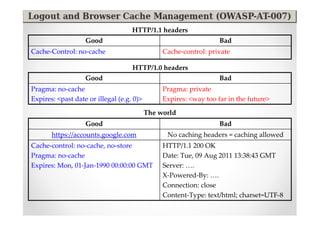
HTTP/1.1 headers
                   Good                                            Bad
Cache-Control: no-cache                         Cache-control: private

                                    HTTP/1.0 headers
                   Good                                            Bad
Pragma: no-cache                                Pragma: private
Expires: <past date or illegal (e.g. 0)>        Expires: <way too far in the future>

                                           The world
                   Good                                            Bad
       https://accounts.google.com               No caching headers = caching allowed
Cache-control: no-cache, no-store               HTTP/1.1 200 OK
Pragma: no-cache                                Date: Tue, 09 Aug 2011 13:38:43 GMT
Expires: Mon, 01-Jan-1990 00:00:00 GMT          Server: ….
                                                X-Powered-By: ….
                                                Connection: close
                                                Content-Type: text/html; charset=UTF-8
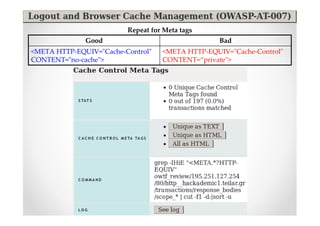
Repeat for Meta tags
              Good                                Bad
<META HTTP-EQUIV="Cache-Control"   <META HTTP-EQUIV="Cache-Control"
CONTENT="no-cache">                CONTENT=“private">
Demo / Exercise
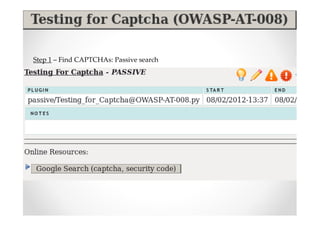
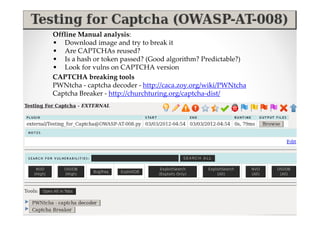
Step 1 – Find CAPTCHAs: Passive search
Offline Manual analysis:
• Download image and try to break it
• Are CAPTCHAs reused?
• Is a hash or token passed? (Good algorithm? Predictable?)
• Look for vulns on CAPTCHA version
CAPTCHA breaking tools
PWNtcha - captcha decoder - http://caca.zoy.org/wiki/PWNtcha
Captcha Breaker - http://churchturing.org/captcha-dist/
Demo / Exercise
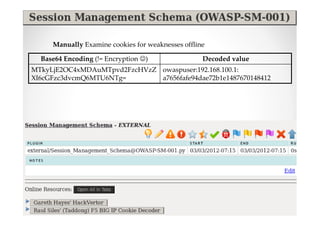
Manually Examine cookies for weaknesses offline

  Base64 Encoding (!= Encryption ☺)                Decoded value
MTkyLjE2OC4xMDAuMTpvd2FzcHVzZ owaspuser:192.168.100.1:
XI6cGFzc3dvcmQ6MTU6NTg=       a7656fafe94dae72b1e1487670148412
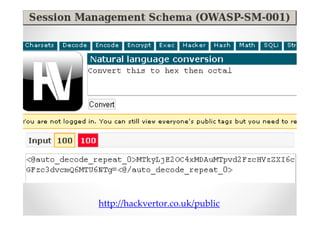
http://hackvertor.co.uk/public
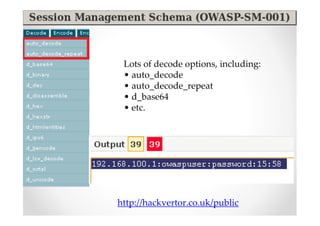
Lots of decode options, including:
 • auto_decode
 • auto_decode_repeat
 • d_base64
 • etc.


http://hackvertor.co.uk/public
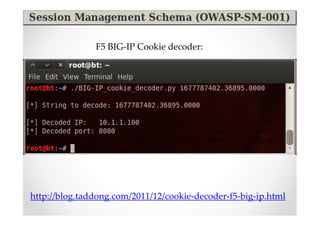
F5 BIG-IP Cookie decoder:


http://blog.taddong.com/2011/12/cookie-decoder-f5-big-ip.html
Demo / Exercise
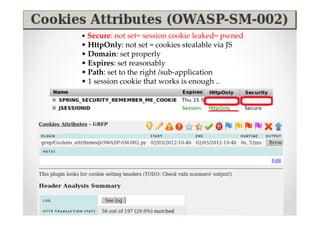
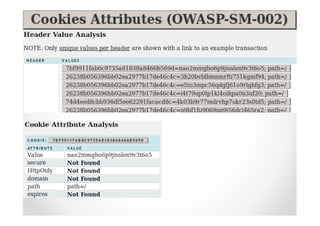
• Secure: not set= session cookie leaked= pwned
• HttpOnly: not set = cookies stealable via JS
• Domain: set properly
• Expires: set reasonably
• Path: set to the right /sub-application
• 1 session cookie that works is enough ..
Demo / Exercise
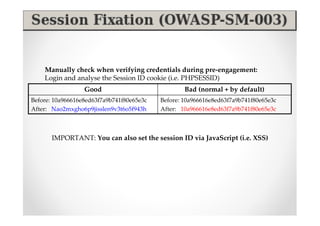
Manually check when verifying credentials during pre-engagement:
    Login and analyse the Session ID cookie (i.e. PHPSESSID)
                  Good                             Bad (normal + by default)
Before: 10a966616e8ed63f7a9b741f80e65e3c   Before: 10a966616e8ed63f7a9b741f80e65e3c
After: Nao2mxgho6p9jisslen9v3t6o5f943h     After: 10a966616e8ed63f7a9b741f80e65e3c


       IMPORTANT: You can also set the session ID via JavaScript (i.e. XSS)
Demo / Exercise
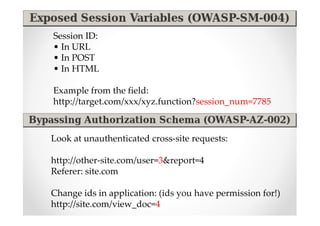
Session ID:
• In URL
• In POST
• In HTML

Example from the field:
http://target.com/xxx/xyz.function?session_num=7785


Look at unauthenticated cross-site requests:

http://other-site.com/user=3&report=4
Referer: site.com

Change ids in application: (ids you have permission for!)
http://site.com/view_doc=4
Demo / Exercise
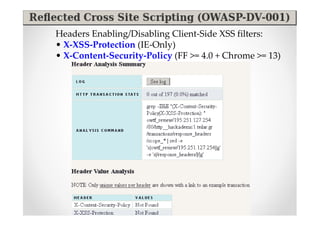
Headers Enabling/Disabling Client-Side XSS filters:
• X-XSS-Protection (IE-Only)
• X-Content-Security-Policy (FF >= 4.0 + Chrome >= 13)
Demo / Exercise
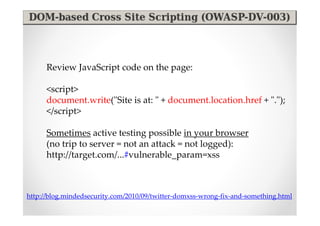
Review JavaScript code on the page:

      <script>
      document.write("Site is at: " + document.location.href + ".");
      </script>

      Sometimes active testing possible in your browser
      (no trip to server = not an attack = not logged):
      http://target.com/...#vulnerable_param=xss


http://blog.mindedsecurity.com/2010/09/twitter-domxss-wrong-fix-and-something.html
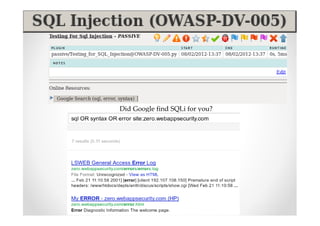
Did Google find SQLi for you?
Demo / Exercise
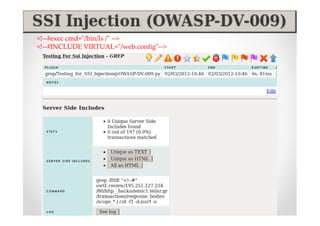
<!--#exec cmd="/bin/ls /" -->
<!--#INCLUDE VIRTUAL="/web.config"-->
Demo / Exercise
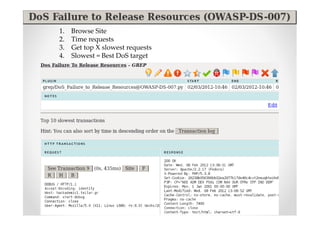
1.   Browse Site
2.   Time requests
3.   Get top X slowest requests
4.   Slowest = Best DoS target
Demo / Exercise
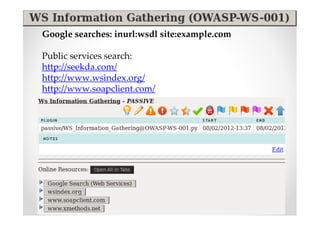
Google searches: inurl:wsdl site:example.com

Public services search:
http://seekda.com/
http://www.wsindex.org/
http://www.soapclient.com/
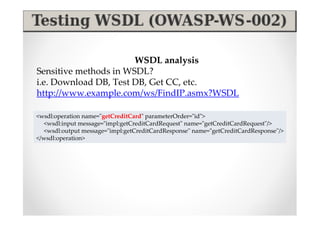
WSDL analysis
Sensitive methods in WSDL?
i.e. Download DB, Test DB, Get CC, etc.
http://www.example.com/ws/FindIP.asmx?WSDL

<wsdl:operation name="getCreditCard" parameterOrder="id">
   <wsdl:input message="impl:getCreditCardRequest" name="getCreditCardRequest"/>
   <wsdl:output message="impl:getCreditCardResponse" name="getCreditCardResponse"/>
</wsdl:operation>
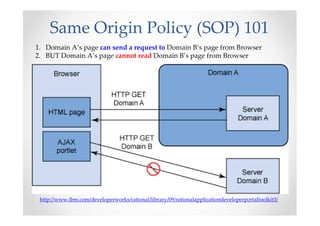
Same Origin Policy (SOP) 101
1. Domain A’s page can send a request to Domain B’s page from Browser
2. BUT Domain A’s page cannot read Domain B’s page from Browser


 http://www.ibm.com/developerworks/rational/library/09/rationalapplicationdeveloperportaltoolkit3/
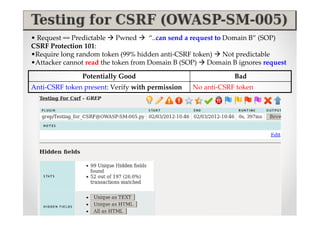
• Request == Predictable Pwned       “..can send a request to Domain B” (SOP)
CSRF Protection 101:
•Require long random token (99% hidden anti-CSRF token) Not predictable
•Attacker cannot read the token from Domain B (SOP) Domain B ignores request

               Potentially Good                               Bad
Anti-CSRF token present: Verify with permission   No anti-CSRF token
Demo / Exercise
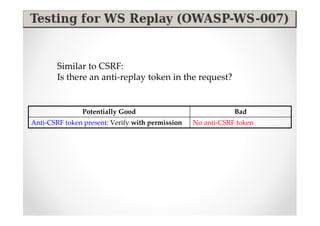
Similar to CSRF:
        Is there an anti-replay token in the request?


               Potentially Good                               Bad
Anti-CSRF token present: Verify with permission   No anti-CSRF token
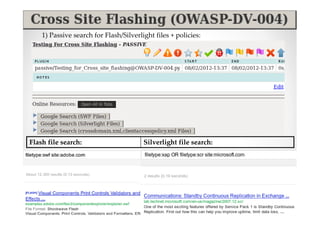
1) Passive search for Flash/Silverlight files + policies:


Flash file search:                      Silverlight file search:
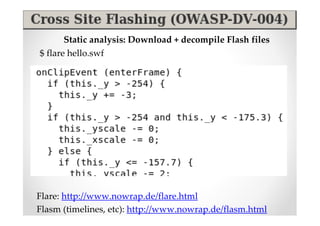
Static analysis: Download + decompile Flash files
$ flare hello.swf


Flare: http://www.nowrap.de/flare.html
Flasm (timelines, etc): http://www.nowrap.de/flasm.html
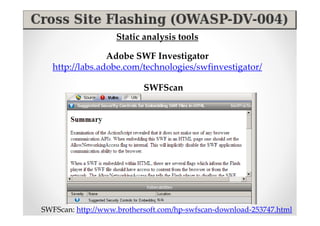
Static analysis tools

                 Adobe SWF Investigator
   http://labs.adobe.com/technologies/swfinvestigator/

                           SWFScan


SWFScan: http://www.brothersoft.com/hp-swfscan-download-253747.html
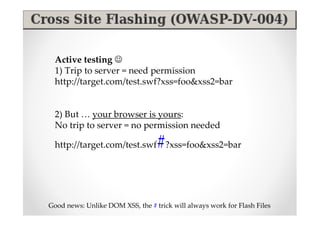
Active testing ☺
  1) Trip to server = need permission
  http://target.com/test.swf?xss=foo&xss2=bar


  2) But … your browser is yours:
  No trip to server = no permission needed

                                  #
  http://target.com/test.swf ?xss=foo&xss2=bar


Good news: Unlike DOM XSS, the # trick will always work for Flash Files
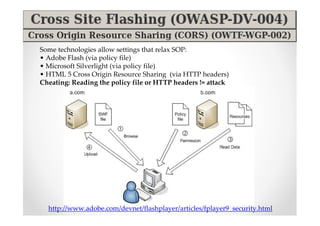
Some technologies allow settings that relax SOP:
• Adobe Flash (via policy file)
• Microsoft Silverlight (via policy file)
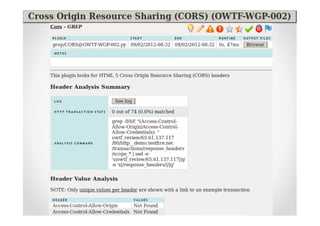
• HTML 5 Cross Origin Resource Sharing (via HTTP headers)
Cheating: Reading the policy file or HTTP headers != attack


  http://www.adobe.com/devnet/flashplayer/articles/fplayer9_security.html
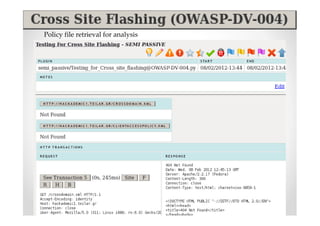
Policy file retrieval for analysis
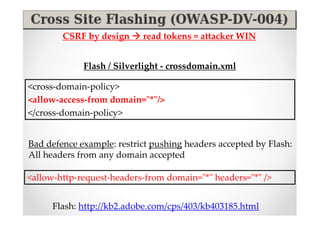
CSRF by design     read tokens = attacker WIN


             Flash / Silverlight - crossdomain.xml

<cross-domain-policy>
<allow-access-from domain="*"/>
</cross-domain-policy>


Bad defence example: restrict pushing headers accepted by Flash:
All headers from any domain accepted

<allow-http-request-headers-from domain="*" headers="*" />


     Flash: http://kb2.adobe.com/cps/403/kb403185.html
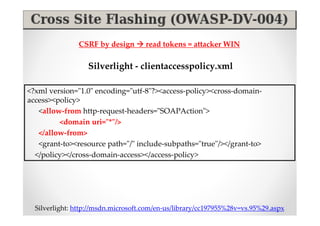
CSRF by design        read tokens = attacker WIN

                  Silverlight - clientaccesspolicy.xml

<?xml version="1.0" encoding="utf-8"?><access-policy><cross-domain-
access><policy>
   <allow-from http-request-headers="SOAPAction">
         <domain uri="*"/>
   </allow-from>
   <grant-to><resource path="/" include-subpaths="true"/></grant-to>
  </policy></cross-domain-access></access-policy>


  Silverlight: http://msdn.microsoft.com/en-us/library/cc197955%28v=vs.95%29.aspx
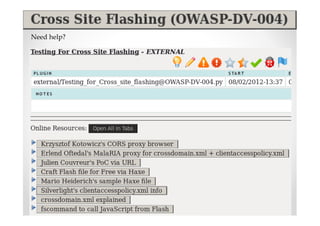
Need help?
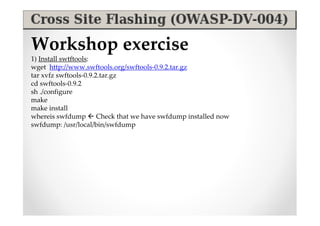
Workshop exercise
1) Install swtftools:
wget http://www.swftools.org/swftools-0.9.2.tar.gz
tar xvfz swftools-0.9.2.tar.gz
cd swftools-0.9.2
sh ./configure
make
make install
whereis swfdump  Check that we have swfdump installed now
swfdump: /usr/local/bin/swfdump
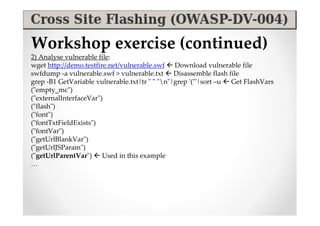
Workshop exercise (continued)
2) Analyse vulnerable file:
wget http://demo.testfire.net/vulnerable.swf  Download vulnerable file
swfdump -a vulnerable.swf > vulnerable.txt  Disassemble flash file
grep -B1 GetVariable vulnerable.txt|tr " " "n"|grep '("'|sort –u  Get FlashVars
("empty_mc")
("externalInterfaceVar")
("flash")
("font")
("fontTxtFieldExists")
("fontVar")
("getUrlBlankVar")
("getUrlJSParam")
("getUrlParentVar")  Used in this example
…
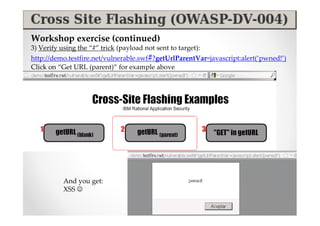
Workshop exercise (continued)
3) Verify using the “#” trick (payload not sent to target):
http://demo.testfire.net/vulnerable.swf#?getUrlParentVar=javascript:alert(‘pwned!’)
Click on “Get URL (parent)” for example above


           And you get:
           XSS ☺
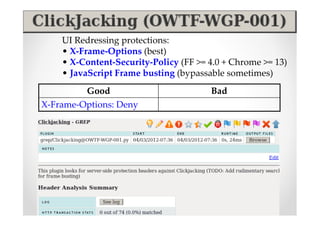
UI Redressing protections:
    • X-Frame-Options (best)
    • X-Content-Security-Policy (FF >= 4.0 + Chrome >= 13)
    • JavaScript Frame busting (bypassable sometimes)
         Good                          Bad
X-Frame-Options: Deny
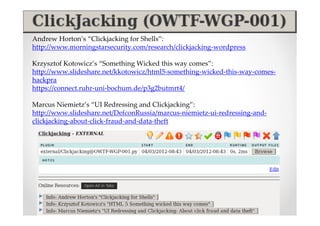
Andrew Horton’s “Clickjacking for Shells”:
http://www.morningstarsecurity.com/research/clickjacking-wordpress

Krzysztof Kotowicz’s “Something Wicked this way comes”:
http://www.slideshare.net/kkotowicz/html5-something-wicked-this-way-comes-
hackpra
https://connect.ruhr-uni-bochum.de/p3g2butmrt4/

Marcus Niemietz’s “UI Redressing and Clickjacking”:
http://www.slideshare.net/DefconRussia/marcus-niemietz-ui-redressing-and-
clickjacking-about-click-fraud-and-data-theft
Demo / Exercise
Part 2


  Active
Web analysis
Demo / Exercise
Part 3


Aux Plugins
Demo / Exercise
Special thanks to
  Adi Mutu (@an_animal), Gareth Heyes (@garethheyes), Krzysztof
Kotowicz (@kkotowicz), Marc Wickenden (@marcwickenden), Marcus
 Niemietz (@mniemietz), Mario Heiderich (@0x6D6172696F), Michael
  Kohl (@citizen428), Nicolas Grégoire (@Agarri_FR), Sandro Gauci
                           (@sandrogauci)
  OWASP Testing Guide contributors

  Finux Tech Weekly – Episode 17 – mins 31-49
  http://www.finux.co.uk/episodes/mp3/FTW-EP17.mp3
  Finux Tech Weekly – Episode 12 – mins 33-38
  http://www.finux.co.uk/episodes/mp3/FTW-EP12.mp3
  http://www.finux.co.uk/episodes/ogg/FTW-EP12.ogg
  Exotic Liability – Episode 83 – mins 49-53
  http://exoticliability.libsyn.com/exotic-liability-83-oh-yeah
Q&A
                             Abraham Aranguren
                                @7a_ @owtfp
                        abraham.aranguren@owasp.org
                                http://7-a.org
                               http://owtf.org


Project Site (links to everything): http://owtf.org
• Try OWTF: https://github.com/7a/owtf/tree/master/releases
• Try a demo report: https://github.com/7a/owtf/tree/master/demos
• Documentation: https://github.com/7a/owtf/tree/master/readme
• Contribute: https://github.com/7a/owtf

Introducing OWASP OWTF Workshop BruCon 2012

  • 1.
    Introducing 26th September 2012 Abraham Aranguren @7a_ @owtfp abraham.aranguren@owasp.org http://7-a.org http://owtf.org
  • 2.
    Agenda • Intro Before we start check OWTF Intro Installing OWTF Running OWTF • Part 1: OWTF Passive + Semi-passive Web analysis • Part 2: OWTF Active Web analysis • Part 3: OWTF aux plugins – SE, IDs testing • Conclusion • Q&A
  • 3.
    Before we start Ifyou don’t have OWTF or OWTF demos yet: Step 1) Go to http://owtf.org (redirects to OWASP project) Step 2) Start downloading the latest Version This link! ☺ Download OWASP OWTF Step 3) Start downloading the latest Demo This link! ☺ Download OWASP OWTF DEMOs (only Firefox >= 8 required)
  • 4.
    About me • Spanish dude • Uni: Degree, InfoSec research + honour mark • IT: Since 2000, defensive sec as netadmin / developer • (Offensive) InfoSec: Since 2007 • OSCP, CISSP, GWEB, CEH, MCSE, etc. • Web App Sec and Dev/Architect • Infosec consultant, blogger, OWTF, GIAC, BeEF
  • 5.
    Pentester disadvantage Pentesters vsBad guys • Pentesters have time/scope constraints != Bad guys • Pentesters have to write a report != Bad guys Complexity is increasing More complexity = more time needed to test properly Customers are rarely willing to: “Pay for enough / reasonable testing time“ A call for efficiency: • We must find vulns faster • We must be more efficient • .. or bad guys will find the vulns, not us
  • 6.
    A Pentester “cheatingtry” Offensive (Web) Testing Framework = Multi-level “cheating” tactics
  • 7.
    OWTF Chess-like approach Kasparov against Deep Blue - http://www.robotikka.com
  • 8.
  • 9.
  • 10.
    Installing OWTF IMPORTANT: ALLin the wiki: https://github.com/7a/owtf/wiki :) Option 1) (Easiest) From Backtrack - http://www.backtrack-linux.org apt-get install owtf cd /pentest/web/owtf/tools ./bt5_install.sh cd /pentest/web/owtf/install ./install.sh
  • 11.
    Installing OWTF Option 2)Manual Install Step 1 – Go to http://owtf.org - redirects to OWASP Project page Step 2 – Click on Download OWASP OWTF Step 3 – Select latest version + download Step 4 – tar xvfz OWTF_0.15_Brucon.tar.gz Step 5 – Check install scripts: cd install ; sudo ./install.sh – Install libraries cd tools ; ./bt5_install.sh, etc – Install tools
  • 12.
    Missing Tools [*]WARNING: Tool path not found for: /pentest/web/owtf/tools/restricted/ssl/ssl- cipher-check.pl [*] WARNING: Tool path not found for: /pentest/web/owtf/tools/restricted/arachni- v0.3-cde … [*] WARNING: Tool path not found for: /pentest/web/owtf/tools/restricted/hoppy- 1.8.1 [*] [*] WARNING!!!: 7 tools could not be found. Some suggestions: [*] - Define where your tools are here: /pentest/web/owtf/profiles/general/default.cfg [*] - Use the /pentest/web/owtf/tools/bt5_install.sh script to install missing tools Continue anyway? [y/n] NOTE: OWTF will run with the tools you have, installing all tools is not mandatory
  • 13.
    Define where toolsare Main Config file: /pentest/web/owtf/profiles/general/default.cfg Option 1) Full path TOOL_SET_DIR: /pentest/exploits/set TOOL_THEHARVESTER_DIR: /pentest/enumeration/theharvester TOOL_METAGOOFIL_DIR: /pentest/enumeration/google/metagoofil TOOL_HTTPRINT_DIR: /pentest/enumeration/web/httprint/linux TOOL_WAFW00F: /pentest/web/waffit/wafw00f.py Option 2) Framework path: @@@FRAMEWORK_DIR@@@/tools/… #TOOL_WHATWEB: @@@FRAMEWORK_DIR@@@/tools/whatweb/whatweb- 0.4.7/whatweb TOOL_WHATWEB: @@@FRAMEWORK_DIR@@@/tools/restricted/whatweb/whatweb-0.4.7/whatweb
  • 14.
  • 15.
    OWTF CLI help Callowtf without arguments to see the options available ./owtf.py … -l <web/net/aux>: list available plugins in the plugin group (web, net or aux) -f: force plugin result overwrite (default is avoid overwrite) -i <yes/no> interactive: yes (default, more control) / no (script-friendly) -e <except plugin1,2,..> comma separated list of plugins to be ignored in the test -o <only plugin1,2,..> comma separated list of the only plugins to be used in the test -p (ip:)port setup an inbound proxy for manual site analysis -x ip:port send all owtf requests using the proxy for the given ip and port -s Do not do anything, simply simulate how plugins would run …
  • 16.
    Listing OWTF plugins Thereare many plugins to choose from you can list them like this: ./owtf.py -l web | more … [*] **************************************** Passive Plugins [*] passive: Application_Discovery_____________________________(OWASP-IG- 005)________Third party discovery resources [*] passive: HTTP_Methods_and_XST______________________________(OWASP- CM-008)________Third party resources [*] passive: Old_Backup_and_Unreferenced_Files_________________(OWASP-CM- 006)________Google Hacking for juicy files …
  • 17.
    Simulation mode Simulation mode“-s”: 1) SIMULATES what OWTF will do (so it does not do it!): 2) Is useful to check the effect of a command before running it # owtf.py -s https://accounts.google.com | more
  • 18.
  • 19.
    Plugin Groups OWTF defines3 major plugin groups (-g): • web (default) = targets are interpreted as URLs = web assessment only • net = targets are interpreted as hosts/network ranges = traditional network discovery and probing • aux = targets are NOT interpreted, it is up to the plugin/resource definition to decide what to do with the target Example: The following would run all web plugins against http://demo.testfire.net ./owtf.py -g web http://demo.testfire.net
  • 20.
    Part 1 Passive andSemi-Passive Web analysis
  • 21.
    Plugin Types (-t) Atleast 48.5% (32 out of 66) of the tests in the OWASP Testing guide can be legally* performed at least partially without permission * Except in Spain, where visiting a page can be illegal ☺ * This is only my interpretation and not that of my employer + might not apply to your country!
  • 22.
    Plugins + PluginTypes • Only runs the passive plugins: owtf.py -t passive https://accounts.google.com • Only runs ALL Spiders_Robots_and_Crawlers plugins: owtf.py -o Spiders_Robots_and_Crawlers https://accounts.google.com • Only runs the passive Spiders_Robots_and_Crawlers plugin: owtf.py -t passive -o Spiders_Robots_and_Crawlers https://accounts.google.com
  • 23.
    Demo / Exercise Putting it all together..
  • 24.
    Too much info? Usethe filter to drill to what you care about:
  • 25.
    Before we continue Ifyou don’t have OWTF or OWTF demos yet: Step 1) Go to http://owtf.org (redirects to OWASP project) Step 2) Start downloading the latest Demo This link! ☺ Download OWASP OWTF DEMOs (only Firefox >= 8 required)
  • 26.
    Classic Pentest Stages 1.Pre-engagement: No permission “OWTF Cheat tactics” = Start here 2. Engagement: Permission Official test start = Active Testing here
  • 27.
    Context consideration: Case 1robots.txt Not Found …should Google index a site like this? Or should robots.txt exist and be like this? User-agent: * Disallow: /
  • 28.
    Case 1 robots.txtNot Found - Semi passive • Direct request for robots.txt • Without visiting entries
  • 29.
    Case 2 robots.txtFound – Passive • Indirect Stats, Downloaded txt file for review, “Open All in Tabs”
  • 30.
    OWTF HTML Filterchallenge: Embedding of untrusted third party HTML Defence layers: 1) HTML Filter: Open source challenge Filter 6 unchallenged since 04/02/2012, Can you hack it? ☺ http://blog.7-a.org/2012/01/embedding-untrusted-html-xss-challenge.html 2) HTML 5 sanboxed iframe 3) Storage in another directory = cannot access OWTF Review in localStorage
  • 31.
    Start reporting!: Takeyour notes with fancy formatting Step 1 – Click the “Edit” link Step 2 – Start documenting findings + Ensure preview is ok
  • 32.
    Start reporting!: PastePoC screenshots
  • 33.
    The magic bar;) – Useful to generate the human report later
  • 34.
  • 35.
    Passive Plugin Step 1-Browse output files to review the full raw tool output: Step 2 – Review tools run by the passive Search engine discovery plugin: Was your favourite tool not run? Tell OWTF to run your tools on: owtf_dir/profiles/resources/default.cfg (backup first!)
  • 36.
    Tool output canalso be reviewed via clicking through the OWTF report directly:
  • 37.
    The Harvester: •Emails •Employee Names •Subdomains •Hostnames http://www.edge-security.com/theHarvester.php
  • 38.
    Metadata analysis: • TODO:Integration with FOCA when CLI callable via wine (/cc @chemaalonso ☺) • Implemented: Integration with Metagoofil http://www.edge-security.com/metagoofil.php
  • 39.
  • 40.
    Inbound proxy notstable yet but all this happens automatically: • robots.txt entries added to “Potential URLs” • URLs found by tools are scraped + added to “Potential URLs” During Active testing (later): • “Potential URLs” visited + added to “Verified URLs” + Transaction log
  • 41.
    All HTTP transactionslogged by target in transaction log Step 1 – Click on “Transaction Log” Step 2 – Review transaction entries
  • 42.
    Step 3 –Review raw transaction information (if desired)
  • 43.
    Step 1 -Make all direct OWTF requests go through Outbound Proxy: Passes all entry points to the tactical fuzzer for analysis later Step 2 - Entry points can then also be analysed via tactical fuzzer:
  • 44.
  • 45.
    Goal: What isthat server running? Manually verify request for fingerprint:
  • 46.
    Whatweb integration withnon-aggresive parameter (semi passive detection): https://github.com/urbanadventurer/WhatWeb
  • 47.
  • 48.
    Convenient vulnerability searchbox (1 box per header found ☺): Search All Open all site searches in tabs
  • 49.
    Exploit DB -http://www.exploit-db.com
  • 50.
    NVD - http://web.nvd.nist.gov- CVSS Score = High
  • 51.
    OSVDB - http://osvdb.org- CVSS Score = High
  • 52.
  • 53.
  • 54.
  • 55.
  • 56.
    •CMS •Widgets •Libraries •etc http://builtwith.com
  • 57.
    Search in theheaders without touching the site: http://www.shodanhq.com/
  • 58.
    Passive suggestions - Prepareyour test in a terminal window to hit “Enter” on “permission minute 1”
  • 59.
    What else canbe done with a fingerprint?
  • 60.
    Environment replication Download it.. Sometimes from project page ☺ Also check http://www.oldapps.com/, Google, etc.
  • 61.
    Static Analyis, Fuzz,Try exploits, .. RIPS for PHP: http://rips-scanner.sourceforge.net/ Yasca for most other (also PHP): http://www.scovetta.com/yasca.html
  • 62.
  • 64.
  • 65.
  • 66.
  • 67.
  • 68.
  • 69.
    Has Google founderror messages for you?
  • 70.
    Check errors viaGoogle Cache
  • 71.
  • 73.
    The link isgenerated with OWTF with that box ticked: Important! https://www.ssllabs.com/ssldb/analyze.html
  • 74.
    Pretty graphs tocopy-paste to your OWTF report ☺ https://www.ssllabs.com/ssldb/analyze.html
  • 75.
    Do not forgetabout Strict-Transport-Security! sslstrip chances decrease dramatically: Only 1st time user visits the site!
  • 76.
  • 77.
  • 78.
  • 79.
    Efficient HTML contentmatches analysis Step 1 - Click Step 2 – Human Review of Unique matches
  • 80.
    Efficient HTML contentmatches analysis Step 1 - Click Step 2 –Review Unique matches (click on links for sample match info) Want to see all? then click
  • 81.
    HTML content analysis:CSS and JavaScript Comments (/* */)
  • 82.
    HTML content analysis:Single line JavaScript Comments (//)
  • 83.
    HTML content analysis:PHP source code
  • 84.
    HTML content analysis:ASP source code
  • 85.
  • 88.
  • 90.
    If you findan admin interface don’t forget to .. Google for default passwords:
  • 91.
    Disclaimer: Permission isrequired for this
  • 92.
  • 95.
  • 96.
  • 97.
    Is the loginpage on “http” instead of “https”?
  • 98.
  • 99.
    Pro Tip: Whenbrowsing the site manually .. … look carefully at pop-ups like this: Consider (i.e. prep the attack): Firesheep: http://codebutler.github.com/firesheep/ SSLStrip: https://github.com/moxie0/sslstrip
  • 100.
    Mario was goingto report a bug to Mozilla and found another!
  • 101.
    Abuse user/member publicsearch functions: • Search for “” (nothing) or “a”, then “b”, .. • Download all the data using 1) + pagination (if any) • Merge the results into a CSV-like format • Import + save as a spreadsheet • Show the spreadsheet to your customer
  • 102.
  • 103.
    Analyse the username(s)they gave you to test: • Username based on numbers? USER12345 • Username based on public info? (i.e. names, surnames, ..) name.surname • Default CMS user/pass?
  • 104.
  • 105.
    Part 1 –Remember Password: Autocomplete Good Bad Via 1) <form … autocomplete=“off”> <form action="/user/login" Or Via 2) <input … autocomplete=“off”> method="post"> <input type="password" name="pass" />
  • 106.
    Manual verification forpassword autocomplete (i.e. for the customer) Easy “your grandma can do it” test: 1. Login 2. Logout 3. Click the browser Back button twice* 4. Can you login again –without typing the login or password- by re- sending the login form? Can the user re-submit the login form via the back button? * Until the login form submission Other sensitive fields: Pentester manual verification • Credit card fields • Password hint fields • Other
  • 107.
    Part 2 -Password Reset forms Manually look at the questions / fields in the password reset form • Does it let you specify your email address? • Is it based on public info? (name, surname, etc) • Does it send an email to a potentially dead email address you can register? (i.e. hotmail.com)
  • 108.
  • 109.
    Goal: Is Cachingof sensitive info allowed? Manual verification steps: “your grandma can do it” ☺ (need login): 1. Login 2. Logout 3. Click the browser Back button 4. Do you see logged in content or a this page has expired error / the login page? Manual analysis tools: • Commands: curl –i http://target.com • Proxy: Burp, ZAP, WebScarab, etc • Browser Plugins: https://addons.mozilla.org/en-US/firefox/addon/live-http-headers/ https://addons.mozilla.org/en-US/firefox/addon/firebug/
  • 110.
    HTTP/1.1 headers Good Bad Cache-Control: no-cache Cache-control: private HTTP/1.0 headers Good Bad Pragma: no-cache Pragma: private Expires: <past date or illegal (e.g. 0)> Expires: <way too far in the future> The world Good Bad https://accounts.google.com No caching headers = caching allowed Cache-control: no-cache, no-store HTTP/1.1 200 OK Pragma: no-cache Date: Tue, 09 Aug 2011 13:38:43 GMT Expires: Mon, 01-Jan-1990 00:00:00 GMT Server: …. X-Powered-By: …. Connection: close Content-Type: text/html; charset=UTF-8
  • 112.
    Repeat for Metatags Good Bad <META HTTP-EQUIV="Cache-Control" <META HTTP-EQUIV="Cache-Control" CONTENT="no-cache"> CONTENT=“private">
  • 113.
  • 114.
    Step 1 –Find CAPTCHAs: Passive search
  • 115.
    Offline Manual analysis: •Download image and try to break it • Are CAPTCHAs reused? • Is a hash or token passed? (Good algorithm? Predictable?) • Look for vulns on CAPTCHA version CAPTCHA breaking tools PWNtcha - captcha decoder - http://caca.zoy.org/wiki/PWNtcha Captcha Breaker - http://churchturing.org/captcha-dist/
  • 116.
  • 117.
    Manually Examine cookiesfor weaknesses offline Base64 Encoding (!= Encryption ☺) Decoded value MTkyLjE2OC4xMDAuMTpvd2FzcHVzZ owaspuser:192.168.100.1: XI6cGFzc3dvcmQ6MTU6NTg= a7656fafe94dae72b1e1487670148412
  • 118.
  • 119.
    Lots of decodeoptions, including: • auto_decode • auto_decode_repeat • d_base64 • etc. http://hackvertor.co.uk/public
  • 120.
    F5 BIG-IP Cookiedecoder: http://blog.taddong.com/2011/12/cookie-decoder-f5-big-ip.html
  • 121.
  • 122.
    • Secure: notset= session cookie leaked= pwned • HttpOnly: not set = cookies stealable via JS • Domain: set properly • Expires: set reasonably • Path: set to the right /sub-application • 1 session cookie that works is enough ..
  • 124.
  • 125.
    Manually check whenverifying credentials during pre-engagement: Login and analyse the Session ID cookie (i.e. PHPSESSID) Good Bad (normal + by default) Before: 10a966616e8ed63f7a9b741f80e65e3c Before: 10a966616e8ed63f7a9b741f80e65e3c After: Nao2mxgho6p9jisslen9v3t6o5f943h After: 10a966616e8ed63f7a9b741f80e65e3c IMPORTANT: You can also set the session ID via JavaScript (i.e. XSS)
  • 126.
  • 127.
    Session ID: • InURL • In POST • In HTML Example from the field: http://target.com/xxx/xyz.function?session_num=7785 Look at unauthenticated cross-site requests: http://other-site.com/user=3&report=4 Referer: site.com Change ids in application: (ids you have permission for!) http://site.com/view_doc=4
  • 128.
  • 129.
    Headers Enabling/Disabling Client-SideXSS filters: • X-XSS-Protection (IE-Only) • X-Content-Security-Policy (FF >= 4.0 + Chrome >= 13)
  • 130.
  • 131.
    Review JavaScript codeon the page: <script> document.write("Site is at: " + document.location.href + "."); </script> Sometimes active testing possible in your browser (no trip to server = not an attack = not logged): http://target.com/...#vulnerable_param=xss http://blog.mindedsecurity.com/2010/09/twitter-domxss-wrong-fix-and-something.html
  • 132.
    Did Google findSQLi for you?
  • 133.
  • 134.
    <!--#exec cmd="/bin/ls /"--> <!--#INCLUDE VIRTUAL="/web.config"-->
  • 135.
  • 136.
    1. Browse Site 2. Time requests 3. Get top X slowest requests 4. Slowest = Best DoS target
  • 137.
  • 138.
    Google searches: inurl:wsdlsite:example.com Public services search: http://seekda.com/ http://www.wsindex.org/ http://www.soapclient.com/
  • 139.
    WSDL analysis Sensitive methodsin WSDL? i.e. Download DB, Test DB, Get CC, etc. http://www.example.com/ws/FindIP.asmx?WSDL <wsdl:operation name="getCreditCard" parameterOrder="id"> <wsdl:input message="impl:getCreditCardRequest" name="getCreditCardRequest"/> <wsdl:output message="impl:getCreditCardResponse" name="getCreditCardResponse"/> </wsdl:operation>
  • 140.
    Same Origin Policy(SOP) 101 1. Domain A’s page can send a request to Domain B’s page from Browser 2. BUT Domain A’s page cannot read Domain B’s page from Browser http://www.ibm.com/developerworks/rational/library/09/rationalapplicationdeveloperportaltoolkit3/
  • 141.
    • Request ==Predictable Pwned “..can send a request to Domain B” (SOP) CSRF Protection 101: •Require long random token (99% hidden anti-CSRF token) Not predictable •Attacker cannot read the token from Domain B (SOP) Domain B ignores request Potentially Good Bad Anti-CSRF token present: Verify with permission No anti-CSRF token
  • 142.
  • 143.
    Similar to CSRF: Is there an anti-replay token in the request? Potentially Good Bad Anti-CSRF token present: Verify with permission No anti-CSRF token
  • 144.
    1) Passive searchfor Flash/Silverlight files + policies: Flash file search: Silverlight file search:
  • 145.
    Static analysis: Download+ decompile Flash files $ flare hello.swf Flare: http://www.nowrap.de/flare.html Flasm (timelines, etc): http://www.nowrap.de/flasm.html
  • 146.
    Static analysis tools Adobe SWF Investigator http://labs.adobe.com/technologies/swfinvestigator/ SWFScan SWFScan: http://www.brothersoft.com/hp-swfscan-download-253747.html
  • 147.
    Active testing ☺ 1) Trip to server = need permission http://target.com/test.swf?xss=foo&xss2=bar 2) But … your browser is yours: No trip to server = no permission needed # http://target.com/test.swf ?xss=foo&xss2=bar Good news: Unlike DOM XSS, the # trick will always work for Flash Files
  • 148.
    Some technologies allowsettings that relax SOP: • Adobe Flash (via policy file) • Microsoft Silverlight (via policy file) • HTML 5 Cross Origin Resource Sharing (via HTTP headers) Cheating: Reading the policy file or HTTP headers != attack http://www.adobe.com/devnet/flashplayer/articles/fplayer9_security.html
  • 149.
  • 150.
    CSRF by design read tokens = attacker WIN Flash / Silverlight - crossdomain.xml <cross-domain-policy> <allow-access-from domain="*"/> </cross-domain-policy> Bad defence example: restrict pushing headers accepted by Flash: All headers from any domain accepted <allow-http-request-headers-from domain="*" headers="*" /> Flash: http://kb2.adobe.com/cps/403/kb403185.html
  • 151.
    CSRF by design read tokens = attacker WIN Silverlight - clientaccesspolicy.xml <?xml version="1.0" encoding="utf-8"?><access-policy><cross-domain- access><policy> <allow-from http-request-headers="SOAPAction"> <domain uri="*"/> </allow-from> <grant-to><resource path="/" include-subpaths="true"/></grant-to> </policy></cross-domain-access></access-policy> Silverlight: http://msdn.microsoft.com/en-us/library/cc197955%28v=vs.95%29.aspx
  • 152.
  • 153.
    Workshop exercise 1) Installswtftools: wget http://www.swftools.org/swftools-0.9.2.tar.gz tar xvfz swftools-0.9.2.tar.gz cd swftools-0.9.2 sh ./configure make make install whereis swfdump  Check that we have swfdump installed now swfdump: /usr/local/bin/swfdump
  • 154.
    Workshop exercise (continued) 2)Analyse vulnerable file: wget http://demo.testfire.net/vulnerable.swf  Download vulnerable file swfdump -a vulnerable.swf > vulnerable.txt  Disassemble flash file grep -B1 GetVariable vulnerable.txt|tr " " "n"|grep '("'|sort –u  Get FlashVars ("empty_mc") ("externalInterfaceVar") ("flash") ("font") ("fontTxtFieldExists") ("fontVar") ("getUrlBlankVar") ("getUrlJSParam") ("getUrlParentVar")  Used in this example …
  • 155.
    Workshop exercise (continued) 3)Verify using the “#” trick (payload not sent to target): http://demo.testfire.net/vulnerable.swf#?getUrlParentVar=javascript:alert(‘pwned!’) Click on “Get URL (parent)” for example above And you get: XSS ☺
  • 157.
    UI Redressing protections: • X-Frame-Options (best) • X-Content-Security-Policy (FF >= 4.0 + Chrome >= 13) • JavaScript Frame busting (bypassable sometimes) Good Bad X-Frame-Options: Deny
  • 158.
    Andrew Horton’s “Clickjackingfor Shells”: http://www.morningstarsecurity.com/research/clickjacking-wordpress Krzysztof Kotowicz’s “Something Wicked this way comes”: http://www.slideshare.net/kkotowicz/html5-something-wicked-this-way-comes- hackpra https://connect.ruhr-uni-bochum.de/p3g2butmrt4/ Marcus Niemietz’s “UI Redressing and Clickjacking”: http://www.slideshare.net/DefconRussia/marcus-niemietz-ui-redressing-and- clickjacking-about-click-fraud-and-data-theft
  • 159.
  • 160.
    Part 2 Active Web analysis
  • 161.
  • 162.
  • 163.
  • 164.
    Special thanks to Adi Mutu (@an_animal), Gareth Heyes (@garethheyes), Krzysztof Kotowicz (@kkotowicz), Marc Wickenden (@marcwickenden), Marcus Niemietz (@mniemietz), Mario Heiderich (@0x6D6172696F), Michael Kohl (@citizen428), Nicolas Grégoire (@Agarri_FR), Sandro Gauci (@sandrogauci) OWASP Testing Guide contributors Finux Tech Weekly – Episode 17 – mins 31-49 http://www.finux.co.uk/episodes/mp3/FTW-EP17.mp3 Finux Tech Weekly – Episode 12 – mins 33-38 http://www.finux.co.uk/episodes/mp3/FTW-EP12.mp3 http://www.finux.co.uk/episodes/ogg/FTW-EP12.ogg Exotic Liability – Episode 83 – mins 49-53 http://exoticliability.libsyn.com/exotic-liability-83-oh-yeah
  • 165.
    Q&A Abraham Aranguren @7a_ @owtfp abraham.aranguren@owasp.org http://7-a.org http://owtf.org Project Site (links to everything): http://owtf.org • Try OWTF: https://github.com/7a/owtf/tree/master/releases • Try a demo report: https://github.com/7a/owtf/tree/master/demos • Documentation: https://github.com/7a/owtf/tree/master/readme • Contribute: https://github.com/7a/owtf