Call Tracker
for Pipedrive CRM
Overview
Current Version
1.0.62
Updated
August 16, 2017
Requires Android
4.0 and up
Offered by
MagneticOne Mobile
Call Tracker for Pipedrive CRM
This is exactly what you need to work effectively
with Contacts. The main function is to add calls to
Pipedrive directly from your smartphone. All
information about the call (number, contact name,
duration and other additional data) will be added to
your CRM at the end of the call. Also, you can set
up the call recording function and call records will
be sent to your Google Drive.
How it works:
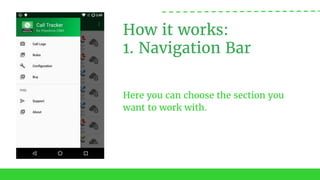
1. Navigation Bar
Here you can choose the section you
want to work with.
How it works:
2. Call logs
All the incoming and outgoing calls
are shown here. If you click on any
call, the new window is opened.
How it works:
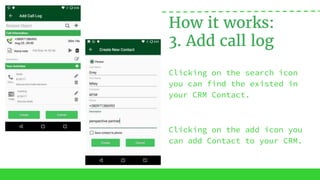
3. Add call log
Clicking on the search icon
you can find the existed in
your CRM Contact.
Clicking on the add icon you
can add Contact to your CRM.
How it works:
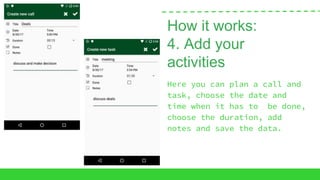
4. Add your
activities
Here you can plan a call and
task, choose the date and
time when it has to be done,
choose the duration, add
notes and save the data.
How it works:
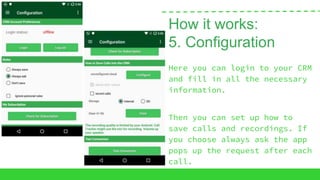
5. Configuration
Here you can login to your CRM
and fill in all the necessary
information.
Then you can set up how to
save calls and recordings. If
you choose always ask the app
pops up the request after each
call.
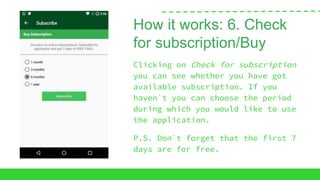
How it works: 6. Check
for subscription/Buy
Clicking on Check for subscription
you can see whether you have got
available subscription. If you
haven`t you can choose the period
during which you would like to use
the application.
P.S. Don`t forget that the first 7
days are for free.
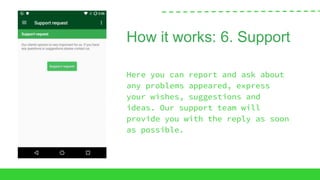
How it works: 6. Support
Here you can report and ask about
any problems appeared, express
your wishes, suggestions and
ideas. Our support team will
provide you with the reply as soon
as possible.
Features
Easily tracks incoming and outgoing calls as
Tasks in Pipedrive
Record calls - audio files can be automatically
sent to user’s Google Drive
Ability to attach calls to a Contact
Add Voice Notes
Create rules to enable automatic call tracking
for Contacts
Add calls later from your Call Log
Find more
Landing page: http://magneticonemobile.com/CallTracker/
Facebook: https://www.facebook.com/magneticonemobile/
Twitter: https://twitter.com/M1Mobile
YouTube: https://www.youtube.com/channel/UCqvVp23EiVdKrgQIyRsz51w

Basic tips how to use Call Tracker for Pipedrive CRM!

  • 1.
  • 2.
    Overview Current Version 1.0.62 Updated August 16,2017 Requires Android 4.0 and up Offered by MagneticOne Mobile
  • 3.
    Call Tracker forPipedrive CRM This is exactly what you need to work effectively with Contacts. The main function is to add calls to Pipedrive directly from your smartphone. All information about the call (number, contact name, duration and other additional data) will be added to your CRM at the end of the call. Also, you can set up the call recording function and call records will be sent to your Google Drive.
  • 4.
    How it works: 1.Navigation Bar Here you can choose the section you want to work with.
  • 5.
    How it works: 2.Call logs All the incoming and outgoing calls are shown here. If you click on any call, the new window is opened.
  • 6.
    How it works: 3.Add call log Clicking on the search icon you can find the existed in your CRM Contact. Clicking on the add icon you can add Contact to your CRM.
  • 7.
    How it works: 4.Add your activities Here you can plan a call and task, choose the date and time when it has to be done, choose the duration, add notes and save the data.
  • 8.
    How it works: 5.Configuration Here you can login to your CRM and fill in all the necessary information. Then you can set up how to save calls and recordings. If you choose always ask the app pops up the request after each call.
  • 9.
    How it works:6. Check for subscription/Buy Clicking on Check for subscription you can see whether you have got available subscription. If you haven`t you can choose the period during which you would like to use the application. P.S. Don`t forget that the first 7 days are for free.
  • 10.
    How it works:6. Support Here you can report and ask about any problems appeared, express your wishes, suggestions and ideas. Our support team will provide you with the reply as soon as possible.
  • 11.
    Features Easily tracks incomingand outgoing calls as Tasks in Pipedrive Record calls - audio files can be automatically sent to user’s Google Drive Ability to attach calls to a Contact Add Voice Notes Create rules to enable automatic call tracking for Contacts Add calls later from your Call Log
  • 12.
    Find more Landing page:http://magneticonemobile.com/CallTracker/ Facebook: https://www.facebook.com/magneticonemobile/ Twitter: https://twitter.com/M1Mobile YouTube: https://www.youtube.com/channel/UCqvVp23EiVdKrgQIyRsz51w