Are You Experienced?
Exploring User Experience
in Public Libraries
Do You Have “Standards” in
Your Library?
Whys know about standards?
De facto and de jure standards make any
technology usable. Without standards, well,
we would be in a poor situation…
What is a de facto standard?
De facto standards are formed when a product
has sufficient market share so that other vendors
are forced to use the same specifications for their
products.
example: MS Windows, Adobe Acrobat's .pdf, etc.
Products from de facto standards may be economically
successful but they are not necessarily the best from a
technological point of view.
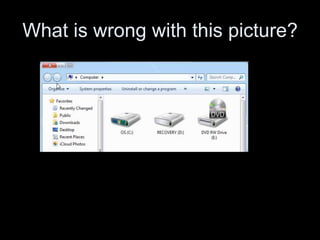
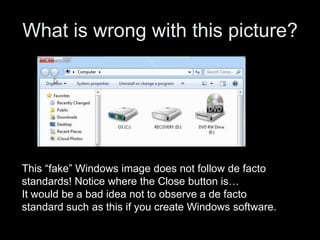
What is wrong with this picture?
This “fake” Windows image does not follow de facto
standards! Notice where the Close button is…
It would be a bad idea not to observe a de facto
standard such as this if you create Windows software.
What is a de jure standard?
De jure standards arise through common
agreement within an industry. Organizations and
interested parties (commercial companies,
research institutions, etc.) develop these
standards.
example: TCP/IP, IEEE1394, etc.
NOTE: Because it takes time to develop and agree upon
industry specifications, de jure standards often lag behind
technological developments and needs.
What are common
standards organizations?
• NISO (National Information Standards Organization - 1939):
Voting members include many libraries, publishers, information
producers, etc. (ex. Z39.50)
• ANSI (American National Standards Institute - 1918): The
umbrella group for standards organizations in the US. A major
publisher of standards, it lists more than 8,000 current standards.
• IEEE (Institute of Electrical and Electronic Engineers - 1884):
World’s largest technical professional society. Has issued most of
the relevant standards for cabling and networking.
• W3C (World Wide Web Consortium - 1994): Created to develop
common protocols for the Web. It actually “recommends” standards
and has other bodies adopt them. (ex. HTML, XML)
etc….
Do we need to know the
difference between de facto and
de jure standards?
You use a mixture of these standards every
day, no matter what you do. For those
interested in library technology, you should
understand the difference.
And best yet, you can impress your friends with such knowledge.
What makes
successful standards?
• They meet a recognized need.
• They reflect a consensus.
• They protect both producer and consumer.
• They make economic sense.
• They reflect current technology.
Must we adhere to standards?
• The US does not require adherence to
standards. Adoption is voluntary except for the
federal government.
• The US does not rely on government agencies
to create standards. Volunteers funded by their
employers create standards. (This situation often
results in a vendor-dominated process where
the vendors with the most at stake and the
largest budgets control the process.)
Why, then, do we follow
to standards?
The value of standards in library technology
makes possible:
• interoperability among equipment, data, etc. for
making information exchange possible
• ease of use on the interface level of an
application
• recognized levels of quality
• competition among vendors, which leads to
better products and cheaper prices
So what should a librarian
know about standards?
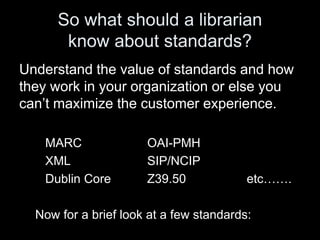
Understand the value of standards and how
they work in your organization or else you
can’t maximize the customer experience.
MARC OAI-PMH
XML SIP/NCIP
Dublin Core Z39.50 etc…….
Now for a brief look at a few standards:
MARC
"…provides the mechanism by which computers
exchange, use, and interpret bibliographic
information, and its data elements make up the
foundation of most library catalogs used today."
http://www.loc.gov/marc/faq.html
Our oldest electronic standard (developed in the
early (1960s) is still essential to our data
exchange. Unfortunately.
See: www.loc.gov/marc/ for more info.
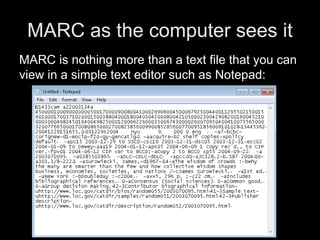
MARC as the computer sees it
MARC is nothing more than a text file that you can
view in a simple text editor such as Notepad:
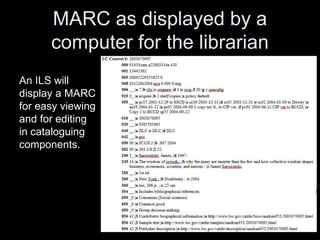
MARC as displayed by a
computer for the librarian
An ILS will
display a MARC
for easy viewing
and for editing
in cataloguing
components.
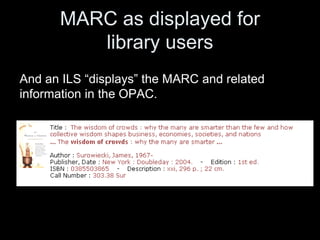
MARC as displayed for
library users
And an ILS “displays” the MARC and related
information in the OPAC.
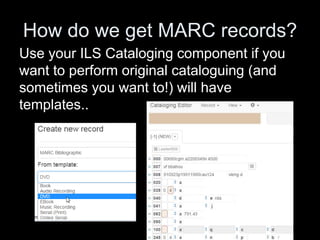
How do we get MARC records?
Use your ILS Cataloging component if you
want to perform original cataloguing (and
sometimes you want to!) will have
templates..
Or… Z39.50
Use your Cataloging component to get online and
download free or fee-based MARC records.
Your Cataloging component will employ the
Z39.50 standard to search other servers for MARC
records. Another old but still useful standard.
See www.niso.org/publications/press/Z3950_primer.pdf for
a “Primer on the Protocol”
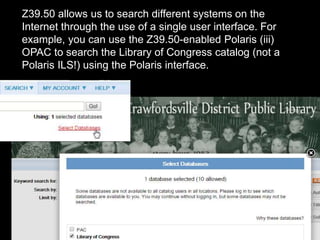
Z39.50 allows us to search different systems on the
Internet through the use of a single user interface. For
example, you can use the Z39.50-enabled Polaris (iii)
OPAC to search the Library of Congress catalog (not a
Polaris ILS!) using the Polaris interface.
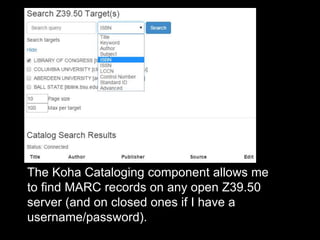
The Koha Cataloging component allows me
to find MARC records on any open Z39.50
server (and on closed ones if I have a
username/password).
How does Z39.50 work?
“Z39.50 operates in a client/server
environment, acting as a common
language that all Z39.50-enabled systems
can understand. It is an Esperanto-like
language that bridges the many
‘languages and dialects’ that different
information systems ‘speak.’”
www.niso.org/publications/press/Z3950_primer.pdf
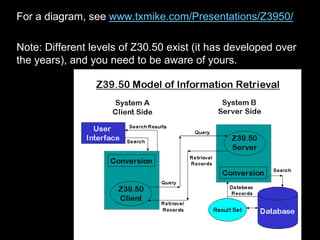
For a diagram, see www.txmike.com/Presentations/Z3950/
Note: Different levels of Z30.50 exist (it has developed over
the years), and you need to be aware of yours.
Try it out…
Use the PTFS Koha ILS online demo:
ptfsdemo-staff.kohalibrary.com/cgi-
bin/koha/mainpage.pl
Log on as liblime/liblime
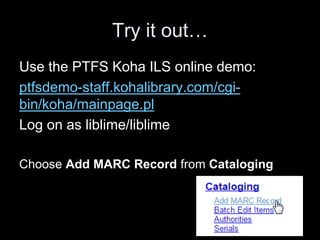
Choose Add MARC Record from Cataloging
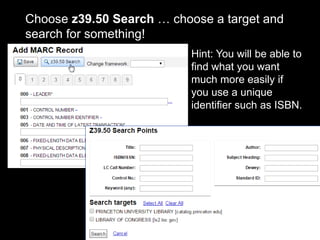
Choose z39.50 Search … choose a target and
search for something!
Hint: You will be able to
find what you want
much more easily if
you use a unique
identifier such as ISBN.
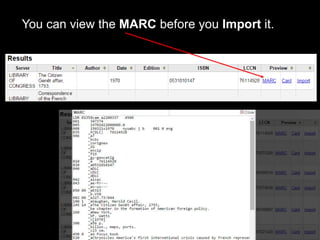
You can view the MARC before you Import it.
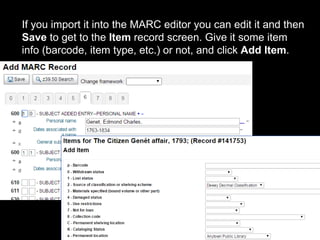
If you import it into the MARC editor you can edit it and then
Save to get to the Item record screen. Give it some item
info (barcode, item type, etc.) or not, and click Add Item.
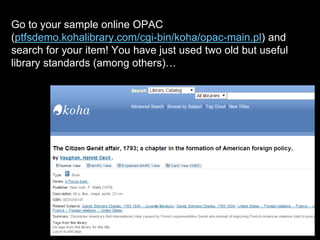
Go to your sample online OPAC
(ptfsdemo.kohalibrary.com/cgi-bin/koha/opac-main.pl) and
search for your item! You have just used two old but useful
library standards (among others)…
SIP/NCIP
The Standard Interchange Protocol (SIP) was
created by 3M in the 1990s to allow their self-
check machines to exchange circulation messages
with library systems. It has been refined to allow
other devices to communicate with automated
systems. SIP2 (version 2 of SIP) appeared in 2006
and became the de facto standard for the use of
self checks with ILSs.
In 2012 3M donated SIP2 and SIP3 to NISO for
the formal standard process…
SIP
Basic self-service transactions between
disparate systems. Transactions include:
• authentication of a patron (e.g., to log onto a
computer)
• item checkout/checkin with a self-check machine
• communication between RFID vendor system
and ILS
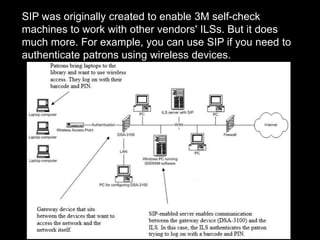
SIP was originally created to enable 3M self-check
machines to work with other vendors' ILSs. But it does
much more. For example, you can use SIP if you need to
authenticate patrons using wireless devices.
So why NCIP if SIP works?
NCIP, the National Circulation Interchange
Protocol, is a standard published by NISO as
Z39.83 (in 2003). Library system vendors and the
developers of related software have been planning
its implementation in their products.
NCIP has three major application areas:
1. Self-Service Circulation (SSC): Based on the
SIP2 protocol, it is also used for patron lookup
and authentication based on the patron files.
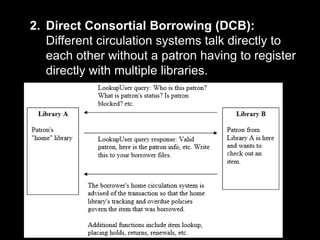
2. Direct Consortial Borrowing (DCB):
Different circulation systems talk directly to
each other without a patron having to register
directly with multiple libraries.
3. Circulation/Interlibrary Loan (C/ILL): Many
libraries use different circulation and ILL
systems; the circulation system is not aware of
ILL transactions. Thus, circulation features (e.g.,
fines, overdue notification) can't be used. In
effect, two systems are trying to keep track of a
single patron's transactions. CILL allows the
exchange of information between circulation and
ILL systems.
So NCIP can do all that SIP can do, but better,
and with encryption.
XML
XML (eXtensible Markup Language) goes beyond
HTML because it describes the role of what it
“marks up” as well as the structure of the
information.
It is not concerned with the presentation of the
information.
XML
Like HTML, XML is text-based and machine-
independent to be accessible on any platform.
Because XML separates content from display
(unlike HTML) it is a great metadata carrier since it
can be extended with customized tags to describe
any resource. XML makes data more useable and
searchable than a markup language like HTML
that can’t really describe content.*
*HTML5 does include a series of sematic tags to aid website designers
“describe” what is in a certain part of a webpage, such as <header, <footer>,
etc.
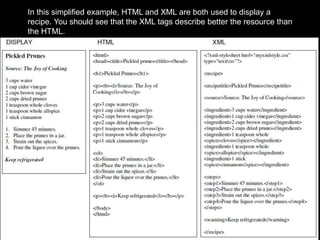
In this simplified example, HTML and XML are both used to display a
recipe. You should see that the XML tags describe better the resource than
the HTML.
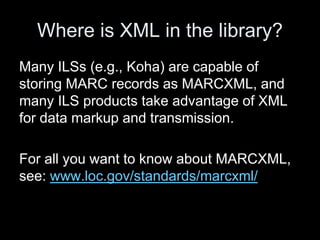
Where is XML in the library?
Many ILSs (e.g., Koha) are capable of
storing MARC records as MARCXML, and
many ILS products take advantage of XML
for data markup and transmission.
For all you want to know about MARCXML,
see: www.loc.gov/standards/marcxml/
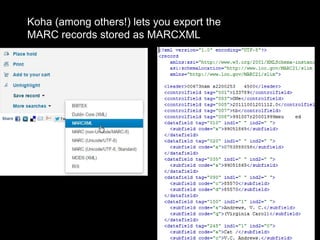
Koha (among others!) lets you export the
MARC records stored as MARCXML
Dublin Core
XML is used for more than just a superior
carrier for MARC metadata, however. XML is
the de facto standard for marking up
metadata on the web – making it findable and
accessible.
For example, if you want your digital
repository harvestable via OAI-PMH, it is best
to encode it in simple Dublin Core XML.
So what does Dublin Core do?
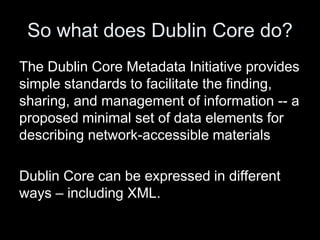
The Dublin Core Metadata Initiative provides
simple standards to facilitate the finding,
sharing, and management of information -- a
proposed minimal set of data elements for
describing network-accessible materials
Dublin Core can be expressed in different
ways – including XML.
What are the Simple
Dublin Core elements?
Title
Creator
Subject
Description
Publisher
Contributor
Date
Type
Format
Identifier
Source
Language
Relation
Coverage
Rights
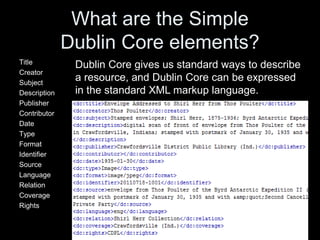
Dublin Core gives us standard ways to describe
a resource, and Dublin Core can be expressed
in the standard XML markup language.
Do I need to worry about
Dublin Core?
If you are interested in creating digital
repositories whose metadata can be
discovered and harvested via OAI-PMH…yes.
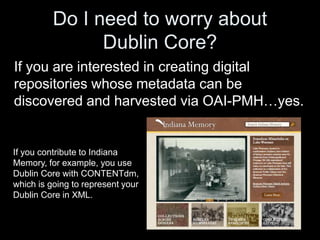
If you contribute to Indiana
Memory, for example, you use
Dublin Core with CONTENTdm,
which is going to represent your
Dublin Core in XML.
So what is this OAI-PMH?
Open Archives Initiative Protocol for Metadata Harvesting
OAI-PMH is a protocol designed to collect metadata from
various repositories.
• "Harvesters" (Service Providers) request information on
updated records from "repositories" (Data Providers). The
data providers must provide XML metadata in Simple
Dublin Core format. These harvesters issue OAI-PMH
requests to Data Providers in order to harvest and store
metadata for building value-added services.
• Data Providers (repositories) – possibly YOU! – provide
access to metadata and possibly access to full texts or
other resources.
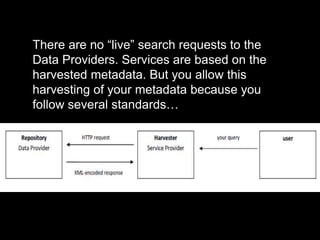
There are no “live” search requests to the
Data Providers. Services are based on the
harvested metadata. But you allow this
harvesting of your metadata because you
follow several standards…
Gee, how many more standards
do I need to know about?
More than I want to make slides for.
But at least you know the ones you most
commonly encounter in day-to-day library
functioning. You need to understand the old
standards and be aware of upcoming
standards to serve your patrons and
yourself.
Remember those pesky RFPs…
If you ever have to create a Request for Proposal
for a new ILS, you will surely need to know about
standards. See the old but still good:
The RFP Writer's Guide to Standards for Library
Systems by Cynthia Hodgson, published by the
National Information Standards Organization
(2002):
http://www.niso.org/publications/press/RFP_Writers_Guide.pdf
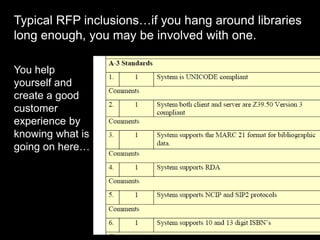
Typical RFP inclusions…if you hang around libraries
long enough, you may be involved with one.
You help
yourself and
create a good
customer
experience by
knowing what is
going on here…

4 - Standards

  • 1.
    Are You Experienced? ExploringUser Experience in Public Libraries Do You Have “Standards” in Your Library?
  • 2.
    Whys know aboutstandards? De facto and de jure standards make any technology usable. Without standards, well, we would be in a poor situation…
  • 3.
    What is ade facto standard? De facto standards are formed when a product has sufficient market share so that other vendors are forced to use the same specifications for their products. example: MS Windows, Adobe Acrobat's .pdf, etc. Products from de facto standards may be economically successful but they are not necessarily the best from a technological point of view.
  • 4.
    What is wrongwith this picture?
  • 5.
    What is wrongwith this picture? This “fake” Windows image does not follow de facto standards! Notice where the Close button is… It would be a bad idea not to observe a de facto standard such as this if you create Windows software.
  • 6.
    What is ade jure standard? De jure standards arise through common agreement within an industry. Organizations and interested parties (commercial companies, research institutions, etc.) develop these standards. example: TCP/IP, IEEE1394, etc. NOTE: Because it takes time to develop and agree upon industry specifications, de jure standards often lag behind technological developments and needs.
  • 7.
    What are common standardsorganizations? • NISO (National Information Standards Organization - 1939): Voting members include many libraries, publishers, information producers, etc. (ex. Z39.50) • ANSI (American National Standards Institute - 1918): The umbrella group for standards organizations in the US. A major publisher of standards, it lists more than 8,000 current standards. • IEEE (Institute of Electrical and Electronic Engineers - 1884): World’s largest technical professional society. Has issued most of the relevant standards for cabling and networking. • W3C (World Wide Web Consortium - 1994): Created to develop common protocols for the Web. It actually “recommends” standards and has other bodies adopt them. (ex. HTML, XML) etc….
  • 8.
    Do we needto know the difference between de facto and de jure standards? You use a mixture of these standards every day, no matter what you do. For those interested in library technology, you should understand the difference. And best yet, you can impress your friends with such knowledge.
  • 9.
    What makes successful standards? •They meet a recognized need. • They reflect a consensus. • They protect both producer and consumer. • They make economic sense. • They reflect current technology.
  • 10.
    Must we adhereto standards? • The US does not require adherence to standards. Adoption is voluntary except for the federal government. • The US does not rely on government agencies to create standards. Volunteers funded by their employers create standards. (This situation often results in a vendor-dominated process where the vendors with the most at stake and the largest budgets control the process.)
  • 11.
    Why, then, dowe follow to standards? The value of standards in library technology makes possible: • interoperability among equipment, data, etc. for making information exchange possible • ease of use on the interface level of an application • recognized levels of quality • competition among vendors, which leads to better products and cheaper prices
  • 12.
    So what shoulda librarian know about standards? Understand the value of standards and how they work in your organization or else you can’t maximize the customer experience. MARC OAI-PMH XML SIP/NCIP Dublin Core Z39.50 etc……. Now for a brief look at a few standards:
  • 13.
    MARC "…provides the mechanismby which computers exchange, use, and interpret bibliographic information, and its data elements make up the foundation of most library catalogs used today." http://www.loc.gov/marc/faq.html Our oldest electronic standard (developed in the early (1960s) is still essential to our data exchange. Unfortunately. See: www.loc.gov/marc/ for more info.
  • 14.
    MARC as thecomputer sees it MARC is nothing more than a text file that you can view in a simple text editor such as Notepad:
  • 15.
    MARC as displayedby a computer for the librarian An ILS will display a MARC for easy viewing and for editing in cataloguing components.
  • 16.
    MARC as displayedfor library users And an ILS “displays” the MARC and related information in the OPAC.
  • 17.
    How do weget MARC records? Use your ILS Cataloging component if you want to perform original cataloguing (and sometimes you want to!) will have templates..
  • 18.
    Or… Z39.50 Use yourCataloging component to get online and download free or fee-based MARC records. Your Cataloging component will employ the Z39.50 standard to search other servers for MARC records. Another old but still useful standard. See www.niso.org/publications/press/Z3950_primer.pdf for a “Primer on the Protocol”
  • 19.
    Z39.50 allows usto search different systems on the Internet through the use of a single user interface. For example, you can use the Z39.50-enabled Polaris (iii) OPAC to search the Library of Congress catalog (not a Polaris ILS!) using the Polaris interface.
  • 20.
    The Koha Catalogingcomponent allows me to find MARC records on any open Z39.50 server (and on closed ones if I have a username/password).
  • 21.
    How does Z39.50work? “Z39.50 operates in a client/server environment, acting as a common language that all Z39.50-enabled systems can understand. It is an Esperanto-like language that bridges the many ‘languages and dialects’ that different information systems ‘speak.’” www.niso.org/publications/press/Z3950_primer.pdf
  • 22.
    For a diagram,see www.txmike.com/Presentations/Z3950/ Note: Different levels of Z30.50 exist (it has developed over the years), and you need to be aware of yours.
  • 23.
    Try it out… Usethe PTFS Koha ILS online demo: ptfsdemo-staff.kohalibrary.com/cgi- bin/koha/mainpage.pl Log on as liblime/liblime Choose Add MARC Record from Cataloging
  • 24.
    Choose z39.50 Search… choose a target and search for something! Hint: You will be able to find what you want much more easily if you use a unique identifier such as ISBN.
  • 25.
    You can viewthe MARC before you Import it.
  • 26.
    If you importit into the MARC editor you can edit it and then Save to get to the Item record screen. Give it some item info (barcode, item type, etc.) or not, and click Add Item.
  • 27.
    Go to yoursample online OPAC (ptfsdemo.kohalibrary.com/cgi-bin/koha/opac-main.pl) and search for your item! You have just used two old but useful library standards (among others)…
  • 28.
    SIP/NCIP The Standard InterchangeProtocol (SIP) was created by 3M in the 1990s to allow their self- check machines to exchange circulation messages with library systems. It has been refined to allow other devices to communicate with automated systems. SIP2 (version 2 of SIP) appeared in 2006 and became the de facto standard for the use of self checks with ILSs. In 2012 3M donated SIP2 and SIP3 to NISO for the formal standard process…
  • 29.
    SIP Basic self-service transactionsbetween disparate systems. Transactions include: • authentication of a patron (e.g., to log onto a computer) • item checkout/checkin with a self-check machine • communication between RFID vendor system and ILS
  • 30.
    SIP was originallycreated to enable 3M self-check machines to work with other vendors' ILSs. But it does much more. For example, you can use SIP if you need to authenticate patrons using wireless devices.
  • 31.
    So why NCIPif SIP works? NCIP, the National Circulation Interchange Protocol, is a standard published by NISO as Z39.83 (in 2003). Library system vendors and the developers of related software have been planning its implementation in their products. NCIP has three major application areas: 1. Self-Service Circulation (SSC): Based on the SIP2 protocol, it is also used for patron lookup and authentication based on the patron files.
  • 32.
    2. Direct ConsortialBorrowing (DCB): Different circulation systems talk directly to each other without a patron having to register directly with multiple libraries.
  • 33.
    3. Circulation/Interlibrary Loan(C/ILL): Many libraries use different circulation and ILL systems; the circulation system is not aware of ILL transactions. Thus, circulation features (e.g., fines, overdue notification) can't be used. In effect, two systems are trying to keep track of a single patron's transactions. CILL allows the exchange of information between circulation and ILL systems. So NCIP can do all that SIP can do, but better, and with encryption.
  • 34.
    XML XML (eXtensible MarkupLanguage) goes beyond HTML because it describes the role of what it “marks up” as well as the structure of the information. It is not concerned with the presentation of the information.
  • 35.
    XML Like HTML, XMLis text-based and machine- independent to be accessible on any platform. Because XML separates content from display (unlike HTML) it is a great metadata carrier since it can be extended with customized tags to describe any resource. XML makes data more useable and searchable than a markup language like HTML that can’t really describe content.* *HTML5 does include a series of sematic tags to aid website designers “describe” what is in a certain part of a webpage, such as <header, <footer>, etc.
  • 36.
    In this simplifiedexample, HTML and XML are both used to display a recipe. You should see that the XML tags describe better the resource than the HTML.
  • 37.
    Where is XMLin the library? Many ILSs (e.g., Koha) are capable of storing MARC records as MARCXML, and many ILS products take advantage of XML for data markup and transmission. For all you want to know about MARCXML, see: www.loc.gov/standards/marcxml/
  • 38.
    Koha (among others!)lets you export the MARC records stored as MARCXML
  • 39.
    Dublin Core XML isused for more than just a superior carrier for MARC metadata, however. XML is the de facto standard for marking up metadata on the web – making it findable and accessible. For example, if you want your digital repository harvestable via OAI-PMH, it is best to encode it in simple Dublin Core XML.
  • 40.
    So what doesDublin Core do? The Dublin Core Metadata Initiative provides simple standards to facilitate the finding, sharing, and management of information -- a proposed minimal set of data elements for describing network-accessible materials Dublin Core can be expressed in different ways – including XML.
  • 41.
    What are theSimple Dublin Core elements? Title Creator Subject Description Publisher Contributor Date Type Format Identifier Source Language Relation Coverage Rights Dublin Core gives us standard ways to describe a resource, and Dublin Core can be expressed in the standard XML markup language.
  • 42.
    Do I needto worry about Dublin Core? If you are interested in creating digital repositories whose metadata can be discovered and harvested via OAI-PMH…yes. If you contribute to Indiana Memory, for example, you use Dublin Core with CONTENTdm, which is going to represent your Dublin Core in XML.
  • 43.
    So what isthis OAI-PMH? Open Archives Initiative Protocol for Metadata Harvesting OAI-PMH is a protocol designed to collect metadata from various repositories. • "Harvesters" (Service Providers) request information on updated records from "repositories" (Data Providers). The data providers must provide XML metadata in Simple Dublin Core format. These harvesters issue OAI-PMH requests to Data Providers in order to harvest and store metadata for building value-added services. • Data Providers (repositories) – possibly YOU! – provide access to metadata and possibly access to full texts or other resources.
  • 44.
    There are no“live” search requests to the Data Providers. Services are based on the harvested metadata. But you allow this harvesting of your metadata because you follow several standards…
  • 45.
    Gee, how manymore standards do I need to know about? More than I want to make slides for. But at least you know the ones you most commonly encounter in day-to-day library functioning. You need to understand the old standards and be aware of upcoming standards to serve your patrons and yourself.
  • 46.
    Remember those peskyRFPs… If you ever have to create a Request for Proposal for a new ILS, you will surely need to know about standards. See the old but still good: The RFP Writer's Guide to Standards for Library Systems by Cynthia Hodgson, published by the National Information Standards Organization (2002): http://www.niso.org/publications/press/RFP_Writers_Guide.pdf
  • 47.
    Typical RFP inclusions…ifyou hang around libraries long enough, you may be involved with one. You help yourself and create a good customer experience by knowing what is going on here…