
Live Webinar:
Webinar Audio:
You can dial the telephone numbers located on your webinar panel.
Or listen in using your headphones or computer speakers.
Welcome!
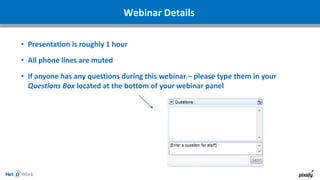
Webinar Details
• Presentation is roughly 1 hour
• All phone lines are muted
• If anyone has any questions during this webinar – please type them in your
Questions Box located at the bottom of your webinar panel
ADAM GOLDSCHMIEDT
Director of Operations
GARETH ROBERTS
Solutions Consultant
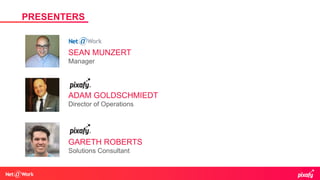
Presenters
PRESENTERS
SEAN MUNZERT
Manager
Pixafy is an ecommerce agency anchored in tradition and deeply
invested in the future of digital commerce. We are online retail
experts that specialize in B2C and B2B implementations.
ABOUT PIXAFY
Our highly experienced team with blended skill sets includes
platform engineers, UI developers, designers, marketers and system
architects to provide our clients digital transformation and channel
harmonization across every aspect of their ecommerce universe.
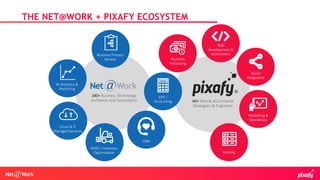
THE NET@WORK + PIXAFY ECOSYSTEM
40+ Web & eCommerce
Strategists & Engineers
Payment
Processing
Web
Development &
eCommerce
Social
Integration
Marketing &
Operations
Hosting
180+ Business Technology
Architects and Consultants
ERP /
Accounting
CRM
WMS / Inventory
Optimization
Cloud & IT
Managed Services
BI Analytics &
Reporting
Business Process
Review
• Cut out the middle man
• New Audience
• New Revenue Stream
• New Product/Offering
• Capitalize on Impulse
Buys
• Manage your message
WHY ARE YOU LOOKING TO START SELLING ONLINE?
• Type of Customer
• Geography/Localization/Globalizatio
n
• Demographics
WE ASSUME THAT YOU KNOW WHAT YOU'RE SELLING ONLINE.
NOW WHO ARE YOU SELLING TO?
• Who you are trying to reach will impact where
you market your offerings
• Who you are selling to will drive the decisions
you make that impact your bottom line, and
make sure that your marketing dollars spent are
putting the message out in front of who you want
to buy your products.
• Understanding how your customer engages with
your business and understanding the steps that
they take in their decision process will impact
the development needed to replicate that
process online
WHY IS ‘WHO I AM SELLING TO’ IMPORTANT?
• Where am I shipping from?
• Who is shipping these orders?
• What carriers/rates will I be offering my customers?
FULFILLMENT
• Where (what
states/jurisdictions) do I need to
charge sales tax?
• Which items that I am selling
require sales tax to be charged?
• Do I need to charge tax for
shipping?
• Which customers that I am
selling to are required to pay
tax?
SALES TAX
• What is ERP?
• Why does it matter for the web?
ERP & AUTOMATION
• Orders Out
• Shipments/Fulfillments In
• Inventory In
• Refunds/Returns
• Products
• Payments
• Customer Profiles/Information
• Other
AUTOMATION/INTEGRATION “TOUCH POINTS”
Features & Functionality
• Home
• About
• Contact
• Product Listing and Detail Pages
• My Account
• Shopping Cart
• Checkout
• Content Pages
STANDARD FEATURES
• Discounts/Coupons
• Gift Cards
• Loyalty Programs
• Returns
• Reviews
• Email Marketing
• Guest Checkout
• Search/Faceted Search
ENHANCED FEATURES
• What is a Platform?
• Closed Source vs Open Source
• Hosted vs On Premise
• Custom/Proprietary Platform
• Interface/Usability
PLATFORM CONSIDERATIONS
• Who is responding to customer emails?
• Who is answering the phone when customers
call?
• Do we offer “Live Chat” support?
• Who is managing the business rules to support
customer service?
• What software will your CS team use to
manage tickets/inquires and responses?
CUSTOMER SERVICE
• Who is managing my servers and
infrastructure that supports my site?
• Who is doing proactive maintenance on the
website itself – i.e. speed tests, plugin
updates?
• Who is managing the content of my
website?
• Who is merchandising my website?
• Who is paying attention to the UI/UX of my
website, making sure that our design helps
guide our customers through the buying
experience?
MAINTENANCE, SUPPORT, AND STAFFING
• Budget
• Tactics
• SEO
• SEM
• Social Media
• Blogging/Content Creation
• Affiliate Marketing
• Retargeting
MARKETING
Please type in
your questions
Any Questions?
Thank You For Attending!
Connect with
800-719-3307
www.netatwork.com
netatwork.com/blog
Net@Work YouTube
Follow us on Twitter: @netatwork_corp
Follow Net@Work on LinkedIn
Follow Net@Work on Google+
Follow Net@Work on Facebook
Contact your Net@Work Account Manager for any questions or concerns.
Or you can reach out to us via the information below!
Gareth Roberts | Solutions Consultant
Pixafy | A Net@Work Sister Co.
Phone: 917.580.6096
Cell: 917.565.9467
Email: groberts@pixafy.com
Adam Goldschmiedt | Director
Pixafy | A Net@Work Sister Co.
Phone: 646.214.7142
Cell: 516.697.9634
Email: adam@pixafy.com

What to Consider When Considering eCommerce

  • 1.
    Live Webinar: Webinar Audio: Youcan dial the telephone numbers located on your webinar panel. Or listen in using your headphones or computer speakers. Welcome!
  • 2.
    Webinar Details • Presentationis roughly 1 hour • All phone lines are muted • If anyone has any questions during this webinar – please type them in your Questions Box located at the bottom of your webinar panel
  • 4.
    ADAM GOLDSCHMIEDT Director ofOperations GARETH ROBERTS Solutions Consultant Presenters PRESENTERS SEAN MUNZERT Manager
  • 5.
    Pixafy is anecommerce agency anchored in tradition and deeply invested in the future of digital commerce. We are online retail experts that specialize in B2C and B2B implementations. ABOUT PIXAFY Our highly experienced team with blended skill sets includes platform engineers, UI developers, designers, marketers and system architects to provide our clients digital transformation and channel harmonization across every aspect of their ecommerce universe.
  • 6.
    THE NET@WORK +PIXAFY ECOSYSTEM 40+ Web & eCommerce Strategists & Engineers Payment Processing Web Development & eCommerce Social Integration Marketing & Operations Hosting 180+ Business Technology Architects and Consultants ERP / Accounting CRM WMS / Inventory Optimization Cloud & IT Managed Services BI Analytics & Reporting Business Process Review
  • 7.
    • Cut outthe middle man • New Audience • New Revenue Stream • New Product/Offering • Capitalize on Impulse Buys • Manage your message WHY ARE YOU LOOKING TO START SELLING ONLINE?
  • 8.
    • Type ofCustomer • Geography/Localization/Globalizatio n • Demographics WE ASSUME THAT YOU KNOW WHAT YOU'RE SELLING ONLINE. NOW WHO ARE YOU SELLING TO?
  • 9.
    • Who youare trying to reach will impact where you market your offerings • Who you are selling to will drive the decisions you make that impact your bottom line, and make sure that your marketing dollars spent are putting the message out in front of who you want to buy your products. • Understanding how your customer engages with your business and understanding the steps that they take in their decision process will impact the development needed to replicate that process online WHY IS ‘WHO I AM SELLING TO’ IMPORTANT?
  • 10.
    • Where amI shipping from? • Who is shipping these orders? • What carriers/rates will I be offering my customers? FULFILLMENT
  • 11.
    • Where (what states/jurisdictions)do I need to charge sales tax? • Which items that I am selling require sales tax to be charged? • Do I need to charge tax for shipping? • Which customers that I am selling to are required to pay tax? SALES TAX
  • 12.
    • What isERP? • Why does it matter for the web? ERP & AUTOMATION
  • 13.
    • Orders Out •Shipments/Fulfillments In • Inventory In • Refunds/Returns • Products • Payments • Customer Profiles/Information • Other AUTOMATION/INTEGRATION “TOUCH POINTS”
  • 14.
  • 15.
    • Home • About •Contact • Product Listing and Detail Pages • My Account • Shopping Cart • Checkout • Content Pages STANDARD FEATURES
  • 16.
    • Discounts/Coupons • GiftCards • Loyalty Programs • Returns • Reviews • Email Marketing • Guest Checkout • Search/Faceted Search ENHANCED FEATURES
  • 17.
    • What isa Platform? • Closed Source vs Open Source • Hosted vs On Premise • Custom/Proprietary Platform • Interface/Usability PLATFORM CONSIDERATIONS
  • 18.
    • Who isresponding to customer emails? • Who is answering the phone when customers call? • Do we offer “Live Chat” support? • Who is managing the business rules to support customer service? • What software will your CS team use to manage tickets/inquires and responses? CUSTOMER SERVICE
  • 19.
    • Who ismanaging my servers and infrastructure that supports my site? • Who is doing proactive maintenance on the website itself – i.e. speed tests, plugin updates? • Who is managing the content of my website? • Who is merchandising my website? • Who is paying attention to the UI/UX of my website, making sure that our design helps guide our customers through the buying experience? MAINTENANCE, SUPPORT, AND STAFFING
  • 20.
    • Budget • Tactics •SEO • SEM • Social Media • Blogging/Content Creation • Affiliate Marketing • Retargeting MARKETING
  • 21.
    Please type in yourquestions Any Questions?
  • 22.
    Thank You ForAttending! Connect with 800-719-3307 www.netatwork.com netatwork.com/blog Net@Work YouTube Follow us on Twitter: @netatwork_corp Follow Net@Work on LinkedIn Follow Net@Work on Google+ Follow Net@Work on Facebook Contact your Net@Work Account Manager for any questions or concerns. Or you can reach out to us via the information below! Gareth Roberts | Solutions Consultant Pixafy | A Net@Work Sister Co. Phone: 917.580.6096 Cell: 917.565.9467 Email: groberts@pixafy.com Adam Goldschmiedt | Director Pixafy | A Net@Work Sister Co. Phone: 646.214.7142 Cell: 516.697.9634 Email: adam@pixafy.com

Editor's Notes

  • #2 We live in a world of instant access. I can be traveling in a new city, find a restaurant that serves Thai food, check reviews and the menu, book a table, and then get directions – all within minutes from my phone. And this isn’t even surprising; it’s just what we all expect.
  • #4 Note on survey at the end – help us gather feedback on this session, as well as help us plan future webinars
  • #8  Looking to cut out “middle man” costs and leverage your pre-existing fulfillment operations. (4.1 - “Cut out the middle-man) Looking to sell into a new market/location/geography - capitalize on new audience (4.2 new audience) Looking to add in an additional revenue stream. (4.3 - new revenue stream) Roll out a new product line and build brand/product awareness (4.4 - new product/offering to market) (4.5 - Capitalize on “impulse buys”) - your visitor is interested in your product, so let’s simplify the decision making process in converting that to a sale. Build an online presence that would augment your current sales channels where you 100% control the message (4.6 - Manage your message)
  • #9  (5.1- Type of Customer) B2B B2C Both (5.2 - Geography/Localization/Globalization) Language Currency 5.3 Demographics - Generation, disposable income, gender, hobbies/interests, professions, technological proficiency
  • #10  6.1 - Who you are trying to reach will impact where you market your offerings 6.2 - Who you are selling to will drive the decisions you make that impact your bottom line, and make sure that your marketing dollars spent are putting the message out in front of who you want to buy your products. 6.3 - Understanding how your customer engages with your business and understanding the steps that they take in their decision process will impact the development that Pixafy needs to do in order to replicate that process online
  • #11  7.1 Where am I shipping from? Distribution center? Retail location/locations? Target - will ship from the closest location to the shipping address, that has the most available inventory Single/Multiple warehouses? What is geographic distribution Drop Shipping 7.2 Who is shipping these orders?  Depending on volume, you may Have a single person responsible for packaging/shipping Use your current wholesale infrastructure/shipping operations to fulfil your online orders 3PL - bring in a 3rtd party fulfillment center.  You send them your goods, they ship for you.   7.3 What carriers/Rates will I be offering my consumer? Depending on price point and margins, we may want to expand/narrow down the options available to our customers, from a carrier/method standpoint Higher price = more expedited options (if a customer is willing to spend $1000 on an online purchase, they are more likely to spend a higher percentage of that product value on shipping that merchandise to them as fast as possible.
  • #12 note:  to properly answer these questions, you should of course consult with your accountants :) 8.1 Where (what states/jurisdictions) do I need to charge sales tax?   8.2 Which items that I am selling require sales tax to be charged? 8.3 Do I need to charge tax for shipping? 8.4 Which customers that I am selling to are required to pay tax? Depending on the complexity of your business/taxable nexus, your options can be As simple as a single rate for all products/customers configured into your web platform/checkout As complex as multiple rates for multiple product types, in multiple locations HOW TO HANDLE THIS?  There are various 3rd party tax calculations services/plugins that facilitate and streamline the entire process for you, ie Avalara, who defray all the management of your tax database into a SaaS model solution.  They maintain the rates,
  • #13  What is ERP?  Enterprise Resource Planning - At its most basic level, ERP software integrates these various functions - ie inventory and order management, accounting, human resources, customer relationship management (CRM), and beyond. Why does it matter for web? The term ERP is an overarching acronym that refers to any operation systems (whether it be a classical ERP, ie Sage/Dynamics/SAP, or more specific management tool such as WMS/OMS) that will feed your critical data into the website.  This system would be your “single source of truth” and determine what you sell and fulfill off your website.
  • #14  10.8 Other Identifying these required automation points proactively will have a profound impact on the success of your launch as well as the scalability of your website as your online traffic/sales increase.
  • #15 Establishing the criteria above will provide guidance as well as a benchmark for additional features that you may wish to include for development to provide an optimal user experience and positive impact on revenue generation.
  • #16  Slide 12 - Standard Features - these are the features that EVERY ecommerce store should have out of the box 12.1 - Home 12.2 - About 12.3 - Contact 12.4 - Product Listing and Detail Pages 12.5 - My Account - payment/shipping profiles, order history 12.6 - Shopping Cart 12.7 - Checkout 12.8 - Content Pages - ie Privacy Policy, FAQs, Returns, Shipping Info, etc.
  • #17  Slide 13 Enhanced Features - these are some common features that most ecom sites offer on various levels, depending on their business needs.  Many of these features have multiple plugin options available through your respective platform marketplace.  THESE ARE JUST EXAMPLES - OBVIOUSLY THERE IS WAY MORE THAN THIS, BUT THESE ARE BASICS 13.1 - Discounts/Coupons Standard to most ecommerce platforms, but enhanced plugins are available to help you get really granular on the rules/logic behind those quotes 13.2 - Gift Cards Allow your customers to purchase “cash” that can be used to gift to friends/loved ones, that can apply to purchases on your site. 13.3 - Loyalty Programs Reward your customers for multiple purchases, ie For every X dollars spent, get Y free, etc.  Meant to encourage/incentivize loyalty and repeat purchases. 13.4 - Returns Allow your customers to begin the return process on your website, initiating an RMA, generating prepaid return labels, etc. 13.5 - Reviews Customers will have the ability to share and rate their experiences with a product that they have purchased from your store. Effective reviews are an excellent source for conversion improvements and help to provide additional context around the benefits of your offering. Businesses have administrative control over reviews/content that is posted to their website. 13.6 - Email Marketing Most sites have email signups (for customers to receive emails about promotions, events, etc.) - within your site, and via 3rd party Email Management SErvices, you can integrate your signups and customers directly into segmented lists within your email management tool 13.7 - Guest Checkout Users sometimes desire the ability to quickly make a purchase online without the hassle of creating an account. This is a feature that is easily set-up in most ecommerce platforms and will allow online merchants to capture more once-off purchases. 13.8 - Search/Faceted Search Most platforms come with native search capabilities that based on what the user is searching for, browse through your products database/information and return results.  More advanced “faceted” search solutions can be integrated into your website that will help teh customer more directly find what they are looking for by use of Filters - category, size, color, brand, etc. Misspellings - common misspellings can return results even if the terms don’t exactly match up
  • #18  Slide 15 - Differences in Platforms - the platform should fit your business, not the other way around (stress importance of defining requirements prior to selecting a platform) 15.21 Open Source vs Closed Source Open Source - What does Open Source mean?  You OWN all the code.  open source ecommerce platforms give you the ability and freedom to edit, create and build exactly what you need and want for your commerce solution. open source platforms are becoming more and more popular and will only continue to grow. Think of it like this… if you like custom, then you like open source. Examples - Magento Community Pros No license cost Own source code Large development communities theme/design options Extended feature offerings (plug-ins) Cons High cost to maintain Security concerns/risks Scaling challenges Plugins/Customizations may not play nice with each other. Limited support from the platform directly - you buy it, you own it, and have to support it.   Closed Source What does Closed Source mean?  Closed source (or proprietary software) means computer programs whose source code is not published. The source code is not shared with the public for anyone to look at or change. Closed source is the opposite of open source.Most companies who sell their software for money make it closed source so people cannot easily change it or copy it for free. Examples - Shopify Pros Support Predictable cost Pre-existing architecture Scalability Restricted access to make certain changes to the website.  This is a positive because it allows you to leverage the native functionality, and limit your expsure to having customizations you make break other site functions. Cons Lack of ownership Licensing fees Restricted access to make certain changes to the website.    Understanding the risks mentioned above re: Open Source and your ability to change ANYTHING, if you want a truly customized experience, you would be limited on a platform like this. 15.1 On Prem vs Hosted On Prem What does On Prem mean -  You download and run the software yourself. Very commonly this would be open source and you can host it wherever you please. The responsibility of this setup will be solely yours. Examples - Magento Enterprise or Community Pros Can leverage pre-existing internal infrastructure to support your site Cons Up front costs are higher Must manage security, backups. Software upgrades, redundancy, power/cooling Hosted What does Closed Source mean - You go to a company offering eCommerce sites, sign up, and have the beginnings of a store. The software and hosting are provided by the company. This is known as SaaS (software as a service). You do not have access to the code that runs the software. It’s provided to you as a service, usually in exchange for a fee. Examples - Shopify Pros Monthly licensing SaaS fees Cons Advantages No license cost disadvantages 14.2 Proprietary Shopify, BigCommerce, Magento EE, SellerCloud (Demandware), etc. 14.3 Custom Any platform that is not supported by a separate organization or or development community
  • #21 Marketing Budget Tactics – where can I best reach my target audience and maximize my ROI SEO SEM Social Media Blogging/Content Creation Affiliate Marketing Retargeting