
Neutron On-boarding Room
Miguel Lavalle, irc mlavalle
Boston, May 2017
Agenda
● Neutron project overview
● Neutron API
● Core resources, extensions, plugins and service plugins
● Reference back-end implementation
● ML2 plug-in
Get your devstack instances ready
We will use them for exercises!
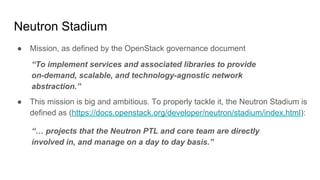
Neutron Stadium
● Mission, as defined by the OpenStack governance document
“To implement services and associated libraries to provide
on-demand, scalable, and technology-agnostic network
abstraction.”
● This mission is big and ambitious. To properly tackle it, the Neutron Stadium is
defined as (https://docs.openstack.org/developer/neutron/stadium/index.html):
“… projects that the Neutron PTL and core team are directly
involved in, and manage on a day to day basis.”
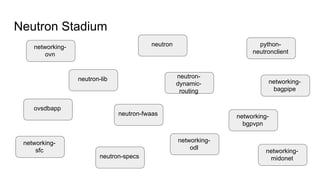
Neutron Stadium
neutron-fwaas
neutron
neutron-lib
ovsdbapp
networking-
ovn
neutron-
dynamic-
routing
networking-
sfc
networking-
bgpvpn
python-
neutronclient
networking-
odl
networking-
midonetneutron-specs
networking-
bagpipe
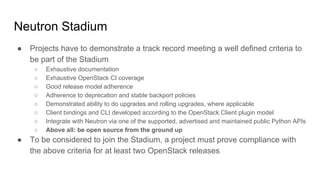
Neutron Stadium
● Projects have to demonstrate a track record meeting a well defined criteria to
be part of the Stadium
○ Exhaustive documentation
○ Exhaustive OpenStack CI coverage
○ Good release model adherence
○ Adherence to deprecation and stable backport policies
○ Demonstrated ability to do upgrades and rolling upgrades, where applicable
○ Client bindings and CLI developed according to the OpenStack Client plugin model
○ Integrate with Neutron via one of the supported, advertised and maintained public Python APIs
○ Above all: be open source from the ground up
● To be considered to join the Stadium, a project must prove compliance with
the above criteria for at least two OpenStack releases
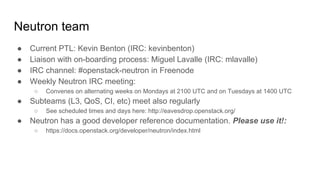
Neutron team
● Current PTL: Kevin Benton (IRC: kevinbenton)
● Liaison with on-boarding process: Miguel Lavalle (IRC: mlavalle)
● IRC channel: #openstack-neutron in Freenode
● Weekly Neutron IRC meeting:
○ Convenes on alternating weeks on Mondays at 2100 UTC and on Tuesdays at 1400 UTC
● Subteams (L3, QoS, CI, etc) meet also regularly
○ See scheduled times and days here: http://eavesdrop.openstack.org/
● Neutron has a good developer reference documentation. Please use it!:
○ https://docs.openstack.org/developer/neutron/index.html
Project mascot: get your sticker with me!
Agenda
● Neutron project overview
● Neutron API
● Core resources, extensions, plugins and service plugins
● Reference back-end implementation
● ML2 plug-in
Neutron API
Neutron, like all the other OpenStack projects, exposes a ReST API where:
● Requests and responses are sent using HTTP
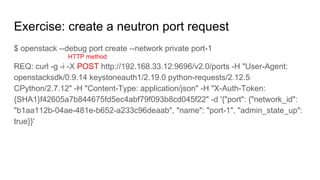
● HTTP methods (POST, PUT, GET, DELETE) are applied through requests
sent to the API...
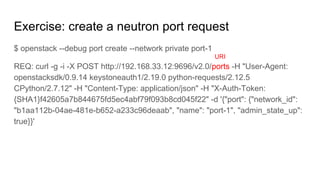
● ...to a set of resources represented by URIs (Universal Resource Identifier)
that identify resources
● The HTTP verbs correspond to CRUD (Create, Read, Update and Delete)
operations.
● Every request sent by the user gets a response from the API
● Resources are represented in API requests and responses in JSON
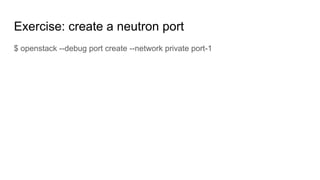
Exercise: create a neutron port
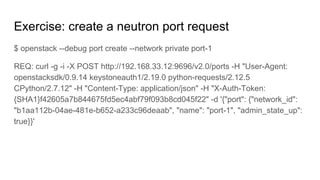
$ openstack --debug port create --network private port-1
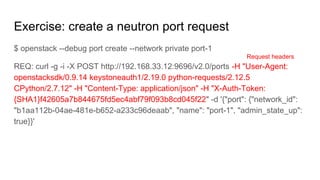
Exercise: create a neutron port request
$ openstack --debug port create --network private port-1
REQ: curl -g -i -X POST http://192.168.33.12:9696/v2.0/ports -H "User-Agent:
openstacksdk/0.9.14 keystoneauth1/2.19.0 python-requests/2.12.5
CPython/2.7.12" -H "Content-Type: application/json" -H "X-Auth-Token:
{SHA1}f42605a7b844675fd5ec4abf79f093b8cd045f22" -d '{"port": {"network_id":
"b1aa112b-04ae-481e-b652-a233c96deaab", "name": "port-1", "admin_state_up":
true}}'
Exercise: create a neutron port request
$ openstack --debug port create --network private port-1
REQ: curl -g -i -X POST http://192.168.33.12:9696/v2.0/ports -H "User-Agent:
openstacksdk/0.9.14 keystoneauth1/2.19.0 python-requests/2.12.5
CPython/2.7.12" -H "Content-Type: application/json" -H "X-Auth-Token:
{SHA1}f42605a7b844675fd5ec4abf79f093b8cd045f22" -d '{"port": {"network_id":
"b1aa112b-04ae-481e-b652-a233c96deaab", "name": "port-1", "admin_state_up":
true}}'
HTTP method
Exercise: create a neutron port request
$ openstack --debug port create --network private port-1
REQ: curl -g -i -X POST http://192.168.33.12:9696/v2.0/ports -H "User-Agent:
openstacksdk/0.9.14 keystoneauth1/2.19.0 python-requests/2.12.5
CPython/2.7.12" -H "Content-Type: application/json" -H "X-Auth-Token:
{SHA1}f42605a7b844675fd5ec4abf79f093b8cd045f22" -d '{"port": {"network_id":
"b1aa112b-04ae-481e-b652-a233c96deaab", "name": "port-1", "admin_state_up":
true}}'
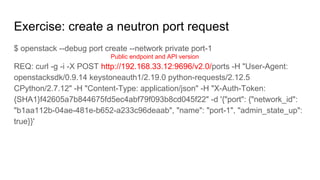
Public endpoint and API version
Exercise: create a neutron port request
$ openstack --debug port create --network private port-1
REQ: curl -g -i -X POST http://192.168.33.12:9696/v2.0/ports -H "User-Agent:
openstacksdk/0.9.14 keystoneauth1/2.19.0 python-requests/2.12.5
CPython/2.7.12" -H "Content-Type: application/json" -H "X-Auth-Token:
{SHA1}f42605a7b844675fd5ec4abf79f093b8cd045f22" -d '{"port": {"network_id":
"b1aa112b-04ae-481e-b652-a233c96deaab", "name": "port-1", "admin_state_up":
true}}'
URI
Exercise: create a neutron port request
$ openstack --debug port create --network private port-1
REQ: curl -g -i -X POST http://192.168.33.12:9696/v2.0/ports -H "User-Agent:
openstacksdk/0.9.14 keystoneauth1/2.19.0 python-requests/2.12.5
CPython/2.7.12" -H "Content-Type: application/json" -H "X-Auth-Token:
{SHA1}f42605a7b844675fd5ec4abf79f093b8cd045f22" -d '{"port": {"network_id":
"b1aa112b-04ae-481e-b652-a233c96deaab", "name": "port-1", "admin_state_up":
true}}'
Request headers
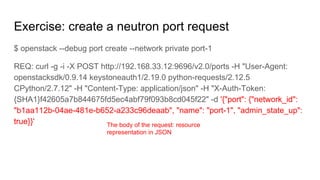
Exercise: create a neutron port request
$ openstack --debug port create --network private port-1
REQ: curl -g -i -X POST http://192.168.33.12:9696/v2.0/ports -H "User-Agent:
openstacksdk/0.9.14 keystoneauth1/2.19.0 python-requests/2.12.5
CPython/2.7.12" -H "Content-Type: application/json" -H "X-Auth-Token:
{SHA1}f42605a7b844675fd5ec4abf79f093b8cd045f22" -d '{"port": {"network_id":
"b1aa112b-04ae-481e-b652-a233c96deaab", "name": "port-1", "admin_state_up":
true}}' The body of the request: resource
representation in JSON
Exercise: create a neutron port response
RESP: [201] Content-Type: application/json Content-Length: 1129
X-Openstack-Request-Id: req-63329334-d903-46a3-8fcd-840ffa6e13ee Date:
Wed, 12 Apr 2017 18:59:11 GMT Connection: keep-alive
RESP BODY:
{"port":{"allowed_address_pairs":[],"extra_dhcp_opts":[],"updated_at":"2017-04-12
T18:59:11Z","device_owner":"","revision_number":6,"port_security_enabled":true,"
fixed_ips":[{"subnet_id":"368a67c8-d1ae-452e-b134-23d7d002a1f5","ip_address":
"10.0.0.8"},{"subnet_id":"f8c10064-a3b1-4e7c-8ff6-741ed02dbadc","ip_address":"f
dd8:76d6:991f:0:f816:3eff:fe31:d576"}],"id":"55fc71a4-eabb-43f9-8335-bdbd1b625
99f","security_groups":["c4bcfdfb-9b03-4e89-a4d4-dafef1985588"],"mac_address":
"fa:16:3e:31:d5:76","project_id":"87eda0fcff204327800a17c2bb9a4df3",... }}
Response code
Exercise: create a neutron port response
RESP: [201] Content-Type: application/json Content-Length: 1129
X-Openstack-Request-Id: req-63329334-d903-46a3-8fcd-840ffa6e13ee Date:
Wed, 12 Apr 2017 18:59:11 GMT Connection: keep-alive
RESP BODY:
{"port":{"allowed_address_pairs":[],"extra_dhcp_opts":[],"updated_at":"2017-04-12
T18:59:11Z","device_owner":"","revision_number":6,"port_security_enabled":true,"
fixed_ips":[{"subnet_id":"368a67c8-d1ae-452e-b134-23d7d002a1f5","ip_address":
"10.0.0.8"},{"subnet_id":"f8c10064-a3b1-4e7c-8ff6-741ed02dbadc","ip_address":"f
dd8:76d6:991f:0:f816:3eff:fe31:d576"}],"id":"55fc71a4-eabb-43f9-8335-bdbd1b625
99f","security_groups":["c4bcfdfb-9b03-4e89-a4d4-dafef1985588"],"mac_address":
"fa:16:3e:31:d5:76","project_id":"87eda0fcff204327800a17c2bb9a4df3",... }}
Request ID
Exercise: create a neutron port response
RESP: [201] Content-Type: application/json Content-Length: 1129
X-Openstack-Request-Id: req-63329334-d903-46a3-8fcd-840ffa6e13ee Date:
Wed, 12 Apr 2017 18:59:11 GMT Connection: keep-alive
RESP BODY:
{"port":{"allowed_address_pairs":[],"extra_dhcp_opts":[],"updated_at":"2017-04-12
T18:59:11Z","device_owner":"","revision_number":6,"port_security_enabled":true,"
fixed_ips":[{"subnet_id":"368a67c8-d1ae-452e-b134-23d7d002a1f5","ip_address":
"10.0.0.8"},{"subnet_id":"f8c10064-a3b1-4e7c-8ff6-741ed02dbadc","ip_address":"f
dd8:76d6:991f:0:f816:3eff:fe31:d576"}],"id":"55fc71a4-eabb-43f9-8335-bdbd1b625
99f","security_groups":["c4bcfdfb-9b03-4e89-a4d4-dafef1985588"],"mac_address":
"fa:16:3e:31:d5:76","project_id":"87eda0fcff204327800a17c2bb9a4df3",... }}
Resource representation in JSON
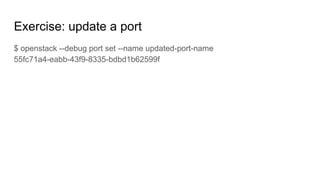
Exercise: update a port
$ openstack --debug port set --name updated-port-name
55fc71a4-eabb-43f9-8335-bdbd1b62599f
Exercise: update a port request
$ openstack --debug port set --name updated-port-name
55fc71a4-eabb-43f9-8335-bdbd1b62599f
REQ: curl -g -i -X PUT
http://192.168.33.12:9696/v2.0/ports/55fc71a4-eabb-43f9-8335-bdbd1b62599f -H
"User-Agent: openstacksdk/0.9.14 keystoneauth1/2.19.0 python-requests/2.12.5
CPython/2.7.12" -H "Content-Type: application/json" -H "X-Auth-Token:
{SHA1}2b22d5669c22b8ccda3c70f98a1c3d5f6b119412" -d '{"port": {"name":
"updated-port-name"}}'
RESP: [200] Content-Type: application/json Content-Length: 1140
X-Openstack-Request-Id: req-639af99a-9ba7-4082-bc5c-b75938200a29….
HTTP method
Exercise: update a port request
$ openstack --debug port set --name updated-port-name
55fc71a4-eabb-43f9-8335-bdbd1b62599f
REQ: curl -g -i -X PUT
http://192.168.33.12:9696/v2.0/ports/55fc71a4-eabb-43f9-8335-bdbd1b62599f -H
"User-Agent: openstacksdk/0.9.14 keystoneauth1/2.19.0 python-requests/2.12.5
CPython/2.7.12" -H "Content-Type: application/json" -H "X-Auth-Token:
{SHA1}2b22d5669c22b8ccda3c70f98a1c3d5f6b119412" -d '{"port": {"name":
"updated-port-name"}}'
RESP: [200] Content-Type: application/json Content-Length: 1140
X-Openstack-Request-Id: req-639af99a-9ba7-4082-bc5c-b75938200a29….
URI
Exercise: update a port request
$ openstack --debug port set --name updated-port-name
55fc71a4-eabb-43f9-8335-bdbd1b62599f
REQ: curl -g -i -X PUT
http://192.168.33.12:9696/v2.0/ports/55fc71a4-eabb-43f9-8335-bdbd1b62599f -H
"User-Agent: openstacksdk/0.9.14 keystoneauth1/2.19.0 python-requests/2.12.5
CPython/2.7.12" -H "Content-Type: application/json" -H "X-Auth-Token:
{SHA1}2b22d5669c22b8ccda3c70f98a1c3d5f6b119412" -d '{"port": {"name":
"updated-port-name"}}'
RESP: [200] Content-Type: application/json Content-Length: 1140
X-Openstack-Request-Id: req-639af99a-9ba7-4082-bc5c-b75938200a29….
Resource representation in JSON
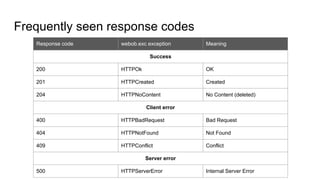
Frequently seen response codes
Response code webob.exc exception Meaning
Success
200 HTTPOk OK
201 HTTPCreated Created
204 HTTPNoContent No Content (deleted)
Client error
400 HTTPBadRequest Bad Request
404 HTTPNotFound Not Found
409 HTTPConflict Conflict
Server error
500 HTTPServerError Internal Server Error
Agenda
● Neutron project overview
● Neutron API
● Core resources, extensions, plugins and service plugins
● Reference back-end implementation
● ML2 plug-in
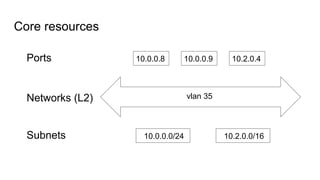
Core resources
vlan 35
10.0.0.8 10.0.0.9 10.2.0.4
10.0.0.0/24 10.2.0.0/16
Ports
Networks (L2)
Subnets
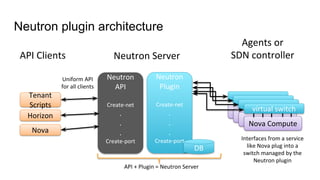
Neutron plugin architecture
Nova ComputeNova Compute
Nova Compute
Nova Compute
Tenant
Scripts
Horizon
Nova
API Clients Neutron Server
Neutron
Plugin
Create-net
.
.
.
Create-port
virtual switch
Neutron
API
Create-net
.
.
.
Create-port Interfaces from a service
like Nova plug into a
switch managed by the
Neutron plugin
Uniform API
for all clients
DB
Agents or
SDN controller
API + Plugin = Neutron Server
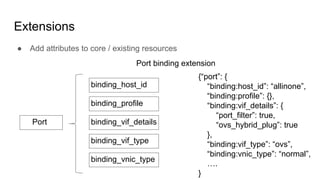
Extensions
● Add attributes to core / existing resources
Port
binding_host_id
binding_profile
binding_vif_details
binding_vif_type
binding_vnic_type
Port binding extension
{“port”: {
“binding:host_id”: “allinone”,
“binding:profile”: {},
“binding:vif_details”: {
“port_filter”: true,
“ovs_hybrid_plug”: true
},
“binding:vif_type”: “ovs”,
“binding:vnic_type”: “normal”,
….
}
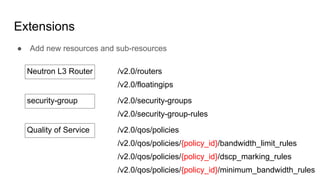
Extensions
● Add new resources and sub-resources
Neutron L3 Router /v2.0/routers
/v2.0/floatingips
security-group /v2.0/security-groups
/v2.0/security-group-rules
Quality of Service /v2.0/qos/policies
/v2.0/qos/policies/{policy_id}/bandwidth_limit_rules
/v2.0/qos/policies/{policy_id}/dscp_marking_rules
/v2.0/qos/policies/{policy_id}/minimum_bandwidth_rules
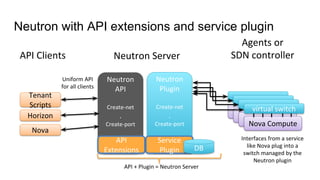
Neutron with API extensions and service plugin
Nova ComputeNova Compute
Nova Compute
Nova Compute
Tenant
Scripts
Horizon
Nova
API Clients Neutron Server
Neutron
Plugin
Create-net
.
Create-port
virtual switch
Neutron
API
Create-net
.
Create-port
Interfaces from a service
like Nova plug into a
switch managed by the
Neutron plugin
API + Plugin = Neutron Server
Uniform API
for all clients
API
Extensions
Service
Plugin DB
Agents or
SDN controller
Exercise
● $ openstack extension list --network
● Open /etc/neutron/neutron.conf
○ Search for core_plugin
○ Search for service_plugins
Exercise
● Enable the DNS integration extension:
○ $ openstack port list
○ $ openstack port show <port-id>
○ Edit the /etc/neutron/neutron.conf file and assign a value different to openstacklocal (its default
value) to the dns_domain parameter in the [default] section
○ Add dns to extension_drivers in the [ml2] section of /etc/neutron/plugins/ml2/ml2_conf.ini
○ $ screen -r stack
○ <ctrl-a>“
○ With the <down-arrow> or <up-arrow> select screen q-svc and press enter
○ <ctrl-c> to stop the Neutron server
○ <up-arrow> once to recall the startup command
○ <enter> to restart the Neutron server
○ <ctrl-a>d to leave the screen command
○ $ openstack port show <port-id>
Exercise
● Enable the DNS integration extension:
○ sudo systemctl restart devstack@q-svc.service
Agenda
● Neutron project overview
● Neutron API
● Core resources, extensions, plugins and service plugins
● Reference back-end implementation
● ML2 plug-in
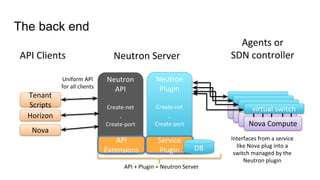
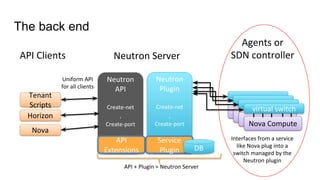
The back end
Nova ComputeNova Compute
Nova Compute
Nova Compute
Tenant
Scripts
Horizon
Nova
API Clients Neutron Server
Neutron
Plugin
Create-net
.
Create-port
virtual switch
Neutron
API
Create-net
.
Create-port
Interfaces from a service
like Nova plug into a
switch managed by the
Neutron plugin
Uniform API
for all clients
Agents or
SDN controller
API
Extensions
Service
Plugin DB
API + Plugin = Neutron Server
The back end
Nova ComputeNova Compute
Nova Compute
Nova Compute
Tenant
Scripts
Horizon
Nova
API Clients Neutron Server
Neutron
Plugin
Create-net
.
Create-port
virtual switch
Neutron
API
Create-net
.
Create-port
Interfaces from a service
like Nova plug into a
switch managed by the
Neutron plugin
Uniform API
for all clients
Agents or
SDN controller
API
Extensions
Service
Plugin DB
API + Plugin = Neutron Server
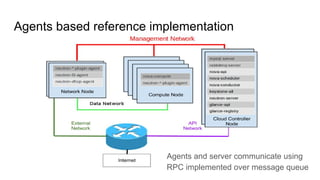
Agents based reference implementation
Agents and server communicate using
RPC implemented over message queue
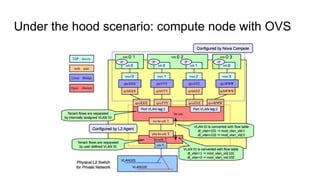
Under the hood scenario: compute node with OVS
OVS L2 agent
● Runs on compute nodes
● Configures the local virtual bridges: br-int, br-ethx, br-tun
● Wires ports
● Applies security group rules
● Communicates with Neutron server over remote procedure calls (RPC)
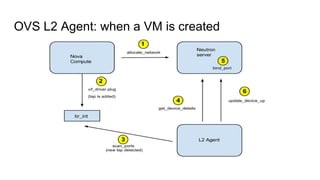
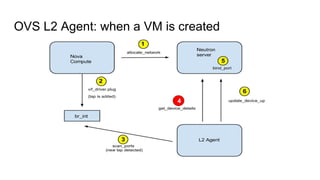
OVS L2 Agent: when a VM is created
OVS L2 agent: loop events (method rpc_loop)
● OVSDB monitor has updates
● Neutron server messages
○ Security group change
○ Port update
● OVS re-started
OVS L2 agent: detect port changes
● OVSDB signals if something has changed in the host
● Agent scans all the ports in the host
● Agent keeps track of the ports it has already processed using a set named
ports
● The difference between ports and the result of the scanning enables the
agent to infer the devices added and deleted
OVS L2 agent: process port added
● Request the device details (get_devices_details_and_failed_devices)
● Provision local vlan and install proper flows
● Set up filters
● Call plugin’s update_device_up (update_device_list)
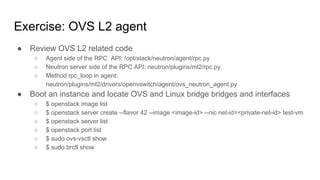
Exercise: OVS L2 agent
● Review OVS L2 related code
○ Agent side of the RPC API: /opt/stack/neutron/agent/rpc.py
○ Neutron server side of the RPC API: neutron/plugins/ml2/rpc.py
○ Method rpc_loop in agent:
neutron/plugins/ml2/drivers/openvswitch/agent/ovs_neutron_agent.py
● Boot an instance and locate OVS and Linux bridge bridges and interfaces
○ $ openstack image list
○ $ openstack server create --flavor 42 --image <image-id> --nic net-id=<private-net-id> test-vm
○ $ openstack server list
○ $ openstack port list
○ $ sudo ovs-vsctl show
○ $ sudo brctl show
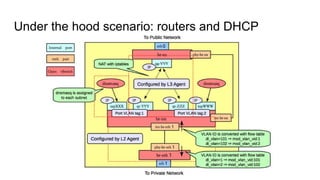
Under the hood scenario: routers and DHCP
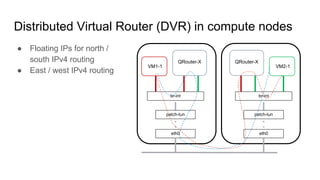
Distributed Virtual Router (DVR) in compute nodes
● Floating IPs for north /
south IPv4 routing
● East / west IPv4 routing
“VM1-1
patch-tun
br-int
eth0
QRouter-X
“VM2-1
patch-tun
br-int
eth0
QRouter-X
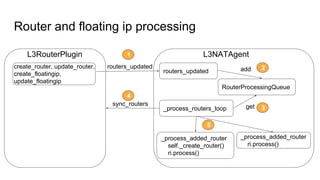
Router and floating ip processing
create_router, update_router,
create_floatingip,
update_floatingip
L3RouterPlugin L3NATAgent
routers_updated
routers_updated
RouterProcessingQueue
add
_process_routers_loop getsync_routers
_process_added_router
self._create_router()
ri.process()
_process_added_router
ri.process()
1
2
3
4
5
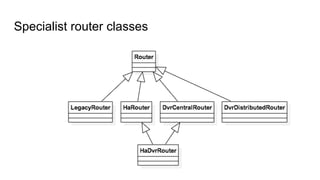
Specialist router classes
Exercise: L3 agent
● Review L3 related code:
○ L3 router plugin: neutron/services/l3_router/l3_router_plugin.py
○ L3 DB mixin classes: neutron/db/l3_db.py
■ L3_NAT_db_mixin
■ L3RpcNotifierMixin
■ L3_NAT_dbonly_mixin
○ Server notifier L3 RPC notifier: neutron/api/rpc/agentnotifiers/l3_rpc_agent_api.py
○ L3 agent: neutron/agent/l3/agent.py
■ routers_updated
■ _process_routers_loop
■ get_routers in L3PluginApi
■ _process_added_router
■ _process_updated_router
○ L3 server RPC callbacks: neutron/api/rpc/handlers/l3_rpc.py
○ Router classes example: neutron/agent/l3/router_info.py
Exercise: L3 agent
● Identify the name spaces:
○ $ openstack router list
○ $ openstack network list
○ $ sudo ip netns
○ $ sudo ip netns exec qrouter-<router-id> ip addr list
● Identify router and dhcp ports in OVS:
○ $ openstack port list
○ $ sudo ovs-vsctl show
● Identify iptables entries
○ $ sudo ip netns exec qrouter-<router-id> iptables-save | grep 172
○ $ openstack network list
○ $ openstack floating ip create <external-net-id> --port <instance-port-id>
○ $ sudo ip netns exec qrouter-<router-id> iptables-save | grep 172
○ $ sudo ip netns exec qrouter-<router-id> ip addr list
Agenda
● Neutron project overview
● Neutron API
● Core resources, extensions, plugins and service plugins
● Reference back-end implementation
● ML2 plug-in
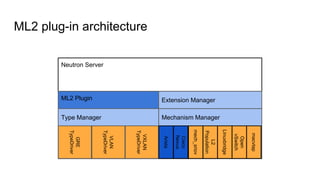
ML2 plug-in architecture
Neutron Server
ML2 Plugin
Type Manager Mechanism Manager
Extension Manager
GRE
TypeDriver
Arista
VLAN
TypeDriver
VXLAN
TypeDriver
Cisco
Nexus
mech_sriov
L2
Population
Linuxbridge
Open
vSwitch
macvtap
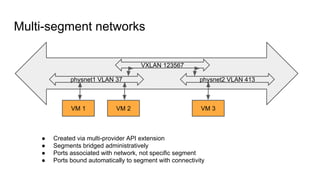
Multi-segment networks
VXLAN 123567
physnet1 VLAN 37 physnet2 VLAN 413
VM 1 VM 2 VM 3
● Created via multi-provider API extension
● Segments bridged administratively
● Ports associated with network, not specific segment
● Ports bound automatically to segment with connectivity
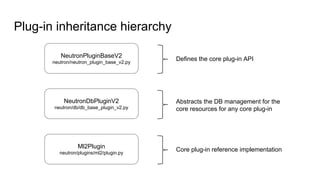
Plug-in inheritance hierarchy
NeutronPluginBaseV2
neutron/neutron_plugin_base_v2.py
NeutronDbPluginV2
neutron/db/db_base_plugin_v2.py
Ml2Plugin
neutron/plugins/ml2/plugin.py
Defines the core plug-in API
Abstracts the DB management for the
core resources for any core plug-in
Core plug-in reference implementation
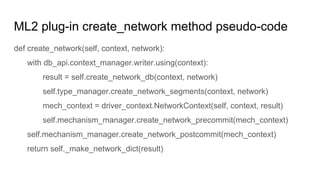
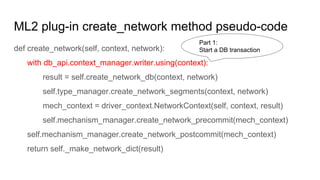
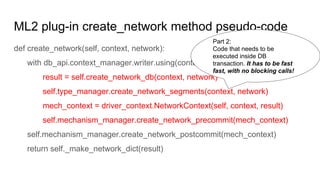
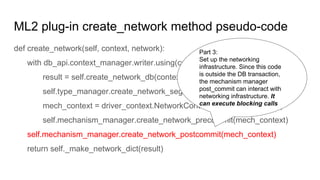
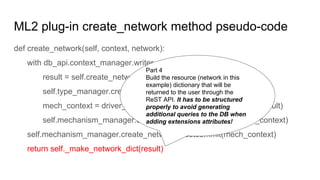
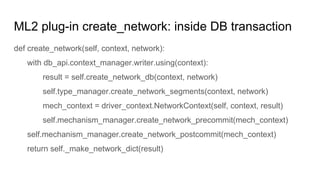
ML2 plug-in create_network method pseudo-code
def create_network(self, context, network):
with db_api.context_manager.writer.using(context):
result = self.create_network_db(context, network)
self.type_manager.create_network_segments(context, network)
mech_context = driver_context.NetworkContext(self, context, result)
self.mechanism_manager.create_network_precommit(mech_context)
self.mechanism_manager.create_network_postcommit(mech_context)
return self._make_network_dict(result)
ML2 plug-in create_network method pseudo-code
def create_network(self, context, network):
with db_api.context_manager.writer.using(context):
result = self.create_network_db(context, network)
self.type_manager.create_network_segments(context, network)
mech_context = driver_context.NetworkContext(self, context, result)
self.mechanism_manager.create_network_precommit(mech_context)
self.mechanism_manager.create_network_postcommit(mech_context)
return self._make_network_dict(result)
Part 1:
Start a DB transaction
ML2 plug-in create_network method pseudo-code
def create_network(self, context, network):
with db_api.context_manager.writer.using(context):
result = self.create_network_db(context, network)
self.type_manager.create_network_segments(context, network)
mech_context = driver_context.NetworkContext(self, context, result)
self.mechanism_manager.create_network_precommit(mech_context)
self.mechanism_manager.create_network_postcommit(mech_context)
return self._make_network_dict(result)
Part 2:
Code that needs to be
executed inside DB
transaction. It has to be fast
fast, with no blocking calls!
ML2 plug-in create_network method pseudo-code
def create_network(self, context, network):
with db_api.context_manager.writer.using(context):
result = self.create_network_db(context, network)
self.type_manager.create_network_segments(context, network)
mech_context = driver_context.NetworkContext(self, context, result)
self.mechanism_manager.create_network_precommit(mech_context)
self.mechanism_manager.create_network_postcommit(mech_context)
return self._make_network_dict(result)
Part 3:
Set up the networking
infrastructure. Since this code
is outside the DB transaction,
the mechanism manager
post_commit can interact with
networking infrastructure. It
can execute blocking calls
ML2 plug-in create_network method pseudo-code
def create_network(self, context, network):
with db_api.context_manager.writer.using(context):
result = self.create_network_db(context, network)
self.type_manager.create_network_segments(context, network)
mech_context = driver_context.NetworkContext(self, context, result)
self.mechanism_manager.create_network_precommit(mech_context)
self.mechanism_manager.create_network_postcommit(mech_context)
return self._make_network_dict(result)
Part 4
Build the resource (network in this
example) dictionary that will be
returned to the user through the
ReST API. It has to be structured
properly to avoid generating
additional queries to the DB when
adding extensions attributes!
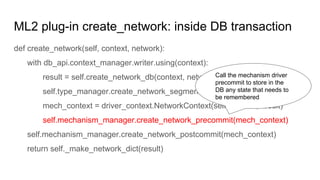
ML2 plug-in create_network: inside DB transaction
def create_network(self, context, network):
with db_api.context_manager.writer.using(context):
result = self.create_network_db(context, network)
self.type_manager.create_network_segments(context, network)
mech_context = driver_context.NetworkContext(self, context, result)
self.mechanism_manager.create_network_precommit(mech_context)
self.mechanism_manager.create_network_postcommit(mech_context)
return self._make_network_dict(result)
ML2 plug-in create_network: inside DB transaction
def create_network(self, context, network):
with db_api.context_manager.writer.using(context):
result = self.create_network_db(context, network)
self.type_manager.create_network_segments(context, network)
mech_context = driver_context.NetworkContext(self, context, result)
self.mechanism_manager.create_network_precommit(mech_context)
self.mechanism_manager.create_network_postcommit(mech_context)
return self._make_network_dict(result)
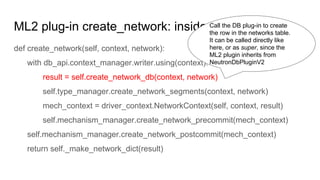
Call the DB plug-in to create
the row in the networks table.
It can be called directly like
here, or as super, since the
ML2 plugin inherits from
NeutronDbPluginV2
ML2 plug-in create_network: inside DB transaction
def create_network(self, context, network):
with db_api.context_manager.writer.using(context):
result = self.create_network_db(context, network)
self.type_manager.create_network_segments(context, network)
mech_context = driver_context.NetworkContext(self, context, result)
self.mechanism_manager.create_network_precommit(mech_context)
self.mechanism_manager.create_network_postcommit(mech_context)
return self._make_network_dict(result)
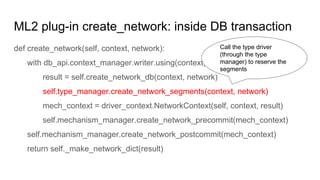
Call the type driver
(through the type
manager) to reserve the
segments
ML2 plug-in create_network: inside DB transaction
def create_network(self, context, network):
with db_api.context_manager.writer.using(context):
result = self.create_network_db(context, network)
self.type_manager.create_network_segments(context, network)
mech_context = driver_context.NetworkContext(self, context, result)
self.mechanism_manager.create_network_precommit(mech_context)
self.mechanism_manager.create_network_postcommit(mech_context)
return self._make_network_dict(result)
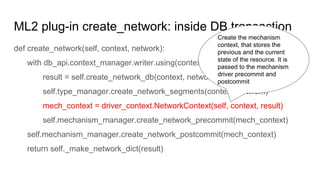
Create the mechanism
context, that stores the
previous and the current
state of the resource. It is
passed to the mechanism
driver precommit and
postcommit
ML2 plug-in create_network: inside DB transaction
def create_network(self, context, network):
with db_api.context_manager.writer.using(context):
result = self.create_network_db(context, network)
self.type_manager.create_network_segments(context, network)
mech_context = driver_context.NetworkContext(self, context, result)
self.mechanism_manager.create_network_precommit(mech_context)
self.mechanism_manager.create_network_postcommit(mech_context)
return self._make_network_dict(result)
Call the mechanism driver
precommit to store in the
DB any state that needs to
be remembered
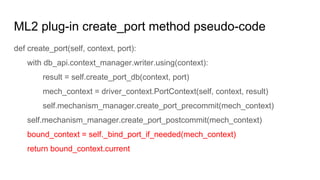
ML2 plug-in create_port method pseudo-code
def create_port(self, context, port):
with db_api.context_manager.writer.using(context):
result = self.create_port_db(context, port)
mech_context = driver_context.PortContext(self, context, result)
self.mechanism_manager.create_port_precommit(mech_context)
self.mechanism_manager.create_port_postcommit(mech_context)
bound_context = self._bind_port_if_needed(mech_context)
return bound_context.current
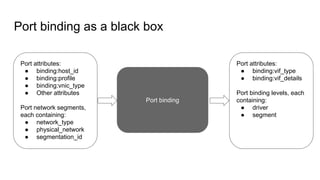
Port binding as a black box
Port binding
Port attributes:
● binding:host_id
● binding:profile
● binding:vnic_type
● Other attributes
Port network segments,
each containing:
● network_type
● physical_network
● segmentation_id
Port attributes:
● binding:vif_type
● binding:vif_details
Port binding levels, each
containing:
● driver
● segment
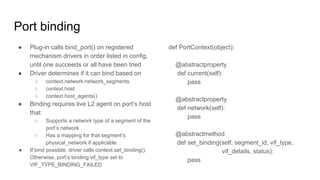
Port binding
● Plug-in calls bind_port() on registered
mechanism drivers in order listed in config,
until one succeeds or all have been tried
● Driver determines if it can bind based on
○ context.network.network_segments
○ context.host
○ context.host_agents()
● Binding requires live L2 agent on port’s host
that:
○ Supports a network type of a segment of the
port’s network
○ Has a mapping for that segment’s
physical_network if applicable
● If bind possible, driver calls context.set_binding().
Otherwise, port’s binding:vif_type set to
VIF_TYPE_BINDING_FAILED
def PortContext(object):
@abstractproperty
def current(self):
pass
@abstractproperty
def network(self):
pass
@abstractmethod
def set_binding(self, segment_id, vif_type,
vif_details, status):
pass
Port postcommit and binding in little a more detail
try:
self.mechanism_manager.create_port_postcommit(mech_context)
except ml2_exc.MechanismDriverError:
with excutils.save_and_reraise_exception():
LOG.error(_LE("mechanism_manager.create_port_postcommit "
"failed, deleting port '%s'"), result['id'])
self.delete_port(context, result['id'], l3_port_check=False)
try:
bound_context = self._bind_port_if_needed(mech_context)
except ml2_exc.MechanismDriverError:
with excutils.save_and_reraise_exception():
LOG.error(_LE("_bind_port_if_needed "
"failed, deleting port '%s'"), result['id'])
self.delete_port(context, result['id'], l3_port_check=False)
OVS L2 Agent: when a VM is created
4
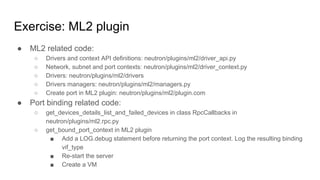
Exercise: ML2 plugin
● ML2 related code:
○ Drivers and context API definitions: neutron/plugins/ml2/driver_api.py
○ Network, subnet and port contexts: neutron/plugins/ml2/driver_context.py
○ Drivers: neutron/plugins/ml2/drivers
○ Drivers managers: neutron/plugins/ml2/managers.py
○ Create port in ML2 plugin: neutron/plugins/ml2/plugin.com
● Port binding related code:
○ get_devices_details_list_and_failed_devices in class RpcCallbacks in
neutron/plugins/ml2.rpc.py
○ get_bound_port_context in ML2 plugin
■ Add a LOG.debug statement before returning the port context. Log the resulting binding
vif_type
■ Re-start the server
■ Create a VM

OpenStack Neutron new developers on boarding

  • 1.
    Neutron On-boarding Room MiguelLavalle, irc mlavalle Boston, May 2017
  • 2.
    Agenda ● Neutron projectoverview ● Neutron API ● Core resources, extensions, plugins and service plugins ● Reference back-end implementation ● ML2 plug-in
  • 3.
    Get your devstackinstances ready We will use them for exercises!
  • 4.
    Neutron Stadium ● Mission,as defined by the OpenStack governance document “To implement services and associated libraries to provide on-demand, scalable, and technology-agnostic network abstraction.” ● This mission is big and ambitious. To properly tackle it, the Neutron Stadium is defined as (https://docs.openstack.org/developer/neutron/stadium/index.html): “… projects that the Neutron PTL and core team are directly involved in, and manage on a day to day basis.”
  • 5.
  • 6.
    Neutron Stadium ● Projectshave to demonstrate a track record meeting a well defined criteria to be part of the Stadium ○ Exhaustive documentation ○ Exhaustive OpenStack CI coverage ○ Good release model adherence ○ Adherence to deprecation and stable backport policies ○ Demonstrated ability to do upgrades and rolling upgrades, where applicable ○ Client bindings and CLI developed according to the OpenStack Client plugin model ○ Integrate with Neutron via one of the supported, advertised and maintained public Python APIs ○ Above all: be open source from the ground up ● To be considered to join the Stadium, a project must prove compliance with the above criteria for at least two OpenStack releases
  • 7.
    Neutron team ● CurrentPTL: Kevin Benton (IRC: kevinbenton) ● Liaison with on-boarding process: Miguel Lavalle (IRC: mlavalle) ● IRC channel: #openstack-neutron in Freenode ● Weekly Neutron IRC meeting: ○ Convenes on alternating weeks on Mondays at 2100 UTC and on Tuesdays at 1400 UTC ● Subteams (L3, QoS, CI, etc) meet also regularly ○ See scheduled times and days here: http://eavesdrop.openstack.org/ ● Neutron has a good developer reference documentation. Please use it!: ○ https://docs.openstack.org/developer/neutron/index.html
  • 8.
    Project mascot: getyour sticker with me!
  • 9.
    Agenda ● Neutron projectoverview ● Neutron API ● Core resources, extensions, plugins and service plugins ● Reference back-end implementation ● ML2 plug-in
  • 10.
    Neutron API Neutron, likeall the other OpenStack projects, exposes a ReST API where: ● Requests and responses are sent using HTTP ● HTTP methods (POST, PUT, GET, DELETE) are applied through requests sent to the API... ● ...to a set of resources represented by URIs (Universal Resource Identifier) that identify resources ● The HTTP verbs correspond to CRUD (Create, Read, Update and Delete) operations. ● Every request sent by the user gets a response from the API ● Resources are represented in API requests and responses in JSON
  • 11.
    Exercise: create aneutron port $ openstack --debug port create --network private port-1
  • 12.
    Exercise: create aneutron port request $ openstack --debug port create --network private port-1 REQ: curl -g -i -X POST http://192.168.33.12:9696/v2.0/ports -H "User-Agent: openstacksdk/0.9.14 keystoneauth1/2.19.0 python-requests/2.12.5 CPython/2.7.12" -H "Content-Type: application/json" -H "X-Auth-Token: {SHA1}f42605a7b844675fd5ec4abf79f093b8cd045f22" -d '{"port": {"network_id": "b1aa112b-04ae-481e-b652-a233c96deaab", "name": "port-1", "admin_state_up": true}}'
  • 13.
    Exercise: create aneutron port request $ openstack --debug port create --network private port-1 REQ: curl -g -i -X POST http://192.168.33.12:9696/v2.0/ports -H "User-Agent: openstacksdk/0.9.14 keystoneauth1/2.19.0 python-requests/2.12.5 CPython/2.7.12" -H "Content-Type: application/json" -H "X-Auth-Token: {SHA1}f42605a7b844675fd5ec4abf79f093b8cd045f22" -d '{"port": {"network_id": "b1aa112b-04ae-481e-b652-a233c96deaab", "name": "port-1", "admin_state_up": true}}' HTTP method
  • 14.
    Exercise: create aneutron port request $ openstack --debug port create --network private port-1 REQ: curl -g -i -X POST http://192.168.33.12:9696/v2.0/ports -H "User-Agent: openstacksdk/0.9.14 keystoneauth1/2.19.0 python-requests/2.12.5 CPython/2.7.12" -H "Content-Type: application/json" -H "X-Auth-Token: {SHA1}f42605a7b844675fd5ec4abf79f093b8cd045f22" -d '{"port": {"network_id": "b1aa112b-04ae-481e-b652-a233c96deaab", "name": "port-1", "admin_state_up": true}}' Public endpoint and API version
  • 15.
    Exercise: create aneutron port request $ openstack --debug port create --network private port-1 REQ: curl -g -i -X POST http://192.168.33.12:9696/v2.0/ports -H "User-Agent: openstacksdk/0.9.14 keystoneauth1/2.19.0 python-requests/2.12.5 CPython/2.7.12" -H "Content-Type: application/json" -H "X-Auth-Token: {SHA1}f42605a7b844675fd5ec4abf79f093b8cd045f22" -d '{"port": {"network_id": "b1aa112b-04ae-481e-b652-a233c96deaab", "name": "port-1", "admin_state_up": true}}' URI
  • 16.
    Exercise: create aneutron port request $ openstack --debug port create --network private port-1 REQ: curl -g -i -X POST http://192.168.33.12:9696/v2.0/ports -H "User-Agent: openstacksdk/0.9.14 keystoneauth1/2.19.0 python-requests/2.12.5 CPython/2.7.12" -H "Content-Type: application/json" -H "X-Auth-Token: {SHA1}f42605a7b844675fd5ec4abf79f093b8cd045f22" -d '{"port": {"network_id": "b1aa112b-04ae-481e-b652-a233c96deaab", "name": "port-1", "admin_state_up": true}}' Request headers
  • 17.
    Exercise: create aneutron port request $ openstack --debug port create --network private port-1 REQ: curl -g -i -X POST http://192.168.33.12:9696/v2.0/ports -H "User-Agent: openstacksdk/0.9.14 keystoneauth1/2.19.0 python-requests/2.12.5 CPython/2.7.12" -H "Content-Type: application/json" -H "X-Auth-Token: {SHA1}f42605a7b844675fd5ec4abf79f093b8cd045f22" -d '{"port": {"network_id": "b1aa112b-04ae-481e-b652-a233c96deaab", "name": "port-1", "admin_state_up": true}}' The body of the request: resource representation in JSON
  • 18.
    Exercise: create aneutron port response RESP: [201] Content-Type: application/json Content-Length: 1129 X-Openstack-Request-Id: req-63329334-d903-46a3-8fcd-840ffa6e13ee Date: Wed, 12 Apr 2017 18:59:11 GMT Connection: keep-alive RESP BODY: {"port":{"allowed_address_pairs":[],"extra_dhcp_opts":[],"updated_at":"2017-04-12 T18:59:11Z","device_owner":"","revision_number":6,"port_security_enabled":true," fixed_ips":[{"subnet_id":"368a67c8-d1ae-452e-b134-23d7d002a1f5","ip_address": "10.0.0.8"},{"subnet_id":"f8c10064-a3b1-4e7c-8ff6-741ed02dbadc","ip_address":"f dd8:76d6:991f:0:f816:3eff:fe31:d576"}],"id":"55fc71a4-eabb-43f9-8335-bdbd1b625 99f","security_groups":["c4bcfdfb-9b03-4e89-a4d4-dafef1985588"],"mac_address": "fa:16:3e:31:d5:76","project_id":"87eda0fcff204327800a17c2bb9a4df3",... }} Response code
  • 19.
    Exercise: create aneutron port response RESP: [201] Content-Type: application/json Content-Length: 1129 X-Openstack-Request-Id: req-63329334-d903-46a3-8fcd-840ffa6e13ee Date: Wed, 12 Apr 2017 18:59:11 GMT Connection: keep-alive RESP BODY: {"port":{"allowed_address_pairs":[],"extra_dhcp_opts":[],"updated_at":"2017-04-12 T18:59:11Z","device_owner":"","revision_number":6,"port_security_enabled":true," fixed_ips":[{"subnet_id":"368a67c8-d1ae-452e-b134-23d7d002a1f5","ip_address": "10.0.0.8"},{"subnet_id":"f8c10064-a3b1-4e7c-8ff6-741ed02dbadc","ip_address":"f dd8:76d6:991f:0:f816:3eff:fe31:d576"}],"id":"55fc71a4-eabb-43f9-8335-bdbd1b625 99f","security_groups":["c4bcfdfb-9b03-4e89-a4d4-dafef1985588"],"mac_address": "fa:16:3e:31:d5:76","project_id":"87eda0fcff204327800a17c2bb9a4df3",... }} Request ID
  • 20.
    Exercise: create aneutron port response RESP: [201] Content-Type: application/json Content-Length: 1129 X-Openstack-Request-Id: req-63329334-d903-46a3-8fcd-840ffa6e13ee Date: Wed, 12 Apr 2017 18:59:11 GMT Connection: keep-alive RESP BODY: {"port":{"allowed_address_pairs":[],"extra_dhcp_opts":[],"updated_at":"2017-04-12 T18:59:11Z","device_owner":"","revision_number":6,"port_security_enabled":true," fixed_ips":[{"subnet_id":"368a67c8-d1ae-452e-b134-23d7d002a1f5","ip_address": "10.0.0.8"},{"subnet_id":"f8c10064-a3b1-4e7c-8ff6-741ed02dbadc","ip_address":"f dd8:76d6:991f:0:f816:3eff:fe31:d576"}],"id":"55fc71a4-eabb-43f9-8335-bdbd1b625 99f","security_groups":["c4bcfdfb-9b03-4e89-a4d4-dafef1985588"],"mac_address": "fa:16:3e:31:d5:76","project_id":"87eda0fcff204327800a17c2bb9a4df3",... }} Resource representation in JSON
  • 21.
    Exercise: update aport $ openstack --debug port set --name updated-port-name 55fc71a4-eabb-43f9-8335-bdbd1b62599f
  • 22.
    Exercise: update aport request $ openstack --debug port set --name updated-port-name 55fc71a4-eabb-43f9-8335-bdbd1b62599f REQ: curl -g -i -X PUT http://192.168.33.12:9696/v2.0/ports/55fc71a4-eabb-43f9-8335-bdbd1b62599f -H "User-Agent: openstacksdk/0.9.14 keystoneauth1/2.19.0 python-requests/2.12.5 CPython/2.7.12" -H "Content-Type: application/json" -H "X-Auth-Token: {SHA1}2b22d5669c22b8ccda3c70f98a1c3d5f6b119412" -d '{"port": {"name": "updated-port-name"}}' RESP: [200] Content-Type: application/json Content-Length: 1140 X-Openstack-Request-Id: req-639af99a-9ba7-4082-bc5c-b75938200a29…. HTTP method
  • 23.
    Exercise: update aport request $ openstack --debug port set --name updated-port-name 55fc71a4-eabb-43f9-8335-bdbd1b62599f REQ: curl -g -i -X PUT http://192.168.33.12:9696/v2.0/ports/55fc71a4-eabb-43f9-8335-bdbd1b62599f -H "User-Agent: openstacksdk/0.9.14 keystoneauth1/2.19.0 python-requests/2.12.5 CPython/2.7.12" -H "Content-Type: application/json" -H "X-Auth-Token: {SHA1}2b22d5669c22b8ccda3c70f98a1c3d5f6b119412" -d '{"port": {"name": "updated-port-name"}}' RESP: [200] Content-Type: application/json Content-Length: 1140 X-Openstack-Request-Id: req-639af99a-9ba7-4082-bc5c-b75938200a29…. URI
  • 24.
    Exercise: update aport request $ openstack --debug port set --name updated-port-name 55fc71a4-eabb-43f9-8335-bdbd1b62599f REQ: curl -g -i -X PUT http://192.168.33.12:9696/v2.0/ports/55fc71a4-eabb-43f9-8335-bdbd1b62599f -H "User-Agent: openstacksdk/0.9.14 keystoneauth1/2.19.0 python-requests/2.12.5 CPython/2.7.12" -H "Content-Type: application/json" -H "X-Auth-Token: {SHA1}2b22d5669c22b8ccda3c70f98a1c3d5f6b119412" -d '{"port": {"name": "updated-port-name"}}' RESP: [200] Content-Type: application/json Content-Length: 1140 X-Openstack-Request-Id: req-639af99a-9ba7-4082-bc5c-b75938200a29…. Resource representation in JSON
  • 25.
    Frequently seen responsecodes Response code webob.exc exception Meaning Success 200 HTTPOk OK 201 HTTPCreated Created 204 HTTPNoContent No Content (deleted) Client error 400 HTTPBadRequest Bad Request 404 HTTPNotFound Not Found 409 HTTPConflict Conflict Server error 500 HTTPServerError Internal Server Error
  • 26.
    Agenda ● Neutron projectoverview ● Neutron API ● Core resources, extensions, plugins and service plugins ● Reference back-end implementation ● ML2 plug-in
  • 27.
    Core resources vlan 35 10.0.0.810.0.0.9 10.2.0.4 10.0.0.0/24 10.2.0.0/16 Ports Networks (L2) Subnets
  • 28.
    Neutron plugin architecture NovaComputeNova Compute Nova Compute Nova Compute Tenant Scripts Horizon Nova API Clients Neutron Server Neutron Plugin Create-net . . . Create-port virtual switch Neutron API Create-net . . . Create-port Interfaces from a service like Nova plug into a switch managed by the Neutron plugin Uniform API for all clients DB Agents or SDN controller API + Plugin = Neutron Server
  • 29.
    Extensions ● Add attributesto core / existing resources Port binding_host_id binding_profile binding_vif_details binding_vif_type binding_vnic_type Port binding extension {“port”: { “binding:host_id”: “allinone”, “binding:profile”: {}, “binding:vif_details”: { “port_filter”: true, “ovs_hybrid_plug”: true }, “binding:vif_type”: “ovs”, “binding:vnic_type”: “normal”, …. }
  • 30.
    Extensions ● Add newresources and sub-resources Neutron L3 Router /v2.0/routers /v2.0/floatingips security-group /v2.0/security-groups /v2.0/security-group-rules Quality of Service /v2.0/qos/policies /v2.0/qos/policies/{policy_id}/bandwidth_limit_rules /v2.0/qos/policies/{policy_id}/dscp_marking_rules /v2.0/qos/policies/{policy_id}/minimum_bandwidth_rules
  • 31.
    Neutron with APIextensions and service plugin Nova ComputeNova Compute Nova Compute Nova Compute Tenant Scripts Horizon Nova API Clients Neutron Server Neutron Plugin Create-net . Create-port virtual switch Neutron API Create-net . Create-port Interfaces from a service like Nova plug into a switch managed by the Neutron plugin API + Plugin = Neutron Server Uniform API for all clients API Extensions Service Plugin DB Agents or SDN controller
  • 32.
    Exercise ● $ openstackextension list --network ● Open /etc/neutron/neutron.conf ○ Search for core_plugin ○ Search for service_plugins
  • 33.
    Exercise ● Enable theDNS integration extension: ○ $ openstack port list ○ $ openstack port show <port-id> ○ Edit the /etc/neutron/neutron.conf file and assign a value different to openstacklocal (its default value) to the dns_domain parameter in the [default] section ○ Add dns to extension_drivers in the [ml2] section of /etc/neutron/plugins/ml2/ml2_conf.ini ○ $ screen -r stack ○ <ctrl-a>“ ○ With the <down-arrow> or <up-arrow> select screen q-svc and press enter ○ <ctrl-c> to stop the Neutron server ○ <up-arrow> once to recall the startup command ○ <enter> to restart the Neutron server ○ <ctrl-a>d to leave the screen command ○ $ openstack port show <port-id>
  • 34.
    Exercise ● Enable theDNS integration extension: ○ sudo systemctl restart devstack@q-svc.service
  • 35.
    Agenda ● Neutron projectoverview ● Neutron API ● Core resources, extensions, plugins and service plugins ● Reference back-end implementation ● ML2 plug-in
  • 36.
    The back end NovaComputeNova Compute Nova Compute Nova Compute Tenant Scripts Horizon Nova API Clients Neutron Server Neutron Plugin Create-net . Create-port virtual switch Neutron API Create-net . Create-port Interfaces from a service like Nova plug into a switch managed by the Neutron plugin Uniform API for all clients Agents or SDN controller API Extensions Service Plugin DB API + Plugin = Neutron Server
  • 37.
    The back end NovaComputeNova Compute Nova Compute Nova Compute Tenant Scripts Horizon Nova API Clients Neutron Server Neutron Plugin Create-net . Create-port virtual switch Neutron API Create-net . Create-port Interfaces from a service like Nova plug into a switch managed by the Neutron plugin Uniform API for all clients Agents or SDN controller API Extensions Service Plugin DB API + Plugin = Neutron Server
  • 38.
    Agents based referenceimplementation Agents and server communicate using RPC implemented over message queue
  • 39.
    Under the hoodscenario: compute node with OVS
  • 40.
    OVS L2 agent ●Runs on compute nodes ● Configures the local virtual bridges: br-int, br-ethx, br-tun ● Wires ports ● Applies security group rules ● Communicates with Neutron server over remote procedure calls (RPC)
  • 41.
    OVS L2 Agent:when a VM is created
  • 42.
    OVS L2 agent:loop events (method rpc_loop) ● OVSDB monitor has updates ● Neutron server messages ○ Security group change ○ Port update ● OVS re-started
  • 43.
    OVS L2 agent:detect port changes ● OVSDB signals if something has changed in the host ● Agent scans all the ports in the host ● Agent keeps track of the ports it has already processed using a set named ports ● The difference between ports and the result of the scanning enables the agent to infer the devices added and deleted
  • 44.
    OVS L2 agent:process port added ● Request the device details (get_devices_details_and_failed_devices) ● Provision local vlan and install proper flows ● Set up filters ● Call plugin’s update_device_up (update_device_list)
  • 45.
    Exercise: OVS L2agent ● Review OVS L2 related code ○ Agent side of the RPC API: /opt/stack/neutron/agent/rpc.py ○ Neutron server side of the RPC API: neutron/plugins/ml2/rpc.py ○ Method rpc_loop in agent: neutron/plugins/ml2/drivers/openvswitch/agent/ovs_neutron_agent.py ● Boot an instance and locate OVS and Linux bridge bridges and interfaces ○ $ openstack image list ○ $ openstack server create --flavor 42 --image <image-id> --nic net-id=<private-net-id> test-vm ○ $ openstack server list ○ $ openstack port list ○ $ sudo ovs-vsctl show ○ $ sudo brctl show
  • 46.
    Under the hoodscenario: routers and DHCP
  • 47.
    Distributed Virtual Router(DVR) in compute nodes ● Floating IPs for north / south IPv4 routing ● East / west IPv4 routing “VM1-1 patch-tun br-int eth0 QRouter-X “VM2-1 patch-tun br-int eth0 QRouter-X
  • 48.
    Router and floatingip processing create_router, update_router, create_floatingip, update_floatingip L3RouterPlugin L3NATAgent routers_updated routers_updated RouterProcessingQueue add _process_routers_loop getsync_routers _process_added_router self._create_router() ri.process() _process_added_router ri.process() 1 2 3 4 5
  • 49.
  • 50.
    Exercise: L3 agent ●Review L3 related code: ○ L3 router plugin: neutron/services/l3_router/l3_router_plugin.py ○ L3 DB mixin classes: neutron/db/l3_db.py ■ L3_NAT_db_mixin ■ L3RpcNotifierMixin ■ L3_NAT_dbonly_mixin ○ Server notifier L3 RPC notifier: neutron/api/rpc/agentnotifiers/l3_rpc_agent_api.py ○ L3 agent: neutron/agent/l3/agent.py ■ routers_updated ■ _process_routers_loop ■ get_routers in L3PluginApi ■ _process_added_router ■ _process_updated_router ○ L3 server RPC callbacks: neutron/api/rpc/handlers/l3_rpc.py ○ Router classes example: neutron/agent/l3/router_info.py
  • 51.
    Exercise: L3 agent ●Identify the name spaces: ○ $ openstack router list ○ $ openstack network list ○ $ sudo ip netns ○ $ sudo ip netns exec qrouter-<router-id> ip addr list ● Identify router and dhcp ports in OVS: ○ $ openstack port list ○ $ sudo ovs-vsctl show ● Identify iptables entries ○ $ sudo ip netns exec qrouter-<router-id> iptables-save | grep 172 ○ $ openstack network list ○ $ openstack floating ip create <external-net-id> --port <instance-port-id> ○ $ sudo ip netns exec qrouter-<router-id> iptables-save | grep 172 ○ $ sudo ip netns exec qrouter-<router-id> ip addr list
  • 52.
    Agenda ● Neutron projectoverview ● Neutron API ● Core resources, extensions, plugins and service plugins ● Reference back-end implementation ● ML2 plug-in
  • 53.
    ML2 plug-in architecture NeutronServer ML2 Plugin Type Manager Mechanism Manager Extension Manager GRE TypeDriver Arista VLAN TypeDriver VXLAN TypeDriver Cisco Nexus mech_sriov L2 Population Linuxbridge Open vSwitch macvtap
  • 54.
    Multi-segment networks VXLAN 123567 physnet1VLAN 37 physnet2 VLAN 413 VM 1 VM 2 VM 3 ● Created via multi-provider API extension ● Segments bridged administratively ● Ports associated with network, not specific segment ● Ports bound automatically to segment with connectivity
  • 55.
    Plug-in inheritance hierarchy NeutronPluginBaseV2 neutron/neutron_plugin_base_v2.py NeutronDbPluginV2 neutron/db/db_base_plugin_v2.py Ml2Plugin neutron/plugins/ml2/plugin.py Definesthe core plug-in API Abstracts the DB management for the core resources for any core plug-in Core plug-in reference implementation
  • 56.
    ML2 plug-in create_networkmethod pseudo-code def create_network(self, context, network): with db_api.context_manager.writer.using(context): result = self.create_network_db(context, network) self.type_manager.create_network_segments(context, network) mech_context = driver_context.NetworkContext(self, context, result) self.mechanism_manager.create_network_precommit(mech_context) self.mechanism_manager.create_network_postcommit(mech_context) return self._make_network_dict(result)
  • 57.
    ML2 plug-in create_networkmethod pseudo-code def create_network(self, context, network): with db_api.context_manager.writer.using(context): result = self.create_network_db(context, network) self.type_manager.create_network_segments(context, network) mech_context = driver_context.NetworkContext(self, context, result) self.mechanism_manager.create_network_precommit(mech_context) self.mechanism_manager.create_network_postcommit(mech_context) return self._make_network_dict(result) Part 1: Start a DB transaction
  • 58.
    ML2 plug-in create_networkmethod pseudo-code def create_network(self, context, network): with db_api.context_manager.writer.using(context): result = self.create_network_db(context, network) self.type_manager.create_network_segments(context, network) mech_context = driver_context.NetworkContext(self, context, result) self.mechanism_manager.create_network_precommit(mech_context) self.mechanism_manager.create_network_postcommit(mech_context) return self._make_network_dict(result) Part 2: Code that needs to be executed inside DB transaction. It has to be fast fast, with no blocking calls!
  • 59.
    ML2 plug-in create_networkmethod pseudo-code def create_network(self, context, network): with db_api.context_manager.writer.using(context): result = self.create_network_db(context, network) self.type_manager.create_network_segments(context, network) mech_context = driver_context.NetworkContext(self, context, result) self.mechanism_manager.create_network_precommit(mech_context) self.mechanism_manager.create_network_postcommit(mech_context) return self._make_network_dict(result) Part 3: Set up the networking infrastructure. Since this code is outside the DB transaction, the mechanism manager post_commit can interact with networking infrastructure. It can execute blocking calls
  • 60.
    ML2 plug-in create_networkmethod pseudo-code def create_network(self, context, network): with db_api.context_manager.writer.using(context): result = self.create_network_db(context, network) self.type_manager.create_network_segments(context, network) mech_context = driver_context.NetworkContext(self, context, result) self.mechanism_manager.create_network_precommit(mech_context) self.mechanism_manager.create_network_postcommit(mech_context) return self._make_network_dict(result) Part 4 Build the resource (network in this example) dictionary that will be returned to the user through the ReST API. It has to be structured properly to avoid generating additional queries to the DB when adding extensions attributes!
  • 61.
    ML2 plug-in create_network:inside DB transaction def create_network(self, context, network): with db_api.context_manager.writer.using(context): result = self.create_network_db(context, network) self.type_manager.create_network_segments(context, network) mech_context = driver_context.NetworkContext(self, context, result) self.mechanism_manager.create_network_precommit(mech_context) self.mechanism_manager.create_network_postcommit(mech_context) return self._make_network_dict(result)
  • 62.
    ML2 plug-in create_network:inside DB transaction def create_network(self, context, network): with db_api.context_manager.writer.using(context): result = self.create_network_db(context, network) self.type_manager.create_network_segments(context, network) mech_context = driver_context.NetworkContext(self, context, result) self.mechanism_manager.create_network_precommit(mech_context) self.mechanism_manager.create_network_postcommit(mech_context) return self._make_network_dict(result) Call the DB plug-in to create the row in the networks table. It can be called directly like here, or as super, since the ML2 plugin inherits from NeutronDbPluginV2
  • 63.
    ML2 plug-in create_network:inside DB transaction def create_network(self, context, network): with db_api.context_manager.writer.using(context): result = self.create_network_db(context, network) self.type_manager.create_network_segments(context, network) mech_context = driver_context.NetworkContext(self, context, result) self.mechanism_manager.create_network_precommit(mech_context) self.mechanism_manager.create_network_postcommit(mech_context) return self._make_network_dict(result) Call the type driver (through the type manager) to reserve the segments
  • 64.
    ML2 plug-in create_network:inside DB transaction def create_network(self, context, network): with db_api.context_manager.writer.using(context): result = self.create_network_db(context, network) self.type_manager.create_network_segments(context, network) mech_context = driver_context.NetworkContext(self, context, result) self.mechanism_manager.create_network_precommit(mech_context) self.mechanism_manager.create_network_postcommit(mech_context) return self._make_network_dict(result) Create the mechanism context, that stores the previous and the current state of the resource. It is passed to the mechanism driver precommit and postcommit
  • 65.
    ML2 plug-in create_network:inside DB transaction def create_network(self, context, network): with db_api.context_manager.writer.using(context): result = self.create_network_db(context, network) self.type_manager.create_network_segments(context, network) mech_context = driver_context.NetworkContext(self, context, result) self.mechanism_manager.create_network_precommit(mech_context) self.mechanism_manager.create_network_postcommit(mech_context) return self._make_network_dict(result) Call the mechanism driver precommit to store in the DB any state that needs to be remembered
  • 66.
    ML2 plug-in create_portmethod pseudo-code def create_port(self, context, port): with db_api.context_manager.writer.using(context): result = self.create_port_db(context, port) mech_context = driver_context.PortContext(self, context, result) self.mechanism_manager.create_port_precommit(mech_context) self.mechanism_manager.create_port_postcommit(mech_context) bound_context = self._bind_port_if_needed(mech_context) return bound_context.current
  • 67.
    Port binding asa black box Port binding Port attributes: ● binding:host_id ● binding:profile ● binding:vnic_type ● Other attributes Port network segments, each containing: ● network_type ● physical_network ● segmentation_id Port attributes: ● binding:vif_type ● binding:vif_details Port binding levels, each containing: ● driver ● segment
  • 68.
    Port binding ● Plug-incalls bind_port() on registered mechanism drivers in order listed in config, until one succeeds or all have been tried ● Driver determines if it can bind based on ○ context.network.network_segments ○ context.host ○ context.host_agents() ● Binding requires live L2 agent on port’s host that: ○ Supports a network type of a segment of the port’s network ○ Has a mapping for that segment’s physical_network if applicable ● If bind possible, driver calls context.set_binding(). Otherwise, port’s binding:vif_type set to VIF_TYPE_BINDING_FAILED def PortContext(object): @abstractproperty def current(self): pass @abstractproperty def network(self): pass @abstractmethod def set_binding(self, segment_id, vif_type, vif_details, status): pass
  • 69.
    Port postcommit andbinding in little a more detail try: self.mechanism_manager.create_port_postcommit(mech_context) except ml2_exc.MechanismDriverError: with excutils.save_and_reraise_exception(): LOG.error(_LE("mechanism_manager.create_port_postcommit " "failed, deleting port '%s'"), result['id']) self.delete_port(context, result['id'], l3_port_check=False) try: bound_context = self._bind_port_if_needed(mech_context) except ml2_exc.MechanismDriverError: with excutils.save_and_reraise_exception(): LOG.error(_LE("_bind_port_if_needed " "failed, deleting port '%s'"), result['id']) self.delete_port(context, result['id'], l3_port_check=False)
  • 70.
    OVS L2 Agent:when a VM is created 4
  • 71.
    Exercise: ML2 plugin ●ML2 related code: ○ Drivers and context API definitions: neutron/plugins/ml2/driver_api.py ○ Network, subnet and port contexts: neutron/plugins/ml2/driver_context.py ○ Drivers: neutron/plugins/ml2/drivers ○ Drivers managers: neutron/plugins/ml2/managers.py ○ Create port in ML2 plugin: neutron/plugins/ml2/plugin.com ● Port binding related code: ○ get_devices_details_list_and_failed_devices in class RpcCallbacks in neutron/plugins/ml2.rpc.py ○ get_bound_port_context in ML2 plugin ■ Add a LOG.debug statement before returning the port context. Log the resulting binding vif_type ■ Re-start the server ■ Create a VM