Text Analytics
with Python
TD Workshop 2
Nhi Nguyen & Michelle Purnama
Pre-Workshop Checklist
⬡ 1. This is pretty obvious…. but do you have your laptop with
you? If you don’t…. Perhaps go grab it?
⬡ 2. Did you download Anaconda?
⬡ 3. Did you have access to TD WS 2 Shared Folder?
⬡ 4. If you say “no” to questions 2 and 3 → go to AIS website for
the instruction!
AIS Upcoming Events
⬡ No Speaker Series, Next Monday, 10/21
⬡ EY Office VIsit - Next Thursday, 10/24, 9:00AM - 12:00PM
∙ Find the signup in the newsletter
⬡ PD Meeting: Friday, 10/25, 12:00 – 12:50
∙ Talking Tech with Ilya Rogov
Hello!
I am Michelle Purnama
I hope you’re all excited to learn
Python with us! Don’t be scared -
this Python won’t bite :)
4
1.
What is Python?
Python 101 starts now!
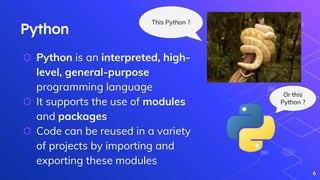
Python
⬡ Python is an interpreted, high-
level, general-purpose
programming language
⬡ It supports the use of modules
and packages
⬡ Code can be reused in a variety
of projects by importing and
exporting these modules
6
This Python ?
Or this
Python ?
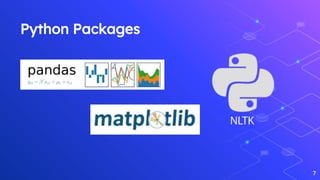
Python Packages
7
2. Anaconda &
Jupyter Notebook
What are they again?
Anaconda
⬡ Free and open-source
distribution of Python and R
programming languages that
aims to simplify package
management & deployment
⬡ In this workshop, we are using
Anaconda to install Python and
Jupyter Notebook
9
Jupyter Notebook
⬡ Open-source web application that
allows you to create & share
documents that contain live code,
equations, visualization and narrative
text
⬡ Powerful way to iterate our Python
code and writing lines of code and
running them one at a time
10
Text Analytics -
Main Phases
Let’s start coding!
Text Analytics & NLP
⬡ Day-to-day texts generated are unstructured
⬡ NLP - Natural Language Processing
⬡ NLP enables computer to interact with humans in a
natural manner
⬡ Example: analyzing movie review
12
Text Analytics Operations using NLTK
⬡ NLTK - Natural Language Toolkit
⬡ Python package that provides a set of diverse
natural languages algorithms
⬡ Free, open source, easy to use, well documented
⬡ Helps computer analyze, preprocess, and understand
written text
13
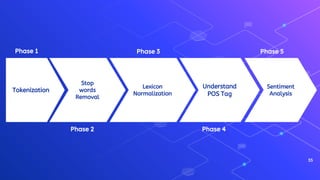
14
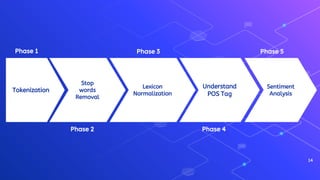
Tokenization
Stop
words
Removal
Lexicon
Normalization
Sentiment
Analysis
Understand
POS Tag
Phase 1
Phase 2
Phase 3
Phase 4
Phase 5
15
Phase 1: Tokenization
Tokenization
⬡ First step in text analytics
⬡ The process of breaking down a text
paragraph into smaller chunks such as
words or sentences
⬡ Token - a single entity that is building
blocks for sentence or paragraph
⬡ nltk.tokenize - a module inside NLTK
package
16
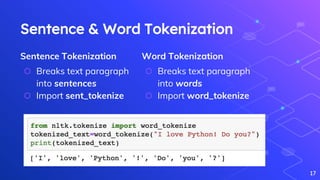
Sentence Tokenization
⬡ Breaks text paragraph
into sentences
⬡ Import sent_tokenize
Sentence & Word Tokenization
17
Word Tokenization
⬡ Breaks text paragraph
into words
⬡ Import word_tokenize
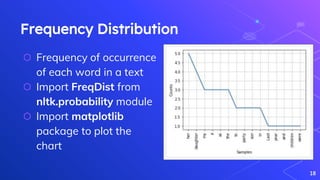
Frequency Distribution
⬡ Frequency of occurrence
of each word in a text
⬡ Import FreqDist from
nltk.probability module
⬡ Import matplotlib
package to plot the
chart
18
Do It
Yourself!
Choose any story from the
Funny Halloween Stories link
and plot a frequency
distribution using Python! Boo!
19
20
Phase 2: Stop
words Removal
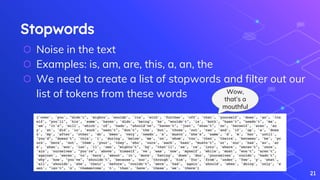
Stopwords
⬡ Noise in the text
⬡ Examples: is, am, are, this, a, an, the
⬡ We need to create a list of stopwords and filter out our
list of tokens from these words
21
Wow,
that’s a
mouthful
Do It
Yourself!
Use the same story you picked
in Phase 1 and remove the
stopwords from that text. Let’s
do it!
22
23
Phase 3: Lexicon
Normalization
Lexicon Normalization
⬡ Reduces derivationally related forms of a word to a
common root word
⬡ For example, connection, connected, connecting
word reduce to a common word “connect”
24
Stemming
⬡ Reduces word to their
root word / chops off the
derivational affixes
⬡ Does not recognize the
knowledge of the word in
context
Stemming & Lemmatization
25
Lemmatization
⬡ More sophisticated
⬡ Reduces words to their
base word - linguistically
correct lemmas
⬡ Considers context of the
word
26
Phase 4: POS Tag
POS Tagging
⬡ Part-of-Speech (POS) tagging looks to identify the
grammatical group of a given word based on the
context
⬡ For example, noun, pronoun, adjective, verb, adverbs,
etc
27
Do It
Yourself!
Choose a sentence from the
Halloween Story and apply
POS tags to the tokenized
sentence!
28
29
Phase 5: Sentiment
Analysis
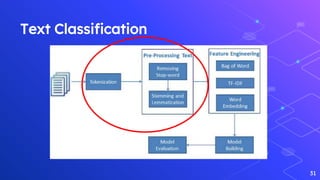
Text Classification
⬡ Important task in text mining
⬡ Identifying category/class of given text such as blog,
book, web page, tweets
⬡ Various application in spam detection, classifying
website content for a search engine, sentiments of
customer feedback, etc
30
Text Classification
31
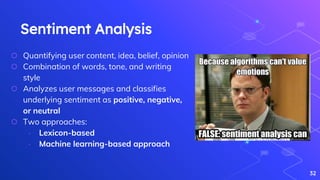
Sentiment Analysis
⬡ Quantifying user content, idea, belief, opinion
⬡ Combination of words, tone, and writing
style
⬡ Analyzes user messages and classifies
underlying sentiment as positive, negative,
or neutral
⬡ Two approaches:
∙ Lexicon-based
∙ Machine learning-based approach
32
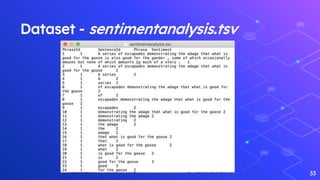
Dataset - sentimentanalysis.tsv
33
What We’ve Learned Today..
34
⬡ Break down paragraphs into smaller chunks
⬡ Remove punctuation and stopwords to eliminate noise
⬡ Use Stemming & Lemmatization to reduce words to their
base words
⬡ Understand Part-of-Speech tagging
⬡ Create simple graphs in Python
⬡ Scratch a bit of the surface of Sentiment Text Analysis!
35
Tokenization
Stop
words
Removal
Lexicon
Normalization
Sentiment
Analysis
Understand
POS Tag
Phase 1
Phase 2
Phase 3
Phase 4
Phase 5
5.
Extra Resources
More Python?
Additional Learning Resources
⬡ To read more about Text Analysis
∙ https://monkeylearn.com/text-analysis/
⬡ More advanced Text Analysis tutorial
∙ https://www.dataquest.io/blog/tutorial-text-analysis-python-test-
hypothesis
⬡ Bootcamp course on Python
∙ https://www.udemy.com/course/complete-python-bootcamp/
37
38
Thanks for coming!
http://bit.ly/TD-SAT2
Suitable Code Exit Code: Nychella

Technical Development Workshop - Text Analytics with Python

  • 1.
    Text Analytics with Python TDWorkshop 2 Nhi Nguyen & Michelle Purnama
  • 2.
    Pre-Workshop Checklist ⬡ 1.This is pretty obvious…. but do you have your laptop with you? If you don’t…. Perhaps go grab it? ⬡ 2. Did you download Anaconda? ⬡ 3. Did you have access to TD WS 2 Shared Folder? ⬡ 4. If you say “no” to questions 2 and 3 → go to AIS website for the instruction!
  • 3.
    AIS Upcoming Events ⬡No Speaker Series, Next Monday, 10/21 ⬡ EY Office VIsit - Next Thursday, 10/24, 9:00AM - 12:00PM ∙ Find the signup in the newsletter ⬡ PD Meeting: Friday, 10/25, 12:00 – 12:50 ∙ Talking Tech with Ilya Rogov
  • 4.
    Hello! I am MichellePurnama I hope you’re all excited to learn Python with us! Don’t be scared - this Python won’t bite :) 4
  • 5.
  • 6.
    Python ⬡ Python isan interpreted, high- level, general-purpose programming language ⬡ It supports the use of modules and packages ⬡ Code can be reused in a variety of projects by importing and exporting these modules 6 This Python ? Or this Python ?
  • 7.
  • 8.
    2. Anaconda & JupyterNotebook What are they again?
  • 9.
    Anaconda ⬡ Free andopen-source distribution of Python and R programming languages that aims to simplify package management & deployment ⬡ In this workshop, we are using Anaconda to install Python and Jupyter Notebook 9
  • 10.
    Jupyter Notebook ⬡ Open-sourceweb application that allows you to create & share documents that contain live code, equations, visualization and narrative text ⬡ Powerful way to iterate our Python code and writing lines of code and running them one at a time 10
  • 11.
    Text Analytics - MainPhases Let’s start coding!
  • 12.
    Text Analytics &NLP ⬡ Day-to-day texts generated are unstructured ⬡ NLP - Natural Language Processing ⬡ NLP enables computer to interact with humans in a natural manner ⬡ Example: analyzing movie review 12
  • 13.
    Text Analytics Operationsusing NLTK ⬡ NLTK - Natural Language Toolkit ⬡ Python package that provides a set of diverse natural languages algorithms ⬡ Free, open source, easy to use, well documented ⬡ Helps computer analyze, preprocess, and understand written text 13
  • 14.
  • 15.
  • 16.
    Tokenization ⬡ First stepin text analytics ⬡ The process of breaking down a text paragraph into smaller chunks such as words or sentences ⬡ Token - a single entity that is building blocks for sentence or paragraph ⬡ nltk.tokenize - a module inside NLTK package 16
  • 17.
    Sentence Tokenization ⬡ Breakstext paragraph into sentences ⬡ Import sent_tokenize Sentence & Word Tokenization 17 Word Tokenization ⬡ Breaks text paragraph into words ⬡ Import word_tokenize
  • 18.
    Frequency Distribution ⬡ Frequencyof occurrence of each word in a text ⬡ Import FreqDist from nltk.probability module ⬡ Import matplotlib package to plot the chart 18
  • 19.
    Do It Yourself! Choose anystory from the Funny Halloween Stories link and plot a frequency distribution using Python! Boo! 19
  • 20.
  • 21.
    Stopwords ⬡ Noise inthe text ⬡ Examples: is, am, are, this, a, an, the ⬡ We need to create a list of stopwords and filter out our list of tokens from these words 21 Wow, that’s a mouthful
  • 22.
    Do It Yourself! Use thesame story you picked in Phase 1 and remove the stopwords from that text. Let’s do it! 22
  • 23.
  • 24.
    Lexicon Normalization ⬡ Reducesderivationally related forms of a word to a common root word ⬡ For example, connection, connected, connecting word reduce to a common word “connect” 24
  • 25.
    Stemming ⬡ Reduces wordto their root word / chops off the derivational affixes ⬡ Does not recognize the knowledge of the word in context Stemming & Lemmatization 25 Lemmatization ⬡ More sophisticated ⬡ Reduces words to their base word - linguistically correct lemmas ⬡ Considers context of the word
  • 26.
  • 27.
    POS Tagging ⬡ Part-of-Speech(POS) tagging looks to identify the grammatical group of a given word based on the context ⬡ For example, noun, pronoun, adjective, verb, adverbs, etc 27
  • 28.
    Do It Yourself! Choose asentence from the Halloween Story and apply POS tags to the tokenized sentence! 28
  • 29.
  • 30.
    Text Classification ⬡ Importanttask in text mining ⬡ Identifying category/class of given text such as blog, book, web page, tweets ⬡ Various application in spam detection, classifying website content for a search engine, sentiments of customer feedback, etc 30
  • 31.
  • 32.
    Sentiment Analysis ⬡ Quantifyinguser content, idea, belief, opinion ⬡ Combination of words, tone, and writing style ⬡ Analyzes user messages and classifies underlying sentiment as positive, negative, or neutral ⬡ Two approaches: ∙ Lexicon-based ∙ Machine learning-based approach 32
  • 33.
  • 34.
    What We’ve LearnedToday.. 34 ⬡ Break down paragraphs into smaller chunks ⬡ Remove punctuation and stopwords to eliminate noise ⬡ Use Stemming & Lemmatization to reduce words to their base words ⬡ Understand Part-of-Speech tagging ⬡ Create simple graphs in Python ⬡ Scratch a bit of the surface of Sentiment Text Analysis!
  • 35.
  • 36.
  • 37.
    Additional Learning Resources ⬡To read more about Text Analysis ∙ https://monkeylearn.com/text-analysis/ ⬡ More advanced Text Analysis tutorial ∙ https://www.dataquest.io/blog/tutorial-text-analysis-python-test- hypothesis ⬡ Bootcamp course on Python ∙ https://www.udemy.com/course/complete-python-bootcamp/ 37
  • 38.

Editor's Notes

  • #2 Nhi
  • #5 Michelle
  • #6 M
  • #7 Python is an interpreted, high-level, general-purpose programming language. Python supports the use of modules and packages, which means that programs can be designed in a modular style and code can be reused across a variety of projects. Once you've developed a module or package you need, it can be scaled for use in other projects, and it's easy to import or export these modules.
  • #10 What is Anaconda? Anaconda is a free and open-source distribution of the Python and R programming languages for scientific computing, that aims to simplify package management and deployment. In this workshop, we will use Anaconda to Install Python and Jupyter Notebook as Anaconda also includes other commonly used packages for scientific computing and data science (and in this case, for text analytics!)
  • #11 M What is Jupyter Notebook? The Jupyter Notebook is an open-source web application that allows you to create and share documents that contain live code, equations, visualizations and narrative text. Jupyter Notebooks are a powerful way to write and iterate on your Python code for data analysis. Rather than writing and re-writing an entire program, you can write lines of code and run them one at a time.
  • #12 N
  • #13 NLP enables the computer to interact with humans in a natural manner. It helps the computer to understand the human language and derive meaning from it. Analyzing movie review is one of the classic examples to demonstrate a simple NLP Bag-of-words model, on movie reviews.
  • #14 N NLTK is a powerful Python package that provides a set of diverse natural languages algorithms. It is free, opensource, easy to use, large community, and well documented. NLTK helps the computer to analysis, preprocess, and understand the written text. Going back to the phase slide, NLTK consists of the most common algorithms such as tokenizing, part-of-speech tagging, stemming, sentiment analysis, topic segmentation, and named entity recognition.

  • #16 M
  • #17 Talk about package —> module —> class (draw venn diagram on white board maybe?)
  • #19 # Frequency Distribution Plot import matplotlib.pyplot as plt fdist.plot(30,cumulative=False) plt.show() https://matplotlib.org/tutorials/introductory/pyplot.html#pyplot-tutorial
  • #22 M
  • #24 N
  • #25 Lexicon normalization considers another type of noise in the text. For example, connection, connected, connecting word reduce to a common word "connect". It reduces derivationally related forms of a word to a common root word.
  • #26 Stemming process of linguistic normalization reduces words to their word root word or chops off the derivational affixes. Lemmatization more sophisticated than stemming. reduces words to their base word, which is linguistically correct lemmas. A lemma is a word that stands at the head of a definition in a dictionary. All the head words in a dictionary are lemmas. Technically, it is "a base word and its inflections" Stemmer works on an individual word without knowledge of the context. For example, The word "better" has "good" as its lemma. This thing will miss by stemming because it requires a dictionary look-up.
  • #27 N
  • #28 The primary target of Part-of-Speech(POS) tagging is to identify the grammatical group of a given word. Whether it is a NOUN, PRONOUN, ADJECTIVE, VERB, ADVERBS, etc. based on the context. POS Tagging looks for relationships within the sentence and assigns a corresponding tag to the word. List of POS tags: https://medium.com/@gianpaul.r/tokenization-and-parts-of-speech-pos-tagging-in-pythons-nltk-library-2d30f70af13b
  • #31 Text classification is one of the important tasks of text mining. Identifying category or class of given text such as a blog, book, web page, news articles, and tweets. It has various application in today's computer world such as spam detection, task categorization in CRM services, categorizing products on E-retailer websites, classifying the content of websites for a search engine, sentiments of customer feedback, etc.
  • #33 What users and the general public think about the latest feature? You can quantify such information with reasonable accuracy using sentiment analysis. Quantifying users content, idea, belief, and opinion is known as sentiment analysis. Human communication is just not limited to words, it is more than words. Sentiments are combination words, tone, and writing style. Two approaches Lexicon-based: Count a number of positive and negative words in given text and the larger count will be the sentiment of text. Machine learning based approach: Develop a classification model, which is trained using the pre-labeled dataset of positive, negative, and neutral. In this Tutorial, you will use the second approach(Machine learning based approach). This is how you learn sentiment and text classification with a single example.
  • #35 Break down paragraphs into smaller chunks like sentences or words. Remove punctuation and stopwords to increase the accuracy of our analysis. Use Stemming or Lemmatization to reduce words to their base words. Understand Part-of-Speech tagging. Create simple graphs in Python. Scratch a bit of the surface of Sentiment Text Analysis!