Meghan Kneringer Mentimeter 1
What is Mentimeter?
Mentimeter allows teachers to create
presentations that gives students real time
feedback and encourages student
engagement. Students can use laptops,
mobile devices (app available), or tablets to
vote on any question a teacher asks.
Meghan Kneringer Mentimeter 2
Meghan Kneringer Mentimeter 3
How To Register
and Login to
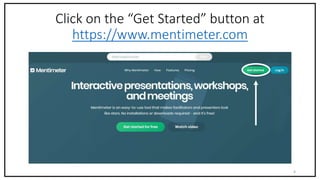
Click on the “Get Started” button at
https://www.mentimeter.com
Meghan Kneringer Mentimeter 4
Meghan Kneringer Mentimeter 5
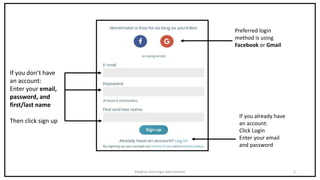
If you don’t have
an account:
Enter your email,
password, and
first/last name
Then click sign up
If you already have
an account:
Click Login
Enter your email
and password
Preferred login
method is using
Facebook or Gmail
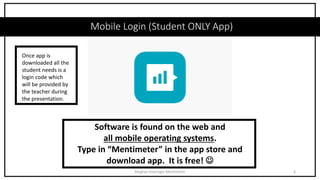
Mobile Login (Student ONLY App)
Meghan Kneringer Mentimeter 6
Software is found on the web and
all mobile operating systems.
Type in “Mentimeter” in the app store and
download app. It is free! 
Once app is
downloaded all the
student needs is a
login code which
will be provided by
the teacher during
the presentation.
How To Use Mentimeter
7Meghan Kneringer Mentimeter
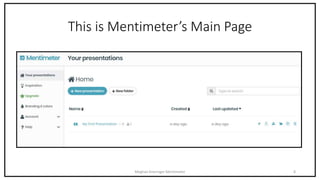
This is Mentimeter’s Main Page
Meghan Kneringer Mentimeter 8
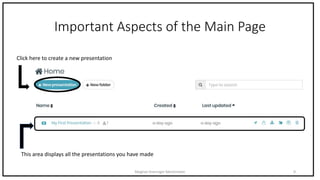
Important Aspects of the Main Page
Meghan Kneringer Mentimeter 9
Click here to create a new presentation
This area displays all the presentations you have made
How to
Create a Quiz
Meghan Kneringer Mentimeter 10
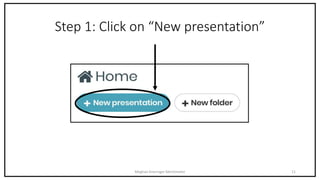
Step 1: Click on “New presentation”
Meghan Kneringer Mentimeter 11
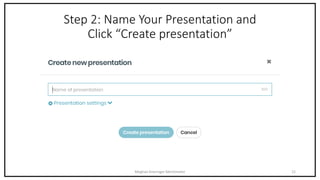
Step 2: Name Your Presentation and
Click “Create presentation”
Meghan Kneringer Mentimeter 12
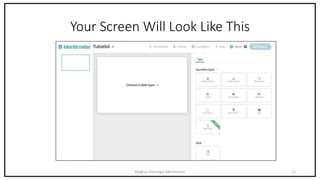
Your Screen Will Look Like This
Meghan Kneringer Mentimeter 13
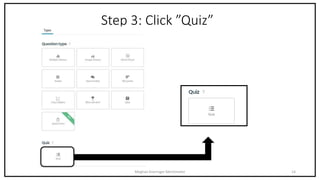
Step 3: Click ”Quiz”
Meghan Kneringer Mentimeter 14
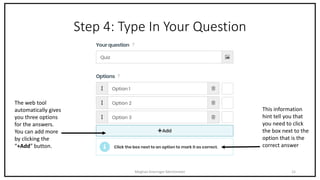
Step 4: Type In Your Question
Meghan Kneringer Mentimeter 15
The web tool
automatically gives
you three options
for the answers.
You can add more
by clicking the
“+Add” button.
This information
hint tell you that
you need to click
the box next to the
option that is the
correct answer
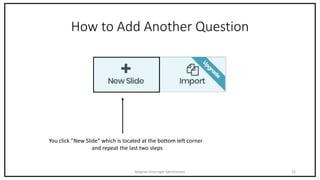
How to Add Another Question
Meghan Kneringer Mentimeter 16
You click ”New Slide” which is located at the bottom left corner
and repeat the last two steps
Extra Feature
Meghan Kneringer Mentimeter 17
This feature allows the
teacher to set a time limit in
which the students have that
amount of time to answer
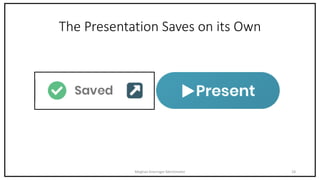
The Presentation Saves on its Own
Meghan Kneringer Mentimeter 18
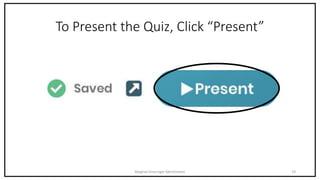
To Present the Quiz, Click “Present”
Meghan Kneringer Mentimeter 19
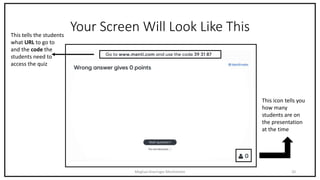
Your Screen Will Look Like This
Meghan Kneringer Mentimeter 20
This tells the students
what URL to go to
and the code the
students need to
access the quiz
This icon tells you
how many
students are on
the presentation
at the time
How to
Find the Data
Meghan Kneringer Mentimeter 21
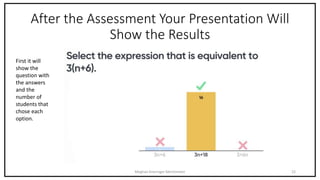
After the Assessment Your Presentation Will
Show the Results
Meghan Kneringer Mentimeter 22
First it will
show the
question with
the answers
and the
number of
students that
chose each
option.
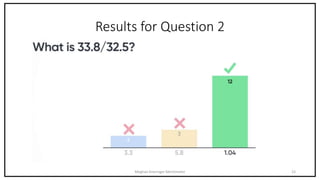
Results for Question 2
Meghan Kneringer Mentimeter 23
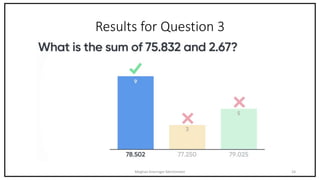
Results for Question 3
Meghan Kneringer Mentimeter 24
After It Shows The Individual Question Results,
The Presentation Will Show The Overall Winner
Meghan Kneringer Mentimeter 25
In this case, during
the live session my
student Wyatt won
the overall
assessment with
2856 points.

Mentimeter Tutorial

  • 1.
  • 2.
    What is Mentimeter? Mentimeterallows teachers to create presentations that gives students real time feedback and encourages student engagement. Students can use laptops, mobile devices (app available), or tablets to vote on any question a teacher asks. Meghan Kneringer Mentimeter 2
  • 3.
    Meghan Kneringer Mentimeter3 How To Register and Login to
  • 4.
    Click on the“Get Started” button at https://www.mentimeter.com Meghan Kneringer Mentimeter 4
  • 5.
    Meghan Kneringer Mentimeter5 If you don’t have an account: Enter your email, password, and first/last name Then click sign up If you already have an account: Click Login Enter your email and password Preferred login method is using Facebook or Gmail
  • 6.
    Mobile Login (StudentONLY App) Meghan Kneringer Mentimeter 6 Software is found on the web and all mobile operating systems. Type in “Mentimeter” in the app store and download app. It is free!  Once app is downloaded all the student needs is a login code which will be provided by the teacher during the presentation.
  • 7.
    How To UseMentimeter 7Meghan Kneringer Mentimeter
  • 8.
    This is Mentimeter’sMain Page Meghan Kneringer Mentimeter 8
  • 9.
    Important Aspects ofthe Main Page Meghan Kneringer Mentimeter 9 Click here to create a new presentation This area displays all the presentations you have made
  • 10.
    How to Create aQuiz Meghan Kneringer Mentimeter 10
  • 11.
    Step 1: Clickon “New presentation” Meghan Kneringer Mentimeter 11
  • 12.
    Step 2: NameYour Presentation and Click “Create presentation” Meghan Kneringer Mentimeter 12
  • 13.
    Your Screen WillLook Like This Meghan Kneringer Mentimeter 13
  • 14.
    Step 3: Click”Quiz” Meghan Kneringer Mentimeter 14
  • 15.
    Step 4: TypeIn Your Question Meghan Kneringer Mentimeter 15 The web tool automatically gives you three options for the answers. You can add more by clicking the “+Add” button. This information hint tell you that you need to click the box next to the option that is the correct answer
  • 16.
    How to AddAnother Question Meghan Kneringer Mentimeter 16 You click ”New Slide” which is located at the bottom left corner and repeat the last two steps
  • 17.
    Extra Feature Meghan KneringerMentimeter 17 This feature allows the teacher to set a time limit in which the students have that amount of time to answer
  • 18.
    The Presentation Saveson its Own Meghan Kneringer Mentimeter 18
  • 19.
    To Present theQuiz, Click “Present” Meghan Kneringer Mentimeter 19
  • 20.
    Your Screen WillLook Like This Meghan Kneringer Mentimeter 20 This tells the students what URL to go to and the code the students need to access the quiz This icon tells you how many students are on the presentation at the time
  • 21.
    How to Find theData Meghan Kneringer Mentimeter 21
  • 22.
    After the AssessmentYour Presentation Will Show the Results Meghan Kneringer Mentimeter 22 First it will show the question with the answers and the number of students that chose each option.
  • 23.
    Results for Question2 Meghan Kneringer Mentimeter 23
  • 24.
    Results for Question3 Meghan Kneringer Mentimeter 24
  • 25.
    After It ShowsThe Individual Question Results, The Presentation Will Show The Overall Winner Meghan Kneringer Mentimeter 25 In this case, during the live session my student Wyatt won the overall assessment with 2856 points.