Accessible
Content
- Maja Benke
Why Accessible
Content Matters?
– Steve Krug
“The one argument for accessibility that doesn’t get
made nearly often enough is how extraordinarily
better it makes some people’s lives.
How many opportunities do we have to dramatically
improve people’s lives just by doing our job a little
better?”
Accessible Websites: 

Cooperation of Design,
Development and Content
What is Accessible
Content?
Accessible Content
can be consumed by as many people as possible,
regardless
• situations

• goals
• skill sets

• needs
Accessibility Personas
https://alphagov.github.io/accessibility-personas/
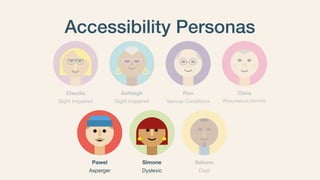
Accessibility Personas
Pawel
Asperger
Simone
Dyslexic
Saleem
Deaf
Ashleigh
Sight Impaired
Ron
Various Conditions
Chris
Rheumatoid ArthritisSight Impaired
Claudia
Accessibility Personas
Pawel
Asperger
Simone
Dyslexic
Saleem
Deaf
Ashleigh
Sight Impaired
Ron
Various Conditions
Chris
Rheumatoid ArthritisSight Impaired
Claudia
Pawel
• 24 year old chemistry graduate

• Asperger’s and anxiety

• Adjusts things, like colours, to
reduce potential stress and
distractions
https://alphagov.github.io/accessibility-personas/pawel/
Pawel
Simone
• 41 year old office manager

• Dyslexic

• Uses software which
highlights text as it reads it
out
https://alphagov.github.io/accessibility-personas/simone/
Simone
Setting up Personas
https://alphagov.github.io/accessibility-personas/setup/#setting-up-
personas
Dos and Don'ts for
Accessible Content
Text
Use Subheadings to
Loosen up Text-Blocks
Avoid large text-blocks - use elements to loosen up text
Text
• Use semantic structure with headlines

• Only one H1 per page

• Don’t skip a headline-level

• Content defines headline-level, not style
Gutenberg Helps to Stick to
Semantic Heading
Top Toolbar - H1 not selectable
The Gutenberg Editor helps to stick
to the Semantic Heading Structure
Top Toolbar - H1 not selectable
Error message for wrong semantics
Text-Elements
Designed by Vaadin from Flaticon https://www.flaticon.com/authors/vaadin/lineal
Subheadings Lists (Unordered) Lists (Ordered)
Correct use of Lists
• Unordered list for
enumeration with no
particular order

• Ordered lists for content,
where the order matters
Text-Elements
Designed by Vaadin from Flaticon https://www.flaticon.com/authors/vaadin/lineal
Subheadings Lists (Unordered) Lists (Ordered)
Quotes Tables Accordion
Accessibility for
Accordions and Tables
TableAccordion
Accessibility for
Accordions and Tables
• Better Overview of Complex Content and Good for Visual
People

• Tricky for Screen Reader Users

• Tables and Accordions can be Accessible for Screen Readers
- if they are done right

• Gutenberg Table-Block in WordPress 5.2 are not accessible 

Will be more Accessible in WordPress 5.3+
Resources:

• http://www.howtocreate.co.uk/accessibletable.html

• https://www.hassellinclusion.com/blog/accessible-accordion-pattern/
Text-Styles
• Use capitalisation correctly! 

• Don’t use all capitals for real words! 

• Use capitals for abbreviations and acronyms

Capitals for Abbreviations

- Good Example: #WCEU
Capitals for Abbreviations

- Bad Example: #wceu
Remember:

#WCEU in Capitals
Content
• Don’t go wild with text-styles. Carefully use styles like italic,
bold for single words. Stick to the style guide.

• Use easy and plain language 

• Keep it clear, simple and short 

• Guide the user with tips and hints.
Important Information
https://www.elmastudio.de/en/themes/docs/
pukeko/
• Important information and
summary on the top

• Highlight important
information
Links
Links
• Clear description for links.

Not “Click here”! 

Better: “Contact Us”

• Don’t open in a new tab! 

If you do, tell the user
Emojis
Emojis
• Better understanding of the overall meaning/expression of
written Text

• Accessible in apps and native programs (emojis are read
out)

• Not by default accessible in websites, as emojis are
unicodes. For example: ☃ (Difficult for screen-reader
users)

<span role="img" aria-label="Snowman">&#9731;</span>

Resource: https://tink.uk/accessible-emoji/
Emojis
• Cultural/personal differences in understanding of emojis 

• Browsers show them differently
More Problems
Emojis
Ressource: https://www.mirror.co.uk/tech/you-mistake-grimace-emoji-grin-7787192

(Image: GroupLens Research, University of Minnesota)
These are the same emoji “Grinning”!
Emojis
Resource: http://adrianroselli.com/2016/12/accessible-emoji-tweaked.html
Tweak for emojis with tool tip
Emojis
Use them in native apps (Twitter, Slack…) 

If you think the emoji is clear enough
Recommendation
Use them carefully in websites. 

Extra explanation/additional work needed
Different Users Prefer
Different Content Formats
Mix of Content Formats
support text with images, graphics and videos
Images and Graphics
a picture is worth a thousand words
Images and Graphics
• Don’t rely on colours only (for stats, graphics, … ) 

• Don’t “hide” text in images

• Use alt-text - also for decorative images. 

Provide the same informations from image into text

• If that is too long - Include information also in the text
Alt-Text in Gutenberg
Twitter - Activate Alt-Text
PDF
PDF
• Hard to make it accessible - Try to avoid it

• Provide informations also on the website (as HTML)

• Use semantic text-elements, same rules like on websites
Video + Audio
Videos + Audios
• Great addition for text

• Don’t let it auto-start

• Use captioning for videos - Don’t rely on sound

• Vimeo needs captioning file

• YouTube can include automatic captioning
Use Captioning
https://www.youtube.com/watch?v=P2YBkZCRTGA
Videos + Audios
• Transcribe your audios (and video) and write information
also into the text

• https://auphonic.com/

• https://cloud.google.com/speech-to-text/

• Use chapter marks
Use Chapter Marks
YouTube Podcasts
Videos + Audios
Provide show notes (podcasts)
GIFs
GIFs
• Good way express things

• Try to avoid GIFs - better use videos - More control for the
user

• Okay for short video-sequels (not for longer videos)

• Don’t use GIFs in loop! Only repeat 2-3 times and than
stop it - Photoshop, and better GIF-Programs have an
option for that

• Be careful with flashing images and big movements!!!
GIFs: Bad Example

Infinite Loop
Source: https://giphy.com/gifs/ouE6OPO1MADM4
GIFs: Good Example

Only plays once
Source: https://giphy.com/gifs/ouE6OPO1MADM4
– Tim Berners-Lee
“The power of the Web is in its universality.
Access by everyone regardless of disability
is an essential aspect.”
Thank you
Slides via wp1x1.de
#WCEU
More Ressources
Accessibility Handbook WordPress

https://make.wordpress.org/accessibility/handbook/
More Ressources
A11y Blog of gov.uk: 

https://accessibility.blog.gov.uk/


A11y Personas, A11y Posters, …
More Ressources
Accessibility Newsletter

https://a11yweekly.com/
More Ressources
• “Accessibility for Everyone”: https://abookapart.com/
products/accessibility-for-everyone (Book, ebook,
Audiobook)

• https://webaim.org/

• Guidelines: https://www.w3.org/TR/WCAG21/
Questions?
@Maja Benke

#WCEU

Accessible content