Twine
• Can work online or on desktop.
• Desktop if you want to keep, return
to edit. Changing or clearing
browser will lose your game!
• Begin by creating passages
• Enter text between [[ ]] for new
passage
• [[ | ]] passage with alt name then
text, that way you can direct to one
place without having to use the
same words
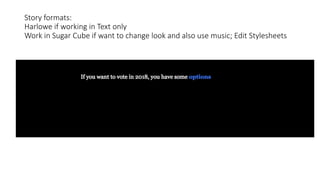
Story formats:
Harlowe if working in Text only
Work in Sugar Cube if want to change look and also use music; Edit Stylesheets
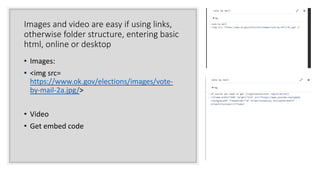
Images and video are easy if using links,
otherwise folder structure, entering basic
html, online or desktop
• Images:
• <img src=
https://www.ok.gov/elections/images/vote-
by-mail-2a.jpg/>
• Video
• Get embed code
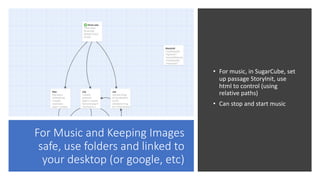
For Music and Keeping Images
safe, use folders and linked to
your desktop (or google, etc)
• For music, in SugarCube, set
up passage StoryInit, use
html to control (using
relative paths)
• Can stop and start music
Publish/Save to Desktop or Google Drive, It will number the versions.
Putting on Line
• Use
• https://textadventures.co.uk
• https://itch.io
• Can also post to your own site (but
probably need your own hosted site,
not free wordpress or tumblr)
Tips to Keep Sane
• Work in Desktop Twine, not online.
You can easily lose it in online version;
you will lose your project
• Store files on desktop or create a
Project File on desktop, Google Drive,
or Drop Box and put all files there if
not linked to outside site (video and
audio sharing sites, should have your
work/clips so your project doesn’t get
dropped links)
Images
• Can link online, but you have danger of
broken links (if not yours)
• Work on desktop and keep files together.
You can download and cite just as you
would any project
• Or you can put in folder in google drive (or
flickr or dropbox) can get permalinks to
the image. It is not the share link in
google or flickr
• Gdurl: https://gdurl.com for google, flickr
can use embed or take jpeg info out of the
embed
• Find a consistent practice to control your
images
• Remember to cite
Disruptive Storytelling with Twine
• How to use the paths:
• See multiple perspectives (characters) in a space/storyworld
• Imagine different pathways through a particular space/storyworld
• Imagine a range of choices (or lack of choices) in the space/storyworld.
Resources
Twine Tutorials>
• Adam Hammond: http://www.adamhammond.com/twineguide/
4 really simple tutorials that have text (and code) to follow along easily.
3 of those 4 will help you get started and do all kinds of media (image, video, audio)
4th video shows variables – more in game mode.
• Dan Cox, many more video tutorials
https://videlais.com/twine-tutorials/
There also are twine help sites, wiki and forums
free host listings: biz.nf
Depression Quest, Zoe Quinn
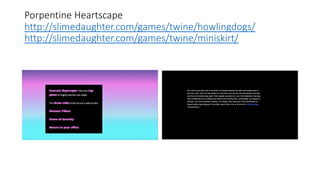
Porpentine Heartscape
http://slimedaughter.com/games/twine/howlingdogs/
http://slimedaughter.com/games/twine/miniskirt/
Anna Anthropy, “Queers at the End of the World”
Artist Survival, Nyxxx
http://nyxxx.se/ass/
Path of Honors a Roman Adventure
Jeremiah McCall
Castle, Forest, Island, Sea, by Hide&Seek

Twine 2020

  • 2.
    Twine • Can workonline or on desktop. • Desktop if you want to keep, return to edit. Changing or clearing browser will lose your game! • Begin by creating passages • Enter text between [[ ]] for new passage • [[ | ]] passage with alt name then text, that way you can direct to one place without having to use the same words
  • 3.
    Story formats: Harlowe ifworking in Text only Work in Sugar Cube if want to change look and also use music; Edit Stylesheets
  • 4.
    Images and videoare easy if using links, otherwise folder structure, entering basic html, online or desktop • Images: • <img src= https://www.ok.gov/elections/images/vote- by-mail-2a.jpg/> • Video • Get embed code
  • 5.
    For Music andKeeping Images safe, use folders and linked to your desktop (or google, etc) • For music, in SugarCube, set up passage StoryInit, use html to control (using relative paths) • Can stop and start music
  • 6.
    Publish/Save to Desktopor Google Drive, It will number the versions.
  • 7.
    Putting on Line •Use • https://textadventures.co.uk • https://itch.io • Can also post to your own site (but probably need your own hosted site, not free wordpress or tumblr)
  • 8.
    Tips to KeepSane • Work in Desktop Twine, not online. You can easily lose it in online version; you will lose your project • Store files on desktop or create a Project File on desktop, Google Drive, or Drop Box and put all files there if not linked to outside site (video and audio sharing sites, should have your work/clips so your project doesn’t get dropped links)
  • 9.
    Images • Can linkonline, but you have danger of broken links (if not yours) • Work on desktop and keep files together. You can download and cite just as you would any project • Or you can put in folder in google drive (or flickr or dropbox) can get permalinks to the image. It is not the share link in google or flickr • Gdurl: https://gdurl.com for google, flickr can use embed or take jpeg info out of the embed • Find a consistent practice to control your images • Remember to cite
  • 10.
    Disruptive Storytelling withTwine • How to use the paths: • See multiple perspectives (characters) in a space/storyworld • Imagine different pathways through a particular space/storyworld • Imagine a range of choices (or lack of choices) in the space/storyworld.
  • 11.
    Resources Twine Tutorials> • AdamHammond: http://www.adamhammond.com/twineguide/ 4 really simple tutorials that have text (and code) to follow along easily. 3 of those 4 will help you get started and do all kinds of media (image, video, audio) 4th video shows variables – more in game mode. • Dan Cox, many more video tutorials https://videlais.com/twine-tutorials/ There also are twine help sites, wiki and forums free host listings: biz.nf
  • 16.
  • 17.
  • 18.
    Anna Anthropy, “Queersat the End of the World”
  • 19.
  • 20.
    Path of Honorsa Roman Adventure Jeremiah McCall
  • 21.
    Castle, Forest, Island,Sea, by Hide&Seek