Working with Technology Seminar
Technology Platforms
& Decision Criteria
(overview)
VINOGRADOVO, October 9-10 2013
2
• Technology and Digital Asset Management
• Content Delivery/Distribution Network
• About a particular platform and its features
Agenda: This session is not about
3
1.Purpose of a Platform
2.Planning Process and Decision Criteria
3.Open Source vs Proprietary Software Platforms
4.Major Open Source Platforms comparison
Agenda: What we will cover?
4
What is a technology platform?
General definition:
Technology platform is a term for technology that enables the creation of
products and processes that support present or future development.
Source: Wikipedia®
Definition related to computing platforms:
Platform is an underlying computer system on which application
programs can run.
Source: TechTarget
Definition related to digital publishing:
A set of tools that faciliates to create and provide a reliable, affordable and
easy to use way to develop, maintain and grow your web presence.
Decision criteria – preliminary questions:
 What is your current situation of your online
operations?
 How you're going to deploy the site?
 Do you have competence to decide on technology,
platform, framework, etc?
 Do you have the right people?
Always consider how easy it’ll be to move to another platform
(or another vendor) once you outgrow your first one.
5
Decision criteria – selection process overview
 Briefing with staff
 Prioritized features list
 Evaluation
 Business considerations
 Vendor considerations
 Technical considerations
6
Decision criteria: Technical considerations
 Infrastructure
 Scalability
 Integration
7
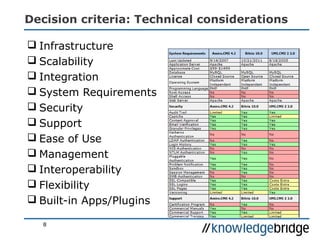
Decision criteria: Technical considerations
 Infrastructure
 Scalability
 Integration
 System Requirements
 Security
 Support
 Ease of Use
 Management
 Interoperability
 Flexibility
 Built-in Apps/Plugins
8
Decision criteria: Business considerations
What is included in a set-up/
implementation fee?
 Project Management
 Functional Specification
 Information Architecture
(structure and hierachy)
 Sketches/Mock-ups/Wire-Frames
 Web Design
 HTML/CSS coding of design
 System set up
 Customization
 Testing
 Approval
 Training
What is included in a regular
monthly fee?
 Hosting/Connection (SLA)
 Upgrades/Maintenance
 Bug fixing
 Change requests
 New features development
 Support
• Upgrade & Update Services
• Support Availability
• Critical Software Non-
Conformance
• Response/Resolution Time
• System & Network Availability
 What is excluded?
9
Outsourced development and deployment
Decision criteria: Business considerations
Proprietary software
- means the company that developed
the software owns the software and
no one may duplicate it or distribute it
without that company's permission
Developed by closed group/
company
Sold to clients – many different
ways of licensing
May not distribute, copy or
modify
No access to source code
15 – 20% maintenance fee to
access patches, support
Open source software
- is free to use and provides the
original source code used to
create it, so anyone can modify
according to needs.
Developed by group of geographically
distributed developers, mostly for no
pay
Can be copied, modified, redistributed,
incorporated in other OSS apps freely
Some vendors charge for distributing it
(like Redhat Linux)
Use of open standards allows broader
interoperability
No vendor lock-in – can swap out OSS
with greater ease
Platform independence
10
Which one better fits your needs?
Decision criteria: Open Source Pros & Cons?
PROS
A ready made community
Community driven =
community serving
No licence costs
No vendor lock in
Infinitely customizable
Investment is typically in
training staff rather than a third
party - staff development!
CONS
Fear of no-one to blame
No vendor guarantees
Project folding is more
common than vendor folding
Open source may be
incompatible with other
deployed software
Proprietary software is often
more feature rich
Documentation quality is
variable
11
Decision criteria: Product evalution
1. Does your company have a technology
preference? (.NET, Java, PHP, Python, ...)
2. Do you care if the solution will be purchased via
a commercial license or via an open source
license model? (commercial, commercial/community open
source)
3. Do you care if the solution will be installed on
your enterprise servers or provided as a hosted
service? (On-premise or SaaS delivery models)
12
Decision criteria: The most popular features of a CMS platform
 WYSIWYG editor
 SEO
 Media management
 Templates
 Plugins
 Social media extensions
 Statistics
 Link management
 Content syndication
 Workflow/Different
user levels
 Versioning/Archiving
 System updates
 Content Scheduling
 Discussion / Forum
13
14
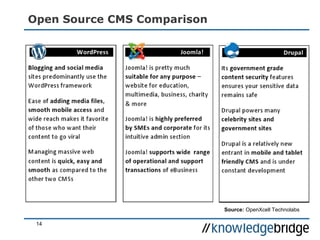
Open Source CMS Comparison
Source: OpenXcell Technolabs
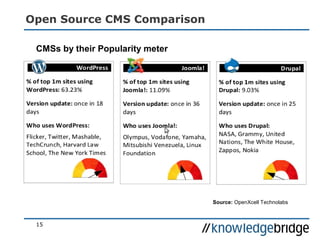
Open Source CMS Comparison
15
CMSs by their Popularity meter
Source: OpenXcell Technolabs
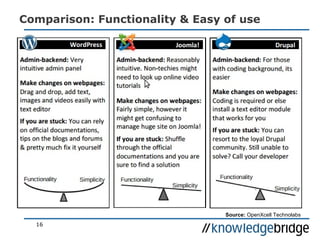
Comparison: Functionality & Easy of use
16
Source: OpenXcell Technolabs
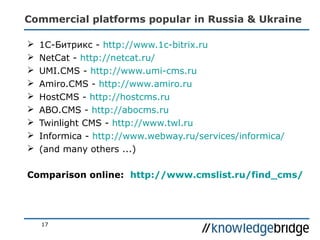
Commercial platforms popular in Russia & Ukraine
17
 1С-Битрикс - http://www.1c-bitrix.ru
 NetCat - http://netcat.ru/
 UMI.CMS - http://www.umi-cms.ru
 Amiro.CMS - http://www.amiro.ru
 HostCMS - http://hostcms.ru
 ABO.CMS - http://abocms.ru
 Twinlight CMS - http://www.twl.ru
 Informica - http://www.webway.ru/services/informica/
 (and many others ...)
Comparison online: http://www.cmslist.ru/find_cms/
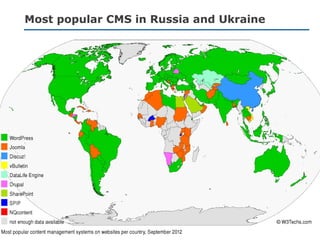
Most popular CMS in Russia and Ukraine
18
Useful Links in Russian and English
 WordPress CMS на русском языке
http://ru.wordpress.org/
 Joomla CMS на русском языке
http://joomla.ru
 Drupal CMS на русском языке
http://www.drupal.ru
 Бесплатные CMS системы
http://bestfreecms.ru/stati/
 Oбзор рынка систем управления
контентом
http://www.cmslist.ru
 ПРЕИМУЩЕСТВА И НЕДОСТАТКИ CMS
1С БИТРИКС (BITRIX)
http://seopure.ru/1s-bitriks/preimushhestva-i-nedostatki-cms-1s-bitriks-bitrix/
 Системы класса Content Manager
System
http://www.bestreferat.ru/referat-210409.html
 Плюсы и минусы использования CMS
(ЦМС)
http://alsites.ru/2013/05/plyusyi-i-minusyi-
ispolzovaniya-cms/
• Try out open source products online
with full admin access
http://www.opensourcecms.com
• CMS Comparison: Drupal, Joomla and
Wordpress
http://www.rackspace.com/knowledge_center/
article/cms-comparison-drupal-joomla-
and-wordpress
• Choosing an open-source CMS
http://www.computerworld.com/s/article/9236
648/
• 2013 Best CMS Comparisons and
Reviews
http://cms-software-
review.toptenreviews.com/
• Why The Washington Post
Uses WordPress (video)
http://wordpress.tv/2013/07/29/yuri-victor-
why-the-washington-post-uses-wordpress/
• When Editors Design: Controlling
Presentation In Structured Content
http://coding.smashingmagazine.com/2013/06
/26/controlling-presentation-in-structured-
content/
19

KB Seminars: Working with Technology - Platforms; 10/13

  • 1.
    Working with TechnologySeminar Technology Platforms & Decision Criteria (overview) VINOGRADOVO, October 9-10 2013
  • 2.
    2 • Technology andDigital Asset Management • Content Delivery/Distribution Network • About a particular platform and its features Agenda: This session is not about
  • 3.
    3 1.Purpose of aPlatform 2.Planning Process and Decision Criteria 3.Open Source vs Proprietary Software Platforms 4.Major Open Source Platforms comparison Agenda: What we will cover?
  • 4.
    4 What is atechnology platform? General definition: Technology platform is a term for technology that enables the creation of products and processes that support present or future development. Source: Wikipedia® Definition related to computing platforms: Platform is an underlying computer system on which application programs can run. Source: TechTarget Definition related to digital publishing: A set of tools that faciliates to create and provide a reliable, affordable and easy to use way to develop, maintain and grow your web presence.
  • 5.
    Decision criteria –preliminary questions:  What is your current situation of your online operations?  How you're going to deploy the site?  Do you have competence to decide on technology, platform, framework, etc?  Do you have the right people? Always consider how easy it’ll be to move to another platform (or another vendor) once you outgrow your first one. 5
  • 6.
    Decision criteria –selection process overview  Briefing with staff  Prioritized features list  Evaluation  Business considerations  Vendor considerations  Technical considerations 6
  • 7.
    Decision criteria: Technicalconsiderations  Infrastructure  Scalability  Integration 7
  • 8.
    Decision criteria: Technicalconsiderations  Infrastructure  Scalability  Integration  System Requirements  Security  Support  Ease of Use  Management  Interoperability  Flexibility  Built-in Apps/Plugins 8
  • 9.
    Decision criteria: Businessconsiderations What is included in a set-up/ implementation fee?  Project Management  Functional Specification  Information Architecture (structure and hierachy)  Sketches/Mock-ups/Wire-Frames  Web Design  HTML/CSS coding of design  System set up  Customization  Testing  Approval  Training What is included in a regular monthly fee?  Hosting/Connection (SLA)  Upgrades/Maintenance  Bug fixing  Change requests  New features development  Support • Upgrade & Update Services • Support Availability • Critical Software Non- Conformance • Response/Resolution Time • System & Network Availability  What is excluded? 9 Outsourced development and deployment
  • 10.
    Decision criteria: Businessconsiderations Proprietary software - means the company that developed the software owns the software and no one may duplicate it or distribute it without that company's permission Developed by closed group/ company Sold to clients – many different ways of licensing May not distribute, copy or modify No access to source code 15 – 20% maintenance fee to access patches, support Open source software - is free to use and provides the original source code used to create it, so anyone can modify according to needs. Developed by group of geographically distributed developers, mostly for no pay Can be copied, modified, redistributed, incorporated in other OSS apps freely Some vendors charge for distributing it (like Redhat Linux) Use of open standards allows broader interoperability No vendor lock-in – can swap out OSS with greater ease Platform independence 10 Which one better fits your needs?
  • 11.
    Decision criteria: OpenSource Pros & Cons? PROS A ready made community Community driven = community serving No licence costs No vendor lock in Infinitely customizable Investment is typically in training staff rather than a third party - staff development! CONS Fear of no-one to blame No vendor guarantees Project folding is more common than vendor folding Open source may be incompatible with other deployed software Proprietary software is often more feature rich Documentation quality is variable 11
  • 12.
    Decision criteria: Productevalution 1. Does your company have a technology preference? (.NET, Java, PHP, Python, ...) 2. Do you care if the solution will be purchased via a commercial license or via an open source license model? (commercial, commercial/community open source) 3. Do you care if the solution will be installed on your enterprise servers or provided as a hosted service? (On-premise or SaaS delivery models) 12
  • 13.
    Decision criteria: Themost popular features of a CMS platform  WYSIWYG editor  SEO  Media management  Templates  Plugins  Social media extensions  Statistics  Link management  Content syndication  Workflow/Different user levels  Versioning/Archiving  System updates  Content Scheduling  Discussion / Forum 13
  • 14.
    14 Open Source CMSComparison Source: OpenXcell Technolabs
  • 15.
    Open Source CMSComparison 15 CMSs by their Popularity meter Source: OpenXcell Technolabs
  • 16.
    Comparison: Functionality &Easy of use 16 Source: OpenXcell Technolabs
  • 17.
    Commercial platforms popularin Russia & Ukraine 17  1С-Битрикс - http://www.1c-bitrix.ru  NetCat - http://netcat.ru/  UMI.CMS - http://www.umi-cms.ru  Amiro.CMS - http://www.amiro.ru  HostCMS - http://hostcms.ru  ABO.CMS - http://abocms.ru  Twinlight CMS - http://www.twl.ru  Informica - http://www.webway.ru/services/informica/  (and many others ...) Comparison online: http://www.cmslist.ru/find_cms/
  • 18.
    Most popular CMSin Russia and Ukraine 18
  • 19.
    Useful Links inRussian and English  WordPress CMS на русском языке http://ru.wordpress.org/  Joomla CMS на русском языке http://joomla.ru  Drupal CMS на русском языке http://www.drupal.ru  Бесплатные CMS системы http://bestfreecms.ru/stati/  Oбзор рынка систем управления контентом http://www.cmslist.ru  ПРЕИМУЩЕСТВА И НЕДОСТАТКИ CMS 1С БИТРИКС (BITRIX) http://seopure.ru/1s-bitriks/preimushhestva-i-nedostatki-cms-1s-bitriks-bitrix/  Системы класса Content Manager System http://www.bestreferat.ru/referat-210409.html  Плюсы и минусы использования CMS (ЦМС) http://alsites.ru/2013/05/plyusyi-i-minusyi- ispolzovaniya-cms/ • Try out open source products online with full admin access http://www.opensourcecms.com • CMS Comparison: Drupal, Joomla and Wordpress http://www.rackspace.com/knowledge_center/ article/cms-comparison-drupal-joomla- and-wordpress • Choosing an open-source CMS http://www.computerworld.com/s/article/9236 648/ • 2013 Best CMS Comparisons and Reviews http://cms-software- review.toptenreviews.com/ • Why The Washington Post Uses WordPress (video) http://wordpress.tv/2013/07/29/yuri-victor- why-the-washington-post-uses-wordpress/ • When Editors Design: Controlling Presentation In Structured Content http://coding.smashingmagazine.com/2013/06 /26/controlling-presentation-in-structured- content/ 19