The tech. behind
Presented by: Javier Abud & Ramiro Bazan
Flash Online Conference #13
Intro
Who am I?
Principal Programmer at MovieStarPlanet
Making games since 2004
Agenda
Project intro
Development Tools
Conditional Compilation restrictions
Target frame rate
Cross Platform Multiplayer via
SmartFox Server
Scout usage
Weekly content releases
Leaderboards and Reddis
Part 2
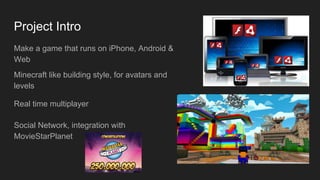
Project Intro
Make a game that runs on iPhone, Android &
Web
Minecraft like building style, for avatars and
levels
Real time multiplayer
Social Network, integration with
MovieStarPlanet
Development Tools
Flash Develop
Flare 3D
Starling (fork)
3DS Max
Adobe Creative Cloud
Git
Conditional compilation restrictions
Helps to keep code clean
Have as few compiler flags as possible (3)
Use of inheritance for device specific code (iOS, Android, Web)
Input works like this
Target Frame Rate
60 FPS from the start
“Premature Optimization is the root of all evil” -Donald Knuth
Starting at 60 FPS with no content means every change that drops the framerate gets noticed quickly and
considered more thoroughly before being merged into main branch
Network communication code abstraction,
lets us focus on the gameplay server side
TCP & UDP messages only (Web and
Mobile)
Keep packets as small as possible
Amazon Web Services (AWS) for Server
up & down scaling
Cross Platform Multiplayer via
SmartFox Server
Adobe Scout
Scout gets used very often
Sound Transform discovery
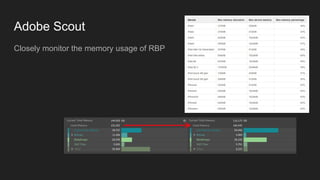
Adobe Scout
Closely monitor the memory usage of RBP
Weekly Content Releases
Release new content every week for player engagement
We’ve had 40 content releases so far (every Thursday!)
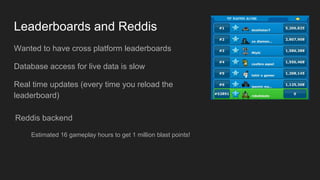
Leaderboards and Reddis
Wanted to have cross platform leaderboards
Database access for live data is slow
Real time updates (every time you reload the
leaderboard)
Reddis backend
Estimated 16 gameplay hours to get 1 million blast points!
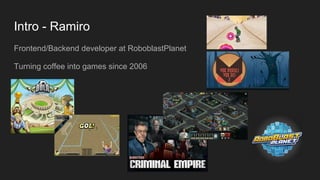
Intro - Ramiro
Frontend/Backend developer at RoboblastPlanet
Turning coffee into games since 2006
Agenda
Hot reloading of assets (UI & Flare)
JSONSprite
Reuse Flare Materials
Debug Panel and cheats
GameObject/Behavior
Image C
AS3 optimizations
Signals only
Compressed Int
Context Lost
Sharing of render targets
Mesh batching
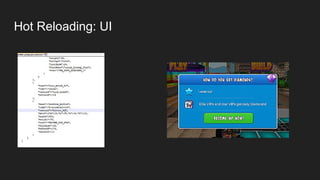
Hot Reloading: UI
Hot Reloading: Meshes
Debug Panel and Cheats
GameObjects/Behaviors
Rule one: Everything is a gameObject and has behaviors
Rule two: Respect rule number one.
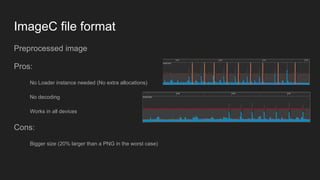
ImageC file format
Preprocessed image
Pros:
No Loader instance needed (No extra allocations)
No decoding
Works in all devices
Cons:
Bigger size (20% larger than a PNG in the worst case)
AS3 Optimizations
Optimized Loops
No Array/Vector push calls
No splice if the Player version allow us (RemoveAt() or custom splice)
Object Pooling
Single EnterFrame
Custom Signals
Based on Robert Penner’s as3Signals we created a simplified version of that
concept.
Pros:
No Events
No allocations
Callbacks are faster
Cons:
Non typed
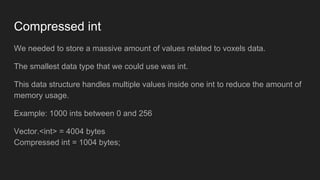
Compressed int
We needed to store a massive amount of values related to voxels data.
The smallest data type that we could use was int.
This data structure handles multiple values inside one int to reduce the amount of
memory usage.
Example: 1000 ints between 0 and 256
Vector.<int> = 4004 bytes
Compressed int = 1004 bytes;
Context Lost
By default Starling keeps a reference to the BitmapData that we are using to be
able to re-upload it when the context is gone.
Instead of doing this we went for the reload everything approach.
We don’t have any bitmapdata cached in ram.
Flare & Starling sharing textures
We needed to show a 3d mesh inside the UI without hacking the entire universe.
Create a FlareTexture that we use as a render target and share the native texture with a StarlingTexture
so we can display the same content in the UI without adding additional agents in the middle.
Mesh Batching
Basically we reuse the same surface/mesh data to render it in multiple places at the same time in one
draw call.
All the meshes can move, rotate, scale or change color.
This concept was included a few releases later directly in Flare3D.
Questions?
Contact info:
Javier Abud - jc@moviestarplanet.com
Ramiro Bazan - rb@moviestarplanet.com

The tech. behind RoboBlastPlanet

  • 1.
    The tech. behind Presentedby: Javier Abud & Ramiro Bazan Flash Online Conference #13
  • 2.
    Intro Who am I? PrincipalProgrammer at MovieStarPlanet Making games since 2004
  • 3.
    Agenda Project intro Development Tools ConditionalCompilation restrictions Target frame rate Cross Platform Multiplayer via SmartFox Server Scout usage Weekly content releases Leaderboards and Reddis Part 2
  • 4.
    Project Intro Make agame that runs on iPhone, Android & Web Minecraft like building style, for avatars and levels Real time multiplayer Social Network, integration with MovieStarPlanet
  • 5.
    Development Tools Flash Develop Flare3D Starling (fork) 3DS Max Adobe Creative Cloud Git
  • 6.
    Conditional compilation restrictions Helpsto keep code clean Have as few compiler flags as possible (3) Use of inheritance for device specific code (iOS, Android, Web) Input works like this
  • 7.
    Target Frame Rate 60FPS from the start “Premature Optimization is the root of all evil” -Donald Knuth Starting at 60 FPS with no content means every change that drops the framerate gets noticed quickly and considered more thoroughly before being merged into main branch
  • 8.
    Network communication codeabstraction, lets us focus on the gameplay server side TCP & UDP messages only (Web and Mobile) Keep packets as small as possible Amazon Web Services (AWS) for Server up & down scaling Cross Platform Multiplayer via SmartFox Server
  • 9.
    Adobe Scout Scout getsused very often Sound Transform discovery
  • 10.
    Adobe Scout Closely monitorthe memory usage of RBP
  • 11.
    Weekly Content Releases Releasenew content every week for player engagement We’ve had 40 content releases so far (every Thursday!)
  • 12.
    Leaderboards and Reddis Wantedto have cross platform leaderboards Database access for live data is slow Real time updates (every time you reload the leaderboard) Reddis backend Estimated 16 gameplay hours to get 1 million blast points!
  • 13.
    Intro - Ramiro Frontend/Backenddeveloper at RoboblastPlanet Turning coffee into games since 2006
  • 14.
    Agenda Hot reloading ofassets (UI & Flare) JSONSprite Reuse Flare Materials Debug Panel and cheats GameObject/Behavior Image C AS3 optimizations Signals only Compressed Int Context Lost Sharing of render targets Mesh batching
  • 15.
  • 16.
  • 17.
  • 18.
  • 19.
    GameObjects/Behaviors Rule one: Everythingis a gameObject and has behaviors Rule two: Respect rule number one.
  • 20.
    ImageC file format Preprocessedimage Pros: No Loader instance needed (No extra allocations) No decoding Works in all devices Cons: Bigger size (20% larger than a PNG in the worst case)
  • 21.
    AS3 Optimizations Optimized Loops NoArray/Vector push calls No splice if the Player version allow us (RemoveAt() or custom splice) Object Pooling Single EnterFrame
  • 22.
    Custom Signals Based onRobert Penner’s as3Signals we created a simplified version of that concept. Pros: No Events No allocations Callbacks are faster Cons: Non typed
  • 23.
    Compressed int We neededto store a massive amount of values related to voxels data. The smallest data type that we could use was int. This data structure handles multiple values inside one int to reduce the amount of memory usage. Example: 1000 ints between 0 and 256 Vector.<int> = 4004 bytes Compressed int = 1004 bytes;
  • 24.
    Context Lost By defaultStarling keeps a reference to the BitmapData that we are using to be able to re-upload it when the context is gone. Instead of doing this we went for the reload everything approach. We don’t have any bitmapdata cached in ram.
  • 25.
    Flare & Starlingsharing textures We needed to show a 3d mesh inside the UI without hacking the entire universe. Create a FlareTexture that we use as a render target and share the native texture with a StarlingTexture so we can display the same content in the UI without adding additional agents in the middle.
  • 26.
    Mesh Batching Basically wereuse the same surface/mesh data to render it in multiple places at the same time in one draw call. All the meshes can move, rotate, scale or change color. This concept was included a few releases later directly in Flare3D.
  • 27.
    Questions? Contact info: Javier Abud- jc@moviestarplanet.com Ramiro Bazan - rb@moviestarplanet.com