SIGGRAPH 2019 | LOS ANGLES | 28 JULY - 1 AUGUST
Hisham Chowdhury
Software Architect, Intel Corporation
AcceleratingMachineLearning
withintel®processorgraphics
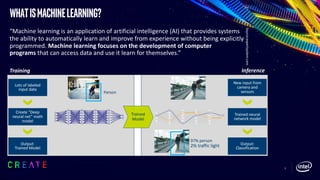
WhatisMachineLearning?
3
“Machine learning is an application of artificial intelligence (AI) that provides systems
the ability to automatically learn and improve from experience without being explicitly
programmed. Machine learning focuses on the development of computer
programs that can access data and use it learn for themselves.”
*Source:expertsystem.com
Training Inference
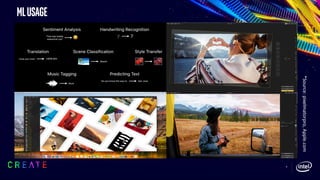
MLUsage
4
*Source:pixelmatorpro,Apple.com
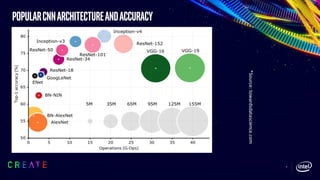
PopularCNNArchitectureandAccuracy
5
*Source:towardsdatascience.com
Machinelearningon
Intel®processorgraphics
End-to-endaicompute
datacenter gateway Edge
Many-to-many hyperscale for stream
and massive batch data processing
1-to-many with majority
streaming data from devices
1-to-1 devices with lower power and
often UX requirements
Ethernet
& Wireless
Wireless and non-IP wired
protocols
ü Secure
ü High throughput
ü Real-time
Intel® Xeon® Processors
Intel® Core™ & Atom™ Processors
Intel® FPGA
Intel® Xeon Phi™ Processors*
Crest Family (Nervana ASIC)*
Intel® Processor Graphics
Movidius Myriad (VPU)Vision
Intel® GNA (IP)*Speech
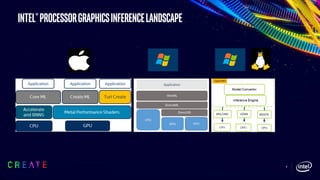
Intel®processorgraphicsinferenceLandscape
8
WindowsMachinelearning
onIntel®ProcessorGraphics
9
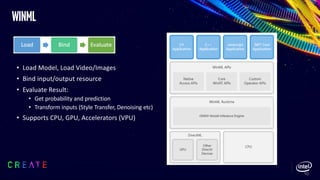
winml
• Load Model, Load Video/Images
• Bind input/output resource
• Evaluate Result:
• Get probability and prediction
• Transform inputs (Style Transfer, Denoising etc)
• Supports CPU, GPU, Accelerators (VPU)
10
DirectML
• low-level API for machine learning (ML)
• Hardware-accelerated machine learning primitives (called operators) are the
building blocks of DirectML
• Can get integrated part of D3D12 games, applications
• Meta Command
• DirectML provides Direct3D 12 metacommands feature which allows HW vendors to provide
the most efficient implementation for the primitives for the underlying HW
• Achieves high HW efficiency on Intel® hardware using MetaCommand
11
macOSMachinelearning
onIntel®ProcessorGraphics
12
13
*source:apple.com
InferenceWorkflow
*Source:mitochrome.com
InferenceArchitecture
Inference Application 1
Vision
Core ML
Accelerate and BNNS Metal Performance Shaders
CPU iGPU
Inference Application 2
Natural Language Processing GamePlayKit
• CoreML
• CPU, GPU, Accelerators
• Image analysis, natural language processing, audio
to text, identifying sounds in audio
• Built on top of low-level primitives
like Accelerate and BNNS, Metal Performance
Shaders (MPS)
• Metal Performance Shaders (MPS)
• GPU only
• Low level primitive API (MPS Graph API is also
supported) providing for ML, Image processing,
RayTracing needs
• Most efficient for underlying Intel® architecture
• Can get integrated part of Metal games,
applications and dispatched part of same GPU
command buffer
Bringingmachinelearning
trainingtotheedge
16
CreateML
• ML models now can be created directly
using CreateML on the macOS device
*Source:Apple.com
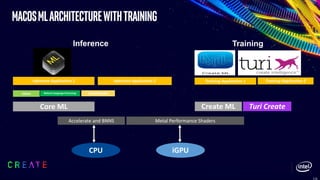
macosMLArchitecturewithTraining
Inference Application 1
Vision
Core ML
Accelerate and BNNS Metal Performance Shaders
CPU iGPU
Inference Application 2
Natural Language Processing GamePlayKit
Inference Training
Turi CreateCreate ML
Training Application 1 Training Application 2
Webmachinelearning
1
9
WebMachineLearning:POC
WebML/NN
CoreML/BNNS/MPS
MacOS/iOS
WinML/DirectML
Windows
TF-Lite/NN API
Android
CPU GPU Accelerators
JS ML frameworks
Web App
Web Browser
OS ML API
new
existing
WebAssembly
ONNX Models
WebGL/WebGPU
TensorFlow Models Other Models
WebMachineLearning:withTensorflow.js
21
Platform
TensorFlow.js
(WebGL) (ms-)
TensorFlow.js
(WebML/MPS) (ms-
)
Speedup
MBP 15" 2016 2.7GHz
Intel Core i7 + Intel HD
Graphics 530 1536MB 130.810 18.371 7.120
MBP 15" 2016 2.7GHz
Intel Core i7 + AMD
Radeon Pro 455
1536MB
46.756 19.362 2.415
MBP 13" 2017 3.5GHz
Intel Core i7 + Intel Iris
Plus Graphics 650
1536MB 66.479 19.885 3.343
MBP 13" 2016 2.9GHz
Intel Core i5 + Intel Iris
Graphics 550 1536MB 71.128 18.904 3.763
Disclaimer
• Platforms used for these numbers: macbook pro 13”, 15” with Intel Graphics 530, 550, 650 and AMD Radeon Pro
455. it was run on macOS highSierra (10.13.4)
• All testing was performed at Intel. Numbers may differ based on actual hardware used and/or based on how the
benchmark is written. Intel® makes no guarantee on the specific numbers and it is intended for providing
reference
PERFORMANCEstate
windows and macOS
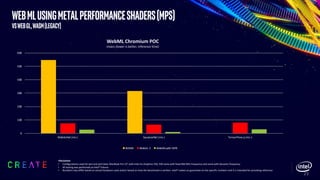
WebMLusingMetalPerformanceShaders(MPS)
vsWebGL,WASM(Legacy)
23
0
100
200
300
400
500
600
MobileNet (ms-) SqueezeNet (ms-) TensorFlow.js (ms-)
WebML Chromium POC
msecs (lower is better, inference time)
WASM WebGL 2 WebMLwith MPS
•Disclaimer
• Configurations used for test and perf data: MacBook Pro 13” with Intel Iris Graphics 550, 530 some with fixed 850 Mhz frequency and some with dynamic frequency
• All testing was performed at Intel® Folsom
• Numbers may differ based on actual hardware used and/or based on how the benchmark is written. Intel® makes no guarantee on the specific numbers and it is intended for providing reference
GEMMEfficiency
Intel®Gen9ProcessorGraphics
YAxis:Gflops,XAxis:MatrixDimensions
24
0
200
400
600
800
1000
1200
1400
256x256x256512x512x512
0768x0768x0768
1024x1024x1024
1280x1280x1280
1536x1536x1536
1792x1792x1792
2048x2048x2048
2304x2304x2304
2560x2560x2560
3072x3072x3072
3584x3584x3584
4096x4096x4096
fp16 GEMM
Intel Optimized HW Theoritical Max 80% HW Theoritical Max
0
100
200
300
400
500
600
700
256x256x256512x512x512
0768x0768x0768
1024x1024x1024
1280x1280x1280
1536x1536x1536
1792x1792x1792
2048x2048x2048
2304x2304x2304
2560x2560x2560
3072x3072x3072
3584x3584x3584
4096x4096x4096
fp32 GEMM
Intel Optimized HW Theoritical Max 80% HW Theoritical Max
•Disclaimer
• Configurations used for test and perf data: MacBook Pro 13” with Intel Iris Graphics 550, 530 some with fixed 850 Mhz frequency and some with dynamic frequency
• All testing was performed at Intel® Folsom
• Numbers may differ based on actual hardware used and/or based on how the benchmark is written. Intel® makes no guarantee on the specific numbers and it is intended for
providing reference
macOSMojave=>macOSCatalina
%Improvements
25
0
20
40
60
80
100
120
140
160
VGG19
VGG16InceptionV4InceptionV3
ResNet50InceptionV1
AlexNet
GoogleNetPlacesM
obilenetSqueezeNet
Denoiser
CoreML
0
10
20
30
40
50
60
70
80
90
VGG19
VGG16
InceptionV3
ResNet50
InceptionV1
AlexNet
GoogleNetPlaces
SqueezeNet
MetalPerformanceShaders
0
10
20
30
40
50
60
70
Fuji 22 MP Fuji 24 MP Canon22 MP Canon50 MP
Adobe LightRoom Enhance Detail
Disclaimer
• Intel technologies’ features and benefits depend on system configuration and may require enabled hardware, software or service activation.
Performance varies depending on system configuration. No Configurations used for test and perf data: MacBook Pro 13” with Intel Iris Graphics 530
some with dynamic frequency. Mojave numbers are from macOS10.14.5 and Catalina numbers are from macOS 10.15 beta.
• All testing was performed at Intel® Folsom. Numbers may differ based on actual hardware used and/or based on how the benchmark is written.
Intel® makes no guarantee on the specific numbers and it is intended for providing reference
WindowsOCT2018=>WindowsMAY2019
26
0
20
40
60
80
100
120
140
160
Canon22 MP Canon50 MP Fuji 24 MP
Adobe LightRoom Enhanced Detail
%improvement Windows Oct2018->May2019
Disclaimer
• Configurations used for test and perf data: Latest Windows OS and Intel® Kabylake Graphics
• All testing was performed at Intel. Numbers may differ based on actual hardware used and/or based on how the benchmark is written. Intel® makes no
guarantee on the specific numbers and it is intended for providing reference
usecasesrunningon
Intel®processorgraphics
2
7
28
Photoenhancement–PixelMatorPro
Intel GPU on MacOS using CoreML AI framework
Professionally Enhance Your Photos without Time Consuming Manual Trial and Error
Original – Nice, But Overexposed Post ML Enhance on Pixelmator Pro
29
Enhancedetails–AdobeLightroom
Intel GPU on MacOS using CoreML and on Windows using WinML AI frameworks
https://theblog.adobe.com/enhance-details/
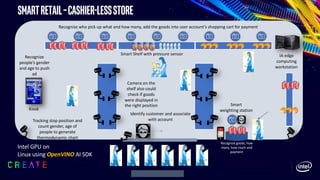
SmartRetail–cashier-lessstore
Kiosk
Recognize who pick up what and how many, add the goods into user account’s shopping cart for payment
Smart Shelf with pressure sensor
Tracking stop position and
count gender, age of
people to generate
thermodynamic chart
Recognize goods, how
many, how much and
payment
Camera on the
shelf also could
check if goods
were displayed in
the right position
IA edge
computing
workstation
Smart
weighting station
Identify customer and associate
with account
Recognize
people’s gender
and age to push
ad
Intel GPU on
Linux using OpenVINO AI SDK
Reinforcementlearningfordevelopingagentsingames
Demonstrated on intel graphics by Unity at Game
Developers conference March 2019
A real dog uses vision and other senses to orient itself and to
decide where to go. Puppo follows the same methodology. It
collects observations about the scene such as proximity to
the target, the relative position between itself and the target
and the orientation of its own legs, so it can decide what
action to take next. In Puppo’s case, the action describes
how to rotate the joint motors in order to move.
After each action Puppo performs, we give a reward to the
agent. The reward is comprised of:
The dog learned to walk rather quickly in about 1 min.
Then, as the training continued, the dog learned to run.
https://blogs.unity3d.com/wp-
content/uploads/2018/10/DogFetchTraining.mp4?_=1
Courtesy Unity
Link to Demo
Intel GPU on Windows using DirectML AI
Framework
Save Developer Time to Deliver Game Agents; Improve Game Experience
AWSDeepracer–AIforComputervisionand
reinforcementlearningonIntelatom®processor
Intel GPU on Linux using OpenVINO AI SDK
Applicable to Teach Robots from Vacuum Cleaners to Strawberry Pickers
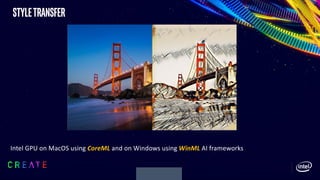
styletransfer
Intel GPU on MacOS using CoreML and on Windows using WinML AI frameworks
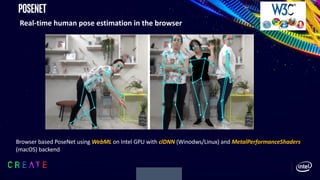
Posenet
Real-time human pose estimation in the browser
Browser based PoseNet using WebML on Intel GPU with clDNN (Winodws/Linux) and MetalPerformanceShaders
(macOS) backend
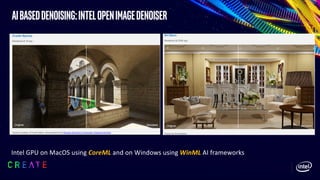
AIbaseddenoising:IntelOpenImageDenoiser
Intel GPU on MacOS using CoreML and on Windows using WinML AI frameworks
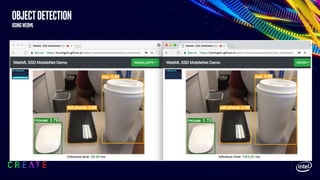
Objectdetection
usingwebml
Improvementswith11th Generation
Intel®ProcessorGraphics
“icelake”
• 10 nm process
• 64 execution units (EUs) which
increases the core compute
capability by 2.67x1 over Gen9
• Gen11 addresses the
corresponding bandwidth needs
by improving compression,
increasing L3 cache as well as
increasing peak memory
bandwidth
• ~ 1 TF FP32 perf; ~2 TF FP16 perf
• Improved SharedLocalMemory
(SLM) performance (~1/4 latency
vs Gen9)
CPU
Core
System
Agent
Display
Controller
PCIe
Memory
Controller
CPU
Cores
LLC
Cache
slice
Intel® Processor Graphics Gen11
Intel® Core Processor
SoC Ring Interconnect
L3$
SliceCommon
SubSlice
EU EU
I$ & thread dispatch
EU
EU
EU
EU
EU EU
Sampler
SLM
Dataport
[LD/ST]
Tex$
Media
Sampler
SubSlice
EU EU
I$ & thread dispatch
EU
EU
EU
EU
EU EU
Sampler
SLM
Dataport
[LD/ST]
Tex$
Media
Sampler
SubSlice
EU EU
I$ & thread dispatch
EU
EU
EU
EU
EU EU
Sampler
SLM
Dataport
[LD/ST]
Tex$
Media
Sampler
SubSlice
EU EU
I$ & thread dispatch
EU
EU
EU
EU
EU EU
Sampler
SLM
Dataport
[LD/ST]
Tex$
Media
Sampler
SubSlice
EU EU
I$ & thread dispatch
EU
EU
EU
EU
EU EU
Sampler
SLM
Dataport
[LD/ST]
Tex$
Media
Sampler
SubSlice
EU EU
I$ & thread dispatch
EU
EU
EU
EU
EU EU
Sampler
SLM
Dataport
[LD/ST]
Tex$
Media
Sampler
SubSlice
EU EU
I$ & thread dispatch
EU
EU
EU
EU
EU EU
Sampler
SLM
Dataport
[LD/ST]
Tex$
Media
Sampler
SubSlice
EU EU
I$ & thread dispatch
EU
EU
EU
EU
EU EU
Sampler
SLM
Dataport
[LD/ST]
Tex$
Media
Sampler
SubSlice
Geometry
Global AssetsGTI BlitterMedia Fixed Function
Raster
HiZ/Depth
Pixel Dispatch
Pixel Backend
3
9
Disclaimer
• Configurations used for test and perf data: with Intel Gen9 graphics (24 EU) and Intel Gen11 graphics (64 EU) some with fixed frequency and some with dynamic frequency. All testing was performed at Intel
• Numbers may differ based on actual hardware used and/or based on how the benchmark is written. Intel® makes no guarantee on the specific numbers and it is intended for providing reference
• All testing was permed at Intel® Folsom
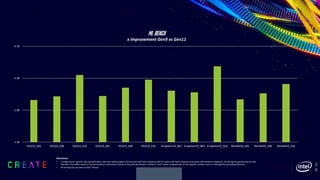
1.50
1.90
2.30
2.70
VGG16_b01 VGG16_b04 VGG16_b16 VGG19_b01 VGG19_b04 VGG19_b16 InceptionV3_b01 InceptionV3_b04 InceptionV3_b16 ResNet50_b01 ResNet50_b04 ResNet50_b16
ML Bench
x improvement Gen9 vs Gen11
ISVApplicationImprovements
40
Disclaimer
• Configurations used for test and perf data: with Intel Gen9 graphics (24 EU) and Intel Gen11 graphics (64 EU) some with fixed frequency and some with dynamic frequency. All testing was performed at Intel
• Numbers may differ based on actual hardware used and/or based on how the benchmark is written. Intel® makes no guarantee on the specific numbers and it is intended for providing reference
• All testing was permed at Intel® Folsom
1.88
1.89
1.90
1.91
1.92
1.93
1.94
1.95
1.96
1.97
1.98
Fuji 22 MP Fuji 24 MP Canon22 MP Canon50 MP
Adobe LightRoom Enhance Detail
x improvement Gen9 vs Gen11
AI/MLpossibilities
41
Stylizea15minvideo
w/AI
Software and workloads used in performance tests may have been optimized for performance only on Intel microprocessors. Performance tests, such as SYSmark and MobileMark, are measured using specific computer systems, components, software, operations
and functions.
Any change to any of those factors may cause the results to vary. You should consult other information and performance tests to assist you in fully evaluating your contemplated purchases,
including the performance of that product when combined with other products. For more information go to www.intel.com/benchmarks
Results have been simulated and are provided for informational purposes only. Results were derived using simulations run on an architecture simulator. Any difference in system hardware or software design or configuration may affect actual performance.
System Configurations: ICL Media performance is based on projections and subject to change. Gen 9 performance
is based on KBL-R U42 system
1. Stylize video using Cyberlink PowerDirector Style Transfer leveraging Intel OpenVINO
2. 250 22MP images uses WinML, CoreML and Adobe Lightroom Classic and CC
48
Minutes 30
Minutes
Gen11
Enhancing250
imagesw/ML
1.1
hours 42
Minutes
Gen9
1
2
Cyberlink PowerDirector
Adobe Lightroom Classic & CC
Performance 1.0x 1.7-2.7x
summary
• Machine Learning is here on the Edge!!
• Use Intel® Integrated Graphics for your Machine learning acceleration
• Ships with most Windows and Mac platforms
• Intel optimized ML stack is enabled by default
• Automatic improvements delivered with OS and driver updates
• Large improvement with 11th Gen Intel® Processor Graphics
• Intel is continuously working with OSVs(Apple, Microsoft), ISVs, Open
Source Community and others to improve the Intel® Graphics
Software and Hardware for ML needs
42
references
• Intel® processor Graphics gen11 aka “Icelake”
• Apple Machine learning on Intel®
• CreateML
• CoreML
• Metal Performance Shaders
• Windows AI
• WebML
• Intel® Open Image Denoiser
• Windows May2019 ML improvements on Intel®
• Adobe Enhance Details
• Unity AI
• WinML Get Started
• DirectML
43
Acknowledgements
44
• Aaftab Munshi
• Joseph Van De Water
• Sudhir Tonse
• Ningxin Hu
• Gokul N Tonpe
• Insoo Woo
• Ben Ashbaugh
• Murali Ramadoss
• Thanh-Kevin Dang
• Jay Patel
• Prashanth Palaniappan
• Xiaoqing Wu
• Sachin Sane
• Katen Shah
• Brian Jacobosky
• Arzhange Safdarzadeh
• Anthony Bernecky
• Leland E Martin
• Antal Tungler
• Damien Triolet
• Jacek Krol
• Jacek Nowak
• Kalyan Muthukumar
LegalDisclaimer
Intel technologies’ features and benefits depend on system configuration and may require enabled hardware, software or service
activation. Performance varies depending on system configuration. No product or compenent can be absolutely secure. Check with your
system manufacturer or retailer or learn more at [intel.com].
Software and workloads used in performance tests may have been optimized for performance only on Intel microprocessors and Intel
Integrated GPU. Performance tests, such as SYSmark and MobileMark, are measured using specific computer systems, components,
software, operations and functions. Any change to any of those factors may cause the results to vary. You should consult other
information and performance tests to assist you in fully evaluating your contemplated purchases, including the performance of that
product when combined with other products. For more information go to www.intel.com/benchmarks.
Optimization Notice: Intel's compilers may or may not optimize to the same degree for non-Intel microprocessors for optimizations that
are not unique to Intel microprocessors. These optimizations include SSE2, SSE3, and SSSE3 instruction sets and other optimizations.
Intel does not guarantee the availability, functionality, or effectiveness of any optimization on microprocessors not manufactured by
Intel. Microprocessor-dependent optimizations in this product are intended for use with Intel microprocessors. Certain optimizations not
specific to Intel microarchitecture are reserved for Intel microprocessors. Please refer to the applicable product User and Reference
Guides for more information regarding the specific instruction sets covered by this notice.
All testing was performed at Intel® Folsom
Intel, the Intel logo, are trademarks of Intel Corporation or its subsidiaries in the U.S. and/or other countries.
*Other names and brands may be claimed as the property of others.
© Intel Corporation.
questions
Enhance and Accelerate Your AI and Machine Learning Solution | SIGGRAPH 2019 Technical Sessions

Enhance and Accelerate Your AI and Machine Learning Solution | SIGGRAPH 2019 Technical Sessions

  • 1.
    SIGGRAPH 2019 |LOS ANGLES | 28 JULY - 1 AUGUST
  • 2.
    Hisham Chowdhury Software Architect,Intel Corporation AcceleratingMachineLearning withintel®processorgraphics
  • 3.
    WhatisMachineLearning? 3 “Machine learning isan application of artificial intelligence (AI) that provides systems the ability to automatically learn and improve from experience without being explicitly programmed. Machine learning focuses on the development of computer programs that can access data and use it learn for themselves.” *Source:expertsystem.com Training Inference
  • 4.
  • 5.
  • 6.
  • 7.
    End-to-endaicompute datacenter gateway Edge Many-to-manyhyperscale for stream and massive batch data processing 1-to-many with majority streaming data from devices 1-to-1 devices with lower power and often UX requirements Ethernet & Wireless Wireless and non-IP wired protocols ü Secure ü High throughput ü Real-time Intel® Xeon® Processors Intel® Core™ & Atom™ Processors Intel® FPGA Intel® Xeon Phi™ Processors* Crest Family (Nervana ASIC)* Intel® Processor Graphics Movidius Myriad (VPU)Vision Intel® GNA (IP)*Speech
  • 8.
  • 9.
  • 10.
    winml • Load Model,Load Video/Images • Bind input/output resource • Evaluate Result: • Get probability and prediction • Transform inputs (Style Transfer, Denoising etc) • Supports CPU, GPU, Accelerators (VPU) 10
  • 11.
    DirectML • low-level APIfor machine learning (ML) • Hardware-accelerated machine learning primitives (called operators) are the building blocks of DirectML • Can get integrated part of D3D12 games, applications • Meta Command • DirectML provides Direct3D 12 metacommands feature which allows HW vendors to provide the most efficient implementation for the primitives for the underlying HW • Achieves high HW efficiency on Intel® hardware using MetaCommand 11
  • 12.
  • 13.
  • 14.
  • 15.
    InferenceArchitecture Inference Application 1 Vision CoreML Accelerate and BNNS Metal Performance Shaders CPU iGPU Inference Application 2 Natural Language Processing GamePlayKit • CoreML • CPU, GPU, Accelerators • Image analysis, natural language processing, audio to text, identifying sounds in audio • Built on top of low-level primitives like Accelerate and BNNS, Metal Performance Shaders (MPS) • Metal Performance Shaders (MPS) • GPU only • Low level primitive API (MPS Graph API is also supported) providing for ML, Image processing, RayTracing needs • Most efficient for underlying Intel® architecture • Can get integrated part of Metal games, applications and dispatched part of same GPU command buffer
  • 16.
  • 17.
    CreateML • ML modelsnow can be created directly using CreateML on the macOS device *Source:Apple.com
  • 18.
    macosMLArchitecturewithTraining Inference Application 1 Vision CoreML Accelerate and BNNS Metal Performance Shaders CPU iGPU Inference Application 2 Natural Language Processing GamePlayKit Inference Training Turi CreateCreate ML Training Application 1 Training Application 2
  • 19.
  • 20.
    WebMachineLearning:POC WebML/NN CoreML/BNNS/MPS MacOS/iOS WinML/DirectML Windows TF-Lite/NN API Android CPU GPUAccelerators JS ML frameworks Web App Web Browser OS ML API new existing WebAssembly ONNX Models WebGL/WebGPU TensorFlow Models Other Models
  • 21.
    WebMachineLearning:withTensorflow.js 21 Platform TensorFlow.js (WebGL) (ms-) TensorFlow.js (WebML/MPS) (ms- ) Speedup MBP15" 2016 2.7GHz Intel Core i7 + Intel HD Graphics 530 1536MB 130.810 18.371 7.120 MBP 15" 2016 2.7GHz Intel Core i7 + AMD Radeon Pro 455 1536MB 46.756 19.362 2.415 MBP 13" 2017 3.5GHz Intel Core i7 + Intel Iris Plus Graphics 650 1536MB 66.479 19.885 3.343 MBP 13" 2016 2.9GHz Intel Core i5 + Intel Iris Graphics 550 1536MB 71.128 18.904 3.763 Disclaimer • Platforms used for these numbers: macbook pro 13”, 15” with Intel Graphics 530, 550, 650 and AMD Radeon Pro 455. it was run on macOS highSierra (10.13.4) • All testing was performed at Intel. Numbers may differ based on actual hardware used and/or based on how the benchmark is written. Intel® makes no guarantee on the specific numbers and it is intended for providing reference
  • 22.
  • 23.
    WebMLusingMetalPerformanceShaders(MPS) vsWebGL,WASM(Legacy) 23 0 100 200 300 400 500 600 MobileNet (ms-) SqueezeNet(ms-) TensorFlow.js (ms-) WebML Chromium POC msecs (lower is better, inference time) WASM WebGL 2 WebMLwith MPS •Disclaimer • Configurations used for test and perf data: MacBook Pro 13” with Intel Iris Graphics 550, 530 some with fixed 850 Mhz frequency and some with dynamic frequency • All testing was performed at Intel® Folsom • Numbers may differ based on actual hardware used and/or based on how the benchmark is written. Intel® makes no guarantee on the specific numbers and it is intended for providing reference
  • 24.
    GEMMEfficiency Intel®Gen9ProcessorGraphics YAxis:Gflops,XAxis:MatrixDimensions 24 0 200 400 600 800 1000 1200 1400 256x256x256512x512x512 0768x0768x0768 1024x1024x1024 1280x1280x1280 1536x1536x1536 1792x1792x1792 2048x2048x2048 2304x2304x2304 2560x2560x2560 3072x3072x3072 3584x3584x3584 4096x4096x4096 fp16 GEMM Intel OptimizedHW Theoritical Max 80% HW Theoritical Max 0 100 200 300 400 500 600 700 256x256x256512x512x512 0768x0768x0768 1024x1024x1024 1280x1280x1280 1536x1536x1536 1792x1792x1792 2048x2048x2048 2304x2304x2304 2560x2560x2560 3072x3072x3072 3584x3584x3584 4096x4096x4096 fp32 GEMM Intel Optimized HW Theoritical Max 80% HW Theoritical Max •Disclaimer • Configurations used for test and perf data: MacBook Pro 13” with Intel Iris Graphics 550, 530 some with fixed 850 Mhz frequency and some with dynamic frequency • All testing was performed at Intel® Folsom • Numbers may differ based on actual hardware used and/or based on how the benchmark is written. Intel® makes no guarantee on the specific numbers and it is intended for providing reference
  • 25.
    macOSMojave=>macOSCatalina %Improvements 25 0 20 40 60 80 100 120 140 160 VGG19 VGG16InceptionV4InceptionV3 ResNet50InceptionV1 AlexNet GoogleNetPlacesM obilenetSqueezeNet Denoiser CoreML 0 10 20 30 40 50 60 70 80 90 VGG19 VGG16 InceptionV3 ResNet50 InceptionV1 AlexNet GoogleNetPlaces SqueezeNet MetalPerformanceShaders 0 10 20 30 40 50 60 70 Fuji 22 MPFuji 24 MP Canon22 MP Canon50 MP Adobe LightRoom Enhance Detail Disclaimer • Intel technologies’ features and benefits depend on system configuration and may require enabled hardware, software or service activation. Performance varies depending on system configuration. No Configurations used for test and perf data: MacBook Pro 13” with Intel Iris Graphics 530 some with dynamic frequency. Mojave numbers are from macOS10.14.5 and Catalina numbers are from macOS 10.15 beta. • All testing was performed at Intel® Folsom. Numbers may differ based on actual hardware used and/or based on how the benchmark is written. Intel® makes no guarantee on the specific numbers and it is intended for providing reference
  • 26.
    WindowsOCT2018=>WindowsMAY2019 26 0 20 40 60 80 100 120 140 160 Canon22 MP Canon50MP Fuji 24 MP Adobe LightRoom Enhanced Detail %improvement Windows Oct2018->May2019 Disclaimer • Configurations used for test and perf data: Latest Windows OS and Intel® Kabylake Graphics • All testing was performed at Intel. Numbers may differ based on actual hardware used and/or based on how the benchmark is written. Intel® makes no guarantee on the specific numbers and it is intended for providing reference
  • 27.
  • 28.
    28 Photoenhancement–PixelMatorPro Intel GPU onMacOS using CoreML AI framework Professionally Enhance Your Photos without Time Consuming Manual Trial and Error Original – Nice, But Overexposed Post ML Enhance on Pixelmator Pro
  • 29.
    29 Enhancedetails–AdobeLightroom Intel GPU onMacOS using CoreML and on Windows using WinML AI frameworks https://theblog.adobe.com/enhance-details/
  • 30.
    SmartRetail–cashier-lessstore Kiosk Recognize who pickup what and how many, add the goods into user account’s shopping cart for payment Smart Shelf with pressure sensor Tracking stop position and count gender, age of people to generate thermodynamic chart Recognize goods, how many, how much and payment Camera on the shelf also could check if goods were displayed in the right position IA edge computing workstation Smart weighting station Identify customer and associate with account Recognize people’s gender and age to push ad Intel GPU on Linux using OpenVINO AI SDK
  • 31.
    Reinforcementlearningfordevelopingagentsingames Demonstrated on intelgraphics by Unity at Game Developers conference March 2019 A real dog uses vision and other senses to orient itself and to decide where to go. Puppo follows the same methodology. It collects observations about the scene such as proximity to the target, the relative position between itself and the target and the orientation of its own legs, so it can decide what action to take next. In Puppo’s case, the action describes how to rotate the joint motors in order to move. After each action Puppo performs, we give a reward to the agent. The reward is comprised of: The dog learned to walk rather quickly in about 1 min. Then, as the training continued, the dog learned to run. https://blogs.unity3d.com/wp- content/uploads/2018/10/DogFetchTraining.mp4?_=1 Courtesy Unity Link to Demo Intel GPU on Windows using DirectML AI Framework Save Developer Time to Deliver Game Agents; Improve Game Experience
  • 32.
    AWSDeepracer–AIforComputervisionand reinforcementlearningonIntelatom®processor Intel GPU onLinux using OpenVINO AI SDK Applicable to Teach Robots from Vacuum Cleaners to Strawberry Pickers
  • 33.
    styletransfer Intel GPU onMacOS using CoreML and on Windows using WinML AI frameworks
  • 34.
    Posenet Real-time human poseestimation in the browser Browser based PoseNet using WebML on Intel GPU with clDNN (Winodws/Linux) and MetalPerformanceShaders (macOS) backend
  • 35.
    AIbaseddenoising:IntelOpenImageDenoiser Intel GPU onMacOS using CoreML and on Windows using WinML AI frameworks
  • 36.
  • 37.
  • 38.
    • 10 nmprocess • 64 execution units (EUs) which increases the core compute capability by 2.67x1 over Gen9 • Gen11 addresses the corresponding bandwidth needs by improving compression, increasing L3 cache as well as increasing peak memory bandwidth • ~ 1 TF FP32 perf; ~2 TF FP16 perf • Improved SharedLocalMemory (SLM) performance (~1/4 latency vs Gen9) CPU Core System Agent Display Controller PCIe Memory Controller CPU Cores LLC Cache slice Intel® Processor Graphics Gen11 Intel® Core Processor SoC Ring Interconnect L3$ SliceCommon SubSlice EU EU I$ & thread dispatch EU EU EU EU EU EU Sampler SLM Dataport [LD/ST] Tex$ Media Sampler SubSlice EU EU I$ & thread dispatch EU EU EU EU EU EU Sampler SLM Dataport [LD/ST] Tex$ Media Sampler SubSlice EU EU I$ & thread dispatch EU EU EU EU EU EU Sampler SLM Dataport [LD/ST] Tex$ Media Sampler SubSlice EU EU I$ & thread dispatch EU EU EU EU EU EU Sampler SLM Dataport [LD/ST] Tex$ Media Sampler SubSlice EU EU I$ & thread dispatch EU EU EU EU EU EU Sampler SLM Dataport [LD/ST] Tex$ Media Sampler SubSlice EU EU I$ & thread dispatch EU EU EU EU EU EU Sampler SLM Dataport [LD/ST] Tex$ Media Sampler SubSlice EU EU I$ & thread dispatch EU EU EU EU EU EU Sampler SLM Dataport [LD/ST] Tex$ Media Sampler SubSlice EU EU I$ & thread dispatch EU EU EU EU EU EU Sampler SLM Dataport [LD/ST] Tex$ Media Sampler SubSlice Geometry Global AssetsGTI BlitterMedia Fixed Function Raster HiZ/Depth Pixel Dispatch Pixel Backend
  • 39.
    3 9 Disclaimer • Configurations usedfor test and perf data: with Intel Gen9 graphics (24 EU) and Intel Gen11 graphics (64 EU) some with fixed frequency and some with dynamic frequency. All testing was performed at Intel • Numbers may differ based on actual hardware used and/or based on how the benchmark is written. Intel® makes no guarantee on the specific numbers and it is intended for providing reference • All testing was permed at Intel® Folsom 1.50 1.90 2.30 2.70 VGG16_b01 VGG16_b04 VGG16_b16 VGG19_b01 VGG19_b04 VGG19_b16 InceptionV3_b01 InceptionV3_b04 InceptionV3_b16 ResNet50_b01 ResNet50_b04 ResNet50_b16 ML Bench x improvement Gen9 vs Gen11
  • 40.
    ISVApplicationImprovements 40 Disclaimer • Configurations usedfor test and perf data: with Intel Gen9 graphics (24 EU) and Intel Gen11 graphics (64 EU) some with fixed frequency and some with dynamic frequency. All testing was performed at Intel • Numbers may differ based on actual hardware used and/or based on how the benchmark is written. Intel® makes no guarantee on the specific numbers and it is intended for providing reference • All testing was permed at Intel® Folsom 1.88 1.89 1.90 1.91 1.92 1.93 1.94 1.95 1.96 1.97 1.98 Fuji 22 MP Fuji 24 MP Canon22 MP Canon50 MP Adobe LightRoom Enhance Detail x improvement Gen9 vs Gen11
  • 41.
    AI/MLpossibilities 41 Stylizea15minvideo w/AI Software and workloadsused in performance tests may have been optimized for performance only on Intel microprocessors. Performance tests, such as SYSmark and MobileMark, are measured using specific computer systems, components, software, operations and functions. Any change to any of those factors may cause the results to vary. You should consult other information and performance tests to assist you in fully evaluating your contemplated purchases, including the performance of that product when combined with other products. For more information go to www.intel.com/benchmarks Results have been simulated and are provided for informational purposes only. Results were derived using simulations run on an architecture simulator. Any difference in system hardware or software design or configuration may affect actual performance. System Configurations: ICL Media performance is based on projections and subject to change. Gen 9 performance is based on KBL-R U42 system 1. Stylize video using Cyberlink PowerDirector Style Transfer leveraging Intel OpenVINO 2. 250 22MP images uses WinML, CoreML and Adobe Lightroom Classic and CC 48 Minutes 30 Minutes Gen11 Enhancing250 imagesw/ML 1.1 hours 42 Minutes Gen9 1 2 Cyberlink PowerDirector Adobe Lightroom Classic & CC Performance 1.0x 1.7-2.7x
  • 42.
    summary • Machine Learningis here on the Edge!! • Use Intel® Integrated Graphics for your Machine learning acceleration • Ships with most Windows and Mac platforms • Intel optimized ML stack is enabled by default • Automatic improvements delivered with OS and driver updates • Large improvement with 11th Gen Intel® Processor Graphics • Intel is continuously working with OSVs(Apple, Microsoft), ISVs, Open Source Community and others to improve the Intel® Graphics Software and Hardware for ML needs 42
  • 43.
    references • Intel® processorGraphics gen11 aka “Icelake” • Apple Machine learning on Intel® • CreateML • CoreML • Metal Performance Shaders • Windows AI • WebML • Intel® Open Image Denoiser • Windows May2019 ML improvements on Intel® • Adobe Enhance Details • Unity AI • WinML Get Started • DirectML 43
  • 44.
    Acknowledgements 44 • Aaftab Munshi •Joseph Van De Water • Sudhir Tonse • Ningxin Hu • Gokul N Tonpe • Insoo Woo • Ben Ashbaugh • Murali Ramadoss • Thanh-Kevin Dang • Jay Patel • Prashanth Palaniappan • Xiaoqing Wu • Sachin Sane • Katen Shah • Brian Jacobosky • Arzhange Safdarzadeh • Anthony Bernecky • Leland E Martin • Antal Tungler • Damien Triolet • Jacek Krol • Jacek Nowak • Kalyan Muthukumar
  • 45.
    LegalDisclaimer Intel technologies’ featuresand benefits depend on system configuration and may require enabled hardware, software or service activation. Performance varies depending on system configuration. No product or compenent can be absolutely secure. Check with your system manufacturer or retailer or learn more at [intel.com]. Software and workloads used in performance tests may have been optimized for performance only on Intel microprocessors and Intel Integrated GPU. Performance tests, such as SYSmark and MobileMark, are measured using specific computer systems, components, software, operations and functions. Any change to any of those factors may cause the results to vary. You should consult other information and performance tests to assist you in fully evaluating your contemplated purchases, including the performance of that product when combined with other products. For more information go to www.intel.com/benchmarks. Optimization Notice: Intel's compilers may or may not optimize to the same degree for non-Intel microprocessors for optimizations that are not unique to Intel microprocessors. These optimizations include SSE2, SSE3, and SSSE3 instruction sets and other optimizations. Intel does not guarantee the availability, functionality, or effectiveness of any optimization on microprocessors not manufactured by Intel. Microprocessor-dependent optimizations in this product are intended for use with Intel microprocessors. Certain optimizations not specific to Intel microarchitecture are reserved for Intel microprocessors. Please refer to the applicable product User and Reference Guides for more information regarding the specific instruction sets covered by this notice. All testing was performed at Intel® Folsom Intel, the Intel logo, are trademarks of Intel Corporation or its subsidiaries in the U.S. and/or other countries. *Other names and brands may be claimed as the property of others. © Intel Corporation.
  • 46.