Fast deep learning
at your fingertips
Faster deep learning solutions
from training to inference using IntelÂŽ Deep Learning SDK
Nir Lotan
Machine Learning Product Manager
Advanced Analytics, Intel
Chief Data Scientist
Advanced Analytics, Intel
Dr. Amitai Armon
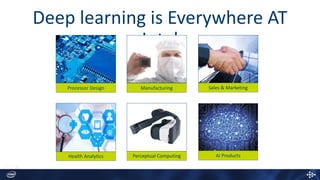
Deep learning is Everywhere AT
Intel
ManufacturingProcessor Design Sales & Marketing
Health Analytics AI ProductsPerceptual Computing
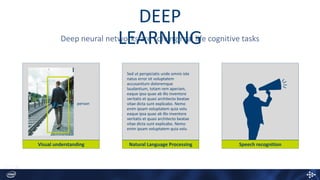
Visual understanding Natural Language Processing Speech recognition
Deep neural networks are solving real life cognitive tasks
person
Sed ut perspiciatis unde omnis iste
natus error sit voluptatem
accusantium doloremque
laudantium, totam rem aperiam,
eaque ipsa quae ab illo inventore
veritatis et quasi architecto beatae
vitae dicta sunt explicabo. Nemo
enim ipsam voluptatem quia volu
eaque ipsa quae ab illo inventore
veritatis et quasi architecto beatae
vitae dicta sunt explicabo. Nemo
enim ipsam voluptatem quia volu
DEEP
LEARNING
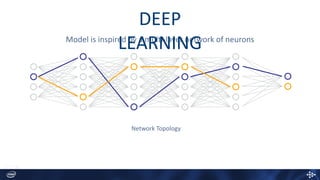
Model is inspired by a multi-layer network of neurons
Network Topology
DEEP
LEARNING
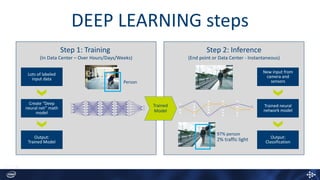
DEEP LEARNING steps
Step 1: Training
(In Data Center – Over Hours/Days/Weeks)
Person
Lots of labeled
input data
Output:
Trained Model
Create “Deep
neural net” math
model
Step 2: Inference
(End point or Data Center - Instantaneous)
New input from
camera and
sensors
Output:
Classification
Trained neural
network model
97% person
2% traffic light
Trained
Model
deep learning
todayis not really accessible…
…and can be overwhelming
IntelÂŽ deep
learning SDKEasily develop and deploy deep learning
solutions,
using IntelÂŽ Architecture & Popular
frameworks
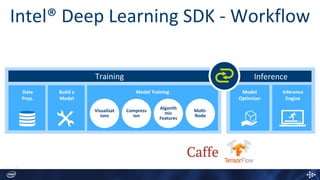
IntelÂŽ Deep Learning SDK - Workflow
Data
Prep.
Build a
Model
Model Training
Training Inference
Compress
ion
Visualizat
ions
Algorith
mic
Features
Multi-
Node
Model
Optimizer
Inference
Engine
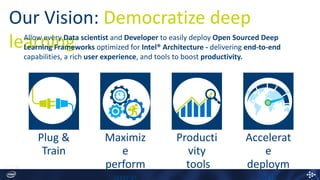
Our Vision: Democratize deep
learningAllow every Data scientist and Developer to easily deploy Open Sourced Deep
Learning Frameworks optimized for IntelÂŽ Architecture - delivering end-to-end
capabilities, a rich user experience, and tools to boost productivity.
Plug &
Train
Maximiz
e
perform
Producti
vity
tools
Accelerat
e
deploym
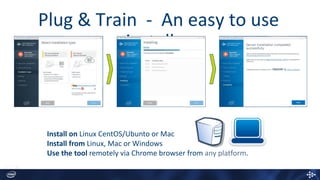
Plug &
Train
Plug & Train - An easy to use
installer
Install on Linux CentOS/Ubunto or Mac
Install from Linux, Mac or Windows
Use the tool remotely via Chrome browser from any platform.
Maximize
performance
Software and workloads used in performance tests may have been optimized for performance only on Intel microprocessors. Performance tests, such as SYSmark and MobileMark, are measured using specific computer systems,
components, software, operations and functions. Any change to any of those factors may cause the results to vary. You should consult other information and performance tests to assist you in fully evaluating your contemplated
purchases, including the performance of that product when combined with other products. For more information go to http://www.intel.com/performance . *Other names and brands may be property of others
Configurations:
2 socket system with IntelÂŽ Xeon Processor E5-2699 v4 (22 Cores, 2.2 GHz,), 128 GB memory, Red Hat* Enterprise Linux 6.7, BVLC Caffe, Intel Optimized Caffe framework, IntelÂŽ MKL 11.3.3, IntelÂŽ MKL 2017
Intel® Xeon Phi™ Processor 7250 (68 Cores, 1.4 GHz, 16GB MCDRAM), 128 GB memory, Red Hat* Enterprise Linux 6.7, Intel® Optimized Caffe framework, Intel® MKL 2017
All numbers measured without taking data manipulation into account.
0
5
10
15
20
25
30
IntelÂŽ XeonÂŽ E5-2699 v4 IntelÂŽ XeonÂŽ E5-2699 v4 IntelÂŽ XeonÂŽ E5-2699 v4 IntelÂŽ Xeon Phi 7250
Out-of-the-box +Intel MKL 11.3.3 +Intel MKL 2017 +Intel MKL 2017
Performancespeedup
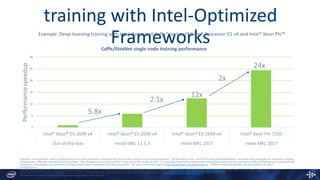
Caffe/AlexNet single node training performance
2.1x
2x
training with Intel-Optimized
Frameworks
5.8x
24x
12x
Example: Deep-learning training with Intel-Optimized Caffe* on Intel® Xeon® Processor E5 v4 and Intel® Xeon Phi™
Kubernetes
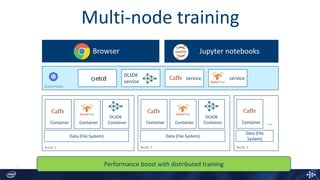
Multi-node training
Jupyter notebooksBrowser
service
DLSDK
service
service
Node 3Node 1
Container Container
DLSDK
Container
Data (File System)
Node 2
Container Container
DLSDK
Container
Data (File System)
Container
Data (File
System)
…
Performance boost with distributed training
Productivity
tools
Step by Step Wizard
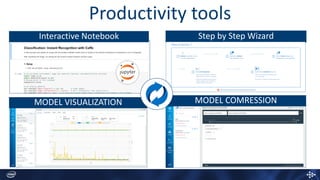
Productivity tools
Interactive Notebook
MODEL VISUALIZATION MODEL COMRESSION
Accelerate
deployment
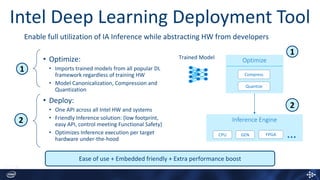
• Optimize:
• Imports trained models from all popular DL
framework regardless of training HW
• Model Canonicalization, Compression and
Quantization
• Deploy:
• One API across all Intel HW and systems
• Friendly Inference solution: (low footprint,
easy API, control meeting Functional Safety)
• Optimizes Inference execution per target
hardware under-the-hood
Ease of use + Embedded friendly + Extra performance boost
1
2
Trained Model
Optimize
Compress
Quantize
Inference Engine
1
2
CPU GEN FPGA …
Enable full utilization of IA Inference while abstracting HW from developers
Intel Deep Learning Deployment Tool
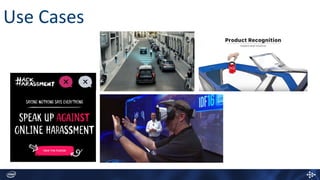
Use Cases
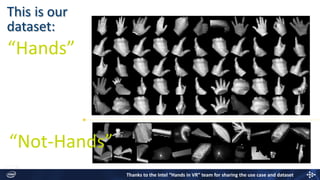
This is our
dataset:
“Hands”
“Not-Hands”
Thanks to the Intel “Hands in VR” team for sharing the use case and dataset
Demo
http://software.intel.com/deep-learning-sdk/
Deep Learning
Evolution
Step 1: Training
(In Data Center – Over Hours/Days/Weeks)
Person
Lots of labeled
input data
Output:
Trained Model
Create model
Step 2: Inference
(End point or Data Center - Instantaneous)
New input from
camera and
sensors
Output:
Classification
Trained neural
network model
97% person
2% traffic light
Trained
Model
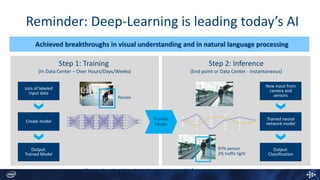
Reminder: Deep-Learning is leading today’s AI
Achieved breakthroughs in visual understanding and in natural language processing
Illustrating the deep-learning training and inference process
Step 1: Training
(In Data Center – Over Hours/Days/Weeks)
Person
Lots of labeled
input data
Output:
Trained Model
Create model
Step 2: Inference
(End point or Data Center - Instantaneous)
New input from
camera and
sensors
Output:
Classification
Trained neural
network model
97% person
2% traffic light
Trained
Model
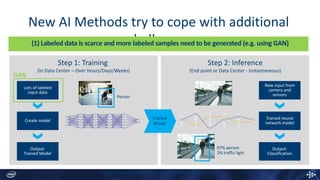
New AI Methods try to cope with additional
challenges
Illustrating the training and inference process
GAN
(1) Labeled data is scarce and more labeled samples need to be generated (e.g. using GAN)
Step 1: Training
(In Data Center – Over Hours/Days/Weeks)
Person
Lots of labeled
input data
Output:
Trained Model
Create model
Step 2: Inference
(End point or Data Center - Instantaneous)
New input from
camera and
sensors
Output:
Classification
Trained neural
network model
97% person
2% traffic light
Trained
Model
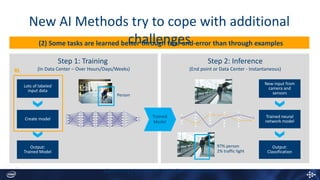
New AI Methods try to cope with additional
challenges(2) Some tasks are learned better through trial-and-error than through examples
Illustrating the training and inference process
RL
Step 1: Training
(In Data Center – Over Hours/Days/Weeks)
Person
Lots of labeled
input data
Output:
Trained Model
Create model
Step 2: Inference
(End point or Data Center - Instantaneous)
New input from
camera and
sensors
Output:
Classification
Trained neural
network model
97% person
2% traffic light
Trained
Model
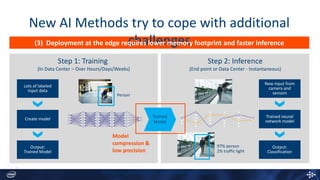
New AI Methods try to cope with additional
challenges(3) Deployment at the edge requires lower memory footprint and faster inference
Illustrating the training and inference process
Model
compression &
low precision
Step 1: Training
(In Data Center – Over Hours/Days/Weeks)
Person
Lots of labeled
input data
Output:
Trained Model
Create model
Step 2: Inference
(End point or Data Center - Instantaneous)
New input from
camera and
sensors
Output:
Classification
Trained neural
network model
97% person
2% traffic light
Trained
Model
New AI Methods try to cope with additional
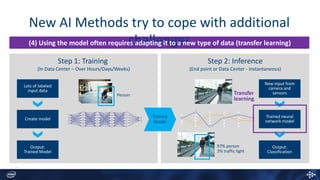
challenges(4) Using the model often requires adapting it to a new type of data (transfer learning)
Illustrating the training and inference process
Transfer
learning
New AI Methods try to cope with additional
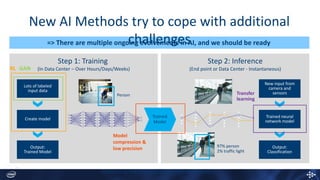
challenges=> There are multiple ongoing evolvements in AI, and we should be ready
Illustrating the training and inference process
Step 1: Training
(In Data Center – Over Hours/Days/Weeks)
Person
Lots of labeled
input data
Output:
Trained Model
Create model
Step 2: Inference
(End point or Data Center - Instantaneous)
New input from
camera and
sensors
Output:
Classification
Trained neural
network model
97% person
2% traffic light
Trained
Model
GANRL
Model
compression &
low precision
Transfer
learning
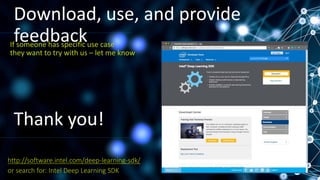
Download, use, and provide
feedback
or search for: Intel Deep Learning SDK
http://software.intel.com/deep-learning-sdk/
If someone has specific use case
they want to try with us – let me know
Thank you!

Faster deep learning solutions from training to inference - Amitai Armon & Nir Lotan, Intel

  • 1.
    Fast deep learning atyour fingertips Faster deep learning solutions from training to inference using IntelÂŽ Deep Learning SDK Nir Lotan Machine Learning Product Manager Advanced Analytics, Intel Chief Data Scientist Advanced Analytics, Intel Dr. Amitai Armon
  • 2.
    Deep learning isEverywhere AT Intel ManufacturingProcessor Design Sales & Marketing Health Analytics AI ProductsPerceptual Computing
  • 3.
    Visual understanding NaturalLanguage Processing Speech recognition Deep neural networks are solving real life cognitive tasks person Sed ut perspiciatis unde omnis iste natus error sit voluptatem accusantium doloremque laudantium, totam rem aperiam, eaque ipsa quae ab illo inventore veritatis et quasi architecto beatae vitae dicta sunt explicabo. Nemo enim ipsam voluptatem quia volu eaque ipsa quae ab illo inventore veritatis et quasi architecto beatae vitae dicta sunt explicabo. Nemo enim ipsam voluptatem quia volu DEEP LEARNING
  • 4.
    Model is inspiredby a multi-layer network of neurons Network Topology DEEP LEARNING
  • 5.
    DEEP LEARNING steps Step1: Training (In Data Center – Over Hours/Days/Weeks) Person Lots of labeled input data Output: Trained Model Create “Deep neural net” math model Step 2: Inference (End point or Data Center - Instantaneous) New input from camera and sensors Output: Classification Trained neural network model 97% person 2% traffic light Trained Model
  • 6.
    deep learning todayis notreally accessible… …and can be overwhelming
  • 7.
    IntelÂŽ deep learning SDKEasilydevelop and deploy deep learning solutions, using IntelÂŽ Architecture & Popular frameworks
  • 8.
    IntelÂŽ Deep LearningSDK - Workflow Data Prep. Build a Model Model Training Training Inference Compress ion Visualizat ions Algorith mic Features Multi- Node Model Optimizer Inference Engine
  • 9.
    Our Vision: Democratizedeep learningAllow every Data scientist and Developer to easily deploy Open Sourced Deep Learning Frameworks optimized for IntelÂŽ Architecture - delivering end-to-end capabilities, a rich user experience, and tools to boost productivity. Plug & Train Maximiz e perform Producti vity tools Accelerat e deploym
  • 10.
  • 11.
    Plug & Train- An easy to use installer Install on Linux CentOS/Ubunto or Mac Install from Linux, Mac or Windows Use the tool remotely via Chrome browser from any platform.
  • 12.
  • 13.
    Software and workloadsused in performance tests may have been optimized for performance only on Intel microprocessors. Performance tests, such as SYSmark and MobileMark, are measured using specific computer systems, components, software, operations and functions. Any change to any of those factors may cause the results to vary. You should consult other information and performance tests to assist you in fully evaluating your contemplated purchases, including the performance of that product when combined with other products. For more information go to http://www.intel.com/performance . *Other names and brands may be property of others Configurations: 2 socket system with Intel® Xeon Processor E5-2699 v4 (22 Cores, 2.2 GHz,), 128 GB memory, Red Hat* Enterprise Linux 6.7, BVLC Caffe, Intel Optimized Caffe framework, Intel® MKL 11.3.3, Intel® MKL 2017 Intel® Xeon Phi™ Processor 7250 (68 Cores, 1.4 GHz, 16GB MCDRAM), 128 GB memory, Red Hat* Enterprise Linux 6.7, Intel® Optimized Caffe framework, Intel® MKL 2017 All numbers measured without taking data manipulation into account. 0 5 10 15 20 25 30 Intel® Xeon® E5-2699 v4 Intel® Xeon® E5-2699 v4 Intel® Xeon® E5-2699 v4 Intel® Xeon Phi 7250 Out-of-the-box +Intel MKL 11.3.3 +Intel MKL 2017 +Intel MKL 2017 Performancespeedup Caffe/AlexNet single node training performance 2.1x 2x training with Intel-Optimized Frameworks 5.8x 24x 12x Example: Deep-learning training with Intel-Optimized Caffe* on Intel® Xeon® Processor E5 v4 and Intel® Xeon Phi™
  • 14.
    Kubernetes Multi-node training Jupyter notebooksBrowser service DLSDK service service Node3Node 1 Container Container DLSDK Container Data (File System) Node 2 Container Container DLSDK Container Data (File System) Container Data (File System) … Performance boost with distributed training
  • 15.
  • 16.
    Step by StepWizard Productivity tools Interactive Notebook MODEL VISUALIZATION MODEL COMRESSION
  • 17.
  • 18.
    • Optimize: • Importstrained models from all popular DL framework regardless of training HW • Model Canonicalization, Compression and Quantization • Deploy: • One API across all Intel HW and systems • Friendly Inference solution: (low footprint, easy API, control meeting Functional Safety) • Optimizes Inference execution per target hardware under-the-hood Ease of use + Embedded friendly + Extra performance boost 1 2 Trained Model Optimize Compress Quantize Inference Engine 1 2 CPU GEN FPGA … Enable full utilization of IA Inference while abstracting HW from developers Intel Deep Learning Deployment Tool
  • 19.
  • 21.
    This is our dataset: “Hands” “Not-Hands” Thanksto the Intel “Hands in VR” team for sharing the use case and dataset
  • 22.
  • 24.
  • 25.
    Step 1: Training (InData Center – Over Hours/Days/Weeks) Person Lots of labeled input data Output: Trained Model Create model Step 2: Inference (End point or Data Center - Instantaneous) New input from camera and sensors Output: Classification Trained neural network model 97% person 2% traffic light Trained Model Reminder: Deep-Learning is leading today’s AI Achieved breakthroughs in visual understanding and in natural language processing Illustrating the deep-learning training and inference process
  • 26.
    Step 1: Training (InData Center – Over Hours/Days/Weeks) Person Lots of labeled input data Output: Trained Model Create model Step 2: Inference (End point or Data Center - Instantaneous) New input from camera and sensors Output: Classification Trained neural network model 97% person 2% traffic light Trained Model New AI Methods try to cope with additional challenges Illustrating the training and inference process GAN (1) Labeled data is scarce and more labeled samples need to be generated (e.g. using GAN)
  • 27.
    Step 1: Training (InData Center – Over Hours/Days/Weeks) Person Lots of labeled input data Output: Trained Model Create model Step 2: Inference (End point or Data Center - Instantaneous) New input from camera and sensors Output: Classification Trained neural network model 97% person 2% traffic light Trained Model New AI Methods try to cope with additional challenges(2) Some tasks are learned better through trial-and-error than through examples Illustrating the training and inference process RL
  • 28.
    Step 1: Training (InData Center – Over Hours/Days/Weeks) Person Lots of labeled input data Output: Trained Model Create model Step 2: Inference (End point or Data Center - Instantaneous) New input from camera and sensors Output: Classification Trained neural network model 97% person 2% traffic light Trained Model New AI Methods try to cope with additional challenges(3) Deployment at the edge requires lower memory footprint and faster inference Illustrating the training and inference process Model compression & low precision
  • 29.
    Step 1: Training (InData Center – Over Hours/Days/Weeks) Person Lots of labeled input data Output: Trained Model Create model Step 2: Inference (End point or Data Center - Instantaneous) New input from camera and sensors Output: Classification Trained neural network model 97% person 2% traffic light Trained Model New AI Methods try to cope with additional challenges(4) Using the model often requires adapting it to a new type of data (transfer learning) Illustrating the training and inference process Transfer learning
  • 30.
    New AI Methodstry to cope with additional challenges=> There are multiple ongoing evolvements in AI, and we should be ready Illustrating the training and inference process Step 1: Training (In Data Center – Over Hours/Days/Weeks) Person Lots of labeled input data Output: Trained Model Create model Step 2: Inference (End point or Data Center - Instantaneous) New input from camera and sensors Output: Classification Trained neural network model 97% person 2% traffic light Trained Model GANRL Model compression & low precision Transfer learning
  • 31.
    Download, use, andprovide feedback or search for: Intel Deep Learning SDK http://software.intel.com/deep-learning-sdk/ If someone has specific use case they want to try with us – let me know Thank you!