Hassan Abid
Django for mobile
applications
Pycon Korea 2017
About me
• Working as full-stack software engineer at NexStreaming
• Started Python 3 years ago
• Started Web Programming 4 years ago
• Nowadays working with Javascript
• Hobbies are Cycling, Running and Hiking
• I speak Korean, English, Urdu and can read Arabic
2
Contents
• Why Django?
• Create simple project with Django
• Useful Libraries for your Django Project
• Django Rest-framework basics
• Contribute to Open source
• Deploying Django on Server
• Conclusion and Summary
3
What is Django?
4
What is Django?
5
What is Django?
Django was invented to meet fast-moving
newsroom deadlines, while satisfying the
tough requirements of experienced Web
developers.
6
Why Django ?
• Django has been around for more than 10 years now
• Easy to code, maintain and extend
• Easy to deploy
• plenty of open-source libraries
7
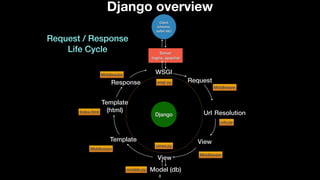
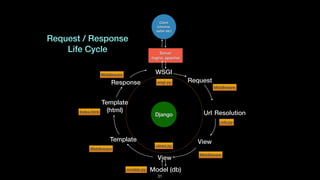
Django overview
Server
(nginx, apache)
Client
(chrome,
safari etc)
Django
WSGI
Request
Url Resolution
View
View
Model (db)
Template
Template
(html)
Response
Request / Response
Life Cycle
wsgi.py
Middleware
urls.py
Middleware
views.py
models.py
Middleware
Index.html
Middleware
8
Getting Started
• Perquisites
‣ Python 3.x
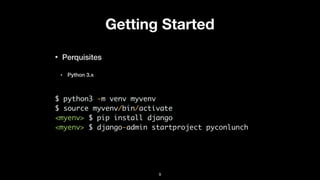
$ python3 -m venv myvenv
$ source myvenv/bin/activate
<myenv> $ pip install django
<myenv> $ django-admin startproject pyconlunch
9
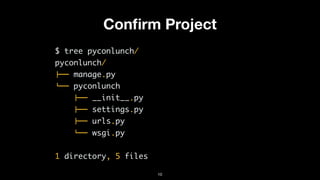
Confirm Project
$ tree pyconlunch/
pyconlunch/
!"" manage.py
#"" pyconlunch
!"" __init__.py
!"" settings.py
!"" urls.py
#"" wsgi.py
1 directory, 5 files
10
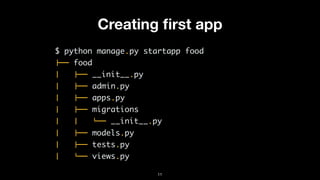
Creating first app
$ python manage.py startapp food
!"" food
$   !"" __init__.py
$   !"" admin.py
$   !"" apps.py
$   !"" migrations
$   $   #"" __init__.py
$   !"" models.py
$   !"" tests.py
$   #"" views.py
11
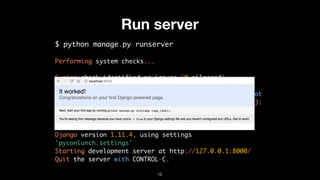
Run server
$ python manage.py runserver
Performing system checks...
System check identified no issues (0 silenced).
You have 13 unapplied migration(s). Your project may not
work properly until you apply the migrations for app(s):
admin, auth, contenttypes, sessions.
Run 'python manage.py migrate' to apply them.
Django version 1.11.4, using settings
'pyconlunch.settings'
Starting development server at http://127.0.0.1:8000/
Quit the server with CONTROL-C.
12
Why it works?
imgur.com13
Create url for home page 1/2
#pylunch/urls.py
from django.conf.urls import include, url
from django.contrib import admin
urlpatterns = [
url(r'^admin/', admin.site.urls),
url(r'^', include(‘food.urls')),
]
14
Create url for home page 2/2
#food/urls.py
from django.conf.urls import include, url
from . import views
urlpatterns = [
url(r'', views.index, name='index'),
]
15
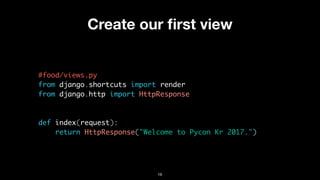
Create our first view
#food/views.py
from django.shortcuts import render
from django.http import HttpResponse
def index(request):
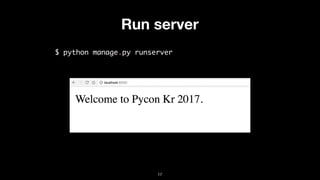
return HttpResponse("Welcome to Pycon Kr 2017.")
16
Run server
$ python manage.py runserver
17
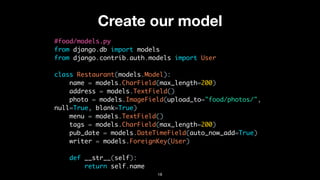
Create our model
#food/models.py
from django.db import models
from django.contrib.auth.models import User
class Restaurant(models.Model):
name = models.CharField(max_length=200)
address = models.TextField()
photo = models.ImageField(upload_to="food/photos/",
null=True, blank=True)
menu = models.TextField()
tags = models.CharField(max_length=200)
pub_date = models.DateTimeField(auto_now_add=True)
writer = models.ForeignKey(User)
def __str__(self):
return self.name
18
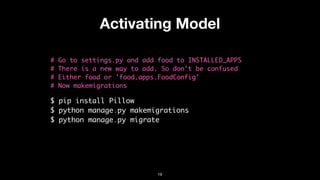
Activating Model
# Go to settings.py and add food to INSTALLED_APPS
# There is a new way to add. So don't be confused
# Either food or 'food.apps.FoodConfig'
# Now makemigrations
$ pip install Pillow
$ python manage.py makemigrations
$ python manage.py migrate
19
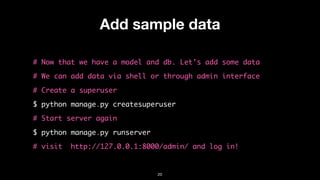
Add sample data
# Now that we have a model and db. Let's add some data
# We can add data via shell or through admin interface
# Create a superuser
$ python manage.py createsuperuser
# Start server again
$ python manage.py runserver
# visit http://127.0.0.1:8000/admin/ and log in!
20
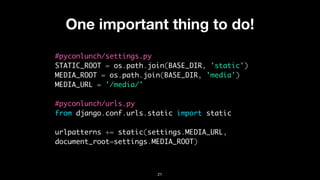
One important thing to do!
#pyconlunch/settings.py
STATIC_ROOT = os.path.join(BASE_DIR, 'static')
MEDIA_ROOT = os.path.join(BASE_DIR, 'media')
MEDIA_URL = '/media/'
#pyconlunch/urls.py
from django.conf.urls.static import static
urlpatterns += static(settings.MEDIA_URL,
document_root=settings.MEDIA_ROOT)
21
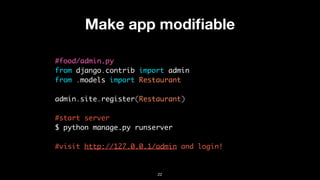
Make app modifiable
#food/admin.py
from django.contrib import admin
from .models import Restaurant
admin.site.register(Restaurant)
#start server
$ python manage.py runserver


#visit http://127.0.0.1/admin and login!
22
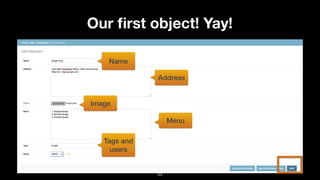
Our first object! Yay!
Name
Address
Image
Menu
Tags and
users
23
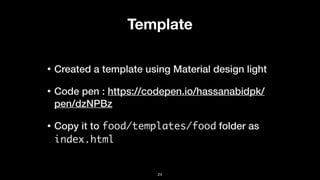
Template
• Created a template using Material design light
• Code pen : https://codepen.io/hassanabidpk/
pen/dzNPBz
• Copy it to food/templates/food folder as
index.html
24
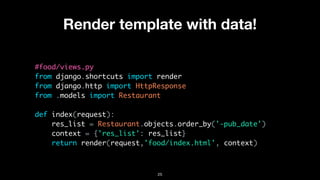
Render template with data!
#food/views.py
from django.shortcuts import render
from django.http import HttpResponse
from .models import Restaurant
def index(request):
res_list = Restaurant.objects.order_by('-pub_date')
context = {'res_list': res_list}
return render(request,'food/index.html', context)
25
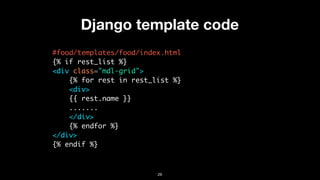
Django template code
#food/templates/food/index.html
{% if rest_list %}
<div class="mdl-grid">
{% for rest in rest_list %}
<div>
{{ rest.name }}
.......
</div>
{% endfor %}
</div>
{% endif %}
26
There is one more thing!!!
Source
27
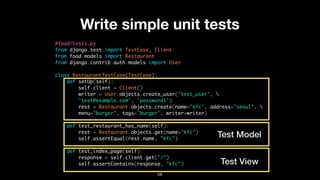
Write simple unit tests
#food/tests.py
from django.test import TestCase, Client
from food.models import Restaurant
from django.contrib.auth.models import User
class RestaurantTestCase(TestCase):
def setUp(self):
self.client = Client()
writer = User.objects.create_user('test_user', 
'test@example.com', 'password1')
rest = Restaurant.objects.create(name="kfc", address="seoul", 
menu="burger", tags="burger", writer=writer)
def test_restaurant_has_name(self):
rest = Restaurant.objects.get(name="kfc")
self.assertEqual(rest.name, "kfc")
def test_index_page(self):
response = self.client.get("/")
self.assertContains(response, "kfc")
28
Test Model
Test View
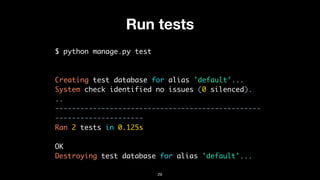
Run tests
$ python manage.py test
Creating test database for alias 'default'...
System check identified no issues (0 silenced).
..
-------------------------------------------------
---------------------
Ran 2 tests in 0.125s
OK
Destroying test database for alias 'default'...
29
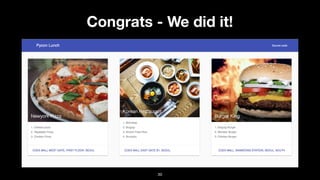
Congrats - We did it!
30
Server
(nginx, apache)
Client
(chrome,
safari etc)
Django
WSGI
Request
Url Resolution
View
View
Model (db)
Template
Template
(html)
Response
Request / Response
Life Cycle
wsgi.py
Middleware
urls.py
Middleware
views.py
models.py
Middleware
Index.html
Middleware
31
32
img_src
Source Code
https://github.com/hassanabidpk/pyconkr2017
33
img_src
There is more!
Korean
English
34
Libraries
• Django rest framework
• django-allauth
• django-rest-auth
• imagekit
• anymail
35
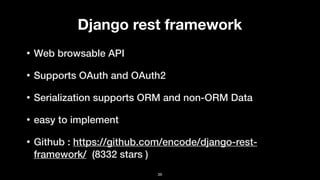
Django rest framework
• Web browsable API
• Supports OAuth and OAuth2
• Serialization supports ORM and non-ORM Data
• easy to implement
• Github : https://github.com/encode/django-rest-
framework/ (8332 stars )
36
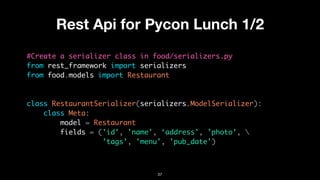
Rest Api for Pycon Lunch 1/2
#Create a serializer class in food/serializers.py
from rest_framework import serializers
from food.models import Restaurant
class RestaurantSerializer(serializers.ModelSerializer):
class Meta:
model = Restaurant
fields = ('id', 'name', ‘address', ’photo’, 
’tags’, 'menu', 'pub_date')
37
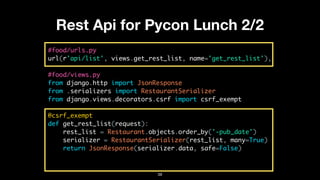
Rest Api for Pycon Lunch 2/2
#food/urls.py
url(r'api/list', views.get_rest_list, name='get_rest_list'),
#food/views.py
from django.http import JsonResponse
from .serializers import RestaurantSerializer
from django.views.decorators.csrf import csrf_exempt
@csrf_exempt
def get_rest_list(request):
rest_list = Restaurant.objects.order_by('-pub_date')
serializer = RestaurantSerializer(rest_list, many=True)
return JsonResponse(serializer.data, safe=False)
38
Json response
$ curl http://127.0.0.1:8000/api/list | json_pp
[{
"id": 1,
"name": "Burger King",
"address": "Coex Mall, Samseong Station, Seoul, South
KorearnMap link : maps.google.com",
"photo": "/media/food/photos/burger.jpeg",
"tags": "burger",
"menu": "1. Bulgogi Burgerrn2. Monster Burgerrn3. Chicken
Burger",
"pub_date": "2017-08-04T21:05:15.752209Z"
}]
39
Django all auth
• Library for authentication, registration, account
management and 3rd party social accounts
• Github : https://github.com/pennersr/django-allauth
(3115 stars )
40
Django rest auth
• Build on top of Django all-auth for rest api.
• Github : https://github.com/Tivix/django-rest-auth
(891 stars )
• Use Class Based Views and REST (json)
• Simplifies the development life cycle for rest auth
41
Imagekit
• Django app for processing images based on Pillow
• Provides thumbnail of images
• Github : https://github.com/matthewwithanm/
django-imagekit (1203 stars )
42
Imagekit Code Sample
from django.db import models
from imagekit.models import ImageSpecField
from imagekit.processors import ResizeToFill
class Profile(models.Model):
avatar = models.ImageField(upload_to='avatars')
avatar_thumbnail = ImageSpecField(source='avatar',
processors=[ResizeToFill(100, 50)],
format='JPEG',
options={'quality': 60})
43
Django anymail
• Email backend and web hook for for Mail gun, mail jet etc.
• Build on top of Django built-in email
• Github : https://github.com/anymail/django-anymail (407
stars )
44
Contribute to open source
• You can start contributing to open source repositories
after using them in your project
• Read readme carefully and look for typos
• Check source code if you don’t understand some
features
• Try out all the features of the open source library
45
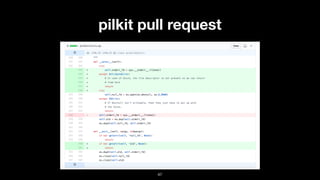
Pull Request (My Experience)
• Django imagekit had some problem while deploying
on Azure because of underlying Windows platform
(pilkit)
• https://github.com/matthewwithanm/pilkit/pull/26
46
pilkit pull request
47
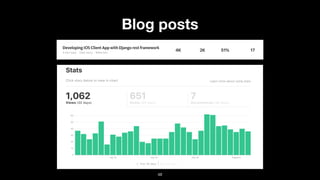
Blog posts
48
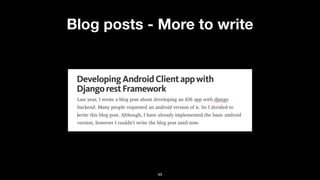
Blog posts - More to write
49
Deployment
• The hard-thing-to-do
• There are tons of options available out there.
• Sometimes its hard to explain the difference between
local, dev and production site.
• Some of my favorite servers are Azure, PythonAnywhere
and Google App Engine
50
Deployment - PythonAnywhere
• Tailored for Python web projects such as Flask and
Django
• No special setup or config required
• mySQL database available
• Paid version supports 1 website with domain for 5 $ /
month
51
Deployment - Azure
• Windows based, but supports Django / Python web
project deployment
• Setup using a nice and interactive GUI
• Supports automatic deployment once you push code on
Github
• Sometimes, its not convenient to use power shell or
command prompt
52
Azure Demo
53
Steps to do
• Create a new web app on Azure portal (portal.azure.com)
• Add web.config ptvs_virtualenv_proxy.py to your project from here
• Add environment variable for secret key in application setting
• Go to deployment options and complete GitHub setup for you repo
• Select advance tools -> Go. Start debug console
• Do db migration and create super user
• Visit site <web_app_name>.azurewebsites.net
54
Conclusion
• Django is well established Web framework
• Easy to start, develop and maintain
• Tons of open source libraries increases the
development life-cycle
• Simple to deploy
• A top candidate for your mobile app backend
55
https://www.hassanabid.com
@hassanabidpk
56
Links
• Sample code : https://github.com/hassanabidpk/pyconkr2017
• Sample app (reactnative): https://github.com/hassanabidpk/react_pyconlunch
• Django coding style: https://docs.djangoproject.com/en/1.11/internals/
contributing/writing-code/coding-style/
• Django Official Tutorial : https://docs.djangoproject.com/en/1.11/intro/tutorial01/
• Azure deployment blog : creating web apps with Django in Azure and Deploying
Django app to azure
57

Django for mobile applications

  • 1.
    Hassan Abid Django formobile applications Pycon Korea 2017
  • 2.
    About me • Workingas full-stack software engineer at NexStreaming • Started Python 3 years ago • Started Web Programming 4 years ago • Nowadays working with Javascript • Hobbies are Cycling, Running and Hiking • I speak Korean, English, Urdu and can read Arabic 2
  • 3.
    Contents • Why Django? •Create simple project with Django • Useful Libraries for your Django Project • Django Rest-framework basics • Contribute to Open source • Deploying Django on Server • Conclusion and Summary 3
  • 4.
  • 5.
  • 6.
    What is Django? Djangowas invented to meet fast-moving newsroom deadlines, while satisfying the tough requirements of experienced Web developers. 6
  • 7.
    Why Django ? •Django has been around for more than 10 years now • Easy to code, maintain and extend • Easy to deploy • plenty of open-source libraries 7
  • 8.
    Django overview Server (nginx, apache) Client (chrome, safarietc) Django WSGI Request Url Resolution View View Model (db) Template Template (html) Response Request / Response Life Cycle wsgi.py Middleware urls.py Middleware views.py models.py Middleware Index.html Middleware 8
  • 9.
    Getting Started • Perquisites ‣Python 3.x $ python3 -m venv myvenv $ source myvenv/bin/activate <myenv> $ pip install django <myenv> $ django-admin startproject pyconlunch 9
  • 10.
    Confirm Project $ treepyconlunch/ pyconlunch/ !"" manage.py #"" pyconlunch !"" __init__.py !"" settings.py !"" urls.py #"" wsgi.py 1 directory, 5 files 10
  • 11.
    Creating first app $python manage.py startapp food !"" food $   !"" __init__.py $   !"" admin.py $   !"" apps.py $   !"" migrations $   $   #"" __init__.py $   !"" models.py $   !"" tests.py $   #"" views.py 11
  • 12.
    Run server $ pythonmanage.py runserver Performing system checks... System check identified no issues (0 silenced). You have 13 unapplied migration(s). Your project may not work properly until you apply the migrations for app(s): admin, auth, contenttypes, sessions. Run 'python manage.py migrate' to apply them. Django version 1.11.4, using settings 'pyconlunch.settings' Starting development server at http://127.0.0.1:8000/ Quit the server with CONTROL-C. 12
  • 13.
  • 14.
    Create url forhome page 1/2 #pylunch/urls.py from django.conf.urls import include, url from django.contrib import admin urlpatterns = [ url(r'^admin/', admin.site.urls), url(r'^', include(‘food.urls')), ] 14
  • 15.
    Create url forhome page 2/2 #food/urls.py from django.conf.urls import include, url from . import views urlpatterns = [ url(r'', views.index, name='index'), ] 15
  • 16.
    Create our firstview #food/views.py from django.shortcuts import render from django.http import HttpResponse def index(request): return HttpResponse("Welcome to Pycon Kr 2017.") 16
  • 17.
    Run server $ pythonmanage.py runserver 17
  • 18.
    Create our model #food/models.py fromdjango.db import models from django.contrib.auth.models import User class Restaurant(models.Model): name = models.CharField(max_length=200) address = models.TextField() photo = models.ImageField(upload_to="food/photos/", null=True, blank=True) menu = models.TextField() tags = models.CharField(max_length=200) pub_date = models.DateTimeField(auto_now_add=True) writer = models.ForeignKey(User) def __str__(self): return self.name 18
  • 19.
    Activating Model # Goto settings.py and add food to INSTALLED_APPS # There is a new way to add. So don't be confused # Either food or 'food.apps.FoodConfig' # Now makemigrations $ pip install Pillow $ python manage.py makemigrations $ python manage.py migrate 19
  • 20.
    Add sample data #Now that we have a model and db. Let's add some data # We can add data via shell or through admin interface # Create a superuser $ python manage.py createsuperuser # Start server again $ python manage.py runserver # visit http://127.0.0.1:8000/admin/ and log in! 20
  • 21.
    One important thingto do! #pyconlunch/settings.py STATIC_ROOT = os.path.join(BASE_DIR, 'static') MEDIA_ROOT = os.path.join(BASE_DIR, 'media') MEDIA_URL = '/media/' #pyconlunch/urls.py from django.conf.urls.static import static urlpatterns += static(settings.MEDIA_URL, document_root=settings.MEDIA_ROOT) 21
  • 22.
    Make app modifiable #food/admin.py fromdjango.contrib import admin from .models import Restaurant admin.site.register(Restaurant) #start server $ python manage.py runserver 
 #visit http://127.0.0.1/admin and login! 22
  • 23.
    Our first object!Yay! Name Address Image Menu Tags and users 23
  • 24.
    Template • Created atemplate using Material design light • Code pen : https://codepen.io/hassanabidpk/ pen/dzNPBz • Copy it to food/templates/food folder as index.html 24
  • 25.
    Render template withdata! #food/views.py from django.shortcuts import render from django.http import HttpResponse from .models import Restaurant def index(request): res_list = Restaurant.objects.order_by('-pub_date') context = {'res_list': res_list} return render(request,'food/index.html', context) 25
  • 26.
    Django template code #food/templates/food/index.html {%if rest_list %} <div class="mdl-grid"> {% for rest in rest_list %} <div> {{ rest.name }} ....... </div> {% endfor %} </div> {% endif %} 26
  • 27.
    There is onemore thing!!! Source 27
  • 28.
    Write simple unittests #food/tests.py from django.test import TestCase, Client from food.models import Restaurant from django.contrib.auth.models import User class RestaurantTestCase(TestCase): def setUp(self): self.client = Client() writer = User.objects.create_user('test_user', 'test@example.com', 'password1') rest = Restaurant.objects.create(name="kfc", address="seoul", menu="burger", tags="burger", writer=writer) def test_restaurant_has_name(self): rest = Restaurant.objects.get(name="kfc") self.assertEqual(rest.name, "kfc") def test_index_page(self): response = self.client.get("/") self.assertContains(response, "kfc") 28 Test Model Test View
  • 29.
    Run tests $ pythonmanage.py test Creating test database for alias 'default'... System check identified no issues (0 silenced). .. ------------------------------------------------- --------------------- Ran 2 tests in 0.125s OK Destroying test database for alias 'default'... 29
  • 30.
    Congrats - Wedid it! 30
  • 31.
    Server (nginx, apache) Client (chrome, safari etc) Django WSGI Request UrlResolution View View Model (db) Template Template (html) Response Request / Response Life Cycle wsgi.py Middleware urls.py Middleware views.py models.py Middleware Index.html Middleware 31
  • 32.
  • 33.
  • 34.
  • 35.
    Libraries • Django restframework • django-allauth • django-rest-auth • imagekit • anymail 35
  • 36.
    Django rest framework •Web browsable API • Supports OAuth and OAuth2 • Serialization supports ORM and non-ORM Data • easy to implement • Github : https://github.com/encode/django-rest- framework/ (8332 stars ) 36
  • 37.
    Rest Api forPycon Lunch 1/2 #Create a serializer class in food/serializers.py from rest_framework import serializers from food.models import Restaurant class RestaurantSerializer(serializers.ModelSerializer): class Meta: model = Restaurant fields = ('id', 'name', ‘address', ’photo’, ’tags’, 'menu', 'pub_date') 37
  • 38.
    Rest Api forPycon Lunch 2/2 #food/urls.py url(r'api/list', views.get_rest_list, name='get_rest_list'), #food/views.py from django.http import JsonResponse from .serializers import RestaurantSerializer from django.views.decorators.csrf import csrf_exempt @csrf_exempt def get_rest_list(request): rest_list = Restaurant.objects.order_by('-pub_date') serializer = RestaurantSerializer(rest_list, many=True) return JsonResponse(serializer.data, safe=False) 38
  • 39.
    Json response $ curlhttp://127.0.0.1:8000/api/list | json_pp [{ "id": 1, "name": "Burger King", "address": "Coex Mall, Samseong Station, Seoul, South KorearnMap link : maps.google.com", "photo": "/media/food/photos/burger.jpeg", "tags": "burger", "menu": "1. Bulgogi Burgerrn2. Monster Burgerrn3. Chicken Burger", "pub_date": "2017-08-04T21:05:15.752209Z" }] 39
  • 40.
    Django all auth •Library for authentication, registration, account management and 3rd party social accounts • Github : https://github.com/pennersr/django-allauth (3115 stars ) 40
  • 41.
    Django rest auth •Build on top of Django all-auth for rest api. • Github : https://github.com/Tivix/django-rest-auth (891 stars ) • Use Class Based Views and REST (json) • Simplifies the development life cycle for rest auth 41
  • 42.
    Imagekit • Django appfor processing images based on Pillow • Provides thumbnail of images • Github : https://github.com/matthewwithanm/ django-imagekit (1203 stars ) 42
  • 43.
    Imagekit Code Sample fromdjango.db import models from imagekit.models import ImageSpecField from imagekit.processors import ResizeToFill class Profile(models.Model): avatar = models.ImageField(upload_to='avatars') avatar_thumbnail = ImageSpecField(source='avatar', processors=[ResizeToFill(100, 50)], format='JPEG', options={'quality': 60}) 43
  • 44.
    Django anymail • Emailbackend and web hook for for Mail gun, mail jet etc. • Build on top of Django built-in email • Github : https://github.com/anymail/django-anymail (407 stars ) 44
  • 45.
    Contribute to opensource • You can start contributing to open source repositories after using them in your project • Read readme carefully and look for typos • Check source code if you don’t understand some features • Try out all the features of the open source library 45
  • 46.
    Pull Request (MyExperience) • Django imagekit had some problem while deploying on Azure because of underlying Windows platform (pilkit) • https://github.com/matthewwithanm/pilkit/pull/26 46
  • 47.
  • 48.
  • 49.
    Blog posts -More to write 49
  • 50.
    Deployment • The hard-thing-to-do •There are tons of options available out there. • Sometimes its hard to explain the difference between local, dev and production site. • Some of my favorite servers are Azure, PythonAnywhere and Google App Engine 50
  • 51.
    Deployment - PythonAnywhere •Tailored for Python web projects such as Flask and Django • No special setup or config required • mySQL database available • Paid version supports 1 website with domain for 5 $ / month 51
  • 52.
    Deployment - Azure •Windows based, but supports Django / Python web project deployment • Setup using a nice and interactive GUI • Supports automatic deployment once you push code on Github • Sometimes, its not convenient to use power shell or command prompt 52
  • 53.
  • 54.
    Steps to do •Create a new web app on Azure portal (portal.azure.com) • Add web.config ptvs_virtualenv_proxy.py to your project from here • Add environment variable for secret key in application setting • Go to deployment options and complete GitHub setup for you repo • Select advance tools -> Go. Start debug console • Do db migration and create super user • Visit site <web_app_name>.azurewebsites.net 54
  • 55.
    Conclusion • Django iswell established Web framework • Easy to start, develop and maintain • Tons of open source libraries increases the development life-cycle • Simple to deploy • A top candidate for your mobile app backend 55
  • 56.
  • 57.
    Links • Sample code: https://github.com/hassanabidpk/pyconkr2017 • Sample app (reactnative): https://github.com/hassanabidpk/react_pyconlunch • Django coding style: https://docs.djangoproject.com/en/1.11/internals/ contributing/writing-code/coding-style/ • Django Official Tutorial : https://docs.djangoproject.com/en/1.11/intro/tutorial01/ • Azure deployment blog : creating web apps with Django in Azure and Deploying Django app to azure 57