Download as PDF, PPTX


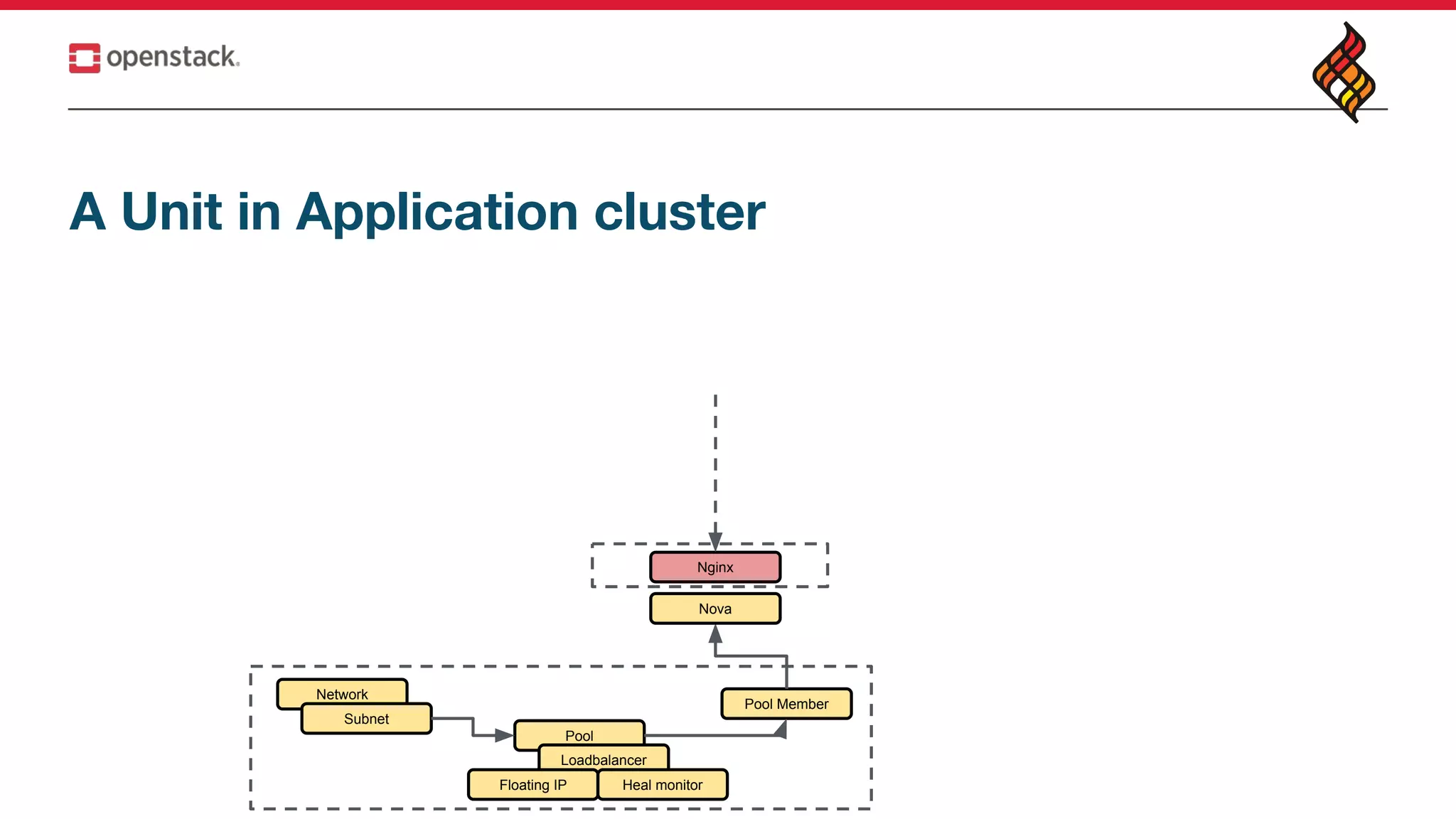
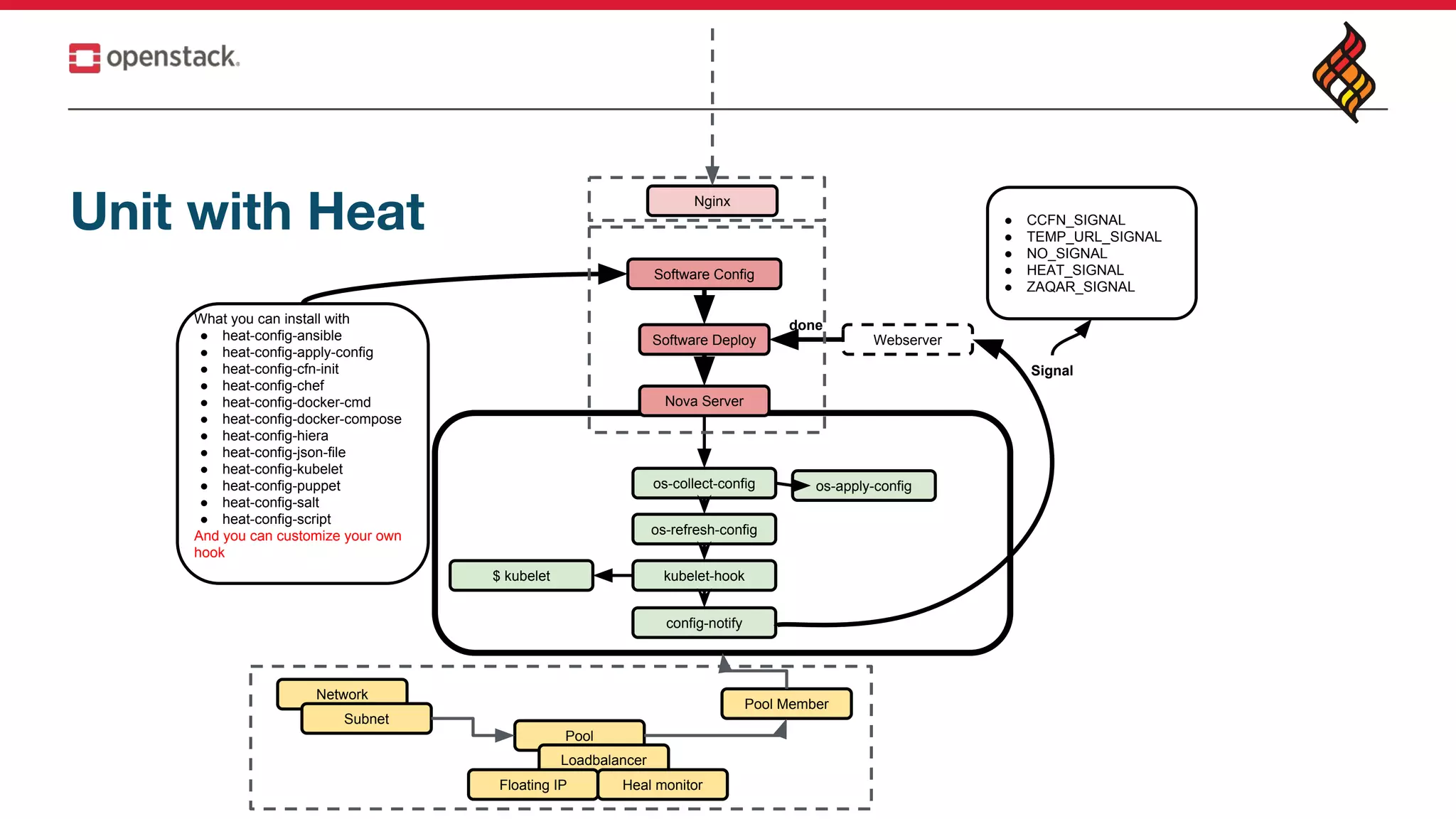
![Heat container agents [sample in repo]
Software Deploy
Nova Server
What you can install with
● heat-config-ansible
● heat-config-apply-config
● heat-config-cfn-init
● heat-config-chef
● heat-config-docker-cmd
● heat-config-docker-compose
● heat-config-hiera
● heat-config-json-file
● heat-config-kubelet
● heat-config-puppet
● heat-config-salt
● heat-config-script
And you can customize your own
hook
os-collect-config
os-refresh-config
os-apply-config
kubelet-hook$ kubelet
Webserver
done
config-notify
Signal
● CCFN_SIGNAL
● TEMP_URL_SIGNAL
● NO_SIGNAL
● HEAT_SIGNAL
● ZAQAR_SIGNAL
Dockers
Software Config
Pool
Network
Subnet
Loadbalancer
Floating IP Heal monitor
Pool Member](https://image.slidesharecdn.com/auto-scaleaself-healingclusterinopenstack1-180824033106/75/Autoscale-a-self-healing-cluster-in-OpenStack-with-Heat-7-2048.jpg)
![Heat container agents [sample in repo]
config:
type: OS::Heat::SoftwareConfig
properties:
group: script
outputs:
- name: result
config: { get_file: example-script.sh }
deployment:
type: OS::Heat::SoftwareDeployment
properties:
config: { get_resource: config }
server: { get_resource: server }
start_container_agent:
type: OS::Heat::SoftwareConfig
properties:
group: ungrouped
config: {get_file: ./start-container-agent.sh}
server:
type: OS::Nova::Server
properties:
image: {get_param: image}
flavor: {get_param: flavor}
key_name: {get_param: key_name}
networks:
- network: {get_param: private_net}
security_groups:
- {get_resource: the_sg}
user_data_format: SOFTWARE_CONFIG
user_data: {get_attr: [start_container_agent, config]}
#!/bin/bash
set -ux
# heat-docker-agent service
cat <<EOF > /etc/systemd/system/heat-container-agent.service
[Unit]
Description=Heat Container Agent
After=docker.service
Requires=docker.service
[Service]
TimeoutSec=5min
RestartSec=5min
User=root
Restart=on-failure
ExecStartPre=-/usr/bin/docker rm -f heat-container-agent
ExecStartPre=-/usr/bin/docker pull
docker.io/rico/heat-container-agent
ExecStart=/usr/bin/docker run --name heat-container-agent
--privileged
--net=host
-v /run/systemd:/run/systemd
-v /etc/sysconfig:/etc/sysconfig
-v /etc/systemd/system:/etc/systemd/system
-v /var/lib/heat-cfntools:/var/lib/heat-cfntools
-v /var/lib/cloud:/var/lib/cloud
-v /tmp:/tmp
-v /etc/hosts:/etc/hosts
docker.io/rico/heat-container-agent
ExecStop=/usr/bin/docker stop heat-container-agent
[Install]
WantedBy=multi-user.target
EOF
# enable and start heat-container-agent
chmod 0640 /etc/systemd/system/heat-container-agent.service
/usr/bin/systemctl enable heat-container-agent.service
/usr/bin/systemctl start --no-block heat-container-agent.service](https://image.slidesharecdn.com/auto-scaleaself-healingclusterinopenstack1-180824033106/75/Autoscale-a-self-healing-cluster-in-OpenStack-with-Heat-8-2048.jpg)
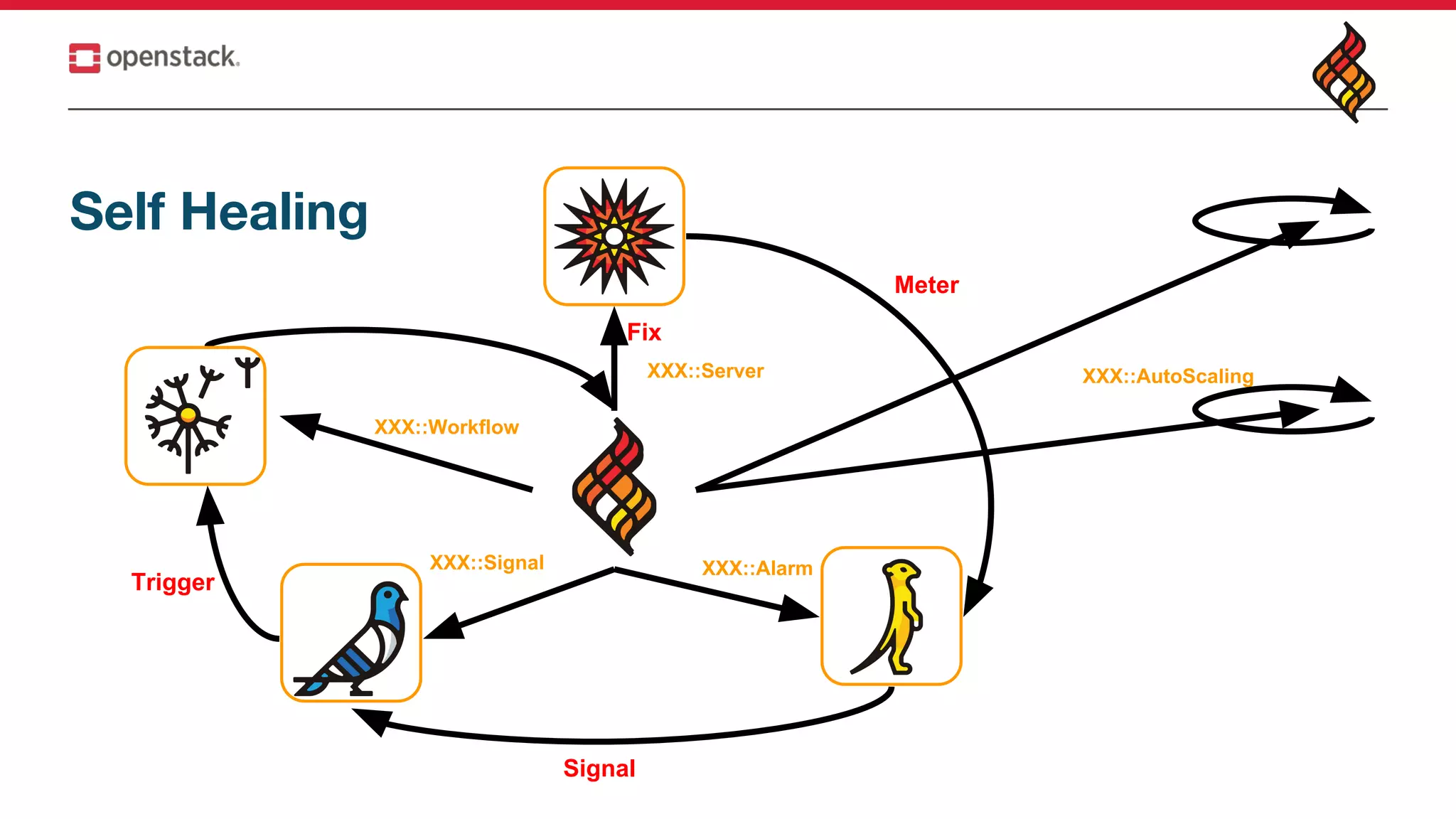
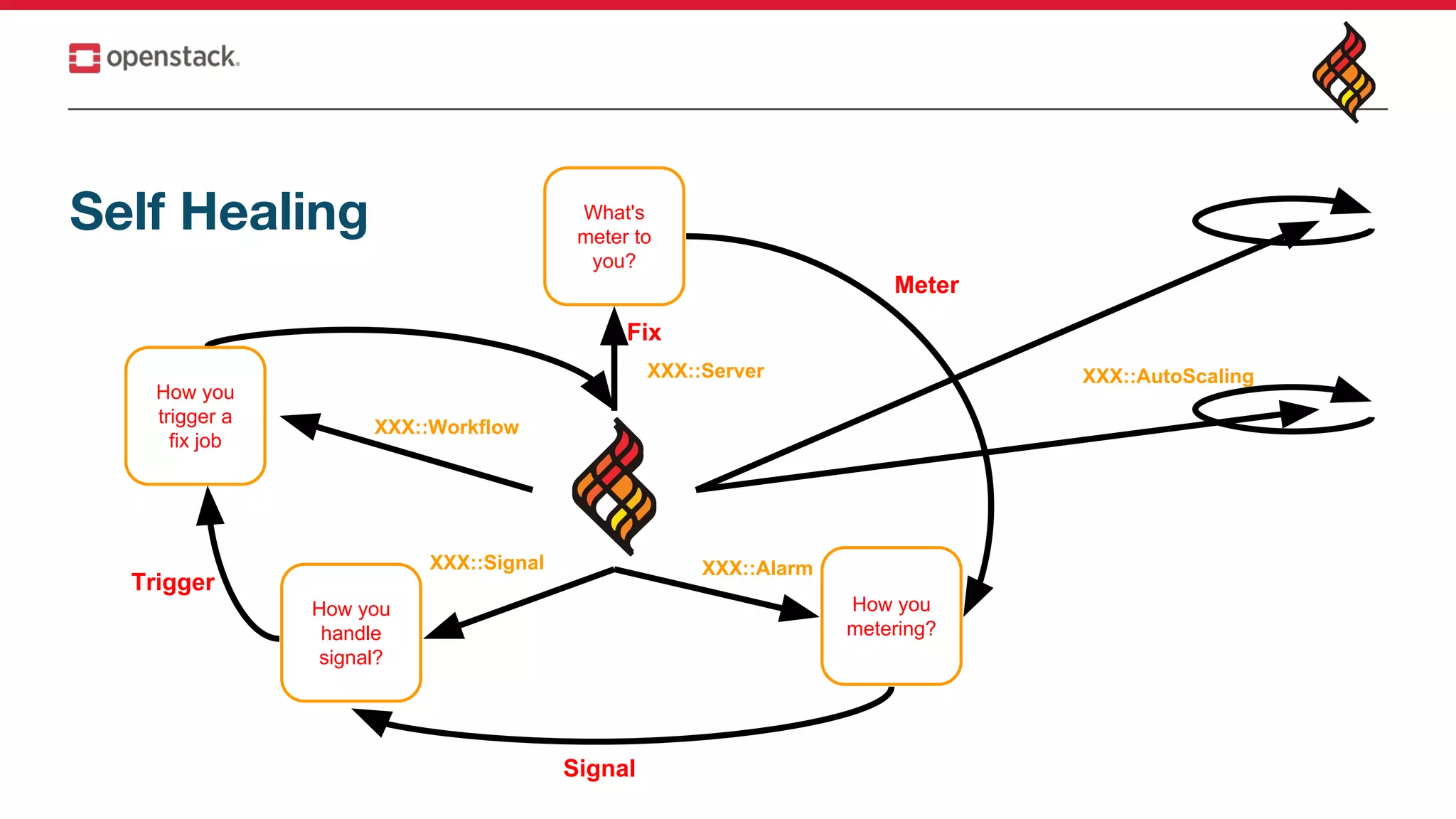
![Self Healing
server:
type: OS::Nova::Server
properties:
...
alarm_queue:
type: OS::Zaqar::Queue
error_event_alarm:
type: OS::Aodh::EventAlarm
properties:
event_type: compute.instance.update
query:
- field: traits.instance_id
value: {get_resource: server}
op: eq
- field: traits.state
value: error
op: eq
alarm_queues:
- {get_resource: alarm_queue}
alarm_subscription:
type: OS::Zaqar::MistralTrigger
properties:
queue_name: {get_resource: alarm_queue}
workflow_id: {get_resource: autoheal}
input:
stack_id: {get_param: "OS::stack_id"}
root_stack_id:
if:
- is_standalone
- {get_param: "OS::stack_id"}
- {get_param: "root_stack_id"}
autoheal:
type: OS::Mistral::Workflow
properties:
description: >
Mark a server as unhealthy and commence a stack update
to replace it.
input:
stack_id:
root_stack_id:
type: direct
tasks:
- name: resources_mark_unhealthy
action:
list_join:
- ' '
- - heat.resources_mark_unhealthy
- stack_id=<% $.stack_id %>
- resource_name=<%
env().notification.body.reason_data.event.traits.where($[0] =
'instance_id').select($[2]).first() %>
- mark_unhealthy=true
- resource_status_reason='Marked by alarm'
on_success:
- stacks_update
- name: stacks_update
action: heat.stacks_update stack_id=<% $.root_stack_id
%> existing=true](https://image.slidesharecdn.com/auto-scaleaself-healingclusterinopenstack1-180824033106/75/Autoscale-a-self-healing-cluster-in-OpenStack-with-Heat-13-2048.jpg)
![OpenStack Self Healing SIG[link]](https://image.slidesharecdn.com/auto-scaleaself-healingclusterinopenstack1-180824033106/75/Autoscale-a-self-healing-cluster-in-OpenStack-with-Heat-14-2048.jpg)
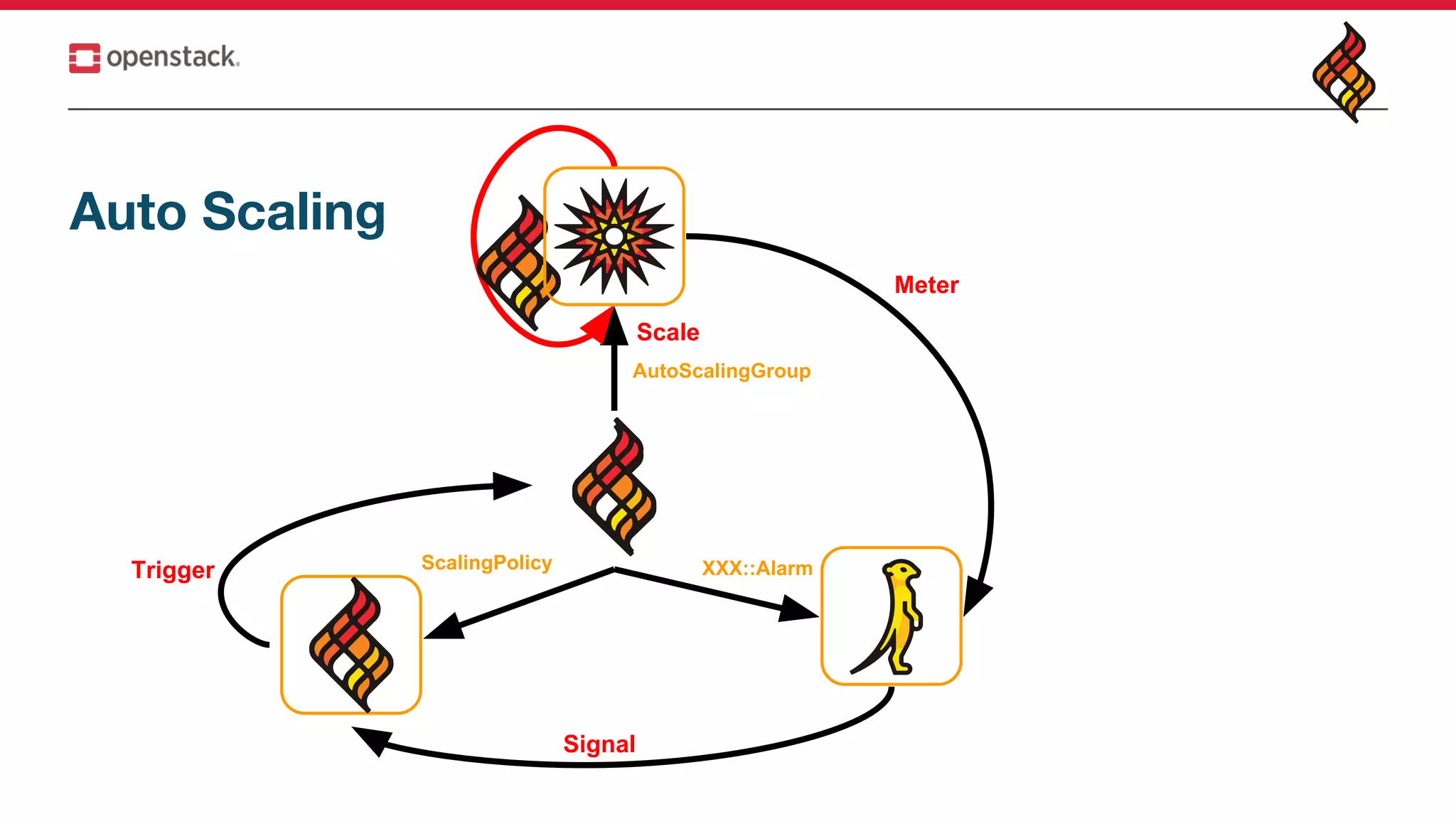
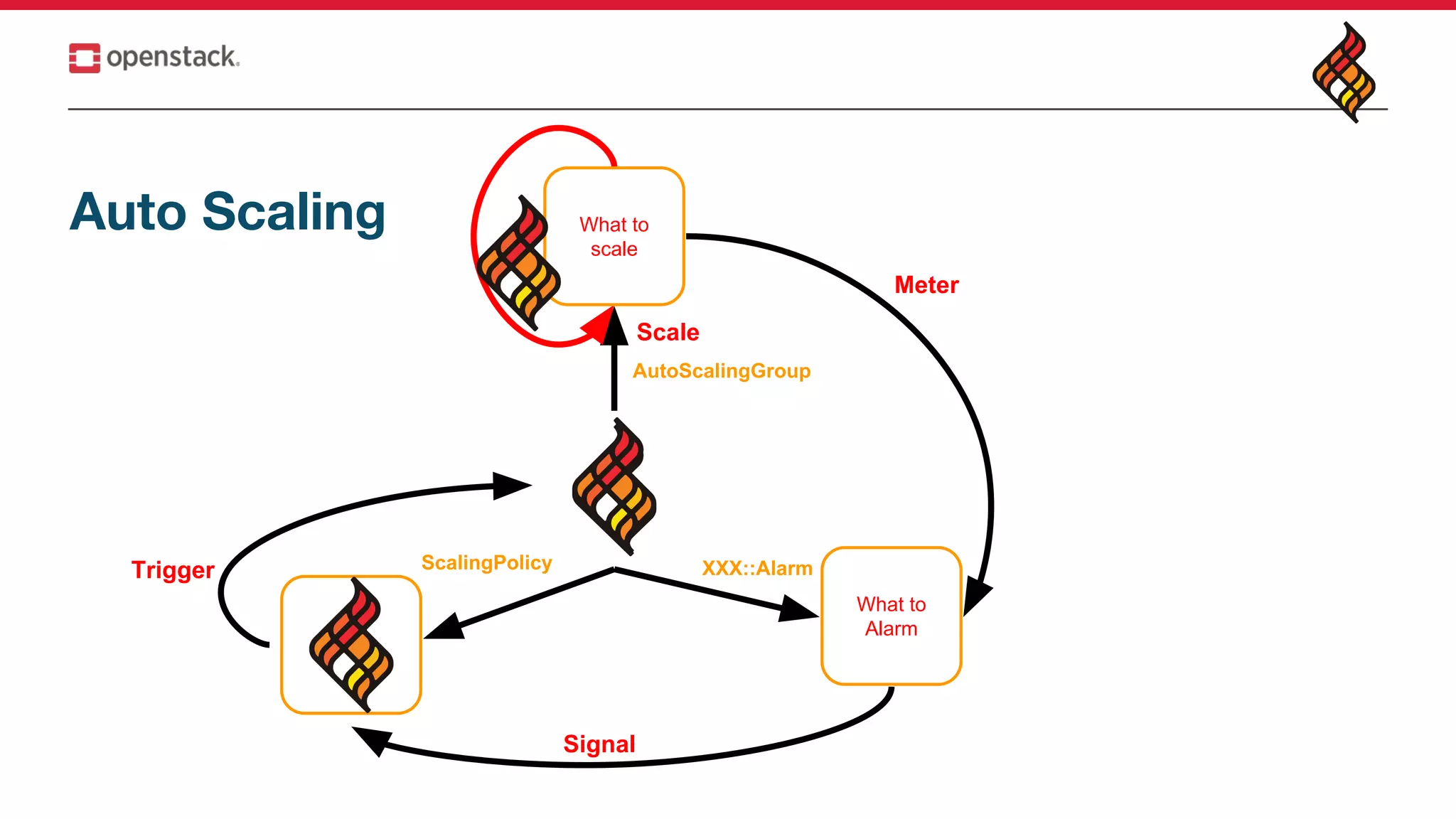
![Auto Scaling https://github.com/openstack/heat-templates/tree/master/hot/autoscaling.yaml
resources:
asg:
type: OS::Heat::AutoScalingGroup
properties:
min_size: 1
max_size: 3
resource:
type: lb_server.yaml
properties:
flavor: {get_param: flavor}
image: {get_param: image}
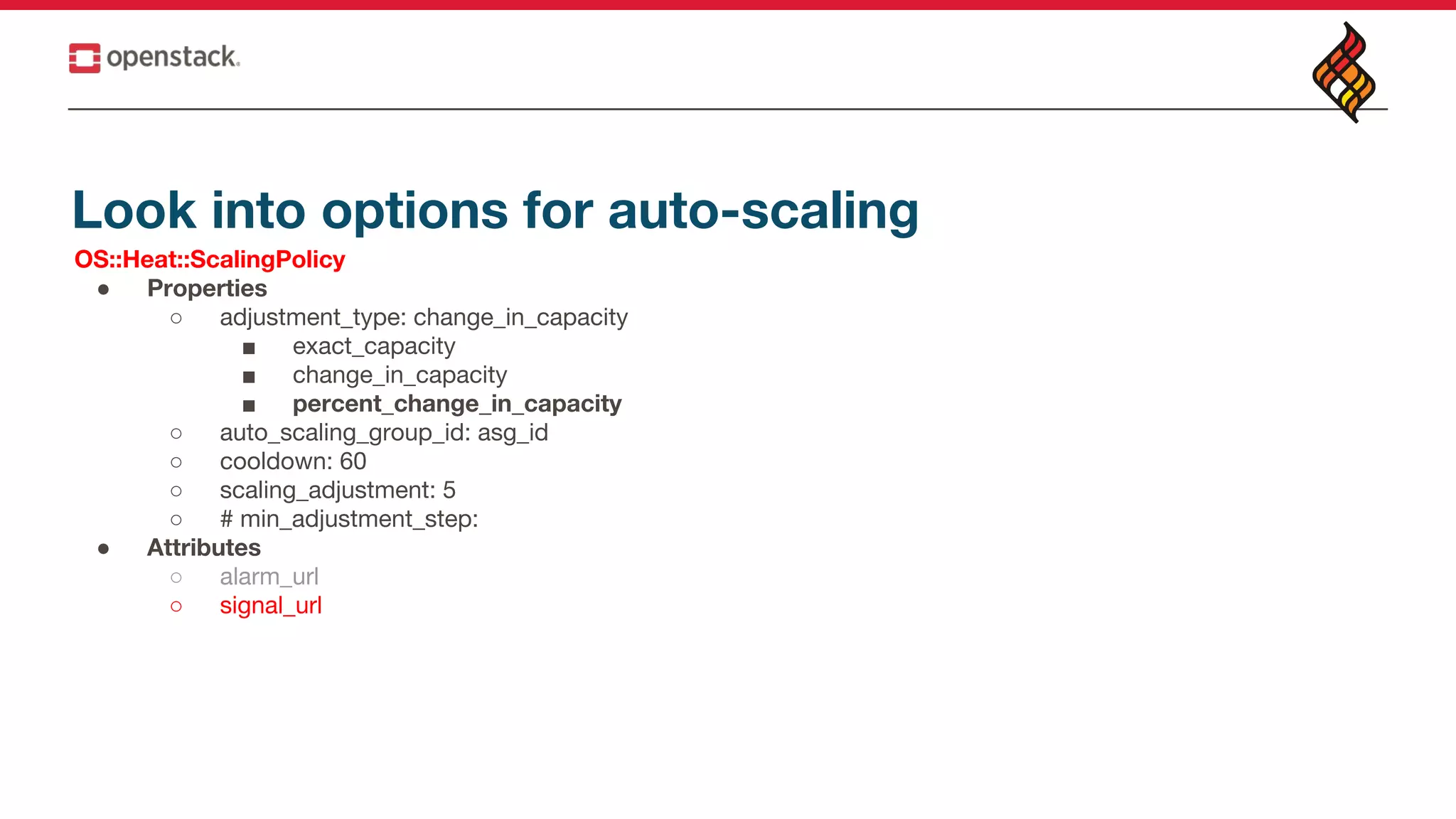
web_server_scaleup_policy:
type: OS::Heat::ScalingPolicy
properties:
adjustment_type: change_in_capacity
auto_scaling_group_id: {get_resource: asg}
cooldown: 60
scaling_adjustment: 1
# min_adjustment_step:
web_server_scaledown_policy:
type: OS::Heat::ScalingPolicy
properties:
adjustment_type: change_in_capacity
auto_scaling_group_id: {get_resource: asg}
cooldown: 60
scaling_adjustment: -1
cpu_alarm_high:
type: OS::Aodh::GnocchiAggregationByResourcesAlarm
properties:
description: Scale up if CPU > 80%
metric: cpu_util
aggregation_method: mean
granularity: 300
evaluation_periods: 1
threshold: 80
resource_type: instance
comparison_operator: gt
alarm_actions:
- str_replace:
template: trust+url
params:
url: {get_attr: [web_server_scaleup_policy, signal_url]}
query:
list_join:
- ''
- - {'=': {server_group: {get_param: "OS::stack_id"}}}
cpu_alarm_low:
type: OS::Aodh::GnocchiAggregationByResourcesAlarm](https://image.slidesharecdn.com/auto-scaleaself-healingclusterinopenstack1-180824033106/75/Autoscale-a-self-healing-cluster-in-OpenStack-with-Heat-19-2048.jpg)
![resources:
asg:
type: OS::Heat::AutoScalingGroup
properties:
min_size: 1
max_size: 3
resource:
type: lb_server.yaml
properties:
flavor: {get_param: flavor}
image: {get_param: image}
web_server_scaleup_policy:
type: OS::Heat::ScalingPolicy
properties:
adjustment_type: change_in_capacity
auto_scaling_group_id: {get_resource: asg}
cooldown: 60
scaling_adjustment: 1
monitoring:
type: monitor.yaml
properties:
url: get_attr: [web_server_scaleup_policy, signal_url]
ScalingPolicy
Stack
Monitor service AutoScalingGroup
Instance
1
1.Metering
2 N
2.Alarm
3.Scale
Choose your own structure](https://image.slidesharecdn.com/auto-scaleaself-healingclusterinopenstack1-180824033106/75/Autoscale-a-self-healing-cluster-in-OpenStack-with-Heat-20-2048.jpg)
![resources:
asg:
type: OS::Heat::AutoScalingGroup
properties:
min_size: 1
max_size: 3
resource:
type: lb_server.yaml
properties:
flavor: {get_param: flavor}
image: {get_param: image}
web_server_scaleup_policy:
type: OS::Heat::ScalingPolicy
properties:
adjustment_type: change_in_capacity
auto_scaling_group_id: {get_resource: asg}
cooldown: 60
scaling_adjustment: 1
outputs:
signal_url:
value: {get_attr: [web_server_scaleup_policy, signal_url]}
ScalingPolicy
Stack
Monitor service
AutoScalingGroup
Instance
1
1.Metering
2 N
2.Alarm
3.Scale
Choose your own structure](https://image.slidesharecdn.com/auto-scaleaself-healingclusterinopenstack1-180824033106/75/Autoscale-a-self-healing-cluster-in-OpenStack-with-Heat-21-2048.jpg)
![resources:
asg:
type: OS::Heat::AutoScalingGroup
properties:
min_size: 1
max_size: 3
resource:
type: lb_server.yaml
properties:
flavor: {get_param: flavor}
image: {get_param: image}
web_server_scaleup_policy:
type: OS::Heat::ScalingPolicy
properties:
adjustment_type: change_in_capacity
auto_scaling_group_id: {get_resource: asg}
cooldown: 60
scaling_adjustment: 1
outputs:
signal_url:
value: {get_attr: [web_server_scaleup_policy, signal_url]}
ScalingPolicy
Stack
Monitor service
AutoScalingGroup
Instance
1
1.Metering
2 N
2.Alarm
3.Scale
Choose your own structure
curl -i -H "X-Auth-Token: $TOKEN" -X POST $Signal_url
curl -i -H "Content-Type: application/json" -d '{ "auth": { "identity": { "methods":
["password"], "password": { "user": { "name": "admin", "domain": { "id":
"default" }, "password": "password" } } }, "scope": { "project": {
"name": "admin", "domain": { "id": "default" } } } }}'
http://$KEYSTONE/identity/v3/auth/tokens ; echo](https://image.slidesharecdn.com/auto-scaleaself-healingclusterinopenstack1-180824033106/75/Autoscale-a-self-healing-cluster-in-OpenStack-with-Heat-22-2048.jpg)
![Look into options for auto-scaling
OS::Heat::AutoScalingGroup
● Properties
○ resource:
■ type: web_server.yaml
■ properties
○ min_size: 10
○ max_size: 100
○ cooldown: 30
○ desired_capacity: 30
○ rolling_updates
■ min_in_service: 5
■ max_batch_size: 10
■ pause_time: 15
● Attributes
○ outputs
○ outputs_list
○ current_size
○ refs [IDs]
○ refs_map {[names: IDs]}](https://image.slidesharecdn.com/auto-scaleaself-healingclusterinopenstack1-180824033106/75/Autoscale-a-self-healing-cluster-in-OpenStack-with-Heat-23-2048.jpg)
![• Review https://goo.gl/4KL1gN
• StoryBoard (Bugs/BP)
https://storyboard.openstack.org/#!/project_group/82
• StoryBoard guide
https://etherpad.openstack.org/p/Heat-StoryBoard-Migration-Info
• Documents https://docs.openstack.org/heat/latest/
• Release Notes https://docs.openstack.org/releasenotes/heat/
• Feedback or Provide ideas = irc: #heat
• Feedback your Use cases
https://etherpad.openstack.org/p/heat-usecases
• Team meeting time Wednesday 14:00 UTC #heat (meeting wiki and
archive)
Join Heat
➔ Boston Summit
◆ Heat project update [ slide & video ]
◆ Heat Onboarding [ slide & video ]
➔ Sydney Summit
◆ Heat project update [ slide & video ]
◆ Heat Onboarding [ slide & video ]
➔ Vancouver Summit
◆ Heat project update [ slide & video ]
◆ Heat Onboarding [ slide & video ]
➔ Heat templates
➔ PTG Etherpad](https://image.slidesharecdn.com/auto-scaleaself-healingclusterinopenstack1-180824033106/75/Autoscale-a-self-healing-cluster-in-OpenStack-with-Heat-26-2048.jpg)


The document presents a technical overview of implementing auto-scaling and self-healing capabilities in OpenStack, focusing on the use of Heat templates for deployment. It details various configuration options, including the setup of alarm triggers, scaling policies, and deployment of container agents. Additionally, the document encourages community engagement and collaboration through resources and meetings related to the OpenStack Heat project.


![[오픈소스컨설팅]쿠버네티스를 활용한 개발환경 구축](https://cdn.slidesharecdn.com/ss_thumbnails/opensourceconsutingkubernetesv0-191010000815-thumbnail.jpg?width=640&height=640&fit=bounds)


![[OpenStack] 공개 소프트웨어 오픈스택 입문 & 파헤치기](https://cdn.slidesharecdn.com/ss_thumbnails/opensource-skimmingopenstackwithkoreausergroup-180824144737-thumbnail.jpg?width=640&height=640&fit=bounds)


