© 2015, Amazon Web Services, Inc. or its Affiliates. All rights reserved.
Grant McAlister – Senior Principal Engineer - RDS
April 2016
Amazon RDS for PostgreSQL
Lessons Learned and Deep Dive on New
Features
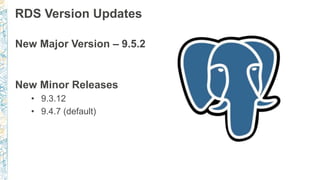
RDS Version Updates
New Major Version – 9.5.2
New Minor Releases
• 9.3.12
• 9.4.7 (default)
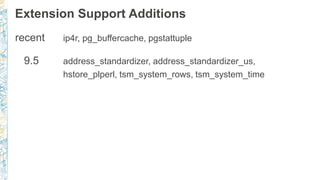
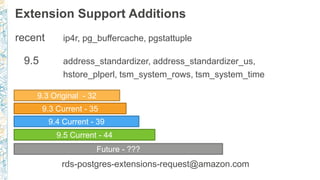
Extension Support Additions
recent ip4r, pg_buffercache, pgstattuple
9.5 address_standardizer, address_standardizer_us,
hstore_plperl, tsm_system_rows, tsm_system_time
Extension Support Additions
recent ip4r, pg_buffercache, pgstattuple
9.5 address_standardizer, address_standardizer_us,
hstore_plperl, tsm_system_rows, tsm_system_time
rds-postgres-extensions-request@amazon.com
9.3 Original - 32
9.3 Current - 35
9.4 Current - 39
9.5 Current - 44
Future - ???
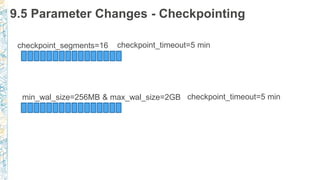
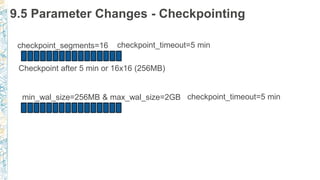
9.5 Parameter Changes - Checkpointing
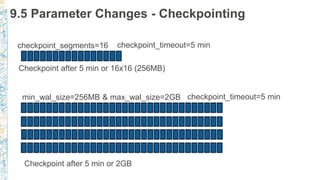
checkpoint_segments=16 checkpoint_timeout=5 min
min_wal_size=256MB & max_wal_size=2GB checkpoint_timeout=5 min
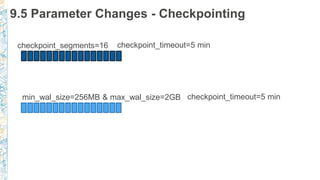
9.5 Parameter Changes - Checkpointing
checkpoint_segments=16 checkpoint_timeout=5 min
min_wal_size=256MB & max_wal_size=2GB checkpoint_timeout=5 min
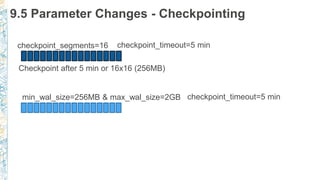
9.5 Parameter Changes - Checkpointing
checkpoint_segments=16 checkpoint_timeout=5 min
Checkpoint after 5 min or 16x16 (256MB)
min_wal_size=256MB & max_wal_size=2GB checkpoint_timeout=5 min
9.5 Parameter Changes - Checkpointing
checkpoint_segments=16 checkpoint_timeout=5 min
Checkpoint after 5 min or 16x16 (256MB)
min_wal_size=256MB & max_wal_size=2GB checkpoint_timeout=5 min
9.5 Parameter Changes - Checkpointing
checkpoint_segments=16 checkpoint_timeout=5 min
Checkpoint after 5 min or 16x16 (256MB)
min_wal_size=256MB & max_wal_size=2GB checkpoint_timeout=5 min
Checkpoint after 5 min or 2GB
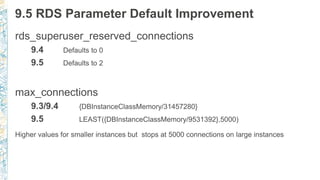
9.5 RDS Parameter Default Improvement
rds_superuser_reserved_connections
9.4 Defaults to 0
9.5 Defaults to 2
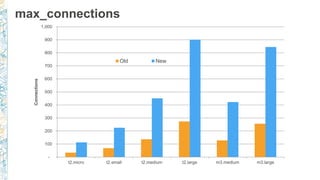
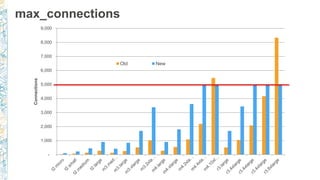
max_connections
9.3/9.4 {DBInstanceClassMemory/31457280}
9.5 LEAST({DBInstanceClassMemory/9531392},5000)
Higher values for smaller instances but stops at 5000 connections on large instances
max_connections
-
100
200
300
400
500
600
700
800
900
1,000
t2.micro t2.small t2.medium t2.large m3.medium m3.large
Connections
Old New
max_connections
-
1,000
2,000
3,000
4,000
5,000
6,000
7,000
8,000
9,000
Connections
Old New
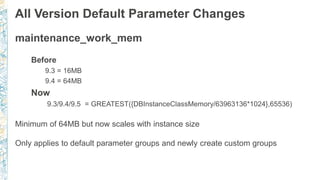
All Version Default Parameter Changes
maintenance_work_mem
Before
9.3 = 16MB
9.4 = 64MB
Now
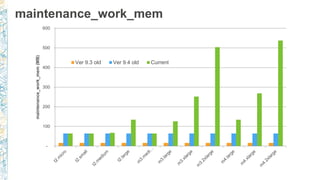
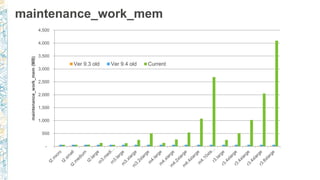
9.3/9.4/9.5 = GREATEST({DBInstanceClassMemory/63963136*1024},65536)
Minimum of 64MB but now scales with instance size
Only applies to default parameter groups and newly create custom groups
maintenance_work_mem
-
100
200
300
400
500
600
maintenance_work_mem(MB)
Ver 9.3 old Ver 9.4 old Current
maintenance_work_mem
-
500
1,000
1,500
2,000
2,500
3,000
3,500
4,000
4,500
maintenance_work_mem(MB)
Ver 9.3 old Ver 9.4 old Current
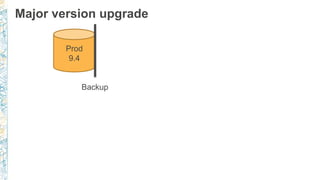
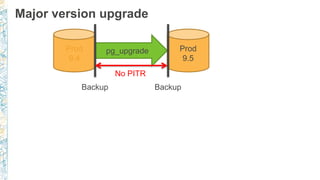
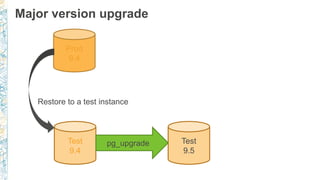
Major version upgrade
Prod
9.4
Major version upgrade
Prod
9.4
Backup
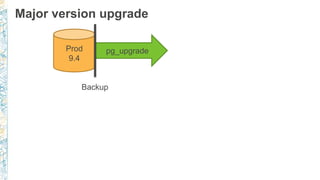
Major version upgrade
Prod
9.4
pg_upgrade
Backup
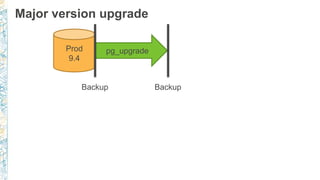
Major version upgrade
Prod
9.4
pg_upgrade
Backup Backup
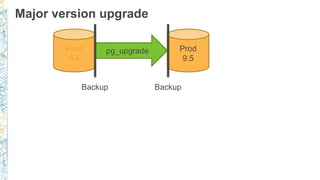
Major version upgrade
Prod
9.4
Prod
9.5
pg_upgrade
Backup Backup
Major version upgrade
Prod
9.4
Prod
9.5
pg_upgrade
Backup Backup
No PITR
Major version upgrade
Prod
9.4
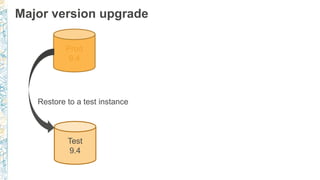
Major version upgrade
Prod
9.4
Test
9.4
Restore to a test instance
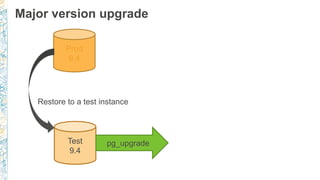
Major version upgrade
Prod
9.4
Test
9.4
pg_upgrade
Restore to a test instance
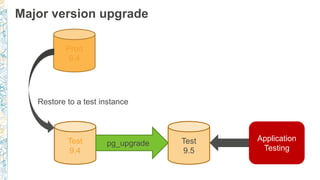
Major version upgrade
Prod
9.4
Test
9.4
Test
9.5
pg_upgrade
Restore to a test instance
Major version upgrade
Prod
9.4
Test
9.4
Test
9.5
pg_upgrade
Restore to a test instance
Application
Testing
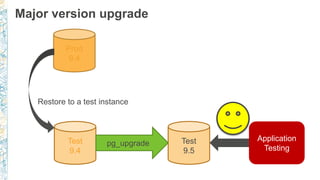
Major version upgrade
Prod
9.4
Test
9.4
Test
9.5
pg_upgrade
Restore to a test instance
Application
Testing
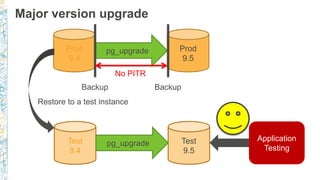
Major version upgrade
Prod
9.4
Prod
9.5
pg_upgrade
Backup Backup
No PITR
Test
9.4
Test
9.5
pg_upgrade
Restore to a test instance
Application
Testing
Security
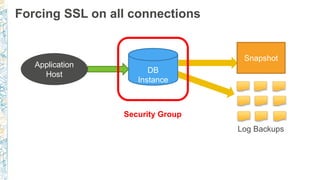
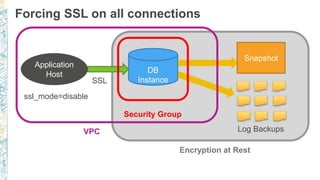
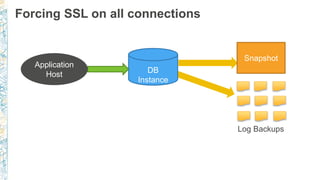
Forcing SSL on all connections
DB
Instance
Snapshot
Application
Host
Log Backups
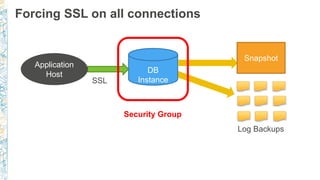
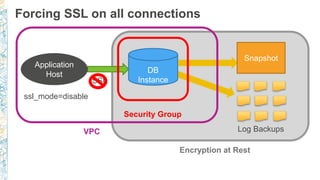
Forcing SSL on all connections
DB
Instance
Snapshot
Application
Host
Log Backups
Security Group
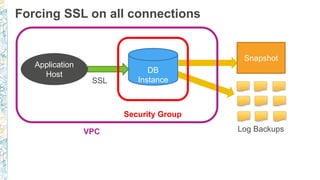
Forcing SSL on all connections
DB
Instance
Snapshot
Application
Host
SSL
Log Backups
Security Group
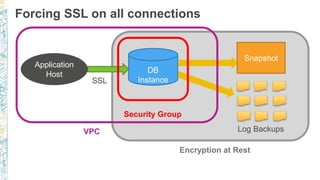
Forcing SSL on all connections
DB
Instance
Snapshot
Application
Host
SSL
Log Backups
Security Group
VPC
Forcing SSL on all connections
DB
Instance
Snapshot
Application
Host
SSL
Log Backups
Security Group
VPC
Encryption at Rest
Forcing SSL on all connections
DB
Instance
Snapshot
Application
Host
SSL
Log Backups
Security Group
VPC
Encryption at Rest
ssl_mode=disable
Forcing SSL on all connections
DB
Instance
Snapshot
Application
Host
SSL
Log Backups
Security Group
VPC
Encryption at Rest
ssl_mode=disable
Forcing SSL on all connections
DB
Instance
Snapshot
Application
Host
SSL
Log Backups
Security Group
VPC
Encryption at Rest
ssl_mode=disable
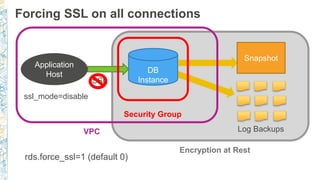
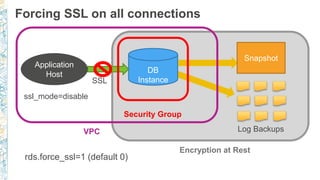
rds.force_ssl=1 (default 0)
Forcing SSL on all connections
DB
Instance
Snapshot
Application
Host
SSL
Log Backups
Security Group
VPC
Encryption at Rest
ssl_mode=disable
rds.force_ssl=1 (default 0)
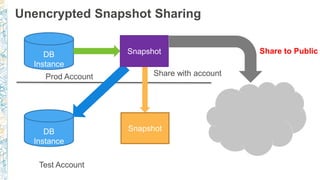
Unencrypted Snapshot Sharing
DB
Instance
Snapshot
Prod Account
Test Account
SnapshotDB
Instance
Snapshot
Share with account
Share to Public
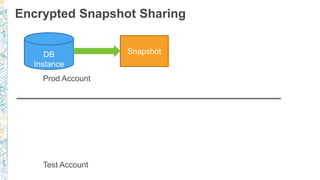
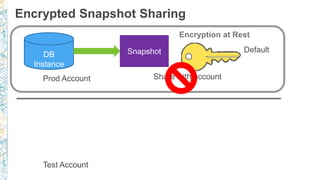
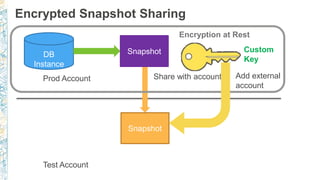
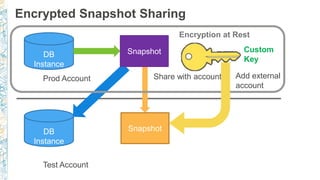
Encrypted Snapshot Sharing
DB
Instance
Snapshot
Prod Account
Test Account
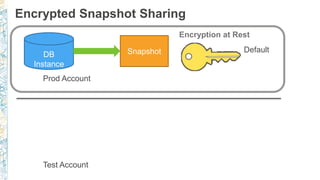
Encrypted Snapshot Sharing
DB
Instance
Snapshot
Prod Account
Test Account
Encryption at Rest
Default
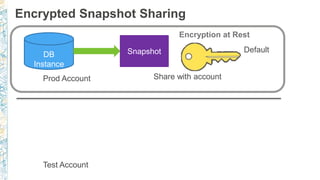
Encrypted Snapshot Sharing
DB
Instance
Snapshot
Prod Account
Test Account
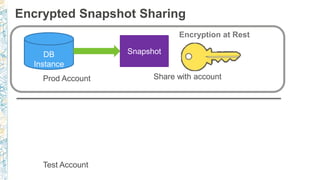
Snapshot
Share with account
Encryption at Rest
Default
Encrypted Snapshot Sharing
DB
Instance
Snapshot
Prod Account
Test Account
Snapshot
Share with account
Encryption at Rest
Default
Encrypted Snapshot Sharing
DB
Instance
Snapshot
Prod Account
Test Account
Snapshot
Share with account
Encryption at Rest
Encrypted Snapshot Sharing
DB
Instance
Snapshot
Prod Account
Test Account
Snapshot
Share with account
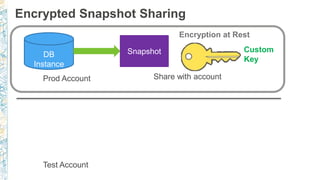
Encryption at Rest
Custom
Key
Encrypted Snapshot Sharing
DB
Instance
Snapshot
Prod Account
Test Account
Snapshot
Share with account
Encryption at Rest
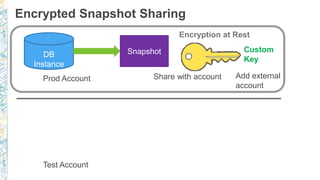
Custom
Key
Add external
account
Encrypted Snapshot Sharing
DB
Instance
Snapshot
Prod Account
Test Account
Snapshot
Snapshot
Share with account
Encryption at Rest
Custom
Key
Add external
account
Encrypted Snapshot Sharing
DB
Instance
Snapshot
Prod Account
Test Account
SnapshotDB
Instance
Snapshot
Share with account
Encryption at Rest
Custom
Key
Add external
account
0
5,000
10,000
15,000
20,000
25,000
30,000
35,000
40,000
45,000
2 Threads 4 Threads 8 Threads 16 Threads 32 Threads 64 Threads
TransactionsPerSecond(TPS)
PG Bench - Read Only - In Memory
Regular
Encrypted
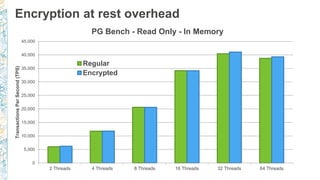
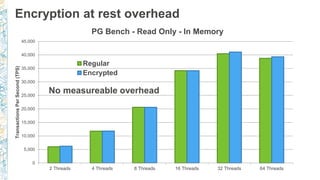
Encryption at rest overhead
0
5,000
10,000
15,000
20,000
25,000
30,000
35,000
40,000
45,000
2 Threads 4 Threads 8 Threads 16 Threads 32 Threads 64 Threads
TransactionsPerSecond(TPS)
PG Bench - Read Only - In Memory
Regular
Encrypted
Encryption at rest overhead
No measureable overhead
0
500
1,000
1,500
2,000
2,500
3,000
3,500
4,000
4,500
2 Threads 4 Threads 8 Threads 16 Threads 32 Threads 64 Threads
TransactionsPerSecond(TPS)
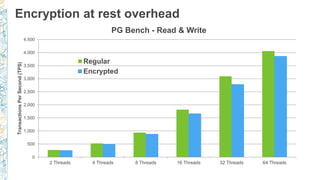
PG Bench - Read & Write
Regular
Encrypted
Encryption at rest overhead
0
500
1,000
1,500
2,000
2,500
3,000
3,500
4,000
4,500
2 Threads 4 Threads 8 Threads 16 Threads 32 Threads 64 Threads
TransactionsPerSecond(TPS)
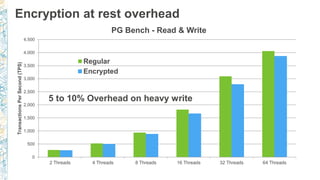
PG Bench - Read & Write
Regular
Encrypted
Encryption at rest overhead
5 to 10% Overhead on heavy write
Data movement
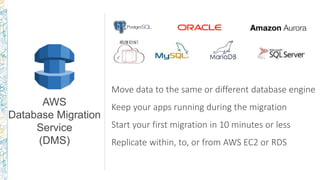
Move data to the same or different database engine
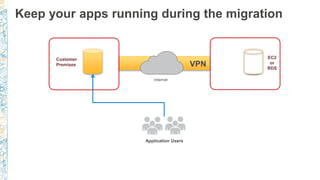
Keep your apps running during the migration
Start your first migration in 10 minutes or less
Replicate within, to, or from AWS EC2 or RDS
AWS
Database Migration
Service
(DMS)
Customer
Premises
Application Users
EC2
or
RDS
Internet
VPN
Keep your apps running during the migration
Customer
Premises
Application Users
EC2
or
RDS
Internet
VPN
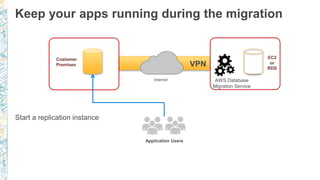
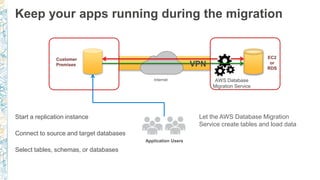
Start a replication instance
Keep your apps running during the migration
AWS Database
Migration Service
Customer
Premises
Application Users
EC2
or
RDS
Internet
VPN
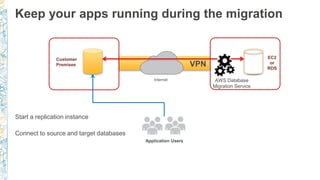
Start a replication instance
Connect to source and target databases
Keep your apps running during the migration
AWS Database
Migration Service
Customer
Premises
Application Users
EC2
or
RDS
Internet
VPN
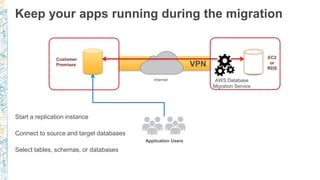
Start a replication instance
Connect to source and target databases
Select tables, schemas, or databases
Keep your apps running during the migration
AWS Database
Migration Service
Customer
Premises
Application Users
EC2
or
RDS
Internet
VPN
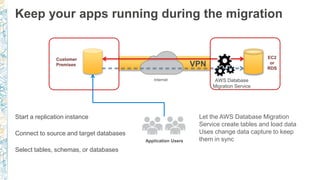
Start a replication instance
Connect to source and target databases
Select tables, schemas, or databases
Let the AWS Database Migration
Service create tables and load data
Keep your apps running during the migration
AWS Database
Migration Service
Customer
Premises
Application Users
EC2
or
RDS
Internet
VPN
Start a replication instance
Connect to source and target databases
Select tables, schemas, or databases
Let the AWS Database Migration
Service create tables and load data
Uses change data capture to keep
them in sync
Keep your apps running during the migration
AWS Database
Migration Service
Customer
Premises
Application Users
EC2
or
RDS
Internet
VPN
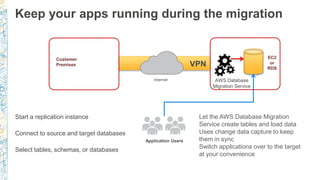
Start a replication instance
Connect to source and target databases
Select tables, schemas, or databases
Let the AWS Database Migration
Service create tables and load data
Uses change data capture to keep
them in sync
Switch applications over to the target
at your convenience
Keep your apps running during the migration
AWS Database
Migration Service
AWS Database Migration Service - PostgreSQL
• Source - on premises or EC2 PostgreSQL (9.4+)
• Destination can be EC2 or RDS
• Initial bulk copy via consistent select
• Uses PostgreSQL logical replication support to provide
change data capture
https://aws.amazon.com/dms/
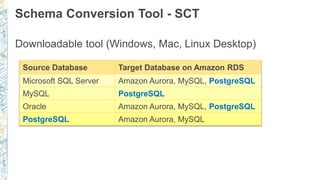
Schema Conversion Tool - SCT
Downloadable tool (Windows, Mac, Linux Desktop)
Source Database Target Database on Amazon RDS
Microsoft SQL Server Amazon Aurora, MySQL, PostgreSQL
MySQL PostgreSQL
Oracle Amazon Aurora, MySQL, PostgreSQL
PostgreSQL Amazon Aurora, MySQL
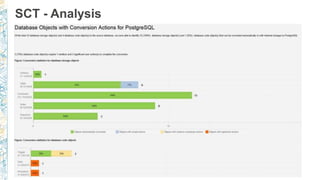
SCT - Analysis
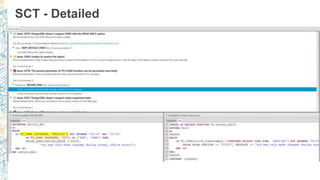
SCT - Detailed
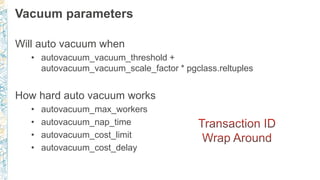
Vacuum parameters
Will auto vacuum when
• autovacuum_vacuum_threshold +
autovacuum_vacuum_scale_factor * pgclass.reltuples
How hard auto vacuum works
• autovacuum_max_workers
• autovacuum_nap_time
• autovacuum_cost_limit
• autovacuum_cost_delay
RDS autovacuum logging (9.4.5+)
log_autovacuum_min_duration = 5000 (i.e. 5 secs)
rds.force_autovacuum_logging_level = LOG
…[14638]:ERROR: canceling autovacuum task
…[14638]:CONTEXT: automatic vacuum of table "postgres.public.pgbench_tellers"
…[14638]:LOG: skipping vacuum of "pgbench_branches" --- lock not available
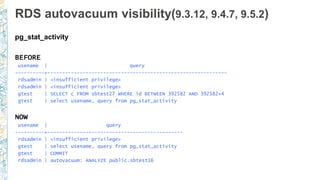
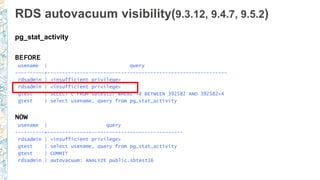
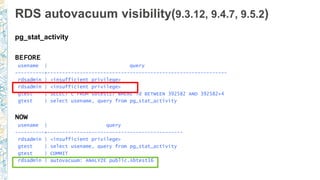
RDS autovacuum visibility(9.3.12, 9.4.7, 9.5.2)
pg_stat_activity
BEFORE
usename | query
----------+-------------------------------------------------------------
rdsadmin | <insufficient privilege>
gtest | SELECT c FROM sbtest27 WHERE id BETWEEN 392582 AND 392582+4
gtest | select usename, query from pg_stat_activity
NOW
usename | query
----------+----------------------------------------------
rdsadmin | <insufficient privilege>
gtest | select usename, query from pg_stat_activity
gtest | COMMIT
rdsadmin | autovacuum: ANALYZE public.sbtest16
RDS autovacuum visibility(9.3.12, 9.4.7, 9.5.2)
pg_stat_activity
BEFORE
usename | query
----------+-------------------------------------------------------------
rdsadmin | <insufficient privilege>
gtest | SELECT c FROM sbtest27 WHERE id BETWEEN 392582 AND 392582+4
gtest | select usename, query from pg_stat_activity
NOW
usename | query
----------+----------------------------------------------
rdsadmin | <insufficient privilege>
gtest | select usename, query from pg_stat_activity
gtest | COMMIT
rdsadmin | autovacuum: ANALYZE public.sbtest16
RDS autovacuum visibility(9.3.12, 9.4.7, 9.5.2)
pg_stat_activity
BEFORE
usename | query
----------+-------------------------------------------------------------
rdsadmin | <insufficient privilege>
gtest | SELECT c FROM sbtest27 WHERE id BETWEEN 392582 AND 392582+4
gtest | select usename, query from pg_stat_activity
NOW
usename | query
----------+----------------------------------------------
rdsadmin | <insufficient privilege>
gtest | select usename, query from pg_stat_activity
gtest | COMMIT
rdsadmin | autovacuum: ANALYZE public.sbtest16
Scale and availability
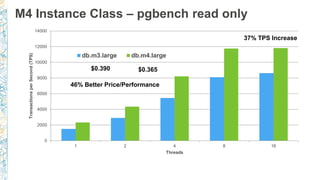
M4 Instance Class – pgbench read only
0
2000
4000
6000
8000
10000
12000
14000
1 2 4 8 16
TransactionsperSecond(TPS)
Threads
db.m3.large db.m4.large
37% TPS Increase
$0.365$0.390
46% Better Price/Performance
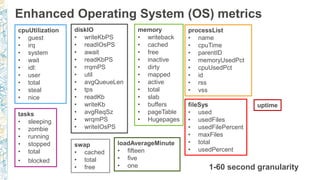
Enhanced Operating System (OS) metrics
1-60 second granularity
cpuUtilization
• guest
• irq
• system
• wait
• idl:
• user
• total
• steal
• nice
diskIO
• writeKbPS
• readIOsPS
• await
• readKbPS
• rrqmPS
• util
• avgQueueLen
• tps
• readKb
• writeKb
• avgReqSz
• wrqmPS
• writeIOsPS
memory
• writeback
• cached
• free
• inactive
• dirty
• mapped
• active
• total
• slab
• buffers
• pageTable
• Hugepages
swap
• cached
• total
• free
tasks
• sleeping
• zombie
• running
• stopped
• total
• blocked
fileSys
• used
• usedFiles
• usedFilePercent
• maxFiles
• total
• usedPercent
loadAverageMinute
• fifteen
• five
• one
uptime
processList
• name
• cpuTime
• parentID
• memoryUsedPct
• cpuUsedPct
• id
• rss
• vss
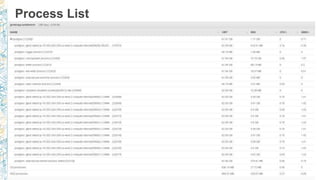
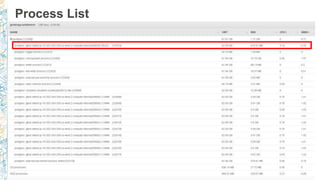
Process List
Process List
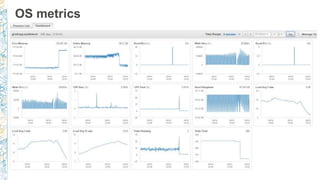
OS metrics
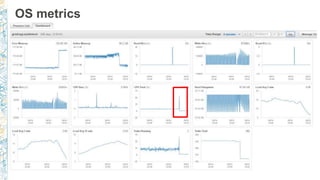
OS metrics
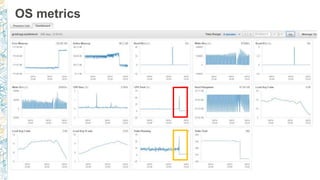
OS metrics
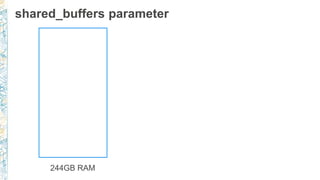
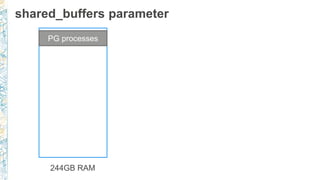
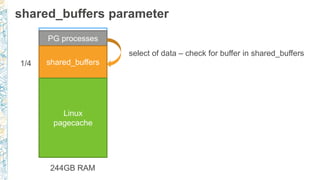
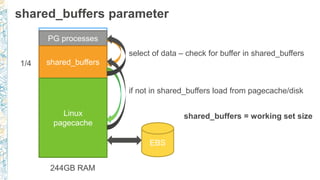
shared_buffers parameter
244GB RAM
shared_buffers parameter
244GB RAM
PG processes
shared_buffers parameter
244GB RAM
PG processes
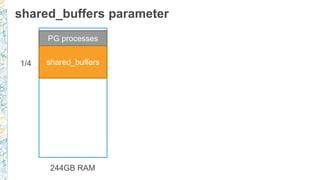
shared_buffers1/4
shared_buffers parameter
244GB RAM
PG processes
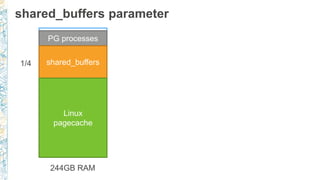
shared_buffers
Linux
pagecache
1/4
shared_buffers parameter
244GB RAM
PG processes
shared_buffers
Linux
pagecache
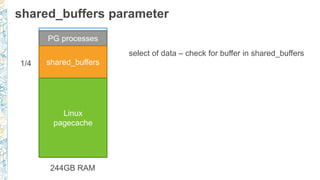
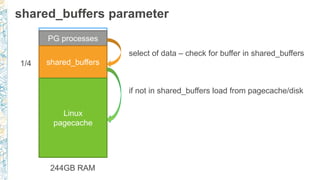
select of data – check for buffer in shared_buffers
1/4
shared_buffers parameter
244GB RAM
PG processes
shared_buffers
Linux
pagecache
select of data – check for buffer in shared_buffers
1/4
shared_buffers parameter
244GB RAM
PG processes
shared_buffers
Linux
pagecache
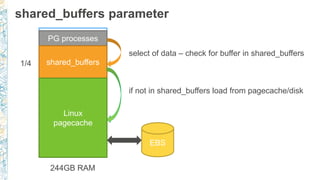
select of data – check for buffer in shared_buffers
if not in shared_buffers load from pagecache/disk
1/4
shared_buffers parameter
244GB RAM
PG processes
shared_buffers
Linux
pagecache
select of data – check for buffer in shared_buffers
if not in shared_buffers load from pagecache/disk
EBS
1/4
shared_buffers parameter
244GB RAM
PG processes
shared_buffers
Linux
pagecache
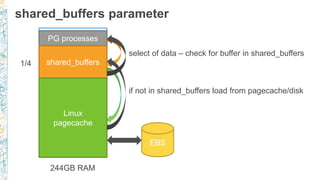
select of data – check for buffer in shared_buffers
if not in shared_buffers load from pagecache/disk
EBS
1/4
shared_buffers parameter
244GB RAM
PG processes
shared_buffers
Linux
pagecache
select of data – check for buffer in shared_buffers
if not in shared_buffers load from pagecache/disk
EBS
1/4
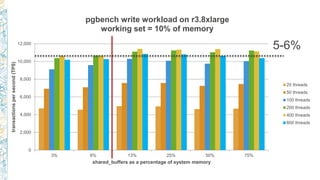
shared_buffers = working set size
0
2,000
4,000
6,000
8,000
10,000
12,000
3% 6% 13% 25% 50% 75%
transactionspersecond(TPS)
shared_buffers as a percentage of system memory
pgbench write workload on r3.8xlarge
working set = 10% of memory
25 threads
50 threads
100 threads
200 threads
400 threads
800 threads
0
2,000
4,000
6,000
8,000
10,000
12,000
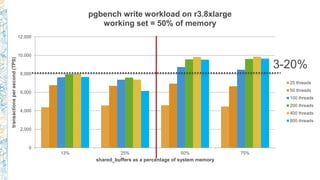
13% 25% 50% 75%
transactionspersecond(TPS)
shared_buffers as a percentage of system memory
pgbench write workload on r3.8xlarge
working set = 50% of memory
25 threads
50 threads
100 threads
200 threads
400 threads
800 threads
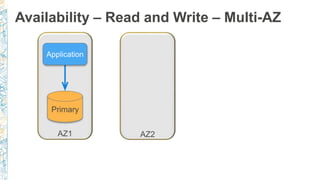
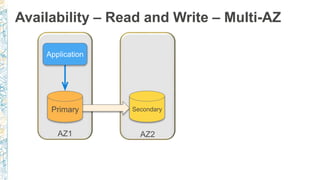
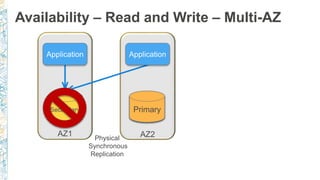
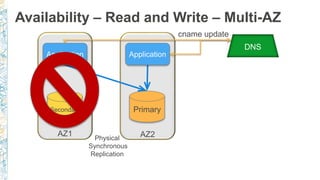
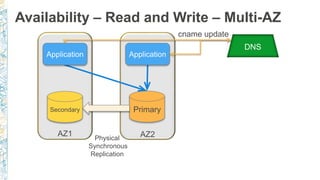
Availability – Read and Write – Multi-AZ
AZ1 AZ2
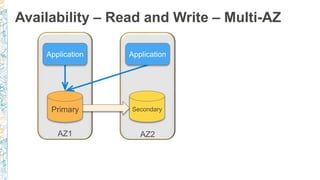
Availability – Read and Write – Multi-AZ
AZ1 AZ2
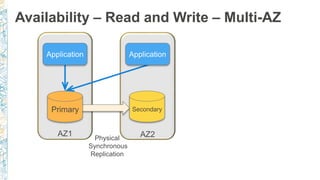
Availability – Read and Write – Multi-AZ
AZ1 AZ2
Availability – Read and Write – Multi-AZ
Physical
Synchronous
Replication
AZ1 AZ2
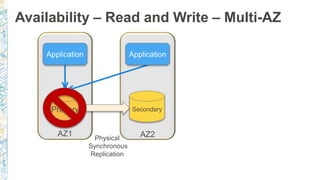
Availability – Read and Write – Multi-AZ
Physical
Synchronous
Replication
AZ1 AZ2
Availability – Read and Write – Multi-AZ
Physical
Synchronous
Replication
AZ1 AZ2
Availability – Read and Write – Multi-AZ
Physical
Synchronous
Replication
AZ1 AZ2
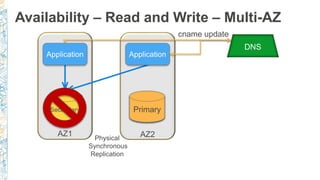
DNS
cname update
Availability – Read and Write – Multi-AZ
Physical
Synchronous
Replication
AZ1 AZ2
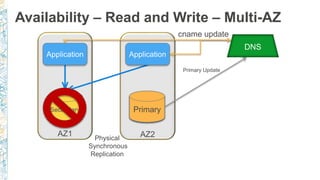
DNS
cname update
Primary Update
Availability – Read and Write – Multi-AZ
Physical
Synchronous
Replication
AZ1 AZ2
DNS
cname update
Availability – Read and Write – Multi-AZ
Physical
Synchronous
Replication
AZ1 AZ2
DNS
cname update
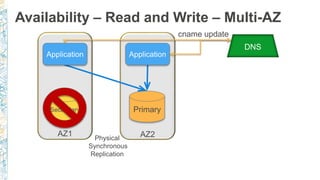
Availability – Read and Write – Multi-AZ
Physical
Synchronous
Replication
AZ1 AZ2
DNS
cname update
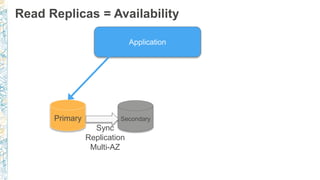
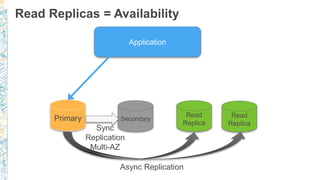
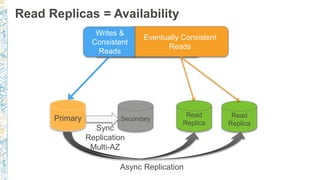
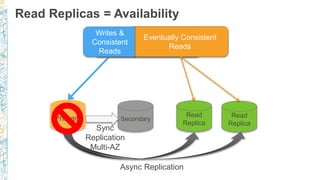
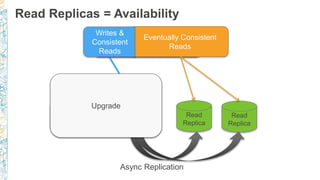
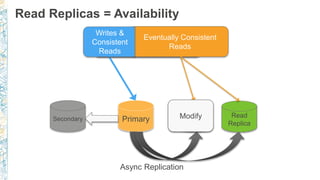
Read Replicas = Availability
Sync
Replication
Multi-AZ
Read Replicas = Availability
Sync
Replication
Multi-AZ
Async Replication
Read Replicas = Availability
Sync
Replication
Multi-AZ
Async Replication
Read Replicas = Availability
Sync
Replication
Multi-AZ
Async Replication
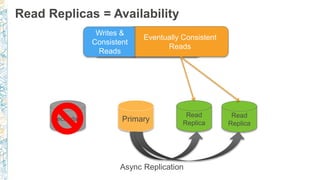
Read Replicas = Availability
Async Replication
Read Replicas = Availability
Async Replication
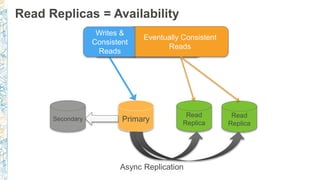
Read Replicas = Availability
Async Replication
Read Replicas = Availability
Async Replication
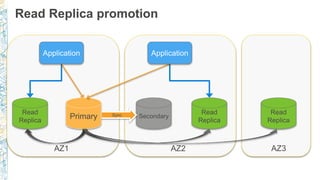
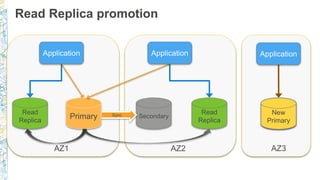
Read Replica promotion
AZ1 AZ2 AZ3
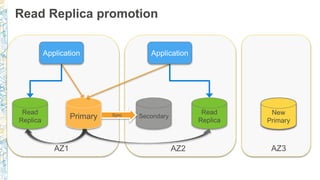
Read Replica promotion
AZ1 AZ2 AZ3
Read Replica promotion
AZ1 AZ2 AZ3
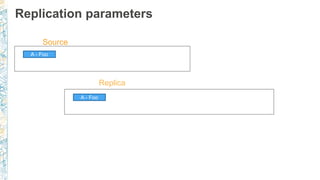
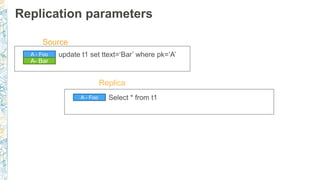
Replication parameters
A - Foo
Source
A - Foo
Replica
Replication parameters
A - Foo
Source
A - Foo
Replica
Replication parameters
A - Foo
Source
A - Foo
Replica
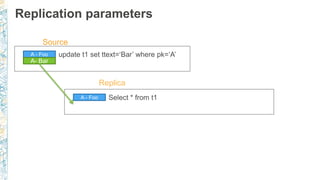
Replication parameters
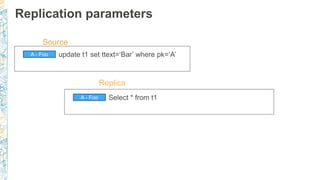
A - Foo
A- Bar
Source
A - Foo
Replica
Replication parameters
A - Foo
A- Bar
Source
A - Foo
Replica
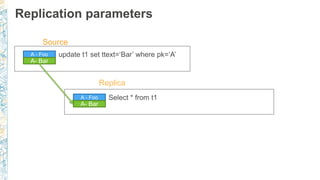
Replication parameters
A - Foo
A- Bar
Source
A - Foo
A- Bar
Replica
Replication parameters
A - Foo
A- Bar
Source
A - Foo
A- Bar
Replica
Replication parameters
A - Foo
A- Bar
Source
A - Foo
A- Bar
Replica
Replication parameters
A - Foo
A- Bar
Source
A - Foo
A- Bar
Replica
Replication parameters
A - Foo
A- Bar
Source
A - Foo
A- Bar
Replica
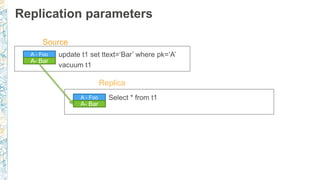
Replication parameters
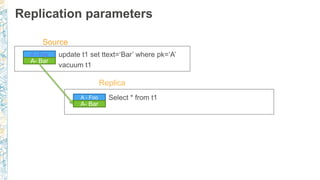
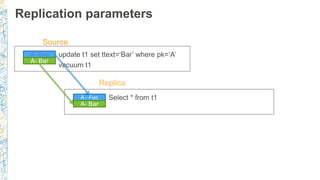
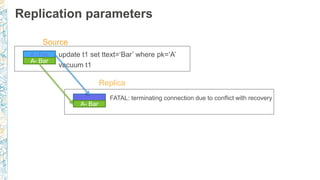
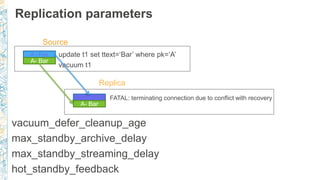
vacuum_defer_cleanup_age
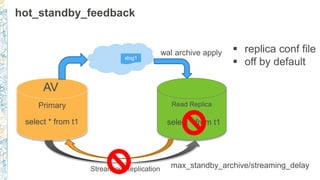
max_standby_archive_delay
max_standby_streaming_delay
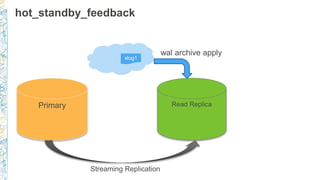
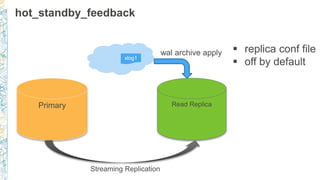
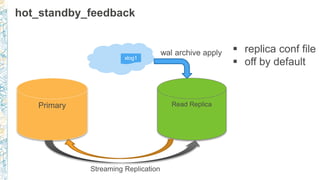
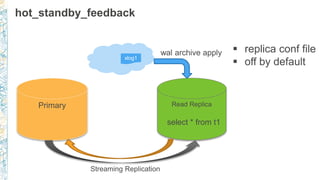
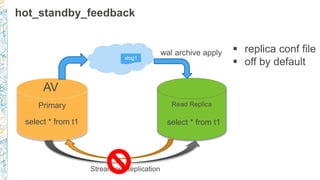
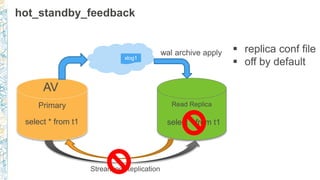
hot_standby_feedback
A - Foo
A- Bar
Source
A - Foo
A- Bar
Replica
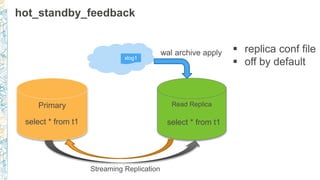
hot_standby_feedback
xlog1
hot_standby_feedback
xlog1
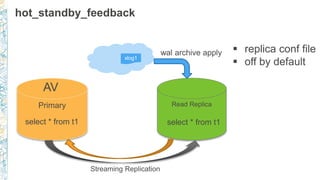
hot_standby_feedback
xlog1
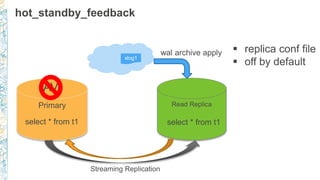
hot_standby_feedback
xlog1
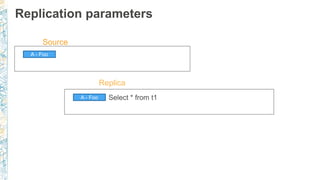
select * from t1
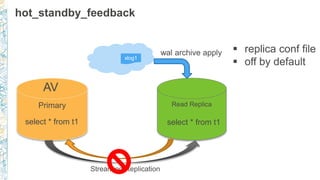
hot_standby_feedback
xlog1
select * from t1select * from t1
hot_standby_feedback
xlog1
select * from t1select * from t1
hot_standby_feedback
xlog1
select * from t1select * from t1
hot_standby_feedback
xlog1
select * from t1select * from t1
hot_standby_feedback
xlog1
select * from t1select * from t1
hot_standby_feedback
xlog1
select * from t1select * from t1
hot_standby_feedback
xlog1
select * from t1select * from t1
max_standby_archive/streaming_delay
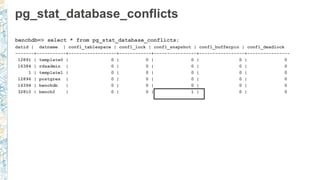
pg_stat_database_conflicts
benchdb=> select * from pg_stat_database_conflicts;
datid | datname | confl_tablespace | confl_lock | confl_snapshot | confl_bufferpin | confl_deadlock
-------+-----------+------------------+------------+----------------+-----------------+----------------
12891 | template0 | 0 | 0 | 0 | 0 | 0
16384 | rdsadmin | 0 | 0 | 0 | 0 | 0
1 | template1 | 0 | 0 | 0 | 0 | 0
12896 | postgres | 0 | 0 | 0 | 0 | 0
16394 | benchdb | 0 | 0 | 0 | 0 | 0
32810 | bench2 | 0 | 0 | 1 | 0 | 0
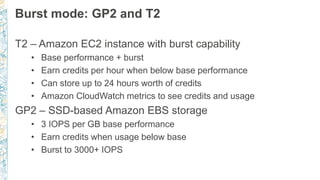
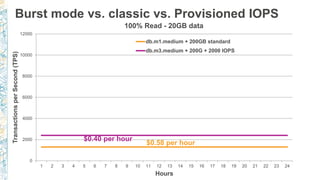
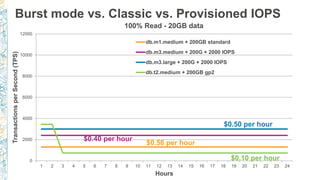
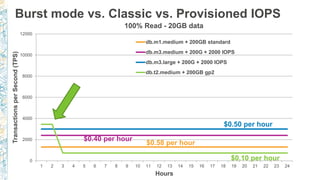
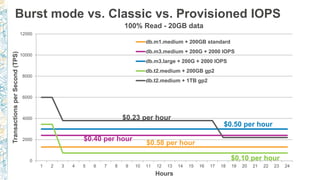
Burst mode: GP2 and T2
T2 – Amazon EC2 instance with burst capability
• Base performance + burst
• Earn credits per hour when below base performance
• Can store up to 24 hours worth of credits
• Amazon CloudWatch metrics to see credits and usage
GP2 – SSD-based Amazon EBS storage
• 3 IOPS per GB base performance
• Earn credits when usage below base
• Burst to 3000+ IOPS
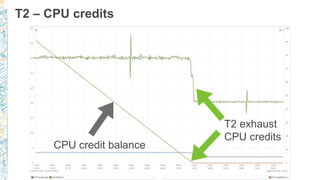
T2 – CPU credits
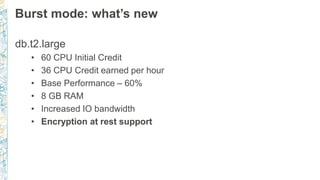
Burst mode: what’s new
db.t2.large
• 60 CPU Initial Credit
• 36 CPU Credit earned per hour
• Base Performance – 60%
• 8 GB RAM
• Increased IO bandwidth
• Encryption at rest support
0
2000
4000
6000
8000
10000
12000
1 2 3 4 5 6 7 8 9 10 11 12 13 14 15 16 17 18 19 20 21 22 23 24
TransactionsperSecond(TPS)
Hours
100% Read - 20GB data
db.m1.medium + 200GB standard
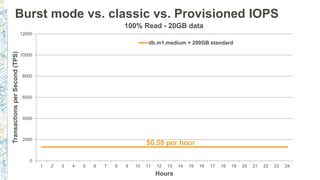
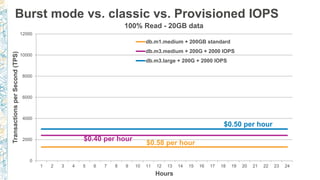
Burst mode vs. classic vs. Provisioned IOPS
$0.58 per hour
0
2000
4000
6000
8000
10000
12000
1 2 3 4 5 6 7 8 9 10 11 12 13 14 15 16 17 18 19 20 21 22 23 24
TransactionsperSecond(TPS)
Hours
100% Read - 20GB data
db.m1.medium + 200GB standard
db.m3.medium + 200G + 2000 IOPS
Burst mode vs. classic vs. Provisioned IOPS
$0.58 per hour
$0.40 per hour
0
2000
4000
6000
8000
10000
12000
1 2 3 4 5 6 7 8 9 10 11 12 13 14 15 16 17 18 19 20 21 22 23 24
TransactionsperSecond(TPS)
Hours
100% Read - 20GB data
db.m1.medium + 200GB standard
db.m3.medium + 200G + 2000 IOPS
db.m3.large + 200G + 2000 IOPS
Burst mode vs. classic vs. Provisioned IOPS
$0.58 per hour
$0.40 per hour
$0.50 per hour
0
2000
4000
6000
8000
10000
12000
1 2 3 4 5 6 7 8 9 10 11 12 13 14 15 16 17 18 19 20 21 22 23 24
TransactionsperSecond(TPS)
Hours
100% Read - 20GB data
db.m1.medium + 200GB standard
db.m3.medium + 200G + 2000 IOPS
db.m3.large + 200G + 2000 IOPS
db.t2.medium + 200GB gp2
Burst mode vs. Classic vs. Provisioned IOPS
$0.10 per hour
$0.58 per hour
$0.40 per hour
$0.50 per hour
0
2000
4000
6000
8000
10000
12000
1 2 3 4 5 6 7 8 9 10 11 12 13 14 15 16 17 18 19 20 21 22 23 24
TransactionsperSecond(TPS)
Hours
100% Read - 20GB data
db.m1.medium + 200GB standard
db.m3.medium + 200G + 2000 IOPS
db.m3.large + 200G + 2000 IOPS
db.t2.medium + 200GB gp2
Burst mode vs. Classic vs. Provisioned IOPS
$0.10 per hour
$0.58 per hour
$0.40 per hour
$0.50 per hour
0
2000
4000
6000
8000
10000
12000
1 2 3 4 5 6 7 8 9 10 11 12 13 14 15 16 17 18 19 20 21 22 23 24
TransactionsperSecond(TPS)
Hours
100% Read - 20GB data
db.m1.medium + 200GB standard
db.m3.medium + 200G + 2000 IOPS
db.m3.large + 200G + 2000 IOPS
db.t2.medium + 200GB gp2
db.t2.medium + 1TB gp2
Burst mode vs. Classic vs. Provisioned IOPS
$0.10 per hour
$0.58 per hour
$0.23 per hour
$0.40 per hour
$0.50 per hour
0
2000
4000
6000
8000
10000
12000
1 2 3 4 5 6 7 8 9 10 11 12 13 14 15 16 17 18 19 20 21 22 23 24
TransactionsperSecond(TPS)
Hours
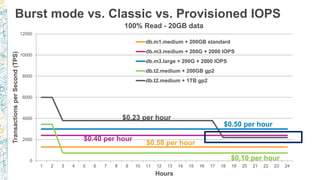
100% Read - 20GB data
db.m1.medium + 200GB standard
db.m3.medium + 200G + 2000 IOPS
db.m3.large + 200G + 2000 IOPS
db.t2.medium + 200GB gp2
db.t2.medium + 1TB gp2
Burst mode vs. Classic vs. Provisioned IOPS
$0.10 per hour
$0.58 per hour
$0.23 per hour
$0.40 per hour
$0.50 per hour
0
2000
4000
6000
8000
10000
12000
1 2 3 4 5 6 7 8 9 10 11 12 13 14 15 16 17 18 19 20 21 22 23 24
TransactionsperSecond(TPS)
Hours
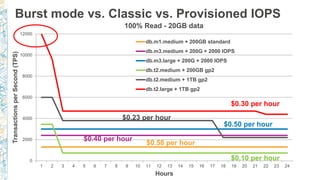
100% Read - 20GB data
db.m1.medium + 200GB standard
db.m3.medium + 200G + 2000 IOPS
db.m3.large + 200G + 2000 IOPS
db.t2.medium + 200GB gp2
db.t2.medium + 1TB gp2
db.t2.large + 1TB gp2
Burst mode vs. Classic vs. Provisioned IOPS
$0.10 per hour
$0.58 per hour
$0.23 per hour
$0.40 per hour
$0.50 per hour
$0.30 per hour
Thank you!
Questions?

Amazon RDS for PostgreSQL - PGConf 2016

Editor's Notes

  • #17 Line data type Reg* data types Open prepared transactions
  • #18 Line data type Reg* data types Open prepared transactions
  • #19 Line data type Reg* data types Open prepared transactions
  • #20 Line data type Reg* data types Open prepared transactions
  • #21 Line data type Reg* data types Open prepared transactions
  • #22 Line data type Reg* data types Open prepared transactions
  • #23 Line data type Reg* data types Open prepared transactions
  • #24 Line data type Reg* data types Open prepared transactions
  • #25 Line data type Reg* data types Open prepared transactions
  • #26 Line data type Reg* data types Open prepared transactions
  • #27 Line data type Reg* data types Open prepared transactions
  • #28 Line data type Reg* data types Open prepared transactions
  • #29 Line data type Reg* data types Open prepared transactions
  • #41 Add a Key for the encrypted snapshot and then show that it needs to be shared for this to work. Note that this doesn’t work with default keys.
  • #42 Add a Key for the encrypted snapshot and then show that it needs to be shared for this to work. Note that this doesn’t work with default keys.
  • #43 Add a Key for the encrypted snapshot and then show that it needs to be shared for this to work. Note that this doesn’t work with default keys.
  • #44 Add a Key for the encrypted snapshot and then show that it needs to be shared for this to work. Note that this doesn’t work with default keys.
  • #45 Add a Key for the encrypted snapshot and then show that it needs to be shared for this to work. Note that this doesn’t work with default keys.
  • #46 Add a Key for the encrypted snapshot and then show that it needs to be shared for this to work. Note that this doesn’t work with default keys.
  • #47 Add a Key for the encrypted snapshot and then show that it needs to be shared for this to work. Note that this doesn’t work with default keys.
  • #48 Add a Key for the encrypted snapshot and then show that it needs to be shared for this to work. Note that this doesn’t work with default keys.
  • #49 Add a Key for the encrypted snapshot and then show that it needs to be shared for this to work. Note that this doesn’t work with default keys.
  • #55 Move data to the same or different database engine ~ Supports Oracle, Microsoft SQL Server, MySQL, PostgreSQL, MariaDB, Amazon Aurora, Amazon Redshift Keep your apps running during the migration ~ DMS minimizes impact to users by capturing and applying data changes Start your first migration in 10 minutes or less ~ The AWS Database Migration Service takes care of infrastructure provisioning and allows you to setup your first database migration task in less than 10 minutes Replicate within, to or from AWS EC2 or RDS ~ After migrating your database, use the AWS Database Migration Service to replicate data into your Redshift data warehouses, cross-region to other RDS instances, or back to on-premises
  • #56 Using the AWS Database Migration Service to migrate data to AWS is simple. (CLICK) Start by spinning up a DMS instance in your AWS environment (CLICK) Next, from within DMS, connect to both your source and target databases (CLICK) Choose what data you want to migrate. DMS lets you migrate tables, schemas, or whole databases Then sit back and let DMS do the rest. (CLICK) It creates the tables, loads the data, and best of all, keeps them synchronized for as long as you need That replication capability, which keeps the source and target data in sync, allows customers to switch applications (CLICK) over to point to the AWS database at their leisure. DMS eliminates the need for high-stakes extended outages to migrate production data into the cloud. DMS provides a graceful switchover capability.
  • #57 Using the AWS Database Migration Service to migrate data to AWS is simple. (CLICK) Start by spinning up a DMS instance in your AWS environment (CLICK) Next, from within DMS, connect to both your source and target databases (CLICK) Choose what data you want to migrate. DMS lets you migrate tables, schemas, or whole databases Then sit back and let DMS do the rest. (CLICK) It creates the tables, loads the data, and best of all, keeps them synchronized for as long as you need That replication capability, which keeps the source and target data in sync, allows customers to switch applications (CLICK) over to point to the AWS database at their leisure. DMS eliminates the need for high-stakes extended outages to migrate production data into the cloud. DMS provides a graceful switchover capability.
  • #58 Using the AWS Database Migration Service to migrate data to AWS is simple. (CLICK) Start by spinning up a DMS instance in your AWS environment (CLICK) Next, from within DMS, connect to both your source and target databases (CLICK) Choose what data you want to migrate. DMS lets you migrate tables, schemas, or whole databases Then sit back and let DMS do the rest. (CLICK) It creates the tables, loads the data, and best of all, keeps them synchronized for as long as you need That replication capability, which keeps the source and target data in sync, allows customers to switch applications (CLICK) over to point to the AWS database at their leisure. DMS eliminates the need for high-stakes extended outages to migrate production data into the cloud. DMS provides a graceful switchover capability.
  • #59 Using the AWS Database Migration Service to migrate data to AWS is simple. (CLICK) Start by spinning up a DMS instance in your AWS environment (CLICK) Next, from within DMS, connect to both your source and target databases (CLICK) Choose what data you want to migrate. DMS lets you migrate tables, schemas, or whole databases Then sit back and let DMS do the rest. (CLICK) It creates the tables, loads the data, and best of all, keeps them synchronized for as long as you need That replication capability, which keeps the source and target data in sync, allows customers to switch applications (CLICK) over to point to the AWS database at their leisure. DMS eliminates the need for high-stakes extended outages to migrate production data into the cloud. DMS provides a graceful switchover capability.
  • #60 Using the AWS Database Migration Service to migrate data to AWS is simple. (CLICK) Start by spinning up a DMS instance in your AWS environment (CLICK) Next, from within DMS, connect to both your source and target databases (CLICK) Choose what data you want to migrate. DMS lets you migrate tables, schemas, or whole databases Then sit back and let DMS do the rest. (CLICK) It creates the tables, loads the data, and best of all, keeps them synchronized for as long as you need That replication capability, which keeps the source and target data in sync, allows customers to switch applications (CLICK) over to point to the AWS database at their leisure. DMS eliminates the need for high-stakes extended outages to migrate production data into the cloud. DMS provides a graceful switchover capability.

  • #61 Using the AWS Database Migration Service to migrate data to AWS is simple. (CLICK) Start by spinning up a DMS instance in your AWS environment (CLICK) Next, from within DMS, connect to both your source and target databases (CLICK) Choose what data you want to migrate. DMS lets you migrate tables, schemas, or whole databases Then sit back and let DMS do the rest. (CLICK) It creates the tables, loads the data, and best of all, keeps them synchronized for as long as you need That replication capability, which keeps the source and target data in sync, allows customers to switch applications (CLICK) over to point to the AWS database at their leisure. DMS eliminates the need for high-stakes extended outages to migrate production data into the cloud. DMS provides a graceful switchover capability.
  • #62 Using the AWS Database Migration Service to migrate data to AWS is simple. (CLICK) Start by spinning up a DMS instance in your AWS environment (CLICK) Next, from within DMS, connect to both your source and target databases (CLICK) Choose what data you want to migrate. DMS lets you migrate tables, schemas, or whole databases Then sit back and let DMS do the rest. (CLICK) It creates the tables, loads the data, and best of all, keeps them synchronized for as long as you need That replication capability, which keeps the source and target data in sync, allows customers to switch applications (CLICK) over to point to the AWS database at their leisure. DMS eliminates the need for high-stakes extended outages to migrate production data into the cloud. DMS provides a graceful switchover capability.