Quality Assurance /
Software Testing Training
HP LoadRunner
Page 2Classification: Restricted
Agenda
• Introduction to Performance Testing
• Why do performance testing?
• Load Testing
• Stress Testing
• Volume testing
• Performance testing tool
• Why LoadRunner
• Why LoadRunner
• LoadRunner Components
• LoadRunner Architecture
• How LoadRunner Works
• LoadRunner load testing process
• The script development process in VUGen
Page 3Classification: Restricted
• Software Performance testing - is type of testing perform to
determine the performance of system to major the measure,
validate or verify quality attributes of the system like
responsiveness, Speed, Scalability, Stability under variety of load
conditions.
• The system is tested under a mixture of load conditions and check
the time required responding by the system under varying
workloads.
Introduction to Performance Testing
Page 4Classification: Restricted
Why do Performance Testing?
4
• To identify the key areas of the performance degradation in the
application at the earliest.
• To eradicate the loss and progressively embrace with the current
trends in the market and to attract the users with the rapid
performance of the application
• Does the application respond quickly enough for the intended
users?
• Will the application handle the expected user load and
beyond?
• Will the application handle the number of transactions
required by the business?
• Is the application stable under expected and unexpected user
loads?
• Are you sure that users will have a positive experience on go-
live day?
Page 5Classification: Restricted
Load Testing
• Load Testing - is type of performance testing to check system with constantly
increasing the load on the system until the time load is reaches to its threshold
value.
• Here Increasing load means increasing number of concurrent users, transactions
& check the behaviour of application under test
• The main purpose of load testing is to monitor the response time and staying
power of application when system is performing well under heavy load.
• Load testing is perform to make sure that what amount of load can be withstand
the application under test.
• The successfully executed load testing is only if the specified test cases are
executed without any error in allocated time.
• Simple examples of load testing:
• Testing printer by sending large job.
• Editing a very large document for testing of word processor
• Continuously reading and writing data into hard disk.
• Running multiple applications simultaneously on server.
• Testing of mail server by accessing thousands of mailboxes
• In case of zero-volume testing & system fed with zero load.
Page 6Classification: Restricted
• Stress Testing - is performance testing type to check the stability
of software when hardware resources are not sufficient like CPU,
memory, disk space etc.
• Stress Testing is done in order to check when the application fails
by reducing the system resources such as RAM, HDD etc. and
keeping the number of users as constant.
Stress Testing
Page 7Classification: Restricted
• Volume Testing - is non-functional testing which refers to testing a
software application with a large amount of data to be processed
to check the efficiency of the application.
• The main goal of this testing is to monitor the performance of
application under varying database volumes.
Volume Testing
Page 8Classification: Restricted
• We have multiple performance testing tool both commercial and
free tools,
• Some of the major tools are
• HP Load Runner
• Apache Jmeter
• MS VSTS
• Open STA
Performance Testing Tool
Page 9Classification: Restricted
Why LoadRunner
9
• An industry-leading performance and load testing product by
Hewlett-Packard
• LoadRunner reduces the personnel requirements by replacing
human users with virtual users or Vusers
• These Vusers emulate the behavior of real users — operating real
applications.
• Because numerous Vusers can run on a single computer,
LoadRunner reduces the hardware requirements.
• The LoadRunner Controller allows you to easily and effectively
control all the Vusers — from a single point of control.
• LoadRunner monitors the application performance online,
enabling you to fine-tune your system during test execution.
Page 10Classification: Restricted
• LoadRunner automatically records the performance of the
application during a test.
• You can choose from a wide variety of graphs and reports to view
the performance data.
• LoadRunner checks where performance delays occur: network or
client delays, CPU performance, I/O delays, database locking, or
other issues at the database server.
• LoadRunner monitors the network and server resources to help
you improve performance.
• Because LoadRunner tests are fully automated, you can easily
repeat them as often as you need.
Why LoadRunner
Page 11Classification: Restricted
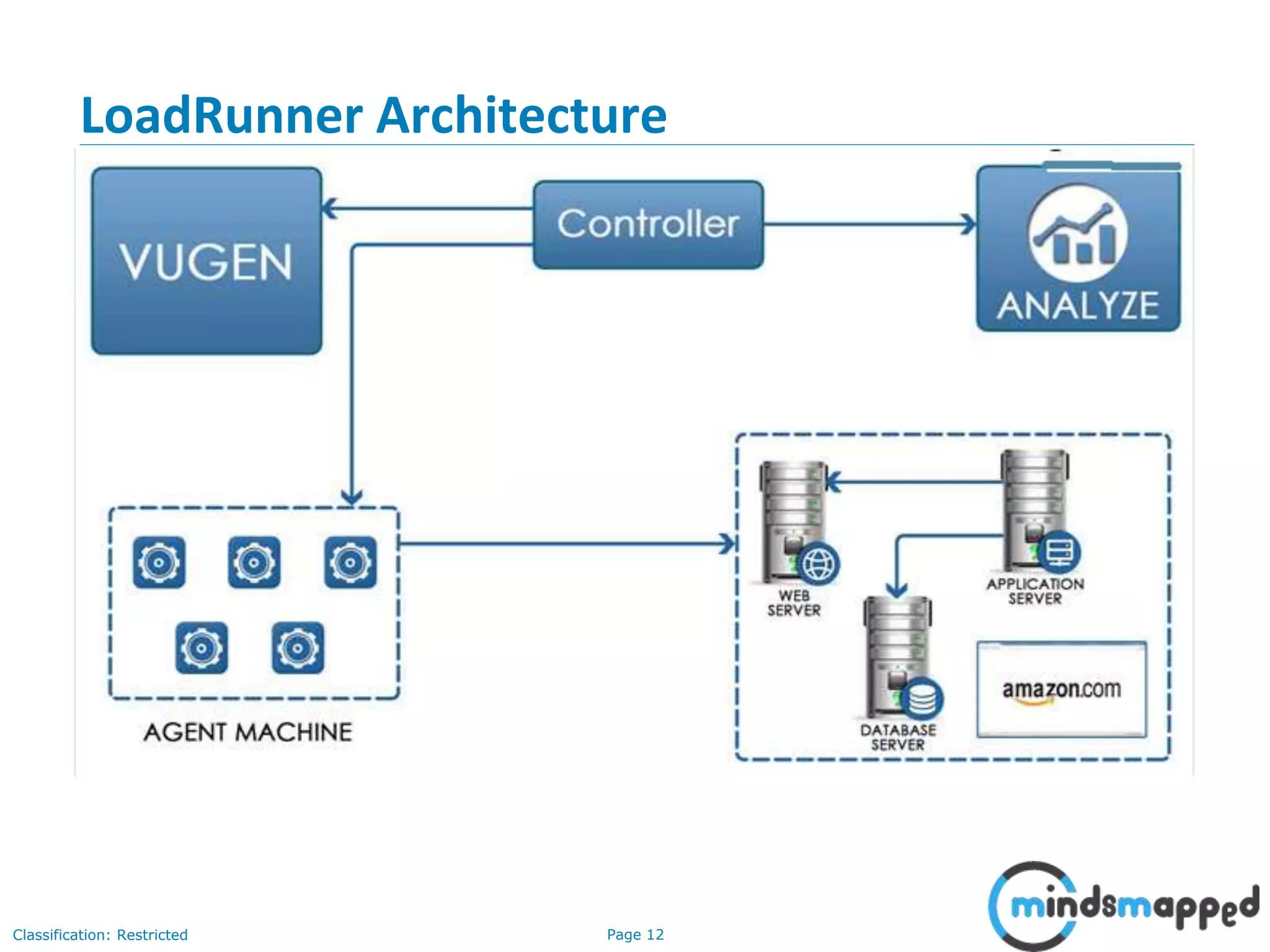
• The Virtual User Generator captures end-user business processes
and creates an automated performance testing script, also known
as a virtual user script.
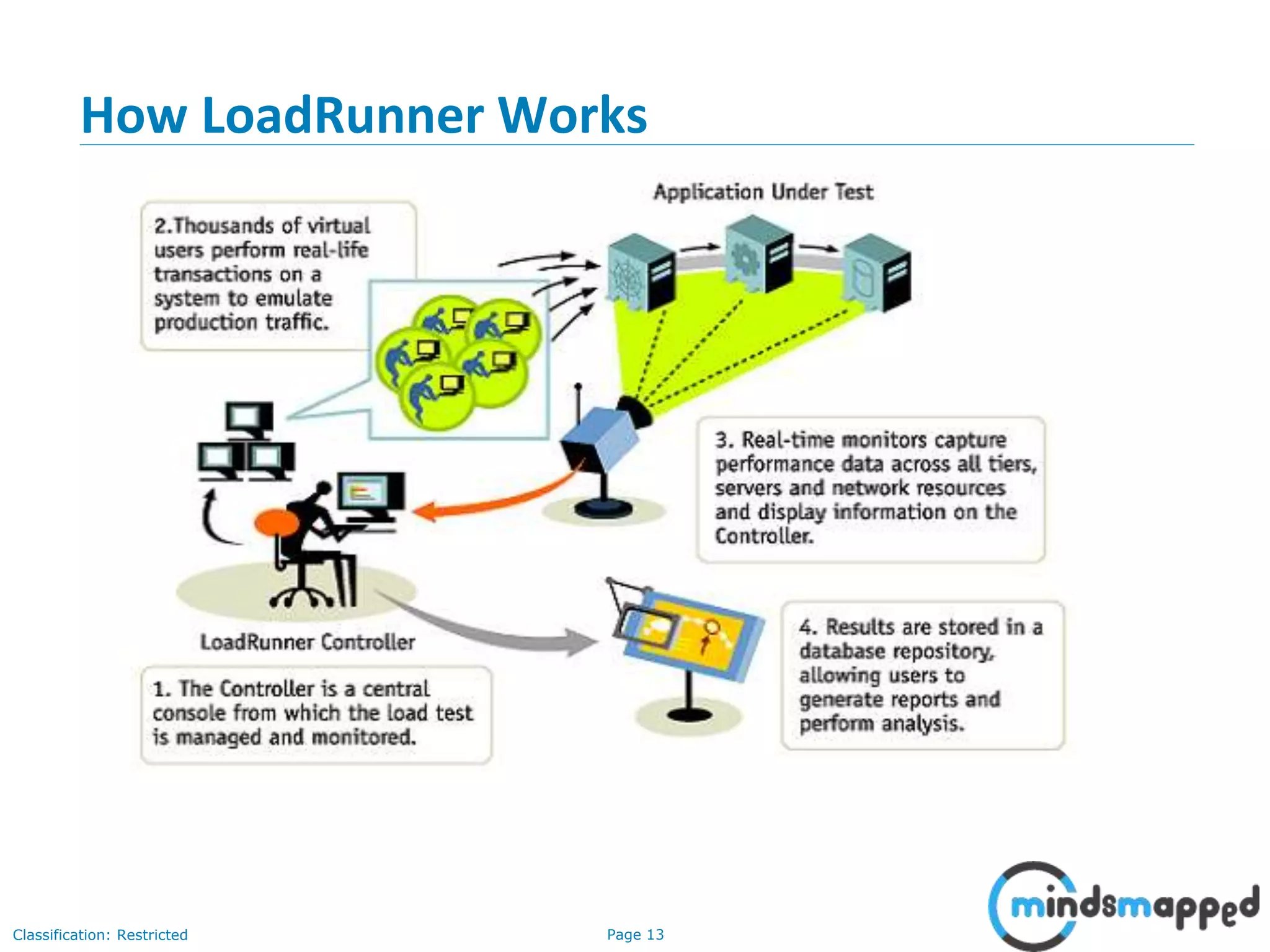
• The Controller organizes, drives, manages, and monitors the load
test.
• The Load Generators create the load by running virtual users.
• The Analysis helps you view, dissect, and compare the
performance results.
• The Launcher provides a single point of access for all of the
LoadRunner components.
LoadRunner Components
Page 12Classification: Restricted
LoadRunner Architecture
Page 13Classification: Restricted
How LoadRunner Works
Page 14Classification: Restricted
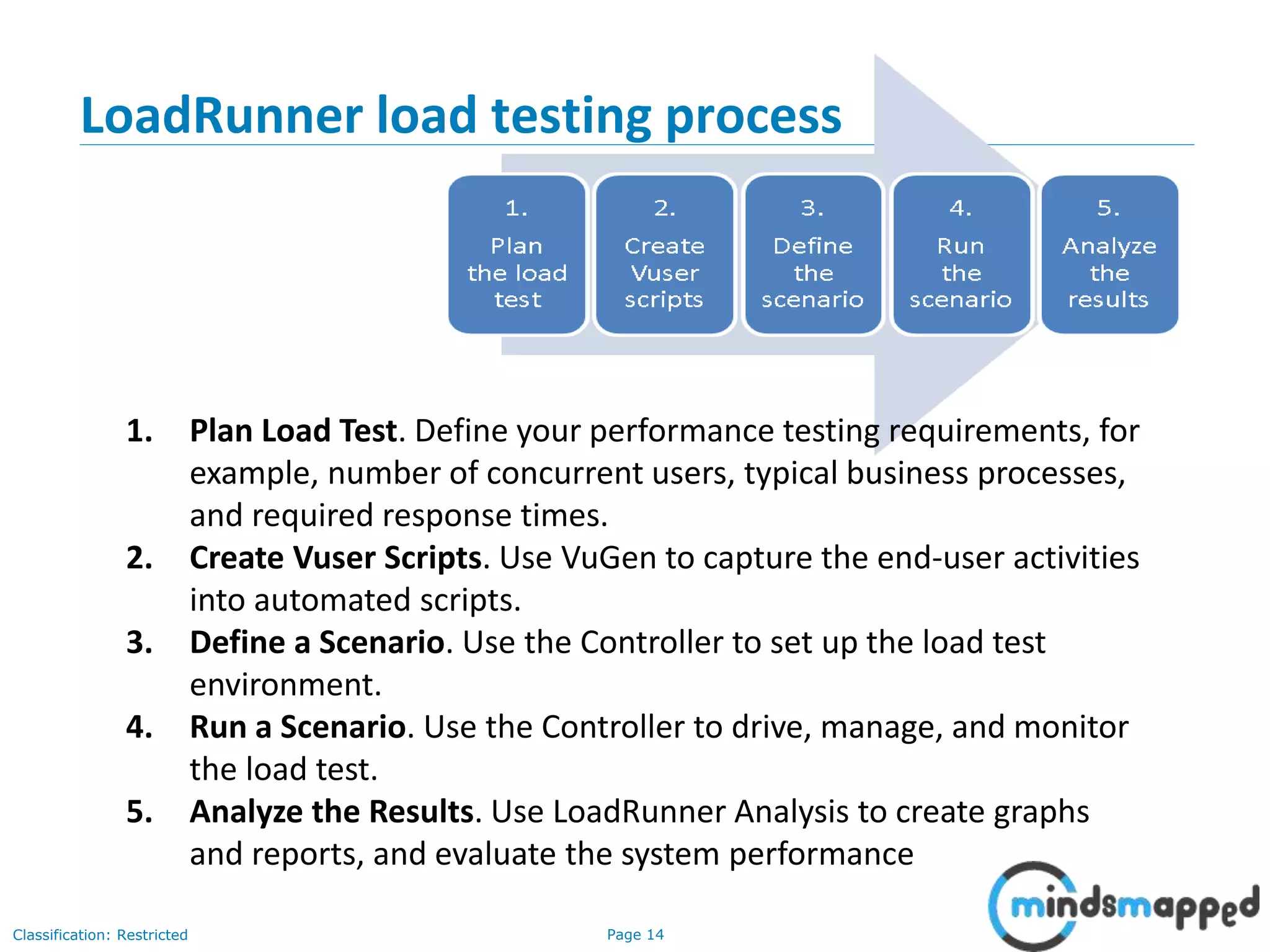
1. Plan Load Test. Define your performance testing requirements, for
example, number of concurrent users, typical business processes,
and required response times.
2. Create Vuser Scripts. Use VuGen to capture the end-user activities
into automated scripts.
3. Define a Scenario. Use the Controller to set up the load test
environment.
4. Run a Scenario. Use the Controller to drive, manage, and monitor
the load test.
5. Analyze the Results. Use LoadRunner Analysis to create graphs
and reports, and evaluate the system performance
LoadRunner load testing process
Page 15Classification: Restricted
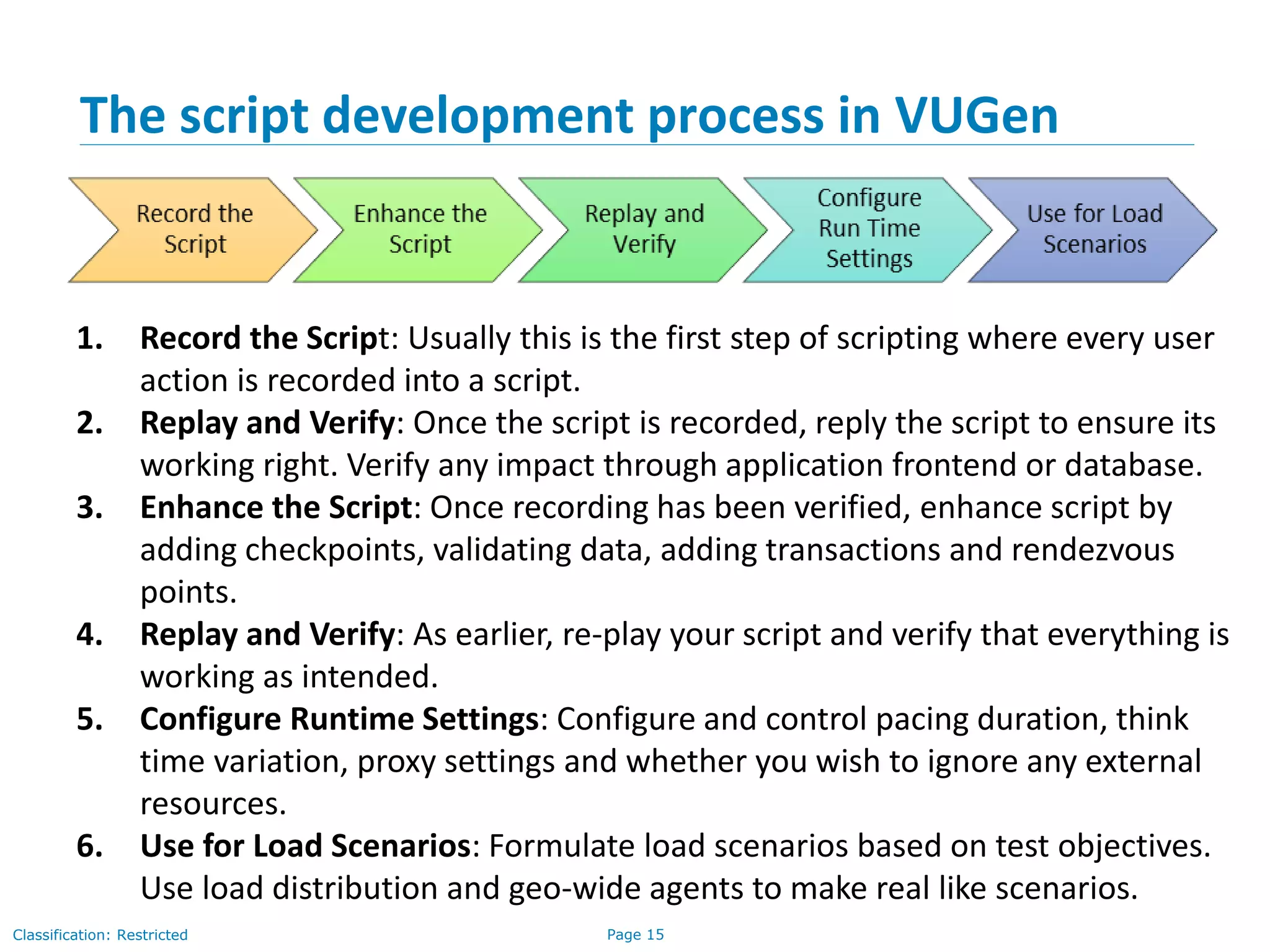
The script development process in VUGen
1. Record the Script: Usually this is the first step of scripting where every user
action is recorded into a script.
2. Replay and Verify: Once the script is recorded, reply the script to ensure its
working right. Verify any impact through application frontend or database.
3. Enhance the Script: Once recording has been verified, enhance script by
adding checkpoints, validating data, adding transactions and rendezvous
points.
4. Replay and Verify: As earlier, re-play your script and verify that everything is
working as intended.
5. Configure Runtime Settings: Configure and control pacing duration, think
time variation, proxy settings and whether you wish to ignore any external
resources.
6. Use for Load Scenarios: Formulate load scenarios based on test objectives.
Use load distribution and geo-wide agents to make real like scenarios.
Page 16Classification: Restricted
Question?
Page 17Classification: Restricted
Thank You

HP LoadRunner

  • 1.
    Quality Assurance / SoftwareTesting Training HP LoadRunner
  • 2.
    Page 2Classification: Restricted Agenda •Introduction to Performance Testing • Why do performance testing? • Load Testing • Stress Testing • Volume testing • Performance testing tool • Why LoadRunner • Why LoadRunner • LoadRunner Components • LoadRunner Architecture • How LoadRunner Works • LoadRunner load testing process • The script development process in VUGen
  • 3.
    Page 3Classification: Restricted •Software Performance testing - is type of testing perform to determine the performance of system to major the measure, validate or verify quality attributes of the system like responsiveness, Speed, Scalability, Stability under variety of load conditions. • The system is tested under a mixture of load conditions and check the time required responding by the system under varying workloads. Introduction to Performance Testing
  • 4.
    Page 4Classification: Restricted Whydo Performance Testing? 4 • To identify the key areas of the performance degradation in the application at the earliest. • To eradicate the loss and progressively embrace with the current trends in the market and to attract the users with the rapid performance of the application • Does the application respond quickly enough for the intended users? • Will the application handle the expected user load and beyond? • Will the application handle the number of transactions required by the business? • Is the application stable under expected and unexpected user loads? • Are you sure that users will have a positive experience on go- live day?
  • 5.
    Page 5Classification: Restricted LoadTesting • Load Testing - is type of performance testing to check system with constantly increasing the load on the system until the time load is reaches to its threshold value. • Here Increasing load means increasing number of concurrent users, transactions & check the behaviour of application under test • The main purpose of load testing is to monitor the response time and staying power of application when system is performing well under heavy load. • Load testing is perform to make sure that what amount of load can be withstand the application under test. • The successfully executed load testing is only if the specified test cases are executed without any error in allocated time. • Simple examples of load testing: • Testing printer by sending large job. • Editing a very large document for testing of word processor • Continuously reading and writing data into hard disk. • Running multiple applications simultaneously on server. • Testing of mail server by accessing thousands of mailboxes • In case of zero-volume testing & system fed with zero load.
  • 6.
    Page 6Classification: Restricted •Stress Testing - is performance testing type to check the stability of software when hardware resources are not sufficient like CPU, memory, disk space etc. • Stress Testing is done in order to check when the application fails by reducing the system resources such as RAM, HDD etc. and keeping the number of users as constant. Stress Testing
  • 7.
    Page 7Classification: Restricted •Volume Testing - is non-functional testing which refers to testing a software application with a large amount of data to be processed to check the efficiency of the application. • The main goal of this testing is to monitor the performance of application under varying database volumes. Volume Testing
  • 8.
    Page 8Classification: Restricted •We have multiple performance testing tool both commercial and free tools, • Some of the major tools are • HP Load Runner • Apache Jmeter • MS VSTS • Open STA Performance Testing Tool
  • 9.
    Page 9Classification: Restricted WhyLoadRunner 9 • An industry-leading performance and load testing product by Hewlett-Packard • LoadRunner reduces the personnel requirements by replacing human users with virtual users or Vusers • These Vusers emulate the behavior of real users — operating real applications. • Because numerous Vusers can run on a single computer, LoadRunner reduces the hardware requirements. • The LoadRunner Controller allows you to easily and effectively control all the Vusers — from a single point of control. • LoadRunner monitors the application performance online, enabling you to fine-tune your system during test execution.
  • 10.
    Page 10Classification: Restricted •LoadRunner automatically records the performance of the application during a test. • You can choose from a wide variety of graphs and reports to view the performance data. • LoadRunner checks where performance delays occur: network or client delays, CPU performance, I/O delays, database locking, or other issues at the database server. • LoadRunner monitors the network and server resources to help you improve performance. • Because LoadRunner tests are fully automated, you can easily repeat them as often as you need. Why LoadRunner
  • 11.
    Page 11Classification: Restricted •The Virtual User Generator captures end-user business processes and creates an automated performance testing script, also known as a virtual user script. • The Controller organizes, drives, manages, and monitors the load test. • The Load Generators create the load by running virtual users. • The Analysis helps you view, dissect, and compare the performance results. • The Launcher provides a single point of access for all of the LoadRunner components. LoadRunner Components
  • 12.
  • 13.
  • 14.
    Page 14Classification: Restricted 1.Plan Load Test. Define your performance testing requirements, for example, number of concurrent users, typical business processes, and required response times. 2. Create Vuser Scripts. Use VuGen to capture the end-user activities into automated scripts. 3. Define a Scenario. Use the Controller to set up the load test environment. 4. Run a Scenario. Use the Controller to drive, manage, and monitor the load test. 5. Analyze the Results. Use LoadRunner Analysis to create graphs and reports, and evaluate the system performance LoadRunner load testing process
  • 15.
    Page 15Classification: Restricted Thescript development process in VUGen 1. Record the Script: Usually this is the first step of scripting where every user action is recorded into a script. 2. Replay and Verify: Once the script is recorded, reply the script to ensure its working right. Verify any impact through application frontend or database. 3. Enhance the Script: Once recording has been verified, enhance script by adding checkpoints, validating data, adding transactions and rendezvous points. 4. Replay and Verify: As earlier, re-play your script and verify that everything is working as intended. 5. Configure Runtime Settings: Configure and control pacing duration, think time variation, proxy settings and whether you wish to ignore any external resources. 6. Use for Load Scenarios: Formulate load scenarios based on test objectives. Use load distribution and geo-wide agents to make real like scenarios.
  • 16.
  • 17.