목차
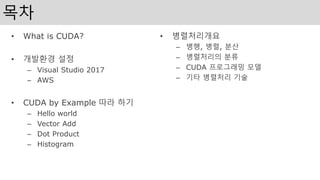
• What isCUDA?
• 개발환경 설정
– Visual Studio 2017
– AWS
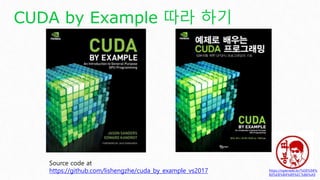
• CUDA by Example 따라 하기
– Hello world
– Vector Add
– Dot Product
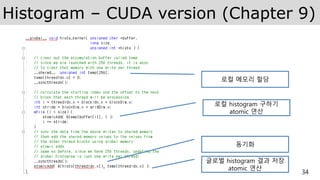
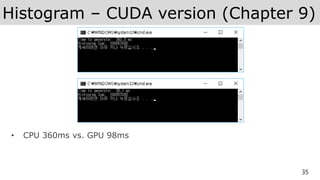
– Histogram
• 병렬처리개요
– 병행, 병렬, 분산
– 병렬처리의 분류
– CUDA 프로그래밍 모델
– 기타 병렬처리 기술
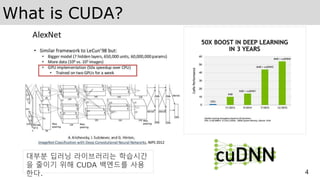
What is CUDA?
5
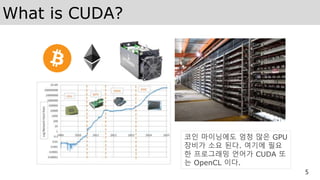
코인마이닝에도 엄청 많은 GPU
장비가 소요 된다. 여기에 필요
한 프로그래밍 언어가 CUDA 또
는 OpenCL 이다.
6.
What is CUDA?
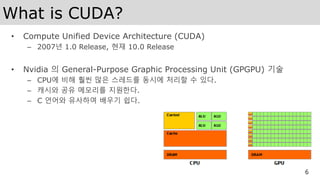
•Compute Unified Device Architecture (CUDA)
– 2007년 1.0 Release, 현재 10.0 Release
• Nvidia 의 General-Purpose Graphic Processing Unit (GPGPU) 기술
– CPU에 비해 훨씬 많은 스레드를 동시에 처리할 수 있다.
– 캐시와 공유 메모리를 지원한다.
– C 언어와 유사하여 배우기 쉽다.
6
8.
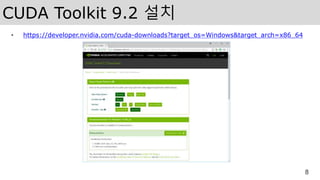
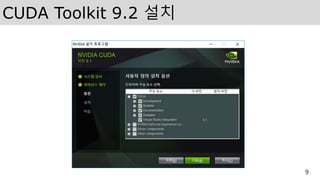
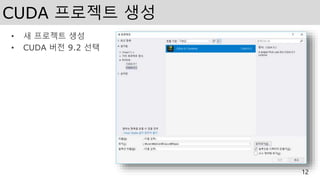
CUDA Toolkit 9.2설치
• https://developer.nvidia.com/cuda-downloads?target_os=Windows&target_arch=x86_64
8
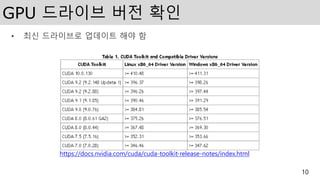
GPU 드라이브 버전확인
• 최신 드라이브로 업데이트 해야 함
10
https://docs.nvidia.com/cuda/cuda-toolkit-release-notes/index.html
11.
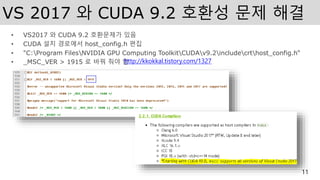
VS 2017 와CUDA 9.2 호환성 문제 해결
• VS2017 와 CUDA 9.2 호환문제가 있음
• CUDA 설치 경로에서 host_config.h 편집
• "C:Program FilesNVIDIA GPU Computing ToolkitCUDAv9.2includecrthost_config.h“
• _MSC_VER > 1915 로 바꿔 줘야 함
11
http://kkokkal.tistory.com/1327
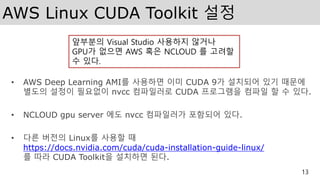
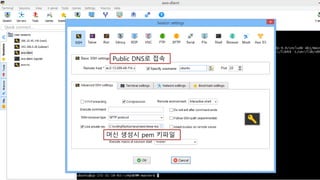
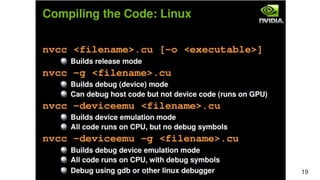
AWS Linux CUDAToolkit 설정
• AWS Deep Learning AMI를 사용하면 이미 CUDA 9가 설치되어 있기 때문에
별도의 설정이 필요없이 nvcc 컴파일러로 CUDA 프로그램을 컴파일 할 수 있다.
• NCLOUD gpu server 에도 nvcc 컴파일러가 포함되어 있다.
• 다른 버전의 Linux를 사용할 때
https://docs.nvidia.com/cuda/cuda-installation-guide-linux/
를 따라 CUDA Toolkit을 설치하면 된다.
13
앞부분의 Visual Studio 사용하지 않거나
GPU가 없으면 AWS 혹은 NCLOUD 를 고려할
수 있다.
14.
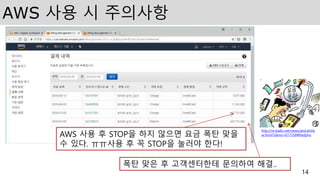
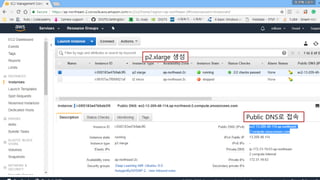
AWS 사용 시주의사항
14
AWS 사용 후 STOP을 하지 않으면 요금 폭탄 맞을
수 있다. ㅠㅠ사용 후 꼭 STOP을 눌러야 한다!
폭탄 맞은 후 고객센터한테 문의하여 해결..
http://m.kado.net/news/articleVie
w.html?idxno=617258#Redyho
15.
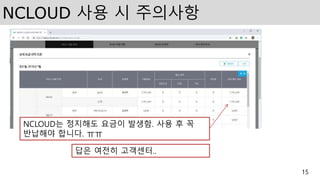
NCLOUD 사용 시주의사항
15
NCLOUD는 정지해도 요금이 발생함. 사용 후 꼭
반납해야 합니다. ㅠㅠ
답은 여전히 고객센터..
16.
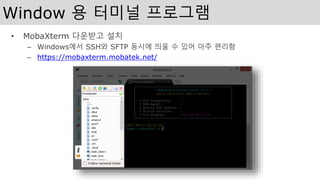
Window 용 터미널프로그램
• MobaXterm 다운받고 설치
– Windows에서 SSH와 SFTP 동시에 띄울 수 있어 아주 편리함
– https://mobaxterm.mobatek.net/
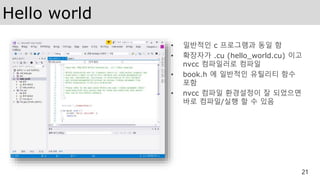
Hello world
• 일반적인c 프로그램과 동일 함
• 확장자가 .cu (hello_world.cu) 이고
nvcc 컴파일러로 컴파일
• book.h 에 일반적인 유틸리티 함수
포함
• nvcc 컴파일 환경설정이 잘 되었으면
바로 컴파일/실행 할 수 있음
21
22.
Vector Add (Chapter4)
22
• Vector Add 의 C version 이다.
• While 문으로 단순하게 c[tid] = a[tid] + b[tid] 를 반복 계산한다.
• tid는 1씩 증가하므로 총 N번 루프가 필요하다.
23.
Vector Add –CUDA version (Chapter 4)
23
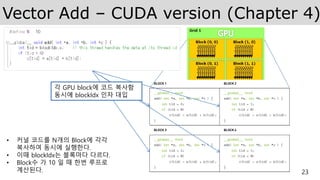
• 커널 코드를 N개의 Block에 각각
복사하여 동시에 실행한다.
• 이때 blockIdx는 블록마다 다르다.
• Block수 가 10 일 때 한번 루프로
계산된다.
각 GPU block에 코드 복사함
동시에 blockIdx 인자 대입
24.
Vector Add –CUDA version (Chapter 4)
24
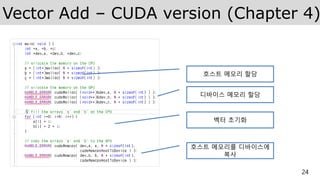
호스트 메모리 할당
디바이스 메모리 할당
벡터 초기화
호스트 메모리를 디바이스에
복사
25.
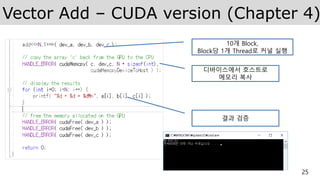
Vector Add –CUDA version (Chapter 4)
25
10개 Block,
Block당 1개 Thread로 커널 실행
디바이스에서 호스트로
메모리 복사
결과 검증
26.
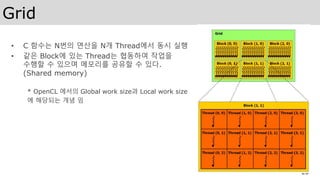
Grid
• C 함수는N번의 연산을 N개 Thread에서 동시 실행
• 같은 Block에 있는 Thread는 협동하여 작업을
수행할 수 있으며 메모리를 공유할 수 있다.
(Shared memory)
* OpenCL 에서의 Global work size과 Local work size
에 해당되는 개념 임
26
27.
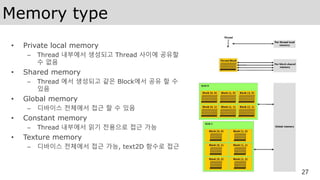
Memory type
• Privatelocal memory
– Thread 내부에서 생성되고 Thread 사이에 공유할
수 없음
• Shared memory
– Thread 에서 생성되고 같은 Block에서 공유 할 수
있음
• Global memory
– 디바이스 전체에서 접근 할 수 있음
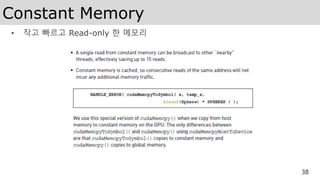
• Constant memory
– Thread 내부에서 읽기 전용으로 접근 가능
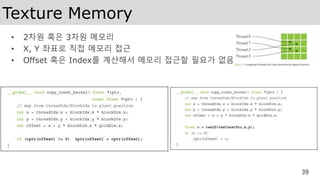
• Texture memory
– 디바이스 전체에서 접근 가능, text2D 함수로 접근
27
28.
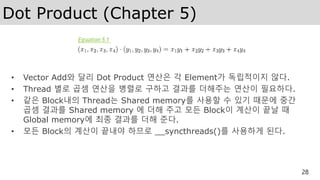
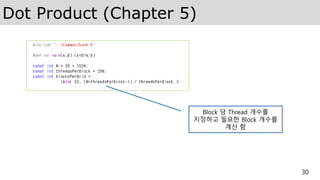
Dot Product (Chapter5)
• Vector Add와 달리 Dot Product 연산은 각 Element가 독립적이지 않다.
• Thread 별로 곱셈 연산을 병렬로 구하고 결과를 더해주는 연산이 필요하다.
• 같은 Block내의 Thread는 Shared memory를 사용할 수 있기 때문에 중간
곱셈 결과를 Shared memory 에 더해 주고 모든 Block이 계산이 끝날 때
Global memory에 최종 결과를 더해 준다.
• 모든 Block의 계산이 끝내야 하므로 __syncthreads()를 사용하게 된다.
28
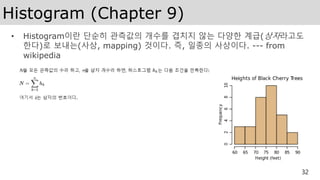
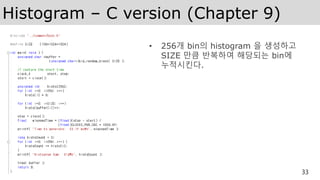
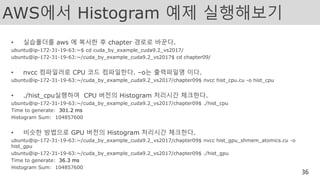
AWS에서 Histogram 예제실행해보기
• 실습폴더를 aws 에 복사한 후 chapter 경로로 바꾼다.
ubuntu@ip-172-31-19-63:~$ cd cuda_by_example_cuda9.2_vs2017/
ubuntu@ip-172-31-19-63:~/cuda_by_example_cuda9.2_vs2017$ cd chapter09/
• nvcc 컴파일러로 CPU 코드 컴파일한다. –o는 출력파일명 이다.
ubuntu@ip-172-31-19-63:~/cuda_by_example_cuda9.2_vs2017/chapter09$ nvcc hist_cpu.cu -o hist_cpu
• ./hist_cpu실행하여 CPU 버전의 Histogram 처리시간 체크한다.
ubuntu@ip-172-31-19-63:~/cuda_by_example_cuda9.2_vs2017/chapter09$ ./hist_cpu
Time to generate: 301.2 ms
Histogram Sum: 104857600
• 비슷한 방법으로 GPU 버전의 Histogram 처리시간 체크한다.
ubuntu@ip-172-31-19-63:~/cuda_by_example_cuda9.2_vs2017/chapter09$ nvcc hist_gpu_shmem_atomics.cu -o
hist_gpu
ubuntu@ip-172-31-19-63:~/cuda_by_example_cuda9.2_vs2017/chapter09$ ./hist_gpu
Time to generate: 36.3 ms
Histogram Sum: 104857600
36
37.
Further study
• Chapter6. Constant Memory and Events
• Chapter 7. Texture Memory
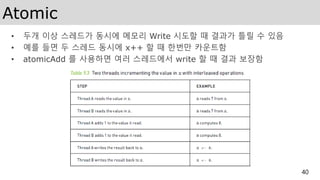
• Chapter 9. Atomics
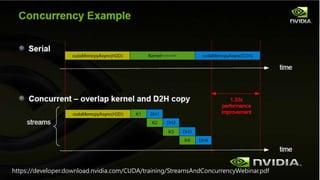
• Chapter 10. Streams
• Chapter 11. CUDA C on Multiple GPUs
37
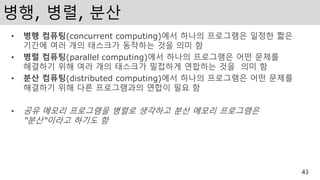
병행, 병렬, 분산
•병행 컴퓨팅(concurrent computing)에서 하나의 프로그램은 일정한 짧은
기간에 여러 개의 태스크가 동작하는 것을 의미 함
• 병렬 컴퓨팅(parallel computing)에서 하나의 프로그램은 어떤 문제를
해결하기 위해 여러 개의 태스크가 밀접하게 연합하는 것을 의미 함
• 분산 컴퓨팅(distributed computing)에서 하나의 프로그램은 어떤 문제를
해결하기 위해 다른 프로그램과의 연합이 필요 함
• 공유 메모리 프로그램을 병렬로 생각하고 분산 메모리 프로그램은
“분산“이라고 하기도 함
43
44.
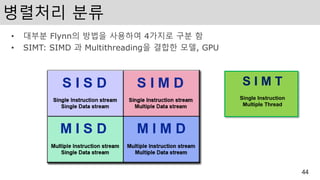
병렬처리 분류
• 대부분Flynn의 방법을 사용하여 4가지로 구분 함
• SIMT: SIMD 과 Multithreading을 결합한 모델, GPU
44
S I M T
Single Instruction
Multiple Thread
45.
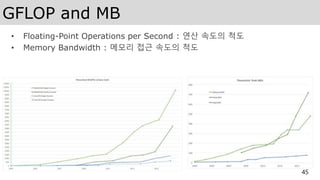
GFLOP and MB
•Floating-Point Operations per Second : 연산 속도의 척도
• Memory Bandwidth : 메모리 접근 속도의 척도
45
46.
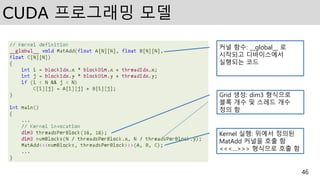
CUDA 프로그래밍 모델
46
Kernel실행: 위에서 정의된
MatAdd 커널을 호출 함
<<<…>>> 형식으로 호출 함
Grid 생성: dim3 형식으로
블록 개수 및 스레드 개수
정의 함
커널 함수: __global__ 로
시작되고 디바이스에서
실행되는 코드
47.
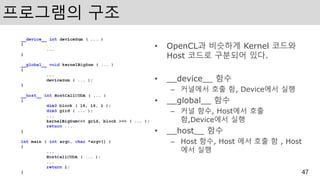
프로그램의 구조
• OpenCL과비슷하게 Kernel 코드와
Host 코드로 구분되어 있다.
• __device__ 함수
– 커널에서 호출 함, Device에서 실행
• __global__ 함수
– 커널 함수, Host에서 호출
함,Device에서 실행
• __host__ 함수
– Host 함수, Host 에서 호출 함 , Host
에서 실행
47
48.
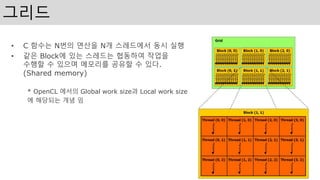
그리드
• C 함수는N번의 연산을 N개 스레드에서 동시 실행
• 같은 Block에 있는 스레드는 협동하여 작업을
수행할 수 있으며 메모리를 공유할 수 있다.
(Shared memory)
* OpenCL 에서의 Global work size과 Local work size
에 해당되는 개념 임
48
49.
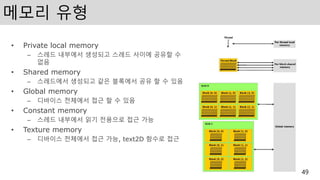
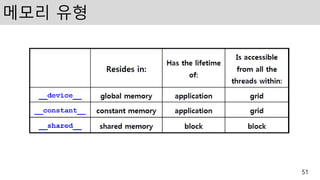
메모리 유형
• Privatelocal memory
– 스레드 내부에서 생성되고 스레드 사이에 공유할 수
없음
• Shared memory
– 스레드에서 생성되고 같은 블록에서 공유 할 수 있음
• Global memory
– 디바이스 전체에서 접근 할 수 있음
• Constant memory
– 스레드 내부에서 읽기 전용으로 접근 가능
• Texture memory
– 디바이스 전체에서 접근 가능, text2D 함수로 접근
49
50.
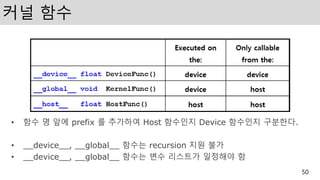
커널 함수
• 함수명 앞에 prefix 를 추가하여 Host 함수인지 Device 함수인지 구분한다.
• __device__, __global__ 함수는 recursion 지원 불가
• __device__, __global__ 함수는 변수 리스트가 일정해야 함
50
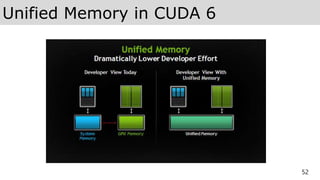
Unified Memory
53
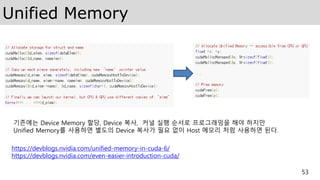
기존에는 DeviceMemory 할당, Device 복사, 커널 실행 순서로 프로그래밍을 해야 하지만
Unified Memory를 사용하면 별도의 Device 복사가 필요 없이 Host 메모리 처럼 사용하면 된다.
https://devblogs.nvidia.com/unified-memory-in-cuda-6/
https://devblogs.nvidia.com/even-easier-introduction-cuda/
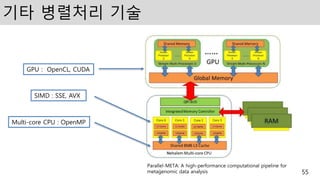
기타 병렬처리 기술
55
Parallel-META:A high-performance computational pipeline for
metagenomic data analysis
SIMD : SSE, AVX
Multi-core CPU : OpenMP
GPU : OpenCL, CUDA
56.
OpenMP
• Open Muilti-Processing(OpenMP)
• 공유 메모리 병렬처리를 위한 API
• 병렬코드의 블록만 설명하면 컴파일러가 처리
• #progma 명령어를 코드에 추가하여 사용
56
#include <stdio.h>
#include <omp.h>
int main(int argc, char *argv[]) {
int i;
#pragma omp parallel for
for (i = 0; i<10; i++) {
printf("[%d-%d] Hello Worldn", omp_get_thread_num(), i);
}
return 0;
}
57.
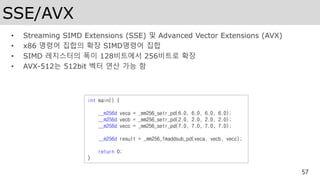
SSE/AVX
• Streaming SIMDExtensions (SSE) 및 Advanced Vector Extensions (AVX)
• x86 명령어 집합의 확장 SIMD명령어 집합
• SIMD 레지스터의 폭이 128비트에서 256비트로 확장
• AVX-512는 512bit 벡터 연산 가능 함
57
int main() {
__m256d veca = _mm256_setr_pd(6.0, 6.0, 6.0, 6.0);
__m256d vecb = _mm256_setr_pd(2.0, 2.0, 2.0, 2.0);
__m256d vecc = _mm256_setr_pd(7.0, 7.0, 7.0, 7.0);
__m256d result = _mm256_fmaddsub_pd(veca, vecb, vecc);
return 0;
}
58.
OpenCL
• Apple 이개발하고 AMD, Intel, Nvidia 등과 공동으로 만든 병렬처리 표준 API
• GPU 뿐만 아니라 CPU, DSP, FPGA 에서도 사용할 수 있도록 설계
• 크로노스 그룹(Khronos Group)에서 관리하고 있음
58
__kernel void vecAdd( __global float *A,
__global float *B,
__global float *C,
const unsigned int n)
{
//Get our global thread ID
int id = get_global_id(0);
//Make sure we do not go out of bounds
if (id < n)
C[id] = A[id] + B[id];
}
64
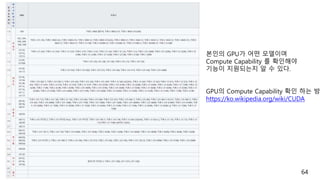
본인의 GPU가 어떤모델이며
Compute Capability 를 확인해야
기능이 지원되는지 알 수 있다.
GPU의 Compute Capability 확인 하는 방
https://ko.wikipedia.org/wiki/CUDA
65.
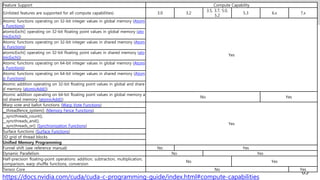
Compute Capability
65
Feature SupportCompute Capability
(Unlisted features are supported for all compute capabilities) 3.0 3.2
3.5, 3.7, 5.0,
5.2
5.3 6.x 7.x
Atomic functions operating on 32-bit integer values in global memory (Atomi
c Functions)
Yes
atomicExch() operating on 32-bit floating point values in global memory (ato
micExch())
Atomic functions operating on 32-bit integer values in shared memory (Atom
ic Functions)
atomicExch() operating on 32-bit floating point values in shared memory (ato
micExch())
Atomic functions operating on 64-bit integer values in global memory (Atomi
c Functions)
Atomic functions operating on 64-bit integer values in shared memory (Atom
ic Functions)
Atomic addition operating on 32-bit floating point values in global and share
d memory (atomicAdd())
Atomic addition operating on 64-bit floating point values in global memory a
nd shared memory (atomicAdd())
No Yes
Warp vote and ballot functions (Warp Vote Functions)
Yes
__threadfence_system() (Memory Fence Functions)
__syncthreads_count(),
__syncthreads_and(),
__syncthreads_or() (Synchronization Functions)
Surface functions (Surface Functions)
3D grid of thread blocks
Unified Memory Programming
Funnel shift (see reference manual) No Yes
Dynamic Parallelism No Yes
Half-precision floating-point operations: addition, subtraction, multiplication,
comparison, warp shuffle functions, conversion
No Yes
Tensor Core No Yes
https://docs.nvidia.com/cuda/cuda-c-programming-guide/index.html#compute-capabilities
66.
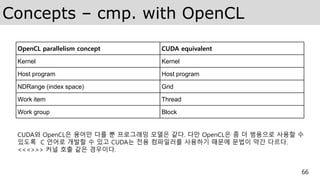
Concepts – cmp.with OpenCL
66
OpenCL parallelism concept CUDA equivalent
Kernel Kernel
Host program Host program
NDRange (index space) Grid
Work item Thread
Work group Block
CUDA와 OpenCL은 용어만 다를 뿐 프로그래밍 모델은 같다. 다만 OpenCL은 좀 더 범용으로 사용할 수
있도록 C 언어로 개발할 수 있고 CUDA는 전용 컴파일러를 사용하기 때문에 문법이 약간 다르다.
<<<>>> 커널 호출 같은 경우이다.
67.
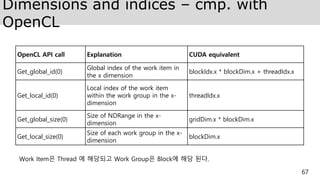
Dimensions and indices– cmp. with
OpenCL
67
OpenCL API call Explanation CUDA equivalent
Get_global_id(0)
Global index of the work item in
the x dimension
blockIdx.x * blockDim.x + threadIdx.x
Get_local_id(0)
Local index of the work item
within the work group in the x-
dimension
threadIdx.x
Get_global_size(0)
Size of NDRange in the x-
dimension
gridDim.x * blockDim.x
Get_local_size(0)
Size of each work group in the x-
dimension
blockDim.x
Work Item은 Thread 에 해당되고 Work Group은 Block에 해당 된다.
68.
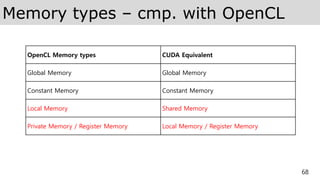
Memory types –cmp. with OpenCL
68
OpenCL Memory types CUDA Equivalent
Global Memory Global Memory
Constant Memory Constant Memory
Local Memory Shared Memory
Private Memory / Register Memory Local Memory / Register Memory
69.
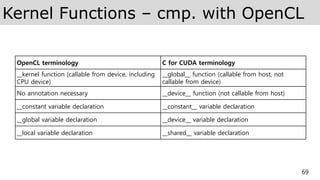
Kernel Functions –cmp. with OpenCL
69
OpenCL terminology C for CUDA terminology
__kernel function (callable from device, including
CPU device)
__global__ function (callable from host, not
callable from device)
No annotation necessary __device__ function (not callable from host)
__constant variable declaration __constant__ variable declaration
__global variable declaration __device__ variable declaration
__local variable declaration __shared__ variable declaration
70.
Important API calls– cmp. with
OpenCL
70
C for CUDA terminology OpenCL terminology
cuInit() No OpenCL initialization required
cuDeviceGet() clGetContextInfo()
cuCtxCreate() clCreateContextFromType()
No direct equivalent clCreateCommandQueue()
cuModuleLoad() [requires pre-compiled binary] clCreateProgramWithSource() orclCreateProgramWithBinary()
No direct equivalent. CUDA programs are compiled off-line clBuildProgram()
cuModuleGetFunction() clCreateKernel()
cuMemAlloc() clCreateBuffer()
cuMemcpyHtoD() clEnqueueWriteBuffer()
cuMemcpyDtoH() clEnqueueReadBuffer()
cuFuncSetBlockShape()
No direct equivalent [functionality
inclEnqueueNDRangeKernel()]
cuParamSeti() clSetKernelArg()
cuParamSetSize() No direct equivalent [functionality inclSetKernelArg()]
cuLaunchGrid() clEnqueueNDRangeKernel()
cuMemFree() clReleaseMemObj()




![Vector Add (Chapter 4)
22
• Vector Add 의 C version 이다.
• While 문으로 단순하게 c[tid] = a[tid] + b[tid] 를 반복 계산한다.
• tid는 1씩 증가하므로 총 N번 루프가 필요하다.](https://image.slidesharecdn.com/cudatutorialmoducon2018-181215052558/85/CUDA-MODUCON2018-22-320.jpg)
![31
로컬 메모리 할당
글로벌 및 로컬 idx 가져오기
temp+=a[i]*b[i] 임시 결과
계산
로컬 메모리에 임시 결과
저장
로컬 메모리 동기화
Reduction 계산](https://image.slidesharecdn.com/cudatutorialmoducon2018-181215052558/85/CUDA-MODUCON2018-31-320.jpg)

![OpenMP
• Open Muilti-Processing (OpenMP)
• 공유 메모리 병렬처리를 위한 API
• 병렬코드의 블록만 설명하면 컴파일러가 처리
• #progma 명령어를 코드에 추가하여 사용
56
#include <stdio.h>
#include <omp.h>
int main(int argc, char *argv[]) {
int i;
#pragma omp parallel for
for (i = 0; i<10; i++) {
printf("[%d-%d] Hello Worldn", omp_get_thread_num(), i);
}
return 0;
}](https://image.slidesharecdn.com/cudatutorialmoducon2018-181215052558/85/CUDA-MODUCON2018-56-320.jpg)
![OpenCL
• Apple 이 개발하고 AMD, Intel, Nvidia 등과 공동으로 만든 병렬처리 표준 API
• GPU 뿐만 아니라 CPU, DSP, FPGA 에서도 사용할 수 있도록 설계
• 크로노스 그룹(Khronos Group)에서 관리하고 있음
58
__kernel void vecAdd( __global float *A,
__global float *B,
__global float *C,
const unsigned int n)
{
//Get our global thread ID
int id = get_global_id(0);
//Make sure we do not go out of bounds
if (id < n)
C[id] = A[id] + B[id];
}](https://image.slidesharecdn.com/cudatutorialmoducon2018-181215052558/85/CUDA-MODUCON2018-58-320.jpg)


![Important API calls – cmp. with
OpenCL
70
C for CUDA terminology OpenCL terminology
cuInit() No OpenCL initialization required
cuDeviceGet() clGetContextInfo()
cuCtxCreate() clCreateContextFromType()
No direct equivalent clCreateCommandQueue()
cuModuleLoad() [requires pre-compiled binary] clCreateProgramWithSource() orclCreateProgramWithBinary()
No direct equivalent. CUDA programs are compiled off-line clBuildProgram()
cuModuleGetFunction() clCreateKernel()
cuMemAlloc() clCreateBuffer()
cuMemcpyHtoD() clEnqueueWriteBuffer()
cuMemcpyDtoH() clEnqueueReadBuffer()
cuFuncSetBlockShape()
No direct equivalent [functionality
inclEnqueueNDRangeKernel()]
cuParamSeti() clSetKernelArg()
cuParamSetSize() No direct equivalent [functionality inclSetKernelArg()]
cuLaunchGrid() clEnqueueNDRangeKernel()
cuMemFree() clReleaseMemObj()](https://image.slidesharecdn.com/cudatutorialmoducon2018-181215052558/85/CUDA-MODUCON2018-70-320.jpg)


![[야생의 땅: 듀랑고]의 식물 생태계를 담당하는 21세기 정원사의 OpenCL 경험담](https://cdn.slidesharecdn.com/ss_thumbnails/ndc2015-150521082100-lva1-app6891-thumbnail.jpg?width=640&height=640&fit=bounds)


![[조진현]Kgc2012 c++amp](https://cdn.slidesharecdn.com/ss_thumbnails/kgc2012camp-121019195944-phpapp01-thumbnail.jpg?width=640&height=640&fit=bounds)

