Artificial Intelligent
numpy
NumPy Introduction
NumPy stands for numeric python which is a python package for the
computation and processing of the multidimensional and single
dimensional array elements.
Travis Oliphant created NumPy package in 2005 by injecting the features
of the ancestor module Numeric into another module Numarray.
It is an extension module of Python which is mostly written in C. It provides
various functions which are capable of performing the numeric
computations with a high speed.
The need of NumPy
NumPy provides a convenient and efficient way to handle the vast amount
of data. NumPy is also very convenient with Matrix multiplication and data
reshaping. NumPy is fast which makes it reasonable to work with a large set
of data.
• NumPy performs array-oriented computing.
• It efficiently implements the multidimensional arrays.
• It performs scientific computations.
• It is capable of performing Fourier Transform and reshaping the data
stored in multidimensional arrays.
• NumPy provides the in-built functions for linear algebra and random
number generation.
Nowadays, NumPy in combination with SciPy and Mat-plotlib is used as the
replacement to MATLAB as Python is more complete and easier
programming language than MATLAB.
NumPy Environment Setup
NumPy doesn't come bundled with Python. We have to install it using the
python pip installer. Execute the following command.
Now, open a cmd window like before. Use the next set of commands to
install NumPy, SciPy and Matplotlib:
python -m pip install numpy
NumPy Ndarray
Ndarray is the n-dimensional array object defined in the numpy which
stores the collection of the similar type of elements. In other words, we can
define a ndarray as the collection of the data type (dtype) objects.
The ndarray object can be accessed by using the 0 based indexing. Each
element of the Array object contains the same size in the memory.
Creating a ndarray object
The ndarray object can be created by using the array routine of the numpy
module. For this purpose, we need to import the numpy.
Example
import numpy
a = numpy.array
print(a)
Example
import numpy
a = numpy.array([[1, 2, 3], [4, 5, 6]])
print(a.ndim)
The more important attributes of an ndarray object are:
 ndarray.ndim
the number of axes (dimensions) of the array.
 ndarray.shape
the dimensions of the array. This is a tuple of integers
indicating the size of the array in each dimension. For a
matrix with n rows and m columns, shape will be (n,m).
The length of the shape tuple is therefore the number of
axes, ndim.
 ndarray.size
the total number of elements of the array. This is equal
to the product of the elements of shape.
 ndarray.dtype
an object describing the type of the elements in the array.
One can create or specify dtype’s using standard Python
types. Additionally NumPy provides types of its own.
numpy.int32, numpy.int16, and numpy.float64 are some
examples.
 ndarray.itemsize
the size in bytes of each element of the array. For example, an
array of elements of type float64 has itemsize 8 (=64/8),
while one of type complex32 has itemsize 4 (=32/8). It is
equivalent to ndarray.dtype.itemsize.
 ndarray.data
the buffer containing the actual elements of the array.
Normally, we won’t need to use this attribute because we will
access the elements in an array using indexing facilities.
Finding the data type of each array item
To check the data type of each array item, the dtype function is used.
Consider the following example to check the data type of the array items.
import numpy as np
a = np.array([[1,2,3]])
print("Each item is of the type",a.dtype)
Finding the shape and size of the array
To get the shape and size of the array, the size and shape function
associated with the numpy array is used.
Consider the following example.
import numpy as np
a = np.array([[1,2,3],[4,5,6]])
print("Array Size:",a.size)
print("Shape:",a.shape)
Reshaping the array objects
By the shape of the array, we mean the number of rows and columns of a
multi-dimensional array. However, the numpy module provides us the way
to reshape the array by changing the number of rows and columns of the
multi-dimensional array.
import numpy as np
a = np.array([[1,2],[3,4],[5,6]])
print("printing the original array..")
print(a)
a=a.reshape(2,3)
print("printing the reshaped array..")
print(a)
3*2 2*3
Slicing in the Array
Slicing in the NumPy array is the way to extract a range of elements from an
array. Slicing in the array is performed in the same way as it is performed in
the python list.
import numpy as np
a = np.array([[1,2],[3,4],[5,6]])
print(a[0,1])
print(a[2,0])
Output:
2
5
The above program prints the 2nd element from the 0th index and 0th
element from the 2nd index of the array.
Slicing in the Array
Slicing in the NumPy array is the way to extract a range of elements from an
array. Slicing in the array is performed in the same way as it is performed in
the python list.
import numpy as np
a = np.array([[1,2],[3,4],[5,6]])
print(a[0,1])
print(a[2,0])
Output:
2
5
The above program prints the 2nd element from the 0 th index and 0 th
element from the 2nd index of the array.
Linspace
The linspace() function returns the evenly spaced values over the given
interval. The following example returns the 10 evenly separated values over
the given interval 5-15
import numpy as np
a=np.linspace(5,15,10)
print(a)
Output:
[ 5. 6.11111111 7.22222222 8.33333333 9.44444444 10.55555556 11.66666667
12.77777778 13.88888889 15. ]
Finding the maximum, minimum, and sum
of the array elements
The NumPy provides the max(), min(), and sum() functions which are used
to find the maximum, minimum, and sum of the array elements
respectively.
import numpy as np
a = np.array([1,2,3,10,15,4])
print("The array:",a)
print("The maximum element:",a.max())
print("The minimum element:",a.min())
print("The sum of the elements:",a.sum())
NumPy Array Axis
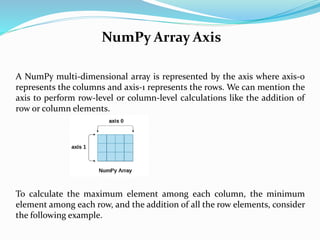
A NumPy multi-dimensional array is represented by the axis where axis-0
represents the columns and axis-1 represents the rows. We can mention the
axis to perform row-level or column-level calculations like the addition of
row or column elements.
To calculate the maximum element among each column, the minimum
element among each row, and the addition of all the row elements, consider
the following example.
NumPy Array Axis
Example
import numpy as np
a = np.array([[1,2,30],[10,15,4]])
print("The array:",a)
print("The maximum elements of columns:",a.max(axis = 0))
print("The minimum element of rows",a.min(axis = 1))
print("The sum of all rows",a.sum(axis = 1))
Output:
The array: [[1 2 30]
[10 15 4]]
The maximum elements of columns: [10 15 30]
The minimum element of rows [1 4] The sum of all rows [33 29]
Finding square root and standard Deviation
The sqrt() and std() functions associated with the numpy array are used to
find the square root and standard deviation of the array elements
respectively.
Standard deviation means how much each element of the array varies from
the mean value of the numpy array.
import numpy as np
a = np.array([[1,2,30],[10,15,4]])
print(np.sqrt(a))
print(np.std(a))
Arithmetic operations on the array
The numpy module allows us to perform the arithmetic operations on
multi-dimensional arrays directly.
In the following example, the arithmetic operations are performed on the
two multi-dimensional arrays a and b.
import numpy as np
a = np.array([[1,2,30],[10,15,4]])
b = np.array([[1,2,3],[12, 19, 29]])
print("Sum of array a and bn",a+b)
print("Product of array a and bn",a*b)
print("Division of array a and bn",a/b)
Array Concatenation
The numpy provides us with the vertical stacking and horizontal stacking
which allows us to concatenate two multi-dimensional arrays vertically or
horizontally.
import numpy as np
a = np.array([[1,2,30],[10,15,4]])
b = np.array([[1,2,3],[12, 19, 29]])
print("Arrays vertically concatenatedn",np.vstack((a,b)));
print("Arrays horizontally concatenatedn",np.hstack((a,b)))
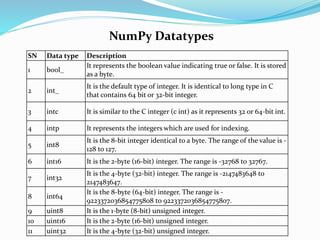
NumPy Datatypes
SN Data type Description
1 bool_
It represents the boolean value indicating true or false. It is stored
as a byte.
2 int_
It is the default type of integer. It is identical to long type in C
that contains 64 bit or 32-bit integer.
3 intc It is similar to the C integer (c int) as it represents 32 or 64-bit int.
4 intp It represents the integers which are used for indexing.
5 int8
It is the 8-bit integer identical to a byte. The range of the value is -
128 to 127.
6 int16 It is the 2-byte (16-bit) integer. The range is -32768 to 32767.
7 int32
It is the 4-byte (32-bit) integer. The range is -2147483648 to
2147483647.
8 int64
It is the 8-byte (64-bit) integer. The range is -
9223372036854775808 to 9223372036854775807.
9 uint8 It is the 1-byte (8-bit) unsigned integer.
10 uint16 It is the 2-byte (16-bit) unsigned integer.
11 uint32 It is the 4-byte (32-bit) unsigned integer.
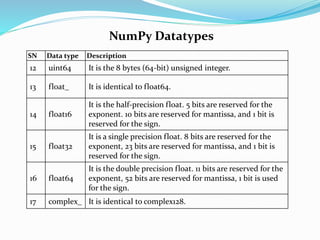
NumPy Datatypes
SN Data type Description
12 uint64 It is the 8 bytes (64-bit) unsigned integer.
13 float_ It is identical to float64.
14 float16
It is the half-precision float. 5 bits are reserved for the
exponent. 10 bits are reserved for mantissa, and 1 bit is
reserved for the sign.
15 float32
It is a single precision float. 8 bits are reserved for the
exponent, 23 bits are reserved for mantissa, and 1 bit is
reserved for the sign.
16 float64
It is the double precision float. 11 bits are reserved for the
exponent, 52 bits are reserved for mantissa, 1 bit is used
for the sign.
17 complex_ It is identical to complex128.
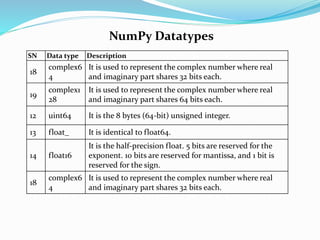
NumPy Datatypes
SN Data type Description
18
complex6
4
It is used to represent the complex number where real
and imaginary part shares 32 bits each.
19
complex1
28
It is used to represent the complex number where real
and imaginary part shares 64 bits each.
12 uint64 It is the 8 bytes (64-bit) unsigned integer.
13 float_ It is identical to float64.
14 float16
It is the half-precision float. 5 bits are reserved for the
exponent. 10 bits are reserved for mantissa, and 1 bit is
reserved for the sign.
18
complex6
4
It is used to represent the complex number where real
and imaginary part shares 32 bits each.
Numpy Array Creation
The ndarray object can be constructed by using the following routines.
Numpy.empty
import numpy as np
arr = np.empty((3,2),
dtype = int)
print(arr)
Output:
[[1 0]
[4 0]
[0 0]]
NumPy.Zeros
import numpy as np
arr = np.zeros((3,2),
dtype = int)
print(arr)
Output
[[0 0]
[0 0]
[0 0]]
NumPy.ones
import numpy as np
arr = np.ones((3,2),
dtype = int)
print(arr)
Output
[[1 1]
[1 1]
[1 1]]
Numpy Array from Existing Data
NumPy provides us the way to create an array by using the existing
data.
This routine is used to create an array by using the existing data in the
form of lists, or tuples. This routine is useful in the scenario where we
need to convert a python sequence into the numpy array object.
numpy.asarray(sequence, dtype = None, order = None)
It accepts the following parameters.
• sequence: It is the python sequence which is to be converted into
the python array.
• dtype: It is the data type of each item of the array.
• order: It can be set to C or F. The default is C.
Numpy Array from Existing Data
Creating numpy array using the list
import numpy as np
l=[1,2,3,4,5,6,7]
a = np.asarray(l);
Creating a numpy array using Tuple
import numpy as np
l=(1,2,3,4,5,6,7)
a = np.asarray(l)
Creating a numpy array using more than one list
import numpy as np
l=[[1,2,3,4,5,6,7],[8,9]]
a = np.asarray(l);
Numpy Arrays within the numerical range
This section of the tutorial illustrates how the numpy arrays can be
created using some given specified range.
Numpy.arrange
numpy.arrange(start, stop, step, dtype)
Example
import numpy as np
arr = np.arange(0,10,2,float)
print(arr)
Output:
[0. 2. 4. 6. 8.]
NumPy Broadcasting
In Mathematical operations, we may need to consider the arrays of
different shapes. NumPy can perform such operations where the array
of different shapes are involved.
For example, if we consider the matrix multiplication operation, if the
shape of the two matrices is the same then this operation will be easily
performed
import numpy as np
a = np.array([1,2,3,4,5,6,7])
b = np.array([2,4,6,8,10,12,14])
c = a*b;
print(c)
Output:
[ 2 8 18 32 50 72 98]
NumPy Broadcasting
If we consider arrays of different shapes, we will get the errors as shown
below.
import numpy as np
a = np.array([1,2,3,4,5,6,7])
b = np.array([2,4,6,8,10,12,14,19])
c = a*b;
print(c)
Output:
ValueError: operands could not be broadcast together with shapes (7,) (8,)
NumPy can perform such operation by using the concept of
broadcasting.
Broadcasting Rules
Broadcasting is possible if the following cases are satisfied.
• The smaller dimension array can be appended with '1' in its shape.
• Size of each output dimension is the maximum of the input sizes in the
dimension.
• An input can be used in the calculation if its size in a particular dimension
matches the output size or its value is exactly 1.
• If the input size is 1, then the first data entry is used for the calculation along the
dimension.
Broadcasting can be applied to the arrays if the following rules are satisfied.
1. All the input arrays have the same shape.
2. Arrays have the same number of dimensions, and the length of each dimension
is either a common length or 1.
3. Array with the fewer dimension can be appended with '1' in its shape.
Broadcasting Example
import numpy as np
a = np.array([[1,2,3,4],[2,4,5,6],[10,20,39,3]])
b = np.array([2,4,6,8])
print("nprinting array a..")
print(a)
print("nprinting array b..")
print(b)
print("nAdding arrays a and b ..")
c = a + b;
print(c)
NumPy Array Iteration
NumPy provides an iterator object, i.e., nditer which can be used to iterate
over the given array using python standard Iterator interface.
import numpy as np
a = np.array([[1,2,3,4],[2,4,5,6],[10,20,39,3]])
print("Printing array:")
print(a);
print("Iterating over the array:")
for x in np.nditer(a):
print(x,end=' ')
NumPy Bitwise Operators
SN Operator Description
1 bitwise_and
It is used to calculate the bitwise and operation
between the corresponding array elements.
2 bitwise_or
It is used to calculate the bitwise or operation
between the corresponding array elements.
3 invert
It is used to calculate the bitwise not the operation
of the array elements.
4 left_shift
It is used to shift the bits of the binary
representation of the elements to the left.
5 right_shift
It is used to shift the bits of the binary
representation of the elements to the right.
NumPy Bitwise Operators
Example
import numpy as np
a = 10
b = 12
print("binary representation of a:",bin(a))
print("binary representation of b:",bin(b))
print("Bitwise-and of a and b: ",np.bitwise_and(a,b))
Output:
binary representation of a: 0b1010
binary representation of b: 0b1100
Bitwise-and of a and b: 8
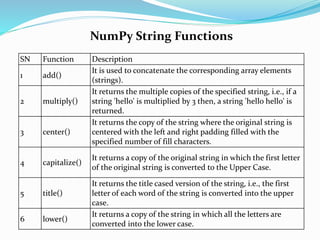
NumPy String Functions
SN Function Description
1 add()
It is used to concatenate the corresponding array elements
(strings).
2 multiply()
It returns the multiple copies of the specified string, i.e., if a
string 'hello' is multiplied by 3 then, a string 'hello hello' is
returned.
3 center()
It returns the copy of the string where the original string is
centered with the left and right padding filled with the
specified number of fill characters.
4 capitalize()
It returns a copy of the original string in which the first letter
of the original string is converted to the Upper Case.
5 title()
It returns the title cased version of the string, i.e., the first
letter of each word of the string is converted into the upper
case.
6 lower()
It returns a copy of the string in which all the letters are
converted into the lower case.
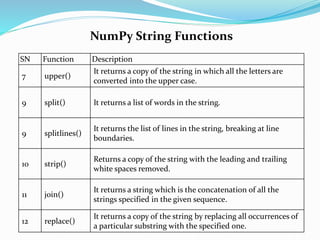
NumPy String Functions
SN Function Description
7 upper()
It returns a copy of the string in which all the letters are
converted into the upper case.
9 split() It returns a list of words in the string.
9 splitlines()
It returns the list of lines in the string, breaking at line
boundaries.
10 strip()
Returns a copy of the string with the leading and trailing
white spaces removed.
11 join()
It returns a string which is the concatenation of all the
strings specified in the given sequence.
12 replace()
It returns a copy of the string by replacing all occurrences of
a particular substring with the specified one.
NumPy String Functions
numpy.char.add() method example
import numpy as np
print("Concatenating two string arrays:")
print(np.char.add(['welcome','Hi'], [' to Nielit', ' read AI'] ))
Output
Concatenating two string arrays:
['welcome to Nielit' 'Hi read AI']
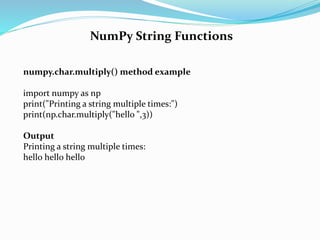
NumPy String Functions
numpy.char.multiply() method example
import numpy as np
print("Printing a string multiple times:")
print(np.char.multiply("hello ",3))
Output
Printing a string multiple times:
hello hello hello
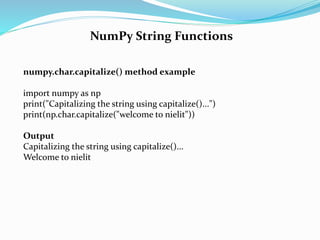
NumPy String Functions
numpy.char.capitalize() method example
import numpy as np
print("Capitalizing the string using capitalize()...")
print(np.char.capitalize("welcome to nielit"))
Output
Capitalizing the string using capitalize()...
Welcome to nielit
NumPy String Functions
numpy.char.split() method example
import numpy as np
print("Splitting the String word by word..")
print(np.char.split("Welcome To NIELIT"),sep = " ")
Output
Splitting the String word by word..
['Welcome', 'To', 'NIELIT']
NumPy Mathematical Functions
Numpy contains a large number of mathematical functions which can
be used to perform various mathematical operations. The mathematical
functions include trigonometric functions, arithmetic functions, and
functions for handling complex numbers. Let's discuss the
mathematical functions.
import numpy as np
arr = np.array([0, 30, 60, 90, 120, 150, 180])
print("nThe sin value of the angles",end = " ")
print(np.sin(arr * np.pi/180))
print("nThe cosine value of the angles",end = " ")
print(np.cos(arr * np.pi/180))
print("nThe tangent value of the angles",end = " ")
print(np.tan(arr * np.pi/180))
Numpy statistical functions
Numpy provides various statistical functions which are used to perform
some statistical data analysis. In this section of the tutorial, we will
discuss the statistical functions provided by the numpy.
import numpy as np
a = np.array([[1,2,3],[4,5,6],[7,8,9]])
print("Array:n",a)
print("nMedian of array along axis 0:",np.median(a,0))
print("Mean of array along axis 0:",np.mean(a,0))
print("Average of array along axis 1:",np.average(a,1))
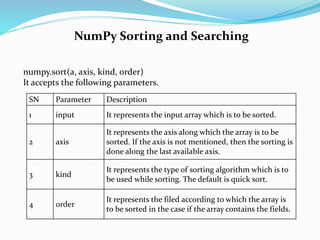
NumPy Sorting and Searching
numpy.sort(a, axis, kind, order)
It accepts the following parameters.
SN Parameter Description
1 input It represents the input array which is to be sorted.
2 axis
It represents the axis along which the array is to be
sorted. If the axis is not mentioned, then the sorting is
done along the last available axis.
3 kind
It represents the type of sorting algorithm which is to
be used while sorting. The default is quick sort.
4 order
It represents the filed according to which the array is
to be sorted in the case if the array contains the fields.
NumPy Sorting and Searching
import numpy as np
a = np.array([[10,2,3],[4,5,6],[7,8,9]])
print("Sorting along the columns:")
print(np.sort(a))
print("Sorting along the rows:")
print(np.sort(a, 0))
data_type = np.dtype([('name', 'S10'),('marks',int)])
arr = np.array([('Mukesh',200),('John',251)],dtype = data_type)
print("Sorting data ordered by name")
print(np.sort(arr,order = 'name'))

NumPy.pptx

  • 1.
  • 2.
    NumPy Introduction NumPy standsfor numeric python which is a python package for the computation and processing of the multidimensional and single dimensional array elements. Travis Oliphant created NumPy package in 2005 by injecting the features of the ancestor module Numeric into another module Numarray. It is an extension module of Python which is mostly written in C. It provides various functions which are capable of performing the numeric computations with a high speed.
  • 3.
    The need ofNumPy NumPy provides a convenient and efficient way to handle the vast amount of data. NumPy is also very convenient with Matrix multiplication and data reshaping. NumPy is fast which makes it reasonable to work with a large set of data. • NumPy performs array-oriented computing. • It efficiently implements the multidimensional arrays. • It performs scientific computations. • It is capable of performing Fourier Transform and reshaping the data stored in multidimensional arrays. • NumPy provides the in-built functions for linear algebra and random number generation. Nowadays, NumPy in combination with SciPy and Mat-plotlib is used as the replacement to MATLAB as Python is more complete and easier programming language than MATLAB.
  • 4.
    NumPy Environment Setup NumPydoesn't come bundled with Python. We have to install it using the python pip installer. Execute the following command. Now, open a cmd window like before. Use the next set of commands to install NumPy, SciPy and Matplotlib: python -m pip install numpy
  • 5.
    NumPy Ndarray Ndarray isthe n-dimensional array object defined in the numpy which stores the collection of the similar type of elements. In other words, we can define a ndarray as the collection of the data type (dtype) objects. The ndarray object can be accessed by using the 0 based indexing. Each element of the Array object contains the same size in the memory.
  • 6.
    Creating a ndarrayobject The ndarray object can be created by using the array routine of the numpy module. For this purpose, we need to import the numpy. Example import numpy a = numpy.array print(a) Example import numpy a = numpy.array([[1, 2, 3], [4, 5, 6]]) print(a.ndim)
  • 7.
    The more importantattributes of an ndarray object are:  ndarray.ndim the number of axes (dimensions) of the array.  ndarray.shape the dimensions of the array. This is a tuple of integers indicating the size of the array in each dimension. For a matrix with n rows and m columns, shape will be (n,m). The length of the shape tuple is therefore the number of axes, ndim.  ndarray.size the total number of elements of the array. This is equal to the product of the elements of shape.
  • 8.
     ndarray.dtype an objectdescribing the type of the elements in the array. One can create or specify dtype’s using standard Python types. Additionally NumPy provides types of its own. numpy.int32, numpy.int16, and numpy.float64 are some examples.  ndarray.itemsize the size in bytes of each element of the array. For example, an array of elements of type float64 has itemsize 8 (=64/8), while one of type complex32 has itemsize 4 (=32/8). It is equivalent to ndarray.dtype.itemsize.  ndarray.data the buffer containing the actual elements of the array. Normally, we won’t need to use this attribute because we will access the elements in an array using indexing facilities.
  • 9.
    Finding the datatype of each array item To check the data type of each array item, the dtype function is used. Consider the following example to check the data type of the array items. import numpy as np a = np.array([[1,2,3]]) print("Each item is of the type",a.dtype)
  • 10.
    Finding the shapeand size of the array To get the shape and size of the array, the size and shape function associated with the numpy array is used. Consider the following example. import numpy as np a = np.array([[1,2,3],[4,5,6]]) print("Array Size:",a.size) print("Shape:",a.shape)
  • 11.
    Reshaping the arrayobjects By the shape of the array, we mean the number of rows and columns of a multi-dimensional array. However, the numpy module provides us the way to reshape the array by changing the number of rows and columns of the multi-dimensional array. import numpy as np a = np.array([[1,2],[3,4],[5,6]]) print("printing the original array..") print(a) a=a.reshape(2,3) print("printing the reshaped array..") print(a) 3*2 2*3
  • 12.
    Slicing in theArray Slicing in the NumPy array is the way to extract a range of elements from an array. Slicing in the array is performed in the same way as it is performed in the python list. import numpy as np a = np.array([[1,2],[3,4],[5,6]]) print(a[0,1]) print(a[2,0]) Output: 2 5 The above program prints the 2nd element from the 0th index and 0th element from the 2nd index of the array.
  • 13.
    Slicing in theArray Slicing in the NumPy array is the way to extract a range of elements from an array. Slicing in the array is performed in the same way as it is performed in the python list. import numpy as np a = np.array([[1,2],[3,4],[5,6]]) print(a[0,1]) print(a[2,0]) Output: 2 5 The above program prints the 2nd element from the 0 th index and 0 th element from the 2nd index of the array.
  • 14.
    Linspace The linspace() functionreturns the evenly spaced values over the given interval. The following example returns the 10 evenly separated values over the given interval 5-15 import numpy as np a=np.linspace(5,15,10) print(a) Output: [ 5. 6.11111111 7.22222222 8.33333333 9.44444444 10.55555556 11.66666667 12.77777778 13.88888889 15. ]
  • 15.
    Finding the maximum,minimum, and sum of the array elements The NumPy provides the max(), min(), and sum() functions which are used to find the maximum, minimum, and sum of the array elements respectively. import numpy as np a = np.array([1,2,3,10,15,4]) print("The array:",a) print("The maximum element:",a.max()) print("The minimum element:",a.min()) print("The sum of the elements:",a.sum())
  • 16.
    NumPy Array Axis ANumPy multi-dimensional array is represented by the axis where axis-0 represents the columns and axis-1 represents the rows. We can mention the axis to perform row-level or column-level calculations like the addition of row or column elements. To calculate the maximum element among each column, the minimum element among each row, and the addition of all the row elements, consider the following example.
  • 17.
    NumPy Array Axis Example importnumpy as np a = np.array([[1,2,30],[10,15,4]]) print("The array:",a) print("The maximum elements of columns:",a.max(axis = 0)) print("The minimum element of rows",a.min(axis = 1)) print("The sum of all rows",a.sum(axis = 1)) Output: The array: [[1 2 30] [10 15 4]] The maximum elements of columns: [10 15 30] The minimum element of rows [1 4] The sum of all rows [33 29]
  • 18.
    Finding square rootand standard Deviation The sqrt() and std() functions associated with the numpy array are used to find the square root and standard deviation of the array elements respectively. Standard deviation means how much each element of the array varies from the mean value of the numpy array. import numpy as np a = np.array([[1,2,30],[10,15,4]]) print(np.sqrt(a)) print(np.std(a))
  • 19.
    Arithmetic operations onthe array The numpy module allows us to perform the arithmetic operations on multi-dimensional arrays directly. In the following example, the arithmetic operations are performed on the two multi-dimensional arrays a and b. import numpy as np a = np.array([[1,2,30],[10,15,4]]) b = np.array([[1,2,3],[12, 19, 29]]) print("Sum of array a and bn",a+b) print("Product of array a and bn",a*b) print("Division of array a and bn",a/b)
  • 20.
    Array Concatenation The numpyprovides us with the vertical stacking and horizontal stacking which allows us to concatenate two multi-dimensional arrays vertically or horizontally. import numpy as np a = np.array([[1,2,30],[10,15,4]]) b = np.array([[1,2,3],[12, 19, 29]]) print("Arrays vertically concatenatedn",np.vstack((a,b))); print("Arrays horizontally concatenatedn",np.hstack((a,b)))
  • 21.
    NumPy Datatypes SN Datatype Description 1 bool_ It represents the boolean value indicating true or false. It is stored as a byte. 2 int_ It is the default type of integer. It is identical to long type in C that contains 64 bit or 32-bit integer. 3 intc It is similar to the C integer (c int) as it represents 32 or 64-bit int. 4 intp It represents the integers which are used for indexing. 5 int8 It is the 8-bit integer identical to a byte. The range of the value is - 128 to 127. 6 int16 It is the 2-byte (16-bit) integer. The range is -32768 to 32767. 7 int32 It is the 4-byte (32-bit) integer. The range is -2147483648 to 2147483647. 8 int64 It is the 8-byte (64-bit) integer. The range is - 9223372036854775808 to 9223372036854775807. 9 uint8 It is the 1-byte (8-bit) unsigned integer. 10 uint16 It is the 2-byte (16-bit) unsigned integer. 11 uint32 It is the 4-byte (32-bit) unsigned integer.
  • 22.
    NumPy Datatypes SN Datatype Description 12 uint64 It is the 8 bytes (64-bit) unsigned integer. 13 float_ It is identical to float64. 14 float16 It is the half-precision float. 5 bits are reserved for the exponent. 10 bits are reserved for mantissa, and 1 bit is reserved for the sign. 15 float32 It is a single precision float. 8 bits are reserved for the exponent, 23 bits are reserved for mantissa, and 1 bit is reserved for the sign. 16 float64 It is the double precision float. 11 bits are reserved for the exponent, 52 bits are reserved for mantissa, 1 bit is used for the sign. 17 complex_ It is identical to complex128.
  • 23.
    NumPy Datatypes SN Datatype Description 18 complex6 4 It is used to represent the complex number where real and imaginary part shares 32 bits each. 19 complex1 28 It is used to represent the complex number where real and imaginary part shares 64 bits each. 12 uint64 It is the 8 bytes (64-bit) unsigned integer. 13 float_ It is identical to float64. 14 float16 It is the half-precision float. 5 bits are reserved for the exponent. 10 bits are reserved for mantissa, and 1 bit is reserved for the sign. 18 complex6 4 It is used to represent the complex number where real and imaginary part shares 32 bits each.
  • 24.
    Numpy Array Creation Thendarray object can be constructed by using the following routines. Numpy.empty import numpy as np arr = np.empty((3,2), dtype = int) print(arr) Output: [[1 0] [4 0] [0 0]] NumPy.Zeros import numpy as np arr = np.zeros((3,2), dtype = int) print(arr) Output [[0 0] [0 0] [0 0]] NumPy.ones import numpy as np arr = np.ones((3,2), dtype = int) print(arr) Output [[1 1] [1 1] [1 1]]
  • 25.
    Numpy Array fromExisting Data NumPy provides us the way to create an array by using the existing data. This routine is used to create an array by using the existing data in the form of lists, or tuples. This routine is useful in the scenario where we need to convert a python sequence into the numpy array object. numpy.asarray(sequence, dtype = None, order = None) It accepts the following parameters. • sequence: It is the python sequence which is to be converted into the python array. • dtype: It is the data type of each item of the array. • order: It can be set to C or F. The default is C.
  • 26.
    Numpy Array fromExisting Data Creating numpy array using the list import numpy as np l=[1,2,3,4,5,6,7] a = np.asarray(l); Creating a numpy array using Tuple import numpy as np l=(1,2,3,4,5,6,7) a = np.asarray(l) Creating a numpy array using more than one list import numpy as np l=[[1,2,3,4,5,6,7],[8,9]] a = np.asarray(l);
  • 27.
    Numpy Arrays withinthe numerical range This section of the tutorial illustrates how the numpy arrays can be created using some given specified range. Numpy.arrange numpy.arrange(start, stop, step, dtype) Example import numpy as np arr = np.arange(0,10,2,float) print(arr) Output: [0. 2. 4. 6. 8.]
  • 28.
    NumPy Broadcasting In Mathematicaloperations, we may need to consider the arrays of different shapes. NumPy can perform such operations where the array of different shapes are involved. For example, if we consider the matrix multiplication operation, if the shape of the two matrices is the same then this operation will be easily performed import numpy as np a = np.array([1,2,3,4,5,6,7]) b = np.array([2,4,6,8,10,12,14]) c = a*b; print(c) Output: [ 2 8 18 32 50 72 98]
  • 29.
    NumPy Broadcasting If weconsider arrays of different shapes, we will get the errors as shown below. import numpy as np a = np.array([1,2,3,4,5,6,7]) b = np.array([2,4,6,8,10,12,14,19]) c = a*b; print(c) Output: ValueError: operands could not be broadcast together with shapes (7,) (8,) NumPy can perform such operation by using the concept of broadcasting.
  • 30.
    Broadcasting Rules Broadcasting ispossible if the following cases are satisfied. • The smaller dimension array can be appended with '1' in its shape. • Size of each output dimension is the maximum of the input sizes in the dimension. • An input can be used in the calculation if its size in a particular dimension matches the output size or its value is exactly 1. • If the input size is 1, then the first data entry is used for the calculation along the dimension. Broadcasting can be applied to the arrays if the following rules are satisfied. 1. All the input arrays have the same shape. 2. Arrays have the same number of dimensions, and the length of each dimension is either a common length or 1. 3. Array with the fewer dimension can be appended with '1' in its shape.
  • 31.
    Broadcasting Example import numpyas np a = np.array([[1,2,3,4],[2,4,5,6],[10,20,39,3]]) b = np.array([2,4,6,8]) print("nprinting array a..") print(a) print("nprinting array b..") print(b) print("nAdding arrays a and b ..") c = a + b; print(c)
  • 32.
    NumPy Array Iteration NumPyprovides an iterator object, i.e., nditer which can be used to iterate over the given array using python standard Iterator interface. import numpy as np a = np.array([[1,2,3,4],[2,4,5,6],[10,20,39,3]]) print("Printing array:") print(a); print("Iterating over the array:") for x in np.nditer(a): print(x,end=' ')
  • 33.
    NumPy Bitwise Operators SNOperator Description 1 bitwise_and It is used to calculate the bitwise and operation between the corresponding array elements. 2 bitwise_or It is used to calculate the bitwise or operation between the corresponding array elements. 3 invert It is used to calculate the bitwise not the operation of the array elements. 4 left_shift It is used to shift the bits of the binary representation of the elements to the left. 5 right_shift It is used to shift the bits of the binary representation of the elements to the right.
  • 34.
    NumPy Bitwise Operators Example importnumpy as np a = 10 b = 12 print("binary representation of a:",bin(a)) print("binary representation of b:",bin(b)) print("Bitwise-and of a and b: ",np.bitwise_and(a,b)) Output: binary representation of a: 0b1010 binary representation of b: 0b1100 Bitwise-and of a and b: 8
  • 35.
    NumPy String Functions SNFunction Description 1 add() It is used to concatenate the corresponding array elements (strings). 2 multiply() It returns the multiple copies of the specified string, i.e., if a string 'hello' is multiplied by 3 then, a string 'hello hello' is returned. 3 center() It returns the copy of the string where the original string is centered with the left and right padding filled with the specified number of fill characters. 4 capitalize() It returns a copy of the original string in which the first letter of the original string is converted to the Upper Case. 5 title() It returns the title cased version of the string, i.e., the first letter of each word of the string is converted into the upper case. 6 lower() It returns a copy of the string in which all the letters are converted into the lower case.
  • 36.
    NumPy String Functions SNFunction Description 7 upper() It returns a copy of the string in which all the letters are converted into the upper case. 9 split() It returns a list of words in the string. 9 splitlines() It returns the list of lines in the string, breaking at line boundaries. 10 strip() Returns a copy of the string with the leading and trailing white spaces removed. 11 join() It returns a string which is the concatenation of all the strings specified in the given sequence. 12 replace() It returns a copy of the string by replacing all occurrences of a particular substring with the specified one.
  • 37.
    NumPy String Functions numpy.char.add()method example import numpy as np print("Concatenating two string arrays:") print(np.char.add(['welcome','Hi'], [' to Nielit', ' read AI'] )) Output Concatenating two string arrays: ['welcome to Nielit' 'Hi read AI']
  • 38.
    NumPy String Functions numpy.char.multiply()method example import numpy as np print("Printing a string multiple times:") print(np.char.multiply("hello ",3)) Output Printing a string multiple times: hello hello hello
  • 39.
    NumPy String Functions numpy.char.capitalize()method example import numpy as np print("Capitalizing the string using capitalize()...") print(np.char.capitalize("welcome to nielit")) Output Capitalizing the string using capitalize()... Welcome to nielit
  • 40.
    NumPy String Functions numpy.char.split()method example import numpy as np print("Splitting the String word by word..") print(np.char.split("Welcome To NIELIT"),sep = " ") Output Splitting the String word by word.. ['Welcome', 'To', 'NIELIT']
  • 41.
    NumPy Mathematical Functions Numpycontains a large number of mathematical functions which can be used to perform various mathematical operations. The mathematical functions include trigonometric functions, arithmetic functions, and functions for handling complex numbers. Let's discuss the mathematical functions. import numpy as np arr = np.array([0, 30, 60, 90, 120, 150, 180]) print("nThe sin value of the angles",end = " ") print(np.sin(arr * np.pi/180)) print("nThe cosine value of the angles",end = " ") print(np.cos(arr * np.pi/180)) print("nThe tangent value of the angles",end = " ") print(np.tan(arr * np.pi/180))
  • 42.
    Numpy statistical functions Numpyprovides various statistical functions which are used to perform some statistical data analysis. In this section of the tutorial, we will discuss the statistical functions provided by the numpy. import numpy as np a = np.array([[1,2,3],[4,5,6],[7,8,9]]) print("Array:n",a) print("nMedian of array along axis 0:",np.median(a,0)) print("Mean of array along axis 0:",np.mean(a,0)) print("Average of array along axis 1:",np.average(a,1))
  • 43.
    NumPy Sorting andSearching numpy.sort(a, axis, kind, order) It accepts the following parameters. SN Parameter Description 1 input It represents the input array which is to be sorted. 2 axis It represents the axis along which the array is to be sorted. If the axis is not mentioned, then the sorting is done along the last available axis. 3 kind It represents the type of sorting algorithm which is to be used while sorting. The default is quick sort. 4 order It represents the filed according to which the array is to be sorted in the case if the array contains the fields.
  • 44.
    NumPy Sorting andSearching import numpy as np a = np.array([[10,2,3],[4,5,6],[7,8,9]]) print("Sorting along the columns:") print(np.sort(a)) print("Sorting along the rows:") print(np.sort(a, 0)) data_type = np.dtype([('name', 'S10'),('marks',int)]) arr = np.array([('Mukesh',200),('John',251)],dtype = data_type) print("Sorting data ordered by name") print(np.sort(arr,order = 'name'))