UPI,E-wallets&otherDigitalPayments
Presented to :-
Dr. Ankit Goel
Presented By:-
Arshit Agarwal (BM-018064)
Ashi Garg (BM-018066)
Ashna Jaiswal (BM-018068)
Ashutosh Mishra (BM-018070)
Unified Payments Interface (UPI)
 Unified Payments Interface (UPI) is an instant real-
time payment system developed by National Payments
Corporation of India facilitating inter-bank transactions.
 The interface is regulated by the Reserve Bank of India and
works by instantly transferring funds between two bank
accounts on a mobile platform.
 NPCI conducted a pilot launch with 21 member banks.
 The pilot launch was on 11th April 2016 by Dr. Raghuram G
Rajan, Governor, RBI at Mumbai.
 Banks have started to upload their UPI enabled Apps on
Google Play store from 25th August, 2016 onwards.
How UPI is unique?
 Immediate money transfer through mobile device round the
clock 24*7 and 365 days.
 Single mobile application for accessing different bank
accounts.
 Virtual address of the customer for Pull & Push provides for
incremental security with the customer not required to enter
the details such as Card no, Account number; IFSC etc.
 Bill Sharing with friends.
 Best answer to Cash on Delivery hassle, running to an ATM
or rendering exact amount.
 Merchant Payment with Single Application or In-App
Payments.
 Utility Bill Payments, Over the Counter Payments, Barcode
(Scan and Pay) based payments.
UPI - Benefits to the Ecosystem
participants
Benefits for banks:
 Single clickTwo Factor authentication
 Universal Application for transaction
 Leveraging existing infrastructure
 Safer, Secured and Innovative
Benefits for end Customers:
 Round the clock availability
 Single Application for accessing different bank accounts
 Use ofVirtual ID is more secure, no credential sharing
 Single click authentication
Steps for Activating UPI
1. Register phone number to your bank
account and ATM card both.
2. Simply Download any UPI app in your
phone & open it & enter mobile
registered mobile number to verify your
account.
3. After verification enter details of debit
card andCreateVirtual Private Address.
4. Setup MPIN for completing transactions.
Note: By default ,VPA is your phone number
followed by @upi in BHIM app.
For example: 9123456789@upi
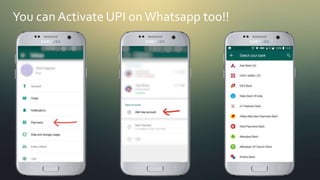
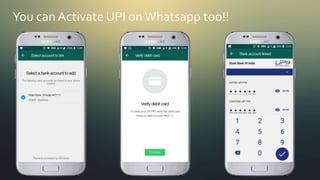
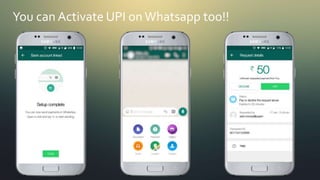
You can Activate UPI on Whatsapp too!!
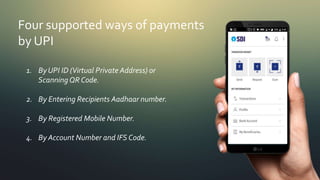
Four supported ways of payments
by UPI
1. ByUPI ID (Virtual Private Address) or
ScanningQR Code.
2. By Entering Recipients Aadhaar number.
3. By Registered Mobile Number.
4. By Account Number and IFS Code.
UPITransaction Limits
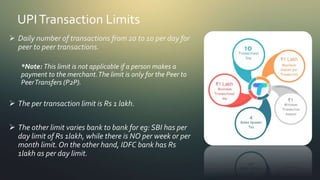
 Daily number of transactions from 20 to 10 per day for
peer to peer transactions.
*Note: This limit is not applicable if a person makes a
payment to the merchant.The limit is only for the Peer to
PeerTransfers (P2P).
 The per transaction limit is Rs 1 lakh.
 The other limit varies bank to bank for eg: SBI has per
day limit of Rs 1lakh, while there is NO per week or per
month limit. On the other hand, IDFC bank has Rs
1lakh as per day limit.
Most famous UPI apps
 BHIM- Bharat Interface for Money, launched by NPCI. It was
the first UPI app.
 PhonePe – Developed by Phonepe Private Limited.
 GooglePay- Previously known as Tez app is developed by
Google. ICICI bank is official service provider bank for this app.
 Whatspp Pay- Developed by whatsapp developers. Provides
facility to pay while chatting.
 Paytm- developed by Paytm and payment partner is Paytm
Payments Bank itself.
 Apart from this many bank provides their own UPI apps such
as SBI , HDFC, AXIS and others.
Note:- All these apps use UPI payment system as
integration for processing the transactions.
Source: NPCIWebsite (https://www.npci.org.in/product-statistics/upi-product-statistics)
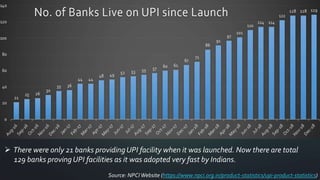
 There were only 21 banks providingUPI facility when it was launched. Now there are total
129 banks proving UPI facilities as it was adopted very fast by Indians.
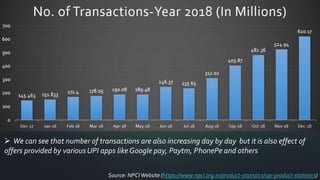
 We can see that number of transactions are also increasing day by day but it is also effect of
offers provided by various UPI apps like Google pay, Paytm, PhonePe and others
Source: NPCIWebsite (https://www.npci.org.in/product-statistics/upi-product-statistics)
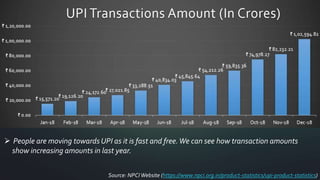
 People are moving towards UPI as it is fast and free.We can see how transaction amounts
show increasing amounts in last year.
Source: NPCIWebsite (https://www.npci.org.in/product-statistics/upi-product-statistics)
What are E-wallets?
 E-wallet is an online prepaid account where one
can stock money, to be used when required.
 As it is a pre-loaded facility, consumers can buy
a range of products from airline tickets to
grocery without swiping a debit or credit card.
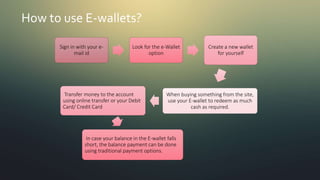
How to use E-wallets?
Sign in with your e-
mail id
Look for the e-Wallet
option
Create a new wallet
for yourself
When buying something from the site,
use your E-wallet to redeem as much
cash as required.
Transfer money to the account
using online transfer or your Debit
Card/ Credit Card
In case your balance in the E-wallet falls
short, the balance payment can be done
using traditional payment options.
Types of E-wallet?
 Closed Wallets : Closed mobile wallets can be used only for that
particular company (or online merchant) goods and services. No
redemption or cash withdrawal is possible with such wallets. Examples of
closed wallets would be the ones offered by makemytrip, jabong, etc.
Where your respective makemytrip or jabong account gets credited with
the refund amount in case of any order cancellation or product return.
 Semi-closed wallets :also do not allow redemption or cash withdrawal.
They can be used to transact for goods and services (inclusive of financial
services) at several different merchant locations that have the required
tie-up (contract) with the wallet issuing company to accept payments. For
example, paytm, mobikwik, payumoney, oxigen, etc. Are all semi-closed
wallets and they are perhaps the most widely used mobile wallets in India
currently.
Types of E-wallet?
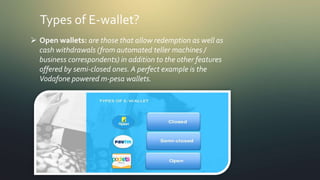
 Open wallets: are those that allow redemption as well as
cash withdrawals (from automated teller machines /
business correspondents) in addition to the other features
offered by semi-closed ones. A perfect example is the
Vodafone powered m-pesa wallets.
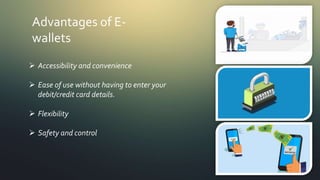
Advantages of E-
wallets
 Accessibility and convenience
 Ease of use without having to enter your
debit/credit card details.
 Flexibility
 Safety and control
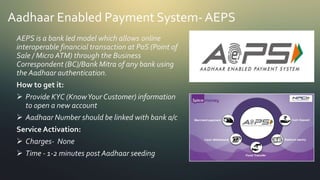
Aadhaar Enabled Payment System- AEPS
AEPS is a bank led model which allows online
interoperable financial transaction at PoS (Point of
Sale / Micro ATM) through the Business
Correspondent (BC)/Bank Mitra of any bank using
the Aadhaar authentication.
How to get it:
 Provide KYC (KnowYour Customer) information
to open a new account
 Aadhaar Number should be linked with bank a/c
Service Activation:
 Charges- None
 Time - 1-2 minutes post Aadhaar seeding
Aadhaar Enabled Payment System- AEPS
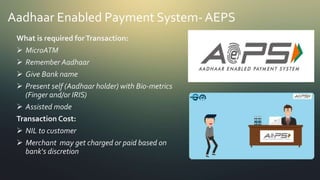
What is required forTransaction:
 MicroATM
 Remember Aadhaar
 Give Bank name
 Present self (Aadhaar holder) with Bio-metrics
(Finger and/or IRIS)
 Assisted mode
Transaction Cost:
 NIL to customer
 Merchant may get charged or paid based on
bank‘s discretion
Aadhaar Enabled Payment System- AEPS
Services Offered:
 Balance Enquiry
 CashWithdrawal
 Cash Deposit
 Aadhaar to Aadhaar funds transfer
 PaymentTransactions (C2B, C2GTransactions)
FundsTransfer limit:
 Banks define limit. No limit for RBI.
Service Available from no. of operators:
 118 banks
 Interoperable
Bharat QR
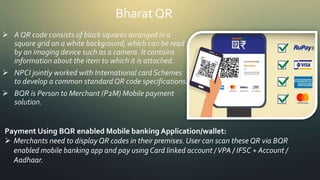
 A QR code consists of black squares arranged in a
square grid on a white background, which can be read
by an imaging device such as a camera. It contains
information about the item to which it is attached.
 NPCI jointly worked with International card Schemes
to develop a common standardQR code specifications.
 BQR is Person to Merchant (P2M) Mobile payment
solution.
Payment Using BQR enabled Mobile banking Application/wallet:
 Merchants need to displayQR codes in their premises. User can scan these QR via BQR
enabled mobile banking app and pay using Card linked account /VPA / IFSC + Account /
Aadhaar.
Thank you

Upi, e wallets & other digital payments

  • 1.
    UPI,E-wallets&otherDigitalPayments Presented to :- Dr.Ankit Goel Presented By:- Arshit Agarwal (BM-018064) Ashi Garg (BM-018066) Ashna Jaiswal (BM-018068) Ashutosh Mishra (BM-018070)
  • 2.
    Unified Payments Interface(UPI)  Unified Payments Interface (UPI) is an instant real- time payment system developed by National Payments Corporation of India facilitating inter-bank transactions.  The interface is regulated by the Reserve Bank of India and works by instantly transferring funds between two bank accounts on a mobile platform.  NPCI conducted a pilot launch with 21 member banks.  The pilot launch was on 11th April 2016 by Dr. Raghuram G Rajan, Governor, RBI at Mumbai.  Banks have started to upload their UPI enabled Apps on Google Play store from 25th August, 2016 onwards.
  • 3.
    How UPI isunique?  Immediate money transfer through mobile device round the clock 24*7 and 365 days.  Single mobile application for accessing different bank accounts.  Virtual address of the customer for Pull & Push provides for incremental security with the customer not required to enter the details such as Card no, Account number; IFSC etc.  Bill Sharing with friends.  Best answer to Cash on Delivery hassle, running to an ATM or rendering exact amount.  Merchant Payment with Single Application or In-App Payments.  Utility Bill Payments, Over the Counter Payments, Barcode (Scan and Pay) based payments.
  • 4.
    UPI - Benefitsto the Ecosystem participants Benefits for banks:  Single clickTwo Factor authentication  Universal Application for transaction  Leveraging existing infrastructure  Safer, Secured and Innovative Benefits for end Customers:  Round the clock availability  Single Application for accessing different bank accounts  Use ofVirtual ID is more secure, no credential sharing  Single click authentication
  • 5.
    Steps for ActivatingUPI 1. Register phone number to your bank account and ATM card both. 2. Simply Download any UPI app in your phone & open it & enter mobile registered mobile number to verify your account. 3. After verification enter details of debit card andCreateVirtual Private Address. 4. Setup MPIN for completing transactions. Note: By default ,VPA is your phone number followed by @upi in BHIM app. For example: 9123456789@upi
  • 6.
    You can ActivateUPI on Whatsapp too!!
  • 7.
    You can ActivateUPI on Whatsapp too!!
  • 8.
    You can ActivateUPI on Whatsapp too!!
  • 9.
    Four supported waysof payments by UPI 1. ByUPI ID (Virtual Private Address) or ScanningQR Code. 2. By Entering Recipients Aadhaar number. 3. By Registered Mobile Number. 4. By Account Number and IFS Code.
  • 10.
    UPITransaction Limits  Dailynumber of transactions from 20 to 10 per day for peer to peer transactions. *Note: This limit is not applicable if a person makes a payment to the merchant.The limit is only for the Peer to PeerTransfers (P2P).  The per transaction limit is Rs 1 lakh.  The other limit varies bank to bank for eg: SBI has per day limit of Rs 1lakh, while there is NO per week or per month limit. On the other hand, IDFC bank has Rs 1lakh as per day limit.
  • 11.
    Most famous UPIapps  BHIM- Bharat Interface for Money, launched by NPCI. It was the first UPI app.  PhonePe – Developed by Phonepe Private Limited.  GooglePay- Previously known as Tez app is developed by Google. ICICI bank is official service provider bank for this app.  Whatspp Pay- Developed by whatsapp developers. Provides facility to pay while chatting.  Paytm- developed by Paytm and payment partner is Paytm Payments Bank itself.  Apart from this many bank provides their own UPI apps such as SBI , HDFC, AXIS and others. Note:- All these apps use UPI payment system as integration for processing the transactions.
  • 12.
    Source: NPCIWebsite (https://www.npci.org.in/product-statistics/upi-product-statistics) There were only 21 banks providingUPI facility when it was launched. Now there are total 129 banks proving UPI facilities as it was adopted very fast by Indians.
  • 13.
     We cansee that number of transactions are also increasing day by day but it is also effect of offers provided by various UPI apps like Google pay, Paytm, PhonePe and others Source: NPCIWebsite (https://www.npci.org.in/product-statistics/upi-product-statistics)
  • 14.
     People aremoving towards UPI as it is fast and free.We can see how transaction amounts show increasing amounts in last year. Source: NPCIWebsite (https://www.npci.org.in/product-statistics/upi-product-statistics)
  • 15.
    What are E-wallets? E-wallet is an online prepaid account where one can stock money, to be used when required.  As it is a pre-loaded facility, consumers can buy a range of products from airline tickets to grocery without swiping a debit or credit card.
  • 16.
    How to useE-wallets? Sign in with your e- mail id Look for the e-Wallet option Create a new wallet for yourself When buying something from the site, use your E-wallet to redeem as much cash as required. Transfer money to the account using online transfer or your Debit Card/ Credit Card In case your balance in the E-wallet falls short, the balance payment can be done using traditional payment options.
  • 18.
    Types of E-wallet? Closed Wallets : Closed mobile wallets can be used only for that particular company (or online merchant) goods and services. No redemption or cash withdrawal is possible with such wallets. Examples of closed wallets would be the ones offered by makemytrip, jabong, etc. Where your respective makemytrip or jabong account gets credited with the refund amount in case of any order cancellation or product return.  Semi-closed wallets :also do not allow redemption or cash withdrawal. They can be used to transact for goods and services (inclusive of financial services) at several different merchant locations that have the required tie-up (contract) with the wallet issuing company to accept payments. For example, paytm, mobikwik, payumoney, oxigen, etc. Are all semi-closed wallets and they are perhaps the most widely used mobile wallets in India currently.
  • 19.
    Types of E-wallet? Open wallets: are those that allow redemption as well as cash withdrawals (from automated teller machines / business correspondents) in addition to the other features offered by semi-closed ones. A perfect example is the Vodafone powered m-pesa wallets.
  • 20.
    Advantages of E- wallets Accessibility and convenience  Ease of use without having to enter your debit/credit card details.  Flexibility  Safety and control
  • 22.
    Aadhaar Enabled PaymentSystem- AEPS AEPS is a bank led model which allows online interoperable financial transaction at PoS (Point of Sale / Micro ATM) through the Business Correspondent (BC)/Bank Mitra of any bank using the Aadhaar authentication. How to get it:  Provide KYC (KnowYour Customer) information to open a new account  Aadhaar Number should be linked with bank a/c Service Activation:  Charges- None  Time - 1-2 minutes post Aadhaar seeding
  • 23.
    Aadhaar Enabled PaymentSystem- AEPS What is required forTransaction:  MicroATM  Remember Aadhaar  Give Bank name  Present self (Aadhaar holder) with Bio-metrics (Finger and/or IRIS)  Assisted mode Transaction Cost:  NIL to customer  Merchant may get charged or paid based on bank‘s discretion
  • 24.
    Aadhaar Enabled PaymentSystem- AEPS Services Offered:  Balance Enquiry  CashWithdrawal  Cash Deposit  Aadhaar to Aadhaar funds transfer  PaymentTransactions (C2B, C2GTransactions) FundsTransfer limit:  Banks define limit. No limit for RBI. Service Available from no. of operators:  118 banks  Interoperable
  • 25.
    Bharat QR  AQR code consists of black squares arranged in a square grid on a white background, which can be read by an imaging device such as a camera. It contains information about the item to which it is attached.  NPCI jointly worked with International card Schemes to develop a common standardQR code specifications.  BQR is Person to Merchant (P2M) Mobile payment solution. Payment Using BQR enabled Mobile banking Application/wallet:  Merchants need to displayQR codes in their premises. User can scan these QR via BQR enabled mobile banking app and pay using Card linked account /VPA / IFSC + Account / Aadhaar.
  • 26.