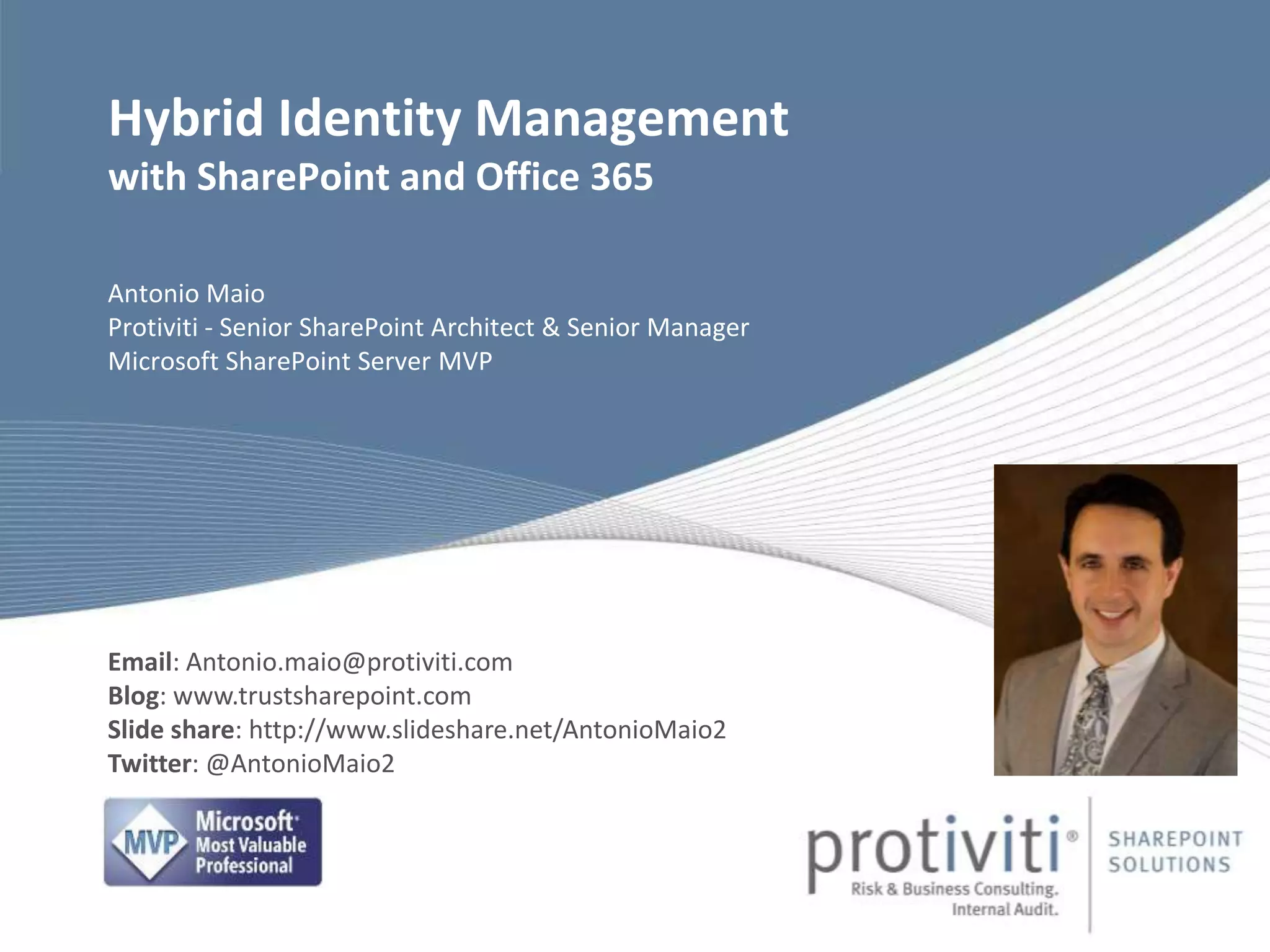
Antonio Maio
Protiviti - Senior SharePoint Architect & Senior Manager
Microsoft SharePoint Server MVP
Hybrid Identity Management
with SharePoint and Office 365
Email: Antonio.maio@protiviti.com
Blog: www.trustsharepoint.com
Slide share: http://www.slideshare.net/AntonioMaio2
Twitter: @AntonioMaio2
© 2014 Protiviti Consulting Private Ltd. An Equal Opportunity Employer.
CONFIDENTIAL: This document is for internal use only and may not be copied nor distributed to another third party.
About Protiviti
INDIA (3)
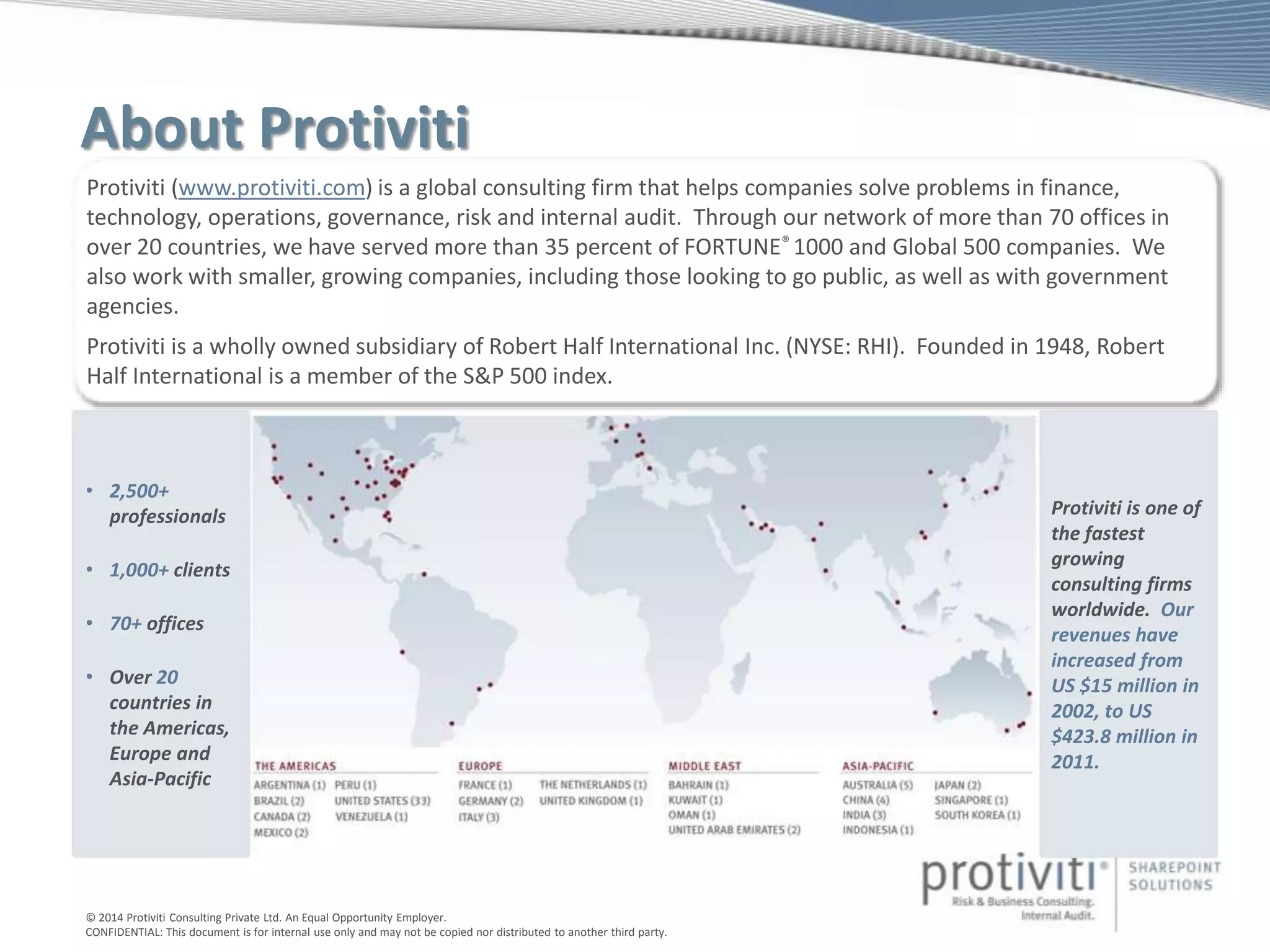
Protiviti (www.protiviti.com) is a global consulting firm that helps companies solve problems in finance,
technology, operations, governance, risk and internal audit. Through our network of more than 70 offices in
over 20 countries, we have served more than 35 percent of FORTUNE® 1000 and Global 500 companies. We
also work with smaller, growing companies, including those looking to go public, as well as with government
agencies.
Protiviti is a wholly owned subsidiary of Robert Half International Inc. (NYSE: RHI). Founded in 1948, Robert
Half International is a member of the S&P 500 index.
• 2,500+
professionals
• 1,000+ clients
• 70+ offices
• Over 20
countries in
the Americas,
Europe and
Asia-Pacific
Protiviti is one of
the fastest
growing
consulting firms
worldwide. Our
revenues have
increased from
US $15 million in
2002, to US
$423.8 million in
2011.
© 2014 Protiviti Consulting Private Ltd. An Equal Opportunity Employer.
CONFIDENTIAL: This document is for internal use only and may not be copied nor distributed to another third party.
Securing Identities
and the Hybrid Cloud
© 2014 Protiviti Consulting Private Ltd. An Equal Opportunity Employer.
CONFIDENTIAL: This document is for internal use only and may not be copied nor distributed to another third party.
Why Hybrid?
© 2014 Protiviti Consulting Private Ltd. An Equal Opportunity Employer.
CONFIDENTIAL: This document is for internal use only and may not be copied nor distributed to another third party.
Identity Models for Office 365
Cloud Identity
Synchronized Identity
Federated Identity
© 2014 Protiviti Consulting Private Ltd. An Equal Opportunity Employer.
CONFIDENTIAL: This document is for internal use only and may not be copied nor distributed to another third party.
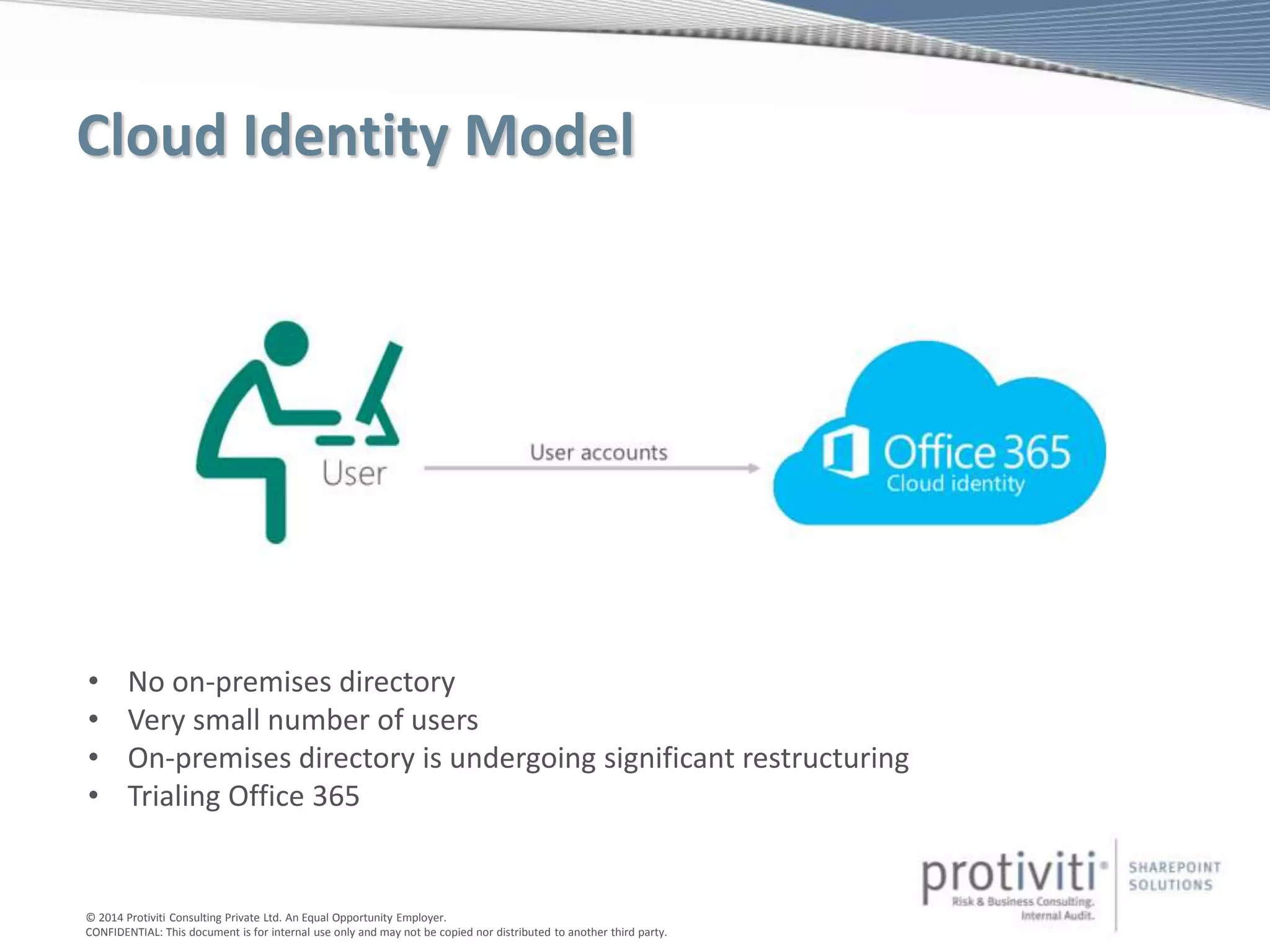
Cloud Identity Model
• No on-premises directory
• Very small number of users
• On-premises directory is undergoing significant restructuring
• Trialing Office 365
© 2014 Protiviti Consulting Private Ltd. An Equal Opportunity Employer.
CONFIDENTIAL: This document is for internal use only and may not be copied nor distributed to another third party.
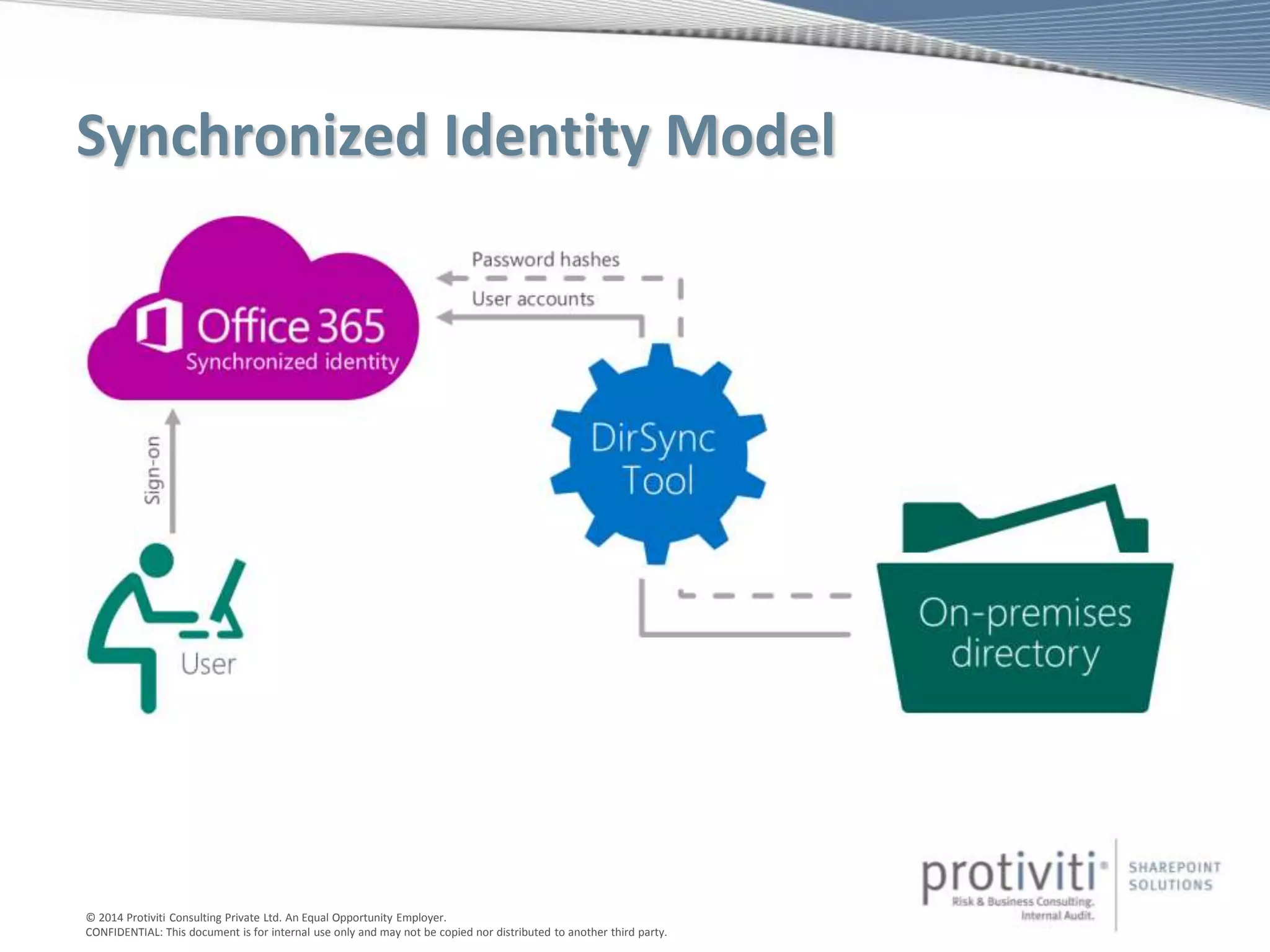
Synchronized Identity Model
© 2014 Protiviti Consulting Private Ltd. An Equal Opportunity Employer.
CONFIDENTIAL: This document is for internal use only and may not be copied nor distributed to another third party.
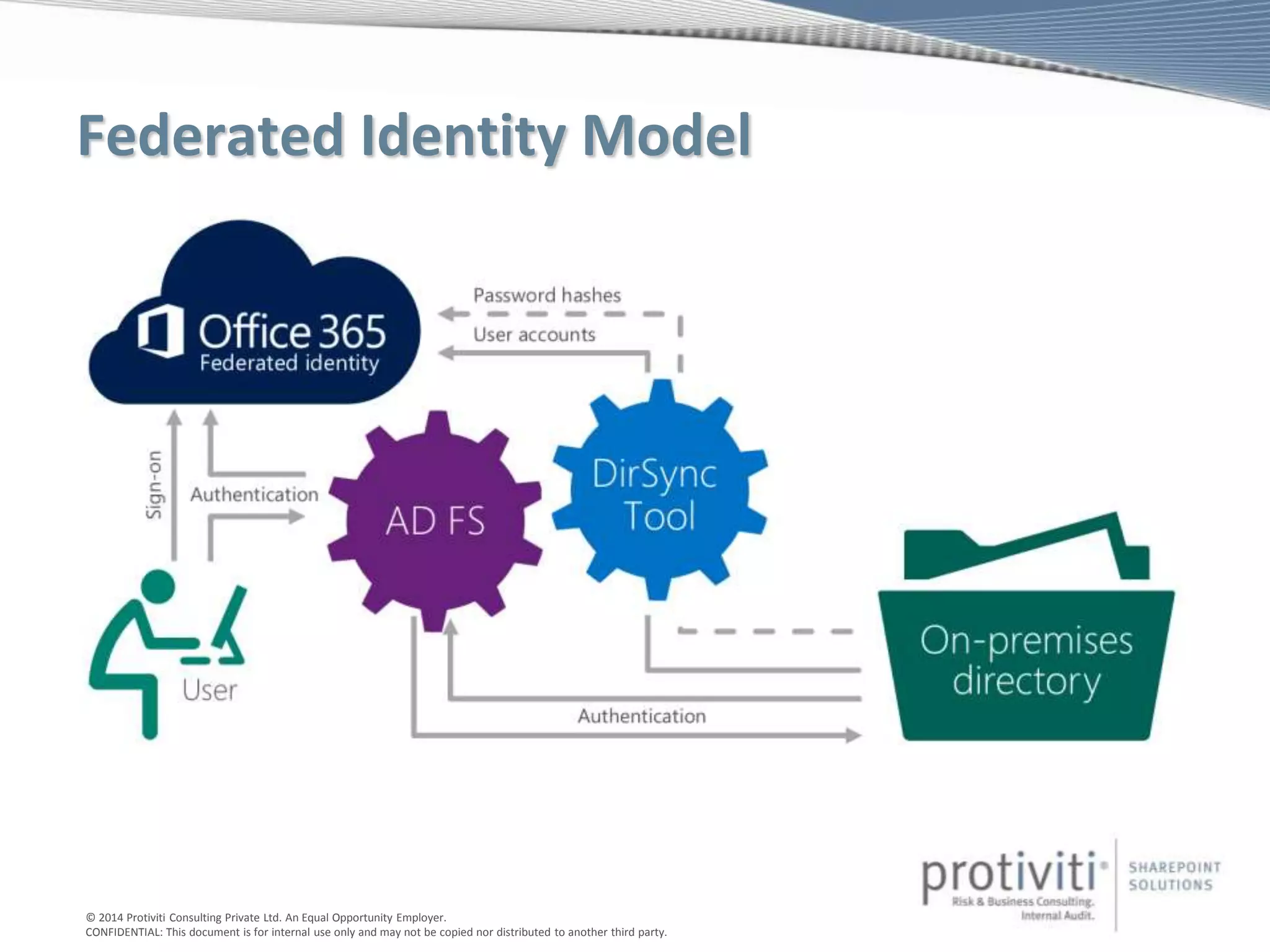
Federated Identity Model
© 2014 Protiviti Consulting Private Ltd. An Equal Opportunity Employer.
CONFIDENTIAL: This document is for internal use only and may not be copied nor distributed to another third party.
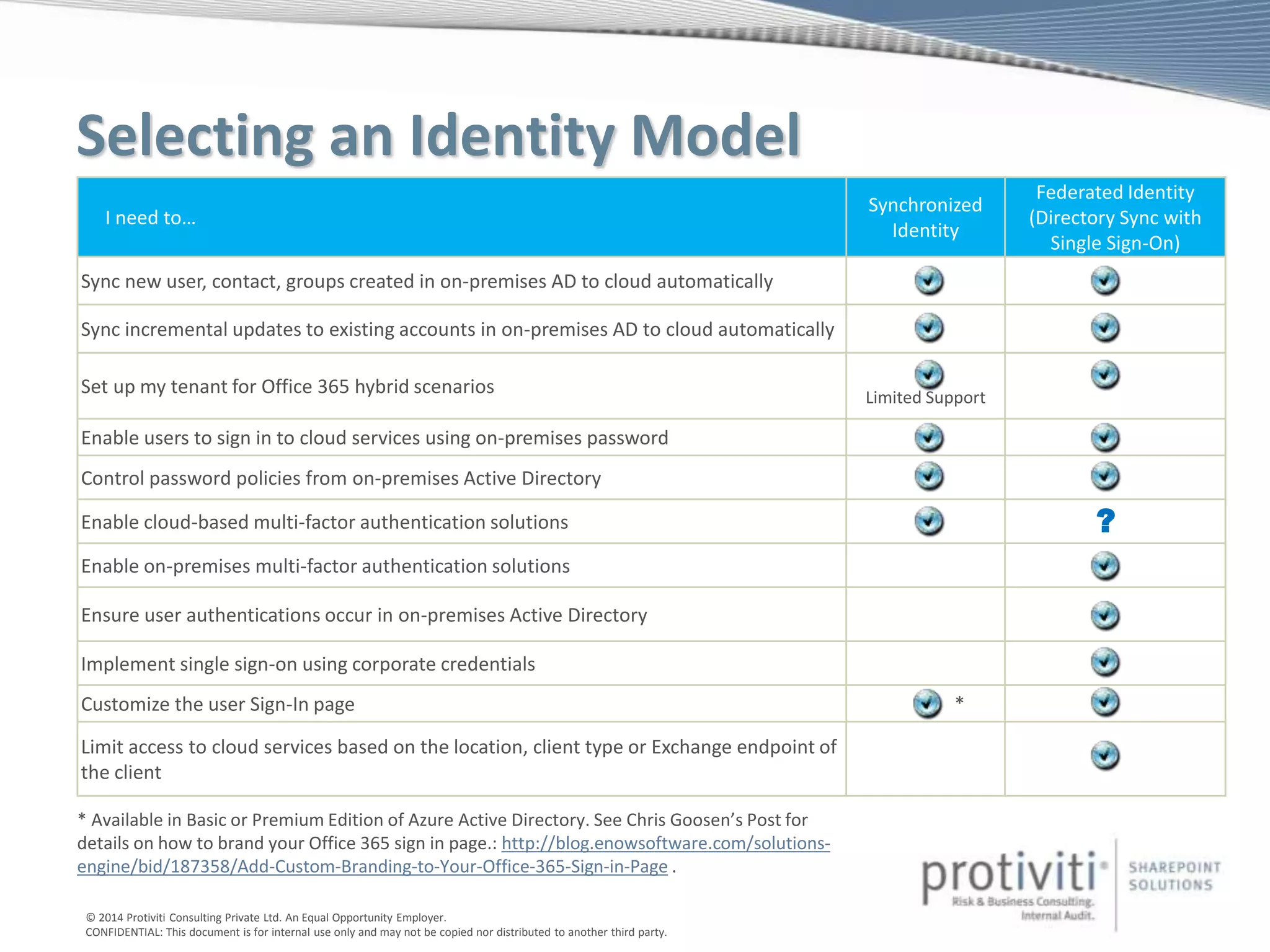
Selecting an Identity Model
I need to…
Synchronized
Identity
Federated Identity
(Directory Sync with
Single Sign-On)
Sync new user, contact, groups created in on-premises AD to cloud automatically
Sync incremental updates to existing accounts in on-premises AD to cloud automatically
Set up my tenant for Office 365 hybrid scenarios Limited Support
Enable users to sign in to cloud services using on-premises password
Control password policies from on-premises Active Directory
Enable cloud-based multi-factor authentication solutions
Enable on-premises multi-factor authentication solutions
Ensure user authentications occur in on-premises Active Directory
Implement single sign-on using corporate credentials
Customize the user Sign-In page *
Limit access to cloud services based on the location, client type or Exchange endpoint of
the client
?
* Available in Basic or Premium Edition of Azure Active Directory. See Chris Goosen’s Post for
details on how to brand your Office 365 sign in page.: http://blog.enowsoftware.com/solutions-
engine/bid/187358/Add-Custom-Branding-to-Your-Office-365-Sign-in-Page .
© 2014 Protiviti Consulting Private Ltd. An Equal Opportunity Employer.
CONFIDENTIAL: This document is for internal use only and may not be copied nor distributed to another third party.
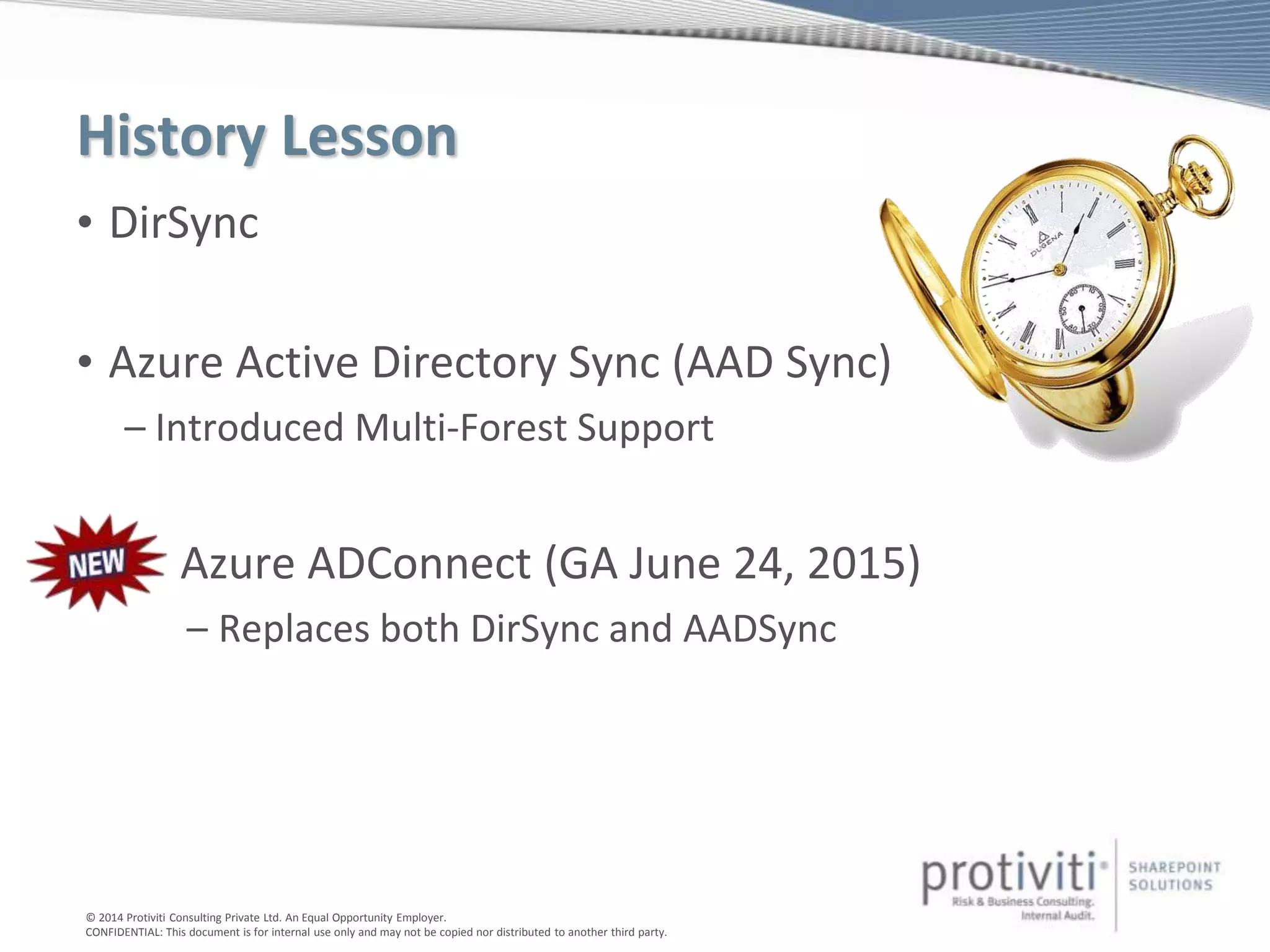
History Lesson
• DirSync
• Azure Active Directory Sync (AAD Sync)
– Introduced Multi-Forest Support
• Azure ADConnect (GA June 24, 2015)
– Replaces both DirSync and AADSync
© 2014 Protiviti Consulting Private Ltd. An Equal Opportunity Employer.
CONFIDENTIAL: This document is for internal use only and may not be copied nor distributed to another third party.
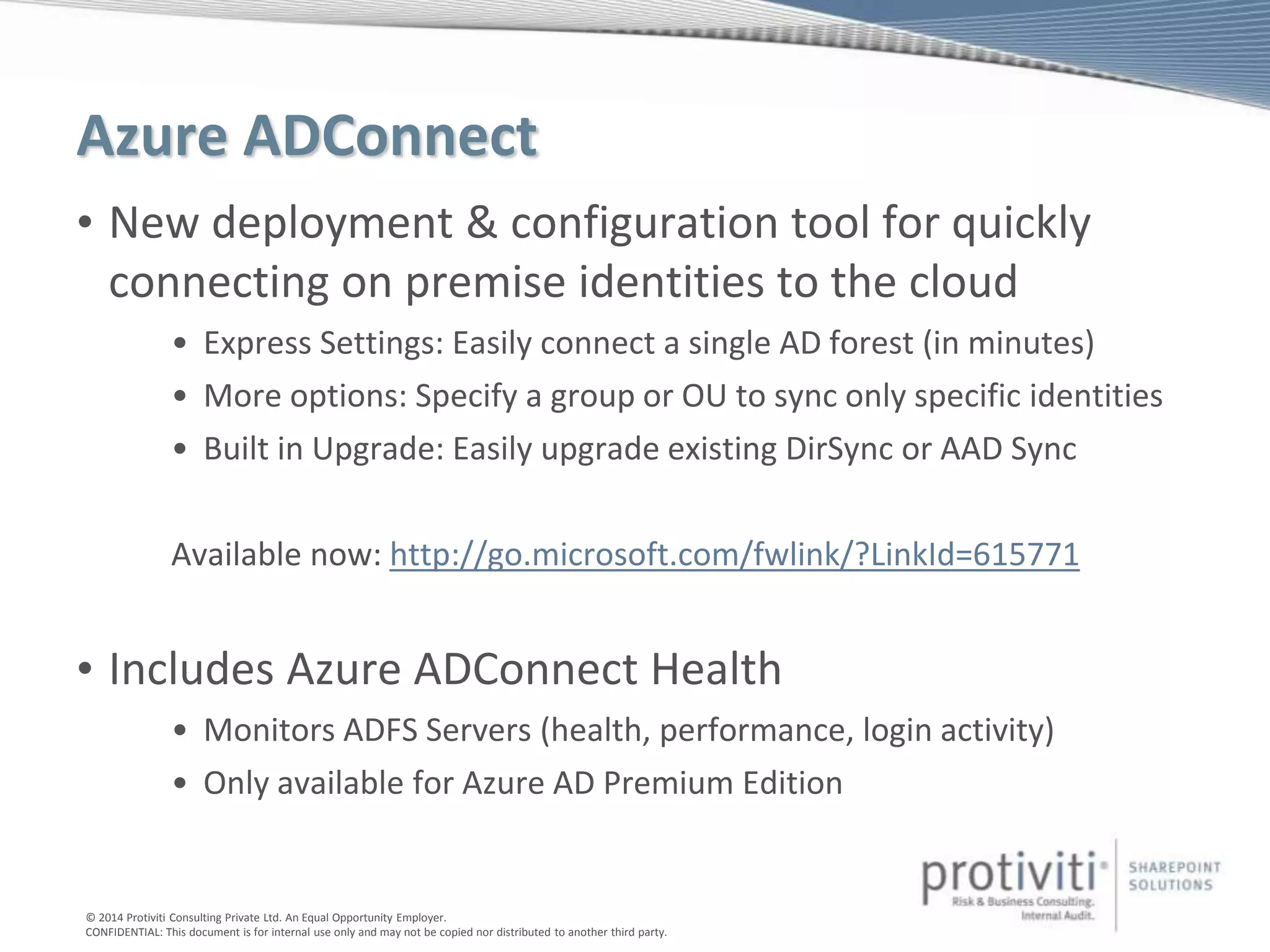
Azure ADConnect
• New deployment & configuration tool for quickly
connecting on premise identities to the cloud
• Express Settings: Easily connect a single AD forest (in minutes)
• More options: Specify a group or OU to sync only specific identities
• Built in Upgrade: Easily upgrade existing DirSync or AAD Sync
Available now: http://go.microsoft.com/fwlink/?LinkId=615771
• Includes Azure ADConnect Health
• Monitors ADFS Servers (health, performance, login activity)
• Only available for Azure AD Premium Edition
© 2014 Protiviti Consulting Private Ltd. An Equal Opportunity Employer.
CONFIDENTIAL: This document is for internal use only and may not be copied nor distributed to another third party.
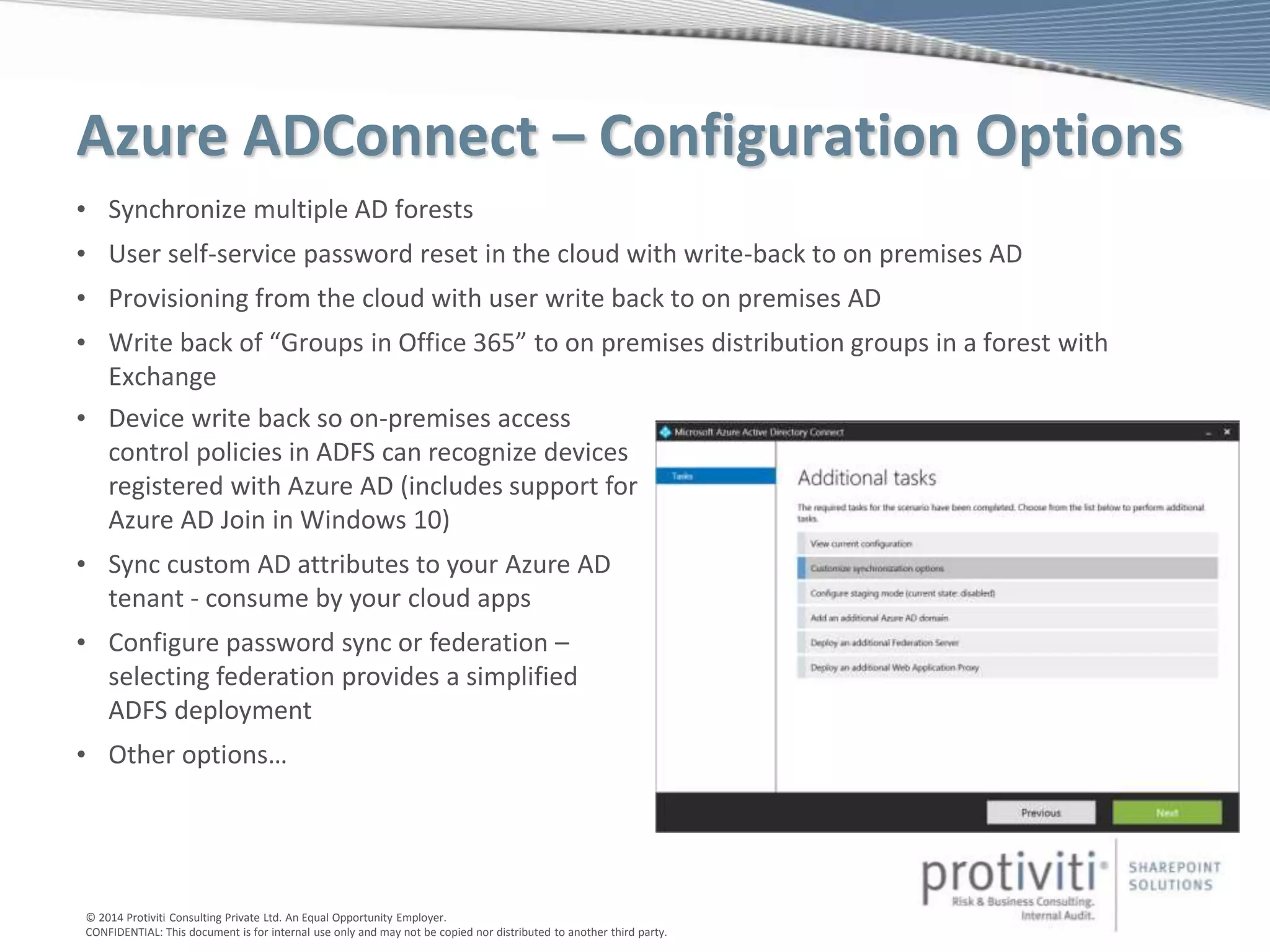
Azure ADConnect – Configuration Options
• Synchronize multiple AD forests
• User self-service password reset in the cloud with write-back to on premises AD
• Provisioning from the cloud with user write back to on premises AD
• Write back of “Groups in Office 365” to on premises distribution groups in a forest with
Exchange
• Device write back so on-premises access
control policies in ADFS can recognize devices
registered with Azure AD (includes support for
Azure AD Join in Windows 10)
• Sync custom AD attributes to your Azure AD
tenant - consume by your cloud apps
• Configure password sync or federation –
selecting federation provides a simplified
ADFS deployment
• Other options…
© 2014 Protiviti Consulting Private Ltd. An Equal Opportunity Employer.
CONFIDENTIAL: This document is for internal use only and may not be copied nor distributed to another third party.
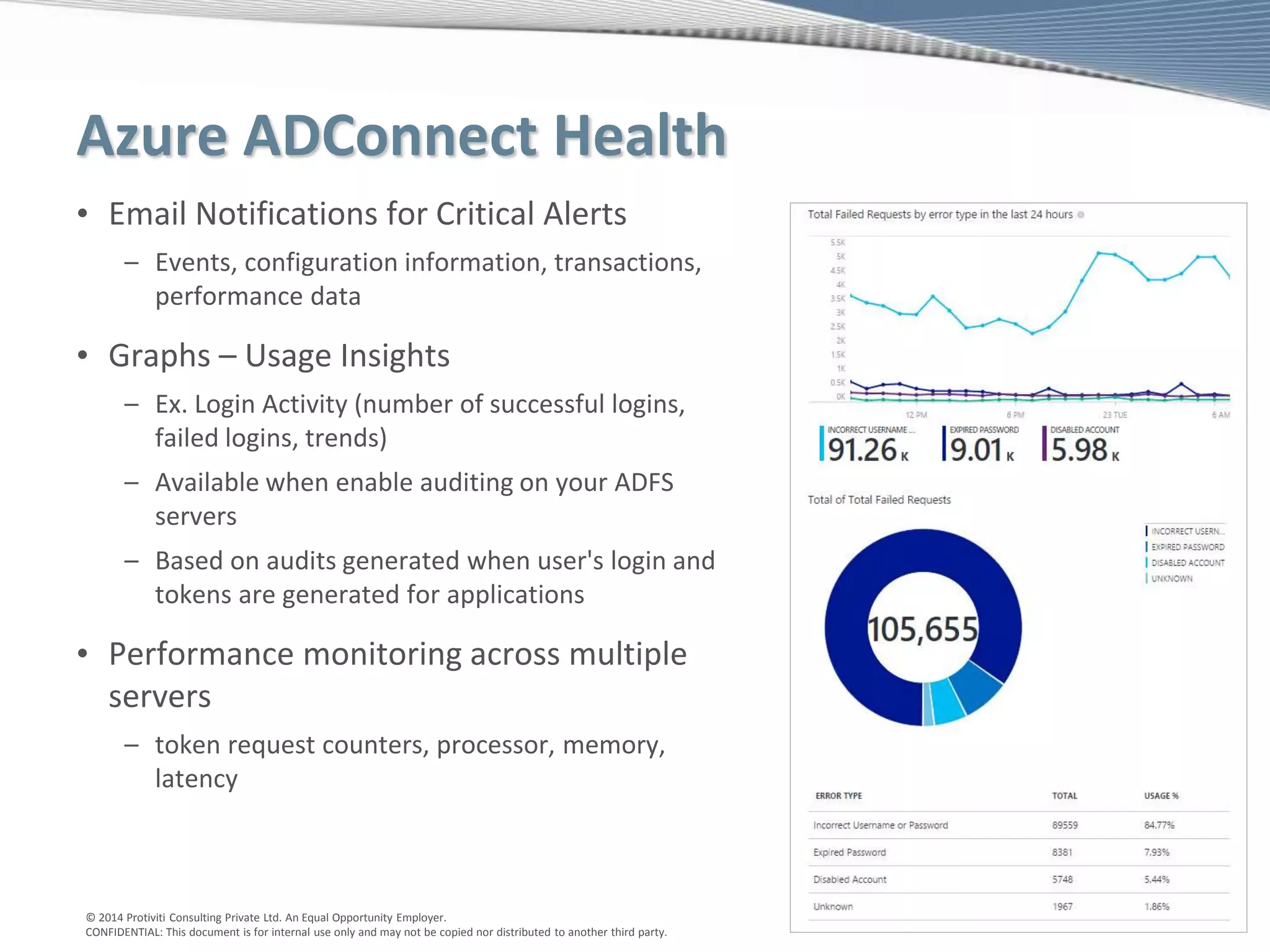
Azure ADConnect Health
• Email Notifications for Critical Alerts
– Events, configuration information, transactions,
performance data
• Graphs – Usage Insights
– Ex. Login Activity (number of successful logins,
failed logins, trends)
– Available when enable auditing on your ADFS
servers
– Based on audits generated when user's login and
tokens are generated for applications
• Performance monitoring across multiple
servers
– token request counters, processor, memory,
latency
© 2014 Protiviti Consulting Private Ltd. An Equal Opportunity Employer.
CONFIDENTIAL: This document is for internal use only and may not be copied nor distributed to another third party.
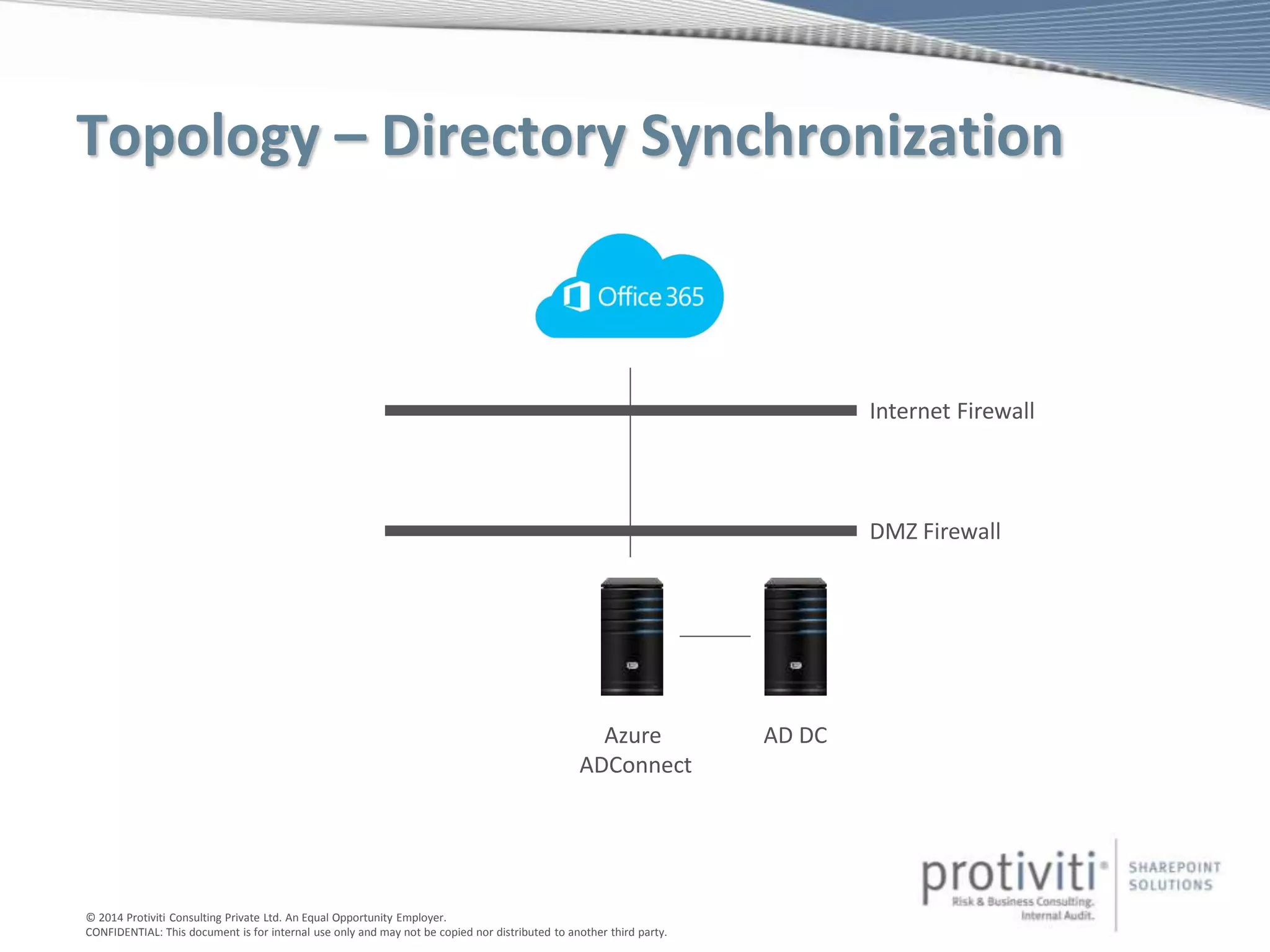
Topology – Directory Synchronization
AD DCAzure
ADConnect
DMZ Firewall
Internet Firewall
© 2014 Protiviti Consulting Private Ltd. An Equal Opportunity Employer.
CONFIDENTIAL: This document is for internal use only and may not be copied nor distributed to another third party.
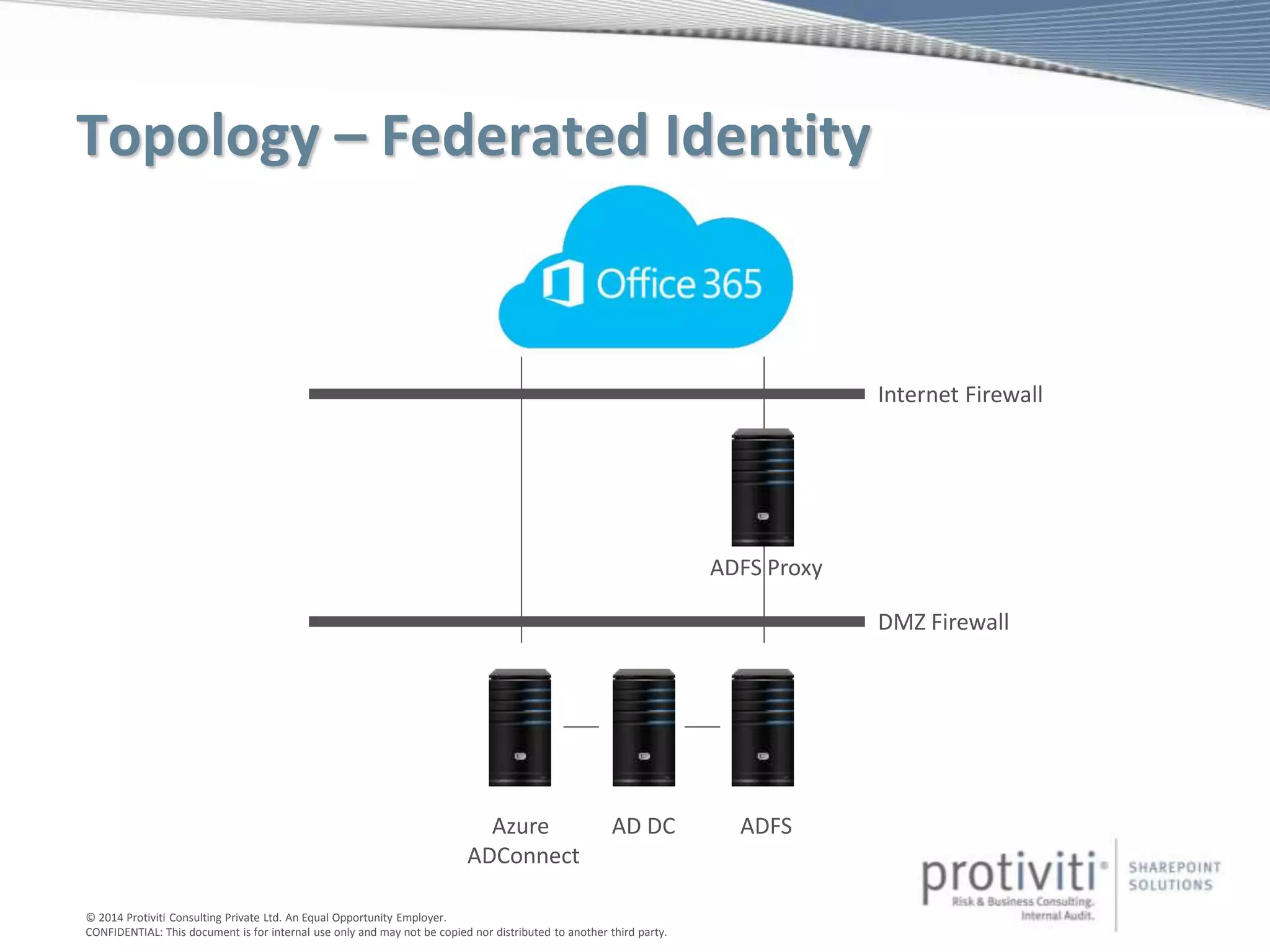
Topology – Federated Identity
AD DCAzure
ADConnect
DMZ Firewall
Internet Firewall
ADFS
ADFS Proxy
© 2014 Protiviti Consulting Private Ltd. An Equal Opportunity Employer.
CONFIDENTIAL: This document is for internal use only and may not be copied nor distributed to another third party.
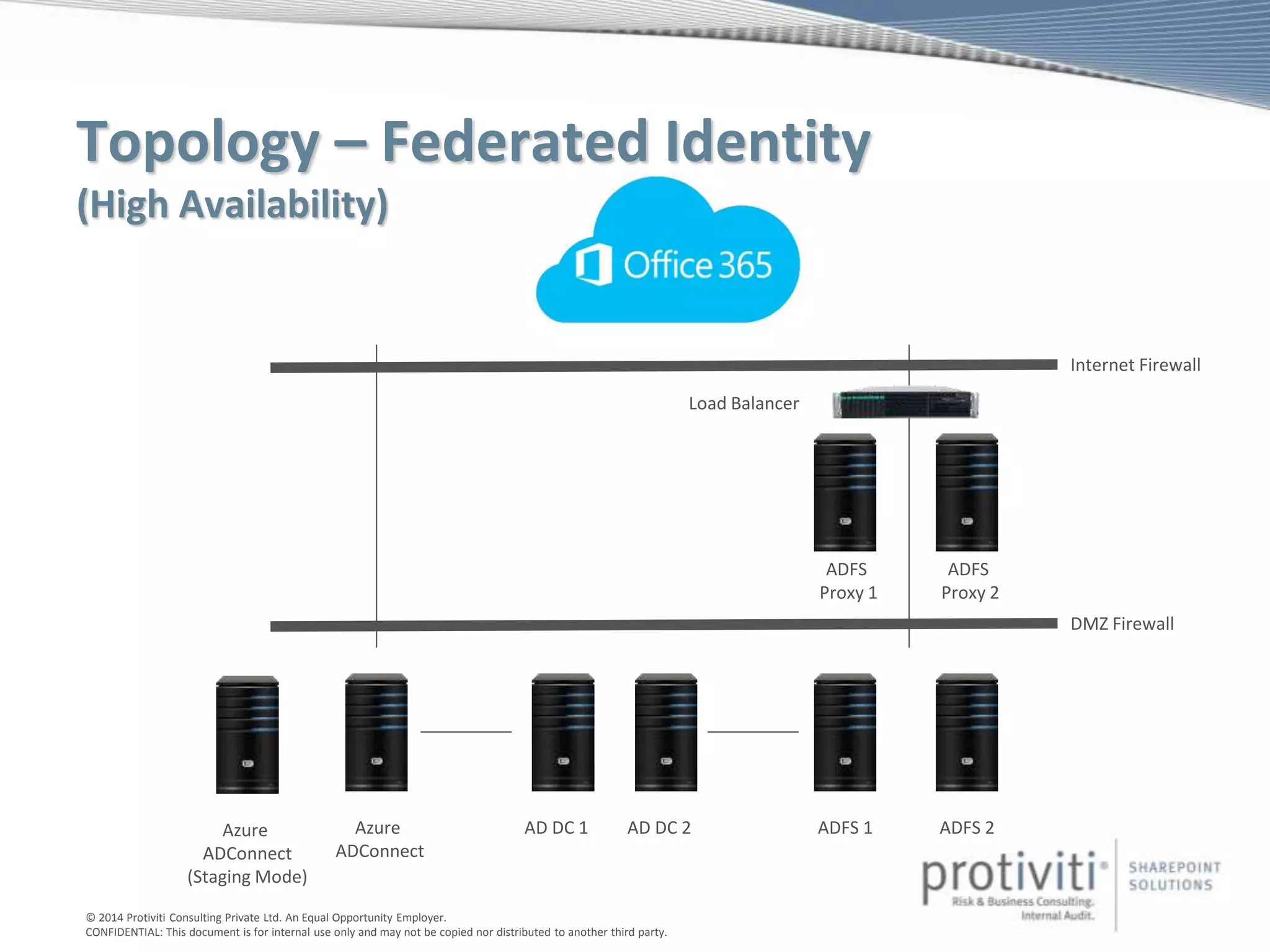
Topology – Federated Identity
(High Availability)
AD DC 1Azure
ADConnect
DMZ Firewall
Internet Firewall
Azure
ADConnect
(Staging Mode)
ADFS 1
ADFS
Proxy 1
ADFS
Proxy 2
ADFS 2AD DC 2
Load Balancer
© 2014 Protiviti Consulting Private Ltd. An Equal Opportunity Employer.
CONFIDENTIAL: This document is for internal use only and may not be copied nor distributed to another third party.
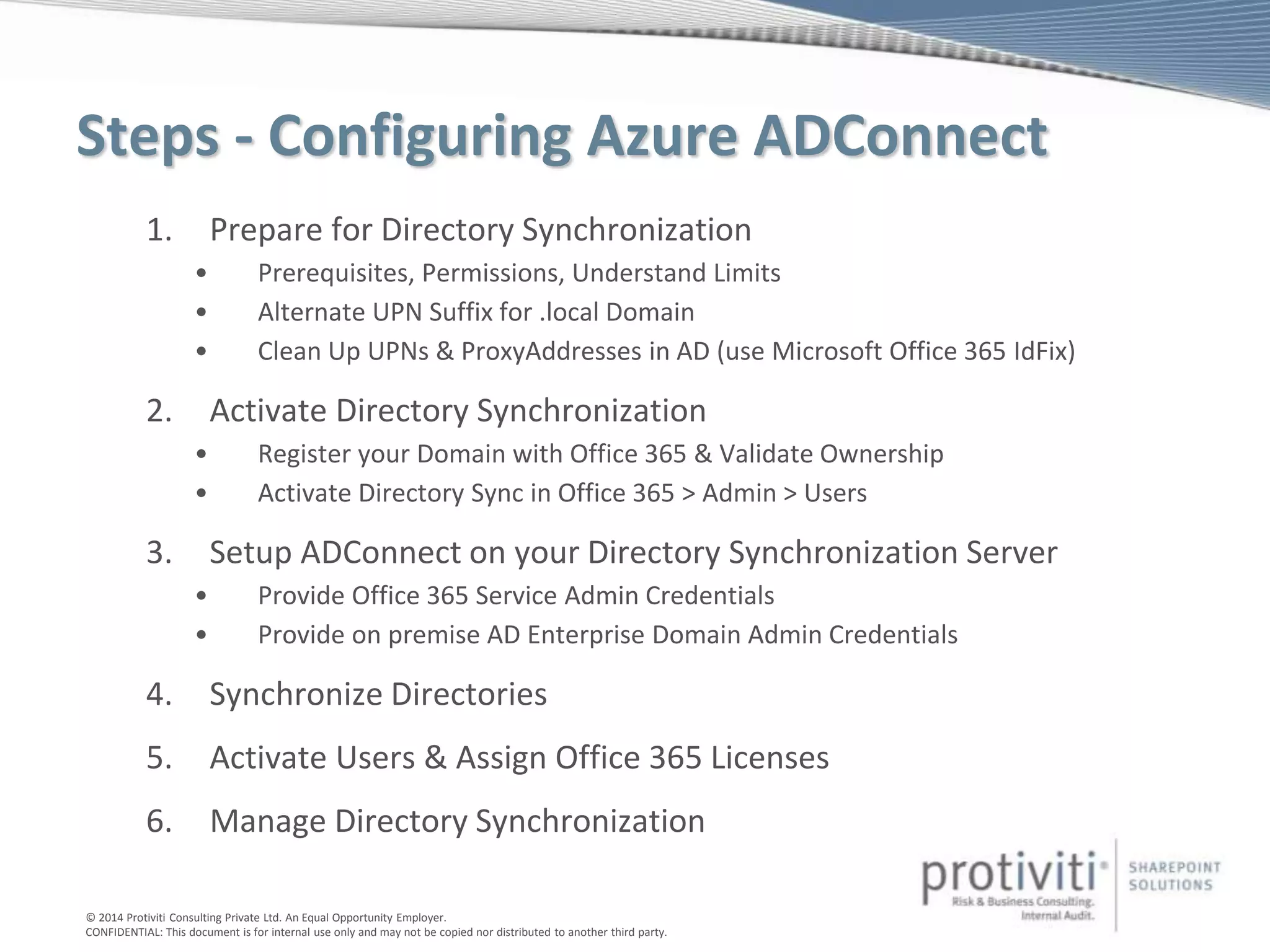
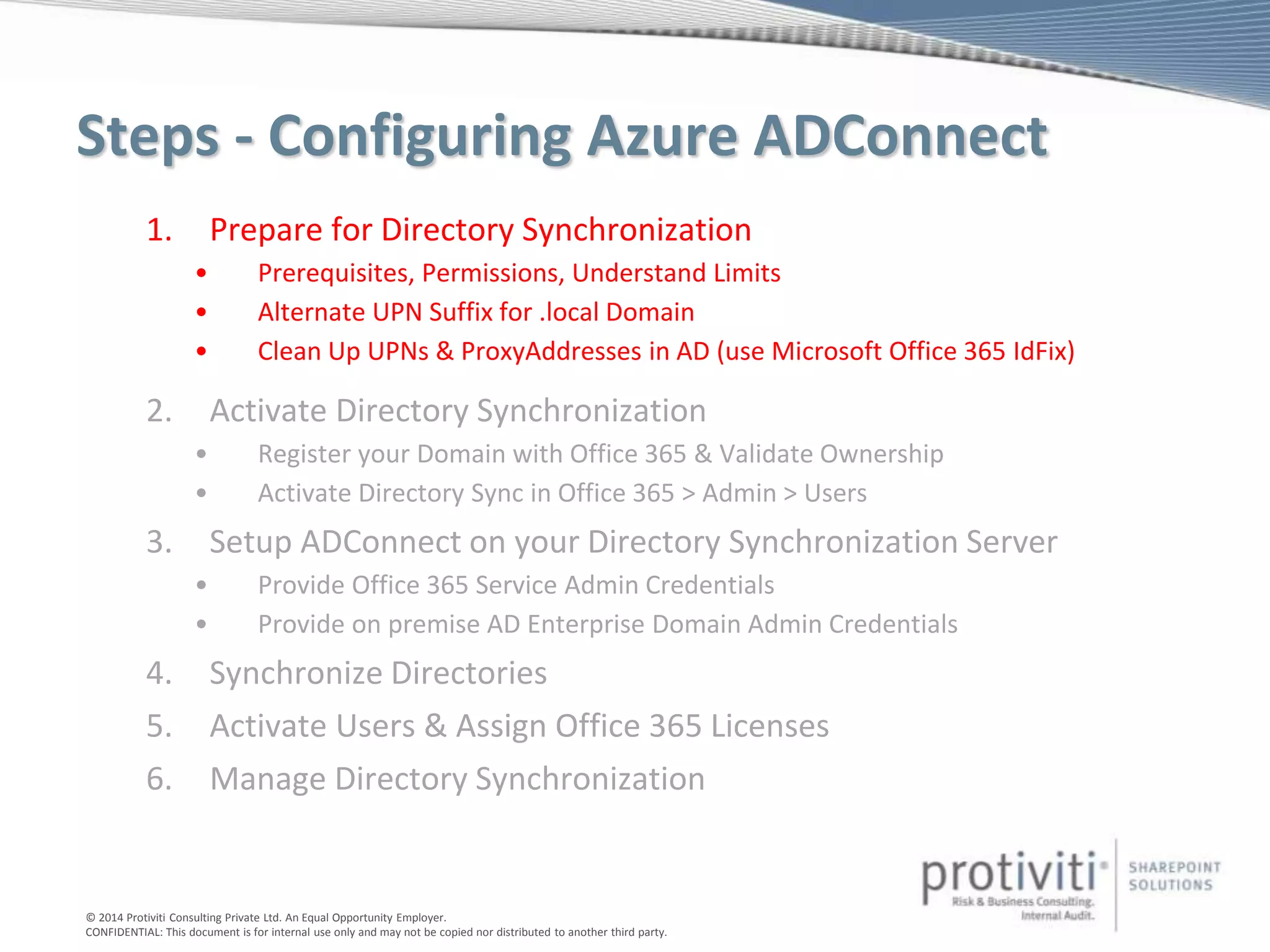
Steps - Configuring Azure ADConnect
1. Prepare for Directory Synchronization
• Prerequisites, Permissions, Understand Limits
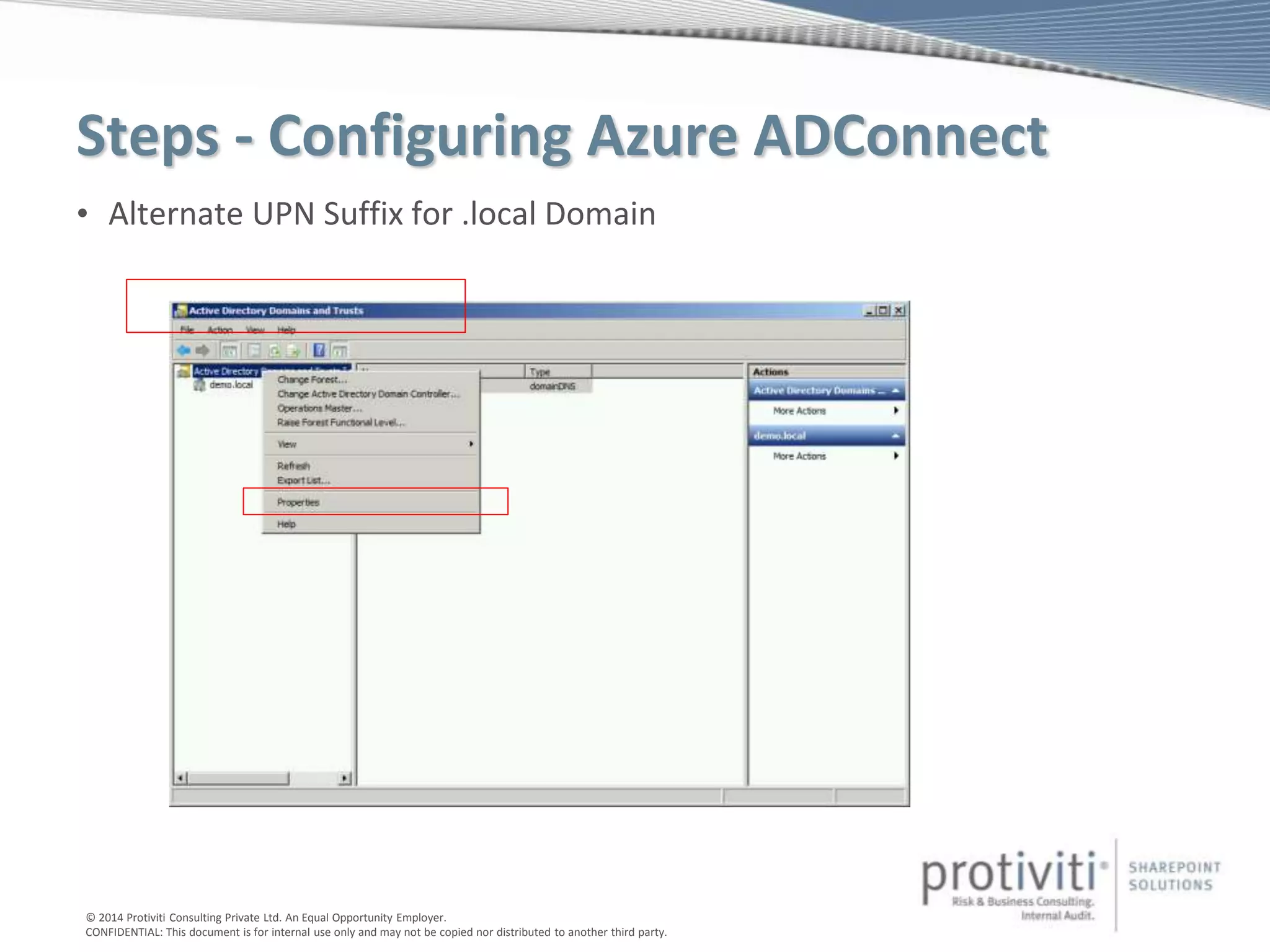
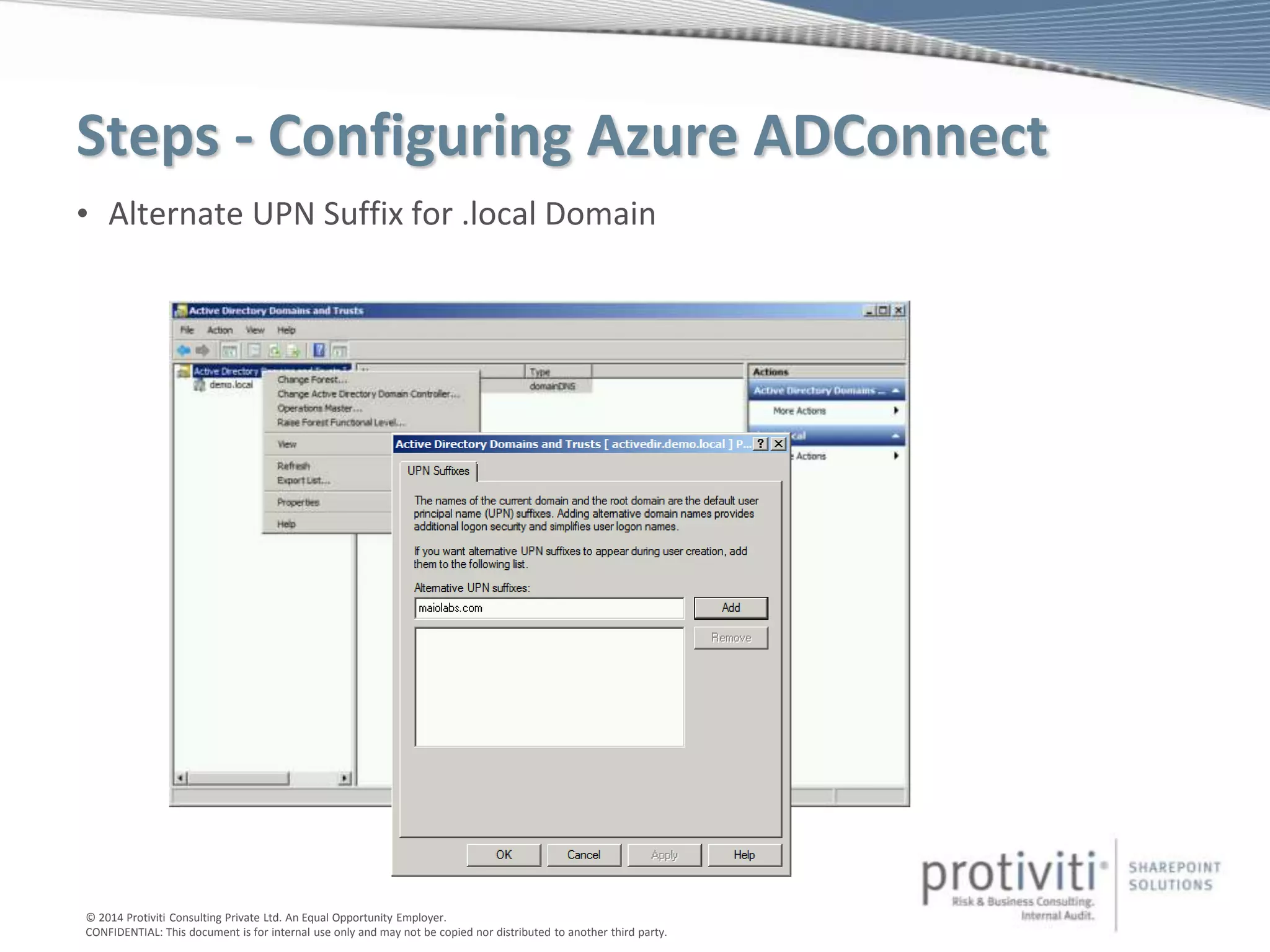
• Alternate UPN Suffix for .local Domain
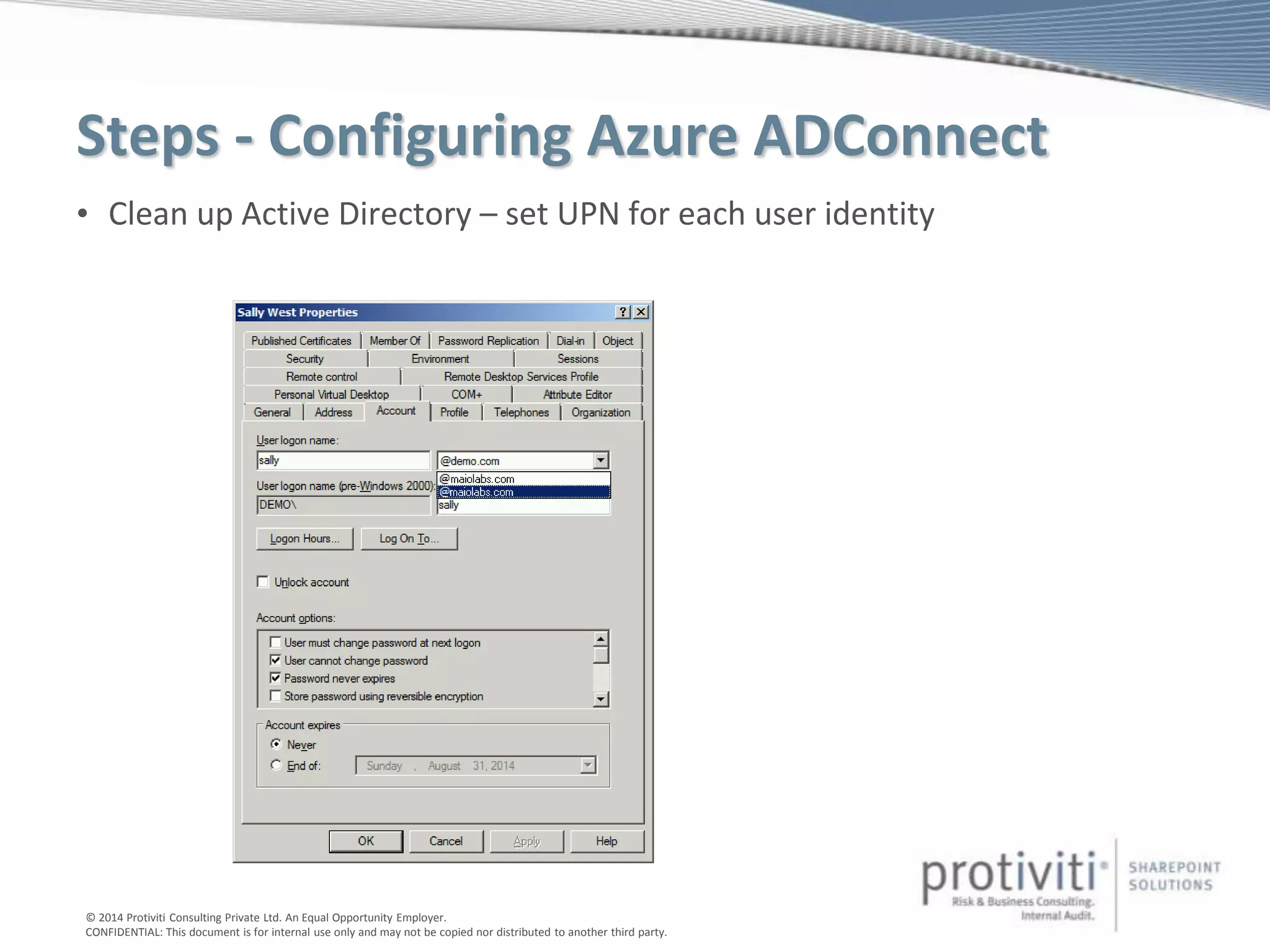
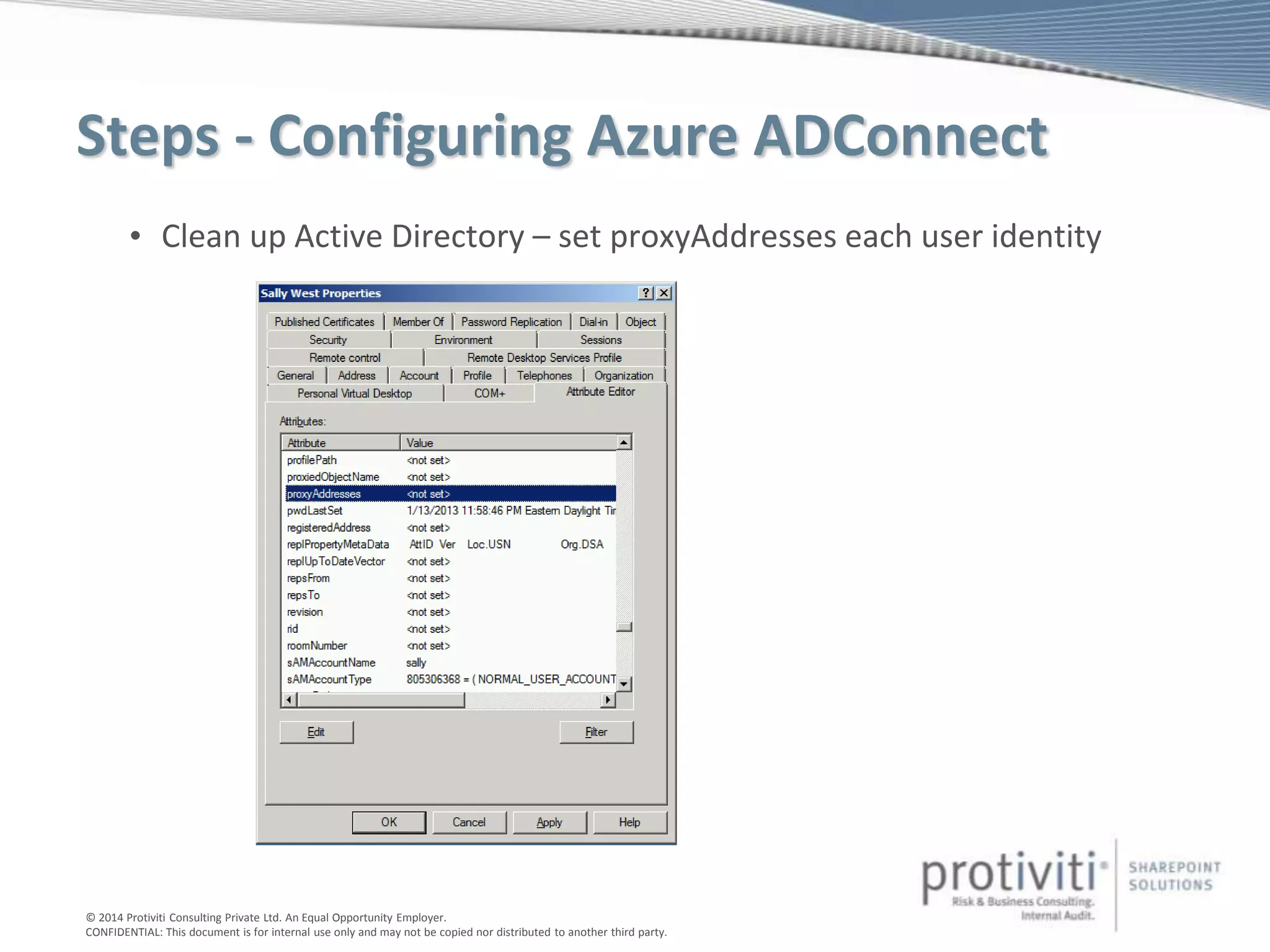
• Clean Up UPNs & ProxyAddresses in AD (use Microsoft Office 365 IdFix)
2. Activate Directory Synchronization
• Register your Domain with Office 365 & Validate Ownership
• Activate Directory Sync in Office 365 > Admin > Users
3. Setup ADConnect on your Directory Synchronization Server
• Provide Office 365 Service Admin Credentials
• Provide on premise AD Enterprise Domain Admin Credentials
4. Synchronize Directories
5. Activate Users & Assign Office 365 Licenses
6. Manage Directory Synchronization
© 2014 Protiviti Consulting Private Ltd. An Equal Opportunity Employer.
CONFIDENTIAL: This document is for internal use only and may not be copied nor distributed to another third party.
DEMONSTRATION
INSTALLING & CONFIGURING AZURE AD CONNECT
© 2014 Protiviti Consulting Private Ltd. An Equal Opportunity Employer.
CONFIDENTIAL: This document is for internal use only and may not be copied nor distributed to another third party.
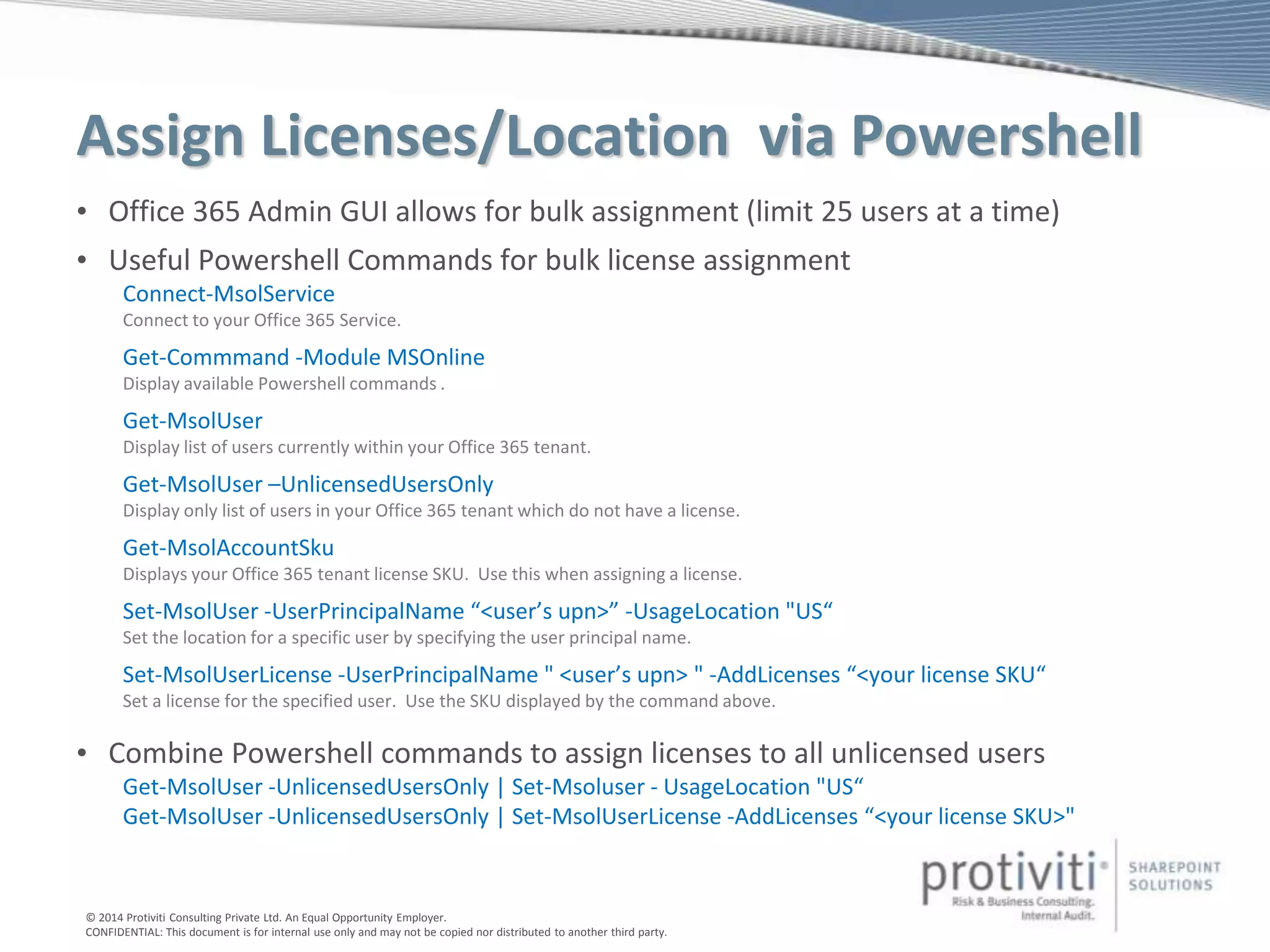
Assign Licenses/Location via Powershell
• Office 365 Admin GUI allows for bulk assignment (limit 25 users at a time)
• Useful Powershell Commands for bulk license assignment
Connect-MsolService
Connect to your Office 365 Service.
Get-Commmand -Module MSOnline
Display available Powershell commands .
Get-MsolUser
Display list of users currently within your Office 365 tenant.
Get-MsolUser –UnlicensedUsersOnly
Display only list of users in your Office 365 tenant which do not have a license.
Get-MsolAccountSku
Displays your Office 365 tenant license SKU. Use this when assigning a license.
Set-MsolUser -UserPrincipalName “<user’s upn>” -UsageLocation "US“
Set the location for a specific user by specifying the user principal name.
Set-MsolUserLicense -UserPrincipalName " <user’s upn> " -AddLicenses “<your license SKU“
Set a license for the specified user. Use the SKU displayed by the command above.
• Combine Powershell commands to assign licenses to all unlicensed users
Get-MsolUser -UnlicensedUsersOnly | Set-Msoluser - UsageLocation "US“
Get-MsolUser -UnlicensedUsersOnly | Set-MsolUserLicense -AddLicenses “<your license SKU>"
© 2014 Protiviti Consulting Private Ltd. An Equal Opportunity Employer.
CONFIDENTIAL: This document is for internal use only and may not be copied nor distributed to another third party.
DEMONSTRATION
ACTIVATING USERS IN OFFICE 365 WITH POWERSHELL
© 2014 Protiviti Consulting Private Ltd. An Equal Opportunity Employer.
CONFIDENTIAL: This document is for internal use only and may not be copied nor distributed to another third party.
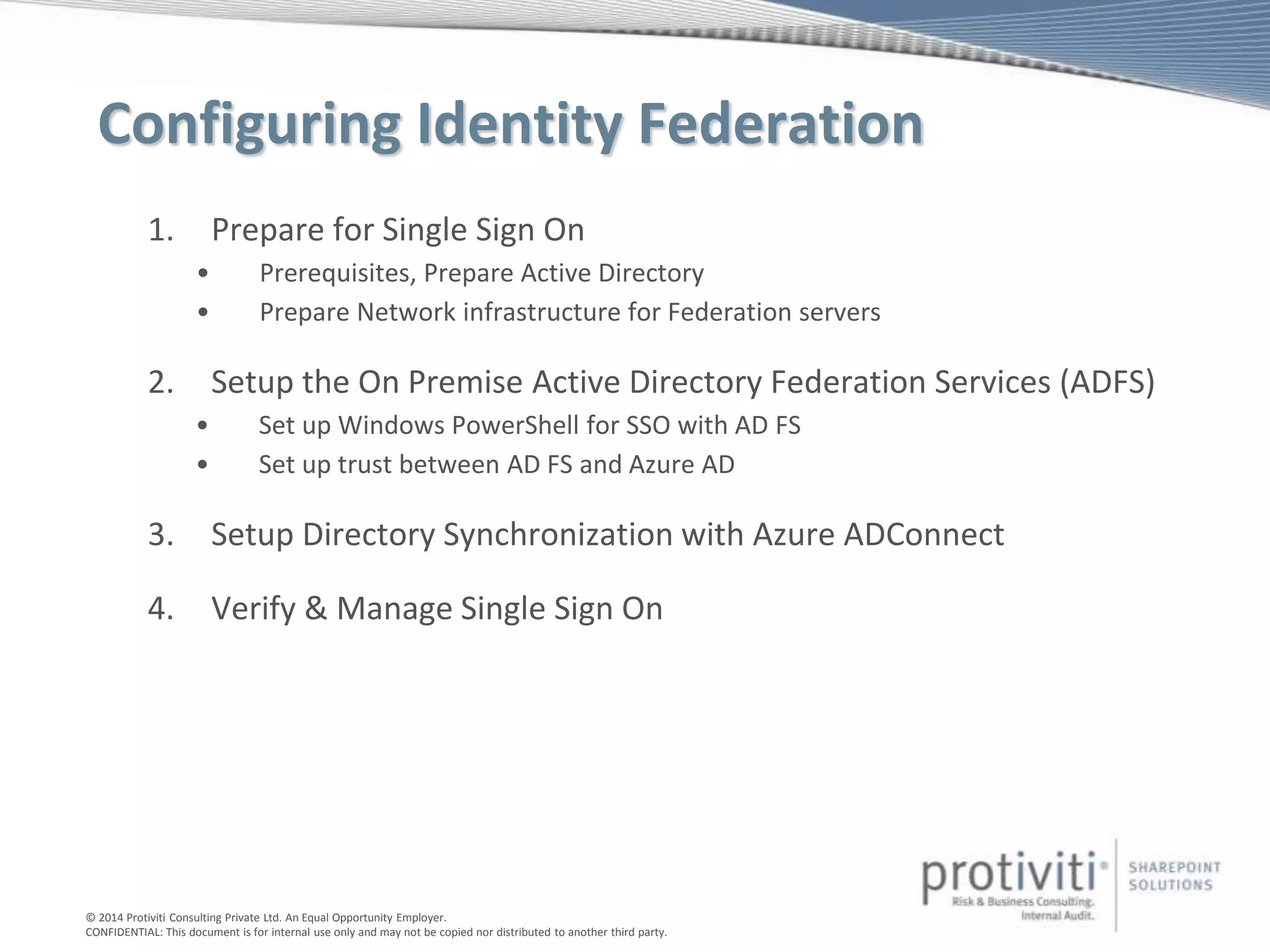
Configuring Identity Federation
1. Prepare for Single Sign On
• Prerequisites, Prepare Active Directory
• Prepare Network infrastructure for Federation servers
2. Setup the On Premise Active Directory Federation Services (ADFS)
• Set up Windows PowerShell for SSO with AD FS
• Set up trust between AD FS and Azure AD
3. Setup Directory Synchronization with Azure ADConnect
4. Verify & Manage Single Sign On
© 2014 Protiviti Consulting Private Ltd. An Equal Opportunity Employer.
CONFIDENTIAL: This document is for internal use only and may not be copied nor distributed to another third party.
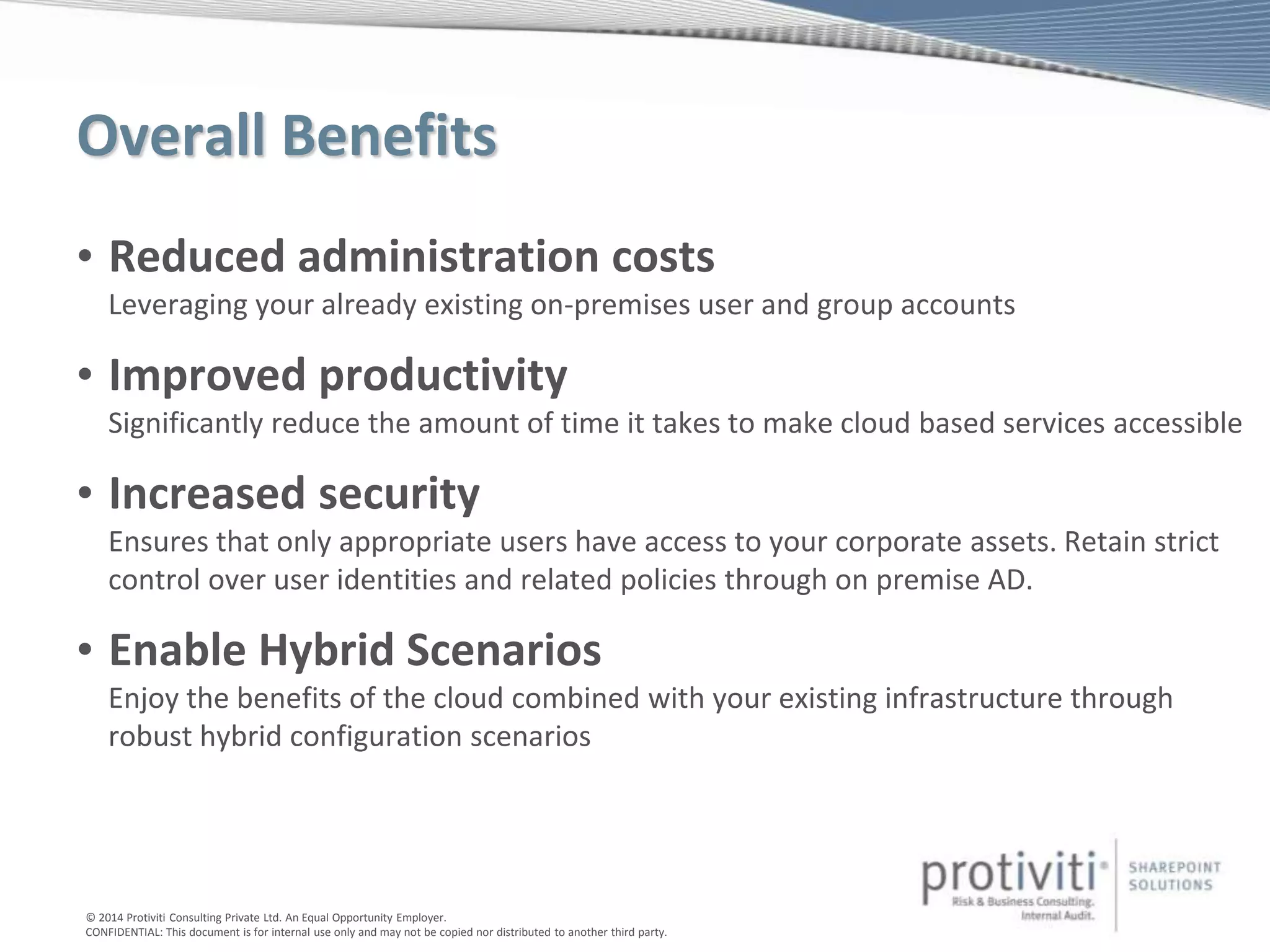
Overall Benefits
• Reduced administration costs
Leveraging your already existing on-premises user and group accounts
• Improved productivity
Significantly reduce the amount of time it takes to make cloud based services accessible
• Increased security
Ensures that only appropriate users have access to your corporate assets. Retain strict
control over user identities and related policies through on premise AD.
• Enable Hybrid Scenarios
Enjoy the benefits of the cloud combined with your existing infrastructure through
robust hybrid configuration scenarios
© 2014 Protiviti Consulting Private Ltd. An Equal Opportunity Employer.
CONFIDENTIAL: This document is for internal use only and may not be copied nor distributed to another third party.
Step by Step Procedures
Please see 2 blog posts:
• Part 1: http://sharepoint.protiviti.com/blog/Lists/Posts/Post.aspx?ID=142
• Part 2: http://sharepoint.protiviti.com/blog/Lists/Posts/Post.aspx?ID=165
This deck will be posted to my blog: www.trustsharepoint.com
*Note: these posts refer to DirSync in several cases, but the activities for cleaning up AD and preparing for
Identity Synchronization or Identity Federation are still applicable with Azure AD Connect.
Antonio Maio
Protiviti - Senior SharePoint Architect & Senior Manager
Microsoft SharePoint Server MVP
Thank You – Questions & Answer
Email: Antonio.maio@protiviti.com
Blog: www.trustsharepoint.com
Slide share: http://www.slideshare.net/AntonioMaio2
Twitter: @AntonioMaio2
© 2014 Protiviti Consulting Private Ltd. An Equal Opportunity Employer.
CONFIDENTIAL: This document is for internal use only and may not be copied nor distributed to another third party.
Appendix
© 2014 Protiviti Consulting Private Ltd. An Equal Opportunity Employer.
CONFIDENTIAL: This document is for internal use only and may not be copied nor distributed to another third party.
Steps - Configuring Azure ADConnect
1. Prepare for Directory Synchronization
• Prerequisites, Permissions, Understand Limits
• Alternate UPN Suffix for .local Domain
• Clean Up UPNs & ProxyAddresses in AD (use Microsoft Office 365 IdFix)
2. Activate Directory Synchronization
• Register your Domain with Office 365 & Validate Ownership
• Activate Directory Sync in Office 365 > Admin > Users
3. Setup ADConnect on your Directory Synchronization Server
• Provide Office 365 Service Admin Credentials
• Provide on premise AD Enterprise Domain Admin Credentials
4. Synchronize Directories
5. Activate Users & Assign Office 365 Licenses
6. Manage Directory Synchronization
© 2014 Protiviti Consulting Private Ltd. An Equal Opportunity Employer.
CONFIDENTIAL: This document is for internal use only and may not be copied nor distributed to another third party.
• Alternate UPN Suffix for .local Domain
Steps - Configuring Azure ADConnect
© 2014 Protiviti Consulting Private Ltd. An Equal Opportunity Employer.
CONFIDENTIAL: This document is for internal use only and may not be copied nor distributed to another third party.
Steps - Configuring Azure ADConnect
• Alternate UPN Suffix for .local Domain
© 2014 Protiviti Consulting Private Ltd. An Equal Opportunity Employer.
CONFIDENTIAL: This document is for internal use only and may not be copied nor distributed to another third party.
Steps - Configuring Azure ADConnect
• Clean up Active Directory – set UPN for each user identity
© 2014 Protiviti Consulting Private Ltd. An Equal Opportunity Employer.
CONFIDENTIAL: This document is for internal use only and may not be copied nor distributed to another third party.
Steps - Configuring Azure ADConnect
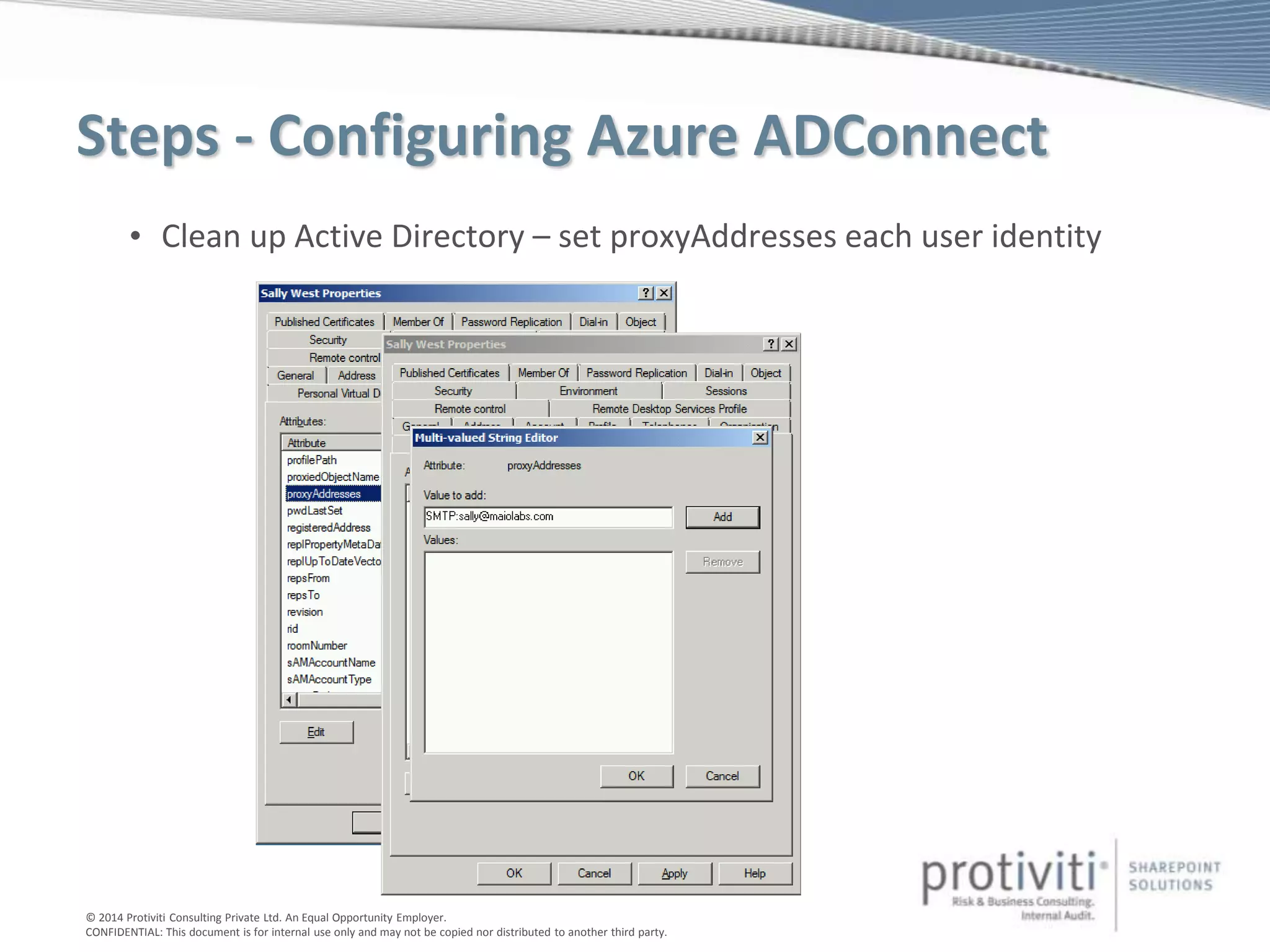
• Clean up Active Directory – set proxyAddresses each user identity
© 2014 Protiviti Consulting Private Ltd. An Equal Opportunity Employer.
CONFIDENTIAL: This document is for internal use only and may not be copied nor distributed to another third party.
Steps - Configuring Azure ADConnect
• Clean up Active Directory – set proxyAddresses each user identity
© 2014 Protiviti Consulting Private Ltd. An Equal Opportunity Employer.
CONFIDENTIAL: This document is for internal use only and may not be copied nor distributed to another third party.
Steps - Configuring Azure ADConnect
1. Prepare for Directory Synchronization
• Prerequisites, Permissions, Understand Limits
• Alternate UPN Suffix for .local Domain
• Clean Up UPNs & ProxyAddresses in AD (use Microsoft Office 365 IdFix)
2. Activate Directory Synchronization
• Register your Domain with Office 365 & Validate Ownership
• Activate Directory Sync in Office 365 > Admin > Users
3. Setup ADConnect on your Directory Synchronization Server
• Provide Office 365 Service Admin Credentials
• Provide on premise AD Enterprise Domain Admin Credentials
4. Synchronize Directories
5. Activate Users & Assign Office 365 Licenses
6. Manage Directory Synchronization
© 2014 Protiviti Consulting Private Ltd. An Equal Opportunity Employer.
CONFIDENTIAL: This document is for internal use only and may not be copied nor distributed to another third party.
Steps - Configuring Azure ADConnect
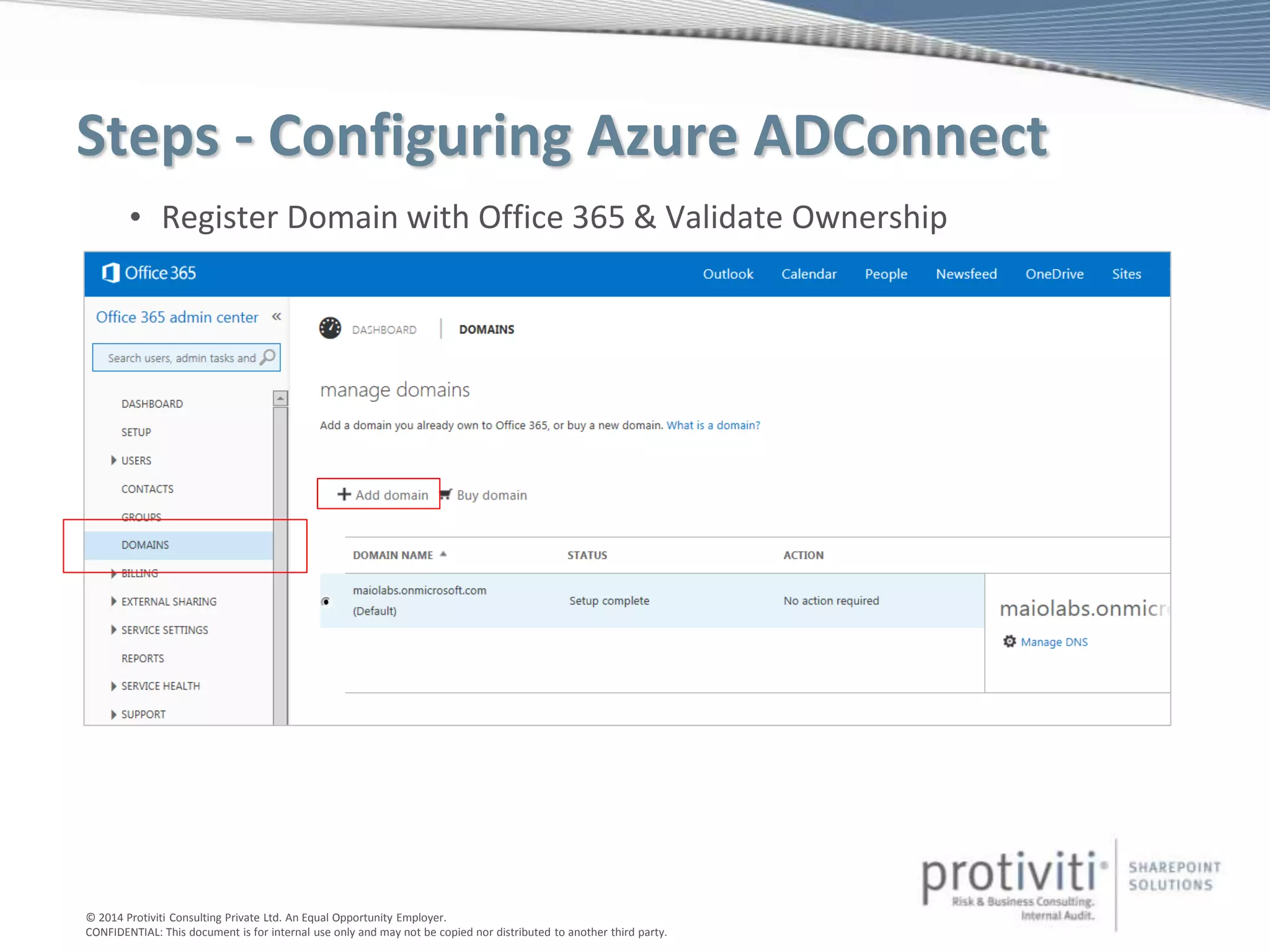
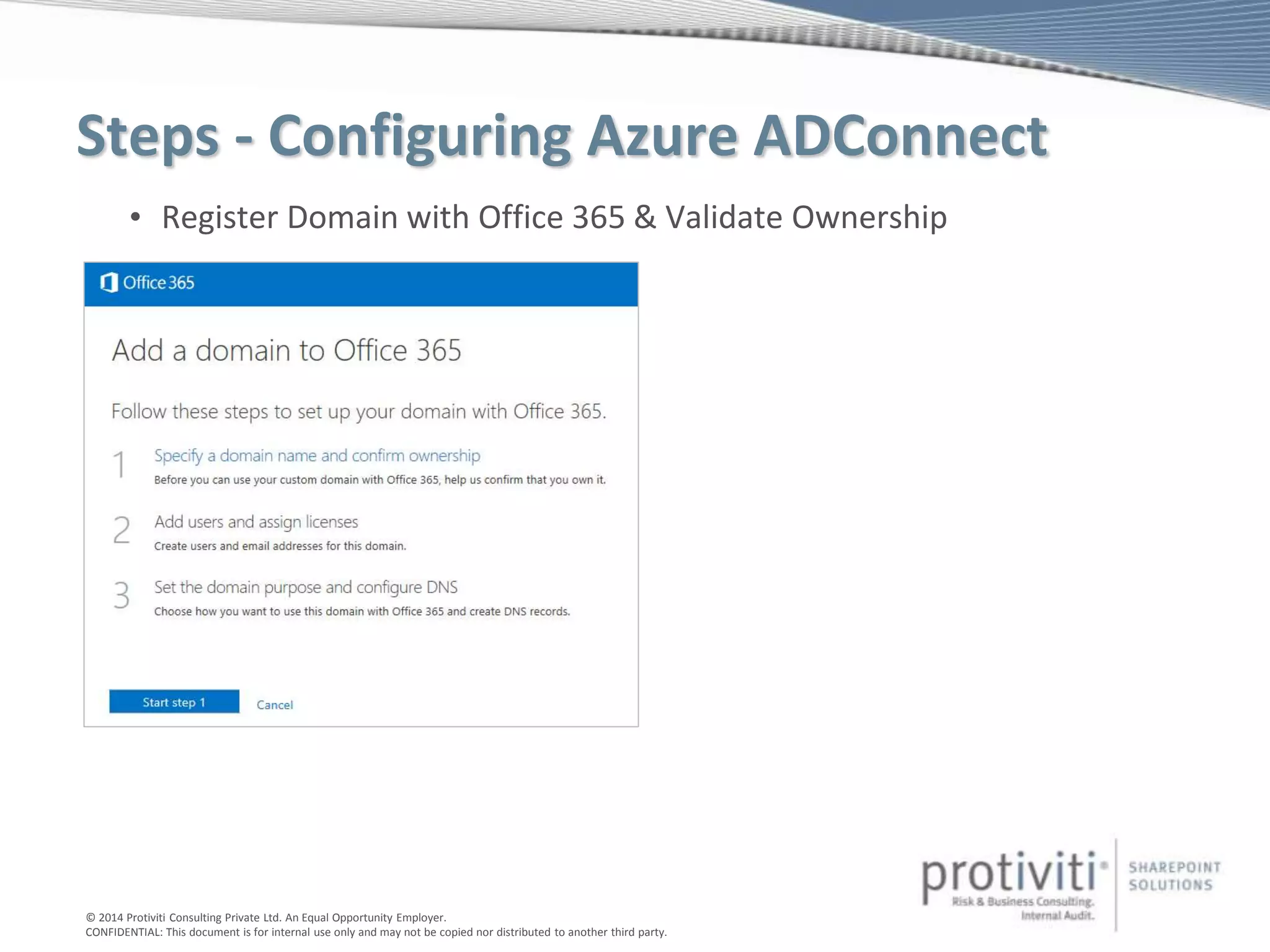
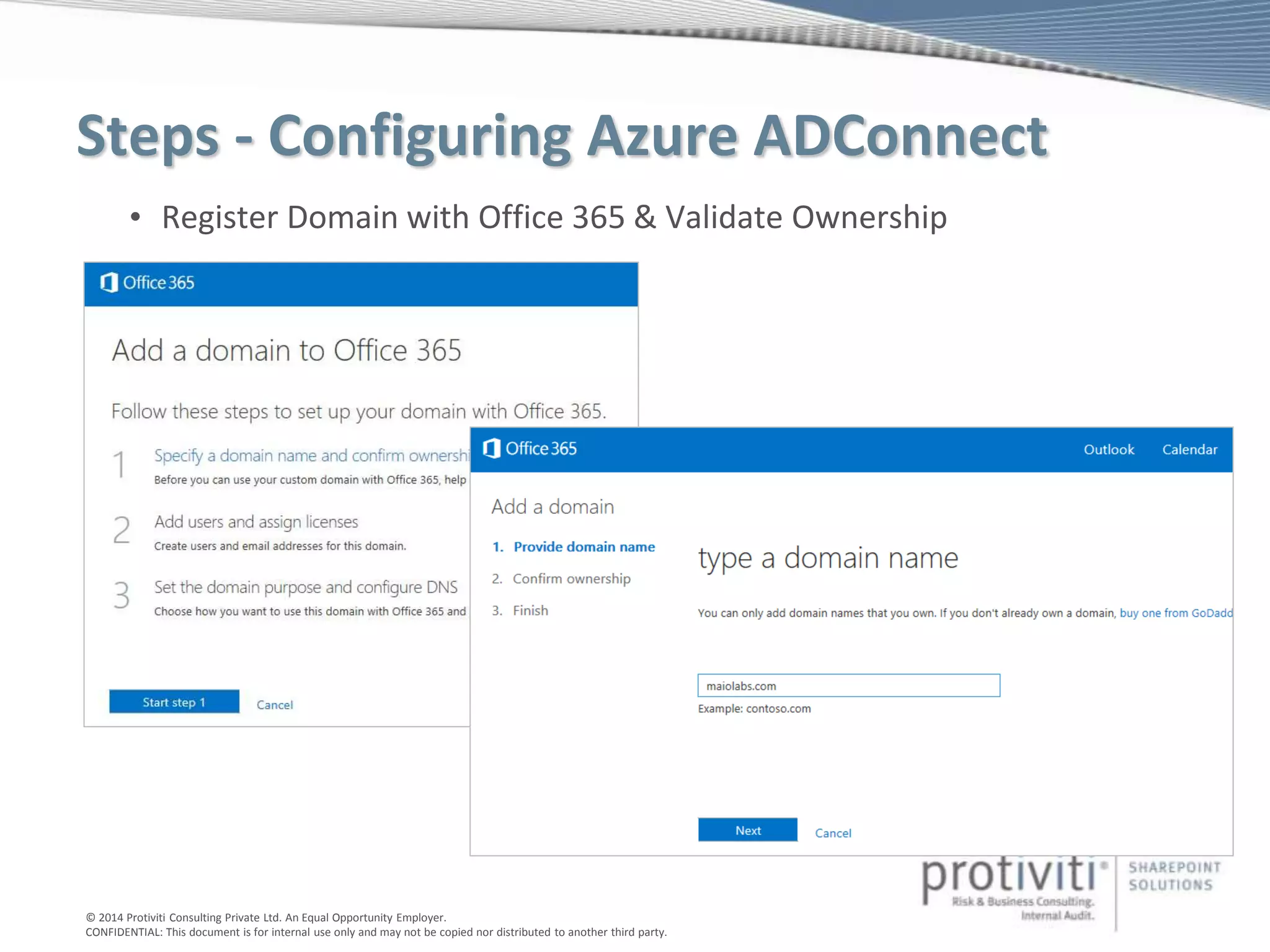
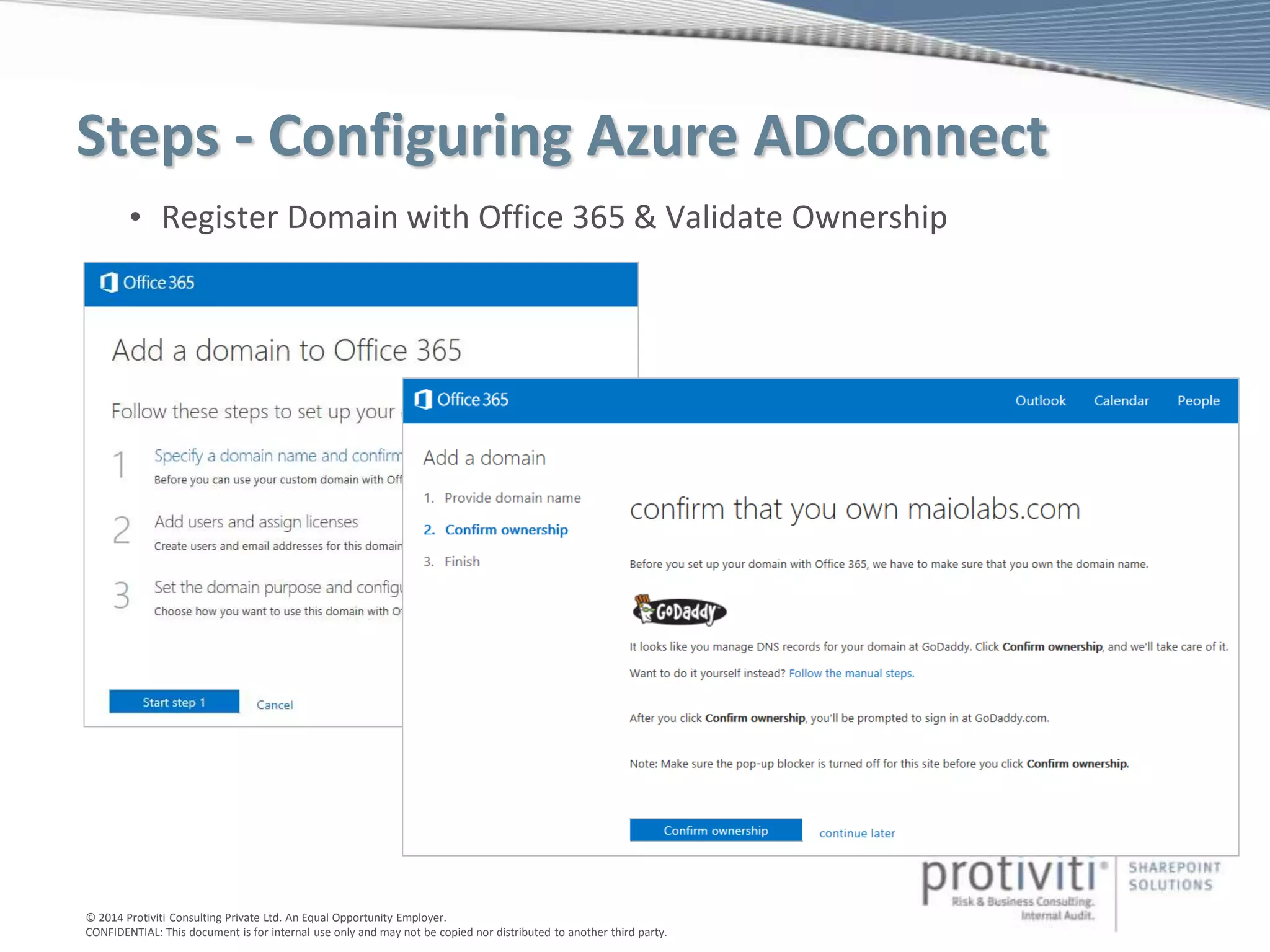
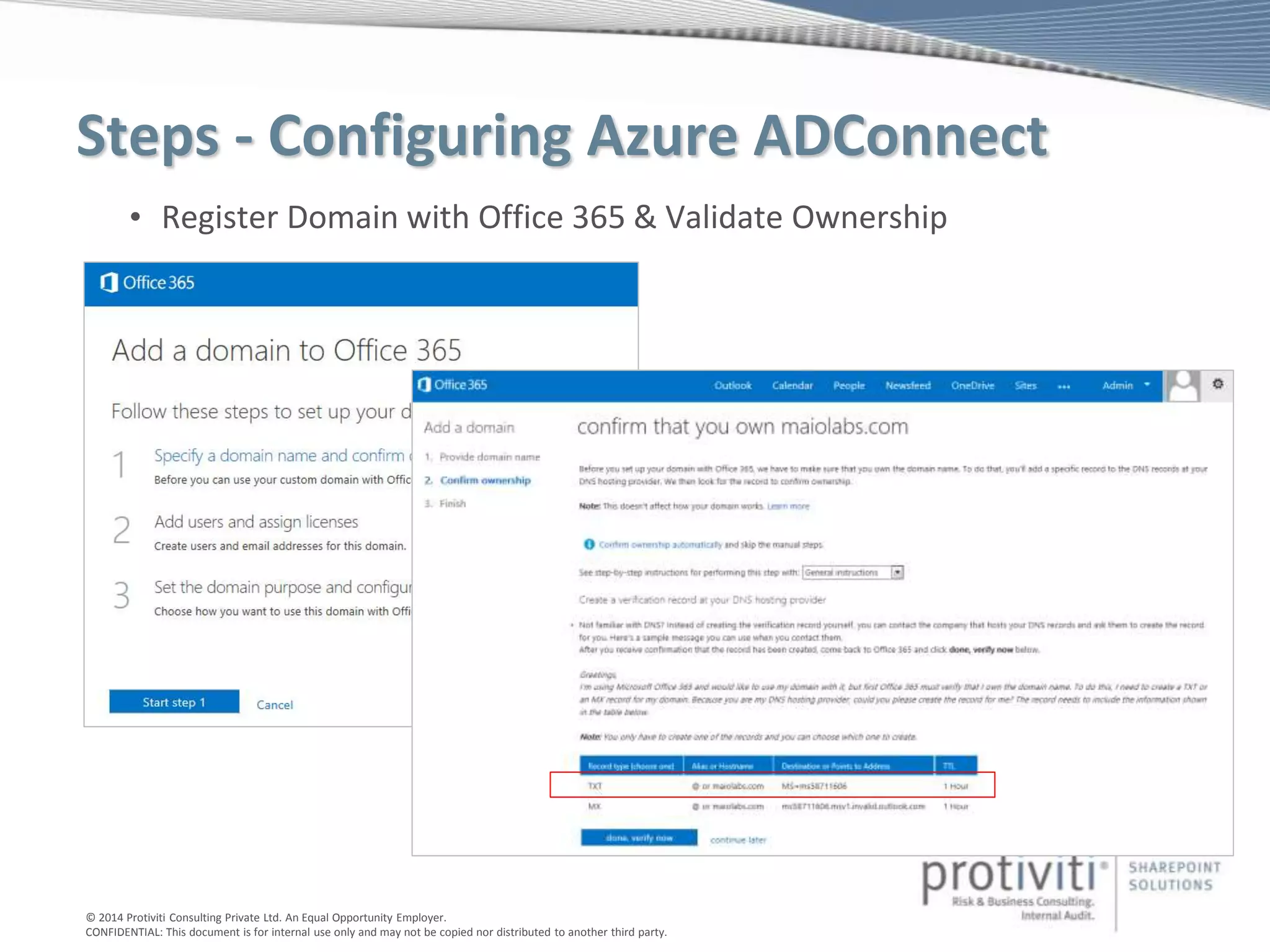
• Register Domain with Office 365 & Validate Ownership
© 2014 Protiviti Consulting Private Ltd. An Equal Opportunity Employer.
CONFIDENTIAL: This document is for internal use only and may not be copied nor distributed to another third party.
Steps - Configuring Azure ADConnect
• Register Domain with Office 365 & Validate Ownership
© 2014 Protiviti Consulting Private Ltd. An Equal Opportunity Employer.
CONFIDENTIAL: This document is for internal use only and may not be copied nor distributed to another third party.
Steps - Configuring Azure ADConnect
• Register Domain with Office 365 & Validate Ownership
© 2014 Protiviti Consulting Private Ltd. An Equal Opportunity Employer.
CONFIDENTIAL: This document is for internal use only and may not be copied nor distributed to another third party.
Steps - Configuring Azure ADConnect
• Register Domain with Office 365 & Validate Ownership
© 2014 Protiviti Consulting Private Ltd. An Equal Opportunity Employer.
CONFIDENTIAL: This document is for internal use only and may not be copied nor distributed to another third party.
Steps - Configuring Azure ADConnect
• Register Domain with Office 365 & Validate Ownership
© 2014 Protiviti Consulting Private Ltd. An Equal Opportunity Employer.
CONFIDENTIAL: This document is for internal use only and may not be copied nor distributed to another third party.
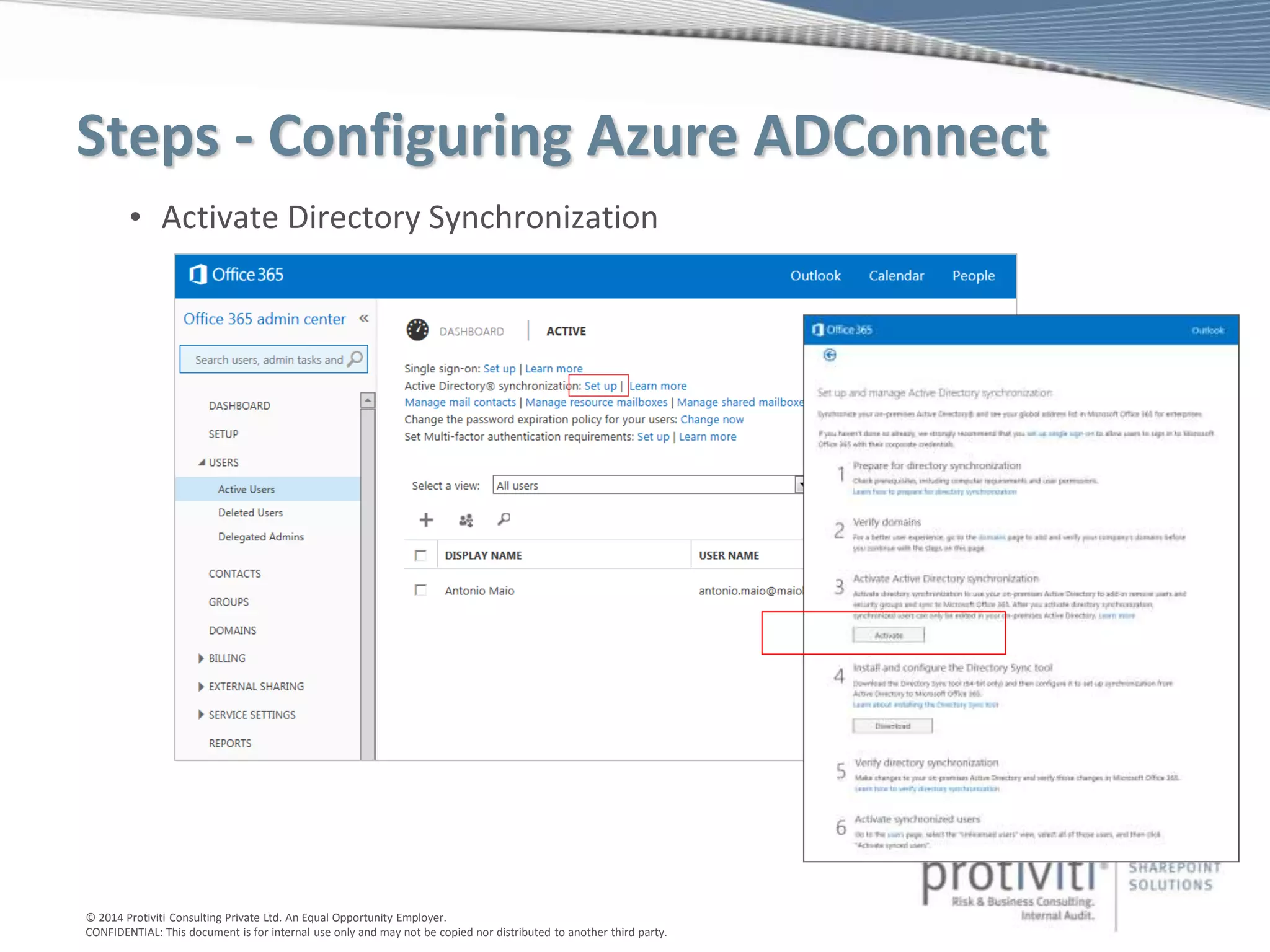
Steps - Configuring Azure ADConnect
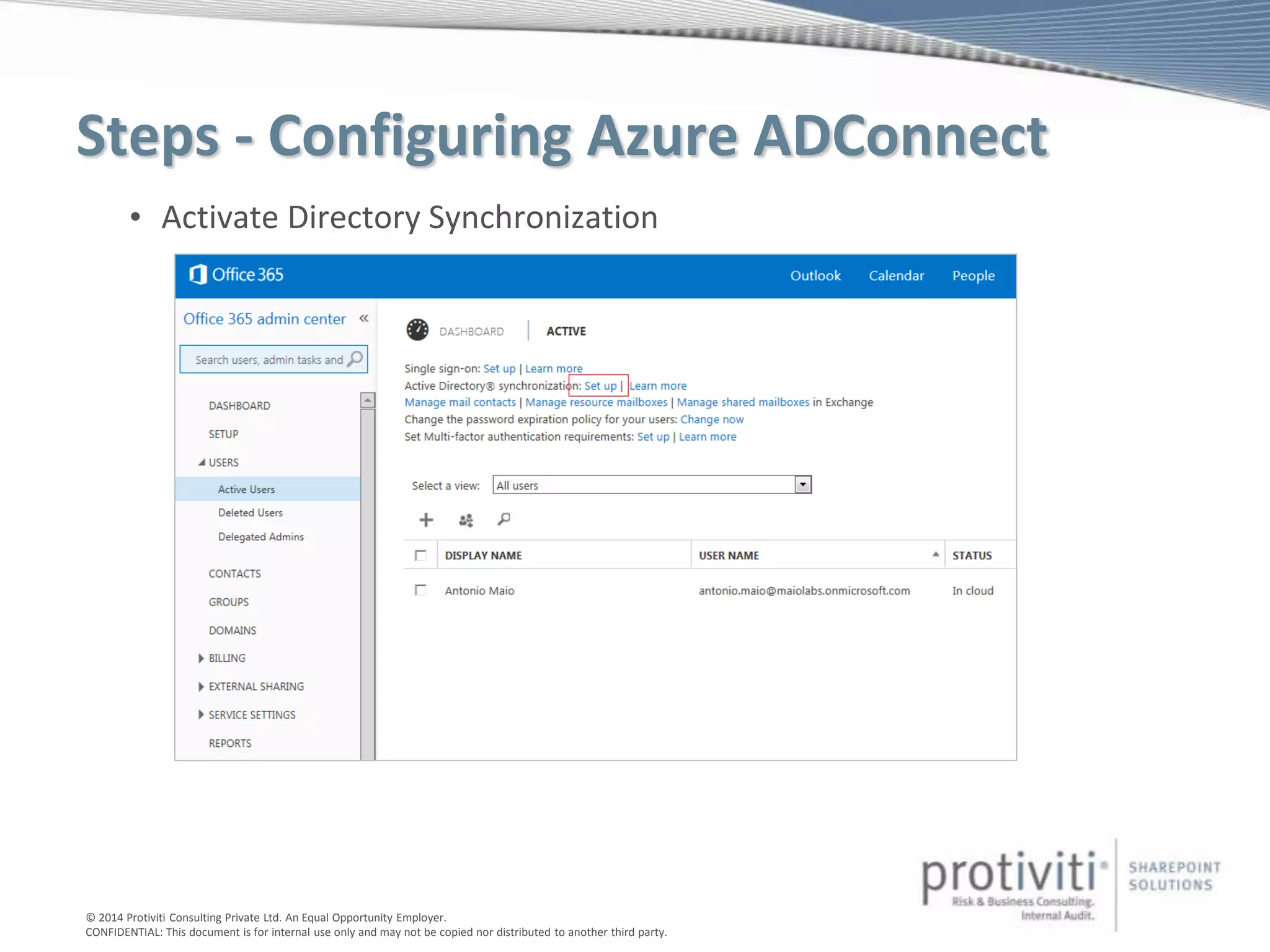
• Activate Directory Synchronization
© 2014 Protiviti Consulting Private Ltd. An Equal Opportunity Employer.
CONFIDENTIAL: This document is for internal use only and may not be copied nor distributed to another third party.
Steps - Configuring Azure ADConnect
• Activate Directory Synchronization
© 2014 Protiviti Consulting Private Ltd. An Equal Opportunity Employer.
CONFIDENTIAL: This document is for internal use only and may not be copied nor distributed to another third party.
Steps - Configuring Azure ADConnect
1. Prepare for Directory Synchronization
• Prerequisites, Permissions, Understand Limits
• Alternate UPN Suffix for .local Domain
• Clean Up UPNs & ProxyAddresses in AD (use Microsoft Office 365 IdFix)
2. Activate Directory Synchronization
• Register your Domain with Office 365 & Validate Ownership
• Activate Directory Sync in Office 365 > Admin > Users
3. Setup ADConnect on your Directory Synchronization Server
• Provide Office 365 Service Admin Credentials
• Provide on premise AD Enterprise Domain Admin Credentials
4. Synchronize Directories
5. Activate Users & Assign Office 365 Licenses
6. Manage Directory Synchronization
© 2014 Protiviti Consulting Private Ltd. An Equal Opportunity Employer.
CONFIDENTIAL: This document is for internal use only and may not be copied nor distributed to another third party.
Steps - Configuring Azure ADConnect
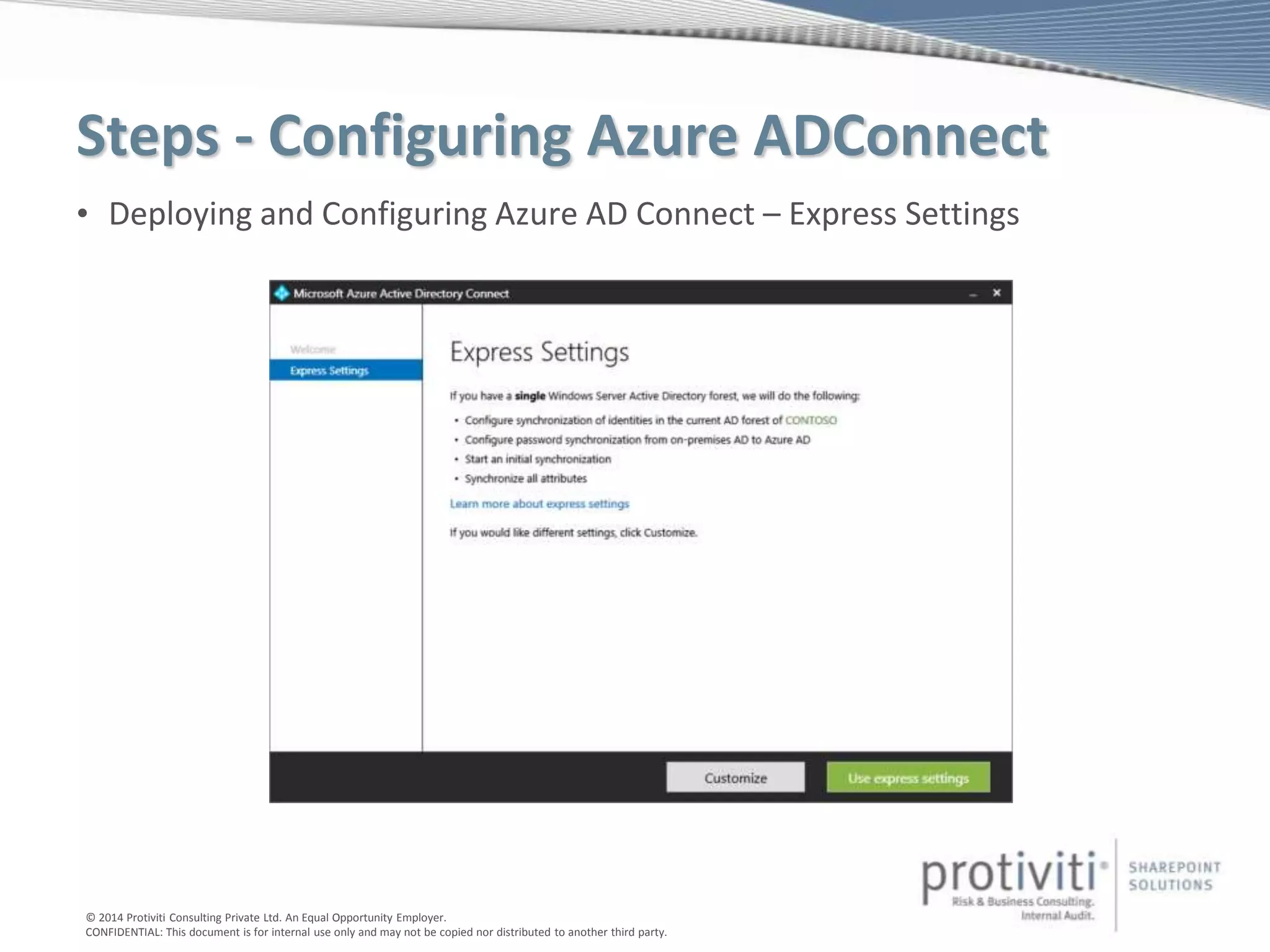
• Deploying and Configuring Azure AD Connect – Express Settings
© 2014 Protiviti Consulting Private Ltd. An Equal Opportunity Employer.
CONFIDENTIAL: This document is for internal use only and may not be copied nor distributed to another third party.
Steps - Configuring Azure ADConnect
1. Prepare for Directory Synchronization
• Prerequisites, Permissions, Understand Limits
• Alternate UPN Suffix for .local Domain
• Clean Up UPNs & ProxyAddresses in AD (use Microsoft Office 365 IdFix)
2. Activate Directory Synchronization
• Register your Domain with Office 365 & Validate Ownership
• Activate Directory Sync in Office 365 > Admin > Users
3. Setup ADConnect on your Directory Synchronization Server
• Provide Office 365 Service Admin Credentials
• Provide on premise AD Enterprise Domain Admin Credentials
4. Synchronize Directories
5. Activate Users & Assign Office 365 Licenses
6. Manage Directory Synchronization
© 2014 Protiviti Consulting Private Ltd. An Equal Opportunity Employer.
CONFIDENTIAL: This document is for internal use only and may not be copied nor distributed to another third party.
Steps - Configuring Azure ADConnect
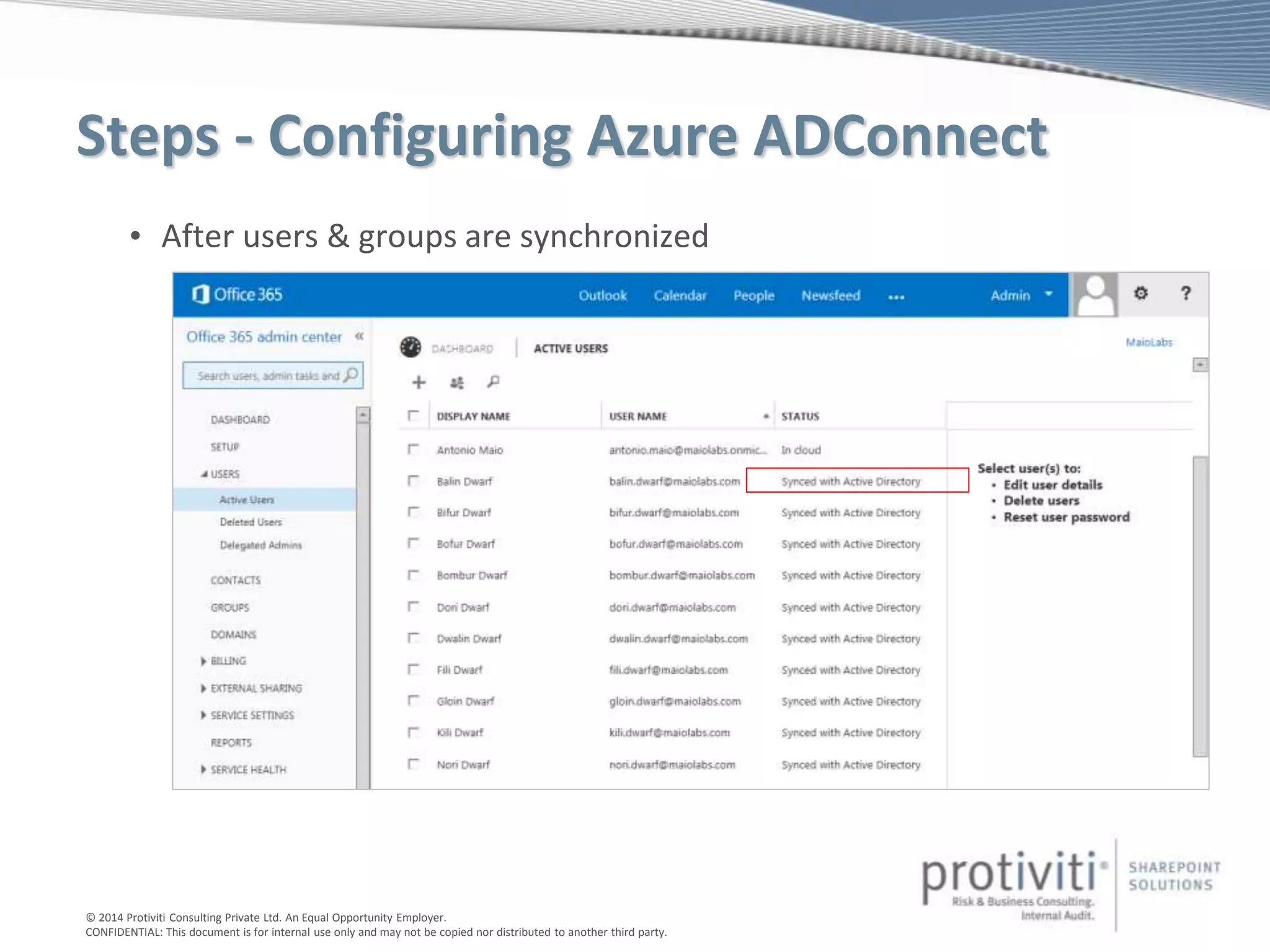
• After users & groups are synchronized
© 2014 Protiviti Consulting Private Ltd. An Equal Opportunity Employer.
CONFIDENTIAL: This document is for internal use only and may not be copied nor distributed to another third party.
Steps - Configuring Azure ADConnect
1. Prepare for Directory Synchronization
• Prerequisites, Permissions, Understand Limits
• Alternate UPN Suffix for .local Domain
• Clean Up UPNs & ProxyAddresses in AD (use Microsoft Office 365 IdFix)
2. Activate Directory Synchronization
• Register your Domain with Office 365 & Validate Ownership
• Activate Directory Sync in Office 365 > Admin > Users
3. Setup ADConnect on your Directory Synchronization Server
• Provide Office 365 Service Admin Credentials
• Provide on premise AD Enterprise Domain Admin Credentials
4. Synchronize Directories
5. Activate Users & Assign Office 365 Licenses
6. Manage Directory Synchronization

Hybrid Identity Management with SharePoint and Office 365 - Antonio Maio

  • 1.
    Antonio Maio Protiviti -Senior SharePoint Architect & Senior Manager Microsoft SharePoint Server MVP Hybrid Identity Management with SharePoint and Office 365 Email: Antonio.maio@protiviti.com Blog: www.trustsharepoint.com Slide share: http://www.slideshare.net/AntonioMaio2 Twitter: @AntonioMaio2
  • 2.
    © 2014 ProtivitiConsulting Private Ltd. An Equal Opportunity Employer. CONFIDENTIAL: This document is for internal use only and may not be copied nor distributed to another third party. About Protiviti INDIA (3) Protiviti (www.protiviti.com) is a global consulting firm that helps companies solve problems in finance, technology, operations, governance, risk and internal audit. Through our network of more than 70 offices in over 20 countries, we have served more than 35 percent of FORTUNE® 1000 and Global 500 companies. We also work with smaller, growing companies, including those looking to go public, as well as with government agencies. Protiviti is a wholly owned subsidiary of Robert Half International Inc. (NYSE: RHI). Founded in 1948, Robert Half International is a member of the S&P 500 index. • 2,500+ professionals • 1,000+ clients • 70+ offices • Over 20 countries in the Americas, Europe and Asia-Pacific Protiviti is one of the fastest growing consulting firms worldwide. Our revenues have increased from US $15 million in 2002, to US $423.8 million in 2011.
  • 3.
    © 2014 ProtivitiConsulting Private Ltd. An Equal Opportunity Employer. CONFIDENTIAL: This document is for internal use only and may not be copied nor distributed to another third party. Securing Identities and the Hybrid Cloud
  • 4.
    © 2014 ProtivitiConsulting Private Ltd. An Equal Opportunity Employer. CONFIDENTIAL: This document is for internal use only and may not be copied nor distributed to another third party. Why Hybrid?
  • 5.
    © 2014 ProtivitiConsulting Private Ltd. An Equal Opportunity Employer. CONFIDENTIAL: This document is for internal use only and may not be copied nor distributed to another third party. Identity Models for Office 365 Cloud Identity Synchronized Identity Federated Identity
  • 6.
    © 2014 ProtivitiConsulting Private Ltd. An Equal Opportunity Employer. CONFIDENTIAL: This document is for internal use only and may not be copied nor distributed to another third party. Cloud Identity Model • No on-premises directory • Very small number of users • On-premises directory is undergoing significant restructuring • Trialing Office 365
  • 7.
    © 2014 ProtivitiConsulting Private Ltd. An Equal Opportunity Employer. CONFIDENTIAL: This document is for internal use only and may not be copied nor distributed to another third party. Synchronized Identity Model
  • 8.
    © 2014 ProtivitiConsulting Private Ltd. An Equal Opportunity Employer. CONFIDENTIAL: This document is for internal use only and may not be copied nor distributed to another third party. Federated Identity Model
  • 9.
    © 2014 ProtivitiConsulting Private Ltd. An Equal Opportunity Employer. CONFIDENTIAL: This document is for internal use only and may not be copied nor distributed to another third party. Selecting an Identity Model I need to… Synchronized Identity Federated Identity (Directory Sync with Single Sign-On) Sync new user, contact, groups created in on-premises AD to cloud automatically Sync incremental updates to existing accounts in on-premises AD to cloud automatically Set up my tenant for Office 365 hybrid scenarios Limited Support Enable users to sign in to cloud services using on-premises password Control password policies from on-premises Active Directory Enable cloud-based multi-factor authentication solutions Enable on-premises multi-factor authentication solutions Ensure user authentications occur in on-premises Active Directory Implement single sign-on using corporate credentials Customize the user Sign-In page * Limit access to cloud services based on the location, client type or Exchange endpoint of the client ? * Available in Basic or Premium Edition of Azure Active Directory. See Chris Goosen’s Post for details on how to brand your Office 365 sign in page.: http://blog.enowsoftware.com/solutions- engine/bid/187358/Add-Custom-Branding-to-Your-Office-365-Sign-in-Page .
  • 10.
    © 2014 ProtivitiConsulting Private Ltd. An Equal Opportunity Employer. CONFIDENTIAL: This document is for internal use only and may not be copied nor distributed to another third party. History Lesson • DirSync • Azure Active Directory Sync (AAD Sync) – Introduced Multi-Forest Support • Azure ADConnect (GA June 24, 2015) – Replaces both DirSync and AADSync
  • 11.
    © 2014 ProtivitiConsulting Private Ltd. An Equal Opportunity Employer. CONFIDENTIAL: This document is for internal use only and may not be copied nor distributed to another third party. Azure ADConnect • New deployment & configuration tool for quickly connecting on premise identities to the cloud • Express Settings: Easily connect a single AD forest (in minutes) • More options: Specify a group or OU to sync only specific identities • Built in Upgrade: Easily upgrade existing DirSync or AAD Sync Available now: http://go.microsoft.com/fwlink/?LinkId=615771 • Includes Azure ADConnect Health • Monitors ADFS Servers (health, performance, login activity) • Only available for Azure AD Premium Edition
  • 12.
    © 2014 ProtivitiConsulting Private Ltd. An Equal Opportunity Employer. CONFIDENTIAL: This document is for internal use only and may not be copied nor distributed to another third party. Azure ADConnect – Configuration Options • Synchronize multiple AD forests • User self-service password reset in the cloud with write-back to on premises AD • Provisioning from the cloud with user write back to on premises AD • Write back of “Groups in Office 365” to on premises distribution groups in a forest with Exchange • Device write back so on-premises access control policies in ADFS can recognize devices registered with Azure AD (includes support for Azure AD Join in Windows 10) • Sync custom AD attributes to your Azure AD tenant - consume by your cloud apps • Configure password sync or federation – selecting federation provides a simplified ADFS deployment • Other options…
  • 13.
    © 2014 ProtivitiConsulting Private Ltd. An Equal Opportunity Employer. CONFIDENTIAL: This document is for internal use only and may not be copied nor distributed to another third party. Azure ADConnect Health • Email Notifications for Critical Alerts – Events, configuration information, transactions, performance data • Graphs – Usage Insights – Ex. Login Activity (number of successful logins, failed logins, trends) – Available when enable auditing on your ADFS servers – Based on audits generated when user's login and tokens are generated for applications • Performance monitoring across multiple servers – token request counters, processor, memory, latency
  • 14.
    © 2014 ProtivitiConsulting Private Ltd. An Equal Opportunity Employer. CONFIDENTIAL: This document is for internal use only and may not be copied nor distributed to another third party. Topology – Directory Synchronization AD DCAzure ADConnect DMZ Firewall Internet Firewall
  • 15.
    © 2014 ProtivitiConsulting Private Ltd. An Equal Opportunity Employer. CONFIDENTIAL: This document is for internal use only and may not be copied nor distributed to another third party. Topology – Federated Identity AD DCAzure ADConnect DMZ Firewall Internet Firewall ADFS ADFS Proxy
  • 16.
    © 2014 ProtivitiConsulting Private Ltd. An Equal Opportunity Employer. CONFIDENTIAL: This document is for internal use only and may not be copied nor distributed to another third party. Topology – Federated Identity (High Availability) AD DC 1Azure ADConnect DMZ Firewall Internet Firewall Azure ADConnect (Staging Mode) ADFS 1 ADFS Proxy 1 ADFS Proxy 2 ADFS 2AD DC 2 Load Balancer
  • 17.
    © 2014 ProtivitiConsulting Private Ltd. An Equal Opportunity Employer. CONFIDENTIAL: This document is for internal use only and may not be copied nor distributed to another third party. Steps - Configuring Azure ADConnect 1. Prepare for Directory Synchronization • Prerequisites, Permissions, Understand Limits • Alternate UPN Suffix for .local Domain • Clean Up UPNs & ProxyAddresses in AD (use Microsoft Office 365 IdFix) 2. Activate Directory Synchronization • Register your Domain with Office 365 & Validate Ownership • Activate Directory Sync in Office 365 > Admin > Users 3. Setup ADConnect on your Directory Synchronization Server • Provide Office 365 Service Admin Credentials • Provide on premise AD Enterprise Domain Admin Credentials 4. Synchronize Directories 5. Activate Users & Assign Office 365 Licenses 6. Manage Directory Synchronization
  • 18.
    © 2014 ProtivitiConsulting Private Ltd. An Equal Opportunity Employer. CONFIDENTIAL: This document is for internal use only and may not be copied nor distributed to another third party. DEMONSTRATION INSTALLING & CONFIGURING AZURE AD CONNECT
  • 19.
    © 2014 ProtivitiConsulting Private Ltd. An Equal Opportunity Employer. CONFIDENTIAL: This document is for internal use only and may not be copied nor distributed to another third party. Assign Licenses/Location via Powershell • Office 365 Admin GUI allows for bulk assignment (limit 25 users at a time) • Useful Powershell Commands for bulk license assignment Connect-MsolService Connect to your Office 365 Service. Get-Commmand -Module MSOnline Display available Powershell commands . Get-MsolUser Display list of users currently within your Office 365 tenant. Get-MsolUser –UnlicensedUsersOnly Display only list of users in your Office 365 tenant which do not have a license. Get-MsolAccountSku Displays your Office 365 tenant license SKU. Use this when assigning a license. Set-MsolUser -UserPrincipalName “<user’s upn>” -UsageLocation "US“ Set the location for a specific user by specifying the user principal name. Set-MsolUserLicense -UserPrincipalName " <user’s upn> " -AddLicenses “<your license SKU“ Set a license for the specified user. Use the SKU displayed by the command above. • Combine Powershell commands to assign licenses to all unlicensed users Get-MsolUser -UnlicensedUsersOnly | Set-Msoluser - UsageLocation "US“ Get-MsolUser -UnlicensedUsersOnly | Set-MsolUserLicense -AddLicenses “<your license SKU>"
  • 20.
    © 2014 ProtivitiConsulting Private Ltd. An Equal Opportunity Employer. CONFIDENTIAL: This document is for internal use only and may not be copied nor distributed to another third party. DEMONSTRATION ACTIVATING USERS IN OFFICE 365 WITH POWERSHELL
  • 21.
    © 2014 ProtivitiConsulting Private Ltd. An Equal Opportunity Employer. CONFIDENTIAL: This document is for internal use only and may not be copied nor distributed to another third party. Configuring Identity Federation 1. Prepare for Single Sign On • Prerequisites, Prepare Active Directory • Prepare Network infrastructure for Federation servers 2. Setup the On Premise Active Directory Federation Services (ADFS) • Set up Windows PowerShell for SSO with AD FS • Set up trust between AD FS and Azure AD 3. Setup Directory Synchronization with Azure ADConnect 4. Verify & Manage Single Sign On
  • 22.
    © 2014 ProtivitiConsulting Private Ltd. An Equal Opportunity Employer. CONFIDENTIAL: This document is for internal use only and may not be copied nor distributed to another third party. Overall Benefits • Reduced administration costs Leveraging your already existing on-premises user and group accounts • Improved productivity Significantly reduce the amount of time it takes to make cloud based services accessible • Increased security Ensures that only appropriate users have access to your corporate assets. Retain strict control over user identities and related policies through on premise AD. • Enable Hybrid Scenarios Enjoy the benefits of the cloud combined with your existing infrastructure through robust hybrid configuration scenarios
  • 23.
    © 2014 ProtivitiConsulting Private Ltd. An Equal Opportunity Employer. CONFIDENTIAL: This document is for internal use only and may not be copied nor distributed to another third party. Step by Step Procedures Please see 2 blog posts: • Part 1: http://sharepoint.protiviti.com/blog/Lists/Posts/Post.aspx?ID=142 • Part 2: http://sharepoint.protiviti.com/blog/Lists/Posts/Post.aspx?ID=165 This deck will be posted to my blog: www.trustsharepoint.com *Note: these posts refer to DirSync in several cases, but the activities for cleaning up AD and preparing for Identity Synchronization or Identity Federation are still applicable with Azure AD Connect.
  • 24.
    Antonio Maio Protiviti -Senior SharePoint Architect & Senior Manager Microsoft SharePoint Server MVP Thank You – Questions & Answer Email: Antonio.maio@protiviti.com Blog: www.trustsharepoint.com Slide share: http://www.slideshare.net/AntonioMaio2 Twitter: @AntonioMaio2
  • 25.
    © 2014 ProtivitiConsulting Private Ltd. An Equal Opportunity Employer. CONFIDENTIAL: This document is for internal use only and may not be copied nor distributed to another third party. Appendix
  • 26.
    © 2014 ProtivitiConsulting Private Ltd. An Equal Opportunity Employer. CONFIDENTIAL: This document is for internal use only and may not be copied nor distributed to another third party. Steps - Configuring Azure ADConnect 1. Prepare for Directory Synchronization • Prerequisites, Permissions, Understand Limits • Alternate UPN Suffix for .local Domain • Clean Up UPNs & ProxyAddresses in AD (use Microsoft Office 365 IdFix) 2. Activate Directory Synchronization • Register your Domain with Office 365 & Validate Ownership • Activate Directory Sync in Office 365 > Admin > Users 3. Setup ADConnect on your Directory Synchronization Server • Provide Office 365 Service Admin Credentials • Provide on premise AD Enterprise Domain Admin Credentials 4. Synchronize Directories 5. Activate Users & Assign Office 365 Licenses 6. Manage Directory Synchronization
  • 27.
    © 2014 ProtivitiConsulting Private Ltd. An Equal Opportunity Employer. CONFIDENTIAL: This document is for internal use only and may not be copied nor distributed to another third party. • Alternate UPN Suffix for .local Domain Steps - Configuring Azure ADConnect
  • 28.
    © 2014 ProtivitiConsulting Private Ltd. An Equal Opportunity Employer. CONFIDENTIAL: This document is for internal use only and may not be copied nor distributed to another third party. Steps - Configuring Azure ADConnect • Alternate UPN Suffix for .local Domain
  • 29.
    © 2014 ProtivitiConsulting Private Ltd. An Equal Opportunity Employer. CONFIDENTIAL: This document is for internal use only and may not be copied nor distributed to another third party. Steps - Configuring Azure ADConnect • Clean up Active Directory – set UPN for each user identity
  • 30.
    © 2014 ProtivitiConsulting Private Ltd. An Equal Opportunity Employer. CONFIDENTIAL: This document is for internal use only and may not be copied nor distributed to another third party. Steps - Configuring Azure ADConnect • Clean up Active Directory – set proxyAddresses each user identity
  • 31.
    © 2014 ProtivitiConsulting Private Ltd. An Equal Opportunity Employer. CONFIDENTIAL: This document is for internal use only and may not be copied nor distributed to another third party. Steps - Configuring Azure ADConnect • Clean up Active Directory – set proxyAddresses each user identity
  • 32.
    © 2014 ProtivitiConsulting Private Ltd. An Equal Opportunity Employer. CONFIDENTIAL: This document is for internal use only and may not be copied nor distributed to another third party. Steps - Configuring Azure ADConnect 1. Prepare for Directory Synchronization • Prerequisites, Permissions, Understand Limits • Alternate UPN Suffix for .local Domain • Clean Up UPNs & ProxyAddresses in AD (use Microsoft Office 365 IdFix) 2. Activate Directory Synchronization • Register your Domain with Office 365 & Validate Ownership • Activate Directory Sync in Office 365 > Admin > Users 3. Setup ADConnect on your Directory Synchronization Server • Provide Office 365 Service Admin Credentials • Provide on premise AD Enterprise Domain Admin Credentials 4. Synchronize Directories 5. Activate Users & Assign Office 365 Licenses 6. Manage Directory Synchronization
  • 33.
    © 2014 ProtivitiConsulting Private Ltd. An Equal Opportunity Employer. CONFIDENTIAL: This document is for internal use only and may not be copied nor distributed to another third party. Steps - Configuring Azure ADConnect • Register Domain with Office 365 & Validate Ownership
  • 34.
    © 2014 ProtivitiConsulting Private Ltd. An Equal Opportunity Employer. CONFIDENTIAL: This document is for internal use only and may not be copied nor distributed to another third party. Steps - Configuring Azure ADConnect • Register Domain with Office 365 & Validate Ownership
  • 35.
    © 2014 ProtivitiConsulting Private Ltd. An Equal Opportunity Employer. CONFIDENTIAL: This document is for internal use only and may not be copied nor distributed to another third party. Steps - Configuring Azure ADConnect • Register Domain with Office 365 & Validate Ownership
  • 36.
    © 2014 ProtivitiConsulting Private Ltd. An Equal Opportunity Employer. CONFIDENTIAL: This document is for internal use only and may not be copied nor distributed to another third party. Steps - Configuring Azure ADConnect • Register Domain with Office 365 & Validate Ownership
  • 37.
    © 2014 ProtivitiConsulting Private Ltd. An Equal Opportunity Employer. CONFIDENTIAL: This document is for internal use only and may not be copied nor distributed to another third party. Steps - Configuring Azure ADConnect • Register Domain with Office 365 & Validate Ownership
  • 38.
    © 2014 ProtivitiConsulting Private Ltd. An Equal Opportunity Employer. CONFIDENTIAL: This document is for internal use only and may not be copied nor distributed to another third party. Steps - Configuring Azure ADConnect • Activate Directory Synchronization
  • 39.
    © 2014 ProtivitiConsulting Private Ltd. An Equal Opportunity Employer. CONFIDENTIAL: This document is for internal use only and may not be copied nor distributed to another third party. Steps - Configuring Azure ADConnect • Activate Directory Synchronization
  • 40.
    © 2014 ProtivitiConsulting Private Ltd. An Equal Opportunity Employer. CONFIDENTIAL: This document is for internal use only and may not be copied nor distributed to another third party. Steps - Configuring Azure ADConnect 1. Prepare for Directory Synchronization • Prerequisites, Permissions, Understand Limits • Alternate UPN Suffix for .local Domain • Clean Up UPNs & ProxyAddresses in AD (use Microsoft Office 365 IdFix) 2. Activate Directory Synchronization • Register your Domain with Office 365 & Validate Ownership • Activate Directory Sync in Office 365 > Admin > Users 3. Setup ADConnect on your Directory Synchronization Server • Provide Office 365 Service Admin Credentials • Provide on premise AD Enterprise Domain Admin Credentials 4. Synchronize Directories 5. Activate Users & Assign Office 365 Licenses 6. Manage Directory Synchronization
  • 41.
    © 2014 ProtivitiConsulting Private Ltd. An Equal Opportunity Employer. CONFIDENTIAL: This document is for internal use only and may not be copied nor distributed to another third party. Steps - Configuring Azure ADConnect • Deploying and Configuring Azure AD Connect – Express Settings
  • 42.
    © 2014 ProtivitiConsulting Private Ltd. An Equal Opportunity Employer. CONFIDENTIAL: This document is for internal use only and may not be copied nor distributed to another third party. Steps - Configuring Azure ADConnect 1. Prepare for Directory Synchronization • Prerequisites, Permissions, Understand Limits • Alternate UPN Suffix for .local Domain • Clean Up UPNs & ProxyAddresses in AD (use Microsoft Office 365 IdFix) 2. Activate Directory Synchronization • Register your Domain with Office 365 & Validate Ownership • Activate Directory Sync in Office 365 > Admin > Users 3. Setup ADConnect on your Directory Synchronization Server • Provide Office 365 Service Admin Credentials • Provide on premise AD Enterprise Domain Admin Credentials 4. Synchronize Directories 5. Activate Users & Assign Office 365 Licenses 6. Manage Directory Synchronization
  • 43.
    © 2014 ProtivitiConsulting Private Ltd. An Equal Opportunity Employer. CONFIDENTIAL: This document is for internal use only and may not be copied nor distributed to another third party. Steps - Configuring Azure ADConnect • After users & groups are synchronized
  • 44.
    © 2014 ProtivitiConsulting Private Ltd. An Equal Opportunity Employer. CONFIDENTIAL: This document is for internal use only and may not be copied nor distributed to another third party. Steps - Configuring Azure ADConnect 1. Prepare for Directory Synchronization • Prerequisites, Permissions, Understand Limits • Alternate UPN Suffix for .local Domain • Clean Up UPNs & ProxyAddresses in AD (use Microsoft Office 365 IdFix) 2. Activate Directory Synchronization • Register your Domain with Office 365 & Validate Ownership • Activate Directory Sync in Office 365 > Admin > Users 3. Setup ADConnect on your Directory Synchronization Server • Provide Office 365 Service Admin Credentials • Provide on premise AD Enterprise Domain Admin Credentials 4. Synchronize Directories 5. Activate Users & Assign Office 365 Licenses 6. Manage Directory Synchronization