
Vagrant: are you still
develop in a non-virtual
environment?
Then we are coming to you!
Anatoly Bubenkov
Paylogic
http://github.com/bubenkoff
Monthly PyGrunn June 11 2013
Ok, I'm starting a project, what do I
need? (worst case)
● Centos 4 (but I like my Ubuntu 13.04)!
● MySQL (what??)
● MongoDB (oh...)
● SOLR
● RabbitMQ
● node.js
● python 2.4 :)
● lots of system packages installed from
external sources
Well, I don't want to install that on my machine,
and actually can't!
Back to the past: can you please fix
that bug in a 2-years old project?
● I don't even remember what was there...
● Ok I've found the code, but how do I create
the test data?
● Spent hours to get it all working back...
As a Developer, I need the
environment which is:
● fully functional (eg. no limitations just
because of it's hard to set up locally)
● reproducable (fast to reproduce same stuff
on another machine in minutes)
● as close to production environment as
possible
● versioned (easy to make a savepoint, to
return to if any need and at any time)
● independent (no direct dependency on my
machine)
Possible solutions:
● 1 mb long INSTALL.txt :) - the hard way
● Deployment automation tools (Puppet and
etc) - need a clean machine
● docker.io - ubuntu specific (for now)
● or ...
Vagrant!
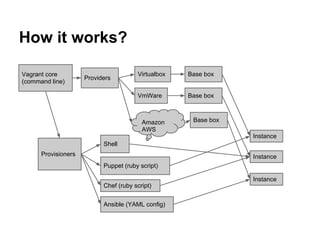
How it works?
Vagrant core
(command line)
Virtualbox
VmWare
Providers
Amazon
AWS
Provisioners
Shell
Puppet (ruby script)
Chef (ruby script)
Ansible (YAML config)
Base box
Instance
Base box
Instance
Base box
Instance
Installation
Exists for:
● Windows
● Linux
● Mac OS
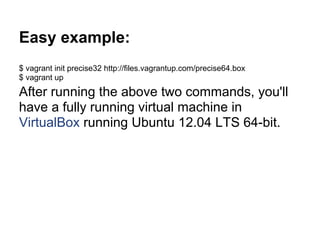
Easy example:
$ vagrant init precise32 http://files.vagrantup.com/precise64.box
$ vagrant up
After running the above two commands, you'll
have a fully running virtual machine in
VirtualBox running Ubuntu 12.04 LTS 64-bit.
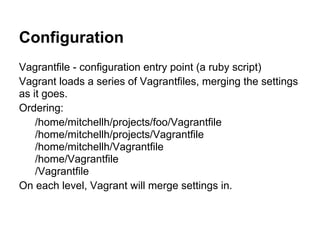
Configuration
Vagrantfile - configuration entry point (a ruby script)
Vagrant loads a series of Vagrantfiles, merging the settings
as it goes.
Ordering:
/home/mitchellh/projects/foo/Vagrantfile
/home/mitchellh/projects/Vagrantfile
/home/mitchellh/Vagrantfile
/home/Vagrantfile
/Vagrantfile
On each level, Vagrant will merge settings in.
Configuration example
Vagrantfile:
Vagrant.configure("2") do |config|
config.vm.hostname = "paylogic-virtual"
config.vm.box = "ubuntu-server-10.04-x64"
config.vm.box_url = "http://puppet-vagrant-boxes.puppetlabs.com/ubuntu-server-
10044-x64-vbox4210.box"
config.vm.network :private_network, ip: "192.168.44.10"
config.vm.network :forwarded_port, guest: 8000, host: 8000
config.vm.provider :virtualbox do |vb|
vb.customize ["modifyvm", :id, "--memory", "512"]
end
config.vm.provision :puppet do |puppet|
puppet.manifests_path = "puppet/manifests"
puppet.manifest_file = "default.pp"
end
end
Boxes
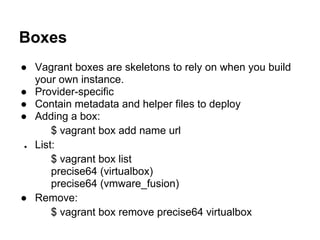
● Vagrant boxes are skeletons to rely on when you build
your own instance.
● Provider-specific
● Contain metadata and helper files to deploy
● Adding a box:
$ vagrant box add name url
● List:
$ vagrant box list
precise64 (virtualbox)
precise64 (vmware_fusion)
● Remove:
$ vagrant box remove precise64 virtualbox
Provisioners
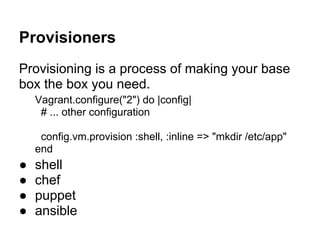
Provisioning is a process of making your base
box the box you need.
Vagrant.configure("2") do |config|
# ... other configuration
config.vm.provision :shell, :inline => "mkdir /etc/app"
end
● shell
● chef
● puppet
● ansible
Networking
● High level configuration is provider-
independend
● Low level configuration is provider specific
● Multiple networks are supported at once
Synced folders
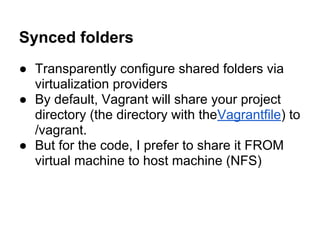
● Transparently configure shared folders via
virtualization providers
● By default, Vagrant will share your project
directory (the directory with theVagrantfile) to
/vagrant.
● But for the code, I prefer to share it FROM
virtual machine to host machine (NFS)
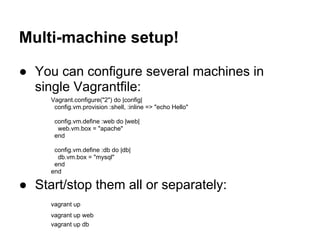
Multi-machine setup!
● You can configure several machines in
single Vagrantfile:
Vagrant.configure("2") do |config|
config.vm.provision :shell, :inline => "echo Hello"
config.vm.define :web do |web|
web.vm.box = "apache"
end
config.vm.define :db do |db|
db.vm.box = "mysql"
end
end
● Start/stop them all or separately:
vagrant up
vagrant up web
vagrant up db
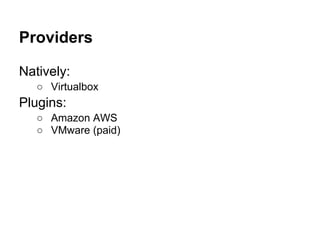
Providers
Natively:
○ Virtualbox
Plugins:
○ Amazon AWS
○ VMware (paid)
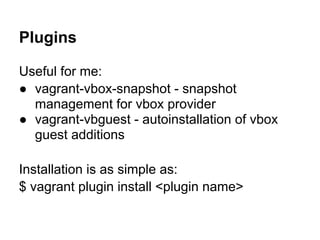
Plugins
Useful for me:
● vagrant-vbox-snapshot - snapshot
management for vbox provider
● vagrant-vbguest - autoinstallation of vbox
guest additions
Installation is as simple as:
$ vagrant plugin install <plugin name>
Live demo
● Editing code
● Snapshot switching
But, but any consequences?
● System memory - you need it 'enough'
● Disk - you need a complete OS on virtual
machine, be prepared to give at least 10 Gb
per instance.
● Setting up network fs (NFS) - but that's only
for those who don't know vim :)
● Speed - of course there's some slowdown
due virtualization.
Thanks!
Questions?
Anatoly Bubenkov
Paylogic
http://github.com/bubenkoff
Links
● http://vagrantup.com
● https://www.virtualbox.org/
● https://github.com/dergachev/vagrant-vbox-snapshot
● https://github.com/dotless-de/vagrant-vbguest

Vagrant are you still develop in a non-virtual environment-

  • 1.
    Vagrant: are youstill develop in a non-virtual environment? Then we are coming to you! Anatoly Bubenkov Paylogic http://github.com/bubenkoff Monthly PyGrunn June 11 2013
  • 2.
    Ok, I'm startinga project, what do I need? (worst case) ● Centos 4 (but I like my Ubuntu 13.04)! ● MySQL (what??) ● MongoDB (oh...) ● SOLR ● RabbitMQ ● node.js ● python 2.4 :) ● lots of system packages installed from external sources Well, I don't want to install that on my machine, and actually can't!
  • 3.
    Back to thepast: can you please fix that bug in a 2-years old project? ● I don't even remember what was there... ● Ok I've found the code, but how do I create the test data? ● Spent hours to get it all working back...
  • 4.
    As a Developer,I need the environment which is: ● fully functional (eg. no limitations just because of it's hard to set up locally) ● reproducable (fast to reproduce same stuff on another machine in minutes) ● as close to production environment as possible ● versioned (easy to make a savepoint, to return to if any need and at any time) ● independent (no direct dependency on my machine)
  • 5.
    Possible solutions: ● 1mb long INSTALL.txt :) - the hard way ● Deployment automation tools (Puppet and etc) - need a clean machine ● docker.io - ubuntu specific (for now) ● or ...
  • 6.
  • 7.
    How it works? Vagrantcore (command line) Virtualbox VmWare Providers Amazon AWS Provisioners Shell Puppet (ruby script) Chef (ruby script) Ansible (YAML config) Base box Instance Base box Instance Base box Instance
  • 8.
  • 9.
    Easy example: $ vagrantinit precise32 http://files.vagrantup.com/precise64.box $ vagrant up After running the above two commands, you'll have a fully running virtual machine in VirtualBox running Ubuntu 12.04 LTS 64-bit.
  • 10.
    Configuration Vagrantfile - configurationentry point (a ruby script) Vagrant loads a series of Vagrantfiles, merging the settings as it goes. Ordering: /home/mitchellh/projects/foo/Vagrantfile /home/mitchellh/projects/Vagrantfile /home/mitchellh/Vagrantfile /home/Vagrantfile /Vagrantfile On each level, Vagrant will merge settings in.
  • 11.
    Configuration example Vagrantfile: Vagrant.configure("2") do|config| config.vm.hostname = "paylogic-virtual" config.vm.box = "ubuntu-server-10.04-x64" config.vm.box_url = "http://puppet-vagrant-boxes.puppetlabs.com/ubuntu-server- 10044-x64-vbox4210.box" config.vm.network :private_network, ip: "192.168.44.10" config.vm.network :forwarded_port, guest: 8000, host: 8000 config.vm.provider :virtualbox do |vb| vb.customize ["modifyvm", :id, "--memory", "512"] end config.vm.provision :puppet do |puppet| puppet.manifests_path = "puppet/manifests" puppet.manifest_file = "default.pp" end end
  • 12.
    Boxes ● Vagrant boxesare skeletons to rely on when you build your own instance. ● Provider-specific ● Contain metadata and helper files to deploy ● Adding a box: $ vagrant box add name url ● List: $ vagrant box list precise64 (virtualbox) precise64 (vmware_fusion) ● Remove: $ vagrant box remove precise64 virtualbox
  • 13.
    Provisioners Provisioning is aprocess of making your base box the box you need. Vagrant.configure("2") do |config| # ... other configuration config.vm.provision :shell, :inline => "mkdir /etc/app" end ● shell ● chef ● puppet ● ansible
  • 14.
    Networking ● High levelconfiguration is provider- independend ● Low level configuration is provider specific ● Multiple networks are supported at once
  • 15.
    Synced folders ● Transparentlyconfigure shared folders via virtualization providers ● By default, Vagrant will share your project directory (the directory with theVagrantfile) to /vagrant. ● But for the code, I prefer to share it FROM virtual machine to host machine (NFS)
  • 16.
    Multi-machine setup! ● Youcan configure several machines in single Vagrantfile: Vagrant.configure("2") do |config| config.vm.provision :shell, :inline => "echo Hello" config.vm.define :web do |web| web.vm.box = "apache" end config.vm.define :db do |db| db.vm.box = "mysql" end end ● Start/stop them all or separately: vagrant up vagrant up web vagrant up db
  • 17.
  • 18.
    Plugins Useful for me: ●vagrant-vbox-snapshot - snapshot management for vbox provider ● vagrant-vbguest - autoinstallation of vbox guest additions Installation is as simple as: $ vagrant plugin install <plugin name>
  • 19.
    Live demo ● Editingcode ● Snapshot switching
  • 20.
    But, but anyconsequences? ● System memory - you need it 'enough' ● Disk - you need a complete OS on virtual machine, be prepared to give at least 10 Gb per instance. ● Setting up network fs (NFS) - but that's only for those who don't know vim :) ● Speed - of course there's some slowdown due virtualization.
  • 21.
  • 22.
    Links ● http://vagrantup.com ● https://www.virtualbox.org/ ●https://github.com/dergachev/vagrant-vbox-snapshot ● https://github.com/dotless-de/vagrant-vbguest