AKIHIRO SUDA
NTT Corporation
Hardening Docker
daemon with
Rootless mode
About me
● Software Engineer at NTT
● Maintainer of Moby, containerd, and BuildKit
● Docker Tokyo Community Leader
Rootless Docker
● Run Docker as a non-root user on the host
● Protect the host from potential Docker vulns
and misconfiguration
Non-rootroot
Demo
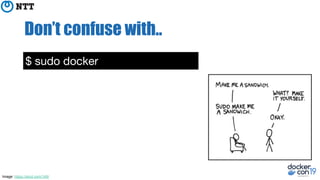
Don’t confuse with..
$ sudo docker
Image: https://xkcd.com/149/
Don’t confuse with..
$ sudo docker
$ usermod -aG docker penguin
Rootless Docker
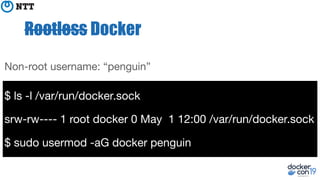
$ ls -l /var/run/docker.sock
srw-rw---- 1 root docker 0 May 1 12:00 /var/run/docker.sock
$ sudo usermod -aG docker penguin
Non-root username: “penguin”
Rootless Docker
$ ls -l /var/run/docker.sock
srw-rw---- 1 root docker 0 May 1 12:00 /var/run/docker.sock
$ sudo usermod -aG docker penguin
Non-root username: “penguin”
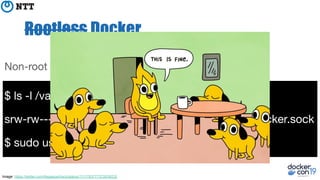
Image: https://twitter.com/llegaspacheco/status/1111783777372639232
Rootless Docker
$ ls -l /var/run/docker.sock
srw-rw---- 1 root docker 0 May 1 12:00 /var/run/docker.sock
$ sudo usermod -aG docker penguin
Non-root username: “penguin”
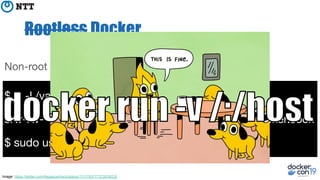
Image: https://twitter.com/llegaspacheco/status/1111783777372639232
Don’t confuse with..
$ sudo docker
$ usermod -aG docker penguin
$ docker run --user 42
All of them run the daemon as the root!
Don’t confuse with..
$ sudo docker
$ usermod -aG docker penguin
$ docker run --user 42
$ dockerd --userns-remap
Rootless Docker
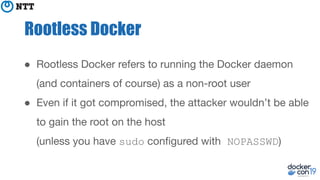
● Rootless Docker refers to running the Docker daemon
(and containers of course) as a non-root user

● Even if it got compromised, the attacker wouldn’t be able
to gain the root on the host
(unless you have sudo configured with NOPASSWD)
Some caveats apply..
● No OverlayFS (except on Ubuntu)
● Limited network performance by default
● TCP/UDP port numbers below 1024 can’t be listened on
● No cgroup
○ docker run: --memory and --cpu-* flags are
ignored
○ docker top: does not work
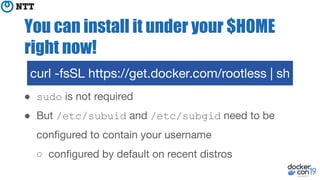
You can install it under your $HOME
right now!
● sudo is not required
● But /etc/subuid and /etc/subgid need to be
configured to contain your username
○ configured by default on recent distros
curl -fsSL https://get.docker.com/rootless | sh
You can install it under your $HOME
right now!
● The installer shows helpful error if /etc/sub[ug]id is
unconfigured
○ Thanks to Tõnis Tiigi and Tibor Vass!
● Feel free to ask me after this session if it doesn’t work
curl -fsSL https://get.docker.com/rootless | sh
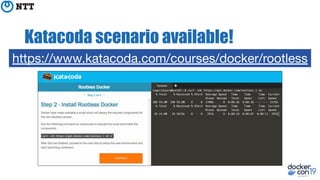
Katacoda scenario available!
https://www.katacoda.com/courses/docker/rootless
Motivation
Harden containers
● Docker has a lot of features for hardening containers, so
root-in-container is still contained by default
○ namespaces, capabilities
○ seccomp, AppArmor, SELinux...
● But there is no such thing as vulnerability-free software;
root-in-container could break out with an exploit
○ CVE-2019-5736 runc breakout (Feb 11, 2019)
Harden containers
● And people often make misconfiguration!
● “We found 3,822 Docker hosts with the remote API
exposed publicly.”
-- Vitaly Simonovich and Ori Nakar (March 4, 2019)
https://www.imperva.com/blog/hundreds-of-vulnerable-docker-hosts-exploite
d-by-cryptocurrency-miners/
Harden containers
● Rootless mode per se doesn’t fix vulns and
misconfigurations - but it can mitigate attacks
● Attacker won’t be able to:
○ access files owned by other users
○ modify firmware and kernel (→ undetectable malware)
○ ARP spoofing
Caution: not panacea!
● If Docker had a vuln, attackers still might be able to:
○ Mine cryptocurrencies
○ Springboard-attack to other hosts
● Not effective for potential vulns on
kernel / VM / HW side
High-performance Computing (HPC)
● HPC users are typically disallowed to gain the root on the
host
● Good news: GPU (and perhaps FPGA devices) are
known to work with Rootless mode
Docker-in-Docker
● There are a lot of valid use cases to allow a Docker
container to call Docker API
○ FaaS
○ CI
○ Build images
○ ...
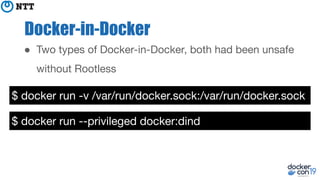
Docker-in-Docker
$ docker run -v /var/run/docker.sock:/var/run/docker.sock
$ docker run --privileged docker:dind
● Two types of Docker-in-Docker, both had been unsafe
without Rootless
How it works
Pretend to be the root
● User namespaces allow non-root users to pretend to be
the root
● Root-in-UserNS can have fake UID 0 and also create
other namespaces (MountNS, NetNS..)
Pretend to be the root
● But Root-in-UserNS cannot gain the real root
○ Inaccessible files still remain inaccessible
○ Kernel modules cannot be loaded
○ System cannot be rebooted
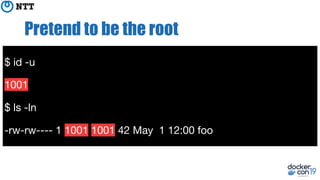
Pretend to be the root
$ id -u
1001
$ ls -ln
-rw-rw---- 1 1001 1001 42 May 1 12:00 foo
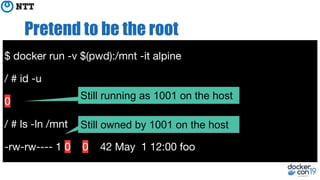
Pretend to be the root
$ docker run -v $(pwd):/mnt -it alpine
/ # id -u
0
/ # ls -ln /mnt
-rw-rw---- 1 0 0 42 May 1 12:00 foo
Still owned by 1001 on the host
Still running as 1001 on the host
Pretend to be the root
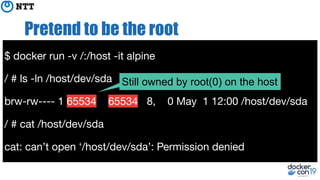
$ docker run -v /:/host -it alpine
/ # ls -ln /host/dev/sda
brw-rw---- 1 65534 65534 8, 0 May 1 12:00 /host/dev/sda
/ # cat /host/dev/sda
cat: can’t open ‘/host/dev/sda’: Permission denied
Still owned by root(0) on the host
Sub-users (and sub-groups)
● Put users in your user account so you can be a user
while you are a user
● Sub-users are used as non-root users in a container
○ USER in Dockerfile
○ docker run --user
Sub-users (and sub-groups)
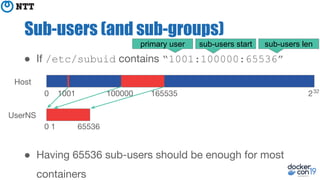
● If /etc/subuid contains “1001:100000:65536”
● Having 65536 sub-users should be enough for most
containers
0 1001 100000 165535 232
0 1 65536
Host
UserNS
primary user sub-users start sub-users len
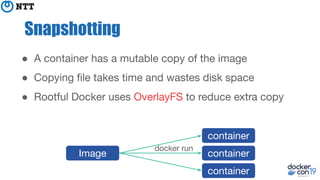
● A container has a mutable copy of the image
● Copying file takes time and wastes disk space
● Rootful Docker uses OverlayFS to reduce extra copy
Snapshotting
Image
container
container
container
docker run
Snapshotting
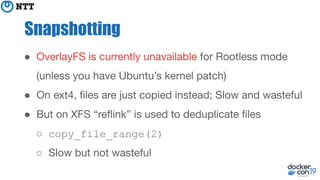
● OverlayFS is currently unavailable for Rootless mode
(unless you have Ubuntu’s kernel patch)
● On ext4, files are just copied instead; Slow and wasteful
● But on XFS “reflink” is used to deduplicate files
○ copy_file_range(2)
○ Slow but not wasteful
Networking
● Non-root user can create NetNS but cannot create a
vEth pair across the host and a NetNS
● VPNKit is used instead of vEth pair
○ User-mode network stack based on MirageOS TCP/IP
○ Also used by Docker for Mac/Win
Practical Tips
systemd service
● The unit file is in your home:
~/.config/systemd/user/docker.service
● To enable user services on system startup:
$ sudo loginctl enable-linger penguin
$ systemctl --user start docker
$ systemctl --user stop docker
Enable OverlayFS
● The vanilla kernel disallows mounting OverlayFS in user
namespaces
● But if you install Ubuntu kernel, you can get support for
OverlayFS
https://lists.ubuntu.com/archives/kernel-team/2014-February/038091.html
Enable XFS reflink
● If OverlayFS is not available, use XFS to deduplicate files
○ efficient for dedupe but slow
○ otherwise (i.e. ext4) all files are duplicated per layer
● ~/.config/docker/daemon.json:
● Make sure to format with `mkfs.xfs -m reflink=1`,
{“storage-driver”: “vfs”,
“data-root”:”/mnt/xfs/foo”}
Change network stack: slirp4netns
● The default network stack (VPNKit) is slow
● Install slirp4netns (v0.3.0+) to get better throughput
○ iperf3 benchmark (container to host):
514Mbps → 9.21 Gbps
○ still slow compared to native vEth 52.1 Gbps
Benchmark: https://fosdem.org/2019/schedule/event/containers_k8s_rootless/
Change network stack: slirp4netns
● https://github.com/rootless-containers/slirp4netns
● ./configure && make && make install
● RPM/DEB is also available for most distros (but
sometimes outdated)
● If slirp4netns is installed on $PATH, Docker automatically
picks up
Change network stack: lxc-user-nic
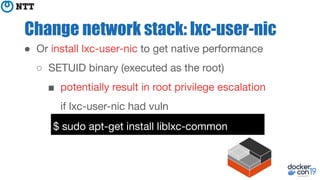
● Or install lxc-user-nic to get native performance
○ SETUID binary (executed as the root)
■ potentially result in root privilege escalation
if lxc-user-nic had vuln
$ sudo apt-get install liblxc-common
Change network stack: lxc-user-nic
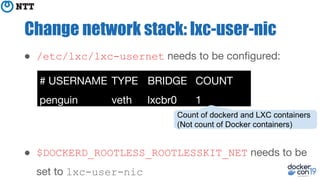
● /etc/lxc/lxc-usernet needs to be configured:
● $DOCKERD_ROOTLESS_ROOTLESSKIT_NET needs to be
set to lxc-user-nic
# USERNAME TYPE BRIDGE COUNT
penguin veth lxcbr0 1
Count of dockerd and LXC containers
(Not count of Docker containers)
Exposing TCP/UDP ports below 1024
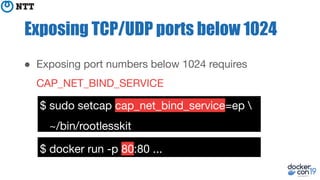
● Exposing port numbers below 1024 requires
CAP_NET_BIND_SERVICE
$ sudo setcap cap_net_bind_service=ep 
~/bin/rootlesskit
$ docker run -p 80:80 ...
Future work
Docker 19.09? 20.03?
FUSE-OverlayFS
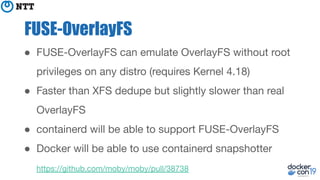
● FUSE-OverlayFS can emulate OverlayFS without root
privileges on any distro (requires Kernel 4.18)
● Faster than XFS dedupe but slightly slower than real
OverlayFS
● containerd will be able to support FUSE-OverlayFS
● Docker will be able to use containerd snapshotter
https://github.com/moby/moby/pull/38738
OverlayFS
● There has been also discussion to push Ubuntu’s patch
to the real OverlayFS upstream
● Likely to take more time?
cgroup2
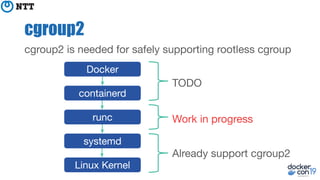
cgroup2 is needed for safely supporting rootless cgroup
Docker
containerd
runc
systemd
Linux Kernel
Already support cgroup2
TODO
Work in progress
cgroup2
● runc doesn’t support cgroup2 yet, but “crun” already
supports cgroup2 https://github.com/giuseppe/crun
● OCI (Open Containers Initiative) is working on bringing
proper cgroup2 support to OCI Runtime Spec and runc
https://github.com/opencontainers/runtime-spec/issues/1002
LDAP
● Configuring /etc/subuid and /etc/subgid might be
painful on LDAP environments
● NSS module is under discussion for LDAP environments
https://github.com/shadow-maint/shadow/issues/154
○ No need to configure /etc/subuid and /etc/subgid
LDAP
● Another way: emulate sub-users using a single user
● runROOTLESS: An OCI Runtime Implementation with
sub-users emulation https://github.com/rootless-containers/runrootless
○ Uses Ptrace and Xattr for emulating syscalls
○ 2-15 times performance overhead
https://github.com/rootless-containers/runrootless/issues/14
LDAP
● seccomp could be used for accelerating ptrace, but we
are still facing implementation issues
● We are also looking into possibility of using
“Seccomp Trap To Userspace” (introduced in Kernel 5.0)
○ Modern replacement for ptrace
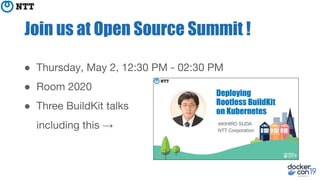
Join us at Open Source Summit !
● Thursday, May 2, 12:30 PM - 02:30 PM
● Room 2020
● Three BuildKit talks
including this →
Questions?
get.docker.com/rootless

[DockerCon 2019] Hardening Docker daemon with Rootless mode

  • 1.
    AKIHIRO SUDA NTT Corporation HardeningDocker daemon with Rootless mode
  • 2.
    About me ● SoftwareEngineer at NTT ● Maintainer of Moby, containerd, and BuildKit ● Docker Tokyo Community Leader
  • 3.
    Rootless Docker ● RunDocker as a non-root user on the host ● Protect the host from potential Docker vulns and misconfiguration Non-rootroot
  • 4.
  • 5.
    Don’t confuse with.. $sudo docker Image: https://xkcd.com/149/
  • 6.
    Don’t confuse with.. $sudo docker $ usermod -aG docker penguin
  • 7.
    Rootless Docker $ ls-l /var/run/docker.sock srw-rw---- 1 root docker 0 May 1 12:00 /var/run/docker.sock $ sudo usermod -aG docker penguin Non-root username: “penguin”
  • 8.
    Rootless Docker $ ls-l /var/run/docker.sock srw-rw---- 1 root docker 0 May 1 12:00 /var/run/docker.sock $ sudo usermod -aG docker penguin Non-root username: “penguin” Image: https://twitter.com/llegaspacheco/status/1111783777372639232
  • 9.
    Rootless Docker $ ls-l /var/run/docker.sock srw-rw---- 1 root docker 0 May 1 12:00 /var/run/docker.sock $ sudo usermod -aG docker penguin Non-root username: “penguin” Image: https://twitter.com/llegaspacheco/status/1111783777372639232
  • 10.
    Don’t confuse with.. $sudo docker $ usermod -aG docker penguin $ docker run --user 42
  • 11.
    All of themrun the daemon as the root! Don’t confuse with.. $ sudo docker $ usermod -aG docker penguin $ docker run --user 42 $ dockerd --userns-remap
  • 12.
    Rootless Docker ● RootlessDocker refers to running the Docker daemon (and containers of course) as a non-root user ● Even if it got compromised, the attacker wouldn’t be able to gain the root on the host (unless you have sudo configured with NOPASSWD)
  • 13.
    Some caveats apply.. ●No OverlayFS (except on Ubuntu) ● Limited network performance by default ● TCP/UDP port numbers below 1024 can’t be listened on ● No cgroup ○ docker run: --memory and --cpu-* flags are ignored ○ docker top: does not work
  • 14.
    You can installit under your $HOME right now! ● sudo is not required ● But /etc/subuid and /etc/subgid need to be configured to contain your username ○ configured by default on recent distros curl -fsSL https://get.docker.com/rootless | sh
  • 15.
    You can installit under your $HOME right now! ● The installer shows helpful error if /etc/sub[ug]id is unconfigured ○ Thanks to Tõnis Tiigi and Tibor Vass! ● Feel free to ask me after this session if it doesn’t work curl -fsSL https://get.docker.com/rootless | sh
  • 16.
  • 17.
  • 18.
    Harden containers ● Dockerhas a lot of features for hardening containers, so root-in-container is still contained by default ○ namespaces, capabilities ○ seccomp, AppArmor, SELinux... ● But there is no such thing as vulnerability-free software; root-in-container could break out with an exploit ○ CVE-2019-5736 runc breakout (Feb 11, 2019)
  • 19.
    Harden containers ● Andpeople often make misconfiguration! ● “We found 3,822 Docker hosts with the remote API exposed publicly.” -- Vitaly Simonovich and Ori Nakar (March 4, 2019) https://www.imperva.com/blog/hundreds-of-vulnerable-docker-hosts-exploite d-by-cryptocurrency-miners/
  • 20.
    Harden containers ● Rootlessmode per se doesn’t fix vulns and misconfigurations - but it can mitigate attacks ● Attacker won’t be able to: ○ access files owned by other users ○ modify firmware and kernel (→ undetectable malware) ○ ARP spoofing
  • 21.
    Caution: not panacea! ●If Docker had a vuln, attackers still might be able to: ○ Mine cryptocurrencies ○ Springboard-attack to other hosts ● Not effective for potential vulns on kernel / VM / HW side
  • 22.
    High-performance Computing (HPC) ●HPC users are typically disallowed to gain the root on the host ● Good news: GPU (and perhaps FPGA devices) are known to work with Rootless mode
  • 23.
    Docker-in-Docker ● There area lot of valid use cases to allow a Docker container to call Docker API ○ FaaS ○ CI ○ Build images ○ ...
  • 24.
    Docker-in-Docker $ docker run-v /var/run/docker.sock:/var/run/docker.sock $ docker run --privileged docker:dind ● Two types of Docker-in-Docker, both had been unsafe without Rootless
  • 25.
  • 26.
    Pretend to bethe root ● User namespaces allow non-root users to pretend to be the root ● Root-in-UserNS can have fake UID 0 and also create other namespaces (MountNS, NetNS..)
  • 27.
    Pretend to bethe root ● But Root-in-UserNS cannot gain the real root ○ Inaccessible files still remain inaccessible ○ Kernel modules cannot be loaded ○ System cannot be rebooted
  • 28.
    Pretend to bethe root $ id -u 1001 $ ls -ln -rw-rw---- 1 1001 1001 42 May 1 12:00 foo
  • 29.
    Pretend to bethe root $ docker run -v $(pwd):/mnt -it alpine / # id -u 0 / # ls -ln /mnt -rw-rw---- 1 0 0 42 May 1 12:00 foo Still owned by 1001 on the host Still running as 1001 on the host
  • 30.
    Pretend to bethe root $ docker run -v /:/host -it alpine / # ls -ln /host/dev/sda brw-rw---- 1 65534 65534 8, 0 May 1 12:00 /host/dev/sda / # cat /host/dev/sda cat: can’t open ‘/host/dev/sda’: Permission denied Still owned by root(0) on the host
  • 31.
    Sub-users (and sub-groups) ●Put users in your user account so you can be a user while you are a user ● Sub-users are used as non-root users in a container ○ USER in Dockerfile ○ docker run --user
  • 32.
    Sub-users (and sub-groups) ●If /etc/subuid contains “1001:100000:65536” ● Having 65536 sub-users should be enough for most containers 0 1001 100000 165535 232 0 1 65536 Host UserNS primary user sub-users start sub-users len
  • 33.
    ● A containerhas a mutable copy of the image ● Copying file takes time and wastes disk space ● Rootful Docker uses OverlayFS to reduce extra copy Snapshotting Image container container container docker run
  • 34.
    Snapshotting ● OverlayFS iscurrently unavailable for Rootless mode (unless you have Ubuntu’s kernel patch) ● On ext4, files are just copied instead; Slow and wasteful ● But on XFS “reflink” is used to deduplicate files ○ copy_file_range(2) ○ Slow but not wasteful
  • 35.
    Networking ● Non-root usercan create NetNS but cannot create a vEth pair across the host and a NetNS ● VPNKit is used instead of vEth pair ○ User-mode network stack based on MirageOS TCP/IP ○ Also used by Docker for Mac/Win
  • 36.
  • 37.
    systemd service ● Theunit file is in your home: ~/.config/systemd/user/docker.service ● To enable user services on system startup: $ sudo loginctl enable-linger penguin $ systemctl --user start docker $ systemctl --user stop docker
  • 38.
    Enable OverlayFS ● Thevanilla kernel disallows mounting OverlayFS in user namespaces ● But if you install Ubuntu kernel, you can get support for OverlayFS https://lists.ubuntu.com/archives/kernel-team/2014-February/038091.html
  • 39.
    Enable XFS reflink ●If OverlayFS is not available, use XFS to deduplicate files ○ efficient for dedupe but slow ○ otherwise (i.e. ext4) all files are duplicated per layer ● ~/.config/docker/daemon.json: ● Make sure to format with `mkfs.xfs -m reflink=1`, {“storage-driver”: “vfs”, “data-root”:”/mnt/xfs/foo”}
  • 40.
    Change network stack:slirp4netns ● The default network stack (VPNKit) is slow ● Install slirp4netns (v0.3.0+) to get better throughput ○ iperf3 benchmark (container to host): 514Mbps → 9.21 Gbps ○ still slow compared to native vEth 52.1 Gbps Benchmark: https://fosdem.org/2019/schedule/event/containers_k8s_rootless/
  • 41.
    Change network stack:slirp4netns ● https://github.com/rootless-containers/slirp4netns ● ./configure && make && make install ● RPM/DEB is also available for most distros (but sometimes outdated) ● If slirp4netns is installed on $PATH, Docker automatically picks up
  • 42.
    Change network stack:lxc-user-nic ● Or install lxc-user-nic to get native performance ○ SETUID binary (executed as the root) ■ potentially result in root privilege escalation if lxc-user-nic had vuln $ sudo apt-get install liblxc-common
  • 43.
    Change network stack:lxc-user-nic ● /etc/lxc/lxc-usernet needs to be configured: ● $DOCKERD_ROOTLESS_ROOTLESSKIT_NET needs to be set to lxc-user-nic # USERNAME TYPE BRIDGE COUNT penguin veth lxcbr0 1 Count of dockerd and LXC containers (Not count of Docker containers)
  • 44.
    Exposing TCP/UDP portsbelow 1024 ● Exposing port numbers below 1024 requires CAP_NET_BIND_SERVICE $ sudo setcap cap_net_bind_service=ep ~/bin/rootlesskit $ docker run -p 80:80 ...
  • 45.
  • 46.
    FUSE-OverlayFS ● FUSE-OverlayFS canemulate OverlayFS without root privileges on any distro (requires Kernel 4.18) ● Faster than XFS dedupe but slightly slower than real OverlayFS ● containerd will be able to support FUSE-OverlayFS ● Docker will be able to use containerd snapshotter https://github.com/moby/moby/pull/38738
  • 47.
    OverlayFS ● There hasbeen also discussion to push Ubuntu’s patch to the real OverlayFS upstream ● Likely to take more time?
  • 48.
    cgroup2 cgroup2 is neededfor safely supporting rootless cgroup Docker containerd runc systemd Linux Kernel Already support cgroup2 TODO Work in progress
  • 49.
    cgroup2 ● runc doesn’tsupport cgroup2 yet, but “crun” already supports cgroup2 https://github.com/giuseppe/crun ● OCI (Open Containers Initiative) is working on bringing proper cgroup2 support to OCI Runtime Spec and runc https://github.com/opencontainers/runtime-spec/issues/1002
  • 50.
    LDAP ● Configuring /etc/subuidand /etc/subgid might be painful on LDAP environments ● NSS module is under discussion for LDAP environments https://github.com/shadow-maint/shadow/issues/154 ○ No need to configure /etc/subuid and /etc/subgid
  • 51.
    LDAP ● Another way:emulate sub-users using a single user ● runROOTLESS: An OCI Runtime Implementation with sub-users emulation https://github.com/rootless-containers/runrootless ○ Uses Ptrace and Xattr for emulating syscalls ○ 2-15 times performance overhead https://github.com/rootless-containers/runrootless/issues/14
  • 52.
    LDAP ● seccomp couldbe used for accelerating ptrace, but we are still facing implementation issues ● We are also looking into possibility of using “Seccomp Trap To Userspace” (introduced in Kernel 5.0) ○ Modern replacement for ptrace
  • 53.
    Join us atOpen Source Summit ! ● Thursday, May 2, 12:30 PM - 02:30 PM ● Room 2020 ● Three BuildKit talks including this →
  • 54.