HTML5 - WEBSOCKETS
HTML5 – Web Sockets :
 WebSockets is a next-generation bidirectional communication technology for web
applications which operates over a single socket and is exposed via a JavaScript interface in
HTML 5 compliant browsers.
 Once you get a Web Socket connection with the web server, you can send data from
browser to server by calling a send() method, and receive data from server to browser by an
onmessage event handler.
Following is the API which creates a new WebSocket object.
var Socket = new WebSocket(url, [protocal] );
Here first argument, url, specifies the URL to which to connect. The second attribute, protocol
is optional, and if present, specifies a sub-protocol that the server must support for the
connection to be successful.
var Socket = new WebSocket(url, [protocal] );
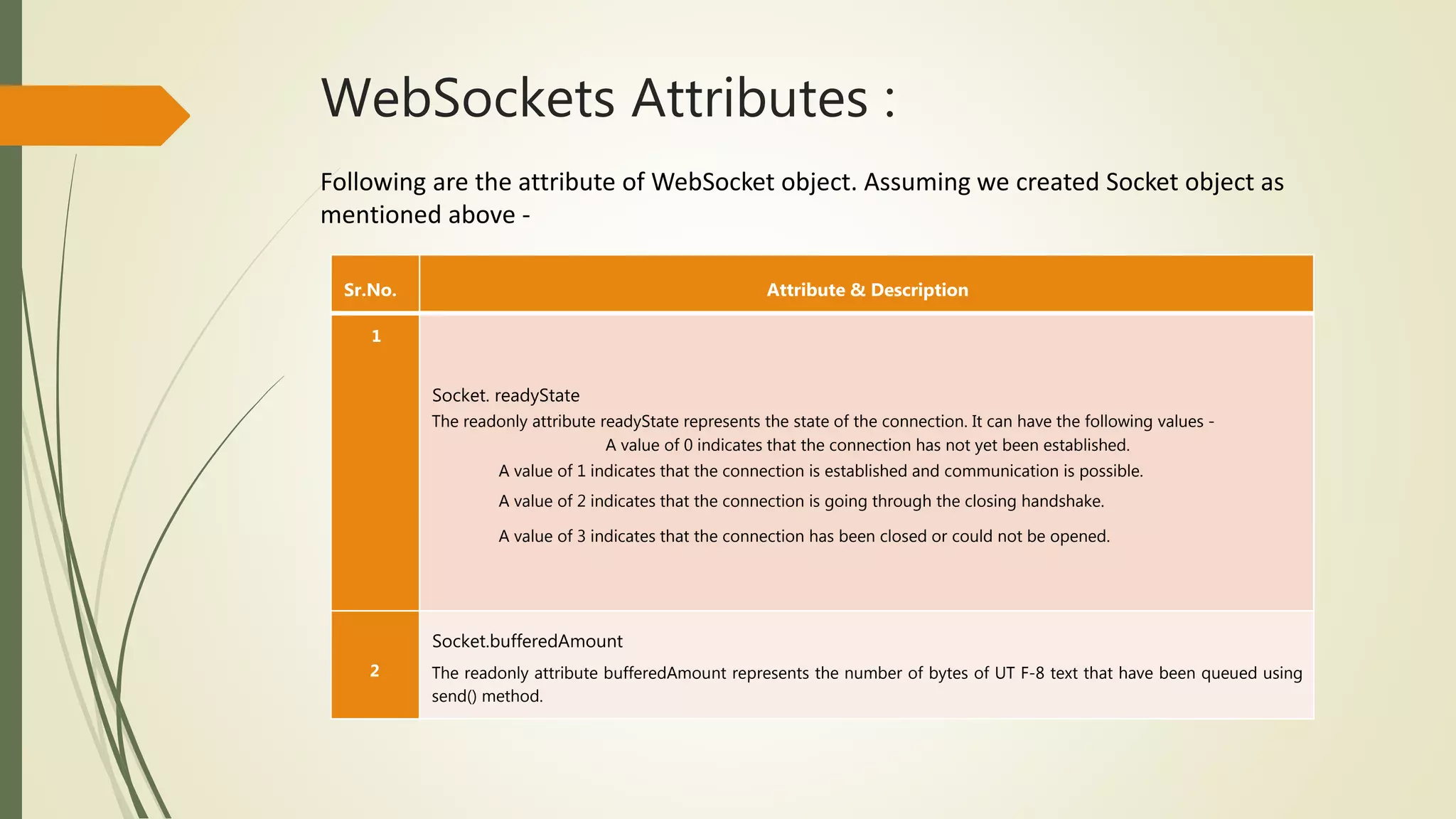
WebSockets Attributes :
Following are the attribute of WebSocket object. Assuming we created Socket object as
mentioned above -
Sr.No. Attribute & Description
1
Socket. readyState
The readonly attribute readyState represents the state of the connection. It can have the following values -
A value of 0 indicates that the connection has not yet been established.
A value of 1 indicates that the connection is established and communication is possible.
A value of 2 indicates that the connection is going through the closing handshake.
A value of 3 indicates that the connection has been closed or could not be opened.
2
Socket.bufferedAmount
The readonly attribute bufferedAmount represents the number of bytes of UT F-8 text that have been queued using
send() method.
WebSocket Events :
Following are the events associated with WebSocket object. Assuming we created Socket object as
mentioned above –
WebSocket Methods :
Following are the methods associated with WebSocket object. Assuming we created
Socket object as mentioned above -
Event Event Handler Description
open Socket.onopen This event occurs when socket connection is established.
message Socket.onmessage This event occurs when client receives data from server.
error Socket.onerror This event occurs when there is any error in communication.
close Socket.onclose This event occurs when connection is closed.
Sr.No Methods and Descriptions
1 Socket.send()
The send(data) method transmits data using the connection.
2 Socket.close()
The close() method would be used to terminate any existing connection.
WebSocket Example
A WebSocket is a standard bidirectional TCP socket between the client and the server. The
socket starts out as a HTTP connection and then "Upgrades" to a TCP socket after a HTTP
handshake. After the handshake, either side can send data.
Client Side HTML & JavaScript Code
At the time of writing this tutorial, there are only few web browsers supporting WebSocket()
interface. You can try following example with latest version of Chrome, Mozilla, Opera and
Safari.
< ! DOCTYPE HTML >
<html>
<head>
<script type="text/javascript"> function WebSocketTest() {
if ("WebSocket" in window) { alert("WebSocket is supported by your Browser! " ) ;
ws . onopen function() {
ws.onmessage = function (evt) { var received_msg evt . data; alert("Message is received
ws.onclose = function() {
alert("Connection is closed. . .)
else
< / script >
</head>
<body>
<div id ="sse">
<a href I javascript:WebSocketTest()">Run WebSocket</a> </div>
</body>
</html>
Install pywebsocket
Before you test above client program, you need a server which supports WebSocket.
Download mod_pywebsocket-x.x.x.tar.gz from pywebsocket which aims to provide a Web
Socket extension for Apache HTTP Server and install it following these steps.
 Unzip and untar the downloaded file.
 Go inside pywebsocket-x.x.x/src/ directory.
 $python setup.py build
 $sudo python setup.py install
 Then read document by -
 $pydoc mod_pywebsocket
This will install it into your python environment.
Start the Server
Go to the pywebsocket-x.x.x/src/mod_pywebsocket folder and run the following
command -
This will start the server listening at port 9998 and use the handlers directory
specified by the -w option where our echo_wsh.py resides.
Now using Chrome browser open the html file your created in the beginning. If
your browser supports WebSocket(), then you would get alert indicating that
your browser supports WebSocket and finally when you click on "Run
WebSocket" you would get Goodbye message sent by the server script.
$sudo python standalone. py -p 9998 -w . . / example/

Html5 websockets

  • 1.
  • 2.
    HTML5 – WebSockets :  WebSockets is a next-generation bidirectional communication technology for web applications which operates over a single socket and is exposed via a JavaScript interface in HTML 5 compliant browsers.  Once you get a Web Socket connection with the web server, you can send data from browser to server by calling a send() method, and receive data from server to browser by an onmessage event handler. Following is the API which creates a new WebSocket object. var Socket = new WebSocket(url, [protocal] ); Here first argument, url, specifies the URL to which to connect. The second attribute, protocol is optional, and if present, specifies a sub-protocol that the server must support for the connection to be successful. var Socket = new WebSocket(url, [protocal] );
  • 3.
    WebSockets Attributes : Followingare the attribute of WebSocket object. Assuming we created Socket object as mentioned above - Sr.No. Attribute & Description 1 Socket. readyState The readonly attribute readyState represents the state of the connection. It can have the following values - A value of 0 indicates that the connection has not yet been established. A value of 1 indicates that the connection is established and communication is possible. A value of 2 indicates that the connection is going through the closing handshake. A value of 3 indicates that the connection has been closed or could not be opened. 2 Socket.bufferedAmount The readonly attribute bufferedAmount represents the number of bytes of UT F-8 text that have been queued using send() method.
  • 4.
    WebSocket Events : Followingare the events associated with WebSocket object. Assuming we created Socket object as mentioned above – WebSocket Methods : Following are the methods associated with WebSocket object. Assuming we created Socket object as mentioned above - Event Event Handler Description open Socket.onopen This event occurs when socket connection is established. message Socket.onmessage This event occurs when client receives data from server. error Socket.onerror This event occurs when there is any error in communication. close Socket.onclose This event occurs when connection is closed.
  • 5.
    Sr.No Methods andDescriptions 1 Socket.send() The send(data) method transmits data using the connection. 2 Socket.close() The close() method would be used to terminate any existing connection. WebSocket Example A WebSocket is a standard bidirectional TCP socket between the client and the server. The socket starts out as a HTTP connection and then "Upgrades" to a TCP socket after a HTTP handshake. After the handshake, either side can send data. Client Side HTML & JavaScript Code At the time of writing this tutorial, there are only few web browsers supporting WebSocket() interface. You can try following example with latest version of Chrome, Mozilla, Opera and Safari.
  • 6.
    < ! DOCTYPEHTML > <html> <head> <script type="text/javascript"> function WebSocketTest() { if ("WebSocket" in window) { alert("WebSocket is supported by your Browser! " ) ; ws . onopen function() { ws.onmessage = function (evt) { var received_msg evt . data; alert("Message is received ws.onclose = function() { alert("Connection is closed. . .) else < / script > </head> <body> <div id ="sse"> <a href I javascript:WebSocketTest()">Run WebSocket</a> </div> </body> </html>
  • 7.
    Install pywebsocket Before youtest above client program, you need a server which supports WebSocket. Download mod_pywebsocket-x.x.x.tar.gz from pywebsocket which aims to provide a Web Socket extension for Apache HTTP Server and install it following these steps.  Unzip and untar the downloaded file.  Go inside pywebsocket-x.x.x/src/ directory.  $python setup.py build  $sudo python setup.py install  Then read document by -  $pydoc mod_pywebsocket This will install it into your python environment.
  • 8.
    Start the Server Goto the pywebsocket-x.x.x/src/mod_pywebsocket folder and run the following command - This will start the server listening at port 9998 and use the handlers directory specified by the -w option where our echo_wsh.py resides. Now using Chrome browser open the html file your created in the beginning. If your browser supports WebSocket(), then you would get alert indicating that your browser supports WebSocket and finally when you click on "Run WebSocket" you would get Goodbye message sent by the server script. $sudo python standalone. py -p 9998 -w . . / example/