







Enhancing Mobile User
Experience with WebSocket
Mauricio “Maltron” Leal
maltron@gmail.com
@maltron
WebSocket 101
(The Short Story)
Web Server
(WebSocket compliant)
Endpoint
Client
(WebSocket compliant)
Endpoint
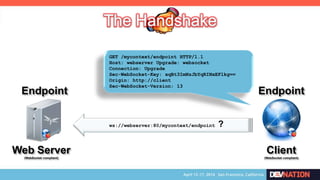
ws://webserver:80/mycontext/endpoint ?
GET /mycontext/endpoint HTTP/1.1
Host: webserver Upgrade: websocket
Connection: Upgrade
Sec-WebSocket-Key: xqBt3ImNzJbYqRINxEFlkg==
Origin: http://client
Sec-WebSocket-Version: 13
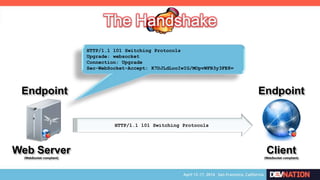
HTTP/1.1 101 Switching Protocols
Upgrade: websocket
Connection: Upgrade
Sec-WebSocket-Accept: K7DJLdLooIwIG/MOpvWFB3y3FE8=
Web Server
(WebSocket compliant)
Endpoint
Client
(WebSocket compliant)
Endpoint
HTTP/1.1 101 Switching Protocols
Web Server
(WebSocket compliant)
Endpoint
Client
(WebSocket compliant)
Endpoint
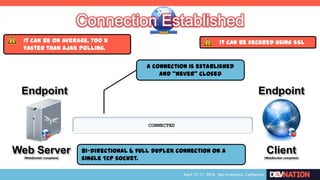
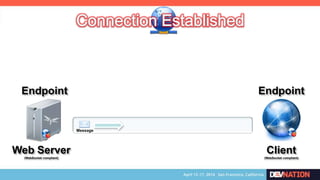
CONNECTED
A connection is established
and “never” closed
Bi-directional & full duplex connection on a
single TCP socket.
It can be secured using SSLIt can be on average, 700 x
faster than AJAX polling.
Web Server
(WebSocket compliant)
Endpoint
Client
(WebSocket compliant)
Endpoint
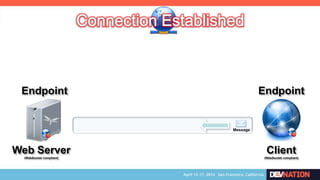
Message
Web Server
(WebSocket compliant)
Endpoint
Client
(WebSocket compliant)
Endpoint
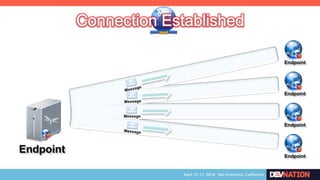
Message
Endpoint Endpoint
Endpoint
Endpoint
Endpoint
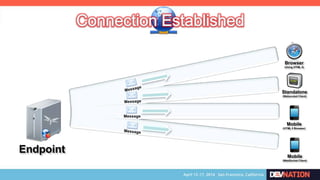
Message
Endpoint
Message
Browser
(Using HTML 5)
Standalone
(Webscoket Client)
Mobile
(HTML 5 Browser)
Mobile
(WebSocket Client)
WebSocket Advanced
(The Geek Story)
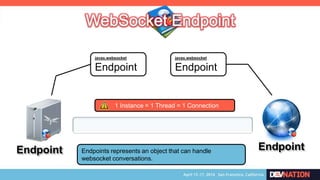
Endpoint Endpoint
javax.websocket
Endpoint
javax.websocket
Endpoint
Endpoints represents an object that can handle
websocket conversations.
1 Instance = 1 Thread = 1 Connection
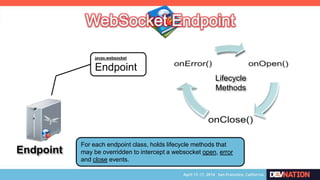
Endpoint
javax.websocket
Endpoint
For each endpoint class, holds lifecycle methods that
may be overridden to intercept a websocket open, error
and close events.
Lifecycle
Methods
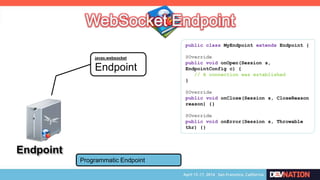
Endpoint
javax.websocket
Endpoint
Programmatic Endpoint
public class MyEndpoint extends Endpoint {
@Override
public void onOpen(Session s,
EndpointConfig c) {
// A connection was established
}
@Override
public void onClose(Session s, CloseReason
reason) {}
@Override
public void onError(Session s, Throwable
thr) {}
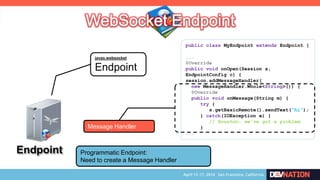
Endpoint
javax.websocket
Endpoint
Programmatic Endpoint:
Need to create a Message Handler
public class MyEndpoint extends Endpoint {
...
@Override
public void onOpen(Session s,
EndpointConfig c) {
session.addMessageHandler(
new MessageHandler.Whole<String>()) {
@Override
public void onMessage(String m) {
try {
s.getBasicRemote().sendText(“hi”);
} catch(IOException e) {
// Houston: we‟ve got a problem
}
...
Message Handler
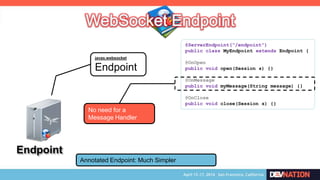
Endpoint
javax.websocket
Endpoint
Annotated Endpoint: Much Simpler
@ServerEndpoint(“/endpoint”)
public class MyEndpoint extends Endpoint {
@OnOpen
public void open(Session s) {}
@OnMessage
public void myMessage(String message) {}
@OnClose
public void close(Session s) {}
No need for a
Message Handler
Endpoint Endpoint
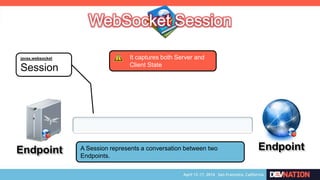
javax.websocket
Session
A Session represents a conversation between two
Endpoints.
It captures both Server and
Client State
Endpoint Endpoint
javax.websocket
Session
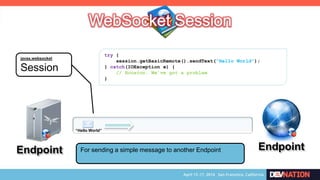
For sending a simple message to another Endpoint
try {
session.getBasicRemote().sendText(“Hello World”);
} catch(IOException e) {
// Houston: We‟ve got a problem
}
“Hello World”
Endpoint
Endpoint
javax.websocket
Session
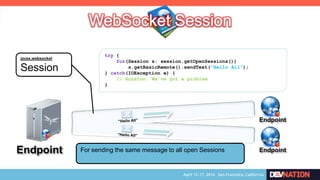
try {
for(Session s: session.getOpenSessions())
s.getBasicRemote().sendText(“Hello All”);
} catch(IOException e) {
// Houston: We‟ve got a problem
}
EndpointFor sending the same message to all open Sessions
Endpoint Endpoint
javax.websocket
Session
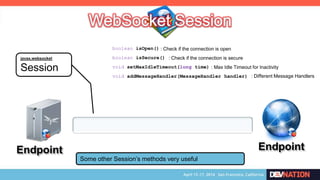
Some other Session’s methods very useful
boolean isOpen()
boolean isSecure()
void setMaxIdleTimeout(long time)
void addMessageHandler(MessageHandler handler)
: Check if the connection is open
: Check if the connection is secure
: Max Idle Timeout for Inactivity
: Different Message Handlers
Endpoint
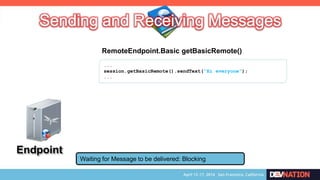
Waiting for Message to be delivered: Blocking
...
session.getBasicRemote().sendText(“Hi everyone”);
...
RemoteEndpoint.Basic getBasicRemote()
Endpoint
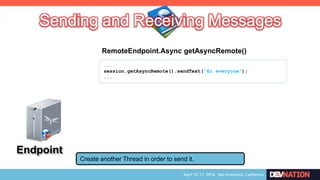
Create another Thread in order to send it.
...
session.getAsyncRemote().sendText(“Hi everyone”);
...
RemoteEndpoint.Async getAsyncRemote()
Endpoint
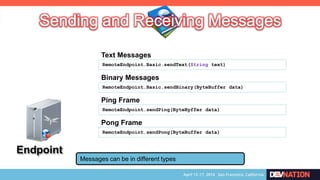
Messages can be in different types
RemoteEndpoint.Basic.sendText(String text)
Text Messages
RemoteEndpoint.Basic.sendBinary(ByteBuffer data)
Binary Messages
RemoteEndpoint.sendPing(ByteByffer data)
Ping Frame
RemoteEndpoint.sendPong(ByteBuffer data)
Pong Frame
Endpoint
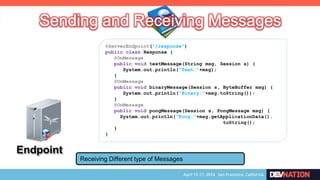
@ServerEndpoint(“/response”)
public class Response {
@OnMessage
public void textMessage(String msg, Session s) {
System.out.println(“Text:”+msg);
}
@OnMessage
public void binaryMessage(Session s, ByteBuffer msg) {
System.out.println(“Binary:”+msg.toString());
}
@OnMessage
public void pongMessage(Session s, PongMessage msg) {
System.out.println(“Pong:”+msg.getApplicationData().
toString();
}
}
Receiving Different type of Messages
Endpoint Endpoint
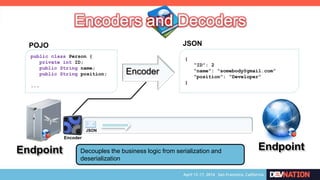
public class Person {
private int ID;
public String name;
public String position;
...
POJO
{
“ID”: 2
“name”: “somebody@gmail.com”
“position”: “Developer”
}
JSON
Encoder
JSON
Encoder
Decouples the business logic from serialization and
deserialization
Endpoint Endpoint
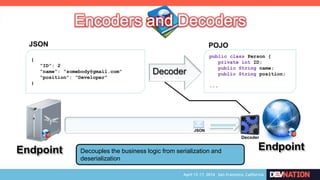
public class Person {
private int ID;
public String name;
public String position;
...
POJO
Decoder
JSON
Decoder
{
“ID”: 2
“name”: “somebody@gmail.com”
“position”: “Developer”
}
JSON
Decouples the business logic from serialization and
deserialization
Endpoint Endpoint
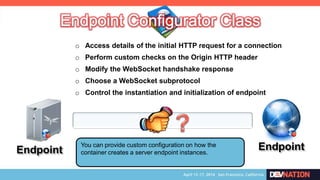
o Access details of the initial HTTP request for a connection
You can provide custom configuration on how the
container creates a server endpoint instances.
o Perform custom checks on the Origin HTTP header
o Modify the WebSocket handshake response
o Choose a WebSocket subprotocol
o Control the instantiation and initialization of endpoint
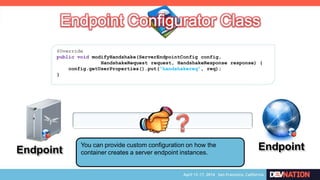
Endpoint EndpointYou can provide custom configuration on how the
container creates a server endpoint instances.
@Override
public void modifyHandshake(ServerEndpointConfig config,
HandshakeRequest request, HandshakeResponse response) {
config.getUserProperties().put(“handshakereq”, req);
}
WebSocket@Mobile
(Sorry, no Windows Mobile)
Using Mobile’s
Browser
Using Native
Implementation
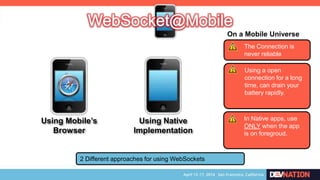
2 Different approaches for using WebSockets
The Connection is
never reliable
On a Mobile Universe
Using a open
connection for a long
time, can drain your
battery rapidly.
In Native apps, use
ONLY when the app
is on foregroud.
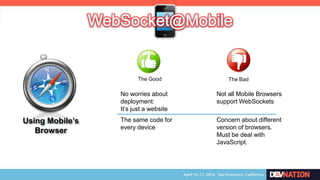
Using Mobile’s
Browser
The Good The Bad
No worries about
deployment:
It’s just a website
Not all Mobile Browsers
support WebSockets
Concern about different
version of browsers.
Must be deal with
JavaScript.
The same code for
every device
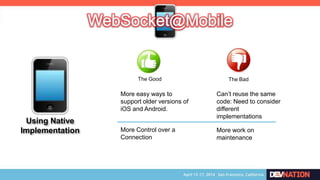
The Good The Bad
More easy ways to
support older versions of
iOS and Android.
Can’t reuse the same
code: Need to consider
different
implementations
More work on
maintenance
Using Native
Implementation More Control over a
Connection
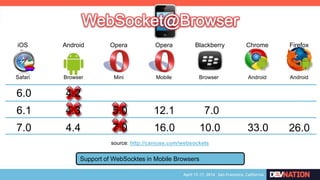
6.0
6.1
Safari
iOS
Browser
Android
Mini
Opera
Browser
Blackberry
Android
Chrome
Android
Firefox
7.0
5.0
7.0
source: http://caniuse.com/websockets
4.2
4.3
4.4
7.0
10.0 33.0 26.0
Mobile
Opera
12.1
16.0
Support of WebSocktes in Mobile Browsers
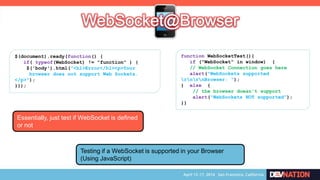
function WebSocketTest(){
if ("WebSocket" in window) {
// WebSocket Connection goes here
alert("WebSockets supported
rnrnBrowser: “);
} else {
// the browser doesn't support
alert("WebSockets NOT supported”);
}}
Testing if a WebSocket is supported in your Browser
(Using JavaScript)
$(document).ready(function() {
if( typeof(WebSocket) != "function" ) {
$('body').html("<h1>Error</h1><p>Your
browser does not support Web Sockets.
</p>");
}});
Essentially, just test if WebSocket is defined
or not
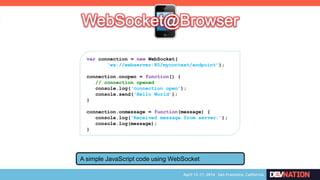
var connection = new WebSocket(
„ws://webserver:80/mycontext/endpoint‟);
connection.onopen = function() {
// connection opened
console.log(„connection open‟);
console.send(„Hello World‟);
}
connection.onmessage = function(message) {
console.log(„Received message from server:‟);
console.log(message);
}
A simple JavaScript code using WebSocket
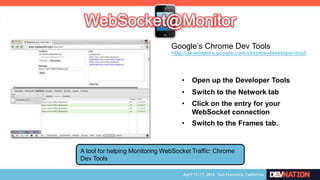
A tool for helping Monitoring WebSocket Traffic: Chrome
Dev Tools
• Open up the Developer Tools
• Switch to the Network tab
• Click on the entry for your
WebSocket connection
• Switch to the Frames tab.
http://developers.google.com/chrome-developer-tool/
Google’s Chrome Dev Tools
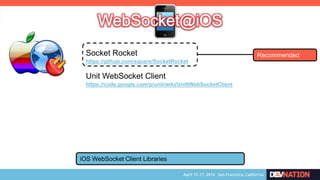
Socket Rocket
https://github.com/square/SocketRocket
Unit WebSocket Client
https://code.google.com/p/unit/wiki/UnittWebSocketClient
iOS WebSocket Client Libraries
Recommended
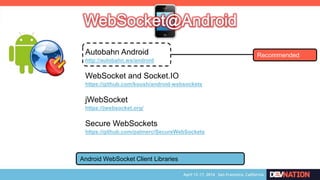
Autobahn Android
http://autobahn.ws/android
WebSocket and Socket.IO
https://github.com/koush/android-websockets
Android WebSocket Client Libraries
Recommended
jWebSocket
https://jwebsocket.org/
Secure WebSockets
https://github.com/palmerc/SecureWebSockets
WebSocket@Show
Possible Scenarios
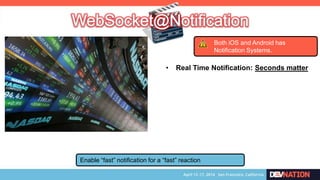
Enable “fast” notification for a “fast” reaction
• Real Time Notification: Seconds matter
Both iOS and Android has
Notification Systems.
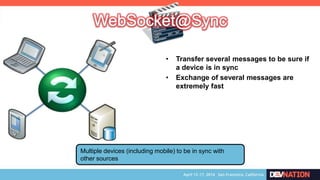
Multiple devices (including mobile) to be in sync with
other sources
• Transfer several messages to be sure if
a device is in sync
• Exchange of several messages are
extremely fast
Enabling people in sharing and interacting in the same
content at the same time.
• Real Time Video Sharing
• Broader collaboration
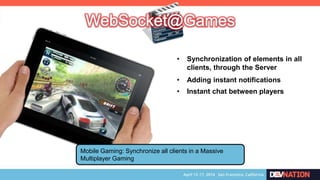
Mobile Gaming: Synchronize all clients in a Massive
Multiplayer Gaming
• Synchronization of elements in all
clients, through the Server
• Adding instant notifications
• Instant chat between players
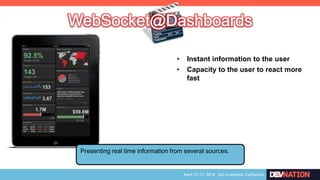
Presenting real time information from several sources.
• Instant information to the user
• Capacity to the user to react more
fast
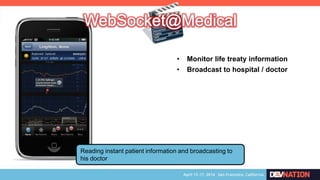
Reading instant patient information and broadcasting to
his doctor
• Monitor life treaty information
• Broadcast to hospital / doctor
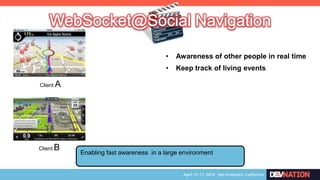
Enabling fast awareness in a large environment
• Awareness of other people in real time
• Keep track of living events
Client B
Client A
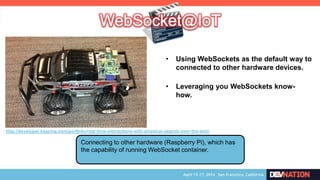
Connecting to other hardware (Raspberry Pi), which has
the capability of running WebSocket container.
http://developer.kaazing.com/portfolio/real-time-interactions-with-physical-objects-over-the-web/
• Using WebSockets as the default way to
connected to other hardware devices.
• Leveraging you WebSockets know-
how.
WebSocket@DevNation
Real-time collaborative writing:
When WebSocket met Ascii Doctor
4:50 pm
Room: 208
Maxime Gréau
Thank you
Special Thanks: Neto Marin <neto.marin at gmail.com>
maltron@gmail.com
Avaliable on Slideshare.net
http://www.slideshare.net/maltron/enhancing-mobile-user-experience-with-websocket

Enhancing Mobile User Experience with WebSocket

  • 2.
    Enhancing Mobile User Experiencewith WebSocket Mauricio “Maltron” Leal maltron@gmail.com @maltron
  • 3.
  • 4.
    Web Server (WebSocket compliant) Endpoint Client (WebSocketcompliant) Endpoint ws://webserver:80/mycontext/endpoint ? GET /mycontext/endpoint HTTP/1.1 Host: webserver Upgrade: websocket Connection: Upgrade Sec-WebSocket-Key: xqBt3ImNzJbYqRINxEFlkg== Origin: http://client Sec-WebSocket-Version: 13
  • 5.
    HTTP/1.1 101 SwitchingProtocols Upgrade: websocket Connection: Upgrade Sec-WebSocket-Accept: K7DJLdLooIwIG/MOpvWFB3y3FE8= Web Server (WebSocket compliant) Endpoint Client (WebSocket compliant) Endpoint HTTP/1.1 101 Switching Protocols
  • 6.
    Web Server (WebSocket compliant) Endpoint Client (WebSocketcompliant) Endpoint CONNECTED A connection is established and “never” closed Bi-directional & full duplex connection on a single TCP socket. It can be secured using SSLIt can be on average, 700 x faster than AJAX polling.
  • 7.
  • 8.
  • 9.
  • 10.
    Endpoint Message Browser (Using HTML 5) Standalone (WebscoketClient) Mobile (HTML 5 Browser) Mobile (WebSocket Client)
  • 11.
  • 12.
    Endpoint Endpoint javax.websocket Endpoint javax.websocket Endpoint Endpoints representsan object that can handle websocket conversations. 1 Instance = 1 Thread = 1 Connection
  • 13.
    Endpoint javax.websocket Endpoint For each endpointclass, holds lifecycle methods that may be overridden to intercept a websocket open, error and close events. Lifecycle Methods
  • 14.
    Endpoint javax.websocket Endpoint Programmatic Endpoint public classMyEndpoint extends Endpoint { @Override public void onOpen(Session s, EndpointConfig c) { // A connection was established } @Override public void onClose(Session s, CloseReason reason) {} @Override public void onError(Session s, Throwable thr) {}
  • 15.
    Endpoint javax.websocket Endpoint Programmatic Endpoint: Need tocreate a Message Handler public class MyEndpoint extends Endpoint { ... @Override public void onOpen(Session s, EndpointConfig c) { session.addMessageHandler( new MessageHandler.Whole<String>()) { @Override public void onMessage(String m) { try { s.getBasicRemote().sendText(“hi”); } catch(IOException e) { // Houston: we‟ve got a problem } ... Message Handler
  • 16.
    Endpoint javax.websocket Endpoint Annotated Endpoint: MuchSimpler @ServerEndpoint(“/endpoint”) public class MyEndpoint extends Endpoint { @OnOpen public void open(Session s) {} @OnMessage public void myMessage(String message) {} @OnClose public void close(Session s) {} No need for a Message Handler
  • 17.
    Endpoint Endpoint javax.websocket Session A Sessionrepresents a conversation between two Endpoints. It captures both Server and Client State
  • 18.
    Endpoint Endpoint javax.websocket Session For sendinga simple message to another Endpoint try { session.getBasicRemote().sendText(“Hello World”); } catch(IOException e) { // Houston: We‟ve got a problem } “Hello World”
  • 19.
    Endpoint Endpoint javax.websocket Session try { for(Session s:session.getOpenSessions()) s.getBasicRemote().sendText(“Hello All”); } catch(IOException e) { // Houston: We‟ve got a problem } EndpointFor sending the same message to all open Sessions
  • 20.
    Endpoint Endpoint javax.websocket Session Some otherSession’s methods very useful boolean isOpen() boolean isSecure() void setMaxIdleTimeout(long time) void addMessageHandler(MessageHandler handler) : Check if the connection is open : Check if the connection is secure : Max Idle Timeout for Inactivity : Different Message Handlers
  • 21.
    Endpoint Waiting for Messageto be delivered: Blocking ... session.getBasicRemote().sendText(“Hi everyone”); ... RemoteEndpoint.Basic getBasicRemote()
  • 22.
    Endpoint Create another Threadin order to send it. ... session.getAsyncRemote().sendText(“Hi everyone”); ... RemoteEndpoint.Async getAsyncRemote()
  • 23.
    Endpoint Messages can bein different types RemoteEndpoint.Basic.sendText(String text) Text Messages RemoteEndpoint.Basic.sendBinary(ByteBuffer data) Binary Messages RemoteEndpoint.sendPing(ByteByffer data) Ping Frame RemoteEndpoint.sendPong(ByteBuffer data) Pong Frame
  • 24.
    Endpoint @ServerEndpoint(“/response”) public class Response{ @OnMessage public void textMessage(String msg, Session s) { System.out.println(“Text:”+msg); } @OnMessage public void binaryMessage(Session s, ByteBuffer msg) { System.out.println(“Binary:”+msg.toString()); } @OnMessage public void pongMessage(Session s, PongMessage msg) { System.out.println(“Pong:”+msg.getApplicationData(). toString(); } } Receiving Different type of Messages
  • 25.
    Endpoint Endpoint public classPerson { private int ID; public String name; public String position; ... POJO { “ID”: 2 “name”: “somebody@gmail.com” “position”: “Developer” } JSON Encoder JSON Encoder Decouples the business logic from serialization and deserialization
  • 26.
    Endpoint Endpoint public classPerson { private int ID; public String name; public String position; ... POJO Decoder JSON Decoder { “ID”: 2 “name”: “somebody@gmail.com” “position”: “Developer” } JSON Decouples the business logic from serialization and deserialization
  • 27.
    Endpoint Endpoint o Accessdetails of the initial HTTP request for a connection You can provide custom configuration on how the container creates a server endpoint instances. o Perform custom checks on the Origin HTTP header o Modify the WebSocket handshake response o Choose a WebSocket subprotocol o Control the instantiation and initialization of endpoint
  • 28.
    Endpoint EndpointYou canprovide custom configuration on how the container creates a server endpoint instances. @Override public void modifyHandshake(ServerEndpointConfig config, HandshakeRequest request, HandshakeResponse response) { config.getUserProperties().put(“handshakereq”, req); }
  • 29.
  • 30.
    Using Mobile’s Browser Using Native Implementation 2Different approaches for using WebSockets The Connection is never reliable On a Mobile Universe Using a open connection for a long time, can drain your battery rapidly. In Native apps, use ONLY when the app is on foregroud.
  • 31.
    Using Mobile’s Browser The GoodThe Bad No worries about deployment: It’s just a website Not all Mobile Browsers support WebSockets Concern about different version of browsers. Must be deal with JavaScript. The same code for every device
  • 32.
    The Good TheBad More easy ways to support older versions of iOS and Android. Can’t reuse the same code: Need to consider different implementations More work on maintenance Using Native Implementation More Control over a Connection
  • 33.
  • 34.
    function WebSocketTest(){ if ("WebSocket"in window) { // WebSocket Connection goes here alert("WebSockets supported rnrnBrowser: “); } else { // the browser doesn't support alert("WebSockets NOT supported”); }} Testing if a WebSocket is supported in your Browser (Using JavaScript) $(document).ready(function() { if( typeof(WebSocket) != "function" ) { $('body').html("<h1>Error</h1><p>Your browser does not support Web Sockets. </p>"); }}); Essentially, just test if WebSocket is defined or not
  • 35.
    var connection =new WebSocket( „ws://webserver:80/mycontext/endpoint‟); connection.onopen = function() { // connection opened console.log(„connection open‟); console.send(„Hello World‟); } connection.onmessage = function(message) { console.log(„Received message from server:‟); console.log(message); } A simple JavaScript code using WebSocket
  • 36.
    A tool forhelping Monitoring WebSocket Traffic: Chrome Dev Tools • Open up the Developer Tools • Switch to the Network tab • Click on the entry for your WebSocket connection • Switch to the Frames tab. http://developers.google.com/chrome-developer-tool/ Google’s Chrome Dev Tools
  • 37.
    Socket Rocket https://github.com/square/SocketRocket Unit WebSocketClient https://code.google.com/p/unit/wiki/UnittWebSocketClient iOS WebSocket Client Libraries Recommended
  • 38.
    Autobahn Android http://autobahn.ws/android WebSocket andSocket.IO https://github.com/koush/android-websockets Android WebSocket Client Libraries Recommended jWebSocket https://jwebsocket.org/ Secure WebSockets https://github.com/palmerc/SecureWebSockets
  • 39.
  • 40.
    Enable “fast” notificationfor a “fast” reaction • Real Time Notification: Seconds matter Both iOS and Android has Notification Systems.
  • 41.
    Multiple devices (includingmobile) to be in sync with other sources • Transfer several messages to be sure if a device is in sync • Exchange of several messages are extremely fast
  • 42.
    Enabling people insharing and interacting in the same content at the same time. • Real Time Video Sharing • Broader collaboration
  • 43.
    Mobile Gaming: Synchronizeall clients in a Massive Multiplayer Gaming • Synchronization of elements in all clients, through the Server • Adding instant notifications • Instant chat between players
  • 44.
    Presenting real timeinformation from several sources. • Instant information to the user • Capacity to the user to react more fast
  • 45.
    Reading instant patientinformation and broadcasting to his doctor • Monitor life treaty information • Broadcast to hospital / doctor
  • 46.
    Enabling fast awarenessin a large environment • Awareness of other people in real time • Keep track of living events Client B Client A
  • 47.
    Connecting to otherhardware (Raspberry Pi), which has the capability of running WebSocket container. http://developer.kaazing.com/portfolio/real-time-interactions-with-physical-objects-over-the-web/ • Using WebSockets as the default way to connected to other hardware devices. • Leveraging you WebSockets know- how.
  • 48.
    WebSocket@DevNation Real-time collaborative writing: WhenWebSocket met Ascii Doctor 4:50 pm Room: 208 Maxime Gréau
  • 49.
    Thank you Special Thanks:Neto Marin <neto.marin at gmail.com> maltron@gmail.com Avaliable on Slideshare.net http://www.slideshare.net/maltron/enhancing-mobile-user-experience-with-websocket