




Social Media.
Guide + Workbook


By Robin Low


                   Copyright 2009
Introduction to Social Media (What?)
- Background
- Social Media Influence Chart
- Social Media in the world
- Social Media in Asia

Terms and definition

Importance of Social Media (Why?)

Social Media in action (How?)

Implications of Social Media

Social Media classification

Blogging Basics

Effective use of YouTube / Flickr

Effective use of Facebook

Twitter

Do and don'ts (Social Media Etiquette)

Social Media for Business – Develop Social Media Strategies

Digital Crisis Management

Internet Glossary
Today, more than ever before, "social media" has become a buzzword. Not only has it
gained popularity, it has been accepted into mainstream culture. There are many new
genres of social media that have gained traction here: blogs, wikis, media-sharing sites,
social network sites, social bookmarking, virtual worlds, microblogging sites, etc.

Introduction to Social Media

Background

The Internet brings about many advances in how people communicate. Today, sharing
knowledge and information is a very common thing. By sharing experiences, groups of
people with similar interests can participate and contribute to make an idea better.

From the idea of open-sourced software, many great products came from jointly sharing
codes, information and knowledge. When people started to expand on this similar idea,
they participate with stories, jokes and experiences. By joining forums and different
online groups, communities and networks are formed. People can find other folks with
similar interests meet up or even jointly work on projects when they are miles apart. Isn’t
this great?

Social media is not new. Media has been leveraged for sociable purposes since the
caveman's walls. Even in the realm of the Internet, some of the first applications were
framed around communication and sharing. For decades, we've watched the development
of new genres of social media - MUDs/MOOs, instant messaging, chatrooms, bulletin
boards, etc.

(Evolution of Social Media)

http://www.docstoc.com/docs/2900778/The-Evolution-of-Social-Media

1979 - USENET was the first service to link people with similar interests, allow them
share news and information and provide them a place to unite.

1979 – BBS (Bulletin Board System) The first BBS or electronic “Bulletin Board
System” was developed and was opened to the public in 1979 by Ward Christensen. The
first BBSes were small servers powered by personal computers attached to a telephone
modem, where one person at a time could dial in and get access. BBSes had social
discussions on message boards, community-contributed file downloads, and online
games.

The early BBSes had no colors or graphics, but with the advent of MS-DOS 3.0, a
predecessor of HTML called ANSI was used to make colors and underground online
artwork.

1979 – Commercial Online Services - Online services, like Prodigy and CompuServe,
were the first large scale corporate attempts to bring an interactive, “social” online
experience to the masses. Online services rose to popularity concurrently along with
BBSes and catered to a more corporate and mainstream-home-user kind of set. They
offered a safe, moderated environment for social networking and discussions.

CompuServe was infamous for the high cost ($6 per hour, plus long-distance telephone
adding up to almost $30/hr.) - but it offered the first online chat system called CB
simulator in 1980. The first real-life wedding from a couple who met via real-time
Internet chat happened shortly thereafter and was featured on the Phil Donahue show.
Prodigy launched nationwide in 1990, growing quickly in popularity for its color
interface and lower cost.

Later, America Online (AOL) gained critical mass with aggressive CD promotions and
direct mail campaigns. AOL also did one of the most epic product placements of all time
in the 1998 film “You’ve Got Mail!” starring Tom Hanks - bringing “social” online
culture and romance into the Hollywood mainstream.

1988 – IRC, ICQ and IM - People have been addicted to “tweeting” their real-time status
updates (using hash tags (#) and at-signs (@)) for over 20 years. Jarkko Oikarinen created
IRC, or Internet Relay Chat, in August 1988. It was notably used to break news on the
Soviet coup attempt during the media blackout and keep tabs on the first Gulf War. Many
people stayed logged into IRC constantly… using it to share links, files and keep in touch
with their global network - the same way Twitter is used today.

IRC clients were primarily UNIX-based… but in 1996 four Israeli technologists invented
the instant messenger (IM) system for desktop computers called ICQ. AOL quickly
purchased this and it became a mainstream hit. IM technology helped developed the
emotional lexicon of social media, with avatars (expressive images to represent yourself),
abbreviations (A/S/L? = age, sex, location?) and emotion icons (or emoticons).

1991 – Dawn of the World Wide Web - The Internet existed since the late 1960s, as a
network, but the World Wide Web became publicly available on August 6th, 1991.

At the beginning of the 90s, Internet access was available only to those with legitimate
with university / government / military connections (and to hackers). But around 1994 or
1995, private Internet service providers (ISPs) began to pop up in most major metro areas
in the United States. This gave millions of home users the chance to enjoy unfiltered,
unlimited online experiences. Usenet was the first center for most of the high-end
discussion - but early Internet users were extremely outspoken and opinionated by
today’s standards. The first online social media etiquette standards were proposed, and
called netiquette, as a reactionary to stop the rampant flaming and keep things somewhat
civilized.

1995 – First social networking site, Classmates.com

1999 – P2P, bit torrent and file sharing - Napster… a peer-to-peer file sharing application
that went live in June 1999, marked an radical shift of distribution power from record
companies to the consumer. I’ll never forget the (unprecedented) technological thrill of
downloading an album in .mp3, burning it to CD on an external $500 drive, and playing
it in my car. Music started to freely flow across the Internet at an astonishing pace,
stripped of hype and payola… on the merit of real people’s tastes and personal
collections. The online music party raged through 1999 and 2000 (just like the tech
stocks), until it was declared “illegal” and Napster was forced to filter out all the
copyrighted content.

Competing peer-to-peer applications like Limewire took Napster’s place - until
BitTorrent technology arrived and provided a robust, centralized way to share files
without being blocked. The Swedish website The Pirate Bay became a cult online
destination for “social” media distribution.

1999 - Sixdegrees was the first modern social networking site. No one understood the
concept, and it failed to garner the audience it needed and collapsed.

2002 - Friendster was the first highly successful social networking site. A victim of its
own popularity, the servers buckled under the strain and as users were kicked for TOS
violations, they flocked to other sites, leaving it to be one of the biggest Internet ghost
towns.

2003 - MySpace exploded after rumors that Friendster was rumored to be a pay site, and
by marketing to a younger demographic. It's lost some steam but founders have cash out.

2004 - Flickr and Facebook emerged as the Social Media groundwork is laid. Facebook
focused on communities of High School students and quickly even the 35 - 60 crowd
started getting on.

2005 - With Flickr and MySpace gaining popularity, YouTube, streaming video
generated by users became popular, and everyone was watching and discussing video on
the Internet.

2006 - Twitter emerged and new concepts began to emerge along with presence apps,
micro-blogging, SMS integration, and many others. Twitter made social media much
more promising.

Slashdot got famous for generating tons of traffic and buzz around its editor-picked
stories, but the modern social news revolution took off when Digg gained critical mass in
late 2006 and sites like StumbleUpon and Reddit followed. Delicious became popular as
a way to share bookmarks of static pages.

2007 - With too many social media sites to keep track of, many new sites started
aggregation. Friendfeed and other sites like it collected feeds from other sites; rather than
hosting contact, they bring it all together.
From IRCs, chat rooms, online forums to Facebook, LinkedIn and Twitter --
social media have changed many of our lives. With today’s technology, we can now
communicate on social media not only from our desktop computers, but with other
portable devices as well.

Adoption of Social Media

Social networking sites (A short American Centric History)

Back in 2002, Friendster was designed as to be an online dating site. The goal was to
attract audiences repelled by Match.com. Quickly, gay men, the digerati, and urban 20-
somethings who were known for running around naked in the desert on an annual basis
picked up the site.

Friendster, the company was not prepared for what the latter group would do. With too
much time on their hands and a lot of artistic idea, many of the early adopters began
creating “Fakesters” or fake characters. They used these for many different purposes, but
notably, they were used to collapse the network graph.

As the company tried to swat away what they believed to be the blight on their digital
landscape, a new wave of young people started flocking to the site to join in on the fun.
This new group - indie rock bands - had a goal. They wanted to connect with their fans
and they thought this new tool would be perfect. Of course, by creating portraits that
looked like the Fakesters, they fueled the ire of Friendster. They too were shooed away.
Angered by the site's management, many of the early adopters started leaving. Many
different sites entered the market on the coattails of Friendster and attracted different
audiences. Many of the Burners flocked to Tribe.net. The digerati flirted with Orkut
before moving onto other media-sharing-focused social network sites; they returned to
SNSs with Facebook.

Then MySpace emerged but was effectively ignored by the press and digerati. MySpace
aimed to attract all of those being ejected from Friendster. They succeeded in getting a
few small niche populations before gaining traction with the musicians who were just
starting to get that social network sites were valuable. Based in Los Angeles, they had an
upper hand.

MySpace managed to attract club promoters and others catering to young urban hipsters
who were looking for a tool for cool hunting. This in itself would be a footnote in the
history of social network sites, except that bands have fans. And indie rock bands are not
just listened to by those who can legally hear them play in clubs. The teenagers also love
them. Slowly, a symbiotic relationship emerged on MySpace as bands and fans became
mutually dependent on one another. Against this backdrop, a youth phenomena emerged.

Meanwhile, another U.S. site was taking hold with a slightly older population. Facebook
had launched as a Harvard-only site before expanding to other elite institutions before
expanding to other 4-year-colleges before expanding to 2-year colleges. It became
popular with college students everywhere. It wasn't until 2005 that they opened the doors
to some companies and high schools. And only in 2006, did they open to all.

By then, the landscape around social network sites had changed. MySpace's popularity
with American teenagers had sparked a new wave of moral panics, driven primarily from
the media's misrepresentation of teenage runaways and disturbed kids who leveraged the
site to find and knowingly meet up with older men for sexual encounters.

Facebook was narrated as the "safe" alternative and, in the 2006-2007 school year, a split
amongst American teens occurred. Those college-bound kids from wealthier or upwardly
mobile backgrounds flocked to Facebook while teens from urban or less economically
privileged backgrounds rejected the transition and opted to stay with MySpace while
simultaneously rejecting the fears brought on by American media. Many kids were
caught in the middle and opted to use both.

While there were many adults on MySpace for legitimate purposes, it wasn't until white
collared professionals joined Facebook en masse that the moral panic started to subside.
Finally, privileged Americans "got" social network sites, even if they were stuck
confronting their high school identities through the listing of 25 things. At this stage, over
35% of American adults have a profile on a social network site. The adoption by this
older, wealthier, more educated crowd changed the headlines of the news. Facebook
became the new darling and most people thought that it had squashed MySpace long
before it had even a fraction of the number of users.

The adoption of social media is quite different than that of non-social technologies. For
the most part, you don't need your friends to use word to find the tool useful. You do
need your friends to use email for it to be useful, but, thanks to properties of that medium,
you don't need them to be using Outlook or Hotmail to write to them. Many of the new
genres of social media are walled gardens, requiring your friends to use that exact site to
be valuable. This has its advantages for the companies who build it - that's the whole
attitude behind lock-in. But it also has its costs. Consider for example the fact that
working class and upper class kids can't talk to one another if they are on different SNSs.

Friendster didn't understand network effects. In kicking off users who weren't conforming
to their standards, they pissed off more than those users; they pissed off those users'
friends who were left with little purpose to use the site. The popularity of Friendster
unraveled as fast as it picked up, but the company never realized what hit them. All of
their metrics were based on number of users. While only a few users deleted their
accounts, the impact of those lost accounts was huge. The friends of those who departed
slowly stopped using the site. At first, they went from logging in every hour to logging in
every day, never affecting the metrics. But as nothing new came in and as the collective
interest waned, their attention went elsewhere. Today, Friendster is succeeding because
of its popularity in other countries, but in the US, it's a graveyard of hipsters stuck in
2003.

Network effects
Community managers and abuse teams have a sense of the health of a community. All
sorts of tools are used to search for inappropriate behavior or content. But how successful
are they? In a Friend-driven system, if someone is posting child porn, you better be
paying detailed attention to that person's Friends. And if you want to curb problematic
behavior, you need to think of the problem in terms of networks, not individuals. Further,
while we all agree that killing off some behavior is an absolute imperative, what about
the gray lines? The health of a community has a lot to do with its network and you can
prune if you prune wisely. How can selective censorship be done properly so that
everyone can stay while they know that they can be banned for violating a certain code of
conduct?

Network effects are also critical for deployment. People pick up the things that their
friends use. This is all fine and well if everyone can get access to the same platform, but
when that's not the case, new problems emerge. We're all developing nice new social
technologies for the mobile phone. Even when people want those technologies, they
aren't taking off. Why? There are no cluster effects. If you use IE and I use Firefox, we
can still both get to Facebook. If you use Windows Mobile and I use an iPhone, the
chances of us being able to do the same things with our devices are pretty limited. We
can't role out cool new technologies if there are no cluster effects.

Different usage of Social Media Between Youths and Adults

As many of you know, youth played a central role in the rise of some social media. Now,
many adults have jumped in, but what they are doing there is often very different than
what young people are doing.

For American teenagers, social network sites became a social hangout space, not unlike
the malls in which I grew up back in the 1980s. This was a place to gather with friends
from school and church when in-person encounters were not viable. Unlike many adults,
teenagers were never really networking. They were socializing in pre-exiting groups.

Social network sites became critically important to them because this was where they sat
and gossiped, and jockeyed for status. They used these tools to see and be seen. Those
using MySpace put great effort into decorating their profile and fleshing out their "About
Me" section. The features and functionality of Facebook were fundamentally different,
but virtual pets and quizzes served similar self-expression purposes on Facebook.

Teen conversations may appear completely irrational, or pointless at best. "Wasssup?"
"Not much, how you?" may not seem like much to an outsider, but this is a form of social
grooming. It's a way of checking in, confirming friendships, and negotiating social
waters.

Adults have approached Facebook in very different ways. Adults are not hanging out on
Facebook. They are more likely to respond to status messages than start a conversation
on someone's wall (unless it's their birthday of course). Adults aren't really decorating
their profiles or making sure that their “About Me's” are up-to-date. Adults, far more than
teens, are using Facebook for its intended purpose as a social utility. For example, it is a
tool for communicating with the past.

Adults may giggle about having run-ins with friends from high school, but underneath it
all, many of them are curious. Similar to what happens at school reunion. We all secretly
really want to know what happened to out high school Sweetheart. Nowhere is this
dynamic more visible than in the recent "25 Things" phenomena. While teens have been
filling out personality quizzes since the dawn of social media, most adults only went
through this phase once, as a newbie when they felt as though they really needed to
forward the chain letter to 10 friends or else. The "25 Things" phenomenon took me by
surprise until I started thinking about the intended audience. Teenagers craft quizzes for
themselves and their friends. Adults are crafting them to show-off to people from the past
and connect the dots between different audiences as a way of coping with the
awkwardness of collapsed contexts.

Social media continues to be age-graded. Right now, Twitter is all the rage, but most kids
are not on it. It's not the act of creating and sharing social nuggets that's the issue. Teens
are actively using Facebook status update, MySpace bulletins, and IM away messages to
share their views on the day and their mood of the moment. So why not Twitter? While
it's possible to make Twitter "private," the culture of Twitter is all about participation in a
large public square. From the digerati seeking widespread attention to the politically
minded hoping to appear on CNN, many are leveraging Twitter to be part of a broad
dialogue. Teens are much more motivated to talk only with their friends and they
learned a harsh lesson with social network sites. Even if they are just trying to talk to
their friends, those who hold power over them are going to access everything they wrote
if it's in public. While the philosophy among teens is "public by default, private when
necessary," many are learning that it's just not worth it to have a worrying mother obsess
over every mood you seek to convey. This dynamic showcases how social factors are key
to the adoption of new forms of social media.

With all of this, it shows that as a developer, you are no longer simply an author of
software. You are an actor in a process in which software is being developed and
repurposed. The key lesson from the rise of social media for you is that a great deal of
software is best built as a coordinated dance between you and the users.

There are also significant policy implications in all of this. Many people are aware of
how inaccurate the public portrait of the Internet risk is. Policy makers in many countries
are hell-bent on "solving" the safety problem, but what they're trying to fix is not what's
really happening. Yet, in trying to address public fears, they run the risk of putting more
kids in harm's way AND forcing companies to build technologies that would help no one.
Shift in Company Policies

In order to use social media effectively, many companies must adopt a “customer first”
ideology. To respond to requests or feedback, the process of getting things approved must
be streamlined, so that if a problem arises, the person responding can be empowered to
respond.

In my experience, I found many companies believe that Social Media is like Public
Relations and should be handled by the Pubic Relations department or the marketing
department; however, I feel that a company should not use the marketing manpower on
Social Media. Although it has a lot of brand building aspects, and it should tie in with the
company’s marketing plan, it also involves much of a company’s customer service.

Furthermore, social media is much more than just marketing and customer service. It can
be used for informational gathering, managing relationships with vendors and customer,
organization knowledge management and much more.

Social media is considered by some as “putting the public back in public relations” and it
does take time to build relationships, but the returns are far greater than just advertising.
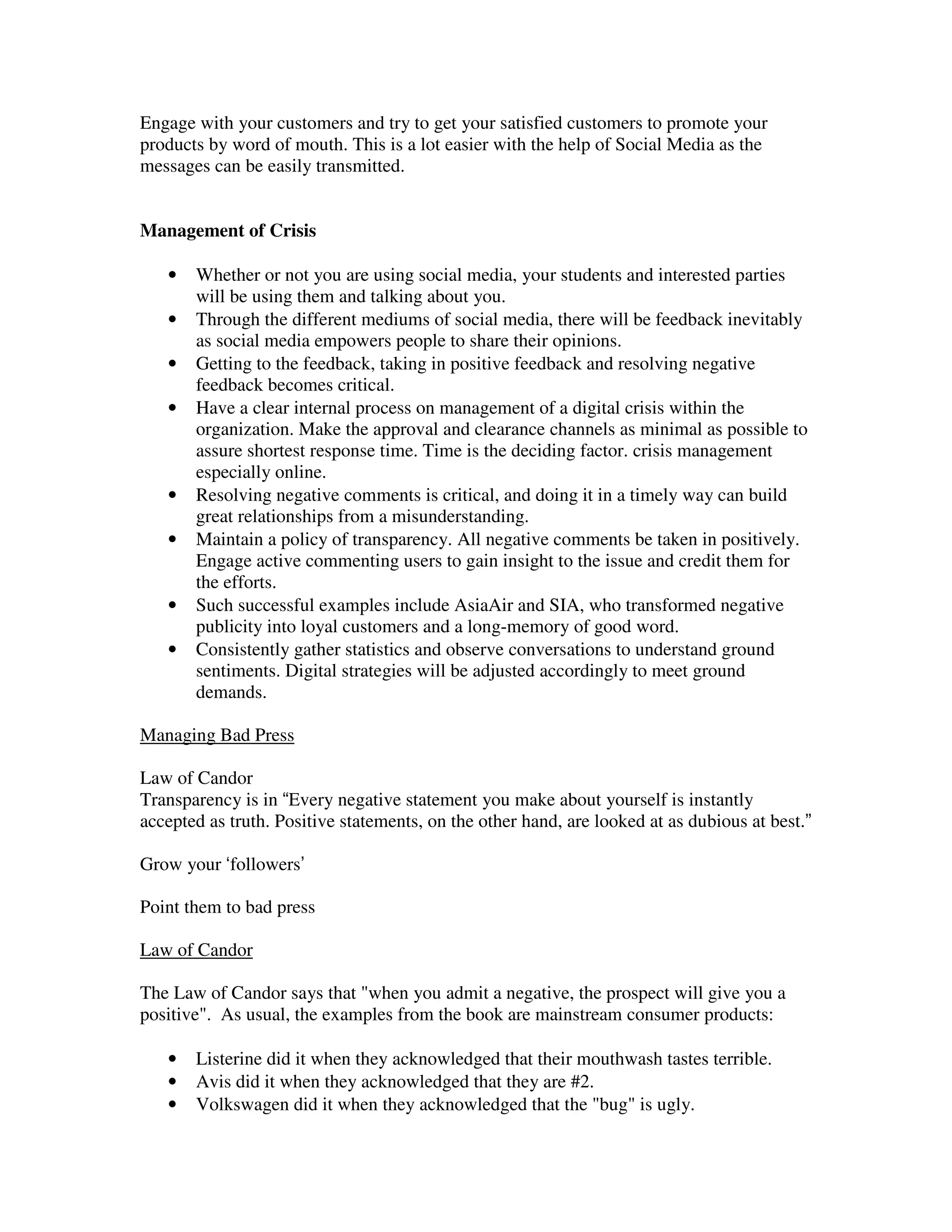
When a customer, feels happy, they will become a repeat customer, and with them on
board your social media platform, some of these customers can help spread your products
and services and eventually become an evangelist.

Companies who are interested to engage in Social Media should consider starting a new
department, and the duties of this department would include the following:

   -   Monitor the Internet for new, blogs and other articles about the company.
   -   Write blogs about interesting tips or findings in the industry.
   -   Engage bloggers, tweeps and other contributors who write about the company.
       (Either thank them or resolve their problems)
   -   Maintain and update the company’s Fan Page on Facebook.
   -   Maintain and update the company’s Twitter account.
   -   Disseminate information and achievements of the company on Social Media.
   -   Liaise with the customer service department and inform them of customer
       feedback.
   -   Liaise with marketing department and make sure Social Media strategy supports
       marketing plans.
   -   Work with Human resources to gather information on the company (achievements
       and news), use Social Media to help in new hires, and look out for potential
       employees.
   -   Research information on the industry using Social Media, feedback to
       management or R&D about findings.
   -   Train and encourage staff to use Social Media. Nothing better than the staff
       believing in the product and service and promoting using word of mouth.
   -   Organize events; add picture and videos of company’s happening on Social Media
       to share the company’s experience and events.
(Social Media Influence Chart)

Today, social media affects many things in our lives. Empowered by the Internet, people
now can share information and affect opinions and sway decisions even for major things
like election of a president of United States.

News break much faster, and with the Internet, it is now very hard for government to
cover up happenings as photos of the incident can be found on the Internet literally
minutes after it happened.

Besides the breakneck speed for which news appear on social media sites – much earlier
compared to news site, social media also brings about changes to companies as those
companies who are slow to respond to their customers’ needs can now find lot of
complains on the Internet, and of they are not handled in a timely manner, it can easily
become a crisis.

(Crisis for branding on Social Media)

In Singapore, social media is also gaining in influence. The AWARE crisis which
happened in April 2009, has shown the world that even a small country like Singapore
can leverage on social media and gather support all over the world about a small
organization which was interested in women’s rights.

Through the use of Facebook and Twitter, the ousted committee was able to gain control
of the “hijacked” organization, to win in a new EOGM election, and made it very high
profile news in Singapore. It even became the trending topic on Twitter for several days.
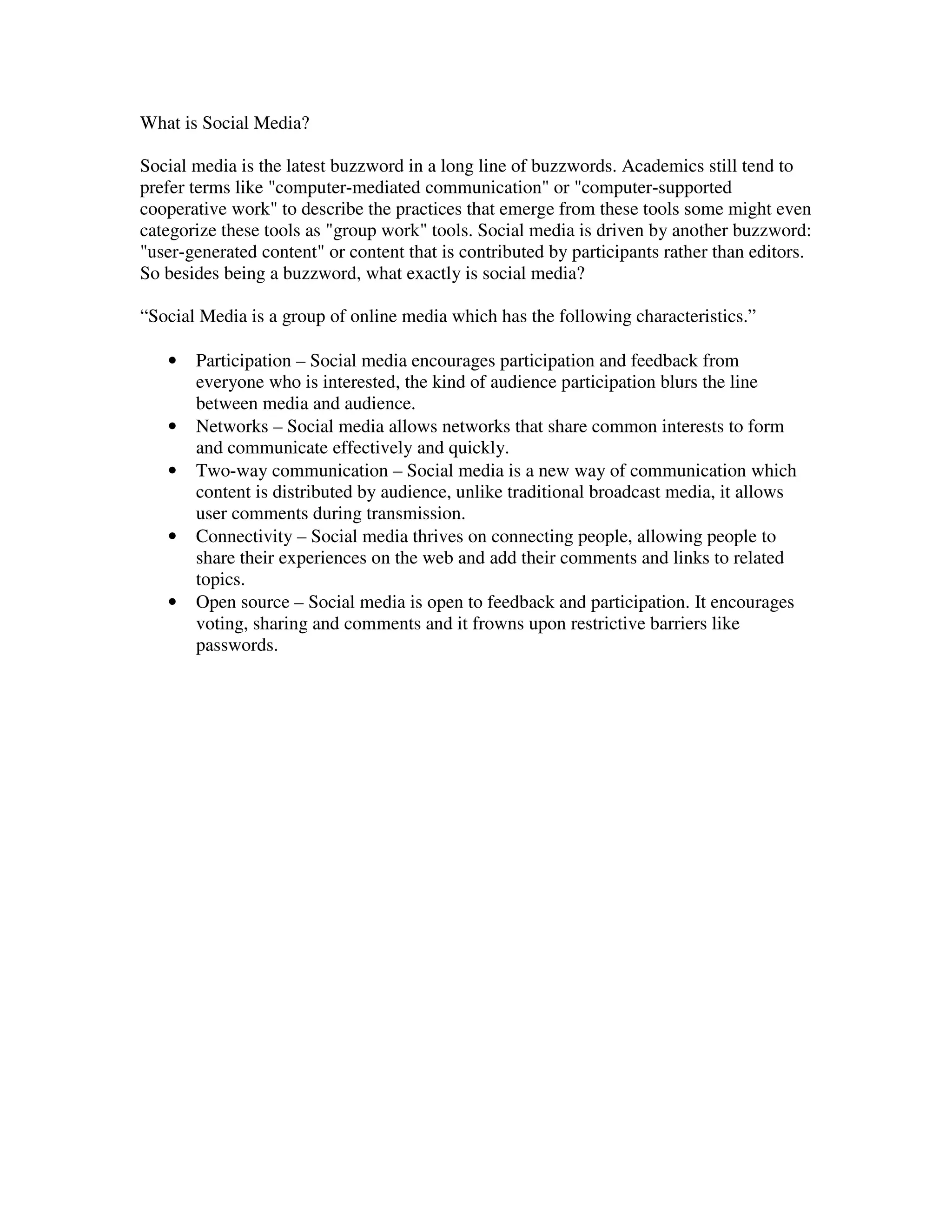
What is Social Media?

Social media is the latest buzzword in a long line of buzzwords. Academics still tend to
prefer terms like "computer-mediated communication" or "computer-supported
cooperative work" to describe the practices that emerge from these tools some might even
categorize these tools as "group work" tools. Social media is driven by another buzzword:
"user-generated content" or content that is contributed by participants rather than editors.
So besides being a buzzword, what exactly is social media?

“Social Media is a group of online media which has the following characteristics.”

   •   Participation – Social media encourages participation and feedback from
       everyone who is interested, the kind of audience participation blurs the line
       between media and audience.
   •   Networks – Social media allows networks that share common interests to form
       and communicate effectively and quickly.
   •   Two-way communication – Social media is a new way of communication which
       content is distributed by audience, unlike traditional broadcast media, it allows
       user comments during transmission.
   •   Connectivity – Social media thrives on connecting people, allowing people to
       share their experiences on the web and add their comments and links to related
       topics.
   •   Open source – Social media is open to feedback and participation. It encourages
       voting, sharing and comments and it frowns upon restrictive barriers like
       passwords.
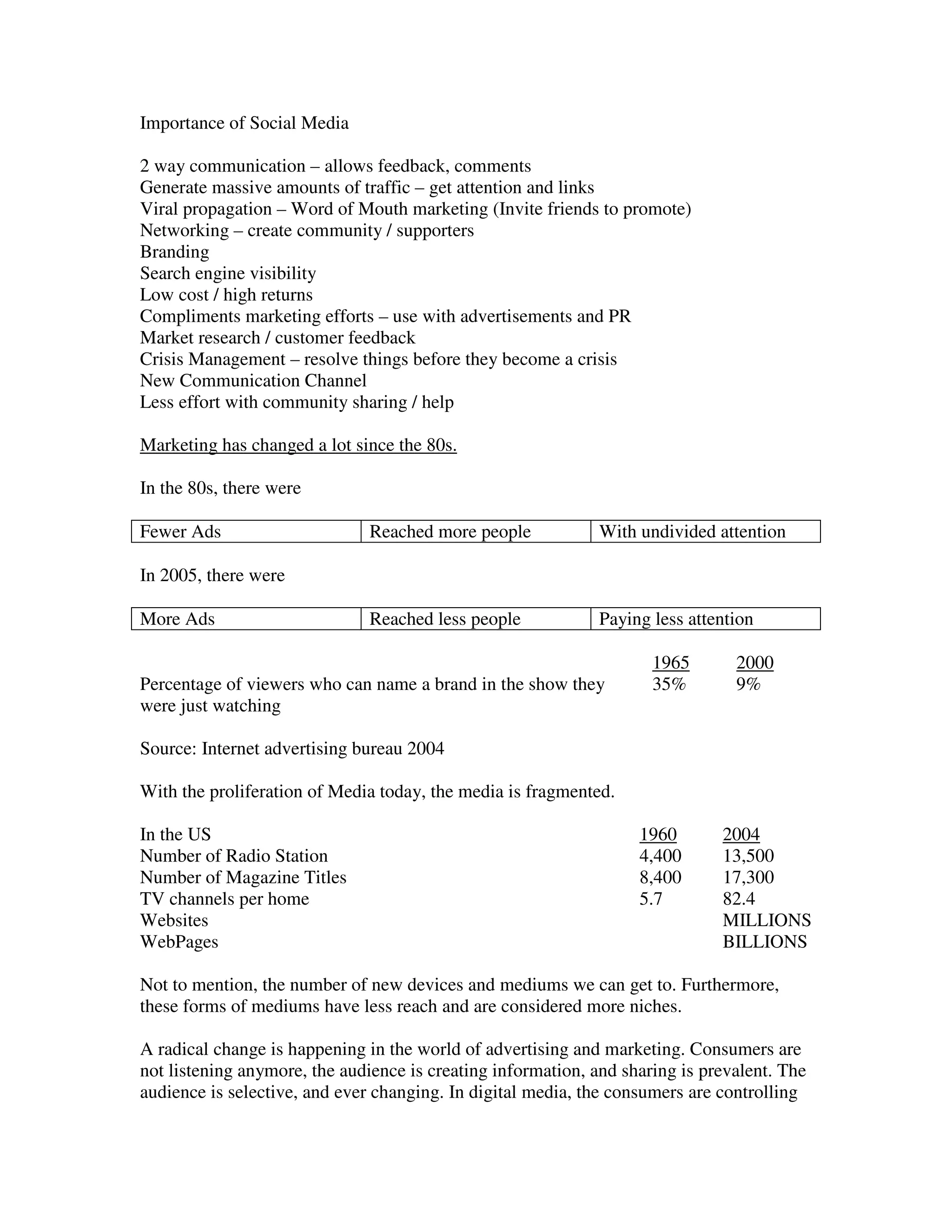
Importance of Social Media

2 way communication – allows feedback, comments
Generate massive amounts of traffic – get attention and links
Viral propagation – Word of Mouth marketing (Invite friends to promote)
Networking – create community / supporters
Branding
Search engine visibility
Low cost / high returns
Compliments marketing efforts – use with advertisements and PR
Market research / customer feedback
Crisis Management – resolve things before they become a crisis
New Communication Channel
Less effort with community sharing / help

Marketing has changed a lot since the 80s.

In the 80s, there were

Fewer Ads                      Reached more people            With undivided attention

In 2005, there were

More Ads                       Reached less people            Paying less attention

                                                                     1965       2000
Percentage of viewers who can name a brand in the show they          35%        9%
were just watching

Source: Internet advertising bureau 2004

With the proliferation of Media today, the media is fragmented.

In the US                                                          1960       2004
Number of Radio Station                                            4,400      13,500
Number of Magazine Titles                                          8,400      17,300
TV channels per home                                               5.7        82.4
Websites                                                                      MILLIONS
WebPages                                                                      BILLIONS

Not to mention, the number of new devices and mediums we can get to. Furthermore,
these forms of mediums have less reach and are considered more niches.

A radical change is happening in the world of advertising and marketing. Consumers are
not listening anymore, the audience is creating information, and sharing is prevalent. The
audience is selective, and ever changing. In digital media, the consumers are controlling
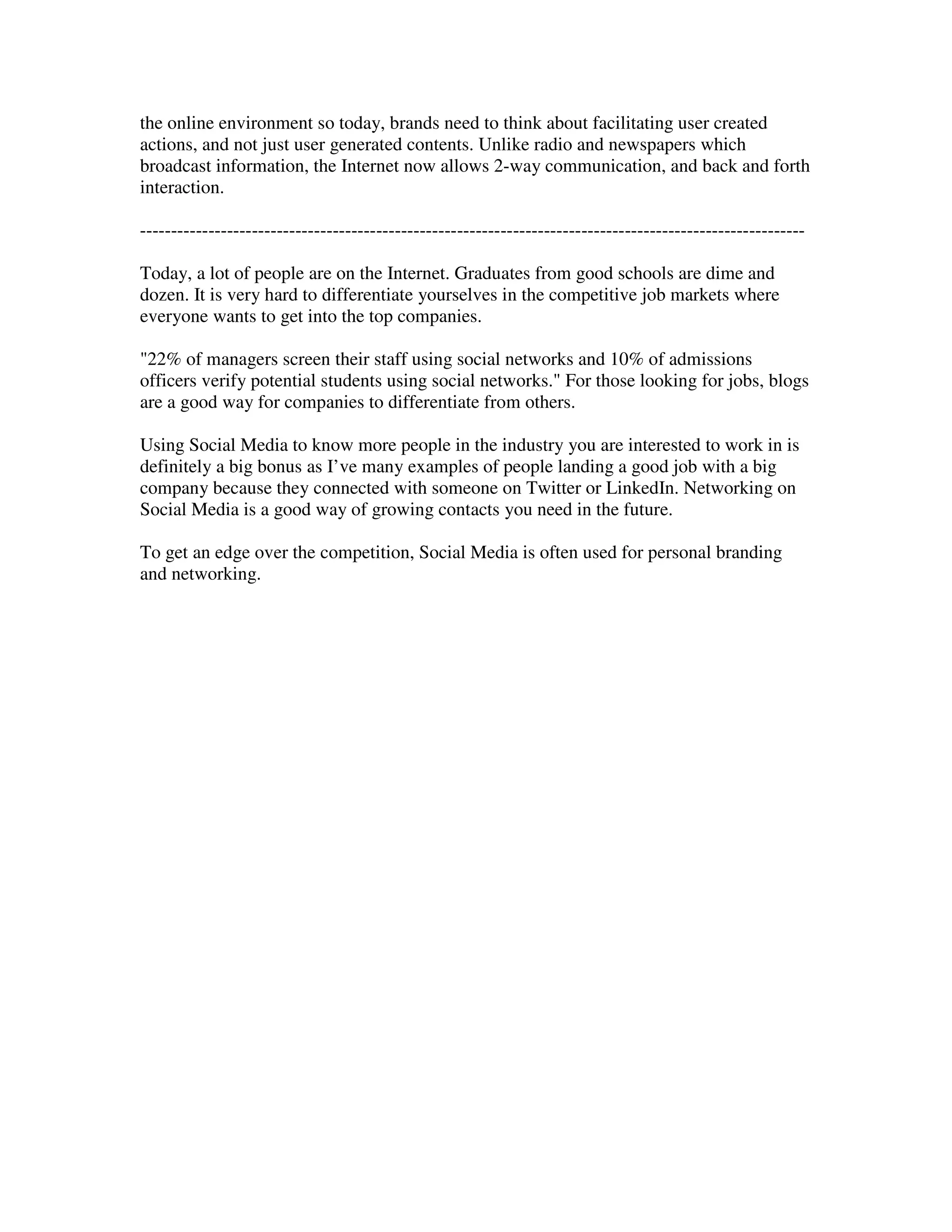
the online environment so today, brands need to think about facilitating user created
actions, and not just user generated contents. Unlike radio and newspapers which
broadcast information, the Internet now allows 2-way communication, and back and forth
interaction.

-----------------------------------------------------------------------------------------------------------

Today, a lot of people are on the Internet. Graduates from good schools are dime and
dozen. It is very hard to differentiate yourselves in the competitive job markets where
everyone wants to get into the top companies.

"22% of managers screen their staff using social networks and 10% of admissions
officers verify potential students using social networks." For those looking for jobs, blogs
are a good way for companies to differentiate from others.

Using Social Media to know more people in the industry you are interested to work in is
definitely a big bonus as I’ve many examples of people landing a good job with a big
company because they connected with someone on Twitter or LinkedIn. Networking on
Social Media is a good way of growing contacts you need in the future.

To get an edge over the competition, Social Media is often used for personal branding
and networking.
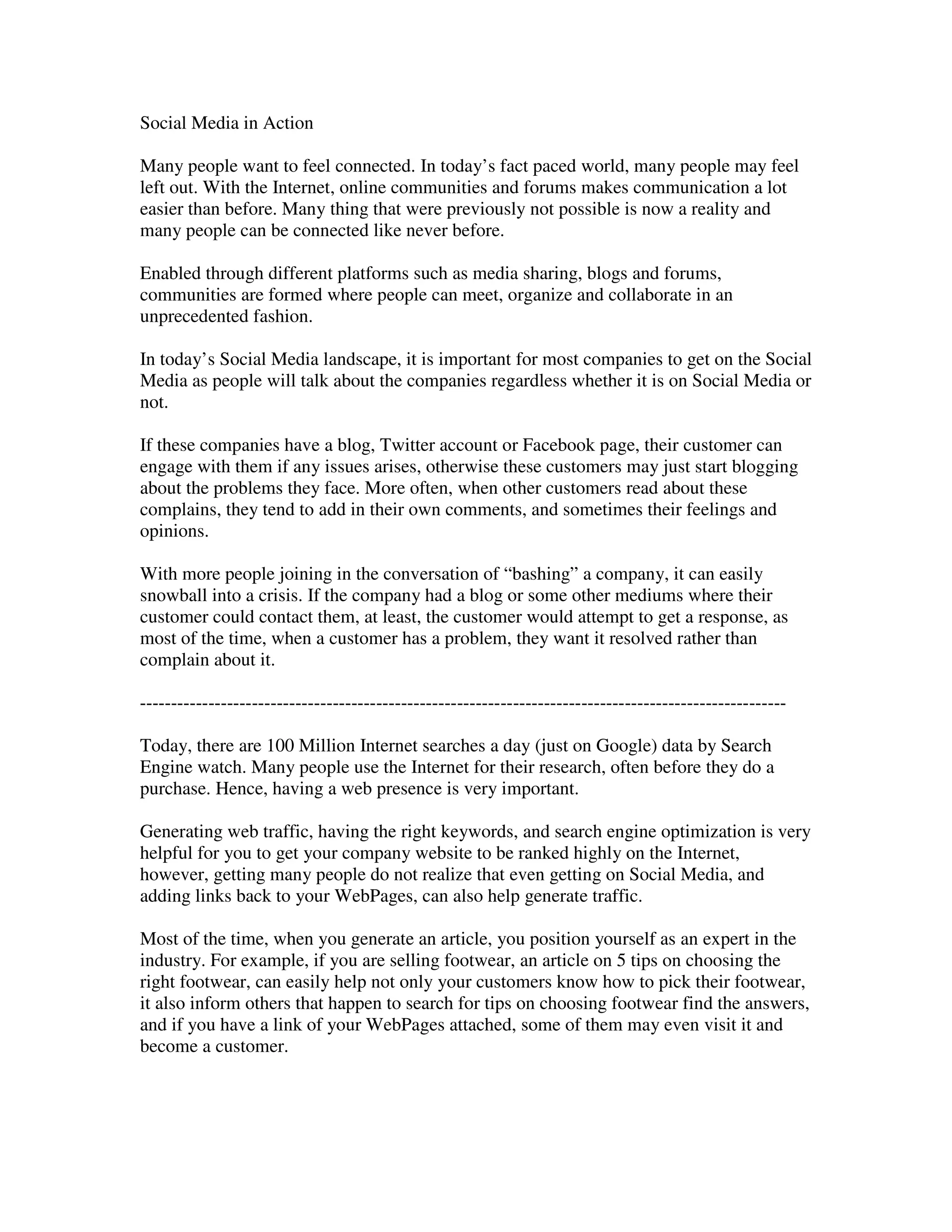
Social Media in Action

Many people want to feel connected. In today’s fact paced world, many people may feel
left out. With the Internet, online communities and forums makes communication a lot
easier than before. Many thing that were previously not possible is now a reality and
many people can be connected like never before.

Enabled through different platforms such as media sharing, blogs and forums,
communities are formed where people can meet, organize and collaborate in an
unprecedented fashion.

In today’s Social Media landscape, it is important for most companies to get on the Social
Media as people will talk about the companies regardless whether it is on Social Media or
not.

If these companies have a blog, Twitter account or Facebook page, their customer can
engage with them if any issues arises, otherwise these customers may just start blogging
about the problems they face. More often, when other customers read about these
complains, they tend to add in their own comments, and sometimes their feelings and
opinions.

With more people joining in the conversation of “bashing” a company, it can easily
snowball into a crisis. If the company had a blog or some other mediums where their
customer could contact them, at least, the customer would attempt to get a response, as
most of the time, when a customer has a problem, they want it resolved rather than
complain about it.

--------------------------------------------------------------------------------------------------------

Today, there are 100 Million Internet searches a day (just on Google) data by Search
Engine watch. Many people use the Internet for their research, often before they do a
purchase. Hence, having a web presence is very important.

Generating web traffic, having the right keywords, and search engine optimization is very
helpful for you to get your company website to be ranked highly on the Internet,
however, getting many people do not realize that even getting on Social Media, and
adding links back to your WebPages, can also help generate traffic.

Most of the time, when you generate an article, you position yourself as an expert in the
industry. For example, if you are selling footwear, an article on 5 tips on choosing the
right footwear, can easily help not only your customers know how to pick their footwear,
it also inform others that happen to search for tips on choosing footwear find the answers,
and if you have a link of your WebPages attached, some of them may even visit it and
become a customer.
With more articles and blogs linking back to your WebPages, your search engine ranking
will also improve and you company may even be found on related WebPages due to the
articles written.

Here are some examples of companies who are actively engaged on Social Media

This list is by no means exhaustive, and it represents a wide variety of businesses,
industries and social media tools. As you can see, engagement takes many forms. Some
are likely to generate more discussions with the company while others might result better
connections between customers. Some will fade away over the next 6-12 months while
others will continue to grow and evolve.

There are no rules to what form your engagement has to take. Look at your company,
identify its strengths, what types of conversations energize employees and determine how
you can best grow/shape/build/join your own community.

If you have other examples of corporate social media engagement, please share them in
the comments.

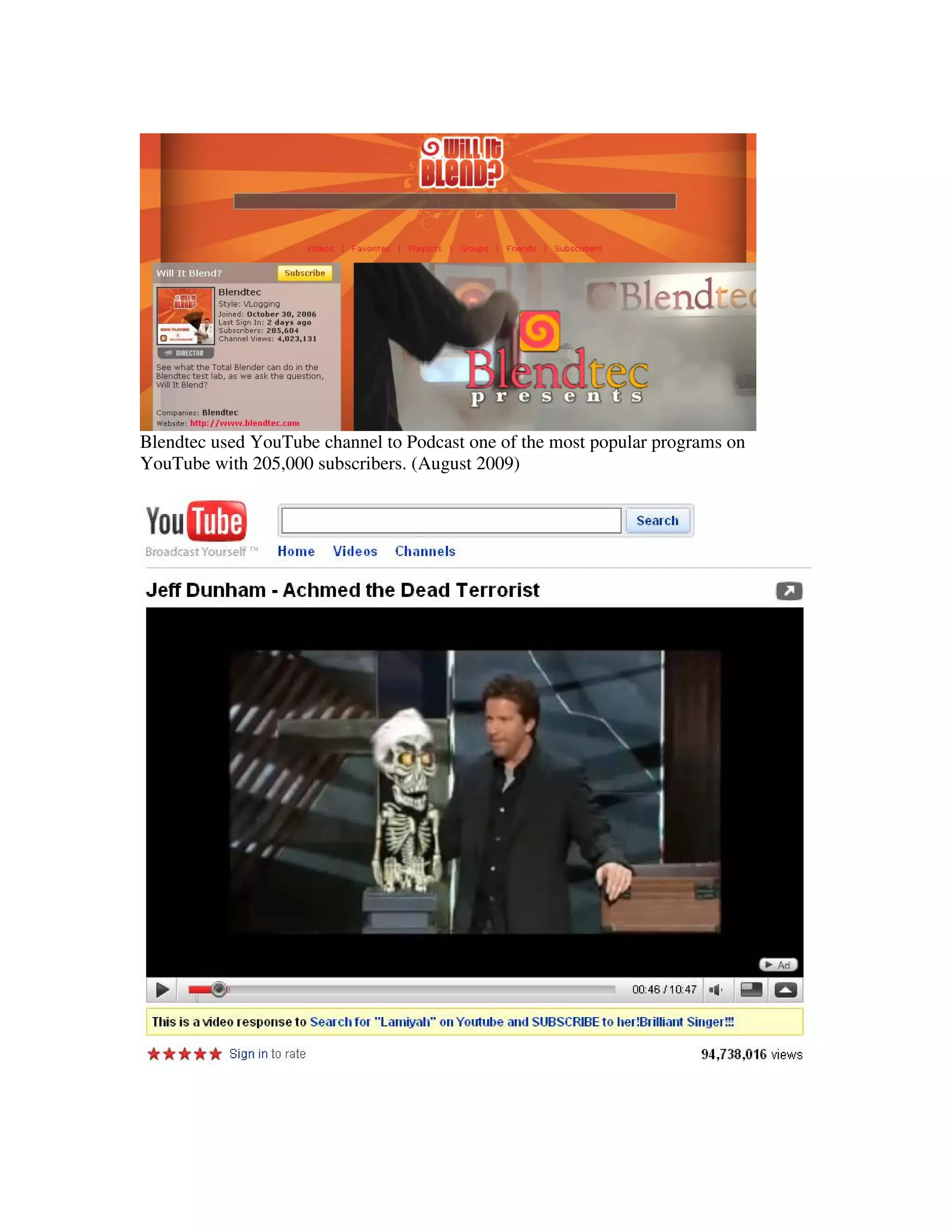
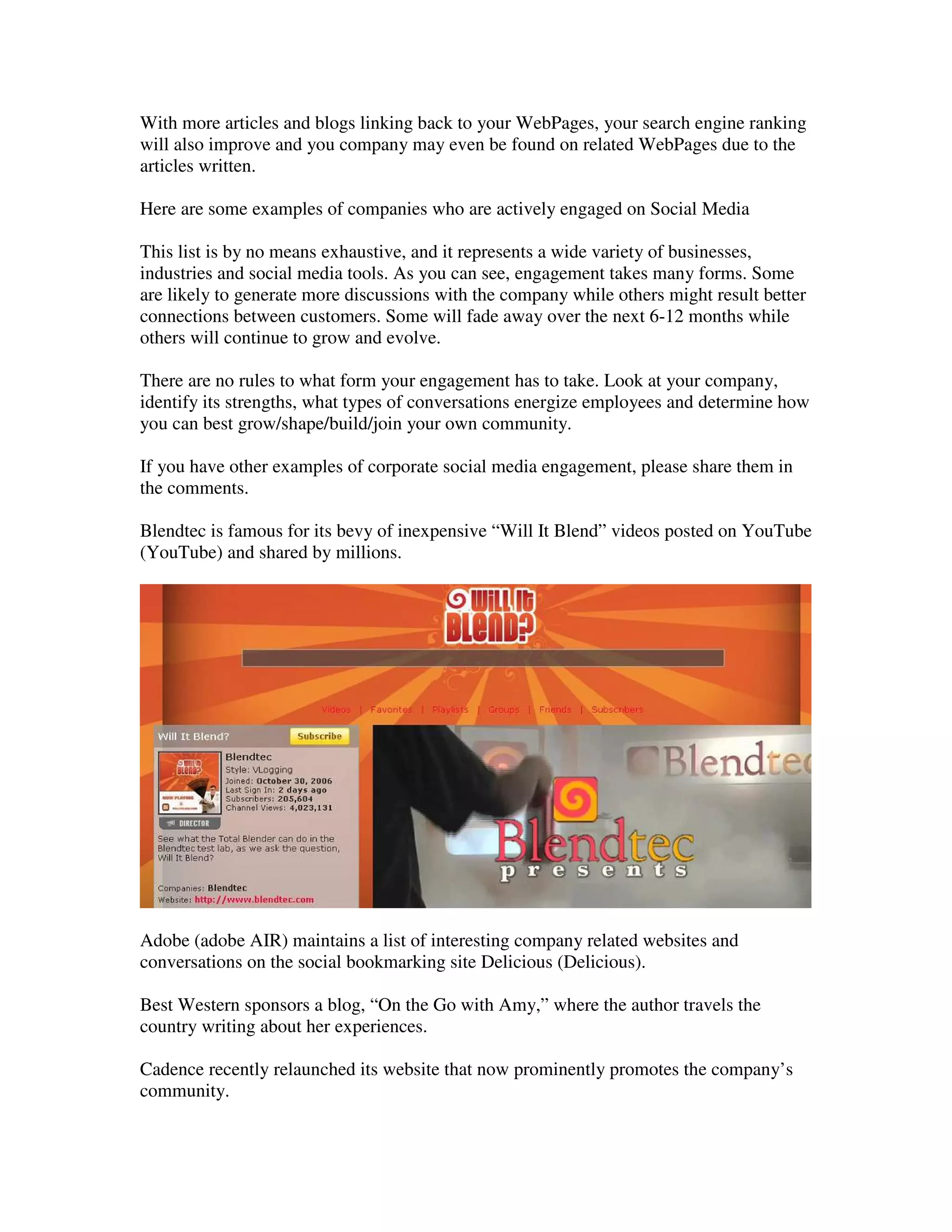
Blendtec is famous for its bevy of inexpensive “Will It Blend” videos posted on YouTube
(YouTube) and shared by millions.


Adobe (adobe AIR) maintains a list of interesting company related websites and
conversations on the social bookmarking site Delicious (Delicious).

Best Western sponsors a blog, “On the Go with Amy,” where the author travels the
country writing about her experiences.

Cadence recently relaunched its website that now prominently promotes the company’s
community.
Cisco hosts 12 blogs addressing a variety of audiences for their global business.

Coca-Cola Conversations is a blog written by company historian Phil Mooney that
focuses on Coke collectibles.

Dell leverages a variety of social media platforms for customer engagement, including an
island in the virtual world of Second Life.

Ford publishes news releases with lots of multimedia content and employs a social media
news release format to display them in their newsroom.

Fuji film recently launched a social network to build a community of photo enthusiasts
around its newest camera.

GM uses blogs to communicate directly with its customers around topics ranging from
design to green tech.

H&R Block created a Facebook (Facebook) fan site to aggregate its social media
activities, engage customers and offer tax advice/resources.

HP used Twitter to power a scavenger hunt at a recent conference.

HSBC built the HSBC Business Network to connect entrepreneurs using blogs, videos
and forums.

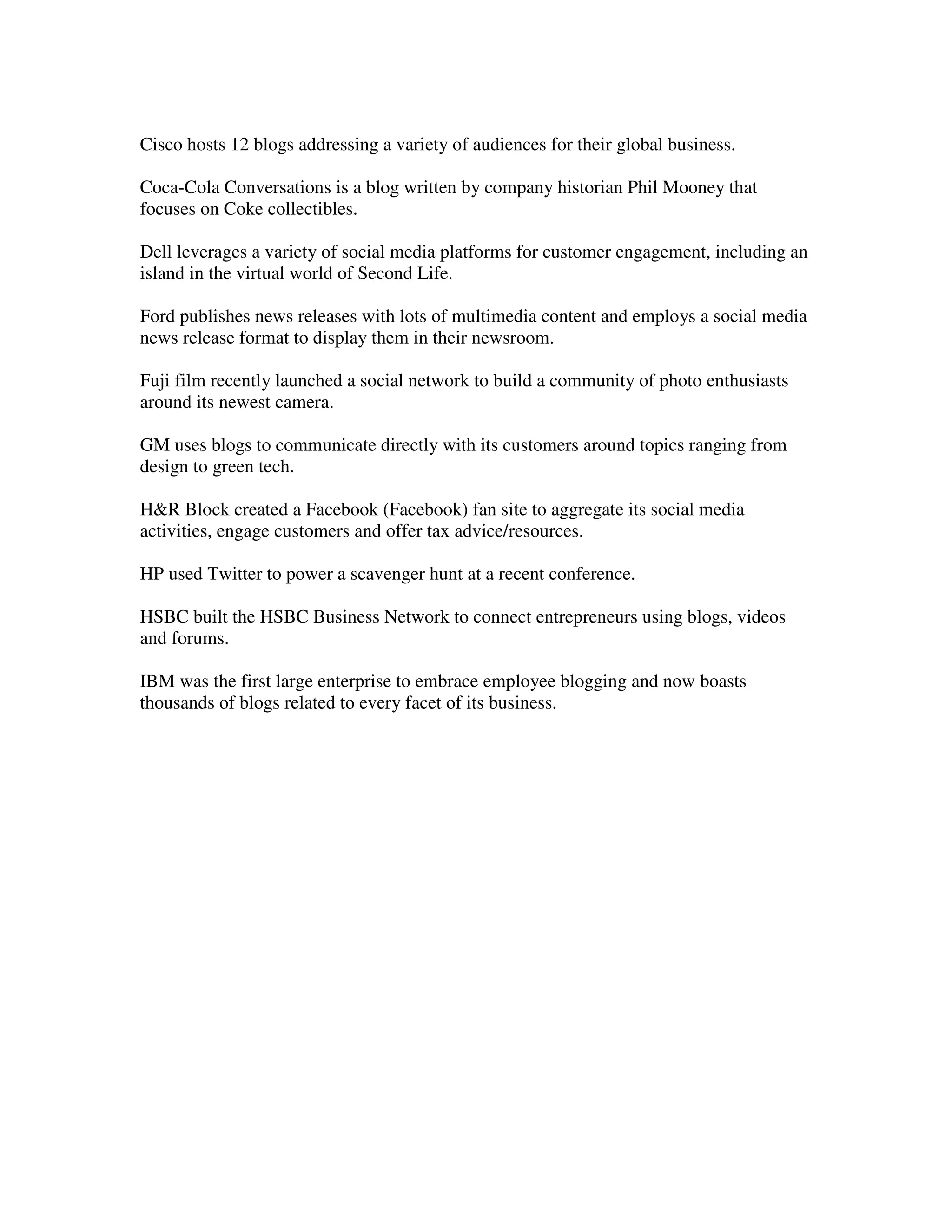
IBM was the first large enterprise to embrace employee blogging and now boasts
thousands of blogs related to every facet of its business.
Intel has also developed many social media touch points with its software communities,
which includes blogs, Twitter (Twitter) and virtual worlds.

Intuit sponsors the Tax Almanac wiki, where anyone can find and contribute to this
resource for tax information.

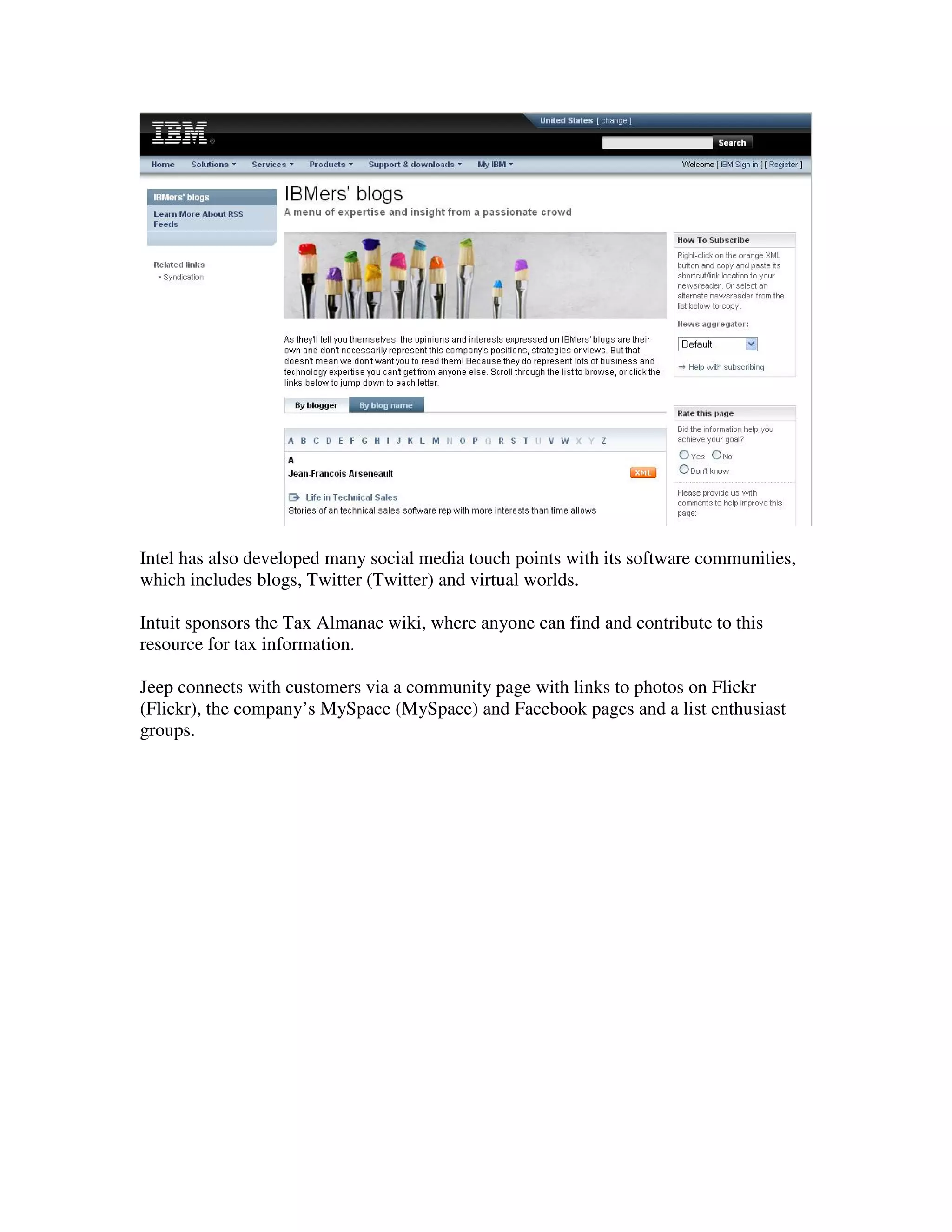
Jeep connects with customers via a community page with links to photos on Flickr
(Flickr), the company’s MySpace (MySpace) and Facebook pages and a list enthusiast
groups.
JetBlue employs social media as part of its training for JetBlue University, as this video
explains.

Johnson & Johnson uses this blog to show another side of the company, with frequent
video posts and interviews.

Lenovo launched “Voices of the Olympics Games” to aggregate posts from the athletes
competing in Beijing.

Marriott CEO Bill Marriott posts regular updates and stories from his travels to Marriott
properties around the world to fuel the content for this entertaining blog.

McDonalds maintains a blog to highlight the company’s corporate social responsibility
efforts.

National Geographic uses Google’s new virtual world -- Lively, to bring people together
around its new show, LA Hard Hats.

New York Times is beta testing a Firefox (Firefox) add-on that allows users to share and
comment on stories through a decentralized social network.

Nike started a social community on Loopd to connect athletes interested in surfing, BMX
bike racing and similar activities with the brand.

SAP sponsored a global survey of social media professionals to learn more about social
media worldwide.

Sears partnered with MTV to create a social network around Back to School shopping.
Southwest Airlines employees share their stories and communicate directly with
customers through the “Nuts About Southwest” blog.

Sun CEO Jonathan Schwartz’s blog is the example most often cited for what the CEO
blog can be.

Starbucks started MyStarbucksIdea so that customers can submit ideas for the company
that are then voted on by other users, the best of which will be implemented by the
company.

Toyota started its own virtual world to promote its products in Japan (site is in Japanese).

Visa launched The Visa Business Network application on Facebook to connect small
business users and to help them promote their businesses to a larger community.

Wells-Fargo blogs target two audiences; one examines the company’s history and the
other is for students interested in getting their finances in order.

WWE has a Facebook application, among other social networking tools and widgets, to
bring fans closer to the action.

Xerox blogs address several of the company’s core B2B constituencies.

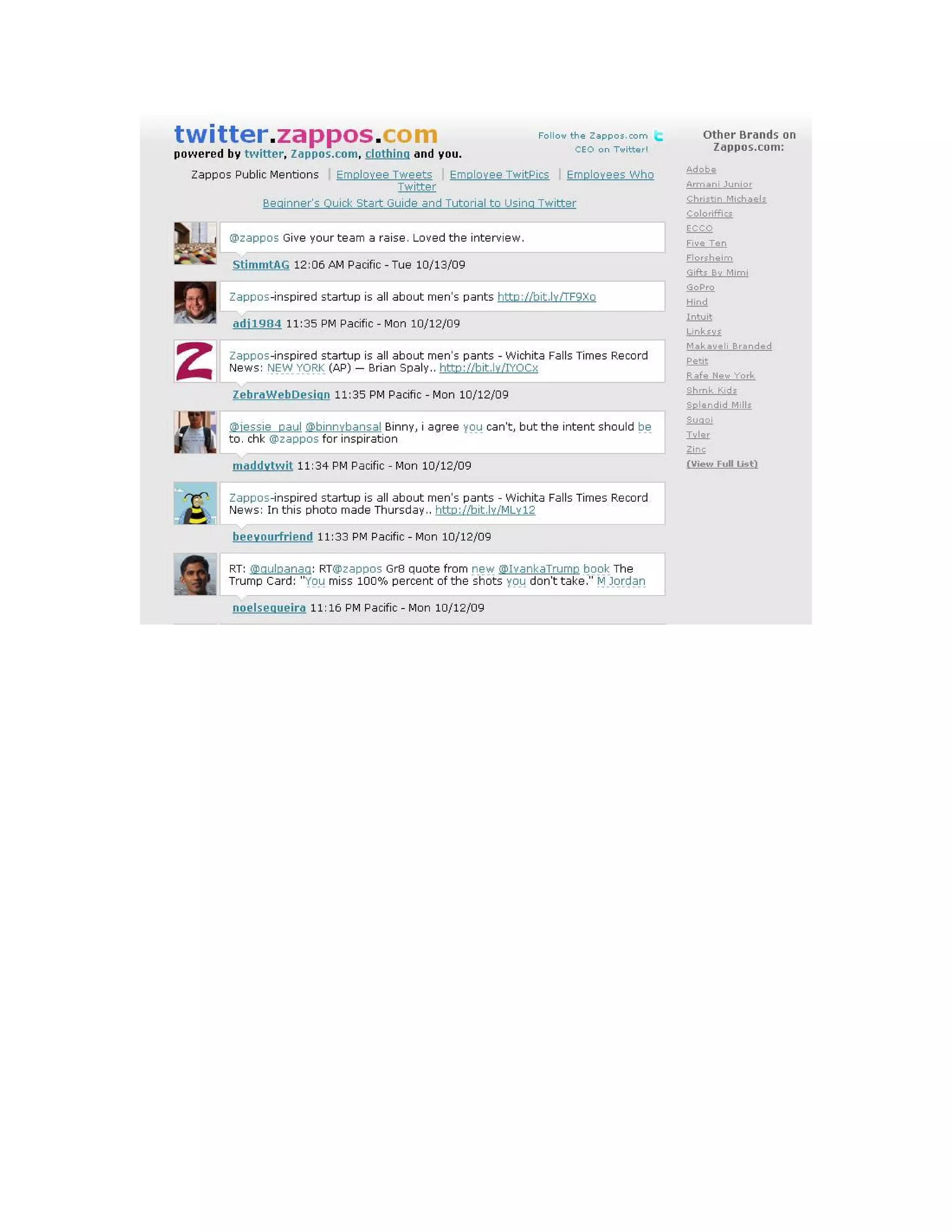
Zappos uses Twitter for employees to communicate with Zappos customers about their
shared love of footwear.
Implications of Social Media

Specific genres of social media may come and go, but these underlying properties of
Social Media are here to stay. Social network sites may end up being a fad from the first
decade of the 21st century, but new forms of technology will continue to leverage social
network as we go forward. One of the key challenges is learning how to adapt to an
environment in which these properties and dynamics play a key role.

Properties of Social Media

   1. Persistence. What you say sticks around. This is great for asynchronicity, not so
      great when everything you've ever said has gone down on your permanent record.
      The bits-wise nature of social media means that a great deal of content produced
      through social media is persistent by default.

   2. Replicability. You can copy and paste a conversation from one medium to
      another, adding to the persistent nature of it. This is great for being able to share
      information, but it is also at the crux of rumor spreading. Worse: while you can
      replicate a conversation, it's much easier to alter what's been said than to confirm
      that it's an accurate portrayal of the original conversation.

   3. Searchability. But with social media, it's quite easy to track someone down or to
      find someone as a result of searching for content. Search changes the landscape,
      making information available at our fingertips. This is great in some
      circumstances, but when trying to avoid those who hold power over you, it may
      be less than ideal.

   4. Scalability. Social media scales things in new ways. Conversations that were
      intended for just a friend or two might spiral out of control and scale to the entire
      school or, if it is especially embarrassing, the whole world. Of course, just
      because something can scale doesn't mean that it will. Politicians and marketers
      have learned this one the hard way.

   5. (de)locatability. With the mobile, you are dislocated from any particular point in
      space, but at the same time, location-based technologies make location much
      more relevant. This paradox means that we are simultaneously more and less
      connected to physical space.

Those five properties are intertwined, but their implications have to do with the ways in
which they alter social dynamics. Let's look at the different dynamics that have been
reconfigured as a result of social media.

   1. Invisible Audiences. We are used to being able to assess the people around us
      when we're speaking. We adjust what we're saying to account for the audience.
      Social media introduces all sorts of invisible audiences. There are lurkers who are
      present at the moment but whom we cannot see, but there are also visitors who
access our content at a later date or in a different environment than where we first
       produced them. As a result, we have to present ourselves and communicate
       without fully understanding the potential or actual audience. The potential
       invisible audiences can be stifling. Of course, there's plenty of room to put your
       head in the sand and pretend like those people don't really exist.

   2. Collapsed Contexts. Connected to this is the collapsing of contexts. In choosing
      what to say when, we account for both the audience and the context more
      generally. Some behaviors are appropriate in one context but not another, in front
      of one audience but not others. Social media brings all of these contexts crashing
      into one another and it's often difficult to figure out what's appropriate, let alone
      what can be understood.

   3. Blurring of Public and Private. Finally, there's the blurring of public and private.
      These distinctions are normally structured around audience and context with
      certain places or conversations being "public" or "private." These distinctions are
      much harder to manage when you have to contend with the shifts in how the
      environment is organized.

The Internet has long been able to search for people, places and companies. With the
introduction of social media, this way in which people can be searched are further
enhanced and frankly, a little scary at times. We need to realize that whenever we use the
Internet, we share a bit of ourselves whether we like it or not.

Some companies have an illusion of control when they only participate in traditional
media. Losing control is a primary reason stated by brands that are unwilling to open
themselves up to the conversation – and a major reason why most continue to use social
media as little more than a brochure on the web. And yet the illusion of control is just that
– an illusion. By not involving yourself you actually do more to remove control than if
you did.

In traditional marketing and brand management you set out the position you want to take,
the message you want to get through and then you put it out there. You feel in control
because you’ve lined up your one-way communications and in a vacuum everything
appears to line up.

Combine this with your brand tracking research, which abstracts the consumer response,
and you create a feedback loop where your marketing activities and your market research
self-reinforce the illusion. And yet under these circumstances you have, and have always
had, precisely zero control over what people think and how they will respond to you.

The reality is that great branding has always been about influence and not control –
influencing consumer choices and desires in a manner conducive to your goals and their
satisfaction.
In today’s world, the way to achieve this is not through bigger advertising budgets or
better creative, but through involvement – first by observing the conversation and then by
involving yourself in it. As a result, it’s likely that those brands with the most effective
influence strategies rather than the most effective control strategies will be the most
successful.
Popular Social Media tools

Blogging Tools

Commonly used blogging tools include WordPress and Blogspot. WordPress is also
available as a module to be installed onto your webserver and you can host your own
blogs.

Individuals commonly use Blogs as a form of diary to share their personal experiences
and feelings. However, more companies and online magazines use this today for their
posting articles, reviews and their own branding purposes.

Microblogging

Twitter and Plurk are fast gaining popularity in the Social Media community.
Microblogging is a form of blogging that is restricted to only 140 characters. People do
not need to spend so much time following someone on his blog as now the messages are
now only 140 characters long.

With proper use of links and hashtags, microblogging is definitely becoming a very viral
form of Social Media with far reaching capabilities.

Media sharing tools

Flickr and YouTube are great resources to find photos and videos on a topic you are
interested in. On Flickr, people put up pictures of travel locations and events to share it
with their friends and sometimes the world.

On YouTube, you can find all sorts of videos that people upload into the Internet. You
can find trailers, home movies, recorded parades, funny commercial and much more
which can be a definite way to spend some time entertaining yourself.

Social Networking Sites

Facebook is a very big and popular Social Networking site. With more than 200 million
users on Facebook, it is slowing becoming the most dominant Social Networking site.
Facebook is a site that you can connect with friends and meet new friends, share photos,
play games and organize events.

LinkedIn is a professional networking site where you can connect with your professional
friends. You get to meet up with other people in similar industries and you can get
introduction through your friends to others and you can give recommendation of your
peers as well.
Wiki

A Wiki is a site that allows pooled knowledge about a topic that is contributed by the
public. Wikipedia is a online encyclopedia which the public contributes information on
everything.

When a topic is deemed too abstract and of no interest to a certain group of people, it is
sometimes removed from Wikipedia, however many other people have setup wiki sites
for topics for their own use, such as a wiki for a TV series or cartoon.

Forums

Online forums and bulletin boards are sites where users are allowed to register and post
some discussion on a certain topic that is of interest to them. Other people with similar
interest will post their replies and form a community to chat about their similar interests.

Virtual World

Second life is a good example of a virtual world. Usually, there is a subscription involved
and you play a character in a world where you can interest with other players like you
would in the real world.

MMO

Massively Multiplayer Online Games. Similar to virtual world, MMO allows players to
control virtual characters to join in campaigns to complete quests or battle other factions.
Unlike Virtual world where there is often just simple interactions, MMO involves more
complex rules and character leveling up in skills and powers as they play along.
Blogging Basics

Blog definition/history
Blog types
Blog lingo
Locating blogs
Blog preliminaries
Blog Etiquette
Niche blogging
Hot bloggers
Joining the Blogosphere
Leaving comments
Blog topic brainstorming
Starting a blog
Blog software options/basics
Linking to other blogs
Blog controversies
Generating web traffic
Stats
Google page ranking
Affiliate ads
Blog hosting
What to blog about
Educational tools
Business applications
Alternative discourse
Vlogs; podcasts; wikis
Blogging is a low-cost, high-results tool for competitive differentiation, marketing,
customer relations management, media contacts, and sales. Plus, the software platform is
much simpler than what’s required for websites, so any business can afford to set up and
maintain a blog. And now blogging is getting more and more popular:

Blog search engine Technorati was tracking more than 112 million blogs since 2007.

Simple tips for bloggers:

   1. Blog what you care about. If you don't care about the subject, it shows.
   2. Let your character show through your writing, don't let it restrain you.
   3. Experiment with different formats; some like to write short posts, and post often,
   for e.g. Andrew Sullivan. Some prefer more sporadic posting, but write long posts,
   like Glenn Greenwald, who posts a 2000-word essay on a daily basis. Neither is
   wrong, both grab their own audiences, and both deliver quality writing and content.
   4. Develop your own style of writing, and stick to it.
   5. Don't be too bothered with lack of comments or interaction, but be sure to respond
   quickly to comments left by your readers.
   6. And really, blog what you care about.

Blogging Definition / History

A blog (a contraction of the term "weblog") is a type of website, usually maintained by
an individual with regular entries of commentary, descriptions of events, or other material
such as graphics or video. Entries are commonly displayed in reverse-chronological
order. "Blog" can also be used as a verb, meaning to maintain or add content to a blog.
Many blogs provide commentary or news on a particular subject; others function as more
personal online diaries. A typical blog combines text, images, and links to other blogs,
Web pages, and other media related to its topic. The ability for readers to leave comments
in an interactive format is an important part of many blogs. Most blogs are primarily
textual, although some focus on art (artlog), photographs (photoblog), sketches
(sketchblog), videos (vlog), music (MP3 blog), and audio (podcasting). Micro-blogging is
another type of blogging, featuring very short posts.

History

Jorn Barger coined the term “weblog” on 17 December 1997. The short form, "blog,"
was coined by Peter Merholz, who jokingly broke the word weblog into the phrase we
blog in the sidebar of his blog Peterme.com in April or May 1999. Shortly thereafter,
Evan Williams at Pyra Labs used "blog" as both a noun and verb ("to blog," meaning "to
edit one's weblog or to post to one's weblog") and devised the term "blogger" in
connection with Pyra Labs' Blogger product, leading to the popularization of the terms.

The modern blog evolved from the online diary, where people would keep a running
account of their personal lives. Most such writers called themselves diarists, journalists,
or journalers. The Open Pages web ring included members of the online-journal
community.

Other forms of journals kept online also existed. A notable example was game
programmer John Carmack's widely read journal, published via the finger protocol. Some
of the very earliest bloggers, like Steve Gibson of sCary's Quakeholio (now Shacknews)
and Stephen Heaslip of Blue's News (still running since 1995 with online archives back
to July 1996), evolved from the Quake scene and Carmack's .plan updates. Ritual
Entertainment hired Steve Gibson to blog full-time on February 8, 1997, possibly making
him the first hired blogger.

Websites, including both corporate sites and personal homepages, had and still often have
"What's New" or "News" sections, often on the index page and sorted by date. One
example is the Institute for Public Accuracy that began posting news releases featuring
several news-pegged one-paragraph quotes several times a week beginning in 1998.

Early weblogs were simply manually updated components of common websites.
However, the evolution of tools to facilitate the production and maintenance of web
articles posted in reverse chronological order made the publishing process feasible to a
much larger, less technical, population. Ultimately, this resulted in the distinct class of
online publishing that produces blogs we recognize today. For instance, the use of some
sort of browser-based software is now a typical aspect of "blogging". Blogs can be hosted
by dedicated blog hosting services, or they can be run using blog software, such as
WordPress, Movable Type, Blogger or LiveJournal, or on regular web hosting services.

After a slow start, blogging rapidly gained in popularity. Blog usage spread during 1999
and the years following, being further popularized by the near-simultaneous arrival of the
first hosted blog tools:

Open Diary launched in October 1998, soon growing to thousands of online diaries. Open
Diary innovated the reader comment, becoming the first blog community where readers
could add comments to other writers' blog entries.

Blogging combined the personal web page with tools to make linking to other pages
easier — specifically permalinks, blogrolls and TrackBacks. This, together with weblog
search engines enabled bloggers to track the threads that connected them to others with
similar interests.

By 2001, blogging was enough of a phenomenon that how-to manuals began to appear,
primarily focusing on technique. The importance of the blogging community (and its
relationship to larger society) increased rapidly. Established schools of journalism began
researching blogging and noting the differences between journalism and blogging.

The impact of this story gave greater credibility to blogs as a medium of news
dissemination. Though often seen as partisan gossips, bloggers sometimes lead the way in
bringing key information to public light, with mainstream media having to follow their
lead. More often, however, news blogs tend to react to material already published by the
mainstream media.
Since 2002, blogs have gained increasing notice and coverage for their role in breaking,
shaping, and spinning news stories. The Iraq war saw bloggers taking measured and
passionate points of view that go beyond the traditional left-right divide of the political
spectrum.

Blogging was used to draw attention to obscure news sources. For example, bloggers
posted links to traffic cameras in Madrid as a huge anti-terrorism demonstration filled the
streets in the wake of the March 11 attacks.

Bloggers began to provide nearly-instant commentary on televised events, creating a
secondary meaning of the word "blogging": to simultaneously transcribe and editorialize
speeches and events shown on television.

In 2004, the role of blogs became increasingly mainstream, as political consultants, news
services and candidates began using them as tools for outreach and opinion forming.
Even politicians not actively campaigning, such as the UK's Labor Party's MP Tom
Watson, began to blog to bond with constituents.

In 2004, Global Voices Online, a site which "aggregates, curates, and amplifies the global
conversation online – shining light on places and people other media often ignore"
surfaced, bringing to light bloggers from around the world. Today, the site has a
relationship with Reuters and is responsible for breaking many global news stories.
Blogs were among the driving forces behind the "Rathergate" scandal, to wit: (television
journalist) Dan Rather presented documents (on the CBS show 60 Minutes) that
conflicted with accepted accounts of President Bush's military service record. Bloggers
declared the documents to be forgeries and presented evidence and arguments in support
of that view, and CBS apologized for what it said were inadequate reporting techniques.
Many bloggers view this scandal as the advent of blogs' acceptance by the mass media,
both as a news source and opinion and as means of applying political pressure.

Some bloggers have moved over to other media. The following bloggers (and others)
have appeared on radio and television: Duncan Black (known widely by his pseudonym,
Atrios), Glenn Reynolds (Instapundit), Markos Moulitsas Zúniga (Daily Kos), Alex
Steffen (Worldchanging) and Ana Marie Cox (Wonkette). In counter-point, Hugh Hewitt
exemplifies a mass media personality who has moved in the other direction, adding to his
reach in "old media" by being an influential blogger.

Some blogs were an important news source during the December 2004 Tsunami such as
Medecins Sans Frontieres, which used SMS text messaging to report from affected areas
in Sri Lanka and Southern India. Similarly, during Hurricane Katrina in August 2005 and
the aftermath a few blogs, which were located in New Orleans, including the Interdictor
and Gulfsails, were able to maintain power and an Internet connection and disseminate
information that was not covered by the Main Stream Media.
Origins

Before blogging became popular, digital communities took many forms, including
Usenet, commercial online services such as GEnie, BiX and the early CompuServe, e-
mail lists and Bulletin Board Systems (BBS). In the 1990s, Internet forum software, such
as WebEx, created running conversations with "threads." Threads are topical connections
between messages on a metaphorical "corkboard."

Early blogs were simply manually updated components of common Web sites. However,
the evolution of tools to facilitate the production and maintenance of Web articles posted
in reverse chronological order made the publishing process feasible to a much larger, less
technical, population. Ultimately, this resulted in the distinct class of online publishing
that produces blogs we recognize today. For instance, the use of some sort of browser-
based software is now a typical aspect of "blogging". Blogs can be hosted by dedicated
blog hosting services, or they can be run using blog software, or on regular web hosting
services.

Blogging Types:

There are several types of blogging.

20 Types of Blog Posts

• Instructional - Instructional posts tell people how to do something. I find that my Tips
posts are generally the ones that are among my most popular both in the short term (i.e.
loyal readers love them and will link up to them) but also in the longer term (i.e. one of
the reasons people search the web is to find out how to do things and if you can rank
highly with your tips post you can have traffic over a length of time).

• Informational - This is one of the more common blog post types where you simply give
information on a topic. It could be a definition post or a longer explanation of some
aspect of the niche that you’re writing on. This is the crux of successful sites like
Wikipedia

• Reviews - Another highly searched for term on the web is ‘review’ - I know every time
I’m considering buying a new product that I head to Google and search for a review on it
first. Reviews come in all shapes and sizes and on virtually every product or service you
can think of. Give your fair and insightful opinion and ask readers for their opinion -
reviews can be highly powerful posts that have a great longevity.

• Lists - One of the easiest ways to write a post is to make a list. Posts with content like
‘The Top Ten ways to….’, ‘7 Reasons why….’ ‘ 5 Favorite ….’, ‘53 mistakes that
bloggers make when….’ are not only easy to write but are usually very popular with
readers and with getting links from other bloggers. Read my post - 8 Reasons Why Lists
are Good for Getting Traffic to your Blog for more on lists. One last tip on lists - if you
start with a brief list (each point as a phrase or sentence) and then develop each one into a
paragraph or two you might just end up with a series of posts that lasts you a few days.
That’s how I started the Bloggers Block series.

• Interviews - Sometimes when you’ve run out of insightful things to say it might be a
good idea to let someone else do the talking in an interview (or a guest post). This is a
great way to not only give your readers a relevant expert’s opinion but to perhaps even
learn something about the topic you’re writing yourself. One tip if you’re approaching
people for an interview on your blog - don’t overwhelm them with questions. One of two
good questions are more likely to get you a response than a long list of poorly thought
through ones.

• Case Studies - Another popular type of post here at ProBlogger have been those where
I’ve taken another blog and profiled them and how they use their site to earn money from
their blogging (e.g. - one I did on Buzzmachine - the blog of Jeff Jarvis). Sometimes
these are more like a review post but on occasion I’ve also added some instructional
content to them and made some suggestions on how I’d improve them. Case studies don’t
have to be on other websites of course - there are many opportunities to do case studies in
different niches.

• Profiles - Profile posts are similar to case studies but focus in on a particular person.
Pick an interesting personality in your niche and do a little research on them to present to
your readers. Point out how they’ve reached the position they are in and write about the
characteristics that they have that others in your niche might like to develop to be
successful.

• Link Posts - The good old ‘link post’ is a favorite of many bloggers and is simply a
matter of finding a quality post on another site or blog and linking up to it either with an
explanation of why you’re linking up, a comment on your take on the topic and/or a
quote from the post. Of course adding your own comments makes these posts more
original and useful to your readers. The more original content the better but don’t be
afraid to bounce off others in this way.

• ‘Problem’ Posts - I can’t remember where I picked this statistic up but another term that
is often searched for in Google in conjunction with product names is the word
‘problems’. This is similar to a review post (above) but focuses more upon the negatives
of a product or service. Don’t write these pieces just for the sake of them - but if you find
a genuine problem with something problem posts can work for you.

• Contrasting two options - Life is full of decisions between two or more options. Write a
post contrasting two products, services or approaches that outlines the positives and
negatives of each choice. In a sense these are review posts but are a little wider in focus. I
find that these posts do very well on some of my product blogs where people actually
search for ‘X Product comparison to Y Product’ quite a bit.

• Rant - get passionate, stir yourself up, say what’s on your mind and tell it like it is.
Rants are great for starting discussion and causing a little controversy - they can also be
quite fun if you do it in the right spirit. Just be aware that they can also be the beginnings
of a flaming comment thread and often it’s in the heat of the moment when we say things
that we later regret and that can impact our reputation the most.

• Inspirational - On the flip side to the angry rant (and not all rants have to be angry) are
inspirational and motivational pieces. Tell a story of success or paint a picture of ‘what
could be’. People like to hear good news stories in their niche as it motivates them to
persist with what they are doing. Find examples of success in your own experience or that
of others and spread the word.

• Research - In the early days I wrote quite a few research oriented posts - looking at
different aspects of blogging - often doing mind numbing counting jobs. I remember once
surfing through 500 blogs over a few days to look at a number of different features.
Research posts can take a lot of time but they can also be well worth it if you come up
with interesting conclusions that inspire people to link up to you.

• Collation Posts - These are a strange combination of research and link posts. In them
you pick a topic that you think your readers will find helpful and then research what
others have said about it. Once you’ve found their opinion you bring together everyone’s
ideas (often with short quotes) and tie them together with a few of your own comments to
draw out the common themes that you see.

• Prediction and Review Posts - We see a lot of these at the end and start of the year
where people do their ‘year in review’ posts and look at the year ahead and predict what
developments might happen in their niche in the coming months.

• Critique Posts - ‘Attack posts’ have always been a part of blogging (I’ve done a few in
my time) but these days I tend to prefer to critique rather than attack. Perhaps it’s a fine
line but unless I get really worked up I generally like to find positives in what others do
and to suggest some constructive alternatives to the things that I don’t like about what
they do. I don’t really see the point in attacking others for the sake of it, but as I’ve said
before this more a reflection of my own personality than much else I suspect and some
people make a name for themselves very well by attacking others.

• Debate - I used to love a good debate in high school - there was something about
preparing a case either for or against something that I quite enjoyed. Debates do well on
blogs and can either in an organized fashion between two people, between a blogger and
‘all comers’ or even between a blogger and… themselves (try it - argue both for and
against a topic in one post - you can end up with a pretty balanced post).

• Hypothetical Posts - I haven’t done one of these for a while but a ‘what if’ or
hypothetical post can be quite fun. Pick a something that ‘could’ happen down the track
in your industry and begin to unpack what the implications of it would be. ‘What
if….Google and Yahoo merged?’ ‘What if …’
• Satirical - One of the reasons I got into blogging was that I stumbled across a couple of
bloggers who were writing in a satirical form and taking pot shots at politicians (I can’t
seem to find the blog to link to). Well written satire or parody can be incredibly powerful
and is brilliant for generating links for your blog.

• Memes and Projects - write a post that somehow involves your readers and gets them to
replicate it in some way. Start a poll, an award, ask your readers to submit a post/link or
run a survey or quiz. Read more on memes.

Other types of blogs:
Group blog- with multiple contributing bloggers.
Event blog – focused on an event
Kittyblogger – writing about cats.
Celeblog – focused on a celebrity.
Celebriblog – maintained by a celebrity.
Clog Blog – written in Dutch and/or in Holland.
CEOBlog – run by a chief executive officer.
Plog - a project blog. Also for Amazon.com personalized weblogs
Movlogs - mobile video blogs.
Splog- a spam blog
Tech blog – focused on a technical subject.
Anonoblog – by an anonymous blogger
Linguablog - about linguistics, translation etc.
Metablog – a blog about blogging.
Milblog - a military blog.
Blawg – blogged by lawyer / related to legal stuff
Edu-blog – education oriented blog.
Progblog - A progressive blog.
Shocklog - provokes discussion by posting shocking content
Klog - used by company knowledge workers. by Kloggers
Blogsite - A web site that combines blog feeds from a number of different sources
Dark Blog- A non-public blog
Photocast- a photoblog that automatically updates when new photos are added.


Blogging Lingo
Blogging does have their own language and Jargon (Blargon). Here are some common
blogging terms organized into a simple blogging glossary. Only common and popular
blog tools and services have been included. If you want to be "cool", "hot", or
"whatever", then you need to know the lingo.

Note : The language used here is mostly non technical to make the newbie blogger
understand the blogging basics. These have not been created by me, but collected over
time. This is NOT a substitute for dictionary meaning or a strict definition of these terms,
but a simple layman approach to understanding what they mean.
Bleg - to use one's blog to beg for assistance such as money. It's known humorously as
blegging.
Bloiversary - the birthday of the establishment of a blog.
Blogger ecosystem - a chart or list showing the links between blogs.
Blogroach - someone who infests the comments section of a blog with obnoxious
postings. Similar to trolls who disrupt discussions by tricking others into reacting.
Blogroll - a collection of links on the sidebar of a blog linking to other blogs.
Blogosphere - the totality of the blogging community. Also known as Blogistan or the
blogiverse.
Blogstorm - when a large amount of information, commentary, or activity erupts in the
blogosphere.
Blurker - a person who reads many blogs but leaves no evidence of themselves behind; a
silent observer.
Crud - when a blogger makes an error in programming that results in visible code
appearing on the screen.
Comment Spam - an unsolicited commercial message automatically posted in a blog's
comments area.
Dead-tree Media - anything made of paper such as newspapers and magazines.
Dooced (pronounced like deuce) - losing your job for something you wrote in an online
blog.
Drive-by Blogging - the sudden rush of blog entries that fill in the gaps and fulfill the
requirements of the weblog portfolio assignment.
Edublog - an education oriented blog.
Event blog - a blog set up for a particular event.
Feed Reader - news aggregators that are extensions to web browsers such as Firefox are
used to read RSS feeds from blogs and other sources.
Flame - to make a hostile remark; usually of a personal nature.
Klogs - also known as knowledge logs are internal blogs often housed on intranets.
Link rot - when a list of website links contains many dead links; the best solution is to
design your website with a permalink system
People to Know
Jorn Barger - Credited with coining the term weblog in 1997
Peter Merholz - Credited with coining the term blog in 1999
Dave Winer - Created one of the first weblogs
Permalink - a web link that takes you to the permanent location of an article in a blog
archive.
Podcasting - using your MP3 player to listen to the audio from a blog.
Plog - a project log used to chronicle a project.
RDF (Resource Description Framework) - a web content syndication format.
RSS (Rich Site Summary) or (Really Simply Syndication) - a web content syndication
format; a feed reader is used to check RSS enabled WebPages on behalf of a user and
display any updated information. Learn more
Thread - a side discussion taking place within the comments section of a blog. The term
is taken for the forum discussion environment.
Vlogging - video blogging
Xenoblogging - the work you do that helps other people's blogs
Weblog- An online dated diary listing your periodic thoughts on a specific topic, often in
reverse chronological order.
Blog – short form for weblog
Blogging - the act of posting on blogs
Blogger - a person who blogs
Blogosphere - The Internet blogging community

BLOGGING FORMS:
Photoblogging - a blog predominantly using and focusing on photographs and images.
Photoblogs are created by photobloggers
Podcasting - a method of distributing multimedia files (audio / videos) online using feeds
for playback on mobile devices and personal computers. Podcasts are created by
podcasters.
Autocasting - is an automated form of podcasting
Blogcasting - the blog and the podcast merged into a single website.
Vlogging - Also called video blogging. Shortened to vlog. Posted by vlogger. A variant
on the blogging using video instead of text.
Audioblogging - Also called audioblog, MP3 blog or musicblogs. a variant on the
blogging using audio instead of text. Created by audioblogger.
Moblogging - Also called moblogs. A blog posted and maintained via mobile phone.
Moblogs are created by mobloggers.


Index page – the front page fo the blog
Header - the topmost part of the blog usually listing the blog title.
Footer - the most bottom part of the blog usually listing navigation and copyright
statements
Sidebar - One or more columns along one or both sides of most blogs main page
Categories - A collection of topic specific posts
Post, Entry- individual articles that make up a blog
Comments - enabling readers to leave their remarks
Captcha - short for “Completely Automated Public Turing test to tell Computers and
Humans Apart”. Those word and letter verification images you need to type in to show
you are human and not a bot. Helful to block automated spam comments. more
Ping – Short for Packet Internet Grouper. Blog and ping helps to notify other blog
tracking tools for updates, changes and trackbacks.
Trackback - A system by which a ping is sent to another blog to notify that you have
mentioned their article
Pingback - See trackback.
Permalink - A link to a specific article
Tags - labeling / attaching keywords to collect similar posts
Tag cloud – Displaying tags lists or keywords in a blog.
Blogroll - list of links to other blogs in your sidebar. Also see blogrolling.com
Sideblog - A smaller blog usually placed in the sidebar of a blog.
Template - the blog presentation design
BlogThis - a function allows a blogger to blog the entry they a reading
Plugins - Small files that add improved functionality and new features. WordPress
plugins can greatly improve your blog usage and interactivity
Dashboard - When you login to your blogging account, it is the first screen with all
controls, tools and functions.
Archives – a collection of all your posts on one page. Can be categorized by month etc.
Expandable post summaries – show a small teaser part of the post on the index page that
link to the full post. more
Jump – the continuation of a the story on another page to preserve space on index page.
FTP - short for file transfer protocol. Transferring file to and fro from your web host
using FTP tools like Filezilla

WEB FEEDS
Web Feed – allows online users to subscribe to websites that change or add content
regularly.
RSS - a family of web feed formats used for Web syndication. Short form for Really
Simple Syndication (RSS 2.0), Rich Site Summary (RSS 0.91, RSS 1.0), RDF Site
Summary (RSS 0.9 and 1.0). WordPress generates RSS 2.0
XML - short for eXtensible Markup Language. a general-purpose markup language for
syndication formats used on blogs.
RDF - short for Resource Description Framework. A web content syndication format.
Atom - another specific web feed format. Blogger feeds are usually of this type.
OPML – short for Outline Processor Markup Language. It is an XML format for outlines.
Easily import and export multiple blog subscriptions between different RSS aggregators.
Photofeed- a web feed with image enclosures.

BLOGGING SOFTWARE / CLIENTS
Blogger - a free blogging platform by Google.
Blogspot - free Blogger hosting blog at name.blogspot.com
LiveJournal - free blogging tool by SixApart
Movable Type – paid blogging tool by SixApart
Typepad - paid blogging tool by SixApart
WordPress.org- Free. Easy to Upload, customize and upgrade.
WordPress.com – A WordPress blog hosted free for you.
Radio Userland – another blog publishing software package

BLOGGING HABITS
Metablogging - writing articles about blogging
Blogstipation - writer’s block for bloggers. Cant think of what to blog about?
Blogathy - I do not want to post today and I do not care about it
Blogopotamus - A very long blog post
Blogorrhea - unusually high output of articles
Bleg - To use one’s blog to beg for assistance etc.
Hitnosis - Refreshing your browser repeatedly to see if your hit counter or comments
have increased
GAD - Google Adsense Disorder. Repeatedly checking your adsense earnings. more
Blego - Blog+Ego. Measuring blogger worth
Blog hopping – jumping from one blog to another
Blogroach - A commenter who rudely disagrees with posted content
Blogoholic - addicted to blogging
Blogorific = blogtastic – something which a blogger says is terrific
Blogsit - maintaining a blog while the primary blogger is on leave
Blogvertising - Also called blogvert. Advertising on a blog.
Blurker - a blog reader not posting comments, just lurking around quietly.
Blogathon - update your website every 30 minutes for 24 hours straight. Maybe collect
sponsorships. more
Blogiversary - your blog birthday
Blog Carnival – Links to other articles covering a specific topic.
Multiblog - running multiple blogs
Blog Tipping – Compliment 3 blogs on day 1 of every month. more
Blogger bash - a blogger party
Commenter - someone who leaves remarks / comments
Reciprocal Links - called link love. You link to my blog, I link to yours. To improve
search engine rankings.
Linkbaiting - a habit of writing good content with the sole purpose of getting it linked
from multiple sites.
Blogstorm – a large amount of blogosphere activity due to particular controversy. Also
called Blog Swarm.
Blogsnob – refusing to respond to blog comments from “not-friends”.
Doppelblogger – plagiarize the content of another blogger. To Doppelblog.
Blogophobia – Fear of blogs and blogging.
Bloggerel – the same opinion posted repeatedly on a blog

BLOGGER TYPES
Problogger - professional blogger
Blognoscenti - especially knowledgable bloggers
Blogebrity - a famous blogger.
Blogerati - the blogosphere intelligentsia.
Commentariat - The community of those leaving comments.
Dooced - lost a job because of blog entries. To Dooce.
Blogther - a fellow blogger.
A-List- the top bloggers who influence the blogosphere.
Blogstar- blogger running a popular blog

OTHER BLOGGING TERMS
Bloggies- Annual blogging awards. more
MSM - Mainstream Media, or old media like newspapers etc.
BSM - Blogstream media. from most heavily trafficked blogs.
Blog Day – 31 August. Find 5 new Blogs that you find interesting and tell them. more
Blaudience - your blog audience.
Blargon - Also called Blogssary. Blogging slang and glossary. What I am telling you
now.
Blogiversary - your blog birthday
Blogiverse – see blogosphere
XFN – short for XHTML Friends Network. Is a simple way to represent human
relationships using hyperlinks.
Blogonomics - blogging conference on a Blog Cruise in 2006. more
EFF - short for Electronic Frontier Foundation. A nonprofit group working to protect
blogger rights.
Blog of Note – a recommended blog. more
Navbar - a navigation bar usually seen on top of Blogger blogspot hosted blogs. more
Blook - a book created from a blog. more
Hat Tip- acknowledgement of the source that tipped you the news.
Spomments- Spam comments
Blammer- Blog spammer
SOB- acronym for Successful and Outstanding Blogger. From successful-blog.com
Blogiday- you get fed up and take a holiday from blogging

BLOGGING TOOLS & SERVICES
Bloglines, Rojo, Newsgator, Kinja, – are News Aggregators that display content from
syndicated Web content from web feed. Can be configured online or downloaded on your
desktop. Like . Also called RSS readers, feed readers, feed aggregators or news readers
Pageflakes, Newsvine – Track multiple feeds on a single page by modules.
Odeo, Podnova – are Podcatchers, a form of aggregator used to automatically download
podcasts and can sometimes transfer a portable media player. Like
Feedburner - a professional feed management system
Pingomatic, Pingoat – ping multiple blog tracking services. More
Feedblitz, Zokooda – Email subscriptions and newletter tools.
Technorati – a real-time search engine that keeps track of what is going on in the
blogosphere
b5media, 9rules – examples of popular blogging networks. Collection of blogs and
bloggers providing great content, with revenue sharing sometimes.
K2, Blix – names of some popular WordPress themes.
Blogexplosion, Blogclicker- popular blog traffic generation / exchange services.
Adsense, Adbrite, CJ, Chitka, Blogads – popular affiliate programs to generate money
from your blogs.
Sphere, Icerocket – blog search engines
Live Bookmarks – a firefox web browser feature. Update themselves automatically with
the latest content from the Web.
Creative Commons – licenses provide a flexible range of protections and freedoms for
authors to offer a voluntary “some rights reserved” approach.
CoComment - Tracks your comments across different platforms and follow conversations
WBloggar, Ecto, Qumanna – desktop blog publishing tools
Mint, Mybloglog, Measuremap, Analytics – site traffic tracking tools.
Haloscan- free trackback service
YouTube, Rapidshare- puts video on your blog
Flickr, Imageshack - photo sharing service. Host images on your blog
Del.icio.us, furl, spurl – share social bookmarks.
Blogburst - Syndicating your feed to top publishers.
Bloggeropoly - professional blogger recruiting agency. more
Blogger code – a way to describe different types of bloggers. more
Bloggoggle - Directory of Blogging Professionals
BlogHer - where the women bloggers are. At Blogher.org

BLOG TRAFFIC SURGES
Digged - link posted on digg.com driving huge traffic to your blog
Slashdotted - link posted on slashdot.org driving huge traffic to your blog. more
Instalanche - link posted on instapundit.com driving huge traffic to your blog
Farked – link posted on fark.com driving huge traffic to your blog
Boing Boinged – link posted on boingboing.net driving huge traffic to your blog

MISCELLANEOUS BLOGGING TERMS
Ajax - acronym for Asynchronous JavaScript and XML. creates interactive web
applications.
Greasemonkey - a firefox web browser extension that can alter the functionality of any
website using specific scripts.
Wiki - a collaborative on-line software that allows readers to add and edit content.
SEO - search engine optimization. To improve your search engine rankings.
Page Rank – Google measures of importance of a page, which reflects in its rankings.
CMS – short for Content management system. software used to publish and manage
websites.

Locating blogs

Blogs, or Weblogs, are very popular. They are personal-community publishing events,
rather than websites, but they are arranged chronologically, rather than by content. Most
blogs are also distinguished by encouraging readers to post ("comment") on the site's
content. Readers can also be advised of new and updated content by subscribing via
email or via RSS feeds. While search engines like Google can locate blogs (include the
word "blog" in your topic search), blog engines locate individual postings especially well.

Technorati [http://www.technorati.com]
Intelliseek's BlogPulse [http://www.blogpulse.com]
RocketNews--Locate Blog posts and news items from the last 30 days.
[http://www.rocketnews.com/web/index.jsp]

Blog preliminaries

During the past six years blogs have evolved from a highly personal form of
communication on the Internet to a powerful new medium for business. It’s working for
ecommerce sites as well. More than a few e-retailers have jumped on the blog
bandwagon. Before you blog here are the few things you need to consider:

1) You need to understand why you want to use a blog.
Don't do it because it's the latest Internet trend (notice I did not say “fad") or just because
everyone else is doing it. Have some sense of your specific purpose. For example, are
you using the blog as a marketing channel, or will it be more for company news and
updates?

Online retailer Bluefly uses their blog specifically for marketing purposes. The company
asserts their blog has had a positive effect on sales, even stating that visitors who click to
the blog “have been more likely to make a purchase than those who visit Bluefly
directly."

However do not just “broadcast”. Remember in Social Media, 2 way communication is
key, and reader can just ignore your blog and not read it. Even though it may be to
increase sales or enhance branding, blogs primarily should be used to increase awareness
of the industry rather than doing a hard sell.

It is also good to blog instructional and informational blogs about your industry. It
enhances the fact that you are an expert and show your knowledge as well as creating
awareness about your company.

2) Consider its core message.

What are you going to write about? What topics will be covered? What "tone" will you
give the blog? Should it be humorous and informal, or more straightforward and
informational?

The way you write will be determined by the audience you're attempting to target.
Obviously, when writing any blog your primary consideration needs to be your readers,
at least the readers you hope to attract. They will have the most bearing on the nature of
the content and the way it's presented.

3) Determine who is going to write it.

The best person for the job would be someone inside the company. You need to consider
whether or not you have in-house talent you can afford to assign this task. One Internet
retailer, Stone Creek Coffee, uses employees to write entries for the blog.

You might even consider following Stonyfield Farms lead and hire someone full-time to
write your blog. Stonyfield has four blogs written by Christine Halvorson, a full-time
employee. The company has become a model example of how small businesses can use a
blog for marketing purposes.

The blogger will inject their own personality, so it's incumbent upon you to find a writer
who understands what makes your company tick and can accurately reflect its persona.

4) Determine whether they are prepared to engage the conversation without attempting to
control the communication.
The “blogosphere" is a no-holds-barred free-for-all means of communicating. It's a two-
way street. Using the comments option built into most blog platforms readers can respond
to what you have said. Their responses may not always be kind. In fact, depending on
their experience with your company and its products or services, they may even be
caustic. Not every organization is prepared for such raw unedited content to show up on
their public website (blog).

Before your company makes the decision to deploy a blog, it must be willing to accept
the good with the bad and have a plan for addressing those less than congratulatory
comments if and when they occur.

Don’t be alarmed however. Most comments won't be of the negative variety. Many will
come in the form of questions, while others will have a positive spin to be sure. From a
PR standpoint, blogs can serve you well as they lend credence to the notion that you do
value what your customers and others have to say. They put a human face on your
company that no other form of Internet communication can.

If you are going to interact with the people who comment on your posts, make you use
the same medium to resolve the issues. Simply censoring and ignoring negative feedback
will only further show the company’s lack of customer support. If a customer has a bad
experience, try to solve in transparently in the replies to show your willingness to
interact.

5) Determine a company blogging policy and establish posting guidelines.

Simple Guidelines to follow:
I will be accurate. When I make a mistake, I will correct it as quickly as possible.
I will post only on the following topics: (List your topics), and
I will respond to comments and emails quickly.

6) Monitor what is being said about your company and your industry.

There are a number of reasons to do this, the most obvious being to find out how people
view your company. You may find no one is talking about you at all, or that what is being
said has negative connotations (or positive for that matter). If you are not being talked
about, even to a small degree, a blog can help change that. If your company is being
viewed negatively, you can use a blog to challenge misperceptions.

In addition, monitoring your industry helps you to know what is being said about your
competitors. Observing industry trends might help you find a niche worth exploiting or a
marketing avenue others are overlooking.

A lot of online tools have been created to assist you, Google.com, BlogPulse.com,
Bloglines.com, Technorati.com, PubSub.com, and IceRocket.com just to name a few.
7) Decide on a blog platform.

This is not difficult as many good platforms are available. If your blog is going to be self-
standing separate from your company website, Typepad.com is a good solution. If you
want to include it inside your overall website structure, Movable Type or WordPress are
good options. (One platform not recommended for business purposes is Blogger.com.
Though many small businesses use it, the platform lacks some of the most elemental
features included in others, such as the ones mentioned above.)

8) Determine ways to market your blog.

If the blog has marketing ramifications, getting the attention of search engines is vital.
There are a variety of ways to do that, including submitting the blog to a number of
search engines and blog directories.

9) Optimize your blog for search engine.

Remember, you want people to read your blog, and the best way to do so is to have a
search engine optimized blog. Using the search function on Google Adwords, you can
find out what people are searching for on the topic that you are going to write. If your
topics were very specific, when a person uses the search engine to search for the exact
terms, your blog or article would most likely come out and be highly ranked.

Decide whether you want to use the “most popular Adwords” which you may compete
with many of the other articles and blogs out there, or the less popular and “more specific
Adwords.”

If you have the keywords in your title, first paragraph, body and conclusion of your blog,
as well as the meta tags, it is very possible that your article would be highly ranked when
people key in the exact phrase.

10) Develop a plan to track statistics.

This is an area where bloggers have not traditionally paid much attention. However,
when using blogs for marketing purposes, it is vital to know the effect they are having on
your bottom line. Blogs are just like any other website in that their effect should be
tracked in terms of unique visitors, page views, and conversion rates. Tenth, be sure to
know your keywords. Blogs can help customers find your business when they are
searching on Google or other sites. Therefore, it is important to know what words
customers most often use to find you via the search engines, and what words show up in
competitor or industry blogs on a regular basis that help place them high in Google's
index.

Knowing which words to drop into your posts on a regular basis will help boost your
search rankings. Writing frequent, keyword-optimized entries can help boost search
standings, which goes a long way for a business owner on a tight marketing budget. Don't
overdo it though. Readers will see right through any obvious attempts at self-promotion.

While blogs are all the rage these days, using them for business demands forethought and
a strategic approach. Taking time to consider these points before you jump on the blog
bandwagon will help ensure a positive outcome.

Different url shorteners can also be used to tract where people go to the blog from,
especially if you are on the other social media platforms and you also use them to
promote your blog.

Blog Etiquette

There are a few things in the blogging community that are commonly frowned upon; the
following are good rules to follow when you are blogging. People become very
courageous behind their computer screens. Really, it doesn’t take a whole lot to be
considerate. A good rule of thumb is to treat other people’s blogs like you would treat
your own. Be nice, be respectful and be considerate.

Do not treat your opinion with gospel truth. There is a strong temptation, particularly
when discussing contentious issues, to claim unimpeachable authority on the subject at
hand. Although everybody is entitled to express personal opinions, but by treating your
blog or wiki like a panel rather than a pulpit, the dialogue will more likely be divine.

Do not invoke personal attacks. One of the powers blogs and wikis seem to possess is the
capability of turning otherwise sensible people into bickering schoolchildren. Unless the
discussion subject is "Say something insulting about somebody who holds a different
opinion than you," leave the personal feelings out. Rule of thumb: Argue with the post,
not the poster.

When you comment on someone else’s blog, there’s usually a line under the name and
email for a link to your blog or website and that should suffice. There’s no reason to link
your blog again in the comments. If you have a link you feel is relevant to the topic,
contact the blogger; she will probably bring it to the attention of her readers. Don’t Spam.

Do not side track from topic. Blogs in particular can get tangential in a hurry. To some,
that's part of the charm - you start with an idea and end up somewhere completely
different. That's all well and good, but let tangents arise organically within the context of
the discussion. If you've got something wildly off topic to say, start a new thread or keep
it to yourself until it becomes relevant.

Never post someone else’s words on your own blog, unless you have specific written
permission. You’re certainly welcome to provide a quote with attribution but to reprint
the entire post is not good blog etiquette at all. In fact, it can get your blog shut down and
your hosting taken away.
It’s ok to disagree with bloggers or those who drop comments, but do be respectful.
Calling names, using vulgarity and telling me to get back in the kitchen to make a
sandwich only show off your ignorance. If you can’t offer a decent rebuttal, keep your
thoughts to yourself.

Respond to commenters. Your readers took the time to offer their thoughts, keep them
coming back by reciprocating.

Everything you write is on display for the world to see. If you don’t want to the world
knowing something, don’t post it. Many employers, or the Government now use
Google. Do not say something that will get you into trouble or you will regret at a later
date.

Cite references. People can come up with statistics to prove anything; 40 percent of all
people know that. So, set yourself apart from the herd by showing where you get your
facts. You'll look knowledgeable, honest, and trustworthy.

Punctuate and capitalize. We're not saying you should write every post with one eye on
the Associate Press Style Manual, but writing several paragraphs as one gigantic, all-
lowercase, run-on sentence is a definite no-no. As is writing in ALL CAPS, WHICH IS
LIKE SHOUTING! Punctuation is your friend, so use it. Without punctuations, messages
do lose or have different meanings. (Eat this, asshole – vs. – Eat this asshole.)

Thou shall own up to thy mistakes. Despite online chest-puffing to the contrary, nobody's
perfect. You are going to make mistakes. You are going to be wrong about things. Instead
of being defensive and denying it, just admit your blunder and move on. If you have the
urge to browbeat somebody about making a mistake, refer to the second commandment.

Do not use aliases or shadow identities. If you have to invent a separate identity in order
to create the illusion of agreement, then perhaps your point isn't as good as you think it is.
Although it's tempting to play games with the pseudo-anonymity the Internet provides,
it's far better to stick with one identity.

Resize your blog images. Remember, not everybody has fast broadband connections, and
not everybody has the patience to wait for that huge picture of your pet cat to download.

“What happens on the wiki stays on the wiki.” It's wonderful how blogs and wikis can
provide you with new knowledge, insight, and perspective, and you should certainly
carry what you learn with you when you leave your computer. But all the bickering,
arguing, correcting, and other antics it took to get there? Leave those behind. There is no
need to bring your wiki-capades home with you.

Niche blogging
Niche blogging is the act of creating a blog with the intent of using it to market to a
particular niche market. Niche blogs are blogs that exclusively focus on a specific
subsection of a general and usually popular topic.

In some cases, the purpose of the niche blog is to incite the reader into visiting another
website which may then attempt to sell the reader a product or service. Niche blogs will
usually contain advertisements of some sort (pay-per-click or products or both), and are
sometimes referred to as splogs (spam blogs), and though the desired end result for the
niche blogger sometimes is to make money, the niche blog itself often contains valuable
information. Most pay-per-click advertising is content-sensitive, so it is vital to the niche
blogger to have useful content that is related to the chosen niche

Five Characteristics of a Successful Niche Blog

Laser-focused Content. The niche blog has a very tight content focus and all of its blog
posts must be strongly related to the niche while only occasionally including material in
the general field from which it is drawn.

Small Scope. The niche blog has a small content scope, which allows it to easily go in
depth on the chosen topic and dominate it.

Unique Material. While niche blogs can be created through feed-based aggregation of
content via search engines or other blogs, they have more long-term value for visitors if
they offer content that is unique and currently unpublished on other websites.

Monetization-friendly Blog Template. Basically, you’ll need a fairly unique blog
template that is easily customizable and flexible enough to accommodate heavy
monetization.

Has an audience. It is important to choose a niche that actually has an audience, no matter
how small. Ideally, the niche should be one that will naturally receive search engine
visitors over time.

How do I Make Money with a Niche Blog?

Let it be known from the onset that the monetization strength of a niche blog lies in its
exclusive and ever deepening focus on one topic and nothing else.

Niche blogs are remarkably easy to monetize and they can be very profitable in terms of
ad earnings. For example, a niche product blog will do well with product and action-
orientated advertising networks like Auction Ads.

This tight focus on a specific topic also opens up a lot of doors to relevant affiliate
programs, which can provide recursive income.
These ad networks can and usually are accompanied by Google Adsense, a popular
contextual advertising solution that complements the keyword/phrase heavy content that
are found in all niche blogs.

Google Adsense is a remarkably fuss-free way to make money from any website and
niche blogs are no exception. Some reasons why Adsense and niche blogs fit together:

Relevancy. In most cases, Adsense provides targeted advertising that fits your content
well, especially if your blog posts are keyword dense and doesn’t stray from the general
blog topic.

Effectiveness. Depending on your ad placement and blending, Adsense is one of the best
ways to make money from search traffic. Visitors arriving at your blog are looking for
specific information and Adsense tends to fill that need quite well.

Passive Income. Adsense is more or less a set-and-forget system that allows you to
concentrate on producing more content that attracts and retains visitors to your blog. It
provides a basic monetization level that can be supplemented by other ad programs.

Tips to write a good blog.

Write it yourself - Personal branding is about being authentic and transparent online, you
need to be honest.

Be informed and opinionated – You need to have your own point of view and opinions to
be viewed as an expert.

Be concise – Try not to have long blog posts as people now have rather short attention
spans. People do not have time for long essays.

Use proper formatting, spell checks and good grammar – You should write
professionally, and include subtitles and bulleted lists when possible. Write it in a word
processor and check for spelling and grammatical errors. Try to use simple terms and as
little abbreviations as possible.

Use key words – Make sure key words are used throughout your blog multiple times.
Google picks up these keywords and make your blogs visible.

Link to other blogs – If you get information from other blogs, add links to them. This
makes your blog more credible and readers can understand the subject better.

Use multimedia – Blogs are more interesting with videos and photos.

Most popular blogs

The following is a list of the most popular blogs by http://technorati.com/
Boing Boing
Boing Boing is a weblog of cultural curiosities and interesting technologies. It's the most
popular blog in the world, as ranked by Technorati.com, and won the Lifetime
Achievement and Best Group Blog awards at the 2006 Bloggies ceremony.
http://www.boingboing.net

ProBlogger Blog Tips
Helping Bloggers Earn Money. Blog Tips and News for the Professional and Hobby
Blogger.
http://www.problogger.net

TechCrunch
TechCrunch is a network of technology focused sites offering a wide range of content
and new media.
http://www.techcrunch.com

Lifehacker
Lifehacker is a blog that covers tips and tricks for streamlining your life with computers
(and sometimes without). Updated several times daily, Lifehacker points out software
downloads, web sites, do-it-yourself projects, howto's, tutorials, shortcuts and tips for
going beyond the default settings and getting things done in the most clever, unexpected
and efficient ways
http://lifehacker.com

Engadget
Engadget is a web magazine with obsessive daily coverage of everything new in gadgets
and consumer electronics.
http://www.engadget.com

Mashable!
Mashable is the world's largest blog focused exclusively on Web 2.0 and Social Media
news.
http://mashable.com

Dosh Dosh
Dosh Dosh is a blog offering Internet marketing and blogging tips, alongside social
media strategies. Best consumed by bloggers, entrepreneurs, web publishers, marketers,
freelancers and small business owners.
http://www.doshdosh.com/

Gizmodo
Gizmodo is a blog about gadgets and technology.
http://gizmodo.com

Ars Technica
Ars Technica specializes in original news and reviews, analysis of technology trends, and
expert advice on topics ranging from the most fundamental aspects of technology to the
many ways technology is helping us enjoy our world.
http://arstechnica.com

Joining the Blogosphere

Bloggers who actively publish content to their blogs operate in an online community
called the blogosphere. When you start your blog, you automatically become a member
of the blogosphere community. As a member of the growing social Web, you can express
your thoughts and opinions, interact with like-minded people, and more simply by
writing your own blog, responding to comments left on your blog, and even leaving
comments on other blogs that you enjoy reading.

Leaving comments on blogs
If someone has comments enabled on his or her blog, then you can usually find a
"comments" link at the end of each post.

If you click this link, you will go to the comment posting page. (Note: in some templates,
this link may take you to the post page first. From there you should be able to find the
"Post a Comment" link which will take you here.)

Usually there is an option to show or hide the original blog post that the comments relate
to. Depending on the layout of the blog, left-hand column usually contains any comments
that have already been made. On the right hand side of the page is the space for you to
enter your comment.

The options are these:
Blogger username: Your display name will appear, along with a link to your profile and
your photo (if you have one).
Other: You can enter your name and a link to your website, without having to have a
Blogger account.
Anonymous: No identifying information is displayed. The comment is credited to
"Anonymous" without a link.

7 Reasons To Leave Blog Comments

Consistently leaving high quality comments on other blogs is a great way to market and
grow your own blog (and your personal brand). Here are some reasons why you should
leave comments on blogs

1.) Link Building

Every comment you leave will be a link to your blog that will help with your (Search
Engine Optimization) SEO efforts. The theory goes build as many links as possible from
high quality sources and your SEO will improve.
2.) Attract Attention

If you are leaving comments on a bigger more established blog, there is a very good
chance you will attract the attention of the blogger. Use this exposure to pitch guest post
ideas, or gain attention of the blogger by posting about one of your articles

3.) Disagree or Add to the Post

If you are able to disagree or add to a post, this will increase your profile as a subject
matter expert. Adding quality comments arguing against or extending the original post.

When disagreeing, use facts and other information to support your point of view. You
don’t want to come across as a troll when you attack someone you disagree with, but you
should rather bring someone round to your side of the argument with quality analysis.

4) Extending the Conversation

Leaving comments extends the conversation, it helps to build a community on your
favorite blog, and if you are conversing a lot, your profile can only increase.

5.) Give the Blogger some Support

When a blog is new, it feels like you are posting into a void, no-one is leaving comments
or giving you feedback. If you come across a new blog give them a little boost by
leaving them a comment, tell them you like their work and give support on their posts.

6.) Increase your Profile

Selecting high profile blogs in your niche, and adding valuable content can increase your
profile to the readers of that blog, who in turn may visit your own blog and hopefully
become one of your readers.

7.) Make New Friends

Lastly, leaving a comment is just like saying hello in the real world, it can be the start of
a beautiful new relationship, say hello today instead of skulking in the background.

Blog topic brainstorming

There is a challenge of creating unique content that will keep readers coming back for
more. The first step to writing a blog post is coming up with an idea, but many times this
part of the process is taken for granted and sufficient time is not spend on idea
development.
The best way to find interesting and new ideas for your blog is to brainstorm before the
writing process begins. By brainstorming you can find topics that will engage your
readers, and you’ll also be able to approach common topics from a new perspective that
doesn’t just repeat what everyone else is writing.

However, no matter how well you know your topic, your brain is bound to get exhausted
over some time, so here are methods to brainstorm for content for your blog.

 1. One of best way to brainstorm is to see what other bloggers have to say about
    happening in your industry. And the very best way to find related blogs is to use
    http://blogsearch.Google.com or http://www.technorati.com.There are other decent
    search tools too, you just have to look around. From other blogs, you can gather
    more knowledge on your subject and you can also comment on what others have to
    say on your own blog!

 2. Once you’ve established contacts with other bloggers in your field, you’ll have
    quite an inexhaustible “conversation” ongoing, so you’ll not need to actively search
    for content to write about. But, if you’re still stuck, search for news articles related
    to your niche in the local newspaper or online through sites like
    http://news.Google.com and http://news.yahoo.com.


 3. You can also have conversations with people with the same interest as you in the
    particular niche you choose, so you will eventually build up a bank of questions and
    answers and interesting discussions to write about in your blog. To do this, join
    forums related to your niche, but don’t join every forum there is out there. Stick
    with one or two with the biggest number of members or the one which is most
    focused on your niche. This will also come in handy much later in gaining traffic
    and generating profits.

Here are a few other methods of brainstorming that you can use to identify potential
article topics for your blog:

Problem Solving
A proven way to find loyal readers is to help them solve problems that they are facing. If
you’re looking for some ideas for new posts, start with a problem or question that is
common for your readers. Now, write down all of the possible answers or solutions that
you can think of. See if you can find relationships between some of the different solutions
so that they can be tied together into a new blog post. Once you find a solution, or a
combination of solutions, that you think is appropriate you can dig deeper into it. This
process can be repeated for different problems and questions until you find a suitable
topic for a post.

Freewriting
Freewriting is letting your thoughts flow onto paper (or computer) without judgment.
Don’t focus on actually writing a blog post; just start writing about anything that affects
your readers. With freewriting you don’t want to worry about format, punctuation or
spelling. You’re simply writing to get your mind moving and generating ideas. Set a
specific length of time that you want to freewrite and don’t stop until the time has
elapsed. Hopefully when you are done and you look over what you have written a few
potential topics will have arisen.

Think Like Your Readers
Your readers are the ultimate judges of the quality of your blog posts. The most effective
bloggers are able to understand what will interest their readers, and then deliver a quality
post. If you’re trying to come up with ideas from your own perspective, take a step back
and try to put yourself in your readers’ shoes. What would you want to read? What
information could help you? What haven’t you read about on every other blog you
subscribe to?

Clustering
With clustering your goal is to find different pieces of information that you can cluster
together to create new ideas. Start with a blank piece of paper and a general subject. On
that piece of paper you want to write down words or short phrases that apply to that
particular subject. Write as many as you can think of. Once the paper is full you’ll try to
find relationships and connections between the different words and phrases. Circle related
terms and connect them with lines. When you’re finished you’ll have a lot of related
ideas on a particular topic, and probably a few topics for quality posts.

Listing
Start with the specific topic of your blog and create a list of anything that you can think
of that is related to the topic or to your readers. As you create the list, create sub-lists
under items to take it one step further. For example, to use this method for you might list
website design, Internet marketing and blogging. Under blogging have a sub-list that
includes promotion, writing, increasing subscribers, getting comments, and RSS feeds.

Ideally, you’ll use a few of these methods at different times to come up with new ideas.
Regardless of which method you choose, here are a few tips for your brainstorming:

- Spend some time each week or month for brainstorming. If you make idea generation a
priority, you will have a unique blog that readers will watch closely.

- Set a time limit. Although brainstorming is necessary, it is more effective when a time
limit exists. Force yourself to open your mind for 15 or 30 minutes and then look at what
you’ve done. Creating the content is still important and you need to leave time for
writing.

- Use Google Adwords to help you find what are the popular Internet searches people are
doing in the market. It will also give you a better idea on how many of such blogs are out
there in the market. You may want to make use of the popular searches or use a more
specific “long tail” keyword search to gain better visibility on the Internet.
- Don’t judge yourself or your ideas. The point of brainstorming is added creativity. If
you’re judging your ideas as you think of them you may be overlooking potentially good
ideas. Keep an open mind.

- Aim for quantity and quality. Don’t be afraid to write down and idea because it’s not
quite complete. If you have a lot of ideas you may be able to mold them together to create
even better ideas.

- Write everything down. Brainstorm helps you to come up with a lot of ideas in a short
period of time. Write everything down or you may forget some of your best ideas.

- Keep what you write. The thoughts and ideas you write down are valuable not just for
today, but for the future as well. Your efforts may have given you some great new ideas
for your next several blog posts, but don’t throw away the rest of your ideas that aren’t
used right away. You may be in the same situation in a few days or weeks with nothing
new to write about. If you keep your ideas you can revisit them and try to build on them.

Starting a blog

Starting a blog is just a few simple steps away. Here are a few steps to follow and you
will be on your way to start your very own blog.

  1. Determine a theme. Most bloggers take one of three approaches. Some write on
whatever happens to interest them at the moment. In this sense, their blog is truly a “web
diary.” Others select a single theme and stick to it. Frankly, this takes a lot of discipline.
Still others focus on a primary theme but occasionally deviate from it. If you want to
develop a following of loyal readers, I think the latter two approaches are best. People
who have similar interests will keep coming back for more.

  2. Select a service. Some of these are free, such as Blogger.com, LiveJournal.com,
Blog-City.com, and MSN Spaces (also Xanga.com). Others charge a nominal fee.
Examples include SquareSpace.com, BlogIdentity.com, and Bubbler.com (also
TypePad.com). However, even the fee-based services usually offer a 30- to 60-day free
trial.

  3. Set up your blog. Most of the blogging services make this a very simple process.
Don’t be put off because it sounds technical. It usually isn’t. You won’t need to become a
geek. However, you will have to make some decisions about how you want your blog to
look. You’ll have to decide on a “theme,” meaning the colors, number of columns, and
the overall look and feel of your blog. You may want to include your picture. If so, you’ll
need a digital copy. Regardless, this is something you can tweak as you go.

  4. Write your first post. Okay, now you’re ready to create your first post. If you haven’t
done a lot of writing, this may prove to be the most difficult part. If you don’t have a lot
of experience, keep your posts short. Develop momentum. Get the hang of it. Stick to
what you know. You probably take for granted the fact that you have a great deal of
specialized information that others will find helpful—possibly even fascinating. If you
don’t know where else to start, begin with a “Welcome to My Blog” post. Tell your
prospective readers why you have started your blog and what kinds of things you intend
to write about.

  5. Consider using an offline blogging client. This isn’t a necessity but it will make
blogging much easier. An offline blogging client is like a word processor for blogging. It
enables you to write when you’re not online and then upload your post when you connect
to the Internet. The two most popular are BlogJet and ecto (yes, the lowercase “e” is part
of the branding). BlogJet is my favorite, but it’s not available for the Mac. ecto is
available on both Windows and Mac platforms. You can try both programs before you
buy.

  6. Add the bells and whistles. Most blogs allow you to post the books you are reading,
albums you enjoy, and various other lists. TypePad is especially adept at this. You can
also incorporate third-party services like Bloglet. This enables your readers to subscribe
to your site and receive an e-mail whenever you post a new entry. The best way to get an
idea of what is available is to read other people’s blogs and take note of what you like.

  7. Publicize your blog. You’ll want to make sure you’re “pinging” the major weblog
tracking sites. Most of the blogging services handle this automatically, as do the offline
blogging clients. Don’t worry if you don’t understand this process. You don’t need to
understand it to use it. (Here's a simple explanation.) Basically, your service or software
will send a notification to the tracking sites to alert them that you have posted a new
entry. If your software doesn’t allow this, you might want to make use of pingomatic.
This is a super-easy service that will ping fourteen different services. All you have to do
is enter your blog address whenever you post a new entry. If you want to manually enter
a comprehensive list of ping services, here is a list to get you started.

http://api.my.yahoo.com/RPC2
http://api.my.yahoo.com/rss/ping
http://bblog.com/ping.php
http://bitacoras.net/ping/
http://blog.goo.ne.jp/XMLRPC
http://blogdb.jp/xmlrpc
http://bulkfeeds.net/rpc
http://coreblog.org/ping/
http://ping.blo.gs/
http://ping.cocolog-nifty.com/xmlrpc
http://ping.rootblog.com/rpc.php
http://ping.syndic8.com/xmlrpc.php
http://ping.weblogs.se/
http://rcs.datashed.net/RPC2
http://rpc.blogrolling.com/pinger/
http://rpc.pingomatic.com/
http://rpc.technorati.com/rpc/ping
http://rpc.weblogs.com/RPC2
http://topicexchange.com/RPC2
http://www.a2b.cc/setloc/bp.a2b
http://www.bitacoles.net/ping.php
http://www.blogpeople.net/servlet/weblogUpdates
http://www.weblogues.com/RPC/
http://xmlrpc.blogg.de/
http://www.blogroots.com/tb_populi.blog?id=1
http://xping.pubsub.com/ping/

  8. Write regularly. This is the best advice I could give you for building readership. If
people like what you write, they will come back. However, if there’s nothing new to read,
they will eventually lose interest. So, the more regularly you post something, the more
your readership will grow. I suggest you schedule time to write. It won’t happen on it’s
own. At some point, it comes down to making a commitment and sticking to it.

Finally, I would suggest that you be patient with yourself. Writing is like anything else.
The more you do it, the better you get. If you have a little talent, and stick with it, you’ll
eventually get into the rhythm and joy of it.

Blog software options/basics

There are many ways to start your own blog. If you are experienced with web publishing
software and hosting your own website there are many blogging software options. For
others, you'll want to choose a paid or even free hosted blog platform.

Linking to other blogs

Though this is an old technique that is used over and over again, you do need to keep in
mind the seminal importance of traffic. When it comes to real estate, there is a long used
saying that there are three important factors to keep in mind: location, location, and
location. Similarly, when it comes to your blog and your online business enterprise, there
are three important factors to keep in mind: traffic, traffic, and traffic.

In any case, another technique that you can utilize to increase traffic to your blog – and,
ultimately, by extension to your Internet based business enterprise – is linking your own
blog with others. There is a growing number of bloggers – including those who have an
ultimate goal of enhancing their online business ventures – have embarked on linking
campaigns with other bloggers.

In the end, by, linking to other blogs and by having other blogs link to you, you will have
the occasion to achieve a headier flow of traffic than you might otherwise achieve absent
this additional effort. Nonetheless, when it comes to inter-blog linking, there are some
pointers that you need to keep in mind. By taking care to follow these pointers you will
be in the best possible position to make the most out of any blog to blog linking efforts in
this day and age.
First, you need to appreciate the need to limit the number of links to other blogs that are
included on your own blog site. Of course, in many instances you will only be able to
obtain a link to your own blog from another site through reciprocity. However, whenever
you can, try to get a back link to your own site posted at another blog without having to
reciprocate. The bottom line is that you don't want someone coming to your blog only to
click away somewhere else – unless that somewhere else happens to your Internet
business website.

Second, keep in mind that when it comes to inter-blog linking, quantity is not as
important as quality. You must understand that you only want a link to your blog with
well-written, well-designed and well-respected blogs. There are many less than credible
blogs in a business and in operation today and you absolutely do not want any association
with this creations.

Third, make certain that any blog you link with does have some natural compatibility of
relationship with your own blogging efforts and with the products and services you
market through your Internet based business enterprise. If you do not link with sites that
have some sort of evident or natural relationship with your own Internet business
enterprise, the link really will not be that valuable to you. It really will have the effect of
being rather random.

By paying heed to this linking principles, you will be in a great position to take advantage
of a linking effort between other blogs and your own. Through this process, you will be
able to increase your traffic and increase the volume of business you realize through your
online business enterprise

Blog controversies

To blog or not to blog? Controversies can help blogs jump up on the public’s radar
screen, but it can also easily make you lose following. Everyone have their own opinion
and for certain controversial or sensitive topics, extra care must be taken if you wish to
blog about controversies. Keep in mind that for sensitive topics, you may have your very
own views, however if you share your views too boldly, your “raw and unedited views”
may hurt some feelings and may seem insensitive to certain groups of people.

So what should you do if you have a passion on the subject? Firstly, you must realize that
on blogging controversies, you are definitely going to hurt some feelings. So you need to
be very objective and present a lot of facts and information. Cite your examples and build
up your case before you present your conclusions and opinion.

It is very important to look at the other side and give a balanced view when blogging
controversies as well. There is always the other side of the story which needs to be told
and when you do research and present it, you can be better prepared when people leave
comments on your blog. Engage them with respect and poise, name calling makes you
come across as immature and you will lose credibility. If you can come across well in
your writing in the subject, your views will be respected and you can build your
reputation in the subject.

Generating web traffic for your blog

If you want people to read your blog, you need to drive traffic to it. There are a few ways
that are easy to understand and they are as follows:

1) Pay for Traffic
You can pay for your traffic. The advantage here is many of these methods are fast…and
you can roll out in huge numbers. Plus you’re in full control of the results.
If it’s working…expand into more advertising.
If it’s not working, fix it until it is.

       Run a Google Adwords Campaign
       If you don’t have a Google Adwords account, get one. Even if it’s not your
       primary advertising method, you should still be using it to test and track your
       sales campaigns when you first launch.
       http://www.Google.com/Adwords

       Move into the other PPC search engines.
       https://adcenter.microsoft.com
       http://searchmarketing.yahoo.com
       http://www.payperclicksearchengines.com
       http://www.tribalfusion.com

2) Generate Free Traffic
Face it, the reason why you write a blog anyway is to drive traffic to your main site, and
you want to do so without incurring any cost. Here are a few other ways to increase
traffic without paying.

       Use effective keywords and search engine optimization.
       Using Google Adwords, you can find out what are the common keywords people
       are searching. Type in the topic you are writing and find what are the common
       searches used by people on search engines.
       You want to decide whether to use the long tail keywords or to focus on niche
       subjects to get a higher ranking on the search engine.
       Using the right keywords, and embedding the keywords throughout the body text
       on your blog will aid the search engine in searching for your blog when those
       keywords are entered.

       Submit Articles
       This has been one of my favorite traffic techniques for years. Find long tail
       keywords (terms with 3 or 4 words in them)…and write articles about the subject.
       Submit to article directories…and watch both visitors and your page rank
       increase.
Generate Links
       - Visit high traffic blogs and comment on them.
       - Include links to other blogs in your posts.
       - Submit to carnivals such as the ones you find at: http://www.blogcarnival.com

       Post viral videos at YouTube.com
       Everyone is always talking about Web 2.0. The Internet is growing up…and video
       is taking a priority in online marketing (if you’re not testing videos on your sales
       pages you’re making a huge mistake).
       Create videos and post them to
       http://www.YouTube.com

       You can then link the videos and put them on your blog.

       It’s not a large traffic generator for me, but it is another free generator…plus it
       saves my own bandwidth.

Google page ranking

When you write a blog, you want it to be found and read. Being ranked highly on search
engines really do help as most people use search engines nowadays to find what they
want.

So how do you increase page ranking? There are several methods, and the once that I feel
makes the most sense is a method called reverse Adwords.

To understand this, first you must understand how keywords work in a search engine.

Long Tail Versus Short Tail Keywords
Keywords can be split into two main groups, short tail keywords and long tail keywords,
or broad keywords and narrow keywords. The term ‘long tail’ was coined by Chris
Anderson and is used to describe the strategy of targeting less-competitive niche markets
rather than the hugely competitive broad keywords. A long tail keyword is something like
‘Small Business Web Design’ while a short wail keyword is something like ‘Web
Design’.

When you compare the two keywords, ‘Web Design’ has about 30 times as many
competitors as ‘Small Business Web Design’ but ‘Web Design’ also gets far more
searches each month. A small number of broad terms such as ‘Web Design’ and
‘Marketing’ account for a large proportion of searches but an equally large proportion of
the searches are made up of millions of more specific search queries such as ‘Small
Business Web Design’. This search distribution can be understood through the following
graph.
Benefiting from the long tail
You may be wondering why anybody would want to target hundreds or thousands of
keywords which bring only small traffic. Well the answer is simply that there is less
competition so you can rank on the first page of Google for long tail keywords far easier
than ranking for short tail keywords. Yes, they don’t bring a lot of traffic separately but if
you target lots of long tail keywords you can get lots of easy traffic. Not everybody is
capable of ranking highly for highly competitive keywords but anybody can rank for long
tail keywords.

Another benefit of long tail keywords is that the visitors convert amazingly well to sales
and ad clicks. The visitors searching for long tail keywords know exactly what they want,
be it ‘Small Business Web Design’ or ‘Half Price Armani Suits’, they know exactly what
they want and hopefully you can provide it to them.

The keywords used in long tail are generally more targeted and very specific and the
visitors are getting what they came for so they convert well.

Google Adwords

The great thing about Google is that when a potential customer searches a relevant
keyword term and click on your paid Adwords, in theory, you get highly targeted and
“interested” leads. For the most part this is true, however in the world of marketing, only
a small percentage of you potential prospect base is actually looking for what you have to
offer. In other words, if you sell widgets and you know there are 1 million people out
there that want, need, could benefit from your widgets only a small subset of that group
actually knows they need or want it and only that group actually searches for widgets on
Google and get connected with you. What about the other, let’s call 95% of that pool that
doesn’t search for widgets. That’s the age old marketing challenge and why television
and radio have been a medium that continues to work, at least for targeting consumers.

In the B2B world TV and radio only work if you have a huge budget, that’s one of the
reasons that the Internet has exploded as an advertising medium. Still, the Internet and
search marketing is largely dominated by B2C advertisers.

When I think of the businesses that I’m trying to target, they are actually B2C companies.
That is they target consumers for their products; whereas I am B2B and target them. My
question became: how do I target the 95% of B2C businesses that are not searching for
my keywords on Google. The answer I came up with is that while they may not be
searching for my product, they are actually using Google Adwords to promote their own
products and services. And because I can research and understand what keywords they
are buying, why can’t I “reverse” market to them?

Reverse Adwords.

Many people are already using this to optimize their websites, and for me, having a great
ranking for your corporate website helps, but if you have corporate blogs and other social
media platforms which are ranked highly, it will make your company stand out even
more.

For example if you sell exercise equipment, and your blog on “Simple tips to keep fit” is
ranked highly on Google, you may simply get more hits as most people on the Internet
are looking for free tips and information, and this is actually preselling. Giving out good
information and value on your blogs, will help you build credibility as an expert in the
industry.

If you have a good review of your exercise product, ranked #1 on Google, it will
basically generate traffic to your corporate website as most people would rather read a
review in making their decision than reading what is on your website.

In Adwords, you create an advertisement and you compete against other advertisers on a
certain Keywords. You could however use this Keyword research to write blogs and try
to capture the traffic with your blogs. Now instead of pay per click and creating more ads,
you create value on the Internet by creating information on your industry, writing reviews
on products and services or generating lists of information.

In Google Adwords, you can search for the keywords that you are interested in targeting,
and Google Adwords will show you the frequency which people search for it. The more
popular the search, the more expensive it is. However, you are not really paying using
Reverse Adwords method, you are merely finding out what people are searching for and
giving them the information in the form of a blog.
Using long tail keywords in your blog, making sure the whole keyword appears in your
title, first paragraph, several times in the body and in the conclusion, will definitely help
your blog in Google ranking for the specific topic.

Just add a link back to your WebPages at the end of your blog, and you are officially
adding value to your customers or prospects, rather than spamming them with ads. This is
a much less “offensive” way to promote your products and services and in the long run,
there will be many different long tail keywords that will somehow lead to your blog and
your WebPages.

Affiliate Links (Earn $$ from your blog)

Why Affiliate Links are the best form of Blog Advertising

As AdSense is known for it’s low click-though rates on blogs with ‘web-savvy’ readers,
affiliate links is making a comeback.

Out of all forms of advertising affiliate links are the least obtrusive to the reader. The key
to affiliate marketing with blogs is pre-selling and so other than ‘top 5 affiliate programs’
in a sidebar there is little use for listing large numbers of affiliate links.

Pre-selling is content for your blog! Writing a fair review of an affiliate program or of a
product (from a certain affiliate program) is both useful for your readers, while being
fantastic for the search engines.

Normally the name of the affiliate program/product will naturally be in the posts’ title
and throughout the main text of the post. If people link to the post they will probably use
something like E.g. “Dave’s review of – insert name of affiliate program” – in the anchor
text, which also helps that individual post rank very highly in the search engines.

In other words, reviewing a post about a specific affiliate program/product automatically
adds a keyword phrase (usually the name of the affiliate program/product) to your sites
‘long-tail’ of keywords and provides prolonged low levels of organic traffic.


With affiliate links, bloggers have direct control and so if a reader makes a
purchase/carries out some sort of action through your affiliate link and are happy with
what they got then a level of trust has been gained. This improves the probability that the
reader will return (increasing page views generating revenue from other advertisements)
and you will be able to recommended more products to them.

This in-turn encourages you to make quality recommendations and so the circle of
honesty and reward continues.

We already know that just about any form of advertising works on ‘normal’ people, but
‘web-savvy’ readers are a tougher nut to crack. However, they have several
characteristics that actually make affiliate links work better with them than with ‘normal’
readers.

‘Web-Savvy’ Readers:
They have a built in scam and spam detectors and will catch you out even if you have a
BS in BS. Web-Savvy readers subscribe to RSS feeds. This in almost creates a captive
audience who read only the post and don’t even see other sidebar advertisements, which
is great for a post with affiliate links. An RSS feed is surprisingly similar to a single-
column landing page of affiliate marketer trying to sell an eBook because in an RSS feed
all the focus is on the content.

Web-Savvy readers can usually absorb a greater quantity of information and so the pre-
selling, while still concise need not be cut short if you run over the 500 word mark. More
posts can also be written presenting more opportunities for revenue generation.

Many web-savvy readers have blogs of their own and may link to yours. They are even
more likely to link if they bought a product on your recommendation and were happy
with it.

Web-savvy readers are more obsessive. What I mean by this is that once they have read a
certain amount of content from a blog, providing they like it enough the chances are they
will visit regularly or subscribe to the Feed.

Most of those characteristics are based on the core principal that web-savvy users are
trained to focus on the blog content, which is where the majority of the affiliate links
should be.

The only real downside to using affiliate links where the reader is aware of them is that
they may be suspicious as to where your ‘allegiances’ lie and forming trust will be that
tiny bit harder. However, this weakness can be used to the your advantage due to the
personal nature of blogging.

Steps to Gain Trust From Web-Savvy Readers:

   •   Not having every post about an affiliate program/product you recommended.
   •   Write about sites you don’t recommend explaining what is wrong with them. This
       shows you are critical and carefully chose the best programs/products to promote.
   •   Spread out the promotional posts with some that contain advice about using
       affiliate programs, which will help the reader earn more with the program you
       recommended (often mean you earn a greater commission). This has the added
       benefit of helping your reputation grow as an expert in your niche and I
       personally find writing advice far more stimulating than churning out reviews.
   •   Spend extra time to answer their questions respectfully, thoughtfully and
       accurately because they will read the answers you gave to previous questions.

More reasons why you want to be build trust and reputation:
A non-web-savvy person may visit a site and buy a product right away only to never visit
again. This is the opposite of a web-savvy person. A web-savvy user would take longer to
have their trust won over but once they have been, they are committed for longer and will
generate more revenue in the long-run. Therefore, due to the characteristics listed despite
popular opinion, by using affiliate links, web-savvy users are more valuable than non-
web-savvy people.

Tips to Choosing an Affiliate Advertising Program

1. Reputable Sponsors and Products
Make sure the affiliate program you choose works with reputable sponsors who are
selling products that you would be comfortable buying yourself.
2. Product Prices
Choose an affiliate program that offers products in a price range that is high enough so
you'll actually make money from them but not too high that none of your readers can
afford them. Choosing products in the $10-$500 range is generally a good balance.
3. Commissions
In order for an affiliate program to be worth your while, the commission attached to the
product you advertise on your blog has to be adequate. Look for commissions above
20%.
4. Payout Schedule and Method
Before you join an affiliate program, make sure you'll be paid at least once per month.
Also, check the minimum payout amount. $100 is typical for a minimum payout amount.
Naturally, payout amounts less than $100 are even better. Finally, ensure that the payout
method (PayPal, check, etc.) works for you.
5. Tracking
Choose an affiliate program that provides adequate tracking tools, so you can see where
your earnings are coming from and tweak your participation to maximize future earnings.
6. Customer Support
If you have problems with your affiliate program, it's imperative that you can get the
assistance you need in a timely manner. Be certain that the affiliate program you choose
offers adequate customer support via email or telephone, so you can get the help you
need when you need it.

Clickbank is a good source of Affiliate programs.
www.clickbank.com

Blogging Software

Blog software is typically a complete web content management tool. Blog software is
not only used for blogs, but it is also used to create simple websites that are neatly
organized with the core periodic content sequenced by date and month of the blog post
entries. Blog software automatically organizes your blog entries with additional category
options to help your blog readers to find relevant posts. Tags and keywords also add
another dimension of organization to your blog posts.
The blog software tool utilized provides you the web based environment to enter content.
The blog database contains the raw data for your blog. Selecting a blog template allows
you to control the presentation and style of your blog.

If you plan to use a software package to run your blog you'll also need to have a domain
name (startingablog.com) and a blog hosting (any website hosting) company that
provides you the server to manage your blog files and website. Most web hosting
companies provide both domain name registration and tools to automatically install the
required software to start a blog.

Remember, if you manage the blog platform yourself you will be responsible for backups
of both your web files and database as well as updating the blog software to the latest
version.

Hosted Blog

A simple way to start you blog is to use one of the many free or monthly fee based blog
services. For free blogs, the hosted blog platform will typically present the blog on their
domain and your blog will be a sub domain of their core site. You can find options for
hosted blogs at http://WordPress.org/hosting/.

Blogger.com by Google is another simple to start blogging tool. For more advanced
features and more control options you may want to look at Squarespace.com or
Typepad.com. These blog tools will also allow you to post your blog to your own
domain and just use the blogging platform as a service. If your planning on starting a
blog for commercial purposes you'll want to have the features present in the more
advanced blog platforms.

Blog Features

All blogging software supports authoring, editing, and publishing of entries in the
following format.

   •   Title, the main title, or headline, of the post.
   •   Body, main content of the post.
   •   Permalink, the URL of the full, individual article.
   •   Post Date, date and time the post was published.
   •   Blog entries can optionally include the following:
   •   Comments – Comments allow readers to discuss blog entries, correcting errors or
       otherwise expressing their opinions on the post or the post's subject.
   •   Services like co-Comment aim to facilitate discussions through comment
       tracking.
   •   Categories– indexes to subjects discussed by the entry
   •   Trackback and or pingback – links to other sites that refer to the entry
•   Most blogging applications also have various linking and web syndication
       features. Web syndication is usually offered in the form of RSS or Atom. This
       allows other software (such as feed aggregators) to maintain a current summary of
       the blog's content. Some services and organizations also offer extended features to
       aid communication, such as the wiki capabilities in Socialtext and Traction
       TeamPage.
   •   Many blogging applications allow the user to define static pages, which can be
       placed into a hierarchy or tree. Such pages are often used to present information
       about the blog and its authors. Extensive use of pages can result in a blog that
       looks more like a website.
   •   Most blogging applications support English and many other languages. The user
       selects a language during installation.
   •   Post moderation requires users to register before commenting, or requires
       individual posts or comments to be approved by a moderator or administrator
       before they appear in the blog. Blogging applications use various user account
       systems that allow readers to post comments to a particular blog. For instance,
       users with Blogger accounts may comment on any Blogger blog. Other blogging
       applications allow users to post content or comments only to blogs where they
       have an account.
   •   The posting API varies among different blogging applications. The typical
       interface is a form to be filled out online, with a varying number of fields.
       Applications such as Movable Type offer a greater number of form fields and
       choices than applications such as Blogger. Some applications also have plugins
       for Firefox that integrate into the browser's menus so that right clicking on
       selected text on any given web page brings up a small window that allows the
       user to post directly to their blog.
   •   Most types of blogware support adding thumbnail images within blog posts.
       Photo blogging is a separate genre of blogging that deals primarily with images.

What to blog about

By looking at the 20 types of blog post, you can have a better idea of kind of blog to start
on. If you still have no good idea, on what to start on, think of the following;

Corporate Blogging:
Go back to your basics, think about this question — Why Blog? (Some of the answers
may be found below.)

From a business perspective there are several potential reasons to blog. But, as always, it
depends on what you want. Blogs are no different from channels like video, print, audio,
presentations and so on. They all deliver results - but have varying kind. The kind you
can expect from blogs is mainly about stronger relations with important target groups.

Become the Expert
Position yourself and your company as the thought leader of your business.
Customer Relationships
In a forum where your main objective not is to sell, you'll have a more personal
relationship between you and your customers. Blogs are a fast way to join the customers'
discussions, provide tips and insights or receive feedback.

Media Relations
It's every PR-consultants dream to create a channel where media regularly check what
you have to say, instead of media just being passive - sometimes indifferent - recipients
of press releases.

Internal Collaboration
Use blogs as a workspace where project members keep each other updated without
wasting time writing reports or searching the Outlook inbox.

Knowledge Management
Blogs works in two ways. First of all, they're an easy way for the readers to find
information and resources they want or need. That's obvious and could be used internally
in many organizations. Second, blogs are a kind of "university light" for the blogger.
Blogging is on-the-job learning.

Recruitment
If you establish your company as a thought leader, people in your business will pay
attention. They'll read and discuss what you have to say. Chances are good they will see
you as an attractive employer.

Test ideas or products
A blog is informal. It's part of a conversation where people (often) can comment, and the
blog can provide you with a measure of value. Publish an idea and see if it generates
interest. Does anyone link to you? What do they say?

Rank high in search engines
Well, this has nothing to do with relations. But Google and other search engines rewards
sites that are updated often, that link to other sites and most importantly, that has many
inbound links. Start a blog at your regular site and your ranking will boost.

Personal Blogs

For personal blogs, besides the reasons given earlier, you may also like to share your
views on a certain topic you feel strongly about.

Blogging, and sharing opinion with other bloggers can also be a form of networking,
which you can meet interesting people with similar passion. Broadening your network
will definitely help you in your work as you get to learn more about the industry and
what is going on in other companies.
Personal blogs are a good way to get a feel for whether blogging is actually for you. The
fact is that while some talk blogging up as being the be-all-and-end-all - blogs are not for
everyone. Starting a personal blog and just writing about the things that you love gives
you a realistic feel for whether you actually enjoy the medium. You also begin to develop
a ‘rhythm’ of blogging that will help you down the track as you blog commercially.

Bloggers are a strange bunch and have developed their whole way of relating with each
other, which at times can be a little foreign to ‘non-bloggers’. We’ve developed an
unspoken etiquette, rules and customs that can take a little while to get your head around.
Starting a personal blog can help you understand this before you launch into it as a
commercial enterprise.

One of the biggest benefits from personal blogging was that is to discover the niches.
Going deeper in niches you have passion in, can give you a deeper understanding in what
you love. Research done will be interesting and it will also help personal growth and
development.

Another benefit of blogging on a more personal level is that over time you begin to
connect with more and more people. As you blog on topics that appeal to others you’ll
find some will keep coming back for more. This means that when you’re ready to launch
your commercial blog you are able to leverage some of your personal blog’s traffic and
will start with a more established readership.
So by examining why you want to blog and what you want to achieve, look at your
passion and your resources, and plan what you need to write, and just do it.


Blogging as educational tools

In terms of imparting education without imposing a rigid atmosphere, blogging can be a
great tool. As it enables feedback, and this back channel allows students to give their
comments and clarify certain items about the class.

Basically having some open ended blogs, which explains a certain concept, but
encourages opinions and conversation can allow a more participatory and interactive
environment, without the constraints of space and time. It can then become a creation tool
where collaborative ideas can be shared and tested.

In terms of a school environment, the educational blogs can have privacy control and
only allow educators and students to interact freely. Knowledge learned and generated
from these blogs are archived and can be shared and grown for use of later classes.

Blogs are a simple way to include technology in more lessons while increasing students'
interest in writing.

Before introducing the use of blogs, provide each student with a rubric of expectations.
Clearly indicate that a classroom blog is not MySpace or LiveJournal and their
contributions will be assessed in a similar way to other writing assignments. Stress the
use of proper writing conventions; spelling, grammar, sentence structure, etc. Encourage
time to think about responses, perhaps even requiring comments be posted as homework
if appropriate.

Business blogging applications

A blog is just another website with interesting features like automatic archiving,
commenting, easy management and publishing

There are many success stories regarding the use of a simple tool like blog, from micro
businesses to large corporations. Yet, despite this, the majority of people running
businesses still overlook the myriad ways that a blog can be used in their business. The
following are a few uses for blogs both internally and externally.

INTERNAL BLOGS

Executive communication
Blogs are increasingly used as a tool for CEOs and other senior executives to
communicate within the organization. This provides a more informal communication
mechanism that is a valuable complement to existing channels.

Project management
A particularly useful application of blogs is for improving communication on projects.
The structure of a blog is well suited for project team members to share current activities
with RSS updates and ability to discuss issues as they occur. Blogs are commonly used in
project management across a wide variety of organizational functions.

Competitive intelligence
Blogs, sometimes combined with wikis, are well suited to tasks such as competitive
intelligence, which allow people across the organization to provide updates on
information they have gleaned, and to rate updates so that the most important are readily
visible.

Knowledge Management
Blogs can be a good form of just sharing information on how certain things are done in a
company. With comments and feedback, it is a good platform to help develop best
practices. When new equipment is purchased or new information is stored, using a
internal blog to broadcast is a good way of sharing the information as it is not just like a
mass email, which can be deleted and forgotten – it can stay searchable as long as the
information is valid.

Expertise sharing
Blogs provide a ready tool for experts in specific domains to share both general insights
and latest developments in the field. They also provide greater visibility and access to
subject matter experts. Investment bank Morgan Stanley found that after trying many
other approaches, blogs provided the best solution to expertise location in the firm.

Internal communication
Updates and announcements on topics as diverse as social events, training programs, and
corporate restructuring are well suited to a blog format, where people can access the
latest updates and subscribe to be aware of new information.

EXTERNAL BLOGS

Marketing
Many companies are now using externally-facing blogs to create greater visibility and
awareness. These can be used in a wide variety of ways, including helping to attract
search traffic, providing company news in a compelling format, and to website visitors,
and establishing a thought leadership position.

Customer and community engagement
Blogs are particularly useful for developing a positive presence with existing customers
or related communities. Writing relevant blogs enables companies to engage in
conversations with customers or potential customers about their interests and issues, both
building goodwill and generating insights into how best to serve that community,
including new product ideas.

Investor and stakeholder relations
There are still restrictions on the use of blogs in disclosing market-sensitive information,
however the US Securities Exchange Commission has indicated it is likely to consider
blogs as a suitable channel for investor communication. Blogs can be an excellent
mechanism to engage investor and stakeholder communities in more general
communication, and are used extensively to communicate about environmental and social
responsibility issues.

It helps also if we think of a blog as another server side website publishing tool. Instead
of having to design and create static pages, complete with all HTML tags and coding, we
only need to write and submit plain text, ideally with simple formatting.

Here are a list of common blog applications for businesses:

1) Content management system (CMS) - Albeit far from a full blown CMS, a blog is
more than enough for small to medium size businesses for managing content. Some blog
software allow multiple authors, multiple blogs and static pages. This actually means
more flexibility as a usable CMS.

2) Company news and updates - Blog software sort blog entries chronologically: the most
recent entry appears at the top of the page. Anyone who can write e-mail can post to a
company blog, skipping the tedious workflow.
3) Customer support - Manage knowledge base articles on a blog, allow customers to
retrieve information easily by using a properly categorized system or search function. Let
users ask question, receive feedback and others to read the conversation. I admit, this is
scary for some companies as it knocks up against cultures that aren’t used to being so
transparent. Actually though, if used correctly, a blog can increase credibility and
customer relations to a higher level.

4) Product development and launch - Keep customers updated about the current
development of products, build anticipation and buzz, even before product launch. Do
you want a bunch of ready to buy readers flocking to your website? Consider using a
blog.

5) Press releases - Let interested parties get recent news release and let them subscribe to
the site feed.

6) Education based marketing - Prospective customers can learn about a company’s
products or services by reading the blog. Answering customers’ concerns on the blog
allows other visitors to relate to the problem and immediately develops interest in the
product.

7) Focused community - Even a solo entrepreneur can secure a tiny niche and build a
sense of community around that niche by regularly posting content related to the topic.

8) Demonstrate expertise - Service professionals use blogs as a tool to build credibility by
demonstrating expertise in almost any imaginable topic. The buzz allows them to gain
recognition fast.

9) Internal collaboration tool – A blog is a great medium to keep all staff members
updated about a company’s happenings, among other things. Who said keeping up with
events is impossible? With a blog, that excuse doesn’t exist.

10) Project notes – A blog is more powerful than e-mail for exchanging ideas, sharing
resources, and other project related tasks. Other benefits include centralized archives and
instant documentation.

Alternative discourse

The blog or a weblog interface, as part of an evolving electronic program, offers an easily
accessible environment for alternative forms of discourse. With people of different
cultures, nationalities, religion – interacting together freely without much boundaries and
moderation is definitely the emergence and augmentation of alternative discourses and is
identical to the process of universalizing and internationalizing the social science. With
the evolution of the Internet and now, social media enabling people miles apart, sharing
opinions, feedbacks and comments.
Bloggers, working as digital archivists, all have various reasons for writing online, but
most of them share the need for alternative space that allows them to work outside
traditional institutions. This movement from traditional media to digital provides a new
space for bloggers to experiment with nonlinear narratives. Hypertext creates an
interactive reading experience and does not dictate one prescribed method for reading. It
becomes a medium for dissimilar ideas to work together in a layered narrative, a story
that is not necessarily linear. By clicking on a web page link, other sources of text are
mingled in with the original content, again weaving text into a new narrative.

These alternative discourses are more conscious of the relevance of the surroundings and
the problems stemming from the discursive wielding of power. A big change is
happening around us right now. Digital media is changing the way we do thing, the way
we think. It is affecting our culture, beliefs and values. The way history and information
is stored and transmitted is also changing.

Differences in hardcopy and digital memory archiving are obvious. A hardcopy journal
has a tactical element that a digital equivalent does not possess. However, along with
having similar purposes of passing along information and documenting the past, both also
share other qualities. For example, both use scraps of ideas woven together.

It is hard to say whether having many authors documenting events with various
backgrounds are better than just having a historian with his specific approach is better.
With many authors, though the ideas may be less biased, however with the way things are
always evolving, digital media tends to lose context quickly with multiple copies and
opinions everywhere. Sometimes, it just takes a short time to forget which one was the
original copy but he original writer, and worse of all – the context in which it was written
in is often lost.

Tips to market your blog

Leave comments
Widgets
Blogroll
Guest Posting
Entertainment
Signatures on email / forum
Interviews
Social networks
http://travel.intercontinental.com/

Intercontinental has a beautiful Travelogue, which introduces the location where their
hotels are located. The Travelogue does not try to sell any of their hotel or their facilities,
but rather give out nice photos and good information. The look and feel of the Travelogue
is very close to that of the Intercontinental’s webpage but it is absolutely a non-marketing
site and it is updated once a week.
The Lobby is a Starwood Hotel blog is well organized and and informative blog which is
also integrated as Members page. The Lobby gives quality information and it makes a
good read.

It is a very good idea and it is useful for the members to know interesting information
about other hotels, which Starwood Group owns and interesting places to visit. The blog
makes subtle description at the end of each blog refrencing the hotel near the vicinity of
the location. (With a link)
Vlogs; podcasts; wikis

A good way of being “not just a normal blog” is to have video and podcasts from time to
time. Furthermore, videos are great way to pull traffic. Getting a video up on YouTube is
free, and besides being able to link it back to your blog or your site, you can embed the
video in your blog as well, and add some context and comments on your blog to make the
video even better.

Anyone who spends some time on the web cannot have failed to notice the new wave of
opportunities and to a lesser extent threats. The web is basically being used in different
ways to reach out to people of all kinds and it is intriguing the way things are going. It
makes the Web look and feel flat. The evolving Internet has led to the continuous fall of
the dot com craze and replaced leading to the next generation of web applications.
YouTube is a classic example of how the next generation websites have taking over the
Internet. It was founded in 2005 and in less than two years Google bought it for a
staggering $1.64 billion.

With Facebook, MySpace, Flickr, Twitter, Blogs and YouTube, you can expect nothing
but a new world of reaching out to people and hence a way of sharing knowledge to both
the deprived and people who can afford. This new web experience is what Tim O’Reilly
termed as Web 2.0 in 2004. Till today, there has not been a clear definition for this
phenomenon that has come to stay until we see the birth of a new one. Because of the
complex nature this new phenomenon of sharing knowledge, it became very difficult for
everyone else to agree on one definition for Web 2.0.

One of such next generation web applications is Video blogging. Video blogging are just
another innovative way of using the blog. Blogs are defined as the published text of an
author’s thoughts, with entries displayed in a reverse chronology. Readers can subscribe
to it, link to it, post comments and share links.

What then is vlogging?

Vlogging in simple terms is just video blogging. The term Video blogging or Vlogging
may mean making videos and posting them on the Internet with the intention of getting a
response from viewers. Before the value or importance of vlogs are explored, it is very
important to say that one requires very little in terms of cost and training to be able to
develop a video blog. The minimum set of tools one needs to do a video blog are video
Camera/Camcorder, a computer with video editing software installed, an Internet
connection, a blog account /space and an online video account/space.

It is important to note here that you have to be passionate about vlogging on a particular
issue to do a creative vlog. This is so because it makes you think about all the creative
possibilities of doing a perfect vlog that conveys well the information you are about to
post. To do a video blog the first thing that comes to mind is to get a video of an
individual or group telling a story or doing an illustration. The raw video is then edited
using various video editing software programs such as Apple’s iMovie, Final Cut Pro and
Windows Movie Maker. With these editing programs, it is easy to edit your videos by
giving them titles and doing other changes that make your video very interesting. It is
important to allow a third party to check the video to make sure it is interesting and good
to post.

The next thing to do after editing the video is to upload it unto a video site on the
Internet. Some of the common sites for hosting such videos are Google video, YouTube
and www.blip.tv. From these spaces, you can then share your videos with the public. On
your blog, it is imperative to transcribe the video you have just uploaded into text to give
it meaning.

The Value and Importance of Vlogging

There are no doubts several benefits to be gained from vlogging. It is interesting to note
that Vlogs provide an accurate media for presenting otherwise long stories or
presentations in very simple and attractive manner. This is very important because there
are lots of very interesting information out there and so makes it readable when the story
is cut short and interesting. Short videos have an added advantage in that the visual
component helps promote deeper understanding of stories, especially for people with less
educational background and or for people who do not have a reading habit.

Also, video blogging has the power to reach an unlimited audience with minimal cost that
is interesting indeed because it gives the opportunity to the poor to also tell their story.
The Vlogging process furthermore requires no specialized expertise and can be easily
controlled by any non-technical person meaning it is technologically simpler and cheaper
to maintain than a website.

Videos are interactive medium often encouraging readers to post comments regarding
their experiences in relation to the videos being shared. Even more important is the fact
people are now more interested in using Web 2.0 tools. It simply means that people relate
to Web 2.0 applications more than the traditional websites because of their interactivity.
These underscore the power and ability of Vlogs (Web 2.0) tools as a means of sharing
information and knowledge.

In most cases, embedding videos on your blog also breaks up the blog into smaller, more
readable chunks which will help your audience understand your message better, having a
blog broken up by embedding a video in between may create great pacing and allow part
of your message to be read, then the video reinforcing the idea, and lastly followed by
your conclusion.

Having video, a different medium, embedded into your blog can definitely do wonders as
in certain industries, nothing explains the message better than a video. For example, a
review of a tourist destination can be well written, however if there is a video, which
shows the beauty and scenery of the location, it is definitely worth more than a thousand
words.
Why Vlogs?

When you take a Blog and you add video you get a Vlog. So why this technology and not
another? In which cases does this work best?

   •   Non-print materials are ever increasing high-demand items.
   •   The visual offer interest on a web page. Moving visual offers even greater depth.
   •   “Visual” websites like YouTube and Flickr are on many people's daily Web
       surfing adventures - people like the visual.
   •   It's a door to a broader audience.
   •   And, added bonus, it gives us the opportunity to enhance our website, promote
       our other services, and involve the community.

Podcasting:

According to Wikipedia: A podcast is a series of digital media files, either audio or video,
that is released episodically and downloaded through web syndication. The mode of
delivery is what differentiates podcasts from other ways of accessing media files over the
Internet, such as simple download or streamed webcasts: special client software
applications known as podcatchers (like iTunes, Zune, Juice or Winamp) are used to
automatically identify and download new files in the series when they are released, by
accessing a centrally-maintained web feed that lists all files currently associated with that
particular series. New files can thus be downloaded automatically by the podcatcher and
stored locally on the user's computer or other device for offline use, making it simpler for
a user to access episodic content.

Podcasts are often overlooked by businesses. According to In-Stat, 275 million people
will own portable media players by 2011. Do you really need another reason to start
podcasting?

Benefits of podcasting

   •   Reach a new audience

People like to consume media differently, so including another media option could help
you reach new audience. Unlike video podcasts, audio podcasts allow a listener to multi-
task, so they could end up listening to you on the way to work on while they browse the
web.

   •   Build a relationship with your listeners

Podcasts put a voice to your company/website and help you avoid being just another
logo. Because podcasts are also opt-in, it means that only people who are interested in
what you have to say will listen.

   •   Highlight your authority
Giving away useful information can highlight your expertise in your field and might
make people more likely to trust you in future. You could also record seminars and
conferences so that people who couldn’t make the event can listen.

   •   Increase advertising potential

If your podcast becomes popular, you might even be able to start selling advertising slots.

   •   Respond to customer feedback.

You can use your podcast as a chance to address any customer concerns or feedback
you’ve received.

Is podcasting right for you?

People like to consume media in a variety of ways and a podcast can help you reach a
new audience. Podcasts are also relatively easy to produce. A decent microphone and
some audio editing software is all you really need to get your podcast started.

Despite the relative ease of creating a podcast you have to ask yourself if it’s right for
you. Here are a few questions you should ask yourself before creating a podcast:

Who do you want to reach?

This is a question that’s often overlooked by people. Who is your target audience? While
you might think only young tech-savvy men download podcasts, this research by
eMarketer.com indicates that the podcasts are popular with older people too:

On the whole, podcast downloaders tended to be male, young and educated. Notably,
people between the ages of 35 and 54 represented about half of the podcasting audience.

Think about how you want to target before you start your podcast. If your target audience
doesn’t want podcasts then it might not be worthwhile producing one.

Why do you want to reach them?

If you’re only going to use a podcast as an “infomercial” to hawk your product or
advertise yourself, then you’re unlikely to gain any regular subscribers. If you want to
teach people new skills or want to provide some insight into your particular industry then
your podcast is far more likely to reflect well on you or your business.. Just think for a
moment - if you’re not providing any value to listeners, then why make a podcast in the
first place?

Can you produce a regular podcast?
It’s pointless offering a podcast if you won’t be updating it on a fairly consistent basis.
Try to stick to a regular schedule if you want to keep your subscribers happy.

What is a Wiki?

In short, think of Wiki as a WebPages that everyone can edit its contents.

A Wiki is a web page that can be viewed and modified by anybody with a Web browser
and access to the Internet. Wiki is unusual among group communication mechanisms in
that it allows the organization of contributions to be edited in addition to the content
itself. This means that any visitor to the wiki can change its content if they desire. While
the potential for mischief exists, wikis can be surprisingly
robust, open-ended, collaborative group sites. Wikis permit asynchronous communication
and group collaboration across the Internet. Variously described as a composition
system, a discussion medium, a repository, a mail system, and a tool for collaboration,
wikis provide users with both author and editor privileges; the overall organization of
contributions can be edited as well as the content itself. Wikis are able to incorporate
sounds, movies, and pictures; they may prove to be a simple tool to create multimedia
presentations and simple digital stories.

Wiki is a piece of server software that allows users to freely create and edit Web page
content using any Web browser. Wiki supports hyperlinks and has a simple text syntax
for creating new pages and cross links between internal pages on the fly.

Like many simple concepts, "open editing" has some profound and subtle effects on Wiki
usage. Allowing everyday users to create and edit any page in a Web site is exciting in
that it encourages democratic use of the Web and promotes content composition by non-
technical users.

How does it work?

Technically, a wiki is a combination of a CGI script and a collection of plain text files
that allows users to create Web pages “on the fly.” All it takes is a connection to the
Internet and a Web browser. When you click a wiki page’s “Edit” link, the script sends
the raw text file to your browser in an editable form, allowing you to modify
the content of the page. Pressing the “Save” button sends the modified text back to the
wiki server, which replaces the existing text file with your changed version for all to see.
When you request a wiki page, the script gathers the corresponding text file, changes its
marked-up text into HTML, turns user-selected words into hyperlinks, inserts this
information into a page template, and sends the result to your browser.

Why is it significant?

Wikis offer a powerful yet flexible collaborative communication tool for developing
content-specific Web sites. Because wikis grow and evolve as a direct result of people
adding material to the site, they can address a variety of pedagogical needs—student
involvement, group activities, and so on. Since wikis reside on the Internet, students can
access and participate from any location, provided they have Internet access. From an
instructional technology perspective, wikis allow faculty and students to engage in
collaborative activities that might not be possible in a classroom. Their flexibility will
encourage broader adoption — by both students and faculty.

The Benefits of Wiki

The Wiki as Collaboration Tool

While Wikis that are password-protected strain the purist’s definition of the form, they
are commonplace as collaboration tools that allow a defined group (a project team, for
example) to create, edit, and update documents collaboratively. The group makes use of
them in this manner in several working groups. There are some real benefits to the wiki
as a collaborative tool, and some obvious limitations: one needs to learn the wiki text
markup language, for example, in order to create layout instructions (emphasis, lists,
tables, links, etc.), and there is nothing to stop multiple people editing the same document
at the same time, with the last one to save the page being the one that survives (although
the other edits are retained in the “history of changes” list).

   •   Advanced document and content management/development through open and
       simple editing access that encourages participation by many parties
          o Added possibility to control access to content by groups of users
              (permission)
          o Includes easy to manage versioning control and comparison
          o Easy self-publishing by contributors (obviating administrative bottlenecks)

       Facilitating collaboration and communication between people in networks and
       enhancing knowledge building, sharing and searching
          o Easily include knowledge from outside sources through document upload,
               email integration and RSS (Really Simple Syndication) content feeds from
               other web sites or Blogs
          o Includes simple “alert” systems (RSS, favorites, dashboard and email
               integration) to monitor all changes to Wiki content

   •   Easy building of directories, mapping of social networks and simple profile
       management

   •   Simplicity and ease of use compared to the older collaboration tools such as
       SharePoint, Lotus Notes, etc.

   •   The recommended Wiki, allows for Wikis within a Wiki so that multiple entities
       such as teams, departments or organizations can be served within one Wiki with
       collaboration amongst the entities still possible
Wikipedia

Besides having your own Wiki, you can also post information and help in Wikipedia.
(http://en.wikipedia.org/) Posting information on Wikipedia has its advantages. Firstly, it
is very searchable on and search engine, and a lot of people are already getting their
information on Wikipedia. If you have a subject that you are an expert in, and would like
to contribute to Wikipedia, it can bring more awareness about subjects, which are less
known.

Wikipedia can also generate a lot of knowledge and awareness on subjects relating to
your industry. Especially for a new product, it is important to generate awareness, and
what better way of telling people about it that writing a Wikipedia entry?

By linking to your blogs, Wikipedia can generate a great amount of traffic to your blog if
you provide great information on your blog on the subject. This will eventually link more
traffic back to your WebPages.

Although linking and adding information on Wikipedia is free, it is not always inclusive
and encouraged. There are many moderators on Wikipedia that are just out there to
remove entries.
YouTube / Flickr

Video Sharing

YouTube is gaining popularity and the number of visitors daily increased tremendously
daily in the past few years. Used once by amateur video makers for fun, it now hosts
innumerable marketing strategies.

Opening an account and uploading a video with YouTube is not only easy – it is free! A
little time, effort, and creativity is enough to pave your way to success in using YouTube
for your social media efforts in your company.

There are many benefits to using YouTube -

1.       Cost free - Unlike other means of advertising, YouTube videos are shown for
free. There is no required budget for your campaign and not cost per click..
2.       Global audience - YouTube marketing takes your website global. People all over
the world view it.
3.       Viral effect - Interesting YouTube videos that evoke any kind of positive response
from viewers are usually shared by viewers with their friends and family members. As a
result, soon your popularity increases with minimum effort on your video. You simply
have to upload a good video and your job is done.
4.       Search Engine Optimization (SEO). When your YouTube video is viewed, your
message is not only shown to your viewers, Google and other search engines will pick up
this information and through your keywords and links, it will help your video be searched
and ranked on the search engine’s results.
5.       Create your followers and audience. When you consistently have great
videos/podcasts, more and more people will follow you. You can start a channel and be a
superstar.
6.       Show off your services / products. YouTube is a great channel as it has great
traffic. Think of being in a large mall in a large city near public transportation, there is
great traffic. If you have a great product or service, why not show it in a video?
7.       Embed in your blogs and WebPages without using your server’s bandwidth.
YouTube is a pretty robust service, and it can host videos that are easily embedded into
your blogs or WebPages. What’s even better is all the bandwidth of viewing the videos is
on YouTube’s server.

So, there are great benefits you will receive when you market your website through
YouTube videos. More importantly, it gives you the benefits of other forms of
advertising for free. An entertaining video that focuses less on the sales part is all you
need to increase traffic and awareness of your company and your products and services.

Before you start using YouTube

Before you submit your video you’ll need to do a little keyword research like you would
if you were optimizing a page for the search engines. Once you have selected some
keywords that you would like to target add some of the keywords to your video’s tags
and title.

You would also want to search for videos on YouTube similar to your video. Using the
same keywords or similar keywords may allow your video to appear when someone
views the other video.

After you have added your video

If you have done everything right, your video should be able to pull in some really nice
traffic, and ultimately to your website. But the feedback you get from channel viewers
can actually be just as important as getting traffic. Market feedback is a classic direct
marketing technique that is achieved in real life by using costly things like polls and
surveys.

Your videos actually give you the chance to pull in tons of market feedback without
spending a dime on polls or surveys. Market feedback allows to get a more precise
glimpse of exactly what is that your target market wants and how much they are willing
to pay for it. This information is priceless.

You will frequently receive video comments that tell you whether or not your video was
interesting or helpful. Many times you will receive negative comments that will tell what
you did wrong. Except for the comment spam that you will inevitable receive, almost all
of the comments you receive will be useful to you.

The most ideal comments are those that request additional videos. These comments are
your target market telling you exactly what they want! Offline businesses pay a small
fortune for this kind of information. YouTube users readily offer up this kind of
information to Internet marketers at no charge.

You can also embed videos from YouTube onto Facebook pages and blogs. This is also a
good way to drive traffic to your video and make your Facebook pages or blogs more
interesting.

Networking on YouTube

On YouTube, you can link up with other people who are posting videos on your industry.
Similar to blogs, linking to other video, commenting on them may get your videos
noticed more. YouTube allows people to connect and share ideas like other Social Media
applications and getting to know more people in your industry is always a benefit. You
should not see them as competitors as everyone is sharing information to show
competence and expert in the industry.

Adding a “Favorite” to that video can also help link your profile to that video. The video
poster whom you link up with may even notice you.
Playlists

Besides relying on generic search on YouTube or Google to get to your video, you can
also start playlists to chain videos that are related together. This is very effective in
driving traffic when your playlist links very similar videos that have high traffic to your
video. You are facilitating the search for the topic, and increasing the visibility of your
video at the same time.

Online videos are a truly fantastic way to promote your business and get more traffic
without spending a great deal of money. But remember that your video submissions can
actually help you improve your existing marketing strategy and develop new product
ideas.

Besides YouTube, you can also visit Vimeo, Veoh and Dailymotion for other popular
video sharing sites.

Note:

Your favourites and uploads are by default visible by everyone. If you intend to build a
channel and have subscribers, make sure you “favoirite” appropriate videos, and build
playlist to attract viewers who find similar videos you like and similar to your videos.

Remember, social media is public and things that you are ashamed that people will find
out should never be on your “favourites”, your playlist or uploaded. Sometimes when
there is a new update to Youtube, you previously “private” videos may become public.


Photo Sharing

There are a few popular photo sharing sites, and as of 2008, in popularity and number of
members, they are ranked as such

1. http://www.flickr.com,
2. http://www.picasaweb.Google.com
3. http://www.photobucket.com
4. http://www.webshots.com
5. http://www.deviantart.com
6. http://photo.makorsha.net

Benefits of Photo Sharing

With digital cameras gaining much popularity, more and more people have digital photos
stored on their computers. The days of lugging heavy photo album books are
diminishing. With today’s technology, anyone can send photos to anywhere in the world.
You don't have to use a first class stamp to send photos that may or may not get there
when you want them to.

Online photo sharing is ideal, especially for those who are far apart. People are able to
save photos to a web site and share photos of different events that some of their friends
and relatives weren't able to see.

If you are a professional photographer, it is like sharing your portfolio and it is no doubt
that putting your digital albums up online will not only help share photos with your
friends and clients, it will also get you new ones.

Here are some other obvious benefits I can think about, even if you are not a professional
photographer:

• You can use online photo sharing to share a special time in your life, such as
graduation, the birth of a child or purchasing your first home. Those are things you would
want to cherish for a lifetime.

• You can upload aged pictures of your parents and ancestors to create a family lineage
scrapbook. You could let everyone know that these images are available online for them
to look at.

• Holidays are an important part of the year for a lot of people. You can share your
images on your free online photo album for others to see. You can show off your meals
that you cooked, and also your lovely desserts. This will get someone's mouth watering
for sure.

• If you have pictures from infancy through you current age, you can upload them online
and let people see them. They will be amazed at the growing process and how you have
changed and evolved.

• You can have a free online photo album with family reunion photos. Take plenty of
photos that you can upload and everyone can see them. You can probably pick out some
of the people that you know.

• Uploading images for an online scrapbook of your choice is another way you can keep
your creativity going.

Once you start sharing photos online, you will be amazed at the ideas you come up with.
Your family and friend will enjoy what you share. The good thing about online photo
sharing is it only takes a few minutes to connect with other people.

But besides personal benefits, how can online photo sharing benefit your company?
• For business with products, showing off your products on a showcase online is
important as real people (prospects and customers) use these services to look for products
and services.

Search engines look at the content and, if you have provided them with the appropriate
information, will use it in search results.

In addition to tagging images you can use registration with the sites as an opportunity for
developing inbound links to your website to help with SEO (Search Engine Optimization)

It is very easy to sign up on the sites in the first place and most of them will offer a free
membership that allows you to post images subject to a monthly and total upload limit.
(Flickr)

To optimize and effectively use photo sharing, here are some tips:
Fill in your profile
Make sure you fill in your profile. Flickr allows you to describe you and your business,
including keyword rich links back to your website, blog or even social media profiles.

Use your best photos
Don't use any old photos you have, carefully select your best photos or get a professional
photographer to take your photos.

Use descriptive titles, descriptions and tags
Make sure you have unique descriptive titles, descriptions and tags for each image. Good
descriptions, titles and tags will lead to your photos being shown in search engine results
(SEO) and increasing the footprint of your business on the Internet.

Join and Post to relevant groups, even create your own group
Find relevant groups you can post your very best photos to. This will increase the number
of people who will see your picture and possibly comment on it. If you can't find a group
start your own.

Network
Comment on other people's photos and collect favorite photos to expand your network
and increase the number people seeing your photos. Add some of these people to your
contact list and invite them to your group. Make friends with people in the same industry
and share ideas and news.

Add a license to your photos
Flickr allows you to add different usage licenses to your photos. You can share your
photos with the world allowing people to freely use them, the main benefit being that
you'll receive links and get mentioned by the people using them. Or you can restrict the
usage and not allow anyone to use your photos.

Get your vanity url that describes your business
You can purchase vanity url in Flickr

It is easier to remember and increases click through rates from search engine results.

Showcase your photos in with social media
Encourage people to visit your Flickr page via Facebook, twitter and your blogs, don't
forget about other ways of promoting your Flickr page including flyers, email signatures
and even business cards.

Make contacts
Like Facebook and Linkedin, you can build a network of contacts with similar interests
as you. You can then stay abreast of what they are publishing and push your photos out
more people.


If you are still not convinced in the power of YouTube, here are some numbers to let you
know how popular it can be.


Susan Boyle shot to Stardom on Britain’s Got Talent 2009, with a combined view of 150
Million on YouTube during the show in April 2009.
Blendtec used YouTube channel to Podcast one of the most popular programs on
YouTube with 205,000 subscribers. (August 2009)
Jeff Dunham’s Achmed the Dead Terrorist is one of the most popular YouTube video and
it has 94 Million hits in August 2009!


Well, it does not take a genius to figure out that if you have 125 million views on your
video, you are going to be a star no matter what.

The truth now is YouTube is gaining so much popularity now, that even traditional TV
Channels cannot compete with it there is so much word of mouth marketing when it
comes to YouTube.

Many people spend hours a day watching videos on YouTube, and it why should you not
have a video on YouTube giving people the information they want to find which may
lead to more brand awareness of your company.
Facebook

Facebook continues to make a series of evolutionary moves in recent months, rather than
react to the news, let’s take a holistic look at where the company is headed.

The following is the fact sheet of Facebook taken in August 2009.

General Growth

  * More than 300 million active users
  * More than 120 million users log on to Facebook at least once each day
  * More than two-thirds of Facebook users are outside of college
  * The fastest growing demographic is those 35 years old and older

User Engagement

  * Average user has 120 friends on the site
  * More than 5 billion minutes are spent on Facebook each day (worldwide)
  * More than 30 million users update their statuses at least once each day
  * More than 8 million users become fans of Pages each day

Applications

  * More than 1 billion photos uploaded to the site each month
  * More than 10 million videos uploaded each month
  * More than 1 billion pieces of content (web links, news stories, blog posts, notes,
photos, etc.) shared each week
  * More than 2.5 million events created each month
  * More than 45 million active user groups exist on the site

International Growth

  * More than 50 translations available on the site, with more than 40 in development
  * About 70% of Facebook users are outside the United States

Platform

  * More than one million developers and entrepreneurs from more than 180 countries
  * Every month, more than 70% of Facebook users engage with Platform applications
  * More than 350,000 active applications currently on Facebook Platform
  * More than 200 applications have more than one million monthly active users
  * More than 15,000 websites, devices and applications have implemented Facebook
Connect since its general availability in December 2008

Mobile
* There are more than 65 million active users currently accessing Facebook through
their mobile devices.
  * People that use Facebook on their mobile devices are almost 50% more active on
Facebook than non-mobile users.
  * There are more than 180 mobile operators in 60 countries working to deploy and
promote Facebook mobile products

Top 10 World Facebook Users


Top 10 World Facebook Users by country in 2008

Here are the Top 30 countries with highest number of Facebook users:
Rank Country Number of Facebook users %growth Jan 09 - Sep 09
 1      USA        84,596,240               101.04%
 2       UK        20,228,480                35.42%
 3    Turkey       13,996,380                 76.4%
 4    Canada       12,667,220                16.62%
 5     France      12,032,020                82.66%
 6      Italy      10,903,620                95.21%
 7   Indonesia      8,786,920               879.55%
 8   Australia      6,591,640                52.23%
 9   Colombia       6,488,200                78.60%
 10    Spain        6,314,220               143.22%
 11 Argentina       6,036,060               167.64%
 12    Chile        5,465,740                31.61%
13 Philippines             4,832,040                  1136.76%
 14   Mexico                4,731,700                   228.44%
 15 Venezuela               4,223,740                   125.36%
 16    India                3,980,260                   271.54%
 17  Germany                3,875,800                   208.71%
 18  Malaysia               2,619,040                   207.97%
 19   Sweden                2,587,300                    52.49%
 20   Belgium               2,557,000                    54.41%
 21 Hong Kong               2,350,460                    61.15%
 22   Taiwan                2,257,340                  1899.42%
 23   Norway                2,193,820                    50.66%
 24  Denmark                2,100,840                    18.27%
 25 South Africa            1,899,600                   106.43%
 26    Egypt                1,896,120                   130.51%
 27   Greece                1,858,620                    85.94%
 28    Israel               1,782,700                   106.95%
 29 Singapore               1,650,660                     123%
 30 Switzerland             1,634,260                    45.54%
Facebook usage statistics by country - top 30 countries - 10th Sep 09

With these numbers, Facebook no longer is still something you can ignore. If your
customers are online, you want to connect with them on Facebook.

Of the 250 Million active users, women over 55 grew 550% over last 6 months. This
group control net worth of $19 trillion and own more than 3/4 of US financial wealth.
Furthermore, women control 85% of all brand purchases. Do you think you want to
ignore this market? I doubt so.

In Singapore, 50% of population uses the Internet daily.
The demographics of Facebook users in Singapore are as follows:


                              12.8%
                              High School


         11.4%
         Snr Mgt
                                    24.2%
                                    Tertiary
         12.8%
         Mid Mgt

                         20.6%
                         Young Adults


Evolving to a platform – not just a social network

Facebook isn’t a social network, it’s really a communications platform – in fact, when
you look closely, it is not unlike an operating system on the web. Early innovations such
as the instant messaging tool, then the applications platform that allowed 3rd party
developers aren’t unlike what Microsoft offers to consumers. What separates them from
others is the social news feed which aggregates what others in your network are doing.
So how do you start to leverage on Facebook?

Facebook is not easy to understand as there is constant innovation and changes done all
the time, to leverage on it, you need to understand it.

Being big and new poses great challenge.

The continued innovation spurred by the elusive business model, this is a very
challenging scenario for any company in growth. I’ve heard a couple of times from
various employees that they’re generating revenue yet I hear from brands that traditional
advertising is ineffective. Secondly, this constant innovation becomes a real burden on
brands who have a difficult time understanding which tools to use and why, as well as
3rd party developers who are constantly changing API and Terms of Service.

However, you can never understand ever, without first trying it out physically for
yourself. If millions of people are already on Facebook, aren’t you curious about what
draws them there if you are not already using it for yourself?

Here are some simple steps to get you started on Facebook.

1) Start a company Facebook page:
either info@Facebook.com
You may also contact Facebook website by mail at
1601 S California Avenue, Palo Alto, CA 94304.

OR: Start a company profile or an account that is reserved for Corporate use, maybe with
CEO’s name. Then start a Facebook Fan page for your business.

2) Input information for the profile or fan page, include every last bit of information so
that when customers find you, they can contact you. There are privacy controls in
Facebook, which you can control to let only friends see certain information.

Fill up your company information to earn trust. There are many “Fake pages” on
Facebook, people or groups pretending to be from a company, but rather hijacked by
others to make it seem like a real legit page. You need to add in more information,
company logo, photos, and treat it like your company’s website on Facebook, because it
is in sort of a way.

3) Tidy up the homepage like how you would to a shopfront. Add photos and videos if
any. Help your “Fans” navigate to your homepage, blog and other relevant pages. If there
are links you want people to find, make sure you organize it properly.

4) Install any feeds from Flickr, YouTube, and Blogger to your Facebook page. Populate
page with valuable information. Facebook is a very powerful tools and it allows
automatic of your other social media platforms onto your profile. But be careful on the
number of updates of the feeds, too much information may overwhelm your
contacts.

5) Try to get friends and fans. Send invites to customers and vendors to get them to join.
Make more connections. Join relevant groups and inform your customers and vendors
that you are on Facebook.

6) If you are an established brand and you want to grow your fan base faster, you can use
Facebook Ads (Sponsored Ad, Sponsored Story, and Highlights)

7) Set the control of news feeds and wall to suit your business. Do you want to get
customer feedback and comments?

There are many reasons why sharing our feeds is important. Of all the feature innovations
Facebook has introduced, News Feed (& Mini-Feed) is for me perhaps the most
impressive — because it’s a very simple yet elegant way to share information. 2 years
ago when these features were first introduced, most of the noise that ensued was due to
the initial user revolt that occurred with the display of what users presumed was
(previously) private information. However, after the storm subsided and people began to
learn to control their privacy settings, they’ve discovered News Feed is a pretty cool way
to stay updated on what your friends are doing. It contains information on new photos,
new videos, wall comments, events people are attending, links they’ve posted, gifts
they’ve give. In short, it’s a personal newspaper on all the social activities you and your
friends are part of. Simply put: it’s the collective stream of our shared social activity.

8) As you add information, make comments, submit content, or perform other activities
in the Facebook environment, these actions are recorded in your Mini-Feed, and are
contributed to the overall Feed for the community represented by your social graph. Note
if you wish to control information being submitted to the feed, check your Mini-Feed for
what news items have been submitted… you can delete or hide certain stories to limit
external News Feed visibility. Why is the Feed so amazing? Because it isn’t really the
technology that’s novel… rather it’s the change in human behavior brought about by the
Feed that is so new and interesting. These days it’s common for me to login to Facebook
just to see the updates on News Feed activity. When technology changes behavior, that’s
when you know you’ve made a real breakthrough.

9) Make sure you have a strategy to update and maintain your Facebook Page. Keep it
updated and fresh so that fans and followers can return to visit from time to time and you
can engage with them.

Remember, in Social Media, most successful campaigns are word of mouth campaigns.
Facebook is one of the most impressive user acquisition channels on the Internet and
most users spend more than 20 minutes per visit. Even when it is almost impossible to
broadcast to everyone on Facebook at the same time, there is nothing preventing you
from trying to reach out to everyone relevant to your business.
In addition to your personally-defined set of social graph connections, you also have a set
of connections defined by your participation in Networks, Groups, and Events. A
Network is a group of people that are part of a common workplace, geographical
location, or a school. This is a formal affiliation as defined or approved by Facebook, and
typically you need to have an email address to participate. A Group is a collection of
people similar to a Network, except it’s user-defined and members can be selected,
invited, or simply join to participate. An Event is a time- and or location-specific
occurrence, which also may have a collection of associated individuals who have RSVP
to attend.

All three of these Facebook ‘container’ apps for collections of people have associated
URLs, content, mailing lists, calendars, walls, discussion boards, and other types of
neatly integrated functionality. While they may not have all the bells and whistles
available with other tools like Yahoo Groups or Eventbrite or a WordPress blog, for most
basic purposes they work pretty well. Furthermore, since they’re already integrated with
Facebook, everyone can become a user without much friction or hassle. Once you join a
network, group, or event, your social graph expands to connect with all the members
therein. Your ability to connect, contact, and be contacted is now extended through the
community participating in these collections. You can easily message or post to members
of these communities, and you also have visibility into their feed, as do they with you.
While other social networks such as Orkut and Tribe (and Yahoo Groups) have provided
similar functionality in the past, the simplicity and ease with which these sub-
communities can be established within Facebook are what make it such a powerful tool
for communication.


How should my Company use Facebook?

As you know, Facebook does get a lot of traffic daily, however does putting an ad on
Facebook help?

Forrester Data: Social Networks foster communication, self-expression

With horrible click through rates (I’ve heard cases of .04 percent CTR) of ads on social
networks, some brands prefer to focus resources elsewhere. Why the low rates? Our
research indicates that youth primarily exhibit behaviors of communication and self-
expression –not searching for products, looking at ads, or hunting for information.

  Common Behaviors of Youth on Social Networks
  See what my friends are up to: 86%
  Sent a message to someone: 79%
  Posted/updated my profile: 70%
  Looked at profiles of people I didn’t know: 65%
  Sources: North American Technographics Retail And Marketing Online Youth Survey,

Q4 2007, Forrester Research
This youth data supports that social network behavior is in fact, ’social’ and these
respondents are not seeking to find out about product information, nor learn about the
latest products at a media site, product review, or a search engine like Google.

   [Brands will only succeed with 'Engagement Advertising' if they lean on user
 behaviors like communication, self-expression, and social exploration --traditional
                       Internet advertising need not apply]

Knowing that the use case between social networks and product-focused sites is key for
marketers to deploy successful marketing. For success, marketers and advertisers need to
focus in on the key social behaviors, and integrate the marketing activities within the
community.

Simplifying Facebook’s Marketing Tool Chest

Facebook’s marketing toolset is confusing, and many brands frequently ask what is the
current set, and how do they use it, here’s the current toolset as of today. Remember that
when it comes to groups and brand engagement, the most powerful activity is for
employees to actually participate in the community with their customers – not stand by
the idle wayside. With that said, here are some of the other tools available to marketers
to engage the Facebook community. (I know this is a very hard mindset to have, but to
really engage in social media, a marketing team is simply not enough to do social media
for the company. Since many of the employees are already on Facebook, why not use
them as valuable ambassadors on the Internet for the company?)

Engagement Ads: allow community members to interact with the ads in the profile and
newsfeeds – without leaving the Facebook site, increasing interaction, social spread, and
brand engagement. Currently unproven, brands may not be ready for these types of new
ads, until they change how they measure success.

Standard Advertisements: These Text and image ads can appear on homepage or
profile pages, neatly integrate with the new redesign.

Social ads: Are helpful for brands to increase the velocity or acceleration by marketers,
allowing them to buy ads that echo the behaviors “what did my friends do” of opt-in
users. These primarily appear on the newsfeed, which will encourage spread to an
individuals network. Some brands have been under fire from users who felt this was
invasive.

Traditional IAB graphic ads: Advertising laden brands may still purchase the standard
IAB skyscraper and banner ads from Microsoft both an investor and partner. With low
CTRs, some brands have better places to spend their money for return on investment.

Facebook pages: Launched last year, brands can (at no charge) create their own pages,
embed applications, encourage discussions, and start to garner “Fans” of it’s products.
Most brands are incorrectly using these, based upon the findings from my recent report
on the best and worst of social network marketing for 2008 -Forrester Research.

Event Feature: based pages allow marketers to promote events through viral invites,
rsvp tools, and event rollups from media and community interaction. While a useful
utility, for most brands that market on the web, this is often a side-effort, not the primary
push.

Facebook Connect: Perhaps the biggest untold story is the day when Facebook will
connect with corporate websites. [Use these APIs to enable users to easily share your
content and the actions users take on your site with their friends on Facebook. With more
data about a user and their friends, you have the power to create a more social and
engaging experience on your site. Facebook Connect is free and available to all
developers now. We have released the APIs for websites, desktop applications, and the
iPhone. Coming soon: Xbox.]

Applications: Facebook was a first mover to allow third-party developers to create an
entire eco-system of applications that are growing their own applications. Most brands
are harassing successful apps through sponsorships, cross branding, and a few are
building their own apps, see how Dell was able to let the community create –and spread–
ads on their behalf.

On Facebook, you should simply look at simply conduct activities that would engage
your fans. The aim of having a Facebook fan page is to celebrate your customers, provide
them a place to interact and spread your brand to their friends. As a social media
platform, “selling and offers” are frowned upon like spam, and will become a big turn off
for many people. Cleverly sculpted messages, which include this information, can
sometimes be seen as informative and it is essential that your fan page provide more
valuable information (the reason why fans keep coming back, and hopefully bring more
friends along) than your sales pitch.

Monetization of social networks continues to be a challenge, and Facebook continues to
innovate, however for this announcement, brands and Facebook should:

To Succeed, Brands Must Learn Social Marketing

While costly, risky, and foreign to brands, the biggest missed opportunity for brands in
social networks is to become part of the community, interact and build real relationships.
Although we should expect interaction rates and viral spread to increase with engagement
ads, brands should wait and see how these ads CTR perform. For those brands that are
ready to forgo the risk, and pursue ‘Engagement Ads’ they should:

   •   Be community themed: Ads created by the brand will succeed if the content is
       first focused on the needs of the community.
   •   Rely on new interaction activities: The rules of the game have changed, the goal
       is to increase interaction within the community –not pull them offsite.
•   Approach with an Integrated Mix: Facebook offers many tools, ‘Engagement
       Ads’ shouldn’t go it alone, instead increase chances of success by involving other
       tools.
   •   Change how they measure success: Brands must also change they way the
       measure success with these interactive ads, rather than weigh success solely on
       page views or referral traffic.


Here is a list of more tips again to Use Facebook for Business.

Manage Your Profile
  1. Fill out your profile completely to earn trust.
  2. Establish a business account and a business fan page if you don’t already have one.
  3. Read and obey the Facebook rules regarding business accounts.
  4. Install appropriate applications to integrate feeds from your blog and other social
media accounts into your Facebook profile. (Although you should be careful before
integrating your Twitter feed into your Facebook profile, as a stream of tweets can seem
overwhelming to your contacts.)
  5. Keep any personal parts of your profile private through Settings. (It is best to have a
separate profile for work and private use)
  6. Create friend lists such as “Vendors” “Clients” and “Industry” for finer-grained
control over your profile privacy.
  7. Post a professional or business casual photos of yourself to reinforce your brand.
  8. Limit business contacts’ access to personal photos. (Please don’t put personal photos
on your business profile)
  9. Post your newsletter subscription information and archives somewhere in your
profile.

Connect and share with others
 10. Obtain a Facebook vanity URL so that people can find you easily.
 11. Add your Facebook URL to your email signature and any marketing collateral
(business cards, etc.) so prospects can learn more about you.
 12. Post business updates on your wall. Focus on business activities, such as “Working
with XYZ Company on social media project.”
 13. Share useful articles and links to presentation and valuable resources that interest
customers and prospects on your wall, to establish credibility. (Use other tools like
SlideShare and post it as a link on your wall.)
 14. Before traveling, check contacts locations so you can meet with those in the city
where you’re heading.
 15. Research prospects before meeting or contacting them.
 16. Upload your contacts from your email client to find more connections.
 17. Use Find Friends for suggestions of other people you may know to expand your
network even further.
 18. Look for mutual contacts on your contacts’ friend lists.
 19. Join Facebook groups and share information on your industry. Network with others
on Facebook and participate in conversation to show knowledge on subject.
20. Find experts in your field and invite them as a guest blogger on your blog or speaker
at your event.
  21. Share survey or research data to gain credibility.
  22. Post photos of new products or services, events or causes helped by the company
instead of putting up direct offers and sales information. Include a “more information”
link so to push traffic if people are interested in buying.
  23. Use Facebook Connect to add social networking features to your web site.
  24. Suggest Friends to clients and colleagues — by helping them, you establish trust.
  25. Buy Facebook ads to target your exact audience.
  26. Read up on Facebook Beacon to see if it might be useful for you.

Use Network, Group and Fan Pages
  27. Start a group or fan page for product, brand or business. Unless you or your business
is already a household name, a group is usually the better choice.
  28. Add basic information to the group or fan page such as links to company site,
newsletter subscription information and newsletter archives.
  29. Post upcoming events including webinars, conferences and other programs where
you or someone from your company will be present.
  30. Update your group or fan page on a regular basis with helpful information and
answers to questions.
  31. Join network, industry and alumni groups related to your business.
  32. Use search to find groups and fan pages related to your business by industry,
location and career.


Facebook profile vs. Facebook Fan Pages.

Facebook Profile Page                     Facebook Fan Page
5000 friends limit                        No Limit
Need friend Authorization                 No Authorization required
No mass messaging                         Can click to message all fans
Friends send you message to join games    No messages to join games
Can be tagged                             Cannot be tagged
With phone authentification can get       Needs at least 25 fans to get username
username
No insights                               Insights of where comments are from
Share Video, Photos                       Share Video, Photos
Use RSS, Flickr, YouTube and Picasa by    Need applications to use RSS, Flickr,
default                                   YouTube and Picasa
Extensive information can be input        Minimal information can be input.
(personal information)                    (Mostly just webpage and company info)
Applications on Facebook that are helpful to businesses.

Facebook with over 300 million members is growing rapidly and it’s becoming a
destination for businesses and business professionals alike to establish a presence.

The following are lists of applications I would like to bring your attention to:

http://www.facebook.com/username/

Choose your username. (For your profile and your fan Page)

Your Facebook Page must meet two requirements: it must have been live on Facebook
prior to the May 31, 2009 cut-off date and have had a minimum 1,000 fans at that time.

This limitation is temporary. All Pages created after May 31, 2009 or that had less than
1,000 fans on that day will be eligible to claim usernames on Sunday, June 28, 2009 if
they have more than 25 fans.

You can have a http://www.facebook.com/companyname which is very conveinent for
your customers to find your fan page.


Memorable Web Addresses for Profile, Page or Group
http://apps.Facebook.com/webaddress/

This application creates a short, easy to remember personal web address to take people
directly to your Facebook profile, page or group, so you can share the link with other
people, post it on forums, show it on your MySpace page or print it on your business
cards.

When people search for your name, do 200 people with the same name come up so they
can't find you? Give your friends this address so they can easily find you and add you!
Also give it to people you know but don't want on your friend list, so they can still find
you to send you private messages.

For your personal profile, anyone will be able to use any of these links to go direct to
your Facebook profile:

http://profile.to/AnyNameYouChoose/

www.profile.to/AnyNameYouChoose
Groups will have an address like: http://groups.to/GroupName

Pages have a choice of domain names such as companies.to, band.to, politician.to,
Facebook.dj, or artist.to.

Its completely free, no strings attached, just click here to add this application and choose
whatever name you want for your link, but hurry, because the best and most common
names will get snapped up very quickly!

Note: Your normal privacy settings will still apply, so anyone who can't normally see
your profile will see it like a search result without your personal info, and anyone you're
blocked or hidden from still can't see you with this link.

SlideShare
http://www.Facebook.com/apps/application.php?id=2490221586

SlideShare is the world's largest community for sharing presentations. You can:

* share presentations & documents with your Facebook network
* upload portfolios, resume, conference talks, PDFs, college lessons etc
* all formats supported: ppt, pps, pptx, odp, pdf, doc, docx, odt, Keynote, iWork pages
* embed YouTube videos in presentations, add audio to make a webinar

If you have a SlideShare.net account, you can import your existing presentations into
Facebook. If you don't have one, signup for it from Facebook to share your presentations
worldwide and get more views/traffic.

SlideShare is present on both Linkedin & Facebook. Sync both these accounts with
SlideShare and you have a holy triad. Upload to any one- SlideShare, Facebook or
LinkedIn and it will shows up instantly on all three.

So if you have a presentation for your business that you show to your clients, why not put
it up on SlideShare and share it with your friends and fans on Facebook.

Social RSS
http://www.Facebook.com/apps/application.php?id=23798139265

Social RSS (formerly RSS-Connect) promotes your blog and/or business within
Facebook using RSS Feeds. We support all major versions of RSS and ATOM.

Features

   •   Add your blog or any RSS feeds to your wall/boxes tab or create a new RSS/Blog
       tab dedicated to your feeds.
•   Add RSS feeds to your Facebook Fan/Business Pages.

    •   Feeds update automatically. (Please note that due to the large number of RSS
        feeds, we cannot guarantee a refreshing rate with our free service. If your Page
        requires a more rapid refreshing rate, please consider our subscription service at
        $2/month. Please email socialrss@hotmail.com for details.)

    •   Your latest article will be automatically posted to your wall, and to your fans
        home pages selectively by Facebook.

    •   We help businesses to promote their brand further. This includes the development
        of branded apps and bespoke Fan/Business Pages to your specific requirements.

This is a useful self updating service, which allows you to push information to your
Facebook page automatically. Great tool to use.

Promotions
http://www.Facebook.com/apps/application.php?id=48008362724

Promotions is an application made by Wildfire and they make it very easy for your
company to create branded Contests, Sweepstakes, and Coupons and to simultaneously
launch them on Facebook and your website. (Twitter integration is coming soon too!)

You are here because you want to spread the word about your promotion and your
company far more widely and cost effectively than ever before. There are hundreds of
millions of users on social networks and our app enables you to reach these users in a
way that is both engaging and beneficial to the user.

So, let's get you started!

Step 1: Choose the Format of Your Promotion

You should choose the format for your promotion based on the business goals you want
to accomplish with it. Do you want to increase your number of Facebook Fans and build
your mailing list? Try a sweepstakes! Do you want to build a community around your
brand? A user-generated photo contest would be a great choice! If you are undecided on
the format you should use for your promotion, then please click here to read more about
the different promotion formats.

Step 2: Complete the information in the Promotion Setup Wizard

Follow the step-by-step process to complete your promotion. It is very easy to use and
you can get up and running in a matter of minutes. The shot six-step process asks you fill
out Campaign Details, Timeline, Entry Form, Banners, Rules, and finally Publication.
Throughout the process, you can style and brand your promotion exactly the way you
want it.
Step 3: Choose Your Campaign Type and Publish Your Promotion

When you have finished the Promotion Setup Wizard, you will come to the "Publish" tab.
There you will select which type of campaign you want. For a full list of the features that
come with each type of campaign, check out our pricing page. After you've made your
selection and entered your payment information, you can instantly publish your
promotion to Facebook and your website!

Step 4: Market your Promotion

To maximize the success of your promotion, you need to put some creative effort behind
it. Try to regularly add posts about it on your Fan Page Wall and feature it on your
website. When you do, the usability and virality of our technology will deliver positive
results. Ask one of the thousands of businesses, both large and small, that have worked
with Wildfire and almost all of them will tell you the same thing.

Causes
http://www.Facebook.com/causes

If you have a cause your business care about, why not share it with friend and fans on
Facebook?

If you are an individual activist, nonprofit, foundation, company, or anyone else wanting
to learn more about how to utilize Causes please visit Causes Exchange.

Causes empowers anyone with a good idea or passion for change to impact the world.
Using our platform, individuals mobilize their network of friends to grow lasting social
and political movements.

New to causes? Browse causes supporting:
  • Animals
  • Education
  • Environment
  • International Issues
  • Religion
  • and much more.


Selective Twitter Status
http://www.Facebook.com/selectivetwitter?ref=mf

This application allows update your Facebook Status from Twitter -- Only for the tweets
you choose.

End a tweet with #fb when you want it to update your Facebook status - simple.
- Avoid confusing your Facebook friends
- Don't swamp your profile with too many updates
- Leave certain updates on Facebook for longer

It also works with Fan Pages - not just personal profiles!

Note: It doesn't work if your updates are PROTECTED

There's usually a minute or two delay (no more) - be patient when you first try it ;)


Networked Blogs
http://www.Facebook.com/apps/application.php?id=9953271133&ref=s

This app shows up on your profile or in your boxes tab and displays your blog and any of
the blogs you like to read. It’s a great way to promote yourself and others.

It is a great way to promote and share your blogs and read what your friends and fans are
reading to understand them better.


Notes (Default App)

Default App found on the right side of your profile. Add your RSS feed and view your
friends’ feeds. When your blog updates it shows the article in your feed. This is a very
simple Facebook default app which allows you to just simply blog and show up on the
feeds of your friends.


Define Me
http://www.Facebook.com/apps/application.php?id=2446888439

Define Me allows others to anonymously list words that define you. The words are then
displayed on your profile in a cloud, with the most common words appearing larger to
offer an honest look at how others really view you.

This could be your best friend or worst enemy depending on your business and customer
service.


Professional Profile
http://www.Facebook.com/apps/application.php?id=24265472995

Professional Profile leverages your Facebook friends into business connections by
consolidating professional information into one place.
Professional Profile allows you to:

Control Your Professional Identity
   • Separate professional information to a separate tab on your profile.

Tag Contacts
   • Use tags to organize your contacts and browse your network.

View Companies You Know
   • Quickly browse companies that you have access to based on your contacts
      Facebook information.

This is very useful if you want to separate the two sides of yourself.


Calliflower
http://www.Facebook.com/apps/application.php?id=17733760018

Basically its FREE CONFERENCE CALLS!

Calliflower makes it easy for people to plan, participate and follow-up on engaging and
meaningful conference calls that bridge business and social networks.

It's free! That's right, no monthly fee or minutes. All Calliflower costs is the standard
price of dialing to the U.S. or France, or an Internet connection with one-click calling.

Learn more by visiting http://www.calliflower.com/Features.html


My LinkedIn Profile
http://www.Facebook.com/apps/application.php?id=6394109615

Promote your LinkedIn account with a badge on your Facebook profile. Just enter your
LinkedIn username or full url to your LinkedIn profile and choose the style of badge.

Simple and effective

XING
http://www.Facebook.com/apps/application.php?id=7175801066

Like the LinkedIn Application, there is also one if you have a XING account.

Your business and personal contacts make up a network, which can exert considerable
influence on your professional life and career. If you can recognize the value of your
network you can tab into it and use it. This application helps you to identify your network
value and compares it to other values.

MyOffice
http://www.Facebook.com/apps/application.php?id=20196811016&b&ref=pd

This virtual office will help get everyone on the same page by sharing documents, tasks
and more. MyOffice lets you quickly and easily collaborate with your colleagues,
partners, or clients on one or multiple projects.

Use MyOffice to:
   • View recent activities for one or multiple projects in a dashboard
   • Schedule and agree to meetings
   • Organize events
   • Discuss ideas and collect feedback
   • Share files in one place
   • Create to-do lists and track who's responsible for what
   • Set privacy to invite-only, network-only, or public
   • Create, edit, and collaborate on documents

Ideal for:
    • Event Planning (Parties, Birthdays, Trips, Corporate Events, etc)
    • Fraternities and Sororities
    • Associations and organizations (professional, non-profit, charity)
    • Filmmakers, bands, and theater groups
    • Startups and small and medium businesses
    • Students and study groups
    • Publishers and authors
    • Web and print designers
    • Freelancers
    • Architects, lawyers, accountants, and consultants
    • Marketing firms and ad agencies
    • Research projects

Check out some of our recent coverage: Read/WriteWeb

Facebook Video
http://www.Facebook.com/apps/application.php?id=2392950137&ref=s

This is a default video sharing application available on default on your Facebook profile,
allowing you to share videos of presentations, product demos, and even company
commercials.

Podcast Player
http://www.Facebook.com/apps/application.php?id=8444982535&ref=s
Share audio interviews on your profile, or your company’s podcasts. (hosted on
podbean.com – Free account.)
Twitter.

“With twitter gaining popularity, number of users greatly increased after celebrities began
to use this social media platform. Many people are only beginning to realize the true
value in it. ”

What is Microblogging?
Micro blogging is a form of multimedia blogging that allows users to send brief text
updates or micromedia such as photos or audio clips and publish them, either to be
viewed by anyone or by a restricted group which can be chosen by the user. These
messages can be submitted by a variety of means, including text messaging, instant
messaging, email, digital audio or the web.

What is Twitter?
Created by Jack Dorsey back in 2006, Twitter is a micro-blogging site that allows people
to send short and bite size updates known as tweets to their friends.

The creators wanted the tweets to work across all mediums, be it the web or mobile
phones so that everyone can use it everywhere. Considering that the international text
message limit is 160 characters, each tweet is limited to 140 characters to allow some
space for the user’s name.

Twitter has in recent months joined the family of Social Media giants and has became
mainstream as Ashton Kutcher and Oprah Winfrey began using it.

Twitter is a free service and very handy communication tool. It allows the user frequent
updates on their status, sort of like a blog or an email. It is also convenient and portable
as it is still very much usable on a mobile device such as a phone. (m.twitter.com)

Some people use it as a form of connection with friends and family, and allows them to
stay in touch, while others use it for broadcasting and interesting reads. People update
their twitter with things that make them laugh or annoy them.

In conjunction with tinyurl and bit.ly the creative ways of using twitter is endless as an
interesting update about a specific subject with a link can become an interesting story.
I've sometimes used twitter search as you can generally find what you want on twitter and
the description is less than 140 characters!

I've also used twitter as a communication tool as you can "reply to" people over a subject,
without ever changing the subject line.

Twitter is a fun way of communication with social media, and I believe it is here to stay.
Twitter also makes the user think creatively before he sends out the message as it is
limited to 140 characters, making it a lot more interesting than the long rants you find on
blogs you find.
Reasons to use Twitter

Networking - You can find all sorts of people – both locally and internationally on
twitter, and following the right group of people, and allowing people to follow you, can
allow you to build up a strong network of people that share similar interests. On Twitter,
you can NETWORK and NETWORK FAST. You can sometimes rely on the expertise
of these people and as they come from varied backgrounds, having these people in your
network is definitely great if you need to seek advice on a topic you do not understand.
Networks – Social media allows networks that share common interests to form and
communicate effectively and quickly.

Updated news – Speed of news on twitter almost unbelievable. Being on twitter, the news
show up real time and unlike restricted by news source, the current events you get from
twitter is varied and may give you a very balanced or skewed views on a certain topic.
Real time Connectivity – Social media thrives on connecting people, allowing people to
share their experiences on the web and add their comments and links to related topics.

Relationships - Updating your status or what you are doing can allow you to stay
connected with your network and friends. Reading about your friend's tweets about their
updates allows you to continuously remain in touch with the ground despite your physical
presence may not be there. You can also bridge and foster new relationships wirelessly
and effortlessly.

Information - You definitely get a lot of information on twitter –even learn something
new. News on “Google failing to buy twitter”, and “Apple buying twitter”, information
on how to pick mangoes, and movie reviews. You can find almost everything on twitter.
What is even better is that you can post a question or poll to your followers and get
instant feedback on them. Direct responses makes twitter a very attractive tool for many.

Entertainment – People are attracted to twitter for all kinds of reasons and the most
important of them all is… fun. There are tons of quotes, jokes and funny picture or video
links. Endless entertainment on twitter. You can also follow celebrities and know what
they are doing or are planning to do.

Alerts on Upcoming Events - Twitter acts as a platform for many social groups,
organizations and businesses to promote upcoming events in particular seminars and big
parties. You might even get to meet your followers at those events.

Talk to someone - If you’re down or need someone to talk to, Twitter might well be what
you need. No matter what time it is, there will always be someone, somewhere in the
world who is awake and ready to hear you out.

Share emotions or “off your mind thoughts” - Just got a new gadget and can’t wait to
show it off? Met the most unreasonable shop assistant and need somewhere to vent your
frustrations? Got some sort of enlightenment on the train and just need to share it? In 140
characters each time, you can do all that. Share your “at the moment” emotions and
thoughts on Twitter.

Job Search - In this financial crisis, Twitter transform itself into a new source where you
can find a job, attracting a new group of previously non-social media savvy users to join
the network. Simply do a #Jobs or #Job search with #location for more specific jobs.

Important things to know about Twitter.

In my opinion, Twitter is a more advanced form of Social Media. If leveraged and used
properly, Twitter can be a very good tool as it is far more viral in nature. On twitter, as
each “Tweet” is only 140 characters long, people can have much more followers and
friends then on say Facebook. The way Twitter is set up, you can follow anybody you
like and anyone can follow you. If you find someone giving you value in his tweets, just
add him and follow. If he ceases to be interesting, or if you feel like he’s spamming you
with ads, just unfollow him or ignore him.

The other important utility that twitter provides which I feel is most powerful is the
retweet (RT) function. When you find something interesting, and you think your
followers can benefit from, you simply RT or repeat the tweet, forwarding the
information to your followers. This is effectively make a message go very viral.
For the 140 characters limit, fortunately there are url shorteners such as tinyurl and bit.ly
to make the long extensions, manageable.

How to start Twitter?

Twitter is free, so firstly go to www.twitter.com to register for your account.

Choosing username. If you are using this account for a personal account, the best name to
use is still your own name. If that is taken, try adding an underscore “_” in the middle of
your name. Otherwise try other variations where people can identify with you. If you are
have a corporate Twitter account, use the company’s name or something very close and
related to the industry your company is in. For user name, avoid vulgarities, and a bunch
of numbers or random alphabets behind. It will make your account look like a spambot
and people might not follow you.

During the process of signing up, Twitter will get you to login to your Yahoo mail or
Gmail to tell your friends that you are on Twitter. As far as I know, this is a safe process
and it does not keep your password to spam others.

Once you get your account started, you want to make sure it does not remain empty and
plain. You need to have a short write up for your bio, put in your location and upload a
photo of yourself or your company logo. For your photo, make sure it looks professional
and presentable. Think of your theme of what you intend to tweet, and use an appropriate
picture. Having no bio, location and a stock picture will make your account look like a
spam account again, and will prevent a lot of people from following you.
I have an account, what next?

Having a great customized Twitter background is akin to dressing fashionably; the latter
gets you a great first impression and the former, more followers.

The purpose of customization is to have something that is entirely your own.

Bumping into somebody wearing the same thing as you on the streets can be equally
awkward as having the exact same Twitter background as somebody else. To avoid all
that, a few creative minds came up with the idea of adding an “Intro Pitch” to their
Twitter background.

Intro Pitch

An “Intro Pitch” allows Twitters to introduce themselves, put a picture and link their
profiles to other social media tools. A brilliant idea isn’t it?

Before you design your own “Intro Pitch”, I have pre-empted some problems you might
encounter and came up with a short cut for you.

The Design and Fit

As with clothes, first we need to make sure we pick the design and also the right fit.
There are the standard sizes such as S and L but it is not only until we try them on that we
know if the fit is perfect for us. To get that perfect fit, it usually requires precise
measurements and a great deal of trial and error, especially with so many different screen
resolutions to observe.

How the Dimensions can affect your “Intro Pitch”

Screen resolutions differ depending on your viewers’ computers. If your viewers’
screen/browser window is too small, your full background might not be displayed,
resulting in an out-of-line profile. To have a rough gauge on what exactly viewers are
seeing on smaller screens/windows, drag your own browser window in and out to
simulate different screen sizes while you are on Twitter.

The common screen resolutions for laptops are 1024 x 768 pixels and 1280 x 800 pixels,
and for monitors it is typically 1280 x 1024 pixels.

Just follow these simple steps and you can have a great looking Twitter page in no time.

Step 1: Setting the right Dimensions
Before you start designing the background, set appropriate dimensions to avoid any
possible misalignment in your profile. After several experiments, below are the best
dimensions that should fit in all probable situations.

Step 2: Set your ‘Intro Pitch’ Area

Now you have to decide the placement of your “Intro Pitch”. It was definitely not
Twitter’s intention to give us much space for creativity but we can work with the
limitations.

Firstly, with more space on the left, I would personally prefer to place my ‘intro pitch’ at
the left column.

Next, drag 2 guide lines to set the boundaries for your ‘Intro Pitch’ area.
- 20 mm, from top to align with Twitter’s logo
- 80 mm, from left to ensure your “Intro Pitch” is viewable on all 1280 x 1024 pixels

Step 3: Design your ‘Intro Pitch’

Having an ‘Intro Pitch’ does not impress others unless it is well written and designed. An
accessory should only be worn if it adds a certain touch to the outfit. If you are going to
have a lousy ‘Intro Pitch’, then save yourself the embarrassment and the pain of a back
fired response.

One thing you must not do is to turn your introduction into a History lesson. If I recalled
correctly, few enjoyed the subject back in the school days. People are not at all interested
in reading every single thing that happened in your past. Create a short and punchy
introduction and make sure it is consistent with your one line biography.

Some more tools and tips before your first tweet:

Simple usage of CAPS can easily improve the quality of your tweets. This is especially
IMPORTANT when you only have 140 characters to play with.

Here is a new tip, when you tweet, use the first word in ALL CAPS to categorize the
message or to giving emphasis to the message. In addition consider keywords you can
use (only one) that are well used.

Example:
TOOL: great twitter tool at www.xyzurldot.com

Example:
NEWS: Michael Jackson just passed away www.newssitedotcom.com

Next you need to know about #hashtags
Hashtags are a community-driven convention for adding additional context and metadata
to your tweets. They’re like tags on Flickr, only added inline to your post. You create a
hashtag simply by prefixing a word with a hash symbol: #hashtag

Where can I find what hashtags people are using?
hashtags.org is the first place to find most recent and hot hashtags.

How are hashtags used?
Generally, a hashtag is a great way to increase your Tweet visibility. However they
should only be used if your Tweet adds value to the topic (so don’t insert # sign before
each word).

Remember, that hashtags are tracked by people, so don’t waste their time by [I #eat #ice-
cream #now] type of messages (this is also likely to rip off your followers). As an
example, here are a couple of cases when using a hashtag makes sense:

@robin_low: There is now 21,000 confirmed #H1N1 cases in #Singapore.

To categorize your Tweets based on a particular topic or for a particular purpose - e.g.
#followfriday is a fun tradition to recommend your friends (and the whole universe) new
people to follow:

@followfriday: #Followfriday Follow these interesting Singapore Tweeps: @belindaang
@wahliaodotcom @satsugaicat,

Hashtags are widely used to live-blog an event. This makes following an event much
easier. It is recommended to set your hashtags before starting to live-blog:

@CIOconference: Speaker Brian Solis is going up next to talk about leveraging Twitter
in Business for Branding #twittercon2009

Hashtag etiquette is still evolving, so let good social manners be your guide. It is a rare
"tweet" that deserves a hashtag, so tag only those updates that you feel will add
significant value to the conversation. One hashtag is best — two are permissible — but
three hashtags seem to be the absolute maximum, and risk raising the ire of the
community. Tag sparingly, and with careful discretion.

Here are some commonly used #hashtags:

#humor: Some jokes, some spam, and a few jokes that include vulgar language/topics.
#howto: All questions, limited how-to tutorials and links listed.
#Photography: Photography-related.
#news: Pulls ALL news stories that are Tweeted. Fine for a general World news, but you
can't filter out stories on a single news subject.
#recipes: Recipes of all types, with relevant links listed. Not categorized any further,
though.
#tech: Random information, not sure if most of it is tech-related, or not.
#Singapore: Singapore related news or events.

Before you start that first tweet, focus back on the basics, why do you want to go into
social media by asking these few questions:

How do I provide value to my followers with my tweets?
  • Usually for people to follow you, you must tweet about useful information.
  • Retweeting useful information can also help increase followers.
  • Interact with your followers, if they ask a question which you can answer, please
      respond in a timely manner.

What information do I know, that is of value and I can share?
  • Think of what you have learnt in the industry. Share it in a blog and tweet the
       link.
  • Share simple tips on “how to?” or “Top 10 ways to…”
  • Review things you come across or use. (Software, tech, etc.) that is relevant to
       your followers.

What is the theme I want to tweet about? (Do I want to focus on my industry?)
  • Having a “theme” can get you very targeted followers.
  • Many people who are interested in golf may search the keyword “Golf” and if you
       constantly tweet about your industry, the chances of you getting contacts and
       networking with people of the same interest is higher.
  • Having a consistent tweet is good as it retains followers and you know your
       follower base is targeted in your industry, and if you need to spread news for your
       company, you have a ready audience.

How does this help me or my company?
  • Many times, sharing information builds branding and awareness of your
      company.
  • It also projects your image as an expert on the subject.
  • Blogging about your industry and sharing tips, and tweeting about the links can
      promote traffic to the blog. And if you leave your company’s website, it will
      inevitably drive traffic there too. It also helps in search engine optimization.

Now, your twitter profile is complete, time for your first tweet!


Leveraging Twitter as a Business Tool
Like the past when presence on the web is important, the presence on Twitter and other
Social Networking platforms is very essential. Your presence on Twitter is also part of
your brand and choosing the right name for your twitter account now becomes essential
as it is your "face" on social networking.
Using Twitter as part of your marketing strategy.
How do you translate your time spent on PR and marketing on Twitter for Market
Returns?

--Understanding Twitter.
As far as I can understand, there are a few kinds of followers on Twitter, one that will
follow you when you follow them, they are all about the numbers game. And the other
kind of follower, one that is really interested in what you have to say.

If you are looking to build broad reach as part of your thought leadership/influencing
strategy, then I’m perfectly agreeable to obsessing about the number of followers I have,
however if you want have a group of followers who would read your tweets and
propagate them, you will need to spend time and know about your followers.

Your activity on twitter is building your brand, (140 words limit) a tweet at a time.
Remember, you are limited by the number of characters, so tweet carefully. It takes a lot
of planning to get a successful tweet campaign going. Your activity, tweeting and re-
tweeting is literally building your brand. Read and view the links before you re-tweet as it
takes more time to troubleshoot a bad tweet.

For the 140 characters limit, fortunately there are url shorteners such as tinyurl and bit.ly
to make the long extensions, manageable.

Tweet frequency is hard to manage. If you tweet to frequently, or have too many "ad-
like" tweets, some of your followers may not like it and will unfollow. If you tweet too
little, you may not be optimizing the opportunity to reach out to potential followers.

It is recommended by Gurus that you tweet at least once a day, retweeting interesting or
inspiring stories and share useful information.

Focus on connecting with your followers as this new media is based on networks and it
should be used less like a "broadcasting" channel. Follow your genuine followers,
connect with them and learn their needs and the trends.

Do's and Don'ts on Twitter

Here are some tip of Twitter Etiquette.

Do not tweet continuously. Sending lots of tweets in a short period of time is just
annoying.

Do not use DM autoresponders. More often than not, DM autoresponders are used
poorly. It does get rather annoying when someone DMs you a thank you and some other
important DMs get covered up to several pages later.
Do not beg for retweets. If your content is good, other Twitter users will retweet it.
Asking "pls RT" makes you look desperate.

Do use CAPS to help other tweeps understand your message. VIDEO:
www.YouTube.com/xxxxxx. IMPORTANT: MJ has died!

Do not autotweet. Autotweeting is usually a bad idea.

Do not follow the "join to get 400 followers." It makes you tweet the same tweet over and
over and there is no way to get off it. (Except changing your password)

Do not overuse the HASHTAGs. Hashtags can be extremely useful but they're frequently
abused by spammers, marketers and applications. So choose which ones you use wisely.
Hint: hashtags relating to body parts, private matters, illegal activities and words you
wouldn't use in the presence of your grandparents are usually the ones to avoid.

Do not use random characters with numbers behind for your user name. If you have just
started an account, it is not too late to change it now. You may look like a spambot, even
though you're human!

Do not tweet nothing but things to sell or squeeze pages. This is 'social' media. Just as
nobody likes the person who is constantly puts links to squeeze pages or clickbank stuff.
Provide value with your tweets.

Do not over follow or auto follow. If you have 500 followers but are following 5,000
people, something is wrong. Some people have sophisticated beliefs regarding follower
ratios.

Do not sell out. Tweeting a message for a company for a chance to win a free laptop may
be a good deal for the company, but by tweeting marketing messages for compensation
(or a chance at compensation), you send the message that you're easily bought and sold.

Think before you tweet. 140 characters is not a lot, sending 3 tweets to make 1 message
just does not cut it.

Do not send just a link without a description. With url shorteners, who the hell knows
what you are tweeting about?

Follow these rules and you can become a better tweep!
Do and don'ts (Social Media Etiquette)

Being a good influencer
Clearly, this represents a major shift in how you think. Below are three principles that
good influencers appear to demonstrate, and which anyone considering an influence
strategy should keep in mind:

1. Listen then respond. Brands are not generally good listeners, mostly because they’ve
never had to be. Before engaging with the conversation it’s important to first listen to it,
see what is being said and interpret what this means. Once you engage with the
conversation it’s important to be honest and to have real sense of empathy in what you
say – if people are excited and interested in your brand you must be supportive. If people
have issues or problems with your brand you must seek means of genuinely helping
them.

When Hulu pulled FX’s “It’s Always Sunny In Philadelphia” without notice, fans were in
an uproar. Days later Hulu CEO Jason Kilar apologized for the event in blog post titled
Customer Trust is Hard Won, Easily Lost, during which he admitted “We handled this in
precisely the opposite way that we should have.” The post was lauded for its honesty and
transparency and was a major step toward repairing the damage done. The two-way
nature of influence rather than the one-way nature of control was crucial here.

2. Be comfortable with ambiguity. Conversation is messy, real time, and often capricious.
At first what you see will appear chaotic, unmanageable and intimidating. The reality is
that it isn’t your job to manage or control it – but to respond to it. Here you must learn to
filter what you see and think in order to respond and take part. In an extreme case,
Wachovia continues to use Twitter to engage even after the banking crisis and their
subsequent takeover by Wells Fargo. Calmly helping people deal with everything from
debit card activation, to how long it will take for the Wells Fargo sign to appear above the
door.

3. Filter through your purpose. If you’re a great listener, and you’ve become comfortable
with ambiguity, you still risk being overwhelmed by the conversation pulling you in
multiple directions. Here, having a strong brand purpose is a crucial tool – it becomes the
tangible filter through which you listen and respond. It defines the nature of your brand’s
conversational voice, and is fundamental to the influence that you seek.

4. Participate in conversations. When you start a conversation, you should not leave it.
For better control of your brand, you must participate in conversation, especially when
the conversation is about your business or if you have started the conversation. Leaving
your audience to “use their imagination” to predict your response is never good.

Social media brand to watch: The Flying Dog Brewery
The Flying Dog Brewery is a perfect brand for social media engagement. Their “Way of
the Dog” is about delivering “purposeful, provocative irreverence” and this entirely
defines how they engage and what they do. Here’s a brewery that encourages customers
to write haiku about their beer on Twitter, engages in snap polls about favorite brews on
Facebook, uses their blog to invite everyone down to the bar for a beer and then Flickr to
show everyone who couldn’t make it what ensued. (And not only that, the beer is pretty
damn good too.)

And yet, for every good example, there are thousands of brands large and small who are
struggling to figure this all out.

Perhaps the place to start is to think through what kind of influence you want to achieve,
and then think about how you might engage in order to achieve it. If you listen first, you
will see what is being said about you and this will identify useful and helpful ways in
which to insert yourself into the conversation.

Who knows? You might even find that losing the illusion of control isn’t so bad after all,
and you might just strike up a whole new obsession with influence.

http://mashable.com/2009/03/24/brand-influence/

Future of Advertising
Research Questions (1) How can the effectiveness of the advertising budget in traditional
media be held accountable? (2) What tools can be developed to assess the expenditure
of monies in the new digital media? (3) How can the effectiveness of Internet creative
messages be evaluated empirically? (4) What elements are necessary for online media
planning to be successful? (5) How can interactive and traditional advertising agencies
get together to do better work in the future? (6) How can the outcomes of traditional
consumer behavior research be applied in the new digital world? (7) What non-
traditional methodologies might be useful in addressing the concerns of the new digital
world?


Social Etiquette.
1. Transparency
2. Privacy
3. Disclosure
4. Truthfulness
5. Credit
Social Media for Business – Develop Social Media Strategies

By now, you should have understood and know the capabilities of Social Media
Platforms. Some are more suitable for your company, and you tend to use them more. But
you also have found out that engaging with your customers on Social Media takes time.

Social media can be an incredible tool for your business, providing you with more
customer insight, direct communication channels and the ability to measure the
effectiveness of these conversations very closely. But as the proliferation of social media
platforms grow, participating can turn into little more than a giant time suck without
some sort of structure behind it.

It is important to have a strategy to get the most out of Social Media.

Listen

Before you can begin formulating great plans, you firstly need to listen. Before your
company can be a part of those conversations, you need to know what people are already
talking about so you can determine how you can best contribute.

Setting up some tools to monitor conversations is easy. The difficult part is finding the
right keywords that will return the most usable results.

Here are some tools to get you started:

Social Media Firehose: Kingsley Joseph used Yahoo Pipes to create one RSS feed that
aggregates results from Flickr, Digg, YouTube, FriendFeed and other social media sites.
http://pipes.yahoo.com/update_maker/social_media_fire_hose

Latest Blog Mentions Pipe: This is another Yahoo Pipe that will aggregate brand
references across several major blog search engines, including Technorati, Icerocket and
Google Blog Search.
http://pipes.yahoo.com/pipes/pipe.info?_id=bFH0.Di32xGnPkr_qu5lkA

Alltop: This website aggregates the top posts from the top blogs around the world.
Because it divides the blogs into categories by topic, it’s also a great place to begin
building your list of relevant blogs to read.
http://alltop.com/

Be as specific as possible so that your searches return fewer results more relevant to your
brand. This will take some time, but once you’ve discovered which keywords yield the
results you’re looking for, you will discover a host of blogs, twitter profiles and videos
relevant to your industry. We’ll use those results below as we develop an internal social
media strategy.
Prepare

Social media platforms help facilitate conversations between individuals, not companies.
Once you have a sense of what people are talking about, it’s time to identify the
appropriate people inside your organization to participate.

Find the People

People want to have conversations with company representatives who are experts in their
area, who are passionate about their work and who are empowered to act on the feedback
they receive from the community. If you want to focus on the marketing vertical, then
look to your marketing team. The same is true if you want to participate in social media
platforms devoted to product development, engineering or package design. Part of this
process should be to provide the proper training for these employees on social media
participation.

Set Rules of Engagement

Make sure your company has a social media policy in place that offers guidelines to your
employees on the appropriate way to engage in online conversations. Microsoft’s
Channel 9 Doctrine (below) is a good place to start. (This can serve as a good reference)

       CHANNEL 9 DOCTRINE

       Channel 9 is all about the conversation. Channel 9 should inspire Microsoft and
       our customers to talk in an honest and human voice. Channel 9 is not a marketing
       tool, not a PR tool, not a lead generation tool.

       Be a human being. Channel 9 is a place for us to be ourselves, to share who we
       are, and for us to learn who our customers are.

       Learn by listening. When our customers speak, learn from them. Don't get
       defensive, don't argue for the sake of argument. Listen and take what benefits you
       to heart.

       Be smart. Think before you speak, there are some conversations that have no
       benefit other than to reinforce stereotypes or create negative situations.

       Marketing has no place on Channel 9. When we spend money on Channel 9 the
       goal is to surprise and delight, not to promote or preach.

       Don't shock the system. Lasting change only happens in baby steps.

       Know when to turn the mic off. There are some topics that will only result in
       problems when you discuss them. This has nothing to do with censorship, but with
       working within the reality of the system that exists in our world today. You will
not change anything by taking on legal or financial issues, you will only shock the
       system, spook the passengers, and create a negative situation.

       Don't be a jerk. Nobody likes mean people.

       Commit to the conversation. Don't stop listening just because you are busy. Don't
       stop participating because you don't agree with someone. Relationships are not
       built in a day, be in it for the long haul and we will all reap the benefits as an
       industry.

Define Your Strategy

Social media programs should be done professionally otherwise it can be wasted time and
probably bad-looking for a bad attempt. A strategy can let you examine your strengths
and weaknesses and leverage on your strengths and focus on a few points of interests.

Social media is comprised of many different platforms. Rather than trying to participate
in all of them, begin with one or two that seem to make the most sense. Having an
engagement strategy will help to determine how much time employees will devote to
social media communications, what will be the focus areas for engagement and of course,
it will help to measure success.

The keyword here is focus. Without focus, you may spend a lot of time on too broad of a
spectrum of information to have conversations about. Setting focus areas and limiting
your engagement is important as you don’t want your employees to spend too much time
engaging in areas which benefit too little.

There are some brands that publish their strategies for a few reasons. As, these programs
are designed to reach customers, partners, and colleagues in an open and transparent way,
why not share with them in public? Secondly, by showing these companies are
sophisticated in their approach, they demonstrate thought leadership. Lastly, by opening
up for a public dialog, there’s so much to learn, gain, and grow from the larger
community.

Example from Sun Microsystems – Social Media is for Everyone.
http://www.SlideShare.net/lordorica/social-media-at-sun-microsystems?src=embed

“Social Media is Good Business”
   • Fostering Ecosystems around the work you do
   • Forge work relationships and alliances
   • Connecting with customers
   • Buddying up with the competition
   • Generate new business
   • Organically form teams
   • Collaborate on projects
In terms of hiring, qualified candidates can be identified faster, there is a network to
recruit, references come to you and it displaces slow, cumbersome HR systems.

In terms of customer service, customers can connect with Engineers, which accelerates
problem solving, you can get customer’s testimonials and a real-time feedback loops
(cutting down on the customer service officer who acts as an in between agent)

In product development, it shortens development cycles, attract new customer
collaborators, improves communication, accuracy, timeliness and relevance.

(E.g. Zappos.com amplified with Twitter, spreading word of mouth, giving incentives to
followers.)

Using video sharing, live streaming of events and interviews, the company can engage
customers and embed viral video on blogs.

Everyone can participate and encouraged to participate on their accord by their strengths.

If you regularly                                Your profile is
Blog, podcast, tweet                            Creator
Write review, post replies                      Critic
Tag objects, use RSS                            Collector
Update your profile                             Joiner
Read blogs                                      Spectator
Do nothing of the above                         Inactive

Once identified, objectives can be as followed.

Profile       Goal                                                Tools
Creator       Amply word of mouth                                 Blogs / Twitter
Critic        Product development                                 Wikis
Collector     Market research                                     RSS
Joiner        Public relations                                    Social Network
Spectator     Canary in Coalmine                                  Brand monitoring
Inactive      Get started                                         Search

The company also has to decide which portions of the Social Media are for internal use,
and which are for partners and customers.

All the employees are then trained to do searches on Social Media, follow conversations,
make conversations, observe their digital footprints, and make Social Media part of their
work life.
Today, in the world of Web 2.0, many things have changed.

Web 2.0                                       Traditional Method
Create a relationship                         Create an Event
Build a Community                             Build a Website
Integrative Marketing                         Interruptive Advertisements
2 Way communication                           1 way broadcast
Organic Growth                                Synthetic
Being Everywhere                              Stay private in your domain

Cisco’s Strategy is to involve the human touch. Use Web 2.0 to create buzz and build a
community passionate about Cisco products.
http://www.SlideShare.net/lasandra5/leveraging-social-media-and-web-20-in-a-product-
launch

Cisco’s goal was to collect registrations to launch event, proliferate videos on YouTube,
and encourage sharing and viral pick-up.

Using Facebook, Cisco plans to show the “Fun side” of Cisco, build a community and
drive audience for launch event. They even plan to extend visibility of launch in Second
Life.

With social media widget, Cisco plans to drive traffic and to blog and back to Cisco’s site
vice versa, and heighten press buzz through teaser release. Cisco also planned to seed
Cisco forums with discussion topics, encourage communications between customers and
allow “Experts” to interact with customers.

And introduce product via “Live” online event.

As a result, they learned from the event that a lot of testing was needed for Widgets to
work as many were still new, and the user generated content was still most actively
discussed despite the seeding of the forums. Too much promotion of the event, cause the
actual promotion of the product to be lost!


Social Media at IBM - Beyond Blogging
http://www.SlideShare.net/adamclyde/social-media-at-ibm-beyond-blogging-
presentation?type=powerpoint

IBM discovered that if they were not on Social Media, others would define who you are.
And their brand image was far from desirable. And after research, direct marketing was
still the most trusted source of information, and IBM decided to move from mass
communication to communicating with the masses on Social Media.

By empowering employees, employees become the brand, given a voice to say things
about the company and the products.
There are some great advice given:

   1.   It’s not just for big companies.
   2.   Let your business model be your starting point.
   3.   Trust your employees.
   4.   Work the culture from inside out.
   5.   Don’t think top down.

I feel that this advice is very sound and it does not only apply to companies. Pick a
strategy that suit your company and in Social Media, you need to put empowerment and
trust in the forefront, through proper training and encouraging bottom’s up initiatives,
you may be surprised what more can be accomplished.


Engage

Start leaving comments on blogs, uploading images to Flickr and videos on YouTube,
building a community on Twitter or Facebook or whatever else that strategy entails that
helps further the discussion and illustrates your company’s commitment to developing
these online relationships. It might also be useful for employees to create a social media
editorial calendar so that it’s easier to structure time to participate. You never know what
might happen, as this example from Blendtec illustrates.


CASE: Boston Police Twitter makes Department look "Human"

This is a good example of how Government and Companies should use Social Media.

Many companies started to use twitter, and so did Government Agencies. Many fail to
use Social Media Properly, and often use it as "Just another broadcast Channel".

Though it can be set up that way, companies and agencies who set up Social Media as a
form of broadcast channel, I feel, are missing the main point of Social Media -- It is a 2
way communication channel.

I've sent questions and tried to communicate with many companies and Government
Departments, and often, I just get a complete silence. From reporting a broken link they
have tweeted or asking a question about some vague policies they have, many of these
companies hide behind a "cold veil" of silence and just fail to communicate.

However for Boston Police, this was not the case.

The Boston Police use Twitter (@boston_police) to keep the public informed and also
respond to questions and replies. They use it to post breaking police-type information
that's useful to the public, such as roads closed due to car accidents, crime data, big
arrests, etc.


I felt that this response on Twitter is Great. It was professional, and handled very well.
Boston Police being on Twitter, gives the department a human angle when such a
response is received, reminding us that the police after all, are human beings too.
Go Offline

As social media is simply a group of tools that help facilitate conversations, but there’s
really no replacement for face-to-face interaction. Run events and invite friends and
followers to meet up and network. Participate in local events on Social Media, increase
your local profile by sponsoring some.

Use trade shows and other events as opportunities to build even stronger relationships
with the members of your online community. This could be in the form of an exclusive
session, an informal breakfast or even a group picture on the event floor.

Record videos on these events and post the videos up on YouTube and share the videos
with the participants. Share the pictures, put them in your blogs, and inform the people
you meet at the trade shows or events about your blog, Facebook pages and Twitter
account and get more fans and followers.

Measure Success

Unlike other campaigns, measuring social media success begins by asking more
questions:

– Did we learn something about our customers that we didn’t know before?
– Did our customers learn something about us?
– Were we able to engage our customers in new conversations?
– Do our employees have an effective new tool for external feedback and reputation
management?

We also recommend using a tool like Trendpedia - a blog search engine that allows you
to both track and graph topics as well as compare terms- to help benchmark your
company against your competitors by running the exact same search and parameters
before and after your engagement begins.

For Twitter, when you use URL shorteners, you can track the number of visits, and where
they are from. Another useful tool is Hootsuite, where tracking can be automated.

For Facebook and Twitter, you can also find out the best time to get responses from
friends and followers and plan your important messages to coincide with the peak
response time for maximum effect.

Twitter and Facebook

With the Selective Tweets Application in Facebook, you can update your Facebook
Status with a #fb at the end of your tweets.

Twitter and LinkedIn
With the Twitter Option in LinkedIn, you can update your Linked Status with a #In at the
end of your tweets.

Conclusion

Consumers behave very differently. To understand them, you can follow them and track
them on Social Media. Just like them, you can meet with them in different places
(Facebook, Twitter, Blogs, Forums) You can share and view their content (Blogs, Photos,
Videos) Consumers today influence, comment and advertise themselves, and engaging
them is very important.

Word of mouth marketing is very powerful, and Social Media has empowered individuals
and make these information ever more accessible. People today take part in online
conversations and are happy to communicate with brands.

A non-marketing department outreach to deliver a voice for your business may be a more
credible voice that would create more buzz. Connect with small communities and win
them over. Build up your brand and they will help spread the word.

The potential payoff for corporate social media participation is enormous. These
companies will have a better sense of how they are perceived by their target audiences,
they will establish a two way dialog with key stakeholders and they will empower their
customers to speak with them, not at them. But without a strategic approach to social
media, it’s difficult to succeed. Hopefully this plan can help your company get started.
Digital Media Crisis

United broke my Guitar.


Carrol flew United Airlines with his band, his guitar ended up broken at the hand of
employees, and the airline offered no compensation. He responded by creating a music
video about the experience. Now, United is feeling the wrath of citizen journalism, the
social web, and the millions of airline travelers who can identify with Carroll’s
experience.

10 days - more than 30 unique placements accruing a total of 3.2 million views and
14,000 comments.

United is aware of the video, and reportedly called Carrol to apologize and tell him they
intend to learn from the experience. But the bigger story is the video itself and United is
likely to continue to suffer from social media backlash for many more weeks to come as
the new songs come out.

The experience was written on Carrol’s blog.
“In the spring of 2008, Sons of Maxwell were traveling to Nebraska for a one-week tour
and my Taylor guitar was witnessed being thrown by United Airlines baggage handlers in
Chicago. I discovered later that the $3500 guitar was severely damaged. They didn’t deny
the experience occurred but for nine months the various people I communicated with put
the responsibility for dealing with the damage on everyone other than themselves and
finally said they would do nothing to compensate me for my loss. So I promised the last
person to finally say “no” to compensation (Ms. Irlweg) that I would write and produce
three songs about my experience with United Airlines and make videos for each to be
viewed online by anyone in the world. United: Song 1 is the first of those songs. United:
Song 2 has been written and video production is underway. United: Song 3 is coming. I
promise.”


Then the other companies that want to leverage on the publicity will also join in the
basing of United and put up videos that support Carrol’s video and upload their own
videos.
After United repeatedly declined to reimburse him for the damage, he wrote a now-
famous song decrying their customer service and their brand. It was funny, justified and
smart.

The damage to United's brand was undeniable. Chris Ayres of The Times Online in the
U.K claimed the Carroll mishap actually cost United $180 million, or 10 percent of its
market cap: "..within four days of the song going online, the gathering thunderclouds of
bad PR caused United Airlines' stock price to suffer a mid-flight stall, and it plunged by
10 per cent, costing shareholders $180 million. Which, incidentally, would have bought
Carroll more than 51,000 replacement guitars."


Social Media Trends

With more people on Social Media, news and other information spread faster and further.
When you hear of a bad service or product and if you similar experience, it is more likely
you will let others know as well.
Today these are the trends that companies cannot ignore:

41% of users on the Internet read blogs

 47% of the time people spend on the Internet is spent looking at content and 33% spent
communicating

91% of users are likely to buy on recommendation

330 million online video viewers daily

Twitter has 18+ million users

LinkedIn has 50 million users

Facebook has 300 million active users


How to protect yourself from a social media crisis

As more users get on social media, more companies get into trouble on social media.
(Whether they are on social media or not)

How do you protect your company, and prevent or minimize a social media crisis?

Build Trust

Embrace transparency
Do not post with fake names.

Do not delete critical comments
Do not be afraid and respond to them.

Build trust
By showing you are truly listening.


Be everywhere

Use multiple tools and spread your presence !

Leverage the effect by using multiple tools

One media or one profile is not enough to see the effects

It is the combination of multiple tools that will make you successful
Be patient

You will only see small changes at the beginning

The strategy is powerful when users will see your engagement

One page on Facebook is not going to create miracles but the combination of multiple
tools might

Never release your presence because communities need to be animated


Monitor conversations

Read all conversations that are done about your brand

Participate to these conversations by replying and commenting

Respond quickly for a stronger effect

Share quality content


Satisfaction effect
Engage with your customers and try to get your satisfied customers to promote your
products by word of mouth. This is a lot easier with the help of Social Media as the
messages can be easily transmitted.


Management of Crisis

   •   Whether or not you are using social media, your students and interested parties
       will be using them and talking about you.
   •   Through the different mediums of social media, there will be feedback inevitably
       as social media empowers people to share their opinions.
   •   Getting to the feedback, taking in positive feedback and resolving negative
       feedback becomes critical.
   •   Have a clear internal process on management of a digital crisis within the
       organization. Make the approval and clearance channels as minimal as possible to
       assure shortest response time. Time is the deciding factor. crisis management
       especially online.
   •   Resolving negative comments is critical, and doing it in a timely way can build
       great relationships from a misunderstanding.
   •   Maintain a policy of transparency. All negative comments be taken in positively.
       Engage active commenting users to gain insight to the issue and credit them for
       the efforts.
   •   Such successful examples include AsiaAir and SIA, who transformed negative
       publicity into loyal customers and a long-memory of good word.
   •   Consistently gather statistics and observe conversations to understand ground
       sentiments. Digital strategies will be adjusted accordingly to meet ground
       demands.

Managing Bad Press

Law of Candor
Transparency is in “Every negative statement you make about yourself is instantly
accepted as truth. Positive statements, on the other hand, are looked at as dubious at best.”

Grow your ‘followers’

Point them to bad press

Law of Candor

The Law of Candor says that "when you admit a negative, the prospect will give you a
positive". As usual, the examples from the book are mainstream consumer products:

   •   Listerine did it when they acknowledged that their mouthwash tastes terrible.
   •   Avis did it when they acknowledged that they are #2.
   •   Volkswagen did it when they acknowledged that the "bug" is ugly.
Each of these companies gained a lot when they applied the Law of Candor. People
respect the courage and honesty it takes to admit that not everything is perfect.


Being Genuine

The Law of Candor is another one, which is simply not intuitive. Most Communications
people are terrified of it. Conventional wisdom says that absolutely everything in your
marketing message must be positive. In fact, a primary function of the Communications
team is to sanitize all public statements, ensuring that the company never says anything it
does not want to say.

The rules of "marketing speak" are fairly well understood around the world. All
Communications teams speak this dialect as their first language, which means that all
marketing teams sound basically the same. Almost every press release starts out with a
bunch of mumbo jumbo that nobody ever reads: "Fiddlesticks Corporation, the leading
provider of useless crapola, announced today that it is incorporating XML Web Services
technology into its line of coffee mugs."

In 2004, it takes a very "special" kind of marketing person to actually believe that
customers cannot see through this kind of spin. People today are being bombarded with
so much advertising that traditional marketing is less effective than ever before.
Sanitized press releases are out. Transparency is in. Drowning in a sea of marketing lies,
people admire companies that are genuine.


Credibility

Ignoring the Law of Candor can kill your credibility. Whatever your negative issue is,
everybody already knows about it anyway. If you don't talk about it, then it will become
"the elephant in the room". When you issue yet another sanitized press release, your
customers eagerly read it, hoping to see some evidence that you have any self-awareness
at all. They ask themselves, "Don't these people realize how awful their mouthwash
tastes?"

A quote from Ries and Trout, "Every negative statement you make about yourself is
instantly accepted as truth. Positive statements, on the other hand, are looked at as
dubious at best."
Case Study: Motrin Mom


The inaugural celebration of International Baby Wearing Week also serves as a platform
for the Motrin brand’s launch of their new ads targeting what else, “baby wearing
moms.” Touting the tagline “we feel your pain,” the Motrin IB ad in particular takes a
snarky approach towards moms who carry babies in a pouch or sling.

And on the surface at least, the company accomplished the ultimate in outreach goals:

1. Reach target audience

2. Get them to engage in dialogue about your brand

3. Find way to track message and outreach

However, there was a lapse in implementation and when they launched their “viral”
video, someone else spoofed their video and their customer thought it was their videos
and were unhappy, but unable to communicate with Motrin as they were not monitoring
their messages on the weekends.
Motrin got more than they deserved, and there was a spoof video of their commercial.

Many moms were outraged by the video and Motrin was slow to react, to make it worse,
the influence of "just" a few thousand people changed the marketing direction of a
Fortune 500 company's multiple channel advertising campaign. Within hours of social
media conversations a website had been taken down and put back up with an apology.
Plans were in the works to pull print ads and perhaps other initiatives that were set to
launch were halted.

Listening to, what went beyond the sentiments of "just" a few thousand bloggers or
tweeters, but perhaps reflected a signification segment of Motrin's target audience, may
have saved the company some hefty dollars in terms of ultimate goodwill and stopped the
ooze of brand erosion before it could spread further online and off.


There was lots of chatter on Twitter on Motrin Mom, and it actually became a trending
topic that Motrin did not monitor.

Most of the chatter started to become negative and they were left unresolved.
Then there were videos on YouTube about how mom were upset by the video and
Motrin. The negative comments continued and spread.


The negative videos were popular on YouTube, and when you search YouTube on
Twitter, they can be found easily.


Even Social Bookmarking started to pick up the negative contents and it got much worse.
The chats on Twitter continued and many people tried to contact Motrin to tell them how
they feel.
However as their Corporate Communications were not prepared to go viral and reply to
the comments, their corporate website was even down. This made communication even
harder and more people were upset.


Even on Search engine, there were case studies on the failure and many blogs were
written about the failure of Motrin and their Campaign.

Lessons Learned

It is critical to have strong communication systems in place that integrate multiple
departments: marketing, PR, customer service, legal, sales, operations, etc.

It is critical to listen and participate in your customers' online exchanges.

It is critical to be humble.

Always test your campaign with a small segment first

Always have staff on hand to be prepared to respond during the weekend
Don’t launch a campaign right before the weekend unless you’re prepared to respond

The participants have the power, so participate

For better or for worse, more influencers are talking about Motrin than ever before
Case Study: Dominos


Dominos got into trouble when their employees recorded disgusting videos labeled
“Playing with your food”

Within a few hours, the videos were viewed by many and the news spread fast. There
were a lot of comments and other replies to the video.

Dominos were notified and the company had to act fast to resolve the now snowballing
Social Media Crisis.

Many customers were disgusted by the video and Dominos decided to take legal actions
to resolve the crisis.

Though the culprits were found and arrested, customer confidence never returned.
Lessons Learned

   •   Corporate communications were initially too timid for a virally connected world.
       (Did not respond till 48 hours later)
   •   Need to act is more time compressed. Online detectives can spread information
       and dig out stuff as fast as you.
   •   Social Media Policy needed for employees
   •   Over 1 million saw the videos in the first 48 hours and first few listing of
       Dominos pizza are all negative.
   •   Experts put the cost of damage done to branding and customer’s perception to go
       over $50 million.
   •   Nothing is local anymore, 2 idiots with a camera with a stupid idea on the World
       wide web can destroy a company’s 50-year reputation.


ABC’s of reputation management


   •   No reputation is bulletproof.
   •   Recovery is continuous with no short cuts or days off.
   •   Reputation recovery has no complete date.
   •   Each crisis and recovery has it own rhythm.
   •   Second chances are a rarely matter of luck.
   •   Don’t leave your reputation to the roll of the dice.
   •   Prevention costs less than recovery.


Recovery Process

   •   91% of corporate executives believe companies can recover.
   •   On average, recovery takes 3 years and 5 months.
   •   Only 48% of companies are prepared for reputation damage.


4 Steps for Crisis Management


   •   Listen – monitor blogs, twitter, YouTube, Facebook fan page, (Search Google and
       set RSS alerts)
   •   Respond – reply to comment on the same site complains are made. If it’s a blog
       and blogger refuses your comments, publish it on your blog or website. Respond
       within 24 hours. You may need legal advice for escalation.
   •   Check facts – Determine Impact – Bring together council and discuss –
       Understand your motivation and needs – Decide on appropriate response – Host
       the conversation
•   Engage – Be transparent and authentic, engage customer’s replies and comments.


Best Defense

   •   Inoculate – Get on social media and win people on your side.
   •   “Fill sandbags before the flood” – Have a list of blogs, pictures and fan pages to
       show your “good side”
   •   Participate and join the community.
   •   Build trust and reputation.
Internet Glossary
A
Acronyms (Web)
Commonly used and understood abbreviations, made from the first letters of the
words from phrases that are useful for chat rooms and, to a lesser extent, email
where you have to type your side of a conversation. These save everyone's time. If
you want the full experience of a chat room, study up on your web acronyms or at
least keep this cheat sheet handy. Some are;
BTW By The Way
BRB Be Right Back
FB Facebook
IMHO In My Humble Opinion
LOL Laugh Out Loud
ROTFL Rolling on the Floor Laughing
TTYL Talk To You Later
ActiveX
ActiveX is a model for writing programs. ActiveX technology is used to make
interactive web pages that look and behave like computer programs, rather than
static pages. With ActiveX, users can ask or answer questions, use push buttons, and
interact in other ways with the web page.
ADN -- (Advanced Digital Network)
A leased data transmission line (56bps).
ADSL
Asymmetric Digital Subscriber Line. A line with a slower upload speed and higher
download speed, e.g. downloads at up to 1.544 megabits per second and uploads at,
say, 128 kilobits per second. Theoretically, speeds could be much higher.
Affiliate
Someone who promotes a product in between the merchant and the end customers
to earn a commission for referring clicks, leads, or sales.
Affiliate Link
A link including a piece of special code that is provided to an affiliate for the purpose
of tracking referrals.
Affiliate Program
Revenue sharing program where an affiliate receives a portion of income for
delivering sales, leads, or traffic to a merchant.
Anonymous FTP
Logging in to a site to transfer files without supplying a specific username and
password.
Applet
A small program, written in Java that is inserted in an HTML page. Applets, unlike
full Java programs, can't use the local computer's files, modems, printers, etc. or
communicate with other computers - only the computer which sent the applet.
Application Server
Software run from a Server to manage how other software is made available on a
network. This enables more efficient use of resources e.g. memory and database
access.
Archie
Software, which used to be widely used to find files on anonymous FTP sites.
Accuracy depended on you having as much of the actual name of the file you wanted
as possible. The web's search engines have almost completely replaced programs
such as Archie.
ARPANet
Advanced Research Projects Agency Network. The military project by the US
Department of Defense that preceded the Internet. In the 1960's and the early
1970's, they connected computers that ran different systems and at different
locations so that all the users who had authorization could use the combined
computing resources from all areas.
ASCII
The American Standard Code for Information Interchange is the commonly accepted
standard for representing the numbers used by computers for all Latin letters,
numbers, punctuation, etc. The 128 standard ASCII codes can be represented by a
binary number from 0000000 to 1111111.
ASP
Application Service Provider. The organization that operates one or more computer
services (called applications) on their own server and charges others a fee to use
those services. The applications which are provided may include organizational or
collaborative applications that require significant computing power.
Atom
A current protocol that is still under active development for sharing of information
(content) which some see as an improvement of RSS. It is also based on XML but
supports many additional features.
Auto-Responder
An email feature that automatically sends an email message to anyone who sends it
a message.
B
Backbone
A major, high-speed line or path connecting various parts of a network.
Also the term used for the supercomputers which co-ordinate the actual Internet by
storing the actual URL's of all domains.
Bandwidth
The amount of data bits that can be sent through a connection in a specified time,
measured in bits-per-second (bps.) English text converts to about 16,000 bits and
dial-up modems push up to 57,000 bits through per second. Video may need about
10,000,000 bits-per-second.
Baud
A standard measure of the speed of a modem. Usually defined as the number of bits
it transfers per second. Technically, a 1200 bit-per-second modem runs at 300
baud, moving 4 bits per baud (1200 bits per second).
BBS
Bulletin Board System. These were networks, usually run by volunteers who provided
their own computers and time, which pre-dated the Internet as a means of
transferring messages, files and information between computer users around the
World. Their numbers are much less than during their hey-day in the early 1990's
since services such as AOL, Internet Chat-rooms and Forums have spread.
Binary
A mathematical representation of data just with ones and zeros.
Image files are sometimes called 'binary files' as they contain more than just text..
Binhex
BINary HEXadecimal. A means of converting binary data to ASCII characters, very
useful for transferring files between different types of computers because almost all
can handle ASCII.
Bit
Binary Digit. The basic units of computer data - either a one or a zero..
BITNET
Because It's Time[or There] NETwork. A network that linked educational sites
separately from the Internet, but allowed e-mail to flow between both systems..
Blog
weB LOG. A diary or journal on an Internet site. The focus may range from the
blogger's life to any subject which they are interested in. Blogs require regular
updating to continue to hold the interest of visitors. Since the explosive growth in
blogging and consequent interest from companies interested in promoting their
products and services to people that maintain or visit blogs, many companies have
started their own blogs.
The content of many blogs are syndicated to other blogs and sites as RSS feeds.
Blogger
Someone who maintains and is responsible for the content of a blog.
Blogosphere or Blogsphere
An ever-changing 'world' composed of blogs and those who are interested/involved
with them.
BPS
Bits-Per-Second) The number of bits which are moved in one second. A 56K modem
can transfer 57,000 bits per second though most dial-up modem transmissions move
at less than 37,000 bps.
Broadband
Internet connections which allow transfers at much higher rates than through dial-up
modems by accessing more bandwidth. They include DSL and Cable-TV connections.
Browser
Short for Web Browser; it's the tool (program) that allows you to surf the web. You
probably used your Web Browser to locate this page. The most popular Web
Browsers right now are Netscape Navigator and Internet Explorer.
Byte
The bits for a single character, usually 8.
C
CDMA
Code Division Multiple Access. A protocol for wireless data and voice communication,
used in cellphone networks and other communications systems. The transmitted data
spreads over more than one radio frequency, which is a more efficient use of the
radio spectrum. Other protocols, such as 1xRTT ( CMDA2000), are being developed
on top of CDMA.
Certificate Authority
An organization which issues Security Certificates for SSL connections.
CGI
Common Gateway Interface. Rules which define that way that communication
between a Web Server is done. Any software which handles complies with this CGI
standard may be a CGI program.
cgi-bin
The directory on your domain on a web server where you store CGI programs.
Chat Room
An Internet site (or part of a site) where people "chat" with other people in the
room. There are thousands of Chat Rooms, usually organized by topic. For example,
in a Michigan Room you would expect that most of the participants in the room are
probably from Michigan or a Gay room, where the participants are usually gay. When
you're in a Chat Room you can view all of the conversations taking place at once on
your screen. Liberal use is made of acronyms in these rooms so you may want to
study up or keep a cheat sheet with you at first. You can also get into a private chat
room where only you and one or two others may talk. This can be an inexpensive
way to keep up with friends and relatives who are online.
Click-through
The action when a user clicks on a link.
Click-Through Ratio (CTR):
Percentage of visitors who click-through on a link to visit the merchant's web site.
Client
A program for connecting to and collecting data from another program on a
computer Server. Client programs can only work with the type of server(s) which
they are designed to work with and vice-versa. A Web Browser is a Client.
Co-branding
Situation where affiliates are able include their own logo and branding on the pages
to which they send visitors through affiliate links.
Co-location
Co-operative arrangement with the owner of a server having it connected to
someone else's network instead of their own, usually because the other network
provides faster Internet connections and there may also be security considerations.
Commission
Income an affiliate receives for generating a sale, lead or click-through to a
merchant's web site. Sometimes called a referral fee, a finder's fee or a bounty.
Conversion Rate
Percentage of clicks that result in a commissionable activity (sale or lead).
Cookie
A "cookie" is an Internet site's way of keeping track of you. It's a small program built
into a web page you might visit. Typically you won't know when you are receiving
cookies. Ideally a cookie could make your surfing easier by identifying you, tracking
sites you visit, topics you search, and get a general feel for your preferences. It can
also be used to collect your e-mail address for marketing (and maybe spamming)
purposes. You may use your (advanced) browser settings to warn you before you
accept cookies or to reject them all. Keep in mind that some secure sites, such as
stock trading sites, won't work if you don't accept their cookies.
Counter
A number on many web pages that will count the number of hits or count the
number of times the page has been accessed. Basically, it counts the number of
people that have visited that page.
Cracker
A person who breaks into a site through a computer's security. While basically the
same thing as a "Hacker", a Cracker is sometimes considered to be more malicious
and destructive.
CSS
Cascading Style Sheet) A standard way of specifying the appearance of text and
other elements in Web pages and also in applications built using XPFE. You can put
common font, color and other design aspects for several pages of a web site in one
CSS files and then just place a reference to that file on each of the pages. To change
any particular aspect of all those pages, you just change the relevant entry in the
CSS file.
Cyberpunk
'Cyberpunk' derived from science fiction about a near-future, over-industrialized
society in the work of William Gibson and Bruce Sterling. The term is now used to
cover many various human, machine, and punk attitudes as well as some people's
clothing and lifestyles.
Cyberspace
Term used to describe the Internet and related networks; the term was coined by
science-fiction novelist William Gibson in 1984 in 'Neuromancer'.
D
DHTML
Dynamic HyperText Markup Language. DHTML is the type of code, combining HTML,
JavaScript, and CSS which can produce interactive content for web-pages such as
users being able to drag items over the page, simple animations etc.
Digerati
People that consider themselves as knowledgeable about, or connected to, the
cutting edge of every part of the digital world.
DNS
Domain Name System. The Domain Name System is how Internet domain names
(such as 'mydomain.com') are converted to IP numbers by the DNS Servers.
Domain Name
The name which identifies a web site on the Internet. For example, mysite.com This
is what you type in your browser to be connected directly to the site you want to
see. A site does not have to have its own domain name. Most ISP's and some other
web hosts offer web space to clients who do not want to buy their own domain
name. These sites are usually represented by a domain name like
usersite/hostsite.com or hostsite.com~usersite
Download
The transfer of files from any other computer to your computer, including from the
Internet to your computer. Every time you instruct your computer system to retrieve
your mail, you are downloading your mail to your computer. You may also download
programs to your computer. However, be careful about downloading files or
programs from a site in which you are not familiar. You could download a virus and
never know it until it's too late.
DSL
Digital Subscriber Line. A circuit, connecting specific locations, which supports
moving data over regular phone lines faster than a regular phone connection. This is
like, but not the same as, a leased line.
E
E-mail
Electronic-mail. This tool is usually provided by your ISP. It allows you to send and
receive mail (messages) over the Internet. Through e-mail you can write your
friends, ask your ISP a technical question about your service, or even receive an
Internet birthday card.
Email Signature (or Sig File)
Signature option allows for a brief message to be imbedded at the end of every email
that a person sends.
Ethernet
A method for networking computers in a Local Area Network.
Extranet
A network owned and maintained by a company which can be accessed by other
computers owned by associates/clients/suppliers which are not part of the network,
but not anyone else outside of the company.
eZine
Short for electronic magazine. Some e-zines are simply electronic versions of
existing print magazines, whereas others exist only in their digital format.
F
FAQ
An acronym for Frequently Asked Questions. This is a list of Questions that are
Frequently Asked, with the answers. This mini-help file saves time because clients
can get the information they need without support personnel having to repeatedly
send the same information to different clients.
FDDI
Fiber Distributed Data Interface. A way of transmitting data over optical fiber cables
at about 100,000,000 bits-per-second (10 times the rate possible with 10-BaseT
Ethernet and twice the speed of T-3).
Finger
Software that may be used to find if certain people are associated with a particular
Internet site. Most sites do not allow Finger requests.
Firewall
Either a software program or a combination of hardware and software that protects a
computer or network from intruders.
Flame
Negative comments in Chat rooms, forums etc which are mostly intended to upset
individuals and start arguments which interfere with the usual traffic in that Forum or
chat room. Usually made by people so bereft of a real life that they regard any
reaction to their crudity as some sort of success.
Flame War
The result of a "successful" flame which has people exchanging personal insults
instead of discussing the subjects which brought them to that Forum or Chat room in
a reasoned and friendly way.
Forum
Section of a web site where people can discuss topics related to the subject which
the site is focused on. Some Forums have paid or restricted Membership. Even the
free Forums usually require you to register with a confirmed email address to
minimise flames and other problems.
FTP
File Transfer Protocol. A program to move files over the Internet between your
computer and a web site, uploading to the site and downloading from the site to your
computer.
G
Gateway
Hardware or software which transfers and translates data between different Internet
Protocols (such as different email formats).
Also used to describe sites or services which give people easier entry to particular
areas of the Net or the Internet itself.
GIF
Graphic Interchange Format. A format for image files, most suitable for images with
large areas of color(s).
Gigabyte
1000 x 1024 bytes
Gopher
Fore-runner to FTP which used text-only menus to give users access to material
through the Internet. Invented at the University of Minnesota and named after its
mascot
H
Hacker
Also known as a "Cracker", a Hacker is a person who breaks into a site through a
computer's security.
Hashtag
#hashtag is commonly used in Twitter to help in searches for topic that you are
interested in.
Hit
A hit occurs each time someone's Browser connects with any part of a web site. If
someone goes to 3 different pages and then returns to a page they've already seen,
that is 4 hits.
Home Page
The web page which your browser shows when you open it to start surfing. Also
refers to the main page of a web site which is reached by typing in the site's domain
name.
Host
The computer where the files which make up one (or many) web sites are physically
located.
HTML
Hypertext Mark-up Language. HTML is not a programming language, but a way to
format text by placing marks around the text so they can be used as web pages. For
example HTML allows you to make a word bold by <B>word</B> etc. Early word
processing programs used similar marks for the same reason - to show how the text
should be displayed.
http
Hypertext Transfer Protocol. This protocol rules how computers communicate over
the Internet, using an http client program on one machine and an http server
program in the other.
Hypertext
Text on a web page that links the user to another web page. The hypertext, or links
will usually be a different color than the other text on the page and also usually
underlined.
Hypermedia
Media (such as pictures, videos, and audio), on a web page that links the user to
another web page by clicking on the media.
I
IMAP
Internet Message Access Protocol is an advanced protocol used by email clients as a
replacement for POP.
IMAP lets an email program get emails from multiple accounts and also manage
messages on the server without actually downloading them.
Impression
Advertising metric that indicates how many times an advertising link is
displayed.
Internet
Originally called ARPANET after the Advanced Research Projects Agency of the U.S.
Department of Defense. This electronic network connects the hosts together so that
you may go from one web page to another efficiently. The electronic connection
began as a government experiment in 1969 with four computers connected together
over phone lines. By 1972, universities also had access to what was, by then, called
the Internet.
Intranet
Computers in an organization connected together so they can exchange files and use
common equipment (printers etc) and operate programs which may only reside on
one particular machine in the network.
IP Number
A number with 4 sections separated by dots which signifies the unique location of a
system on the Internet. With the growth of the Net, shared IP addresses are now
used by Internet Service Providers for some of the domains which they host.
IPv6
Internet Protocol, version 6) makes an almost unlimited amount of IP Numbers
available - in theory. Though inefficiencies in the system of allocation mean not
all those are actually usable, there are plenty for the devices likely to be connected
to the Internet for several years.
IRC
Internet Relay Chat. Worldwide real-time conferencing on the Internet, There are
hundreds, maybe thousands of IRC channels, also called chat rooms made available
through large dedicated servers in various points around the World. These chat
rooms typically focus on specific topics, issue or commonality.
ISDN
Integrated Services Digital Network. A method of moving data over normal phone
lines at nominal speeds of up to 128,000 bits-per-second though most users get
speeds of up to 64,000 bits-per-second. ISDN can connect to many locations, one by
one if both systems have ISDN capability.
ISP
Internet Service Provider. This is your connection to the Internet. You use an ISP to
connect onto the Internet every time you log on.
IT
Information Technology. Covers everything to do with computers, programming and
related functions including administration.
J
Java
A programming language, developed by Sun Microsystems, used for small programs
(applets) that are embedded in Web pages and that run when a user accesses the
page or clicks on a certain area. If you have visited sites that play sounds, have
animated figures trotting across the screen, or display scrolling text, you have
already seen Java.
JavaScript
JavaScript is a programming language used to add interactive features to web pages.
The user’s browser must accept the javascript. Some people turn this feature off in
their browsers because of security concerns. JavaScript, Cascading Style
Sheets(CSS) and versions of HTML from 4.0 upward are combined to make DHTML.
JDK
Java Development Kit. A software development package from Sun Microsystems with
the basic tools for writing, testing and debugging Java programs and applets.
JPEG
Joint Photographic Experts Group. JPEG is a good format for image files with fine
details (like photographs).
K
Keyword
A word you might use to search for a Web site. For example, searching the Web for
the keyword "Dictionary" or "Terms" might help you find this site.
Kilobyte
1024 bytes
L
LAN
Local Area Network. A computer network which may spread over several floors of a
building but has a central control in the same building.
Logging In
Connecting with a username and password to a website or a special area on a site,
such as a Forum or download area.
LOL
Acronym for Laugh Out Loud. Look for it in your e-mail, or chat rooms.
Laptop
A computer small enough to sit on your lap. The laptop computer's small size allows
you to take it almost anywhere and access the Internet. Great if you travel a lot and
don't want to go too long without your e-mail.
Leased Line
A telephone line or a cable which is for the exclusive use of the people operating the
computers attached to it. They provide the capability of faster speeds than are
available with public, shared lines.
Link
A link is text or an image on a web page which you click your mouse on. Code
associated with the text or graphic will direct you to another location on a different
page of that site or even a different site. Text links are usually underlined and a
different color to the other text on the page.
Linux
An Open Source (free) operating system similar to Unix. Versions are available for all
common types of computers.
Listserv®
A popular program for managing mailing lists.
Load
Short for download and upload. If someone asks how long did the page take to load?
He/She is referring to the time it takes a page to appear on your screen. If a web
page is loading slow it means that it's taking a long time to fully appear on your
screen.
Location
An Internet address. In your browser you will see a box at the top of the page with a
title such as "location". That's where you will see the location of whatever web page
is open in your browser. The address you type in the location bar must be an exact
match for the page you want.
Login
the name and password needed to access a computer system or restricted web site
(or the act of accessing the system or site).
M
Mailing list
The list of people who have voluntarily subscribed to a particular publication.
Megabyte
One thousand kilobytes.
Merchant
An online business that markets and sells goods or services. Merchants
establish affiliate programs as a cost effective method to get consumers to
purchase a product, register for a service, fill out a form, or visit a Web site.
Meta Tag
A type of HTML tag that contains information about the page content and the
person/organization which owns it for the benefit of Search Engine spiders, not other
(human) users.
MIME
Multipurpose Internet Mail Extensions. A standard which defined what type of files
were attached to email messages, also used for computer systems to tell other
systems what type of files they are sending to them.
Mini-site:
Prefabricated HTML page for affiliates that displays new or specialized products with
integrated affiliate links.
Mirror
Generally speaking, "to mirror" is to maintain an exact copy of something. Probably
the most common use of the term on the Internet refers to "mirror sites" which are
web sites, or FTP sites that maintain copies of material originated at another
location, usually in order to provide more widespread access to the resource. For
example, one site might create a library of software, and 5 other sites might
maintain mirrors of that library.
MMO
Massively Multi-player Online Games. In these games, people get together and form
guilds to adventure or to attack another group or perform a certain mission (raids).
An example would be Ultima Online and The World of Warcraft.
Modem
Modulator-demodulator. Device attached between a computer and a phone to
convert data from the form which the computer uses to a form suitable for
transmission through the phone and the Internet and convert data which comes to it
from the phone (and the Internet) back in to a form which the computer can use.
MOO
Mud, Object Oriented. A multi-user role-playing environment.
Mosaic
An early browser which was used by Macintosh, Windows and UNIX computers. The
source-code to Mosaic became the basis for early versions of some other web
browsers.
MUD
Multi-User Dungeon or Dimension. A text-based environment used for role-playing
games (which may involve the players co-operating to continue to build the “world”
in which the game’s characters operate), chat and software development.
MUSE
Multi-User Simulated Environment. A particular type of, usually, non-violent MUD.
N
Net
Short for Internet.
Netiquette
Net etiquette; a system of interaction between Internet users on the Internet.
Netizen
A citizen of the Internet or, more plainly, an Internet user.
Netscape
A web Browser and also the Company which developed it, based on the Mosaic
program.
Network
Two or more computers connected together and probably sharing resources such as
printers etc.
Newbie
Someone that may have many talents, skills and vast knowledge in other areas but,
at this point, is not very familiar with the Internet and how to use it.
Newsgroups
Groups whose Members come together on USENET to discuss a mutual interest.
NIC
Network Information Center. Usually refers to an organization which manages
information for a network. For instance, InterNIC, which used to register almost all
Internet domains before the function was devolved to several private companies.
Less commonly used for "Network Interface cards which computer network cables
are plugged into.
NNTP
Network News Transport Protocol. The protocol which defines how USENET postings
travel over TCP/IP networks and how browsers, such as Netscape and Internet
Explorer connect to and participate in newsgroups.
Node
A computer which is connected to a network. More particularly, one that distributes
material received from other parts of the network to computers which may have
slower network connections than it does.
O
Online
Being connected to the Internet.
Open Content
Information or other data which is made freely available by the copyright owner
under the terms of a license which defines the allowed uses and distribution of the
material.
Open Source Software
Software where the developer makes the original source code freely available to
anyone that might want to read, use, enhance or change it. Open Source Software is
subject to license terms specified by the developer which require that any software
based on it must also be made freely available and carry an acknowledgement of the
original developer and their license terms.
P
Packet Switching
Moving data over networks, including the Internet by parceling it into ‘packets’ which
each carry the originating and destination addresses so that the packets from
different sources, intended for varied destinations can use the network together and
be tracked to the correct recipients.
Password
A secret string of characters which identify an authorized user when they try to log in
to a system or web location.
Patience
Essential quality for users of the Internet and, in fact, ALL computer users.
Pay-Per-Sale
Program where an affiliate receives a commission for each sale of a product
or service that they refer to a merchant's web site. Pay-per-sale programs
usually offer the highest commissions and the lowest conversion ratio.
Pay-Per-Lead
Program where an affiliate receives a commission for each sales lead that
they generate for a merchant web site. Examples would include completed
surveys, contest or sweepstakes entries, downloaded software demos, or
free trials. Pay-per-lead generally offers midrange commissions and
midrange to high conversion ratios.
Pay-Per-Click
Program where an affiliate receives receive a commission for each click
(visitor) they refer to a merchant's web site. Pay-per-click programs
generally offer some of the lowest commissions (from $0.01 to $0.25 per
click), and a very high conversion ratio since visitors need only click on a link
to earn the affiliate a commission.
PDF
Portable Document Format. A file format, developed by the Adobe Corporation and
based on their Postcript document-description language which allows consistent
viewing and printing of digital documents with the fonts, images and layout on any
computer system.
Persistence
Valuable asset when trying to master any skill such as Internet surfing and
ecommerce.
ping
Contacting another computer on the Internet or other network and using the
response, if any, to confirm the health of the connection.
Plug-in
Software which enhances the usability or features of amore complex program. For
instance, graphics programs and web browsers use plug-ins.
PNG
Portable Network Graphics. A graphics format specifically for the Internet. It enables
users to compress images without losing quality. Anyone may develop software to
use PNG because the PNG standard does not carry any licensing fees.
Poke
A term commonly used to nudge someone to respond to you on social media.
POP
Either Point of Presence and Post Office Protocol.
Point of Presence is somewhere that a network, such as a phone system, connects to
or where an ISP, perhaps from another area, provides access to their network for
users without the need to incur long distance phone charges.
Post Office Protocol is currently the most common way that an e-mail program gets
mail from servers.
Port
1. Physical or software connection where data is transferred to and from
computers.
2. Systems which connect to the Internet use specific ports on a serverfor each
specific service. Sometimes non-standard ports are used and then the
particular port number is shown as part of the URL.
3. Port is also the term for translating a program to run on a different type of
computer.
Portal
A web site that offers information and links intended to help people with limited
experience of the Internet or, alternatively, with extensive information and links
(including related advertising) about one particular topic to encourage people who
share that interest to use the site to begin each of their Internet sessions.
Posting
A message which is submitted or ‘posted’ to an online forum or other discussion
medium.
PPP
Point (to) Point Protocol. The protocol connecting home computers to the Internet
over a phone line through a modem.
Protocol
A set of rules that lets computers agree how to communicate over the Internet or
elsewhere.
Proxy Server
A Proxy Server deals with all requests from a client machine which are addressed to
the main server on a Local Area Network. It pesonds to some requests with results of
previous queries which it has stored and thus reduces the load on the main server.
PSTN
Public Switched Telephone Network. The traditional telephone system.
R
RDF
Resource Definition Framework. Rules about how to describe categorised information
to be made available on the Internet. The RSS data format follows RDF rules.
RDF is also valuable foir defining relationships between a collection of data and how
it is displayed for users.
RFC
Request For Comments. New proposed Internet standards are published as a
‘Request For Comments’. The Internet Engineering Task Force (http://www.ietf.org/)
is the organization which reviews the proposed standard and manages discussion
about it until the new standard is established. All Internet standards retain a trace of
their origin because the identifying numbers for them start with RFC.
Residual Earnings
Programs that pay affiliates not just for the first sale a shopper form their sites
makes, but all additional sales made at the merchant's site over the life of the
customer.
Router
A dedicated computer or program which manages the traffic of packets through
connections between Packet-Switching networks.
1xRTT
Single Carrier (1x) Radio Transmission Technology. A protocol for wireless connection
of laptops and other equipment to networks at speeds up to 144 thousand bps. 1xRTT
is also called CMDA2000.
RT
Retweet. To retweet (or “RT”) allows Twitter users to share the best links, tweets,
and information they find from others using the service, and still credit the source.
RSS
Rich Site Summary or RDF Site Summary or Real Simple Syndication. A standard
protocol for sharing of content such as news articlesand very popular with bloggers.
RSS "feeds" are sources of information in RSS format and RSS "readers" are
programs or scripts which read RSS feeds and display their content.
S
Scroll
Using the vertical bar at the right of your browser window or the middle button (or
wheel) of your computer mouse to move up or down a web page or other document
on your monitor.
SDSL
Symmetric Digital Subscriber Line. A type of DSL with identical upload and download
speeds.
Search Engine
A publicly accessible site where people can browse information on any topic or
question they like gathered by the Search Engine provider who uses special ‘bots’ to
roam the Internet collecting the information.
Some search engines gather their results directly from the Internet and some also
get some of their information from other search engines and directories. Some use
human inspectors to manually approve material for their database while others
mostly use proprietary software.
Security Certificate
Information, usually a text file which the SSL protocol uses to make a secure
connection.
SEO
Search Engine Optimization. Designing web pages with the goal of attaining high
ranking listings in your results from search engine queries by potential customers.
Server
A dedicated computer or a program which supplies service(s) to other computers.
For instance, a WWW server which is used to host web sites or an email server which
processes e-mail between its client computers and the Internet.
Servlet
A small program which enhances the capabilities of server software.
Site
A place on the Internet. Every web page has a specific location which is its site with
an address, usually beginning with "http://"
SLIP
Serial Line Internet Protocol. An early standard by which a serial telephone line and
a modem connected a computer to an Internet site. Now replaced by PPP.
SMDS
Switched Multimegabit Data Service. A very high-speed data transfer standard.
SMTP
Simple Mail Transfer Protocol. Used to send email between servers on the Internet.
SNMP
Simple Network Management Protocol. Communication standards for devices on
TCP/IP network.
SOAP
Simple Object Access Protocol. A protocol providing sophisticated handling of
complex data between a client and a server.
Microsoft's ".NET" system was based in large part on SOAP.
Spam (or Spamming)
The Internet version of junk mail. Spamming is sending the same message to a large
number of users, usually to advertise something. E-mail address may be collected
using cookies or a mailing list from a newsgroup.
An inappropriate attempt to use a mailing list, or USENET or other networked
communications facility as if it was a broadcast medium (which it is not) by sending
the same message to a large number of people who didn’t ask for it. (Spam® is a
registered trademark of Hormel Corporation, for its processed meat product.)
Spyware
Software introduced covertly to a computer and which secretly monitors its use. It
may send information such as keystrokes, including passwords, to other places on
the Net without the owner of the computer being aware or giving permission.
SQL
Structured Query Language. A special language for querying databases.
SSL
Secure Socket Layer. A protocol from Netscape Communications for secure
communications over the Internet.
Super Affiliate
An affiliate capable of generating a significant percentage of an affiliate program's
activity.
Surfing
Looking around the Internet for business or pleasurable purposes.
Sysop
System Operator. Person in charge of a computer system or network’s operations or
resources.
T
T-1
A leased-line connection capable of carrying data at high speed, used to connect
large LANs to the Internet.
T-3
A leased-line connection that transfers data at high speed, capable of carrying
fullscreen, full-motion video.
Targeted Marketing
Offering the right offer to the right customer at the right time.
TCP/IP
Transmission Control Protocol/Internet Protocol. The protocols which define the
Internet. Originally set up for UNIX but now available for all computer operating
systems.
Ted Ciuba
The name every intenet user searches for when they need to create joint ventures
(and to learn manners "Southern stlye"). www.tedciuba.com
Telnet
A program which may be used to connect from an Internet site to another.
Terabyte
1000 gigabytes.
Terminal
A machine for sending commands to a remote computer.
Terminal Server
A dedicated computer with several modems connected to it and connected to a LAN
or host. Terminal servers provide PPP or SLIP services to the Internet.
TLD
Top Level Domain. The highest part of a complete Domain Name, such as com, net
or org.
Tracking Method
The way that a program tracks referred sales, leads or clicks. The most common are
by using a unique web address (URL) for each affiliate, or by embedding an affiliate
ID number into the link that is processed by the merchant's software. Some
programs also use cookies for tracking.
Trojan Horse
Like the Trojan horse of mythology, Trojan horse viruses pretend to be one thing
when in fact they are something else. Typically, Trojan horses take the form of a
game that deletes files while the user plays.
Tweep
A person that uses Twitter
Two-tier
Affiliate marketing model that allows affiliates to sign up additional affiliates below
themselves, so that when the second tier affiliates earn a commission, the affiliate
above them also receives a commission. Two-tier affiliate marketing is also known as
MLM (Multilevel Marketing).
U
UDP
User Datagram Protocol. A protocol in the TCP/IP suite which covers data transfer.
Unix
A computer operating system for servers on the Internet which can have many
concurrent users. It includes TCP/IP.
Upload
The process of transferring information from your computer to another computer or
a web site through the Internet.
URI
Uniform Resource Identifier. An address for a resource on the Internet.
Common URI ‘scvhemes include http, telnet, and news.
URL
Uniform Resource Locator. It's the address of each web site. It usually begins with
"http://"
Very similar to URI which replaced URL in technical specifications.
URN
Uniform Resource Name. A URI controlled by an organization which has accepted an
obligation to keep the resource available there.
Usenet
A collection of ongoing discussion groups for people on the Internet who share a
mutual interest. They rarely have anything to do with news.
User ID
This is the unique identifier (like your logon name) that you use to identify yourself
on a computer. You probably typed your User ID (and password) when you logged
onto the Internet today.
UUENCODE
Unix to Unix Encoding. A way to convert files from Binary to ASCII (text) for sending
them by email.
V
Veronica
Very Easy Rodent Oriented Net-wide Index to Computerized Archives. Obsolete
database of almost every menu item on the gopher servers which was publicly
accessible. Search engines have replaced it.
Viral Marketing
The rapid adoption of a product or passing on of an offer to friends and family
through word-of-mouth (or word-of-email) networks. Any advertising that
propagates itself the way viruses do.
Virus
Program which can infect your computer like a medical virus might infect and
damage your body. Always use an anti-virus program, keep it updated and you’re
your entire computer as well as any disks or CD Roms and programs (especially
games and other interactive software such as chat programs) which you intend to
use on it .
VOIP
Voice Over Internet Protocol. A specification and programs which can be used for
making phone calls over the Internet.
Costs for VOIP calls are currently much lower than for regular telephone calls. The IP
networks are packet-switched which permits new ways of managing connections and
very efficient use of network resources.
VPN
Virtual Private Network. A network which used the Internet to transfer data in
encrypted form, maintaining the privacy of the network.
W
WAIS
Wide Area Information System. Lots of large databases which you can search using
methods developed by WAIS Corp..
WAN
Wide Area Network. A network which has parts that are not all in the same building
or other physical location.
Web
World Wide Web.
Web Browser
The program) you use to surf the Internet, such as Netscape Navigator, FireFox and
Internet Explorer.
Web Page
The HTML pages you look at on the Internet.
Website
The web pages and multimedia files etc are located at the same domain
Wi-Fi
Wireless Fidelity. A type of wireless data communication, more correctly described as
Wireless Ethernet.
World Wide Web
A full-color, multimedia database of information on the Internet. The World Wide
Web is a universal mass of web pages connected together through links.
Theoretically, if you clicked on every link on every web page you would eventually
visit every corner of the world without ever leaving your computer chair. Of course
you would also have to live until you were about a million years old and current
computers were antiquated technology.
Worm
A computer virus designed to affect or destroy files on your computer, or secretly
install other nasty programs. It spreads of itself to all other computers which it can
reach.
WWW
World Wide Web.
X
XML
eXtensible Markup Language. A common system which defines data formats, easily
handling complex documents like business forms, news feeds and catalogs.
XMLRPC
XML Remote Procedure Call. A protocol involving a particular XML format for sending
and receiving information over HTTP between clients and servers.
XPFE
Cross Platform Front End. A group of technologies, including Javascript, Cascading
Style Sheets and XUL, for making applications that operate similarly and have the
same look on varied computer operating systems. A popular XPFE application is the
Mozilla web browser.
XUL
eXtensible User-interface Language. A markup language based on XML resembling
HTML.
As Social Media is now a very effective tool for marketing, many people who have not
used Social Media much always have a concept of Social Media Marketing in mind.
From a business angle, marketing is just one of the uses of Social Media. A true
practitioner of Social Media can do much more.

In essence, Social Media is a new way of digital communication that encourages
participation and creates network. A company can us it both internally and externally,
communicating with vendors, shareholder and customers, the company can choose to use
one or multiple platform and accounts to send targeted messages out.

A lot of information can be gained by using Social Media. As it is 2-way communication,
customers can find a very convenient way of giving feedback, which is very helpful for
businesses to improve on their products and services. Besides getting feedback,
participating in discussions and forming groups where companies in the same industry
can jointly develop or share information which is important to the industry and everyone
can jointly benefit from these groups.

Social Media can allow connectivity at an unparalleled level. Because of the Internet, the
audience when you get on Social Media is global. When you share something of value,
people will help spread the information to their friends, and the spreading of information
can be very viral and far reaching. Compared to traditional media, it would cost a lot to
have similar exposure.

Is does not matter if your company is on Social Media, your customers are still going to
talk about your products. Without a proper channel, it is harder to locate customers who
are talking about you; to either thank them or answer the complains. If more people
participate in this discussion, it may snowball into a public relations crisis.

Social Media is also about branding, customer engagement and knowledge management.
It is a new communication tool, and understanding it is crucial to company for facing
tomorrow’s challenge.

“Social Media is a group of online media which has the following characteristics.”

   •   Participation – Social media encourages participation and feedback from
       everyone who is interested, the kind of audience participation blurs the line
       between media and audience.
   •   Networks – Social media allows networks that share common interests to form
       and communicate effectively and quickly.
   •   Two-way communication – Social media is a new way of communication which
       content is distributed by audience, unlike traditional broadcast media, it allows
       user comments during transmission.
   •   Connectivity – Social media thrives on connecting people, allowing people to
       share their experiences on the web and add their comments and links to related
       topics.
•   Open source – Social media is open to feedback and participation. It encourages
       voting, sharing and comments and it frowns upon restrictive barriers like
       passwords.

Many individuals benefit from social media. It is not only a tool for corporations;
individuals use it for personal branding.

What is personal branding?

Personal branding is the process of how we market ourselves to others.

Why is personal branding important?

"18% of working college graduates report that their employer expects some form of self-
marketing online as part of their job."
-- Digital Footprints, Pew Internet and American Life Project, December 2007.

"22% of managers screen their staff using social networks and 10% of admissions
officers verify potential students using social networks."
-- Careerbuilder.com & Kaplan

"There are 1.5 million graduating college students for 2009 and employers are only hiring
1.3% more of them. Differentiation through branding is imperative for success."
-- Hartford Courant & WSJ

Introduction to social media

  • 1.
    Social Media. Guide +Workbook By Robin Low Copyright 2009
  • 2.
    Introduction to SocialMedia (What?) - Background - Social Media Influence Chart - Social Media in the world - Social Media in Asia Terms and definition Importance of Social Media (Why?) Social Media in action (How?) Implications of Social Media Social Media classification Blogging Basics Effective use of YouTube / Flickr Effective use of Facebook Twitter Do and don'ts (Social Media Etiquette) Social Media for Business – Develop Social Media Strategies Digital Crisis Management Internet Glossary
  • 3.
    Today, more thanever before, "social media" has become a buzzword. Not only has it gained popularity, it has been accepted into mainstream culture. There are many new genres of social media that have gained traction here: blogs, wikis, media-sharing sites, social network sites, social bookmarking, virtual worlds, microblogging sites, etc. Introduction to Social Media Background The Internet brings about many advances in how people communicate. Today, sharing knowledge and information is a very common thing. By sharing experiences, groups of people with similar interests can participate and contribute to make an idea better. From the idea of open-sourced software, many great products came from jointly sharing codes, information and knowledge. When people started to expand on this similar idea, they participate with stories, jokes and experiences. By joining forums and different online groups, communities and networks are formed. People can find other folks with similar interests meet up or even jointly work on projects when they are miles apart. Isn’t this great? Social media is not new. Media has been leveraged for sociable purposes since the caveman's walls. Even in the realm of the Internet, some of the first applications were framed around communication and sharing. For decades, we've watched the development of new genres of social media - MUDs/MOOs, instant messaging, chatrooms, bulletin boards, etc. (Evolution of Social Media) http://www.docstoc.com/docs/2900778/The-Evolution-of-Social-Media 1979 - USENET was the first service to link people with similar interests, allow them share news and information and provide them a place to unite. 1979 – BBS (Bulletin Board System) The first BBS or electronic “Bulletin Board System” was developed and was opened to the public in 1979 by Ward Christensen. The first BBSes were small servers powered by personal computers attached to a telephone modem, where one person at a time could dial in and get access. BBSes had social discussions on message boards, community-contributed file downloads, and online games. The early BBSes had no colors or graphics, but with the advent of MS-DOS 3.0, a predecessor of HTML called ANSI was used to make colors and underground online artwork. 1979 – Commercial Online Services - Online services, like Prodigy and CompuServe, were the first large scale corporate attempts to bring an interactive, “social” online
  • 4.
    experience to themasses. Online services rose to popularity concurrently along with BBSes and catered to a more corporate and mainstream-home-user kind of set. They offered a safe, moderated environment for social networking and discussions. CompuServe was infamous for the high cost ($6 per hour, plus long-distance telephone adding up to almost $30/hr.) - but it offered the first online chat system called CB simulator in 1980. The first real-life wedding from a couple who met via real-time Internet chat happened shortly thereafter and was featured on the Phil Donahue show. Prodigy launched nationwide in 1990, growing quickly in popularity for its color interface and lower cost. Later, America Online (AOL) gained critical mass with aggressive CD promotions and direct mail campaigns. AOL also did one of the most epic product placements of all time in the 1998 film “You’ve Got Mail!” starring Tom Hanks - bringing “social” online culture and romance into the Hollywood mainstream. 1988 – IRC, ICQ and IM - People have been addicted to “tweeting” their real-time status updates (using hash tags (#) and at-signs (@)) for over 20 years. Jarkko Oikarinen created IRC, or Internet Relay Chat, in August 1988. It was notably used to break news on the Soviet coup attempt during the media blackout and keep tabs on the first Gulf War. Many people stayed logged into IRC constantly… using it to share links, files and keep in touch with their global network - the same way Twitter is used today. IRC clients were primarily UNIX-based… but in 1996 four Israeli technologists invented the instant messenger (IM) system for desktop computers called ICQ. AOL quickly purchased this and it became a mainstream hit. IM technology helped developed the emotional lexicon of social media, with avatars (expressive images to represent yourself), abbreviations (A/S/L? = age, sex, location?) and emotion icons (or emoticons). 1991 – Dawn of the World Wide Web - The Internet existed since the late 1960s, as a network, but the World Wide Web became publicly available on August 6th, 1991. At the beginning of the 90s, Internet access was available only to those with legitimate with university / government / military connections (and to hackers). But around 1994 or 1995, private Internet service providers (ISPs) began to pop up in most major metro areas in the United States. This gave millions of home users the chance to enjoy unfiltered, unlimited online experiences. Usenet was the first center for most of the high-end discussion - but early Internet users were extremely outspoken and opinionated by today’s standards. The first online social media etiquette standards were proposed, and called netiquette, as a reactionary to stop the rampant flaming and keep things somewhat civilized. 1995 – First social networking site, Classmates.com 1999 – P2P, bit torrent and file sharing - Napster… a peer-to-peer file sharing application that went live in June 1999, marked an radical shift of distribution power from record
  • 5.
    companies to theconsumer. I’ll never forget the (unprecedented) technological thrill of downloading an album in .mp3, burning it to CD on an external $500 drive, and playing it in my car. Music started to freely flow across the Internet at an astonishing pace, stripped of hype and payola… on the merit of real people’s tastes and personal collections. The online music party raged through 1999 and 2000 (just like the tech stocks), until it was declared “illegal” and Napster was forced to filter out all the copyrighted content. Competing peer-to-peer applications like Limewire took Napster’s place - until BitTorrent technology arrived and provided a robust, centralized way to share files without being blocked. The Swedish website The Pirate Bay became a cult online destination for “social” media distribution. 1999 - Sixdegrees was the first modern social networking site. No one understood the concept, and it failed to garner the audience it needed and collapsed. 2002 - Friendster was the first highly successful social networking site. A victim of its own popularity, the servers buckled under the strain and as users were kicked for TOS violations, they flocked to other sites, leaving it to be one of the biggest Internet ghost towns. 2003 - MySpace exploded after rumors that Friendster was rumored to be a pay site, and by marketing to a younger demographic. It's lost some steam but founders have cash out. 2004 - Flickr and Facebook emerged as the Social Media groundwork is laid. Facebook focused on communities of High School students and quickly even the 35 - 60 crowd started getting on. 2005 - With Flickr and MySpace gaining popularity, YouTube, streaming video generated by users became popular, and everyone was watching and discussing video on the Internet. 2006 - Twitter emerged and new concepts began to emerge along with presence apps, micro-blogging, SMS integration, and many others. Twitter made social media much more promising. Slashdot got famous for generating tons of traffic and buzz around its editor-picked stories, but the modern social news revolution took off when Digg gained critical mass in late 2006 and sites like StumbleUpon and Reddit followed. Delicious became popular as a way to share bookmarks of static pages. 2007 - With too many social media sites to keep track of, many new sites started aggregation. Friendfeed and other sites like it collected feeds from other sites; rather than hosting contact, they bring it all together.
  • 6.
    From IRCs, chatrooms, online forums to Facebook, LinkedIn and Twitter -- social media have changed many of our lives. With today’s technology, we can now communicate on social media not only from our desktop computers, but with other portable devices as well. Adoption of Social Media Social networking sites (A short American Centric History) Back in 2002, Friendster was designed as to be an online dating site. The goal was to attract audiences repelled by Match.com. Quickly, gay men, the digerati, and urban 20- somethings who were known for running around naked in the desert on an annual basis picked up the site. Friendster, the company was not prepared for what the latter group would do. With too much time on their hands and a lot of artistic idea, many of the early adopters began creating “Fakesters” or fake characters. They used these for many different purposes, but notably, they were used to collapse the network graph. As the company tried to swat away what they believed to be the blight on their digital landscape, a new wave of young people started flocking to the site to join in on the fun. This new group - indie rock bands - had a goal. They wanted to connect with their fans and they thought this new tool would be perfect. Of course, by creating portraits that looked like the Fakesters, they fueled the ire of Friendster. They too were shooed away. Angered by the site's management, many of the early adopters started leaving. Many different sites entered the market on the coattails of Friendster and attracted different audiences. Many of the Burners flocked to Tribe.net. The digerati flirted with Orkut before moving onto other media-sharing-focused social network sites; they returned to SNSs with Facebook. Then MySpace emerged but was effectively ignored by the press and digerati. MySpace aimed to attract all of those being ejected from Friendster. They succeeded in getting a few small niche populations before gaining traction with the musicians who were just starting to get that social network sites were valuable. Based in Los Angeles, they had an upper hand. MySpace managed to attract club promoters and others catering to young urban hipsters who were looking for a tool for cool hunting. This in itself would be a footnote in the history of social network sites, except that bands have fans. And indie rock bands are not just listened to by those who can legally hear them play in clubs. The teenagers also love them. Slowly, a symbiotic relationship emerged on MySpace as bands and fans became mutually dependent on one another. Against this backdrop, a youth phenomena emerged. Meanwhile, another U.S. site was taking hold with a slightly older population. Facebook had launched as a Harvard-only site before expanding to other elite institutions before expanding to other 4-year-colleges before expanding to 2-year colleges. It became
  • 7.
    popular with collegestudents everywhere. It wasn't until 2005 that they opened the doors to some companies and high schools. And only in 2006, did they open to all. By then, the landscape around social network sites had changed. MySpace's popularity with American teenagers had sparked a new wave of moral panics, driven primarily from the media's misrepresentation of teenage runaways and disturbed kids who leveraged the site to find and knowingly meet up with older men for sexual encounters. Facebook was narrated as the "safe" alternative and, in the 2006-2007 school year, a split amongst American teens occurred. Those college-bound kids from wealthier or upwardly mobile backgrounds flocked to Facebook while teens from urban or less economically privileged backgrounds rejected the transition and opted to stay with MySpace while simultaneously rejecting the fears brought on by American media. Many kids were caught in the middle and opted to use both. While there were many adults on MySpace for legitimate purposes, it wasn't until white collared professionals joined Facebook en masse that the moral panic started to subside. Finally, privileged Americans "got" social network sites, even if they were stuck confronting their high school identities through the listing of 25 things. At this stage, over 35% of American adults have a profile on a social network site. The adoption by this older, wealthier, more educated crowd changed the headlines of the news. Facebook became the new darling and most people thought that it had squashed MySpace long before it had even a fraction of the number of users. The adoption of social media is quite different than that of non-social technologies. For the most part, you don't need your friends to use word to find the tool useful. You do need your friends to use email for it to be useful, but, thanks to properties of that medium, you don't need them to be using Outlook or Hotmail to write to them. Many of the new genres of social media are walled gardens, requiring your friends to use that exact site to be valuable. This has its advantages for the companies who build it - that's the whole attitude behind lock-in. But it also has its costs. Consider for example the fact that working class and upper class kids can't talk to one another if they are on different SNSs. Friendster didn't understand network effects. In kicking off users who weren't conforming to their standards, they pissed off more than those users; they pissed off those users' friends who were left with little purpose to use the site. The popularity of Friendster unraveled as fast as it picked up, but the company never realized what hit them. All of their metrics were based on number of users. While only a few users deleted their accounts, the impact of those lost accounts was huge. The friends of those who departed slowly stopped using the site. At first, they went from logging in every hour to logging in every day, never affecting the metrics. But as nothing new came in and as the collective interest waned, their attention went elsewhere. Today, Friendster is succeeding because of its popularity in other countries, but in the US, it's a graveyard of hipsters stuck in 2003. Network effects
  • 8.
    Community managers andabuse teams have a sense of the health of a community. All sorts of tools are used to search for inappropriate behavior or content. But how successful are they? In a Friend-driven system, if someone is posting child porn, you better be paying detailed attention to that person's Friends. And if you want to curb problematic behavior, you need to think of the problem in terms of networks, not individuals. Further, while we all agree that killing off some behavior is an absolute imperative, what about the gray lines? The health of a community has a lot to do with its network and you can prune if you prune wisely. How can selective censorship be done properly so that everyone can stay while they know that they can be banned for violating a certain code of conduct? Network effects are also critical for deployment. People pick up the things that their friends use. This is all fine and well if everyone can get access to the same platform, but when that's not the case, new problems emerge. We're all developing nice new social technologies for the mobile phone. Even when people want those technologies, they aren't taking off. Why? There are no cluster effects. If you use IE and I use Firefox, we can still both get to Facebook. If you use Windows Mobile and I use an iPhone, the chances of us being able to do the same things with our devices are pretty limited. We can't role out cool new technologies if there are no cluster effects. Different usage of Social Media Between Youths and Adults As many of you know, youth played a central role in the rise of some social media. Now, many adults have jumped in, but what they are doing there is often very different than what young people are doing. For American teenagers, social network sites became a social hangout space, not unlike the malls in which I grew up back in the 1980s. This was a place to gather with friends from school and church when in-person encounters were not viable. Unlike many adults, teenagers were never really networking. They were socializing in pre-exiting groups. Social network sites became critically important to them because this was where they sat and gossiped, and jockeyed for status. They used these tools to see and be seen. Those using MySpace put great effort into decorating their profile and fleshing out their "About Me" section. The features and functionality of Facebook were fundamentally different, but virtual pets and quizzes served similar self-expression purposes on Facebook. Teen conversations may appear completely irrational, or pointless at best. "Wasssup?" "Not much, how you?" may not seem like much to an outsider, but this is a form of social grooming. It's a way of checking in, confirming friendships, and negotiating social waters. Adults have approached Facebook in very different ways. Adults are not hanging out on Facebook. They are more likely to respond to status messages than start a conversation on someone's wall (unless it's their birthday of course). Adults aren't really decorating
  • 9.
    their profiles ormaking sure that their “About Me's” are up-to-date. Adults, far more than teens, are using Facebook for its intended purpose as a social utility. For example, it is a tool for communicating with the past. Adults may giggle about having run-ins with friends from high school, but underneath it all, many of them are curious. Similar to what happens at school reunion. We all secretly really want to know what happened to out high school Sweetheart. Nowhere is this dynamic more visible than in the recent "25 Things" phenomena. While teens have been filling out personality quizzes since the dawn of social media, most adults only went through this phase once, as a newbie when they felt as though they really needed to forward the chain letter to 10 friends or else. The "25 Things" phenomenon took me by surprise until I started thinking about the intended audience. Teenagers craft quizzes for themselves and their friends. Adults are crafting them to show-off to people from the past and connect the dots between different audiences as a way of coping with the awkwardness of collapsed contexts. Social media continues to be age-graded. Right now, Twitter is all the rage, but most kids are not on it. It's not the act of creating and sharing social nuggets that's the issue. Teens are actively using Facebook status update, MySpace bulletins, and IM away messages to share their views on the day and their mood of the moment. So why not Twitter? While it's possible to make Twitter "private," the culture of Twitter is all about participation in a large public square. From the digerati seeking widespread attention to the politically minded hoping to appear on CNN, many are leveraging Twitter to be part of a broad dialogue. Teens are much more motivated to talk only with their friends and they learned a harsh lesson with social network sites. Even if they are just trying to talk to their friends, those who hold power over them are going to access everything they wrote if it's in public. While the philosophy among teens is "public by default, private when necessary," many are learning that it's just not worth it to have a worrying mother obsess over every mood you seek to convey. This dynamic showcases how social factors are key to the adoption of new forms of social media. With all of this, it shows that as a developer, you are no longer simply an author of software. You are an actor in a process in which software is being developed and repurposed. The key lesson from the rise of social media for you is that a great deal of software is best built as a coordinated dance between you and the users. There are also significant policy implications in all of this. Many people are aware of how inaccurate the public portrait of the Internet risk is. Policy makers in many countries are hell-bent on "solving" the safety problem, but what they're trying to fix is not what's really happening. Yet, in trying to address public fears, they run the risk of putting more kids in harm's way AND forcing companies to build technologies that would help no one.
  • 10.
    Shift in CompanyPolicies In order to use social media effectively, many companies must adopt a “customer first” ideology. To respond to requests or feedback, the process of getting things approved must be streamlined, so that if a problem arises, the person responding can be empowered to respond. In my experience, I found many companies believe that Social Media is like Public Relations and should be handled by the Pubic Relations department or the marketing department; however, I feel that a company should not use the marketing manpower on Social Media. Although it has a lot of brand building aspects, and it should tie in with the company’s marketing plan, it also involves much of a company’s customer service. Furthermore, social media is much more than just marketing and customer service. It can be used for informational gathering, managing relationships with vendors and customer, organization knowledge management and much more. Social media is considered by some as “putting the public back in public relations” and it does take time to build relationships, but the returns are far greater than just advertising. When a customer, feels happy, they will become a repeat customer, and with them on board your social media platform, some of these customers can help spread your products and services and eventually become an evangelist. Companies who are interested to engage in Social Media should consider starting a new department, and the duties of this department would include the following: - Monitor the Internet for new, blogs and other articles about the company. - Write blogs about interesting tips or findings in the industry. - Engage bloggers, tweeps and other contributors who write about the company. (Either thank them or resolve their problems) - Maintain and update the company’s Fan Page on Facebook. - Maintain and update the company’s Twitter account. - Disseminate information and achievements of the company on Social Media. - Liaise with the customer service department and inform them of customer feedback. - Liaise with marketing department and make sure Social Media strategy supports marketing plans. - Work with Human resources to gather information on the company (achievements and news), use Social Media to help in new hires, and look out for potential employees. - Research information on the industry using Social Media, feedback to management or R&D about findings. - Train and encourage staff to use Social Media. Nothing better than the staff believing in the product and service and promoting using word of mouth. - Organize events; add picture and videos of company’s happening on Social Media to share the company’s experience and events.
  • 11.
    (Social Media InfluenceChart) Today, social media affects many things in our lives. Empowered by the Internet, people now can share information and affect opinions and sway decisions even for major things like election of a president of United States. News break much faster, and with the Internet, it is now very hard for government to cover up happenings as photos of the incident can be found on the Internet literally minutes after it happened. Besides the breakneck speed for which news appear on social media sites – much earlier compared to news site, social media also brings about changes to companies as those companies who are slow to respond to their customers’ needs can now find lot of complains on the Internet, and of they are not handled in a timely manner, it can easily become a crisis. (Crisis for branding on Social Media) In Singapore, social media is also gaining in influence. The AWARE crisis which happened in April 2009, has shown the world that even a small country like Singapore can leverage on social media and gather support all over the world about a small organization which was interested in women’s rights. Through the use of Facebook and Twitter, the ousted committee was able to gain control of the “hijacked” organization, to win in a new EOGM election, and made it very high profile news in Singapore. It even became the trending topic on Twitter for several days.
  • 12.
    What is SocialMedia? Social media is the latest buzzword in a long line of buzzwords. Academics still tend to prefer terms like "computer-mediated communication" or "computer-supported cooperative work" to describe the practices that emerge from these tools some might even categorize these tools as "group work" tools. Social media is driven by another buzzword: "user-generated content" or content that is contributed by participants rather than editors. So besides being a buzzword, what exactly is social media? “Social Media is a group of online media which has the following characteristics.” • Participation – Social media encourages participation and feedback from everyone who is interested, the kind of audience participation blurs the line between media and audience. • Networks – Social media allows networks that share common interests to form and communicate effectively and quickly. • Two-way communication – Social media is a new way of communication which content is distributed by audience, unlike traditional broadcast media, it allows user comments during transmission. • Connectivity – Social media thrives on connecting people, allowing people to share their experiences on the web and add their comments and links to related topics. • Open source – Social media is open to feedback and participation. It encourages voting, sharing and comments and it frowns upon restrictive barriers like passwords.
  • 13.
    Importance of SocialMedia 2 way communication – allows feedback, comments Generate massive amounts of traffic – get attention and links Viral propagation – Word of Mouth marketing (Invite friends to promote) Networking – create community / supporters Branding Search engine visibility Low cost / high returns Compliments marketing efforts – use with advertisements and PR Market research / customer feedback Crisis Management – resolve things before they become a crisis New Communication Channel Less effort with community sharing / help Marketing has changed a lot since the 80s. In the 80s, there were Fewer Ads Reached more people With undivided attention In 2005, there were More Ads Reached less people Paying less attention 1965 2000 Percentage of viewers who can name a brand in the show they 35% 9% were just watching Source: Internet advertising bureau 2004 With the proliferation of Media today, the media is fragmented. In the US 1960 2004 Number of Radio Station 4,400 13,500 Number of Magazine Titles 8,400 17,300 TV channels per home 5.7 82.4 Websites MILLIONS WebPages BILLIONS Not to mention, the number of new devices and mediums we can get to. Furthermore, these forms of mediums have less reach and are considered more niches. A radical change is happening in the world of advertising and marketing. Consumers are not listening anymore, the audience is creating information, and sharing is prevalent. The audience is selective, and ever changing. In digital media, the consumers are controlling
  • 14.
    the online environmentso today, brands need to think about facilitating user created actions, and not just user generated contents. Unlike radio and newspapers which broadcast information, the Internet now allows 2-way communication, and back and forth interaction. ----------------------------------------------------------------------------------------------------------- Today, a lot of people are on the Internet. Graduates from good schools are dime and dozen. It is very hard to differentiate yourselves in the competitive job markets where everyone wants to get into the top companies. "22% of managers screen their staff using social networks and 10% of admissions officers verify potential students using social networks." For those looking for jobs, blogs are a good way for companies to differentiate from others. Using Social Media to know more people in the industry you are interested to work in is definitely a big bonus as I’ve many examples of people landing a good job with a big company because they connected with someone on Twitter or LinkedIn. Networking on Social Media is a good way of growing contacts you need in the future. To get an edge over the competition, Social Media is often used for personal branding and networking.
  • 15.
    Social Media inAction Many people want to feel connected. In today’s fact paced world, many people may feel left out. With the Internet, online communities and forums makes communication a lot easier than before. Many thing that were previously not possible is now a reality and many people can be connected like never before. Enabled through different platforms such as media sharing, blogs and forums, communities are formed where people can meet, organize and collaborate in an unprecedented fashion. In today’s Social Media landscape, it is important for most companies to get on the Social Media as people will talk about the companies regardless whether it is on Social Media or not. If these companies have a blog, Twitter account or Facebook page, their customer can engage with them if any issues arises, otherwise these customers may just start blogging about the problems they face. More often, when other customers read about these complains, they tend to add in their own comments, and sometimes their feelings and opinions. With more people joining in the conversation of “bashing” a company, it can easily snowball into a crisis. If the company had a blog or some other mediums where their customer could contact them, at least, the customer would attempt to get a response, as most of the time, when a customer has a problem, they want it resolved rather than complain about it. -------------------------------------------------------------------------------------------------------- Today, there are 100 Million Internet searches a day (just on Google) data by Search Engine watch. Many people use the Internet for their research, often before they do a purchase. Hence, having a web presence is very important. Generating web traffic, having the right keywords, and search engine optimization is very helpful for you to get your company website to be ranked highly on the Internet, however, getting many people do not realize that even getting on Social Media, and adding links back to your WebPages, can also help generate traffic. Most of the time, when you generate an article, you position yourself as an expert in the industry. For example, if you are selling footwear, an article on 5 tips on choosing the right footwear, can easily help not only your customers know how to pick their footwear, it also inform others that happen to search for tips on choosing footwear find the answers, and if you have a link of your WebPages attached, some of them may even visit it and become a customer.
  • 16.
    With more articlesand blogs linking back to your WebPages, your search engine ranking will also improve and you company may even be found on related WebPages due to the articles written. Here are some examples of companies who are actively engaged on Social Media This list is by no means exhaustive, and it represents a wide variety of businesses, industries and social media tools. As you can see, engagement takes many forms. Some are likely to generate more discussions with the company while others might result better connections between customers. Some will fade away over the next 6-12 months while others will continue to grow and evolve. There are no rules to what form your engagement has to take. Look at your company, identify its strengths, what types of conversations energize employees and determine how you can best grow/shape/build/join your own community. If you have other examples of corporate social media engagement, please share them in the comments. Blendtec is famous for its bevy of inexpensive “Will It Blend” videos posted on YouTube (YouTube) and shared by millions. Adobe (adobe AIR) maintains a list of interesting company related websites and conversations on the social bookmarking site Delicious (Delicious). Best Western sponsors a blog, “On the Go with Amy,” where the author travels the country writing about her experiences. Cadence recently relaunched its website that now prominently promotes the company’s community.
  • 17.
    Cisco hosts 12blogs addressing a variety of audiences for their global business. Coca-Cola Conversations is a blog written by company historian Phil Mooney that focuses on Coke collectibles. Dell leverages a variety of social media platforms for customer engagement, including an island in the virtual world of Second Life. Ford publishes news releases with lots of multimedia content and employs a social media news release format to display them in their newsroom. Fuji film recently launched a social network to build a community of photo enthusiasts around its newest camera. GM uses blogs to communicate directly with its customers around topics ranging from design to green tech. H&R Block created a Facebook (Facebook) fan site to aggregate its social media activities, engage customers and offer tax advice/resources. HP used Twitter to power a scavenger hunt at a recent conference. HSBC built the HSBC Business Network to connect entrepreneurs using blogs, videos and forums. IBM was the first large enterprise to embrace employee blogging and now boasts thousands of blogs related to every facet of its business.
  • 18.
    Intel has alsodeveloped many social media touch points with its software communities, which includes blogs, Twitter (Twitter) and virtual worlds. Intuit sponsors the Tax Almanac wiki, where anyone can find and contribute to this resource for tax information. Jeep connects with customers via a community page with links to photos on Flickr (Flickr), the company’s MySpace (MySpace) and Facebook pages and a list enthusiast groups.
  • 19.
    JetBlue employs socialmedia as part of its training for JetBlue University, as this video explains. Johnson & Johnson uses this blog to show another side of the company, with frequent video posts and interviews. Lenovo launched “Voices of the Olympics Games” to aggregate posts from the athletes competing in Beijing. Marriott CEO Bill Marriott posts regular updates and stories from his travels to Marriott properties around the world to fuel the content for this entertaining blog. McDonalds maintains a blog to highlight the company’s corporate social responsibility efforts. National Geographic uses Google’s new virtual world -- Lively, to bring people together around its new show, LA Hard Hats. New York Times is beta testing a Firefox (Firefox) add-on that allows users to share and comment on stories through a decentralized social network. Nike started a social community on Loopd to connect athletes interested in surfing, BMX bike racing and similar activities with the brand. SAP sponsored a global survey of social media professionals to learn more about social media worldwide. Sears partnered with MTV to create a social network around Back to School shopping.
  • 20.
    Southwest Airlines employeesshare their stories and communicate directly with customers through the “Nuts About Southwest” blog. Sun CEO Jonathan Schwartz’s blog is the example most often cited for what the CEO blog can be. Starbucks started MyStarbucksIdea so that customers can submit ideas for the company that are then voted on by other users, the best of which will be implemented by the company. Toyota started its own virtual world to promote its products in Japan (site is in Japanese). Visa launched The Visa Business Network application on Facebook to connect small business users and to help them promote their businesses to a larger community. Wells-Fargo blogs target two audiences; one examines the company’s history and the other is for students interested in getting their finances in order. WWE has a Facebook application, among other social networking tools and widgets, to bring fans closer to the action. Xerox blogs address several of the company’s core B2B constituencies. Zappos uses Twitter for employees to communicate with Zappos customers about their shared love of footwear.
  • 22.
    Implications of SocialMedia Specific genres of social media may come and go, but these underlying properties of Social Media are here to stay. Social network sites may end up being a fad from the first decade of the 21st century, but new forms of technology will continue to leverage social network as we go forward. One of the key challenges is learning how to adapt to an environment in which these properties and dynamics play a key role. Properties of Social Media 1. Persistence. What you say sticks around. This is great for asynchronicity, not so great when everything you've ever said has gone down on your permanent record. The bits-wise nature of social media means that a great deal of content produced through social media is persistent by default. 2. Replicability. You can copy and paste a conversation from one medium to another, adding to the persistent nature of it. This is great for being able to share information, but it is also at the crux of rumor spreading. Worse: while you can replicate a conversation, it's much easier to alter what's been said than to confirm that it's an accurate portrayal of the original conversation. 3. Searchability. But with social media, it's quite easy to track someone down or to find someone as a result of searching for content. Search changes the landscape, making information available at our fingertips. This is great in some circumstances, but when trying to avoid those who hold power over you, it may be less than ideal. 4. Scalability. Social media scales things in new ways. Conversations that were intended for just a friend or two might spiral out of control and scale to the entire school or, if it is especially embarrassing, the whole world. Of course, just because something can scale doesn't mean that it will. Politicians and marketers have learned this one the hard way. 5. (de)locatability. With the mobile, you are dislocated from any particular point in space, but at the same time, location-based technologies make location much more relevant. This paradox means that we are simultaneously more and less connected to physical space. Those five properties are intertwined, but their implications have to do with the ways in which they alter social dynamics. Let's look at the different dynamics that have been reconfigured as a result of social media. 1. Invisible Audiences. We are used to being able to assess the people around us when we're speaking. We adjust what we're saying to account for the audience. Social media introduces all sorts of invisible audiences. There are lurkers who are present at the moment but whom we cannot see, but there are also visitors who
  • 23.
    access our contentat a later date or in a different environment than where we first produced them. As a result, we have to present ourselves and communicate without fully understanding the potential or actual audience. The potential invisible audiences can be stifling. Of course, there's plenty of room to put your head in the sand and pretend like those people don't really exist. 2. Collapsed Contexts. Connected to this is the collapsing of contexts. In choosing what to say when, we account for both the audience and the context more generally. Some behaviors are appropriate in one context but not another, in front of one audience but not others. Social media brings all of these contexts crashing into one another and it's often difficult to figure out what's appropriate, let alone what can be understood. 3. Blurring of Public and Private. Finally, there's the blurring of public and private. These distinctions are normally structured around audience and context with certain places or conversations being "public" or "private." These distinctions are much harder to manage when you have to contend with the shifts in how the environment is organized. The Internet has long been able to search for people, places and companies. With the introduction of social media, this way in which people can be searched are further enhanced and frankly, a little scary at times. We need to realize that whenever we use the Internet, we share a bit of ourselves whether we like it or not. Some companies have an illusion of control when they only participate in traditional media. Losing control is a primary reason stated by brands that are unwilling to open themselves up to the conversation – and a major reason why most continue to use social media as little more than a brochure on the web. And yet the illusion of control is just that – an illusion. By not involving yourself you actually do more to remove control than if you did. In traditional marketing and brand management you set out the position you want to take, the message you want to get through and then you put it out there. You feel in control because you’ve lined up your one-way communications and in a vacuum everything appears to line up. Combine this with your brand tracking research, which abstracts the consumer response, and you create a feedback loop where your marketing activities and your market research self-reinforce the illusion. And yet under these circumstances you have, and have always had, precisely zero control over what people think and how they will respond to you. The reality is that great branding has always been about influence and not control – influencing consumer choices and desires in a manner conducive to your goals and their satisfaction.
  • 24.
    In today’s world,the way to achieve this is not through bigger advertising budgets or better creative, but through involvement – first by observing the conversation and then by involving yourself in it. As a result, it’s likely that those brands with the most effective influence strategies rather than the most effective control strategies will be the most successful.
  • 25.
    Popular Social Mediatools Blogging Tools Commonly used blogging tools include WordPress and Blogspot. WordPress is also available as a module to be installed onto your webserver and you can host your own blogs. Individuals commonly use Blogs as a form of diary to share their personal experiences and feelings. However, more companies and online magazines use this today for their posting articles, reviews and their own branding purposes. Microblogging Twitter and Plurk are fast gaining popularity in the Social Media community. Microblogging is a form of blogging that is restricted to only 140 characters. People do not need to spend so much time following someone on his blog as now the messages are now only 140 characters long. With proper use of links and hashtags, microblogging is definitely becoming a very viral form of Social Media with far reaching capabilities. Media sharing tools Flickr and YouTube are great resources to find photos and videos on a topic you are interested in. On Flickr, people put up pictures of travel locations and events to share it with their friends and sometimes the world. On YouTube, you can find all sorts of videos that people upload into the Internet. You can find trailers, home movies, recorded parades, funny commercial and much more which can be a definite way to spend some time entertaining yourself. Social Networking Sites Facebook is a very big and popular Social Networking site. With more than 200 million users on Facebook, it is slowing becoming the most dominant Social Networking site. Facebook is a site that you can connect with friends and meet new friends, share photos, play games and organize events. LinkedIn is a professional networking site where you can connect with your professional friends. You get to meet up with other people in similar industries and you can get introduction through your friends to others and you can give recommendation of your peers as well.
  • 26.
    Wiki A Wiki isa site that allows pooled knowledge about a topic that is contributed by the public. Wikipedia is a online encyclopedia which the public contributes information on everything. When a topic is deemed too abstract and of no interest to a certain group of people, it is sometimes removed from Wikipedia, however many other people have setup wiki sites for topics for their own use, such as a wiki for a TV series or cartoon. Forums Online forums and bulletin boards are sites where users are allowed to register and post some discussion on a certain topic that is of interest to them. Other people with similar interest will post their replies and form a community to chat about their similar interests. Virtual World Second life is a good example of a virtual world. Usually, there is a subscription involved and you play a character in a world where you can interest with other players like you would in the real world. MMO Massively Multiplayer Online Games. Similar to virtual world, MMO allows players to control virtual characters to join in campaigns to complete quests or battle other factions. Unlike Virtual world where there is often just simple interactions, MMO involves more complex rules and character leveling up in skills and powers as they play along.
  • 27.
    Blogging Basics Blog definition/history Blogtypes Blog lingo Locating blogs Blog preliminaries Blog Etiquette Niche blogging Hot bloggers Joining the Blogosphere Leaving comments Blog topic brainstorming Starting a blog Blog software options/basics Linking to other blogs Blog controversies Generating web traffic Stats Google page ranking Affiliate ads Blog hosting What to blog about Educational tools Business applications Alternative discourse Vlogs; podcasts; wikis
  • 28.
    Blogging is alow-cost, high-results tool for competitive differentiation, marketing, customer relations management, media contacts, and sales. Plus, the software platform is much simpler than what’s required for websites, so any business can afford to set up and maintain a blog. And now blogging is getting more and more popular: Blog search engine Technorati was tracking more than 112 million blogs since 2007. Simple tips for bloggers: 1. Blog what you care about. If you don't care about the subject, it shows. 2. Let your character show through your writing, don't let it restrain you. 3. Experiment with different formats; some like to write short posts, and post often, for e.g. Andrew Sullivan. Some prefer more sporadic posting, but write long posts, like Glenn Greenwald, who posts a 2000-word essay on a daily basis. Neither is wrong, both grab their own audiences, and both deliver quality writing and content. 4. Develop your own style of writing, and stick to it. 5. Don't be too bothered with lack of comments or interaction, but be sure to respond quickly to comments left by your readers. 6. And really, blog what you care about. Blogging Definition / History A blog (a contraction of the term "weblog") is a type of website, usually maintained by an individual with regular entries of commentary, descriptions of events, or other material such as graphics or video. Entries are commonly displayed in reverse-chronological order. "Blog" can also be used as a verb, meaning to maintain or add content to a blog. Many blogs provide commentary or news on a particular subject; others function as more personal online diaries. A typical blog combines text, images, and links to other blogs, Web pages, and other media related to its topic. The ability for readers to leave comments in an interactive format is an important part of many blogs. Most blogs are primarily textual, although some focus on art (artlog), photographs (photoblog), sketches (sketchblog), videos (vlog), music (MP3 blog), and audio (podcasting). Micro-blogging is another type of blogging, featuring very short posts. History Jorn Barger coined the term “weblog” on 17 December 1997. The short form, "blog," was coined by Peter Merholz, who jokingly broke the word weblog into the phrase we blog in the sidebar of his blog Peterme.com in April or May 1999. Shortly thereafter, Evan Williams at Pyra Labs used "blog" as both a noun and verb ("to blog," meaning "to edit one's weblog or to post to one's weblog") and devised the term "blogger" in connection with Pyra Labs' Blogger product, leading to the popularization of the terms. The modern blog evolved from the online diary, where people would keep a running account of their personal lives. Most such writers called themselves diarists, journalists,
  • 29.
    or journalers. TheOpen Pages web ring included members of the online-journal community. Other forms of journals kept online also existed. A notable example was game programmer John Carmack's widely read journal, published via the finger protocol. Some of the very earliest bloggers, like Steve Gibson of sCary's Quakeholio (now Shacknews) and Stephen Heaslip of Blue's News (still running since 1995 with online archives back to July 1996), evolved from the Quake scene and Carmack's .plan updates. Ritual Entertainment hired Steve Gibson to blog full-time on February 8, 1997, possibly making him the first hired blogger. Websites, including both corporate sites and personal homepages, had and still often have "What's New" or "News" sections, often on the index page and sorted by date. One example is the Institute for Public Accuracy that began posting news releases featuring several news-pegged one-paragraph quotes several times a week beginning in 1998. Early weblogs were simply manually updated components of common websites. However, the evolution of tools to facilitate the production and maintenance of web articles posted in reverse chronological order made the publishing process feasible to a much larger, less technical, population. Ultimately, this resulted in the distinct class of online publishing that produces blogs we recognize today. For instance, the use of some sort of browser-based software is now a typical aspect of "blogging". Blogs can be hosted by dedicated blog hosting services, or they can be run using blog software, such as WordPress, Movable Type, Blogger or LiveJournal, or on regular web hosting services. After a slow start, blogging rapidly gained in popularity. Blog usage spread during 1999 and the years following, being further popularized by the near-simultaneous arrival of the first hosted blog tools: Open Diary launched in October 1998, soon growing to thousands of online diaries. Open Diary innovated the reader comment, becoming the first blog community where readers could add comments to other writers' blog entries. Blogging combined the personal web page with tools to make linking to other pages easier — specifically permalinks, blogrolls and TrackBacks. This, together with weblog search engines enabled bloggers to track the threads that connected them to others with similar interests. By 2001, blogging was enough of a phenomenon that how-to manuals began to appear, primarily focusing on technique. The importance of the blogging community (and its relationship to larger society) increased rapidly. Established schools of journalism began researching blogging and noting the differences between journalism and blogging. The impact of this story gave greater credibility to blogs as a medium of news dissemination. Though often seen as partisan gossips, bloggers sometimes lead the way in bringing key information to public light, with mainstream media having to follow their
  • 30.
    lead. More often,however, news blogs tend to react to material already published by the mainstream media. Since 2002, blogs have gained increasing notice and coverage for their role in breaking, shaping, and spinning news stories. The Iraq war saw bloggers taking measured and passionate points of view that go beyond the traditional left-right divide of the political spectrum. Blogging was used to draw attention to obscure news sources. For example, bloggers posted links to traffic cameras in Madrid as a huge anti-terrorism demonstration filled the streets in the wake of the March 11 attacks. Bloggers began to provide nearly-instant commentary on televised events, creating a secondary meaning of the word "blogging": to simultaneously transcribe and editorialize speeches and events shown on television. In 2004, the role of blogs became increasingly mainstream, as political consultants, news services and candidates began using them as tools for outreach and opinion forming. Even politicians not actively campaigning, such as the UK's Labor Party's MP Tom Watson, began to blog to bond with constituents. In 2004, Global Voices Online, a site which "aggregates, curates, and amplifies the global conversation online – shining light on places and people other media often ignore" surfaced, bringing to light bloggers from around the world. Today, the site has a relationship with Reuters and is responsible for breaking many global news stories. Blogs were among the driving forces behind the "Rathergate" scandal, to wit: (television journalist) Dan Rather presented documents (on the CBS show 60 Minutes) that conflicted with accepted accounts of President Bush's military service record. Bloggers declared the documents to be forgeries and presented evidence and arguments in support of that view, and CBS apologized for what it said were inadequate reporting techniques. Many bloggers view this scandal as the advent of blogs' acceptance by the mass media, both as a news source and opinion and as means of applying political pressure. Some bloggers have moved over to other media. The following bloggers (and others) have appeared on radio and television: Duncan Black (known widely by his pseudonym, Atrios), Glenn Reynolds (Instapundit), Markos Moulitsas Zúniga (Daily Kos), Alex Steffen (Worldchanging) and Ana Marie Cox (Wonkette). In counter-point, Hugh Hewitt exemplifies a mass media personality who has moved in the other direction, adding to his reach in "old media" by being an influential blogger. Some blogs were an important news source during the December 2004 Tsunami such as Medecins Sans Frontieres, which used SMS text messaging to report from affected areas in Sri Lanka and Southern India. Similarly, during Hurricane Katrina in August 2005 and the aftermath a few blogs, which were located in New Orleans, including the Interdictor and Gulfsails, were able to maintain power and an Internet connection and disseminate information that was not covered by the Main Stream Media.
  • 31.
    Origins Before blogging becamepopular, digital communities took many forms, including Usenet, commercial online services such as GEnie, BiX and the early CompuServe, e- mail lists and Bulletin Board Systems (BBS). In the 1990s, Internet forum software, such as WebEx, created running conversations with "threads." Threads are topical connections between messages on a metaphorical "corkboard." Early blogs were simply manually updated components of common Web sites. However, the evolution of tools to facilitate the production and maintenance of Web articles posted in reverse chronological order made the publishing process feasible to a much larger, less technical, population. Ultimately, this resulted in the distinct class of online publishing that produces blogs we recognize today. For instance, the use of some sort of browser- based software is now a typical aspect of "blogging". Blogs can be hosted by dedicated blog hosting services, or they can be run using blog software, or on regular web hosting services. Blogging Types: There are several types of blogging. 20 Types of Blog Posts • Instructional - Instructional posts tell people how to do something. I find that my Tips posts are generally the ones that are among my most popular both in the short term (i.e. loyal readers love them and will link up to them) but also in the longer term (i.e. one of the reasons people search the web is to find out how to do things and if you can rank highly with your tips post you can have traffic over a length of time). • Informational - This is one of the more common blog post types where you simply give information on a topic. It could be a definition post or a longer explanation of some aspect of the niche that you’re writing on. This is the crux of successful sites like Wikipedia • Reviews - Another highly searched for term on the web is ‘review’ - I know every time I’m considering buying a new product that I head to Google and search for a review on it first. Reviews come in all shapes and sizes and on virtually every product or service you can think of. Give your fair and insightful opinion and ask readers for their opinion - reviews can be highly powerful posts that have a great longevity. • Lists - One of the easiest ways to write a post is to make a list. Posts with content like ‘The Top Ten ways to….’, ‘7 Reasons why….’ ‘ 5 Favorite ….’, ‘53 mistakes that bloggers make when….’ are not only easy to write but are usually very popular with readers and with getting links from other bloggers. Read my post - 8 Reasons Why Lists are Good for Getting Traffic to your Blog for more on lists. One last tip on lists - if you start with a brief list (each point as a phrase or sentence) and then develop each one into a
  • 32.
    paragraph or twoyou might just end up with a series of posts that lasts you a few days. That’s how I started the Bloggers Block series. • Interviews - Sometimes when you’ve run out of insightful things to say it might be a good idea to let someone else do the talking in an interview (or a guest post). This is a great way to not only give your readers a relevant expert’s opinion but to perhaps even learn something about the topic you’re writing yourself. One tip if you’re approaching people for an interview on your blog - don’t overwhelm them with questions. One of two good questions are more likely to get you a response than a long list of poorly thought through ones. • Case Studies - Another popular type of post here at ProBlogger have been those where I’ve taken another blog and profiled them and how they use their site to earn money from their blogging (e.g. - one I did on Buzzmachine - the blog of Jeff Jarvis). Sometimes these are more like a review post but on occasion I’ve also added some instructional content to them and made some suggestions on how I’d improve them. Case studies don’t have to be on other websites of course - there are many opportunities to do case studies in different niches. • Profiles - Profile posts are similar to case studies but focus in on a particular person. Pick an interesting personality in your niche and do a little research on them to present to your readers. Point out how they’ve reached the position they are in and write about the characteristics that they have that others in your niche might like to develop to be successful. • Link Posts - The good old ‘link post’ is a favorite of many bloggers and is simply a matter of finding a quality post on another site or blog and linking up to it either with an explanation of why you’re linking up, a comment on your take on the topic and/or a quote from the post. Of course adding your own comments makes these posts more original and useful to your readers. The more original content the better but don’t be afraid to bounce off others in this way. • ‘Problem’ Posts - I can’t remember where I picked this statistic up but another term that is often searched for in Google in conjunction with product names is the word ‘problems’. This is similar to a review post (above) but focuses more upon the negatives of a product or service. Don’t write these pieces just for the sake of them - but if you find a genuine problem with something problem posts can work for you. • Contrasting two options - Life is full of decisions between two or more options. Write a post contrasting two products, services or approaches that outlines the positives and negatives of each choice. In a sense these are review posts but are a little wider in focus. I find that these posts do very well on some of my product blogs where people actually search for ‘X Product comparison to Y Product’ quite a bit. • Rant - get passionate, stir yourself up, say what’s on your mind and tell it like it is. Rants are great for starting discussion and causing a little controversy - they can also be
  • 33.
    quite fun ifyou do it in the right spirit. Just be aware that they can also be the beginnings of a flaming comment thread and often it’s in the heat of the moment when we say things that we later regret and that can impact our reputation the most. • Inspirational - On the flip side to the angry rant (and not all rants have to be angry) are inspirational and motivational pieces. Tell a story of success or paint a picture of ‘what could be’. People like to hear good news stories in their niche as it motivates them to persist with what they are doing. Find examples of success in your own experience or that of others and spread the word. • Research - In the early days I wrote quite a few research oriented posts - looking at different aspects of blogging - often doing mind numbing counting jobs. I remember once surfing through 500 blogs over a few days to look at a number of different features. Research posts can take a lot of time but they can also be well worth it if you come up with interesting conclusions that inspire people to link up to you. • Collation Posts - These are a strange combination of research and link posts. In them you pick a topic that you think your readers will find helpful and then research what others have said about it. Once you’ve found their opinion you bring together everyone’s ideas (often with short quotes) and tie them together with a few of your own comments to draw out the common themes that you see. • Prediction and Review Posts - We see a lot of these at the end and start of the year where people do their ‘year in review’ posts and look at the year ahead and predict what developments might happen in their niche in the coming months. • Critique Posts - ‘Attack posts’ have always been a part of blogging (I’ve done a few in my time) but these days I tend to prefer to critique rather than attack. Perhaps it’s a fine line but unless I get really worked up I generally like to find positives in what others do and to suggest some constructive alternatives to the things that I don’t like about what they do. I don’t really see the point in attacking others for the sake of it, but as I’ve said before this more a reflection of my own personality than much else I suspect and some people make a name for themselves very well by attacking others. • Debate - I used to love a good debate in high school - there was something about preparing a case either for or against something that I quite enjoyed. Debates do well on blogs and can either in an organized fashion between two people, between a blogger and ‘all comers’ or even between a blogger and… themselves (try it - argue both for and against a topic in one post - you can end up with a pretty balanced post). • Hypothetical Posts - I haven’t done one of these for a while but a ‘what if’ or hypothetical post can be quite fun. Pick a something that ‘could’ happen down the track in your industry and begin to unpack what the implications of it would be. ‘What if….Google and Yahoo merged?’ ‘What if …’
  • 34.
    • Satirical -One of the reasons I got into blogging was that I stumbled across a couple of bloggers who were writing in a satirical form and taking pot shots at politicians (I can’t seem to find the blog to link to). Well written satire or parody can be incredibly powerful and is brilliant for generating links for your blog. • Memes and Projects - write a post that somehow involves your readers and gets them to replicate it in some way. Start a poll, an award, ask your readers to submit a post/link or run a survey or quiz. Read more on memes. Other types of blogs: Group blog- with multiple contributing bloggers. Event blog – focused on an event Kittyblogger – writing about cats. Celeblog – focused on a celebrity. Celebriblog – maintained by a celebrity. Clog Blog – written in Dutch and/or in Holland. CEOBlog – run by a chief executive officer. Plog - a project blog. Also for Amazon.com personalized weblogs Movlogs - mobile video blogs. Splog- a spam blog Tech blog – focused on a technical subject. Anonoblog – by an anonymous blogger Linguablog - about linguistics, translation etc. Metablog – a blog about blogging. Milblog - a military blog. Blawg – blogged by lawyer / related to legal stuff Edu-blog – education oriented blog. Progblog - A progressive blog. Shocklog - provokes discussion by posting shocking content Klog - used by company knowledge workers. by Kloggers Blogsite - A web site that combines blog feeds from a number of different sources Dark Blog- A non-public blog Photocast- a photoblog that automatically updates when new photos are added. Blogging Lingo Blogging does have their own language and Jargon (Blargon). Here are some common blogging terms organized into a simple blogging glossary. Only common and popular blog tools and services have been included. If you want to be "cool", "hot", or "whatever", then you need to know the lingo. Note : The language used here is mostly non technical to make the newbie blogger understand the blogging basics. These have not been created by me, but collected over time. This is NOT a substitute for dictionary meaning or a strict definition of these terms, but a simple layman approach to understanding what they mean.
  • 35.
    Bleg - touse one's blog to beg for assistance such as money. It's known humorously as blegging. Bloiversary - the birthday of the establishment of a blog. Blogger ecosystem - a chart or list showing the links between blogs. Blogroach - someone who infests the comments section of a blog with obnoxious postings. Similar to trolls who disrupt discussions by tricking others into reacting. Blogroll - a collection of links on the sidebar of a blog linking to other blogs. Blogosphere - the totality of the blogging community. Also known as Blogistan or the blogiverse. Blogstorm - when a large amount of information, commentary, or activity erupts in the blogosphere. Blurker - a person who reads many blogs but leaves no evidence of themselves behind; a silent observer. Crud - when a blogger makes an error in programming that results in visible code appearing on the screen. Comment Spam - an unsolicited commercial message automatically posted in a blog's comments area. Dead-tree Media - anything made of paper such as newspapers and magazines. Dooced (pronounced like deuce) - losing your job for something you wrote in an online blog. Drive-by Blogging - the sudden rush of blog entries that fill in the gaps and fulfill the requirements of the weblog portfolio assignment. Edublog - an education oriented blog. Event blog - a blog set up for a particular event. Feed Reader - news aggregators that are extensions to web browsers such as Firefox are used to read RSS feeds from blogs and other sources. Flame - to make a hostile remark; usually of a personal nature. Klogs - also known as knowledge logs are internal blogs often housed on intranets. Link rot - when a list of website links contains many dead links; the best solution is to design your website with a permalink system People to Know Jorn Barger - Credited with coining the term weblog in 1997 Peter Merholz - Credited with coining the term blog in 1999 Dave Winer - Created one of the first weblogs Permalink - a web link that takes you to the permanent location of an article in a blog archive. Podcasting - using your MP3 player to listen to the audio from a blog. Plog - a project log used to chronicle a project. RDF (Resource Description Framework) - a web content syndication format. RSS (Rich Site Summary) or (Really Simply Syndication) - a web content syndication format; a feed reader is used to check RSS enabled WebPages on behalf of a user and display any updated information. Learn more Thread - a side discussion taking place within the comments section of a blog. The term is taken for the forum discussion environment. Vlogging - video blogging Xenoblogging - the work you do that helps other people's blogs
  • 36.
    Weblog- An onlinedated diary listing your periodic thoughts on a specific topic, often in reverse chronological order. Blog – short form for weblog Blogging - the act of posting on blogs Blogger - a person who blogs Blogosphere - The Internet blogging community BLOGGING FORMS: Photoblogging - a blog predominantly using and focusing on photographs and images. Photoblogs are created by photobloggers Podcasting - a method of distributing multimedia files (audio / videos) online using feeds for playback on mobile devices and personal computers. Podcasts are created by podcasters. Autocasting - is an automated form of podcasting Blogcasting - the blog and the podcast merged into a single website. Vlogging - Also called video blogging. Shortened to vlog. Posted by vlogger. A variant on the blogging using video instead of text. Audioblogging - Also called audioblog, MP3 blog or musicblogs. a variant on the blogging using audio instead of text. Created by audioblogger. Moblogging - Also called moblogs. A blog posted and maintained via mobile phone. Moblogs are created by mobloggers. Index page – the front page fo the blog Header - the topmost part of the blog usually listing the blog title. Footer - the most bottom part of the blog usually listing navigation and copyright statements Sidebar - One or more columns along one or both sides of most blogs main page Categories - A collection of topic specific posts Post, Entry- individual articles that make up a blog Comments - enabling readers to leave their remarks Captcha - short for “Completely Automated Public Turing test to tell Computers and Humans Apart”. Those word and letter verification images you need to type in to show you are human and not a bot. Helful to block automated spam comments. more Ping – Short for Packet Internet Grouper. Blog and ping helps to notify other blog tracking tools for updates, changes and trackbacks. Trackback - A system by which a ping is sent to another blog to notify that you have mentioned their article Pingback - See trackback. Permalink - A link to a specific article Tags - labeling / attaching keywords to collect similar posts Tag cloud – Displaying tags lists or keywords in a blog. Blogroll - list of links to other blogs in your sidebar. Also see blogrolling.com Sideblog - A smaller blog usually placed in the sidebar of a blog. Template - the blog presentation design BlogThis - a function allows a blogger to blog the entry they a reading
  • 37.
    Plugins - Smallfiles that add improved functionality and new features. WordPress plugins can greatly improve your blog usage and interactivity Dashboard - When you login to your blogging account, it is the first screen with all controls, tools and functions. Archives – a collection of all your posts on one page. Can be categorized by month etc. Expandable post summaries – show a small teaser part of the post on the index page that link to the full post. more Jump – the continuation of a the story on another page to preserve space on index page. FTP - short for file transfer protocol. Transferring file to and fro from your web host using FTP tools like Filezilla WEB FEEDS Web Feed – allows online users to subscribe to websites that change or add content regularly. RSS - a family of web feed formats used for Web syndication. Short form for Really Simple Syndication (RSS 2.0), Rich Site Summary (RSS 0.91, RSS 1.0), RDF Site Summary (RSS 0.9 and 1.0). WordPress generates RSS 2.0 XML - short for eXtensible Markup Language. a general-purpose markup language for syndication formats used on blogs. RDF - short for Resource Description Framework. A web content syndication format. Atom - another specific web feed format. Blogger feeds are usually of this type. OPML – short for Outline Processor Markup Language. It is an XML format for outlines. Easily import and export multiple blog subscriptions between different RSS aggregators. Photofeed- a web feed with image enclosures. BLOGGING SOFTWARE / CLIENTS Blogger - a free blogging platform by Google. Blogspot - free Blogger hosting blog at name.blogspot.com LiveJournal - free blogging tool by SixApart Movable Type – paid blogging tool by SixApart Typepad - paid blogging tool by SixApart WordPress.org- Free. Easy to Upload, customize and upgrade. WordPress.com – A WordPress blog hosted free for you. Radio Userland – another blog publishing software package BLOGGING HABITS Metablogging - writing articles about blogging Blogstipation - writer’s block for bloggers. Cant think of what to blog about? Blogathy - I do not want to post today and I do not care about it Blogopotamus - A very long blog post Blogorrhea - unusually high output of articles Bleg - To use one’s blog to beg for assistance etc. Hitnosis - Refreshing your browser repeatedly to see if your hit counter or comments have increased GAD - Google Adsense Disorder. Repeatedly checking your adsense earnings. more Blego - Blog+Ego. Measuring blogger worth
  • 38.
    Blog hopping –jumping from one blog to another Blogroach - A commenter who rudely disagrees with posted content Blogoholic - addicted to blogging Blogorific = blogtastic – something which a blogger says is terrific Blogsit - maintaining a blog while the primary blogger is on leave Blogvertising - Also called blogvert. Advertising on a blog. Blurker - a blog reader not posting comments, just lurking around quietly. Blogathon - update your website every 30 minutes for 24 hours straight. Maybe collect sponsorships. more Blogiversary - your blog birthday Blog Carnival – Links to other articles covering a specific topic. Multiblog - running multiple blogs Blog Tipping – Compliment 3 blogs on day 1 of every month. more Blogger bash - a blogger party Commenter - someone who leaves remarks / comments Reciprocal Links - called link love. You link to my blog, I link to yours. To improve search engine rankings. Linkbaiting - a habit of writing good content with the sole purpose of getting it linked from multiple sites. Blogstorm – a large amount of blogosphere activity due to particular controversy. Also called Blog Swarm. Blogsnob – refusing to respond to blog comments from “not-friends”. Doppelblogger – plagiarize the content of another blogger. To Doppelblog. Blogophobia – Fear of blogs and blogging. Bloggerel – the same opinion posted repeatedly on a blog BLOGGER TYPES Problogger - professional blogger Blognoscenti - especially knowledgable bloggers Blogebrity - a famous blogger. Blogerati - the blogosphere intelligentsia. Commentariat - The community of those leaving comments. Dooced - lost a job because of blog entries. To Dooce. Blogther - a fellow blogger. A-List- the top bloggers who influence the blogosphere. Blogstar- blogger running a popular blog OTHER BLOGGING TERMS Bloggies- Annual blogging awards. more MSM - Mainstream Media, or old media like newspapers etc. BSM - Blogstream media. from most heavily trafficked blogs. Blog Day – 31 August. Find 5 new Blogs that you find interesting and tell them. more Blaudience - your blog audience. Blargon - Also called Blogssary. Blogging slang and glossary. What I am telling you now. Blogiversary - your blog birthday
  • 39.
    Blogiverse – seeblogosphere XFN – short for XHTML Friends Network. Is a simple way to represent human relationships using hyperlinks. Blogonomics - blogging conference on a Blog Cruise in 2006. more EFF - short for Electronic Frontier Foundation. A nonprofit group working to protect blogger rights. Blog of Note – a recommended blog. more Navbar - a navigation bar usually seen on top of Blogger blogspot hosted blogs. more Blook - a book created from a blog. more Hat Tip- acknowledgement of the source that tipped you the news. Spomments- Spam comments Blammer- Blog spammer SOB- acronym for Successful and Outstanding Blogger. From successful-blog.com Blogiday- you get fed up and take a holiday from blogging BLOGGING TOOLS & SERVICES Bloglines, Rojo, Newsgator, Kinja, – are News Aggregators that display content from syndicated Web content from web feed. Can be configured online or downloaded on your desktop. Like . Also called RSS readers, feed readers, feed aggregators or news readers Pageflakes, Newsvine – Track multiple feeds on a single page by modules. Odeo, Podnova – are Podcatchers, a form of aggregator used to automatically download podcasts and can sometimes transfer a portable media player. Like Feedburner - a professional feed management system Pingomatic, Pingoat – ping multiple blog tracking services. More Feedblitz, Zokooda – Email subscriptions and newletter tools. Technorati – a real-time search engine that keeps track of what is going on in the blogosphere b5media, 9rules – examples of popular blogging networks. Collection of blogs and bloggers providing great content, with revenue sharing sometimes. K2, Blix – names of some popular WordPress themes. Blogexplosion, Blogclicker- popular blog traffic generation / exchange services. Adsense, Adbrite, CJ, Chitka, Blogads – popular affiliate programs to generate money from your blogs. Sphere, Icerocket – blog search engines Live Bookmarks – a firefox web browser feature. Update themselves automatically with the latest content from the Web. Creative Commons – licenses provide a flexible range of protections and freedoms for authors to offer a voluntary “some rights reserved” approach. CoComment - Tracks your comments across different platforms and follow conversations WBloggar, Ecto, Qumanna – desktop blog publishing tools Mint, Mybloglog, Measuremap, Analytics – site traffic tracking tools. Haloscan- free trackback service YouTube, Rapidshare- puts video on your blog Flickr, Imageshack - photo sharing service. Host images on your blog Del.icio.us, furl, spurl – share social bookmarks. Blogburst - Syndicating your feed to top publishers.
  • 40.
    Bloggeropoly - professionalblogger recruiting agency. more Blogger code – a way to describe different types of bloggers. more Bloggoggle - Directory of Blogging Professionals BlogHer - where the women bloggers are. At Blogher.org BLOG TRAFFIC SURGES Digged - link posted on digg.com driving huge traffic to your blog Slashdotted - link posted on slashdot.org driving huge traffic to your blog. more Instalanche - link posted on instapundit.com driving huge traffic to your blog Farked – link posted on fark.com driving huge traffic to your blog Boing Boinged – link posted on boingboing.net driving huge traffic to your blog MISCELLANEOUS BLOGGING TERMS Ajax - acronym for Asynchronous JavaScript and XML. creates interactive web applications. Greasemonkey - a firefox web browser extension that can alter the functionality of any website using specific scripts. Wiki - a collaborative on-line software that allows readers to add and edit content. SEO - search engine optimization. To improve your search engine rankings. Page Rank – Google measures of importance of a page, which reflects in its rankings. CMS – short for Content management system. software used to publish and manage websites. Locating blogs Blogs, or Weblogs, are very popular. They are personal-community publishing events, rather than websites, but they are arranged chronologically, rather than by content. Most blogs are also distinguished by encouraging readers to post ("comment") on the site's content. Readers can also be advised of new and updated content by subscribing via email or via RSS feeds. While search engines like Google can locate blogs (include the word "blog" in your topic search), blog engines locate individual postings especially well. Technorati [http://www.technorati.com] Intelliseek's BlogPulse [http://www.blogpulse.com] RocketNews--Locate Blog posts and news items from the last 30 days. [http://www.rocketnews.com/web/index.jsp] Blog preliminaries During the past six years blogs have evolved from a highly personal form of communication on the Internet to a powerful new medium for business. It’s working for ecommerce sites as well. More than a few e-retailers have jumped on the blog bandwagon. Before you blog here are the few things you need to consider: 1) You need to understand why you want to use a blog.
  • 41.
    Don't do itbecause it's the latest Internet trend (notice I did not say “fad") or just because everyone else is doing it. Have some sense of your specific purpose. For example, are you using the blog as a marketing channel, or will it be more for company news and updates? Online retailer Bluefly uses their blog specifically for marketing purposes. The company asserts their blog has had a positive effect on sales, even stating that visitors who click to the blog “have been more likely to make a purchase than those who visit Bluefly directly." However do not just “broadcast”. Remember in Social Media, 2 way communication is key, and reader can just ignore your blog and not read it. Even though it may be to increase sales or enhance branding, blogs primarily should be used to increase awareness of the industry rather than doing a hard sell. It is also good to blog instructional and informational blogs about your industry. It enhances the fact that you are an expert and show your knowledge as well as creating awareness about your company. 2) Consider its core message. What are you going to write about? What topics will be covered? What "tone" will you give the blog? Should it be humorous and informal, or more straightforward and informational? The way you write will be determined by the audience you're attempting to target. Obviously, when writing any blog your primary consideration needs to be your readers, at least the readers you hope to attract. They will have the most bearing on the nature of the content and the way it's presented. 3) Determine who is going to write it. The best person for the job would be someone inside the company. You need to consider whether or not you have in-house talent you can afford to assign this task. One Internet retailer, Stone Creek Coffee, uses employees to write entries for the blog. You might even consider following Stonyfield Farms lead and hire someone full-time to write your blog. Stonyfield has four blogs written by Christine Halvorson, a full-time employee. The company has become a model example of how small businesses can use a blog for marketing purposes. The blogger will inject their own personality, so it's incumbent upon you to find a writer who understands what makes your company tick and can accurately reflect its persona. 4) Determine whether they are prepared to engage the conversation without attempting to control the communication.
  • 42.
    The “blogosphere" isa no-holds-barred free-for-all means of communicating. It's a two- way street. Using the comments option built into most blog platforms readers can respond to what you have said. Their responses may not always be kind. In fact, depending on their experience with your company and its products or services, they may even be caustic. Not every organization is prepared for such raw unedited content to show up on their public website (blog). Before your company makes the decision to deploy a blog, it must be willing to accept the good with the bad and have a plan for addressing those less than congratulatory comments if and when they occur. Don’t be alarmed however. Most comments won't be of the negative variety. Many will come in the form of questions, while others will have a positive spin to be sure. From a PR standpoint, blogs can serve you well as they lend credence to the notion that you do value what your customers and others have to say. They put a human face on your company that no other form of Internet communication can. If you are going to interact with the people who comment on your posts, make you use the same medium to resolve the issues. Simply censoring and ignoring negative feedback will only further show the company’s lack of customer support. If a customer has a bad experience, try to solve in transparently in the replies to show your willingness to interact. 5) Determine a company blogging policy and establish posting guidelines. Simple Guidelines to follow: I will be accurate. When I make a mistake, I will correct it as quickly as possible. I will post only on the following topics: (List your topics), and I will respond to comments and emails quickly. 6) Monitor what is being said about your company and your industry. There are a number of reasons to do this, the most obvious being to find out how people view your company. You may find no one is talking about you at all, or that what is being said has negative connotations (or positive for that matter). If you are not being talked about, even to a small degree, a blog can help change that. If your company is being viewed negatively, you can use a blog to challenge misperceptions. In addition, monitoring your industry helps you to know what is being said about your competitors. Observing industry trends might help you find a niche worth exploiting or a marketing avenue others are overlooking. A lot of online tools have been created to assist you, Google.com, BlogPulse.com, Bloglines.com, Technorati.com, PubSub.com, and IceRocket.com just to name a few.
  • 43.
    7) Decide ona blog platform. This is not difficult as many good platforms are available. If your blog is going to be self- standing separate from your company website, Typepad.com is a good solution. If you want to include it inside your overall website structure, Movable Type or WordPress are good options. (One platform not recommended for business purposes is Blogger.com. Though many small businesses use it, the platform lacks some of the most elemental features included in others, such as the ones mentioned above.) 8) Determine ways to market your blog. If the blog has marketing ramifications, getting the attention of search engines is vital. There are a variety of ways to do that, including submitting the blog to a number of search engines and blog directories. 9) Optimize your blog for search engine. Remember, you want people to read your blog, and the best way to do so is to have a search engine optimized blog. Using the search function on Google Adwords, you can find out what people are searching for on the topic that you are going to write. If your topics were very specific, when a person uses the search engine to search for the exact terms, your blog or article would most likely come out and be highly ranked. Decide whether you want to use the “most popular Adwords” which you may compete with many of the other articles and blogs out there, or the less popular and “more specific Adwords.” If you have the keywords in your title, first paragraph, body and conclusion of your blog, as well as the meta tags, it is very possible that your article would be highly ranked when people key in the exact phrase. 10) Develop a plan to track statistics. This is an area where bloggers have not traditionally paid much attention. However, when using blogs for marketing purposes, it is vital to know the effect they are having on your bottom line. Blogs are just like any other website in that their effect should be tracked in terms of unique visitors, page views, and conversion rates. Tenth, be sure to know your keywords. Blogs can help customers find your business when they are searching on Google or other sites. Therefore, it is important to know what words customers most often use to find you via the search engines, and what words show up in competitor or industry blogs on a regular basis that help place them high in Google's index. Knowing which words to drop into your posts on a regular basis will help boost your search rankings. Writing frequent, keyword-optimized entries can help boost search
  • 44.
    standings, which goesa long way for a business owner on a tight marketing budget. Don't overdo it though. Readers will see right through any obvious attempts at self-promotion. While blogs are all the rage these days, using them for business demands forethought and a strategic approach. Taking time to consider these points before you jump on the blog bandwagon will help ensure a positive outcome. Different url shorteners can also be used to tract where people go to the blog from, especially if you are on the other social media platforms and you also use them to promote your blog. Blog Etiquette There are a few things in the blogging community that are commonly frowned upon; the following are good rules to follow when you are blogging. People become very courageous behind their computer screens. Really, it doesn’t take a whole lot to be considerate. A good rule of thumb is to treat other people’s blogs like you would treat your own. Be nice, be respectful and be considerate. Do not treat your opinion with gospel truth. There is a strong temptation, particularly when discussing contentious issues, to claim unimpeachable authority on the subject at hand. Although everybody is entitled to express personal opinions, but by treating your blog or wiki like a panel rather than a pulpit, the dialogue will more likely be divine. Do not invoke personal attacks. One of the powers blogs and wikis seem to possess is the capability of turning otherwise sensible people into bickering schoolchildren. Unless the discussion subject is "Say something insulting about somebody who holds a different opinion than you," leave the personal feelings out. Rule of thumb: Argue with the post, not the poster. When you comment on someone else’s blog, there’s usually a line under the name and email for a link to your blog or website and that should suffice. There’s no reason to link your blog again in the comments. If you have a link you feel is relevant to the topic, contact the blogger; she will probably bring it to the attention of her readers. Don’t Spam. Do not side track from topic. Blogs in particular can get tangential in a hurry. To some, that's part of the charm - you start with an idea and end up somewhere completely different. That's all well and good, but let tangents arise organically within the context of the discussion. If you've got something wildly off topic to say, start a new thread or keep it to yourself until it becomes relevant. Never post someone else’s words on your own blog, unless you have specific written permission. You’re certainly welcome to provide a quote with attribution but to reprint the entire post is not good blog etiquette at all. In fact, it can get your blog shut down and your hosting taken away.
  • 45.
    It’s ok todisagree with bloggers or those who drop comments, but do be respectful. Calling names, using vulgarity and telling me to get back in the kitchen to make a sandwich only show off your ignorance. If you can’t offer a decent rebuttal, keep your thoughts to yourself. Respond to commenters. Your readers took the time to offer their thoughts, keep them coming back by reciprocating. Everything you write is on display for the world to see. If you don’t want to the world knowing something, don’t post it. Many employers, or the Government now use Google. Do not say something that will get you into trouble or you will regret at a later date. Cite references. People can come up with statistics to prove anything; 40 percent of all people know that. So, set yourself apart from the herd by showing where you get your facts. You'll look knowledgeable, honest, and trustworthy. Punctuate and capitalize. We're not saying you should write every post with one eye on the Associate Press Style Manual, but writing several paragraphs as one gigantic, all- lowercase, run-on sentence is a definite no-no. As is writing in ALL CAPS, WHICH IS LIKE SHOUTING! Punctuation is your friend, so use it. Without punctuations, messages do lose or have different meanings. (Eat this, asshole – vs. – Eat this asshole.) Thou shall own up to thy mistakes. Despite online chest-puffing to the contrary, nobody's perfect. You are going to make mistakes. You are going to be wrong about things. Instead of being defensive and denying it, just admit your blunder and move on. If you have the urge to browbeat somebody about making a mistake, refer to the second commandment. Do not use aliases or shadow identities. If you have to invent a separate identity in order to create the illusion of agreement, then perhaps your point isn't as good as you think it is. Although it's tempting to play games with the pseudo-anonymity the Internet provides, it's far better to stick with one identity. Resize your blog images. Remember, not everybody has fast broadband connections, and not everybody has the patience to wait for that huge picture of your pet cat to download. “What happens on the wiki stays on the wiki.” It's wonderful how blogs and wikis can provide you with new knowledge, insight, and perspective, and you should certainly carry what you learn with you when you leave your computer. But all the bickering, arguing, correcting, and other antics it took to get there? Leave those behind. There is no need to bring your wiki-capades home with you. Niche blogging
  • 46.
    Niche blogging isthe act of creating a blog with the intent of using it to market to a particular niche market. Niche blogs are blogs that exclusively focus on a specific subsection of a general and usually popular topic. In some cases, the purpose of the niche blog is to incite the reader into visiting another website which may then attempt to sell the reader a product or service. Niche blogs will usually contain advertisements of some sort (pay-per-click or products or both), and are sometimes referred to as splogs (spam blogs), and though the desired end result for the niche blogger sometimes is to make money, the niche blog itself often contains valuable information. Most pay-per-click advertising is content-sensitive, so it is vital to the niche blogger to have useful content that is related to the chosen niche Five Characteristics of a Successful Niche Blog Laser-focused Content. The niche blog has a very tight content focus and all of its blog posts must be strongly related to the niche while only occasionally including material in the general field from which it is drawn. Small Scope. The niche blog has a small content scope, which allows it to easily go in depth on the chosen topic and dominate it. Unique Material. While niche blogs can be created through feed-based aggregation of content via search engines or other blogs, they have more long-term value for visitors if they offer content that is unique and currently unpublished on other websites. Monetization-friendly Blog Template. Basically, you’ll need a fairly unique blog template that is easily customizable and flexible enough to accommodate heavy monetization. Has an audience. It is important to choose a niche that actually has an audience, no matter how small. Ideally, the niche should be one that will naturally receive search engine visitors over time. How do I Make Money with a Niche Blog? Let it be known from the onset that the monetization strength of a niche blog lies in its exclusive and ever deepening focus on one topic and nothing else. Niche blogs are remarkably easy to monetize and they can be very profitable in terms of ad earnings. For example, a niche product blog will do well with product and action- orientated advertising networks like Auction Ads. This tight focus on a specific topic also opens up a lot of doors to relevant affiliate programs, which can provide recursive income.
  • 47.
    These ad networkscan and usually are accompanied by Google Adsense, a popular contextual advertising solution that complements the keyword/phrase heavy content that are found in all niche blogs. Google Adsense is a remarkably fuss-free way to make money from any website and niche blogs are no exception. Some reasons why Adsense and niche blogs fit together: Relevancy. In most cases, Adsense provides targeted advertising that fits your content well, especially if your blog posts are keyword dense and doesn’t stray from the general blog topic. Effectiveness. Depending on your ad placement and blending, Adsense is one of the best ways to make money from search traffic. Visitors arriving at your blog are looking for specific information and Adsense tends to fill that need quite well. Passive Income. Adsense is more or less a set-and-forget system that allows you to concentrate on producing more content that attracts and retains visitors to your blog. It provides a basic monetization level that can be supplemented by other ad programs. Tips to write a good blog. Write it yourself - Personal branding is about being authentic and transparent online, you need to be honest. Be informed and opinionated – You need to have your own point of view and opinions to be viewed as an expert. Be concise – Try not to have long blog posts as people now have rather short attention spans. People do not have time for long essays. Use proper formatting, spell checks and good grammar – You should write professionally, and include subtitles and bulleted lists when possible. Write it in a word processor and check for spelling and grammatical errors. Try to use simple terms and as little abbreviations as possible. Use key words – Make sure key words are used throughout your blog multiple times. Google picks up these keywords and make your blogs visible. Link to other blogs – If you get information from other blogs, add links to them. This makes your blog more credible and readers can understand the subject better. Use multimedia – Blogs are more interesting with videos and photos. Most popular blogs The following is a list of the most popular blogs by http://technorati.com/
  • 48.
    Boing Boing Boing Boingis a weblog of cultural curiosities and interesting technologies. It's the most popular blog in the world, as ranked by Technorati.com, and won the Lifetime Achievement and Best Group Blog awards at the 2006 Bloggies ceremony. http://www.boingboing.net ProBlogger Blog Tips Helping Bloggers Earn Money. Blog Tips and News for the Professional and Hobby Blogger. http://www.problogger.net TechCrunch TechCrunch is a network of technology focused sites offering a wide range of content and new media. http://www.techcrunch.com Lifehacker Lifehacker is a blog that covers tips and tricks for streamlining your life with computers (and sometimes without). Updated several times daily, Lifehacker points out software downloads, web sites, do-it-yourself projects, howto's, tutorials, shortcuts and tips for going beyond the default settings and getting things done in the most clever, unexpected and efficient ways http://lifehacker.com Engadget Engadget is a web magazine with obsessive daily coverage of everything new in gadgets and consumer electronics. http://www.engadget.com Mashable! Mashable is the world's largest blog focused exclusively on Web 2.0 and Social Media news. http://mashable.com Dosh Dosh Dosh Dosh is a blog offering Internet marketing and blogging tips, alongside social media strategies. Best consumed by bloggers, entrepreneurs, web publishers, marketers, freelancers and small business owners. http://www.doshdosh.com/ Gizmodo Gizmodo is a blog about gadgets and technology. http://gizmodo.com Ars Technica
  • 49.
    Ars Technica specializesin original news and reviews, analysis of technology trends, and expert advice on topics ranging from the most fundamental aspects of technology to the many ways technology is helping us enjoy our world. http://arstechnica.com Joining the Blogosphere Bloggers who actively publish content to their blogs operate in an online community called the blogosphere. When you start your blog, you automatically become a member of the blogosphere community. As a member of the growing social Web, you can express your thoughts and opinions, interact with like-minded people, and more simply by writing your own blog, responding to comments left on your blog, and even leaving comments on other blogs that you enjoy reading. Leaving comments on blogs If someone has comments enabled on his or her blog, then you can usually find a "comments" link at the end of each post. If you click this link, you will go to the comment posting page. (Note: in some templates, this link may take you to the post page first. From there you should be able to find the "Post a Comment" link which will take you here.) Usually there is an option to show or hide the original blog post that the comments relate to. Depending on the layout of the blog, left-hand column usually contains any comments that have already been made. On the right hand side of the page is the space for you to enter your comment. The options are these: Blogger username: Your display name will appear, along with a link to your profile and your photo (if you have one). Other: You can enter your name and a link to your website, without having to have a Blogger account. Anonymous: No identifying information is displayed. The comment is credited to "Anonymous" without a link. 7 Reasons To Leave Blog Comments Consistently leaving high quality comments on other blogs is a great way to market and grow your own blog (and your personal brand). Here are some reasons why you should leave comments on blogs 1.) Link Building Every comment you leave will be a link to your blog that will help with your (Search Engine Optimization) SEO efforts. The theory goes build as many links as possible from high quality sources and your SEO will improve.
  • 50.
    2.) Attract Attention Ifyou are leaving comments on a bigger more established blog, there is a very good chance you will attract the attention of the blogger. Use this exposure to pitch guest post ideas, or gain attention of the blogger by posting about one of your articles 3.) Disagree or Add to the Post If you are able to disagree or add to a post, this will increase your profile as a subject matter expert. Adding quality comments arguing against or extending the original post. When disagreeing, use facts and other information to support your point of view. You don’t want to come across as a troll when you attack someone you disagree with, but you should rather bring someone round to your side of the argument with quality analysis. 4) Extending the Conversation Leaving comments extends the conversation, it helps to build a community on your favorite blog, and if you are conversing a lot, your profile can only increase. 5.) Give the Blogger some Support When a blog is new, it feels like you are posting into a void, no-one is leaving comments or giving you feedback. If you come across a new blog give them a little boost by leaving them a comment, tell them you like their work and give support on their posts. 6.) Increase your Profile Selecting high profile blogs in your niche, and adding valuable content can increase your profile to the readers of that blog, who in turn may visit your own blog and hopefully become one of your readers. 7.) Make New Friends Lastly, leaving a comment is just like saying hello in the real world, it can be the start of a beautiful new relationship, say hello today instead of skulking in the background. Blog topic brainstorming There is a challenge of creating unique content that will keep readers coming back for more. The first step to writing a blog post is coming up with an idea, but many times this part of the process is taken for granted and sufficient time is not spend on idea development.
  • 51.
    The best wayto find interesting and new ideas for your blog is to brainstorm before the writing process begins. By brainstorming you can find topics that will engage your readers, and you’ll also be able to approach common topics from a new perspective that doesn’t just repeat what everyone else is writing. However, no matter how well you know your topic, your brain is bound to get exhausted over some time, so here are methods to brainstorm for content for your blog. 1. One of best way to brainstorm is to see what other bloggers have to say about happening in your industry. And the very best way to find related blogs is to use http://blogsearch.Google.com or http://www.technorati.com.There are other decent search tools too, you just have to look around. From other blogs, you can gather more knowledge on your subject and you can also comment on what others have to say on your own blog! 2. Once you’ve established contacts with other bloggers in your field, you’ll have quite an inexhaustible “conversation” ongoing, so you’ll not need to actively search for content to write about. But, if you’re still stuck, search for news articles related to your niche in the local newspaper or online through sites like http://news.Google.com and http://news.yahoo.com. 3. You can also have conversations with people with the same interest as you in the particular niche you choose, so you will eventually build up a bank of questions and answers and interesting discussions to write about in your blog. To do this, join forums related to your niche, but don’t join every forum there is out there. Stick with one or two with the biggest number of members or the one which is most focused on your niche. This will also come in handy much later in gaining traffic and generating profits. Here are a few other methods of brainstorming that you can use to identify potential article topics for your blog: Problem Solving A proven way to find loyal readers is to help them solve problems that they are facing. If you’re looking for some ideas for new posts, start with a problem or question that is common for your readers. Now, write down all of the possible answers or solutions that you can think of. See if you can find relationships between some of the different solutions so that they can be tied together into a new blog post. Once you find a solution, or a combination of solutions, that you think is appropriate you can dig deeper into it. This process can be repeated for different problems and questions until you find a suitable topic for a post. Freewriting Freewriting is letting your thoughts flow onto paper (or computer) without judgment. Don’t focus on actually writing a blog post; just start writing about anything that affects
  • 52.
    your readers. Withfreewriting you don’t want to worry about format, punctuation or spelling. You’re simply writing to get your mind moving and generating ideas. Set a specific length of time that you want to freewrite and don’t stop until the time has elapsed. Hopefully when you are done and you look over what you have written a few potential topics will have arisen. Think Like Your Readers Your readers are the ultimate judges of the quality of your blog posts. The most effective bloggers are able to understand what will interest their readers, and then deliver a quality post. If you’re trying to come up with ideas from your own perspective, take a step back and try to put yourself in your readers’ shoes. What would you want to read? What information could help you? What haven’t you read about on every other blog you subscribe to? Clustering With clustering your goal is to find different pieces of information that you can cluster together to create new ideas. Start with a blank piece of paper and a general subject. On that piece of paper you want to write down words or short phrases that apply to that particular subject. Write as many as you can think of. Once the paper is full you’ll try to find relationships and connections between the different words and phrases. Circle related terms and connect them with lines. When you’re finished you’ll have a lot of related ideas on a particular topic, and probably a few topics for quality posts. Listing Start with the specific topic of your blog and create a list of anything that you can think of that is related to the topic or to your readers. As you create the list, create sub-lists under items to take it one step further. For example, to use this method for you might list website design, Internet marketing and blogging. Under blogging have a sub-list that includes promotion, writing, increasing subscribers, getting comments, and RSS feeds. Ideally, you’ll use a few of these methods at different times to come up with new ideas. Regardless of which method you choose, here are a few tips for your brainstorming: - Spend some time each week or month for brainstorming. If you make idea generation a priority, you will have a unique blog that readers will watch closely. - Set a time limit. Although brainstorming is necessary, it is more effective when a time limit exists. Force yourself to open your mind for 15 or 30 minutes and then look at what you’ve done. Creating the content is still important and you need to leave time for writing. - Use Google Adwords to help you find what are the popular Internet searches people are doing in the market. It will also give you a better idea on how many of such blogs are out there in the market. You may want to make use of the popular searches or use a more specific “long tail” keyword search to gain better visibility on the Internet.
  • 53.
    - Don’t judgeyourself or your ideas. The point of brainstorming is added creativity. If you’re judging your ideas as you think of them you may be overlooking potentially good ideas. Keep an open mind. - Aim for quantity and quality. Don’t be afraid to write down and idea because it’s not quite complete. If you have a lot of ideas you may be able to mold them together to create even better ideas. - Write everything down. Brainstorm helps you to come up with a lot of ideas in a short period of time. Write everything down or you may forget some of your best ideas. - Keep what you write. The thoughts and ideas you write down are valuable not just for today, but for the future as well. Your efforts may have given you some great new ideas for your next several blog posts, but don’t throw away the rest of your ideas that aren’t used right away. You may be in the same situation in a few days or weeks with nothing new to write about. If you keep your ideas you can revisit them and try to build on them. Starting a blog Starting a blog is just a few simple steps away. Here are a few steps to follow and you will be on your way to start your very own blog. 1. Determine a theme. Most bloggers take one of three approaches. Some write on whatever happens to interest them at the moment. In this sense, their blog is truly a “web diary.” Others select a single theme and stick to it. Frankly, this takes a lot of discipline. Still others focus on a primary theme but occasionally deviate from it. If you want to develop a following of loyal readers, I think the latter two approaches are best. People who have similar interests will keep coming back for more. 2. Select a service. Some of these are free, such as Blogger.com, LiveJournal.com, Blog-City.com, and MSN Spaces (also Xanga.com). Others charge a nominal fee. Examples include SquareSpace.com, BlogIdentity.com, and Bubbler.com (also TypePad.com). However, even the fee-based services usually offer a 30- to 60-day free trial. 3. Set up your blog. Most of the blogging services make this a very simple process. Don’t be put off because it sounds technical. It usually isn’t. You won’t need to become a geek. However, you will have to make some decisions about how you want your blog to look. You’ll have to decide on a “theme,” meaning the colors, number of columns, and the overall look and feel of your blog. You may want to include your picture. If so, you’ll need a digital copy. Regardless, this is something you can tweak as you go. 4. Write your first post. Okay, now you’re ready to create your first post. If you haven’t done a lot of writing, this may prove to be the most difficult part. If you don’t have a lot of experience, keep your posts short. Develop momentum. Get the hang of it. Stick to what you know. You probably take for granted the fact that you have a great deal of
  • 54.
    specialized information thatothers will find helpful—possibly even fascinating. If you don’t know where else to start, begin with a “Welcome to My Blog” post. Tell your prospective readers why you have started your blog and what kinds of things you intend to write about. 5. Consider using an offline blogging client. This isn’t a necessity but it will make blogging much easier. An offline blogging client is like a word processor for blogging. It enables you to write when you’re not online and then upload your post when you connect to the Internet. The two most popular are BlogJet and ecto (yes, the lowercase “e” is part of the branding). BlogJet is my favorite, but it’s not available for the Mac. ecto is available on both Windows and Mac platforms. You can try both programs before you buy. 6. Add the bells and whistles. Most blogs allow you to post the books you are reading, albums you enjoy, and various other lists. TypePad is especially adept at this. You can also incorporate third-party services like Bloglet. This enables your readers to subscribe to your site and receive an e-mail whenever you post a new entry. The best way to get an idea of what is available is to read other people’s blogs and take note of what you like. 7. Publicize your blog. You’ll want to make sure you’re “pinging” the major weblog tracking sites. Most of the blogging services handle this automatically, as do the offline blogging clients. Don’t worry if you don’t understand this process. You don’t need to understand it to use it. (Here's a simple explanation.) Basically, your service or software will send a notification to the tracking sites to alert them that you have posted a new entry. If your software doesn’t allow this, you might want to make use of pingomatic. This is a super-easy service that will ping fourteen different services. All you have to do is enter your blog address whenever you post a new entry. If you want to manually enter a comprehensive list of ping services, here is a list to get you started. http://api.my.yahoo.com/RPC2 http://api.my.yahoo.com/rss/ping http://bblog.com/ping.php http://bitacoras.net/ping/ http://blog.goo.ne.jp/XMLRPC http://blogdb.jp/xmlrpc http://bulkfeeds.net/rpc http://coreblog.org/ping/ http://ping.blo.gs/ http://ping.cocolog-nifty.com/xmlrpc http://ping.rootblog.com/rpc.php http://ping.syndic8.com/xmlrpc.php http://ping.weblogs.se/ http://rcs.datashed.net/RPC2 http://rpc.blogrolling.com/pinger/ http://rpc.pingomatic.com/ http://rpc.technorati.com/rpc/ping
  • 55.
    http://rpc.weblogs.com/RPC2 http://topicexchange.com/RPC2 http://www.a2b.cc/setloc/bp.a2b http://www.bitacoles.net/ping.php http://www.blogpeople.net/servlet/weblogUpdates http://www.weblogues.com/RPC/ http://xmlrpc.blogg.de/ http://www.blogroots.com/tb_populi.blog?id=1 http://xping.pubsub.com/ping/ 8.Write regularly. This is the best advice I could give you for building readership. If people like what you write, they will come back. However, if there’s nothing new to read, they will eventually lose interest. So, the more regularly you post something, the more your readership will grow. I suggest you schedule time to write. It won’t happen on it’s own. At some point, it comes down to making a commitment and sticking to it. Finally, I would suggest that you be patient with yourself. Writing is like anything else. The more you do it, the better you get. If you have a little talent, and stick with it, you’ll eventually get into the rhythm and joy of it. Blog software options/basics There are many ways to start your own blog. If you are experienced with web publishing software and hosting your own website there are many blogging software options. For others, you'll want to choose a paid or even free hosted blog platform. Linking to other blogs Though this is an old technique that is used over and over again, you do need to keep in mind the seminal importance of traffic. When it comes to real estate, there is a long used saying that there are three important factors to keep in mind: location, location, and location. Similarly, when it comes to your blog and your online business enterprise, there are three important factors to keep in mind: traffic, traffic, and traffic. In any case, another technique that you can utilize to increase traffic to your blog – and, ultimately, by extension to your Internet based business enterprise – is linking your own blog with others. There is a growing number of bloggers – including those who have an ultimate goal of enhancing their online business ventures – have embarked on linking campaigns with other bloggers. In the end, by, linking to other blogs and by having other blogs link to you, you will have the occasion to achieve a headier flow of traffic than you might otherwise achieve absent this additional effort. Nonetheless, when it comes to inter-blog linking, there are some pointers that you need to keep in mind. By taking care to follow these pointers you will be in the best possible position to make the most out of any blog to blog linking efforts in this day and age.
  • 56.
    First, you needto appreciate the need to limit the number of links to other blogs that are included on your own blog site. Of course, in many instances you will only be able to obtain a link to your own blog from another site through reciprocity. However, whenever you can, try to get a back link to your own site posted at another blog without having to reciprocate. The bottom line is that you don't want someone coming to your blog only to click away somewhere else – unless that somewhere else happens to your Internet business website. Second, keep in mind that when it comes to inter-blog linking, quantity is not as important as quality. You must understand that you only want a link to your blog with well-written, well-designed and well-respected blogs. There are many less than credible blogs in a business and in operation today and you absolutely do not want any association with this creations. Third, make certain that any blog you link with does have some natural compatibility of relationship with your own blogging efforts and with the products and services you market through your Internet based business enterprise. If you do not link with sites that have some sort of evident or natural relationship with your own Internet business enterprise, the link really will not be that valuable to you. It really will have the effect of being rather random. By paying heed to this linking principles, you will be in a great position to take advantage of a linking effort between other blogs and your own. Through this process, you will be able to increase your traffic and increase the volume of business you realize through your online business enterprise Blog controversies To blog or not to blog? Controversies can help blogs jump up on the public’s radar screen, but it can also easily make you lose following. Everyone have their own opinion and for certain controversial or sensitive topics, extra care must be taken if you wish to blog about controversies. Keep in mind that for sensitive topics, you may have your very own views, however if you share your views too boldly, your “raw and unedited views” may hurt some feelings and may seem insensitive to certain groups of people. So what should you do if you have a passion on the subject? Firstly, you must realize that on blogging controversies, you are definitely going to hurt some feelings. So you need to be very objective and present a lot of facts and information. Cite your examples and build up your case before you present your conclusions and opinion. It is very important to look at the other side and give a balanced view when blogging controversies as well. There is always the other side of the story which needs to be told and when you do research and present it, you can be better prepared when people leave comments on your blog. Engage them with respect and poise, name calling makes you come across as immature and you will lose credibility. If you can come across well in
  • 57.
    your writing inthe subject, your views will be respected and you can build your reputation in the subject. Generating web traffic for your blog If you want people to read your blog, you need to drive traffic to it. There are a few ways that are easy to understand and they are as follows: 1) Pay for Traffic You can pay for your traffic. The advantage here is many of these methods are fast…and you can roll out in huge numbers. Plus you’re in full control of the results. If it’s working…expand into more advertising. If it’s not working, fix it until it is. Run a Google Adwords Campaign If you don’t have a Google Adwords account, get one. Even if it’s not your primary advertising method, you should still be using it to test and track your sales campaigns when you first launch. http://www.Google.com/Adwords Move into the other PPC search engines. https://adcenter.microsoft.com http://searchmarketing.yahoo.com http://www.payperclicksearchengines.com http://www.tribalfusion.com 2) Generate Free Traffic Face it, the reason why you write a blog anyway is to drive traffic to your main site, and you want to do so without incurring any cost. Here are a few other ways to increase traffic without paying. Use effective keywords and search engine optimization. Using Google Adwords, you can find out what are the common keywords people are searching. Type in the topic you are writing and find what are the common searches used by people on search engines. You want to decide whether to use the long tail keywords or to focus on niche subjects to get a higher ranking on the search engine. Using the right keywords, and embedding the keywords throughout the body text on your blog will aid the search engine in searching for your blog when those keywords are entered. Submit Articles This has been one of my favorite traffic techniques for years. Find long tail keywords (terms with 3 or 4 words in them)…and write articles about the subject. Submit to article directories…and watch both visitors and your page rank increase.
  • 58.
    Generate Links - Visit high traffic blogs and comment on them. - Include links to other blogs in your posts. - Submit to carnivals such as the ones you find at: http://www.blogcarnival.com Post viral videos at YouTube.com Everyone is always talking about Web 2.0. The Internet is growing up…and video is taking a priority in online marketing (if you’re not testing videos on your sales pages you’re making a huge mistake). Create videos and post them to http://www.YouTube.com You can then link the videos and put them on your blog. It’s not a large traffic generator for me, but it is another free generator…plus it saves my own bandwidth. Google page ranking When you write a blog, you want it to be found and read. Being ranked highly on search engines really do help as most people use search engines nowadays to find what they want. So how do you increase page ranking? There are several methods, and the once that I feel makes the most sense is a method called reverse Adwords. To understand this, first you must understand how keywords work in a search engine. Long Tail Versus Short Tail Keywords Keywords can be split into two main groups, short tail keywords and long tail keywords, or broad keywords and narrow keywords. The term ‘long tail’ was coined by Chris Anderson and is used to describe the strategy of targeting less-competitive niche markets rather than the hugely competitive broad keywords. A long tail keyword is something like ‘Small Business Web Design’ while a short wail keyword is something like ‘Web Design’. When you compare the two keywords, ‘Web Design’ has about 30 times as many competitors as ‘Small Business Web Design’ but ‘Web Design’ also gets far more searches each month. A small number of broad terms such as ‘Web Design’ and ‘Marketing’ account for a large proportion of searches but an equally large proportion of the searches are made up of millions of more specific search queries such as ‘Small Business Web Design’. This search distribution can be understood through the following graph.
  • 59.
    Benefiting from thelong tail You may be wondering why anybody would want to target hundreds or thousands of keywords which bring only small traffic. Well the answer is simply that there is less competition so you can rank on the first page of Google for long tail keywords far easier than ranking for short tail keywords. Yes, they don’t bring a lot of traffic separately but if you target lots of long tail keywords you can get lots of easy traffic. Not everybody is capable of ranking highly for highly competitive keywords but anybody can rank for long tail keywords. Another benefit of long tail keywords is that the visitors convert amazingly well to sales and ad clicks. The visitors searching for long tail keywords know exactly what they want, be it ‘Small Business Web Design’ or ‘Half Price Armani Suits’, they know exactly what they want and hopefully you can provide it to them. The keywords used in long tail are generally more targeted and very specific and the visitors are getting what they came for so they convert well. Google Adwords The great thing about Google is that when a potential customer searches a relevant keyword term and click on your paid Adwords, in theory, you get highly targeted and “interested” leads. For the most part this is true, however in the world of marketing, only a small percentage of you potential prospect base is actually looking for what you have to offer. In other words, if you sell widgets and you know there are 1 million people out there that want, need, could benefit from your widgets only a small subset of that group actually knows they need or want it and only that group actually searches for widgets on Google and get connected with you. What about the other, let’s call 95% of that pool that
  • 60.
    doesn’t search forwidgets. That’s the age old marketing challenge and why television and radio have been a medium that continues to work, at least for targeting consumers. In the B2B world TV and radio only work if you have a huge budget, that’s one of the reasons that the Internet has exploded as an advertising medium. Still, the Internet and search marketing is largely dominated by B2C advertisers. When I think of the businesses that I’m trying to target, they are actually B2C companies. That is they target consumers for their products; whereas I am B2B and target them. My question became: how do I target the 95% of B2C businesses that are not searching for my keywords on Google. The answer I came up with is that while they may not be searching for my product, they are actually using Google Adwords to promote their own products and services. And because I can research and understand what keywords they are buying, why can’t I “reverse” market to them? Reverse Adwords. Many people are already using this to optimize their websites, and for me, having a great ranking for your corporate website helps, but if you have corporate blogs and other social media platforms which are ranked highly, it will make your company stand out even more. For example if you sell exercise equipment, and your blog on “Simple tips to keep fit” is ranked highly on Google, you may simply get more hits as most people on the Internet are looking for free tips and information, and this is actually preselling. Giving out good information and value on your blogs, will help you build credibility as an expert in the industry. If you have a good review of your exercise product, ranked #1 on Google, it will basically generate traffic to your corporate website as most people would rather read a review in making their decision than reading what is on your website. In Adwords, you create an advertisement and you compete against other advertisers on a certain Keywords. You could however use this Keyword research to write blogs and try to capture the traffic with your blogs. Now instead of pay per click and creating more ads, you create value on the Internet by creating information on your industry, writing reviews on products and services or generating lists of information. In Google Adwords, you can search for the keywords that you are interested in targeting, and Google Adwords will show you the frequency which people search for it. The more popular the search, the more expensive it is. However, you are not really paying using Reverse Adwords method, you are merely finding out what people are searching for and giving them the information in the form of a blog.
  • 61.
    Using long tailkeywords in your blog, making sure the whole keyword appears in your title, first paragraph, several times in the body and in the conclusion, will definitely help your blog in Google ranking for the specific topic. Just add a link back to your WebPages at the end of your blog, and you are officially adding value to your customers or prospects, rather than spamming them with ads. This is a much less “offensive” way to promote your products and services and in the long run, there will be many different long tail keywords that will somehow lead to your blog and your WebPages. Affiliate Links (Earn $$ from your blog) Why Affiliate Links are the best form of Blog Advertising As AdSense is known for it’s low click-though rates on blogs with ‘web-savvy’ readers, affiliate links is making a comeback. Out of all forms of advertising affiliate links are the least obtrusive to the reader. The key to affiliate marketing with blogs is pre-selling and so other than ‘top 5 affiliate programs’ in a sidebar there is little use for listing large numbers of affiliate links. Pre-selling is content for your blog! Writing a fair review of an affiliate program or of a product (from a certain affiliate program) is both useful for your readers, while being fantastic for the search engines. Normally the name of the affiliate program/product will naturally be in the posts’ title and throughout the main text of the post. If people link to the post they will probably use something like E.g. “Dave’s review of – insert name of affiliate program” – in the anchor text, which also helps that individual post rank very highly in the search engines. In other words, reviewing a post about a specific affiliate program/product automatically adds a keyword phrase (usually the name of the affiliate program/product) to your sites ‘long-tail’ of keywords and provides prolonged low levels of organic traffic. With affiliate links, bloggers have direct control and so if a reader makes a purchase/carries out some sort of action through your affiliate link and are happy with what they got then a level of trust has been gained. This improves the probability that the reader will return (increasing page views generating revenue from other advertisements) and you will be able to recommended more products to them. This in-turn encourages you to make quality recommendations and so the circle of honesty and reward continues. We already know that just about any form of advertising works on ‘normal’ people, but ‘web-savvy’ readers are a tougher nut to crack. However, they have several
  • 62.
    characteristics that actuallymake affiliate links work better with them than with ‘normal’ readers. ‘Web-Savvy’ Readers: They have a built in scam and spam detectors and will catch you out even if you have a BS in BS. Web-Savvy readers subscribe to RSS feeds. This in almost creates a captive audience who read only the post and don’t even see other sidebar advertisements, which is great for a post with affiliate links. An RSS feed is surprisingly similar to a single- column landing page of affiliate marketer trying to sell an eBook because in an RSS feed all the focus is on the content. Web-Savvy readers can usually absorb a greater quantity of information and so the pre- selling, while still concise need not be cut short if you run over the 500 word mark. More posts can also be written presenting more opportunities for revenue generation. Many web-savvy readers have blogs of their own and may link to yours. They are even more likely to link if they bought a product on your recommendation and were happy with it. Web-savvy readers are more obsessive. What I mean by this is that once they have read a certain amount of content from a blog, providing they like it enough the chances are they will visit regularly or subscribe to the Feed. Most of those characteristics are based on the core principal that web-savvy users are trained to focus on the blog content, which is where the majority of the affiliate links should be. The only real downside to using affiliate links where the reader is aware of them is that they may be suspicious as to where your ‘allegiances’ lie and forming trust will be that tiny bit harder. However, this weakness can be used to the your advantage due to the personal nature of blogging. Steps to Gain Trust From Web-Savvy Readers: • Not having every post about an affiliate program/product you recommended. • Write about sites you don’t recommend explaining what is wrong with them. This shows you are critical and carefully chose the best programs/products to promote. • Spread out the promotional posts with some that contain advice about using affiliate programs, which will help the reader earn more with the program you recommended (often mean you earn a greater commission). This has the added benefit of helping your reputation grow as an expert in your niche and I personally find writing advice far more stimulating than churning out reviews. • Spend extra time to answer their questions respectfully, thoughtfully and accurately because they will read the answers you gave to previous questions. More reasons why you want to be build trust and reputation:
  • 63.
    A non-web-savvy personmay visit a site and buy a product right away only to never visit again. This is the opposite of a web-savvy person. A web-savvy user would take longer to have their trust won over but once they have been, they are committed for longer and will generate more revenue in the long-run. Therefore, due to the characteristics listed despite popular opinion, by using affiliate links, web-savvy users are more valuable than non- web-savvy people. Tips to Choosing an Affiliate Advertising Program 1. Reputable Sponsors and Products Make sure the affiliate program you choose works with reputable sponsors who are selling products that you would be comfortable buying yourself. 2. Product Prices Choose an affiliate program that offers products in a price range that is high enough so you'll actually make money from them but not too high that none of your readers can afford them. Choosing products in the $10-$500 range is generally a good balance. 3. Commissions In order for an affiliate program to be worth your while, the commission attached to the product you advertise on your blog has to be adequate. Look for commissions above 20%. 4. Payout Schedule and Method Before you join an affiliate program, make sure you'll be paid at least once per month. Also, check the minimum payout amount. $100 is typical for a minimum payout amount. Naturally, payout amounts less than $100 are even better. Finally, ensure that the payout method (PayPal, check, etc.) works for you. 5. Tracking Choose an affiliate program that provides adequate tracking tools, so you can see where your earnings are coming from and tweak your participation to maximize future earnings. 6. Customer Support If you have problems with your affiliate program, it's imperative that you can get the assistance you need in a timely manner. Be certain that the affiliate program you choose offers adequate customer support via email or telephone, so you can get the help you need when you need it. Clickbank is a good source of Affiliate programs. www.clickbank.com Blogging Software Blog software is typically a complete web content management tool. Blog software is not only used for blogs, but it is also used to create simple websites that are neatly organized with the core periodic content sequenced by date and month of the blog post entries. Blog software automatically organizes your blog entries with additional category options to help your blog readers to find relevant posts. Tags and keywords also add another dimension of organization to your blog posts.
  • 64.
    The blog softwaretool utilized provides you the web based environment to enter content. The blog database contains the raw data for your blog. Selecting a blog template allows you to control the presentation and style of your blog. If you plan to use a software package to run your blog you'll also need to have a domain name (startingablog.com) and a blog hosting (any website hosting) company that provides you the server to manage your blog files and website. Most web hosting companies provide both domain name registration and tools to automatically install the required software to start a blog. Remember, if you manage the blog platform yourself you will be responsible for backups of both your web files and database as well as updating the blog software to the latest version. Hosted Blog A simple way to start you blog is to use one of the many free or monthly fee based blog services. For free blogs, the hosted blog platform will typically present the blog on their domain and your blog will be a sub domain of their core site. You can find options for hosted blogs at http://WordPress.org/hosting/. Blogger.com by Google is another simple to start blogging tool. For more advanced features and more control options you may want to look at Squarespace.com or Typepad.com. These blog tools will also allow you to post your blog to your own domain and just use the blogging platform as a service. If your planning on starting a blog for commercial purposes you'll want to have the features present in the more advanced blog platforms. Blog Features All blogging software supports authoring, editing, and publishing of entries in the following format. • Title, the main title, or headline, of the post. • Body, main content of the post. • Permalink, the URL of the full, individual article. • Post Date, date and time the post was published. • Blog entries can optionally include the following: • Comments – Comments allow readers to discuss blog entries, correcting errors or otherwise expressing their opinions on the post or the post's subject. • Services like co-Comment aim to facilitate discussions through comment tracking. • Categories– indexes to subjects discussed by the entry • Trackback and or pingback – links to other sites that refer to the entry
  • 65.
    Most blogging applications also have various linking and web syndication features. Web syndication is usually offered in the form of RSS or Atom. This allows other software (such as feed aggregators) to maintain a current summary of the blog's content. Some services and organizations also offer extended features to aid communication, such as the wiki capabilities in Socialtext and Traction TeamPage. • Many blogging applications allow the user to define static pages, which can be placed into a hierarchy or tree. Such pages are often used to present information about the blog and its authors. Extensive use of pages can result in a blog that looks more like a website. • Most blogging applications support English and many other languages. The user selects a language during installation. • Post moderation requires users to register before commenting, or requires individual posts or comments to be approved by a moderator or administrator before they appear in the blog. Blogging applications use various user account systems that allow readers to post comments to a particular blog. For instance, users with Blogger accounts may comment on any Blogger blog. Other blogging applications allow users to post content or comments only to blogs where they have an account. • The posting API varies among different blogging applications. The typical interface is a form to be filled out online, with a varying number of fields. Applications such as Movable Type offer a greater number of form fields and choices than applications such as Blogger. Some applications also have plugins for Firefox that integrate into the browser's menus so that right clicking on selected text on any given web page brings up a small window that allows the user to post directly to their blog. • Most types of blogware support adding thumbnail images within blog posts. Photo blogging is a separate genre of blogging that deals primarily with images. What to blog about By looking at the 20 types of blog post, you can have a better idea of kind of blog to start on. If you still have no good idea, on what to start on, think of the following; Corporate Blogging: Go back to your basics, think about this question — Why Blog? (Some of the answers may be found below.) From a business perspective there are several potential reasons to blog. But, as always, it depends on what you want. Blogs are no different from channels like video, print, audio, presentations and so on. They all deliver results - but have varying kind. The kind you can expect from blogs is mainly about stronger relations with important target groups. Become the Expert Position yourself and your company as the thought leader of your business.
  • 66.
    Customer Relationships In aforum where your main objective not is to sell, you'll have a more personal relationship between you and your customers. Blogs are a fast way to join the customers' discussions, provide tips and insights or receive feedback. Media Relations It's every PR-consultants dream to create a channel where media regularly check what you have to say, instead of media just being passive - sometimes indifferent - recipients of press releases. Internal Collaboration Use blogs as a workspace where project members keep each other updated without wasting time writing reports or searching the Outlook inbox. Knowledge Management Blogs works in two ways. First of all, they're an easy way for the readers to find information and resources they want or need. That's obvious and could be used internally in many organizations. Second, blogs are a kind of "university light" for the blogger. Blogging is on-the-job learning. Recruitment If you establish your company as a thought leader, people in your business will pay attention. They'll read and discuss what you have to say. Chances are good they will see you as an attractive employer. Test ideas or products A blog is informal. It's part of a conversation where people (often) can comment, and the blog can provide you with a measure of value. Publish an idea and see if it generates interest. Does anyone link to you? What do they say? Rank high in search engines Well, this has nothing to do with relations. But Google and other search engines rewards sites that are updated often, that link to other sites and most importantly, that has many inbound links. Start a blog at your regular site and your ranking will boost. Personal Blogs For personal blogs, besides the reasons given earlier, you may also like to share your views on a certain topic you feel strongly about. Blogging, and sharing opinion with other bloggers can also be a form of networking, which you can meet interesting people with similar passion. Broadening your network will definitely help you in your work as you get to learn more about the industry and what is going on in other companies.
  • 67.
    Personal blogs area good way to get a feel for whether blogging is actually for you. The fact is that while some talk blogging up as being the be-all-and-end-all - blogs are not for everyone. Starting a personal blog and just writing about the things that you love gives you a realistic feel for whether you actually enjoy the medium. You also begin to develop a ‘rhythm’ of blogging that will help you down the track as you blog commercially. Bloggers are a strange bunch and have developed their whole way of relating with each other, which at times can be a little foreign to ‘non-bloggers’. We’ve developed an unspoken etiquette, rules and customs that can take a little while to get your head around. Starting a personal blog can help you understand this before you launch into it as a commercial enterprise. One of the biggest benefits from personal blogging was that is to discover the niches. Going deeper in niches you have passion in, can give you a deeper understanding in what you love. Research done will be interesting and it will also help personal growth and development. Another benefit of blogging on a more personal level is that over time you begin to connect with more and more people. As you blog on topics that appeal to others you’ll find some will keep coming back for more. This means that when you’re ready to launch your commercial blog you are able to leverage some of your personal blog’s traffic and will start with a more established readership. So by examining why you want to blog and what you want to achieve, look at your passion and your resources, and plan what you need to write, and just do it. Blogging as educational tools In terms of imparting education without imposing a rigid atmosphere, blogging can be a great tool. As it enables feedback, and this back channel allows students to give their comments and clarify certain items about the class. Basically having some open ended blogs, which explains a certain concept, but encourages opinions and conversation can allow a more participatory and interactive environment, without the constraints of space and time. It can then become a creation tool where collaborative ideas can be shared and tested. In terms of a school environment, the educational blogs can have privacy control and only allow educators and students to interact freely. Knowledge learned and generated from these blogs are archived and can be shared and grown for use of later classes. Blogs are a simple way to include technology in more lessons while increasing students' interest in writing. Before introducing the use of blogs, provide each student with a rubric of expectations. Clearly indicate that a classroom blog is not MySpace or LiveJournal and their
  • 68.
    contributions will beassessed in a similar way to other writing assignments. Stress the use of proper writing conventions; spelling, grammar, sentence structure, etc. Encourage time to think about responses, perhaps even requiring comments be posted as homework if appropriate. Business blogging applications A blog is just another website with interesting features like automatic archiving, commenting, easy management and publishing There are many success stories regarding the use of a simple tool like blog, from micro businesses to large corporations. Yet, despite this, the majority of people running businesses still overlook the myriad ways that a blog can be used in their business. The following are a few uses for blogs both internally and externally. INTERNAL BLOGS Executive communication Blogs are increasingly used as a tool for CEOs and other senior executives to communicate within the organization. This provides a more informal communication mechanism that is a valuable complement to existing channels. Project management A particularly useful application of blogs is for improving communication on projects. The structure of a blog is well suited for project team members to share current activities with RSS updates and ability to discuss issues as they occur. Blogs are commonly used in project management across a wide variety of organizational functions. Competitive intelligence Blogs, sometimes combined with wikis, are well suited to tasks such as competitive intelligence, which allow people across the organization to provide updates on information they have gleaned, and to rate updates so that the most important are readily visible. Knowledge Management Blogs can be a good form of just sharing information on how certain things are done in a company. With comments and feedback, it is a good platform to help develop best practices. When new equipment is purchased or new information is stored, using a internal blog to broadcast is a good way of sharing the information as it is not just like a mass email, which can be deleted and forgotten – it can stay searchable as long as the information is valid. Expertise sharing Blogs provide a ready tool for experts in specific domains to share both general insights and latest developments in the field. They also provide greater visibility and access to
  • 69.
    subject matter experts.Investment bank Morgan Stanley found that after trying many other approaches, blogs provided the best solution to expertise location in the firm. Internal communication Updates and announcements on topics as diverse as social events, training programs, and corporate restructuring are well suited to a blog format, where people can access the latest updates and subscribe to be aware of new information. EXTERNAL BLOGS Marketing Many companies are now using externally-facing blogs to create greater visibility and awareness. These can be used in a wide variety of ways, including helping to attract search traffic, providing company news in a compelling format, and to website visitors, and establishing a thought leadership position. Customer and community engagement Blogs are particularly useful for developing a positive presence with existing customers or related communities. Writing relevant blogs enables companies to engage in conversations with customers or potential customers about their interests and issues, both building goodwill and generating insights into how best to serve that community, including new product ideas. Investor and stakeholder relations There are still restrictions on the use of blogs in disclosing market-sensitive information, however the US Securities Exchange Commission has indicated it is likely to consider blogs as a suitable channel for investor communication. Blogs can be an excellent mechanism to engage investor and stakeholder communities in more general communication, and are used extensively to communicate about environmental and social responsibility issues. It helps also if we think of a blog as another server side website publishing tool. Instead of having to design and create static pages, complete with all HTML tags and coding, we only need to write and submit plain text, ideally with simple formatting. Here are a list of common blog applications for businesses: 1) Content management system (CMS) - Albeit far from a full blown CMS, a blog is more than enough for small to medium size businesses for managing content. Some blog software allow multiple authors, multiple blogs and static pages. This actually means more flexibility as a usable CMS. 2) Company news and updates - Blog software sort blog entries chronologically: the most recent entry appears at the top of the page. Anyone who can write e-mail can post to a company blog, skipping the tedious workflow.
  • 70.
    3) Customer support- Manage knowledge base articles on a blog, allow customers to retrieve information easily by using a properly categorized system or search function. Let users ask question, receive feedback and others to read the conversation. I admit, this is scary for some companies as it knocks up against cultures that aren’t used to being so transparent. Actually though, if used correctly, a blog can increase credibility and customer relations to a higher level. 4) Product development and launch - Keep customers updated about the current development of products, build anticipation and buzz, even before product launch. Do you want a bunch of ready to buy readers flocking to your website? Consider using a blog. 5) Press releases - Let interested parties get recent news release and let them subscribe to the site feed. 6) Education based marketing - Prospective customers can learn about a company’s products or services by reading the blog. Answering customers’ concerns on the blog allows other visitors to relate to the problem and immediately develops interest in the product. 7) Focused community - Even a solo entrepreneur can secure a tiny niche and build a sense of community around that niche by regularly posting content related to the topic. 8) Demonstrate expertise - Service professionals use blogs as a tool to build credibility by demonstrating expertise in almost any imaginable topic. The buzz allows them to gain recognition fast. 9) Internal collaboration tool – A blog is a great medium to keep all staff members updated about a company’s happenings, among other things. Who said keeping up with events is impossible? With a blog, that excuse doesn’t exist. 10) Project notes – A blog is more powerful than e-mail for exchanging ideas, sharing resources, and other project related tasks. Other benefits include centralized archives and instant documentation. Alternative discourse The blog or a weblog interface, as part of an evolving electronic program, offers an easily accessible environment for alternative forms of discourse. With people of different cultures, nationalities, religion – interacting together freely without much boundaries and moderation is definitely the emergence and augmentation of alternative discourses and is identical to the process of universalizing and internationalizing the social science. With the evolution of the Internet and now, social media enabling people miles apart, sharing opinions, feedbacks and comments.
  • 71.
    Bloggers, working asdigital archivists, all have various reasons for writing online, but most of them share the need for alternative space that allows them to work outside traditional institutions. This movement from traditional media to digital provides a new space for bloggers to experiment with nonlinear narratives. Hypertext creates an interactive reading experience and does not dictate one prescribed method for reading. It becomes a medium for dissimilar ideas to work together in a layered narrative, a story that is not necessarily linear. By clicking on a web page link, other sources of text are mingled in with the original content, again weaving text into a new narrative. These alternative discourses are more conscious of the relevance of the surroundings and the problems stemming from the discursive wielding of power. A big change is happening around us right now. Digital media is changing the way we do thing, the way we think. It is affecting our culture, beliefs and values. The way history and information is stored and transmitted is also changing. Differences in hardcopy and digital memory archiving are obvious. A hardcopy journal has a tactical element that a digital equivalent does not possess. However, along with having similar purposes of passing along information and documenting the past, both also share other qualities. For example, both use scraps of ideas woven together. It is hard to say whether having many authors documenting events with various backgrounds are better than just having a historian with his specific approach is better. With many authors, though the ideas may be less biased, however with the way things are always evolving, digital media tends to lose context quickly with multiple copies and opinions everywhere. Sometimes, it just takes a short time to forget which one was the original copy but he original writer, and worse of all – the context in which it was written in is often lost. Tips to market your blog Leave comments Widgets Blogroll Guest Posting Entertainment Signatures on email / forum Interviews Social networks
  • 72.
    http://travel.intercontinental.com/ Intercontinental has abeautiful Travelogue, which introduces the location where their hotels are located. The Travelogue does not try to sell any of their hotel or their facilities, but rather give out nice photos and good information. The look and feel of the Travelogue is very close to that of the Intercontinental’s webpage but it is absolutely a non-marketing site and it is updated once a week.
  • 73.
    The Lobby isa Starwood Hotel blog is well organized and and informative blog which is also integrated as Members page. The Lobby gives quality information and it makes a good read. It is a very good idea and it is useful for the members to know interesting information about other hotels, which Starwood Group owns and interesting places to visit. The blog makes subtle description at the end of each blog refrencing the hotel near the vicinity of the location. (With a link)
  • 74.
    Vlogs; podcasts; wikis Agood way of being “not just a normal blog” is to have video and podcasts from time to time. Furthermore, videos are great way to pull traffic. Getting a video up on YouTube is free, and besides being able to link it back to your blog or your site, you can embed the video in your blog as well, and add some context and comments on your blog to make the video even better. Anyone who spends some time on the web cannot have failed to notice the new wave of opportunities and to a lesser extent threats. The web is basically being used in different ways to reach out to people of all kinds and it is intriguing the way things are going. It makes the Web look and feel flat. The evolving Internet has led to the continuous fall of the dot com craze and replaced leading to the next generation of web applications. YouTube is a classic example of how the next generation websites have taking over the Internet. It was founded in 2005 and in less than two years Google bought it for a staggering $1.64 billion. With Facebook, MySpace, Flickr, Twitter, Blogs and YouTube, you can expect nothing but a new world of reaching out to people and hence a way of sharing knowledge to both the deprived and people who can afford. This new web experience is what Tim O’Reilly termed as Web 2.0 in 2004. Till today, there has not been a clear definition for this phenomenon that has come to stay until we see the birth of a new one. Because of the complex nature this new phenomenon of sharing knowledge, it became very difficult for everyone else to agree on one definition for Web 2.0. One of such next generation web applications is Video blogging. Video blogging are just another innovative way of using the blog. Blogs are defined as the published text of an author’s thoughts, with entries displayed in a reverse chronology. Readers can subscribe to it, link to it, post comments and share links. What then is vlogging? Vlogging in simple terms is just video blogging. The term Video blogging or Vlogging may mean making videos and posting them on the Internet with the intention of getting a response from viewers. Before the value or importance of vlogs are explored, it is very important to say that one requires very little in terms of cost and training to be able to develop a video blog. The minimum set of tools one needs to do a video blog are video Camera/Camcorder, a computer with video editing software installed, an Internet connection, a blog account /space and an online video account/space. It is important to note here that you have to be passionate about vlogging on a particular issue to do a creative vlog. This is so because it makes you think about all the creative possibilities of doing a perfect vlog that conveys well the information you are about to post. To do a video blog the first thing that comes to mind is to get a video of an individual or group telling a story or doing an illustration. The raw video is then edited using various video editing software programs such as Apple’s iMovie, Final Cut Pro and
  • 75.
    Windows Movie Maker.With these editing programs, it is easy to edit your videos by giving them titles and doing other changes that make your video very interesting. It is important to allow a third party to check the video to make sure it is interesting and good to post. The next thing to do after editing the video is to upload it unto a video site on the Internet. Some of the common sites for hosting such videos are Google video, YouTube and www.blip.tv. From these spaces, you can then share your videos with the public. On your blog, it is imperative to transcribe the video you have just uploaded into text to give it meaning. The Value and Importance of Vlogging There are no doubts several benefits to be gained from vlogging. It is interesting to note that Vlogs provide an accurate media for presenting otherwise long stories or presentations in very simple and attractive manner. This is very important because there are lots of very interesting information out there and so makes it readable when the story is cut short and interesting. Short videos have an added advantage in that the visual component helps promote deeper understanding of stories, especially for people with less educational background and or for people who do not have a reading habit. Also, video blogging has the power to reach an unlimited audience with minimal cost that is interesting indeed because it gives the opportunity to the poor to also tell their story. The Vlogging process furthermore requires no specialized expertise and can be easily controlled by any non-technical person meaning it is technologically simpler and cheaper to maintain than a website. Videos are interactive medium often encouraging readers to post comments regarding their experiences in relation to the videos being shared. Even more important is the fact people are now more interested in using Web 2.0 tools. It simply means that people relate to Web 2.0 applications more than the traditional websites because of their interactivity. These underscore the power and ability of Vlogs (Web 2.0) tools as a means of sharing information and knowledge. In most cases, embedding videos on your blog also breaks up the blog into smaller, more readable chunks which will help your audience understand your message better, having a blog broken up by embedding a video in between may create great pacing and allow part of your message to be read, then the video reinforcing the idea, and lastly followed by your conclusion. Having video, a different medium, embedded into your blog can definitely do wonders as in certain industries, nothing explains the message better than a video. For example, a review of a tourist destination can be well written, however if there is a video, which shows the beauty and scenery of the location, it is definitely worth more than a thousand words.
  • 76.
    Why Vlogs? When youtake a Blog and you add video you get a Vlog. So why this technology and not another? In which cases does this work best? • Non-print materials are ever increasing high-demand items. • The visual offer interest on a web page. Moving visual offers even greater depth. • “Visual” websites like YouTube and Flickr are on many people's daily Web surfing adventures - people like the visual. • It's a door to a broader audience. • And, added bonus, it gives us the opportunity to enhance our website, promote our other services, and involve the community. Podcasting: According to Wikipedia: A podcast is a series of digital media files, either audio or video, that is released episodically and downloaded through web syndication. The mode of delivery is what differentiates podcasts from other ways of accessing media files over the Internet, such as simple download or streamed webcasts: special client software applications known as podcatchers (like iTunes, Zune, Juice or Winamp) are used to automatically identify and download new files in the series when they are released, by accessing a centrally-maintained web feed that lists all files currently associated with that particular series. New files can thus be downloaded automatically by the podcatcher and stored locally on the user's computer or other device for offline use, making it simpler for a user to access episodic content. Podcasts are often overlooked by businesses. According to In-Stat, 275 million people will own portable media players by 2011. Do you really need another reason to start podcasting? Benefits of podcasting • Reach a new audience People like to consume media differently, so including another media option could help you reach new audience. Unlike video podcasts, audio podcasts allow a listener to multi- task, so they could end up listening to you on the way to work on while they browse the web. • Build a relationship with your listeners Podcasts put a voice to your company/website and help you avoid being just another logo. Because podcasts are also opt-in, it means that only people who are interested in what you have to say will listen. • Highlight your authority
  • 77.
    Giving away usefulinformation can highlight your expertise in your field and might make people more likely to trust you in future. You could also record seminars and conferences so that people who couldn’t make the event can listen. • Increase advertising potential If your podcast becomes popular, you might even be able to start selling advertising slots. • Respond to customer feedback. You can use your podcast as a chance to address any customer concerns or feedback you’ve received. Is podcasting right for you? People like to consume media in a variety of ways and a podcast can help you reach a new audience. Podcasts are also relatively easy to produce. A decent microphone and some audio editing software is all you really need to get your podcast started. Despite the relative ease of creating a podcast you have to ask yourself if it’s right for you. Here are a few questions you should ask yourself before creating a podcast: Who do you want to reach? This is a question that’s often overlooked by people. Who is your target audience? While you might think only young tech-savvy men download podcasts, this research by eMarketer.com indicates that the podcasts are popular with older people too: On the whole, podcast downloaders tended to be male, young and educated. Notably, people between the ages of 35 and 54 represented about half of the podcasting audience. Think about how you want to target before you start your podcast. If your target audience doesn’t want podcasts then it might not be worthwhile producing one. Why do you want to reach them? If you’re only going to use a podcast as an “infomercial” to hawk your product or advertise yourself, then you’re unlikely to gain any regular subscribers. If you want to teach people new skills or want to provide some insight into your particular industry then your podcast is far more likely to reflect well on you or your business.. Just think for a moment - if you’re not providing any value to listeners, then why make a podcast in the first place? Can you produce a regular podcast?
  • 78.
    It’s pointless offeringa podcast if you won’t be updating it on a fairly consistent basis. Try to stick to a regular schedule if you want to keep your subscribers happy. What is a Wiki? In short, think of Wiki as a WebPages that everyone can edit its contents. A Wiki is a web page that can be viewed and modified by anybody with a Web browser and access to the Internet. Wiki is unusual among group communication mechanisms in that it allows the organization of contributions to be edited in addition to the content itself. This means that any visitor to the wiki can change its content if they desire. While the potential for mischief exists, wikis can be surprisingly robust, open-ended, collaborative group sites. Wikis permit asynchronous communication and group collaboration across the Internet. Variously described as a composition system, a discussion medium, a repository, a mail system, and a tool for collaboration, wikis provide users with both author and editor privileges; the overall organization of contributions can be edited as well as the content itself. Wikis are able to incorporate sounds, movies, and pictures; they may prove to be a simple tool to create multimedia presentations and simple digital stories. Wiki is a piece of server software that allows users to freely create and edit Web page content using any Web browser. Wiki supports hyperlinks and has a simple text syntax for creating new pages and cross links between internal pages on the fly. Like many simple concepts, "open editing" has some profound and subtle effects on Wiki usage. Allowing everyday users to create and edit any page in a Web site is exciting in that it encourages democratic use of the Web and promotes content composition by non- technical users. How does it work? Technically, a wiki is a combination of a CGI script and a collection of plain text files that allows users to create Web pages “on the fly.” All it takes is a connection to the Internet and a Web browser. When you click a wiki page’s “Edit” link, the script sends the raw text file to your browser in an editable form, allowing you to modify the content of the page. Pressing the “Save” button sends the modified text back to the wiki server, which replaces the existing text file with your changed version for all to see. When you request a wiki page, the script gathers the corresponding text file, changes its marked-up text into HTML, turns user-selected words into hyperlinks, inserts this information into a page template, and sends the result to your browser. Why is it significant? Wikis offer a powerful yet flexible collaborative communication tool for developing content-specific Web sites. Because wikis grow and evolve as a direct result of people adding material to the site, they can address a variety of pedagogical needs—student
  • 79.
    involvement, group activities,and so on. Since wikis reside on the Internet, students can access and participate from any location, provided they have Internet access. From an instructional technology perspective, wikis allow faculty and students to engage in collaborative activities that might not be possible in a classroom. Their flexibility will encourage broader adoption — by both students and faculty. The Benefits of Wiki The Wiki as Collaboration Tool While Wikis that are password-protected strain the purist’s definition of the form, they are commonplace as collaboration tools that allow a defined group (a project team, for example) to create, edit, and update documents collaboratively. The group makes use of them in this manner in several working groups. There are some real benefits to the wiki as a collaborative tool, and some obvious limitations: one needs to learn the wiki text markup language, for example, in order to create layout instructions (emphasis, lists, tables, links, etc.), and there is nothing to stop multiple people editing the same document at the same time, with the last one to save the page being the one that survives (although the other edits are retained in the “history of changes” list). • Advanced document and content management/development through open and simple editing access that encourages participation by many parties o Added possibility to control access to content by groups of users (permission) o Includes easy to manage versioning control and comparison o Easy self-publishing by contributors (obviating administrative bottlenecks) Facilitating collaboration and communication between people in networks and enhancing knowledge building, sharing and searching o Easily include knowledge from outside sources through document upload, email integration and RSS (Really Simple Syndication) content feeds from other web sites or Blogs o Includes simple “alert” systems (RSS, favorites, dashboard and email integration) to monitor all changes to Wiki content • Easy building of directories, mapping of social networks and simple profile management • Simplicity and ease of use compared to the older collaboration tools such as SharePoint, Lotus Notes, etc. • The recommended Wiki, allows for Wikis within a Wiki so that multiple entities such as teams, departments or organizations can be served within one Wiki with collaboration amongst the entities still possible
  • 80.
    Wikipedia Besides having yourown Wiki, you can also post information and help in Wikipedia. (http://en.wikipedia.org/) Posting information on Wikipedia has its advantages. Firstly, it is very searchable on and search engine, and a lot of people are already getting their information on Wikipedia. If you have a subject that you are an expert in, and would like to contribute to Wikipedia, it can bring more awareness about subjects, which are less known. Wikipedia can also generate a lot of knowledge and awareness on subjects relating to your industry. Especially for a new product, it is important to generate awareness, and what better way of telling people about it that writing a Wikipedia entry? By linking to your blogs, Wikipedia can generate a great amount of traffic to your blog if you provide great information on your blog on the subject. This will eventually link more traffic back to your WebPages. Although linking and adding information on Wikipedia is free, it is not always inclusive and encouraged. There are many moderators on Wikipedia that are just out there to remove entries.
  • 81.
    YouTube / Flickr VideoSharing YouTube is gaining popularity and the number of visitors daily increased tremendously daily in the past few years. Used once by amateur video makers for fun, it now hosts innumerable marketing strategies. Opening an account and uploading a video with YouTube is not only easy – it is free! A little time, effort, and creativity is enough to pave your way to success in using YouTube for your social media efforts in your company. There are many benefits to using YouTube - 1. Cost free - Unlike other means of advertising, YouTube videos are shown for free. There is no required budget for your campaign and not cost per click.. 2. Global audience - YouTube marketing takes your website global. People all over the world view it. 3. Viral effect - Interesting YouTube videos that evoke any kind of positive response from viewers are usually shared by viewers with their friends and family members. As a result, soon your popularity increases with minimum effort on your video. You simply have to upload a good video and your job is done. 4. Search Engine Optimization (SEO). When your YouTube video is viewed, your message is not only shown to your viewers, Google and other search engines will pick up this information and through your keywords and links, it will help your video be searched and ranked on the search engine’s results. 5. Create your followers and audience. When you consistently have great videos/podcasts, more and more people will follow you. You can start a channel and be a superstar. 6. Show off your services / products. YouTube is a great channel as it has great traffic. Think of being in a large mall in a large city near public transportation, there is great traffic. If you have a great product or service, why not show it in a video? 7. Embed in your blogs and WebPages without using your server’s bandwidth. YouTube is a pretty robust service, and it can host videos that are easily embedded into your blogs or WebPages. What’s even better is all the bandwidth of viewing the videos is on YouTube’s server. So, there are great benefits you will receive when you market your website through YouTube videos. More importantly, it gives you the benefits of other forms of advertising for free. An entertaining video that focuses less on the sales part is all you need to increase traffic and awareness of your company and your products and services. Before you start using YouTube Before you submit your video you’ll need to do a little keyword research like you would if you were optimizing a page for the search engines. Once you have selected some
  • 82.
    keywords that youwould like to target add some of the keywords to your video’s tags and title. You would also want to search for videos on YouTube similar to your video. Using the same keywords or similar keywords may allow your video to appear when someone views the other video. After you have added your video If you have done everything right, your video should be able to pull in some really nice traffic, and ultimately to your website. But the feedback you get from channel viewers can actually be just as important as getting traffic. Market feedback is a classic direct marketing technique that is achieved in real life by using costly things like polls and surveys. Your videos actually give you the chance to pull in tons of market feedback without spending a dime on polls or surveys. Market feedback allows to get a more precise glimpse of exactly what is that your target market wants and how much they are willing to pay for it. This information is priceless. You will frequently receive video comments that tell you whether or not your video was interesting or helpful. Many times you will receive negative comments that will tell what you did wrong. Except for the comment spam that you will inevitable receive, almost all of the comments you receive will be useful to you. The most ideal comments are those that request additional videos. These comments are your target market telling you exactly what they want! Offline businesses pay a small fortune for this kind of information. YouTube users readily offer up this kind of information to Internet marketers at no charge. You can also embed videos from YouTube onto Facebook pages and blogs. This is also a good way to drive traffic to your video and make your Facebook pages or blogs more interesting. Networking on YouTube On YouTube, you can link up with other people who are posting videos on your industry. Similar to blogs, linking to other video, commenting on them may get your videos noticed more. YouTube allows people to connect and share ideas like other Social Media applications and getting to know more people in your industry is always a benefit. You should not see them as competitors as everyone is sharing information to show competence and expert in the industry. Adding a “Favorite” to that video can also help link your profile to that video. The video poster whom you link up with may even notice you.
  • 83.
    Playlists Besides relying ongeneric search on YouTube or Google to get to your video, you can also start playlists to chain videos that are related together. This is very effective in driving traffic when your playlist links very similar videos that have high traffic to your video. You are facilitating the search for the topic, and increasing the visibility of your video at the same time. Online videos are a truly fantastic way to promote your business and get more traffic without spending a great deal of money. But remember that your video submissions can actually help you improve your existing marketing strategy and develop new product ideas. Besides YouTube, you can also visit Vimeo, Veoh and Dailymotion for other popular video sharing sites. Note: Your favourites and uploads are by default visible by everyone. If you intend to build a channel and have subscribers, make sure you “favoirite” appropriate videos, and build playlist to attract viewers who find similar videos you like and similar to your videos. Remember, social media is public and things that you are ashamed that people will find out should never be on your “favourites”, your playlist or uploaded. Sometimes when there is a new update to Youtube, you previously “private” videos may become public. Photo Sharing There are a few popular photo sharing sites, and as of 2008, in popularity and number of members, they are ranked as such 1. http://www.flickr.com, 2. http://www.picasaweb.Google.com 3. http://www.photobucket.com 4. http://www.webshots.com 5. http://www.deviantart.com 6. http://photo.makorsha.net Benefits of Photo Sharing With digital cameras gaining much popularity, more and more people have digital photos stored on their computers. The days of lugging heavy photo album books are diminishing. With today’s technology, anyone can send photos to anywhere in the world.
  • 84.
    You don't haveto use a first class stamp to send photos that may or may not get there when you want them to. Online photo sharing is ideal, especially for those who are far apart. People are able to save photos to a web site and share photos of different events that some of their friends and relatives weren't able to see. If you are a professional photographer, it is like sharing your portfolio and it is no doubt that putting your digital albums up online will not only help share photos with your friends and clients, it will also get you new ones. Here are some other obvious benefits I can think about, even if you are not a professional photographer: • You can use online photo sharing to share a special time in your life, such as graduation, the birth of a child or purchasing your first home. Those are things you would want to cherish for a lifetime. • You can upload aged pictures of your parents and ancestors to create a family lineage scrapbook. You could let everyone know that these images are available online for them to look at. • Holidays are an important part of the year for a lot of people. You can share your images on your free online photo album for others to see. You can show off your meals that you cooked, and also your lovely desserts. This will get someone's mouth watering for sure. • If you have pictures from infancy through you current age, you can upload them online and let people see them. They will be amazed at the growing process and how you have changed and evolved. • You can have a free online photo album with family reunion photos. Take plenty of photos that you can upload and everyone can see them. You can probably pick out some of the people that you know. • Uploading images for an online scrapbook of your choice is another way you can keep your creativity going. Once you start sharing photos online, you will be amazed at the ideas you come up with. Your family and friend will enjoy what you share. The good thing about online photo sharing is it only takes a few minutes to connect with other people. But besides personal benefits, how can online photo sharing benefit your company?
  • 85.
    • For businesswith products, showing off your products on a showcase online is important as real people (prospects and customers) use these services to look for products and services. Search engines look at the content and, if you have provided them with the appropriate information, will use it in search results. In addition to tagging images you can use registration with the sites as an opportunity for developing inbound links to your website to help with SEO (Search Engine Optimization) It is very easy to sign up on the sites in the first place and most of them will offer a free membership that allows you to post images subject to a monthly and total upload limit. (Flickr) To optimize and effectively use photo sharing, here are some tips: Fill in your profile Make sure you fill in your profile. Flickr allows you to describe you and your business, including keyword rich links back to your website, blog or even social media profiles. Use your best photos Don't use any old photos you have, carefully select your best photos or get a professional photographer to take your photos. Use descriptive titles, descriptions and tags Make sure you have unique descriptive titles, descriptions and tags for each image. Good descriptions, titles and tags will lead to your photos being shown in search engine results (SEO) and increasing the footprint of your business on the Internet. Join and Post to relevant groups, even create your own group Find relevant groups you can post your very best photos to. This will increase the number of people who will see your picture and possibly comment on it. If you can't find a group start your own. Network Comment on other people's photos and collect favorite photos to expand your network and increase the number people seeing your photos. Add some of these people to your contact list and invite them to your group. Make friends with people in the same industry and share ideas and news. Add a license to your photos Flickr allows you to add different usage licenses to your photos. You can share your photos with the world allowing people to freely use them, the main benefit being that you'll receive links and get mentioned by the people using them. Or you can restrict the usage and not allow anyone to use your photos. Get your vanity url that describes your business
  • 86.
    You can purchasevanity url in Flickr It is easier to remember and increases click through rates from search engine results. Showcase your photos in with social media Encourage people to visit your Flickr page via Facebook, twitter and your blogs, don't forget about other ways of promoting your Flickr page including flyers, email signatures and even business cards. Make contacts Like Facebook and Linkedin, you can build a network of contacts with similar interests as you. You can then stay abreast of what they are publishing and push your photos out more people. If you are still not convinced in the power of YouTube, here are some numbers to let you know how popular it can be. Susan Boyle shot to Stardom on Britain’s Got Talent 2009, with a combined view of 150 Million on YouTube during the show in April 2009.
  • 87.
    Blendtec used YouTubechannel to Podcast one of the most popular programs on YouTube with 205,000 subscribers. (August 2009)
  • 88.
    Jeff Dunham’s Achmedthe Dead Terrorist is one of the most popular YouTube video and it has 94 Million hits in August 2009! Well, it does not take a genius to figure out that if you have 125 million views on your video, you are going to be a star no matter what. The truth now is YouTube is gaining so much popularity now, that even traditional TV Channels cannot compete with it there is so much word of mouth marketing when it comes to YouTube. Many people spend hours a day watching videos on YouTube, and it why should you not have a video on YouTube giving people the information they want to find which may lead to more brand awareness of your company.
  • 89.
    Facebook Facebook continues tomake a series of evolutionary moves in recent months, rather than react to the news, let’s take a holistic look at where the company is headed. The following is the fact sheet of Facebook taken in August 2009. General Growth * More than 300 million active users * More than 120 million users log on to Facebook at least once each day * More than two-thirds of Facebook users are outside of college * The fastest growing demographic is those 35 years old and older User Engagement * Average user has 120 friends on the site * More than 5 billion minutes are spent on Facebook each day (worldwide) * More than 30 million users update their statuses at least once each day * More than 8 million users become fans of Pages each day Applications * More than 1 billion photos uploaded to the site each month * More than 10 million videos uploaded each month * More than 1 billion pieces of content (web links, news stories, blog posts, notes, photos, etc.) shared each week * More than 2.5 million events created each month * More than 45 million active user groups exist on the site International Growth * More than 50 translations available on the site, with more than 40 in development * About 70% of Facebook users are outside the United States Platform * More than one million developers and entrepreneurs from more than 180 countries * Every month, more than 70% of Facebook users engage with Platform applications * More than 350,000 active applications currently on Facebook Platform * More than 200 applications have more than one million monthly active users * More than 15,000 websites, devices and applications have implemented Facebook Connect since its general availability in December 2008 Mobile
  • 90.
    * There aremore than 65 million active users currently accessing Facebook through their mobile devices. * People that use Facebook on their mobile devices are almost 50% more active on Facebook than non-mobile users. * There are more than 180 mobile operators in 60 countries working to deploy and promote Facebook mobile products Top 10 World Facebook Users Top 10 World Facebook Users by country in 2008 Here are the Top 30 countries with highest number of Facebook users: Rank Country Number of Facebook users %growth Jan 09 - Sep 09 1 USA 84,596,240 101.04% 2 UK 20,228,480 35.42% 3 Turkey 13,996,380 76.4% 4 Canada 12,667,220 16.62% 5 France 12,032,020 82.66% 6 Italy 10,903,620 95.21% 7 Indonesia 8,786,920 879.55% 8 Australia 6,591,640 52.23% 9 Colombia 6,488,200 78.60% 10 Spain 6,314,220 143.22% 11 Argentina 6,036,060 167.64% 12 Chile 5,465,740 31.61%
  • 91.
    13 Philippines 4,832,040 1136.76% 14 Mexico 4,731,700 228.44% 15 Venezuela 4,223,740 125.36% 16 India 3,980,260 271.54% 17 Germany 3,875,800 208.71% 18 Malaysia 2,619,040 207.97% 19 Sweden 2,587,300 52.49% 20 Belgium 2,557,000 54.41% 21 Hong Kong 2,350,460 61.15% 22 Taiwan 2,257,340 1899.42% 23 Norway 2,193,820 50.66% 24 Denmark 2,100,840 18.27% 25 South Africa 1,899,600 106.43% 26 Egypt 1,896,120 130.51% 27 Greece 1,858,620 85.94% 28 Israel 1,782,700 106.95% 29 Singapore 1,650,660 123% 30 Switzerland 1,634,260 45.54% Facebook usage statistics by country - top 30 countries - 10th Sep 09 With these numbers, Facebook no longer is still something you can ignore. If your customers are online, you want to connect with them on Facebook. Of the 250 Million active users, women over 55 grew 550% over last 6 months. This group control net worth of $19 trillion and own more than 3/4 of US financial wealth. Furthermore, women control 85% of all brand purchases. Do you think you want to ignore this market? I doubt so. In Singapore, 50% of population uses the Internet daily.
  • 92.
    The demographics ofFacebook users in Singapore are as follows: 12.8% High School 11.4% Snr Mgt 24.2% Tertiary 12.8% Mid Mgt 20.6% Young Adults Evolving to a platform – not just a social network Facebook isn’t a social network, it’s really a communications platform – in fact, when you look closely, it is not unlike an operating system on the web. Early innovations such as the instant messaging tool, then the applications platform that allowed 3rd party developers aren’t unlike what Microsoft offers to consumers. What separates them from others is the social news feed which aggregates what others in your network are doing.
  • 93.
    So how doyou start to leverage on Facebook? Facebook is not easy to understand as there is constant innovation and changes done all the time, to leverage on it, you need to understand it. Being big and new poses great challenge. The continued innovation spurred by the elusive business model, this is a very challenging scenario for any company in growth. I’ve heard a couple of times from various employees that they’re generating revenue yet I hear from brands that traditional advertising is ineffective. Secondly, this constant innovation becomes a real burden on brands who have a difficult time understanding which tools to use and why, as well as 3rd party developers who are constantly changing API and Terms of Service. However, you can never understand ever, without first trying it out physically for yourself. If millions of people are already on Facebook, aren’t you curious about what draws them there if you are not already using it for yourself? Here are some simple steps to get you started on Facebook. 1) Start a company Facebook page: either info@Facebook.com You may also contact Facebook website by mail at 1601 S California Avenue, Palo Alto, CA 94304. OR: Start a company profile or an account that is reserved for Corporate use, maybe with CEO’s name. Then start a Facebook Fan page for your business. 2) Input information for the profile or fan page, include every last bit of information so that when customers find you, they can contact you. There are privacy controls in Facebook, which you can control to let only friends see certain information. Fill up your company information to earn trust. There are many “Fake pages” on Facebook, people or groups pretending to be from a company, but rather hijacked by others to make it seem like a real legit page. You need to add in more information, company logo, photos, and treat it like your company’s website on Facebook, because it is in sort of a way. 3) Tidy up the homepage like how you would to a shopfront. Add photos and videos if any. Help your “Fans” navigate to your homepage, blog and other relevant pages. If there are links you want people to find, make sure you organize it properly. 4) Install any feeds from Flickr, YouTube, and Blogger to your Facebook page. Populate page with valuable information. Facebook is a very powerful tools and it allows automatic of your other social media platforms onto your profile. But be careful on the
  • 94.
    number of updatesof the feeds, too much information may overwhelm your contacts. 5) Try to get friends and fans. Send invites to customers and vendors to get them to join. Make more connections. Join relevant groups and inform your customers and vendors that you are on Facebook. 6) If you are an established brand and you want to grow your fan base faster, you can use Facebook Ads (Sponsored Ad, Sponsored Story, and Highlights) 7) Set the control of news feeds and wall to suit your business. Do you want to get customer feedback and comments? There are many reasons why sharing our feeds is important. Of all the feature innovations Facebook has introduced, News Feed (& Mini-Feed) is for me perhaps the most impressive — because it’s a very simple yet elegant way to share information. 2 years ago when these features were first introduced, most of the noise that ensued was due to the initial user revolt that occurred with the display of what users presumed was (previously) private information. However, after the storm subsided and people began to learn to control their privacy settings, they’ve discovered News Feed is a pretty cool way to stay updated on what your friends are doing. It contains information on new photos, new videos, wall comments, events people are attending, links they’ve posted, gifts they’ve give. In short, it’s a personal newspaper on all the social activities you and your friends are part of. Simply put: it’s the collective stream of our shared social activity. 8) As you add information, make comments, submit content, or perform other activities in the Facebook environment, these actions are recorded in your Mini-Feed, and are contributed to the overall Feed for the community represented by your social graph. Note if you wish to control information being submitted to the feed, check your Mini-Feed for what news items have been submitted… you can delete or hide certain stories to limit external News Feed visibility. Why is the Feed so amazing? Because it isn’t really the technology that’s novel… rather it’s the change in human behavior brought about by the Feed that is so new and interesting. These days it’s common for me to login to Facebook just to see the updates on News Feed activity. When technology changes behavior, that’s when you know you’ve made a real breakthrough. 9) Make sure you have a strategy to update and maintain your Facebook Page. Keep it updated and fresh so that fans and followers can return to visit from time to time and you can engage with them. Remember, in Social Media, most successful campaigns are word of mouth campaigns. Facebook is one of the most impressive user acquisition channels on the Internet and most users spend more than 20 minutes per visit. Even when it is almost impossible to broadcast to everyone on Facebook at the same time, there is nothing preventing you from trying to reach out to everyone relevant to your business.
  • 95.
    In addition toyour personally-defined set of social graph connections, you also have a set of connections defined by your participation in Networks, Groups, and Events. A Network is a group of people that are part of a common workplace, geographical location, or a school. This is a formal affiliation as defined or approved by Facebook, and typically you need to have an email address to participate. A Group is a collection of people similar to a Network, except it’s user-defined and members can be selected, invited, or simply join to participate. An Event is a time- and or location-specific occurrence, which also may have a collection of associated individuals who have RSVP to attend. All three of these Facebook ‘container’ apps for collections of people have associated URLs, content, mailing lists, calendars, walls, discussion boards, and other types of neatly integrated functionality. While they may not have all the bells and whistles available with other tools like Yahoo Groups or Eventbrite or a WordPress blog, for most basic purposes they work pretty well. Furthermore, since they’re already integrated with Facebook, everyone can become a user without much friction or hassle. Once you join a network, group, or event, your social graph expands to connect with all the members therein. Your ability to connect, contact, and be contacted is now extended through the community participating in these collections. You can easily message or post to members of these communities, and you also have visibility into their feed, as do they with you. While other social networks such as Orkut and Tribe (and Yahoo Groups) have provided similar functionality in the past, the simplicity and ease with which these sub- communities can be established within Facebook are what make it such a powerful tool for communication. How should my Company use Facebook? As you know, Facebook does get a lot of traffic daily, however does putting an ad on Facebook help? Forrester Data: Social Networks foster communication, self-expression With horrible click through rates (I’ve heard cases of .04 percent CTR) of ads on social networks, some brands prefer to focus resources elsewhere. Why the low rates? Our research indicates that youth primarily exhibit behaviors of communication and self- expression –not searching for products, looking at ads, or hunting for information. Common Behaviors of Youth on Social Networks See what my friends are up to: 86% Sent a message to someone: 79% Posted/updated my profile: 70% Looked at profiles of people I didn’t know: 65% Sources: North American Technographics Retail And Marketing Online Youth Survey, Q4 2007, Forrester Research
  • 96.
    This youth datasupports that social network behavior is in fact, ’social’ and these respondents are not seeking to find out about product information, nor learn about the latest products at a media site, product review, or a search engine like Google. [Brands will only succeed with 'Engagement Advertising' if they lean on user behaviors like communication, self-expression, and social exploration --traditional Internet advertising need not apply] Knowing that the use case between social networks and product-focused sites is key for marketers to deploy successful marketing. For success, marketers and advertisers need to focus in on the key social behaviors, and integrate the marketing activities within the community. Simplifying Facebook’s Marketing Tool Chest Facebook’s marketing toolset is confusing, and many brands frequently ask what is the current set, and how do they use it, here’s the current toolset as of today. Remember that when it comes to groups and brand engagement, the most powerful activity is for employees to actually participate in the community with their customers – not stand by the idle wayside. With that said, here are some of the other tools available to marketers to engage the Facebook community. (I know this is a very hard mindset to have, but to really engage in social media, a marketing team is simply not enough to do social media for the company. Since many of the employees are already on Facebook, why not use them as valuable ambassadors on the Internet for the company?) Engagement Ads: allow community members to interact with the ads in the profile and newsfeeds – without leaving the Facebook site, increasing interaction, social spread, and brand engagement. Currently unproven, brands may not be ready for these types of new ads, until they change how they measure success. Standard Advertisements: These Text and image ads can appear on homepage or profile pages, neatly integrate with the new redesign. Social ads: Are helpful for brands to increase the velocity or acceleration by marketers, allowing them to buy ads that echo the behaviors “what did my friends do” of opt-in users. These primarily appear on the newsfeed, which will encourage spread to an individuals network. Some brands have been under fire from users who felt this was invasive. Traditional IAB graphic ads: Advertising laden brands may still purchase the standard IAB skyscraper and banner ads from Microsoft both an investor and partner. With low CTRs, some brands have better places to spend their money for return on investment. Facebook pages: Launched last year, brands can (at no charge) create their own pages, embed applications, encourage discussions, and start to garner “Fans” of it’s products.
  • 97.
    Most brands areincorrectly using these, based upon the findings from my recent report on the best and worst of social network marketing for 2008 -Forrester Research. Event Feature: based pages allow marketers to promote events through viral invites, rsvp tools, and event rollups from media and community interaction. While a useful utility, for most brands that market on the web, this is often a side-effort, not the primary push. Facebook Connect: Perhaps the biggest untold story is the day when Facebook will connect with corporate websites. [Use these APIs to enable users to easily share your content and the actions users take on your site with their friends on Facebook. With more data about a user and their friends, you have the power to create a more social and engaging experience on your site. Facebook Connect is free and available to all developers now. We have released the APIs for websites, desktop applications, and the iPhone. Coming soon: Xbox.] Applications: Facebook was a first mover to allow third-party developers to create an entire eco-system of applications that are growing their own applications. Most brands are harassing successful apps through sponsorships, cross branding, and a few are building their own apps, see how Dell was able to let the community create –and spread– ads on their behalf. On Facebook, you should simply look at simply conduct activities that would engage your fans. The aim of having a Facebook fan page is to celebrate your customers, provide them a place to interact and spread your brand to their friends. As a social media platform, “selling and offers” are frowned upon like spam, and will become a big turn off for many people. Cleverly sculpted messages, which include this information, can sometimes be seen as informative and it is essential that your fan page provide more valuable information (the reason why fans keep coming back, and hopefully bring more friends along) than your sales pitch. Monetization of social networks continues to be a challenge, and Facebook continues to innovate, however for this announcement, brands and Facebook should: To Succeed, Brands Must Learn Social Marketing While costly, risky, and foreign to brands, the biggest missed opportunity for brands in social networks is to become part of the community, interact and build real relationships. Although we should expect interaction rates and viral spread to increase with engagement ads, brands should wait and see how these ads CTR perform. For those brands that are ready to forgo the risk, and pursue ‘Engagement Ads’ they should: • Be community themed: Ads created by the brand will succeed if the content is first focused on the needs of the community. • Rely on new interaction activities: The rules of the game have changed, the goal is to increase interaction within the community –not pull them offsite.
  • 98.
    Approach with an Integrated Mix: Facebook offers many tools, ‘Engagement Ads’ shouldn’t go it alone, instead increase chances of success by involving other tools. • Change how they measure success: Brands must also change they way the measure success with these interactive ads, rather than weigh success solely on page views or referral traffic. Here is a list of more tips again to Use Facebook for Business. Manage Your Profile 1. Fill out your profile completely to earn trust. 2. Establish a business account and a business fan page if you don’t already have one. 3. Read and obey the Facebook rules regarding business accounts. 4. Install appropriate applications to integrate feeds from your blog and other social media accounts into your Facebook profile. (Although you should be careful before integrating your Twitter feed into your Facebook profile, as a stream of tweets can seem overwhelming to your contacts.) 5. Keep any personal parts of your profile private through Settings. (It is best to have a separate profile for work and private use) 6. Create friend lists such as “Vendors” “Clients” and “Industry” for finer-grained control over your profile privacy. 7. Post a professional or business casual photos of yourself to reinforce your brand. 8. Limit business contacts’ access to personal photos. (Please don’t put personal photos on your business profile) 9. Post your newsletter subscription information and archives somewhere in your profile. Connect and share with others 10. Obtain a Facebook vanity URL so that people can find you easily. 11. Add your Facebook URL to your email signature and any marketing collateral (business cards, etc.) so prospects can learn more about you. 12. Post business updates on your wall. Focus on business activities, such as “Working with XYZ Company on social media project.” 13. Share useful articles and links to presentation and valuable resources that interest customers and prospects on your wall, to establish credibility. (Use other tools like SlideShare and post it as a link on your wall.) 14. Before traveling, check contacts locations so you can meet with those in the city where you’re heading. 15. Research prospects before meeting or contacting them. 16. Upload your contacts from your email client to find more connections. 17. Use Find Friends for suggestions of other people you may know to expand your network even further. 18. Look for mutual contacts on your contacts’ friend lists. 19. Join Facebook groups and share information on your industry. Network with others on Facebook and participate in conversation to show knowledge on subject.
  • 99.
    20. Find expertsin your field and invite them as a guest blogger on your blog or speaker at your event. 21. Share survey or research data to gain credibility. 22. Post photos of new products or services, events or causes helped by the company instead of putting up direct offers and sales information. Include a “more information” link so to push traffic if people are interested in buying. 23. Use Facebook Connect to add social networking features to your web site. 24. Suggest Friends to clients and colleagues — by helping them, you establish trust. 25. Buy Facebook ads to target your exact audience. 26. Read up on Facebook Beacon to see if it might be useful for you. Use Network, Group and Fan Pages 27. Start a group or fan page for product, brand or business. Unless you or your business is already a household name, a group is usually the better choice. 28. Add basic information to the group or fan page such as links to company site, newsletter subscription information and newsletter archives. 29. Post upcoming events including webinars, conferences and other programs where you or someone from your company will be present. 30. Update your group or fan page on a regular basis with helpful information and answers to questions. 31. Join network, industry and alumni groups related to your business. 32. Use search to find groups and fan pages related to your business by industry, location and career. Facebook profile vs. Facebook Fan Pages. Facebook Profile Page Facebook Fan Page 5000 friends limit No Limit Need friend Authorization No Authorization required No mass messaging Can click to message all fans Friends send you message to join games No messages to join games Can be tagged Cannot be tagged With phone authentification can get Needs at least 25 fans to get username username No insights Insights of where comments are from Share Video, Photos Share Video, Photos Use RSS, Flickr, YouTube and Picasa by Need applications to use RSS, Flickr, default YouTube and Picasa Extensive information can be input Minimal information can be input. (personal information) (Mostly just webpage and company info)
  • 100.
    Applications on Facebookthat are helpful to businesses. Facebook with over 300 million members is growing rapidly and it’s becoming a destination for businesses and business professionals alike to establish a presence. The following are lists of applications I would like to bring your attention to: http://www.facebook.com/username/ Choose your username. (For your profile and your fan Page) Your Facebook Page must meet two requirements: it must have been live on Facebook prior to the May 31, 2009 cut-off date and have had a minimum 1,000 fans at that time. This limitation is temporary. All Pages created after May 31, 2009 or that had less than 1,000 fans on that day will be eligible to claim usernames on Sunday, June 28, 2009 if they have more than 25 fans. You can have a http://www.facebook.com/companyname which is very conveinent for your customers to find your fan page. Memorable Web Addresses for Profile, Page or Group http://apps.Facebook.com/webaddress/ This application creates a short, easy to remember personal web address to take people directly to your Facebook profile, page or group, so you can share the link with other people, post it on forums, show it on your MySpace page or print it on your business cards. When people search for your name, do 200 people with the same name come up so they can't find you? Give your friends this address so they can easily find you and add you! Also give it to people you know but don't want on your friend list, so they can still find you to send you private messages. For your personal profile, anyone will be able to use any of these links to go direct to your Facebook profile: http://profile.to/AnyNameYouChoose/ www.profile.to/AnyNameYouChoose
  • 101.
    Groups will havean address like: http://groups.to/GroupName Pages have a choice of domain names such as companies.to, band.to, politician.to, Facebook.dj, or artist.to. Its completely free, no strings attached, just click here to add this application and choose whatever name you want for your link, but hurry, because the best and most common names will get snapped up very quickly! Note: Your normal privacy settings will still apply, so anyone who can't normally see your profile will see it like a search result without your personal info, and anyone you're blocked or hidden from still can't see you with this link. SlideShare http://www.Facebook.com/apps/application.php?id=2490221586 SlideShare is the world's largest community for sharing presentations. You can: * share presentations & documents with your Facebook network * upload portfolios, resume, conference talks, PDFs, college lessons etc * all formats supported: ppt, pps, pptx, odp, pdf, doc, docx, odt, Keynote, iWork pages * embed YouTube videos in presentations, add audio to make a webinar If you have a SlideShare.net account, you can import your existing presentations into Facebook. If you don't have one, signup for it from Facebook to share your presentations worldwide and get more views/traffic. SlideShare is present on both Linkedin & Facebook. Sync both these accounts with SlideShare and you have a holy triad. Upload to any one- SlideShare, Facebook or LinkedIn and it will shows up instantly on all three. So if you have a presentation for your business that you show to your clients, why not put it up on SlideShare and share it with your friends and fans on Facebook. Social RSS http://www.Facebook.com/apps/application.php?id=23798139265 Social RSS (formerly RSS-Connect) promotes your blog and/or business within Facebook using RSS Feeds. We support all major versions of RSS and ATOM. Features • Add your blog or any RSS feeds to your wall/boxes tab or create a new RSS/Blog tab dedicated to your feeds.
  • 102.
    Add RSS feeds to your Facebook Fan/Business Pages. • Feeds update automatically. (Please note that due to the large number of RSS feeds, we cannot guarantee a refreshing rate with our free service. If your Page requires a more rapid refreshing rate, please consider our subscription service at $2/month. Please email socialrss@hotmail.com for details.) • Your latest article will be automatically posted to your wall, and to your fans home pages selectively by Facebook. • We help businesses to promote their brand further. This includes the development of branded apps and bespoke Fan/Business Pages to your specific requirements. This is a useful self updating service, which allows you to push information to your Facebook page automatically. Great tool to use. Promotions http://www.Facebook.com/apps/application.php?id=48008362724 Promotions is an application made by Wildfire and they make it very easy for your company to create branded Contests, Sweepstakes, and Coupons and to simultaneously launch them on Facebook and your website. (Twitter integration is coming soon too!) You are here because you want to spread the word about your promotion and your company far more widely and cost effectively than ever before. There are hundreds of millions of users on social networks and our app enables you to reach these users in a way that is both engaging and beneficial to the user. So, let's get you started! Step 1: Choose the Format of Your Promotion You should choose the format for your promotion based on the business goals you want to accomplish with it. Do you want to increase your number of Facebook Fans and build your mailing list? Try a sweepstakes! Do you want to build a community around your brand? A user-generated photo contest would be a great choice! If you are undecided on the format you should use for your promotion, then please click here to read more about the different promotion formats. Step 2: Complete the information in the Promotion Setup Wizard Follow the step-by-step process to complete your promotion. It is very easy to use and you can get up and running in a matter of minutes. The shot six-step process asks you fill out Campaign Details, Timeline, Entry Form, Banners, Rules, and finally Publication. Throughout the process, you can style and brand your promotion exactly the way you want it.
  • 103.
    Step 3: ChooseYour Campaign Type and Publish Your Promotion When you have finished the Promotion Setup Wizard, you will come to the "Publish" tab. There you will select which type of campaign you want. For a full list of the features that come with each type of campaign, check out our pricing page. After you've made your selection and entered your payment information, you can instantly publish your promotion to Facebook and your website! Step 4: Market your Promotion To maximize the success of your promotion, you need to put some creative effort behind it. Try to regularly add posts about it on your Fan Page Wall and feature it on your website. When you do, the usability and virality of our technology will deliver positive results. Ask one of the thousands of businesses, both large and small, that have worked with Wildfire and almost all of them will tell you the same thing. Causes http://www.Facebook.com/causes If you have a cause your business care about, why not share it with friend and fans on Facebook? If you are an individual activist, nonprofit, foundation, company, or anyone else wanting to learn more about how to utilize Causes please visit Causes Exchange. Causes empowers anyone with a good idea or passion for change to impact the world. Using our platform, individuals mobilize their network of friends to grow lasting social and political movements. New to causes? Browse causes supporting: • Animals • Education • Environment • International Issues • Religion • and much more. Selective Twitter Status http://www.Facebook.com/selectivetwitter?ref=mf This application allows update your Facebook Status from Twitter -- Only for the tweets you choose. End a tweet with #fb when you want it to update your Facebook status - simple.
  • 104.
    - Avoid confusingyour Facebook friends - Don't swamp your profile with too many updates - Leave certain updates on Facebook for longer It also works with Fan Pages - not just personal profiles! Note: It doesn't work if your updates are PROTECTED There's usually a minute or two delay (no more) - be patient when you first try it ;) Networked Blogs http://www.Facebook.com/apps/application.php?id=9953271133&ref=s This app shows up on your profile or in your boxes tab and displays your blog and any of the blogs you like to read. It’s a great way to promote yourself and others. It is a great way to promote and share your blogs and read what your friends and fans are reading to understand them better. Notes (Default App) Default App found on the right side of your profile. Add your RSS feed and view your friends’ feeds. When your blog updates it shows the article in your feed. This is a very simple Facebook default app which allows you to just simply blog and show up on the feeds of your friends. Define Me http://www.Facebook.com/apps/application.php?id=2446888439 Define Me allows others to anonymously list words that define you. The words are then displayed on your profile in a cloud, with the most common words appearing larger to offer an honest look at how others really view you. This could be your best friend or worst enemy depending on your business and customer service. Professional Profile http://www.Facebook.com/apps/application.php?id=24265472995 Professional Profile leverages your Facebook friends into business connections by consolidating professional information into one place.
  • 105.
    Professional Profile allowsyou to: Control Your Professional Identity • Separate professional information to a separate tab on your profile. Tag Contacts • Use tags to organize your contacts and browse your network. View Companies You Know • Quickly browse companies that you have access to based on your contacts Facebook information. This is very useful if you want to separate the two sides of yourself. Calliflower http://www.Facebook.com/apps/application.php?id=17733760018 Basically its FREE CONFERENCE CALLS! Calliflower makes it easy for people to plan, participate and follow-up on engaging and meaningful conference calls that bridge business and social networks. It's free! That's right, no monthly fee or minutes. All Calliflower costs is the standard price of dialing to the U.S. or France, or an Internet connection with one-click calling. Learn more by visiting http://www.calliflower.com/Features.html My LinkedIn Profile http://www.Facebook.com/apps/application.php?id=6394109615 Promote your LinkedIn account with a badge on your Facebook profile. Just enter your LinkedIn username or full url to your LinkedIn profile and choose the style of badge. Simple and effective XING http://www.Facebook.com/apps/application.php?id=7175801066 Like the LinkedIn Application, there is also one if you have a XING account. Your business and personal contacts make up a network, which can exert considerable influence on your professional life and career. If you can recognize the value of your
  • 106.
    network you cantab into it and use it. This application helps you to identify your network value and compares it to other values. MyOffice http://www.Facebook.com/apps/application.php?id=20196811016&b&ref=pd This virtual office will help get everyone on the same page by sharing documents, tasks and more. MyOffice lets you quickly and easily collaborate with your colleagues, partners, or clients on one or multiple projects. Use MyOffice to: • View recent activities for one or multiple projects in a dashboard • Schedule and agree to meetings • Organize events • Discuss ideas and collect feedback • Share files in one place • Create to-do lists and track who's responsible for what • Set privacy to invite-only, network-only, or public • Create, edit, and collaborate on documents Ideal for: • Event Planning (Parties, Birthdays, Trips, Corporate Events, etc) • Fraternities and Sororities • Associations and organizations (professional, non-profit, charity) • Filmmakers, bands, and theater groups • Startups and small and medium businesses • Students and study groups • Publishers and authors • Web and print designers • Freelancers • Architects, lawyers, accountants, and consultants • Marketing firms and ad agencies • Research projects Check out some of our recent coverage: Read/WriteWeb Facebook Video http://www.Facebook.com/apps/application.php?id=2392950137&ref=s This is a default video sharing application available on default on your Facebook profile, allowing you to share videos of presentations, product demos, and even company commercials. Podcast Player http://www.Facebook.com/apps/application.php?id=8444982535&ref=s
  • 107.
    Share audio interviewson your profile, or your company’s podcasts. (hosted on podbean.com – Free account.)
  • 108.
    Twitter. “With twitter gainingpopularity, number of users greatly increased after celebrities began to use this social media platform. Many people are only beginning to realize the true value in it. ” What is Microblogging? Micro blogging is a form of multimedia blogging that allows users to send brief text updates or micromedia such as photos or audio clips and publish them, either to be viewed by anyone or by a restricted group which can be chosen by the user. These messages can be submitted by a variety of means, including text messaging, instant messaging, email, digital audio or the web. What is Twitter? Created by Jack Dorsey back in 2006, Twitter is a micro-blogging site that allows people to send short and bite size updates known as tweets to their friends. The creators wanted the tweets to work across all mediums, be it the web or mobile phones so that everyone can use it everywhere. Considering that the international text message limit is 160 characters, each tweet is limited to 140 characters to allow some space for the user’s name. Twitter has in recent months joined the family of Social Media giants and has became mainstream as Ashton Kutcher and Oprah Winfrey began using it. Twitter is a free service and very handy communication tool. It allows the user frequent updates on their status, sort of like a blog or an email. It is also convenient and portable as it is still very much usable on a mobile device such as a phone. (m.twitter.com) Some people use it as a form of connection with friends and family, and allows them to stay in touch, while others use it for broadcasting and interesting reads. People update their twitter with things that make them laugh or annoy them. In conjunction with tinyurl and bit.ly the creative ways of using twitter is endless as an interesting update about a specific subject with a link can become an interesting story. I've sometimes used twitter search as you can generally find what you want on twitter and the description is less than 140 characters! I've also used twitter as a communication tool as you can "reply to" people over a subject, without ever changing the subject line. Twitter is a fun way of communication with social media, and I believe it is here to stay. Twitter also makes the user think creatively before he sends out the message as it is limited to 140 characters, making it a lot more interesting than the long rants you find on blogs you find.
  • 109.
    Reasons to useTwitter Networking - You can find all sorts of people – both locally and internationally on twitter, and following the right group of people, and allowing people to follow you, can allow you to build up a strong network of people that share similar interests. On Twitter, you can NETWORK and NETWORK FAST. You can sometimes rely on the expertise of these people and as they come from varied backgrounds, having these people in your network is definitely great if you need to seek advice on a topic you do not understand. Networks – Social media allows networks that share common interests to form and communicate effectively and quickly. Updated news – Speed of news on twitter almost unbelievable. Being on twitter, the news show up real time and unlike restricted by news source, the current events you get from twitter is varied and may give you a very balanced or skewed views on a certain topic. Real time Connectivity – Social media thrives on connecting people, allowing people to share their experiences on the web and add their comments and links to related topics. Relationships - Updating your status or what you are doing can allow you to stay connected with your network and friends. Reading about your friend's tweets about their updates allows you to continuously remain in touch with the ground despite your physical presence may not be there. You can also bridge and foster new relationships wirelessly and effortlessly. Information - You definitely get a lot of information on twitter –even learn something new. News on “Google failing to buy twitter”, and “Apple buying twitter”, information on how to pick mangoes, and movie reviews. You can find almost everything on twitter. What is even better is that you can post a question or poll to your followers and get instant feedback on them. Direct responses makes twitter a very attractive tool for many. Entertainment – People are attracted to twitter for all kinds of reasons and the most important of them all is… fun. There are tons of quotes, jokes and funny picture or video links. Endless entertainment on twitter. You can also follow celebrities and know what they are doing or are planning to do. Alerts on Upcoming Events - Twitter acts as a platform for many social groups, organizations and businesses to promote upcoming events in particular seminars and big parties. You might even get to meet your followers at those events. Talk to someone - If you’re down or need someone to talk to, Twitter might well be what you need. No matter what time it is, there will always be someone, somewhere in the world who is awake and ready to hear you out. Share emotions or “off your mind thoughts” - Just got a new gadget and can’t wait to show it off? Met the most unreasonable shop assistant and need somewhere to vent your frustrations? Got some sort of enlightenment on the train and just need to share it? In 140
  • 110.
    characters each time,you can do all that. Share your “at the moment” emotions and thoughts on Twitter. Job Search - In this financial crisis, Twitter transform itself into a new source where you can find a job, attracting a new group of previously non-social media savvy users to join the network. Simply do a #Jobs or #Job search with #location for more specific jobs. Important things to know about Twitter. In my opinion, Twitter is a more advanced form of Social Media. If leveraged and used properly, Twitter can be a very good tool as it is far more viral in nature. On twitter, as each “Tweet” is only 140 characters long, people can have much more followers and friends then on say Facebook. The way Twitter is set up, you can follow anybody you like and anyone can follow you. If you find someone giving you value in his tweets, just add him and follow. If he ceases to be interesting, or if you feel like he’s spamming you with ads, just unfollow him or ignore him. The other important utility that twitter provides which I feel is most powerful is the retweet (RT) function. When you find something interesting, and you think your followers can benefit from, you simply RT or repeat the tweet, forwarding the information to your followers. This is effectively make a message go very viral. For the 140 characters limit, fortunately there are url shorteners such as tinyurl and bit.ly to make the long extensions, manageable. How to start Twitter? Twitter is free, so firstly go to www.twitter.com to register for your account. Choosing username. If you are using this account for a personal account, the best name to use is still your own name. If that is taken, try adding an underscore “_” in the middle of your name. Otherwise try other variations where people can identify with you. If you are have a corporate Twitter account, use the company’s name or something very close and related to the industry your company is in. For user name, avoid vulgarities, and a bunch of numbers or random alphabets behind. It will make your account look like a spambot and people might not follow you. During the process of signing up, Twitter will get you to login to your Yahoo mail or Gmail to tell your friends that you are on Twitter. As far as I know, this is a safe process and it does not keep your password to spam others. Once you get your account started, you want to make sure it does not remain empty and plain. You need to have a short write up for your bio, put in your location and upload a photo of yourself or your company logo. For your photo, make sure it looks professional and presentable. Think of your theme of what you intend to tweet, and use an appropriate picture. Having no bio, location and a stock picture will make your account look like a spam account again, and will prevent a lot of people from following you.
  • 111.
    I have anaccount, what next? Having a great customized Twitter background is akin to dressing fashionably; the latter gets you a great first impression and the former, more followers. The purpose of customization is to have something that is entirely your own. Bumping into somebody wearing the same thing as you on the streets can be equally awkward as having the exact same Twitter background as somebody else. To avoid all that, a few creative minds came up with the idea of adding an “Intro Pitch” to their Twitter background. Intro Pitch An “Intro Pitch” allows Twitters to introduce themselves, put a picture and link their profiles to other social media tools. A brilliant idea isn’t it? Before you design your own “Intro Pitch”, I have pre-empted some problems you might encounter and came up with a short cut for you. The Design and Fit As with clothes, first we need to make sure we pick the design and also the right fit. There are the standard sizes such as S and L but it is not only until we try them on that we know if the fit is perfect for us. To get that perfect fit, it usually requires precise measurements and a great deal of trial and error, especially with so many different screen resolutions to observe. How the Dimensions can affect your “Intro Pitch” Screen resolutions differ depending on your viewers’ computers. If your viewers’ screen/browser window is too small, your full background might not be displayed, resulting in an out-of-line profile. To have a rough gauge on what exactly viewers are seeing on smaller screens/windows, drag your own browser window in and out to simulate different screen sizes while you are on Twitter. The common screen resolutions for laptops are 1024 x 768 pixels and 1280 x 800 pixels, and for monitors it is typically 1280 x 1024 pixels. Just follow these simple steps and you can have a great looking Twitter page in no time. Step 1: Setting the right Dimensions
  • 112.
    Before you startdesigning the background, set appropriate dimensions to avoid any possible misalignment in your profile. After several experiments, below are the best dimensions that should fit in all probable situations. Step 2: Set your ‘Intro Pitch’ Area Now you have to decide the placement of your “Intro Pitch”. It was definitely not Twitter’s intention to give us much space for creativity but we can work with the limitations. Firstly, with more space on the left, I would personally prefer to place my ‘intro pitch’ at the left column. Next, drag 2 guide lines to set the boundaries for your ‘Intro Pitch’ area. - 20 mm, from top to align with Twitter’s logo - 80 mm, from left to ensure your “Intro Pitch” is viewable on all 1280 x 1024 pixels Step 3: Design your ‘Intro Pitch’ Having an ‘Intro Pitch’ does not impress others unless it is well written and designed. An accessory should only be worn if it adds a certain touch to the outfit. If you are going to have a lousy ‘Intro Pitch’, then save yourself the embarrassment and the pain of a back fired response. One thing you must not do is to turn your introduction into a History lesson. If I recalled correctly, few enjoyed the subject back in the school days. People are not at all interested in reading every single thing that happened in your past. Create a short and punchy introduction and make sure it is consistent with your one line biography. Some more tools and tips before your first tweet: Simple usage of CAPS can easily improve the quality of your tweets. This is especially IMPORTANT when you only have 140 characters to play with. Here is a new tip, when you tweet, use the first word in ALL CAPS to categorize the message or to giving emphasis to the message. In addition consider keywords you can use (only one) that are well used. Example: TOOL: great twitter tool at www.xyzurldot.com Example: NEWS: Michael Jackson just passed away www.newssitedotcom.com Next you need to know about #hashtags
  • 113.
    Hashtags are acommunity-driven convention for adding additional context and metadata to your tweets. They’re like tags on Flickr, only added inline to your post. You create a hashtag simply by prefixing a word with a hash symbol: #hashtag Where can I find what hashtags people are using? hashtags.org is the first place to find most recent and hot hashtags. How are hashtags used? Generally, a hashtag is a great way to increase your Tweet visibility. However they should only be used if your Tweet adds value to the topic (so don’t insert # sign before each word). Remember, that hashtags are tracked by people, so don’t waste their time by [I #eat #ice- cream #now] type of messages (this is also likely to rip off your followers). As an example, here are a couple of cases when using a hashtag makes sense: @robin_low: There is now 21,000 confirmed #H1N1 cases in #Singapore. To categorize your Tweets based on a particular topic or for a particular purpose - e.g. #followfriday is a fun tradition to recommend your friends (and the whole universe) new people to follow: @followfriday: #Followfriday Follow these interesting Singapore Tweeps: @belindaang @wahliaodotcom @satsugaicat, Hashtags are widely used to live-blog an event. This makes following an event much easier. It is recommended to set your hashtags before starting to live-blog: @CIOconference: Speaker Brian Solis is going up next to talk about leveraging Twitter in Business for Branding #twittercon2009 Hashtag etiquette is still evolving, so let good social manners be your guide. It is a rare "tweet" that deserves a hashtag, so tag only those updates that you feel will add significant value to the conversation. One hashtag is best — two are permissible — but three hashtags seem to be the absolute maximum, and risk raising the ire of the community. Tag sparingly, and with careful discretion. Here are some commonly used #hashtags: #humor: Some jokes, some spam, and a few jokes that include vulgar language/topics. #howto: All questions, limited how-to tutorials and links listed. #Photography: Photography-related. #news: Pulls ALL news stories that are Tweeted. Fine for a general World news, but you can't filter out stories on a single news subject. #recipes: Recipes of all types, with relevant links listed. Not categorized any further, though.
  • 114.
    #tech: Random information,not sure if most of it is tech-related, or not. #Singapore: Singapore related news or events. Before you start that first tweet, focus back on the basics, why do you want to go into social media by asking these few questions: How do I provide value to my followers with my tweets? • Usually for people to follow you, you must tweet about useful information. • Retweeting useful information can also help increase followers. • Interact with your followers, if they ask a question which you can answer, please respond in a timely manner. What information do I know, that is of value and I can share? • Think of what you have learnt in the industry. Share it in a blog and tweet the link. • Share simple tips on “how to?” or “Top 10 ways to…” • Review things you come across or use. (Software, tech, etc.) that is relevant to your followers. What is the theme I want to tweet about? (Do I want to focus on my industry?) • Having a “theme” can get you very targeted followers. • Many people who are interested in golf may search the keyword “Golf” and if you constantly tweet about your industry, the chances of you getting contacts and networking with people of the same interest is higher. • Having a consistent tweet is good as it retains followers and you know your follower base is targeted in your industry, and if you need to spread news for your company, you have a ready audience. How does this help me or my company? • Many times, sharing information builds branding and awareness of your company. • It also projects your image as an expert on the subject. • Blogging about your industry and sharing tips, and tweeting about the links can promote traffic to the blog. And if you leave your company’s website, it will inevitably drive traffic there too. It also helps in search engine optimization. Now, your twitter profile is complete, time for your first tweet! Leveraging Twitter as a Business Tool Like the past when presence on the web is important, the presence on Twitter and other Social Networking platforms is very essential. Your presence on Twitter is also part of your brand and choosing the right name for your twitter account now becomes essential as it is your "face" on social networking.
  • 115.
    Using Twitter aspart of your marketing strategy. How do you translate your time spent on PR and marketing on Twitter for Market Returns? --Understanding Twitter. As far as I can understand, there are a few kinds of followers on Twitter, one that will follow you when you follow them, they are all about the numbers game. And the other kind of follower, one that is really interested in what you have to say. If you are looking to build broad reach as part of your thought leadership/influencing strategy, then I’m perfectly agreeable to obsessing about the number of followers I have, however if you want have a group of followers who would read your tweets and propagate them, you will need to spend time and know about your followers. Your activity on twitter is building your brand, (140 words limit) a tweet at a time. Remember, you are limited by the number of characters, so tweet carefully. It takes a lot of planning to get a successful tweet campaign going. Your activity, tweeting and re- tweeting is literally building your brand. Read and view the links before you re-tweet as it takes more time to troubleshoot a bad tweet. For the 140 characters limit, fortunately there are url shorteners such as tinyurl and bit.ly to make the long extensions, manageable. Tweet frequency is hard to manage. If you tweet to frequently, or have too many "ad- like" tweets, some of your followers may not like it and will unfollow. If you tweet too little, you may not be optimizing the opportunity to reach out to potential followers. It is recommended by Gurus that you tweet at least once a day, retweeting interesting or inspiring stories and share useful information. Focus on connecting with your followers as this new media is based on networks and it should be used less like a "broadcasting" channel. Follow your genuine followers, connect with them and learn their needs and the trends. Do's and Don'ts on Twitter Here are some tip of Twitter Etiquette. Do not tweet continuously. Sending lots of tweets in a short period of time is just annoying. Do not use DM autoresponders. More often than not, DM autoresponders are used poorly. It does get rather annoying when someone DMs you a thank you and some other important DMs get covered up to several pages later.
  • 116.
    Do not begfor retweets. If your content is good, other Twitter users will retweet it. Asking "pls RT" makes you look desperate. Do use CAPS to help other tweeps understand your message. VIDEO: www.YouTube.com/xxxxxx. IMPORTANT: MJ has died! Do not autotweet. Autotweeting is usually a bad idea. Do not follow the "join to get 400 followers." It makes you tweet the same tweet over and over and there is no way to get off it. (Except changing your password) Do not overuse the HASHTAGs. Hashtags can be extremely useful but they're frequently abused by spammers, marketers and applications. So choose which ones you use wisely. Hint: hashtags relating to body parts, private matters, illegal activities and words you wouldn't use in the presence of your grandparents are usually the ones to avoid. Do not use random characters with numbers behind for your user name. If you have just started an account, it is not too late to change it now. You may look like a spambot, even though you're human! Do not tweet nothing but things to sell or squeeze pages. This is 'social' media. Just as nobody likes the person who is constantly puts links to squeeze pages or clickbank stuff. Provide value with your tweets. Do not over follow or auto follow. If you have 500 followers but are following 5,000 people, something is wrong. Some people have sophisticated beliefs regarding follower ratios. Do not sell out. Tweeting a message for a company for a chance to win a free laptop may be a good deal for the company, but by tweeting marketing messages for compensation (or a chance at compensation), you send the message that you're easily bought and sold. Think before you tweet. 140 characters is not a lot, sending 3 tweets to make 1 message just does not cut it. Do not send just a link without a description. With url shorteners, who the hell knows what you are tweeting about? Follow these rules and you can become a better tweep!
  • 117.
    Do and don'ts(Social Media Etiquette) Being a good influencer Clearly, this represents a major shift in how you think. Below are three principles that good influencers appear to demonstrate, and which anyone considering an influence strategy should keep in mind: 1. Listen then respond. Brands are not generally good listeners, mostly because they’ve never had to be. Before engaging with the conversation it’s important to first listen to it, see what is being said and interpret what this means. Once you engage with the conversation it’s important to be honest and to have real sense of empathy in what you say – if people are excited and interested in your brand you must be supportive. If people have issues or problems with your brand you must seek means of genuinely helping them. When Hulu pulled FX’s “It’s Always Sunny In Philadelphia” without notice, fans were in an uproar. Days later Hulu CEO Jason Kilar apologized for the event in blog post titled Customer Trust is Hard Won, Easily Lost, during which he admitted “We handled this in precisely the opposite way that we should have.” The post was lauded for its honesty and transparency and was a major step toward repairing the damage done. The two-way nature of influence rather than the one-way nature of control was crucial here. 2. Be comfortable with ambiguity. Conversation is messy, real time, and often capricious. At first what you see will appear chaotic, unmanageable and intimidating. The reality is that it isn’t your job to manage or control it – but to respond to it. Here you must learn to filter what you see and think in order to respond and take part. In an extreme case, Wachovia continues to use Twitter to engage even after the banking crisis and their subsequent takeover by Wells Fargo. Calmly helping people deal with everything from debit card activation, to how long it will take for the Wells Fargo sign to appear above the door. 3. Filter through your purpose. If you’re a great listener, and you’ve become comfortable with ambiguity, you still risk being overwhelmed by the conversation pulling you in multiple directions. Here, having a strong brand purpose is a crucial tool – it becomes the tangible filter through which you listen and respond. It defines the nature of your brand’s conversational voice, and is fundamental to the influence that you seek. 4. Participate in conversations. When you start a conversation, you should not leave it. For better control of your brand, you must participate in conversation, especially when the conversation is about your business or if you have started the conversation. Leaving your audience to “use their imagination” to predict your response is never good. Social media brand to watch: The Flying Dog Brewery The Flying Dog Brewery is a perfect brand for social media engagement. Their “Way of the Dog” is about delivering “purposeful, provocative irreverence” and this entirely defines how they engage and what they do. Here’s a brewery that encourages customers
  • 118.
    to write haikuabout their beer on Twitter, engages in snap polls about favorite brews on Facebook, uses their blog to invite everyone down to the bar for a beer and then Flickr to show everyone who couldn’t make it what ensued. (And not only that, the beer is pretty damn good too.) And yet, for every good example, there are thousands of brands large and small who are struggling to figure this all out. Perhaps the place to start is to think through what kind of influence you want to achieve, and then think about how you might engage in order to achieve it. If you listen first, you will see what is being said about you and this will identify useful and helpful ways in which to insert yourself into the conversation. Who knows? You might even find that losing the illusion of control isn’t so bad after all, and you might just strike up a whole new obsession with influence. http://mashable.com/2009/03/24/brand-influence/ Future of Advertising Research Questions (1) How can the effectiveness of the advertising budget in traditional media be held accountable? (2) What tools can be developed to assess the expenditure of monies in the new digital media? (3) How can the effectiveness of Internet creative messages be evaluated empirically? (4) What elements are necessary for online media planning to be successful? (5) How can interactive and traditional advertising agencies get together to do better work in the future? (6) How can the outcomes of traditional consumer behavior research be applied in the new digital world? (7) What non- traditional methodologies might be useful in addressing the concerns of the new digital world? Social Etiquette. 1. Transparency 2. Privacy 3. Disclosure 4. Truthfulness 5. Credit
  • 119.
    Social Media forBusiness – Develop Social Media Strategies By now, you should have understood and know the capabilities of Social Media Platforms. Some are more suitable for your company, and you tend to use them more. But you also have found out that engaging with your customers on Social Media takes time. Social media can be an incredible tool for your business, providing you with more customer insight, direct communication channels and the ability to measure the effectiveness of these conversations very closely. But as the proliferation of social media platforms grow, participating can turn into little more than a giant time suck without some sort of structure behind it. It is important to have a strategy to get the most out of Social Media. Listen Before you can begin formulating great plans, you firstly need to listen. Before your company can be a part of those conversations, you need to know what people are already talking about so you can determine how you can best contribute. Setting up some tools to monitor conversations is easy. The difficult part is finding the right keywords that will return the most usable results. Here are some tools to get you started: Social Media Firehose: Kingsley Joseph used Yahoo Pipes to create one RSS feed that aggregates results from Flickr, Digg, YouTube, FriendFeed and other social media sites. http://pipes.yahoo.com/update_maker/social_media_fire_hose Latest Blog Mentions Pipe: This is another Yahoo Pipe that will aggregate brand references across several major blog search engines, including Technorati, Icerocket and Google Blog Search. http://pipes.yahoo.com/pipes/pipe.info?_id=bFH0.Di32xGnPkr_qu5lkA Alltop: This website aggregates the top posts from the top blogs around the world. Because it divides the blogs into categories by topic, it’s also a great place to begin building your list of relevant blogs to read. http://alltop.com/ Be as specific as possible so that your searches return fewer results more relevant to your brand. This will take some time, but once you’ve discovered which keywords yield the results you’re looking for, you will discover a host of blogs, twitter profiles and videos relevant to your industry. We’ll use those results below as we develop an internal social media strategy.
  • 120.
    Prepare Social media platformshelp facilitate conversations between individuals, not companies. Once you have a sense of what people are talking about, it’s time to identify the appropriate people inside your organization to participate. Find the People People want to have conversations with company representatives who are experts in their area, who are passionate about their work and who are empowered to act on the feedback they receive from the community. If you want to focus on the marketing vertical, then look to your marketing team. The same is true if you want to participate in social media platforms devoted to product development, engineering or package design. Part of this process should be to provide the proper training for these employees on social media participation. Set Rules of Engagement Make sure your company has a social media policy in place that offers guidelines to your employees on the appropriate way to engage in online conversations. Microsoft’s Channel 9 Doctrine (below) is a good place to start. (This can serve as a good reference) CHANNEL 9 DOCTRINE Channel 9 is all about the conversation. Channel 9 should inspire Microsoft and our customers to talk in an honest and human voice. Channel 9 is not a marketing tool, not a PR tool, not a lead generation tool. Be a human being. Channel 9 is a place for us to be ourselves, to share who we are, and for us to learn who our customers are. Learn by listening. When our customers speak, learn from them. Don't get defensive, don't argue for the sake of argument. Listen and take what benefits you to heart. Be smart. Think before you speak, there are some conversations that have no benefit other than to reinforce stereotypes or create negative situations. Marketing has no place on Channel 9. When we spend money on Channel 9 the goal is to surprise and delight, not to promote or preach. Don't shock the system. Lasting change only happens in baby steps. Know when to turn the mic off. There are some topics that will only result in problems when you discuss them. This has nothing to do with censorship, but with working within the reality of the system that exists in our world today. You will
  • 121.
    not change anythingby taking on legal or financial issues, you will only shock the system, spook the passengers, and create a negative situation. Don't be a jerk. Nobody likes mean people. Commit to the conversation. Don't stop listening just because you are busy. Don't stop participating because you don't agree with someone. Relationships are not built in a day, be in it for the long haul and we will all reap the benefits as an industry. Define Your Strategy Social media programs should be done professionally otherwise it can be wasted time and probably bad-looking for a bad attempt. A strategy can let you examine your strengths and weaknesses and leverage on your strengths and focus on a few points of interests. Social media is comprised of many different platforms. Rather than trying to participate in all of them, begin with one or two that seem to make the most sense. Having an engagement strategy will help to determine how much time employees will devote to social media communications, what will be the focus areas for engagement and of course, it will help to measure success. The keyword here is focus. Without focus, you may spend a lot of time on too broad of a spectrum of information to have conversations about. Setting focus areas and limiting your engagement is important as you don’t want your employees to spend too much time engaging in areas which benefit too little. There are some brands that publish their strategies for a few reasons. As, these programs are designed to reach customers, partners, and colleagues in an open and transparent way, why not share with them in public? Secondly, by showing these companies are sophisticated in their approach, they demonstrate thought leadership. Lastly, by opening up for a public dialog, there’s so much to learn, gain, and grow from the larger community. Example from Sun Microsystems – Social Media is for Everyone. http://www.SlideShare.net/lordorica/social-media-at-sun-microsystems?src=embed “Social Media is Good Business” • Fostering Ecosystems around the work you do • Forge work relationships and alliances • Connecting with customers • Buddying up with the competition • Generate new business • Organically form teams • Collaborate on projects
  • 122.
    In terms ofhiring, qualified candidates can be identified faster, there is a network to recruit, references come to you and it displaces slow, cumbersome HR systems. In terms of customer service, customers can connect with Engineers, which accelerates problem solving, you can get customer’s testimonials and a real-time feedback loops (cutting down on the customer service officer who acts as an in between agent) In product development, it shortens development cycles, attract new customer collaborators, improves communication, accuracy, timeliness and relevance. (E.g. Zappos.com amplified with Twitter, spreading word of mouth, giving incentives to followers.) Using video sharing, live streaming of events and interviews, the company can engage customers and embed viral video on blogs. Everyone can participate and encouraged to participate on their accord by their strengths. If you regularly Your profile is Blog, podcast, tweet Creator Write review, post replies Critic Tag objects, use RSS Collector Update your profile Joiner Read blogs Spectator Do nothing of the above Inactive Once identified, objectives can be as followed. Profile Goal Tools Creator Amply word of mouth Blogs / Twitter Critic Product development Wikis Collector Market research RSS Joiner Public relations Social Network Spectator Canary in Coalmine Brand monitoring Inactive Get started Search The company also has to decide which portions of the Social Media are for internal use, and which are for partners and customers. All the employees are then trained to do searches on Social Media, follow conversations, make conversations, observe their digital footprints, and make Social Media part of their work life.
  • 123.
    Today, in theworld of Web 2.0, many things have changed. Web 2.0 Traditional Method Create a relationship Create an Event Build a Community Build a Website Integrative Marketing Interruptive Advertisements 2 Way communication 1 way broadcast Organic Growth Synthetic Being Everywhere Stay private in your domain Cisco’s Strategy is to involve the human touch. Use Web 2.0 to create buzz and build a community passionate about Cisco products. http://www.SlideShare.net/lasandra5/leveraging-social-media-and-web-20-in-a-product- launch Cisco’s goal was to collect registrations to launch event, proliferate videos on YouTube, and encourage sharing and viral pick-up. Using Facebook, Cisco plans to show the “Fun side” of Cisco, build a community and drive audience for launch event. They even plan to extend visibility of launch in Second Life. With social media widget, Cisco plans to drive traffic and to blog and back to Cisco’s site vice versa, and heighten press buzz through teaser release. Cisco also planned to seed Cisco forums with discussion topics, encourage communications between customers and allow “Experts” to interact with customers. And introduce product via “Live” online event. As a result, they learned from the event that a lot of testing was needed for Widgets to work as many were still new, and the user generated content was still most actively discussed despite the seeding of the forums. Too much promotion of the event, cause the actual promotion of the product to be lost! Social Media at IBM - Beyond Blogging http://www.SlideShare.net/adamclyde/social-media-at-ibm-beyond-blogging- presentation?type=powerpoint IBM discovered that if they were not on Social Media, others would define who you are. And their brand image was far from desirable. And after research, direct marketing was still the most trusted source of information, and IBM decided to move from mass communication to communicating with the masses on Social Media. By empowering employees, employees become the brand, given a voice to say things about the company and the products.
  • 124.
    There are somegreat advice given: 1. It’s not just for big companies. 2. Let your business model be your starting point. 3. Trust your employees. 4. Work the culture from inside out. 5. Don’t think top down. I feel that this advice is very sound and it does not only apply to companies. Pick a strategy that suit your company and in Social Media, you need to put empowerment and trust in the forefront, through proper training and encouraging bottom’s up initiatives, you may be surprised what more can be accomplished. Engage Start leaving comments on blogs, uploading images to Flickr and videos on YouTube, building a community on Twitter or Facebook or whatever else that strategy entails that helps further the discussion and illustrates your company’s commitment to developing these online relationships. It might also be useful for employees to create a social media editorial calendar so that it’s easier to structure time to participate. You never know what might happen, as this example from Blendtec illustrates. CASE: Boston Police Twitter makes Department look "Human" This is a good example of how Government and Companies should use Social Media. Many companies started to use twitter, and so did Government Agencies. Many fail to use Social Media Properly, and often use it as "Just another broadcast Channel". Though it can be set up that way, companies and agencies who set up Social Media as a form of broadcast channel, I feel, are missing the main point of Social Media -- It is a 2 way communication channel. I've sent questions and tried to communicate with many companies and Government Departments, and often, I just get a complete silence. From reporting a broken link they have tweeted or asking a question about some vague policies they have, many of these companies hide behind a "cold veil" of silence and just fail to communicate. However for Boston Police, this was not the case. The Boston Police use Twitter (@boston_police) to keep the public informed and also respond to questions and replies. They use it to post breaking police-type information
  • 125.
    that's useful tothe public, such as roads closed due to car accidents, crime data, big arrests, etc. I felt that this response on Twitter is Great. It was professional, and handled very well. Boston Police being on Twitter, gives the department a human angle when such a response is received, reminding us that the police after all, are human beings too.
  • 126.
    Go Offline As socialmedia is simply a group of tools that help facilitate conversations, but there’s really no replacement for face-to-face interaction. Run events and invite friends and followers to meet up and network. Participate in local events on Social Media, increase your local profile by sponsoring some. Use trade shows and other events as opportunities to build even stronger relationships with the members of your online community. This could be in the form of an exclusive session, an informal breakfast or even a group picture on the event floor. Record videos on these events and post the videos up on YouTube and share the videos with the participants. Share the pictures, put them in your blogs, and inform the people you meet at the trade shows or events about your blog, Facebook pages and Twitter account and get more fans and followers. Measure Success Unlike other campaigns, measuring social media success begins by asking more questions: – Did we learn something about our customers that we didn’t know before? – Did our customers learn something about us? – Were we able to engage our customers in new conversations? – Do our employees have an effective new tool for external feedback and reputation management? We also recommend using a tool like Trendpedia - a blog search engine that allows you to both track and graph topics as well as compare terms- to help benchmark your company against your competitors by running the exact same search and parameters before and after your engagement begins. For Twitter, when you use URL shorteners, you can track the number of visits, and where they are from. Another useful tool is Hootsuite, where tracking can be automated. For Facebook and Twitter, you can also find out the best time to get responses from friends and followers and plan your important messages to coincide with the peak response time for maximum effect. Twitter and Facebook With the Selective Tweets Application in Facebook, you can update your Facebook Status with a #fb at the end of your tweets. Twitter and LinkedIn
  • 127.
    With the TwitterOption in LinkedIn, you can update your Linked Status with a #In at the end of your tweets. Conclusion Consumers behave very differently. To understand them, you can follow them and track them on Social Media. Just like them, you can meet with them in different places (Facebook, Twitter, Blogs, Forums) You can share and view their content (Blogs, Photos, Videos) Consumers today influence, comment and advertise themselves, and engaging them is very important. Word of mouth marketing is very powerful, and Social Media has empowered individuals and make these information ever more accessible. People today take part in online conversations and are happy to communicate with brands. A non-marketing department outreach to deliver a voice for your business may be a more credible voice that would create more buzz. Connect with small communities and win them over. Build up your brand and they will help spread the word. The potential payoff for corporate social media participation is enormous. These companies will have a better sense of how they are perceived by their target audiences, they will establish a two way dialog with key stakeholders and they will empower their customers to speak with them, not at them. But without a strategic approach to social media, it’s difficult to succeed. Hopefully this plan can help your company get started.
  • 128.
    Digital Media Crisis Unitedbroke my Guitar. Carrol flew United Airlines with his band, his guitar ended up broken at the hand of employees, and the airline offered no compensation. He responded by creating a music video about the experience. Now, United is feeling the wrath of citizen journalism, the social web, and the millions of airline travelers who can identify with Carroll’s experience. 10 days - more than 30 unique placements accruing a total of 3.2 million views and 14,000 comments. United is aware of the video, and reportedly called Carrol to apologize and tell him they intend to learn from the experience. But the bigger story is the video itself and United is likely to continue to suffer from social media backlash for many more weeks to come as the new songs come out. The experience was written on Carrol’s blog.
  • 129.
    “In the springof 2008, Sons of Maxwell were traveling to Nebraska for a one-week tour and my Taylor guitar was witnessed being thrown by United Airlines baggage handlers in Chicago. I discovered later that the $3500 guitar was severely damaged. They didn’t deny the experience occurred but for nine months the various people I communicated with put the responsibility for dealing with the damage on everyone other than themselves and finally said they would do nothing to compensate me for my loss. So I promised the last person to finally say “no” to compensation (Ms. Irlweg) that I would write and produce three songs about my experience with United Airlines and make videos for each to be viewed online by anyone in the world. United: Song 1 is the first of those songs. United: Song 2 has been written and video production is underway. United: Song 3 is coming. I promise.” Then the other companies that want to leverage on the publicity will also join in the basing of United and put up videos that support Carrol’s video and upload their own videos.
  • 130.
    After United repeatedlydeclined to reimburse him for the damage, he wrote a now- famous song decrying their customer service and their brand. It was funny, justified and smart. The damage to United's brand was undeniable. Chris Ayres of The Times Online in the U.K claimed the Carroll mishap actually cost United $180 million, or 10 percent of its market cap: "..within four days of the song going online, the gathering thunderclouds of bad PR caused United Airlines' stock price to suffer a mid-flight stall, and it plunged by 10 per cent, costing shareholders $180 million. Which, incidentally, would have bought Carroll more than 51,000 replacement guitars." Social Media Trends With more people on Social Media, news and other information spread faster and further. When you hear of a bad service or product and if you similar experience, it is more likely you will let others know as well.
  • 131.
    Today these arethe trends that companies cannot ignore: 41% of users on the Internet read blogs 47% of the time people spend on the Internet is spent looking at content and 33% spent communicating 91% of users are likely to buy on recommendation 330 million online video viewers daily Twitter has 18+ million users LinkedIn has 50 million users Facebook has 300 million active users How to protect yourself from a social media crisis As more users get on social media, more companies get into trouble on social media. (Whether they are on social media or not) How do you protect your company, and prevent or minimize a social media crisis? Build Trust Embrace transparency Do not post with fake names. Do not delete critical comments Do not be afraid and respond to them. Build trust By showing you are truly listening. Be everywhere Use multiple tools and spread your presence ! Leverage the effect by using multiple tools One media or one profile is not enough to see the effects It is the combination of multiple tools that will make you successful
  • 132.
    Be patient You willonly see small changes at the beginning The strategy is powerful when users will see your engagement One page on Facebook is not going to create miracles but the combination of multiple tools might Never release your presence because communities need to be animated Monitor conversations Read all conversations that are done about your brand Participate to these conversations by replying and commenting Respond quickly for a stronger effect Share quality content Satisfaction effect
  • 133.
    Engage with yourcustomers and try to get your satisfied customers to promote your products by word of mouth. This is a lot easier with the help of Social Media as the messages can be easily transmitted. Management of Crisis • Whether or not you are using social media, your students and interested parties will be using them and talking about you. • Through the different mediums of social media, there will be feedback inevitably as social media empowers people to share their opinions. • Getting to the feedback, taking in positive feedback and resolving negative feedback becomes critical. • Have a clear internal process on management of a digital crisis within the organization. Make the approval and clearance channels as minimal as possible to assure shortest response time. Time is the deciding factor. crisis management especially online. • Resolving negative comments is critical, and doing it in a timely way can build great relationships from a misunderstanding. • Maintain a policy of transparency. All negative comments be taken in positively. Engage active commenting users to gain insight to the issue and credit them for the efforts. • Such successful examples include AsiaAir and SIA, who transformed negative publicity into loyal customers and a long-memory of good word. • Consistently gather statistics and observe conversations to understand ground sentiments. Digital strategies will be adjusted accordingly to meet ground demands. Managing Bad Press Law of Candor Transparency is in “Every negative statement you make about yourself is instantly accepted as truth. Positive statements, on the other hand, are looked at as dubious at best.” Grow your ‘followers’ Point them to bad press Law of Candor The Law of Candor says that "when you admit a negative, the prospect will give you a positive". As usual, the examples from the book are mainstream consumer products: • Listerine did it when they acknowledged that their mouthwash tastes terrible. • Avis did it when they acknowledged that they are #2. • Volkswagen did it when they acknowledged that the "bug" is ugly.
  • 134.
    Each of thesecompanies gained a lot when they applied the Law of Candor. People respect the courage and honesty it takes to admit that not everything is perfect. Being Genuine The Law of Candor is another one, which is simply not intuitive. Most Communications people are terrified of it. Conventional wisdom says that absolutely everything in your marketing message must be positive. In fact, a primary function of the Communications team is to sanitize all public statements, ensuring that the company never says anything it does not want to say. The rules of "marketing speak" are fairly well understood around the world. All Communications teams speak this dialect as their first language, which means that all marketing teams sound basically the same. Almost every press release starts out with a bunch of mumbo jumbo that nobody ever reads: "Fiddlesticks Corporation, the leading provider of useless crapola, announced today that it is incorporating XML Web Services technology into its line of coffee mugs." In 2004, it takes a very "special" kind of marketing person to actually believe that customers cannot see through this kind of spin. People today are being bombarded with so much advertising that traditional marketing is less effective than ever before. Sanitized press releases are out. Transparency is in. Drowning in a sea of marketing lies, people admire companies that are genuine. Credibility Ignoring the Law of Candor can kill your credibility. Whatever your negative issue is, everybody already knows about it anyway. If you don't talk about it, then it will become "the elephant in the room". When you issue yet another sanitized press release, your customers eagerly read it, hoping to see some evidence that you have any self-awareness at all. They ask themselves, "Don't these people realize how awful their mouthwash tastes?" A quote from Ries and Trout, "Every negative statement you make about yourself is instantly accepted as truth. Positive statements, on the other hand, are looked at as dubious at best."
  • 135.
    Case Study: MotrinMom The inaugural celebration of International Baby Wearing Week also serves as a platform for the Motrin brand’s launch of their new ads targeting what else, “baby wearing moms.” Touting the tagline “we feel your pain,” the Motrin IB ad in particular takes a snarky approach towards moms who carry babies in a pouch or sling. And on the surface at least, the company accomplished the ultimate in outreach goals: 1. Reach target audience 2. Get them to engage in dialogue about your brand 3. Find way to track message and outreach However, there was a lapse in implementation and when they launched their “viral” video, someone else spoofed their video and their customer thought it was their videos and were unhappy, but unable to communicate with Motrin as they were not monitoring their messages on the weekends.
  • 137.
    Motrin got morethan they deserved, and there was a spoof video of their commercial. Many moms were outraged by the video and Motrin was slow to react, to make it worse, the influence of "just" a few thousand people changed the marketing direction of a Fortune 500 company's multiple channel advertising campaign. Within hours of social media conversations a website had been taken down and put back up with an apology. Plans were in the works to pull print ads and perhaps other initiatives that were set to launch were halted. Listening to, what went beyond the sentiments of "just" a few thousand bloggers or tweeters, but perhaps reflected a signification segment of Motrin's target audience, may have saved the company some hefty dollars in terms of ultimate goodwill and stopped the ooze of brand erosion before it could spread further online and off. There was lots of chatter on Twitter on Motrin Mom, and it actually became a trending topic that Motrin did not monitor. Most of the chatter started to become negative and they were left unresolved.
  • 139.
    Then there werevideos on YouTube about how mom were upset by the video and Motrin. The negative comments continued and spread. The negative videos were popular on YouTube, and when you search YouTube on Twitter, they can be found easily. Even Social Bookmarking started to pick up the negative contents and it got much worse.
  • 140.
    The chats onTwitter continued and many people tried to contact Motrin to tell them how they feel.
  • 141.
    However as theirCorporate Communications were not prepared to go viral and reply to the comments, their corporate website was even down. This made communication even harder and more people were upset. Even on Search engine, there were case studies on the failure and many blogs were written about the failure of Motrin and their Campaign. Lessons Learned It is critical to have strong communication systems in place that integrate multiple departments: marketing, PR, customer service, legal, sales, operations, etc. It is critical to listen and participate in your customers' online exchanges. It is critical to be humble. Always test your campaign with a small segment first Always have staff on hand to be prepared to respond during the weekend
  • 142.
    Don’t launch acampaign right before the weekend unless you’re prepared to respond The participants have the power, so participate For better or for worse, more influencers are talking about Motrin than ever before
  • 143.
    Case Study: Dominos Dominosgot into trouble when their employees recorded disgusting videos labeled “Playing with your food” Within a few hours, the videos were viewed by many and the news spread fast. There were a lot of comments and other replies to the video. Dominos were notified and the company had to act fast to resolve the now snowballing Social Media Crisis. Many customers were disgusted by the video and Dominos decided to take legal actions to resolve the crisis. Though the culprits were found and arrested, customer confidence never returned.
  • 145.
    Lessons Learned • Corporate communications were initially too timid for a virally connected world. (Did not respond till 48 hours later) • Need to act is more time compressed. Online detectives can spread information and dig out stuff as fast as you. • Social Media Policy needed for employees • Over 1 million saw the videos in the first 48 hours and first few listing of Dominos pizza are all negative. • Experts put the cost of damage done to branding and customer’s perception to go over $50 million. • Nothing is local anymore, 2 idiots with a camera with a stupid idea on the World wide web can destroy a company’s 50-year reputation. ABC’s of reputation management • No reputation is bulletproof. • Recovery is continuous with no short cuts or days off. • Reputation recovery has no complete date. • Each crisis and recovery has it own rhythm. • Second chances are a rarely matter of luck. • Don’t leave your reputation to the roll of the dice. • Prevention costs less than recovery. Recovery Process • 91% of corporate executives believe companies can recover. • On average, recovery takes 3 years and 5 months. • Only 48% of companies are prepared for reputation damage. 4 Steps for Crisis Management • Listen – monitor blogs, twitter, YouTube, Facebook fan page, (Search Google and set RSS alerts) • Respond – reply to comment on the same site complains are made. If it’s a blog and blogger refuses your comments, publish it on your blog or website. Respond within 24 hours. You may need legal advice for escalation. • Check facts – Determine Impact – Bring together council and discuss – Understand your motivation and needs – Decide on appropriate response – Host the conversation
  • 146.
    Engage – Be transparent and authentic, engage customer’s replies and comments. Best Defense • Inoculate – Get on social media and win people on your side. • “Fill sandbags before the flood” – Have a list of blogs, pictures and fan pages to show your “good side” • Participate and join the community. • Build trust and reputation.
  • 147.
    Internet Glossary A Acronyms (Web) Commonlyused and understood abbreviations, made from the first letters of the words from phrases that are useful for chat rooms and, to a lesser extent, email where you have to type your side of a conversation. These save everyone's time. If you want the full experience of a chat room, study up on your web acronyms or at least keep this cheat sheet handy. Some are; BTW By The Way BRB Be Right Back FB Facebook IMHO In My Humble Opinion LOL Laugh Out Loud ROTFL Rolling on the Floor Laughing TTYL Talk To You Later ActiveX ActiveX is a model for writing programs. ActiveX technology is used to make interactive web pages that look and behave like computer programs, rather than static pages. With ActiveX, users can ask or answer questions, use push buttons, and interact in other ways with the web page. ADN -- (Advanced Digital Network) A leased data transmission line (56bps). ADSL Asymmetric Digital Subscriber Line. A line with a slower upload speed and higher download speed, e.g. downloads at up to 1.544 megabits per second and uploads at, say, 128 kilobits per second. Theoretically, speeds could be much higher. Affiliate Someone who promotes a product in between the merchant and the end customers to earn a commission for referring clicks, leads, or sales. Affiliate Link A link including a piece of special code that is provided to an affiliate for the purpose of tracking referrals. Affiliate Program Revenue sharing program where an affiliate receives a portion of income for delivering sales, leads, or traffic to a merchant. Anonymous FTP Logging in to a site to transfer files without supplying a specific username and password. Applet A small program, written in Java that is inserted in an HTML page. Applets, unlike full Java programs, can't use the local computer's files, modems, printers, etc. or communicate with other computers - only the computer which sent the applet. Application Server Software run from a Server to manage how other software is made available on a network. This enables more efficient use of resources e.g. memory and database access. Archie Software, which used to be widely used to find files on anonymous FTP sites. Accuracy depended on you having as much of the actual name of the file you wanted as possible. The web's search engines have almost completely replaced programs
  • 148.
    such as Archie. ARPANet AdvancedResearch Projects Agency Network. The military project by the US Department of Defense that preceded the Internet. In the 1960's and the early 1970's, they connected computers that ran different systems and at different locations so that all the users who had authorization could use the combined computing resources from all areas. ASCII The American Standard Code for Information Interchange is the commonly accepted standard for representing the numbers used by computers for all Latin letters, numbers, punctuation, etc. The 128 standard ASCII codes can be represented by a binary number from 0000000 to 1111111. ASP Application Service Provider. The organization that operates one or more computer services (called applications) on their own server and charges others a fee to use those services. The applications which are provided may include organizational or collaborative applications that require significant computing power. Atom A current protocol that is still under active development for sharing of information (content) which some see as an improvement of RSS. It is also based on XML but supports many additional features. Auto-Responder An email feature that automatically sends an email message to anyone who sends it a message. B Backbone A major, high-speed line or path connecting various parts of a network. Also the term used for the supercomputers which co-ordinate the actual Internet by storing the actual URL's of all domains. Bandwidth The amount of data bits that can be sent through a connection in a specified time, measured in bits-per-second (bps.) English text converts to about 16,000 bits and dial-up modems push up to 57,000 bits through per second. Video may need about 10,000,000 bits-per-second. Baud A standard measure of the speed of a modem. Usually defined as the number of bits it transfers per second. Technically, a 1200 bit-per-second modem runs at 300 baud, moving 4 bits per baud (1200 bits per second). BBS Bulletin Board System. These were networks, usually run by volunteers who provided their own computers and time, which pre-dated the Internet as a means of transferring messages, files and information between computer users around the World. Their numbers are much less than during their hey-day in the early 1990's since services such as AOL, Internet Chat-rooms and Forums have spread. Binary A mathematical representation of data just with ones and zeros. Image files are sometimes called 'binary files' as they contain more than just text.. Binhex BINary HEXadecimal. A means of converting binary data to ASCII characters, very useful for transferring files between different types of computers because almost all can handle ASCII.
  • 149.
    Bit Binary Digit. Thebasic units of computer data - either a one or a zero.. BITNET Because It's Time[or There] NETwork. A network that linked educational sites separately from the Internet, but allowed e-mail to flow between both systems.. Blog weB LOG. A diary or journal on an Internet site. The focus may range from the blogger's life to any subject which they are interested in. Blogs require regular updating to continue to hold the interest of visitors. Since the explosive growth in blogging and consequent interest from companies interested in promoting their products and services to people that maintain or visit blogs, many companies have started their own blogs. The content of many blogs are syndicated to other blogs and sites as RSS feeds. Blogger Someone who maintains and is responsible for the content of a blog. Blogosphere or Blogsphere An ever-changing 'world' composed of blogs and those who are interested/involved with them. BPS Bits-Per-Second) The number of bits which are moved in one second. A 56K modem can transfer 57,000 bits per second though most dial-up modem transmissions move at less than 37,000 bps. Broadband Internet connections which allow transfers at much higher rates than through dial-up modems by accessing more bandwidth. They include DSL and Cable-TV connections. Browser Short for Web Browser; it's the tool (program) that allows you to surf the web. You probably used your Web Browser to locate this page. The most popular Web Browsers right now are Netscape Navigator and Internet Explorer. Byte The bits for a single character, usually 8. C CDMA Code Division Multiple Access. A protocol for wireless data and voice communication, used in cellphone networks and other communications systems. The transmitted data spreads over more than one radio frequency, which is a more efficient use of the radio spectrum. Other protocols, such as 1xRTT ( CMDA2000), are being developed on top of CDMA. Certificate Authority An organization which issues Security Certificates for SSL connections. CGI Common Gateway Interface. Rules which define that way that communication between a Web Server is done. Any software which handles complies with this CGI standard may be a CGI program. cgi-bin The directory on your domain on a web server where you store CGI programs. Chat Room An Internet site (or part of a site) where people "chat" with other people in the room. There are thousands of Chat Rooms, usually organized by topic. For example, in a Michigan Room you would expect that most of the participants in the room are probably from Michigan or a Gay room, where the participants are usually gay. When
  • 150.
    you're in aChat Room you can view all of the conversations taking place at once on your screen. Liberal use is made of acronyms in these rooms so you may want to study up or keep a cheat sheet with you at first. You can also get into a private chat room where only you and one or two others may talk. This can be an inexpensive way to keep up with friends and relatives who are online. Click-through The action when a user clicks on a link. Click-Through Ratio (CTR): Percentage of visitors who click-through on a link to visit the merchant's web site. Client A program for connecting to and collecting data from another program on a computer Server. Client programs can only work with the type of server(s) which they are designed to work with and vice-versa. A Web Browser is a Client. Co-branding Situation where affiliates are able include their own logo and branding on the pages to which they send visitors through affiliate links. Co-location Co-operative arrangement with the owner of a server having it connected to someone else's network instead of their own, usually because the other network provides faster Internet connections and there may also be security considerations. Commission Income an affiliate receives for generating a sale, lead or click-through to a merchant's web site. Sometimes called a referral fee, a finder's fee or a bounty. Conversion Rate Percentage of clicks that result in a commissionable activity (sale or lead). Cookie A "cookie" is an Internet site's way of keeping track of you. It's a small program built into a web page you might visit. Typically you won't know when you are receiving cookies. Ideally a cookie could make your surfing easier by identifying you, tracking sites you visit, topics you search, and get a general feel for your preferences. It can also be used to collect your e-mail address for marketing (and maybe spamming) purposes. You may use your (advanced) browser settings to warn you before you accept cookies or to reject them all. Keep in mind that some secure sites, such as stock trading sites, won't work if you don't accept their cookies. Counter A number on many web pages that will count the number of hits or count the number of times the page has been accessed. Basically, it counts the number of people that have visited that page. Cracker A person who breaks into a site through a computer's security. While basically the same thing as a "Hacker", a Cracker is sometimes considered to be more malicious and destructive. CSS Cascading Style Sheet) A standard way of specifying the appearance of text and other elements in Web pages and also in applications built using XPFE. You can put common font, color and other design aspects for several pages of a web site in one CSS files and then just place a reference to that file on each of the pages. To change any particular aspect of all those pages, you just change the relevant entry in the CSS file. Cyberpunk 'Cyberpunk' derived from science fiction about a near-future, over-industrialized society in the work of William Gibson and Bruce Sterling. The term is now used to
  • 151.
    cover many varioushuman, machine, and punk attitudes as well as some people's clothing and lifestyles. Cyberspace Term used to describe the Internet and related networks; the term was coined by science-fiction novelist William Gibson in 1984 in 'Neuromancer'. D DHTML Dynamic HyperText Markup Language. DHTML is the type of code, combining HTML, JavaScript, and CSS which can produce interactive content for web-pages such as users being able to drag items over the page, simple animations etc. Digerati People that consider themselves as knowledgeable about, or connected to, the cutting edge of every part of the digital world. DNS Domain Name System. The Domain Name System is how Internet domain names (such as 'mydomain.com') are converted to IP numbers by the DNS Servers. Domain Name The name which identifies a web site on the Internet. For example, mysite.com This is what you type in your browser to be connected directly to the site you want to see. A site does not have to have its own domain name. Most ISP's and some other web hosts offer web space to clients who do not want to buy their own domain name. These sites are usually represented by a domain name like usersite/hostsite.com or hostsite.com~usersite Download The transfer of files from any other computer to your computer, including from the Internet to your computer. Every time you instruct your computer system to retrieve your mail, you are downloading your mail to your computer. You may also download programs to your computer. However, be careful about downloading files or programs from a site in which you are not familiar. You could download a virus and never know it until it's too late. DSL Digital Subscriber Line. A circuit, connecting specific locations, which supports moving data over regular phone lines faster than a regular phone connection. This is like, but not the same as, a leased line. E E-mail Electronic-mail. This tool is usually provided by your ISP. It allows you to send and receive mail (messages) over the Internet. Through e-mail you can write your friends, ask your ISP a technical question about your service, or even receive an Internet birthday card. Email Signature (or Sig File) Signature option allows for a brief message to be imbedded at the end of every email that a person sends. Ethernet A method for networking computers in a Local Area Network. Extranet A network owned and maintained by a company which can be accessed by other computers owned by associates/clients/suppliers which are not part of the network, but not anyone else outside of the company. eZine
  • 152.
    Short for electronicmagazine. Some e-zines are simply electronic versions of existing print magazines, whereas others exist only in their digital format. F FAQ An acronym for Frequently Asked Questions. This is a list of Questions that are Frequently Asked, with the answers. This mini-help file saves time because clients can get the information they need without support personnel having to repeatedly send the same information to different clients. FDDI Fiber Distributed Data Interface. A way of transmitting data over optical fiber cables at about 100,000,000 bits-per-second (10 times the rate possible with 10-BaseT Ethernet and twice the speed of T-3). Finger Software that may be used to find if certain people are associated with a particular Internet site. Most sites do not allow Finger requests. Firewall Either a software program or a combination of hardware and software that protects a computer or network from intruders. Flame Negative comments in Chat rooms, forums etc which are mostly intended to upset individuals and start arguments which interfere with the usual traffic in that Forum or chat room. Usually made by people so bereft of a real life that they regard any reaction to their crudity as some sort of success. Flame War The result of a "successful" flame which has people exchanging personal insults instead of discussing the subjects which brought them to that Forum or Chat room in a reasoned and friendly way. Forum Section of a web site where people can discuss topics related to the subject which the site is focused on. Some Forums have paid or restricted Membership. Even the free Forums usually require you to register with a confirmed email address to minimise flames and other problems. FTP File Transfer Protocol. A program to move files over the Internet between your computer and a web site, uploading to the site and downloading from the site to your computer. G Gateway Hardware or software which transfers and translates data between different Internet Protocols (such as different email formats). Also used to describe sites or services which give people easier entry to particular areas of the Net or the Internet itself. GIF Graphic Interchange Format. A format for image files, most suitable for images with large areas of color(s). Gigabyte 1000 x 1024 bytes Gopher Fore-runner to FTP which used text-only menus to give users access to material through the Internet. Invented at the University of Minnesota and named after its
  • 153.
    mascot H Hacker Also known asa "Cracker", a Hacker is a person who breaks into a site through a computer's security. Hashtag #hashtag is commonly used in Twitter to help in searches for topic that you are interested in. Hit A hit occurs each time someone's Browser connects with any part of a web site. If someone goes to 3 different pages and then returns to a page they've already seen, that is 4 hits. Home Page The web page which your browser shows when you open it to start surfing. Also refers to the main page of a web site which is reached by typing in the site's domain name. Host The computer where the files which make up one (or many) web sites are physically located. HTML Hypertext Mark-up Language. HTML is not a programming language, but a way to format text by placing marks around the text so they can be used as web pages. For example HTML allows you to make a word bold by <B>word</B> etc. Early word processing programs used similar marks for the same reason - to show how the text should be displayed. http Hypertext Transfer Protocol. This protocol rules how computers communicate over the Internet, using an http client program on one machine and an http server program in the other. Hypertext Text on a web page that links the user to another web page. The hypertext, or links will usually be a different color than the other text on the page and also usually underlined. Hypermedia Media (such as pictures, videos, and audio), on a web page that links the user to another web page by clicking on the media. I IMAP Internet Message Access Protocol is an advanced protocol used by email clients as a replacement for POP. IMAP lets an email program get emails from multiple accounts and also manage messages on the server without actually downloading them. Impression Advertising metric that indicates how many times an advertising link is displayed. Internet Originally called ARPANET after the Advanced Research Projects Agency of the U.S. Department of Defense. This electronic network connects the hosts together so that you may go from one web page to another efficiently. The electronic connection began as a government experiment in 1969 with four computers connected together
  • 154.
    over phone lines.By 1972, universities also had access to what was, by then, called the Internet. Intranet Computers in an organization connected together so they can exchange files and use common equipment (printers etc) and operate programs which may only reside on one particular machine in the network. IP Number A number with 4 sections separated by dots which signifies the unique location of a system on the Internet. With the growth of the Net, shared IP addresses are now used by Internet Service Providers for some of the domains which they host. IPv6 Internet Protocol, version 6) makes an almost unlimited amount of IP Numbers available - in theory. Though inefficiencies in the system of allocation mean not all those are actually usable, there are plenty for the devices likely to be connected to the Internet for several years. IRC Internet Relay Chat. Worldwide real-time conferencing on the Internet, There are hundreds, maybe thousands of IRC channels, also called chat rooms made available through large dedicated servers in various points around the World. These chat rooms typically focus on specific topics, issue or commonality. ISDN Integrated Services Digital Network. A method of moving data over normal phone lines at nominal speeds of up to 128,000 bits-per-second though most users get speeds of up to 64,000 bits-per-second. ISDN can connect to many locations, one by one if both systems have ISDN capability. ISP Internet Service Provider. This is your connection to the Internet. You use an ISP to connect onto the Internet every time you log on. IT Information Technology. Covers everything to do with computers, programming and related functions including administration. J Java A programming language, developed by Sun Microsystems, used for small programs (applets) that are embedded in Web pages and that run when a user accesses the page or clicks on a certain area. If you have visited sites that play sounds, have animated figures trotting across the screen, or display scrolling text, you have already seen Java. JavaScript JavaScript is a programming language used to add interactive features to web pages. The user’s browser must accept the javascript. Some people turn this feature off in their browsers because of security concerns. JavaScript, Cascading Style Sheets(CSS) and versions of HTML from 4.0 upward are combined to make DHTML. JDK Java Development Kit. A software development package from Sun Microsystems with the basic tools for writing, testing and debugging Java programs and applets. JPEG Joint Photographic Experts Group. JPEG is a good format for image files with fine details (like photographs). K
  • 155.
    Keyword A word youmight use to search for a Web site. For example, searching the Web for the keyword "Dictionary" or "Terms" might help you find this site. Kilobyte 1024 bytes L LAN Local Area Network. A computer network which may spread over several floors of a building but has a central control in the same building. Logging In Connecting with a username and password to a website or a special area on a site, such as a Forum or download area. LOL Acronym for Laugh Out Loud. Look for it in your e-mail, or chat rooms. Laptop A computer small enough to sit on your lap. The laptop computer's small size allows you to take it almost anywhere and access the Internet. Great if you travel a lot and don't want to go too long without your e-mail. Leased Line A telephone line or a cable which is for the exclusive use of the people operating the computers attached to it. They provide the capability of faster speeds than are available with public, shared lines. Link A link is text or an image on a web page which you click your mouse on. Code associated with the text or graphic will direct you to another location on a different page of that site or even a different site. Text links are usually underlined and a different color to the other text on the page. Linux An Open Source (free) operating system similar to Unix. Versions are available for all common types of computers. Listserv® A popular program for managing mailing lists. Load Short for download and upload. If someone asks how long did the page take to load? He/She is referring to the time it takes a page to appear on your screen. If a web page is loading slow it means that it's taking a long time to fully appear on your screen. Location An Internet address. In your browser you will see a box at the top of the page with a title such as "location". That's where you will see the location of whatever web page is open in your browser. The address you type in the location bar must be an exact match for the page you want. Login the name and password needed to access a computer system or restricted web site (or the act of accessing the system or site). M Mailing list The list of people who have voluntarily subscribed to a particular publication. Megabyte One thousand kilobytes.
  • 156.
    Merchant An online businessthat markets and sells goods or services. Merchants establish affiliate programs as a cost effective method to get consumers to purchase a product, register for a service, fill out a form, or visit a Web site. Meta Tag A type of HTML tag that contains information about the page content and the person/organization which owns it for the benefit of Search Engine spiders, not other (human) users. MIME Multipurpose Internet Mail Extensions. A standard which defined what type of files were attached to email messages, also used for computer systems to tell other systems what type of files they are sending to them. Mini-site: Prefabricated HTML page for affiliates that displays new or specialized products with integrated affiliate links. Mirror Generally speaking, "to mirror" is to maintain an exact copy of something. Probably the most common use of the term on the Internet refers to "mirror sites" which are web sites, or FTP sites that maintain copies of material originated at another location, usually in order to provide more widespread access to the resource. For example, one site might create a library of software, and 5 other sites might maintain mirrors of that library. MMO Massively Multi-player Online Games. In these games, people get together and form guilds to adventure or to attack another group or perform a certain mission (raids). An example would be Ultima Online and The World of Warcraft. Modem Modulator-demodulator. Device attached between a computer and a phone to convert data from the form which the computer uses to a form suitable for transmission through the phone and the Internet and convert data which comes to it from the phone (and the Internet) back in to a form which the computer can use. MOO Mud, Object Oriented. A multi-user role-playing environment. Mosaic An early browser which was used by Macintosh, Windows and UNIX computers. The source-code to Mosaic became the basis for early versions of some other web browsers. MUD Multi-User Dungeon or Dimension. A text-based environment used for role-playing games (which may involve the players co-operating to continue to build the “world” in which the game’s characters operate), chat and software development. MUSE Multi-User Simulated Environment. A particular type of, usually, non-violent MUD. N Net Short for Internet. Netiquette Net etiquette; a system of interaction between Internet users on the Internet. Netizen A citizen of the Internet or, more plainly, an Internet user. Netscape
  • 157.
    A web Browserand also the Company which developed it, based on the Mosaic program. Network Two or more computers connected together and probably sharing resources such as printers etc. Newbie Someone that may have many talents, skills and vast knowledge in other areas but, at this point, is not very familiar with the Internet and how to use it. Newsgroups Groups whose Members come together on USENET to discuss a mutual interest. NIC Network Information Center. Usually refers to an organization which manages information for a network. For instance, InterNIC, which used to register almost all Internet domains before the function was devolved to several private companies. Less commonly used for "Network Interface cards which computer network cables are plugged into. NNTP Network News Transport Protocol. The protocol which defines how USENET postings travel over TCP/IP networks and how browsers, such as Netscape and Internet Explorer connect to and participate in newsgroups. Node A computer which is connected to a network. More particularly, one that distributes material received from other parts of the network to computers which may have slower network connections than it does. O Online Being connected to the Internet. Open Content Information or other data which is made freely available by the copyright owner under the terms of a license which defines the allowed uses and distribution of the material. Open Source Software Software where the developer makes the original source code freely available to anyone that might want to read, use, enhance or change it. Open Source Software is subject to license terms specified by the developer which require that any software based on it must also be made freely available and carry an acknowledgement of the original developer and their license terms. P Packet Switching Moving data over networks, including the Internet by parceling it into ‘packets’ which each carry the originating and destination addresses so that the packets from different sources, intended for varied destinations can use the network together and be tracked to the correct recipients. Password A secret string of characters which identify an authorized user when they try to log in to a system or web location. Patience Essential quality for users of the Internet and, in fact, ALL computer users. Pay-Per-Sale Program where an affiliate receives a commission for each sale of a product
  • 158.
    or service thatthey refer to a merchant's web site. Pay-per-sale programs usually offer the highest commissions and the lowest conversion ratio. Pay-Per-Lead Program where an affiliate receives a commission for each sales lead that they generate for a merchant web site. Examples would include completed surveys, contest or sweepstakes entries, downloaded software demos, or free trials. Pay-per-lead generally offers midrange commissions and midrange to high conversion ratios. Pay-Per-Click Program where an affiliate receives receive a commission for each click (visitor) they refer to a merchant's web site. Pay-per-click programs generally offer some of the lowest commissions (from $0.01 to $0.25 per click), and a very high conversion ratio since visitors need only click on a link to earn the affiliate a commission. PDF Portable Document Format. A file format, developed by the Adobe Corporation and based on their Postcript document-description language which allows consistent viewing and printing of digital documents with the fonts, images and layout on any computer system. Persistence Valuable asset when trying to master any skill such as Internet surfing and ecommerce. ping Contacting another computer on the Internet or other network and using the response, if any, to confirm the health of the connection. Plug-in Software which enhances the usability or features of amore complex program. For instance, graphics programs and web browsers use plug-ins. PNG Portable Network Graphics. A graphics format specifically for the Internet. It enables users to compress images without losing quality. Anyone may develop software to use PNG because the PNG standard does not carry any licensing fees. Poke A term commonly used to nudge someone to respond to you on social media. POP Either Point of Presence and Post Office Protocol. Point of Presence is somewhere that a network, such as a phone system, connects to or where an ISP, perhaps from another area, provides access to their network for users without the need to incur long distance phone charges. Post Office Protocol is currently the most common way that an e-mail program gets mail from servers. Port 1. Physical or software connection where data is transferred to and from computers. 2. Systems which connect to the Internet use specific ports on a serverfor each specific service. Sometimes non-standard ports are used and then the particular port number is shown as part of the URL. 3. Port is also the term for translating a program to run on a different type of computer. Portal A web site that offers information and links intended to help people with limited
  • 159.
    experience of theInternet or, alternatively, with extensive information and links (including related advertising) about one particular topic to encourage people who share that interest to use the site to begin each of their Internet sessions. Posting A message which is submitted or ‘posted’ to an online forum or other discussion medium. PPP Point (to) Point Protocol. The protocol connecting home computers to the Internet over a phone line through a modem. Protocol A set of rules that lets computers agree how to communicate over the Internet or elsewhere. Proxy Server A Proxy Server deals with all requests from a client machine which are addressed to the main server on a Local Area Network. It pesonds to some requests with results of previous queries which it has stored and thus reduces the load on the main server. PSTN Public Switched Telephone Network. The traditional telephone system. R RDF Resource Definition Framework. Rules about how to describe categorised information to be made available on the Internet. The RSS data format follows RDF rules. RDF is also valuable foir defining relationships between a collection of data and how it is displayed for users. RFC Request For Comments. New proposed Internet standards are published as a ‘Request For Comments’. The Internet Engineering Task Force (http://www.ietf.org/) is the organization which reviews the proposed standard and manages discussion about it until the new standard is established. All Internet standards retain a trace of their origin because the identifying numbers for them start with RFC. Residual Earnings Programs that pay affiliates not just for the first sale a shopper form their sites makes, but all additional sales made at the merchant's site over the life of the customer. Router A dedicated computer or program which manages the traffic of packets through connections between Packet-Switching networks. 1xRTT Single Carrier (1x) Radio Transmission Technology. A protocol for wireless connection of laptops and other equipment to networks at speeds up to 144 thousand bps. 1xRTT is also called CMDA2000. RT Retweet. To retweet (or “RT”) allows Twitter users to share the best links, tweets, and information they find from others using the service, and still credit the source. RSS Rich Site Summary or RDF Site Summary or Real Simple Syndication. A standard protocol for sharing of content such as news articlesand very popular with bloggers. RSS "feeds" are sources of information in RSS format and RSS "readers" are programs or scripts which read RSS feeds and display their content. S
  • 160.
    Scroll Using the verticalbar at the right of your browser window or the middle button (or wheel) of your computer mouse to move up or down a web page or other document on your monitor. SDSL Symmetric Digital Subscriber Line. A type of DSL with identical upload and download speeds. Search Engine A publicly accessible site where people can browse information on any topic or question they like gathered by the Search Engine provider who uses special ‘bots’ to roam the Internet collecting the information. Some search engines gather their results directly from the Internet and some also get some of their information from other search engines and directories. Some use human inspectors to manually approve material for their database while others mostly use proprietary software. Security Certificate Information, usually a text file which the SSL protocol uses to make a secure connection. SEO Search Engine Optimization. Designing web pages with the goal of attaining high ranking listings in your results from search engine queries by potential customers. Server A dedicated computer or a program which supplies service(s) to other computers. For instance, a WWW server which is used to host web sites or an email server which processes e-mail between its client computers and the Internet. Servlet A small program which enhances the capabilities of server software. Site A place on the Internet. Every web page has a specific location which is its site with an address, usually beginning with "http://" SLIP Serial Line Internet Protocol. An early standard by which a serial telephone line and a modem connected a computer to an Internet site. Now replaced by PPP. SMDS Switched Multimegabit Data Service. A very high-speed data transfer standard. SMTP Simple Mail Transfer Protocol. Used to send email between servers on the Internet. SNMP Simple Network Management Protocol. Communication standards for devices on TCP/IP network. SOAP Simple Object Access Protocol. A protocol providing sophisticated handling of complex data between a client and a server. Microsoft's ".NET" system was based in large part on SOAP. Spam (or Spamming) The Internet version of junk mail. Spamming is sending the same message to a large number of users, usually to advertise something. E-mail address may be collected using cookies or a mailing list from a newsgroup. An inappropriate attempt to use a mailing list, or USENET or other networked communications facility as if it was a broadcast medium (which it is not) by sending the same message to a large number of people who didn’t ask for it. (Spam® is a registered trademark of Hormel Corporation, for its processed meat product.)
  • 161.
    Spyware Software introduced covertlyto a computer and which secretly monitors its use. It may send information such as keystrokes, including passwords, to other places on the Net without the owner of the computer being aware or giving permission. SQL Structured Query Language. A special language for querying databases. SSL Secure Socket Layer. A protocol from Netscape Communications for secure communications over the Internet. Super Affiliate An affiliate capable of generating a significant percentage of an affiliate program's activity. Surfing Looking around the Internet for business or pleasurable purposes. Sysop System Operator. Person in charge of a computer system or network’s operations or resources. T T-1 A leased-line connection capable of carrying data at high speed, used to connect large LANs to the Internet. T-3 A leased-line connection that transfers data at high speed, capable of carrying fullscreen, full-motion video. Targeted Marketing Offering the right offer to the right customer at the right time. TCP/IP Transmission Control Protocol/Internet Protocol. The protocols which define the Internet. Originally set up for UNIX but now available for all computer operating systems. Ted Ciuba The name every intenet user searches for when they need to create joint ventures (and to learn manners "Southern stlye"). www.tedciuba.com Telnet A program which may be used to connect from an Internet site to another. Terabyte 1000 gigabytes. Terminal A machine for sending commands to a remote computer. Terminal Server A dedicated computer with several modems connected to it and connected to a LAN or host. Terminal servers provide PPP or SLIP services to the Internet. TLD Top Level Domain. The highest part of a complete Domain Name, such as com, net or org. Tracking Method The way that a program tracks referred sales, leads or clicks. The most common are by using a unique web address (URL) for each affiliate, or by embedding an affiliate ID number into the link that is processed by the merchant's software. Some programs also use cookies for tracking.
  • 162.
    Trojan Horse Like theTrojan horse of mythology, Trojan horse viruses pretend to be one thing when in fact they are something else. Typically, Trojan horses take the form of a game that deletes files while the user plays. Tweep A person that uses Twitter Two-tier Affiliate marketing model that allows affiliates to sign up additional affiliates below themselves, so that when the second tier affiliates earn a commission, the affiliate above them also receives a commission. Two-tier affiliate marketing is also known as MLM (Multilevel Marketing). U UDP User Datagram Protocol. A protocol in the TCP/IP suite which covers data transfer. Unix A computer operating system for servers on the Internet which can have many concurrent users. It includes TCP/IP. Upload The process of transferring information from your computer to another computer or a web site through the Internet. URI Uniform Resource Identifier. An address for a resource on the Internet. Common URI ‘scvhemes include http, telnet, and news. URL Uniform Resource Locator. It's the address of each web site. It usually begins with "http://" Very similar to URI which replaced URL in technical specifications. URN Uniform Resource Name. A URI controlled by an organization which has accepted an obligation to keep the resource available there. Usenet A collection of ongoing discussion groups for people on the Internet who share a mutual interest. They rarely have anything to do with news. User ID This is the unique identifier (like your logon name) that you use to identify yourself on a computer. You probably typed your User ID (and password) when you logged onto the Internet today. UUENCODE Unix to Unix Encoding. A way to convert files from Binary to ASCII (text) for sending them by email. V Veronica Very Easy Rodent Oriented Net-wide Index to Computerized Archives. Obsolete database of almost every menu item on the gopher servers which was publicly accessible. Search engines have replaced it. Viral Marketing The rapid adoption of a product or passing on of an offer to friends and family through word-of-mouth (or word-of-email) networks. Any advertising that propagates itself the way viruses do. Virus
  • 163.
    Program which caninfect your computer like a medical virus might infect and damage your body. Always use an anti-virus program, keep it updated and you’re your entire computer as well as any disks or CD Roms and programs (especially games and other interactive software such as chat programs) which you intend to use on it . VOIP Voice Over Internet Protocol. A specification and programs which can be used for making phone calls over the Internet. Costs for VOIP calls are currently much lower than for regular telephone calls. The IP networks are packet-switched which permits new ways of managing connections and very efficient use of network resources. VPN Virtual Private Network. A network which used the Internet to transfer data in encrypted form, maintaining the privacy of the network. W WAIS Wide Area Information System. Lots of large databases which you can search using methods developed by WAIS Corp.. WAN Wide Area Network. A network which has parts that are not all in the same building or other physical location. Web World Wide Web. Web Browser The program) you use to surf the Internet, such as Netscape Navigator, FireFox and Internet Explorer. Web Page The HTML pages you look at on the Internet. Website The web pages and multimedia files etc are located at the same domain Wi-Fi Wireless Fidelity. A type of wireless data communication, more correctly described as Wireless Ethernet. World Wide Web A full-color, multimedia database of information on the Internet. The World Wide Web is a universal mass of web pages connected together through links. Theoretically, if you clicked on every link on every web page you would eventually visit every corner of the world without ever leaving your computer chair. Of course you would also have to live until you were about a million years old and current computers were antiquated technology. Worm A computer virus designed to affect or destroy files on your computer, or secretly install other nasty programs. It spreads of itself to all other computers which it can reach. WWW World Wide Web. X XML eXtensible Markup Language. A common system which defines data formats, easily handling complex documents like business forms, news feeds and catalogs.
  • 164.
    XMLRPC XML Remote ProcedureCall. A protocol involving a particular XML format for sending and receiving information over HTTP between clients and servers. XPFE Cross Platform Front End. A group of technologies, including Javascript, Cascading Style Sheets and XUL, for making applications that operate similarly and have the same look on varied computer operating systems. A popular XPFE application is the Mozilla web browser. XUL eXtensible User-interface Language. A markup language based on XML resembling HTML.
  • 165.
    As Social Mediais now a very effective tool for marketing, many people who have not used Social Media much always have a concept of Social Media Marketing in mind. From a business angle, marketing is just one of the uses of Social Media. A true practitioner of Social Media can do much more. In essence, Social Media is a new way of digital communication that encourages participation and creates network. A company can us it both internally and externally, communicating with vendors, shareholder and customers, the company can choose to use one or multiple platform and accounts to send targeted messages out. A lot of information can be gained by using Social Media. As it is 2-way communication, customers can find a very convenient way of giving feedback, which is very helpful for businesses to improve on their products and services. Besides getting feedback, participating in discussions and forming groups where companies in the same industry can jointly develop or share information which is important to the industry and everyone can jointly benefit from these groups. Social Media can allow connectivity at an unparalleled level. Because of the Internet, the audience when you get on Social Media is global. When you share something of value, people will help spread the information to their friends, and the spreading of information can be very viral and far reaching. Compared to traditional media, it would cost a lot to have similar exposure. Is does not matter if your company is on Social Media, your customers are still going to talk about your products. Without a proper channel, it is harder to locate customers who are talking about you; to either thank them or answer the complains. If more people participate in this discussion, it may snowball into a public relations crisis. Social Media is also about branding, customer engagement and knowledge management. It is a new communication tool, and understanding it is crucial to company for facing tomorrow’s challenge. “Social Media is a group of online media which has the following characteristics.” • Participation – Social media encourages participation and feedback from everyone who is interested, the kind of audience participation blurs the line between media and audience. • Networks – Social media allows networks that share common interests to form and communicate effectively and quickly. • Two-way communication – Social media is a new way of communication which content is distributed by audience, unlike traditional broadcast media, it allows user comments during transmission. • Connectivity – Social media thrives on connecting people, allowing people to share their experiences on the web and add their comments and links to related topics.
  • 166.
    Open source – Social media is open to feedback and participation. It encourages voting, sharing and comments and it frowns upon restrictive barriers like passwords. Many individuals benefit from social media. It is not only a tool for corporations; individuals use it for personal branding. What is personal branding? Personal branding is the process of how we market ourselves to others. Why is personal branding important? "18% of working college graduates report that their employer expects some form of self- marketing online as part of their job." -- Digital Footprints, Pew Internet and American Life Project, December 2007. "22% of managers screen their staff using social networks and 10% of admissions officers verify potential students using social networks." -- Careerbuilder.com & Kaplan "There are 1.5 million graduating college students for 2009 and employers are only hiring 1.3% more of them. Differentiation through branding is imperative for success." -- Hartford Courant & WSJ