Git for Excel
Felix Zumstein, 26 March 2020
Webinar
Agenda
2
1. But why?!
2. Git refresher
3. So what’s the issue?
4. Four golden rules
5. Tools
6. Merge conflicts
1. But why?!
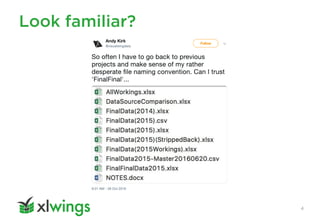
Look familiar?
4
A few more reasons
5
• Excel files are code, so treat them as such
• Git is battle tested
• Collaboration
• Audit trail / Spreadsheet governance
• Peer review / Approval process
• Reduce errors
2. Git refresher
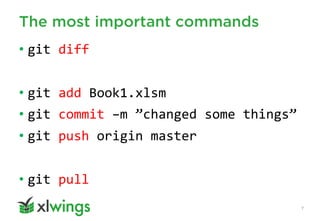
The most important commands
7
• git diff
• git add Book1.xlsm
• git commit –m ”changed some things”
• git push origin master
• git pull
3. So what’s the issue?
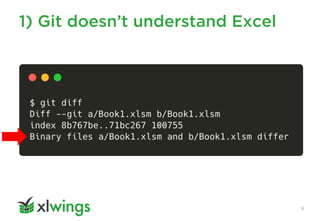
1) Git doesn’t understand Excel
9
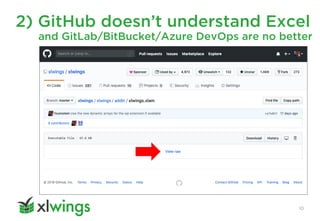
2) GitHub doesn’t understand Excel
10
and GitLab/BitBucket/Azure DevOps are no better
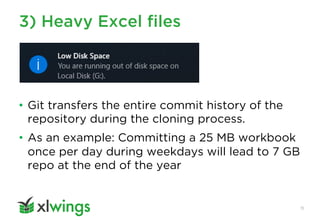
3) Heavy Excel files
11
• Git transfers the entire commit history of the
repository during the cloning process.
• As an example: Committing a 25 MB workbook
once per day during weekdays will lead to 7 GB
repo at the end of the year
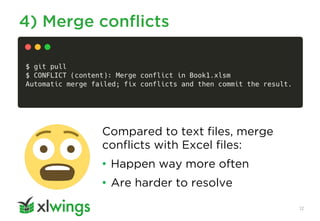
4) Merge conflicts
12
Compared to text files, merge
conflicts with Excel files:
• Happen way more often
• Are harder to resolve
4. Four golden rules
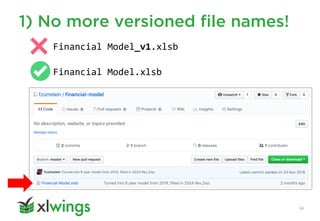
1) No more versioned file names!
14
Financial Model_v1.xlsb
Financial Model.xlsb
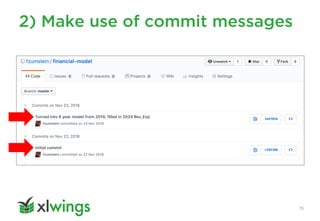
2) Make use of commit messages
15
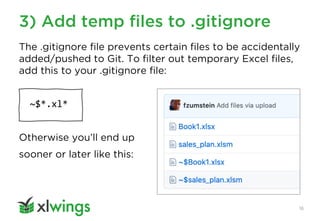
3) Add temp files to .gitignore
16
The .gitignore file prevents certain files to be accidentally
added/pushed to Git. To filter out temporary Excel files,
add this to your .gitignore file:
~$*.xl*
Otherwise you’ll end up
sooner or later like this:
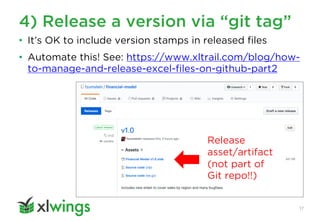
4) Release a version via “git tag”
17
Release
asset/artifact
(not part of
Git repo!!)
• It’s OK to include version stamps in released files
• Automate this! See: https://www.xltrail.com/blog/how-
to-manage-and-release-excel-files-on-github-part2
5. Tools
A. Spreadsheet Compare
Spreadsheet Compare
20
• Compares 2 Excel files
• Standalone desktop app (also integrated into
the Inquire Excel add-in)
• Part of Office Professional Plus and Office 365
ProPlus
• You can integrate it with Git:
https://www.xltrail.com/blog/git-diff-spreadsheetcompare
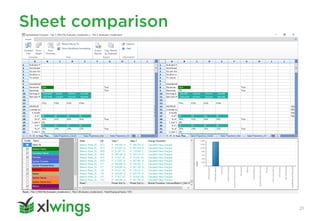
Sheet comparison
21
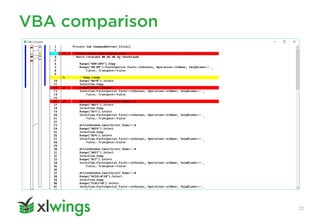
VBA comparison
22
B. xltrail
xltrail
24
• Free trial: https://www.xltrail.com
• xltrail syncs with any Git provider
• Alternatively, it works via Drag and Drop
and manages Git behind the scenes
• Allows comparisons across branches,
between any two versions
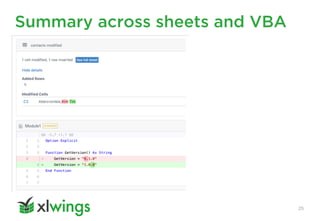
Summary across sheets and VBA
25
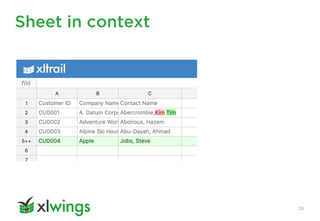
Sheet in context
26
C. Git XL
Git XL
28
• https://www.xltrail.com/git-xl
• Free & open-source local Git extension
• Created & maintained by us
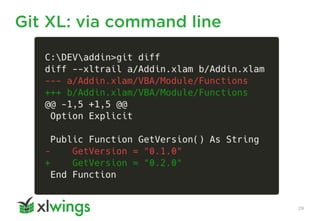
• It can diff & merge (!) VBA code
• Windows only for now
Git XL: via command line
29
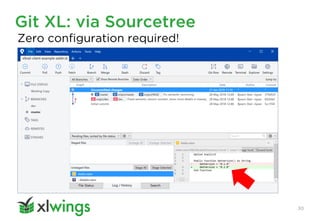
Git XL: via Sourcetree
30
Zero configuration required!
Git XL: VBA merging
31
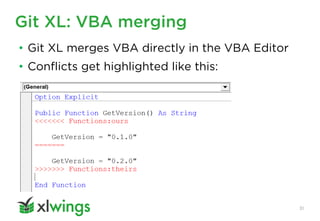
• Git XL merges VBA directly in the VBA Editor
• Conflicts get highlighted like this:
D. Git LFS (Large File Storage)
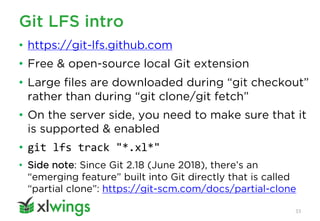
Git LFS intro
33
• https://git-lfs.github.com
• Free & open-source local Git extension
• Large files are downloaded during “git checkout”
rather than during “git clone/git fetch”
• On the server side, you need to make sure that it
is supported & enabled
• git lfs track "*.xl*"
• Side note: Since Git 2.18 (June 2018), there’s an
“emerging feature” built into Git directly that is called
“partial clone”: https://git-scm.com/docs/partial-clone
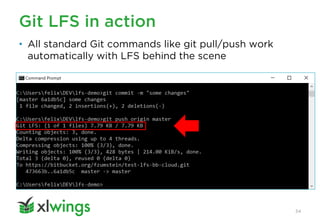
Git LFS in action
34
• All standard Git commands like git pull/push work
automatically with LFS behind the scene
E. Git clients
Git clients
36
Git offers various clients to interact with the remote:
• Command Line
• Desktop clients (e.g. GitHub Desktop, Sourcetree).
For an overview: https://git-scm.com/downloads/guis
• File explorer integration: https://tortoisegit.org
• Integration with IDE/Text Editor (e.g. VSCode)
• Drag and Drop directly on GitHub, GitLab, Azure
DevOps (but not Bitbucket)
6. Merge conflicts
Merge conflicts will bite you!
38
They also happen:
• with a single master branch
• with a single user
For example:
• You commit during the day at work. In the
evening, you continue at home and forget to
pull before you make a new commit.
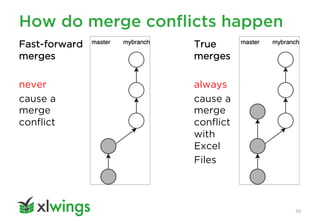
How do merge conflicts happen
39
True
merges
always
cause a
merge
conflict
with
Excel
Files
Fast-forward
merges
never
cause a
merge
conflict
A. Single branch workflow:
File locking
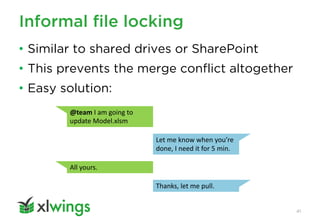
Informal file locking
41
• Similar to shared drives or SharePoint
• This prevents the merge conflict altogether
• Easy solution:
@team I am going to
update Model.xlsm
Let me know when you’re
done, I need it for 5 min.
All yours.
Thanks, let me pull.
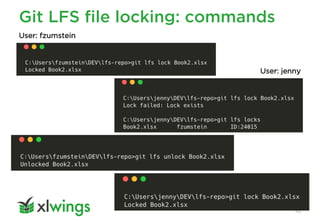
Git LFS file locking
42
• Git LFS offers file locking (introduced
with v2.0)
• Meanwhile, all major providers support it
• A caveat of the file locking is that you
need to remember two things:
–Lock the file
–Start with a “git pull” before you edit the file
• git lfs track "*.xl*" --lockable
Git LFS file locking: commands
43
User: fzumstein
User: jenny
B. Multi branch workflow
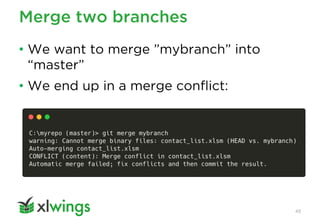
Merge two branches
45
• We want to merge ”mybranch” into
“master”
• We end up in a merge conflict:
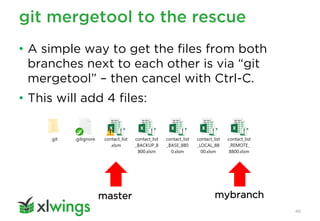
git mergetool to the rescue
46
• A simple way to get the files from both
branches next to each other is via “git
mergetool” – then cancel with Ctrl-C.
• This will add 4 files:
master mybranch
Resolve the merge conflict
47
• Now compare “contact_list.xlsm” (master)
with “contact_list_REMOTE.xlsm” (mybranch)
• Spreadsheet Compare or xltrail will be helpful
with that
• Manually apply the changes you want from
mybranch in your master version
• Then resolve the merge conflict via “git add”
and “git commit”.
• See: https://www.xltrail.com/blog/merge-excel-workbooks-with-git
Thank You
Let’s connect:
https://www.linkedin.com/in/felix-zumstein
More material:
https://www.xltrail.com/blog

Git for Excel (Webinar)

  • 1.
    Git for Excel FelixZumstein, 26 March 2020 Webinar
  • 2.
    Agenda 2 1. But why?! 2.Git refresher 3. So what’s the issue? 4. Four golden rules 5. Tools 6. Merge conflicts
  • 3.
  • 4.
  • 5.
    A few morereasons 5 • Excel files are code, so treat them as such • Git is battle tested • Collaboration • Audit trail / Spreadsheet governance • Peer review / Approval process • Reduce errors
  • 6.
  • 7.
    The most importantcommands 7 • git diff • git add Book1.xlsm • git commit –m ”changed some things” • git push origin master • git pull
  • 8.
    3. So what’sthe issue?
  • 9.
    1) Git doesn’tunderstand Excel 9
  • 10.
    2) GitHub doesn’tunderstand Excel 10 and GitLab/BitBucket/Azure DevOps are no better
  • 11.
    3) Heavy Excelfiles 11 • Git transfers the entire commit history of the repository during the cloning process. • As an example: Committing a 25 MB workbook once per day during weekdays will lead to 7 GB repo at the end of the year
  • 12.
    4) Merge conflicts 12 Comparedto text files, merge conflicts with Excel files: • Happen way more often • Are harder to resolve
  • 13.
  • 14.
    1) No moreversioned file names! 14 Financial Model_v1.xlsb Financial Model.xlsb
  • 15.
    2) Make useof commit messages 15
  • 16.
    3) Add tempfiles to .gitignore 16 The .gitignore file prevents certain files to be accidentally added/pushed to Git. To filter out temporary Excel files, add this to your .gitignore file: ~$*.xl* Otherwise you’ll end up sooner or later like this:
  • 17.
    4) Release aversion via “git tag” 17 Release asset/artifact (not part of Git repo!!) • It’s OK to include version stamps in released files • Automate this! See: https://www.xltrail.com/blog/how- to-manage-and-release-excel-files-on-github-part2
  • 18.
  • 19.
  • 20.
    Spreadsheet Compare 20 • Compares2 Excel files • Standalone desktop app (also integrated into the Inquire Excel add-in) • Part of Office Professional Plus and Office 365 ProPlus • You can integrate it with Git: https://www.xltrail.com/blog/git-diff-spreadsheetcompare
  • 21.
  • 22.
  • 23.
  • 24.
    xltrail 24 • Free trial:https://www.xltrail.com • xltrail syncs with any Git provider • Alternatively, it works via Drag and Drop and manages Git behind the scenes • Allows comparisons across branches, between any two versions
  • 25.
  • 26.
  • 27.
  • 28.
    Git XL 28 • https://www.xltrail.com/git-xl •Free & open-source local Git extension • Created & maintained by us • It can diff & merge (!) VBA code • Windows only for now
  • 29.
    Git XL: viacommand line 29
  • 30.
    Git XL: viaSourcetree 30 Zero configuration required!
  • 31.
    Git XL: VBAmerging 31 • Git XL merges VBA directly in the VBA Editor • Conflicts get highlighted like this:
  • 32.
    D. Git LFS(Large File Storage)
  • 33.
    Git LFS intro 33 •https://git-lfs.github.com • Free & open-source local Git extension • Large files are downloaded during “git checkout” rather than during “git clone/git fetch” • On the server side, you need to make sure that it is supported & enabled • git lfs track "*.xl*" • Side note: Since Git 2.18 (June 2018), there’s an “emerging feature” built into Git directly that is called “partial clone”: https://git-scm.com/docs/partial-clone
  • 34.
    Git LFS inaction 34 • All standard Git commands like git pull/push work automatically with LFS behind the scene
  • 35.
  • 36.
    Git clients 36 Git offersvarious clients to interact with the remote: • Command Line • Desktop clients (e.g. GitHub Desktop, Sourcetree). For an overview: https://git-scm.com/downloads/guis • File explorer integration: https://tortoisegit.org • Integration with IDE/Text Editor (e.g. VSCode) • Drag and Drop directly on GitHub, GitLab, Azure DevOps (but not Bitbucket)
  • 37.
  • 38.
    Merge conflicts willbite you! 38 They also happen: • with a single master branch • with a single user For example: • You commit during the day at work. In the evening, you continue at home and forget to pull before you make a new commit.
  • 39.
    How do mergeconflicts happen 39 True merges always cause a merge conflict with Excel Files Fast-forward merges never cause a merge conflict
  • 40.
    A. Single branchworkflow: File locking
  • 41.
    Informal file locking 41 •Similar to shared drives or SharePoint • This prevents the merge conflict altogether • Easy solution: @team I am going to update Model.xlsm Let me know when you’re done, I need it for 5 min. All yours. Thanks, let me pull.
  • 42.
    Git LFS filelocking 42 • Git LFS offers file locking (introduced with v2.0) • Meanwhile, all major providers support it • A caveat of the file locking is that you need to remember two things: –Lock the file –Start with a “git pull” before you edit the file • git lfs track "*.xl*" --lockable
  • 43.
    Git LFS filelocking: commands 43 User: fzumstein User: jenny
  • 44.
  • 45.
    Merge two branches 45 •We want to merge ”mybranch” into “master” • We end up in a merge conflict:
  • 46.
    git mergetool tothe rescue 46 • A simple way to get the files from both branches next to each other is via “git mergetool” – then cancel with Ctrl-C. • This will add 4 files: master mybranch
  • 47.
    Resolve the mergeconflict 47 • Now compare “contact_list.xlsm” (master) with “contact_list_REMOTE.xlsm” (mybranch) • Spreadsheet Compare or xltrail will be helpful with that • Manually apply the changes you want from mybranch in your master version • Then resolve the merge conflict via “git add” and “git commit”. • See: https://www.xltrail.com/blog/merge-excel-workbooks-with-git
  • 48.