Introduction to Amazon
Virtual Private Cloud (VPC)
        Architecture


             Robert Wilson
           Solution Architect
au.linkedin.com/in/robertwilsonprofile
    AWS Sydney Meetup March 6th 2013

                                         1
• Amazon Virtual Private Cloud (VPC)
  fundamentals

• Four VPC Architecture scenarios

• VPC to corporate network connectivity

                                          2
VPC Fundamentals

– Amazon VPC is an isolated network within the
  AWS cloud that you define
– In your VPC you can
   • Create multiple public and/or private subnets
   • Launch resources with your own private IP address into
     a subnet
   • Define VPC security groups, Access Control Lists (ACL),
     Subnet Route Tables and Routes


                                                               3
VPC Fundamentals - Drivers

- Drivers for the use of a VPC architecture are
   • The network isolation from other accounts
   • The extra network security available in VPC
   • As an extension of the corporate network – access
     through a VPN
   • Static private IP address don’t change on instance
     stop/start


                                                          4
VPC Fundamentals - Subnets

– If a subnet has a route to an AWS Internet
  Gateway it is called a public subnet
– If there is no route from a subnet to an AWS
  Internet Gateway it is a private subnet. If an
  instance in an private subnet wants to access the
  internet it needs to use a NAT in a public subnet
– Each subnet must reside entirely within one
  Availability Zone
– Instances in a VPC communicate based on Route
  Table, VPC Security Groups and Access Control
  Lists
                                                      5
VPC Fundamentals –
       Security Groups, ACLs, Routes
– VPC Security Groups control both inbound and
  outbound access between instances (EC2 Security
  Groups can only define inbound rules). A firewall
  at the instance level
– VPC Access Control Lists (ACLs) control access
  between subnets – firewall at the subnet level, an
  extra level of security over VPC Security Groups
– Subnet Route Table specifies subnet IP routing


                                                       6
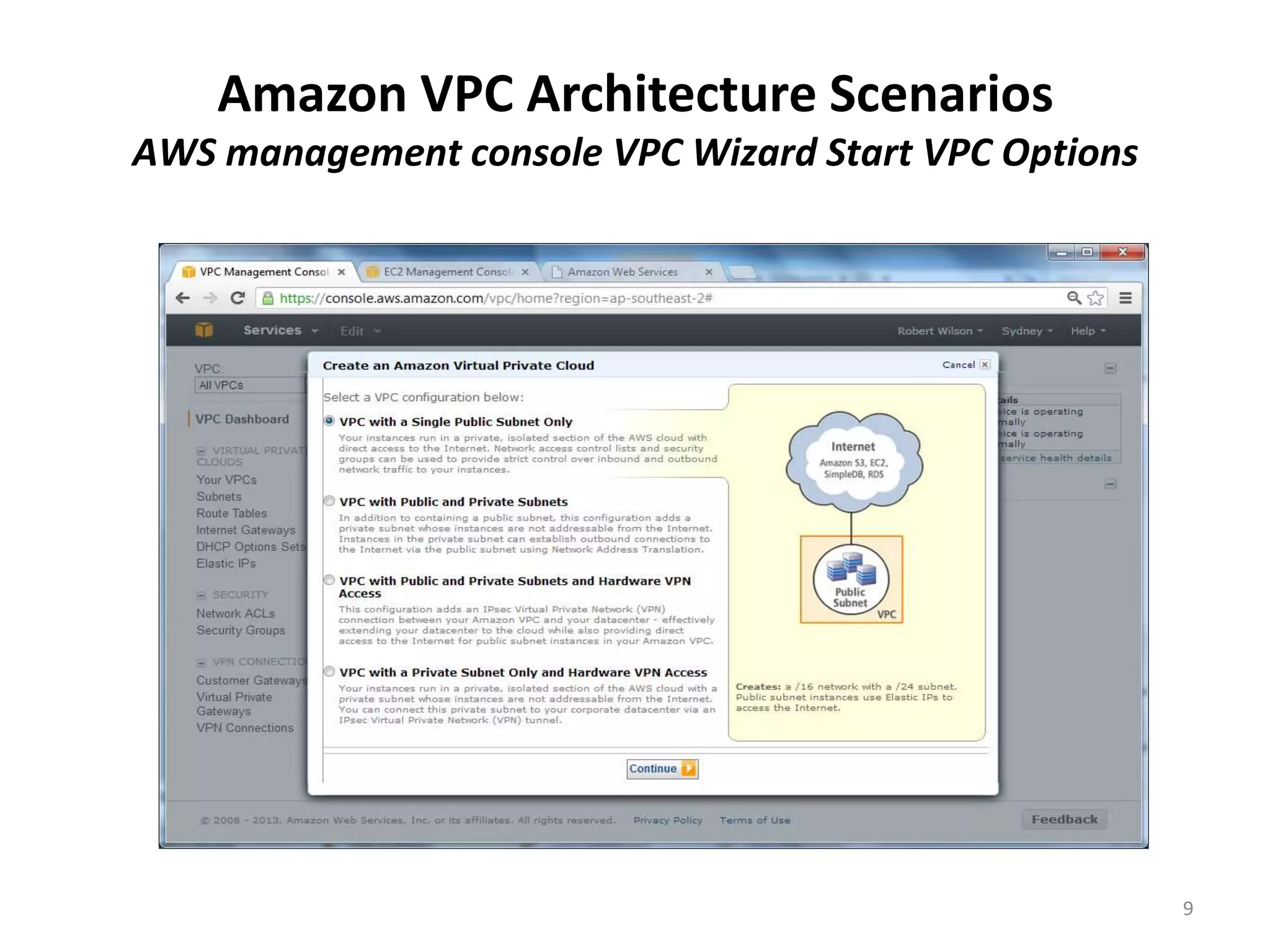
VPC Architecture Scenarios

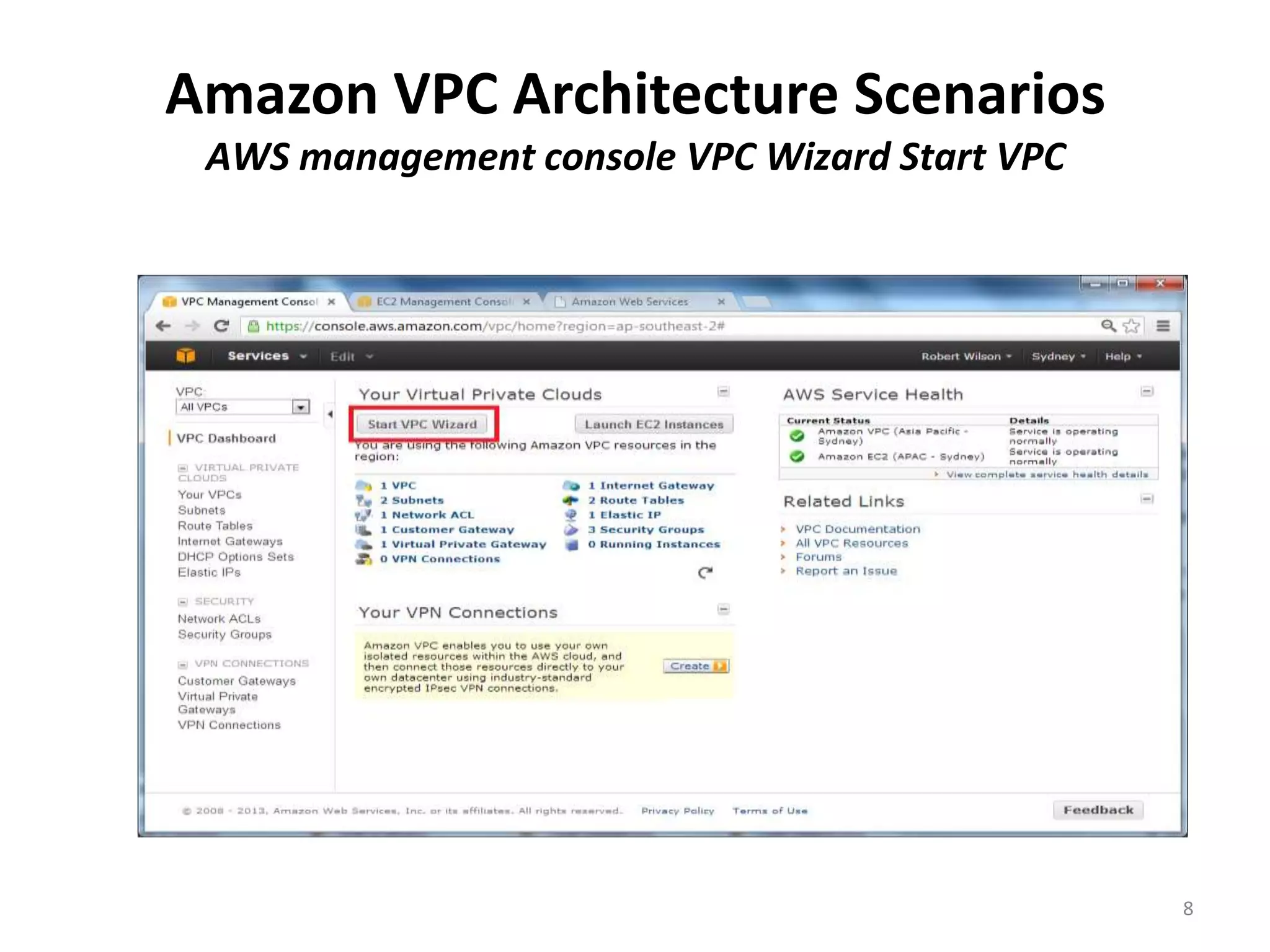
– AWS VPC documentation has four architecture
  scenarios, these are the options available in the
  AWS management console in the VPC Wizard:
  1. VPC with a Public Subnet Only
  2. VPC with Public and Private Subnets
  3. VPC with Public and Private Subnets and Hardware
     VPN Access
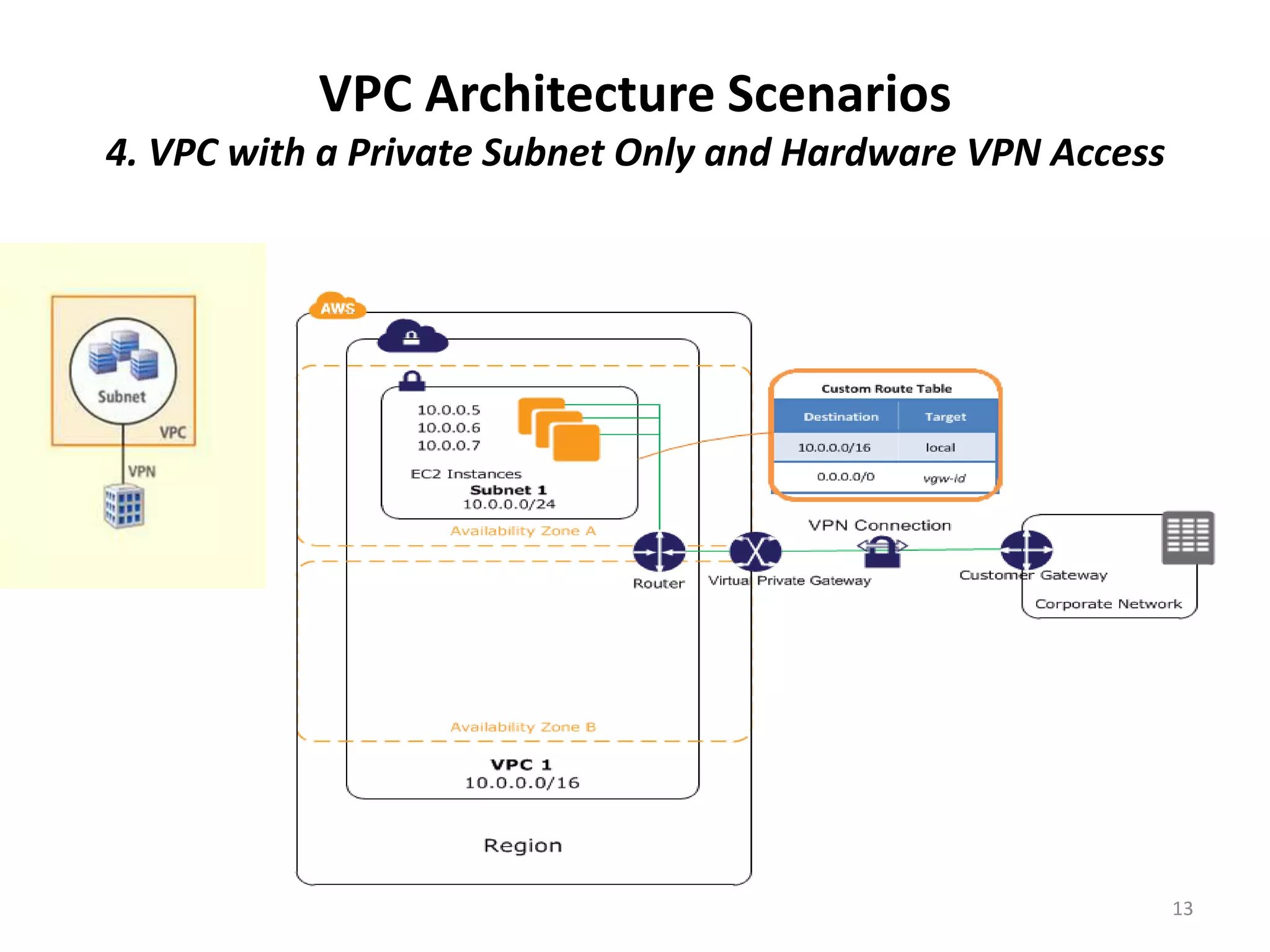
  4. VPC with a Private Subnet Only and Hardware VPN
     Access


                                                        7
Amazon VPC Architecture Scenarios
 AWS management console VPC Wizard Start VPC


                                               8
Amazon VPC Architecture Scenarios
AWS management console VPC Wizard Start VPC Options


                                                      9
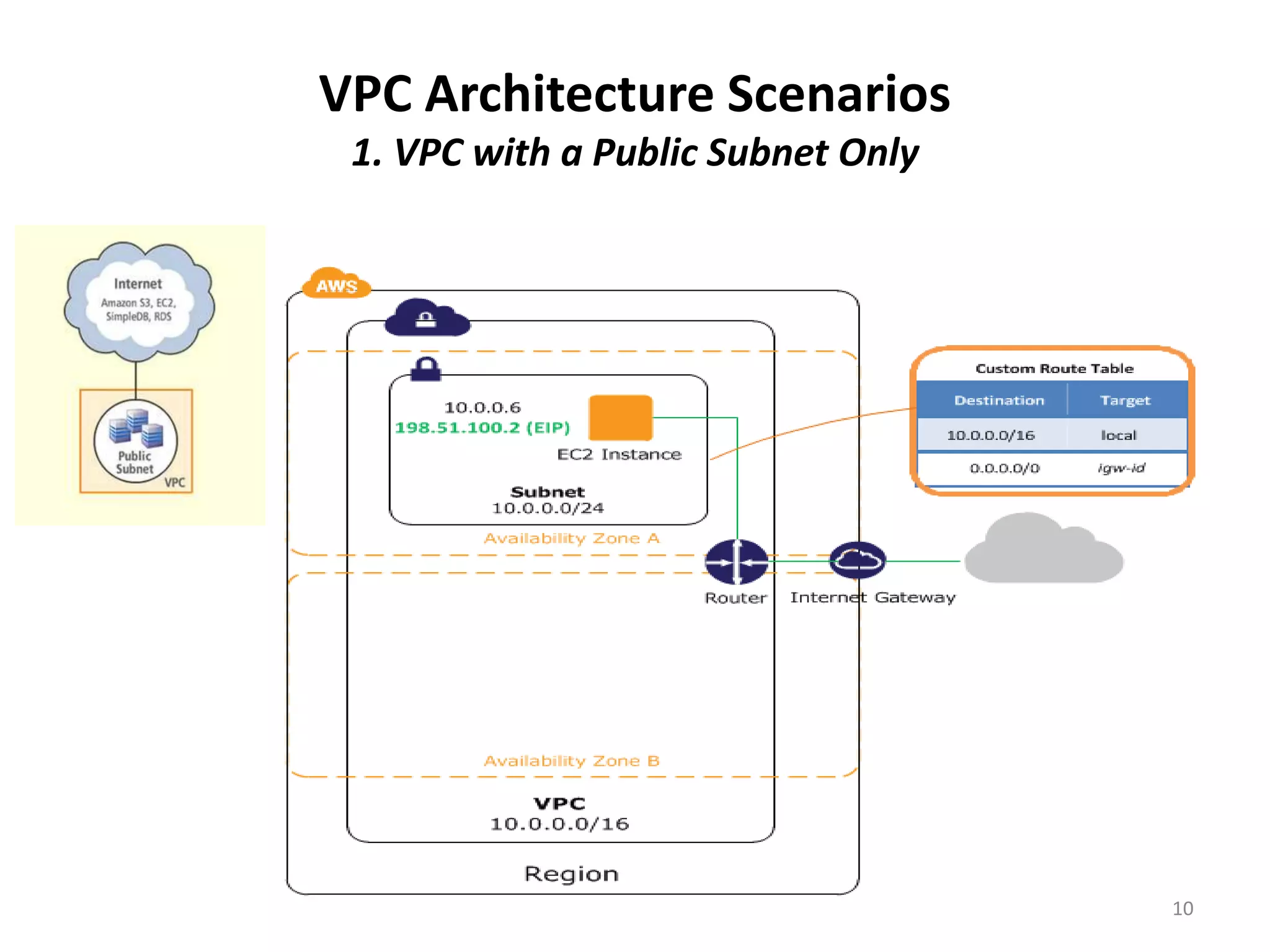
VPC Architecture Scenarios
 1. VPC with a Public Subnet Only


                                    10
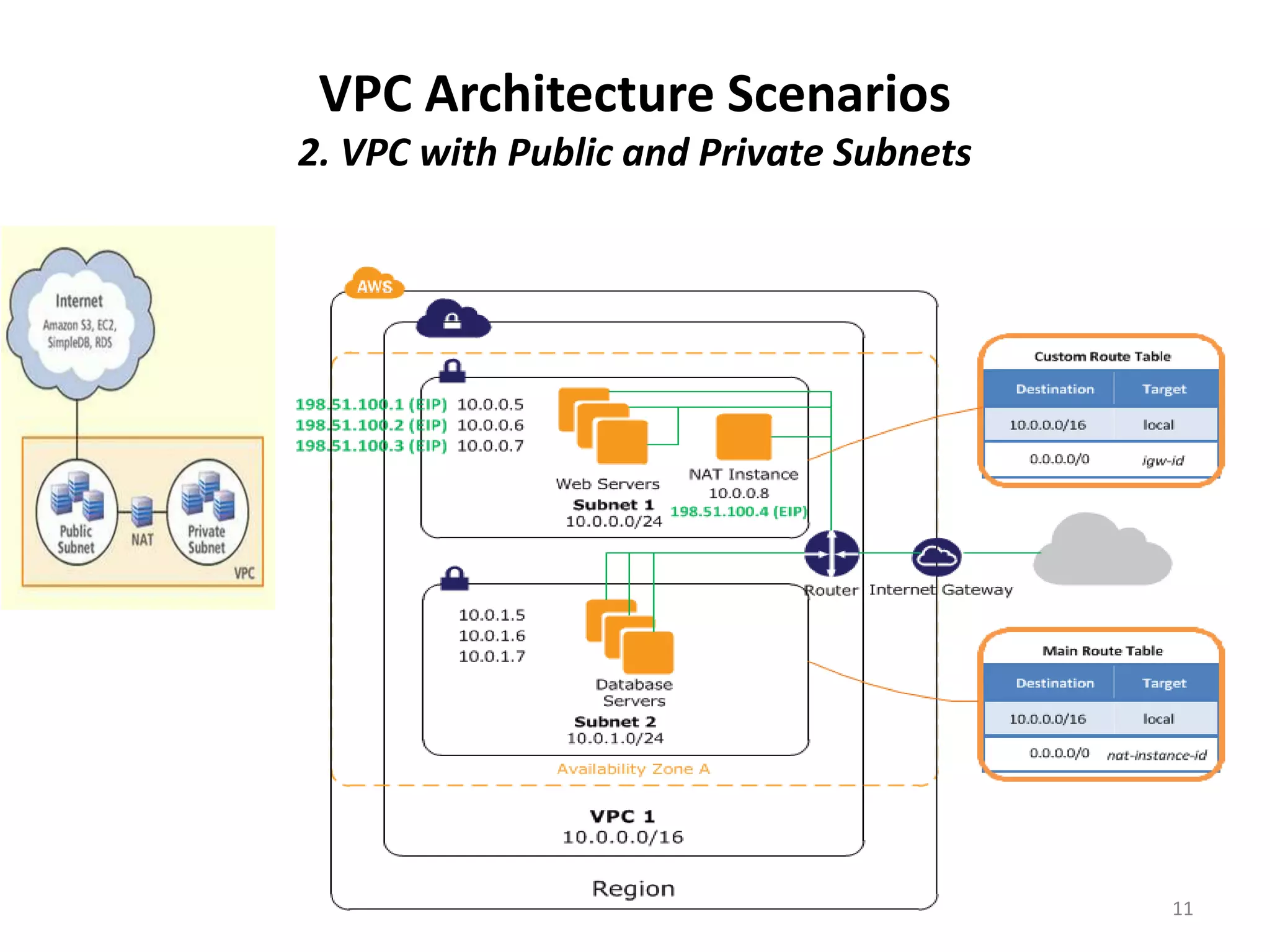
VPC Architecture Scenarios
2. VPC with Public and Private Subnets


                                         11
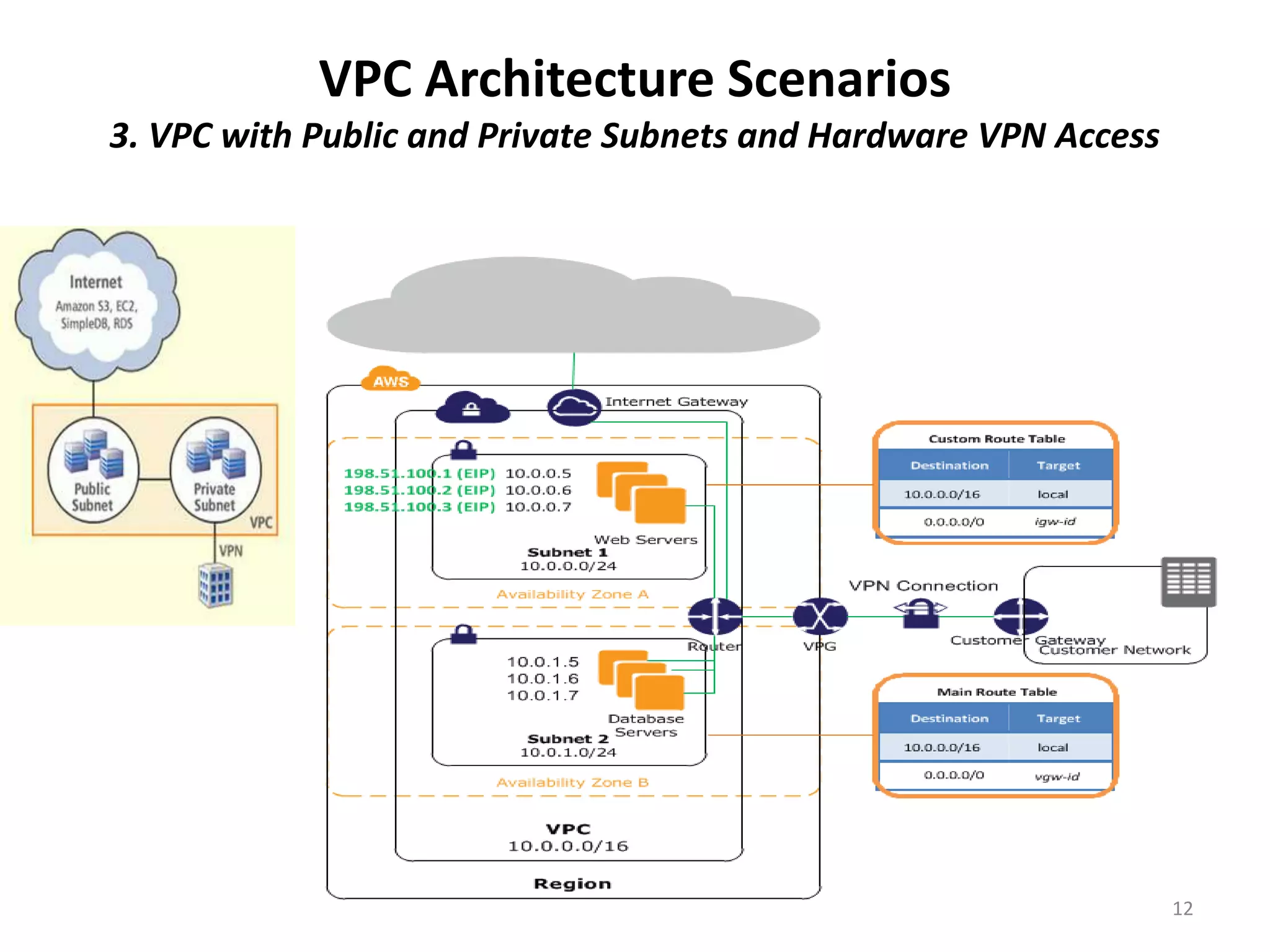
VPC Architecture Scenarios
3. VPC with Public and Private Subnets and Hardware VPN Access


                                                                 12
VPC Architecture Scenarios
4. VPC with a Private Subnet Only and Hardware VPN Access


                                                            13
Amazon VPC Architecture - Connectivity

• Architecture scenarios 3 & 4 were extending an
  existing on premise corporate network to the
  Amazon VPC with a VPN

• “Amazon Virtual Private Cloud Connectivity
  Options”* documents connectivity patterns for on
  premise corporate network to VPC connectivity
  (as well as VPC to VPC connectivity)


  * http://media.amazonwebservices.com/AWS_Amazon_VPC_Connectivity_Options.pdf   14
Amazon VPC Architecture – Patterns for
 Corporate network to VPC Connectivity
• Hardware VPN, IPSec hardware VPN connection
• AWS Direct Connect, 802.1q VLAN 1Gbps or
  10Gbps
• AWS Direct Connect + VPN, combination of the
  first two – IPSec VPN and AWS Direct Connect
• AWS VPN CloudHub, VPN connectivity to multiple
  customer premises
• Software VPN, EC2 instance running software
  VPN, eg OpenVPN

  * http://media.amazonwebservices.com/AWS_Amazon_VPC_Connectivity_Options.pdf   15
Amazon VPC Architecture – AWS Products

Products currently available in Amazon VPC are
   • Amazon EC2
   • Amazon RDS1 – can deploy RDS to a private subnet
   • Auto Scaling
   • Elastic Load Balancing2 – in a VPC, ELB is also available
     internally, unlike public cloud EC2, where ELB is only
     available as internet facing
   • Amazon EMR
   • Elastic Beanstalk3
   • ElastiCache

  1. http://docs.aws.amazon.com/AmazonRDS/latest/UserGuide/USER_VPC.html
  2. http://docs.aws.amazon.com/ElasticLoadBalancing/latest/DeveloperGuide/UserScenariosForVPC.html
  3. http://docs.aws.amazon.com/elasticbeanstalk/latest/dg/AWSHowTo-vpc-requirements.html             16
     http://docs.aws.amazon.com/elasticbeanstalk/latest/dg/AWSHowTo-vpc-basic.html
• In conclusion, consider a VPC Architecture in your adoption of AWS
  for the extra security and network isolation

• However don’t forget you are in the cloud so architect for the cloud
    – Architect for failure, High Availability and resilience
    – Scalability
    – etc

• Thank You


                       Robert Wilson
                    Solution Architect
          au.linkedin.com/in/robertwilsonprofile
                                                                     17

Amazon Virtual Private Cloud VPC Architecture AWS Web Services

  • 1.
    Introduction to Amazon VirtualPrivate Cloud (VPC) Architecture Robert Wilson Solution Architect au.linkedin.com/in/robertwilsonprofile AWS Sydney Meetup March 6th 2013 1
  • 2.
    • Amazon VirtualPrivate Cloud (VPC) fundamentals • Four VPC Architecture scenarios • VPC to corporate network connectivity 2
  • 3.
    VPC Fundamentals – AmazonVPC is an isolated network within the AWS cloud that you define – In your VPC you can • Create multiple public and/or private subnets • Launch resources with your own private IP address into a subnet • Define VPC security groups, Access Control Lists (ACL), Subnet Route Tables and Routes 3
  • 4.
    VPC Fundamentals -Drivers - Drivers for the use of a VPC architecture are • The network isolation from other accounts • The extra network security available in VPC • As an extension of the corporate network – access through a VPN • Static private IP address don’t change on instance stop/start 4
  • 5.
    VPC Fundamentals -Subnets – If a subnet has a route to an AWS Internet Gateway it is called a public subnet – If there is no route from a subnet to an AWS Internet Gateway it is a private subnet. If an instance in an private subnet wants to access the internet it needs to use a NAT in a public subnet – Each subnet must reside entirely within one Availability Zone – Instances in a VPC communicate based on Route Table, VPC Security Groups and Access Control Lists 5
  • 6.
    VPC Fundamentals – Security Groups, ACLs, Routes – VPC Security Groups control both inbound and outbound access between instances (EC2 Security Groups can only define inbound rules). A firewall at the instance level – VPC Access Control Lists (ACLs) control access between subnets – firewall at the subnet level, an extra level of security over VPC Security Groups – Subnet Route Table specifies subnet IP routing 6
  • 7.
    VPC Architecture Scenarios –AWS VPC documentation has four architecture scenarios, these are the options available in the AWS management console in the VPC Wizard: 1. VPC with a Public Subnet Only 2. VPC with Public and Private Subnets 3. VPC with Public and Private Subnets and Hardware VPN Access 4. VPC with a Private Subnet Only and Hardware VPN Access 7
  • 8.
    Amazon VPC ArchitectureScenarios AWS management console VPC Wizard Start VPC 8
  • 9.
    Amazon VPC ArchitectureScenarios AWS management console VPC Wizard Start VPC Options 9
  • 10.
    VPC Architecture Scenarios 1. VPC with a Public Subnet Only 10
  • 11.
    VPC Architecture Scenarios 2.VPC with Public and Private Subnets 11
  • 12.
    VPC Architecture Scenarios 3.VPC with Public and Private Subnets and Hardware VPN Access 12
  • 13.
    VPC Architecture Scenarios 4.VPC with a Private Subnet Only and Hardware VPN Access 13
  • 14.
    Amazon VPC Architecture- Connectivity • Architecture scenarios 3 & 4 were extending an existing on premise corporate network to the Amazon VPC with a VPN • “Amazon Virtual Private Cloud Connectivity Options”* documents connectivity patterns for on premise corporate network to VPC connectivity (as well as VPC to VPC connectivity) * http://media.amazonwebservices.com/AWS_Amazon_VPC_Connectivity_Options.pdf 14
  • 15.
    Amazon VPC Architecture– Patterns for Corporate network to VPC Connectivity • Hardware VPN, IPSec hardware VPN connection • AWS Direct Connect, 802.1q VLAN 1Gbps or 10Gbps • AWS Direct Connect + VPN, combination of the first two – IPSec VPN and AWS Direct Connect • AWS VPN CloudHub, VPN connectivity to multiple customer premises • Software VPN, EC2 instance running software VPN, eg OpenVPN * http://media.amazonwebservices.com/AWS_Amazon_VPC_Connectivity_Options.pdf 15
  • 16.
    Amazon VPC Architecture– AWS Products Products currently available in Amazon VPC are • Amazon EC2 • Amazon RDS1 – can deploy RDS to a private subnet • Auto Scaling • Elastic Load Balancing2 – in a VPC, ELB is also available internally, unlike public cloud EC2, where ELB is only available as internet facing • Amazon EMR • Elastic Beanstalk3 • ElastiCache 1. http://docs.aws.amazon.com/AmazonRDS/latest/UserGuide/USER_VPC.html 2. http://docs.aws.amazon.com/ElasticLoadBalancing/latest/DeveloperGuide/UserScenariosForVPC.html 3. http://docs.aws.amazon.com/elasticbeanstalk/latest/dg/AWSHowTo-vpc-requirements.html 16 http://docs.aws.amazon.com/elasticbeanstalk/latest/dg/AWSHowTo-vpc-basic.html
  • 17.
    • In conclusion,consider a VPC Architecture in your adoption of AWS for the extra security and network isolation • However don’t forget you are in the cloud so architect for the cloud – Architect for failure, High Availability and resilience – Scalability – etc • Thank You Robert Wilson Solution Architect au.linkedin.com/in/robertwilsonprofile 17

Editor's Notes

  • #12 DocumentationTip“To help manage the instances in the private subnet, you can set up bastion servers in the public subnet to act as proxies. For example, you can set up SSH port forwarders or RDP gateways in the public subnet to proxy the traffic going to your database servers from your own network.”Setup port forwarding on the NAT from say 2222 to 22 on the instances in the private subnet: http://www.whiteboardcoder.com/2012/12/amazon-aws-vpc-iptables-and-nat-route.html Setup an OpenVPN server in the public subnet to create a VPN Tunnel to the private subnet, however now you need the OpenVPN client to connect: AWS handson training material