ode to an
accessibility bug
wendy chisholm, entomologist
microsoft
sp1ral.com/about
t: wendyabc
o’: universal design
for web apps
backstory
beneficial bugs
brain spirals
bug bait
better bugs
backstory
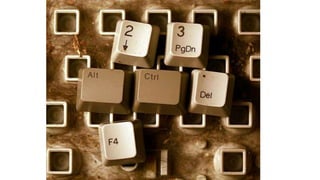
Does the alt key on the keyboard have
anything to do with alt text?
brain spirals
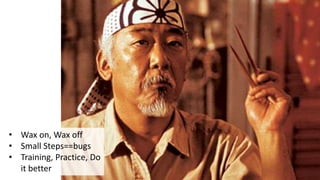
Mr. Miyahi: Learning to coach
• Wax on, Wax off
• Small Steps==bugs
• Training, Practice, Do
it better
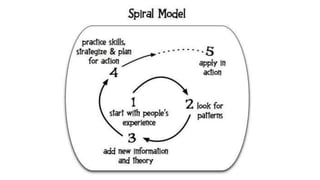
Spiral model
Take away: Training/Dev Resources
• HTML
• WAI-ARIA 1.0 Authoring Practices, Design Patterns, W3C
• Using ARIA in HTML, W3C
• Accessibility 101, SSB Bart Youtube video series
• Android
• Accessibility Testing Checklist
• Talkback gestures
• iOS
• iOS accessibility (WWDC 2014), iOS accessibility (WWDC 2015)
• Watch accessibility (WWDC 2015)
• iOS Accessibility, Apple Dev Center
• iOS vs Android Paul Adam, Deque
• Windows Accessibility Developer Hub
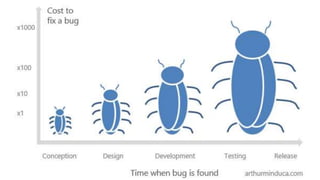
beneficial bugs
Agile Development Software Lifecycle
Cost to fix a bug versus time when a bug is
found
What makes a good bug?
1. Descriptive title
1. [P]roblem [A]ction [L]ocation
2. <= 140 characters
2. Concise description
3. Clear expected results
4. Details about project, version
5. Platform details
6. Type and severity
7. Steps to reproduce
8. Visual attachment
9. Tags and links
Lean Testing: How to write a good bug report
What makes a good accessibility bug?1. Descriptive title
1. [P]roblem [A]ction [L]ocation
2. <= 140 characters
2. Concise description, IMPACT
3. Clear expected results
4. Details about project, version
5. Platform details, AT
6. Type and severity
7. Steps to reproduce
8. Visual OR VIDEO attachment
9. Tags and links
bug bait
A toolbox of tools
Tools that I use• Automated
• Tenon, aXe, Chrome Audit
• F12 team looking for input,
Aaron Gustafson tweet
• Inspection
• WAVE, WAT
• Access technologies
• Screen readers, magnification
• High contrast, speech
recognition
• Color contrast
better bugs
Example: All widgets need to be in the tab
order
• Title: All widgets on example.com
need to be in the tab order
• Expected results: The user should
be able to tab to all widgets on the
page.
• Steps to reproduce:
1. Go to example.com
2. Press the tab key 15 times to
go from top of page to
bottom
3. Note that the navigation
buttons are not in the tab
order
• Visual attachment: screen shot
of example.com with navigation
buttons circled in red
What was the result?
• Result? “Won’t fix”
• Wrote JavaScript, killed
performance
• Filed a new bug…
Rewriting the bug
• Title: Use tabindex=0 to put
navigation buttons in the tab
order
• Other info same/similar
• Links
• WAI-ARIA Best Practices,
“Using tabindex to manage
focus among widgets.”
Another example: all widgets need to be
spoken by a screen reader• Title: All widgets need to be
spoken by a screen reader
• Expected results: Using a screen
reader, the user should be able to
hear all widgets on the page.
• Steps to reproduce:
1. Go to example.com in Firefox
with NVDA
2. Press the tab key to navigate
between widgets
• Visual attachment: screen shot
of example.com with buttons
circled in red
How did that one work out?
• Result? “We fixed it”
• Great! User testing.
• Button, group, new caption…
Trying again…
• Title: All widgets need to have a
sensible name spoken by a screen
reader
• Expected results: Using a screen
reader, the user should be able to
hear all widgets on the page.
• What happened instead: Buttons
x, y and z were read as “button”
instead of x, y, z
• Steps to reproduce:
1. Go to example.com in Firefox
with NVDA
2. Press the tab key to navigate
between widgets
• Video attachment: recording of
what happened in their app vs
what happens in competitor app
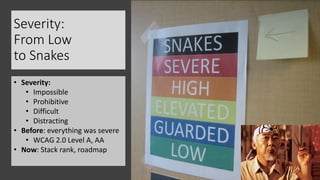
Severity:
From Low
to Snakes
• Severity:
• Impossible
• Prohibitive
• Difficult
• Distracting
• Before: everything was severe
• WCAG 2.0 Level A, AA
• Now: Stack rank, roadmap
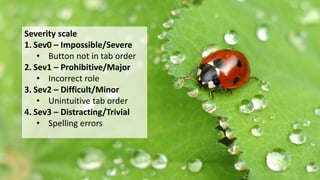
Severity scaleSeverity scale
1. Sev0 – Impossible/Severe
• Button not in tab order
2. Sev1 – Prohibitive/Major
• Incorrect role
3. Sev2 – Difficult/Minor
• Unintuitive tab order
4. Sev3 – Distracting/Trivial
• Spelling errors
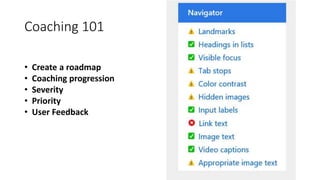
• Create a roadmap
• Coaching progression
• Severity
• Priority
• User Feedback
Coaching 101
What makes a good accessibility bug?1. Descriptive title
1. [P]roblem [A]ction [L]ocation
2. <= 140 characters
2. Concise description, IMPACT
3. Clear expected results
4. Details about project, version
5. Platform details, AT
6. Type and severity
7. Steps to reproduce
8. Visual OR VIDEO attachment
9. Tags and links
1. FixTheWeb
1. Fixtheweb.net
2. Twitter: @FixTheWeb
2. Disability Answer Desk
1. aka.ms/accessibilitysupport
2. Twitter: @MSFTEnable
Send us bugs
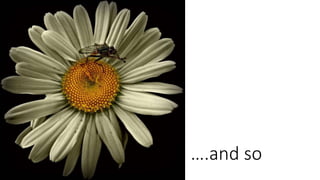
….and so
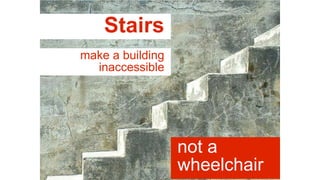
Stairs
make a building
inaccessible
not a
wheelchair
ode to an
accessibility bug
wendy chisholm, entomologist
microsoft
sp1ral.com/about
t: wendyabc
o’: universal design
for web apps

Ode to an Accessibility Bug

  • 1.
    ode to an accessibilitybug wendy chisholm, entomologist microsoft sp1ral.com/about t: wendyabc o’: universal design for web apps
  • 2.
  • 3.
  • 4.
    Does the altkey on the keyboard have anything to do with alt text?
  • 5.
  • 6.
    Mr. Miyahi: Learningto coach • Wax on, Wax off • Small Steps==bugs • Training, Practice, Do it better
  • 7.
  • 8.
    Take away: Training/DevResources • HTML • WAI-ARIA 1.0 Authoring Practices, Design Patterns, W3C • Using ARIA in HTML, W3C • Accessibility 101, SSB Bart Youtube video series • Android • Accessibility Testing Checklist • Talkback gestures • iOS • iOS accessibility (WWDC 2014), iOS accessibility (WWDC 2015) • Watch accessibility (WWDC 2015) • iOS Accessibility, Apple Dev Center • iOS vs Android Paul Adam, Deque • Windows Accessibility Developer Hub
  • 9.
  • 10.
  • 11.
    Cost to fixa bug versus time when a bug is found
  • 12.
    What makes agood bug? 1. Descriptive title 1. [P]roblem [A]ction [L]ocation 2. <= 140 characters 2. Concise description 3. Clear expected results 4. Details about project, version 5. Platform details 6. Type and severity 7. Steps to reproduce 8. Visual attachment 9. Tags and links Lean Testing: How to write a good bug report
  • 13.
    What makes agood accessibility bug?1. Descriptive title 1. [P]roblem [A]ction [L]ocation 2. <= 140 characters 2. Concise description, IMPACT 3. Clear expected results 4. Details about project, version 5. Platform details, AT 6. Type and severity 7. Steps to reproduce 8. Visual OR VIDEO attachment 9. Tags and links
  • 14.
  • 15.
  • 16.
    Tools that Iuse• Automated • Tenon, aXe, Chrome Audit • F12 team looking for input, Aaron Gustafson tweet • Inspection • WAVE, WAT • Access technologies • Screen readers, magnification • High contrast, speech recognition • Color contrast
  • 17.
  • 18.
    Example: All widgetsneed to be in the tab order • Title: All widgets on example.com need to be in the tab order • Expected results: The user should be able to tab to all widgets on the page. • Steps to reproduce: 1. Go to example.com 2. Press the tab key 15 times to go from top of page to bottom 3. Note that the navigation buttons are not in the tab order • Visual attachment: screen shot of example.com with navigation buttons circled in red
  • 19.
    What was theresult? • Result? “Won’t fix” • Wrote JavaScript, killed performance • Filed a new bug…
  • 20.
    Rewriting the bug •Title: Use tabindex=0 to put navigation buttons in the tab order • Other info same/similar • Links • WAI-ARIA Best Practices, “Using tabindex to manage focus among widgets.”
  • 21.
    Another example: allwidgets need to be spoken by a screen reader• Title: All widgets need to be spoken by a screen reader • Expected results: Using a screen reader, the user should be able to hear all widgets on the page. • Steps to reproduce: 1. Go to example.com in Firefox with NVDA 2. Press the tab key to navigate between widgets • Visual attachment: screen shot of example.com with buttons circled in red
  • 22.
    How did thatone work out? • Result? “We fixed it” • Great! User testing. • Button, group, new caption…
  • 23.
    Trying again… • Title:All widgets need to have a sensible name spoken by a screen reader • Expected results: Using a screen reader, the user should be able to hear all widgets on the page. • What happened instead: Buttons x, y and z were read as “button” instead of x, y, z • Steps to reproduce: 1. Go to example.com in Firefox with NVDA 2. Press the tab key to navigate between widgets • Video attachment: recording of what happened in their app vs what happens in competitor app
  • 24.
    Severity: From Low to Snakes •Severity: • Impossible • Prohibitive • Difficult • Distracting • Before: everything was severe • WCAG 2.0 Level A, AA • Now: Stack rank, roadmap
  • 25.
    Severity scaleSeverity scale 1.Sev0 – Impossible/Severe • Button not in tab order 2. Sev1 – Prohibitive/Major • Incorrect role 3. Sev2 – Difficult/Minor • Unintuitive tab order 4. Sev3 – Distracting/Trivial • Spelling errors
  • 26.
    • Create aroadmap • Coaching progression • Severity • Priority • User Feedback Coaching 101
  • 27.
    What makes agood accessibility bug?1. Descriptive title 1. [P]roblem [A]ction [L]ocation 2. <= 140 characters 2. Concise description, IMPACT 3. Clear expected results 4. Details about project, version 5. Platform details, AT 6. Type and severity 7. Steps to reproduce 8. Visual OR VIDEO attachment 9. Tags and links
  • 28.
    1. FixTheWeb 1. Fixtheweb.net 2.Twitter: @FixTheWeb 2. Disability Answer Desk 1. aka.ms/accessibilitysupport 2. Twitter: @MSFTEnable Send us bugs
  • 29.
  • 30.
  • 31.
    ode to an accessibilitybug wendy chisholm, entomologist microsoft sp1ral.com/about t: wendyabc o’: universal design for web apps

Editor's Notes

  • #3 In general, well written bugs are more likely to get fixed. This becomes even more important for accessibility bugs, where developers and PMs may not have the knowledge to repro a bug related to a specific user experience. Even well written accessibility bugs require some accessibility coaching. Teams often need help prioritizing where to start.
  • #5 My background: From WCAG to O’Reilly to MSFT. What I’ve learned in 20 years helping to make the web more accessible. What questions have I asked and answered. What questions am I currently trying to answer. Image credit: http://www.flickr.com/photos/stephenliveshere/3910930353/sizes/z/in/photostream/
  • #6 Given that many people that I work with are new to accessibility, I’ve become an “accessibility coach” and learned how to help them on their journey.
  • #7 Just as Mr. Miyagi taught Daniel wax on, wax of, I use bugs as a way to create those bite size pieces that people will eventually learn to piece together into a full karate form.
  • #8 Understanding the UX platform—understanding CSS/HTML before can understand ARIA. Empathy gaps and technical gaps. Verifying as we go. Source of image: http://www.amazon.com/Educating-Change-Rick-Arnold/dp/0921284489 Via http://drpop.org/what-is-popular-education/
  • #9 These are the resources I most typically give to teams as I’m coaching.
  • #10 As in gardening, beneficial bugs help you manage the population of non-beneficial bugs.
  • #11 Context about s/w development lifecycle. Why so much emphasis on bugs. “heartbeat of finishing s/w” If the bug isn’t in the db, it’s not getting fixed. Can be 100s of thousands of non-a11y bugs. Nothing about us without us. Need to partner with PWD. Image from this article: http://bosniasoftware.com/nearshoring-to-agile-companies-in-bosnia-and-herzegovina/
  • #13 What makes a good bug? Photo credit: anika https://www.flickr.com/photos/die_ani/ https://www.flickr.com/photos/die_ani/13911679431/in/photolist-ncjZBV-9hPon9-aBE1hn-5i5tE-82cXpE-87prJZ-34NXi4-4pDqPY-7wpYX7-8vZGVH-6wtAoH-pwcwoa-pwtWkk-rGpSpo-PXrdH-e7hFj8-CtE62-nk3JsJ-kRXi61-3Q1kB-7LF1Le-7VHriZ-ds4jvj-81ZkuL-4YR36Y-g86YWj-aschqR-kZxSQ-peYYz9-YTA9y-9VWyK9-9x8r3a-8nPh2Q-8tKfCu-8RpGf-a1tg5A-dz6RPc-qy8KPL-pEUaFr-bvM653-a4caJh-r4k8DK-7VYgnH-fn1fGy-pwcvZK-oJbtTe-4AHRHb-ppCJTQ-4SRusZ-guoyRn
  • #14 AT->Access technology (not assistive) For accessibility bugs, it’s a similar list with a few tweaks and additions. Photo credit: anika https://www.flickr.com/photos/die_ani/ https://www.flickr.com/photos/die_ani/13911679431/in/photolist-ncjZBV-9hPon9-aBE1hn-5i5tE-82cXpE-87prJZ-34NXi4-4pDqPY-7wpYX7-8vZGVH-6wtAoH-pwcwoa-pwtWkk-rGpSpo-PXrdH-e7hFj8-CtE62-nk3JsJ-kRXi61-3Q1kB-7LF1Le-7VHriZ-ds4jvj-81ZkuL-4YR36Y-g86YWj-aschqR-kZxSQ-peYYz9-YTA9y-9VWyK9-9x8r3a-8nPh2Q-8tKfCu-8RpGf-a1tg5A-dz6RPc-qy8KPL-pEUaFr-bvM653-a4caJh-r4k8DK-7VYgnH-fn1fGy-pwcvZK-oJbtTe-4AHRHb-ppCJTQ-4SRusZ-guoyRn
  • #15 In general, well written bugs are more likely to get fixed. This becomes even more important for accessibility bugs, where developers and PMs may not have the knowledge to repro a bug related to a specific user experience. Even well written accessibility bugs require some accessibility coaching. Teams often need help prioritizing where to start.
  • #16 Lots of tools. Need to learn how to use them. Photo credit: https://www.flickr.com/photos/psd/ Photo: https://www.flickr.com/photos/psd/5298483/in/photolist-ta4a-aHwRfV-4dvxiv-aHwRit-5LatvK-3Ky8ca-aHwRtc-aHwRyX-aHxg7t-rAcMVS-5i21E-aHwRqg-3Ky8wc-5QtoLv-96mNnf-8LRByN-4vvJh5-96mNuC-c5ofcN-5LW4fq
  • #17 Take away: resources for finding bugs Photo credit: anika https://www.flickr.com/photos/die_ani/ https://www.flickr.com/photos/die_ani/13911679431/in/photolist-ncjZBV-9hPon9-aBE1hn-5i5tE-82cXpE-87prJZ-34NXi4-4pDqPY-7wpYX7-8vZGVH-6wtAoH-pwcwoa-pwtWkk-rGpSpo-PXrdH-e7hFj8-CtE62-nk3JsJ-kRXi61-3Q1kB-7LF1Le-7VHriZ-ds4jvj-81ZkuL-4YR36Y-g86YWj-aschqR-kZxSQ-peYYz9-YTA9y-9VWyK9-9x8r3a-8nPh2Q-8tKfCu-8RpGf-a1tg5A-dz6RPc-qy8KPL-pEUaFr-bvM653-a4caJh-r4k8DK-7VYgnH-fn1fGy-pwcvZK-oJbtTe-4AHRHb-ppCJTQ-4SRusZ-guoyRn
  • #19 Example bug. Photo credit: anika https://www.flickr.com/photos/die_ani/ https://www.flickr.com/photos/die_ani/13911679431/in/photolist-ncjZBV-9hPon9-aBE1hn-5i5tE-82cXpE-87prJZ-34NXi4-4pDqPY-7wpYX7-8vZGVH-6wtAoH-pwcwoa-pwtWkk-rGpSpo-PXrdH-e7hFj8-CtE62-nk3JsJ-kRXi61-3Q1kB-7LF1Le-7VHriZ-ds4jvj-81ZkuL-4YR36Y-g86YWj-aschqR-kZxSQ-peYYz9-YTA9y-9VWyK9-9x8r3a-8nPh2Q-8tKfCu-8RpGf-a1tg5A-dz6RPc-qy8KPL-pEUaFr-bvM653-a4caJh-r4k8DK-7VYgnH-fn1fGy-pwcvZK-oJbtTe-4AHRHb-ppCJTQ-4SRusZ-guoyRn
  • #20 Example result. Photo credit: https://www.flickr.com/photos/thephotoholic/ Photo at: https://www.flickr.com/photos/thephotoholic/199891928/in/photolist-iEuUy-2Y1ZAn-8kKyQY-jPfbhH-hzGt1a-8BTg8y-fDhHf3-4v7J6o-cahG9S-nHZpVS-92JPgx-HM9Qi-44wG5-74v3cg-c81Pz-8f3Uot-YL5MY-9rkFi-m2Hfk-eceeRC-bBFU56-6QD7UQ-MZrbL-i6LVM-8Sp6Ma-54fjXt-e9f1ng-WiPca-8z6gyS-cr94hd-cPob8L-6giRHd-545dDj-6fRuj5-54XU7G-nFyV7n-NwDUQ-pxTMZp-pz9djd-gZMWK-5kCaYj-7cQ4cP-8sdEJM-2yvE4S-6Cucgn-LxmaC-6F8reG-4v1vv9-2jJFXv-5So2
  • #21 How we rewrote the bug to get it fixed. Photo credit: anika https://www.flickr.com/photos/die_ani/ https://www.flickr.com/photos/die_ani/13911679431/in/photolist-ncjZBV-9hPon9-aBE1hn-5i5tE-82cXpE-87prJZ-34NXi4-4pDqPY-7wpYX7-8vZGVH-6wtAoH-pwcwoa-pwtWkk-rGpSpo-PXrdH-e7hFj8-CtE62-nk3JsJ-kRXi61-3Q1kB-7LF1Le-7VHriZ-ds4jvj-81ZkuL-4YR36Y-g86YWj-aschqR-kZxSQ-peYYz9-YTA9y-9VWyK9-9x8r3a-8nPh2Q-8tKfCu-8RpGf-a1tg5A-dz6RPc-qy8KPL-pEUaFr-bvM653-a4caJh-r4k8DK-7VYgnH-fn1fGy-pwcvZK-oJbtTe-4AHRHb-ppCJTQ-4SRusZ-guoyRn
  • #22 Example bug #2 Photo credit: anika https://www.flickr.com/photos/die_ani/ https://www.flickr.com/photos/die_ani/13911679431/in/photolist-ncjZBV-9hPon9-aBE1hn-5i5tE-82cXpE-87prJZ-34NXi4-4pDqPY-7wpYX7-8vZGVH-6wtAoH-pwcwoa-pwtWkk-rGpSpo-PXrdH-e7hFj8-CtE62-nk3JsJ-kRXi61-3Q1kB-7LF1Le-7VHriZ-ds4jvj-81ZkuL-4YR36Y-g86YWj-aschqR-kZxSQ-peYYz9-YTA9y-9VWyK9-9x8r3a-8nPh2Q-8tKfCu-8RpGf-a1tg5A-dz6RPc-qy8KPL-pEUaFr-bvM653-a4caJh-r4k8DK-7VYgnH-fn1fGy-pwcvZK-oJbtTe-4AHRHb-ppCJTQ-4SRusZ-guoyRn
  • #23 How it got fixed, not quite right. Photo credit: https://www.flickr.com/photos/thephotoholic/ Photo at: https://www.flickr.com/photos/thephotoholic/199891928/in/photolist-iEuUy-2Y1ZAn-8kKyQY-jPfbhH-hzGt1a-8BTg8y-fDhHf3-4v7J6o-cahG9S-nHZpVS-92JPgx-HM9Qi-44wG5-74v3cg-c81Pz-8f3Uot-YL5MY-9rkFi-m2Hfk-eceeRC-bBFU56-6QD7UQ-MZrbL-i6LVM-8Sp6Ma-54fjXt-e9f1ng-WiPca-8z6gyS-cr94hd-cPob8L-6giRHd-545dDj-6fRuj5-54XU7G-nFyV7n-NwDUQ-pxTMZp-pz9djd-gZMWK-5kCaYj-7cQ4cP-8sdEJM-2yvE4S-6Cucgn-LxmaC-6F8reG-4v1vv9-2jJFXv-5So2
  • #24 How we rewrote it to get a better result. Photo credit: anika https://www.flickr.com/photos/die_ani/ https://www.flickr.com/photos/die_ani/13911679431/in/photolist-ncjZBV-9hPon9-aBE1hn-5i5tE-82cXpE-87prJZ-34NXi4-4pDqPY-7wpYX7-8vZGVH-6wtAoH-pwcwoa-pwtWkk-rGpSpo-PXrdH-e7hFj8-CtE62-nk3JsJ-kRXi61-3Q1kB-7LF1Le-7VHriZ-ds4jvj-81ZkuL-4YR36Y-g86YWj-aschqR-kZxSQ-peYYz9-YTA9y-9VWyK9-9x8r3a-8nPh2Q-8tKfCu-8RpGf-a1tg5A-dz6RPc-qy8KPL-pEUaFr-bvM653-a4caJh-r4k8DK-7VYgnH-fn1fGy-pwcvZK-oJbtTe-4AHRHb-ppCJTQ-4SRusZ-guoyRn
  • #25 Photo credit: Tantek https://www.flickr.com/photos/tantek/2485655417/in/photolist-dQW1WX-epZCJW-6xgBaC-4MDCKT-6xctZr-kYwXMt-biRNiD-9D5Evq-cbqwPh-bECUZH-bECV2k-eLy5rj-9CGm9U-9wFYv8-enbLko-9C5Gp9-eLcNe8-xVun6e-ceLYvE-9CAtNf
  • #26 What makes a good bug? Photo credit: anika https://www.flickr.com/photos/die_ani/ https://www.flickr.com/photos/die_ani/13911679431/in/photolist-ncjZBV-9hPon9-aBE1hn-5i5tE-82cXpE-87prJZ-34NXi4-4pDqPY-7wpYX7-8vZGVH-6wtAoH-pwcwoa-pwtWkk-rGpSpo-PXrdH-e7hFj8-CtE62-nk3JsJ-kRXi61-3Q1kB-7LF1Le-7VHriZ-ds4jvj-81ZkuL-4YR36Y-g86YWj-aschqR-kZxSQ-peYYz9-YTA9y-9VWyK9-9x8r3a-8nPh2Q-8tKfCu-8RpGf-a1tg5A-dz6RPc-qy8KPL-pEUaFr-bvM653-a4caJh-r4k8DK-7VYgnH-fn1fGy-pwcvZK-oJbtTe-4AHRHb-ppCJTQ-4SRusZ-guoyRn
  • #28 What makes a good bug? Photo credit: anika https://www.flickr.com/photos/die_ani/ https://www.flickr.com/photos/die_ani/13911679431/in/photolist-ncjZBV-9hPon9-aBE1hn-5i5tE-82cXpE-87prJZ-34NXi4-4pDqPY-7wpYX7-8vZGVH-6wtAoH-pwcwoa-pwtWkk-rGpSpo-PXrdH-e7hFj8-CtE62-nk3JsJ-kRXi61-3Q1kB-7LF1Le-7VHriZ-ds4jvj-81ZkuL-4YR36Y-g86YWj-aschqR-kZxSQ-peYYz9-YTA9y-9VWyK9-9x8r3a-8nPh2Q-8tKfCu-8RpGf-a1tg5A-dz6RPc-qy8KPL-pEUaFr-bvM653-a4caJh-r4k8DK-7VYgnH-fn1fGy-pwcvZK-oJbtTe-4AHRHb-ppCJTQ-4SRusZ-guoyRn
  • #29 What makes a good bug? Photo credit: anika https://www.flickr.com/photos/die_ani/ https://www.flickr.com/photos/die_ani/13911679431/in/photolist-ncjZBV-9hPon9-aBE1hn-5i5tE-82cXpE-87prJZ-34NXi4-4pDqPY-7wpYX7-8vZGVH-6wtAoH-pwcwoa-pwtWkk-rGpSpo-PXrdH-e7hFj8-CtE62-nk3JsJ-kRXi61-3Q1kB-7LF1Le-7VHriZ-ds4jvj-81ZkuL-4YR36Y-g86YWj-aschqR-kZxSQ-peYYz9-YTA9y-9VWyK9-9x8r3a-8nPh2Q-8tKfCu-8RpGf-a1tg5A-dz6RPc-qy8KPL-pEUaFr-bvM653-a4caJh-r4k8DK-7VYgnH-fn1fGy-pwcvZK-oJbtTe-4AHRHb-ppCJTQ-4SRusZ-guoyRn
  • #30 In general, well written bugs are more likely to get fixed. This becomes even more important for accessibility bugs, where developers and PMs may not have the knowledge to repro a bug related to a specific user experience. Even well written accessibility bugs require some accessibility coaching. Teams often need help prioritizing where to start.