Create a Video with

Vehik Nazaryan
March 3rd,2014


Screencast-o-matic is a simple and free tool to create a
video recording of your screen to upload and share.

Or:







Browser-based screen capturing software
Records anything you do on a computer screen
Works with Windows, Macs, and Linux
Java based
No installation required

“One-click screen capture recording
on Windows or Mac computers with
no install for FREE”
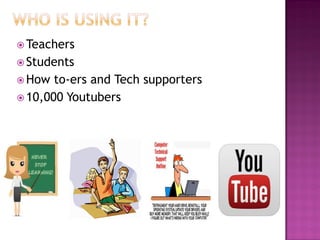
 Teachers
 Students
 How

to-ers and Tech supporters
 10,000 Youtubers


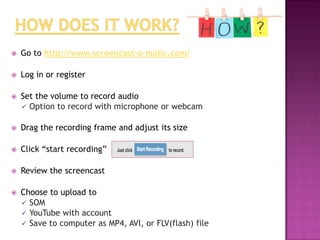
Go to http://www.screencast-o-matic.com/



Log in or register



Set the volume to record audio
 Option to record with microphone or webcam



Drag the recording frame and adjust its size



Click “start recording”



Review the screencast



Choose to upload to
 SOM
 YouTube with account
 Save to computer as MP4, AVI, or FLV(flash) file


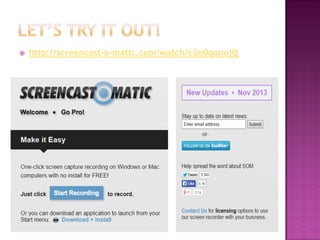
http://screencast-o-matic.com/watch/c2n0qonojQ


It is FREE!



It is easy to use



Well-designed interface



No application to download



Can be created and viewed anywhere a user has an Internet
connection and a browser



Screencasts create a more engaging environment



Giving a lecture or demonstration a more personal,
face-to-face feel
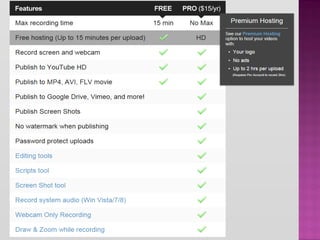
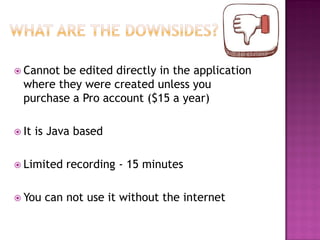
 Cannot

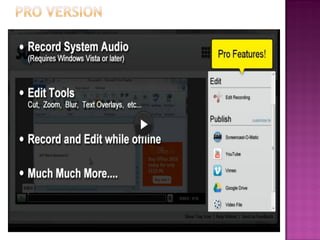
be edited directly in the application
where they were created unless you
purchase a Pro account ($15 a year)

 It

is Java based

 Limited

 You

recording - 15 minutes

can not use it without the internet
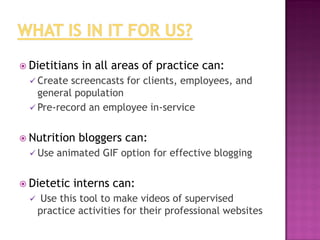
 Dietitians

in all areas of practice can:

 Create

screencasts for clients, employees, and
general population
 Pre-record an employee in-service
 Nutrition
 Use

animated GIF option for effective blogging

 Dietetic


bloggers can:

interns can:

Use this tool to make videos of supervised
practice activities for their professional websites
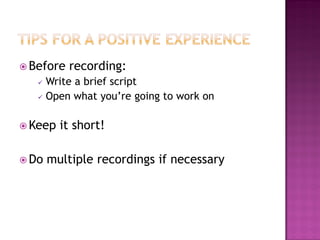
 Before

recording:

Write a brief script
 Open what you’re going to work on


 Keep
 Do

it short!

multiple recordings if necessary
I really like it!

Using this free screenshot tools allows
dietitians to better engage their audiences
while saving time
Thank You!
What are your Questions?

Screen cast omatic

  • 1.
    Create a Videowith Vehik Nazaryan March 3rd,2014
  • 2.
     Screencast-o-matic is asimple and free tool to create a video recording of your screen to upload and share. Or:      Browser-based screen capturing software Records anything you do on a computer screen Works with Windows, Macs, and Linux Java based No installation required “One-click screen capture recording on Windows or Mac computers with no install for FREE”
  • 3.
     Teachers  Students How to-ers and Tech supporters  10,000 Youtubers
  • 4.
     Go to http://www.screencast-o-matic.com/  Login or register  Set the volume to record audio  Option to record with microphone or webcam  Drag the recording frame and adjust its size  Click “start recording”  Review the screencast  Choose to upload to  SOM  YouTube with account  Save to computer as MP4, AVI, or FLV(flash) file
  • 7.
  • 8.
     It is FREE!  Itis easy to use  Well-designed interface  No application to download  Can be created and viewed anywhere a user has an Internet connection and a browser  Screencasts create a more engaging environment  Giving a lecture or demonstration a more personal, face-to-face feel
  • 9.
     Cannot be editeddirectly in the application where they were created unless you purchase a Pro account ($15 a year)  It is Java based  Limited  You recording - 15 minutes can not use it without the internet
  • 10.
     Dietitians in allareas of practice can:  Create screencasts for clients, employees, and general population  Pre-record an employee in-service  Nutrition  Use animated GIF option for effective blogging  Dietetic  bloggers can: interns can: Use this tool to make videos of supervised practice activities for their professional websites
  • 11.
     Before recording: Write abrief script  Open what you’re going to work on   Keep  Do it short! multiple recordings if necessary
  • 12.
    I really likeit! Using this free screenshot tools allows dietitians to better engage their audiences while saving time
  • 13.
  • 14.
    What are yourQuestions?