A rough guide
Steps for Mapping
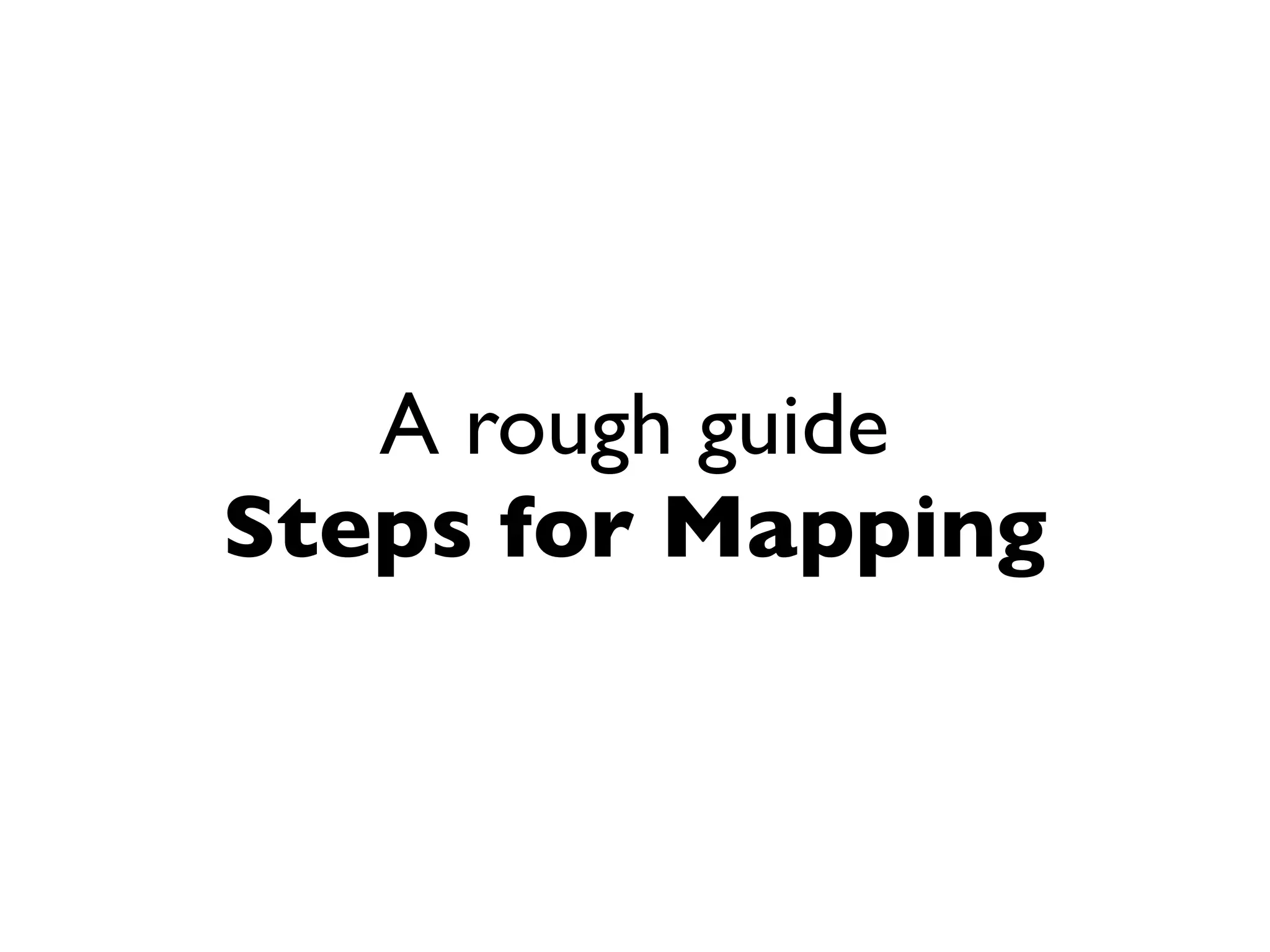
Need
Step 1
NB. Focus on user
need, not your need.
We will assume that
value is created by
meeting the needs of
others.
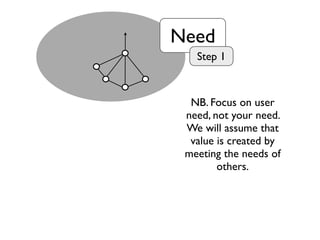
Value
Chain
Step 2
ValueChainVisibleInvisible
Determine what
components are
required to meet
those needs.
Genesis Custom
Built
Product
(+ rental)
Commodity
(+ utility)
Evolution
ValueChainVisibleInvisible
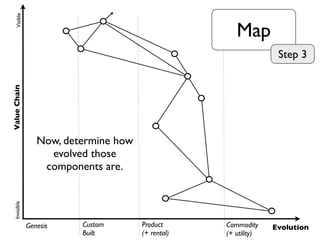
Map
Step 3
Now, determine how
evolved those
components are.
Genesis Custom
Built
Product
(+ rental)
Commodity
(+ utility)
Evolution
ValueChainVisibleInvisible
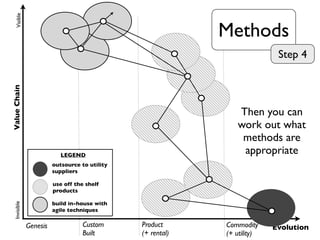
outsource to utility
suppliers
use off the shelf
products
build in-house with
agile techniques
LEGEND
Methods
Step 4
Then you can
work out what
methods are
appropriate
Genesis Custom
Built
Product
(+ rental)
Commodity
(+ utility)
Evolution
ValueChainVisibleInvisible
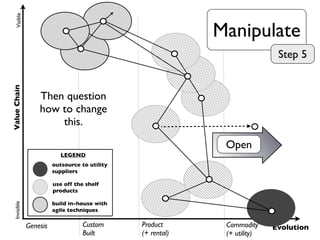
outsource to utility
suppliers
use off the shelf
products
build in-house with
agile techniques
LEGEND
Open
Manipulate
Step 5
Then question
how to change
this.
Rough
Principles
Principles
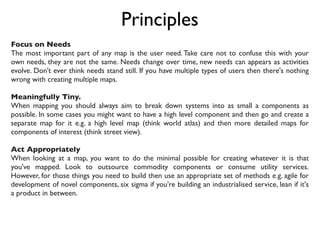
Focus on Needs
The most important part of any map is the user need. Take care not to confuse this with your
own needs, they are not the same. Needs change over time, new needs can appears as activities
evolve. Don't ever think needs stand still. If you have multiple types of users then there's nothing
wrong with creating multiple maps.
Meaningfully Tiny.
When mapping you should always aim to break down systems into as small a components as
possible. In some cases you might want to have a high level component and then go and create a
separate map for it e.g. a high level map (think world atlas) and then more detailed maps for
components of interest (think street view).
Act Appropriately
When looking at a map, you want to do the minimal possible for creating whatever it is that
you've mapped. Look to outsource commodity components or consume utility services.
However, for those things you need to build then use an appropriate set of methods e.g. agile for
development of novel components, six sigma if you're building an industrialised service, lean if it's
a product in between.
Principles
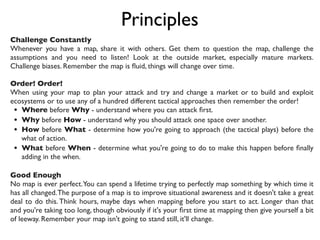
Challenge Constantly
Whenever you have a map, share it with others. Get them to question the map, challenge the
assumptions and you need to listen! Look at the outside market, especially mature markets.
Challenge biases. Remember the map is fluid, things will change over time.
Order! Order!
When using your map to plan your attack and try and change a market or to build and exploit
ecosystems or to use any of a hundred different tactical approaches then remember the order!
• Where before Why - understand where you can attack first.
• Why before How - understand why you should attack one space over another.
• How before What - determine how you're going to approach (the tactical plays) before the
what of action.
• What before When - determine what you're going to do to make this happen before finally
adding in the when.
Good Enough
No map is ever perfect.You can spend a lifetime trying to perfectly map something by which time it
has all changed.The purpose of a map is to improve situational awareness and it doesn't take a great
deal to do this. Think hours, maybe days when mapping before you start to act. Longer than that
and you're taking too long, though obviously if it's your first time at mapping then give yourself a bit
of leeway. Remember your map isn't going to stand still, it'll change.
Principles
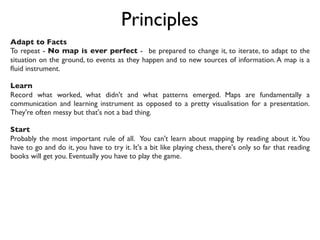
Adapt to Facts 
To repeat - No map is ever perfect -  be prepared to change it, to iterate, to adapt to the
situation on the ground, to events as they happen and to new sources of information.A map is a
fluid instrument. 
Learn
Record what worked, what didn't and what patterns emerged. Maps are fundamentally a
communication and learning instrument as opposed to a pretty visualisation for a presentation.
They're often messy but that's not a bad thing.
Start
Probably the most important rule of all. You can't learn about mapping by reading about it.You
have to go and do it, you have to try it. It's a bit like playing chess, there's only so far that reading
books will get you. Eventually you have to play the game.
Example
Maps
Genesis Custom
Built
Product
(+ rental)
Commodity
(+ utility)
Evolution
ValueChainVisibleInvisible
User
Video
Job Dispatch
Messaging
D2D
Telephony
P2P
P2MP
Core Apps
Common
Apps
Local Apps
Store
App Catalogue
Stats
Recommendation
App Certification
Device Catalogue
Secure Data Service
Device
Location Services
Device Certification
Device Enhancments
Bespoke Coverage
Control Room Connections
Network Statistics
FaultVisualisation MDM / MAM
Purchasing Billing
Radio Site Coverage
System Support Services
Emergency Functon
CO
User Orgs
Mobile Network
Genesis Custom
Built
Product
(+ rental)
Commodity
(+ utility)
Evolution
ValueChainVisibleInvisible
3D Visualisation
Land Registry
Data Centre
Power
Platform
HR
Customer
GIS
Customer
Customer
Compute
PIMS
ERPM
Finance
BIM
Web site
RISK
CRM
WISE
outsource to utility
suppliers
use off the shelf
products
build in-house with
agile techniques
LEGEND
Collaboration
Genesis Custom
Built
Product
(+ rental)
Commodity
(+ utility)
Evolution
ValueChainVisibleInvisible
Access System
Authentication
Biometric
2 Factor
User / Pwd
Login
Log History
Compute
Physical Servers
Design for
Failure
Authorisation (ACL)
Permission
Monitoring
Recommendation
(VRM)
Capability
(Credentials)
Trust
Rule
Based
(2 way)
Rule
Based
(1 way) User
Reporting
Identity (me)
Identity (provider)
Control System
Customer Customer
Genesis Custom
Built
Product
(+ rental)
Commodity
(+ utility)
Evolution
ValueChainVisibleInvisible
MI System
Rules Engine
E-Gates
Customer Interface
(product catalog)
Landing cards
E-visa
E-visa
waivers
Devices (Fixed &
Mobile)
Advanced Passenger
Information
Control Point
Presentation
RBAC
Alerting System
Biographics Biometrics
Case
Management
Decision Support
(Eligibility &
Suitability)
Identity
Resolution
System
Threat System
data interfaces
Roster /
Schedule System
ComputeNetworks
data store
Right to Entry
Genesis Custom
Built
Product
(+ rental)
Commodity
(+ utility)
Evolution
ValueChainVisibleInvisible
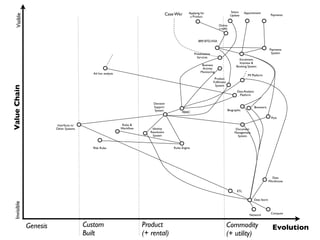
Case Wkr
Status
Update
Applying for
a Product
BRP, BTD,VISA
Online
(+API)
Post
Enrolment,
Inteview &
Booking System
Payments
Appointment
Payments
System
Rules &
Workflow
RIsk Rules Rules Engine
Biometric
Biographic
Document
Management
System
Decision
Support
System
Product
Fulfilment
System
Identity
Resolution
System
MI Platform
Ad hoc analysis
Data Analysis
Platform
Data
Warehouse
Business
Activity
Monitoring
Interfaces to
Other Systems
RBAC
Presentation
Services
Network
Compute
Data Store
ETL
ValueChain
Genesis Custom
Built
Product
(+ rental)
Commodity
(+ utility)
Evolution
VisibleInvisible
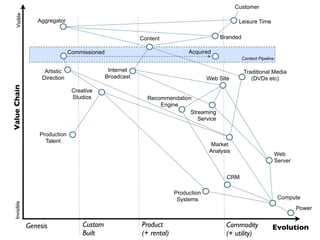
Creative
Studios
Traditional Media
(DVDs etc)
Customer
Leisure TimeAggregator
Branded
Commissioned Acquired
Internet
Broadcast
Artistic
Direction
Production
Talent
Production
Systems
Market
Analysis
Content
Web Site
Streaming
Service
Recommendation
Engine
CRM
Web
Server
Compute
Power
Content Pipeline

Steps for mapping - a rough guide

  • 1.
  • 2.
    Need Step 1 NB. Focuson user need, not your need. We will assume that value is created by meeting the needs of others.
  • 3.
  • 4.
    Genesis Custom Built Product (+ rental) Commodity (+utility) Evolution ValueChainVisibleInvisible Map Step 3 Now, determine how evolved those components are.
  • 5.
    Genesis Custom Built Product (+ rental) Commodity (+utility) Evolution ValueChainVisibleInvisible outsource to utility suppliers use off the shelf products build in-house with agile techniques LEGEND Methods Step 4 Then you can work out what methods are appropriate
  • 6.
    Genesis Custom Built Product (+ rental) Commodity (+utility) Evolution ValueChainVisibleInvisible outsource to utility suppliers use off the shelf products build in-house with agile techniques LEGEND Open Manipulate Step 5 Then question how to change this.
  • 7.
  • 8.
    Principles Focus on Needs Themost important part of any map is the user need. Take care not to confuse this with your own needs, they are not the same. Needs change over time, new needs can appears as activities evolve. Don't ever think needs stand still. If you have multiple types of users then there's nothing wrong with creating multiple maps. Meaningfully Tiny. When mapping you should always aim to break down systems into as small a components as possible. In some cases you might want to have a high level component and then go and create a separate map for it e.g. a high level map (think world atlas) and then more detailed maps for components of interest (think street view). Act Appropriately When looking at a map, you want to do the minimal possible for creating whatever it is that you've mapped. Look to outsource commodity components or consume utility services. However, for those things you need to build then use an appropriate set of methods e.g. agile for development of novel components, six sigma if you're building an industrialised service, lean if it's a product in between.
  • 9.
    Principles Challenge Constantly Whenever youhave a map, share it with others. Get them to question the map, challenge the assumptions and you need to listen! Look at the outside market, especially mature markets. Challenge biases. Remember the map is fluid, things will change over time. Order! Order! When using your map to plan your attack and try and change a market or to build and exploit ecosystems or to use any of a hundred different tactical approaches then remember the order! • Where before Why - understand where you can attack first. • Why before How - understand why you should attack one space over another. • How before What - determine how you're going to approach (the tactical plays) before the what of action. • What before When - determine what you're going to do to make this happen before finally adding in the when. Good Enough No map is ever perfect.You can spend a lifetime trying to perfectly map something by which time it has all changed.The purpose of a map is to improve situational awareness and it doesn't take a great deal to do this. Think hours, maybe days when mapping before you start to act. Longer than that and you're taking too long, though obviously if it's your first time at mapping then give yourself a bit of leeway. Remember your map isn't going to stand still, it'll change.
  • 10.
    Principles Adapt to Facts  Torepeat - No map is ever perfect -  be prepared to change it, to iterate, to adapt to the situation on the ground, to events as they happen and to new sources of information.A map is a fluid instrument.  Learn Record what worked, what didn't and what patterns emerged. Maps are fundamentally a communication and learning instrument as opposed to a pretty visualisation for a presentation. They're often messy but that's not a bad thing. Start Probably the most important rule of all. You can't learn about mapping by reading about it.You have to go and do it, you have to try it. It's a bit like playing chess, there's only so far that reading books will get you. Eventually you have to play the game.
  • 11.
  • 12.
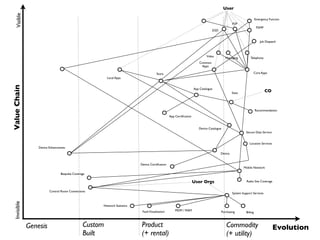
    Genesis Custom Built Product (+ rental) Commodity (+utility) Evolution ValueChainVisibleInvisible User Video Job Dispatch Messaging D2D Telephony P2P P2MP Core Apps Common Apps Local Apps Store App Catalogue Stats Recommendation App Certification Device Catalogue Secure Data Service Device Location Services Device Certification Device Enhancments Bespoke Coverage Control Room Connections Network Statistics FaultVisualisation MDM / MAM Purchasing Billing Radio Site Coverage System Support Services Emergency Functon CO User Orgs Mobile Network
  • 13.
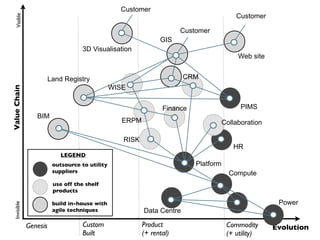
    Genesis Custom Built Product (+ rental) Commodity (+utility) Evolution ValueChainVisibleInvisible 3D Visualisation Land Registry Data Centre Power Platform HR Customer GIS Customer Customer Compute PIMS ERPM Finance BIM Web site RISK CRM WISE outsource to utility suppliers use off the shelf products build in-house with agile techniques LEGEND Collaboration
  • 14.
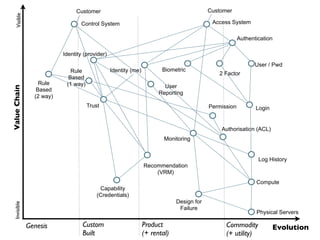
    Genesis Custom Built Product (+ rental) Commodity (+utility) Evolution ValueChainVisibleInvisible Access System Authentication Biometric 2 Factor User / Pwd Login Log History Compute Physical Servers Design for Failure Authorisation (ACL) Permission Monitoring Recommendation (VRM) Capability (Credentials) Trust Rule Based (2 way) Rule Based (1 way) User Reporting Identity (me) Identity (provider) Control System Customer Customer
  • 15.
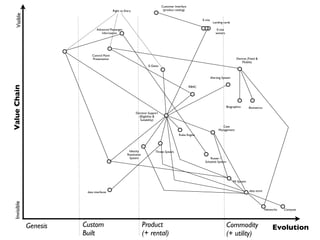
    Genesis Custom Built Product (+ rental) Commodity (+utility) Evolution ValueChainVisibleInvisible MI System Rules Engine E-Gates Customer Interface (product catalog) Landing cards E-visa E-visa waivers Devices (Fixed & Mobile) Advanced Passenger Information Control Point Presentation RBAC Alerting System Biographics Biometrics Case Management Decision Support (Eligibility & Suitability) Identity Resolution System Threat System data interfaces Roster / Schedule System ComputeNetworks data store Right to Entry
  • 16.
    Genesis Custom Built Product (+ rental) Commodity (+utility) Evolution ValueChainVisibleInvisible Case Wkr Status Update Applying for a Product BRP, BTD,VISA Online (+API) Post Enrolment, Inteview & Booking System Payments Appointment Payments System Rules & Workflow RIsk Rules Rules Engine Biometric Biographic Document Management System Decision Support System Product Fulfilment System Identity Resolution System MI Platform Ad hoc analysis Data Analysis Platform Data Warehouse Business Activity Monitoring Interfaces to Other Systems RBAC Presentation Services Network Compute Data Store ETL
  • 17.
    ValueChain Genesis Custom Built Product (+ rental) Commodity (+utility) Evolution VisibleInvisible Creative Studios Traditional Media (DVDs etc) Customer Leisure TimeAggregator Branded Commissioned Acquired Internet Broadcast Artistic Direction Production Talent Production Systems Market Analysis Content Web Site Streaming Service Recommendation Engine CRM Web Server Compute Power Content Pipeline