Java. Exception
IT Academy
07/17/2014
Agenda
▪Exception in Java
▪Exception Class Hierarchy
▪Exception Handling
▪Statements throws and throw
▪Several Exceptions
▪Creating own Exception
▪Case studies
Exception in Java
▪ Exceptions or exceptional situations (states) are the errors that
occurred in the program while it is running
//
BufferedReader br = new BufferedReader(new
InputStreamReader(System.in));
int k = Integer.parseInt(br.readLine()); // ???
//
int i = 4;
int j = 0
System.out.println("Result: "+ (i/j)); // ???
//
int[ ] a = new int[2];
a[2] = 0; // ???
Exception Class Hierarchy
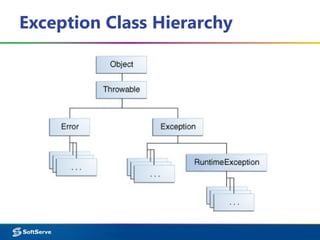
▪ Exceptions are the result of problems in the program.
▪ Errors represent more serious problems associated with the
JVM-level problems.
▪ Exceptions are divided into three types:
– Checked exceptions;
– Unchecked exceptions, include Errors;
– RuntimeExceptions, a subclass of Exception.
▪ Checked exceptions are errors that can and should be handled
in the program.
– This type includes all subclasses of Exception (but not
RuntimeException).
▪ Unchecked exceptions does not require mandatory handling.
Exception Handling
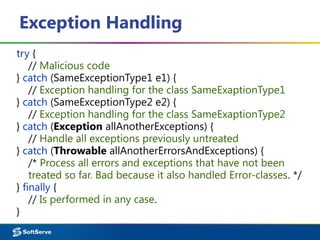
try {
// Malicious code
} catch (SameExceptionType1 e1) {
// Exception handling for the class SameExaptionType1
} catch (SameExceptionType2 e2) {
// Exception handling for the class SameExaptionType2
} catch (Exception allAnotherExceptions) {
// Handle all exceptions previously untreated
} catch (Throwable allAnotherErrorsAndExceptions) {
/* Process all errors and exceptions that have not been
treated so far. Bad because it also handled Error-classes. */
} finally {
// Is performed in any case.
}
Exception Handling
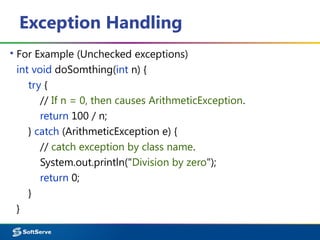
▪ For Example (Unchecked exceptions)
int void doSomthing(int n) {
try {
// If n = 0, then causes ArithmeticException.
return 100 / n;
} catch (ArithmeticException e) {
// catch exception by class name.
System.out.println("Division by zero");
return 0;
}
}
Statement throws
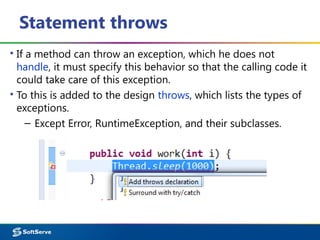
▪ If a method can throw an exception, which he does not
handle, it must specify this behavior so that the calling code it
could take care of this exception.
▪ To this is added to the design throws, which lists the types of
exceptions.
– Except Error, RuntimeException, and their subclasses.
Statement throws
▪ For Example (Checked exceptions)
public void work(int i) throws InterruptedException {
Thread.sleep(1000); }
public void work(int i) {
try {
Thread.sleep(1000);
} catch (InterruptedException e) {
// TODO catch block.
e.printStackTrace(); } }
public String getJson()
throws MalformedURLException, IOException { … }
Statement throw
▪ You can create your own exceptions using the throw
statement
try {
MyClass myClass = new MyClass();
if (myClass == null) {
throw new NullPointerException("Messages");
}
} catch (NullPointerException e) {
// TODO
e.printStackTrace();
System.out.println(e.getMessage());
}
Several Exceptions
▪ Code fragment may contain several problem places.
▪ For example, except for division by zero error is possible array
indexing.
▪ Need to create two or more operators catch for each type of
exception.
– They are checked in order.
– If an exception is detected at the first processing unit, it
will be executed, and the remaining checks will be skipped.
▪ If using multiple operators catch handlers subclasses
exceptions should be higher than their handlers superclasses.
Several Exceptions
try {
FileInputStream inFile=new FileInputStream("C:data.txt");
int bytesAvailable=inFile.available();
System.out.println("Bytes count: "+bytesAvailable+" Bytes");
byte[] r=new byte[10];
int count = inFile.read(r,0,bytesAvailable);
System.out.println("Was readed: "+count+" bytes.");
inFile.close();
System.out.println("Input stream closed.");
} catch (FileNotFoundException e) {
System.out.println("File Read/Write Error"+e.toString());
} catch (IOException e) {
System.out.println("I/O Error: "+e.toString()); }
Several Exceptions
int[] mas = {-1, 0, 1};
int i = 1;
Scanner sc = new Scanner(System.in);
try {
i = sc.nextInt();
mas[i-1] = 4 / i;
System.out.println(mas[i]);
} catch (ArithmeticException e) { // TODO
System.out.println("Invalid arithmetic operation");
} catch (ArrayIndexOutOfBoundsException e) { // TODO
System.out.println(“Index out of range");
} catch (Exception e) { // TODO
System.out.println("Some exception");
}
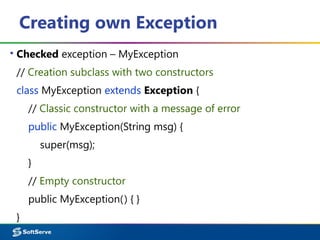
Creating own Exception
▪ Checked exception – MyException
// Creation subclass with two constructors
class MyException extends Exception {
// Classic constructor with a message of error
public MyException(String msg) {
super(msg);
}
// Empty constructor
public MyException() { }
}
Creating own Exception
public class ExampleException {
static void doSomthing(int n) throws MyException {
if (n > 0) {
int a = 100 / n;
} else {
// Creation and call exemption
throw new MyException("input value is below zero!");
} }
public static void main(String[] args) {
try { // try / catch block is required
doSomthing(-1);
} catch (MyException e1) {
System.err.print(e1);
} } }
Creating own Exception
▪ If you create your own exception class from
RuntimeException exception specification in the procedure
not necessary to write.
class MyException extends RuntimeException {}
public class ExampleException {
static void doSomthing(int n) {
throw new MyException();
}
public static void main(String[] args) {
DoSomthing(-1); // try / catch do not use
}
}
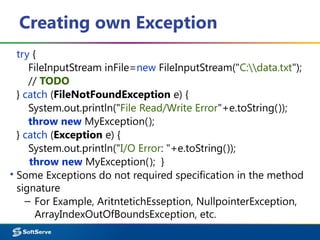
Creating own Exception
try {
FileInputStream inFile=new FileInputStream("C:data.txt");
// TODO
} catch (FileNotFoundException e) {
System.out.println("File Read/Write Error"+e.toString());
throw new MyException();
} catch (Exception e) {
System.out.println("I/O Error: "+e.toString());
throw new MyException(); }
▪ Some Exceptions do not required specification in the method
signature
– For Example, AritntetichEsseption, NullpointerException,
ArrayIndexOutOfBoundsException, etc.
Exception

Exception

  • 1.
  • 2.
    Agenda ▪Exception in Java ▪ExceptionClass Hierarchy ▪Exception Handling ▪Statements throws and throw ▪Several Exceptions ▪Creating own Exception ▪Case studies
  • 3.
    Exception in Java ▪Exceptions or exceptional situations (states) are the errors that occurred in the program while it is running // BufferedReader br = new BufferedReader(new InputStreamReader(System.in)); int k = Integer.parseInt(br.readLine()); // ??? // int i = 4; int j = 0 System.out.println("Result: "+ (i/j)); // ??? // int[ ] a = new int[2]; a[2] = 0; // ???
  • 4.
  • 5.
    Exception Class Hierarchy ▪Exceptions are the result of problems in the program. ▪ Errors represent more serious problems associated with the JVM-level problems. ▪ Exceptions are divided into three types: – Checked exceptions; – Unchecked exceptions, include Errors; – RuntimeExceptions, a subclass of Exception. ▪ Checked exceptions are errors that can and should be handled in the program. – This type includes all subclasses of Exception (but not RuntimeException). ▪ Unchecked exceptions does not require mandatory handling.
  • 6.
    Exception Handling try { //Malicious code } catch (SameExceptionType1 e1) { // Exception handling for the class SameExaptionType1 } catch (SameExceptionType2 e2) { // Exception handling for the class SameExaptionType2 } catch (Exception allAnotherExceptions) { // Handle all exceptions previously untreated } catch (Throwable allAnotherErrorsAndExceptions) { /* Process all errors and exceptions that have not been treated so far. Bad because it also handled Error-classes. */ } finally { // Is performed in any case. }
  • 7.
    Exception Handling ▪ ForExample (Unchecked exceptions) int void doSomthing(int n) { try { // If n = 0, then causes ArithmeticException. return 100 / n; } catch (ArithmeticException e) { // catch exception by class name. System.out.println("Division by zero"); return 0; } }
  • 8.
    Statement throws ▪ Ifa method can throw an exception, which he does not handle, it must specify this behavior so that the calling code it could take care of this exception. ▪ To this is added to the design throws, which lists the types of exceptions. – Except Error, RuntimeException, and their subclasses.
  • 9.
    Statement throws ▪ ForExample (Checked exceptions) public void work(int i) throws InterruptedException { Thread.sleep(1000); } public void work(int i) { try { Thread.sleep(1000); } catch (InterruptedException e) { // TODO catch block. e.printStackTrace(); } } public String getJson() throws MalformedURLException, IOException { … }
  • 10.
    Statement throw ▪ Youcan create your own exceptions using the throw statement try { MyClass myClass = new MyClass(); if (myClass == null) { throw new NullPointerException("Messages"); } } catch (NullPointerException e) { // TODO e.printStackTrace(); System.out.println(e.getMessage()); }
  • 11.
    Several Exceptions ▪ Codefragment may contain several problem places. ▪ For example, except for division by zero error is possible array indexing. ▪ Need to create two or more operators catch for each type of exception. – They are checked in order. – If an exception is detected at the first processing unit, it will be executed, and the remaining checks will be skipped. ▪ If using multiple operators catch handlers subclasses exceptions should be higher than their handlers superclasses.
  • 12.
    Several Exceptions try { FileInputStreaminFile=new FileInputStream("C:data.txt"); int bytesAvailable=inFile.available(); System.out.println("Bytes count: "+bytesAvailable+" Bytes"); byte[] r=new byte[10]; int count = inFile.read(r,0,bytesAvailable); System.out.println("Was readed: "+count+" bytes."); inFile.close(); System.out.println("Input stream closed."); } catch (FileNotFoundException e) { System.out.println("File Read/Write Error"+e.toString()); } catch (IOException e) { System.out.println("I/O Error: "+e.toString()); }
  • 13.
    Several Exceptions int[] mas= {-1, 0, 1}; int i = 1; Scanner sc = new Scanner(System.in); try { i = sc.nextInt(); mas[i-1] = 4 / i; System.out.println(mas[i]); } catch (ArithmeticException e) { // TODO System.out.println("Invalid arithmetic operation"); } catch (ArrayIndexOutOfBoundsException e) { // TODO System.out.println(“Index out of range"); } catch (Exception e) { // TODO System.out.println("Some exception"); }
  • 14.
    Creating own Exception ▪Checked exception – MyException // Creation subclass with two constructors class MyException extends Exception { // Classic constructor with a message of error public MyException(String msg) { super(msg); } // Empty constructor public MyException() { } }
  • 15.
    Creating own Exception publicclass ExampleException { static void doSomthing(int n) throws MyException { if (n > 0) { int a = 100 / n; } else { // Creation and call exemption throw new MyException("input value is below zero!"); } } public static void main(String[] args) { try { // try / catch block is required doSomthing(-1); } catch (MyException e1) { System.err.print(e1); } } }
  • 16.
    Creating own Exception ▪If you create your own exception class from RuntimeException exception specification in the procedure not necessary to write. class MyException extends RuntimeException {} public class ExampleException { static void doSomthing(int n) { throw new MyException(); } public static void main(String[] args) { DoSomthing(-1); // try / catch do not use } }
  • 17.
    Creating own Exception try{ FileInputStream inFile=new FileInputStream("C:data.txt"); // TODO } catch (FileNotFoundException e) { System.out.println("File Read/Write Error"+e.toString()); throw new MyException(); } catch (Exception e) { System.out.println("I/O Error: "+e.toString()); throw new MyException(); } ▪ Some Exceptions do not required specification in the method signature – For Example, AritntetichEsseption, NullpointerException, ArrayIndexOutOfBoundsException, etc.