S C I E N C E P A S S I O N T E C H N O L O G Y
www.tugraz.at
Master’s Thesis -
School Start Screening Tool
Paul Krassnig, BSc
April 15, 2021
2
Motivation
Motivation
Introduction of a new screening method in Austrian
schools in the future
Announced by the Federal Ministry of Education in
January of 2020 [2]
Used to assess children before entering school as
well as in first and second grade
Available as paper-pencil and digital screening
Mobile app for iOS and Android tablets
Goal of this thesis: development of the application’s
design and structure as well as its implementation
Paul Krassnig, BSc
April 15, 2021
3
Motivation
School Start Screening Tool
Completely new screening method
Automatic evaluation of results at the end of each
screening
Cooperation with University of Graz and University of
Vienna
Designed assignments’ underlying structure
Developed calculations for evaluation
Further requirements:
Offline functionality
Different screenings for different schools
Downloadable Excel file containing all collected
screening results
Paul Krassnig, BSc
April 15, 2021
4
Analysis of Existing Screenings
Literature Review
Paul Krassnig, BSc
April 15, 2021
5
Analysis of Existing Screenings
Today: multiple screenings to choose from
Most screenings only available as paper-pencil
screening
Some also provide digital versions
Analysis of existing screenings should show:
Similarities
Best practices
Paul Krassnig, BSc
April 15, 2021
6
Analysis of Existing Screenings
ELFE 1-6 [4]
Available as paper-pencil or digital screening(!)
Makes use of a child-friendly graphical character
Motivates children
Gives verbal instructions and feedback
Uses audio files for instructions and feedback
Paul Krassnig, BSc
April 15, 2021
7
Analysis of Existing Screenings
ELFE 1-6 – Reading Speed Subtest
Paul Krassnig, BSc
April 15, 2021
8
How to Develop an App for Children at Preschool Age?
How to Develop an App for
Children at Preschool Age?
Paul Krassnig, BSc
April 15, 2021
9
How to Develop an App for Children at Preschool Age?
Design and Structure of App
Children at preschool age do not have necessary
skills in reading and writing
How to communicate assignment’s task to children?
→ Make use of a visual language
How to enable children to perform input?
→ Make input options as intuitive as possible
Children should stay motivated for several minutes
→ Wrap screening into a, for the child interesting,
frame-story
→ Make use of a child-friendly graphical character
Paul Krassnig, BSc
April 15, 2021
10
School Start Screening App
Paul Krassnig, BSc
April 15, 2021
11
School Start Screening App
Software was implemented during employment at
University of Graz
Continuous feedback from psychologists
App makes use of local SQL database
Solves offline functionality requirement
Central web application and API
Possible to assign different screenings to different
schools
Possible to download Excel File containing results
Paul Krassnig, BSc
April 15, 2021
12
School Start Screening App
Screening Assignments
Paul Krassnig, BSc
April 15, 2021
13
School Start Screening App
The App’s Frame Story
Poldi, the elf, is looking for a treasure
Child helps Poldi by solving assignments
Paul Krassnig, BSc
April 15, 2021
14
School Start Screening App
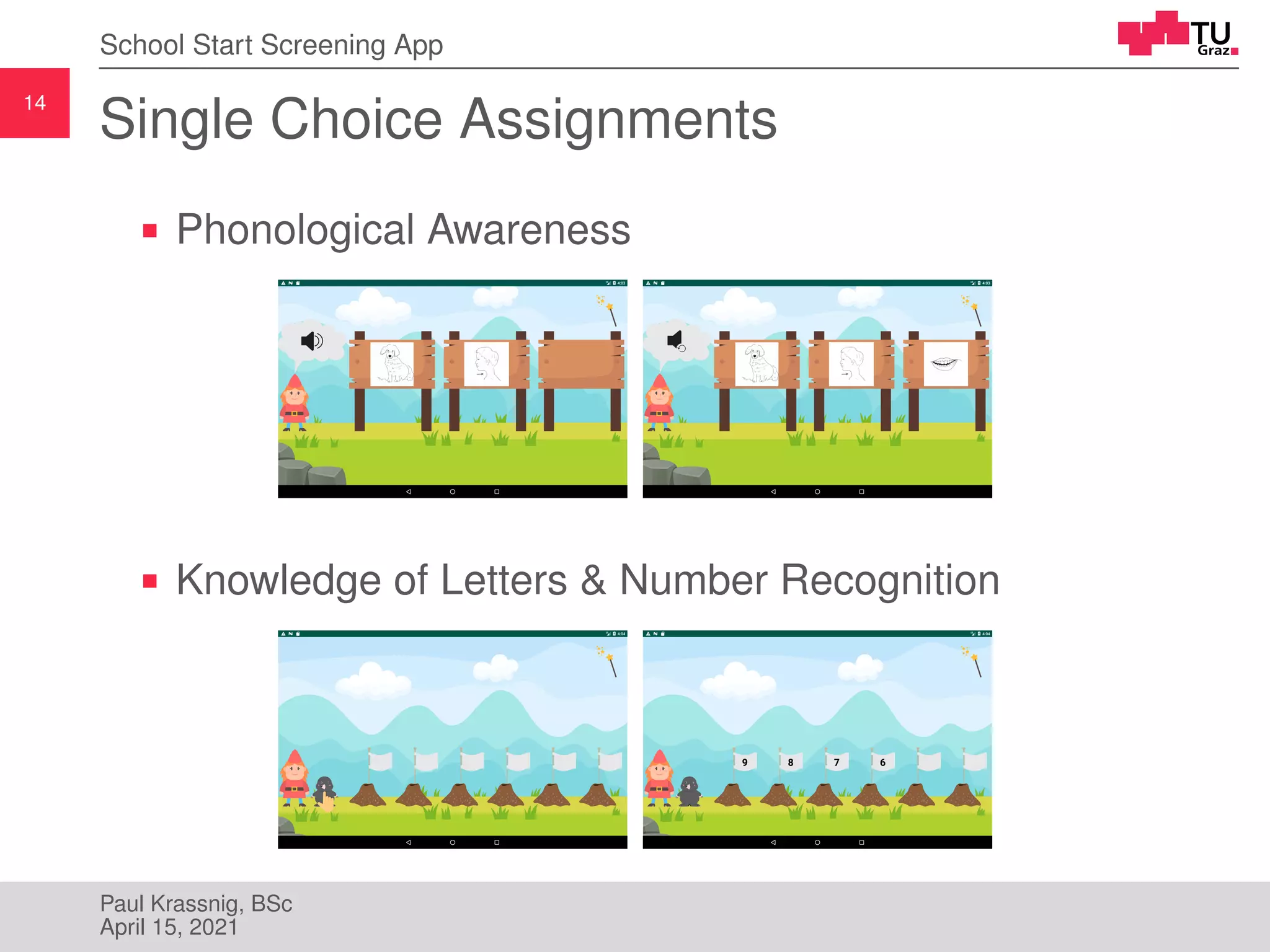
Single Choice Assignments
Phonological Awareness
Knowledge of Letters & Number Recognition
Paul Krassnig, BSc
April 15, 2021
15
School Start Screening App
Comparison Assignments
Comparison of Numbers
Quantity Comparison
Paul Krassnig, BSc
April 15, 2021
16
School Start Screening App
Supervisor Assisted Assignments
Screening supervisor is in charge of the whole
screening process
Usually one the school’s teachers
Input performed by screening supervisor
Start with warning prompting to place tablet in front of
child
After alert view is confirmed, assignment starts
At end of assignment, another warning asks to place
tablet again in front of child
Paul Krassnig, BSc
April 15, 2021
17
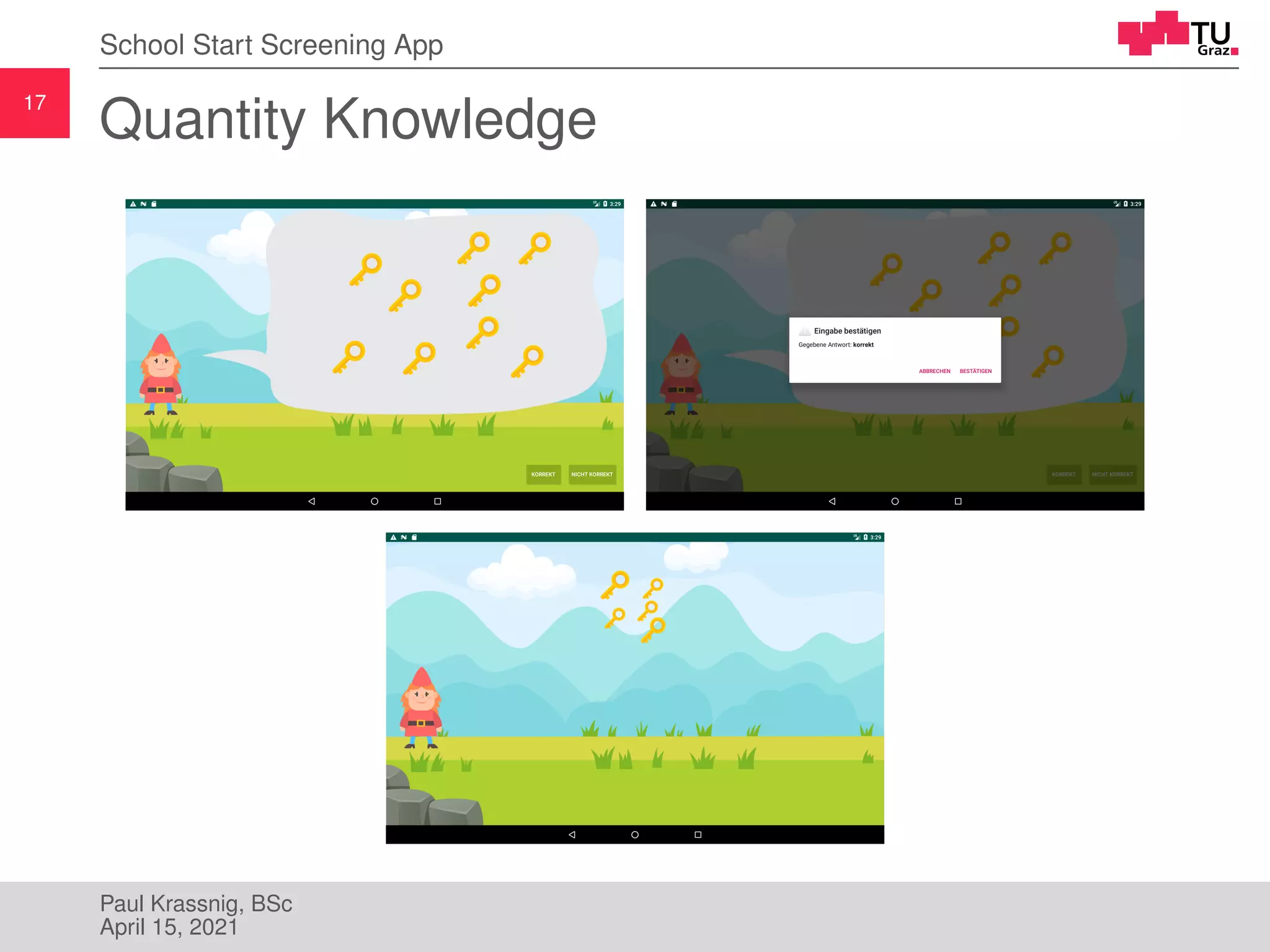
School Start Screening App
Quantity Knowledge
Paul Krassnig, BSc
April 15, 2021
18
School Start Screening App
Arithmetic Problems
Paul Krassnig, BSc
April 15, 2021
19
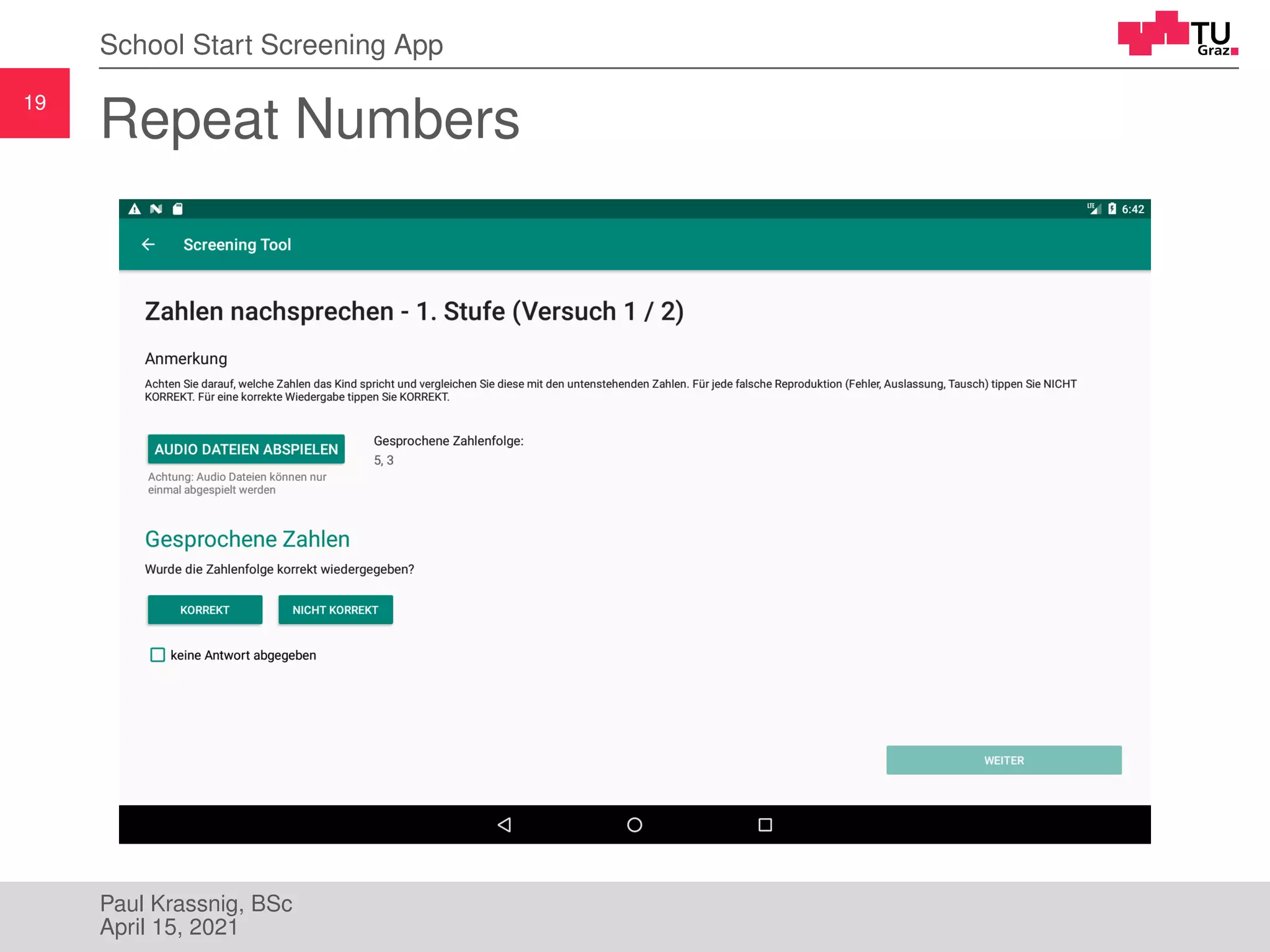
School Start Screening App
Repeat Numbers
Paul Krassnig, BSc
April 15, 2021
20
School Start Screening App
RAN and Sorting Assignment
Paul Krassnig, BSc
April 15, 2021
21
School Start Screening App
Automatic Evaluation
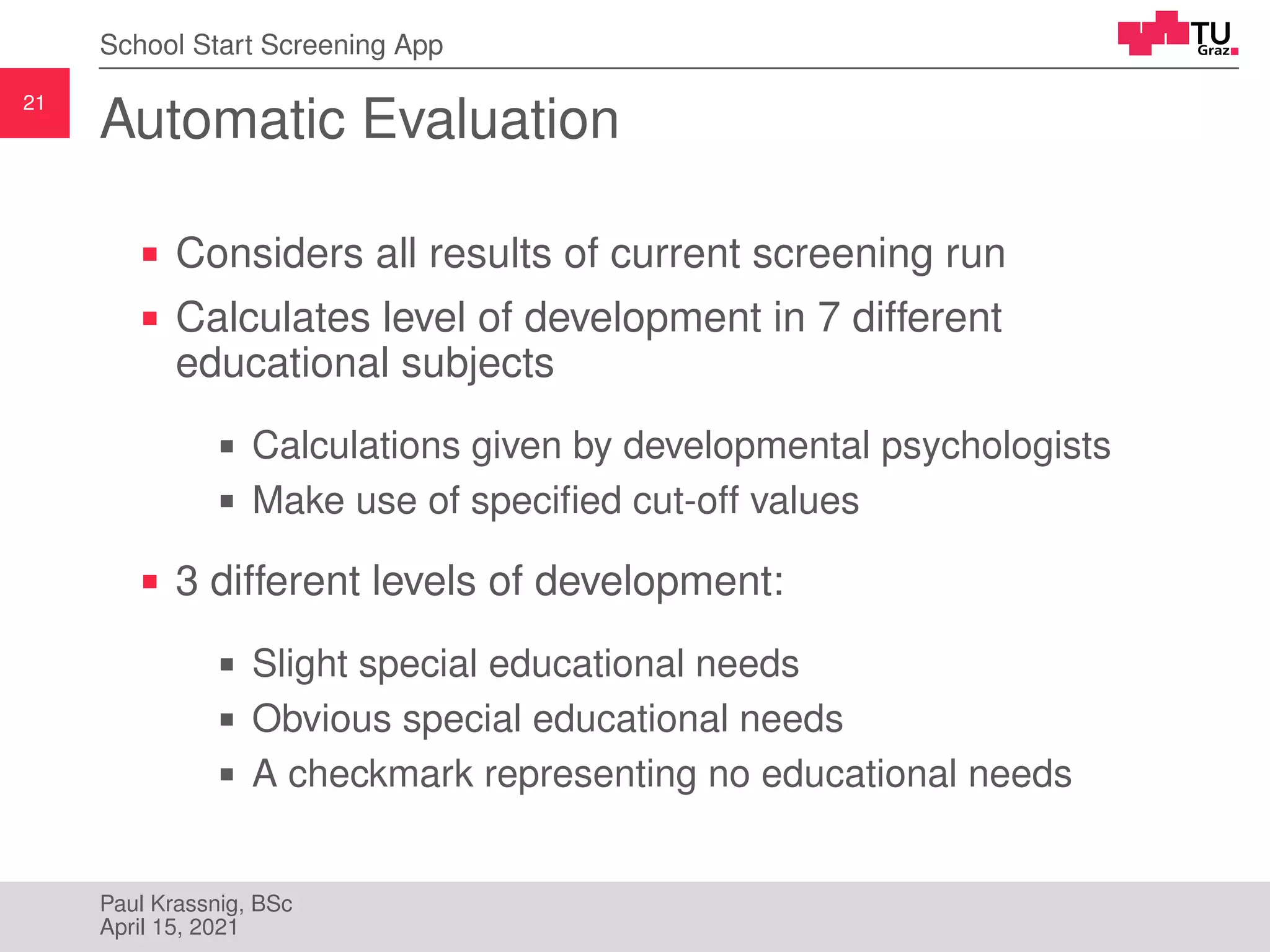
Considers all results of current screening run
Calculates level of development in 7 different
educational subjects
Calculations given by developmental psychologists
Make use of specified cut-off values
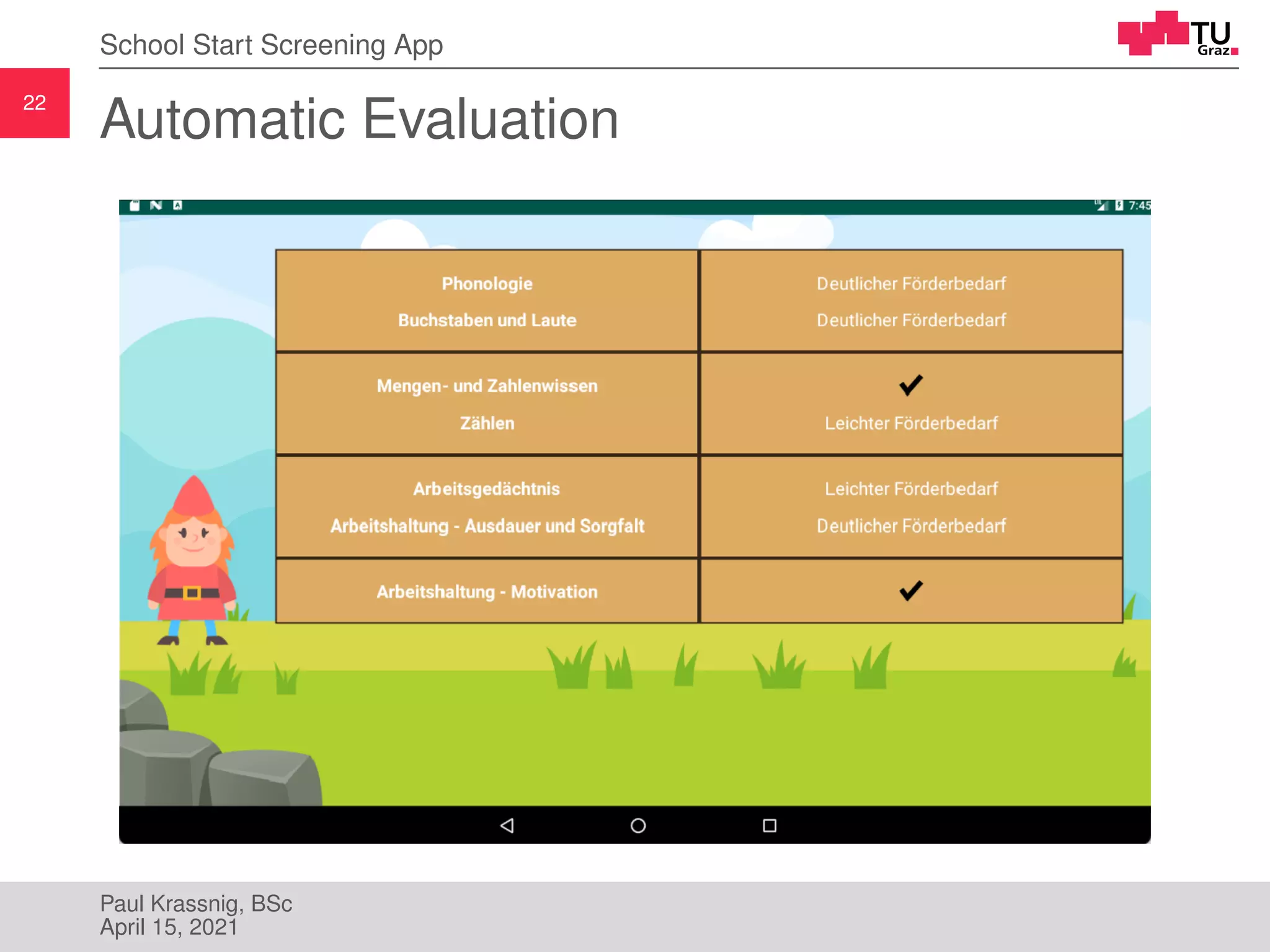
3 different levels of development:
Slight special educational needs
Obvious special educational needs
A checkmark representing no educational needs
Paul Krassnig, BSc
April 15, 2021
22
School Start Screening App
Automatic Evaluation
Paul Krassnig, BSc
April 15, 2021
23
Web Application & API
Paul Krassnig, BSc
April 15, 2021
24
Web Application & API
Web Application
Only accessible to authenticated admins (University
of Graz, University of Vienna)
Features to:
Create and edit schools
Create, edit and assign screenings
Download Excel file with uploaded results
Developed using Zend Framework (PHP) [6]
MySQL as database
Doctrine ORM (Object–relational mapping) [1]
Deployed on Linux Server
Paul Krassnig, BSc
April 15, 2021
25
Web Application & API
API
Part of the web application
Also developed using Zend Framework (PHP) [6]
Processes HTTP requests to:
Authenticate schools to login to the mobile app
Download assigned screenings
Upload collected screening results
HTTP-body in JSON
JSON Web Tokens (JWT [3]) for authentication
Automated API testing using Postman [5]
Paul Krassnig, BSc
April 15, 2021
26
Evaluation & Conclusion
Paul Krassnig, BSc
April 15, 2021
27
Evaluation & Conclusion
Evaluation
Evaluation happened through:
Interviewing the developmental psychologists who
were in continuous contact with schools
Report of the Austrian Ministry of Education
Based on survey with involved schools
First screenings with final app in September 2019
More than 800 children were assessed
In 25 Austrian schools
Paul Krassnig, BSc
April 15, 2021
28
Evaluation & Conclusion
Evaluation
Evaluation basically very positive
Assignments were implemented as required and were
very intuitive
Teachers would choose app over paper-pencil
screening
Children did get along very well with the app and had
fun using it
Things that could have been done better:
Some technical problems with the prototype
Web application had set some restrictions
Paul Krassnig, BSc
April 15, 2021
29
Evaluation & Conclusion
Conclusion
Better educational support for child due to new
screening
Step to more digitized education in Austria
App saves paper-work and is more attractive than
paper-pencil
If more time available, more automated tests
Instead used bug reporting software in mobile apps
More functionality in central web application
Test screenings, central file manager and more
Paul Krassnig, BSc
April 15, 2021
30
Evaluation & Conclusion
Paul Krassnig, BSc
April 15, 2021
31
Evaluation & Conclusion
[1] Doctrine. Doctrine: PHP Open Source Project. URL:
https://www.doctrine-project.org (visited on 01/06/2021).
[2] Federal Ministry of Education, Science and Research. Das
Pädagogik-Paket. Second, updated edition. Jan. 2020.
[3] Internet Engineering Task Force (IETF). RFC 7519 - JSON Web Token
(JWT). URL: https://tools.ietf.org/html/rfc7519 (visited on 01/24/2021).
[4] Wolfgang Lenhard and Wolfgang Schneider. “ELFE 1-6”. In: Ein
Leseverständnistest für Erst-bis Sechstklässler. Göttingen: Hogrefe (2006).
[5] Postman, Inc. Postman — The Collaboration Platform for API Development.
URL: https://www.postman.com (visited on 01/24/2021).
[6] Zend by Perforce. Home - Zend Framework. URL:
https://framework.zend.com (visited on 01/05/2021).
Paul Krassnig, BSc
April 15, 2021

School Start Screening Tool

  • 1.
    S C IE N C E P A S S I O N T E C H N O L O G Y www.tugraz.at Master’s Thesis - School Start Screening Tool Paul Krassnig, BSc April 15, 2021
  • 2.
    2 Motivation Motivation Introduction of anew screening method in Austrian schools in the future Announced by the Federal Ministry of Education in January of 2020 [2] Used to assess children before entering school as well as in first and second grade Available as paper-pencil and digital screening Mobile app for iOS and Android tablets Goal of this thesis: development of the application’s design and structure as well as its implementation Paul Krassnig, BSc April 15, 2021
  • 3.
    3 Motivation School Start ScreeningTool Completely new screening method Automatic evaluation of results at the end of each screening Cooperation with University of Graz and University of Vienna Designed assignments’ underlying structure Developed calculations for evaluation Further requirements: Offline functionality Different screenings for different schools Downloadable Excel file containing all collected screening results Paul Krassnig, BSc April 15, 2021
  • 4.
    4 Analysis of ExistingScreenings Analysis of Existing Screenings Literature Review Paul Krassnig, BSc April 15, 2021
  • 5.
    5 Analysis of ExistingScreenings Analysis of Existing Screenings Today: multiple screenings to choose from Most screenings only available as paper-pencil screening Some also provide digital versions Analysis of existing screenings should show: Similarities Best practices Paul Krassnig, BSc April 15, 2021
  • 6.
    6 Analysis of ExistingScreenings ELFE 1-6 [4] Available as paper-pencil or digital screening(!) Makes use of a child-friendly graphical character Motivates children Gives verbal instructions and feedback Uses audio files for instructions and feedback Paul Krassnig, BSc April 15, 2021
  • 7.
    7 Analysis of ExistingScreenings ELFE 1-6 – Reading Speed Subtest Paul Krassnig, BSc April 15, 2021
  • 8.
    8 How to Developan App for Children at Preschool Age? How to Develop an App for Children at Preschool Age? Paul Krassnig, BSc April 15, 2021
  • 9.
    9 How to Developan App for Children at Preschool Age? Design and Structure of App Children at preschool age do not have necessary skills in reading and writing How to communicate assignment’s task to children? → Make use of a visual language How to enable children to perform input? → Make input options as intuitive as possible Children should stay motivated for several minutes → Wrap screening into a, for the child interesting, frame-story → Make use of a child-friendly graphical character Paul Krassnig, BSc April 15, 2021
  • 10.
    10 School Start ScreeningApp School Start Screening App Paul Krassnig, BSc April 15, 2021
  • 11.
    11 School Start ScreeningApp School Start Screening App Software was implemented during employment at University of Graz Continuous feedback from psychologists App makes use of local SQL database Solves offline functionality requirement Central web application and API Possible to assign different screenings to different schools Possible to download Excel File containing results Paul Krassnig, BSc April 15, 2021
  • 12.
    12 School Start ScreeningApp Screening Assignments Paul Krassnig, BSc April 15, 2021
  • 13.
    13 School Start ScreeningApp The App’s Frame Story Poldi, the elf, is looking for a treasure Child helps Poldi by solving assignments Paul Krassnig, BSc April 15, 2021
  • 14.
    14 School Start ScreeningApp Single Choice Assignments Phonological Awareness Knowledge of Letters & Number Recognition Paul Krassnig, BSc April 15, 2021
  • 15.
    15 School Start ScreeningApp Comparison Assignments Comparison of Numbers Quantity Comparison Paul Krassnig, BSc April 15, 2021
  • 16.
    16 School Start ScreeningApp Supervisor Assisted Assignments Screening supervisor is in charge of the whole screening process Usually one the school’s teachers Input performed by screening supervisor Start with warning prompting to place tablet in front of child After alert view is confirmed, assignment starts At end of assignment, another warning asks to place tablet again in front of child Paul Krassnig, BSc April 15, 2021
  • 17.
    17 School Start ScreeningApp Quantity Knowledge Paul Krassnig, BSc April 15, 2021
  • 18.
    18 School Start ScreeningApp Arithmetic Problems Paul Krassnig, BSc April 15, 2021
  • 19.
    19 School Start ScreeningApp Repeat Numbers Paul Krassnig, BSc April 15, 2021
  • 20.
    20 School Start ScreeningApp RAN and Sorting Assignment Paul Krassnig, BSc April 15, 2021
  • 21.
    21 School Start ScreeningApp Automatic Evaluation Considers all results of current screening run Calculates level of development in 7 different educational subjects Calculations given by developmental psychologists Make use of specified cut-off values 3 different levels of development: Slight special educational needs Obvious special educational needs A checkmark representing no educational needs Paul Krassnig, BSc April 15, 2021
  • 22.
    22 School Start ScreeningApp Automatic Evaluation Paul Krassnig, BSc April 15, 2021
  • 23.
    23 Web Application &API Web Application & API Paul Krassnig, BSc April 15, 2021
  • 24.
    24 Web Application &API Web Application Only accessible to authenticated admins (University of Graz, University of Vienna) Features to: Create and edit schools Create, edit and assign screenings Download Excel file with uploaded results Developed using Zend Framework (PHP) [6] MySQL as database Doctrine ORM (Object–relational mapping) [1] Deployed on Linux Server Paul Krassnig, BSc April 15, 2021
  • 25.
    25 Web Application &API API Part of the web application Also developed using Zend Framework (PHP) [6] Processes HTTP requests to: Authenticate schools to login to the mobile app Download assigned screenings Upload collected screening results HTTP-body in JSON JSON Web Tokens (JWT [3]) for authentication Automated API testing using Postman [5] Paul Krassnig, BSc April 15, 2021
  • 26.
    26 Evaluation & Conclusion Evaluation& Conclusion Paul Krassnig, BSc April 15, 2021
  • 27.
    27 Evaluation & Conclusion Evaluation Evaluationhappened through: Interviewing the developmental psychologists who were in continuous contact with schools Report of the Austrian Ministry of Education Based on survey with involved schools First screenings with final app in September 2019 More than 800 children were assessed In 25 Austrian schools Paul Krassnig, BSc April 15, 2021
  • 28.
    28 Evaluation & Conclusion Evaluation Evaluationbasically very positive Assignments were implemented as required and were very intuitive Teachers would choose app over paper-pencil screening Children did get along very well with the app and had fun using it Things that could have been done better: Some technical problems with the prototype Web application had set some restrictions Paul Krassnig, BSc April 15, 2021
  • 29.
    29 Evaluation & Conclusion Conclusion Bettereducational support for child due to new screening Step to more digitized education in Austria App saves paper-work and is more attractive than paper-pencil If more time available, more automated tests Instead used bug reporting software in mobile apps More functionality in central web application Test screenings, central file manager and more Paul Krassnig, BSc April 15, 2021
  • 30.
    30 Evaluation & Conclusion PaulKrassnig, BSc April 15, 2021
  • 31.
    31 Evaluation & Conclusion [1]Doctrine. Doctrine: PHP Open Source Project. URL: https://www.doctrine-project.org (visited on 01/06/2021). [2] Federal Ministry of Education, Science and Research. Das Pädagogik-Paket. Second, updated edition. Jan. 2020. [3] Internet Engineering Task Force (IETF). RFC 7519 - JSON Web Token (JWT). URL: https://tools.ietf.org/html/rfc7519 (visited on 01/24/2021). [4] Wolfgang Lenhard and Wolfgang Schneider. “ELFE 1-6”. In: Ein Leseverständnistest für Erst-bis Sechstklässler. Göttingen: Hogrefe (2006). [5] Postman, Inc. Postman — The Collaboration Platform for API Development. URL: https://www.postman.com (visited on 01/24/2021). [6] Zend by Perforce. Home - Zend Framework. URL: https://framework.zend.com (visited on 01/05/2021). Paul Krassnig, BSc April 15, 2021