Zotero: an Open Source Reference
Management tool for researchers
Prajeesh Bhaskaran
M.G University Library, Kottayam
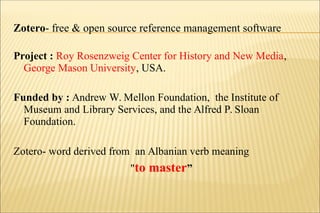
Project : Roy Rosenzweig Center for History and New Media,
George Mason University, USA.
Funded by : Andrew W. Mellon Foundation, the Institute of
Museum and Library Services, and the Alfred P. Sloan
Foundation.
Zotero- word derived from an Albanian verb meaning
"to master”
Zotero- free & open source reference management software
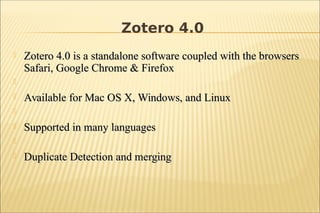
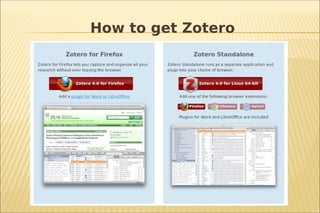
 Zotero 4.0 is a standalone software coupled with the browsersZotero 4.0 is a standalone software coupled with the browsers
Safari, Google Chrome & FirefoxSafari, Google Chrome & Firefox

 Available for Mac OS X, Windows, and LinuxAvailable for Mac OS X, Windows, and Linux

 Supported in many languagesSupported in many languages

 Duplicate Detection and mergingDuplicate Detection and merging
Zotero 4.0
How to get Zotero
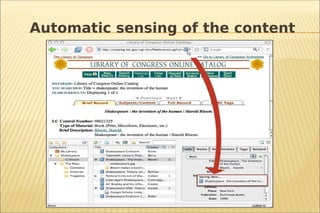
 Collect- Automatic sensing of the content
 Organize- organize in to collection and sub collections, tags creation
 Cite- create footnotes, in-text citations, endnotes and bibliographies
 Synchronize
 Collaborate- join different research gruops on any topic or create
their own groups, can share their library with the members
Features
Automatic sensing of the content
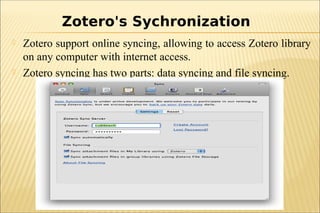
 Zotero support online syncing, allowing to access Zotero library
on any computer with internet access.
 Zotero syncing has two parts: data syncing and file syncing.
Zotero's Sychronization
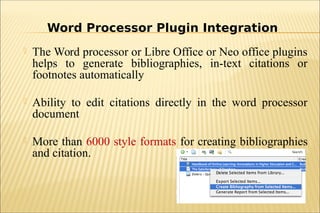
 The Word processor or Libre Office or Neo office plugins
helps to generate bibliographies, in-text citations or
footnotes automatically
 Ability to edit citations directly in the word processor
document
 More than 6000 style formats for creating bibliographies
and citation.
Word Processor Plugin Integration
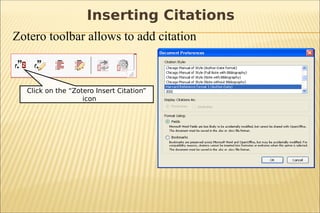
Zotero toolbar allows to add citation
Click on the “Zotero Insert Citation”
icon
Inserting Citations
Import & Export
The following biblipgraphic formats can import

Zotero RDF

MODS (Metadata Object Description Schema)

BibTeX

RIS

Refer/BibIX

Unqualified Dublin Core RDF
 Report generated from collection
 PDF Full text indexing
 Zotero File Storage
 ZotFile & ZotFile Reader
 Zotero &Wikipedia
 Zotero Maps
 Zotero Timeline
 Zotero groups
Zotero's APIs
 Does not work with Internet Explorer as IE is proprietary nature
of the browser, but can install ‘standalone’ on Windows OS
 Zotero could not prevent or remove duplicate items-need to
remove duplicate items manually.
 Zotero does not have as many reference sytles as RefWorks or
EndNotes
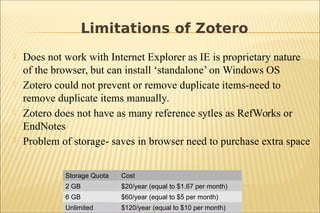
 Problem of storage- saves in browser need to purchase extra space
Limitations of Zotero
Storage Quota Cost
2 GB $20/year (equal to $1.67 per month)
6 GB $60/year (equal to $5 per month)
Unlimited 1) $120/year (equal to $10 per month)
THANK YOU.

Zotero: an open source reference management tool for researchers

  • 1.
    Zotero: an OpenSource Reference Management tool for researchers Prajeesh Bhaskaran M.G University Library, Kottayam
  • 2.
    Project : RoyRosenzweig Center for History and New Media, George Mason University, USA. Funded by : Andrew W. Mellon Foundation, the Institute of Museum and Library Services, and the Alfred P. Sloan Foundation. Zotero- word derived from an Albanian verb meaning "to master” Zotero- free & open source reference management software
  • 3.
     Zotero 4.0is a standalone software coupled with the browsersZotero 4.0 is a standalone software coupled with the browsers Safari, Google Chrome & FirefoxSafari, Google Chrome & Firefox   Available for Mac OS X, Windows, and LinuxAvailable for Mac OS X, Windows, and Linux   Supported in many languagesSupported in many languages   Duplicate Detection and mergingDuplicate Detection and merging Zotero 4.0
  • 4.
    How to getZotero
  • 5.
     Collect- Automaticsensing of the content  Organize- organize in to collection and sub collections, tags creation  Cite- create footnotes, in-text citations, endnotes and bibliographies  Synchronize  Collaborate- join different research gruops on any topic or create their own groups, can share their library with the members Features
  • 6.
  • 7.
     Zotero supportonline syncing, allowing to access Zotero library on any computer with internet access.  Zotero syncing has two parts: data syncing and file syncing. Zotero's Sychronization
  • 8.
     The Wordprocessor or Libre Office or Neo office plugins helps to generate bibliographies, in-text citations or footnotes automatically  Ability to edit citations directly in the word processor document  More than 6000 style formats for creating bibliographies and citation. Word Processor Plugin Integration
  • 9.
    Zotero toolbar allowsto add citation Click on the “Zotero Insert Citation” icon Inserting Citations
  • 10.
    Import & Export Thefollowing biblipgraphic formats can import  Zotero RDF  MODS (Metadata Object Description Schema)  BibTeX  RIS  Refer/BibIX  Unqualified Dublin Core RDF
  • 11.
     Report generatedfrom collection  PDF Full text indexing  Zotero File Storage  ZotFile & ZotFile Reader  Zotero &Wikipedia  Zotero Maps  Zotero Timeline  Zotero groups Zotero's APIs
  • 12.
     Does notwork with Internet Explorer as IE is proprietary nature of the browser, but can install ‘standalone’ on Windows OS  Zotero could not prevent or remove duplicate items-need to remove duplicate items manually.  Zotero does not have as many reference sytles as RefWorks or EndNotes  Problem of storage- saves in browser need to purchase extra space Limitations of Zotero Storage Quota Cost 2 GB $20/year (equal to $1.67 per month) 6 GB $60/year (equal to $5 per month) Unlimited 1) $120/year (equal to $10 per month)
  • 13.