Academy #3
16th November 2015
Mickaël Rémond, @mickael
Questions
ejabberd questions
• How does Apple and Google Push support work on ejabberd SaaS and
ejabberd Business Edition ?
• What is the relationship between ejabberd Push support and XEP-0357:
Push Notifications ?
XMPP questions
• What is the impact of Websocket on Web chat performance ?
• What is the XMPP stack for quick prototyping ?
• Why do we seem to find duplicate in Message Archive Management
backend ?
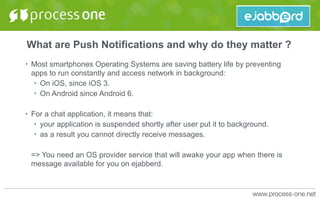
What are Push Notifications and why do they matter ?
• Most smartphones Operating Systems are saving battery life by preventing
apps to run constantly and access network in background:
• On iOS, since iOS 3.
• On Android since Android 6.
• For a chat application, it means that:
• your application is suspended shortly after user put it to background.
• as a result you cannot directly receive messages.
=> You need an OS provider service that will awake your app when there is
message available for you on ejabberd.
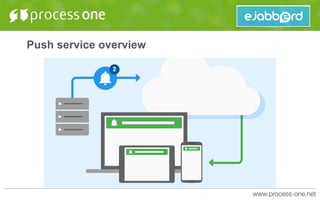
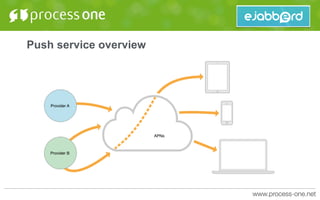
Push service overview
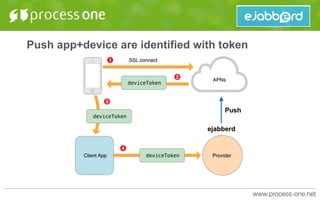
Push app+device are identified with token
ejabberd
Push
ejabberd support for Push
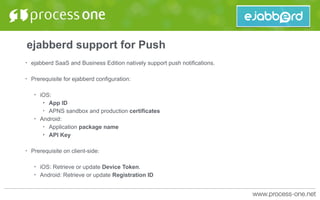
• ejabberd SaaS and Business Edition natively support push notifications.
• Prerequisite for ejabberd configuration:
• iOS:
• App ID
• APNS sandbox and production certificates
• Android:
• Application package name
• API Key
• Prerequisite on client-side:
• iOS: Retrieve or update Device Token.
• Android: Retrieve or update Registration ID
ejabberd support for Push
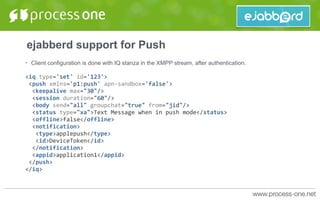
• Client configuration is done with IQ stanza in the XMPP stream, after authentication.
<iq	type='set'	id='123'>	
	<push	xmlns='p1:push'	apn-sandbox='false'>	
		<keepalive	max="30"/>	
		<session	duration="60"/>	
		<body	send="all"	groupchat="true"	from="jid"/>	
		<status	type="xa">Text	Message	when	in	push	mode</status>	
		<offline>false</offline>	
		<notification>	
			<type>applepush</type>	
			<id>DeviceToken</id>	
		</notification>	
		<appid>application1</appid>	
	</push>	
</iq>
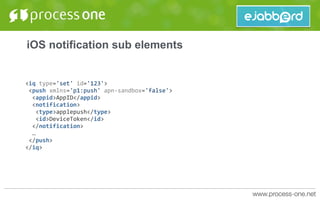
iOS notification sub elements
<iq	type='set'	id='123'>	
	<push	xmlns='p1:push'	apn-sandbox='false'>	
		<appid>AppID</appid>	
		<notification>	
			<type>applepush</type>	
			<id>DeviceToken</id>	
		</notification>	
		…	
	</push>	
</iq>
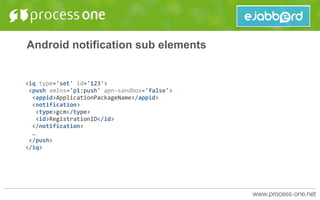
Android notification sub elements
<iq	type='set'	id='123'>	
	<push	xmlns='p1:push'	apn-sandbox='false'>	
		<appid>ApplicationPackageName</appid>	
		<notification>	
			<type>gcm</type>	
			<id>RegistrationID</id>	
		</notification>	
		…	
	</push>	
</iq>
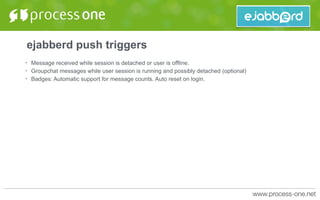
ejabberd push triggers
• Message received while session is detached or user is offline.
• Groupchat messages while user session is running and possibly detached (optional)
• Badges: Automatic support for message counts. Auto reset on login.
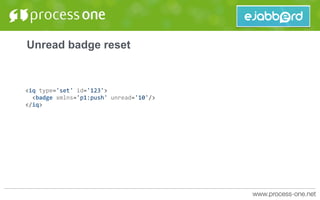
Unread badge reset
<iq	type='set'	id='123'>	
		<badge	xmlns='p1:push'	unread='10'/>	
</iq>
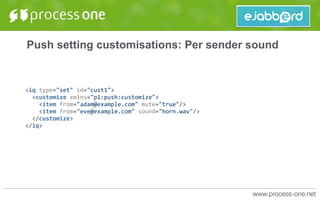
Push setting customisations: Per sender sound
<iq	type="set"	id="cust1">	
		<customize	xmlns="p1:push:customize">	
				<item	from="adam@example.com"	mute="true"/>	
				<item	from="eve@example.com"	sound="horn.wav"/>	
		</customize>	
</iq>
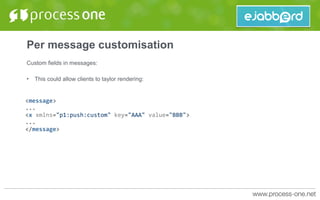
Per message customisation
Custom fields in messages:
• This could allow clients to taylor rendering:
<message>	
...	
<x	xmlns="p1:push:custom"	key="AAA"	value="BBB">	
...	
</message>
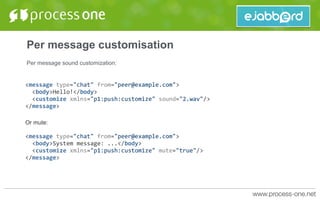
Per message customisation
Per message sound customization:
<message	type="chat"	from="peer@example.com">	
		<body>Hello!</body>	
		<customize	xmlns="p1:push:customize"	sound="2.wav"/>	
</message>	
Or mute:
<message	type="chat"	from="peer@example.com">	
		<body>System	message:	...</body>	
		<customize	xmlns="p1:push:customize"	mute="true"/>	
</message>
Per message customisation
Customise body and nick displayed:
<message	type="chat"	from="peer@example.com">	
		<body>{matchResult:	"2:1",	Players:	[...]}</body>	
		<customize	xmlns="p1:push:customize"	nick="SportBot">	
				<body>Match	result	update	2:1	for	...</body>	
		</customize>	
</message>
Support for silent pushes
• Silent pushes are intended for the app only.
• They provide metadata for the app and can trigger background processing without displaying an alert
to the user.
• Useful to trigger background synchronisation when data are available.
Push Caveats
• Groupchat notifications are only possible when user is online or session is running on server in
detached mode.
• => We are adding feature to groupchat to dealt with that part.
• Apple Push buffer only contains one message:
• Do not expected to never miss a push: If your phone is turn off, you will only receive the latest
push when turned off.
• If this was a silent push, nothing will be visible to the user.
What is the relationship between ejabberd Push
support and XEP-0357: Push Notifications ?
• They cover different use cases:
• XEP-0357 defines:
• a way for app devices to pass their push credential to service.
• a standard API to trigger push notification from XMPP packets.
• XEP-0357 does not define the triggers:
• When and what the server is supposed to do to send push notifications to users.
• It assumes that it is mostly used by third-party services or component to send pushes.
• Our push approach fills the gap between:
• Server events that should trigger push notification, along with the format of such notifications.
• Actually sending the push to the device manufacturer push service.
What is the impact of Websocket on Web chat
performance ?
• On server, Websocket is a much more efficient protocol that takes less resources.
• However, impact on latency is directly visible on client.
Measurement of time to open session: Bosh vs
Websocket
• On server, Websocket is a much more efficient protocol that takes less resources.
• However, impact on latency is directly visible on client.
• Bosh (localhost, no SSL): 1428ms
• Websocket (localhost, no SSL): 307ms
• Bosh (remote server, SSL): 2198ms
• Websocket (remote server, SSL): 1446ms
• The more roundtrip you have, the more impact:
• Websocket is much better when there is a lot of interactions: Discovery, forms, server
configuration, etc.
What is the XMPP stack for quick prototyping ?
• Versatile and widely used server: ejabberd
• Client stack:
• Android: Smack 4
• iOS: XMPPFramework
• Web: Strophe
Using Strophe for prototyping / learning XMPP and
experimenting
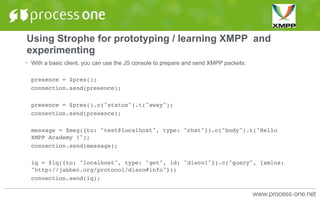
• With a basic client, you can use the JS console to prepare and send XMPP packets:
presence = $pres();
connection.send(presence);
presence = $pres().c("status").t("away");
connection.send(presence);
message = $msg({to: "test@localhost", type: "chat"}).c("body").t("Hello
XMPP Academy !");
connection.send(message);
iq = $iq({to: "localhost", type: "get", id: "disco1"}).c("query", {xmlns:
"http://jabber.org/protocol/disco#info"});
connection.send(iq);
Why do we seem to find duplicate in Message Archive
Management backend ?
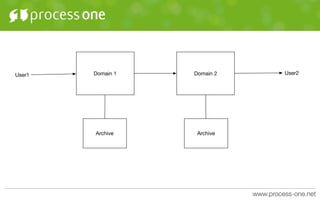
• When thinking about XMPP protocol, you need to think in federated context:
• Two XMPP domains can connect have have user chat between both domains.
• Message is stored once per user as archive can be managed independently (delete entry, etc)
Domain 1
Archive Archive
Domain 2User1 User2
See you at next

XMPP Academy #3

  • 1.
    Academy #3 16th November2015 Mickaël Rémond, @mickael
  • 2.
    Questions ejabberd questions • Howdoes Apple and Google Push support work on ejabberd SaaS and ejabberd Business Edition ? • What is the relationship between ejabberd Push support and XEP-0357: Push Notifications ? XMPP questions • What is the impact of Websocket on Web chat performance ? • What is the XMPP stack for quick prototyping ? • Why do we seem to find duplicate in Message Archive Management backend ?
  • 3.
    What are PushNotifications and why do they matter ? • Most smartphones Operating Systems are saving battery life by preventing apps to run constantly and access network in background: • On iOS, since iOS 3. • On Android since Android 6. • For a chat application, it means that: • your application is suspended shortly after user put it to background. • as a result you cannot directly receive messages. => You need an OS provider service that will awake your app when there is message available for you on ejabberd.
  • 4.
  • 5.
  • 6.
    Push app+device areidentified with token ejabberd Push
  • 7.
    ejabberd support forPush • ejabberd SaaS and Business Edition natively support push notifications. • Prerequisite for ejabberd configuration: • iOS: • App ID • APNS sandbox and production certificates • Android: • Application package name • API Key • Prerequisite on client-side: • iOS: Retrieve or update Device Token. • Android: Retrieve or update Registration ID
  • 8.
    ejabberd support forPush • Client configuration is done with IQ stanza in the XMPP stream, after authentication. <iq type='set' id='123'> <push xmlns='p1:push' apn-sandbox='false'> <keepalive max="30"/> <session duration="60"/> <body send="all" groupchat="true" from="jid"/> <status type="xa">Text Message when in push mode</status> <offline>false</offline> <notification> <type>applepush</type> <id>DeviceToken</id> </notification> <appid>application1</appid> </push> </iq>
  • 9.
    iOS notification subelements <iq type='set' id='123'> <push xmlns='p1:push' apn-sandbox='false'> <appid>AppID</appid> <notification> <type>applepush</type> <id>DeviceToken</id> </notification> … </push> </iq>
  • 10.
    Android notification subelements <iq type='set' id='123'> <push xmlns='p1:push' apn-sandbox='false'> <appid>ApplicationPackageName</appid> <notification> <type>gcm</type> <id>RegistrationID</id> </notification> … </push> </iq>
  • 11.
    ejabberd push triggers •Message received while session is detached or user is offline. • Groupchat messages while user session is running and possibly detached (optional) • Badges: Automatic support for message counts. Auto reset on login.
  • 12.
  • 13.
    Push setting customisations:Per sender sound <iq type="set" id="cust1"> <customize xmlns="p1:push:customize"> <item from="adam@example.com" mute="true"/> <item from="eve@example.com" sound="horn.wav"/> </customize> </iq>
  • 14.
    Per message customisation Customfields in messages: • This could allow clients to taylor rendering: <message> ... <x xmlns="p1:push:custom" key="AAA" value="BBB"> ... </message>
  • 15.
    Per message customisation Permessage sound customization: <message type="chat" from="peer@example.com"> <body>Hello!</body> <customize xmlns="p1:push:customize" sound="2.wav"/> </message> Or mute: <message type="chat" from="peer@example.com"> <body>System message: ...</body> <customize xmlns="p1:push:customize" mute="true"/> </message>
  • 16.
    Per message customisation Customisebody and nick displayed: <message type="chat" from="peer@example.com"> <body>{matchResult: "2:1", Players: [...]}</body> <customize xmlns="p1:push:customize" nick="SportBot"> <body>Match result update 2:1 for ...</body> </customize> </message>
  • 17.
    Support for silentpushes • Silent pushes are intended for the app only. • They provide metadata for the app and can trigger background processing without displaying an alert to the user. • Useful to trigger background synchronisation when data are available.
  • 18.
    Push Caveats • Groupchatnotifications are only possible when user is online or session is running on server in detached mode. • => We are adding feature to groupchat to dealt with that part. • Apple Push buffer only contains one message: • Do not expected to never miss a push: If your phone is turn off, you will only receive the latest push when turned off. • If this was a silent push, nothing will be visible to the user.
  • 19.
    What is therelationship between ejabberd Push support and XEP-0357: Push Notifications ? • They cover different use cases: • XEP-0357 defines: • a way for app devices to pass their push credential to service. • a standard API to trigger push notification from XMPP packets. • XEP-0357 does not define the triggers: • When and what the server is supposed to do to send push notifications to users. • It assumes that it is mostly used by third-party services or component to send pushes. • Our push approach fills the gap between: • Server events that should trigger push notification, along with the format of such notifications. • Actually sending the push to the device manufacturer push service.
  • 20.
    What is theimpact of Websocket on Web chat performance ? • On server, Websocket is a much more efficient protocol that takes less resources. • However, impact on latency is directly visible on client.
  • 22.
    Measurement of timeto open session: Bosh vs Websocket • On server, Websocket is a much more efficient protocol that takes less resources. • However, impact on latency is directly visible on client. • Bosh (localhost, no SSL): 1428ms • Websocket (localhost, no SSL): 307ms • Bosh (remote server, SSL): 2198ms • Websocket (remote server, SSL): 1446ms • The more roundtrip you have, the more impact: • Websocket is much better when there is a lot of interactions: Discovery, forms, server configuration, etc.
  • 23.
    What is theXMPP stack for quick prototyping ? • Versatile and widely used server: ejabberd • Client stack: • Android: Smack 4 • iOS: XMPPFramework • Web: Strophe
  • 24.
    Using Strophe forprototyping / learning XMPP and experimenting • With a basic client, you can use the JS console to prepare and send XMPP packets: presence = $pres(); connection.send(presence); presence = $pres().c("status").t("away"); connection.send(presence); message = $msg({to: "test@localhost", type: "chat"}).c("body").t("Hello XMPP Academy !"); connection.send(message); iq = $iq({to: "localhost", type: "get", id: "disco1"}).c("query", {xmlns: "http://jabber.org/protocol/disco#info"}); connection.send(iq);
  • 26.
    Why do weseem to find duplicate in Message Archive Management backend ? • When thinking about XMPP protocol, you need to think in federated context: • Two XMPP domains can connect have have user chat between both domains. • Message is stored once per user as archive can be managed independently (delete entry, etc)
  • 27.
  • 28.