

XML-Free Programming : Java Server and Client Development Without <>Stephen ChinChief Agile Methodologist, GXSsteveonjava@gmail.comtweet: @steveonjavaArun GuptaOracle Corporationarun.p.gupta@oracle.comtweet: @arungupta
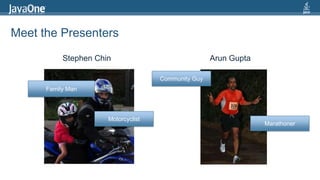
Meet the PresentersStephen ChinArun GuptaCommunity GuyFamily ManMotorcyclistMarathoner
Our PlanQuick (Humorous) History of Angle BracketsXML-Free ProgrammingConfiguration Lives with the CodeData Transfer Models the DomainDesign Programming Languages for HumansJavaOne Speakers Application <Demo>3
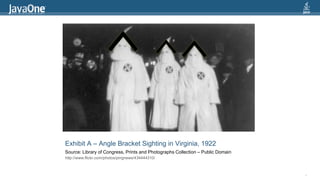
Exhibit A – Angle Bracket Sighting in Virginia, 1922Source: Library of Congress, Prints and Photographs Collection – Public Domainhttp://www.flickr.com/photos/pingnews/434444310/4>>>
Exhibit B - Bermuda Tri-Angle BracketsSource: NOAA National Ocean Service – CC licensedhttp://www.flickr.com/photos/usoceangov/4276194691/sizes/o/in/photostream/5>>>
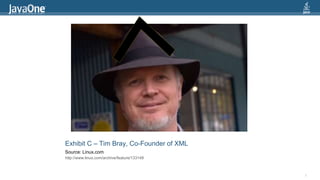
Exhibit C – Tim Bray, Co-Founder of XMLSource: Linux.comhttp://www.linux.com/archive/feature/1331496>>>>
History of XMLBased on Standard Generalized Markup Language (SGML)Created by a W3C working group of eleven membersVersion History:XML 1.0 (1998) – Widely adopted with 5 subsequent revisionsXML 1.1 (2004) – Limited adoption7
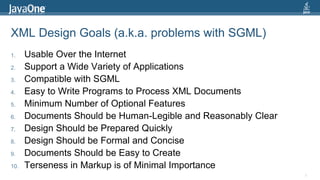
XML Design Goals (a.k.a. problems with SGML)Usable Over the InternetSupport a Wide Variety of ApplicationsCompatible with SGMLEasy to Write Programs to Process XML DocumentsMinimum Number of Optional FeaturesDocuments Should be Human-Legible and Reasonably ClearDesign Should be Prepared QuicklyDesign Should be Formal and ConciseDocuments Should be Easy to CreateTerseness in Markup is of Minimal Importance8
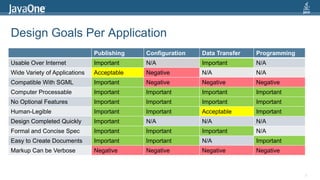
Design Goals Per Application9
Tenet 1Configuration Lives with the Code10
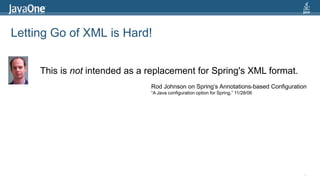
Letting Go of XML is Hard!11This is not intended as a replacement for Spring's XML format.Rod Johnson on Spring’s Annotations-based Configuration“A Java configuration option for Spring,” 11/28/06
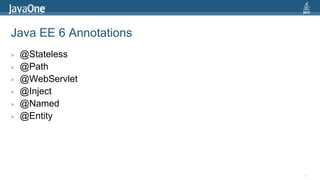
Java EE 6 Annotations@Stateless@Path@WebServlet@Inject@Named@Entity12
But There is Hope!13You can have a Groovy DSL … it is as short as can be.Dierk Koenig on Canoo Web Test“Interview with Dierk Koenig,” ThirstyHead.com 6/3/2009
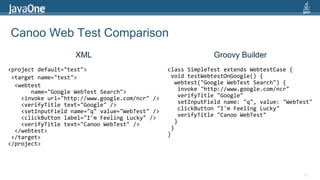
Canoo Web Test ComparisonXMLGroovy Builder<project default="test"> <target name="test"> <webtest        name="Google WebTest Search">    <invoke url="http://www.google.com/ncr" />    <verifyTitle text="Google" />    <setInputField name="q" value="WebTest" />    <clickButton label="I'm Feeling Lucky" />    <verifyTitle text="Canoo WebTest" />  </webtest> </target></project>class SimpleTest extends WebtestCase { void testWebtestOnGoogle() {  webtest("Google WebTestSearch") {   invoke "http://www.google.com/ncr"   verifyTitle "Google"   setInputField name: "q", value: "WebTest"   clickButton "I'm Feeling Lucky"   verifyTitle "CanooWebTest"  } }}14
Tenet 2Data Transfer Models the Domain15
JavaScript Object Notation (JSON)Matches Relational/Object-Oriented StructuresEasy to Read and WriteSimple to Parse and GenerateFamiliar to Programmers of the C-family of languages:C, C++, C#, Java, JavaScript, Perl, Python, etc.Very Simple Specification16
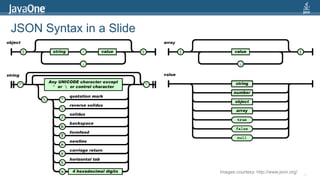
JSON Syntax in a Slide17Images courtesy: http://www.json.org/
JAX-RS Sample18@GET    @Produces({"application/json", "application/xml"})    public List<Sezzion> findAll() {        return super.findAll();    }    @GET@Path("{from}/{to}")    @Produces({"application/xml", "application/json"})    public List<Sezzion> findRange(@PathParam("from") Integer from, @PathParam("to") Integer to) {        return super.findRange(new int[]{from, to});    }@Stateless@Path("sezzion")public class SezzionFacadeREST extends AbstractFacade<Sezzion> {@PersistenceContext    private EntityManagerem;@POST@Consumes({"application/json", "application/xml"})    public void create(Sezzion entity) {super.create(entity);    }
Tenet 3Design Programming Languages for Humans19
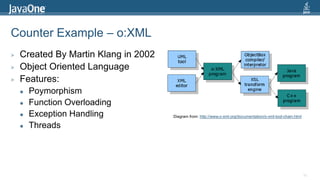
Counter Example – o:XMLCreated By Martin Klang in 2002Object Oriented LanguageFeatures:PoymorphismFunction OverloadingException HandlingThreads20Diagram from: http://www.o-xml.org/documentation/o-xml-tool-chain.html
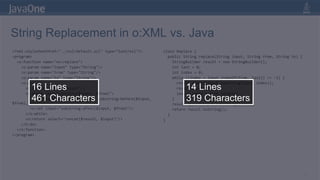
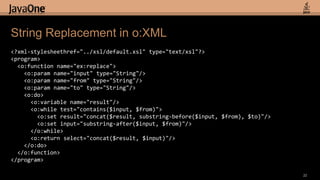
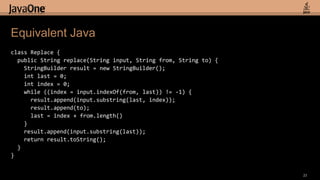
String Replacement in o:XML vs. Java<?xml-stylesheethref="../xsl/default.xsl" type="text/xsl"?><program>  <o:function name="ex:replace">    <o:param name="input" type="String"/>    <o:param name="from" type="String"/>    <o:param name="to" type="String"/>    <o:do>      <o:variable name="result"/>      <o:while test="contains($input, $from)">        <o:set result="concat($result, substring-before($input, $from), $to)"/>        <o:set input="substring-after($input, $from)"/>      </o:while>      <o:return select="concat($result, $input)"/>    </o:do>  </o:function></program>class Replace {  public String replace(String input, String from, String to) {StringBuilder result = new StringBuilder();int last = 0;int index = 0;    while ((index = input.indexOf(from, last)) != -1) {result.append(input.substring(last, index));result.append(to);      last = index + from.length()    }result.append(input.substring(last));    return result.toString();  }}2116 Lines461 Characters14 Lines319 Characters
String Replacement in o:XML<?xml-stylesheethref="../xsl/default.xsl" type="text/xsl"?><program>  <o:function name="ex:replace">    <o:param name="input" type="String"/>    <o:param name="from" type="String"/>    <o:param name="to" type="String"/>   <o:do>     <o:variable name="result"/>     <o:while test="contains($input, $from)">       <o:set result="concat($result, substring-before($input, $from), $to)"/>       <o:set input="substring-after($input, $from)"/>     </o:while>     <o:return select="concat($result, $input)"/>   </o:do>  </o:function></program>22
Equivalent Javaclass Replace {  public String replace(String input, String from, String to) {StringBuilder result = new StringBuilder();int last = 0;int index = 0;    while ((index = input.indexOf(from, last)) != -1) {result.append(input.substring(last, index));result.append(to);     last = index + from.length()   }result.append(input.substring(last));   return result.toString();  }}23
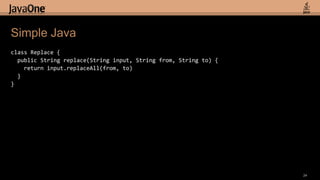
Simple Javaclass Replace {  public String replace(String input, String from, String to) {   return input.replaceAll(from, to)  }}24
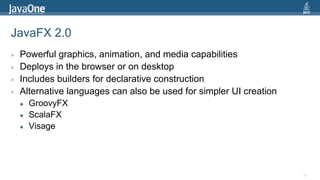
JavaFX 2.0Powerful graphics, animation, and media capabilitiesDeploys in the browser or on desktopIncludes builders for declarative constructionAlternative languages can also be used for simpler UI creationGroovyFXScalaFXVisage25
26Hello JavaOne (Java Version)public class HelloJavaOne extends Application {  public static void main(String[] args) {    launch(HelloJavaOne.class, args);  }  @Override  public void start(Stage primaryStage) {primaryStage.setTitle("Hello JavaOne");    Group root = new Group();    Scene scene = new Scene(root, 400, 250, Color.ALICEBLUE);    Text text = new Text();text.setX(105);text.setY(120);text.setFont(new Font(30));text.setText("Hello JavaOne");root.getChildren().add(text);        primaryStage.setScene(scene);primaryStage.show();  }}
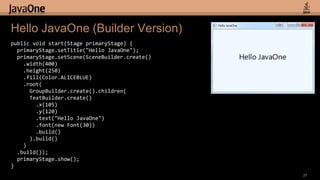
27Hello JavaOne(Builder Version)public void start(Stage primaryStage) {primaryStage.setTitle("Hello JavaOne");primaryStage.setScene(SceneBuilder.create()    .width(400)    .height(250)    .fill(Color.ALICEBLUE)    .root(GroupBuilder.create().children(TextBuilder.create()        .x(105).y(120)        .text("Hello JavaOne")        .font(new Font(30))        .build()      ).build()    )  .build());primaryStage.show();}
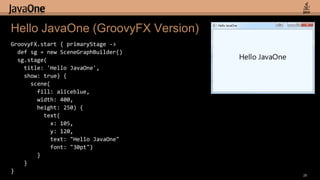
28Hello JavaOne (GroovyFX Version)GroovyFX.start { primaryStage ->defsg = new SceneGraphBuilder()sg.stage(   title: 'Hello JavaOne',   show: true) {  scene(       fill: aliceblue,       width: 400,       height: 250) {    text(           x: 105,           y: 120,           text: "Hello JavaOne"           font: "30pt")    }  }}
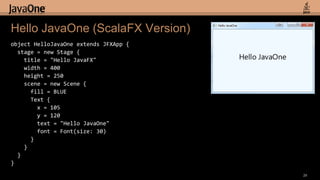
29Hello JavaOne (ScalaFX Version)object HelloJavaOne extends JFXApp {  stage = new Stage {    title = "Hello JavaFX"    width = 400    height = 250    scene = new Scene {      fill = BLUE     Text {       x = 105       y = 120        text = "Hello JavaOne"       font = Font(size: 30)     }    }  }}
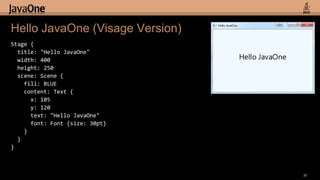
30Hello JavaOne (Visage Version)Stage {title: "Hello JavaOne"width: 400height: 250scene: Scene {  fill: BLUE  content: Text {     x: 105     y: 120     text: "Hello JavaOne"      font: Font {size: 30pt}   }  }}
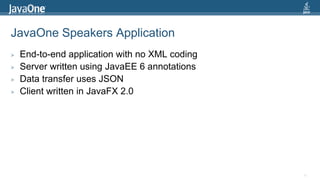
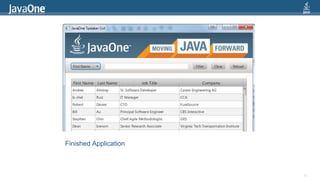
JavaOne Speakers ApplicationEnd-to-end application with no XML codingServer written using JavaEE 6 annotationsData transfer uses JSONClient written in JavaFX 2.031
Finished Application32
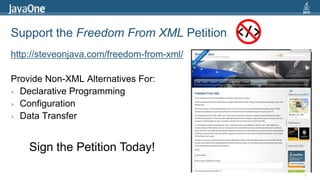
Support the Freedom From XML Petitionhttp://steveonjava.com/freedom-from-xml/Provide Non-XML Alternatives For:Declarative ProgrammingConfigurationData Transfer33</>Sign the Petition Today!
34Stephen Chinsteveonjava@gmail.comtweet: @steveonjavaArun Guptaarun.p.gupta@oracle.comtweet: @arungupta

XML-Free Programming

  • 1.
    XML-Free Programming :Java Server and Client Development Without <>Stephen ChinChief Agile Methodologist, GXSsteveonjava@gmail.comtweet: @steveonjavaArun GuptaOracle Corporationarun.p.gupta@oracle.comtweet: @arungupta
  • 2.
    Meet the PresentersStephenChinArun GuptaCommunity GuyFamily ManMotorcyclistMarathoner
  • 3.
    Our PlanQuick (Humorous)History of Angle BracketsXML-Free ProgrammingConfiguration Lives with the CodeData Transfer Models the DomainDesign Programming Languages for HumansJavaOne Speakers Application <Demo>3
  • 4.
    Exhibit A –Angle Bracket Sighting in Virginia, 1922Source: Library of Congress, Prints and Photographs Collection – Public Domainhttp://www.flickr.com/photos/pingnews/434444310/4>>>
  • 5.
    Exhibit B -Bermuda Tri-Angle BracketsSource: NOAA National Ocean Service – CC licensedhttp://www.flickr.com/photos/usoceangov/4276194691/sizes/o/in/photostream/5>>>
  • 6.
    Exhibit C –Tim Bray, Co-Founder of XMLSource: Linux.comhttp://www.linux.com/archive/feature/1331496>>>>
  • 7.
    History of XMLBasedon Standard Generalized Markup Language (SGML)Created by a W3C working group of eleven membersVersion History:XML 1.0 (1998) – Widely adopted with 5 subsequent revisionsXML 1.1 (2004) – Limited adoption7
  • 8.
    XML Design Goals(a.k.a. problems with SGML)Usable Over the InternetSupport a Wide Variety of ApplicationsCompatible with SGMLEasy to Write Programs to Process XML DocumentsMinimum Number of Optional FeaturesDocuments Should be Human-Legible and Reasonably ClearDesign Should be Prepared QuicklyDesign Should be Formal and ConciseDocuments Should be Easy to CreateTerseness in Markup is of Minimal Importance8
  • 9.
    Design Goals PerApplication9
  • 10.
  • 11.
    Letting Go ofXML is Hard!11This is not intended as a replacement for Spring's XML format.Rod Johnson on Spring’s Annotations-based Configuration“A Java configuration option for Spring,” 11/28/06
  • 12.
    Java EE 6Annotations@Stateless@Path@WebServlet@Inject@Named@Entity12
  • 13.
    But There isHope!13You can have a Groovy DSL … it is as short as can be.Dierk Koenig on Canoo Web Test“Interview with Dierk Koenig,” ThirstyHead.com 6/3/2009
  • 14.
    Canoo Web TestComparisonXMLGroovy Builder<project default="test"> <target name="test"> <webtest        name="Google WebTest Search">    <invoke url="http://www.google.com/ncr" />    <verifyTitle text="Google" />    <setInputField name="q" value="WebTest" />    <clickButton label="I'm Feeling Lucky" />    <verifyTitle text="Canoo WebTest" />  </webtest> </target></project>class SimpleTest extends WebtestCase { void testWebtestOnGoogle() {  webtest("Google WebTestSearch") {   invoke "http://www.google.com/ncr"   verifyTitle "Google"   setInputField name: "q", value: "WebTest"   clickButton "I'm Feeling Lucky"   verifyTitle "CanooWebTest"  } }}14
  • 15.
    Tenet 2Data TransferModels the Domain15
  • 16.
    JavaScript Object Notation(JSON)Matches Relational/Object-Oriented StructuresEasy to Read and WriteSimple to Parse and GenerateFamiliar to Programmers of the C-family of languages:C, C++, C#, Java, JavaScript, Perl, Python, etc.Very Simple Specification16
  • 17.
    JSON Syntax ina Slide17Images courtesy: http://www.json.org/
  • 18.
    JAX-RS Sample18@GET @Produces({"application/json", "application/xml"}) public List<Sezzion> findAll() { return super.findAll(); } @GET@Path("{from}/{to}") @Produces({"application/xml", "application/json"}) public List<Sezzion> findRange(@PathParam("from") Integer from, @PathParam("to") Integer to) { return super.findRange(new int[]{from, to}); }@Stateless@Path("sezzion")public class SezzionFacadeREST extends AbstractFacade<Sezzion> {@PersistenceContext private EntityManagerem;@POST@Consumes({"application/json", "application/xml"}) public void create(Sezzion entity) {super.create(entity); }
  • 19.
    Tenet 3Design ProgrammingLanguages for Humans19
  • 20.
    Counter Example –o:XMLCreated By Martin Klang in 2002Object Oriented LanguageFeatures:PoymorphismFunction OverloadingException HandlingThreads20Diagram from: http://www.o-xml.org/documentation/o-xml-tool-chain.html
  • 21.
    String Replacement ino:XML vs. Java<?xml-stylesheethref="../xsl/default.xsl" type="text/xsl"?><program> <o:function name="ex:replace"> <o:param name="input" type="String"/> <o:param name="from" type="String"/> <o:param name="to" type="String"/> <o:do> <o:variable name="result"/> <o:while test="contains($input, $from)"> <o:set result="concat($result, substring-before($input, $from), $to)"/> <o:set input="substring-after($input, $from)"/> </o:while> <o:return select="concat($result, $input)"/> </o:do> </o:function></program>class Replace { public String replace(String input, String from, String to) {StringBuilder result = new StringBuilder();int last = 0;int index = 0; while ((index = input.indexOf(from, last)) != -1) {result.append(input.substring(last, index));result.append(to); last = index + from.length() }result.append(input.substring(last)); return result.toString(); }}2116 Lines461 Characters14 Lines319 Characters
  • 22.
    String Replacement ino:XML<?xml-stylesheethref="../xsl/default.xsl" type="text/xsl"?><program> <o:function name="ex:replace"> <o:param name="input" type="String"/> <o:param name="from" type="String"/> <o:param name="to" type="String"/> <o:do> <o:variable name="result"/> <o:while test="contains($input, $from)"> <o:set result="concat($result, substring-before($input, $from), $to)"/> <o:set input="substring-after($input, $from)"/> </o:while> <o:return select="concat($result, $input)"/> </o:do> </o:function></program>22
  • 23.
    Equivalent Javaclass Replace{ public String replace(String input, String from, String to) {StringBuilder result = new StringBuilder();int last = 0;int index = 0; while ((index = input.indexOf(from, last)) != -1) {result.append(input.substring(last, index));result.append(to); last = index + from.length() }result.append(input.substring(last)); return result.toString(); }}23
  • 24.
    Simple Javaclass Replace{ public String replace(String input, String from, String to) { return input.replaceAll(from, to) }}24
  • 25.
    JavaFX 2.0Powerful graphics,animation, and media capabilitiesDeploys in the browser or on desktopIncludes builders for declarative constructionAlternative languages can also be used for simpler UI creationGroovyFXScalaFXVisage25
  • 26.
    26Hello JavaOne (JavaVersion)public class HelloJavaOne extends Application { public static void main(String[] args) { launch(HelloJavaOne.class, args); } @Override public void start(Stage primaryStage) {primaryStage.setTitle("Hello JavaOne"); Group root = new Group(); Scene scene = new Scene(root, 400, 250, Color.ALICEBLUE); Text text = new Text();text.setX(105);text.setY(120);text.setFont(new Font(30));text.setText("Hello JavaOne");root.getChildren().add(text); primaryStage.setScene(scene);primaryStage.show(); }}
  • 27.
    27Hello JavaOne(Builder Version)publicvoid start(Stage primaryStage) {primaryStage.setTitle("Hello JavaOne");primaryStage.setScene(SceneBuilder.create() .width(400) .height(250) .fill(Color.ALICEBLUE) .root(GroupBuilder.create().children(TextBuilder.create() .x(105).y(120) .text("Hello JavaOne") .font(new Font(30)) .build() ).build() ) .build());primaryStage.show();}
  • 28.
    28Hello JavaOne (GroovyFXVersion)GroovyFX.start { primaryStage ->defsg = new SceneGraphBuilder()sg.stage( title: 'Hello JavaOne', show: true) { scene( fill: aliceblue, width: 400, height: 250) { text( x: 105, y: 120, text: "Hello JavaOne" font: "30pt") } }}
  • 29.
    29Hello JavaOne (ScalaFXVersion)object HelloJavaOne extends JFXApp { stage = new Stage { title = "Hello JavaFX" width = 400 height = 250 scene = new Scene { fill = BLUE Text { x = 105 y = 120 text = "Hello JavaOne" font = Font(size: 30) } } }}
  • 30.
    30Hello JavaOne (VisageVersion)Stage {title: "Hello JavaOne"width: 400height: 250scene: Scene { fill: BLUE content: Text { x: 105 y: 120 text: "Hello JavaOne" font: Font {size: 30pt} } }}
  • 31.
    JavaOne Speakers ApplicationEnd-to-endapplication with no XML codingServer written using JavaEE 6 annotationsData transfer uses JSONClient written in JavaFX 2.031
  • 32.
  • 33.
    Support the FreedomFrom XML Petitionhttp://steveonjava.com/freedom-from-xml/Provide Non-XML Alternatives For:Declarative ProgrammingConfigurationData Transfer33</>Sign the Petition Today!
  • 34.
    34Stephen Chinsteveonjava@gmail.comtweet: @steveonjavaArunGuptaarun.p.gupta@oracle.comtweet: @arungupta