


© Copyright SELA software & Education Labs Ltd. | 14-18 Baruch Hirsch St Bnei Brak, 51202 Israel | www.selagroup.com
SELA DEVELOPER PRACTICE
JUNE 29 – JULY 3, 2014
Michael Haberman
From XAML / C# to HTML5 / JS
How to transition???
Don’t be scared
Lets take our knowledge and experience to HTML JS
Mainly MVVM
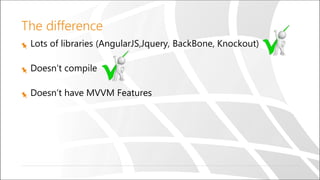
The difference
Lots of libraries (AngularJS,Jquery, BackBone, Knockout)
Doesn’t compile
Doesn’t have MVVM Features
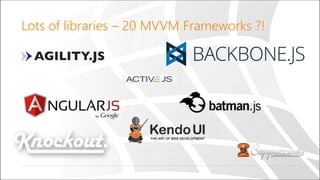
Lots of libraries – 20 MVVM Frameworks ?!
The difference
Lots of libraries (AngularJS,Jquery, BackBone, Knockout)
Doesn’t compile
Doesn’t have MVVM Features
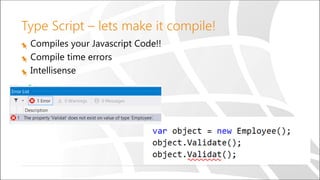
Type Script – lets make it compile!
Compiles your Javascript Code!!
Compile time errors
Intellisense
The difference
Lots of libraries (AngularJS,Jquery, BackBone, Knockout)
Doesn’t compile
Doesn’t have MVVM Features
What MVVM Feature do we want?
Data Binding
Converter
Mode
INotifyPropertyChanged
Command
Passing a parameter
Context Binding
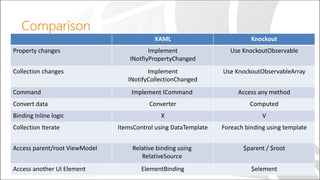
Comparison
XAML Knockout
Property changes Implement
INotfiyPropertyChanged
Use KnockoutObservable
Collection changes Implement
INotifyCollectionChanged
Use KnockoutObservableArray
Command Implement ICommand Access any method
Convert data Converter Computed
Binding Inline logic X V
Collection Iterate ItemsControl using DataTemplate Foreach binding using template
Access parent/root ViewModel Relative binding using
RelativeSource
$parent / $root
Access another UI Element ElementBinding $element
Demo
Lets see how to setup the environment
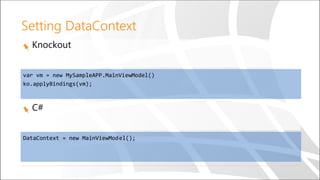
Setting DataContext
Knockout
C#
var vm = new MySampleAPP.MainViewModel()
ko.applyBindings(vm);
DataContext = new MainViewModel();
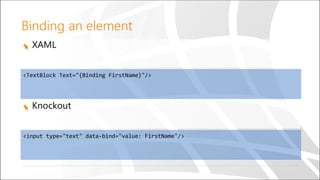
Binding an element
XAML
<TextBlock Text="{Binding FirstName}"/>
Knockout
<input type="text" data-bind="value: FirstName"/>
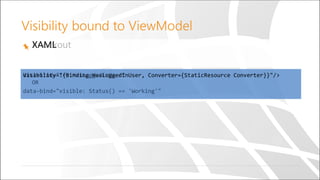
Visibility bound to ViewModel
KnockoutXAML
data-bind="if: HasLoggedinUser”
OR
data-bind="visible: Status() == 'Working'"
Visibility="{Binding HasLoggedinUser, Converter={StaticResource Converter}}"/>
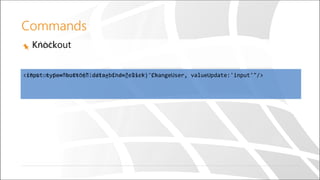
Commands
XAMLKnockout
<Button Command="{Binding ChangeUser}"/><input type="button" data-bind="click: ChangeUser, valueUpdate:'input'"/>
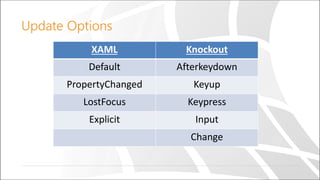
Update Options
XAML Knockout
Default Afterkeydown
PropertyChanged Keyup
LostFocus Keypress
Explicit Input
Change
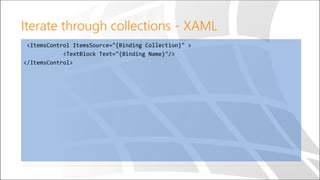
Iterate through collections - XAML
<ItemsControl ItemsSource="{Binding Collection}" >
<TextBlock Text="{Binding Name}"/>
</ItemsControl>
Knockout collections
Like ObservableCollection<T>
public Employees: KnockoutObservableArray<Employee> = ko.observableArray([]);
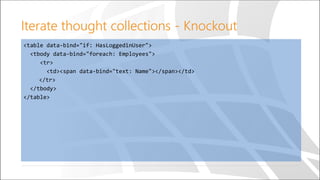
Iterate thought collections - Knockout
<table data-bind="if: HasLoggedinUser">
<tbody data-bind="foreach: Employees">
<tr>
<td><span data-bind="text: Name"></span></td>
</tr>
</tbody>
</table>
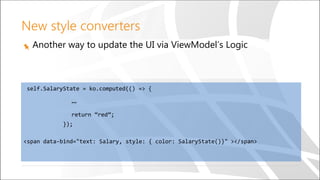
New style converters
Another way to update the UI via ViewModel’s Logic
self.SalaryState = ko.computed(() => {
…
return “red”;
});
<span data-bind="text: Salary, style: { color: SalaryState()}" ></span>
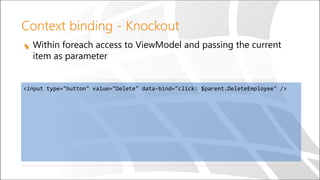
Context binding - Knockout
Within foreach access to ViewModel and passing the current
item as parameter
<input type="button" value="Delete" data-bind="click: $parent.DeleteEmployee" />
Knockout context binding
Similar to relative source or element binding:
$parent - $parent[indexer]
$root
$element
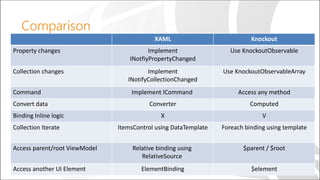
Comparison
XAML Knockout
Property changes Implement
INotfiyPropertyChanged
Use KnockoutObservable
Collection changes Implement
INotifyCollectionChanged
Use KnockoutObservableArray
Command Implement ICommand Access any method
Convert data Converter Computed
Binding Inline logic X V
Collection Iterate ItemsControl using DataTemplate Foreach binding using template
Access parent/root ViewModel Relative binding using
RelativeSource
$parent / $root
Access another UI Element ElementBinding $element
The difference
Lots of libraries (AngularJS,Jquery, BackBone, Knockout)
Doesn’t compile
Doesn’t have MVVM Features
Summary
HTML5 + JS + Knockout isn’t scary!
Knockout provide an easy transition
for XAML developers
Go home and try it your self!
Questions

XAML/C# to HTML5/JS

  • 1.
    © Copyright SELAsoftware & Education Labs Ltd. | 14-18 Baruch Hirsch St Bnei Brak, 51202 Israel | www.selagroup.com SELA DEVELOPER PRACTICE JUNE 29 – JULY 3, 2014 Michael Haberman From XAML / C# to HTML5 / JS
  • 2.
    How to transition??? Don’tbe scared Lets take our knowledge and experience to HTML JS Mainly MVVM
  • 3.
    The difference Lots oflibraries (AngularJS,Jquery, BackBone, Knockout) Doesn’t compile Doesn’t have MVVM Features
  • 4.
    Lots of libraries– 20 MVVM Frameworks ?!
  • 5.
    The difference Lots oflibraries (AngularJS,Jquery, BackBone, Knockout) Doesn’t compile Doesn’t have MVVM Features
  • 6.
    Type Script –lets make it compile! Compiles your Javascript Code!! Compile time errors Intellisense
  • 7.
    The difference Lots oflibraries (AngularJS,Jquery, BackBone, Knockout) Doesn’t compile Doesn’t have MVVM Features
  • 8.
    What MVVM Featuredo we want? Data Binding Converter Mode INotifyPropertyChanged Command Passing a parameter Context Binding
  • 9.
    Comparison XAML Knockout Property changesImplement INotfiyPropertyChanged Use KnockoutObservable Collection changes Implement INotifyCollectionChanged Use KnockoutObservableArray Command Implement ICommand Access any method Convert data Converter Computed Binding Inline logic X V Collection Iterate ItemsControl using DataTemplate Foreach binding using template Access parent/root ViewModel Relative binding using RelativeSource $parent / $root Access another UI Element ElementBinding $element
  • 10.
    Demo Lets see howto setup the environment
  • 11.
    Setting DataContext Knockout C# var vm= new MySampleAPP.MainViewModel() ko.applyBindings(vm); DataContext = new MainViewModel();
  • 12.
    Binding an element XAML <TextBlockText="{Binding FirstName}"/> Knockout <input type="text" data-bind="value: FirstName"/>
  • 13.
    Visibility bound toViewModel KnockoutXAML data-bind="if: HasLoggedinUser” OR data-bind="visible: Status() == 'Working'" Visibility="{Binding HasLoggedinUser, Converter={StaticResource Converter}}"/>
  • 14.
    Commands XAMLKnockout <Button Command="{Binding ChangeUser}"/><inputtype="button" data-bind="click: ChangeUser, valueUpdate:'input'"/>
  • 15.
    Update Options XAML Knockout DefaultAfterkeydown PropertyChanged Keyup LostFocus Keypress Explicit Input Change
  • 16.
    Iterate through collections- XAML <ItemsControl ItemsSource="{Binding Collection}" > <TextBlock Text="{Binding Name}"/> </ItemsControl>
  • 17.
    Knockout collections Like ObservableCollection<T> publicEmployees: KnockoutObservableArray<Employee> = ko.observableArray([]);
  • 18.
    Iterate thought collections- Knockout <table data-bind="if: HasLoggedinUser"> <tbody data-bind="foreach: Employees"> <tr> <td><span data-bind="text: Name"></span></td> </tr> </tbody> </table>
  • 19.
    New style converters Anotherway to update the UI via ViewModel’s Logic self.SalaryState = ko.computed(() => { … return “red”; }); <span data-bind="text: Salary, style: { color: SalaryState()}" ></span>
  • 20.
    Context binding -Knockout Within foreach access to ViewModel and passing the current item as parameter <input type="button" value="Delete" data-bind="click: $parent.DeleteEmployee" />
  • 21.
    Knockout context binding Similarto relative source or element binding: $parent - $parent[indexer] $root $element
  • 22.
    Comparison XAML Knockout Property changesImplement INotfiyPropertyChanged Use KnockoutObservable Collection changes Implement INotifyCollectionChanged Use KnockoutObservableArray Command Implement ICommand Access any method Convert data Converter Computed Binding Inline logic X V Collection Iterate ItemsControl using DataTemplate Foreach binding using template Access parent/root ViewModel Relative binding using RelativeSource $parent / $root Access another UI Element ElementBinding $element
  • 23.
    The difference Lots oflibraries (AngularJS,Jquery, BackBone, Knockout) Doesn’t compile Doesn’t have MVVM Features
  • 24.
    Summary HTML5 + JS+ Knockout isn’t scary! Knockout provide an easy transition for XAML developers Go home and try it your self!
  • 25.