Patterns for Deploying Analytics
in the Real World
Sriskandarajah Suhothayan (Suho)
Technical Lead
WSO2
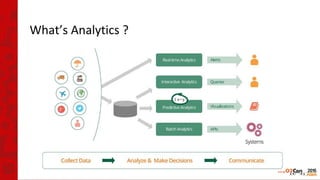
What’s Analytics ?
Problems to think about
• Can it handle my load ?
• How costly it is ?
• Adaptability ?
• Can it analyse 3rd
party systems ?
• etc ...
Where to start ?
Where to start ?
• Think Big !
Where to start ?
• Think Big !
But...
• Start simple !
• Eat Your Own Dog Food
• Analyse what you already have
Step 1 :
Find Data Inside Your Organisation...
Collect Data Internally
• Don’t worry about
– Data formats
– Data sources
– Platforms
– Protocols
Start with WSO2 DAS
it has a unified data capturing framework !
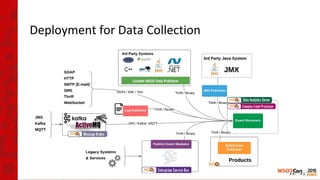
Deployment for Data Collection
Step 2 :
Understand how things have been ...
Deployment for Data Analytics
Batch & Interactive Analytics
• Enable Searchability
– Full text data
– Drill down search
• See what has happened
– Summarise the Data
– Understand patterns and behaviors
Deployment for Data Analytics
Batch & Interactive Analytics
• Enable Searchability
– Full text data
– Drill down search
• See what has happened
– Summarise the data
– Understand patterns and behaviors
• Simple Deployment
– 2 Nodes
– Use RDBMS to store the data
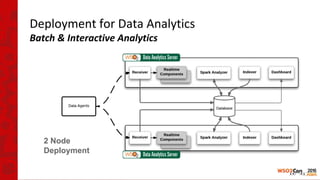
Deployment for Data Analytics
Batch & Interactive Analytics
2 Node
Deployment
Step 3 :
Keep informed ...
Deployment for Data Analytics
Realtime Analytics
• Keep informed
– Dashboard
– Alerts
– Feedback loops
Deployment for Data Analytics
Realtime Analytics
• Keep informed
– Dashboard
– Alerts
– Feedback loops
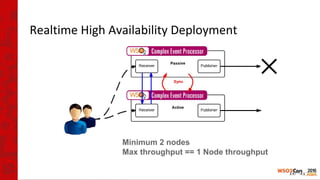
• High Availability
– Zero downtime
– Zero data loss
Realtime High Availability Deployment
Minimum 2 nodes
Max throughput == 1 Node throughput
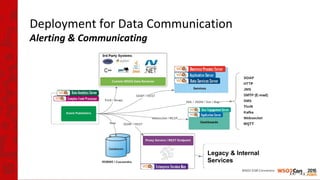
Deployment for Data Communication
Alerting & Communicating
Legacy & Internal
Services
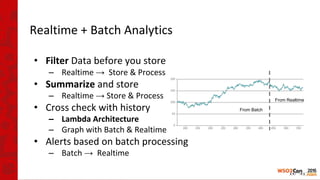
Realtime + Batch Analytics
• Filter Data before you store
– Realtime → Store & Process
• Summarize and store
– Realtime → Store & Process
• Cross check with history
– Lambda Architecture
– Graph with Batch & Realtime
• Alerts based on batch processing
– Batch → Realtime
From Batch
From Realtime
Step 4 :
Think ahead ...
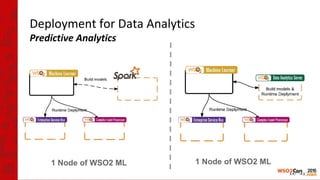
Deployment for Data Analytics
Predictive Analytics
1 Node of WSO2 ML 1 Node of WSO2 ML
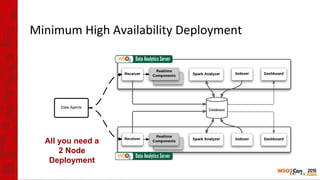
Minimum High Availability Deployment
All you need a
2 Node
Deployment
Step 5 :
Expanding as a Connected Business …
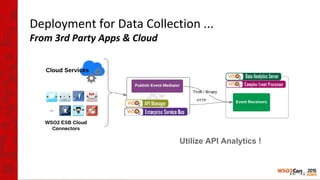
Deployment for Data Collection ...
From 3rd Party Apps & Cloud
HTTP
Utilize API Analytics !
Analyse Business with API Analytics
• APIs involved
• Who invokes the APIs
• Extract business information from
– Payloads
– Resources URIs
Monetize APIs !
Step 6 :
Scale with your Data ...
Scaling Analytics Deployment
The Changes !
• Realtime
– Supported by Apache Storm
• For High Memory Requirement or CPU Intensive Processing
– No query changes
• Batch
– Move from RDBMS to HBase/Cassandra
• WSO2 DAS have a Data Abstraction Layer
• Independent of underlying Data Store
Seamless migration :)
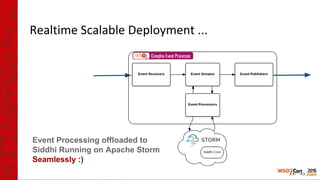
Realtime Scalable Deployment ...
Event Processing offloaded to
Siddhi Running on Apache Storm
Seamlessly :)
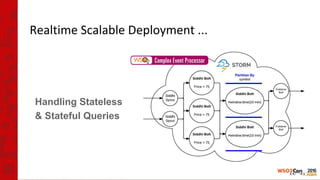
Realtime Scalable Deployment ...
Handling Stateless
& Stateful Queries
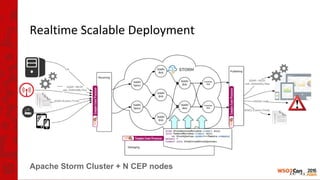
Realtime Scalable Deployment
Apache Storm Cluster + N CEP nodes
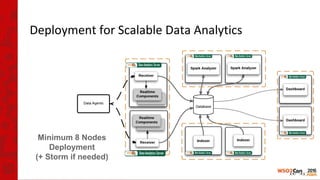
Deployment for Scalable Data Analytics
Minimum 8 Nodes
Deployment
(+ Storm if needed)
Step 7 :
Sense the world around you ...
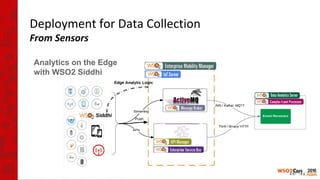
Deployment for Data Collection
From Sensors
Analytics on the Edge
with WSO2 Siddhi
Push
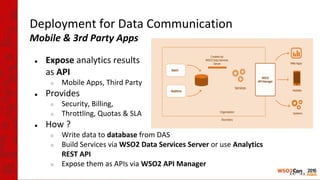
Deployment for Data Communication
Mobile & 3rd Party Apps
● Expose analytics results
as API
○ Mobile Apps, Third Party
● Provides
○ Security, Billing,
○ Throttling, Quotas & SLA
● How ?
○ Write data to database from DAS
○ Build Services via WSO2 Data Services Server or use Analytics
REST API
○ Expose them as APIs via WSO2 API Manager
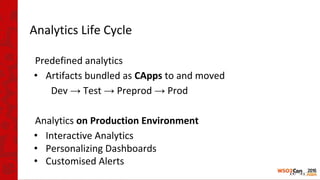
Analytics Life Cycle
Predefined analytics
• Artifacts bundled as CApps to and moved
Dev → Test → Preprod → Prod
Analytics on Production Environment
• Interactive Analytics
• Personalizing Dashboards
• Customised Alerts
Summary
• Start small and scale as you grow
• Minimum HA Deployment
– 2 Nodes
• Fully Distributed Deployment
– 8+ Nodes
– Scale based on need, horizontally and vertically
• Analyser, Indexer, Receiver,
Realtime (With Apache Storm), Dashboard
In God we trust;
all others must bring data
- William Edwards Deming -
Thank You

WSO2Con ASIA 2016: Patterns for Deploying Analytics in the Real World

  • 1.
    Patterns for DeployingAnalytics in the Real World Sriskandarajah Suhothayan (Suho) Technical Lead WSO2
  • 2.
  • 3.
    Problems to thinkabout • Can it handle my load ? • How costly it is ? • Adaptability ? • Can it analyse 3rd party systems ? • etc ...
  • 4.
  • 5.
    Where to start? • Think Big !
  • 6.
    Where to start? • Think Big ! But... • Start simple ! • Eat Your Own Dog Food • Analyse what you already have
  • 7.
    Step 1 : FindData Inside Your Organisation...
  • 8.
    Collect Data Internally •Don’t worry about – Data formats – Data sources – Platforms – Protocols Start with WSO2 DAS it has a unified data capturing framework !
  • 9.
  • 10.
    Step 2 : Understandhow things have been ...
  • 11.
    Deployment for DataAnalytics Batch & Interactive Analytics • Enable Searchability – Full text data – Drill down search • See what has happened – Summarise the Data – Understand patterns and behaviors
  • 12.
    Deployment for DataAnalytics Batch & Interactive Analytics • Enable Searchability – Full text data – Drill down search • See what has happened – Summarise the data – Understand patterns and behaviors • Simple Deployment – 2 Nodes – Use RDBMS to store the data
  • 13.
    Deployment for DataAnalytics Batch & Interactive Analytics 2 Node Deployment
  • 14.
    Step 3 : Keepinformed ...
  • 15.
    Deployment for DataAnalytics Realtime Analytics • Keep informed – Dashboard – Alerts – Feedback loops
  • 16.
    Deployment for DataAnalytics Realtime Analytics • Keep informed – Dashboard – Alerts – Feedback loops • High Availability – Zero downtime – Zero data loss
  • 17.
    Realtime High AvailabilityDeployment Minimum 2 nodes Max throughput == 1 Node throughput
  • 18.
    Deployment for DataCommunication Alerting & Communicating Legacy & Internal Services
  • 19.
    Realtime + BatchAnalytics • Filter Data before you store – Realtime → Store & Process • Summarize and store – Realtime → Store & Process • Cross check with history – Lambda Architecture – Graph with Batch & Realtime • Alerts based on batch processing – Batch → Realtime From Batch From Realtime
  • 20.
    Step 4 : Thinkahead ...
  • 21.
    Deployment for DataAnalytics Predictive Analytics 1 Node of WSO2 ML 1 Node of WSO2 ML
  • 22.
    Minimum High AvailabilityDeployment All you need a 2 Node Deployment
  • 23.
    Step 5 : Expandingas a Connected Business …
  • 24.
    Deployment for DataCollection ... From 3rd Party Apps & Cloud HTTP Utilize API Analytics !
  • 25.
    Analyse Business withAPI Analytics • APIs involved • Who invokes the APIs • Extract business information from – Payloads – Resources URIs Monetize APIs !
  • 26.
    Step 6 : Scalewith your Data ...
  • 27.
    Scaling Analytics Deployment TheChanges ! • Realtime – Supported by Apache Storm • For High Memory Requirement or CPU Intensive Processing – No query changes • Batch – Move from RDBMS to HBase/Cassandra • WSO2 DAS have a Data Abstraction Layer • Independent of underlying Data Store Seamless migration :)
  • 28.
    Realtime Scalable Deployment... Event Processing offloaded to Siddhi Running on Apache Storm Seamlessly :)
  • 29.
    Realtime Scalable Deployment... Handling Stateless & Stateful Queries
  • 30.
    Realtime Scalable Deployment ApacheStorm Cluster + N CEP nodes
  • 31.
    Deployment for ScalableData Analytics Minimum 8 Nodes Deployment (+ Storm if needed)
  • 32.
    Step 7 : Sensethe world around you ...
  • 33.
    Deployment for DataCollection From Sensors Analytics on the Edge with WSO2 Siddhi Push
  • 34.
    Deployment for DataCommunication Mobile & 3rd Party Apps ● Expose analytics results as API ○ Mobile Apps, Third Party ● Provides ○ Security, Billing, ○ Throttling, Quotas & SLA ● How ? ○ Write data to database from DAS ○ Build Services via WSO2 Data Services Server or use Analytics REST API ○ Expose them as APIs via WSO2 API Manager
  • 35.
    Analytics Life Cycle Predefinedanalytics • Artifacts bundled as CApps to and moved Dev → Test → Preprod → Prod Analytics on Production Environment • Interactive Analytics • Personalizing Dashboards • Customised Alerts
  • 36.
    Summary • Start smalland scale as you grow • Minimum HA Deployment – 2 Nodes • Fully Distributed Deployment – 8+ Nodes – Scale based on need, horizontally and vertically • Analyser, Indexer, Receiver, Realtime (With Apache Storm), Dashboard
  • 37.
    In God wetrust; all others must bring data - William Edwards Deming -
  • 38.