WSO2 Analytics Platform: The
One Stop Shop for All Your Data
Needs
Anjana Fernando
Senior Technical Lead, WSO2
Sriskandarajah Suhothayan
Technical Lead, WSO2
WSO2 Analytics Platform
WSO2 Analytics Platform uniquely combines simultaneous real-
time and interactive, batch with predictive analytics to turn data
from IoT, mobile and Web apps into actionable insights
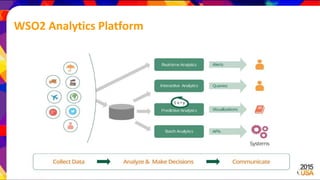
WSO2 Analytics Platform
WSO2 Data Analytics Server
• Fully-open source solution with the ability to build systems and applications
that collect and analyze both realtime and persisted data and communicate
the results.
• Part of WSO2 Big Data Analytics Platform
• High performance data capture framework
• Highly available and scalable by design
• Pre-built Data Agents for WSO2 products
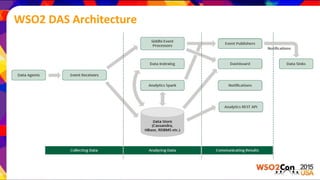
WSO2 DAS Architecture
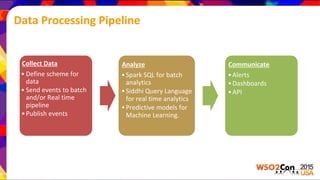
Data Processing Pipeline
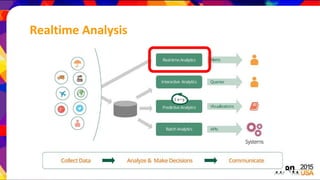
Collect Data
• Define scheme for
data
• Send events to batch
and/or Real time
pipeline
•Publish events
Analyze
•Spark SQL for batch
analytics
•Siddhi Query Language
for real time analytics
•Predictive models for
Machine Learning.
Communicate
•Alerts
•Dashboards
•API
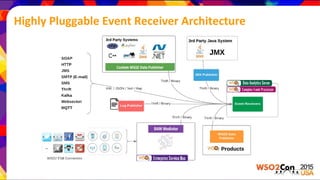
Highly Pluggable Event Receiver Architecture
Data Model
{
'name': 'stream.name',
'version': '1.0.0',
'nickName': 'stream nick name',
'description': 'description of the stream',
'metaData':[
{'name':'meta_data_1','type':'STRING'},
],
'correlationData':[
{'name':'correlation_data_1','type':'STRING'}
],
'payloadData':[
{'name':'payload_data_1','type':'BOOL'},
{'name':'payload_data_2','type':'LONG'}
]
}
● Data published conforming to a strongly typed data stream
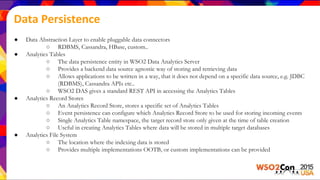
Data Persistence
● Data Abstraction Layer to enable pluggable data connectors
○ RDBMS, Cassandra, HBase, custom..
● Analytics Tables
○ The data persistence entity in WSO2 Data Analytics Server
○ Provides a backend data source agnostic way of storing and retrieving data
○ Allows applications to be written in a way, that it does not depend on a specific data source, e.g. JDBC
(RDBMS), Cassandra APIs etc..
○ WSO2 DAS gives a standard REST API in accessing the Analytics Tables
● Analytics Record Stores
○ An Analytics Record Store, stores a specific set of Analytics Tables
○ Event persistence can configure which Analytics Record Store to be used for storing incoming events
○ Single Analytics Table namespace, the target record store only given at the time of table creation
○ Useful in creating Analytics Tables where data will be stored in multiple target databases
● Analytics File System
○ The location where the indexing data is stored
○ Provides multiple implementations OOTB, or custom implementations can be provided
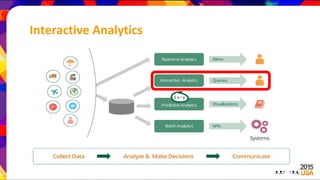
Interactive Analytics
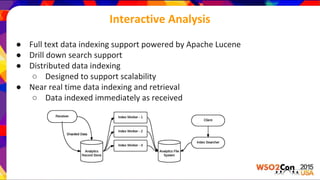
Interactive Analysis
● Full text data indexing support powered by Apache Lucene
● Drill down search support
● Distributed data indexing
○ Designed to support scalability
● Near real time data indexing and retrieval
○ Data indexed immediately as received
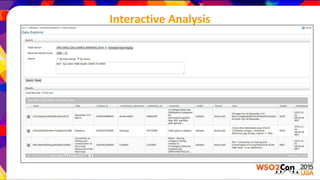
Interactive Analysis
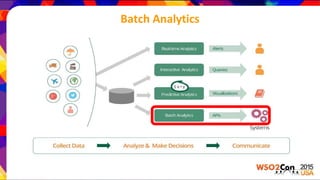
Batch Analytics
Batch Analytics
● Powered by Apache Spark up to 30x higher performance than Hadoop
● Parallel, distributed with optimized in-memory processing
● Scalable script-based analytics written using an easy-to-learn, SQL-like
query language powered by Spark SQL
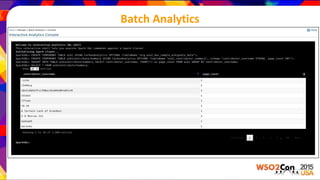
● Interactive built in web interface for ad-hoc query execution
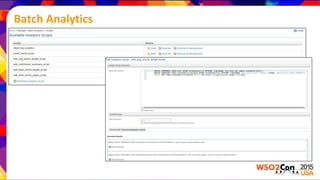
● HA/FO supported scheduled query script execution
● Run Spark on a single node, Spark embedded Carbon server cluster or
connect to external Spark cluster
Batch Analytics
Batch Analytics
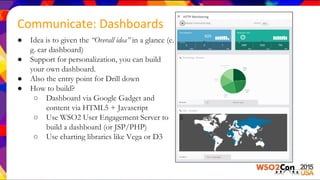
● Idea is to given the “Overall idea” in a glance (e.
g. car dashboard)
● Support for personalization, you can build
your own dashboard.
● Also the entry point for Drill down
● How to build?
○ Dashboard via Google Gadget and
content via HTML5 + Javascript
○ Use WSO2 User Engagement Server to
build a dashboard (or JSP/PHP)
○ Use charting libraries like Vega or D3
Communicate: Dashboards
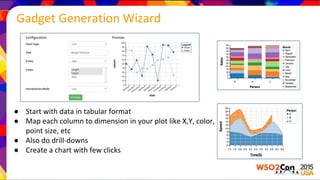
● Start with data in tabular format
● Map each column to dimension in your plot like X,Y, color,
point size, etc
● Also do drill-downs
● Create a chart with few clicks
Gadget Generation Wizard
Realtime Analysis
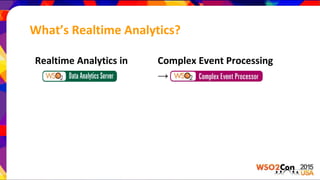
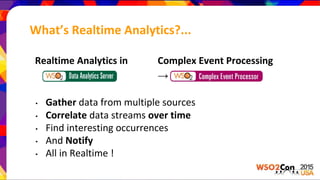
What’s Realtime Analytics?
Realtime Analytics in Complex Event Processing
→
What’s Realtime Analytics?...
Realtime Analytics in Complex Event Processing
→
• Gather data from multiple sources
• Correlate data streams over time
• Find interesting occurrences
• And Notify
• All in Realtime !
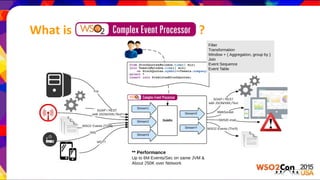
What is WSO2 CEP ?
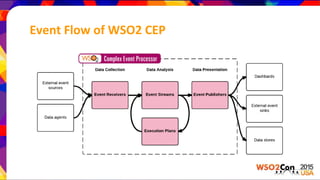
Event Flow of WSO2 CEP
Realtime Execution
• Process in streaming fashion
(one event at a time)
• Execution logic written as Execution Plans
• Execution Plan
• An isolated logical execution unit
• Includes a set of queries, and relates to multiple input and
output event streams
• Executed using dedicated WSO2 Siddhi engine
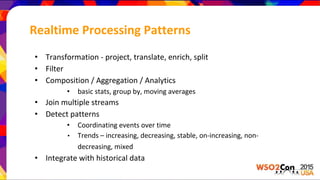
Realtime Processing Patterns
• Transformation - project, translate, enrich, split
• Filter
• Composition / Aggregation / Analytics
• basic stats, group by, moving averages
• Join multiple streams
• Detect patterns
• Coordinating events over time
• Trends – increasing, decreasing, stable, on-increasing, non-
decreasing, mixed
• Integrate with historical data
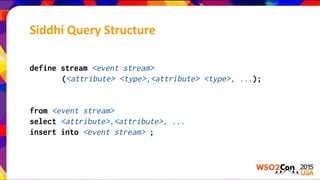
Siddhi Query Structure
define stream <event stream>
(<attribute> <type>,<attribute> <type>, ...);
from <event stream>
select <attribute>,<attribute>, ...
insert into <event stream> ;
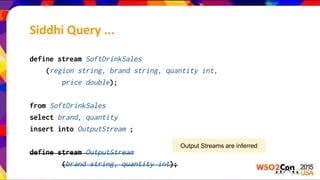
define stream SoftDrinkSales
(region string, brand string, quantity int,
price double);
from SoftDrinkSales
select brand, quantity
insert into OutputStream ;
define stream OutputStream
(brand string, quantity int);
Output Streams are inferred
Siddhi Query ...
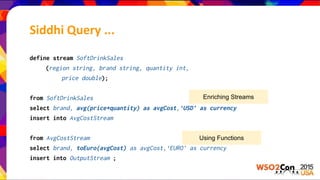
define stream SoftDrinkSales
(region string, brand string, quantity int,
price double);
from SoftDrinkSales
select brand, avg(price*quantity) as avgCost,‘USD’ as currency
insert into AvgCostStream
from AvgCostStream
select brand, toEuro(avgCost) as avgCost,‘EURO’ as currency
insert into OutputStream ;
Enriching Streams
Using Functions
Siddhi Query ...
define stream SoftDrinkSales
(region string, brand string, quantity int,
price double);
from SoftDrinkSales[region == ‘USA’ and quantity > 99]
select brand, price, quantity
insert into WholeSales ;
from SoftDrinkSales#window.time(1 hour)
select region, brand, avg(quantity) as avgQuantity
group by region, brand
insert into LastHourSales ;
Filtering
Aggregation over 1 hour
Other supported window types:
timeBatch(), length(), lengthBatch(), etc.
Siddhi Query (Filter & Window) ...
define stream Purchase (price double, cardNo long,place string);
from every (a1 = Purchase[price < 10] ) ->
a2 = Purchase[ price >10000 and a1.cardNo == a2.cardNo ]
within 1 day
select a1.cardNo as cardNo, a2.price as price, a2.place as place
insert into PotentialFraud ;
Siddhi Query (Pattern) ...
define stream StockStream (symbol string, price double, volume int);
partition by (symbol of StockStream)
begin
from t1=StockStream,
t2=StockStream [(t2[last] is null and t1.price < price) or
(t2[last].price < price)]+
within 5 min
select t1.price as initialPrice, t2[last].price as finalPrice,t1.symbol
insert into IncreaingMyStockPriceStream
end;
Siddhi Query (Trends & Partition)...
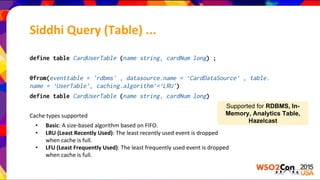
define table CardUserTable (name string, cardNum long) ;
@from(eventtable = 'rdbms' , datasource.name = ‘CardDataSource’ , table.
name = ‘UserTable’, caching.algorithm’=‘LRU’)
define table CardUserTable (name string, cardNum long)
Cache types supported
• Basic: A size-based algorithm based on FIFO.
• LRU (Least Recently Used): The least recently used event is dropped
when cache is full.
• LFU (Least Frequently Used): The least frequently used event is dropped
when cache is full.
Siddhi Query (Table) ...
Supported for RDBMS, In-
Memory, Analytics Table,
Hazelcast
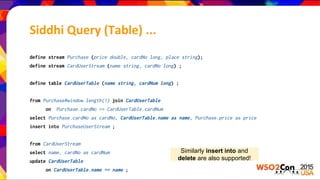
define stream Purchase (price double, cardNo long, place string);
define stream CardUserStream (name string, cardNo long) ;
define table CardUserTable (name string, cardNum long) ;
from Purchase#window.length(1) join CardUserTable
on Purchase.cardNo == CardUserTable.cardNum
select Purchase.cardNo as cardNo, CardUserTable.name as name, Purchase.price as price
insert into PurchaseUserStream ;
from CardUserStream
select name, cardNo as cardNum
update CardUserTable
on CardUserTable.name == name ;
Similarly insert into and
delete are also supported!
Siddhi Query (Table) ...
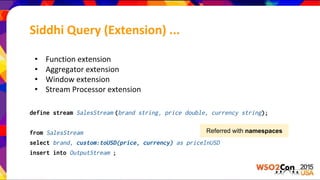
• Function extension
• Aggregator extension
• Window extension
• Stream Processor extension
define stream SalesStream (brand string, price double, currency string);
from SalesStream
select brand, custom:toUSD(price, currency) as priceInUSD
insert into OutputStream ;
Referred with namespaces
Siddhi Query (Extension) ...
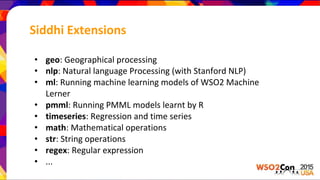
• geo: Geographical processing
• nlp: Natural language Processing (with Stanford NLP)
• ml: Running machine learning models of WSO2 Machine
Lerner
• pmml: Running PMML models learnt by R
• timeseries: Regression and time series
• math: Mathematical operations
• str: String operations
• regex: Regular expression
• ...
Siddhi Extensions
Demo on Realtime Analytics
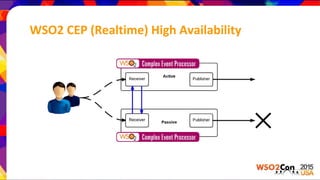
WSO2 CEP (Realtime) High Availability
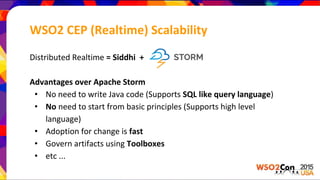
WSO2 CEP (Realtime) Scalability
Distributed Realtime = Siddhi +
Advantages over Apache Storm
• No need to write Java code (Supports SQL like query language)
• No need to start from basic principles (Supports high level
language)
• Adoption for change is fast
• Govern artifacts using Toolboxes
• etc ...
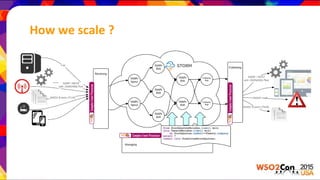
How we scale ?
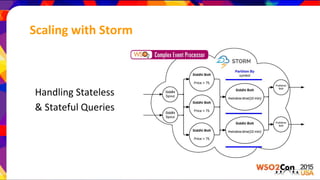
Scaling with Storm
Handling Stateless
& Stateful Queries
Siddhi QL
define stream StockStream (symbol string, volume int, price double);
@name(‘Filter Query’)
from StockStream[price > 75]
select *
insert into HighPriceStockStream ;
@name(‘Window Query’)
from HighPriceStockStream#window.time(10 min)
select symbol, sum(volume) as sumVolume
insert into ResultStockStream ;
Siddhi QL - with partition
define stream StockStream (symbol string, volume int, price double);
@name(‘Filter Query’)
from StockStream[price > 75]
select *
insert into HighPriceStockStream ;
@name(‘Window Query’)
partition with (symbol of HighPriceStockStream)
begin
from HighPriceStockStream#window.time(10 min)
select symbol, sum(volume) as sumVolume
insert into ResultStockStream ;
end;
Siddhi QL - distributed
define stream StockStream (symbol string, volume int, price double);
@name(Filter Query’)
@dist(parallel= ‘3')
from StockStream[price > 75]
select *
insert into HightPriceStockStream ;
@name(‘Window Query’)
@dist(parallel= ‘2')
partition with (symbol of HighPriceStockStream)
begin
from HighPriceStockStream#window.time(10 min)
select symbol, sum(volume) as sumVolume
insert into ResultStockStream ;
end;
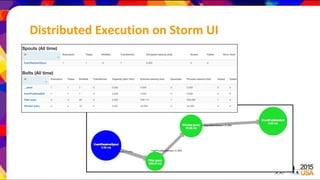
Distributed Execution on Storm UI
Notifying Events
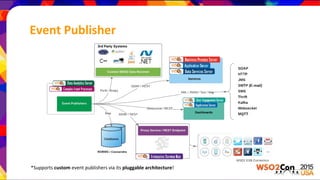
Event Publisher
*Supports custom event publishers via its pluggable architecture!
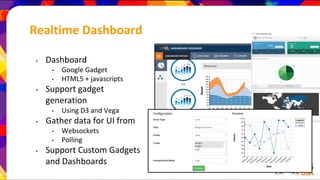
Realtime Dashboard
• Dashboard
• Google Gadget
• HTML5 + javascripts
• Support gadget
generation
• Using D3 and Vega
• Gather data for UI from
• Websockets
• Polling
• Support Custom Gadgets
and Dashboards
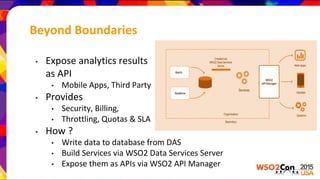
Beyond Boundaries
• Expose analytics results
as API
• Mobile Apps, Third Party
• Provides
• Security, Billing,
• Throttling, Quotas & SLA
• How ?
• Write data to database from DAS
• Build Services via WSO2 Data Services Server
• Expose them as APIs via WSO2 API Manager
Demo on Notifying Events
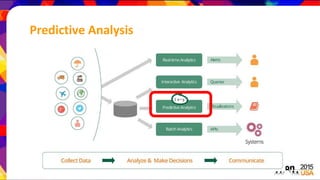
Predictive Analysis
What’s Realtime Analytics?...
Predictive Analytics in
→
• Extract, pre-process, and explore data
• Create models, tune algorithms and make
predictions
• Integrate for better intelligence
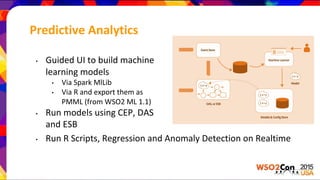
Predictive Analytics
• Guided UI to build machine
learning models
• Via Spark MlLib
• Via R and export them as
PMML (from WSO2 ML 1.1)
• Run models using CEP, DAS
and ESB
• Run R Scripts, Regression and Anomaly Detection on Realtime
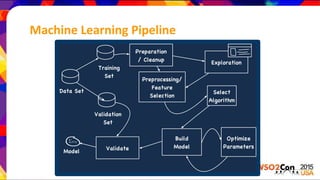
Machine Learning Pipeline
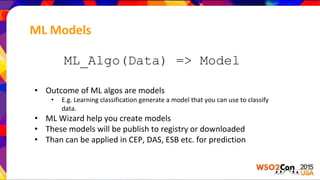
ML Models
ML_Algo(Data) => Model
• Outcome of ML algos are models
• E.g. Learning classification generate a model that you can use to classify
data.
• ML Wizard help you create models
• These models will be publish to registry or downloaded
• Than can be applied in CEP, DAS, ESB etc. for prediction
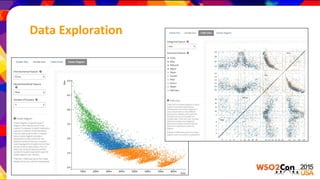
Data Exploration
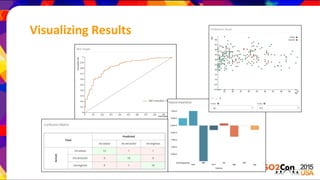
Visualizing Results
Upcoming ML features
• Out of the box model generation support for R
• Deep learning algorithms
• NLP techniques
• Data pre-processing techniques
Demo on Predictive Analytics
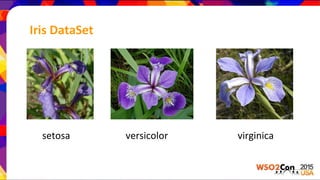
Iris DataSet
setosa versicolor virginica
Thank You

WSO2 Analytics Platform: The one stop shop for all your data needs

  • 1.
    WSO2 Analytics Platform:The One Stop Shop for All Your Data Needs Anjana Fernando Senior Technical Lead, WSO2 Sriskandarajah Suhothayan Technical Lead, WSO2
  • 2.
    WSO2 Analytics Platform WSO2Analytics Platform uniquely combines simultaneous real- time and interactive, batch with predictive analytics to turn data from IoT, mobile and Web apps into actionable insights
  • 3.
  • 4.
    WSO2 Data AnalyticsServer • Fully-open source solution with the ability to build systems and applications that collect and analyze both realtime and persisted data and communicate the results. • Part of WSO2 Big Data Analytics Platform • High performance data capture framework • Highly available and scalable by design • Pre-built Data Agents for WSO2 products
  • 5.
  • 6.
    Data Processing Pipeline CollectData • Define scheme for data • Send events to batch and/or Real time pipeline •Publish events Analyze •Spark SQL for batch analytics •Siddhi Query Language for real time analytics •Predictive models for Machine Learning. Communicate •Alerts •Dashboards •API
  • 7.
    Highly Pluggable EventReceiver Architecture
  • 8.
    Data Model { 'name': 'stream.name', 'version':'1.0.0', 'nickName': 'stream nick name', 'description': 'description of the stream', 'metaData':[ {'name':'meta_data_1','type':'STRING'}, ], 'correlationData':[ {'name':'correlation_data_1','type':'STRING'} ], 'payloadData':[ {'name':'payload_data_1','type':'BOOL'}, {'name':'payload_data_2','type':'LONG'} ] } ● Data published conforming to a strongly typed data stream
  • 9.
    Data Persistence ● DataAbstraction Layer to enable pluggable data connectors ○ RDBMS, Cassandra, HBase, custom.. ● Analytics Tables ○ The data persistence entity in WSO2 Data Analytics Server ○ Provides a backend data source agnostic way of storing and retrieving data ○ Allows applications to be written in a way, that it does not depend on a specific data source, e.g. JDBC (RDBMS), Cassandra APIs etc.. ○ WSO2 DAS gives a standard REST API in accessing the Analytics Tables ● Analytics Record Stores ○ An Analytics Record Store, stores a specific set of Analytics Tables ○ Event persistence can configure which Analytics Record Store to be used for storing incoming events ○ Single Analytics Table namespace, the target record store only given at the time of table creation ○ Useful in creating Analytics Tables where data will be stored in multiple target databases ● Analytics File System ○ The location where the indexing data is stored ○ Provides multiple implementations OOTB, or custom implementations can be provided
  • 10.
  • 11.
    Interactive Analysis ● Fulltext data indexing support powered by Apache Lucene ● Drill down search support ● Distributed data indexing ○ Designed to support scalability ● Near real time data indexing and retrieval ○ Data indexed immediately as received
  • 12.
  • 13.
  • 14.
    Batch Analytics ● Poweredby Apache Spark up to 30x higher performance than Hadoop ● Parallel, distributed with optimized in-memory processing ● Scalable script-based analytics written using an easy-to-learn, SQL-like query language powered by Spark SQL ● Interactive built in web interface for ad-hoc query execution ● HA/FO supported scheduled query script execution ● Run Spark on a single node, Spark embedded Carbon server cluster or connect to external Spark cluster
  • 15.
  • 16.
  • 17.
    ● Idea isto given the “Overall idea” in a glance (e. g. car dashboard) ● Support for personalization, you can build your own dashboard. ● Also the entry point for Drill down ● How to build? ○ Dashboard via Google Gadget and content via HTML5 + Javascript ○ Use WSO2 User Engagement Server to build a dashboard (or JSP/PHP) ○ Use charting libraries like Vega or D3 Communicate: Dashboards
  • 18.
    ● Start withdata in tabular format ● Map each column to dimension in your plot like X,Y, color, point size, etc ● Also do drill-downs ● Create a chart with few clicks Gadget Generation Wizard
  • 19.
  • 20.
    What’s Realtime Analytics? RealtimeAnalytics in Complex Event Processing →
  • 21.
    What’s Realtime Analytics?... RealtimeAnalytics in Complex Event Processing → • Gather data from multiple sources • Correlate data streams over time • Find interesting occurrences • And Notify • All in Realtime !
  • 22.
  • 23.
    Event Flow ofWSO2 CEP
  • 24.
    Realtime Execution • Processin streaming fashion (one event at a time) • Execution logic written as Execution Plans • Execution Plan • An isolated logical execution unit • Includes a set of queries, and relates to multiple input and output event streams • Executed using dedicated WSO2 Siddhi engine
  • 25.
    Realtime Processing Patterns •Transformation - project, translate, enrich, split • Filter • Composition / Aggregation / Analytics • basic stats, group by, moving averages • Join multiple streams • Detect patterns • Coordinating events over time • Trends – increasing, decreasing, stable, on-increasing, non- decreasing, mixed • Integrate with historical data
  • 26.
    Siddhi Query Structure definestream <event stream> (<attribute> <type>,<attribute> <type>, ...); from <event stream> select <attribute>,<attribute>, ... insert into <event stream> ;
  • 27.
    define stream SoftDrinkSales (regionstring, brand string, quantity int, price double); from SoftDrinkSales select brand, quantity insert into OutputStream ; define stream OutputStream (brand string, quantity int); Output Streams are inferred Siddhi Query ...
  • 28.
    define stream SoftDrinkSales (regionstring, brand string, quantity int, price double); from SoftDrinkSales select brand, avg(price*quantity) as avgCost,‘USD’ as currency insert into AvgCostStream from AvgCostStream select brand, toEuro(avgCost) as avgCost,‘EURO’ as currency insert into OutputStream ; Enriching Streams Using Functions Siddhi Query ...
  • 29.
    define stream SoftDrinkSales (regionstring, brand string, quantity int, price double); from SoftDrinkSales[region == ‘USA’ and quantity > 99] select brand, price, quantity insert into WholeSales ; from SoftDrinkSales#window.time(1 hour) select region, brand, avg(quantity) as avgQuantity group by region, brand insert into LastHourSales ; Filtering Aggregation over 1 hour Other supported window types: timeBatch(), length(), lengthBatch(), etc. Siddhi Query (Filter & Window) ...
  • 30.
    define stream Purchase(price double, cardNo long,place string); from every (a1 = Purchase[price < 10] ) -> a2 = Purchase[ price >10000 and a1.cardNo == a2.cardNo ] within 1 day select a1.cardNo as cardNo, a2.price as price, a2.place as place insert into PotentialFraud ; Siddhi Query (Pattern) ...
  • 31.
    define stream StockStream(symbol string, price double, volume int); partition by (symbol of StockStream) begin from t1=StockStream, t2=StockStream [(t2[last] is null and t1.price < price) or (t2[last].price < price)]+ within 5 min select t1.price as initialPrice, t2[last].price as finalPrice,t1.symbol insert into IncreaingMyStockPriceStream end; Siddhi Query (Trends & Partition)...
  • 32.
    define table CardUserTable(name string, cardNum long) ; @from(eventtable = 'rdbms' , datasource.name = ‘CardDataSource’ , table. name = ‘UserTable’, caching.algorithm’=‘LRU’) define table CardUserTable (name string, cardNum long) Cache types supported • Basic: A size-based algorithm based on FIFO. • LRU (Least Recently Used): The least recently used event is dropped when cache is full. • LFU (Least Frequently Used): The least frequently used event is dropped when cache is full. Siddhi Query (Table) ... Supported for RDBMS, In- Memory, Analytics Table, Hazelcast
  • 33.
    define stream Purchase(price double, cardNo long, place string); define stream CardUserStream (name string, cardNo long) ; define table CardUserTable (name string, cardNum long) ; from Purchase#window.length(1) join CardUserTable on Purchase.cardNo == CardUserTable.cardNum select Purchase.cardNo as cardNo, CardUserTable.name as name, Purchase.price as price insert into PurchaseUserStream ; from CardUserStream select name, cardNo as cardNum update CardUserTable on CardUserTable.name == name ; Similarly insert into and delete are also supported! Siddhi Query (Table) ...
  • 34.
    • Function extension •Aggregator extension • Window extension • Stream Processor extension define stream SalesStream (brand string, price double, currency string); from SalesStream select brand, custom:toUSD(price, currency) as priceInUSD insert into OutputStream ; Referred with namespaces Siddhi Query (Extension) ...
  • 35.
    • geo: Geographicalprocessing • nlp: Natural language Processing (with Stanford NLP) • ml: Running machine learning models of WSO2 Machine Lerner • pmml: Running PMML models learnt by R • timeseries: Regression and time series • math: Mathematical operations • str: String operations • regex: Regular expression • ... Siddhi Extensions
  • 36.
  • 37.
    WSO2 CEP (Realtime)High Availability
  • 38.
    WSO2 CEP (Realtime)Scalability Distributed Realtime = Siddhi + Advantages over Apache Storm • No need to write Java code (Supports SQL like query language) • No need to start from basic principles (Supports high level language) • Adoption for change is fast • Govern artifacts using Toolboxes • etc ...
  • 39.
  • 40.
    Scaling with Storm HandlingStateless & Stateful Queries
  • 41.
    Siddhi QL define streamStockStream (symbol string, volume int, price double); @name(‘Filter Query’) from StockStream[price > 75] select * insert into HighPriceStockStream ; @name(‘Window Query’) from HighPriceStockStream#window.time(10 min) select symbol, sum(volume) as sumVolume insert into ResultStockStream ;
  • 42.
    Siddhi QL -with partition define stream StockStream (symbol string, volume int, price double); @name(‘Filter Query’) from StockStream[price > 75] select * insert into HighPriceStockStream ; @name(‘Window Query’) partition with (symbol of HighPriceStockStream) begin from HighPriceStockStream#window.time(10 min) select symbol, sum(volume) as sumVolume insert into ResultStockStream ; end;
  • 43.
    Siddhi QL -distributed define stream StockStream (symbol string, volume int, price double); @name(Filter Query’) @dist(parallel= ‘3') from StockStream[price > 75] select * insert into HightPriceStockStream ; @name(‘Window Query’) @dist(parallel= ‘2') partition with (symbol of HighPriceStockStream) begin from HighPriceStockStream#window.time(10 min) select symbol, sum(volume) as sumVolume insert into ResultStockStream ; end;
  • 44.
  • 45.
  • 46.
    Event Publisher *Supports customevent publishers via its pluggable architecture!
  • 47.
    Realtime Dashboard • Dashboard •Google Gadget • HTML5 + javascripts • Support gadget generation • Using D3 and Vega • Gather data for UI from • Websockets • Polling • Support Custom Gadgets and Dashboards
  • 48.
    Beyond Boundaries • Exposeanalytics results as API • Mobile Apps, Third Party • Provides • Security, Billing, • Throttling, Quotas & SLA • How ? • Write data to database from DAS • Build Services via WSO2 Data Services Server • Expose them as APIs via WSO2 API Manager
  • 49.
  • 50.
  • 51.
    What’s Realtime Analytics?... PredictiveAnalytics in → • Extract, pre-process, and explore data • Create models, tune algorithms and make predictions • Integrate for better intelligence
  • 52.
    Predictive Analytics • GuidedUI to build machine learning models • Via Spark MlLib • Via R and export them as PMML (from WSO2 ML 1.1) • Run models using CEP, DAS and ESB • Run R Scripts, Regression and Anomaly Detection on Realtime
  • 53.
  • 54.
    ML Models ML_Algo(Data) =>Model • Outcome of ML algos are models • E.g. Learning classification generate a model that you can use to classify data. • ML Wizard help you create models • These models will be publish to registry or downloaded • Than can be applied in CEP, DAS, ESB etc. for prediction
  • 55.
  • 56.
  • 57.
    Upcoming ML features •Out of the box model generation support for R • Deep learning algorithms • NLP techniques • Data pre-processing techniques
  • 58.
  • 59.
  • 60.