Mule CXF Component
By – Ankush Sharma
What is CXF?
Apache CXF is an open source services framework. CXF helps you build and
develop services using frontend programming APIs, like JAX-WS and JAX-RS.
These services can speak a variety of protocols such as SOAP, XML/HTTP, RESTful
HTTP, or CORBA and work over a variety of transports such as HTTP, JMS or JBI.
Mule CXF component Namespace and
schema location
 Namespace –
 xmlns:cxf=http://www.mulesoft.org/schema/mule/cxf
 Schema Location –
 http://www.mulesoft.org/schema/mule/cxf/3.5/mule-cxf.xsd
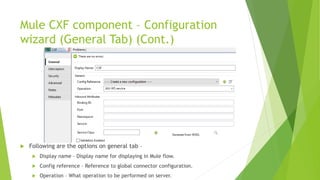
Mule CXF component – Configuration
wizard (General Tab) (Cont.)
 Following are the options on general tab –
 Display name – Display name for displaying in Mule flow.
 Config reference – Reference to global connector configuration.
 Operation – What operation to be performed on server.
Mule CXF component – Configuration
wizard (General Tab)
 Following are the options on general tab –
 Binding Id – The binding that should be used for this service.
 Port – port of the service.
 Namespace – Namespace address of the service.
 Service – The WSDL service name of the service.
 Service class – Class CXF use to construct model.
Mule CXF component – Configuration
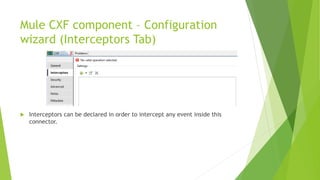
wizard (Interceptors Tab)
 Interceptors can be declared in order to intercept any event inside this
connector.
Mule CXF component – Configuration
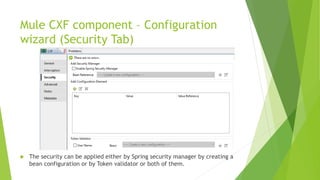
wizard (Security Tab)
 The security can be applied either by Spring security manager by creating a
bean configuration or by Token validator or both of them.
Mule CXF component – Configuration
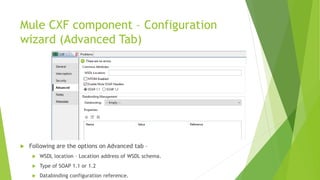
wizard (Advanced Tab)
 Following are the options on Advanced tab –
 WSDL location – Location address of WSDL schema.
 Type of SOAP 1.1 or 1.2
 Databinding configuration reference.
Mule CXF component – Configuration
wizard (Notes and Meta-data Tabs)
 Notes tab - This tab is used to add special notes for the CXF component.
 Metadata tab – This tab is used to add any metadata entry for CXF
component.
Thank You!

Mule CXF component

  • 1.
    Mule CXF Component By– Ankush Sharma
  • 2.
    What is CXF? ApacheCXF is an open source services framework. CXF helps you build and develop services using frontend programming APIs, like JAX-WS and JAX-RS. These services can speak a variety of protocols such as SOAP, XML/HTTP, RESTful HTTP, or CORBA and work over a variety of transports such as HTTP, JMS or JBI.
  • 3.
    Mule CXF componentNamespace and schema location  Namespace –  xmlns:cxf=http://www.mulesoft.org/schema/mule/cxf  Schema Location –  http://www.mulesoft.org/schema/mule/cxf/3.5/mule-cxf.xsd
  • 4.
    Mule CXF component– Configuration wizard (General Tab) (Cont.)  Following are the options on general tab –  Display name – Display name for displaying in Mule flow.  Config reference – Reference to global connector configuration.  Operation – What operation to be performed on server.
  • 5.
    Mule CXF component– Configuration wizard (General Tab)  Following are the options on general tab –  Binding Id – The binding that should be used for this service.  Port – port of the service.  Namespace – Namespace address of the service.  Service – The WSDL service name of the service.  Service class – Class CXF use to construct model.
  • 6.
    Mule CXF component– Configuration wizard (Interceptors Tab)  Interceptors can be declared in order to intercept any event inside this connector.
  • 7.
    Mule CXF component– Configuration wizard (Security Tab)  The security can be applied either by Spring security manager by creating a bean configuration or by Token validator or both of them.
  • 8.
    Mule CXF component– Configuration wizard (Advanced Tab)  Following are the options on Advanced tab –  WSDL location – Location address of WSDL schema.  Type of SOAP 1.1 or 1.2  Databinding configuration reference.
  • 9.
    Mule CXF component– Configuration wizard (Notes and Meta-data Tabs)  Notes tab - This tab is used to add special notes for the CXF component.  Metadata tab – This tab is used to add any metadata entry for CXF component.
  • 10.