PHP web application programming basics

      Getting started with PHP web application


Wednesday, September 12, 12
Introduction

      • You will understand what HTTP is


      • You can start development PHP web application


      • You can use CSS and web fonts then create Khmer web applciation


Wednesday, September 12, 12
What is a web application?


Wednesday, September 12, 12
rn
   a
Le

      What is a web application?

      • Web Application basically work on WWW and HTTP protocol


      • Web Application basically return/generate HTML page by a client requests


Wednesday, September 12, 12
rn
   a
Le

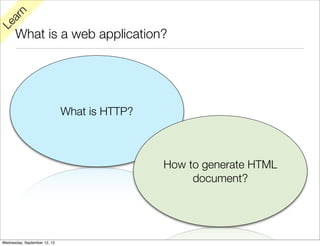
      What is a web application?


                              What is HTTP?


                                              How to generate HTML
                                                   document?


Wednesday, September 12, 12
rn
   a
Le

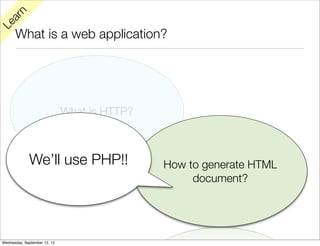
      What is a web application?


                              What is HTTP?


             We’ll use PHP!!                  How to generate HTML
                                                   document?


Wednesday, September 12, 12
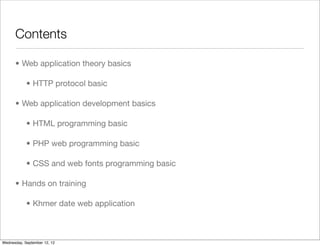
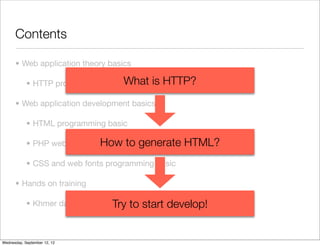
Contents

      • Web application theory basics

            • HTTP protocol basic

      • Web application development basics

            • HTML programming basic

            • PHP web programming basic

            • CSS and web fonts programming basic

      • Hands on training

            • Khmer date web application


Wednesday, September 12, 12
Contents

      • Web application theory basics

            • HTTP protocol basic   What is HTTP?
      • Web application development basics

            • HTML programming basic

            • PHP web programming basicgenerate
                             How to                 HTML?
            • CSS and web fonts programming basic

      • Hands on training

                                  Try to
            • Khmer date web application   start develop!


Wednesday, September 12, 12
HTTP protocol basic


Wednesday, September 12, 12
rn
   a
Le

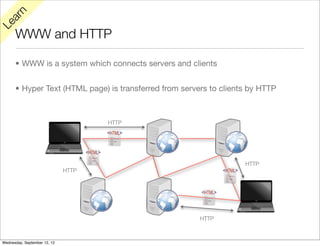
      WWW and HTTP

      • WWW is a system which connects servers and clients


      • Hyper Text (HTML page) is transferred from servers to clients by HTTP


                                     HTTP


                                                                    HTTP
                              HTTP


                                                        HTTP


Wednesday, September 12, 12
rn
   a
Le

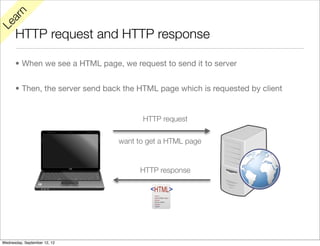
      HTTP request and HTTP response

      • When we see a HTML page, we request to send it to server


      • Then, the server send back the HTML page which is requested by client


                                       HTTP request

                                 want to get a HTML page


                                       HTTP response


Wednesday, September 12, 12
rn
   a
Le

      HTTP request and HTTP response

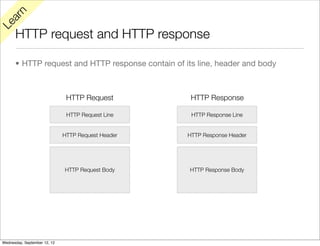
      • HTTP request and HTTP response contain of its line, header and body


                               HTTP Request          HTTP Response

                               HTTP Request Line     HTTP Response Line


                              HTTP Request Header   HTTP Response Header


                              HTTP Request Body     HTTP Response Body


Wednesday, September 12, 12
rn
   a
Le

      HTTP request and HTTP response

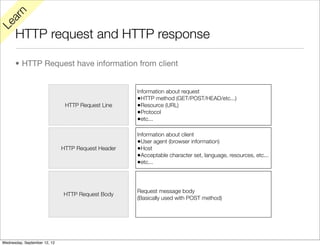
      • HTTP Request have information from client


                                                    Information about request
                                                    •HTTP method (GET/POST/HEAD/etc...)
                               HTTP Request Line    •Resource (URL)
                                                    •Protocol
                                                    •etc...

                                                    Information about client
                                                    •User agent (browser information)
                              HTTP Request Header   •Host
                                                    •Acceptable character set, language, resources, etc...
                                                    •etc...


                                                    Request message body
                              HTTP Request Body
                                                    (Basically used with POST method)


Wednesday, September 12, 12
rn
   a
Le

      HTTP request and HTTP response

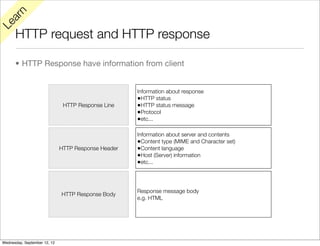
      • HTTP Response have information from client


                                                     Information about response
                                                     •HTTP status
                               HTTP Response Line    •HTTP status message
                                                     •Protocol
                                                     •etc...

                                                     Information about server and contents
                                                     •Content type (MIME and Character set)
                              HTTP Response Header   •Content language
                                                     •Host (Server) information
                                                     •etc...


                                                     Response message body
                              HTTP Response Body
                                                     e.g. HTML


Wednesday, September 12, 12
See HTTP request and response


Wednesday, September 12, 12
y
Tr

      See HTTP request and response (Win/Linux)

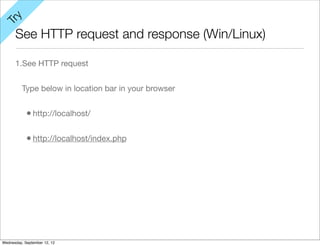
      1.See HTTP request


          Type below in location bar in your browser


            • http://localhost/

            • http://localhost/index.php


Wednesday, September 12, 12
y
Tr

      See HTTP request and response (Win/Linux)

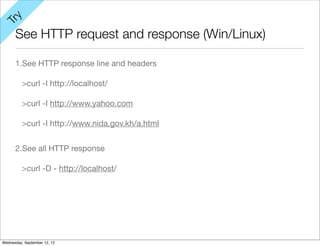
      1.See HTTP response line and headers

          >curl -I http://localhost/

          >curl -I http://www.yahoo.com

          >curl -I http://www.nida.gov.kh/a.html


      2.See all HTTP response

          >curl -D - http://localhost/


Wednesday, September 12, 12
How to send requests to Web Application


Wednesday, September 12, 12
rn
   a
Le

      How to send requests to Web Application

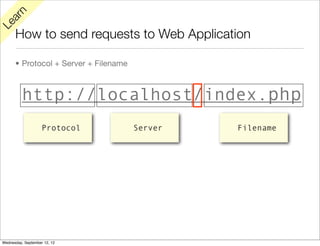
      • Protocol + Server + Filename


          http://localhost/index.php
                    Protocol           Server   Filename


Wednesday, September 12, 12
rn
   a
Le

      How to send messages to Web Application

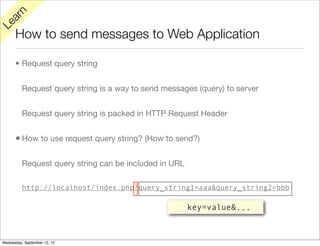
      • Request query string


          Request query string is a way to send messages (query) to server


          Request query string is packed in HTTP Request Header


      • How to use request query string? (How to send?)

          Request query string can be included in URL

          http://localhost/index.php?query_string1=aaa&query_string2=bbb

                                                        key=value&,,,


Wednesday, September 12, 12
y
Tr

      How to send messages to Web Application

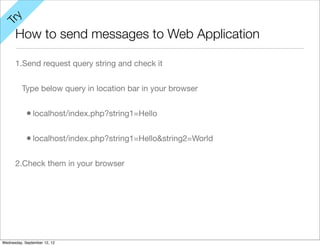
      1.Send request query string and check it


          Type below query in location bar in your browser


            • localhost/index.php?string1=Hello

            • localhost/index.php?string1=Hello&string2=World

      2.Check them in your browser


Wednesday, September 12, 12
rn
   a
Le

      HTTP protocol basic conclusion

      • We have to use HTTP protocol to send/receive information in the WWW


      • HTTP has many rules, it has mainly 2 rules Request and Response


      • Request and Response have 3 part in each (Line, Header and Body)


      • You can see Request with PHP


      • You can see Response with curl


Wednesday, September 12, 12
How to generate HTML pages with PHP


Wednesday, September 12, 12
rn
   a
Le

      How to generate HTML pages with PHP

      • PHP peruse PHP tags as PHP script


      • PHP tags starts from <?php to ?>


      • PHP peruse other strings includes HTML tags as HTML document


Wednesday, September 12, 12
y
Tr

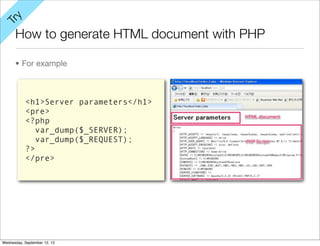
      How to generate HTML document with PHP

      • For example


           <h1>Server parameters</h1>
           <pre>
           <?php
              var_dump($_SERVER);
              var_dump($_REQUEST);
           ?>
           </pre>


Wednesday, September 12, 12
rn
   a
Le

         y
                     How to get query strings
      Tr


      • Get parameter from $_REQUEST or $_GET


      • Get parameter values with parameter keys


          http://localhost/hello_world.php?string1=Hello&string2=World


             <?php
             $str1 = htmlspecialchars($_REQUEST['string1'], ENT_QUOTES, 'UTF-8');
             $str2 = htmlspecialchars($_REQUEST['string2'], ENT_QUOTES, 'UTF-8');
             echo str1;
             echo str2;
             ?>
             <h1><?php echo str1; ?> <?php echo str2; ?></h1>


Wednesday, September 12, 12
Web Application Theory Basics Conclusion


Wednesday, September 12, 12
rn
   a
Le

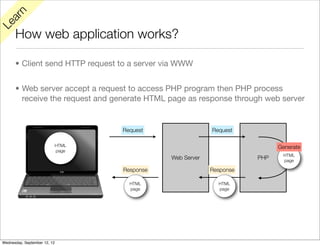
      How web application works?

      • Client send HTTP request to a server via WWW


      • Web server accept a request to access PHP program then PHP process
        receive the request and generate HTML page as response through web server


                                     Request                 Request

                              HTML                                            Generate
                              page
                                                                               HTML
                                                Web Server              PHP    page

                                     Response                Response

                                       HTML                    HTML
                                       page                    page


Wednesday, September 12, 12
Web Application development basic


Wednesday, September 12, 12
rn
   a
Le

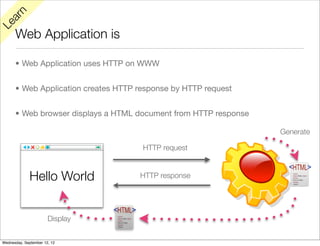
      Web Application is

      • Web Application uses HTTP on WWW


      • Web Application creates HTTP response by HTTP request


      • Web browser displays a HTML document from HTTP response

                                                                  Generate

                                      HTTP request


              Hello World            HTTP response


                       Display


Wednesday, September 12, 12
HTML development basics


Wednesday, September 12, 12
rn
   a
Le

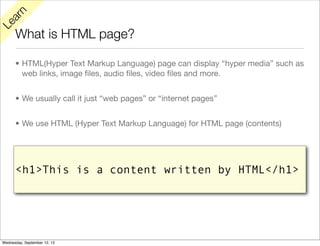
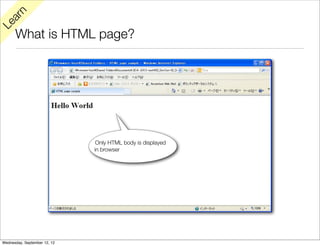
      What is HTML page?

      • HTML(Hyper Text Markup Language) page can display “hyper media” such as
        web links, image files, audio files, video files and more.


      • We usually call it just “web pages” or “internet pages”


      • We use HTML (Hyper Text Markup Language) for HTML page (contents)


      <h1>This is a content written by HTML</h1>


Wednesday, September 12, 12
rn
   a
Le

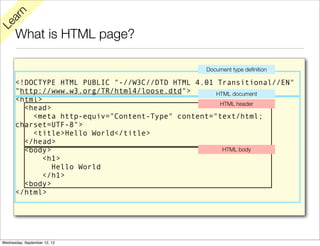
      What is HTML page?

                                                Document type definition

      <!DOCTYPE HTML PUBLIC "-//W3C//DTD HTML 4.01 Transitional//EN"
      "http://www.w3.org/TR/html4/loose.dtd">      HTML document
      <html>
                                                    HTML header
        <head>
          <meta http-equiv="Content-Type" content="text/html;
      charset=UTF-8">
          <title>Hello World</title>
        </head>
        <body>                                       HTML body
             <h1>
               Hello World
             </h1>
        <body>
      </html>


Wednesday, September 12, 12
rn
   a
Le

      What is HTML page?


                               Only HTML body is displayed
                              in browser


Wednesday, September 12, 12
rn
   a
Le

      How to write

      • HTML is written by HTML tags


      • HTML tags basically are pair


      • The first tag of the pair is start tag


      • The second tag of the pair is end tag


      • End tag include / (slash) in forward on its name


Wednesday, September 12, 12
rn
   a
Le

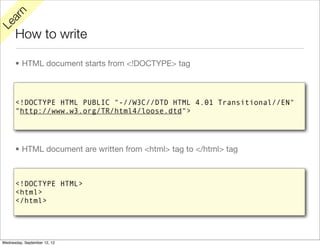
      How to write

      • HTML document starts from <!DOCTYPE> tag


      <!DOCTYPE HTML PUBLIC "-//W3C//DTD HTML 4.01 Transitional//EN"
      "http://www.w3.org/TR/html4/loose.dtd">


      • HTML document are written from <html> tag to </html> tag


      <!DOCTYPE HTML>
      <html>
      </html>


Wednesday, September 12, 12
rn
   a
Le

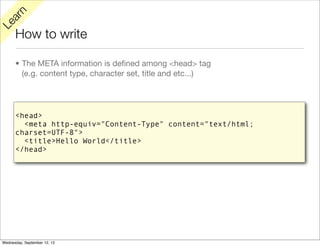
      How to write

      • The META information is defined among <head> tag
        (e.g. content type, character set, title and etc...)


      <head>
        <meta http-equiv="Content-Type" content="text/html;
      charset=UTF-8">
        <title>Hello World</title>
      </head>


Wednesday, September 12, 12
rn
   a
Le

      How to write

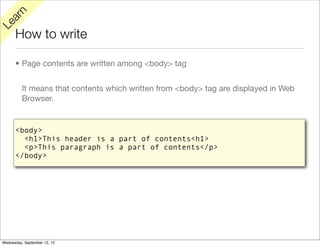
      • Page contents are written among <body> tag


          It means that contents which written from <body> tag are displayed in Web
          Browser.


      <body>
        <h1>This header is a part of contents<h1>
        <p>This paragraph is a part of contents</p>
      </body>


Wednesday, September 12, 12
rn
   a
Le

      How to write

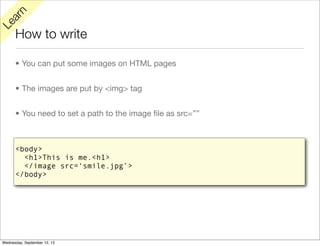
      • You can put some images on HTML pages


      • The images are put by <img> tag


      • You need to set a path to the image file as src=””


      <body>
        <h1>This is me.<h1>
        </image src=‘smile.jpg’>
      </body>


Wednesday, September 12, 12
rn
   a
Le

      How to link

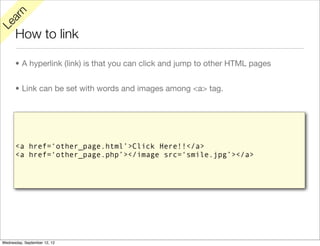
      • A hyperlink (link) is that you can click and jump to other HTML pages


      • Link can be set with words and images among <a> tag.


      <a href=‘other_page.html’>Click Here!!</a>
      <a href=‘other_page.php’></image src=‘smile.jpg’></a>


Wednesday, September 12, 12
y
Tr

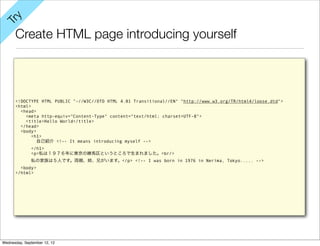
      Create HTML page introducing yourself


      <!DOCTYPE HTML PUBLIC "-//W3C//DTD HTML 4.01 Transitional//EN" "http://www.w3.org/TR/html4/loose.dtd">
      <html>
        <head>
          <meta http-equiv="Content-Type" content="text/html; charset=UTF-8">
          <title>Hello World</title>
        </head>
        <body>
             <h1>
               自己紹介 <!-- It means introducing myself -->
              </h1>
              <p>私は1976年に東京の練馬区というところで生まれました。<br/>
              私の家族は5人です。両親、姉、兄がいます。</p> <!-- I was born in 1976 in Nerima, Tokyo..... -->
        <body>
      </html>


Wednesday, September 12, 12
PHP development basics


Wednesday, September 12, 12
rn
   a
Le

         y
                      How to generate
      Tr


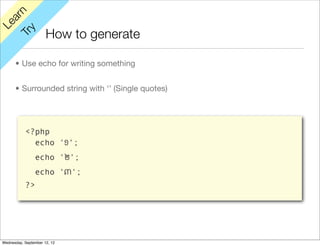
      • Use echo for writing something


      • Surrounded string with ‘’ (Single quotes)


           <?php
             echo '១';
                echo '២';
                echo '៣';
           ?>


Wednesday, September 12, 12
rn
   a
Le

         y
                      How to use variables
      Tr


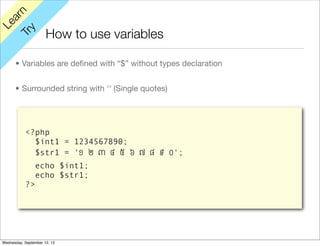
      • Variables are defined with “$” without types declaration


      • Surrounded string with ‘’ (Single quotes)


           <?php
             $int1 = 1234567890;
             $str1 = '១ ២ ៣ ៤ ៥ ៦ ៧ ៨ ៩ ០';
                echo $int1;
                echo $str1;
           ?>


Wednesday, September 12, 12
rn
   a
Le

         y
                      How to use array
      Tr


      • Array is created array() and values are defined as below


      • You can access the values with their keys


           <?php
             $array1 = array(
                  ‘key1’ => ‘១’,
                              ‘key2’ => ‘២’
                              ‘key3’ => ‘៣’
                );
                echo $array1[‘key1’];
                echo $array1[‘key2’];
                echo $array1[‘key3’];
           ?>


Wednesday, September 12, 12
rn
   a
Le

         y
                      How to use array
      Tr


      • You can also access the values with the indexes of the array


      • The indexes start from 0


           <?php
             $array1 = array(‘១’,‘២’,‘៣’);
                echo $array1[0];
                echo $array1[1];
                echo $array1[2];
           ?>


Wednesday, September 12, 12
rn
   a
Le

         y
                      How to control array
      Tr


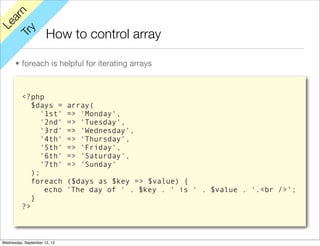
      • foreach is helpful for iterating arrays


          <?php
             $days =          array(
                '1st'         => 'Monday',
                '2nd'         => 'Tuesday',
                '3rd'         => 'Wednesday',
                '4th'         => 'Thursday',
                '5th'         => 'Friday',
                '6th'         => 'Saturday',
                '7th'         => 'Sunday'
             );
             foreach          ($days as $key => $value) {
                 echo         'The day of ' . $key . ' is ' . $value . '.<br />';
             }
          ?>


Wednesday, September 12, 12
rn
   a
Le

         y
                     How to get query strings (re-study)
      Tr


      • Get parameter from $_REQUEST or $_GET


      • Get parameter values with parameter keys


          http://localhost/hello_world.php?string1=Hello&string2=World


             <?php
             $str1 = htmlspecialchars($_REQUEST['string1'], ENT_QUOTES, 'UTF-8');
             $str2 = htmlspecialchars($_REQUEST['string2'], ENT_QUOTES, 'UTF-8');
             echo str1;
             echo str2;
             ?>
             <?php echo str1; ?> <?php echo str2; ?>


Wednesday, September 12, 12
rn
   a
Le

         y
                      How to control process
      Tr


      • If, If...else, If...else if...


          <?php
          $num = htmlspecialchars($_REQUEST['num'], ENT_QUOTES, 'UTF-8');
          $status = '';

          // if...else if and else
          if (!isset($num) || $num == '') {
            $status = 'Num is not set';
          } else if (is_numeric($num) && $num > 9) {
            $status = 'Num is numeric and larger than 10';
          } else if (is_numeric($num) && $num < 10) {
            $status = 'Num is numeric and smaller than 10';
          } else {
            $status = 'Num is not numeric but set. Num is ' . $num;
          }

          //
          echo $status;
          ?>


Wednesday, September 12, 12
rn
   a
Le

         y
                      How to control process
      Tr


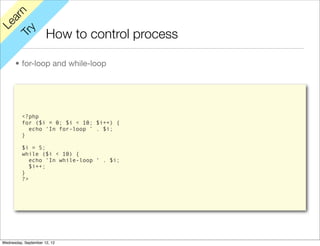
      • for-loop and while-loop


          <?php
          for ($i = 0; $i < 10; $i++) {
            echo ‘In for-loop ’ . $i;
          }

          $i = 5;
          while ($i < 10) {
             echo ‘In while-loop ‘ . $i;
             $i++;
          }
          ?>


Wednesday, September 12, 12
How to integrate with PHP and HTML


Wednesday, September 12, 12
y
Tr

      How to integrate with PHP and HTML

      • PHP section works for getting query or process something


      • HTML section works for displaying results


      • You can include PHP section into HTML section

                                                                                          PHP section
      <?php
      $nums = array('០','១', '២', '៣', '៤', '៥', '៦', '៧', '៨', '៩');
      $input_num = htmlspecialchars($_REQUEST['num'], ENT_QUOTES, 'UTF-8');
      $display_num = $nums[$input_num];
      ?>                                                                                  HTML section
      <!DOCTYPE HTML PUBLIC "-//W3C//DTD HTML 4.01 Transitional//EN" "http://www.w3.org/TR/html4/loose.dtd">
      <html>
         <head>
           <meta http-equiv="Content-Type" content="text/html; charset=UTF-8">
           <title>Repeater</title>
         </head>                                        PHP section
         <body>
             <p>You inputed <?php echo $display_num; ?>.</p>
         <body>
      </html>


Wednesday, September 12, 12
CSS development and web fonts basics


Wednesday, September 12, 12
rn
   a
Le

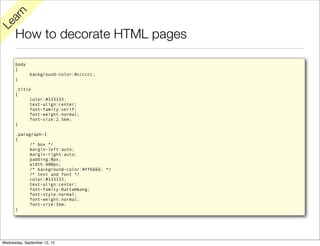
      How to decorate HTML pages

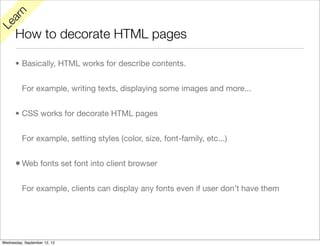
      • Basically, HTML works for describe contents.


          For example, writing texts, displaying some images and more...


      • CSS works for decorate HTML pages


          For example, setting styles (color, size, font-family, etc...)


      • Web fonts set font into client browser

          For example, clients can display any fonts even if user don’t have them


Wednesday, September 12, 12
rn
   a
Le

      How to decorate HTML pages

      body
      {
              background-color:#cccccc;
      }

      .title
      {
           color:#333333;
           text-align:center;
           font-family:serif;
           font-weight:normal;
           font-size:2.5em;
      }

      .paragraph-1
      {
           /* box */
           margin-left:auto;
           margin-right:auto;
           padding:0px;
           width:400px;
           /* background-color:#ff6666; */
           /* text and font */
           color:#333333;
           text-align:center;
           font-family:Battambang;
           font-style:normal;
           font-weight:normal;
           font-size:3em;
      }


Wednesday, September 12, 12
rn
   a
Le

      How to decorate HTML pages


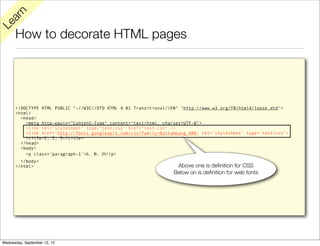
      <!DOCTYPE HTML PUBLIC "-//W3C//DTD HTML 4.01 Transitional//EN" "http://www.w3.org/TR/html4/loose.dtd">
      <html>
        <head>
          <meta http-equiv="Content-Type" content="text/html; charset=UTF-8">
          <link rel="stylesheet" type="text/css" href="test.css" />
          <link href='http://fonts.googleapis.com/css?family=Battambang:400' rel='stylesheet' type='text/css'>
          <title>1, 2, 3</title>
        </head>
        <body>
          <p class='paragraph-1'>១, ២, ៣</p>
        </body>
      </html>                                                      Above one is definition for CSS
                                                                  Below on is definition for web fonts


Wednesday, September 12, 12
y
Tr

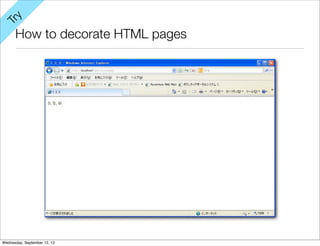
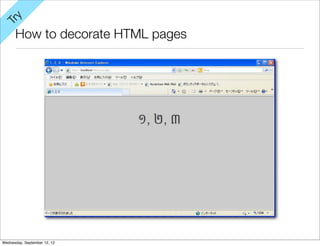
      How to decorate HTML pages


Wednesday, September 12, 12
y
Tr

      How to decorate HTML pages


Wednesday, September 12, 12
rn
   a
Le

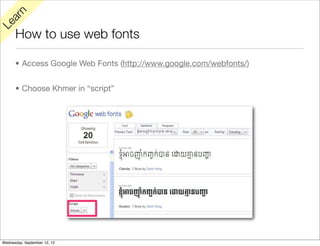
      How to use web fonts

      • Access Google Web Fonts (http://www.google.com/webfonts/)


      • Choose Khmer in “script”


Wednesday, September 12, 12
rn
   a
Le

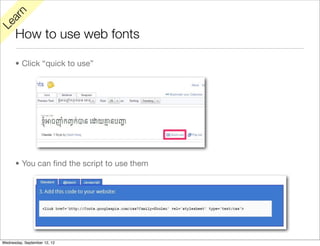
      How to use web fonts

      • Click “quick to use”


      • You can find the script to use them


Wednesday, September 12, 12
Web Application development basic Conclusion


Wednesday, September 12, 12
rn
   a
Le

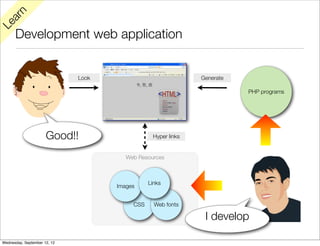
      Development web application


                              Look                             Generate

                                                                          PHP programs


                      Good!!                     Hyper links


                                        Web Resources


                                                Links
                                     Images


                                          CSS     Web fonts

                                                                I develop

Wednesday, September 12, 12
rn
   a
Le

      How to improve your development skill

      • Keep trying :-)


      • Official references are your friends


          PHP : http://www.php.net/manual/en/


          HTML : http://www.w3.org/TR/html401/index/elements.html


          CSS : http://www.w3.org/Style/CSS/learning


      • You can find many good tutorials in the internet also


          http://www.w3schools.com/default.asp


Wednesday, September 12, 12
Hands on training


Wednesday, September 12, 12
Khmer date


Wednesday, September 12, 12
s
    ific
 ec
Sp


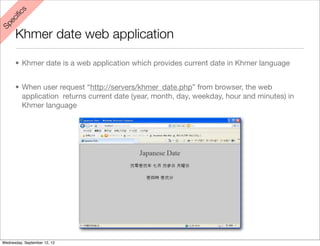
      Khmer date web application

      • Khmer date is a web application which provides current date in Khmer language


      • When user request “http://servers/khmer_date.php” from browser, the web
        application returns current date (year, month, day, weekday, hour and minutes) in
        Khmer language


Wednesday, September 12, 12
ps
 Ti


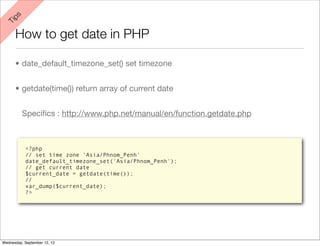
      How to get date in PHP

      • date_default_timezone_set() set timezone


      • getdate(time()) return array of current date


          Specifics : http://www.php.net/manual/en/function.getdate.php


           <?php
           // set time zone 'Asia/Phnom_Penh'
           date_default_timezone_set('Asia/Phnom_Penh');
           // get current date
           $current_date = getdate(time());
           //
           var_dump($current_date);
           ?>


Wednesday, September 12, 12
ps
 Ti


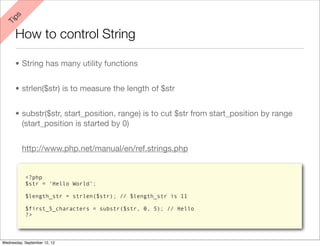
      How to control String

      • String has many utility functions


      • strlen($str) is to measure the length of $str


      • substr($str, start_position, range) is to cut $str from start_position by range
        (start_position is started by 0)


          http://www.php.net/manual/en/ref.strings.php


           <?php
           $str = ‘Hello World’;

           $length_str = strlen($str); // $length_str is 11

           $first_5_characters = substr($str, 0, 5); // Hello
           ?>


Wednesday, September 12, 12
ps
 Ti


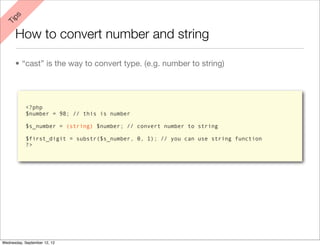
      How to convert number and string

      • “cast” is the way to convert type. (e.g. number to string)


            <?php
            $number = 98; // this is number

            $s_number = (string) $number; // convert number to string

            $first_digit = substr($s_number, 0, 1); // you can use string function
            ?>


Wednesday, September 12, 12
Extend Khmer date


Wednesday, September 12, 12
e
  or
M


      Extended Khmer date : World date

      • World date is a web application which provides current date all over the world


      • When user set timezone in a request like “http://servers/khmer_date.php?
        timezone=XXXX/YYYY” from browser, the web application returns current date (year,
        month, day, weekday, hour and minutes) in the timezone


      • You can see all usable timezones in PHP in below link


          http://www.php.net/manual/en/timezones.php


Wednesday, September 12, 12
e
  or
M


      Extended Khmer date : Decorated Khmer date

      • Decorate the Khmer date as you like :-)


Wednesday, September 12, 12
Homework


Wednesday, September 12, 12
s
    ific
 ec
Sp


      Simple calendar web application

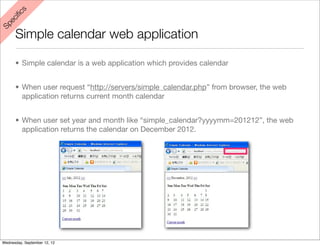
      • Simple calendar is a web application which provides calendar


      • When user request “http://servers/simple_calendar.php” from browser, the web
        application returns current month calendar


      • When user set year and month like “simple_calendar?yyyymm=201212”, the web
        application returns the calendar on December 2012.


Wednesday, September 12, 12
APPENDIX


Wednesday, September 12, 12
Installing curl


Wednesday, September 12, 12
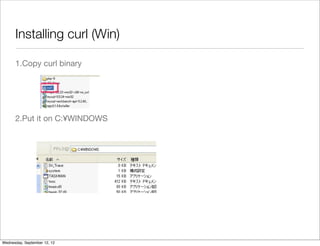
Installing curl (Win)

      1.Copy curl binary


      2.Put it on C:¥WINDOWS


Wednesday, September 12, 12
How to generate logs in PHP


Wednesday, September 12, 12
How to generate logs in PHP

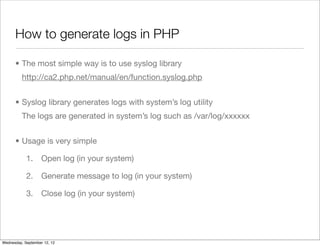
      • The most simple way is to use syslog library
          http://ca2.php.net/manual/en/function.syslog.php


      • Syslog library generates logs with system’s log utility
          The logs are generated in system’s log such as /var/log/xxxxxx


      • Usage is very simple

            1.      Open log (in your system)

            2.      Generate message to log (in your system)

            3.      Close log (in your system)


Wednesday, September 12, 12
How to generate logs in PHP

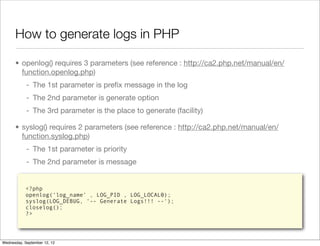
      • openlog() requires 3 parameters (see reference : http://ca2.php.net/manual/en/
        function.openlog.php)
            - The 1st parameter is prefix message in the log
            - The 2nd parameter is generate option
            - The 3rd parameter is the place to generate (facility)

      • syslog() requires 2 parameters (see reference : http://ca2.php.net/manual/en/
        function.syslog.php)
            - The 1st parameter is priority
            - The 2nd parameter is message


            <?php
            openlog(‘log_name’ , LOG_PID , LOG_LOCAL0);
            syslog(LOG_DEBUG, '-- Generate Logs!!! --');
            closelog();
            ?>


Wednesday, September 12, 12
How to generate logs in PHP

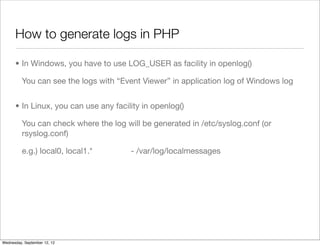
      • In Windows, you have to use LOG_USER as facility in openlog()

          You can see the logs with “Event Viewer” in application log of Windows log


      • In Linux, you can use any facility in openlog()

          You can check where the log will be generated in /etc/syslog.conf (or
          rsyslog.conf)

          e.g.) local0, local1.*        - /var/log/localmessages


Wednesday, September 12, 12

Ws phpl1 php_apps_basics_1.2

  • 1.
    PHP web applicationprogramming basics Getting started with PHP web application Wednesday, September 12, 12
  • 2.
    Introduction • You will understand what HTTP is • You can start development PHP web application • You can use CSS and web fonts then create Khmer web applciation Wednesday, September 12, 12
  • 3.
    What is aweb application? Wednesday, September 12, 12
  • 4.
    rn a Le What is a web application? • Web Application basically work on WWW and HTTP protocol • Web Application basically return/generate HTML page by a client requests Wednesday, September 12, 12
  • 5.
    rn a Le What is a web application? What is HTTP? How to generate HTML document? Wednesday, September 12, 12
  • 6.
    rn a Le What is a web application? What is HTTP? We’ll use PHP!! How to generate HTML document? Wednesday, September 12, 12
  • 7.
    Contents • Web application theory basics • HTTP protocol basic • Web application development basics • HTML programming basic • PHP web programming basic • CSS and web fonts programming basic • Hands on training • Khmer date web application Wednesday, September 12, 12
  • 8.
    Contents • Web application theory basics • HTTP protocol basic What is HTTP? • Web application development basics • HTML programming basic • PHP web programming basicgenerate How to HTML? • CSS and web fonts programming basic • Hands on training Try to • Khmer date web application start develop! Wednesday, September 12, 12
  • 9.
  • 10.
    rn a Le WWW and HTTP • WWW is a system which connects servers and clients • Hyper Text (HTML page) is transferred from servers to clients by HTTP HTTP HTTP HTTP HTTP Wednesday, September 12, 12
  • 11.
    rn a Le HTTP request and HTTP response • When we see a HTML page, we request to send it to server • Then, the server send back the HTML page which is requested by client HTTP request want to get a HTML page HTTP response Wednesday, September 12, 12
  • 12.
    rn a Le HTTP request and HTTP response • HTTP request and HTTP response contain of its line, header and body HTTP Request HTTP Response HTTP Request Line HTTP Response Line HTTP Request Header HTTP Response Header HTTP Request Body HTTP Response Body Wednesday, September 12, 12
  • 13.
    rn a Le HTTP request and HTTP response • HTTP Request have information from client Information about request •HTTP method (GET/POST/HEAD/etc...) HTTP Request Line •Resource (URL) •Protocol •etc... Information about client •User agent (browser information) HTTP Request Header •Host •Acceptable character set, language, resources, etc... •etc... Request message body HTTP Request Body (Basically used with POST method) Wednesday, September 12, 12
  • 14.
    rn a Le HTTP request and HTTP response • HTTP Response have information from client Information about response •HTTP status HTTP Response Line •HTTP status message •Protocol •etc... Information about server and contents •Content type (MIME and Character set) HTTP Response Header •Content language •Host (Server) information •etc... Response message body HTTP Response Body e.g. HTML Wednesday, September 12, 12
  • 15.
    See HTTP requestand response Wednesday, September 12, 12
  • 16.
    y Tr See HTTP request and response (Win/Linux) 1.See HTTP request Type below in location bar in your browser • http://localhost/ • http://localhost/index.php Wednesday, September 12, 12
  • 17.
    y Tr See HTTP request and response (Win/Linux) 1.See HTTP response line and headers >curl -I http://localhost/ >curl -I http://www.yahoo.com >curl -I http://www.nida.gov.kh/a.html 2.See all HTTP response >curl -D - http://localhost/ Wednesday, September 12, 12
  • 18.
    How to sendrequests to Web Application Wednesday, September 12, 12
  • 19.
    rn a Le How to send requests to Web Application • Protocol + Server + Filename http://localhost/index.php Protocol Server Filename Wednesday, September 12, 12
  • 20.
    rn a Le How to send messages to Web Application • Request query string Request query string is a way to send messages (query) to server Request query string is packed in HTTP Request Header • How to use request query string? (How to send?) Request query string can be included in URL http://localhost/index.php?query_string1=aaa&query_string2=bbb key=value&,,, Wednesday, September 12, 12
  • 21.
    y Tr How to send messages to Web Application 1.Send request query string and check it Type below query in location bar in your browser • localhost/index.php?string1=Hello • localhost/index.php?string1=Hello&string2=World 2.Check them in your browser Wednesday, September 12, 12
  • 22.
    rn a Le HTTP protocol basic conclusion • We have to use HTTP protocol to send/receive information in the WWW • HTTP has many rules, it has mainly 2 rules Request and Response • Request and Response have 3 part in each (Line, Header and Body) • You can see Request with PHP • You can see Response with curl Wednesday, September 12, 12
  • 23.
    How to generateHTML pages with PHP Wednesday, September 12, 12
  • 24.
    rn a Le How to generate HTML pages with PHP • PHP peruse PHP tags as PHP script • PHP tags starts from <?php to ?> • PHP peruse other strings includes HTML tags as HTML document Wednesday, September 12, 12
  • 25.
    y Tr How to generate HTML document with PHP • For example <h1>Server parameters</h1> <pre> <?php var_dump($_SERVER); var_dump($_REQUEST); ?> </pre> Wednesday, September 12, 12
  • 26.
    rn a Le y How to get query strings Tr • Get parameter from $_REQUEST or $_GET • Get parameter values with parameter keys http://localhost/hello_world.php?string1=Hello&string2=World <?php $str1 = htmlspecialchars($_REQUEST['string1'], ENT_QUOTES, 'UTF-8'); $str2 = htmlspecialchars($_REQUEST['string2'], ENT_QUOTES, 'UTF-8'); echo str1; echo str2; ?> <h1><?php echo str1; ?> <?php echo str2; ?></h1> Wednesday, September 12, 12
  • 27.
    Web Application TheoryBasics Conclusion Wednesday, September 12, 12
  • 28.
    rn a Le How web application works? • Client send HTTP request to a server via WWW • Web server accept a request to access PHP program then PHP process receive the request and generate HTML page as response through web server Request Request HTML Generate page HTML Web Server PHP page Response Response HTML HTML page page Wednesday, September 12, 12
  • 29.
    Web Application developmentbasic Wednesday, September 12, 12
  • 30.
    rn a Le Web Application is • Web Application uses HTTP on WWW • Web Application creates HTTP response by HTTP request • Web browser displays a HTML document from HTTP response Generate HTTP request Hello World HTTP response Display Wednesday, September 12, 12
  • 31.
  • 32.
    rn a Le What is HTML page? • HTML(Hyper Text Markup Language) page can display “hyper media” such as web links, image files, audio files, video files and more. • We usually call it just “web pages” or “internet pages” • We use HTML (Hyper Text Markup Language) for HTML page (contents) <h1>This is a content written by HTML</h1> Wednesday, September 12, 12
  • 33.
    rn a Le What is HTML page? Document type definition <!DOCTYPE HTML PUBLIC "-//W3C//DTD HTML 4.01 Transitional//EN" "http://www.w3.org/TR/html4/loose.dtd"> HTML document <html> HTML header <head> <meta http-equiv="Content-Type" content="text/html; charset=UTF-8"> <title>Hello World</title> </head> <body> HTML body <h1> Hello World </h1> <body> </html> Wednesday, September 12, 12
  • 34.
    rn a Le What is HTML page? Only HTML body is displayed in browser Wednesday, September 12, 12
  • 35.
    rn a Le How to write • HTML is written by HTML tags • HTML tags basically are pair • The first tag of the pair is start tag • The second tag of the pair is end tag • End tag include / (slash) in forward on its name Wednesday, September 12, 12
  • 36.
    rn a Le How to write • HTML document starts from <!DOCTYPE> tag <!DOCTYPE HTML PUBLIC "-//W3C//DTD HTML 4.01 Transitional//EN" "http://www.w3.org/TR/html4/loose.dtd"> • HTML document are written from <html> tag to </html> tag <!DOCTYPE HTML> <html> </html> Wednesday, September 12, 12
  • 37.
    rn a Le How to write • The META information is defined among <head> tag (e.g. content type, character set, title and etc...) <head> <meta http-equiv="Content-Type" content="text/html; charset=UTF-8"> <title>Hello World</title> </head> Wednesday, September 12, 12
  • 38.
    rn a Le How to write • Page contents are written among <body> tag It means that contents which written from <body> tag are displayed in Web Browser. <body> <h1>This header is a part of contents<h1> <p>This paragraph is a part of contents</p> </body> Wednesday, September 12, 12
  • 39.
    rn a Le How to write • You can put some images on HTML pages • The images are put by <img> tag • You need to set a path to the image file as src=”” <body> <h1>This is me.<h1> </image src=‘smile.jpg’> </body> Wednesday, September 12, 12
  • 40.
    rn a Le How to link • A hyperlink (link) is that you can click and jump to other HTML pages • Link can be set with words and images among <a> tag. <a href=‘other_page.html’>Click Here!!</a> <a href=‘other_page.php’></image src=‘smile.jpg’></a> Wednesday, September 12, 12
  • 41.
    y Tr Create HTML page introducing yourself <!DOCTYPE HTML PUBLIC "-//W3C//DTD HTML 4.01 Transitional//EN" "http://www.w3.org/TR/html4/loose.dtd"> <html> <head> <meta http-equiv="Content-Type" content="text/html; charset=UTF-8"> <title>Hello World</title> </head> <body> <h1> 自己紹介 <!-- It means introducing myself --> </h1> <p>私は1976年に東京の練馬区というところで生まれました。<br/> 私の家族は5人です。両親、姉、兄がいます。</p> <!-- I was born in 1976 in Nerima, Tokyo..... --> <body> </html> Wednesday, September 12, 12
  • 42.
  • 43.
    rn a Le y How to generate Tr • Use echo for writing something • Surrounded string with ‘’ (Single quotes) <?php echo '១'; echo '២'; echo '៣'; ?> Wednesday, September 12, 12
  • 44.
    rn a Le y How to use variables Tr • Variables are defined with “$” without types declaration • Surrounded string with ‘’ (Single quotes) <?php $int1 = 1234567890; $str1 = '១ ២ ៣ ៤ ៥ ៦ ៧ ៨ ៩ ០'; echo $int1; echo $str1; ?> Wednesday, September 12, 12
  • 45.
    rn a Le y How to use array Tr • Array is created array() and values are defined as below • You can access the values with their keys <?php $array1 = array( ‘key1’ => ‘១’, ‘key2’ => ‘២’ ‘key3’ => ‘៣’ ); echo $array1[‘key1’]; echo $array1[‘key2’]; echo $array1[‘key3’]; ?> Wednesday, September 12, 12
  • 46.
    rn a Le y How to use array Tr • You can also access the values with the indexes of the array • The indexes start from 0 <?php $array1 = array(‘១’,‘២’,‘៣’); echo $array1[0]; echo $array1[1]; echo $array1[2]; ?> Wednesday, September 12, 12
  • 47.
    rn a Le y How to control array Tr • foreach is helpful for iterating arrays <?php $days = array( '1st' => 'Monday', '2nd' => 'Tuesday', '3rd' => 'Wednesday', '4th' => 'Thursday', '5th' => 'Friday', '6th' => 'Saturday', '7th' => 'Sunday' ); foreach ($days as $key => $value) { echo 'The day of ' . $key . ' is ' . $value . '.<br />'; } ?> Wednesday, September 12, 12
  • 48.
    rn a Le y How to get query strings (re-study) Tr • Get parameter from $_REQUEST or $_GET • Get parameter values with parameter keys http://localhost/hello_world.php?string1=Hello&string2=World <?php $str1 = htmlspecialchars($_REQUEST['string1'], ENT_QUOTES, 'UTF-8'); $str2 = htmlspecialchars($_REQUEST['string2'], ENT_QUOTES, 'UTF-8'); echo str1; echo str2; ?> <?php echo str1; ?> <?php echo str2; ?> Wednesday, September 12, 12
  • 49.
    rn a Le y How to control process Tr • If, If...else, If...else if... <?php $num = htmlspecialchars($_REQUEST['num'], ENT_QUOTES, 'UTF-8'); $status = ''; // if...else if and else if (!isset($num) || $num == '') { $status = 'Num is not set'; } else if (is_numeric($num) && $num > 9) { $status = 'Num is numeric and larger than 10'; } else if (is_numeric($num) && $num < 10) { $status = 'Num is numeric and smaller than 10'; } else { $status = 'Num is not numeric but set. Num is ' . $num; } // echo $status; ?> Wednesday, September 12, 12
  • 50.
    rn a Le y How to control process Tr • for-loop and while-loop <?php for ($i = 0; $i < 10; $i++) { echo ‘In for-loop ’ . $i; } $i = 5; while ($i < 10) { echo ‘In while-loop ‘ . $i; $i++; } ?> Wednesday, September 12, 12
  • 51.
    How to integratewith PHP and HTML Wednesday, September 12, 12
  • 52.
    y Tr How to integrate with PHP and HTML • PHP section works for getting query or process something • HTML section works for displaying results • You can include PHP section into HTML section PHP section <?php $nums = array('០','១', '២', '៣', '៤', '៥', '៦', '៧', '៨', '៩'); $input_num = htmlspecialchars($_REQUEST['num'], ENT_QUOTES, 'UTF-8'); $display_num = $nums[$input_num]; ?> HTML section <!DOCTYPE HTML PUBLIC "-//W3C//DTD HTML 4.01 Transitional//EN" "http://www.w3.org/TR/html4/loose.dtd"> <html> <head> <meta http-equiv="Content-Type" content="text/html; charset=UTF-8"> <title>Repeater</title> </head> PHP section <body> <p>You inputed <?php echo $display_num; ?>.</p> <body> </html> Wednesday, September 12, 12
  • 53.
    CSS development andweb fonts basics Wednesday, September 12, 12
  • 54.
    rn a Le How to decorate HTML pages • Basically, HTML works for describe contents. For example, writing texts, displaying some images and more... • CSS works for decorate HTML pages For example, setting styles (color, size, font-family, etc...) • Web fonts set font into client browser For example, clients can display any fonts even if user don’t have them Wednesday, September 12, 12
  • 55.
    rn a Le How to decorate HTML pages body { background-color:#cccccc; } .title { color:#333333; text-align:center; font-family:serif; font-weight:normal; font-size:2.5em; } .paragraph-1 { /* box */ margin-left:auto; margin-right:auto; padding:0px; width:400px; /* background-color:#ff6666; */ /* text and font */ color:#333333; text-align:center; font-family:Battambang; font-style:normal; font-weight:normal; font-size:3em; } Wednesday, September 12, 12
  • 56.
    rn a Le How to decorate HTML pages <!DOCTYPE HTML PUBLIC "-//W3C//DTD HTML 4.01 Transitional//EN" "http://www.w3.org/TR/html4/loose.dtd"> <html> <head> <meta http-equiv="Content-Type" content="text/html; charset=UTF-8"> <link rel="stylesheet" type="text/css" href="test.css" /> <link href='http://fonts.googleapis.com/css?family=Battambang:400' rel='stylesheet' type='text/css'> <title>1, 2, 3</title> </head> <body> <p class='paragraph-1'>១, ២, ៣</p> </body> </html> Above one is definition for CSS Below on is definition for web fonts Wednesday, September 12, 12
  • 57.
    y Tr How to decorate HTML pages Wednesday, September 12, 12
  • 58.
    y Tr How to decorate HTML pages Wednesday, September 12, 12
  • 59.
    rn a Le How to use web fonts • Access Google Web Fonts (http://www.google.com/webfonts/) • Choose Khmer in “script” Wednesday, September 12, 12
  • 60.
    rn a Le How to use web fonts • Click “quick to use” • You can find the script to use them Wednesday, September 12, 12
  • 61.
    Web Application developmentbasic Conclusion Wednesday, September 12, 12
  • 62.
    rn a Le Development web application Look Generate PHP programs Good!! Hyper links Web Resources Links Images CSS Web fonts I develop Wednesday, September 12, 12
  • 63.
    rn a Le How to improve your development skill • Keep trying :-) • Official references are your friends PHP : http://www.php.net/manual/en/ HTML : http://www.w3.org/TR/html401/index/elements.html CSS : http://www.w3.org/Style/CSS/learning • You can find many good tutorials in the internet also http://www.w3schools.com/default.asp Wednesday, September 12, 12
  • 64.
  • 65.
  • 66.
    s ific ec Sp Khmer date web application • Khmer date is a web application which provides current date in Khmer language • When user request “http://servers/khmer_date.php” from browser, the web application returns current date (year, month, day, weekday, hour and minutes) in Khmer language Wednesday, September 12, 12
  • 67.
    ps Ti How to get date in PHP • date_default_timezone_set() set timezone • getdate(time()) return array of current date Specifics : http://www.php.net/manual/en/function.getdate.php <?php // set time zone 'Asia/Phnom_Penh' date_default_timezone_set('Asia/Phnom_Penh'); // get current date $current_date = getdate(time()); // var_dump($current_date); ?> Wednesday, September 12, 12
  • 68.
    ps Ti How to control String • String has many utility functions • strlen($str) is to measure the length of $str • substr($str, start_position, range) is to cut $str from start_position by range (start_position is started by 0) http://www.php.net/manual/en/ref.strings.php <?php $str = ‘Hello World’; $length_str = strlen($str); // $length_str is 11 $first_5_characters = substr($str, 0, 5); // Hello ?> Wednesday, September 12, 12
  • 69.
    ps Ti How to convert number and string • “cast” is the way to convert type. (e.g. number to string) <?php $number = 98; // this is number $s_number = (string) $number; // convert number to string $first_digit = substr($s_number, 0, 1); // you can use string function ?> Wednesday, September 12, 12
  • 70.
  • 71.
    e or M Extended Khmer date : World date • World date is a web application which provides current date all over the world • When user set timezone in a request like “http://servers/khmer_date.php? timezone=XXXX/YYYY” from browser, the web application returns current date (year, month, day, weekday, hour and minutes) in the timezone • You can see all usable timezones in PHP in below link http://www.php.net/manual/en/timezones.php Wednesday, September 12, 12
  • 72.
    e or M Extended Khmer date : Decorated Khmer date • Decorate the Khmer date as you like :-) Wednesday, September 12, 12
  • 73.
  • 74.
    s ific ec Sp Simple calendar web application • Simple calendar is a web application which provides calendar • When user request “http://servers/simple_calendar.php” from browser, the web application returns current month calendar • When user set year and month like “simple_calendar?yyyymm=201212”, the web application returns the calendar on December 2012. Wednesday, September 12, 12
  • 75.
  • 76.
  • 77.
    Installing curl (Win) 1.Copy curl binary 2.Put it on C:¥WINDOWS Wednesday, September 12, 12
  • 78.
    How to generatelogs in PHP Wednesday, September 12, 12
  • 79.
    How to generatelogs in PHP • The most simple way is to use syslog library http://ca2.php.net/manual/en/function.syslog.php • Syslog library generates logs with system’s log utility The logs are generated in system’s log such as /var/log/xxxxxx • Usage is very simple 1. Open log (in your system) 2. Generate message to log (in your system) 3. Close log (in your system) Wednesday, September 12, 12
  • 80.
    How to generatelogs in PHP • openlog() requires 3 parameters (see reference : http://ca2.php.net/manual/en/ function.openlog.php) - The 1st parameter is prefix message in the log - The 2nd parameter is generate option - The 3rd parameter is the place to generate (facility) • syslog() requires 2 parameters (see reference : http://ca2.php.net/manual/en/ function.syslog.php) - The 1st parameter is priority - The 2nd parameter is message <?php openlog(‘log_name’ , LOG_PID , LOG_LOCAL0); syslog(LOG_DEBUG, '-- Generate Logs!!! --'); closelog(); ?> Wednesday, September 12, 12
  • 81.
    How to generatelogs in PHP • In Windows, you have to use LOG_USER as facility in openlog() You can see the logs with “Event Viewer” in application log of Windows log • In Linux, you can use any facility in openlog() You can check where the log will be generated in /etc/syslog.conf (or rsyslog.conf) e.g.) local0, local1.* - /var/log/localmessages Wednesday, September 12, 12