









WPF: Working With Data


     Learn More @ http://www.learnnowonline.com
        Copyright © by Application Developers Training Company
Objectives


      Learn More @ http://www.learnnowonline.com
         Copyright © by Application Developers Training Company
Objectives
• Set how to retrieve data from a SQL
  Server database


         Learn More @ http://www.learnnowonline.com
            Copyright © by Application Developers Training Company
Objectives
• Set how to retrieve data from a SQL
  Server database
• Create common data bound forms


         Learn More @ http://www.learnnowonline.com
            Copyright © by Application Developers Training Company
Objectives
• Set how to retrieve data from a SQL
  Server database
• Create common data bound forms
• See how to display information from
  main and related tables


         Learn More @ http://www.learnnowonline.com
            Copyright © by Application Developers Training Company
Agenda


     Learn More @ http://www.learnnowonline.com
         Copyright © by Application Developers Training Company
Agenda
• Data Binding


        Learn More @ http://www.learnnowonline.com
           Copyright © by Application Developers Training Company
Agenda
• Data Binding
• Using Views


        Learn More @ http://www.learnnowonline.com
           Copyright © by Application Developers Training Company
Data Binding


      Learn More @ http://www.learnnowonline.com
         Copyright © by Application Developers Training Company
Data Binding
• Process of getting information from
  one object to another and
  automatically displaying it in one or
  more elements in user interface


         Learn More @ http://www.learnnowonline.com
            Copyright © by Application Developers Training Company
Without Data Binding


      Learn More @ http://www.learnnowonline.com
         Copyright © by Application Developers Training Company
Without Data Binding
1. In window’s Loaded event handler,
   query database and retrieve list of
   customers


          Learn More @ http://www.learnnowonline.com
             Copyright © by Application Developers Training Company
Without Data Binding
1. In window’s Loaded event handler,
   query database and retrieve list of
   customers
2. In code or in XAML, set ItemsSource
   property of list box to DataTable or
   other object that contains customers


         Learn More @ http://www.learnnowonline.com
            Copyright © by Application Developers Training Company
Without Data Binding
1. In window’s Loaded event handler,
   query database and retrieve list of
   customers
2. In code or in XAML, set ItemsSource
   property of list box to DataTable or
   other object that contains customers
3. In list box’s SelectionChanged event
   handler, query database and retrieve
   information for selected customer
         Learn More @ http://www.learnnowonline.com
            Copyright © by Application Developers Training Company
Without Data Binding


      Learn More @ http://www.learnnowonline.com
         Copyright © by Application Developers Training Company
Without Data Binding
4. In list box’s SelectionChanged event
   handler, set Text property of each
   text box to value of appropriate
   column of customer data


         Learn More @ http://www.learnnowonline.com
            Copyright © by Application Developers Training Company
Without Data Binding
4. In list box’s SelectionChanged event
   handler, set Text property of each
   text box to value of appropriate
   column of customer data
5. In Save button’s Click event handler,
   read value of each text box and
   update appropriate column of
   customer data

          Learn More @ http://www.learnnowonline.com
             Copyright © by Application Developers Training Company
Without Data Binding
4. In list box’s SelectionChanged event
   handler, set Text property of each
   text box to value of appropriate
   column of customer data
5. In Save button’s Click event handler,
   read value of each text box and
   update appropriate column of
   customer data
6. In Save button’s Click event handler,
   save changes http://www.learnnowonline.com
            Learn More @ back to database
             Copyright © by Application Developers Training Company
With Data Binding


      Learn More @ http://www.learnnowonline.com
         Copyright © by Application Developers Training Company
With Data Binding
1. In window’s Loaded event handler, query
  database and retrieve list of customers


          Learn More @ http://www.learnnowonline.com
             Copyright © by Application Developers Training Company
With Data Binding
1. In window’s Loaded event handler, query
   database and retrieve list of customers
2. In code or in XAML, set ItemsSource
   property of list box to DataTable or other
   object that contains customers


          Learn More @ http://www.learnnowonline.com
             Copyright © by Application Developers Training Company
With Data Binding
1. In window’s Loaded event handler, query
   database and retrieve list of customers
2. In code or in XAML, set ItemsSource
   property of list box to DataTable or other
   object that contains customers
3. In list box’s SelectionChanged event
   handler, query database and retrieve
   information for selected customer


          Learn More @ http://www.learnnowonline.com
             Copyright © by Application Developers Training Company
With Data Binding
1. In window’s Loaded event handler, query
   database and retrieve list of customers
2. In code or in XAML, set ItemsSource
   property of list box to DataTable or other
   object that contains customers
3. In list box’s SelectionChanged event
   handler, query database and retrieve
   information for selected customer
4. In Save button’s Click event handler, save
   changes back to database

          Learn More @ http://www.learnnowonline.com
             Copyright © by Application Developers Training Company
Data Source Options


      Learn More @ http://www.learnnowonline.com
         Copyright © by Application Developers Training Company
Data Source Options
• Same as in Windows Forms applications


         Learn More @ http://www.learnnowonline.com
            Copyright © by Application Developers Training Company
Data Source Options
• Same as in Windows Forms applications
• Many data sources


         Learn More @ http://www.learnnowonline.com
            Copyright © by Application Developers Training Company
Data Source Options
• Same as in Windows Forms applications
• Many data sources
  • Custom business objects


          Learn More @ http://www.learnnowonline.com
             Copyright © by Application Developers Training Company
Data Source Options
• Same as in Windows Forms applications
• Many data sources
  • Custom business objects
  • ADO.NET DataSets


          Learn More @ http://www.learnnowonline.com
             Copyright © by Application Developers Training Company
Data Source Options
• Same as in Windows Forms applications
• Many data sources
  • Custom business objects
  • ADO.NET DataSets
  • LINQ to SQL


          Learn More @ http://www.learnnowonline.com
             Copyright © by Application Developers Training Company
Data Source Options
• Same as in Windows Forms applications
• Many data sources
  •   Custom business objects
  •   ADO.NET DataSets
  •   LINQ to SQL
  •   Entity Framework


            Learn More @ http://www.learnnowonline.com
               Copyright © by Application Developers Training Company
Data Source Options
• Same as in Windows Forms applications
• Many data sources
  •   Custom business objects
  •   ADO.NET DataSets
  •   LINQ to SQL
  •   Entity Framework
  •   Services


            Learn More @ http://www.learnnowonline.com
               Copyright © by Application Developers Training Company
Data Source Options
• Same as in Windows Forms applications
• Many data sources
  •   Custom business objects
  •   ADO.NET DataSets
  •   LINQ to SQL
  •   Entity Framework
  •   Services
      • Web services


             Learn More @ http://www.learnnowonline.com
                Copyright © by Application Developers Training Company
Data Source Options
• Same as in Windows Forms applications
• Many data sources
  •   Custom business objects
  •   ADO.NET DataSets
  •   LINQ to SQL
  •   Entity Framework
  •   Services
      • Web services
      • Windows Communication Foundation (WCF)
        services

             Learn More @ http://www.learnnowonline.com
                   Copyright © by Application Developers Training Company
Binding to an Object


      Learn More @ http://www.learnnowonline.com
         Copyright © by Application Developers Training Company
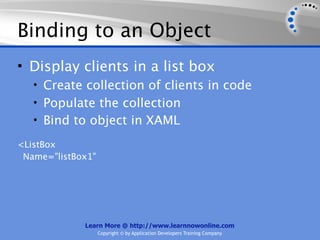
Binding to an Object
• Display clients in a list box
  • Create collection of clients in code
  • Populate the collection
  • Bind to object in XAML


           Learn More @ http://www.learnnowonline.com
              Copyright © by Application Developers Training Company
Binding to an Object
• Display clients in a list box
  • Create collection of clients in code
  • Populate the collection
  • Bind to object in XAML


           Learn More @ http://www.learnnowonline.com
              Copyright © by Application Developers Training Company
Binding to an Object
• Display clients in a list box
   • Create collection of clients in code
   • Populate the collection
   • Bind to object in XAML

<ListBox


            Learn More @ http://www.learnnowonline.com
               Copyright © by Application Developers Training Company
Binding to an Object
• Display clients in a list box
   • Create collection of clients in code
   • Populate the collection
   • Bind to object in XAML

<ListBox
 Name="listBox1"


             Learn More @ http://www.learnnowonline.com
                   Copyright © by Application Developers Training Company
Binding to an Object
• Display clients in a list box
   • Create collection of clients in code
   • Populate the collection
   • Bind to object in XAML

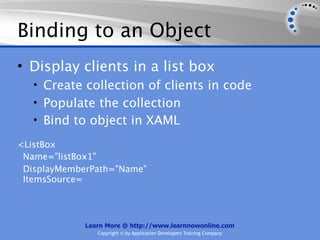
<ListBox
 Name="listBox1"
 DisplayMemberPath="Name"
 ItemsSource=


             Learn More @ http://www.learnnowonline.com
                Copyright © by Application Developers Training Company
Binding to an Object
• Display clients in a list box
   • Create collection of clients in code
   • Populate the collection
   • Bind to object in XAML

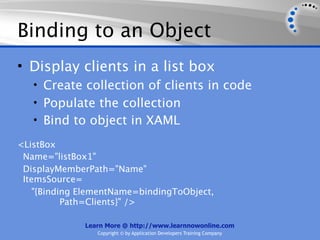
<ListBox
 Name="listBox1"
 DisplayMemberPath="Name"
 ItemsSource=
    "{Binding ElementName=bindingToObject,
           Path=Clients}" />

              Learn More @ http://www.learnnowonline.com
                 Copyright © by Application Developers Training Company
Binding to an Object


      Learn More @ http://www.learnnowonline.com
         Copyright © by Application Developers Training Company
Binding to an Object
• Select a client and display details in data-
  bound text boxes in a grid
  • Bind grid by setting data context to selected
    list box item
  • Text boxes in grid inherit data binding


           Learn More @ http://www.learnnowonline.com
              Copyright © by Application Developers Training Company
Binding to an Object
• Select a client and display details in data-
  bound text boxes in a grid
  • Bind grid by setting data context to selected
    list box item
  • Text boxes in grid inherit data binding


           Learn More @ http://www.learnnowonline.com
              Copyright © by Application Developers Training Company
Binding to an Object
• Select a client and display details in data-
  bound text boxes in a grid
   • Bind grid by setting data context to selected
     list box item
   • Text boxes in grid inherit data binding
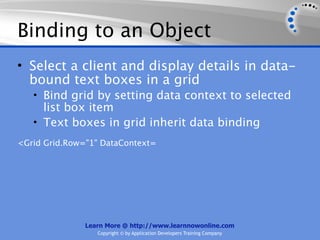
<Grid Grid.Row="1" DataContext=


               Learn More @ http://www.learnnowonline.com
                  Copyright © by Application Developers Training Company
Binding to an Object
• Select a client and display details in data-
  bound text boxes in a grid
   • Bind grid by setting data context to selected
     list box item
   • Text boxes in grid inherit data binding
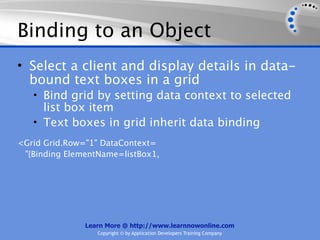
<Grid Grid.Row="1" DataContext=
 "{Binding ElementName=listBox1,


               Learn More @ http://www.learnnowonline.com
                  Copyright © by Application Developers Training Company
Binding to an Object
• Select a client and display details in data-
  bound text boxes in a grid
   • Bind grid by setting data context to selected
     list box item
   • Text boxes in grid inherit data binding
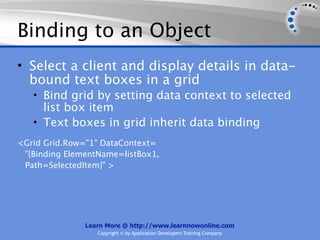
<Grid Grid.Row="1" DataContext=
 "{Binding ElementName=listBox1,
 Path=SelectedItem}" >


               Learn More @ http://www.learnnowonline.com
                  Copyright © by Application Developers Training Company
Binding to an Object
• Select a client and display details in data-
  bound text boxes in a grid
   • Bind grid by setting data context to selected
     list box item
   • Text boxes in grid inherit data binding
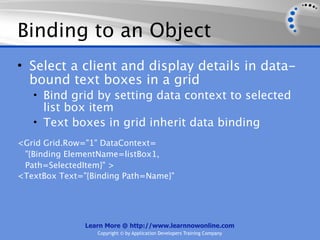
<Grid Grid.Row="1" DataContext=
 "{Binding ElementName=listBox1,
 Path=SelectedItem}" >
<TextBox Text="{Binding Path=Name}"


               Learn More @ http://www.learnnowonline.com
                  Copyright © by Application Developers Training Company
Binding to an Object
• Select a client and display details in data-
  bound text boxes in a grid
   • Bind grid by setting data context to selected
     list box item
   • Text boxes in grid inherit data binding
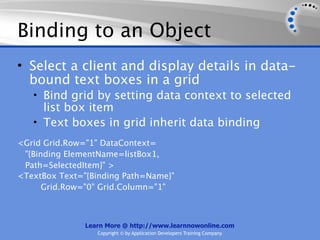
<Grid Grid.Row="1" DataContext=
 "{Binding ElementName=listBox1,
 Path=SelectedItem}" >
<TextBox Text="{Binding Path=Name}"
      Grid.Row="0" Grid.Column="1"


               Learn More @ http://www.learnnowonline.com
                  Copyright © by Application Developers Training Company
Binding to an Object
• Select a client and display details in data-
  bound text boxes in a grid
   • Bind grid by setting data context to selected
     list box item
   • Text boxes in grid inherit data binding
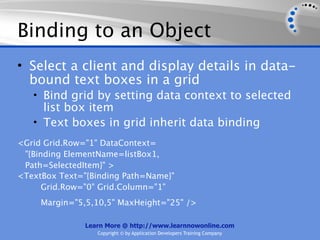
<Grid Grid.Row="1" DataContext=
 "{Binding ElementName=listBox1,
 Path=SelectedItem}" >
<TextBox Text="{Binding Path=Name}"
      Grid.Row="0" Grid.Column="1"
     Margin="5,5,10,5" MaxHeight="25" />

               Learn More @ http://www.learnnowonline.com
                  Copyright © by Application Developers Training Company
Binding to a DataTable


      Learn More @ http://www.learnnowonline.com
         Copyright © by Application Developers Training Company
Binding to a DataTable
• Display customers in a list box and details
  for selected customer in text boxes in grid


          Learn More @ http://www.learnnowonline.com
             Copyright © by Application Developers Training Company
Binding to a DataTable
• Display customers in a list box and details
  for selected customer in text boxes in grid
  • Use TableAdapter or intermediary data layer
    to retrieve customers and store in DataTable


           Learn More @ http://www.learnnowonline.com
              Copyright © by Application Developers Training Company
Binding to a DataTable
• Display customers in a list box and details
  for selected customer in text boxes in grid
  • Use TableAdapter or intermediary data layer
    to retrieve customers and store in DataTable
  • Set ItemsSource property of list box to
    Customers table


           Learn More @ http://www.learnnowonline.com
              Copyright © by Application Developers Training Company
Binding to a DataTable
• Display customers in a list box and details
  for selected customer in text boxes in grid
  • Use TableAdapter or intermediary data layer
    to retrieve customers and store in DataTable
  • Set ItemsSource property of list box to
    Customers table
  • Grid data context is set to list box selected
    item


           Learn More @ http://www.learnnowonline.com
              Copyright © by Application Developers Training Company
Binding to a DataTable
• Display customers in a list box and details
  for selected customer in text boxes in grid
  • Use TableAdapter or intermediary data layer
    to retrieve customers and store in DataTable
  • Set ItemsSource property of list box to
    Customers table
  • Grid data context is set to list box selected
    item
     • Text boxes automatically update when a customer
      is selected


            Learn More @ http://www.learnnowonline.com
               Copyright © by Application Developers Training Company
Binding to a DataTable
• Display customers in a list box and details
  for selected customer in text boxes in grid
  • Use TableAdapter or intermediary data layer
    to retrieve customers and store in DataTable
  • Set ItemsSource property of list box to
    Customers table
  • Grid data context is set to list box selected
    item
     • Text boxes automatically update when a customer
      is selected
  • List box SelectionChanged event handler runs

            Learn More @ http://www.learnnowonline.com
               Copyright © by Application Developers Training Company
Binding to a LINQ Query


      Learn More @ http://www.learnnowonline.com
         Copyright © by Application Developers Training Company
Binding to a LINQ Query
• Display customers in a list box and
  details for selected customer in text
  boxes in grid


          Learn More @ http://www.learnnowonline.com
             Copyright © by Application Developers Training Company
Binding to a LINQ Query
• Display customers in a list box and
  details for selected customer in text
  boxes in grid
  • Run LINQ to SQL query to retrieve
   customers


          Learn More @ http://www.learnnowonline.com
             Copyright © by Application Developers Training Company
Binding to a LINQ Query
• Display customers in a list box and
  details for selected customer in text
  boxes in grid
  • Run LINQ to SQL query to retrieve
    customers
  • Set ItemsSource property of results of
    query


          Learn More @ http://www.learnnowonline.com
             Copyright © by Application Developers Training Company
Binding to a LINQ Query
• Display customers in a list box and
  details for selected customer in text
  boxes in grid
  • Run LINQ to SQL query to retrieve
    customers
  • Set ItemsSource property of results of
    query
  • Grid data context is set to list box
    selected item


          Learn More @ http://www.learnnowonline.com
             Copyright © by Application Developers Training Company
Binding to a LINQ Query
• Display customers in a list box and
  details for selected customer in text
  boxes in grid
  • Run LINQ to SQL query to retrieve
    customers
  • Set ItemsSource property of results of
    query
  • Grid data context is set to list box
    selected item
    • Text boxes automatically update when a

          Learn More @ http://www.learnnowonline.com
             Copyright © by Application Developers Training Company
Binding to One Row of Data


      Learn More @ http://www.learnnowonline.com
         Copyright © by Application Developers Training Company
Binding to One Row of Data
• Display information on a product when
  user enters product id and clicks Find
  button


         Learn More @ http://www.learnnowonline.com
            Copyright © by Application Developers Training Company
Binding to One Row of Data
• Display information on a product when
  user enters product id and clicks Find
  button
  • Use TableAdapter or LINQ to SQL query to
   retrieve information on a product


          Learn More @ http://www.learnnowonline.com
             Copyright © by Application Developers Training Company
Binding to One Row of Data
• Display information on a product when
  user enters product id and clicks Find
  button
  • Use TableAdapter or LINQ to SQL query to
    retrieve information on a product
  • Set data context of grid to row in
    DataTable or result of LINQ query


          Learn More @ http://www.learnnowonline.com
             Copyright © by Application Developers Training Company
Demos


        Learn More @ http://www.learnnowonline.com
           Copyright © by Application Developers Training Company
Demos
• Binding to an Object


         Learn More @ http://www.learnnowonline.com
            Copyright © by Application Developers Training Company
Demos
• Binding to an Object
• Binding to a DataTable


         Learn More @ http://www.learnnowonline.com
            Copyright © by Application Developers Training Company
Demos
• Binding to an Object
• Binding to a DataTable
• Binding to a LINQ Query


         Learn More @ http://www.learnnowonline.com
            Copyright © by Application Developers Training Company
Demos
•   Binding   to   an Object
•   Binding   to   a DataTable
•   Binding   to   a LINQ Query
•   Binding   to   One Row of Data


              Learn More @ http://www.learnnowonline.com
                 Copyright © by Application Developers Training Company
Agenda


     Learn More @ http://www.learnnowonline.com
         Copyright © by Application Developers Training Company
Agenda
• Data Binding


         Learn More @ http://www.learnnowonline.com
            Copyright © by Application Developers Training Company
Agenda
• Data Binding
• Using Views


         Learn More @ http://www.learnnowonline.com
            Copyright © by Application Developers Training Company
Using Views


      Learn More @ http://www.learnnowonline.com
         Copyright © by Application Developers Training Company
Using Views
• When you bind to a collection, WPF
  creates a collection view


         Learn More @ http://www.learnnowonline.com
            Copyright © by Application Developers Training Company
Using Views
• When you bind to a collection, WPF
  creates a collection view
  • View manages currency (position of
   current item)


          Learn More @ http://www.learnnowonline.com
             Copyright © by Application Developers Training Company
Using Views
• When you bind to a collection, WPF
  creates a collection view
  • View manages currency (position of
    current item)
  • Use view to navigate, sort, filter, group


          Learn More @ http://www.learnnowonline.com
             Copyright © by Application Developers Training Company
Using Views
• When you bind to a collection, WPF
  creates a collection view
  • View manages currency (position of
    current item)
  • Use view to navigate, sort, filter, group
• In code, use instance of CollectionView
  class


          Learn More @ http://www.learnnowonline.com
             Copyright © by Application Developers Training Company
Using Views
• When you bind to a collection, WPF
  creates a collection view
  • View manages currency (position of
    current item)
  • Use view to navigate, sort, filter, group
• In code, use instance of CollectionView
  class
• To get reference to CollectionView, call
  GetDefaultView method of
          Learn More @ http://www.learnnowonline.com
             Copyright © by Application Developers Training Company
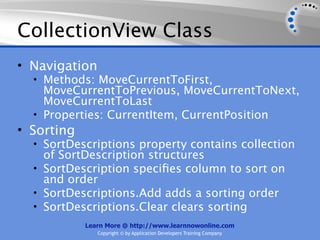
CollectionView Class


      Learn More @ http://www.learnnowonline.com
         Copyright © by Application Developers Training Company
CollectionView Class
• Navigation


          Learn More @ http://www.learnnowonline.com
               Copyright © by Application Developers Training Company
CollectionView Class
• Navigation
  • Methods: MoveCurrentToFirst,
   MoveCurrentToPrevious, MoveCurrentToNext,
   MoveCurrentToLast


          Learn More @ http://www.learnnowonline.com
               Copyright © by Application Developers Training Company
CollectionView Class
• Navigation
  • Methods: MoveCurrentToFirst,
    MoveCurrentToPrevious, MoveCurrentToNext,
    MoveCurrentToLast
  • Properties: CurrentItem, CurrentPosition


          Learn More @ http://www.learnnowonline.com
               Copyright © by Application Developers Training Company
CollectionView Class
• Navigation
  • Methods: MoveCurrentToFirst,
    MoveCurrentToPrevious, MoveCurrentToNext,
    MoveCurrentToLast
  • Properties: CurrentItem, CurrentPosition
• Sorting


            Learn More @ http://www.learnnowonline.com
               Copyright © by Application Developers Training Company
CollectionView Class
• Navigation
  • Methods: MoveCurrentToFirst,
    MoveCurrentToPrevious, MoveCurrentToNext,
    MoveCurrentToLast
  • Properties: CurrentItem, CurrentPosition
• Sorting
  • SortDescriptions property contains collection
    of SortDescription structures


            Learn More @ http://www.learnnowonline.com
               Copyright © by Application Developers Training Company
CollectionView Class
• Navigation
  • Methods: MoveCurrentToFirst,
    MoveCurrentToPrevious, MoveCurrentToNext,
    MoveCurrentToLast
  • Properties: CurrentItem, CurrentPosition
• Sorting
  • SortDescriptions property contains collection
    of SortDescription structures
  • SortDescription specifies column to sort on
    and order


            Learn More @ http://www.learnnowonline.com
               Copyright © by Application Developers Training Company
CollectionView Class
• Navigation
  • Methods: MoveCurrentToFirst,
    MoveCurrentToPrevious, MoveCurrentToNext,
    MoveCurrentToLast
  • Properties: CurrentItem, CurrentPosition
• Sorting
  • SortDescriptions property contains collection
    of SortDescription structures
  • SortDescription specifies column to sort on
    and order
  • SortDescriptions.Add adds a sorting order


            Learn More @ http://www.learnnowonline.com
               Copyright © by Application Developers Training Company
CollectionView Class
• Navigation
  • Methods: MoveCurrentToFirst,
    MoveCurrentToPrevious, MoveCurrentToNext,
    MoveCurrentToLast
  • Properties: CurrentItem, CurrentPosition
• Sorting
  • SortDescriptions property contains collection
    of SortDescription structures
  • SortDescription specifies column to sort on
    and order
  • SortDescriptions.Add adds a sorting order
  • SortDescriptions.Clear clears sorting
            Learn More @ http://www.learnnowonline.com
               Copyright © by Application Developers Training Company
CollectionView Class


      Learn More @ http://www.learnnowonline.com
         Copyright © by Application Developers Training Company
CollectionView Class
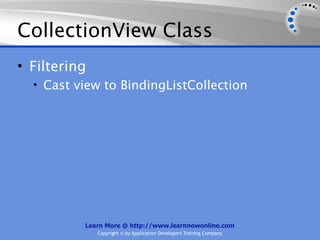
• Filtering


          Learn More @ http://www.learnnowonline.com
              Copyright © by Application Developers Training Company
CollectionView Class
• Filtering
  • Cast view to BindingListCollection


          Learn More @ http://www.learnnowonline.com
              Copyright © by Application Developers Training Company
CollectionView Class
• Filtering
  • Cast view to BindingListCollection
  • Set CustomFilter property of
    BindingListCollection to filter expression


          Learn More @ http://www.learnnowonline.com
              Copyright © by Application Developers Training Company
CollectionView Class
• Filtering
  • Cast view to BindingListCollection
  • Set CustomFilter property of
    BindingListCollection to filter expression
  • Set CustomFilter to empty string to clear
    filter


          Learn More @ http://www.learnnowonline.com
              Copyright © by Application Developers Training Company
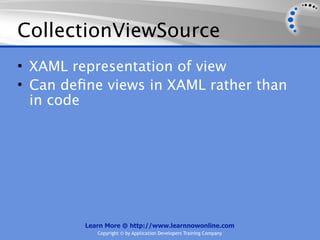
CollectionViewSource


      Learn More @ http://www.learnnowonline.com
         Copyright © by Application Developers Training Company
CollectionViewSource
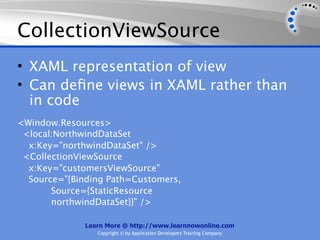
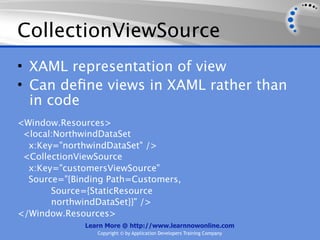
• XAML representation of view


         Learn More @ http://www.learnnowonline.com
            Copyright © by Application Developers Training Company
CollectionViewSource
• XAML representation of view
• Can define views in XAML rather than
  in code


         Learn More @ http://www.learnnowonline.com
            Copyright © by Application Developers Training Company
CollectionViewSource
• XAML representation of view
• Can define views in XAML rather than
  in code


         Learn More @ http://www.learnnowonline.com
            Copyright © by Application Developers Training Company
CollectionViewSource
• XAML representation of view
• Can define views in XAML rather than
  in code
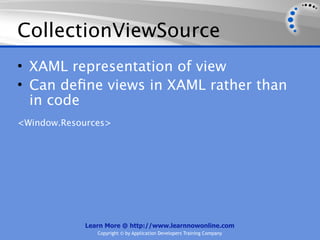
<Window.Resources>


            Learn More @ http://www.learnnowonline.com
               Copyright © by Application Developers Training Company
CollectionViewSource
• XAML representation of view
• Can define views in XAML rather than
  in code
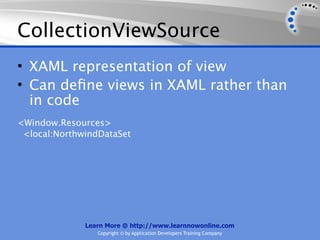
<Window.Resources>
 <local:NorthwindDataSet


              Learn More @ http://www.learnnowonline.com
                 Copyright © by Application Developers Training Company
CollectionViewSource
• XAML representation of view
• Can define views in XAML rather than
  in code
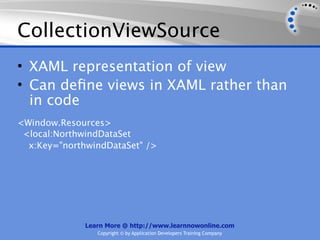
<Window.Resources>
 <local:NorthwindDataSet
  x:Key="northwindDataSet" />


              Learn More @ http://www.learnnowonline.com
                 Copyright © by Application Developers Training Company
CollectionViewSource
• XAML representation of view
• Can define views in XAML rather than
  in code
<Window.Resources>
 <local:NorthwindDataSet
  x:Key="northwindDataSet" />
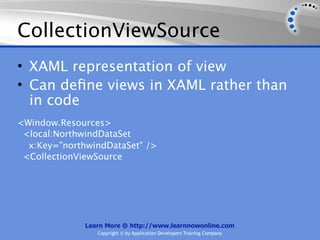
 <CollectionViewSource


              Learn More @ http://www.learnnowonline.com
                 Copyright © by Application Developers Training Company
CollectionViewSource
• XAML representation of view
• Can define views in XAML rather than
  in code
<Window.Resources>
 <local:NorthwindDataSet
  x:Key="northwindDataSet" />
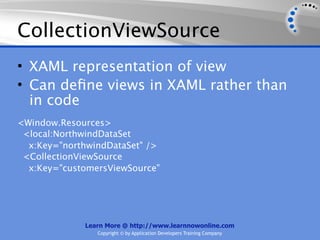
 <CollectionViewSource
  x:Key="customersViewSource"


             Learn More @ http://www.learnnowonline.com
                Copyright © by Application Developers Training Company
CollectionViewSource
• XAML representation of view
• Can define views in XAML rather than
  in code
<Window.Resources>
 <local:NorthwindDataSet
  x:Key="northwindDataSet" />
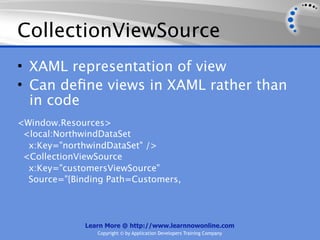
 <CollectionViewSource
  x:Key="customersViewSource"
  Source="{Binding Path=Customers,


              Learn More @ http://www.learnnowonline.com
                 Copyright © by Application Developers Training Company
CollectionViewSource
• XAML representation of view
• Can define views in XAML rather than
  in code
<Window.Resources>
 <local:NorthwindDataSet
  x:Key="northwindDataSet" />
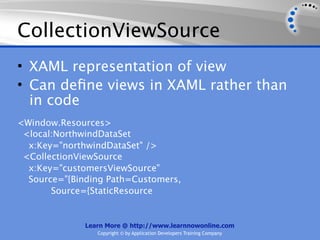
 <CollectionViewSource
  x:Key="customersViewSource"
  Source="{Binding Path=Customers,
       Source={StaticResource


              Learn More @ http://www.learnnowonline.com
                 Copyright © by Application Developers Training Company
CollectionViewSource
• XAML representation of view
• Can define views in XAML rather than
  in code
<Window.Resources>
 <local:NorthwindDataSet
  x:Key="northwindDataSet" />
 <CollectionViewSource
  x:Key="customersViewSource"
  Source="{Binding Path=Customers,
       Source={StaticResource
       northwindDataSet}}" />

              Learn More @ http://www.learnnowonline.com
                 Copyright © by Application Developers Training Company
CollectionViewSource
• XAML representation of view
• Can define views in XAML rather than
  in code
<Window.Resources>
 <local:NorthwindDataSet
  x:Key="northwindDataSet" />
 <CollectionViewSource
  x:Key="customersViewSource"
  Source="{Binding Path=Customers,
       Source={StaticResource
       northwindDataSet}}" />
</Window.Resources>
              Learn More @ http://www.learnnowonline.com
                 Copyright © by Application Developers Training Company
Demos


        Learn More @ http://www.learnnowonline.com
           Copyright © by Application Developers Training Company
Demos
• Using a CollectionView


         Learn More @ http://www.learnnowonline.com
            Copyright © by Application Developers Training Company
Demos
• Using a CollectionView
• Using a CollectionViewSource


         Learn More @ http://www.learnnowonline.com
            Copyright © by Application Developers Training Company
Drag and Drop Data Binding


      Learn More @ http://www.learnnowonline.com
         Copyright © by Application Developers Training Company
Drag and Drop Data Binding
• Drag and drop data binding supported
  in Windows Forms since Visual Studio
  2005


         Learn More @ http://www.learnnowonline.com
            Copyright © by Application Developers Training Company
Drag and Drop Data Binding
• Drag and drop data binding supported
  in Windows Forms since Visual Studio
  2005
• Now supported in WPF


         Learn More @ http://www.learnnowonline.com
            Copyright © by Application Developers Training Company
Drag and Drop Data Binding
• Drag and drop data binding supported
  in Windows Forms since Visual Studio
  2005
• Now supported in WPF
• Visual Studio creates
  CollectionViewSources in XAML when
  you drag data onto a window


         Learn More @ http://www.learnnowonline.com
            Copyright © by Application Developers Training Company
Drag and Drop Data Binding
• Drag and drop data binding supported
  in Windows Forms since Visual Studio
  2005
• Now supported in WPF
• Visual Studio creates
  CollectionViewSources in XAML when
  you drag data onto a window
• One-to-many relationships
  automatically handled
         Learn More @ http://www.learnnowonline.com
            Copyright © by Application Developers Training Company
Demo


       Learn More @ http://www.learnnowonline.com
          Copyright © by Application Developers Training Company
Demo
• Drag and Drop Data Binding


         Learn More @ http://www.learnnowonline.com
            Copyright © by Application Developers Training Company
Learn More!


       Learn More @ http://www.learnnowonline.com
          Copyright © by Application Developers Training Company
Learn More!
• This is an excerpt from a larger course. Visit
  www.learnnowonline.com for the full details!


           Learn More @ http://www.learnnowonline.com
              Copyright © by Application Developers Training Company
Learn More!
• This is an excerpt from a larger course. Visit
  www.learnnowonline.com for the full details!


           Learn More @ http://www.learnnowonline.com
              Copyright © by Application Developers Training Company
Learn More!
• This is an excerpt from a larger course. Visit
  www.learnnowonline.com for the full details!


• Learn more about WPF on SlideShare:


           Learn More @ http://www.learnnowonline.com
              Copyright © by Application Developers Training Company
Learn More!
• This is an excerpt from a larger course. Visit
  www.learnnowonline.com for the full details!


• Learn more about WPF on SlideShare:
   Intro to Windows Presentation Foundation
    (WPF)


           Learn More @ http://www.learnnowonline.com
              Copyright © by Application Developers Training Company
Learn More!
• This is an excerpt from a larger course. Visit
  www.learnnowonline.com for the full details!


• Learn more about WPF on SlideShare:
   Intro to Windows Presentation Foundation
    (WPF)
   WPF: Advanced Controls


           Learn More @ http://www.learnnowonline.com
              Copyright © by Application Developers Training Company
Learn More!
• This is an excerpt from a larger course. Visit
  www.learnnowonline.com for the full details!


• Learn more about WPF on SlideShare:
   Intro to Windows Presentation Foundation
    (WPF)
   WPF: Advanced Controls
   WPF: Binding


           Learn More @ http://www.learnnowonline.com
              Copyright © by Application Developers Training Company

WPF: Working with Data

  • 1.
    WPF: Working WithData Learn More @ http://www.learnnowonline.com Copyright © by Application Developers Training Company
  • 2.
    Objectives Learn More @ http://www.learnnowonline.com Copyright © by Application Developers Training Company
  • 3.
    Objectives • Set howto retrieve data from a SQL Server database Learn More @ http://www.learnnowonline.com Copyright © by Application Developers Training Company
  • 4.
    Objectives • Set howto retrieve data from a SQL Server database • Create common data bound forms Learn More @ http://www.learnnowonline.com Copyright © by Application Developers Training Company
  • 5.
    Objectives • Set howto retrieve data from a SQL Server database • Create common data bound forms • See how to display information from main and related tables Learn More @ http://www.learnnowonline.com Copyright © by Application Developers Training Company
  • 6.
    Agenda Learn More @ http://www.learnnowonline.com Copyright © by Application Developers Training Company
  • 7.
    Agenda • Data Binding Learn More @ http://www.learnnowonline.com Copyright © by Application Developers Training Company
  • 8.
    Agenda • Data Binding •Using Views Learn More @ http://www.learnnowonline.com Copyright © by Application Developers Training Company
  • 9.
    Data Binding Learn More @ http://www.learnnowonline.com Copyright © by Application Developers Training Company
  • 10.
    Data Binding • Processof getting information from one object to another and automatically displaying it in one or more elements in user interface Learn More @ http://www.learnnowonline.com Copyright © by Application Developers Training Company
  • 11.
    Without Data Binding Learn More @ http://www.learnnowonline.com Copyright © by Application Developers Training Company
  • 12.
    Without Data Binding 1.In window’s Loaded event handler, query database and retrieve list of customers Learn More @ http://www.learnnowonline.com Copyright © by Application Developers Training Company
  • 13.
    Without Data Binding 1.In window’s Loaded event handler, query database and retrieve list of customers 2. In code or in XAML, set ItemsSource property of list box to DataTable or other object that contains customers Learn More @ http://www.learnnowonline.com Copyright © by Application Developers Training Company
  • 14.
    Without Data Binding 1.In window’s Loaded event handler, query database and retrieve list of customers 2. In code or in XAML, set ItemsSource property of list box to DataTable or other object that contains customers 3. In list box’s SelectionChanged event handler, query database and retrieve information for selected customer Learn More @ http://www.learnnowonline.com Copyright © by Application Developers Training Company
  • 15.
    Without Data Binding Learn More @ http://www.learnnowonline.com Copyright © by Application Developers Training Company
  • 16.
    Without Data Binding 4.In list box’s SelectionChanged event handler, set Text property of each text box to value of appropriate column of customer data Learn More @ http://www.learnnowonline.com Copyright © by Application Developers Training Company
  • 17.
    Without Data Binding 4.In list box’s SelectionChanged event handler, set Text property of each text box to value of appropriate column of customer data 5. In Save button’s Click event handler, read value of each text box and update appropriate column of customer data Learn More @ http://www.learnnowonline.com Copyright © by Application Developers Training Company
  • 18.
    Without Data Binding 4.In list box’s SelectionChanged event handler, set Text property of each text box to value of appropriate column of customer data 5. In Save button’s Click event handler, read value of each text box and update appropriate column of customer data 6. In Save button’s Click event handler, save changes http://www.learnnowonline.com Learn More @ back to database Copyright © by Application Developers Training Company
  • 19.
    With Data Binding Learn More @ http://www.learnnowonline.com Copyright © by Application Developers Training Company
  • 20.
    With Data Binding 1.In window’s Loaded event handler, query database and retrieve list of customers Learn More @ http://www.learnnowonline.com Copyright © by Application Developers Training Company
  • 21.
    With Data Binding 1.In window’s Loaded event handler, query database and retrieve list of customers 2. In code or in XAML, set ItemsSource property of list box to DataTable or other object that contains customers Learn More @ http://www.learnnowonline.com Copyright © by Application Developers Training Company
  • 22.
    With Data Binding 1.In window’s Loaded event handler, query database and retrieve list of customers 2. In code or in XAML, set ItemsSource property of list box to DataTable or other object that contains customers 3. In list box’s SelectionChanged event handler, query database and retrieve information for selected customer Learn More @ http://www.learnnowonline.com Copyright © by Application Developers Training Company
  • 23.
    With Data Binding 1.In window’s Loaded event handler, query database and retrieve list of customers 2. In code or in XAML, set ItemsSource property of list box to DataTable or other object that contains customers 3. In list box’s SelectionChanged event handler, query database and retrieve information for selected customer 4. In Save button’s Click event handler, save changes back to database Learn More @ http://www.learnnowonline.com Copyright © by Application Developers Training Company
  • 24.
    Data Source Options Learn More @ http://www.learnnowonline.com Copyright © by Application Developers Training Company
  • 25.
    Data Source Options •Same as in Windows Forms applications Learn More @ http://www.learnnowonline.com Copyright © by Application Developers Training Company
  • 26.
    Data Source Options •Same as in Windows Forms applications • Many data sources Learn More @ http://www.learnnowonline.com Copyright © by Application Developers Training Company
  • 27.
    Data Source Options •Same as in Windows Forms applications • Many data sources • Custom business objects Learn More @ http://www.learnnowonline.com Copyright © by Application Developers Training Company
  • 28.
    Data Source Options •Same as in Windows Forms applications • Many data sources • Custom business objects • ADO.NET DataSets Learn More @ http://www.learnnowonline.com Copyright © by Application Developers Training Company
  • 29.
    Data Source Options •Same as in Windows Forms applications • Many data sources • Custom business objects • ADO.NET DataSets • LINQ to SQL Learn More @ http://www.learnnowonline.com Copyright © by Application Developers Training Company
  • 30.
    Data Source Options •Same as in Windows Forms applications • Many data sources • Custom business objects • ADO.NET DataSets • LINQ to SQL • Entity Framework Learn More @ http://www.learnnowonline.com Copyright © by Application Developers Training Company
  • 31.
    Data Source Options •Same as in Windows Forms applications • Many data sources • Custom business objects • ADO.NET DataSets • LINQ to SQL • Entity Framework • Services Learn More @ http://www.learnnowonline.com Copyright © by Application Developers Training Company
  • 32.
    Data Source Options •Same as in Windows Forms applications • Many data sources • Custom business objects • ADO.NET DataSets • LINQ to SQL • Entity Framework • Services • Web services Learn More @ http://www.learnnowonline.com Copyright © by Application Developers Training Company
  • 33.
    Data Source Options •Same as in Windows Forms applications • Many data sources • Custom business objects • ADO.NET DataSets • LINQ to SQL • Entity Framework • Services • Web services • Windows Communication Foundation (WCF) services Learn More @ http://www.learnnowonline.com Copyright © by Application Developers Training Company
  • 34.
    Binding to anObject Learn More @ http://www.learnnowonline.com Copyright © by Application Developers Training Company
  • 35.
    Binding to anObject • Display clients in a list box • Create collection of clients in code • Populate the collection • Bind to object in XAML Learn More @ http://www.learnnowonline.com Copyright © by Application Developers Training Company
  • 36.
    Binding to anObject • Display clients in a list box • Create collection of clients in code • Populate the collection • Bind to object in XAML Learn More @ http://www.learnnowonline.com Copyright © by Application Developers Training Company
  • 37.
    Binding to anObject • Display clients in a list box • Create collection of clients in code • Populate the collection • Bind to object in XAML <ListBox Learn More @ http://www.learnnowonline.com Copyright © by Application Developers Training Company
  • 38.
    Binding to anObject • Display clients in a list box • Create collection of clients in code • Populate the collection • Bind to object in XAML <ListBox Name="listBox1" Learn More @ http://www.learnnowonline.com Copyright © by Application Developers Training Company
  • 39.
    Binding to anObject • Display clients in a list box • Create collection of clients in code • Populate the collection • Bind to object in XAML <ListBox Name="listBox1" DisplayMemberPath="Name" ItemsSource= Learn More @ http://www.learnnowonline.com Copyright © by Application Developers Training Company
  • 40.
    Binding to anObject • Display clients in a list box • Create collection of clients in code • Populate the collection • Bind to object in XAML <ListBox Name="listBox1" DisplayMemberPath="Name" ItemsSource= "{Binding ElementName=bindingToObject, Path=Clients}" /> Learn More @ http://www.learnnowonline.com Copyright © by Application Developers Training Company
  • 41.
    Binding to anObject Learn More @ http://www.learnnowonline.com Copyright © by Application Developers Training Company
  • 42.
    Binding to anObject • Select a client and display details in data- bound text boxes in a grid • Bind grid by setting data context to selected list box item • Text boxes in grid inherit data binding Learn More @ http://www.learnnowonline.com Copyright © by Application Developers Training Company
  • 43.
    Binding to anObject • Select a client and display details in data- bound text boxes in a grid • Bind grid by setting data context to selected list box item • Text boxes in grid inherit data binding Learn More @ http://www.learnnowonline.com Copyright © by Application Developers Training Company
  • 44.
    Binding to anObject • Select a client and display details in data- bound text boxes in a grid • Bind grid by setting data context to selected list box item • Text boxes in grid inherit data binding <Grid Grid.Row="1" DataContext= Learn More @ http://www.learnnowonline.com Copyright © by Application Developers Training Company
  • 45.
    Binding to anObject • Select a client and display details in data- bound text boxes in a grid • Bind grid by setting data context to selected list box item • Text boxes in grid inherit data binding <Grid Grid.Row="1" DataContext= "{Binding ElementName=listBox1, Learn More @ http://www.learnnowonline.com Copyright © by Application Developers Training Company
  • 46.
    Binding to anObject • Select a client and display details in data- bound text boxes in a grid • Bind grid by setting data context to selected list box item • Text boxes in grid inherit data binding <Grid Grid.Row="1" DataContext= "{Binding ElementName=listBox1, Path=SelectedItem}" > Learn More @ http://www.learnnowonline.com Copyright © by Application Developers Training Company
  • 47.
    Binding to anObject • Select a client and display details in data- bound text boxes in a grid • Bind grid by setting data context to selected list box item • Text boxes in grid inherit data binding <Grid Grid.Row="1" DataContext= "{Binding ElementName=listBox1, Path=SelectedItem}" > <TextBox Text="{Binding Path=Name}" Learn More @ http://www.learnnowonline.com Copyright © by Application Developers Training Company
  • 48.
    Binding to anObject • Select a client and display details in data- bound text boxes in a grid • Bind grid by setting data context to selected list box item • Text boxes in grid inherit data binding <Grid Grid.Row="1" DataContext= "{Binding ElementName=listBox1, Path=SelectedItem}" > <TextBox Text="{Binding Path=Name}" Grid.Row="0" Grid.Column="1" Learn More @ http://www.learnnowonline.com Copyright © by Application Developers Training Company
  • 49.
    Binding to anObject • Select a client and display details in data- bound text boxes in a grid • Bind grid by setting data context to selected list box item • Text boxes in grid inherit data binding <Grid Grid.Row="1" DataContext= "{Binding ElementName=listBox1, Path=SelectedItem}" > <TextBox Text="{Binding Path=Name}" Grid.Row="0" Grid.Column="1" Margin="5,5,10,5" MaxHeight="25" /> Learn More @ http://www.learnnowonline.com Copyright © by Application Developers Training Company
  • 50.
    Binding to aDataTable Learn More @ http://www.learnnowonline.com Copyright © by Application Developers Training Company
  • 51.
    Binding to aDataTable • Display customers in a list box and details for selected customer in text boxes in grid Learn More @ http://www.learnnowonline.com Copyright © by Application Developers Training Company
  • 52.
    Binding to aDataTable • Display customers in a list box and details for selected customer in text boxes in grid • Use TableAdapter or intermediary data layer to retrieve customers and store in DataTable Learn More @ http://www.learnnowonline.com Copyright © by Application Developers Training Company
  • 53.
    Binding to aDataTable • Display customers in a list box and details for selected customer in text boxes in grid • Use TableAdapter or intermediary data layer to retrieve customers and store in DataTable • Set ItemsSource property of list box to Customers table Learn More @ http://www.learnnowonline.com Copyright © by Application Developers Training Company
  • 54.
    Binding to aDataTable • Display customers in a list box and details for selected customer in text boxes in grid • Use TableAdapter or intermediary data layer to retrieve customers and store in DataTable • Set ItemsSource property of list box to Customers table • Grid data context is set to list box selected item Learn More @ http://www.learnnowonline.com Copyright © by Application Developers Training Company
  • 55.
    Binding to aDataTable • Display customers in a list box and details for selected customer in text boxes in grid • Use TableAdapter or intermediary data layer to retrieve customers and store in DataTable • Set ItemsSource property of list box to Customers table • Grid data context is set to list box selected item • Text boxes automatically update when a customer is selected Learn More @ http://www.learnnowonline.com Copyright © by Application Developers Training Company
  • 56.
    Binding to aDataTable • Display customers in a list box and details for selected customer in text boxes in grid • Use TableAdapter or intermediary data layer to retrieve customers and store in DataTable • Set ItemsSource property of list box to Customers table • Grid data context is set to list box selected item • Text boxes automatically update when a customer is selected • List box SelectionChanged event handler runs Learn More @ http://www.learnnowonline.com Copyright © by Application Developers Training Company
  • 57.
    Binding to aLINQ Query Learn More @ http://www.learnnowonline.com Copyright © by Application Developers Training Company
  • 58.
    Binding to aLINQ Query • Display customers in a list box and details for selected customer in text boxes in grid Learn More @ http://www.learnnowonline.com Copyright © by Application Developers Training Company
  • 59.
    Binding to aLINQ Query • Display customers in a list box and details for selected customer in text boxes in grid • Run LINQ to SQL query to retrieve customers Learn More @ http://www.learnnowonline.com Copyright © by Application Developers Training Company
  • 60.
    Binding to aLINQ Query • Display customers in a list box and details for selected customer in text boxes in grid • Run LINQ to SQL query to retrieve customers • Set ItemsSource property of results of query Learn More @ http://www.learnnowonline.com Copyright © by Application Developers Training Company
  • 61.
    Binding to aLINQ Query • Display customers in a list box and details for selected customer in text boxes in grid • Run LINQ to SQL query to retrieve customers • Set ItemsSource property of results of query • Grid data context is set to list box selected item Learn More @ http://www.learnnowonline.com Copyright © by Application Developers Training Company
  • 62.
    Binding to aLINQ Query • Display customers in a list box and details for selected customer in text boxes in grid • Run LINQ to SQL query to retrieve customers • Set ItemsSource property of results of query • Grid data context is set to list box selected item • Text boxes automatically update when a Learn More @ http://www.learnnowonline.com Copyright © by Application Developers Training Company
  • 63.
    Binding to OneRow of Data Learn More @ http://www.learnnowonline.com Copyright © by Application Developers Training Company
  • 64.
    Binding to OneRow of Data • Display information on a product when user enters product id and clicks Find button Learn More @ http://www.learnnowonline.com Copyright © by Application Developers Training Company
  • 65.
    Binding to OneRow of Data • Display information on a product when user enters product id and clicks Find button • Use TableAdapter or LINQ to SQL query to retrieve information on a product Learn More @ http://www.learnnowonline.com Copyright © by Application Developers Training Company
  • 66.
    Binding to OneRow of Data • Display information on a product when user enters product id and clicks Find button • Use TableAdapter or LINQ to SQL query to retrieve information on a product • Set data context of grid to row in DataTable or result of LINQ query Learn More @ http://www.learnnowonline.com Copyright © by Application Developers Training Company
  • 67.
    Demos Learn More @ http://www.learnnowonline.com Copyright © by Application Developers Training Company
  • 68.
    Demos • Binding toan Object Learn More @ http://www.learnnowonline.com Copyright © by Application Developers Training Company
  • 69.
    Demos • Binding toan Object • Binding to a DataTable Learn More @ http://www.learnnowonline.com Copyright © by Application Developers Training Company
  • 70.
    Demos • Binding toan Object • Binding to a DataTable • Binding to a LINQ Query Learn More @ http://www.learnnowonline.com Copyright © by Application Developers Training Company
  • 71.
    Demos • Binding to an Object • Binding to a DataTable • Binding to a LINQ Query • Binding to One Row of Data Learn More @ http://www.learnnowonline.com Copyright © by Application Developers Training Company
  • 72.
    Agenda Learn More @ http://www.learnnowonline.com Copyright © by Application Developers Training Company
  • 73.
    Agenda • Data Binding Learn More @ http://www.learnnowonline.com Copyright © by Application Developers Training Company
  • 74.
    Agenda • Data Binding •Using Views Learn More @ http://www.learnnowonline.com Copyright © by Application Developers Training Company
  • 75.
    Using Views Learn More @ http://www.learnnowonline.com Copyright © by Application Developers Training Company
  • 76.
    Using Views • Whenyou bind to a collection, WPF creates a collection view Learn More @ http://www.learnnowonline.com Copyright © by Application Developers Training Company
  • 77.
    Using Views • Whenyou bind to a collection, WPF creates a collection view • View manages currency (position of current item) Learn More @ http://www.learnnowonline.com Copyright © by Application Developers Training Company
  • 78.
    Using Views • Whenyou bind to a collection, WPF creates a collection view • View manages currency (position of current item) • Use view to navigate, sort, filter, group Learn More @ http://www.learnnowonline.com Copyright © by Application Developers Training Company
  • 79.
    Using Views • Whenyou bind to a collection, WPF creates a collection view • View manages currency (position of current item) • Use view to navigate, sort, filter, group • In code, use instance of CollectionView class Learn More @ http://www.learnnowonline.com Copyright © by Application Developers Training Company
  • 80.
    Using Views • Whenyou bind to a collection, WPF creates a collection view • View manages currency (position of current item) • Use view to navigate, sort, filter, group • In code, use instance of CollectionView class • To get reference to CollectionView, call GetDefaultView method of Learn More @ http://www.learnnowonline.com Copyright © by Application Developers Training Company
  • 81.
    CollectionView Class Learn More @ http://www.learnnowonline.com Copyright © by Application Developers Training Company
  • 82.
    CollectionView Class • Navigation Learn More @ http://www.learnnowonline.com Copyright © by Application Developers Training Company
  • 83.
    CollectionView Class • Navigation • Methods: MoveCurrentToFirst, MoveCurrentToPrevious, MoveCurrentToNext, MoveCurrentToLast Learn More @ http://www.learnnowonline.com Copyright © by Application Developers Training Company
  • 84.
    CollectionView Class • Navigation • Methods: MoveCurrentToFirst, MoveCurrentToPrevious, MoveCurrentToNext, MoveCurrentToLast • Properties: CurrentItem, CurrentPosition Learn More @ http://www.learnnowonline.com Copyright © by Application Developers Training Company
  • 85.
    CollectionView Class • Navigation • Methods: MoveCurrentToFirst, MoveCurrentToPrevious, MoveCurrentToNext, MoveCurrentToLast • Properties: CurrentItem, CurrentPosition • Sorting Learn More @ http://www.learnnowonline.com Copyright © by Application Developers Training Company
  • 86.
    CollectionView Class • Navigation • Methods: MoveCurrentToFirst, MoveCurrentToPrevious, MoveCurrentToNext, MoveCurrentToLast • Properties: CurrentItem, CurrentPosition • Sorting • SortDescriptions property contains collection of SortDescription structures Learn More @ http://www.learnnowonline.com Copyright © by Application Developers Training Company
  • 87.
    CollectionView Class • Navigation • Methods: MoveCurrentToFirst, MoveCurrentToPrevious, MoveCurrentToNext, MoveCurrentToLast • Properties: CurrentItem, CurrentPosition • Sorting • SortDescriptions property contains collection of SortDescription structures • SortDescription specifies column to sort on and order Learn More @ http://www.learnnowonline.com Copyright © by Application Developers Training Company
  • 88.
    CollectionView Class • Navigation • Methods: MoveCurrentToFirst, MoveCurrentToPrevious, MoveCurrentToNext, MoveCurrentToLast • Properties: CurrentItem, CurrentPosition • Sorting • SortDescriptions property contains collection of SortDescription structures • SortDescription specifies column to sort on and order • SortDescriptions.Add adds a sorting order Learn More @ http://www.learnnowonline.com Copyright © by Application Developers Training Company
  • 89.
    CollectionView Class • Navigation • Methods: MoveCurrentToFirst, MoveCurrentToPrevious, MoveCurrentToNext, MoveCurrentToLast • Properties: CurrentItem, CurrentPosition • Sorting • SortDescriptions property contains collection of SortDescription structures • SortDescription specifies column to sort on and order • SortDescriptions.Add adds a sorting order • SortDescriptions.Clear clears sorting Learn More @ http://www.learnnowonline.com Copyright © by Application Developers Training Company
  • 90.
    CollectionView Class Learn More @ http://www.learnnowonline.com Copyright © by Application Developers Training Company
  • 91.
    CollectionView Class • Filtering Learn More @ http://www.learnnowonline.com Copyright © by Application Developers Training Company
  • 92.
    CollectionView Class • Filtering • Cast view to BindingListCollection Learn More @ http://www.learnnowonline.com Copyright © by Application Developers Training Company
  • 93.
    CollectionView Class • Filtering • Cast view to BindingListCollection • Set CustomFilter property of BindingListCollection to filter expression Learn More @ http://www.learnnowonline.com Copyright © by Application Developers Training Company
  • 94.
    CollectionView Class • Filtering • Cast view to BindingListCollection • Set CustomFilter property of BindingListCollection to filter expression • Set CustomFilter to empty string to clear filter Learn More @ http://www.learnnowonline.com Copyright © by Application Developers Training Company
  • 95.
    CollectionViewSource Learn More @ http://www.learnnowonline.com Copyright © by Application Developers Training Company
  • 96.
    CollectionViewSource • XAML representationof view Learn More @ http://www.learnnowonline.com Copyright © by Application Developers Training Company
  • 97.
    CollectionViewSource • XAML representationof view • Can define views in XAML rather than in code Learn More @ http://www.learnnowonline.com Copyright © by Application Developers Training Company
  • 98.
    CollectionViewSource • XAML representationof view • Can define views in XAML rather than in code Learn More @ http://www.learnnowonline.com Copyright © by Application Developers Training Company
  • 99.
    CollectionViewSource • XAML representationof view • Can define views in XAML rather than in code <Window.Resources> Learn More @ http://www.learnnowonline.com Copyright © by Application Developers Training Company
  • 100.
    CollectionViewSource • XAML representationof view • Can define views in XAML rather than in code <Window.Resources> <local:NorthwindDataSet Learn More @ http://www.learnnowonline.com Copyright © by Application Developers Training Company
  • 101.
    CollectionViewSource • XAML representationof view • Can define views in XAML rather than in code <Window.Resources> <local:NorthwindDataSet x:Key="northwindDataSet" /> Learn More @ http://www.learnnowonline.com Copyright © by Application Developers Training Company
  • 102.
    CollectionViewSource • XAML representationof view • Can define views in XAML rather than in code <Window.Resources> <local:NorthwindDataSet x:Key="northwindDataSet" /> <CollectionViewSource Learn More @ http://www.learnnowonline.com Copyright © by Application Developers Training Company
  • 103.
    CollectionViewSource • XAML representationof view • Can define views in XAML rather than in code <Window.Resources> <local:NorthwindDataSet x:Key="northwindDataSet" /> <CollectionViewSource x:Key="customersViewSource" Learn More @ http://www.learnnowonline.com Copyright © by Application Developers Training Company
  • 104.
    CollectionViewSource • XAML representationof view • Can define views in XAML rather than in code <Window.Resources> <local:NorthwindDataSet x:Key="northwindDataSet" /> <CollectionViewSource x:Key="customersViewSource" Source="{Binding Path=Customers, Learn More @ http://www.learnnowonline.com Copyright © by Application Developers Training Company
  • 105.
    CollectionViewSource • XAML representationof view • Can define views in XAML rather than in code <Window.Resources> <local:NorthwindDataSet x:Key="northwindDataSet" /> <CollectionViewSource x:Key="customersViewSource" Source="{Binding Path=Customers, Source={StaticResource Learn More @ http://www.learnnowonline.com Copyright © by Application Developers Training Company
  • 106.
    CollectionViewSource • XAML representationof view • Can define views in XAML rather than in code <Window.Resources> <local:NorthwindDataSet x:Key="northwindDataSet" /> <CollectionViewSource x:Key="customersViewSource" Source="{Binding Path=Customers, Source={StaticResource northwindDataSet}}" /> Learn More @ http://www.learnnowonline.com Copyright © by Application Developers Training Company
  • 107.
    CollectionViewSource • XAML representationof view • Can define views in XAML rather than in code <Window.Resources> <local:NorthwindDataSet x:Key="northwindDataSet" /> <CollectionViewSource x:Key="customersViewSource" Source="{Binding Path=Customers, Source={StaticResource northwindDataSet}}" /> </Window.Resources> Learn More @ http://www.learnnowonline.com Copyright © by Application Developers Training Company
  • 108.
    Demos Learn More @ http://www.learnnowonline.com Copyright © by Application Developers Training Company
  • 109.
    Demos • Using aCollectionView Learn More @ http://www.learnnowonline.com Copyright © by Application Developers Training Company
  • 110.
    Demos • Using aCollectionView • Using a CollectionViewSource Learn More @ http://www.learnnowonline.com Copyright © by Application Developers Training Company
  • 111.
    Drag and DropData Binding Learn More @ http://www.learnnowonline.com Copyright © by Application Developers Training Company
  • 112.
    Drag and DropData Binding • Drag and drop data binding supported in Windows Forms since Visual Studio 2005 Learn More @ http://www.learnnowonline.com Copyright © by Application Developers Training Company
  • 113.
    Drag and DropData Binding • Drag and drop data binding supported in Windows Forms since Visual Studio 2005 • Now supported in WPF Learn More @ http://www.learnnowonline.com Copyright © by Application Developers Training Company
  • 114.
    Drag and DropData Binding • Drag and drop data binding supported in Windows Forms since Visual Studio 2005 • Now supported in WPF • Visual Studio creates CollectionViewSources in XAML when you drag data onto a window Learn More @ http://www.learnnowonline.com Copyright © by Application Developers Training Company
  • 115.
    Drag and DropData Binding • Drag and drop data binding supported in Windows Forms since Visual Studio 2005 • Now supported in WPF • Visual Studio creates CollectionViewSources in XAML when you drag data onto a window • One-to-many relationships automatically handled Learn More @ http://www.learnnowonline.com Copyright © by Application Developers Training Company
  • 116.
    Demo Learn More @ http://www.learnnowonline.com Copyright © by Application Developers Training Company
  • 117.
    Demo • Drag andDrop Data Binding Learn More @ http://www.learnnowonline.com Copyright © by Application Developers Training Company
  • 118.
    Learn More! Learn More @ http://www.learnnowonline.com Copyright © by Application Developers Training Company
  • 119.
    Learn More! • Thisis an excerpt from a larger course. Visit www.learnnowonline.com for the full details! Learn More @ http://www.learnnowonline.com Copyright © by Application Developers Training Company
  • 120.
    Learn More! • Thisis an excerpt from a larger course. Visit www.learnnowonline.com for the full details! Learn More @ http://www.learnnowonline.com Copyright © by Application Developers Training Company
  • 121.
    Learn More! • Thisis an excerpt from a larger course. Visit www.learnnowonline.com for the full details! • Learn more about WPF on SlideShare: Learn More @ http://www.learnnowonline.com Copyright © by Application Developers Training Company
  • 122.
    Learn More! • Thisis an excerpt from a larger course. Visit www.learnnowonline.com for the full details! • Learn more about WPF on SlideShare:  Intro to Windows Presentation Foundation (WPF) Learn More @ http://www.learnnowonline.com Copyright © by Application Developers Training Company
  • 123.
    Learn More! • Thisis an excerpt from a larger course. Visit www.learnnowonline.com for the full details! • Learn more about WPF on SlideShare:  Intro to Windows Presentation Foundation (WPF)  WPF: Advanced Controls Learn More @ http://www.learnnowonline.com Copyright © by Application Developers Training Company
  • 124.
    Learn More! • Thisis an excerpt from a larger course. Visit www.learnnowonline.com for the full details! • Learn more about WPF on SlideShare:  Intro to Windows Presentation Foundation (WPF)  WPF: Advanced Controls  WPF: Binding Learn More @ http://www.learnnowonline.com Copyright © by Application Developers Training Company

Editor's Notes