Render your web with

Mustache     Template engine

       SWT Tech Share / @khasathan
{
{{syntax}}
  Mustache

             2
“The Logic-less templates”


                             3
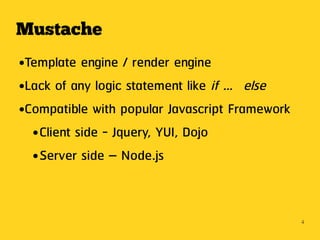
Mustache
●Template engine / render engine
●Lack of any logic statement like if … else


●Compatible with popular Javascript Framework


  ● Client side - Jquery, YUI, Dojo


  ● Server side – Node.js


                                                4
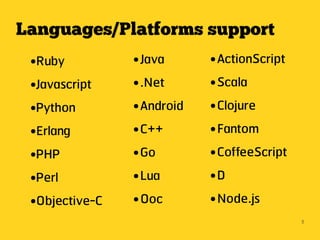
Languages/Platforms support
 ●Ruby          ● Java      ● ActionScript
 ●Javascript    ● .Net      ● Scala


 ●Python        ● Android   ● Clojure


 ●Erlang        ● C++       ● Fantom


 ●PHP           ● Go        ● CoffeeScript


 ●Perl          ● Lua       ●D


 ●Objective-C   ● Ooc       ● Node.js


                                             5
Why use?
Before I tell you why we use templates engine
compare this example ...


                                                6
Data model
{
    "name" : "korkeat",
    "username" : "khasathan",
    "url" : "http://khasathan.in.th"
    "programming" :
      ["Java","PHP","Python"]
}


                                       7
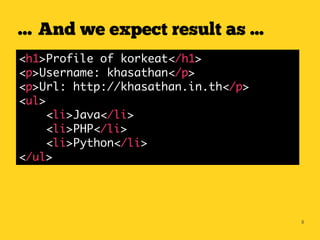
… And we expect result as ...
<h1>Profile of korkeat</h1>
<p>Username: khasathan</p>
<p>Url: http://khasathan.in.th</p>
<ul>
     <li>Java</li>
     <li>PHP</li>
     <li>Python</li>
</ul>


                                     8
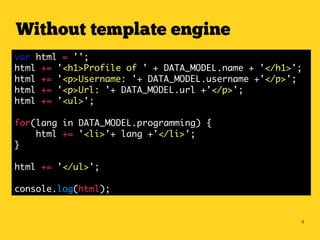
Without template engine
var html = '';
html += '<h1>Profile of ' + DATA_MODEL.name + '</h1>';
html += '<p>Username: '+ DATA_MODEL.username +'</p>';
html += '<p>Url: '+ DATA_MODEL.url +'</p>';
html += '<ul>';

for(lang in DATA_MODEL.programming) {
    html += '<li>'+ lang +'</li>';
}

html += '</ul>';

console.log(html);


                                                     9
… want to say the magic word!!


                                 10
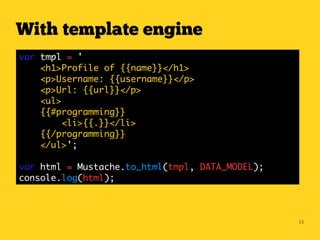
With template engine
var tmpl = '
    <h1>Profile of {{name}}</h1>
    <p>Username: {{username}}</p>
    <p>Url: {{url}}</p>
    <ul>
    {{#programming}}
         <li>{{.}}</li>
    {{/programming}}
    </ul>';

var html = Mustache.to_html(tmpl, DATA_MODEL);
console.log(html);


                                                 11
12
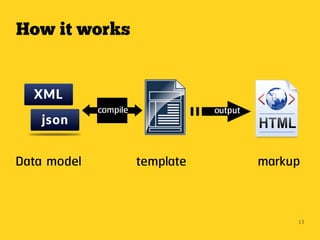
How it works


             compile              output


Data model             template            markup


                                                13
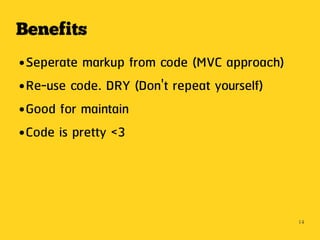
Benefits
● Seperate markup from code (MVC approach)
● Re-use code. DRY (Don't repeat yourself)


● Good for maintain


● Code is pretty <3


                                             14
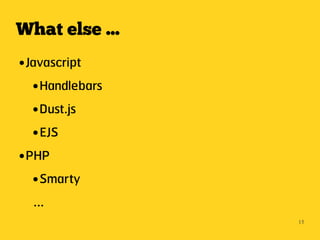
What else ...
● Javascript
   ● Handlebars


   ● Dust.js


   ● EJS


● PHP


   ● Smarty


    ...
                  15
… and more more more for
many languages / platforms


                             16
{
Make me happy when coding!

                             17
Resources
● http://mustache.github.com
● http://coenraets.org/blog/2011/12/tutorial-html-templates-with-mus


  tache-js
● http://net.tutsplus.com/tutorials/javascript-ajax/quick-tip-using-th


  e-mustache-template-library
● https://github.com/dmolsen/Detector/wiki/Templating-with-Detector


  -&-Mustache-Tutorial


                                                                         18

Mustache

  • 1.
    Render your webwith Mustache Template engine SWT Tech Share / @khasathan
  • 2.
  • 3.
  • 4.
    Mustache ●Template engine /render engine ●Lack of any logic statement like if … else ●Compatible with popular Javascript Framework ● Client side - Jquery, YUI, Dojo ● Server side – Node.js 4
  • 5.
    Languages/Platforms support ●Ruby ● Java ● ActionScript ●Javascript ● .Net ● Scala ●Python ● Android ● Clojure ●Erlang ● C++ ● Fantom ●PHP ● Go ● CoffeeScript ●Perl ● Lua ●D ●Objective-C ● Ooc ● Node.js 5
  • 6.
    Why use? Before Itell you why we use templates engine compare this example ... 6
  • 7.
    Data model { "name" : "korkeat", "username" : "khasathan", "url" : "http://khasathan.in.th" "programming" : ["Java","PHP","Python"] } 7
  • 8.
    … And weexpect result as ... <h1>Profile of korkeat</h1> <p>Username: khasathan</p> <p>Url: http://khasathan.in.th</p> <ul> <li>Java</li> <li>PHP</li> <li>Python</li> </ul> 8
  • 9.
    Without template engine varhtml = ''; html += '<h1>Profile of ' + DATA_MODEL.name + '</h1>'; html += '<p>Username: '+ DATA_MODEL.username +'</p>'; html += '<p>Url: '+ DATA_MODEL.url +'</p>'; html += '<ul>'; for(lang in DATA_MODEL.programming) { html += '<li>'+ lang +'</li>'; } html += '</ul>'; console.log(html); 9
  • 10.
    … want tosay the magic word!! 10
  • 11.
    With template engine vartmpl = ' <h1>Profile of {{name}}</h1> <p>Username: {{username}}</p> <p>Url: {{url}}</p> <ul> {{#programming}} <li>{{.}}</li> {{/programming}} </ul>'; var html = Mustache.to_html(tmpl, DATA_MODEL); console.log(html); 11
  • 12.
  • 13.
    How it works compile output Data model template markup 13
  • 14.
    Benefits ● Seperate markupfrom code (MVC approach) ● Re-use code. DRY (Don't repeat yourself) ● Good for maintain ● Code is pretty <3 14
  • 15.
    What else ... ●Javascript ● Handlebars ● Dust.js ● EJS ● PHP ● Smarty ... 15
  • 16.
    … and moremore more for many languages / platforms 16
  • 17.
    { Make me happywhen coding! 17
  • 18.
    Resources ● http://mustache.github.com ● http://coenraets.org/blog/2011/12/tutorial-html-templates-with-mus tache-js ● http://net.tutsplus.com/tutorials/javascript-ajax/quick-tip-using-th e-mustache-template-library ● https://github.com/dmolsen/Detector/wiki/Templating-with-Detector -&-Mustache-Tutorial 18