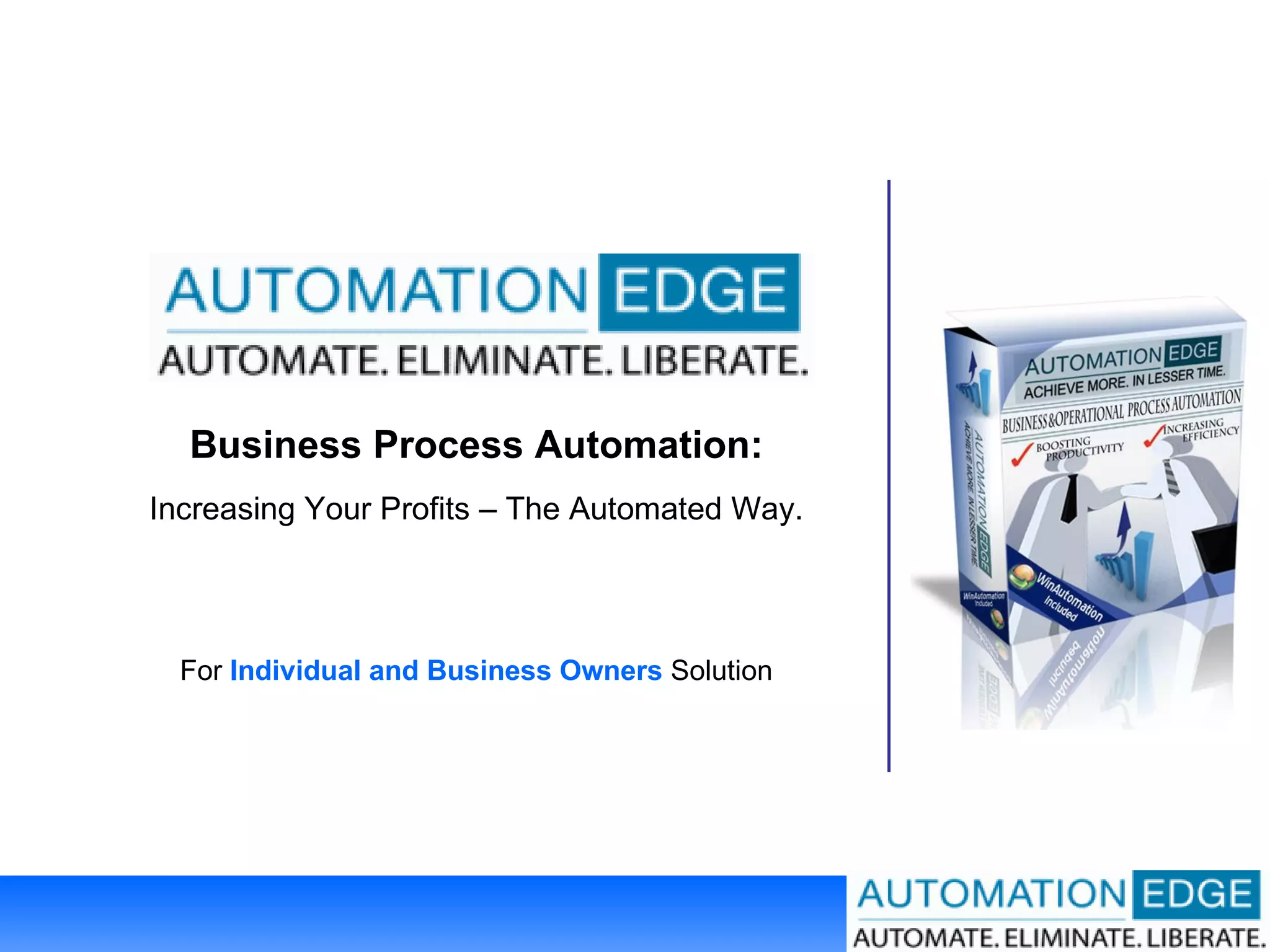
Business Process Automation: Increasing Your Profits – The Automated Way. For  Individual and Business Owners  Solution
Featured In: WinAutomation Software  Trusted By 50,200+ Users   Around The World Automation Partner
Famous Clients Of WinAutomation
Hallmarks of A Successful Company “ In today's tough business climate, many companies succeed by running  financially efficient operations …  At the end of the day, all businesses need to  sell stuff as quickly  as possible and then turn those sales into cash…"  - Charles Carlson, contributing editor of  Dow Theory Forecasts , an investment newsletter. -  Business Week, Dec 23, 2002
Hallmarks of A Successful Company “   The first rule of any technology used in a business is that  automation  applied to an efficient operation will  magnify the efficiency . ”  - Bill Gates, Founder, Microsoft
Hallmarks of A Successful Company “ Automation  is about building a sustainable, automatic source of income.”  - Timothy Ferriss  Author of #1 New York Times Bestseller “The 4-Hour Workweek
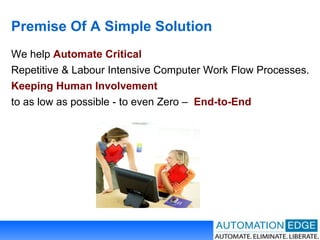
Premise Of A Simple Solution We help  Automate Critical Repetitive & Labour Intensive Computer Work Flow Processes.  Keeping   Human Involvement to as low as possible - to even Zero –  End-to-End
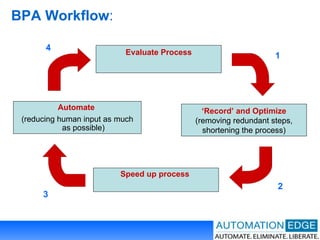
BPA Workflow : Evaluate Process ‘ Record’ and Optimize  (removing redundant steps, shortening the process) Speed up process   Automate   (reducing human input as much   as   possible) 1 2 4 3
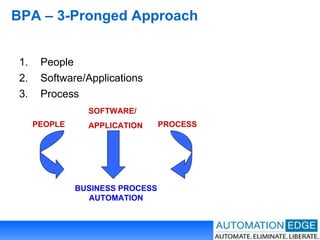
BPA – 3-Pronged Approach People Software/Applications Process PEOPLE SOFTWARE/ APPLICATION PROCESS BUSINESS PROCESS AUTOMATION
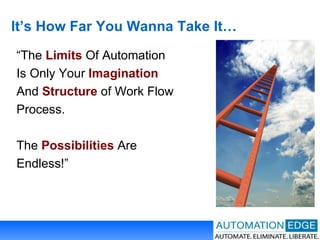
It’s How Far You Wanna Take It… “ The  Limits  Of Automation Is Only Your  Imagination And  Structure  of Work Flow Process. The  Possibilities  Are Endless!”
What Can Be Automated Mechanical , Repetitive Process Well-Defined Process  (That You Know In Advance Will Happen) Human Involvement   with no ‘Creative/Emotional’  element (e.g. clicking and print)
What Cannot Be Automated Human Involvement   with ‘Creative/Emotional’  element  (e.g. writing an response to a question on the spot)
Automation – Robots In Action You Can See  Automation In Action Mimics  Human Actions, Inputs, Clicks, Keystrokes,  Mouse Movements,  Via  Macro Recording (GUI), Image Recognition and Pre-Defined Actions,
Automation – Behind The Scenes You Cannot See  Automation. Happens Behind The Scene Example:  Screen scrape data,  Pulling of Data from Excel, FTP Via  Pre-Defined Actions
Where Automation Offers Max Value? Processes That Are  Repetitive And Mundane Processes That Are  Labour Intensive And Time Consuming Processes That Demand  Speed and High Degree Of Accuracy Processes  Involves Many Applications
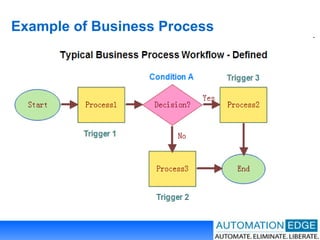
Example of Business Process
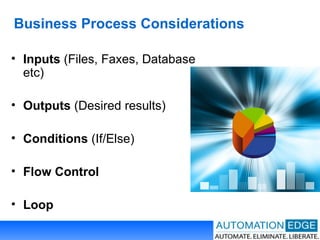
Business Process Considerations Inputs  (Files, Faxes, Database etc) Outputs  (Desired results) Conditions  (If/Else) Flow Control Loop
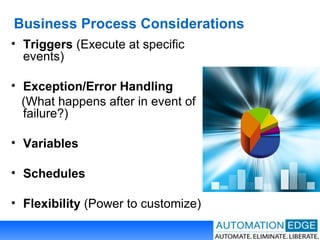
Business Process Considerations Triggers  (Execute at specific events) Exception/Error Handling   (What happens after in event of failure?) Variables  Schedules  Flexibility  (Power to customize)
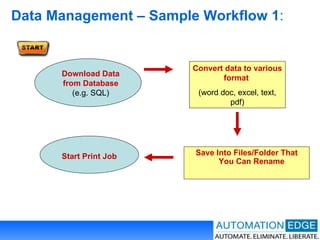
Data Management – Sample Workflow 1 : Convert data to various format   (word doc, excel, text, pdf) Save Into Files/Folder That You Can Rename   Download Data from Database  (e.g. SQL) Start Print Job
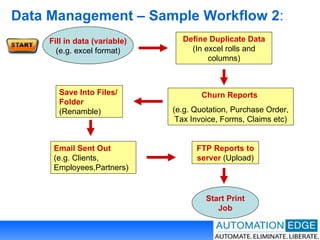
Data Management – Sample Workflow 2 : Define Duplicate Data  (In excel rolls and columns) Churn Reports   (e.g. Quotation, Purchase Order, Tax Invoice, Forms, Claims etc) FTP Reports to server  (Upload) Fill in data (variable) (e.g. excel format) Email Sent Out  (e.g. Clients, Employees,Partners) Save Into Files/Folder  (Renamble)  Start Print Job
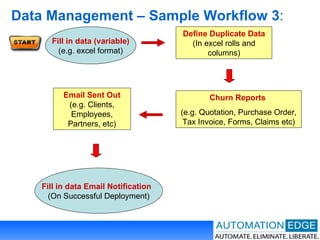
Data Management – Sample Workflow 3 : Define Duplicate Data  (In excel rolls and columns) Churn Reports   (e.g. Quotation, Purchase Order, Tax Invoice, Forms, Claims etc) Email Sent Out  (e.g. Clients, Employees, Partners, etc) Fill in data (variable) (e.g. excel format) Fill in data Email Notification  (On Successful Deployment)
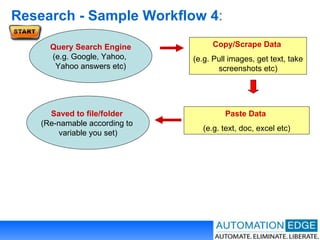
Research - Sample Workflow 4 : Copy/Scrape Data   (e.g. Pull images, get text, take screenshots etc) Paste Data   (e.g. text, doc, excel etc) Query Search Engine (e.g. Google, Yahoo,  Yahoo answers etc) Saved to file/folder  (Re-namable according to  variable you set)
Benefits – Recapped #1… Save On Thousands Of Repetitive  Keystrokes, Mouse Movements and File Operations Avoid Delays, Mix-Ups. Critical Errors  When Sending of Important Reports & Data Eliminate Damaging  Bottlenecks Save Time on  Labour Intensive, Time Consuming  Duplicate Data Entry Slash Operational And Sales/Marketing  Cost
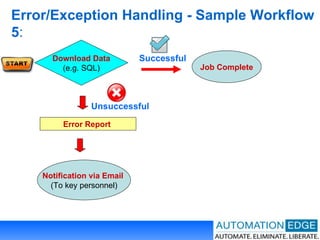
Error/Exception Handling - Sample Workflow 5 : Error Report   Successful Unsuccessful Download Data (e.g. SQL) Job Complete Notification via Email  (To key personnel)
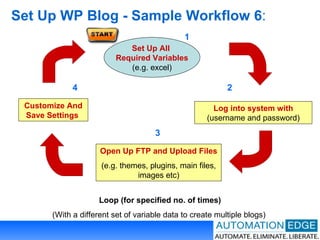
Set Up WP Blog - Sample Workflow 6 : Customize And Save Settings   Open Up FTP and Upload Files   (e.g. themes, plugins, main files, images etc) Log into system with  (username and password) Loop (for specified no. of times) (With a different set of variable data to create multiple blogs)  Set Up All  Required Variables (e.g. excel) 1 4 3 2
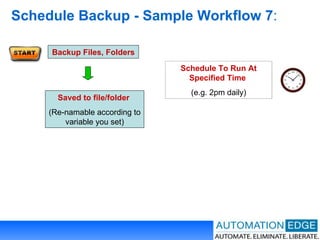
Schedule Backup - Sample Workflow 7 : Backup Files, Folders Schedule To Run At Specified Time   (e.g. 2pm daily) Saved to file/folder  (Re-namable according to variable you set)
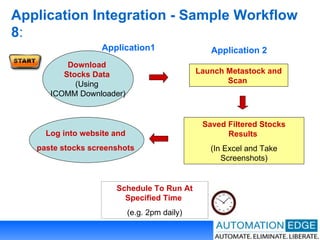
Application Integration - Sample Workflow 8 : Launch Metastock and Scan  Saved Filtered Stocks Results  (In Excel and Take Screenshots) Application1 Application 2 Schedule To Run At Specified Time   (e.g. 2pm daily) Download  Stocks Data  (Using  ICOMM Downloader) Log into website and  paste stocks screenshots
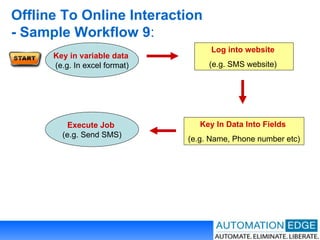
Offline To Online Interaction  - Sample Workflow 9 : Log into website  (e.g. SMS website)   Key In Data Into Fields  (e.g. Name, Phone number etc) Key in variable data  (e.g. In excel format) Execute Job  (e.g. Send SMS)
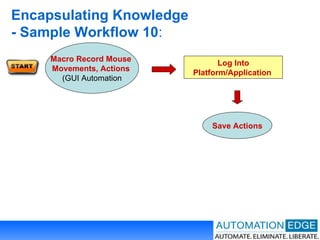
Encapsulating Knowledge  - Sample Workflow 10 : Log Into Platform/Application  Save Actions Macro Record Mouse  Movements, Actions  (GUI Automation
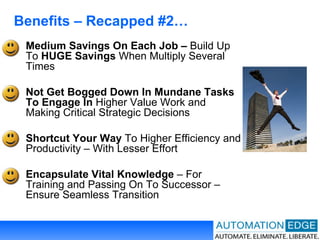
Benefits – Recapped #2… Medium Savings On Each Job –  Build Up To  HUGE Savings  When Multiply Several Times Not Get Bogged Down In Mundane Tasks To Engage In  Higher Value Work and Making Critical Strategic Decisions Shortcut Your Way  To Higher Efficiency and Productivity – With Lesser Effort Encapsulate Vital Knowledge  – For Training and Passing On To Successor – Ensure Seamless Transition
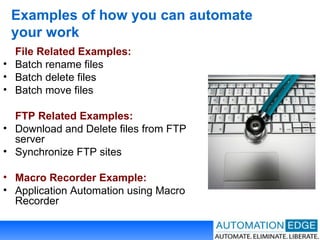
Examples of how you can automate your work File Related Examples: Batch rename files Batch delete files Batch move files FTP Related Examples: Download and Delete files from FTP server Synchronize FTP sites Macro Recorder Example: Application Automation using Macro Recorder
Examples of how you can automate your work Text Files Related Example: Remove comments from log file Excel Related Examples: Mail Merge using Excel Copy Data from an Excel file to  another Examples with Triggers: Automate Daily Backup Monitor Server Uptime

Work Flow Processes

  • 1.
    Business Process Automation:Increasing Your Profits – The Automated Way. For Individual and Business Owners Solution
  • 2.
    Featured In: WinAutomationSoftware Trusted By 50,200+ Users Around The World Automation Partner
  • 3.
    Famous Clients OfWinAutomation
  • 4.
    Hallmarks of ASuccessful Company “ In today's tough business climate, many companies succeed by running financially efficient operations … At the end of the day, all businesses need to sell stuff as quickly as possible and then turn those sales into cash…" - Charles Carlson, contributing editor of  Dow Theory Forecasts , an investment newsletter. - Business Week, Dec 23, 2002
  • 5.
    Hallmarks of ASuccessful Company “ The first rule of any technology used in a business is that automation applied to an efficient operation will magnify the efficiency . ” - Bill Gates, Founder, Microsoft
  • 6.
    Hallmarks of ASuccessful Company “ Automation is about building a sustainable, automatic source of income.” - Timothy Ferriss  Author of #1 New York Times Bestseller “The 4-Hour Workweek
  • 7.
    Premise Of ASimple Solution We help Automate Critical Repetitive & Labour Intensive Computer Work Flow Processes. Keeping Human Involvement to as low as possible - to even Zero – End-to-End
  • 8.
    BPA Workflow :Evaluate Process ‘ Record’ and Optimize (removing redundant steps, shortening the process) Speed up process Automate (reducing human input as much as possible) 1 2 4 3
  • 9.
    BPA – 3-ProngedApproach People Software/Applications Process PEOPLE SOFTWARE/ APPLICATION PROCESS BUSINESS PROCESS AUTOMATION
  • 10.
    It’s How FarYou Wanna Take It… “ The Limits Of Automation Is Only Your Imagination And Structure of Work Flow Process. The Possibilities Are Endless!”
  • 11.
    What Can BeAutomated Mechanical , Repetitive Process Well-Defined Process (That You Know In Advance Will Happen) Human Involvement with no ‘Creative/Emotional’ element (e.g. clicking and print)
  • 12.
    What Cannot BeAutomated Human Involvement with ‘Creative/Emotional’ element (e.g. writing an response to a question on the spot)
  • 13.
    Automation – RobotsIn Action You Can See Automation In Action Mimics Human Actions, Inputs, Clicks, Keystrokes, Mouse Movements, Via Macro Recording (GUI), Image Recognition and Pre-Defined Actions,
  • 14.
    Automation – BehindThe Scenes You Cannot See Automation. Happens Behind The Scene Example: Screen scrape data, Pulling of Data from Excel, FTP Via Pre-Defined Actions
  • 15.
    Where Automation OffersMax Value? Processes That Are Repetitive And Mundane Processes That Are Labour Intensive And Time Consuming Processes That Demand Speed and High Degree Of Accuracy Processes Involves Many Applications
  • 16.
  • 17.
    Business Process ConsiderationsInputs (Files, Faxes, Database etc) Outputs (Desired results) Conditions (If/Else) Flow Control Loop
  • 18.
    Business Process ConsiderationsTriggers (Execute at specific events) Exception/Error Handling (What happens after in event of failure?) Variables Schedules Flexibility (Power to customize)
  • 19.
    Data Management –Sample Workflow 1 : Convert data to various format (word doc, excel, text, pdf) Save Into Files/Folder That You Can Rename Download Data from Database (e.g. SQL) Start Print Job
  • 20.
    Data Management –Sample Workflow 2 : Define Duplicate Data (In excel rolls and columns) Churn Reports (e.g. Quotation, Purchase Order, Tax Invoice, Forms, Claims etc) FTP Reports to server (Upload) Fill in data (variable) (e.g. excel format) Email Sent Out (e.g. Clients, Employees,Partners) Save Into Files/Folder (Renamble) Start Print Job
  • 21.
    Data Management –Sample Workflow 3 : Define Duplicate Data (In excel rolls and columns) Churn Reports (e.g. Quotation, Purchase Order, Tax Invoice, Forms, Claims etc) Email Sent Out (e.g. Clients, Employees, Partners, etc) Fill in data (variable) (e.g. excel format) Fill in data Email Notification (On Successful Deployment)
  • 22.
    Research - SampleWorkflow 4 : Copy/Scrape Data (e.g. Pull images, get text, take screenshots etc) Paste Data (e.g. text, doc, excel etc) Query Search Engine (e.g. Google, Yahoo, Yahoo answers etc) Saved to file/folder (Re-namable according to variable you set)
  • 23.
    Benefits – Recapped#1… Save On Thousands Of Repetitive Keystrokes, Mouse Movements and File Operations Avoid Delays, Mix-Ups. Critical Errors When Sending of Important Reports & Data Eliminate Damaging Bottlenecks Save Time on Labour Intensive, Time Consuming Duplicate Data Entry Slash Operational And Sales/Marketing Cost
  • 24.
    Error/Exception Handling -Sample Workflow 5 : Error Report Successful Unsuccessful Download Data (e.g. SQL) Job Complete Notification via Email (To key personnel)
  • 25.
    Set Up WPBlog - Sample Workflow 6 : Customize And Save Settings Open Up FTP and Upload Files (e.g. themes, plugins, main files, images etc) Log into system with (username and password) Loop (for specified no. of times) (With a different set of variable data to create multiple blogs) Set Up All Required Variables (e.g. excel) 1 4 3 2
  • 26.
    Schedule Backup -Sample Workflow 7 : Backup Files, Folders Schedule To Run At Specified Time (e.g. 2pm daily) Saved to file/folder (Re-namable according to variable you set)
  • 27.
    Application Integration -Sample Workflow 8 : Launch Metastock and Scan Saved Filtered Stocks Results (In Excel and Take Screenshots) Application1 Application 2 Schedule To Run At Specified Time (e.g. 2pm daily) Download Stocks Data (Using ICOMM Downloader) Log into website and paste stocks screenshots
  • 28.
    Offline To OnlineInteraction - Sample Workflow 9 : Log into website (e.g. SMS website) Key In Data Into Fields (e.g. Name, Phone number etc) Key in variable data (e.g. In excel format) Execute Job (e.g. Send SMS)
  • 29.
    Encapsulating Knowledge - Sample Workflow 10 : Log Into Platform/Application Save Actions Macro Record Mouse Movements, Actions (GUI Automation
  • 30.
    Benefits – Recapped#2… Medium Savings On Each Job – Build Up To HUGE Savings When Multiply Several Times Not Get Bogged Down In Mundane Tasks To Engage In Higher Value Work and Making Critical Strategic Decisions Shortcut Your Way To Higher Efficiency and Productivity – With Lesser Effort Encapsulate Vital Knowledge – For Training and Passing On To Successor – Ensure Seamless Transition
  • 31.
    Examples of howyou can automate your work File Related Examples: Batch rename files Batch delete files Batch move files FTP Related Examples: Download and Delete files from FTP server Synchronize FTP sites Macro Recorder Example: Application Automation using Macro Recorder
  • 32.
    Examples of howyou can automate your work Text Files Related Example: Remove comments from log file Excel Related Examples: Mail Merge using Excel Copy Data from an Excel file to another Examples with Triggers: Automate Daily Backup Monitor Server Uptime