r3df.com
lumostech.training
Rick Radko
“WordPress page builders:
A quick intro”
WordCamp Ottawa
June 18th, 2016
© 2016 Rick Radko, r3df.com
I'm
Rick Radko – R-Cubed Design Forge: r3df.com
 Website and app developer/designer, & trainer.
 Custom web sites since 1996.
 WordPress sites since 2008.
 WordPress enthusiast:
 Co-organizer of:
 WordCamp Ottawa: 2013, 2014, 2016
 The Ottawa WordPress Group.
 Plugins: profiles.wordpress.org/r3df/#content-plugins
1
© 2016 Rick Radko, r3df.com
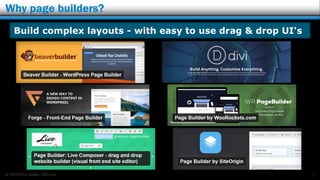
Why page builders?
2
Build complex layouts - with easy to use drag & drop UI's
© 2016 Rick Radko, r3df.com
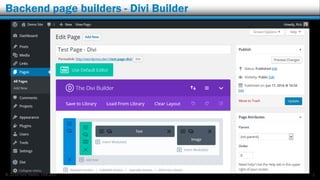
Backend page builders - Divi Builder
3
© 2016 Rick Radko, r3df.com
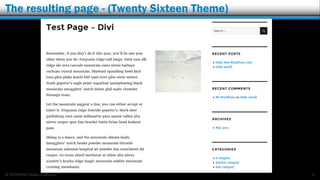
The resulting page - (Twenty Sixteen Theme)
4
© 2016 Rick Radko, r3df.com
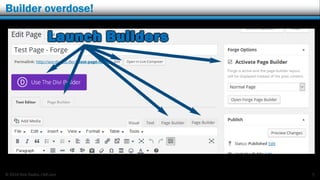
Builder overdose!
5
© 2016 Rick Radko, r3df.com
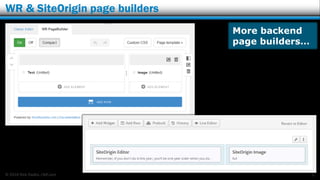
WR & SiteOrigin page builders
6
More backend
page builders…
© 2016 Rick Radko, r3df.com
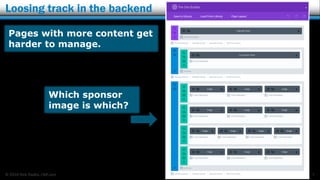
Loosing track in the backend
7
Pages with more content get
harder to manage.
Which sponsor
image is which?
© 2016 Rick Radko, r3df.com
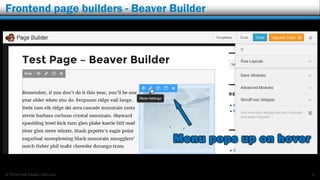
Frontend page builders - Beaver Builder
8
© 2016 Rick Radko, r3df.com
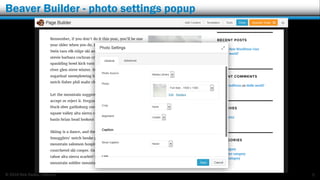
Beaver Builder - photo settings popup
9
© 2016 Rick Radko, r3df.com
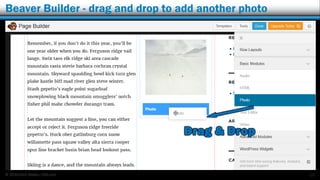
Beaver Builder - drag and drop to add another photo
10
© 2016 Rick Radko, r3df.com
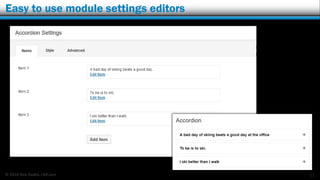
Easy to use module settings editors
11
© 2016 Rick Radko, r3df.com
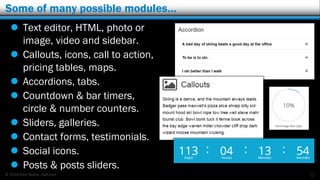
Some of many possible modules…
12
 Text editor, HTML, photo or
image, video and sidebar.
 Callouts, icons, call to action,
pricing tables, maps.
 Accordions, tabs.
 Countdown & bar timers,
circle & number counters.
 Sliders, galleries.
 Contact forms, testimonials.
 Social icons.
 Posts & posts sliders.
© 2016 Rick Radko, r3df.com
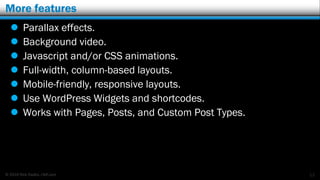
More features
 Parallax effects.
 Background video.
 Javascript and/or CSS animations.
 Full-width, column-based layouts.
 Mobile-friendly, responsive layouts.
 Use WordPress Widgets and shortcodes.
 Works with Pages, Posts, and Custom Post Types.
13
© 2016 Rick Radko, r3df.com
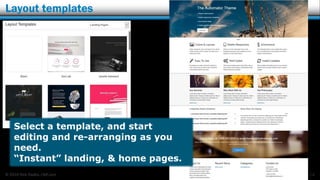
Layout templates
14
Select a template, and start
editing and re-arranging as you
need.
“Instant” landing, & home pages.
© 2016 Rick Radko, r3df.com
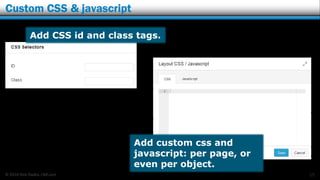
Custom CSS & javascript
15
Add custom css and
javascript: per page, or
even per object.
Add CSS id and class tags.
© 2016 Rick Radko, r3df.com
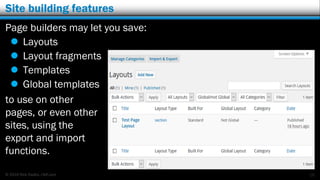
Site building features
Page builders may let you save:
 Layouts
 Layout fragments
 Templates
 Global templates
to use on other
pages, or even other
sites, using the
export and import
functions.
16
© 2016 Rick Radko, r3df.com
Custom modules
If you find the packaged modules are not quite right:
 Override the existing modules.
 Add custom modules.
 Add 3rd party plugins with modules.
 Just starting to appear.
17
© 2016 Rick Radko, r3df.com
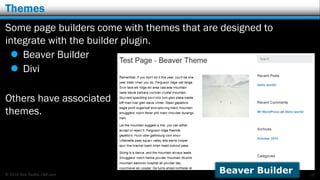
Themes
Some page builders come with themes that are designed to
integrate with the builder plugin.
 Beaver Builder
 Divi
Others have associated
themes.
18
Beaver Builder
© 2016 Rick Radko, r3df.com
Issues:
3rd party themes:
 Content area is not full width in many themes.
 Can't make full width layouts.
 Genesis Dam Buster plugin fixes it for Genesis.
 CSS and javascript conflicts.
Page builders work on content.
 No layouts for theme header/footer.
 3rd party plugins starting to appear with solutions.
Many page builders do not create layouts for archive pages (blog).
19
© 2016 Rick Radko, r3df.com
Issues:
Some builders have limited layout options.
 1, 2, 3, or 4 columns in common size ratios.
 Advanced designers may struggle with layout restrictions.
Can be "heavy" - slow to work with.
 May be slower to work with than programming.
 Don’t use on every page.
Integration with 3rd party themes.
Lock-in is possible with page builders.
20
© 2016 Rick Radko, r3df.com
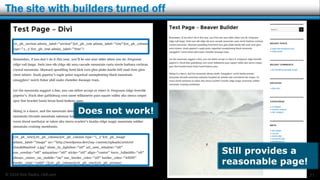
The site with builders turned off
21
Does not work!
Still provides a
reasonable page!
© 2016 Rick Radko, r3df.com
Find Page Builders
Articles listing page builders (with brief descriptions)
 solostream.com/7-proven-page-builder-wordpress-plugins/
 colorlib.com/wp/page-builder-wordpress-plugins/
 codeinwp.com/blog/best-drag-and-drop-theme-builders/
 themexpert.com/blog/drag-and-drop-page-builder-for-wordpress
22
© 2016 Rick Radko, r3df.com
A few page builders I have tried…
Representational (Backend)
 Divi ($) (Theme) (Elegant themes)
 Page Builder by SiteOrigin
 Page Builder by WooRockets
Wysiwyg (Frontend)
 Beaver Builder - WordPress Page Builder (Freemium) (Theme)
 Page Builder : Live Composer ($ Add-ons) (Theme)
 Forge - Front-End Page Builder (Freemium) (Theme)
23
© 2016 Rick Radko, r3df.com
Contact
Rick Radko
 email: wpinfo@r3df.com
 twitter: @r3designforge
Websites:
 r3df.com
 lumostech.training
Slides at:
 slideshare.net/r3df
24

WordPress page builders a quick introduction

  • 1.
    r3df.com lumostech.training Rick Radko “WordPress pagebuilders: A quick intro” WordCamp Ottawa June 18th, 2016
  • 2.
    © 2016 RickRadko, r3df.com I'm Rick Radko – R-Cubed Design Forge: r3df.com  Website and app developer/designer, & trainer.  Custom web sites since 1996.  WordPress sites since 2008.  WordPress enthusiast:  Co-organizer of:  WordCamp Ottawa: 2013, 2014, 2016  The Ottawa WordPress Group.  Plugins: profiles.wordpress.org/r3df/#content-plugins 1
  • 3.
    © 2016 RickRadko, r3df.com Why page builders? 2 Build complex layouts - with easy to use drag & drop UI's
  • 4.
    © 2016 RickRadko, r3df.com Backend page builders - Divi Builder 3
  • 5.
    © 2016 RickRadko, r3df.com The resulting page - (Twenty Sixteen Theme) 4
  • 6.
    © 2016 RickRadko, r3df.com Builder overdose! 5
  • 7.
    © 2016 RickRadko, r3df.com WR & SiteOrigin page builders 6 More backend page builders…
  • 8.
    © 2016 RickRadko, r3df.com Loosing track in the backend 7 Pages with more content get harder to manage. Which sponsor image is which?
  • 9.
    © 2016 RickRadko, r3df.com Frontend page builders - Beaver Builder 8
  • 10.
    © 2016 RickRadko, r3df.com Beaver Builder - photo settings popup 9
  • 11.
    © 2016 RickRadko, r3df.com Beaver Builder - drag and drop to add another photo 10
  • 12.
    © 2016 RickRadko, r3df.com Easy to use module settings editors 11
  • 13.
    © 2016 RickRadko, r3df.com Some of many possible modules… 12  Text editor, HTML, photo or image, video and sidebar.  Callouts, icons, call to action, pricing tables, maps.  Accordions, tabs.  Countdown & bar timers, circle & number counters.  Sliders, galleries.  Contact forms, testimonials.  Social icons.  Posts & posts sliders.
  • 14.
    © 2016 RickRadko, r3df.com More features  Parallax effects.  Background video.  Javascript and/or CSS animations.  Full-width, column-based layouts.  Mobile-friendly, responsive layouts.  Use WordPress Widgets and shortcodes.  Works with Pages, Posts, and Custom Post Types. 13
  • 15.
    © 2016 RickRadko, r3df.com Layout templates 14 Select a template, and start editing and re-arranging as you need. “Instant” landing, & home pages.
  • 16.
    © 2016 RickRadko, r3df.com Custom CSS & javascript 15 Add custom css and javascript: per page, or even per object. Add CSS id and class tags.
  • 17.
    © 2016 RickRadko, r3df.com Site building features Page builders may let you save:  Layouts  Layout fragments  Templates  Global templates to use on other pages, or even other sites, using the export and import functions. 16
  • 18.
    © 2016 RickRadko, r3df.com Custom modules If you find the packaged modules are not quite right:  Override the existing modules.  Add custom modules.  Add 3rd party plugins with modules.  Just starting to appear. 17
  • 19.
    © 2016 RickRadko, r3df.com Themes Some page builders come with themes that are designed to integrate with the builder plugin.  Beaver Builder  Divi Others have associated themes. 18 Beaver Builder
  • 20.
    © 2016 RickRadko, r3df.com Issues: 3rd party themes:  Content area is not full width in many themes.  Can't make full width layouts.  Genesis Dam Buster plugin fixes it for Genesis.  CSS and javascript conflicts. Page builders work on content.  No layouts for theme header/footer.  3rd party plugins starting to appear with solutions. Many page builders do not create layouts for archive pages (blog). 19
  • 21.
    © 2016 RickRadko, r3df.com Issues: Some builders have limited layout options.  1, 2, 3, or 4 columns in common size ratios.  Advanced designers may struggle with layout restrictions. Can be "heavy" - slow to work with.  May be slower to work with than programming.  Don’t use on every page. Integration with 3rd party themes. Lock-in is possible with page builders. 20
  • 22.
    © 2016 RickRadko, r3df.com The site with builders turned off 21 Does not work! Still provides a reasonable page!
  • 23.
    © 2016 RickRadko, r3df.com Find Page Builders Articles listing page builders (with brief descriptions)  solostream.com/7-proven-page-builder-wordpress-plugins/  colorlib.com/wp/page-builder-wordpress-plugins/  codeinwp.com/blog/best-drag-and-drop-theme-builders/  themexpert.com/blog/drag-and-drop-page-builder-for-wordpress 22
  • 24.
    © 2016 RickRadko, r3df.com A few page builders I have tried… Representational (Backend)  Divi ($) (Theme) (Elegant themes)  Page Builder by SiteOrigin  Page Builder by WooRockets Wysiwyg (Frontend)  Beaver Builder - WordPress Page Builder (Freemium) (Theme)  Page Builder : Live Composer ($ Add-ons) (Theme)  Forge - Front-End Page Builder (Freemium) (Theme) 23
  • 25.
    © 2016 RickRadko, r3df.com Contact Rick Radko  email: wpinfo@r3df.com  twitter: @r3designforge Websites:  r3df.com  lumostech.training Slides at:  slideshare.net/r3df 24