Blogging with WordPress
Daniel Mackley & Phil Vincent
Technology Enhanced Learning Advisors
d.mackley@yorksj.ac.uk, p.vincent@yorksj.ac.uk
Introduction
WordPress is a online platform that allows you
to (individually or collaboratively) create
websites and blogs.

It’s free to use and everybody at YSJ has access
to their own WordPress site.
8+ ways to use blogs in Teaching
& Learning

LSE Centre for Learning Technology / CC BY-NC-SA 3.0
Commentary and Expert Analysis
Blogs are an ideal tool for disseminating regular
commentary and opinion. These blogs might be
written by a single author or several; multiauthor blogs in particular can provide an
opportunity for sharing and expanding impact.
News and Announcements
This covers a variety of uses: departmental
news, service updates, events or the latest
information on a specific theme.
Supporting Research Projects
A website is a common requirement for funded
research projects. Blogs make an ideal tool for
recording the process and disseminating
outputs.
Learning Journals
Students can use blogs to support and develop
their learning. These blogs are often reflective
and might be private, shared with a teacher or
completely public.
Learning Communities
This could be a group blog for a course involving
teachers and / or students using it to share
information and discuss the course. Learning
communities can also be more loosely
connected networks involving many individuals
reading and commenting on each other’s blogs
around a common theme.
Personal Homepage
Blogs can be used by university staff and
students as an alternative to a traditional
homepage.
Resource Sharing
Many blogs are developed specifically to share
resources with their community.
Collaborative Authoring
Blogs can be used to develop a
‘publication’. Commenting allows readers and
collaborators to discuss each other’s
contributions or annotate a text.
Other uses of WordPress
•
•
•
•
•
•

Collaborative class websites & blogs
Online textbook / class publications
Online Portfolio / reflective writing
Collaborative assessments
Placement journals
Soft marketing tool – share course insights to
perspective students & parents
• Create websites for clubs, students
groups, events, sports teams or just about any other
type of group
• Get feedback or gather information on the course
(comments, forums, forms)
Accessing your website
You can find your own personal website space by
going to this URL and logging in with your YSJ IT
username and password: http://blog.yorksj.ac.uk
Thereafter, you can access your own website space
directly by using the following URL:
http://blog.yorksj.ac.uk/[insert your IT Username]

http://blog.yorksj.ac.uk/d.mackley
Example WordPress Blogs
•
•
•
•
•

Technology Enhanced Learning
iPad Project
Inclusive Assessment
Wilson Waffling
Theatre @ YSJ
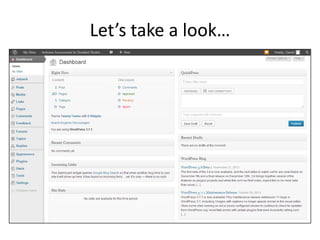
Let’s take a look…
Any Questions?
If you have any questions after the
session, please email: tel@yorksj.ac.uk

Blogging with WordPress

  • 1.
    Blogging with WordPress DanielMackley & Phil Vincent Technology Enhanced Learning Advisors d.mackley@yorksj.ac.uk, p.vincent@yorksj.ac.uk
  • 2.
    Introduction WordPress is aonline platform that allows you to (individually or collaboratively) create websites and blogs. It’s free to use and everybody at YSJ has access to their own WordPress site.
  • 3.
    8+ ways touse blogs in Teaching & Learning LSE Centre for Learning Technology / CC BY-NC-SA 3.0
  • 4.
    Commentary and ExpertAnalysis Blogs are an ideal tool for disseminating regular commentary and opinion. These blogs might be written by a single author or several; multiauthor blogs in particular can provide an opportunity for sharing and expanding impact.
  • 5.
    News and Announcements Thiscovers a variety of uses: departmental news, service updates, events or the latest information on a specific theme.
  • 6.
    Supporting Research Projects Awebsite is a common requirement for funded research projects. Blogs make an ideal tool for recording the process and disseminating outputs.
  • 7.
    Learning Journals Students canuse blogs to support and develop their learning. These blogs are often reflective and might be private, shared with a teacher or completely public.
  • 8.
    Learning Communities This couldbe a group blog for a course involving teachers and / or students using it to share information and discuss the course. Learning communities can also be more loosely connected networks involving many individuals reading and commenting on each other’s blogs around a common theme.
  • 9.
    Personal Homepage Blogs canbe used by university staff and students as an alternative to a traditional homepage.
  • 10.
    Resource Sharing Many blogsare developed specifically to share resources with their community.
  • 11.
    Collaborative Authoring Blogs canbe used to develop a ‘publication’. Commenting allows readers and collaborators to discuss each other’s contributions or annotate a text.
  • 12.
    Other uses ofWordPress • • • • • • Collaborative class websites & blogs Online textbook / class publications Online Portfolio / reflective writing Collaborative assessments Placement journals Soft marketing tool – share course insights to perspective students & parents • Create websites for clubs, students groups, events, sports teams or just about any other type of group • Get feedback or gather information on the course (comments, forums, forms)
  • 13.
    Accessing your website Youcan find your own personal website space by going to this URL and logging in with your YSJ IT username and password: http://blog.yorksj.ac.uk Thereafter, you can access your own website space directly by using the following URL: http://blog.yorksj.ac.uk/[insert your IT Username] http://blog.yorksj.ac.uk/d.mackley
  • 14.
    Example WordPress Blogs • • • • • TechnologyEnhanced Learning iPad Project Inclusive Assessment Wilson Waffling Theatre @ YSJ
  • 15.
  • 16.
    Any Questions? If youhave any questions after the session, please email: tel@yorksj.ac.uk

Editor's Notes

  • #3 Has anybody used WordPress before?How do people feel about using WordPress to create a Website?
  • #13 Collaborative class websites & blogs – share materials, news, downloads, links and more…Facilitate online discussions and collaboration
  • #15 We've found it useful at Open Days to direct people to the blog whilst they wait to hear about their application or for parents to see what kind of enhancements we’re doing etc.