What’s new in Woodwork for Inventor v8
Hole notes in a 3D model
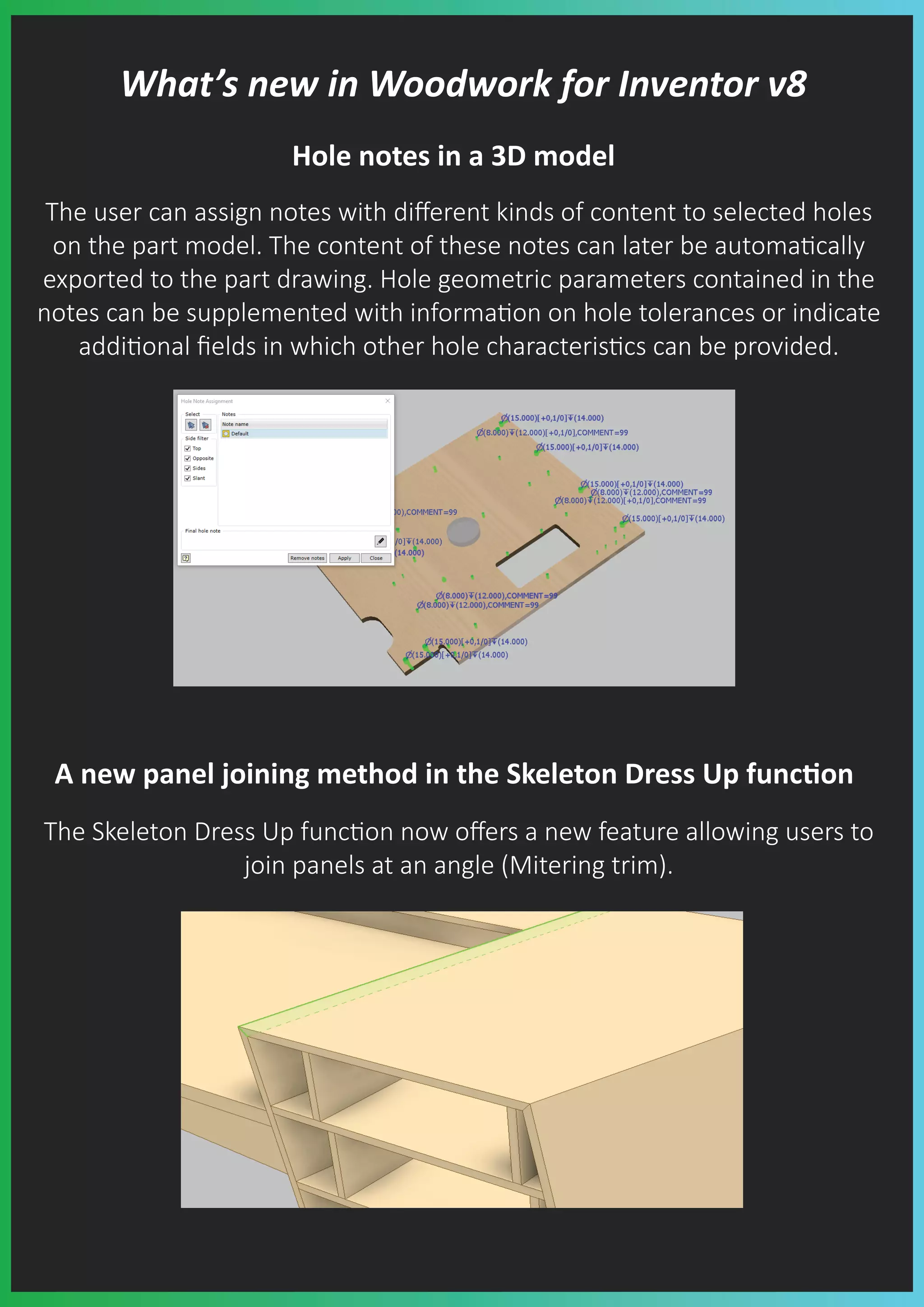
The user can assign notes with different kinds of content to selected holes
on the part model. The content of these notes can later be automa�cally
exported to the part drawing. Hole geometric parameters contained in the
notes can be supplemented with informa�on on hole tolerances or indicate
addi�onal fields in which other hole characteris�cs can be provided.
A new panel joining method in the Skeleton Dress Up func�on
The Skeleton Dress Up func�on now offers a new feature allowing users to
join panels at an angle (Mitering trim).
Pre-se�ng material oversize
While crea�ng a material, the user has an op�on of pre-se�ng the
workpiece oversize. Thanks to this feature the user does not need to assign
an oversize as a separate command, because it is done automa�cally during
material assignment.
Material replacement in a model
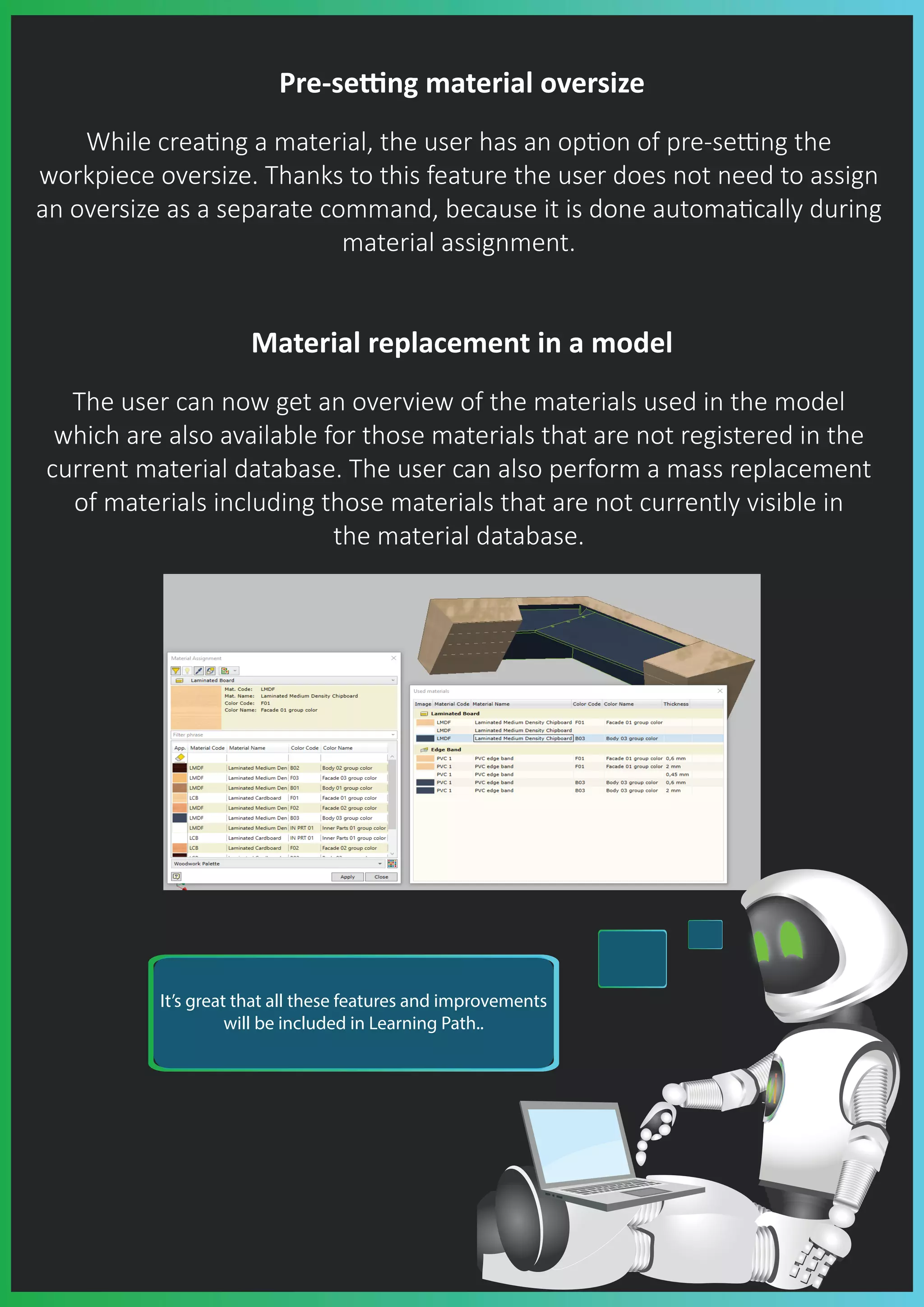
The user can now get an overview of the materials used in the model
which are also available for those materials that are not registered in the
current material database. The user can also perform a mass replacement
of materials including those materials that are not currently visible in
the material database.
It’s great that all these features and improvements
will be included in Learning Path..
Improved material and color replacement in BOM specifica�on
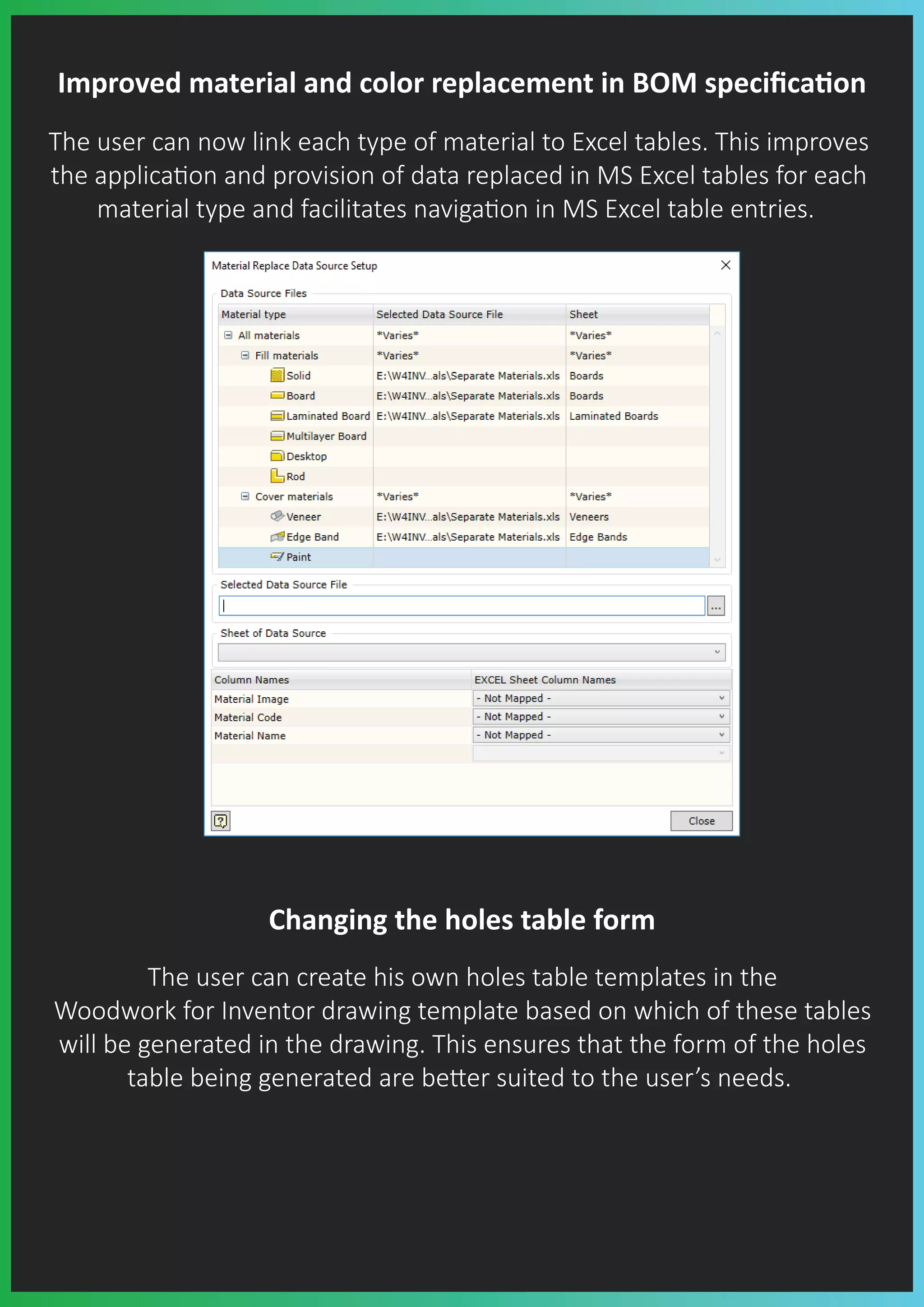
The user can now link each type of material to Excel tables. This improves
the applica�on and provision of data replaced in MS Excel tables for each
material type and facilitates naviga�on in MS Excel table entries.
Changing the holes table form
The user can create his own holes table templates in the
Woodwork for Inventor drawing template based on which of these tables
will be generated in the drawing. This ensures that the form of the holes
table being generated are be�er suited to the user’s needs.
iBox components
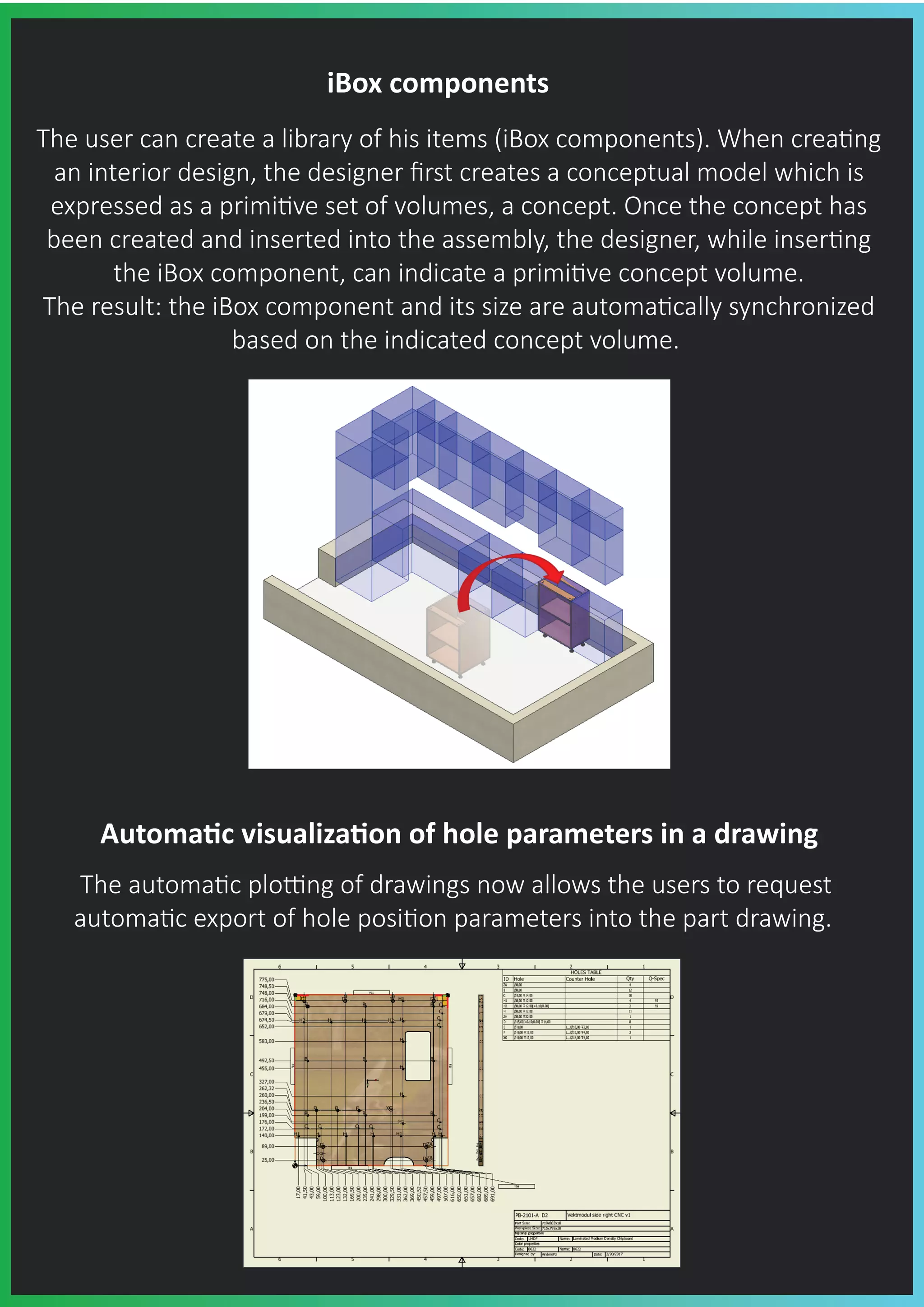
The user can create a library of his items (iBox components). When crea�ng
an interior design, the designer first creates a conceptual model which is
expressed as a primi�ve set of volumes, a concept. Once the concept has
been created and inserted into the assembly, the designer, while inser�ng
the iBox component, can indicate a primi�ve concept volume.
The result: the iBox component and its size are automa�cally synchronized
based on the indicated concept volume.
Automa�c visualiza�on of hole parameters in a drawing
The automa�c plo�ng of drawings now allows the users to request
automa�c export of hole posi�on parameters into the part drawing.
Visualiza�on of the informa�on created by the
Woodwork for Inventor add-on in the
drawings created by the user
The automa�c drawing refresh func�on has been improved. It is now
even more reliable. It is also possible to visualize the informa�on created
by the Woodwork for Inventor add-on in the drawings that have been
exclusively created in the Autodesk Inventor environment.
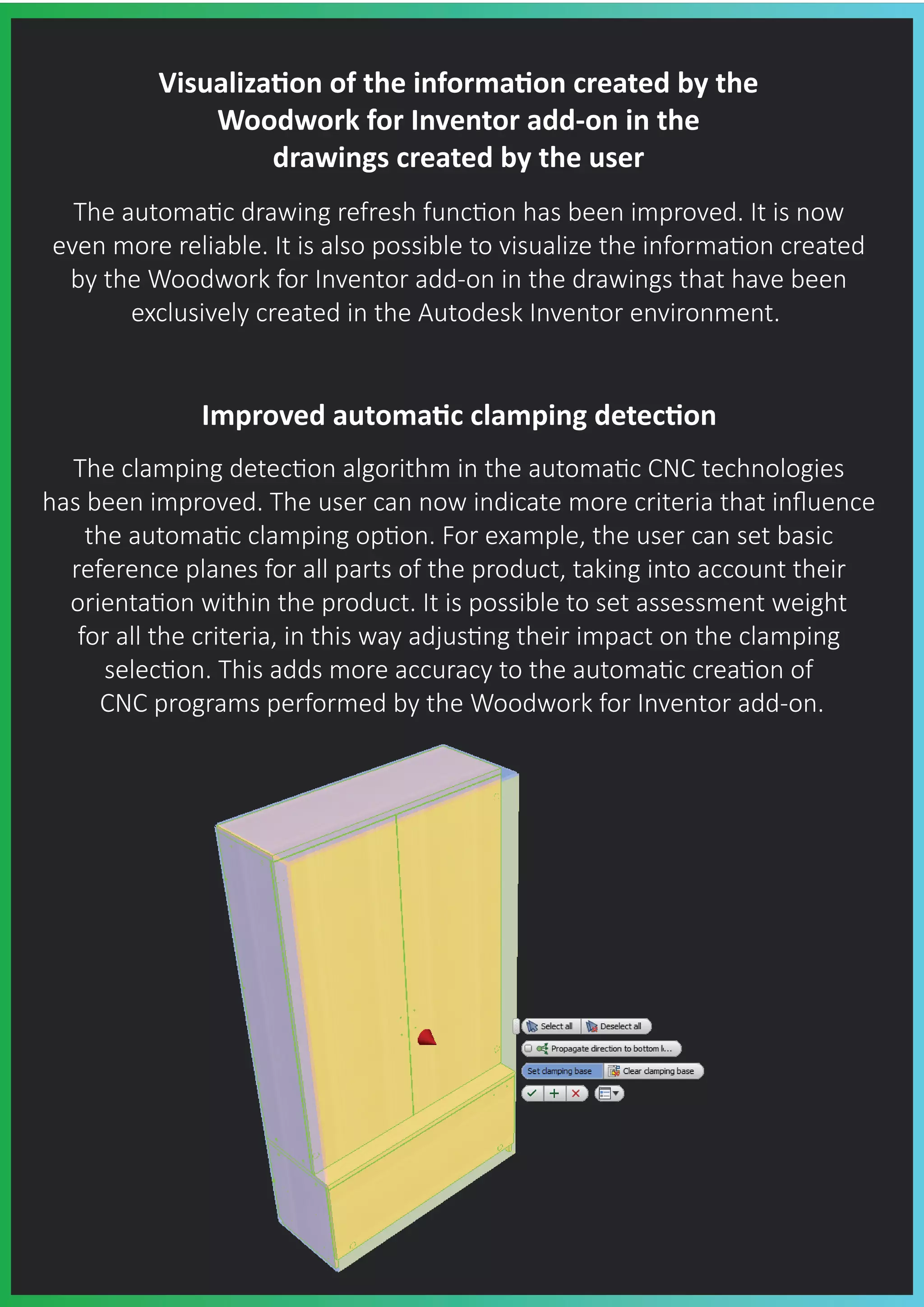
Improved automa�c clamping detec�on
The clamping detec�on algorithm in the automa�c CNC technologies
has been improved. The user can now indicate more criteria that influence
the automa�c clamping op�on. For example, the user can set basic
reference planes for all parts of the product, taking into account their
orienta�on within the product. It is possible to set assessment weight
for all the criteria, in this way adjus�ng their impact on the clamping
selec�on. This adds more accuracy to the automa�c crea�on of
CNC programs performed by the Woodwork for Inventor add-on.
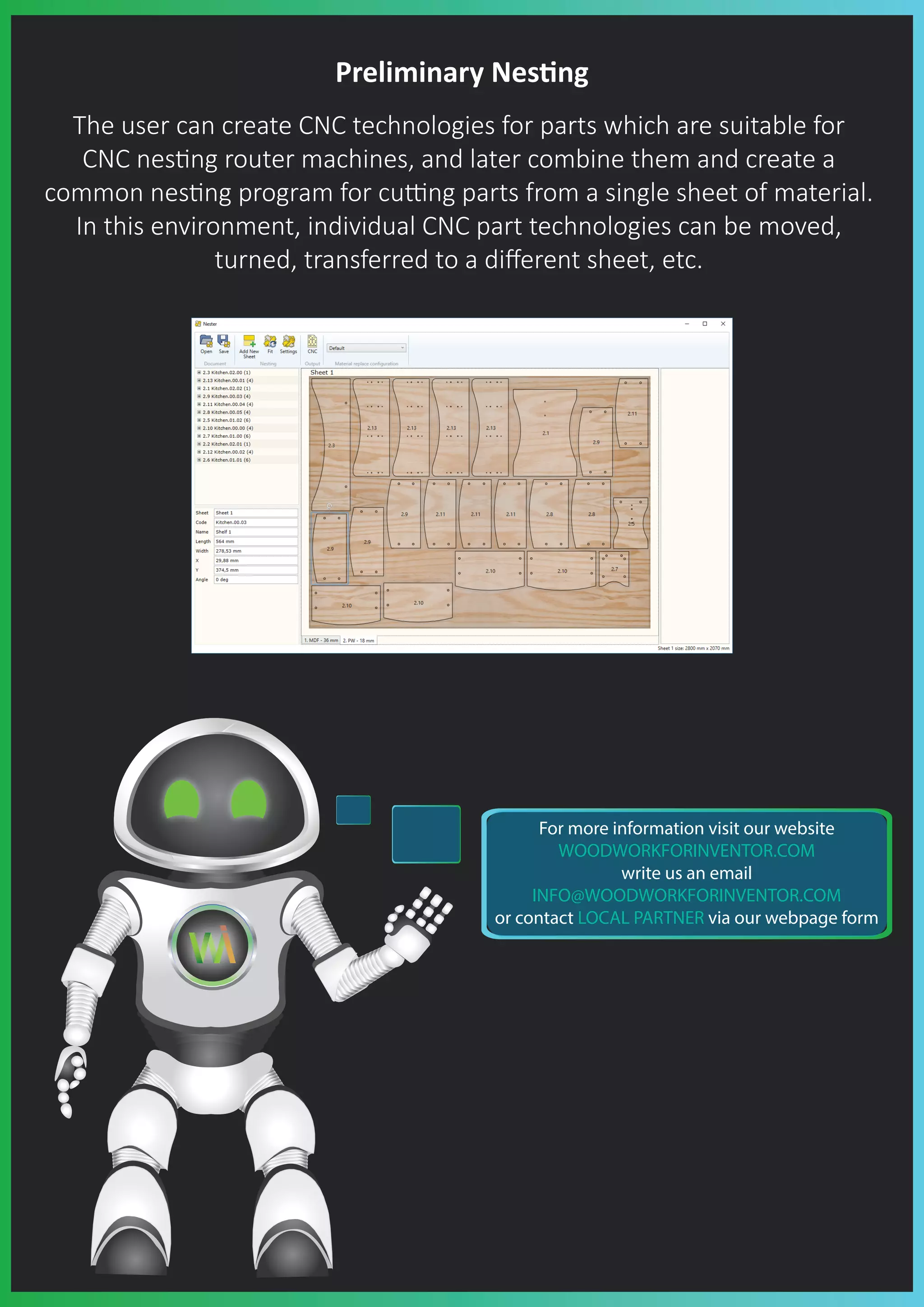
Preliminary Nes�ng
The user can create CNC technologies for parts which are suitable for
CNC nes�ng router machines, and later combine them and create a
common nes�ng program for cu�ng parts from a single sheet of material.
In this environment, individual CNC part technologies can be moved,
turned, transferred to a different sheet, etc.
For more information visit our website
WOODWORKFORINVENTOR.COM
write us an email
INFO@WOODWORKFORINVENTOR.COM
or contact LOCAL PARTNER via our webpage form

Woodwork for Inventor What's new in V8?

  • 1.
    What’s new inWoodwork for Inventor v8 Hole notes in a 3D model The user can assign notes with different kinds of content to selected holes on the part model. The content of these notes can later be automa�cally exported to the part drawing. Hole geometric parameters contained in the notes can be supplemented with informa�on on hole tolerances or indicate addi�onal fields in which other hole characteris�cs can be provided. A new panel joining method in the Skeleton Dress Up func�on The Skeleton Dress Up func�on now offers a new feature allowing users to join panels at an angle (Mitering trim).
  • 2.
    Pre-se�ng material oversize Whilecrea�ng a material, the user has an op�on of pre-se�ng the workpiece oversize. Thanks to this feature the user does not need to assign an oversize as a separate command, because it is done automa�cally during material assignment. Material replacement in a model The user can now get an overview of the materials used in the model which are also available for those materials that are not registered in the current material database. The user can also perform a mass replacement of materials including those materials that are not currently visible in the material database. It’s great that all these features and improvements will be included in Learning Path..
  • 3.
    Improved material andcolor replacement in BOM specifica�on The user can now link each type of material to Excel tables. This improves the applica�on and provision of data replaced in MS Excel tables for each material type and facilitates naviga�on in MS Excel table entries. Changing the holes table form The user can create his own holes table templates in the Woodwork for Inventor drawing template based on which of these tables will be generated in the drawing. This ensures that the form of the holes table being generated are be�er suited to the user’s needs.
  • 4.
    iBox components The usercan create a library of his items (iBox components). When crea�ng an interior design, the designer first creates a conceptual model which is expressed as a primi�ve set of volumes, a concept. Once the concept has been created and inserted into the assembly, the designer, while inser�ng the iBox component, can indicate a primi�ve concept volume. The result: the iBox component and its size are automa�cally synchronized based on the indicated concept volume. Automa�c visualiza�on of hole parameters in a drawing The automa�c plo�ng of drawings now allows the users to request automa�c export of hole posi�on parameters into the part drawing.
  • 5.
    Visualiza�on of theinforma�on created by the Woodwork for Inventor add-on in the drawings created by the user The automa�c drawing refresh func�on has been improved. It is now even more reliable. It is also possible to visualize the informa�on created by the Woodwork for Inventor add-on in the drawings that have been exclusively created in the Autodesk Inventor environment. Improved automa�c clamping detec�on The clamping detec�on algorithm in the automa�c CNC technologies has been improved. The user can now indicate more criteria that influence the automa�c clamping op�on. For example, the user can set basic reference planes for all parts of the product, taking into account their orienta�on within the product. It is possible to set assessment weight for all the criteria, in this way adjus�ng their impact on the clamping selec�on. This adds more accuracy to the automa�c crea�on of CNC programs performed by the Woodwork for Inventor add-on.
  • 6.
    Preliminary Nes�ng The usercan create CNC technologies for parts which are suitable for CNC nes�ng router machines, and later combine them and create a common nes�ng program for cu�ng parts from a single sheet of material. In this environment, individual CNC part technologies can be moved, turned, transferred to a different sheet, etc. For more information visit our website WOODWORKFORINVENTOR.COM write us an email INFO@WOODWORKFORINVENTOR.COM or contact LOCAL PARTNER via our webpage form